Routing in NextJS
Anisha Dahal
What is Routing?
Routing is the process of navigating to different pages on a website….
NextJS Routing
NextJS has FILE SYSTEM BASED ROUTER
Routing Convention is that when a file is added to the pages directory, it is automatically added as a route
NextJS Routing
Options
1. Route with Pages
2. Nested Routes
3. Dynamic Routes
4. Catch-all Routes
5. Navigation from the UI
6. Programmatically
navigate between pages
Routing with Pages
File system based routing feature
How you create your pages determines
the routes!
No need to install Router
No need to configure route with any code
Create files and directories and TaDa!
How does that work?
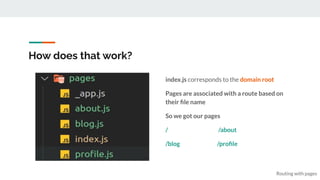
index.js corresponds to the domain root
Pages are associated with a route based on
their file name
So we got our pages
/ /about
/blog /profile
Routing with pages
Nested Routes
We got a route like this localhost:3000/blog
But, we also need nested routes
localhost:3000/blog/first
localhost:3000/blog/second
How can we get these? -> NextJS’s File Based Router
Nest folders inside pages folder, and
you got your nested routes
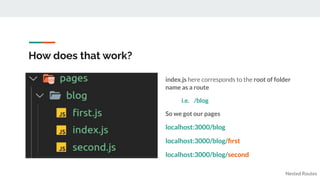
How does that work?
index.js here corresponds to the root of folder
name as a route
i.e. /blog
So we got our pages
localhost:3000/blog
localhost:3000/blog/first
localhost:3000/blog/second
Nested Routes
Dynamic Routes
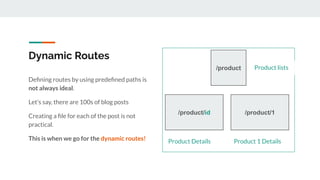
Defining routes by using predefined paths is
not always ideal.
Let’s say, there are 100s of blog posts
Creating a file for each of the post is not
practical.
This is when we go for the dynamic routes!
/product
/product/1
/product/id
Product lists
Product Details Product 1 Details
How does that work?
In this scenario, the product id (1 ,2, 3…)
should be a dynamic value that maps to a
particular file in the product folder
Add Brackets -> [ ] to a page file name to
create a dynamic route
Here, [productId].js
[productId] can be anything
1,2,3, shirt, sweater, laptop,
keyboard…
Dynamic Routes
Nested Dynamic Routes
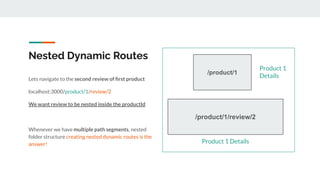
Lets navigate to the second review of first product
localhost:3000/product/1/review/2
We want review to be nested inside the productId
Whenever we have multiple path segments, nested
folder structure creating nested dynamic routes is the
answer!
/product/1
Product 1
Details
Product 1 Details
/product/1/review/2
How does that work?
Similar to productId, here reviewId is a
dynamic value that maps to a dynamic review
file inside review folder.
review is itself nested inside productId.
Clearly [reviewId] represents a single review
of a single product
Nested Dynamic Routes
Catch All Routes
Another way for handling multiple path
segments.
Let’s say, there are 20 articles and each article
has 20 reviews
20 articles * 20 reviews = 400 files
20 articles *1 [reviewId] = 20 files
1[articleId] * 1[reviewId] = 1 file
Lets say each review can have replies too.
Then we would have to nest another dynamic path
inside review as reply/[replyId]
To make this nesting bit simpler, we can define 1
file to catch all the route segments in the router
And this is when we use Catch All Routes feature
of NextJS.
How does that work?
Catch All Routes catches all the url segments
and maps into the single file([...params].js) in
the project
Define it once and render it for multiple
variations of url!
[...params] will match any url that
contains /articles segment in the
path
Catch All Routes
Where does that work?
A Use Case: To pass filtered params for a page
Example: realestate site
houses/min-budget/max-budget
Catch All Routes
Applicable in: Documentation sites
where we want different path segments for
better organization but the layout for the
document will remain the same
/docs/feature1/concept1/example1
Navigation from the UI
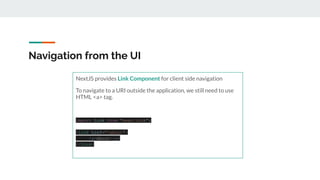
NextJS provides Link Component for client side navigation
To navigate to a URI outside the application, we still need to use
HTML <a> tag.
import Link from "next/link";
<Link href="/about">
<a>About</a>
</Link>
Navigation from the UI
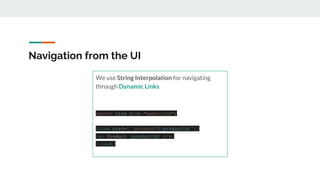
We use String Interpolation for navigating
through Dynamic Links
import Link from "next/link";
<Link href={`/product/${productId}`}>
<a> Product {productId} </a>
</Link>
Note: Push vs Replace
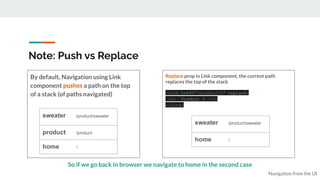
Replace prop in Link component, the current path
replaces the top of the stack
<Link href="/product/3" replace>
<a> Product 3 </a>
</Link>
By default, Navigation using Link
component pushes a path on the top
of a stack (of paths navigated)
Navigation from the UI
sweater /product/sweater
product /product
home /
sweater /product/sweater
home /
So if we go back in browser we navigate to home in the second case
When do we need Replace?
Replace prop in Link component, the current path
replaces the top of the stack
<Link href="/product/3" replace
>
<a> Product 3 </a>
</Link>
Navigation from the UI
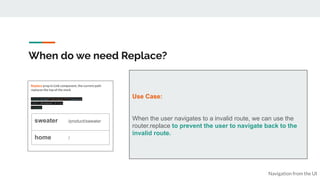
sweater /product/sweater
home /
Use Case:
When the user navigates to a invalid route, we can use the
router.replace to prevent the user to navigate back to the
invalid route.
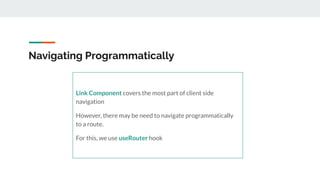
Navigating Programmatically
Link Component covers the most part of client side
navigation
However, there may be need to navigate programmatically
to a route.
For this, we use useRouter hook
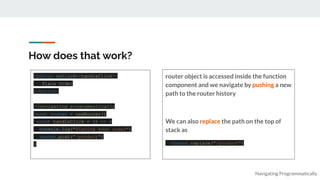
How does that work?
router object is accessed inside the function
component and we navigate by pushing a new
path to the router history
We can also replace the path on the top of
stack as
router.replace("/product")
Navigating Programmatically
<button onClick={handleClick}>
Place Order
</button>
//navigating programmatically
const router = useRouter()
const handleClick = () => {
console.log("Placing your order")
router.push("/product")
}
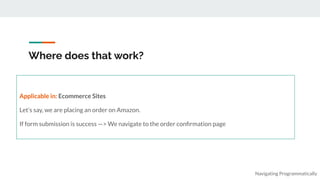
Where does that work?
Navigating Programmatically
Applicable in: Ecommerce Sites
Let’s say, we are placing an order on Amazon.
If form submission is success —> We navigate to the order confirmation page
Shallow Routing
Navigating Programmatically
Shallow routing is when you change your website's URL without re-running data fetching methods again.
Means you have one page component that covers multiple URLs!
Use Case: For adding query strings, and routes
that might explain the content of your pages as they change to user behavior.
router.push("/?counter=10", undefined, { shallow: true })
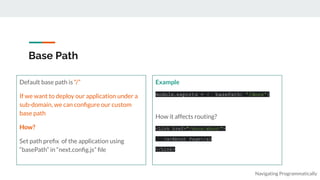
Base Path
Navigating Programmatically
Default base path is “/”
If we want to deploy our application under a
sub-domain, we can configure our custom
base path
How?
Set path prefix of the application using
“basePath” in “next.config.js” file
Example
module.exports = { basePath: '/docs'}
How it affects routing?
<Link href="/docs/about">
<a>About Page</a>
</Link>
Thanks!

Routing in NEXTJS.pdf

  • 1.
  • 2.
    What is Routing? Routingis the process of navigating to different pages on a website….
  • 3.
    NextJS Routing NextJS hasFILE SYSTEM BASED ROUTER Routing Convention is that when a file is added to the pages directory, it is automatically added as a route
  • 4.
    NextJS Routing Options 1. Routewith Pages 2. Nested Routes 3. Dynamic Routes 4. Catch-all Routes 5. Navigation from the UI 6. Programmatically navigate between pages
  • 5.
    Routing with Pages Filesystem based routing feature How you create your pages determines the routes! No need to install Router No need to configure route with any code Create files and directories and TaDa!
  • 6.
    How does thatwork? index.js corresponds to the domain root Pages are associated with a route based on their file name So we got our pages / /about /blog /profile Routing with pages
  • 7.
    Nested Routes We gota route like this localhost:3000/blog But, we also need nested routes localhost:3000/blog/first localhost:3000/blog/second How can we get these? -> NextJS’s File Based Router Nest folders inside pages folder, and you got your nested routes
  • 8.
    How does thatwork? index.js here corresponds to the root of folder name as a route i.e. /blog So we got our pages localhost:3000/blog localhost:3000/blog/first localhost:3000/blog/second Nested Routes
  • 9.
    Dynamic Routes Defining routesby using predefined paths is not always ideal. Let’s say, there are 100s of blog posts Creating a file for each of the post is not practical. This is when we go for the dynamic routes! /product /product/1 /product/id Product lists Product Details Product 1 Details
  • 10.
    How does thatwork? In this scenario, the product id (1 ,2, 3…) should be a dynamic value that maps to a particular file in the product folder Add Brackets -> [ ] to a page file name to create a dynamic route Here, [productId].js [productId] can be anything 1,2,3, shirt, sweater, laptop, keyboard… Dynamic Routes
  • 11.
    Nested Dynamic Routes Letsnavigate to the second review of first product localhost:3000/product/1/review/2 We want review to be nested inside the productId Whenever we have multiple path segments, nested folder structure creating nested dynamic routes is the answer! /product/1 Product 1 Details Product 1 Details /product/1/review/2
  • 12.
    How does thatwork? Similar to productId, here reviewId is a dynamic value that maps to a dynamic review file inside review folder. review is itself nested inside productId. Clearly [reviewId] represents a single review of a single product Nested Dynamic Routes
  • 13.
    Catch All Routes Anotherway for handling multiple path segments. Let’s say, there are 20 articles and each article has 20 reviews 20 articles * 20 reviews = 400 files 20 articles *1 [reviewId] = 20 files 1[articleId] * 1[reviewId] = 1 file Lets say each review can have replies too. Then we would have to nest another dynamic path inside review as reply/[replyId] To make this nesting bit simpler, we can define 1 file to catch all the route segments in the router And this is when we use Catch All Routes feature of NextJS.
  • 14.
    How does thatwork? Catch All Routes catches all the url segments and maps into the single file([...params].js) in the project Define it once and render it for multiple variations of url! [...params] will match any url that contains /articles segment in the path Catch All Routes
  • 15.
    Where does thatwork? A Use Case: To pass filtered params for a page Example: realestate site houses/min-budget/max-budget Catch All Routes Applicable in: Documentation sites where we want different path segments for better organization but the layout for the document will remain the same /docs/feature1/concept1/example1
  • 16.
    Navigation from theUI NextJS provides Link Component for client side navigation To navigate to a URI outside the application, we still need to use HTML <a> tag. import Link from "next/link"; <Link href="/about"> <a>About</a> </Link>
  • 17.
    Navigation from theUI We use String Interpolation for navigating through Dynamic Links import Link from "next/link"; <Link href={`/product/${productId}`}> <a> Product {productId} </a> </Link>
  • 18.
    Note: Push vsReplace Replace prop in Link component, the current path replaces the top of the stack <Link href="/product/3" replace> <a> Product 3 </a> </Link> By default, Navigation using Link component pushes a path on the top of a stack (of paths navigated) Navigation from the UI sweater /product/sweater product /product home / sweater /product/sweater home / So if we go back in browser we navigate to home in the second case
  • 19.
    When do weneed Replace? Replace prop in Link component, the current path replaces the top of the stack <Link href="/product/3" replace > <a> Product 3 </a> </Link> Navigation from the UI sweater /product/sweater home / Use Case: When the user navigates to a invalid route, we can use the router.replace to prevent the user to navigate back to the invalid route.
  • 20.
    Navigating Programmatically Link Componentcovers the most part of client side navigation However, there may be need to navigate programmatically to a route. For this, we use useRouter hook
  • 21.
    How does thatwork? router object is accessed inside the function component and we navigate by pushing a new path to the router history We can also replace the path on the top of stack as router.replace("/product") Navigating Programmatically <button onClick={handleClick}> Place Order </button> //navigating programmatically const router = useRouter() const handleClick = () => { console.log("Placing your order") router.push("/product") }
  • 22.
    Where does thatwork? Navigating Programmatically Applicable in: Ecommerce Sites Let’s say, we are placing an order on Amazon. If form submission is success —> We navigate to the order confirmation page
  • 23.
    Shallow Routing Navigating Programmatically Shallowrouting is when you change your website's URL without re-running data fetching methods again. Means you have one page component that covers multiple URLs! Use Case: For adding query strings, and routes that might explain the content of your pages as they change to user behavior. router.push("/?counter=10", undefined, { shallow: true })
  • 24.
    Base Path Navigating Programmatically Defaultbase path is “/” If we want to deploy our application under a sub-domain, we can configure our custom base path How? Set path prefix of the application using “basePath” in “next.config.js” file Example module.exports = { basePath: '/docs'} How it affects routing? <Link href="/docs/about"> <a>About Page</a> </Link>
  • 25.