Ruby on Rails Guide – P1
                                      Brady Cheng


http://bradyisstudying.blogspot.tw/
Agenda


Prerequisite
First App
Prerequisite


What is Ruby?
  A programming language
What is Rails?
  A web application framework programmed by Ruby
Prerequisite


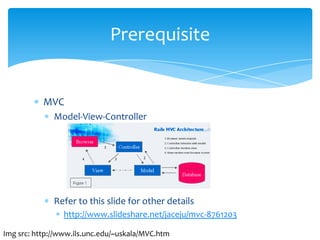
           MVC
              Model-View-Controller


              Refer to this slide for other details
                 http://www.slideshare.net/jaceju/mvc-8761203

Img src: http://www.ils.unc.edu/~uskala/MVC.htm
Prerequisite


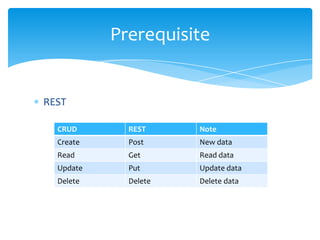
REST

  CRUD       REST     Note
  Create     Post     New data
  Read       Get      Read data
  Update     Put      Update data
  Delete     Delete   Delete data
Prerequisite


Installation
  Windows base
    http://railsinstaller.org/
  Trouble shooting
    ERROR: Error installing json: The 'json' native gem requires
    installed build tools.
    http://stackoverflow.com/questions/8100891/the-json-
    native-gem-requires-installed-build-tools
Prerequisite


Create a new project
  rails new your_project_name

Start the created project
  cd project_name
  bundle install
  rails server
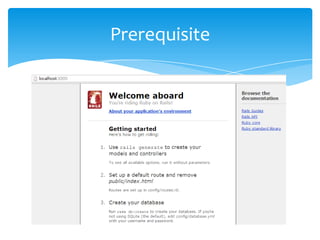
  Check http://localhost:3000 or http://127.0.0.1:3000
Prerequisite


Project organization
  /app
    Organize your models, views, and controllers
  /config
    Configs such as database config (database.yml), rails
    environmental config (environment.rb)…etc
  /db
    Manage your database
Prerequisite


Project organization
  /doc
     Docs generated by RubyDoc framework
  /lib
     Libs for your applications
  /log
     Error log such as “server.log”, “development.log”…etc
  /public
     Some html files for your applications
Prerequisite


Project organization
  /script
    Some scripts for your applications
  /test
    Some tests written by you or by rails such as unit
    test, fixture tests…etc.
  /tmp
    Temp files
  /vendor
    Third party libs
Prerequisite


Snapshot
First App


We can use the following command to new a
controller and related files
      rails generate GENERATOR ARG


Generator can be assets, controller, helper…etc
ARG here is the file name
First App


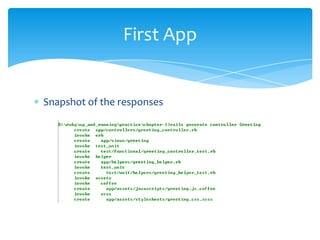
Snapshot of the responses
First App


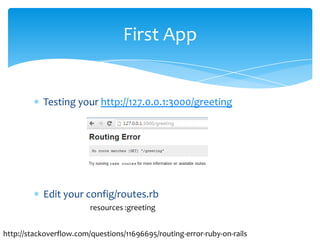
           Testing your http://127.0.0.1:3000/greeting


           Edit your config/routes.rb
                         resources :greeting


http://stackoverflow.com/questions/11696695/routing-error-ruby-on-rails
First App


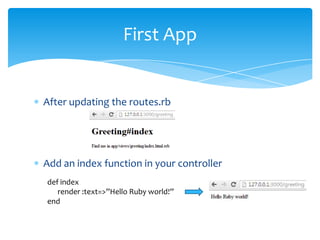
After updating the routes.rb


Add an index function in your controller
def index
   render :text=>”Hello Ruby world!”
end
First App


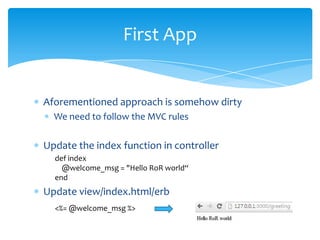
Aforementioned approach is somehow dirty
  We need to follow the MVC rules

Update the index function in controller
  def index
    @welcome_msg = "Hello RoR world“
  end
Update view/index.html/erb
  <%= @welcome_msg %>
First App


Worth to mention what erb file is

ERB file = html code + ruby code
  Ruby code will be surrounded by <%...%> or <%=…%>
    <% code here %> : pure logic, nothing display to screen
    <%= code here %> : display something to screen
First App


Worth to mention the Request scope

Request scope
  Each http request will get a copy of the controller
    Pros : thread safe
    Cons: hard to share data between different requests
      Solution: use sessions

RoR guide_p1

  • 1.
    Ruby on RailsGuide – P1 Brady Cheng http://bradyisstudying.blogspot.tw/
  • 2.
  • 3.
    Prerequisite What is Ruby? A programming language What is Rails? A web application framework programmed by Ruby
  • 4.
    Prerequisite MVC Model-View-Controller Refer to this slide for other details http://www.slideshare.net/jaceju/mvc-8761203 Img src: http://www.ils.unc.edu/~uskala/MVC.htm
  • 5.
    Prerequisite REST CRUD REST Note Create Post New data Read Get Read data Update Put Update data Delete Delete Delete data
  • 6.
    Prerequisite Installation Windowsbase http://railsinstaller.org/ Trouble shooting ERROR: Error installing json: The 'json' native gem requires installed build tools. http://stackoverflow.com/questions/8100891/the-json- native-gem-requires-installed-build-tools
  • 7.
    Prerequisite Create a newproject rails new your_project_name Start the created project cd project_name bundle install rails server Check http://localhost:3000 or http://127.0.0.1:3000
  • 8.
    Prerequisite Project organization /app Organize your models, views, and controllers /config Configs such as database config (database.yml), rails environmental config (environment.rb)…etc /db Manage your database
  • 9.
    Prerequisite Project organization /doc Docs generated by RubyDoc framework /lib Libs for your applications /log Error log such as “server.log”, “development.log”…etc /public Some html files for your applications
  • 10.
    Prerequisite Project organization /script Some scripts for your applications /test Some tests written by you or by rails such as unit test, fixture tests…etc. /tmp Temp files /vendor Third party libs
  • 11.
  • 12.
    First App We canuse the following command to new a controller and related files rails generate GENERATOR ARG Generator can be assets, controller, helper…etc ARG here is the file name
  • 13.
    First App Snapshot ofthe responses
  • 14.
    First App Testing your http://127.0.0.1:3000/greeting Edit your config/routes.rb resources :greeting http://stackoverflow.com/questions/11696695/routing-error-ruby-on-rails
  • 15.
    First App After updatingthe routes.rb Add an index function in your controller def index render :text=>”Hello Ruby world!” end
  • 16.
    First App Aforementioned approachis somehow dirty We need to follow the MVC rules Update the index function in controller def index @welcome_msg = "Hello RoR world“ end Update view/index.html/erb <%= @welcome_msg %>
  • 17.
    First App Worth tomention what erb file is ERB file = html code + ruby code Ruby code will be surrounded by <%...%> or <%=…%> <% code here %> : pure logic, nothing display to screen <%= code here %> : display something to screen
  • 18.
    First App Worth tomention the Request scope Request scope Each http request will get a copy of the controller Pros : thread safe Cons: hard to share data between different requests Solution: use sessions