Introduction to Ruby on Rails
Presented by: Arman Ortega
rubyonrails.org
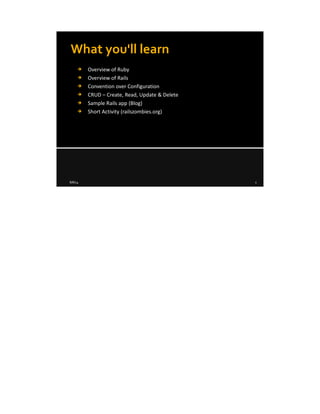
What you'll learn
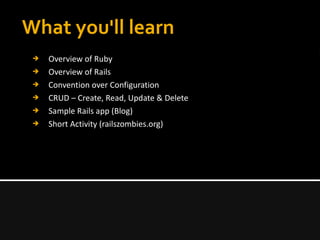
➔ Overview of Ruby
➔ Overview of Rails
➔ Convention over Configuration
➔ CRUD – Create, Read, Update & Delete
➔ Sample Rails app (Blog)
➔ Short Activity (railszombies.org)
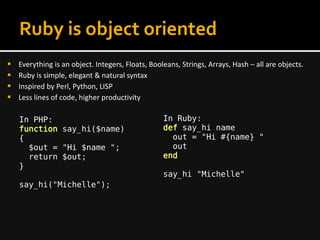
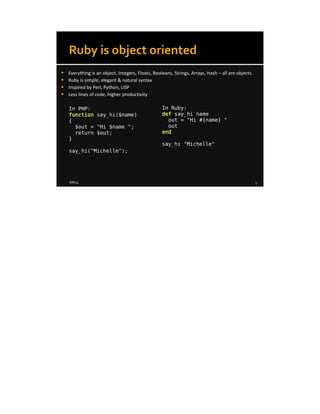
Ruby is object oriented
 Everything is an object. Integers, Floats, Booleans, Strings, Arrays, Hash – all are objects.
 Ruby is simple, elegant & natural syntax
 Inspired by Perl, Python, LISP
 Less lines of code, higher productivity
In PHP:
function say_hi($name)
{
$out = "Hi $name ";
return $out;
}
say_hi("Michelle");
In Ruby:
def say_hi name
out = "Hi #{name} "
out
end
say_hi "Michelle"
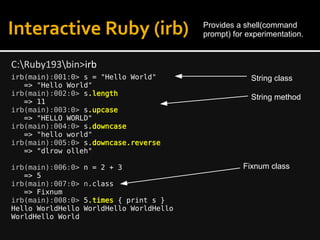
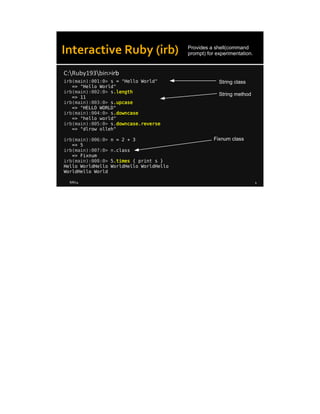
Interactive Ruby (irb)
irb(main):001:0> s = "Hello World"
=> "Hello World"
irb(main):002:0> s.length
=> 11
irb(main):003:0> s.upcase
=> "HELLO WORLD"
irb(main):004:0> s.downcase
=> "hello world"
irb(main):005:0> s.downcase.reverse
=> "dlrow olleh"
irb(main):006:0> n = 2 + 3
=> 5
irb(main):007:0> n.class
=> Fixnum
irb(main):008:0> 5.times { print s }
Hello WorldHello WorldHello WorldHello
WorldHello World
C:Ruby193bin>irb
Provides a shell(command
prompt) for experimentation.
String method
String class
Fixnum class
Arrays - are ordered, integer-indexed collections of any
object. Indexing starts at 0, as in C or Java.
e.g. pet = Array.new or []
irb> pet = ["dog", "cat", "mouse"]
irb> pet.count
=> 3
irb> pet.index("cat")
=> 1
irb> pet[2]
=> "mouse"
Hashes - is a collection of key-value pairs.
e.g. style = Hash.new or {}
irb> style = { "font_size" => 10, "font_family" => "Arial" }
=> {"font_size"=>10, "font_family"=>"Arial"}
irb> style["font_size"]
=> 10
Arrays & Hashes
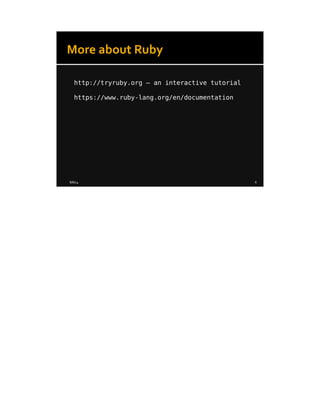
More about Ruby
http://tryruby.org – an interactive tutorial
https://www.ruby-lang.org/en/documentation
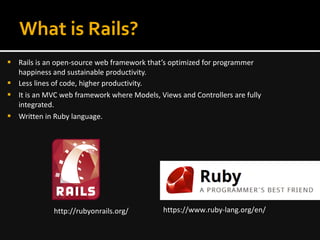
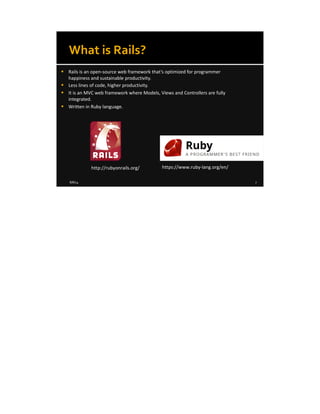
What is Rails?
 Rails is an open-source web framework that’s optimized for programmer
happiness and sustainable productivity.
 Less lines of code, higher productivity.
 It is an MVC web framework where Models, Views and Controllers are fully
integrated.
 Written in Ruby language.
http://rubyonrails.org/ https://www.ruby-lang.org/en/
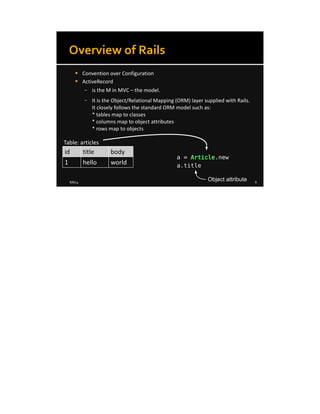
Overview of Rails
 Convention over Configuration
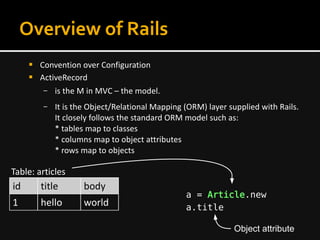
 ActiveRecord
– is the M in MVC – the model.
– It is the Object/Relational Mapping (ORM) layer supplied with Rails.
It closely follows the standard ORM model such as:
* tables map to classes
* columns map to object attributes
* rows map to objects
id title body
1 hello world
Table: articles
a = Article.new
Object attribute
a.title
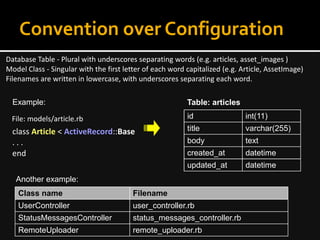
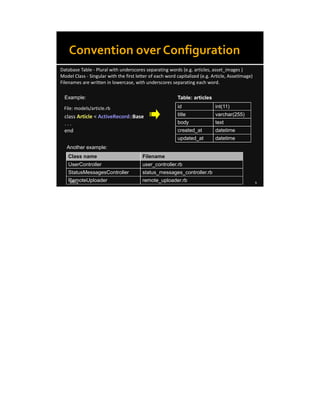
Convention over Configuration
Database Table - Plural with underscores separating words (e.g. articles, asset_images )
Model Class - Singular with the first letter of each word capitalized (e.g. Article, AssetImage)
Filenames are written in lowercase, with underscores separating each word.
id int(11)
title varchar(255)
body text
created_at datetime
updated_at datetime
Table: articles
class Article < ActiveRecord::Base
. . .
end
File: models/article.rb
Class name Filename
UserController user_controller.rb
StatusMessagesController status_messages_controller.rb
RemoteUploader remote_uploader.rb
Another example:
Example:
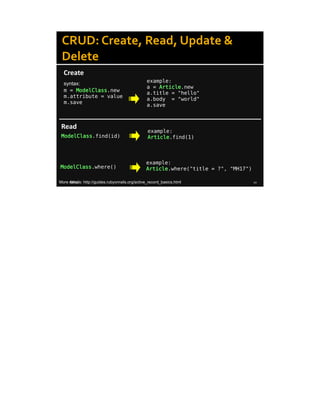
CRUD: Create, Read, Update &
Delete
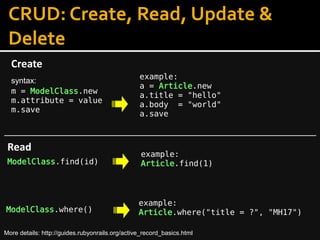
Create
example:
a = Article.new
a.title = "hello"
a.body = "world"
a.save
Read
ModelClass.find(id)
example:
Article.find(1)
ModelClass.where()
example:
Article.where("title = ?", "MH17")
m = ModelClass.new
m.attribute = value
m.save
syntax:
More details: http://guides.rubyonrails.org/active_record_basics.html
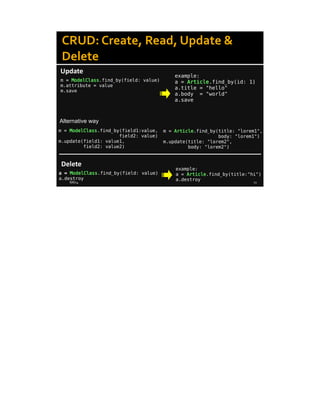
CRUD: Create, Read, Update &
Delete
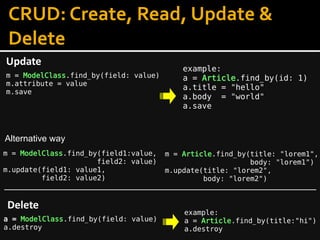
Update
m = ModelClass.find_by(field: value)
m.attribute = value
m.save
example:
a = Article.find_by(id: 1)
a.title = "hello"
a.body = "world"
a.save
Delete
a = ModelClass.find_by(field: value)
a.destroy
example:
a = Article.find_by(title:"hi")
a.destroy
m = ModelClass.find_by(field1:value,
field2: value)
m.update(field1: value1,
field2: value2)
m = Article.find_by(title: "lorem1",
body: "lorem1")
m.update(title: "lorem2",
body: "lorem2")
Alternative way
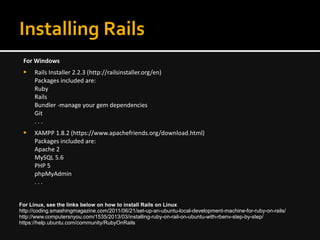
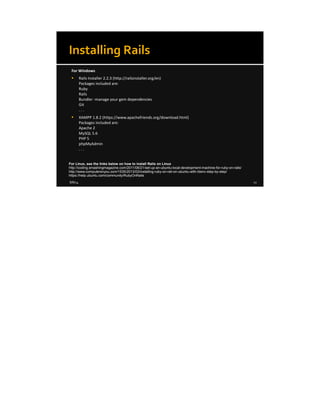
Installing Rails
For Windows
 Rails Installer 2.2.3 (http://railsinstaller.org/en)
Packages included are:
Ruby
Rails
Bundler -manage your gem dependencies
Git
. . .
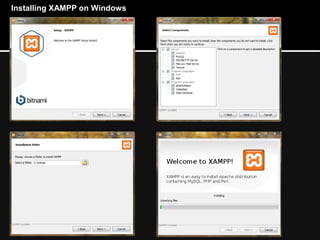
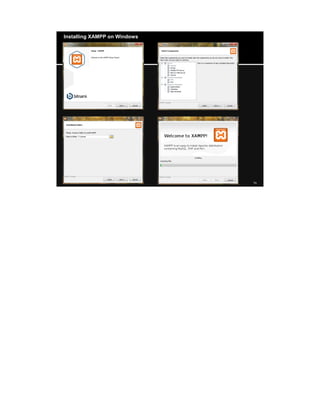
 XAMPP 1.8.2 (https://www.apachefriends.org/download.html)
Packages included are:
Apache 2
MySQL 5.6
PHP 5
phpMyAdmin
. . .
For Linux, see the links below on how to install Rails on Linux
http://coding.smashingmagazine.com/2011/06/21/set-up-an-ubuntu-local-development-machine-for-ruby-on-rails/
http://www.computersnyou.com/1535/2013/03/installing-ruby-on-rail-on-ubuntu-with-rbenv-step-by-step/
https://help.ubuntu.com/community/RubyOnRails
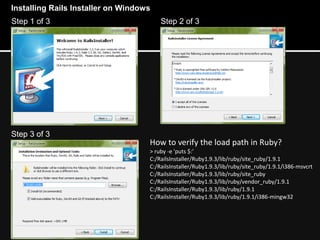
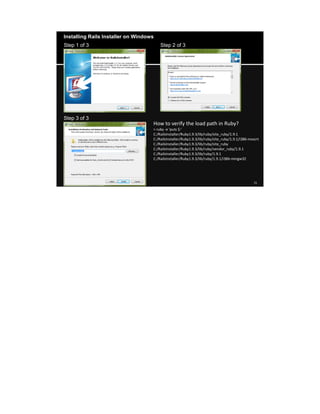
Step 1 of 3 Step 2 of 3
Step 3 of 3
How to verify the load path in Ruby?
> ruby -e 'puts $:'
C:/RailsInstaller/Ruby1.9.3/lib/ruby/site_ruby/1.9.1
C:/RailsInstaller/Ruby1.9.3/lib/ruby/site_ruby/1.9.1/i386-msvcrt
C:/RailsInstaller/Ruby1.9.3/lib/ruby/site_ruby
C:/RailsInstaller/Ruby1.9.3/lib/ruby/vendor_ruby/1.9.1
C:/RailsInstaller/Ruby1.9.3/lib/ruby/1.9.1
C:/RailsInstaller/Ruby1.9.3/lib/ruby/1.9.1/i386-mingw32
Installing Rails Installer on Windows
Installing XAMPP on Windows
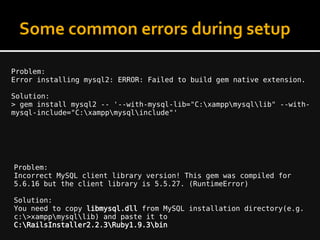
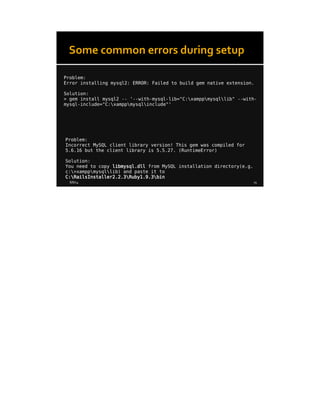
Some common errors during setup
Problem:
Error installing mysql2: ERROR: Failed to build gem native extension.
Solution:
> gem install mysql2 -- '--with-mysql-lib="C:xamppmysqllib" --with-
mysql-include="C:xamppmysqlinclude"'
Problem:
Incorrect MySQL client library version! This gem was compiled for
5.6.16 but the client library is 5.5.27. (RuntimeError)
Solution:
You need to copy libmysql.dll from MySQL installation directory(e.g.
c:>xamppmysqllib) and paste it to
C:RailsInstaller2.2.3Ruby1.9.3bin
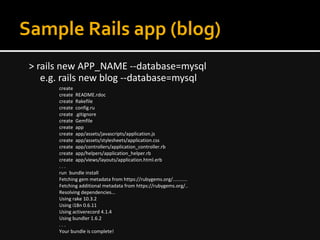
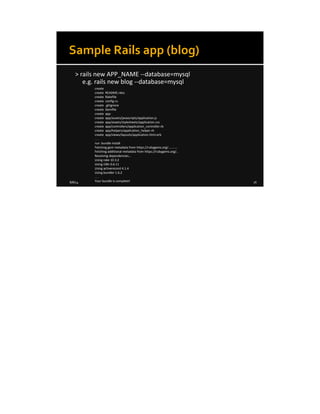
Sample Rails app (blog)
> rails new APP_NAME --database=mysql
e.g. rails new blog --database=mysql
create
create README.rdoc
create Rakefile
create config.ru
create .gitignore
create Gemfile
create app
create app/assets/javascripts/application.js
create app/assets/stylesheets/application.css
create app/controllers/application_controller.rb
create app/helpers/application_helper.rb
create app/views/layouts/application.html.erb
. . .
run bundle install
Fetching gem metadata from https://rubygems.org/...........
Fetching additional metadata from https://rubygems.org/..
Resolving dependencies...
Using rake 10.3.2
Using i18n 0.6.11
Using activerecord 4.1.4
Using bundler 1.6.2
. . .
Your bundle is complete!
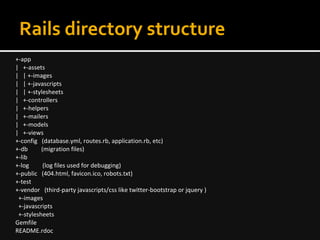
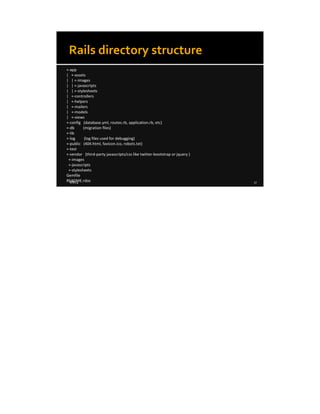
Rails directory structure
+-app
| +-assets
| | +-images
| | +-javascripts
| | +-stylesheets
| +-controllers
| +-helpers
| +-mailers
| +-models
| +-views
+-config (database.yml, routes.rb, application.rb, etc)
+-db (migration files)
+-lib
+-log (log files used for debugging)
+-public (404.html, favicon.ico, robots.txt)
+-test
+-vendor (third-party javascripts/css like twitter-bootstrap or jquery )
+-images
+-javascripts
+-stylesheets
Gemfile
README.rdoc
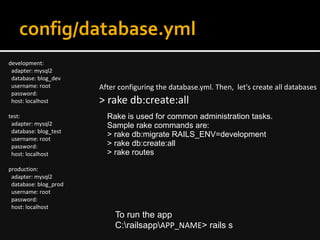
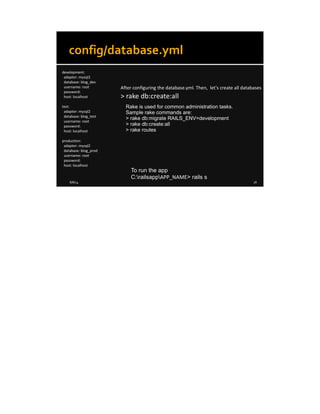
config/database.yml
development:
adapter: mysql2
database: blog_dev
username: root
password:
host: localhost
test:
adapter: mysql2
database: blog_test
username: root
password:
host: localhost
production:
adapter: mysql2
database: blog_prod
username: root
password:
host: localhost
After configuring the database.yml. Then, let's create all databases
> rake db:create:all
Rake is used for common administration tasks.
Sample rake commands are:
> rake db:migrate RAILS_ENV=development
> rake db:create:all
> rake routes
To run the app
C:railsappAPP_NAME> rails s
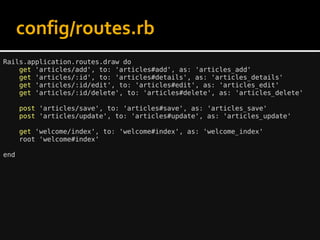
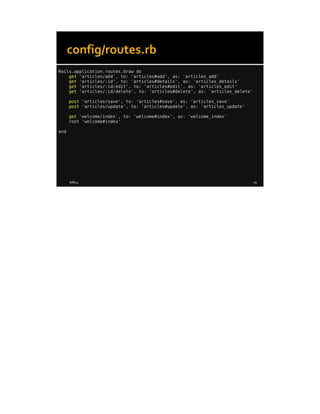
config/routes.rb
Rails.application.routes.draw do
get 'articles/add', to: 'articles#add', as: 'articles_add'
get 'articles/:id', to: 'articles#details', as: 'articles_details'
get 'articles/:id/edit', to: 'articles#edit', as: 'articles_edit'
get 'articles/:id/delete', to: 'articles#delete', as: 'articles_delete'
post 'articles/save', to: 'articles#save', as: 'articles_save'
post 'articles/update', to: 'articles#update', as: 'articles_update'
get 'welcome/index', to: 'welcome#index', as: 'welcome_index'
root 'welcome#index'
end
Router
In controller:
def details
@article = Article.find params[:id]
end
The Rails router recognizes URLs and dispatches
them to a controller's action.
GET articles/1
In routes.rb
get '/articles/:id', to: 'articles#details', as: 'articles_details'
get 'welcome/index', to: 'welcome#index', as: 'welcome_index'
. . .
In views:
<div class="article">
<em><%= time_ago_in_words(@article.updated_at) %> ago</em>
<h3><%= @article.title %></h3>
<p><%= @article.body %></p>
<%= link_to "<<Back to Home", welcome_index_path %>
</div>
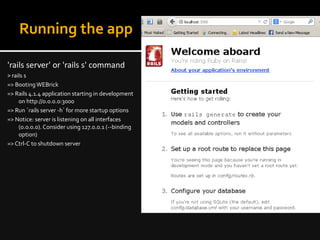
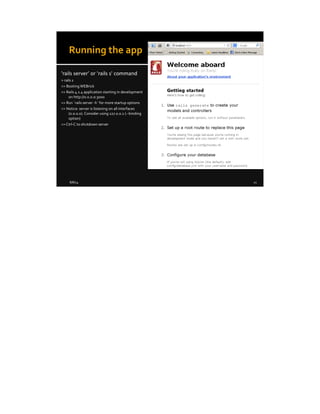
Running the app
'rails server' or 'rails s' command
> rails s
=> BootingWEBrick
=> Rails 4.1.4 application starting in development
on http://0.0.0.0:3000
=> Run `rails server -h` for more startup options
=> Notice: server is listening on all interfaces
(0.0.0.0). Consider using 127.0.0.1 (--binding
option)
=> Ctrl-C to shutdown server
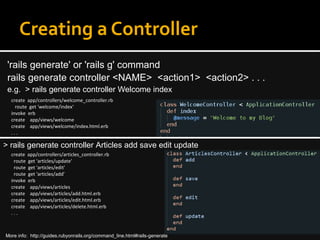
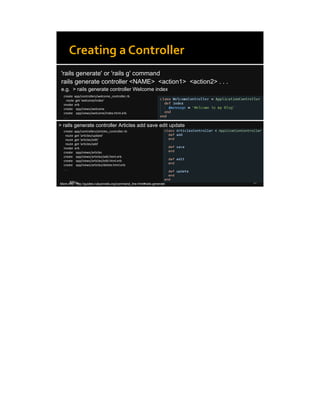
Creating a Controller
'rails generate' or 'rails g' command
rails generate controller <NAME> <action1> <action2> . . .
e.g. > rails generate controller Welcome index
create app/controllers/welcome_controller.rb
route get 'welcome/index‘
invoke erb
create app/views/welcome
create app/views/welcome/index.html.erb
. . .
> rails generate controller Articles add save edit update
create app/controllers/articles_controller.rb
route get 'articles/update'
route get 'articles/edit'
route get 'articles/add'
invoke erb
create app/views/articles
create app/views/articles/add.html.erb
create app/views/articles/edit.html.erb
create app/views/articles/delete.html.erb
. . .
More info: http://guides.rubyonrails.org/command_line.html#rails-generate
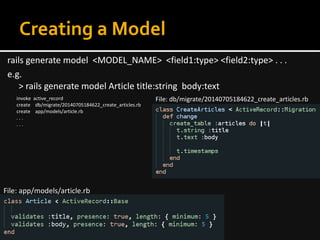
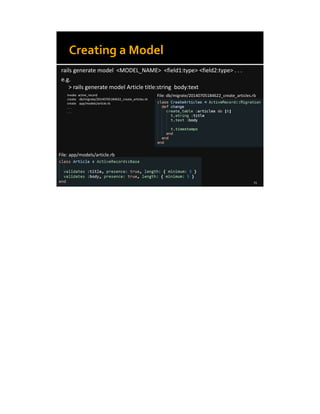
Creating a Model
rails generate model <MODEL_NAME> <field1:type> <field2:type> . . .
e.g.
> rails generate model Article title:string body:text
invoke active_record
create db/migrate/20140705184622_create_articles.rb
create app/models/article.rb
. . .
. . .
File: db/migrate/20140705184622_create_articles.rb
File: app/models/article.rb
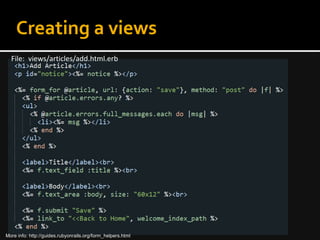
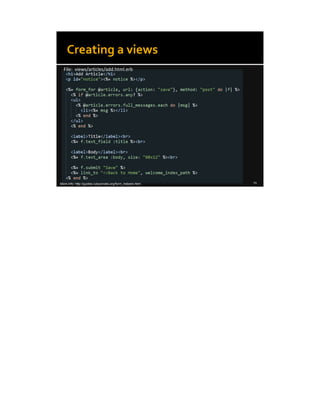
Creating a views
File: views/articles/add.html.erb
More info: http://guides.rubyonrails.org/form_helpers.html
Useful links
 https://www.ruby-lang.org/en/documentation/
 http://guides.rubyonrails.org/getting_started.html
 http://tryruby.org
 http://railsforzombies.org
Thank you!
8/8/14 1
Introduction to Ruby on Rails
Presented by: Arman Ortega
rubyonrails.org
8/8/14 2
What you'll learn
➔ Overview of Ruby
➔ Overview of Rails
➔ Convention over Configuration
➔ CRUD – Create, Read, Update & Delete
➔ Sample Rails app (Blog)
➔ Short Activity (railszombies.org)
8/8/14 3
Ruby is object oriented
 Everything is an object. Integers, Floats, Booleans, Strings, Arrays, Hash – all are objects.
 Ruby is simple, elegant & natural syntax
 Inspired by Perl, Python, LISP
 Less lines of code, higher productivity
In PHP:
function say_hi($name)
{
$out = "Hi $name ";
return $out;
}
say_hi("Michelle");
In Ruby:
def say_hi name
out = "Hi #{name} "
out
end
say_hi "Michelle"
8/8/14 4
Interactive Ruby (irb)
irb(main):001:0> s = "Hello World"
=> "Hello World"
irb(main):002:0> s.length
=> 11
irb(main):003:0> s.upcase
=> "HELLO WORLD"
irb(main):004:0> s.downcase
=> "hello world"
irb(main):005:0> s.downcase.reverse
=> "dlrow olleh"
irb(main):006:0> n = 2 + 3
=> 5
irb(main):007:0> n.class
=> Fixnum
irb(main):008:0> 5.times { print s }
Hello WorldHello WorldHello WorldHello
WorldHello World
C:Ruby193bin>irb
Provides a shell(command
prompt) for experimentation.
String method
String class
Fixnum class
8/8/14 5
Arrays - are ordered, integer-indexed collections of any
object. Indexing starts at 0, as in C or Java.
e.g. pet = Array.new or []
irb> pet = ["dog", "cat", "mouse"]
irb> pet.count
=> 3
irb> pet.index("cat")
=> 1
irb> pet[2]
=> "mouse"
Hashes - is a collection of key-value pairs.
e.g. style = Hash.new or {}
irb> style = { "font_size" => 10, "font_family" => "Arial" }
=> {"font_size"=>10, "font_family"=>"Arial"}
irb> style["font_size"]
=> 10
Arrays & Hashes
8/8/14 6
More about Ruby
http://tryruby.org – an interactive tutorial
https://www.ruby-lang.org/en/documentation
8/8/14 7
What is Rails?
 Rails is an open-source web framework that’s optimized for programmer
happiness and sustainable productivity.
 Less lines of code, higher productivity.
 It is an MVC web framework where Models, Views and Controllers are fully
integrated.
 Written in Ruby language.
http://rubyonrails.org/ https://www.ruby-lang.org/en/
8/8/14 8
Overview of Rails
 Convention over Configuration
 ActiveRecord
– is the M in MVC – the model.
– It is the Object/Relational Mapping (ORM) layer supplied with Rails.
It closely follows the standard ORM model such as:
* tables map to classes
* columns map to object attributes
* rows map to objects
id title body
1 hello world
Table: articles
a = Article.new
Object attribute
a.title
8/8/14 9
Convention over Configuration
Database Table - Plural with underscores separating words (e.g. articles, asset_images )
Model Class - Singular with the first letter of each word capitalized (e.g. Article, AssetImage)
Filenames are written in lowercase, with underscores separating each word.
id int(11)
title varchar(255)
body text
created_at datetime
updated_at datetime
Table: articles
class Article < ActiveRecord::Base
. . .
end
File: models/article.rb
Class name Filename
UserController user_controller.rb
StatusMessagesController status_messages_controller.rb
RemoteUploader remote_uploader.rb
Another example:
Example:
8/8/14 10
CRUD: Create, Read, Update &
Delete
Create
example:
a = Article.new
a.title = "hello"
a.body = "world"
a.save
Read
ModelClass.find(id)
example:
Article.find(1)
ModelClass.where()
example:
Article.where("title = ?", "MH17")
m = ModelClass.new
m.attribute = value
m.save
syntax:
More details: http://guides.rubyonrails.org/active_record_basics.html
8/8/14 11
CRUD: Create, Read, Update &
Delete
Update
m = ModelClass.find_by(field: value)
m.attribute = value
m.save
example:
a = Article.find_by(id: 1)
a.title = "hello"
a.body = "world"
a.save
Delete
a = ModelClass.find_by(field: value)
a.destroy
example:
a = Article.find_by(title:"hi")
a.destroy
m = ModelClass.find_by(field1:value,
field2: value)
m.update(field1: value1,
field2: value2)
m = Article.find_by(title: "lorem1",
body: "lorem1")
m.update(title: "lorem2",
body: "lorem2")
Alternative way
8/8/14 12
Installing Rails
For Windows
 Rails Installer 2.2.3 (http://railsinstaller.org/en)
Packages included are:
Ruby
Rails
Bundler -manage your gem dependencies
Git
. . .
 XAMPP 1.8.2 (https://www.apachefriends.org/download.html)
Packages included are:
Apache 2
MySQL 5.6
PHP 5
phpMyAdmin
. . .
For Linux, see the links below on how to install Rails on Linux
http://coding.smashingmagazine.com/2011/06/21/set-up-an-ubuntu-local-development-machine-for-ruby-on-rails/
http://www.computersnyou.com/1535/2013/03/installing-ruby-on-rail-on-ubuntu-with-rbenv-step-by-step/
https://help.ubuntu.com/community/RubyOnRails
8/8/14 13
Step 1 of 3 Step 2 of 3
Step 3 of 3
How to verify the load path in Ruby?
> ruby -e 'puts $:'
C:/RailsInstaller/Ruby1.9.3/lib/ruby/site_ruby/1.9.1
C:/RailsInstaller/Ruby1.9.3/lib/ruby/site_ruby/1.9.1/i386-msvcrt
C:/RailsInstaller/Ruby1.9.3/lib/ruby/site_ruby
C:/RailsInstaller/Ruby1.9.3/lib/ruby/vendor_ruby/1.9.1
C:/RailsInstaller/Ruby1.9.3/lib/ruby/1.9.1
C:/RailsInstaller/Ruby1.9.3/lib/ruby/1.9.1/i386-mingw32
Installing Rails Installer on Windows
8/8/14 14
Installing XAMPP on Windows
8/8/14 15
Some common errors during setup
Problem:
Error installing mysql2: ERROR: Failed to build gem native extension.
Solution:
> gem install mysql2 -- '--with-mysql-lib="C:xamppmysqllib" --with-
mysql-include="C:xamppmysqlinclude"'
Problem:
Incorrect MySQL client library version! This gem was compiled for
5.6.16 but the client library is 5.5.27. (RuntimeError)
Solution:
You need to copy libmysql.dll from MySQL installation directory(e.g.
c:>xamppmysqllib) and paste it to
C:RailsInstaller2.2.3Ruby1.9.3bin
8/8/14 16
Sample Rails app (blog)
> rails new APP_NAME --database=mysql
e.g. rails new blog --database=mysql
create
create README.rdoc
create Rakefile
create config.ru
create .gitignore
create Gemfile
create app
create app/assets/javascripts/application.js
create app/assets/stylesheets/application.css
create app/controllers/application_controller.rb
create app/helpers/application_helper.rb
create app/views/layouts/application.html.erb
. . .
run bundle install
Fetching gem metadata from https://rubygems.org/...........
Fetching additional metadata from https://rubygems.org/..
Resolving dependencies...
Using rake 10.3.2
Using i18n 0.6.11
Using activerecord 4.1.4
Using bundler 1.6.2
. . .
Your bundle is complete!
8/8/14 17
Rails directory structure
+-app
| +-assets
| | +-images
| | +-javascripts
| | +-stylesheets
| +-controllers
| +-helpers
| +-mailers
| +-models
| +-views
+-config (database.yml, routes.rb, application.rb, etc)
+-db (migration files)
+-lib
+-log (log files used for debugging)
+-public (404.html, favicon.ico, robots.txt)
+-test
+-vendor (third-party javascripts/css like twitter-bootstrap or jquery )
+-images
+-javascripts
+-stylesheets
Gemfile
README.rdoc
8/8/14 18
config/database.yml
development:
adapter: mysql2
database: blog_dev
username: root
password:
host: localhost
test:
adapter: mysql2
database: blog_test
username: root
password:
host: localhost
production:
adapter: mysql2
database: blog_prod
username: root
password:
host: localhost
After configuring the database.yml. Then, let's create all databases
> rake db:create:all
Rake is used for common administration tasks.
Sample rake commands are:
> rake db:migrate RAILS_ENV=development
> rake db:create:all
> rake routes
To run the app
C:railsappAPP_NAME> rails s
8/8/14 19
config/routes.rb
Rails.application.routes.draw do
get 'articles/add', to: 'articles#add', as: 'articles_add'
get 'articles/:id', to: 'articles#details', as: 'articles_details'
get 'articles/:id/edit', to: 'articles#edit', as: 'articles_edit'
get 'articles/:id/delete', to: 'articles#delete', as: 'articles_delete'
post 'articles/save', to: 'articles#save', as: 'articles_save'
post 'articles/update', to: 'articles#update', as: 'articles_update'
get 'welcome/index', to: 'welcome#index', as: 'welcome_index'
root 'welcome#index'
end
8/8/14 20
Router
In controller:
def details
@article = Article.find params[:id]
end
The Rails router recognizes URLs and dispatches
them to a controller's action.
GET articles/1
In routes.rb
get '/articles/:id', to: 'articles#details', as: 'articles_details'
get 'welcome/index', to: 'welcome#index', as: 'welcome_index'
. . .
In views:
<div class="article">
<em><%= time_ago_in_words(@article.updated_at) %> ago</em>
<h3><%= @article.title %></h3>
<p><%= @article.body %></p>
<%= link_to "<<Back to Home", welcome_index_path %>
</div>
8/8/14 21
Running the app
'rails server' or 'rails s' command
> rails s
=> BootingWEBrick
=> Rails 4.1.4 application starting in development
on http://0.0.0.0:3000
=> Run `rails server -h` for more startup options
=> Notice: server is listening on all interfaces
(0.0.0.0). Consider using 127.0.0.1 (--binding
option)
=>Ctrl-C to shutdown server
8/8/14 22
Creating a Controller
'rails generate' or 'rails g' command
rails generate controller <NAME> <action1> <action2> . . .
e.g. > rails generate controller Welcome index
create app/controllers/welcome_controller.rb
route get 'welcome/index‘
invoke erb
create app/views/welcome
create app/views/welcome/index.html.erb
. . .
> rails generate controller Articles add save edit update
create app/controllers/articles_controller.rb
route get 'articles/update'
route get 'articles/edit'
route get 'articles/add'
invoke erb
create app/views/articles
create app/views/articles/add.html.erb
create app/views/articles/edit.html.erb
create app/views/articles/delete.html.erb
. . .
More info: http://guides.rubyonrails.org/command_line.html#rails-generate
8/8/14 23
Creating a Model
rails generate model <MODEL_NAME> <field1:type> <field2:type> . . .
e.g.
> rails generate model Article title:string body:text
invoke active_record
create db/migrate/20140705184622_create_articles.rb
create app/models/article.rb
. . .
. . .
File: db/migrate/20140705184622_create_articles.rb
File: app/models/article.rb
8/8/14 24
Creating a views
File: views/articles/add.html.erb
More info: http://guides.rubyonrails.org/form_helpers.html
8/8/14 25
Useful links
 https://www.ruby-lang.org/en/documentation/
 http://guides.rubyonrails.org/getting_started.html
 http://tryruby.org
 http://railsforzombies.org
8/8/14 26
Thank you!

Introduction to Rails - presented by Arman Ortega

  • 1.
    Introduction to Rubyon Rails Presented by: Arman Ortega rubyonrails.org
  • 2.
    What you'll learn ➔Overview of Ruby ➔ Overview of Rails ➔ Convention over Configuration ➔ CRUD – Create, Read, Update & Delete ➔ Sample Rails app (Blog) ➔ Short Activity (railszombies.org)
  • 3.
    Ruby is objectoriented  Everything is an object. Integers, Floats, Booleans, Strings, Arrays, Hash – all are objects.  Ruby is simple, elegant & natural syntax  Inspired by Perl, Python, LISP  Less lines of code, higher productivity In PHP: function say_hi($name) { $out = "Hi $name "; return $out; } say_hi("Michelle"); In Ruby: def say_hi name out = "Hi #{name} " out end say_hi "Michelle"
  • 4.
    Interactive Ruby (irb) irb(main):001:0>s = "Hello World" => "Hello World" irb(main):002:0> s.length => 11 irb(main):003:0> s.upcase => "HELLO WORLD" irb(main):004:0> s.downcase => "hello world" irb(main):005:0> s.downcase.reverse => "dlrow olleh" irb(main):006:0> n = 2 + 3 => 5 irb(main):007:0> n.class => Fixnum irb(main):008:0> 5.times { print s } Hello WorldHello WorldHello WorldHello WorldHello World C:Ruby193bin>irb Provides a shell(command prompt) for experimentation. String method String class Fixnum class
  • 5.
    Arrays - areordered, integer-indexed collections of any object. Indexing starts at 0, as in C or Java. e.g. pet = Array.new or [] irb> pet = ["dog", "cat", "mouse"] irb> pet.count => 3 irb> pet.index("cat") => 1 irb> pet[2] => "mouse" Hashes - is a collection of key-value pairs. e.g. style = Hash.new or {} irb> style = { "font_size" => 10, "font_family" => "Arial" } => {"font_size"=>10, "font_family"=>"Arial"} irb> style["font_size"] => 10 Arrays & Hashes
  • 6.
    More about Ruby http://tryruby.org– an interactive tutorial https://www.ruby-lang.org/en/documentation
  • 7.
    What is Rails? Rails is an open-source web framework that’s optimized for programmer happiness and sustainable productivity.  Less lines of code, higher productivity.  It is an MVC web framework where Models, Views and Controllers are fully integrated.  Written in Ruby language. http://rubyonrails.org/ https://www.ruby-lang.org/en/
  • 8.
    Overview of Rails Convention over Configuration  ActiveRecord – is the M in MVC – the model. – It is the Object/Relational Mapping (ORM) layer supplied with Rails. It closely follows the standard ORM model such as: * tables map to classes * columns map to object attributes * rows map to objects id title body 1 hello world Table: articles a = Article.new Object attribute a.title
  • 9.
    Convention over Configuration DatabaseTable - Plural with underscores separating words (e.g. articles, asset_images ) Model Class - Singular with the first letter of each word capitalized (e.g. Article, AssetImage) Filenames are written in lowercase, with underscores separating each word. id int(11) title varchar(255) body text created_at datetime updated_at datetime Table: articles class Article < ActiveRecord::Base . . . end File: models/article.rb Class name Filename UserController user_controller.rb StatusMessagesController status_messages_controller.rb RemoteUploader remote_uploader.rb Another example: Example:
  • 10.
    CRUD: Create, Read,Update & Delete Create example: a = Article.new a.title = "hello" a.body = "world" a.save Read ModelClass.find(id) example: Article.find(1) ModelClass.where() example: Article.where("title = ?", "MH17") m = ModelClass.new m.attribute = value m.save syntax: More details: http://guides.rubyonrails.org/active_record_basics.html
  • 11.
    CRUD: Create, Read,Update & Delete Update m = ModelClass.find_by(field: value) m.attribute = value m.save example: a = Article.find_by(id: 1) a.title = "hello" a.body = "world" a.save Delete a = ModelClass.find_by(field: value) a.destroy example: a = Article.find_by(title:"hi") a.destroy m = ModelClass.find_by(field1:value, field2: value) m.update(field1: value1, field2: value2) m = Article.find_by(title: "lorem1", body: "lorem1") m.update(title: "lorem2", body: "lorem2") Alternative way
  • 12.
    Installing Rails For Windows Rails Installer 2.2.3 (http://railsinstaller.org/en) Packages included are: Ruby Rails Bundler -manage your gem dependencies Git . . .  XAMPP 1.8.2 (https://www.apachefriends.org/download.html) Packages included are: Apache 2 MySQL 5.6 PHP 5 phpMyAdmin . . . For Linux, see the links below on how to install Rails on Linux http://coding.smashingmagazine.com/2011/06/21/set-up-an-ubuntu-local-development-machine-for-ruby-on-rails/ http://www.computersnyou.com/1535/2013/03/installing-ruby-on-rail-on-ubuntu-with-rbenv-step-by-step/ https://help.ubuntu.com/community/RubyOnRails
  • 13.
    Step 1 of3 Step 2 of 3 Step 3 of 3 How to verify the load path in Ruby? > ruby -e 'puts $:' C:/RailsInstaller/Ruby1.9.3/lib/ruby/site_ruby/1.9.1 C:/RailsInstaller/Ruby1.9.3/lib/ruby/site_ruby/1.9.1/i386-msvcrt C:/RailsInstaller/Ruby1.9.3/lib/ruby/site_ruby C:/RailsInstaller/Ruby1.9.3/lib/ruby/vendor_ruby/1.9.1 C:/RailsInstaller/Ruby1.9.3/lib/ruby/1.9.1 C:/RailsInstaller/Ruby1.9.3/lib/ruby/1.9.1/i386-mingw32 Installing Rails Installer on Windows
  • 14.
  • 15.
    Some common errorsduring setup Problem: Error installing mysql2: ERROR: Failed to build gem native extension. Solution: > gem install mysql2 -- '--with-mysql-lib="C:xamppmysqllib" --with- mysql-include="C:xamppmysqlinclude"' Problem: Incorrect MySQL client library version! This gem was compiled for 5.6.16 but the client library is 5.5.27. (RuntimeError) Solution: You need to copy libmysql.dll from MySQL installation directory(e.g. c:>xamppmysqllib) and paste it to C:RailsInstaller2.2.3Ruby1.9.3bin
  • 16.
    Sample Rails app(blog) > rails new APP_NAME --database=mysql e.g. rails new blog --database=mysql create create README.rdoc create Rakefile create config.ru create .gitignore create Gemfile create app create app/assets/javascripts/application.js create app/assets/stylesheets/application.css create app/controllers/application_controller.rb create app/helpers/application_helper.rb create app/views/layouts/application.html.erb . . . run bundle install Fetching gem metadata from https://rubygems.org/........... Fetching additional metadata from https://rubygems.org/.. Resolving dependencies... Using rake 10.3.2 Using i18n 0.6.11 Using activerecord 4.1.4 Using bundler 1.6.2 . . . Your bundle is complete!
  • 17.
    Rails directory structure +-app |+-assets | | +-images | | +-javascripts | | +-stylesheets | +-controllers | +-helpers | +-mailers | +-models | +-views +-config (database.yml, routes.rb, application.rb, etc) +-db (migration files) +-lib +-log (log files used for debugging) +-public (404.html, favicon.ico, robots.txt) +-test +-vendor (third-party javascripts/css like twitter-bootstrap or jquery ) +-images +-javascripts +-stylesheets Gemfile README.rdoc
  • 18.
    config/database.yml development: adapter: mysql2 database: blog_dev username:root password: host: localhost test: adapter: mysql2 database: blog_test username: root password: host: localhost production: adapter: mysql2 database: blog_prod username: root password: host: localhost After configuring the database.yml. Then, let's create all databases > rake db:create:all Rake is used for common administration tasks. Sample rake commands are: > rake db:migrate RAILS_ENV=development > rake db:create:all > rake routes To run the app C:railsappAPP_NAME> rails s
  • 19.
    config/routes.rb Rails.application.routes.draw do get 'articles/add',to: 'articles#add', as: 'articles_add' get 'articles/:id', to: 'articles#details', as: 'articles_details' get 'articles/:id/edit', to: 'articles#edit', as: 'articles_edit' get 'articles/:id/delete', to: 'articles#delete', as: 'articles_delete' post 'articles/save', to: 'articles#save', as: 'articles_save' post 'articles/update', to: 'articles#update', as: 'articles_update' get 'welcome/index', to: 'welcome#index', as: 'welcome_index' root 'welcome#index' end
  • 20.
    Router In controller: def details @article= Article.find params[:id] end The Rails router recognizes URLs and dispatches them to a controller's action. GET articles/1 In routes.rb get '/articles/:id', to: 'articles#details', as: 'articles_details' get 'welcome/index', to: 'welcome#index', as: 'welcome_index' . . . In views: <div class="article"> <em><%= time_ago_in_words(@article.updated_at) %> ago</em> <h3><%= @article.title %></h3> <p><%= @article.body %></p> <%= link_to "<<Back to Home", welcome_index_path %> </div>
  • 21.
    Running the app 'railsserver' or 'rails s' command > rails s => BootingWEBrick => Rails 4.1.4 application starting in development on http://0.0.0.0:3000 => Run `rails server -h` for more startup options => Notice: server is listening on all interfaces (0.0.0.0). Consider using 127.0.0.1 (--binding option) => Ctrl-C to shutdown server
  • 22.
    Creating a Controller 'railsgenerate' or 'rails g' command rails generate controller <NAME> <action1> <action2> . . . e.g. > rails generate controller Welcome index create app/controllers/welcome_controller.rb route get 'welcome/index‘ invoke erb create app/views/welcome create app/views/welcome/index.html.erb . . . > rails generate controller Articles add save edit update create app/controllers/articles_controller.rb route get 'articles/update' route get 'articles/edit' route get 'articles/add' invoke erb create app/views/articles create app/views/articles/add.html.erb create app/views/articles/edit.html.erb create app/views/articles/delete.html.erb . . . More info: http://guides.rubyonrails.org/command_line.html#rails-generate
  • 23.
    Creating a Model railsgenerate model <MODEL_NAME> <field1:type> <field2:type> . . . e.g. > rails generate model Article title:string body:text invoke active_record create db/migrate/20140705184622_create_articles.rb create app/models/article.rb . . . . . . File: db/migrate/20140705184622_create_articles.rb File: app/models/article.rb
  • 24.
    Creating a views File:views/articles/add.html.erb More info: http://guides.rubyonrails.org/form_helpers.html
  • 25.
    Useful links  https://www.ruby-lang.org/en/documentation/ http://guides.rubyonrails.org/getting_started.html  http://tryruby.org  http://railsforzombies.org
  • 26.
  • 27.
    8/8/14 1 Introduction toRuby on Rails Presented by: Arman Ortega rubyonrails.org
  • 28.
    8/8/14 2 What you'lllearn ➔ Overview of Ruby ➔ Overview of Rails ➔ Convention over Configuration ➔ CRUD – Create, Read, Update & Delete ➔ Sample Rails app (Blog) ➔ Short Activity (railszombies.org)
  • 29.
    8/8/14 3 Ruby isobject oriented  Everything is an object. Integers, Floats, Booleans, Strings, Arrays, Hash – all are objects.  Ruby is simple, elegant & natural syntax  Inspired by Perl, Python, LISP  Less lines of code, higher productivity In PHP: function say_hi($name) { $out = "Hi $name "; return $out; } say_hi("Michelle"); In Ruby: def say_hi name out = "Hi #{name} " out end say_hi "Michelle"
  • 30.
    8/8/14 4 Interactive Ruby(irb) irb(main):001:0> s = "Hello World" => "Hello World" irb(main):002:0> s.length => 11 irb(main):003:0> s.upcase => "HELLO WORLD" irb(main):004:0> s.downcase => "hello world" irb(main):005:0> s.downcase.reverse => "dlrow olleh" irb(main):006:0> n = 2 + 3 => 5 irb(main):007:0> n.class => Fixnum irb(main):008:0> 5.times { print s } Hello WorldHello WorldHello WorldHello WorldHello World C:Ruby193bin>irb Provides a shell(command prompt) for experimentation. String method String class Fixnum class
  • 31.
    8/8/14 5 Arrays -are ordered, integer-indexed collections of any object. Indexing starts at 0, as in C or Java. e.g. pet = Array.new or [] irb> pet = ["dog", "cat", "mouse"] irb> pet.count => 3 irb> pet.index("cat") => 1 irb> pet[2] => "mouse" Hashes - is a collection of key-value pairs. e.g. style = Hash.new or {} irb> style = { "font_size" => 10, "font_family" => "Arial" } => {"font_size"=>10, "font_family"=>"Arial"} irb> style["font_size"] => 10 Arrays & Hashes
  • 32.
    8/8/14 6 More aboutRuby http://tryruby.org – an interactive tutorial https://www.ruby-lang.org/en/documentation
  • 33.
    8/8/14 7 What isRails?  Rails is an open-source web framework that’s optimized for programmer happiness and sustainable productivity.  Less lines of code, higher productivity.  It is an MVC web framework where Models, Views and Controllers are fully integrated.  Written in Ruby language. http://rubyonrails.org/ https://www.ruby-lang.org/en/
  • 34.
    8/8/14 8 Overview ofRails  Convention over Configuration  ActiveRecord – is the M in MVC – the model. – It is the Object/Relational Mapping (ORM) layer supplied with Rails. It closely follows the standard ORM model such as: * tables map to classes * columns map to object attributes * rows map to objects id title body 1 hello world Table: articles a = Article.new Object attribute a.title
  • 35.
    8/8/14 9 Convention overConfiguration Database Table - Plural with underscores separating words (e.g. articles, asset_images ) Model Class - Singular with the first letter of each word capitalized (e.g. Article, AssetImage) Filenames are written in lowercase, with underscores separating each word. id int(11) title varchar(255) body text created_at datetime updated_at datetime Table: articles class Article < ActiveRecord::Base . . . end File: models/article.rb Class name Filename UserController user_controller.rb StatusMessagesController status_messages_controller.rb RemoteUploader remote_uploader.rb Another example: Example:
  • 36.
    8/8/14 10 CRUD: Create,Read, Update & Delete Create example: a = Article.new a.title = "hello" a.body = "world" a.save Read ModelClass.find(id) example: Article.find(1) ModelClass.where() example: Article.where("title = ?", "MH17") m = ModelClass.new m.attribute = value m.save syntax: More details: http://guides.rubyonrails.org/active_record_basics.html
  • 37.
    8/8/14 11 CRUD: Create,Read, Update & Delete Update m = ModelClass.find_by(field: value) m.attribute = value m.save example: a = Article.find_by(id: 1) a.title = "hello" a.body = "world" a.save Delete a = ModelClass.find_by(field: value) a.destroy example: a = Article.find_by(title:"hi") a.destroy m = ModelClass.find_by(field1:value, field2: value) m.update(field1: value1, field2: value2) m = Article.find_by(title: "lorem1", body: "lorem1") m.update(title: "lorem2", body: "lorem2") Alternative way
  • 38.
    8/8/14 12 Installing Rails ForWindows  Rails Installer 2.2.3 (http://railsinstaller.org/en) Packages included are: Ruby Rails Bundler -manage your gem dependencies Git . . .  XAMPP 1.8.2 (https://www.apachefriends.org/download.html) Packages included are: Apache 2 MySQL 5.6 PHP 5 phpMyAdmin . . . For Linux, see the links below on how to install Rails on Linux http://coding.smashingmagazine.com/2011/06/21/set-up-an-ubuntu-local-development-machine-for-ruby-on-rails/ http://www.computersnyou.com/1535/2013/03/installing-ruby-on-rail-on-ubuntu-with-rbenv-step-by-step/ https://help.ubuntu.com/community/RubyOnRails
  • 39.
    8/8/14 13 Step 1of 3 Step 2 of 3 Step 3 of 3 How to verify the load path in Ruby? > ruby -e 'puts $:' C:/RailsInstaller/Ruby1.9.3/lib/ruby/site_ruby/1.9.1 C:/RailsInstaller/Ruby1.9.3/lib/ruby/site_ruby/1.9.1/i386-msvcrt C:/RailsInstaller/Ruby1.9.3/lib/ruby/site_ruby C:/RailsInstaller/Ruby1.9.3/lib/ruby/vendor_ruby/1.9.1 C:/RailsInstaller/Ruby1.9.3/lib/ruby/1.9.1 C:/RailsInstaller/Ruby1.9.3/lib/ruby/1.9.1/i386-mingw32 Installing Rails Installer on Windows
  • 40.
  • 41.
    8/8/14 15 Some commonerrors during setup Problem: Error installing mysql2: ERROR: Failed to build gem native extension. Solution: > gem install mysql2 -- '--with-mysql-lib="C:xamppmysqllib" --with- mysql-include="C:xamppmysqlinclude"' Problem: Incorrect MySQL client library version! This gem was compiled for 5.6.16 but the client library is 5.5.27. (RuntimeError) Solution: You need to copy libmysql.dll from MySQL installation directory(e.g. c:>xamppmysqllib) and paste it to C:RailsInstaller2.2.3Ruby1.9.3bin
  • 42.
    8/8/14 16 Sample Railsapp (blog) > rails new APP_NAME --database=mysql e.g. rails new blog --database=mysql create create README.rdoc create Rakefile create config.ru create .gitignore create Gemfile create app create app/assets/javascripts/application.js create app/assets/stylesheets/application.css create app/controllers/application_controller.rb create app/helpers/application_helper.rb create app/views/layouts/application.html.erb . . . run bundle install Fetching gem metadata from https://rubygems.org/........... Fetching additional metadata from https://rubygems.org/.. Resolving dependencies... Using rake 10.3.2 Using i18n 0.6.11 Using activerecord 4.1.4 Using bundler 1.6.2 . . . Your bundle is complete!
  • 43.
    8/8/14 17 Rails directorystructure +-app | +-assets | | +-images | | +-javascripts | | +-stylesheets | +-controllers | +-helpers | +-mailers | +-models | +-views +-config (database.yml, routes.rb, application.rb, etc) +-db (migration files) +-lib +-log (log files used for debugging) +-public (404.html, favicon.ico, robots.txt) +-test +-vendor (third-party javascripts/css like twitter-bootstrap or jquery ) +-images +-javascripts +-stylesheets Gemfile README.rdoc
  • 44.
    8/8/14 18 config/database.yml development: adapter: mysql2 database:blog_dev username: root password: host: localhost test: adapter: mysql2 database: blog_test username: root password: host: localhost production: adapter: mysql2 database: blog_prod username: root password: host: localhost After configuring the database.yml. Then, let's create all databases > rake db:create:all Rake is used for common administration tasks. Sample rake commands are: > rake db:migrate RAILS_ENV=development > rake db:create:all > rake routes To run the app C:railsappAPP_NAME> rails s
  • 45.
    8/8/14 19 config/routes.rb Rails.application.routes.draw do get'articles/add', to: 'articles#add', as: 'articles_add' get 'articles/:id', to: 'articles#details', as: 'articles_details' get 'articles/:id/edit', to: 'articles#edit', as: 'articles_edit' get 'articles/:id/delete', to: 'articles#delete', as: 'articles_delete' post 'articles/save', to: 'articles#save', as: 'articles_save' post 'articles/update', to: 'articles#update', as: 'articles_update' get 'welcome/index', to: 'welcome#index', as: 'welcome_index' root 'welcome#index' end
  • 46.
    8/8/14 20 Router In controller: defdetails @article = Article.find params[:id] end The Rails router recognizes URLs and dispatches them to a controller's action. GET articles/1 In routes.rb get '/articles/:id', to: 'articles#details', as: 'articles_details' get 'welcome/index', to: 'welcome#index', as: 'welcome_index' . . . In views: <div class="article"> <em><%= time_ago_in_words(@article.updated_at) %> ago</em> <h3><%= @article.title %></h3> <p><%= @article.body %></p> <%= link_to "<<Back to Home", welcome_index_path %> </div>
  • 47.
    8/8/14 21 Running theapp 'rails server' or 'rails s' command > rails s => BootingWEBrick => Rails 4.1.4 application starting in development on http://0.0.0.0:3000 => Run `rails server -h` for more startup options => Notice: server is listening on all interfaces (0.0.0.0). Consider using 127.0.0.1 (--binding option) =>Ctrl-C to shutdown server
  • 48.
    8/8/14 22 Creating aController 'rails generate' or 'rails g' command rails generate controller <NAME> <action1> <action2> . . . e.g. > rails generate controller Welcome index create app/controllers/welcome_controller.rb route get 'welcome/index‘ invoke erb create app/views/welcome create app/views/welcome/index.html.erb . . . > rails generate controller Articles add save edit update create app/controllers/articles_controller.rb route get 'articles/update' route get 'articles/edit' route get 'articles/add' invoke erb create app/views/articles create app/views/articles/add.html.erb create app/views/articles/edit.html.erb create app/views/articles/delete.html.erb . . . More info: http://guides.rubyonrails.org/command_line.html#rails-generate
  • 49.
    8/8/14 23 Creating aModel rails generate model <MODEL_NAME> <field1:type> <field2:type> . . . e.g. > rails generate model Article title:string body:text invoke active_record create db/migrate/20140705184622_create_articles.rb create app/models/article.rb . . . . . . File: db/migrate/20140705184622_create_articles.rb File: app/models/article.rb
  • 50.
    8/8/14 24 Creating aviews File: views/articles/add.html.erb More info: http://guides.rubyonrails.org/form_helpers.html
  • 51.
    8/8/14 25 Useful links https://www.ruby-lang.org/en/documentation/  http://guides.rubyonrails.org/getting_started.html  http://tryruby.org  http://railsforzombies.org
  • 52.