REST Implementation
In REST architecture, a REST Server simply provides access to resources and REST
client accesses and modifies the resources.
Here each resource is identified by URIs/ global IDs. REST uses various representation
to represent a resource like text, JSON, XML. JSON is the most popular one.
HTTP methods
Following four HTTP methods are commonly used in REST based architecture.
GET āˆ’ Provides a read only access to a resource.
POST āˆ’ Used to create a new resource.
DELETE āˆ’ Used to remove a resource.
PUT āˆ’ Used to update a existing resource or create a new resource.
Introduction to RESTFul web services
• A web service is a collection of open protocols and standards used for
exchanging data between applications or systems.
• Software applications written in various programming languages and running
on various platforms can use web services to exchange data over computer
networks like the Internet in a manner similar to inter-process communication
on a single computer.
• This interoperability (e.g., between Java and Python, or Windows and Linux
applications) is due to the use of open standards.
Web services based on REST Architecture are known as RESTful web
services.
These web services uses HTTP methods to implement the concept of REST
architecture.
A RESTful web service usually defines a URI, Uniform Resource Identifier a
service, provides resource representation such as JSON and set of HTTP
Methods.
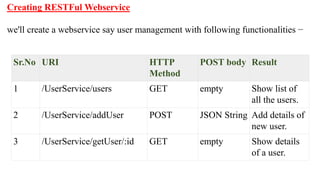
Creating RESTFul Webservice
we'll create a webservice say user management with following functionalities āˆ’
Sr.No URI HTTP
Method
POST body Result
1 /UserService/users GET empty Show list of
all the users.
2 /UserService/addUser POST JSON String Add details of
new user.
3 /UserService/getUser/:id GET empty Show details
of a user.
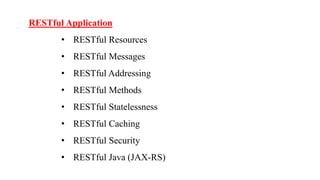
RESTful Application
• RESTful Resources
• RESTful Messages
• RESTful Addressing
• RESTful Methods
• RESTful Statelessness
• RESTful Caching
• RESTful Security
• RESTful Java (JAX-RS)
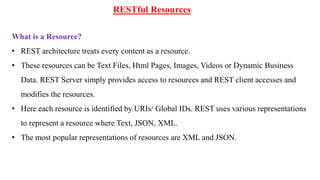
RESTful Resources
What is a Resource?
• REST architecture treats every content as a resource.
• These resources can be Text Files, Html Pages, Images, Videos or Dynamic Business
Data. REST Server simply provides access to resources and REST client accesses and
modifies the resources.
• Here each resource is identified by URIs/ Global IDs. REST uses various representations
to represent a resource where Text, JSON, XML.
• The most popular representations of resources are XML and JSON.
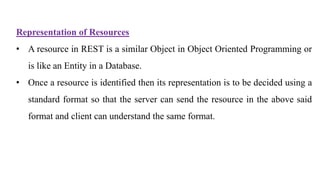
Representation of Resources
• A resource in REST is a similar Object in Object Oriented Programming or
is like an Entity in a Database.
• Once a resource is identified then its representation is to be decided using a
standard format so that the server can send the resource in the above said
format and client can understand the same format.
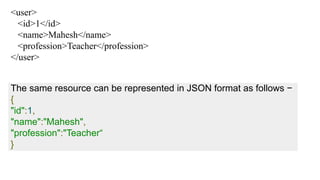
<user>
<id>1</id>
<name>Mahesh</name>
<profession>Teacher</profession>
</user>
The same resource can be represented in JSON format as follows āˆ’
{
"id":1,
"name":"Mahesh",
"profession":"Teacherā€œ
}
Good Resources Representation
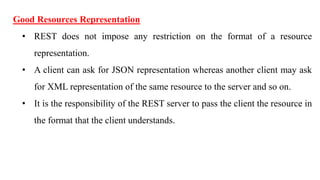
• REST does not impose any restriction on the format of a resource
representation.
• A client can ask for JSON representation whereas another client may ask
for XML representation of the same resource to the server and so on.
• It is the responsibility of the REST server to pass the client the resource in
the format that the client understands.
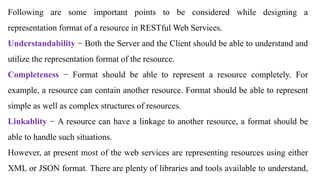
Following are some important points to be considered while designing a
representation format of a resource in RESTful Web Services.
Understandability āˆ’ Both the Server and the Client should be able to understand and
utilize the representation format of the resource.
Completeness āˆ’ Format should be able to represent a resource completely. For
example, a resource can contain another resource. Format should be able to represent
simple as well as complex structures of resources.
Linkablity āˆ’ A resource can have a linkage to another resource, a format should be
able to handle such situations.
However, at present most of the web services are representing resources using either
XML or JSON format. There are plenty of libraries and tools available to understand,
RESTful - Messages
RESTful Web Services make use of HTTP protocols as a medium of communication
between client and server. A client sends a message in form of a HTTP Request and the
server responds in the form of an HTTP Response. This technique is termed as Messaging.
These messages contain message data and metadata i.e. information about message itself.
Let us have a look on the HTTP Request and HTTP Response messages for HTTP 1.1.
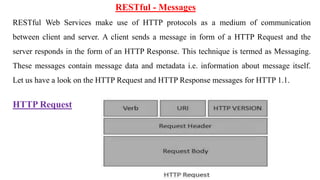
HTTP Request
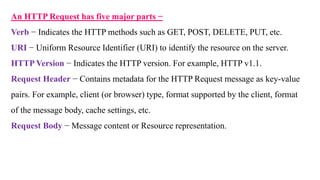
An HTTP Request has five major parts āˆ’
Verb āˆ’ Indicates the HTTP methods such as GET, POST, DELETE, PUT, etc.
URI āˆ’ Uniform Resource Identifier (URI) to identify the resource on the server.
HTTP Version āˆ’ Indicates the HTTP version. For example, HTTP v1.1.
Request Header āˆ’ Contains metadata for the HTTP Request message as key-value
pairs. For example, client (or browser) type, format supported by the client, format
of the message body, cache settings, etc.
Request Body āˆ’ Message content or Resource representation.
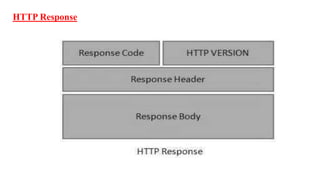
HTTP Response
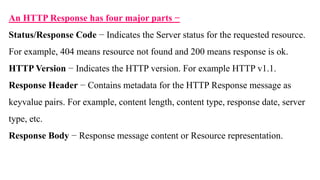
An HTTP Response has four major parts āˆ’
Status/Response Code āˆ’ Indicates the Server status for the requested resource.
For example, 404 means resource not found and 200 means response is ok.
HTTP Version āˆ’ Indicates the HTTP version. For example HTTP v1.1.
Response Header āˆ’ Contains metadata for the HTTP Response message as
keyvalue pairs. For example, content length, content type, response date, server
type, etc.
Response Body āˆ’ Response message content or Resource representation.
RESTful -Addressing
Addressing refers to locating a resource or multiple resources lying on the server. It is
analogous to locate a postal address of a person.
Each resource in REST architecture is identified by its URI (Uniform Resource Identifier). A
URI is of the following format āˆ’
<protocol>://<service-
name>/<ResourceType>/<ResourceID>
Purpose of an URI is to locate a resource(s) on the server hosting the web service. Another
important attribute of a request is VERB which identifies the operation to be performed on
the resource. For example, if the URI
is http://localhost:8080/UserManagement/rest/UserService/users and the VERB is GET.
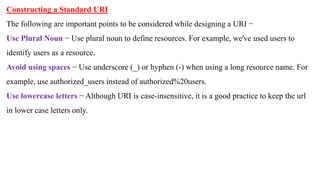
Constructing a Standard URI
The following are important points to be considered while designing a URI āˆ’
Use Plural Noun āˆ’ Use plural noun to define resources. For example, we've used users to
identify users as a resource.
Avoid using spaces āˆ’ Use underscore (_) or hyphen (-) when using a long resource name. For
example, use authorized_users instead of authorized%20users.
Use lowercase letters āˆ’ Although URI is case-insensitive, it is a good practice to keep the url
in lower case letters only.
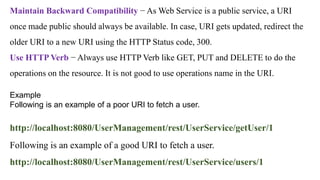
Example
Following is an example of a poor URI to fetch a user.
http://localhost:8080/UserManagement/rest/UserService/getUser/1
Following is an example of a good URI to fetch a user.
http://localhost:8080/UserManagement/rest/UserService/users/1
Maintain Backward Compatibility āˆ’ As Web Service is a public service, a URI
once made public should always be available. In case, URI gets updated, redirect the
older URI to a new URI using the HTTP Status code, 300.
Use HTTP Verb āˆ’ Always use HTTP Verb like GET, PUT and DELETE to do the
operations on the resource. It is not good to use operations name in the URI.
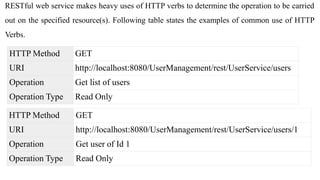
RESTful web service makes heavy uses of HTTP verbs to determine the operation to be carried
out on the specified resource(s). Following table states the examples of common use of HTTP
Verbs.
HTTP Method GET
URI http://localhost:8080/UserManagement/rest/UserService/users
Operation Get list of users
Operation Type Read Only
HTTP Method GET
URI http://localhost:8080/UserManagement/rest/UserService/users/1
Operation Get user of Id 1
Operation Type Read Only
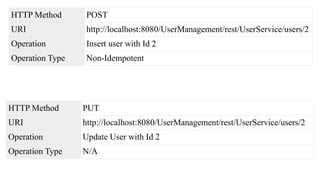
HTTP Method POST
URI http://localhost:8080/UserManagement/rest/UserService/users/2
Operation Insert user with Id 2
Operation Type Non-Idempotent
HTTP Method PUT
URI http://localhost:8080/UserManagement/rest/UserService/users/2
Operation Update User with Id 2
Operation Type N/A
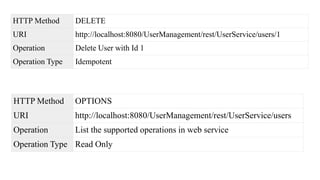
HTTP Method DELETE
URI http://localhost:8080/UserManagement/rest/UserService/users/1
Operation Delete User with Id 1
Operation Type Idempotent
HTTP Method OPTIONS
URI http://localhost:8080/UserManagement/rest/UserService/users
Operation List the supported operations in web service
Operation Type Read Only
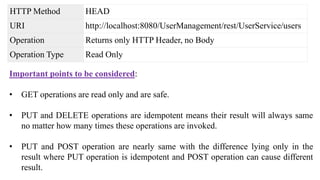
HTTP Method HEAD
URI http://localhost:8080/UserManagement/rest/UserService/users
Operation Returns only HTTP Header, no Body
Operation Type Read Only
Important points to be considered:
• GET operations are read only and are safe.
• PUT and DELETE operations are idempotent means their result will always same
no matter how many times these operations are invoked.
• PUT and POST operation are nearly same with the difference lying only in the
result where PUT operation is idempotent and POST operation can cause different
result.
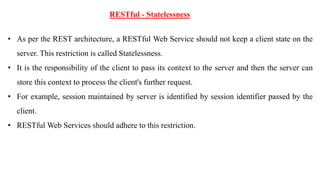
RESTful - Statelessness
• As per the REST architecture, a RESTful Web Service should not keep a client state on the
server. This restriction is called Statelessness.
• It is the responsibility of the client to pass its context to the server and then the server can
store this context to process the client's further request.
• For example, session maintained by server is identified by session identifier passed by the
client.
• RESTful Web Services should adhere to this restriction.
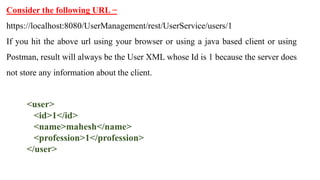
Consider the following URL āˆ’
https://localhost:8080/UserManagement/rest/UserService/users/1
If you hit the above url using your browser or using a java based client or using
Postman, result will always be the User XML whose Id is 1 because the server does
not store any information about the client.
<user>
<id>1</id>
<name>mahesh</name>
<profession>1</profession>
</user>
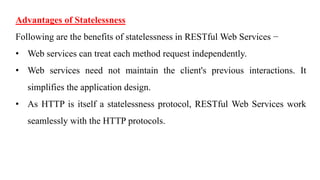
Advantages of Statelessness
Following are the benefits of statelessness in RESTful Web Services āˆ’
• Web services can treat each method request independently.
• Web services need not maintain the client's previous interactions. It
simplifies the application design.
• As HTTP is itself a statelessness protocol, RESTful Web Services work
seamlessly with the HTTP protocols.
Disadvantages of Statelessness
Following are the disadvantages of statelessness in RESTful Web Services āˆ’
Web services need to get extra information in each request and then interpret to
get the client's state in case the client interactions are to be taken care of.
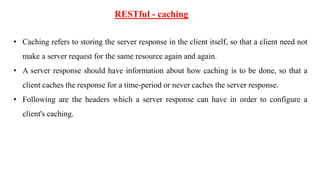
RESTful - caching
• Caching refers to storing the server response in the client itself, so that a client need not
make a server request for the same resource again and again.
• A server response should have information about how caching is to be done, so that a
client caches the response for a time-period or never caches the server response.
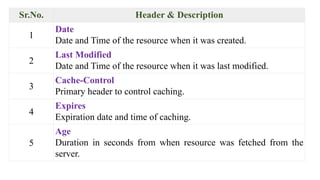
• Following are the headers which a server response can have in order to configure a
client's caching.
Sr.No. Header & Description
1
Date
Date and Time of the resource when it was created.
2
Last Modified
Date and Time of the resource when it was last modified.
3
Cache-Control
Primary header to control caching.
4
Expires
Expiration date and time of caching.
5
Age
Duration in seconds from when resource was fetched from the
server.
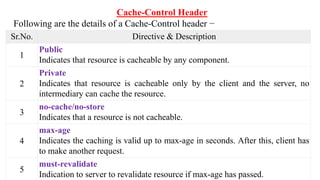
Cache-Control Header
Following are the details of a Cache-Control header āˆ’
Sr.No. Directive & Description
1
Public
Indicates that resource is cacheable by any component.
2
Private
Indicates that resource is cacheable only by the client and the server, no
intermediary can cache the resource.
3
no-cache/no-store
Indicates that a resource is not cacheable.
4
max-age
Indicates the caching is valid up to max-age in seconds. After this, client has
to make another request.
5
must-revalidate
Indication to server to revalidate resource if max-age has passed.
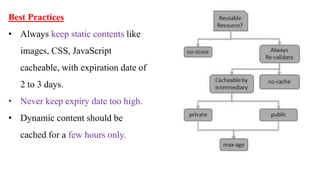
Best Practices
• Always keep static contents like
images, CSS, JavaScript
cacheable, with expiration date of
2 to 3 days.
• Never keep expiry date too high.
• Dynamic content should be
cached for a few hours only.
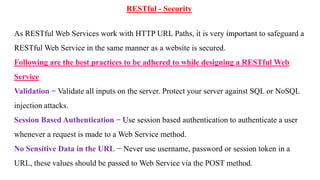
RESTful - Security
As RESTful Web Services work with HTTP URL Paths, it is very important to safeguard a
RESTful Web Service in the same manner as a website is secured.
Following are the best practices to be adhered to while designing a RESTful Web
Service
Validation āˆ’ Validate all inputs on the server. Protect your server against SQL or NoSQL
injection attacks.
Session Based Authentication āˆ’ Use session based authentication to authenticate a user
whenever a request is made to a Web Service method.
No Sensitive Data in the URL āˆ’ Never use username, password or session token in a
URL, these values should be passed to Web Service via the POST method.
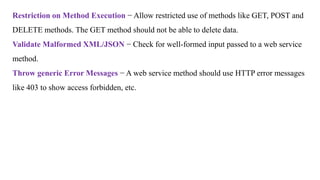
Restriction on Method Execution āˆ’ Allow restricted use of methods like GET, POST and
DELETE methods. The GET method should not be able to delete data.
Validate Malformed XML/JSON āˆ’ Check for well-formed input passed to a web service
method.
Throw generic Error Messages āˆ’ A web service method should use HTTP error messages
like 403 to show access forbidden, etc.
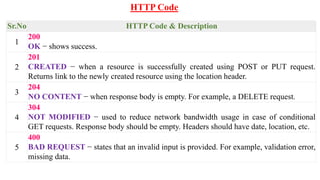
HTTP Code
Sr.No HTTP Code & Description
1
200
OK āˆ’ shows success.
2
201
CREATED āˆ’ when a resource is successfully created using POST or PUT request.
Returns link to the newly created resource using the location header.
3
204
NO CONTENT āˆ’ when response body is empty. For example, a DELETE request.
4
304
NOT MODIFIED āˆ’ used to reduce network bandwidth usage in case of conditional
GET requests. Response body should be empty. Headers should have date, location, etc.
5
400
BAD REQUEST āˆ’ states that an invalid input is provided. For example, validation error,
missing data.
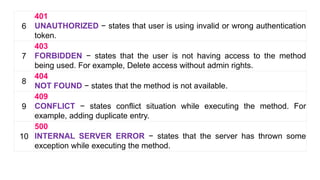
6
401
UNAUTHORIZED āˆ’ states that user is using invalid or wrong authentication
token.
7
403
FORBIDDEN āˆ’ states that the user is not having access to the method
being used. For example, Delete access without admin rights.
8
404
NOT FOUND āˆ’ states that the method is not available.
9
409
CONFLICT āˆ’ states conflict situation while executing the method. For
example, adding duplicate entry.
10
500
INTERNAL SERVER ERROR āˆ’ states that the server has thrown some
exception while executing the method.
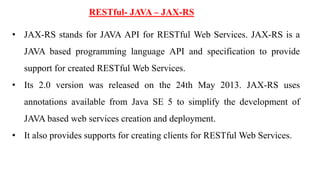
RESTful- JAVA – JAX-RS
• JAX-RS stands for JAVA API for RESTful Web Services. JAX-RS is a
JAVA based programming language API and specification to provide
support for created RESTful Web Services.
• Its 2.0 version was released on the 24th May 2013. JAX-RS uses
annotations available from Java SE 5 to simplify the development of
JAVA based web services creation and deployment.
• It also provides supports for creating clients for RESTful Web Services.
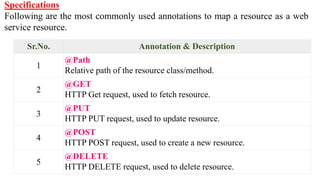
Specifications
Following are the most commonly used annotations to map a resource as a web
service resource.
Sr.No. Annotation & Description
1
@Path
Relative path of the resource class/method.
2
@GET
HTTP Get request, used to fetch resource.
3
@PUT
HTTP PUT request, used to update resource.
4
@POST
HTTP POST request, used to create a new resource.
5
@DELETE
HTTP DELETE request, used to delete resource.
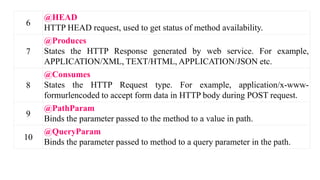
6
@HEAD
HTTP HEAD request, used to get status of method availability.
7
@Produces
States the HTTP Response generated by web service. For example,
APPLICATION/XML, TEXT/HTML, APPLICATION/JSON etc.
8
@Consumes
States the HTTP Request type. For example, application/x-www-
formurlencoded to accept form data in HTTP body during POST request.
9
@PathParam
Binds the parameter passed to the method to a value in path.
10
@QueryParam
Binds the parameter passed to method to a query parameter in the path.
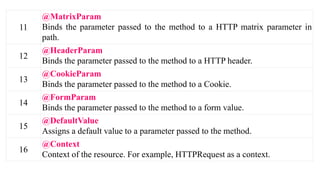
11
@MatrixParam
Binds the parameter passed to the method to a HTTP matrix parameter in
path.
12
@HeaderParam
Binds the parameter passed to the method to a HTTP header.
13
@CookieParam
Binds the parameter passed to the method to a Cookie.
14
@FormParam
Binds the parameter passed to the method to a form value.
15
@DefaultValue
Assigns a default value to a parameter passed to the method.
16
@Context
Context of the resource. For example, HTTPRequest as a context.
ROA.ppt

ROA.ppt

  • 1.
  • 2.
    In REST architecture,a REST Server simply provides access to resources and REST client accesses and modifies the resources. Here each resource is identified by URIs/ global IDs. REST uses various representation to represent a resource like text, JSON, XML. JSON is the most popular one. HTTP methods Following four HTTP methods are commonly used in REST based architecture. GET āˆ’ Provides a read only access to a resource. POST āˆ’ Used to create a new resource. DELETE āˆ’ Used to remove a resource. PUT āˆ’ Used to update a existing resource or create a new resource.
  • 3.
    Introduction to RESTFulweb services • A web service is a collection of open protocols and standards used for exchanging data between applications or systems. • Software applications written in various programming languages and running on various platforms can use web services to exchange data over computer networks like the Internet in a manner similar to inter-process communication on a single computer. • This interoperability (e.g., between Java and Python, or Windows and Linux applications) is due to the use of open standards.
  • 4.
    Web services basedon REST Architecture are known as RESTful web services. These web services uses HTTP methods to implement the concept of REST architecture. A RESTful web service usually defines a URI, Uniform Resource Identifier a service, provides resource representation such as JSON and set of HTTP Methods.
  • 5.
    Creating RESTFul Webservice we'llcreate a webservice say user management with following functionalities āˆ’ Sr.No URI HTTP Method POST body Result 1 /UserService/users GET empty Show list of all the users. 2 /UserService/addUser POST JSON String Add details of new user. 3 /UserService/getUser/:id GET empty Show details of a user.
  • 6.
    RESTful Application • RESTfulResources • RESTful Messages • RESTful Addressing • RESTful Methods • RESTful Statelessness • RESTful Caching • RESTful Security • RESTful Java (JAX-RS)
  • 7.
    RESTful Resources What isa Resource? • REST architecture treats every content as a resource. • These resources can be Text Files, Html Pages, Images, Videos or Dynamic Business Data. REST Server simply provides access to resources and REST client accesses and modifies the resources. • Here each resource is identified by URIs/ Global IDs. REST uses various representations to represent a resource where Text, JSON, XML. • The most popular representations of resources are XML and JSON.
  • 8.
    Representation of Resources •A resource in REST is a similar Object in Object Oriented Programming or is like an Entity in a Database. • Once a resource is identified then its representation is to be decided using a standard format so that the server can send the resource in the above said format and client can understand the same format.
  • 9.
    <user> <id>1</id> <name>Mahesh</name> <profession>Teacher</profession> </user> The same resourcecan be represented in JSON format as follows āˆ’ { "id":1, "name":"Mahesh", "profession":"Teacherā€œ }
  • 10.
    Good Resources Representation •REST does not impose any restriction on the format of a resource representation. • A client can ask for JSON representation whereas another client may ask for XML representation of the same resource to the server and so on. • It is the responsibility of the REST server to pass the client the resource in the format that the client understands.
  • 11.
    Following are someimportant points to be considered while designing a representation format of a resource in RESTful Web Services. Understandability āˆ’ Both the Server and the Client should be able to understand and utilize the representation format of the resource. Completeness āˆ’ Format should be able to represent a resource completely. For example, a resource can contain another resource. Format should be able to represent simple as well as complex structures of resources. Linkablity āˆ’ A resource can have a linkage to another resource, a format should be able to handle such situations. However, at present most of the web services are representing resources using either XML or JSON format. There are plenty of libraries and tools available to understand,
  • 12.
    RESTful - Messages RESTfulWeb Services make use of HTTP protocols as a medium of communication between client and server. A client sends a message in form of a HTTP Request and the server responds in the form of an HTTP Response. This technique is termed as Messaging. These messages contain message data and metadata i.e. information about message itself. Let us have a look on the HTTP Request and HTTP Response messages for HTTP 1.1. HTTP Request
  • 13.
    An HTTP Requesthas five major parts āˆ’ Verb āˆ’ Indicates the HTTP methods such as GET, POST, DELETE, PUT, etc. URI āˆ’ Uniform Resource Identifier (URI) to identify the resource on the server. HTTP Version āˆ’ Indicates the HTTP version. For example, HTTP v1.1. Request Header āˆ’ Contains metadata for the HTTP Request message as key-value pairs. For example, client (or browser) type, format supported by the client, format of the message body, cache settings, etc. Request Body āˆ’ Message content or Resource representation.
  • 14.
  • 15.
    An HTTP Responsehas four major parts āˆ’ Status/Response Code āˆ’ Indicates the Server status for the requested resource. For example, 404 means resource not found and 200 means response is ok. HTTP Version āˆ’ Indicates the HTTP version. For example HTTP v1.1. Response Header āˆ’ Contains metadata for the HTTP Response message as keyvalue pairs. For example, content length, content type, response date, server type, etc. Response Body āˆ’ Response message content or Resource representation.
  • 16.
    RESTful -Addressing Addressing refersto locating a resource or multiple resources lying on the server. It is analogous to locate a postal address of a person. Each resource in REST architecture is identified by its URI (Uniform Resource Identifier). A URI is of the following format āˆ’ <protocol>://<service- name>/<ResourceType>/<ResourceID> Purpose of an URI is to locate a resource(s) on the server hosting the web service. Another important attribute of a request is VERB which identifies the operation to be performed on the resource. For example, if the URI is http://localhost:8080/UserManagement/rest/UserService/users and the VERB is GET.
  • 17.
    Constructing a StandardURI The following are important points to be considered while designing a URI āˆ’ Use Plural Noun āˆ’ Use plural noun to define resources. For example, we've used users to identify users as a resource. Avoid using spaces āˆ’ Use underscore (_) or hyphen (-) when using a long resource name. For example, use authorized_users instead of authorized%20users. Use lowercase letters āˆ’ Although URI is case-insensitive, it is a good practice to keep the url in lower case letters only.
  • 18.
    Example Following is anexample of a poor URI to fetch a user. http://localhost:8080/UserManagement/rest/UserService/getUser/1 Following is an example of a good URI to fetch a user. http://localhost:8080/UserManagement/rest/UserService/users/1 Maintain Backward Compatibility āˆ’ As Web Service is a public service, a URI once made public should always be available. In case, URI gets updated, redirect the older URI to a new URI using the HTTP Status code, 300. Use HTTP Verb āˆ’ Always use HTTP Verb like GET, PUT and DELETE to do the operations on the resource. It is not good to use operations name in the URI.
  • 19.
    RESTful web servicemakes heavy uses of HTTP verbs to determine the operation to be carried out on the specified resource(s). Following table states the examples of common use of HTTP Verbs. HTTP Method GET URI http://localhost:8080/UserManagement/rest/UserService/users Operation Get list of users Operation Type Read Only HTTP Method GET URI http://localhost:8080/UserManagement/rest/UserService/users/1 Operation Get user of Id 1 Operation Type Read Only
  • 20.
    HTTP Method POST URIhttp://localhost:8080/UserManagement/rest/UserService/users/2 Operation Insert user with Id 2 Operation Type Non-Idempotent HTTP Method PUT URI http://localhost:8080/UserManagement/rest/UserService/users/2 Operation Update User with Id 2 Operation Type N/A
  • 21.
    HTTP Method DELETE URIhttp://localhost:8080/UserManagement/rest/UserService/users/1 Operation Delete User with Id 1 Operation Type Idempotent HTTP Method OPTIONS URI http://localhost:8080/UserManagement/rest/UserService/users Operation List the supported operations in web service Operation Type Read Only
  • 22.
    HTTP Method HEAD URIhttp://localhost:8080/UserManagement/rest/UserService/users Operation Returns only HTTP Header, no Body Operation Type Read Only Important points to be considered: • GET operations are read only and are safe. • PUT and DELETE operations are idempotent means their result will always same no matter how many times these operations are invoked. • PUT and POST operation are nearly same with the difference lying only in the result where PUT operation is idempotent and POST operation can cause different result.
  • 23.
    RESTful - Statelessness •As per the REST architecture, a RESTful Web Service should not keep a client state on the server. This restriction is called Statelessness. • It is the responsibility of the client to pass its context to the server and then the server can store this context to process the client's further request. • For example, session maintained by server is identified by session identifier passed by the client. • RESTful Web Services should adhere to this restriction.
  • 24.
    Consider the followingURL āˆ’ https://localhost:8080/UserManagement/rest/UserService/users/1 If you hit the above url using your browser or using a java based client or using Postman, result will always be the User XML whose Id is 1 because the server does not store any information about the client. <user> <id>1</id> <name>mahesh</name> <profession>1</profession> </user>
  • 25.
    Advantages of Statelessness Followingare the benefits of statelessness in RESTful Web Services āˆ’ • Web services can treat each method request independently. • Web services need not maintain the client's previous interactions. It simplifies the application design. • As HTTP is itself a statelessness protocol, RESTful Web Services work seamlessly with the HTTP protocols.
  • 26.
    Disadvantages of Statelessness Followingare the disadvantages of statelessness in RESTful Web Services āˆ’ Web services need to get extra information in each request and then interpret to get the client's state in case the client interactions are to be taken care of.
  • 27.
    RESTful - caching •Caching refers to storing the server response in the client itself, so that a client need not make a server request for the same resource again and again. • A server response should have information about how caching is to be done, so that a client caches the response for a time-period or never caches the server response. • Following are the headers which a server response can have in order to configure a client's caching.
  • 28.
    Sr.No. Header &Description 1 Date Date and Time of the resource when it was created. 2 Last Modified Date and Time of the resource when it was last modified. 3 Cache-Control Primary header to control caching. 4 Expires Expiration date and time of caching. 5 Age Duration in seconds from when resource was fetched from the server.
  • 29.
    Cache-Control Header Following arethe details of a Cache-Control header āˆ’ Sr.No. Directive & Description 1 Public Indicates that resource is cacheable by any component. 2 Private Indicates that resource is cacheable only by the client and the server, no intermediary can cache the resource. 3 no-cache/no-store Indicates that a resource is not cacheable. 4 max-age Indicates the caching is valid up to max-age in seconds. After this, client has to make another request. 5 must-revalidate Indication to server to revalidate resource if max-age has passed.
  • 30.
    Best Practices • Alwayskeep static contents like images, CSS, JavaScript cacheable, with expiration date of 2 to 3 days. • Never keep expiry date too high. • Dynamic content should be cached for a few hours only.
  • 31.
    RESTful - Security AsRESTful Web Services work with HTTP URL Paths, it is very important to safeguard a RESTful Web Service in the same manner as a website is secured. Following are the best practices to be adhered to while designing a RESTful Web Service Validation āˆ’ Validate all inputs on the server. Protect your server against SQL or NoSQL injection attacks. Session Based Authentication āˆ’ Use session based authentication to authenticate a user whenever a request is made to a Web Service method. No Sensitive Data in the URL āˆ’ Never use username, password or session token in a URL, these values should be passed to Web Service via the POST method.
  • 32.
    Restriction on MethodExecution āˆ’ Allow restricted use of methods like GET, POST and DELETE methods. The GET method should not be able to delete data. Validate Malformed XML/JSON āˆ’ Check for well-formed input passed to a web service method. Throw generic Error Messages āˆ’ A web service method should use HTTP error messages like 403 to show access forbidden, etc.
  • 33.
    HTTP Code Sr.No HTTPCode & Description 1 200 OK āˆ’ shows success. 2 201 CREATED āˆ’ when a resource is successfully created using POST or PUT request. Returns link to the newly created resource using the location header. 3 204 NO CONTENT āˆ’ when response body is empty. For example, a DELETE request. 4 304 NOT MODIFIED āˆ’ used to reduce network bandwidth usage in case of conditional GET requests. Response body should be empty. Headers should have date, location, etc. 5 400 BAD REQUEST āˆ’ states that an invalid input is provided. For example, validation error, missing data.
  • 34.
    6 401 UNAUTHORIZED āˆ’ statesthat user is using invalid or wrong authentication token. 7 403 FORBIDDEN āˆ’ states that the user is not having access to the method being used. For example, Delete access without admin rights. 8 404 NOT FOUND āˆ’ states that the method is not available. 9 409 CONFLICT āˆ’ states conflict situation while executing the method. For example, adding duplicate entry. 10 500 INTERNAL SERVER ERROR āˆ’ states that the server has thrown some exception while executing the method.
  • 35.
    RESTful- JAVA –JAX-RS • JAX-RS stands for JAVA API for RESTful Web Services. JAX-RS is a JAVA based programming language API and specification to provide support for created RESTful Web Services. • Its 2.0 version was released on the 24th May 2013. JAX-RS uses annotations available from Java SE 5 to simplify the development of JAVA based web services creation and deployment. • It also provides supports for creating clients for RESTful Web Services.
  • 36.
    Specifications Following are themost commonly used annotations to map a resource as a web service resource. Sr.No. Annotation & Description 1 @Path Relative path of the resource class/method. 2 @GET HTTP Get request, used to fetch resource. 3 @PUT HTTP PUT request, used to update resource. 4 @POST HTTP POST request, used to create a new resource. 5 @DELETE HTTP DELETE request, used to delete resource.
  • 37.
    6 @HEAD HTTP HEAD request,used to get status of method availability. 7 @Produces States the HTTP Response generated by web service. For example, APPLICATION/XML, TEXT/HTML, APPLICATION/JSON etc. 8 @Consumes States the HTTP Request type. For example, application/x-www- formurlencoded to accept form data in HTTP body during POST request. 9 @PathParam Binds the parameter passed to the method to a value in path. 10 @QueryParam Binds the parameter passed to method to a query parameter in the path.
  • 38.
    11 @MatrixParam Binds the parameterpassed to the method to a HTTP matrix parameter in path. 12 @HeaderParam Binds the parameter passed to the method to a HTTP header. 13 @CookieParam Binds the parameter passed to the method to a Cookie. 14 @FormParam Binds the parameter passed to the method to a form value. 15 @DefaultValue Assigns a default value to a parameter passed to the method. 16 @Context Context of the resource. For example, HTTPRequest as a context.