HighEdWeb Michigan
A New Content Management System:
From RFP to Launch in 12 Months
Your Speakers
Holly LaRose-Roenicke,
Assistant Director
Web Communications
Aaron Maturen,
Programmer
Web Technologies (ITS)
Jason Swackhamer,
Director
Web Communications
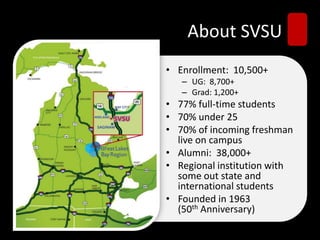
About SVSU
• Enrollment: 10,500+
– UG: 8,700+
– Grad: 1,200+
• 77% full-time students
• 70% under 25
• 70% of incoming freshman
live on campus
• Alumni: 38,000+
• Regional institution with
some out state and
international students
• Founded in 1963
(50th Anniversary)
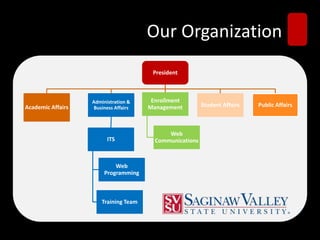
Our Organization
President
Academic Affairs
Administration &
Business Affairs
ITS
Web
Programming
Training Team
Enrollment
Management
Web
Communications
Student Affairs Public Affairs
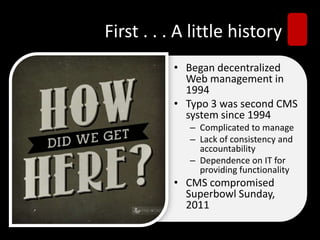
First . . . A little history
• Began decentralized
Web management in
1994
• Typo 3 was second CMS
system since 1994
– Complicated to manage
– Lack of consistency and
accountability
– Dependence on IT for
providing functionality
• CMS compromised
Superbowl Sunday,
2011
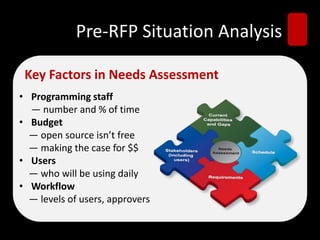
Pre-RFP Situation Analysis
• Programming staff
— number and % of time
• Budget
— open source isn’t free
— making the case for $$
• Users
— who will be using daily
• Workflow
— levels of users, approvers
Key Factors in Needs Assessment
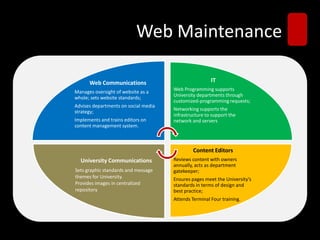
Web Maintenance
Web Communications
Manages oversight of website as a
whole; sets website standards;
Advises departments on social media
strategy;
Implements and trains editors on
content management system.
IT
Web Programming supports
University departments through
customized-programming requests;
Networking supports the
infrastructure to support the
network and servers
Content Editors
Reviews content with owners
annually, acts as department
gatekeeper;
Ensures pages meet the University’s
standards in terms of design and
best practice;
Attends Terminal Four training.
University Communications
Sets graphic standards and message
themes for University.
Provides images in centralized
repository
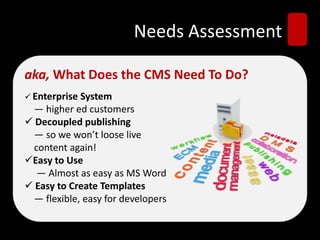
Needs Assessment
aka, What Does the CMS Need To Do?
 Enterprise System
— higher ed customers
 Decoupled publishing
— so we won’t loose live
content again!
Easy to Use
— Almost as easy as MS Word
 Easy to Create Templates
— flexible, easy for developers
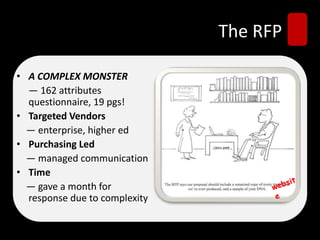
The RFP
• A COMPLEX MONSTER
— 162 attributes
questionnaire, 19 pgs!
• Targeted Vendors
— enterprise, higher ed
• Purchasing Led
— managed communication
• Time
— gave a month for
response due to complexity
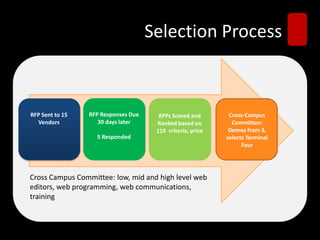
Selection Process
RFP Sent to 15
Vendors
RFP Responses Due
30 days later
5 Responded
RFPs Scored and
Ranked based on
119 criteria, price
Cross-Campus
Committee:
Demos from 3,
selects Terminal
Four
Cross Campus Committee: low, mid and high level web
editors, web programming, web communications,
training
Project Planning
Decisions, Decisions
• Design (templates, CSS)
• Sitemap
• Migration Planning
–All at once or phased?
–Who does it?
• Launch (how, timing)
Evaluate Current Website
Planning for Migration (Typo3 to T4)
 6,102 Pages
 Find patterns for categorizing content
 Create rules for finding content to
import into templates
 Never logged in to Typo3 back end
Set up new Environment
Terminal Four (T4)
 Create new templates for migrating
content into
 Port over CSS and page styles
Transform Hierarchy
Build New Site Structure
 Used excel to define the new structure
for the hierarchy
 Used python to create the pages in new
CMS and keep a reference of where they
were in old CMS
Tip: Use this as opportunity to fix site
structure (nested sites)
Content Migration
Import Content
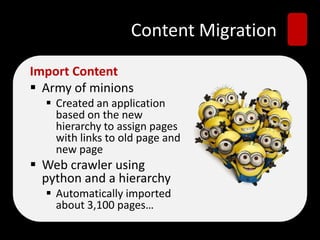
 Army of minions
 Created an application
based on the new
hierarchy to assign pages
with links to old page and
new page
 Web crawler using
python and a hierarchy
 Automatically imported
about 3,100 pages…
Media Asset Migration
 Media had to initially
be imported by a
minion into T4
 All of the links to
images, PDFs, and
files had to be
relinked manually
Tip: All media will need
to be imported and
linked.
Quality Control
 Minions were
responsible for checking
their assigned pages
 Web Communications
also spot checked pages
Tip: Have content owners check
their content and website before
launch
Training for Admins
“Train the Trainer”
• Training from
vendor
• Training done on
“training accounts”,
not live sites
• Began converting
our own websites
Content Editor Training
Required for Login
• Login access given at end of training
- no exceptions
• Conducted using “training accounts”,
not live sites
• Conducted (25) 90-minute trainings
in 6 months, training 145 people
• Any changes made to live sites
between conversion and training
were done by minions, but from
training to launch were their
responsibility to update
Tips To Training Success
• Holding back login access
• Encourage users from same
department to go together
• Improved documentation –
ask vendors to see if they
have documentation to build
from
• Empower users with choices
and tools to improve websites
• Continuous help “T4
Tuesdays”
Redefining Roles
Web Communications (Content)
• Meet with every department annually
– Review content for accuracy
– Set goals/ priorities
– Review analytics
– Provide “report card”
• Assist Content Editors
• Provide training
• Administer access rights
Redefining Roles
Web Technologies (Programming)
• Administer template improvements and technical
aspects of CMS support
• New process for project requests
– New content templates
– Forms
– Special programming
• Clearinghouse for all online forms
• Cross training within department
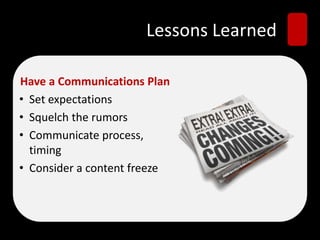
Lessons Learned
Have a Communications Plan
• Set expectations
• Squelch the rumors
• Communicate process,
timing
• Consider a content freeze
Lesson Learned
Conduct a Crisis Plan
• Brainstorm worst-case scenarios and
solutions
 Search broken
 Links to all media files broken
 Server space maxing out
Lessons Learned
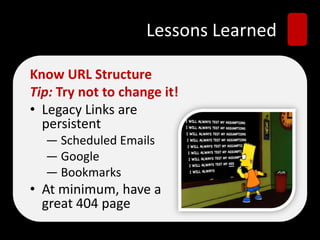
Know URL Structure
Tip: Try not to change it!
• Legacy Links are
persistent
— Scheduled Emails
— Google
— Bookmarks
• At minimum, have a
great 404 page
Lessons Learned
Anticipate What’ll Break (Forms)
• Some forms were processed by old CMS
 These broke
• Some were “included” with php on page
 These broke
• Some were external links
 Worked!
Tip: Include forms in migration schedule
Lessons Learned
Triple-Check Server Setup
 If you don’t want a phone call
at 4 a.m., make sure that there
is enough space on your
server for the website.
Lessons Learned
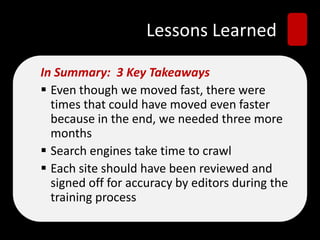
In Summary: 3 Key Takeaways
 Even though we moved fast, there were
times that could have moved even faster
because in the end, we needed three more
months
 Search engines take time to crawl
 Each site should have been reviewed and
signed off for accuracy by editors during the
training process
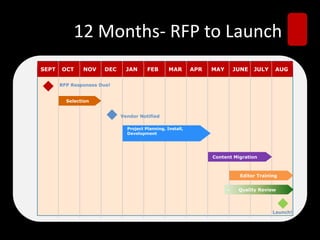
12 Months- RFP to Launch
- Selection
- Editor Training
RFP Responses Due!
Vendor Notified
-Project Planning, Install,
-Development
- Content Migration
- Quality Review
OCT NOV DEC JAN FEB MAR APR MAY JUNE JULY AUG
- Selection
- Editor Training
RFP Responses Due!
Vendor Notified
-Project Planning, Install,
-Development
- Content Migration
- Quality Review
SEPT OCT NOV DEC JAN FEB MAR APR MAY JUNE JULY AUG
Selection
Editor Training
RFP Responses Due!
Vendor Notified
Project Planning, Install,
Development
Content Migration
- Quality Review
Launch!
Lessons Learned
In Summary: 3 Key Takeaways
 Even though we moved fast, there were
times that could have moved even faster
because in the end, we needed three more
months
 Search engines take time to crawl
 Each site should have been reviewed and
signed off for accuracy by editors during the
training process
Questions, Comments, Discussion
Holly LaRose-Roenicke,
Assistant Director
Web Communications
hmlarose@svsu.edu
Aaron Maturen,
Programmer
Web Technologies (ITS)
atmature@svsu.edu
Jason Swackhamer,
Director
Web Communications
jjswack1@svsu.edu
@jswacky
Slides available via Tweet Deck:

Rfp to launch

  • 1.
    HighEdWeb Michigan A NewContent Management System: From RFP to Launch in 12 Months
  • 2.
    Your Speakers Holly LaRose-Roenicke, AssistantDirector Web Communications Aaron Maturen, Programmer Web Technologies (ITS) Jason Swackhamer, Director Web Communications
  • 3.
    About SVSU • Enrollment:10,500+ – UG: 8,700+ – Grad: 1,200+ • 77% full-time students • 70% under 25 • 70% of incoming freshman live on campus • Alumni: 38,000+ • Regional institution with some out state and international students • Founded in 1963 (50th Anniversary)
  • 4.
    Our Organization President Academic Affairs Administration& Business Affairs ITS Web Programming Training Team Enrollment Management Web Communications Student Affairs Public Affairs
  • 5.
    First . .. A little history • Began decentralized Web management in 1994 • Typo 3 was second CMS system since 1994 – Complicated to manage – Lack of consistency and accountability – Dependence on IT for providing functionality • CMS compromised Superbowl Sunday, 2011
  • 6.
    Pre-RFP Situation Analysis •Programming staff — number and % of time • Budget — open source isn’t free — making the case for $$ • Users — who will be using daily • Workflow — levels of users, approvers Key Factors in Needs Assessment
  • 7.
    Web Maintenance Web Communications Managesoversight of website as a whole; sets website standards; Advises departments on social media strategy; Implements and trains editors on content management system. IT Web Programming supports University departments through customized-programming requests; Networking supports the infrastructure to support the network and servers Content Editors Reviews content with owners annually, acts as department gatekeeper; Ensures pages meet the University’s standards in terms of design and best practice; Attends Terminal Four training. University Communications Sets graphic standards and message themes for University. Provides images in centralized repository
  • 8.
    Needs Assessment aka, WhatDoes the CMS Need To Do?  Enterprise System — higher ed customers  Decoupled publishing — so we won’t loose live content again! Easy to Use — Almost as easy as MS Word  Easy to Create Templates — flexible, easy for developers
  • 9.
    The RFP • ACOMPLEX MONSTER — 162 attributes questionnaire, 19 pgs! • Targeted Vendors — enterprise, higher ed • Purchasing Led — managed communication • Time — gave a month for response due to complexity
  • 10.
    Selection Process RFP Sentto 15 Vendors RFP Responses Due 30 days later 5 Responded RFPs Scored and Ranked based on 119 criteria, price Cross-Campus Committee: Demos from 3, selects Terminal Four Cross Campus Committee: low, mid and high level web editors, web programming, web communications, training
  • 11.
    Project Planning Decisions, Decisions •Design (templates, CSS) • Sitemap • Migration Planning –All at once or phased? –Who does it? • Launch (how, timing)
  • 12.
    Evaluate Current Website Planningfor Migration (Typo3 to T4)  6,102 Pages  Find patterns for categorizing content  Create rules for finding content to import into templates  Never logged in to Typo3 back end
  • 13.
    Set up newEnvironment Terminal Four (T4)  Create new templates for migrating content into  Port over CSS and page styles
  • 14.
    Transform Hierarchy Build NewSite Structure  Used excel to define the new structure for the hierarchy  Used python to create the pages in new CMS and keep a reference of where they were in old CMS Tip: Use this as opportunity to fix site structure (nested sites)
  • 15.
    Content Migration Import Content Army of minions  Created an application based on the new hierarchy to assign pages with links to old page and new page  Web crawler using python and a hierarchy  Automatically imported about 3,100 pages…
  • 16.
    Media Asset Migration Media had to initially be imported by a minion into T4  All of the links to images, PDFs, and files had to be relinked manually Tip: All media will need to be imported and linked.
  • 17.
    Quality Control  Minionswere responsible for checking their assigned pages  Web Communications also spot checked pages Tip: Have content owners check their content and website before launch
  • 18.
    Training for Admins “Trainthe Trainer” • Training from vendor • Training done on “training accounts”, not live sites • Began converting our own websites
  • 19.
    Content Editor Training Requiredfor Login • Login access given at end of training - no exceptions • Conducted using “training accounts”, not live sites • Conducted (25) 90-minute trainings in 6 months, training 145 people • Any changes made to live sites between conversion and training were done by minions, but from training to launch were their responsibility to update
  • 20.
    Tips To TrainingSuccess • Holding back login access • Encourage users from same department to go together • Improved documentation – ask vendors to see if they have documentation to build from • Empower users with choices and tools to improve websites • Continuous help “T4 Tuesdays”
  • 21.
    Redefining Roles Web Communications(Content) • Meet with every department annually – Review content for accuracy – Set goals/ priorities – Review analytics – Provide “report card” • Assist Content Editors • Provide training • Administer access rights
  • 22.
    Redefining Roles Web Technologies(Programming) • Administer template improvements and technical aspects of CMS support • New process for project requests – New content templates – Forms – Special programming • Clearinghouse for all online forms • Cross training within department
  • 23.
    Lessons Learned Have aCommunications Plan • Set expectations • Squelch the rumors • Communicate process, timing • Consider a content freeze
  • 24.
    Lesson Learned Conduct aCrisis Plan • Brainstorm worst-case scenarios and solutions  Search broken  Links to all media files broken  Server space maxing out
  • 25.
    Lessons Learned Know URLStructure Tip: Try not to change it! • Legacy Links are persistent — Scheduled Emails — Google — Bookmarks • At minimum, have a great 404 page
  • 26.
    Lessons Learned Anticipate What’llBreak (Forms) • Some forms were processed by old CMS  These broke • Some were “included” with php on page  These broke • Some were external links  Worked! Tip: Include forms in migration schedule
  • 27.
    Lessons Learned Triple-Check ServerSetup  If you don’t want a phone call at 4 a.m., make sure that there is enough space on your server for the website.
  • 28.
    Lessons Learned In Summary:3 Key Takeaways  Even though we moved fast, there were times that could have moved even faster because in the end, we needed three more months  Search engines take time to crawl  Each site should have been reviewed and signed off for accuracy by editors during the training process
  • 29.
    12 Months- RFPto Launch - Selection - Editor Training RFP Responses Due! Vendor Notified -Project Planning, Install, -Development - Content Migration - Quality Review OCT NOV DEC JAN FEB MAR APR MAY JUNE JULY AUG - Selection - Editor Training RFP Responses Due! Vendor Notified -Project Planning, Install, -Development - Content Migration - Quality Review SEPT OCT NOV DEC JAN FEB MAR APR MAY JUNE JULY AUG Selection Editor Training RFP Responses Due! Vendor Notified Project Planning, Install, Development Content Migration - Quality Review Launch!
  • 30.
    Lessons Learned In Summary:3 Key Takeaways  Even though we moved fast, there were times that could have moved even faster because in the end, we needed three more months  Search engines take time to crawl  Each site should have been reviewed and signed off for accuracy by editors during the training process
  • 31.
    Questions, Comments, Discussion HollyLaRose-Roenicke, Assistant Director Web Communications hmlarose@svsu.edu Aaron Maturen, Programmer Web Technologies (ITS) atmature@svsu.edu Jason Swackhamer, Director Web Communications jjswack1@svsu.edu @jswacky Slides available via Tweet Deck: