Module Objectives
• Bythe end of this module participants will be able
to:
• Interpret routing information in the routing table
• Differentiate between the dynamic routing methods
available on the FortiGate unit
• Create static and dynamic routes on the FortiGate unit
Routing
• Routing isthe process of moving
packets of data between devices on a
network from a source to a final
destination
• The destination address is used to
determine where the packets must go
Routing Table
• Therouting table provides the FortiGate unit
with the information it needs to forward a
packet to particular destination on a network
• The FortiGate unit looks in its routing table to
establish the best route to the destination
• The routing table can be built and updated
manually using static routing information
• Routing table entries can also be updated
dynamically
• Dynamic routing algorithms are used to adjust network
paths by analyzing routing update information
7.
Route Elements
• Eachroute in the routing table includes the
following elements:
• IP address/mask
• Gateway IP address/interface
• Distance
• Metric
• Priority
• Device
• Dead Gateway Detection
Click here to read more about route elements
Autonomous Systems
Autonomous System(AS)
ISP1
Autonomous System (AS)
ISP2
Autonomous System (AS)
ISP3
• An autonomous system (AS) is a
collection of connected Internet
Protocol routing prefixes under the
control of one or more network
operators
• Sometimes referred to as a routing domain
Interior Gateway Protocol
AutonomousSystem (AS)
ISP1
• An Interior Gateway Protocol (IGP) is a routing
protocol that is used to exchange routing
information within an autonomous system
• Interior Gateway Protocols can be divided into
two categories
• Distance-vector routing protocols
• Link-state routing protocols
Exterior Gateway Protocol
AutonomousSystem (AS)
ISP1
Autonomous System (AS)
ISP2
Autonomous System (AS)
ISP3
BGP BGP
• An Exterior Gateway Protocol (EGP) is
used to determine network
reachability between autonomous
systems
• Makes use of Interior Gateway Protocols to
resolve routes within an AS
14.
Static Routes
• Astatic route allows packets to be forwarded to a
destination other than the default gateway
• Static routes control traffic exiting the FortiGate
unit
• Specify through which interface the packet will leave and to
which device the packet should be routed
• Static routes defined manually
Route Selection
• InFortiOS the route selection process considers the
following:
• A route is considered only if the outgoing interface is not down
• If multiple routes are available for same subnet, only the
lowest distance is chosen
• For dynamic routes, if multiple routes have the same distance,
the lowest metric value is chosen
• For dynamic routes, the protocol used will determine the route
when multiple routes have the same distance and metric
• All active routes are placed in routing table, the most specific
route will be matched first
• Policy routing is applied before routing table lookups
18.
Route Selection
• TheFortiGate unit only performs routing lookup for
the first packet of the session
• Routing information written to session table
• All packets for that session will use same path
• Exception: After topology change, route information is
flushed from sessions and must be relearned
19.
Route Distance
• Routedistance is configurable for all types of
routes, except direct interfaces
• Default distance settings on the FortiGate unit:
• Directly connected 0
• Static routes 10
• EBGP routes 20
• OSPF routes 110
• RIP routes 120
• IBGP routes 200
20.
Policy Routing
• Withpolicy routing, decisions are based on criteria
other than the destination only
• Packets can be routed based on:
• Protocol
• Source address
• Destination address
• Destination ports
• Type of Service (ToS) bits
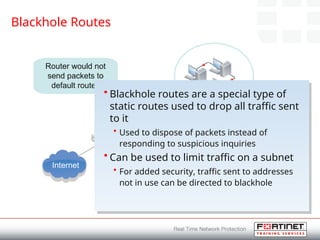
Blackhole Routes
Subnet:192.168.1.0/24
Router: 192.168.1.1
Defaultroute to Internet:
0.0.0.0
Internet
Router would not
send packets to
default routes
• Blackhole routes are a special type of
static routes used to drop all traffic sent
to it
• Used to dispose of packets instead of
responding to suspicious inquiries
• Can be used to limit traffic on a subnet
• For added security, traffic sent to addresses
not in use can be directed to blackhole
24.
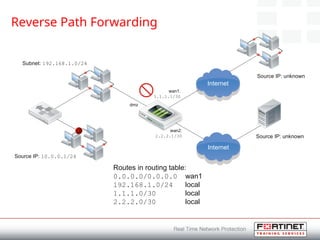
Reverse Path Forwarding
•Reverse Path Forwarding (RPF) protects against IP
spoofing attacks
• Checks the source IP address of all packets
• If path back to the source address does not match the path
the packet is coming from, it is dropped
• RPF is only carried out on the first packet in the
session
• Not on reply traffic, as long as traffic is symmetric
• Debug flow will show packet being dropped
• “Reverse path check fail, drop”
25.
Reverse Path Forwarding
Subnet:192.168.1.0/24
Routes in routing table:
0.0.0.0/0.0.0.0 wan1
192.168.1.0/24 local
1.1.1.0/30 local
2.2.2.0/30 local
Internet
Source IP: 10.0.0.1/24
dmz
wan1:
1.1.1.1/30
wan2:
2.2.2.1/30
Source IP: unknown
Source IP: unknown
Internet
26.
Reverse Path Forwarding
Subnet:192.168.1.0/24
Routes in routing table:
0.0.0.0/0.0.0.0 wan1(static)
10.0.0.0/24 dmz (static)
192.168.1.0/24 local
1.1.1.0/30 local
2.2.2.0/30 local
Source IP: 10.0.0.1/24
dmz
wan1:
1.1.1.1/30
wan2:
2.2.2.1/30
Source IP: unknown
Source IP: unknown
Internet
Internet
27.
Reverse Path Forwarding
Subnet:192.168.1.0/24
Routes in routing table:
0.0.0.0/0.0.0.0 wan1
192.168.1.0/24 local
1.1.1.0/30 local
2.2.2.0/30 local
Internet
Source IP: 10.0.0.1/24
dmz
wan1:
1.1.1.1/30
wan2:
2.2.2.1/30
Source IP: unknown
Source IP: unknown
Internet
28.
Reverse Path Forwarding
Subnet:192.168.1.0/24
Routes in routing table:
0.0.0.0/0.0.0.0 wan1
0.0.0.0/0.0.0.0 wan2
192.168.1.0/24 local
1.1.1.0/30 local
2.2.2.0/30 local
Source IP: 10.0.0.1/24
dmz
wan1:
1.1.1.1/30
wan2:
2.2.2.1/30
Source IP: unknown
Source IP: unknown
Internet
Internet
29.
Reverse Path Forwarding
Subnet:192.168.1.0/24
Routes in routing table:
0.0.0.0/0.0.0.0 wan1(static)
0.0.0.0/0.0.0.0 wan2(static)
10.0.0.0/24 dmz (static)
192.168.1.0/24 local
1.1.1.0/30 local
2.2.2.0/30 local
Source IP: 10.0.0.1/24
dmz
wan1:
1.1.1.1/30
wan2:
2.2.2.1/30
Source IP: unknown
Source IP: unknown
Internet
Internet
Both default routes
have same distance
and priority → ECMP
30.
Reverse Path Forwarding
Subnet:192.168.1.0/24
Routes in routing table:
0.0.0.0/0.0.0.0 wan1(static)
0.0.0.0/0.0.0.0 wan2(static)
10.0.0.0/24 dmz (static)
192.168.1.0/24 local
1.1.1.0/30 local
2.2.2.0/30 local
Source IP: 10.0.0.1/24
dmz
wan1:
1.1.1.1/30
wan2:
2.2.2.1/30
Source IP: unknown
Source IP: unknown
Internet
Internet
config router static
edit <2nd
default
route index>
set priority 10
end
31.
Reverse Path Forwarding
Subnet:192.168.1.0/24
Routes in routing table:
0.0.0.0/0.0.0.0 wan2(static)
10.0.0.0/24 dmz (static)
192.168.1.0/24 local
1.1.1.0/30 local
2.2.2.0/30 local
Source IP: 10.0.0.1/24
dmz
wan1:
1.1.1.1/30
wan2:
2.2.2.1/30
Source IP: unknown
Source IP: unknown
Internet
Internet
32.
Reverse Path ForwardingModes
• RPF check can be configured to be more strict
• Strict Reverse Path Forwarding
• Source address looked up in FIB, if packet received on
interface used to forward traffic to the source, packet
allowed
• Loose Reverse Path Forwarding (FortiGate unit
default)
• Checks only for the existence of a route for the receiving
interface, packet is forwarded even if a better route is
available on another interface
Dynamic Routes
• Withdynamic routing information is shared with neighboring
routers
• Devices learn about routes and networks advertised by neighbors
• The FortiGate unit selects the best route to a destination and
updates the routing table based on defined rules
• The FortiGate unit supports the following dynamic routing
protocols:
• Routing Information Protocol (RIP)
• Open Shortest Path First (OSPF)
• Border Gateway Protocol (BGP)
• Intermediate System to Intermediate System (IS-IS)
Click here to read more about dynamic routing
37.
Routing Information Protocol
•With the Routing Information Protocol (RIP), the
FortiGate unit broadcasts requests for RIP updates
• Neighbors respond with information from their routing table
• The FortiGate unit adds routes from neighbors only if these
are not already recorded in the routing table
• Uses hop count to choose best route
• Each network that a packet travels though to the destination
counts as one hop
• If there are two routes to same destination, the FortiGate
unit selects one with lowest hop count
38.
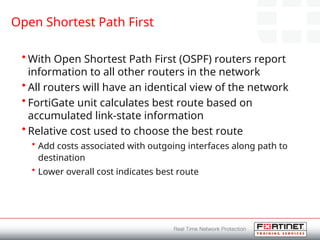
Open Shortest PathFirst
• With Open Shortest Path First (OSPF) routers report
information to all other routers in the network
• All routers will have an identical view of the network
• FortiGate unit calculates best route based on
accumulated link-state information
• Relative cost used to choose the best route
• Add costs associated with outgoing interfaces along path to
destination
• Lower overall cost indicates best route
39.
Open Shortest PathFirst
• Depending on the network topology, entries in the
FortiGate unit routing table may include:
• Addresses of networks in local OSPF area
• Where packets are sent directly
• Routes to OSPF area border routers (ABR)
• Where packets are sent when they are destined for another area
• The OSPF system is divided into ABRs
• ABRs link one or more areas to OSPF backbone
• Maintain database of topologies from each connected area
40.
Open Shortest PathFirst
New York Chicago
Boston
Backbone
Area 0
ABR
ABR ABR
41.
Open Shortest PathFirst Configuration
• When configuring OSPF, the following parameters must be
identified:
• Router ID
• Used to identify the FortiGate unit to other OSPF routers
• Areas
• Identifies a set of networks grouped together for administrative purposes
• Networks to advertise
• The interfaces participating in OSPF (optional)
• This object allows the default OSPF settings to be changed for the
interfaces
• An adjacency can only be formed if two neighbors have some of
the same interface attributes, including:
• Area ID
• Hello Interval
• Dead Interval
42.
Border Gateway Protocol
•With Border Gateway Protocol (BGP) reachability
information is exchanged between configured peers
• Does not discover network topology
• Constructs a graph of autonomous system (AS)
connectivity
• Routing loops may be pruned
• Policy decisions may be enforced
• The FortiGate unit accepts BGP routes and enters
them into the routing table
• An AS-PATH is built to get to a destination
• Multiple paths can exist
43.
Border Gateway Protocol
AS701 (ISP 1) AS 702 (ISP 2) AS 703 (ISP 3)
AS 704 (ISP 4) AS 705 (ISP 5)
AS 706 (ISP 6)
Starting point
Destination
AS Path: AS 701 → AS 702 → AS 703 → AS 705 → AS 706
44.
Border Gateway ProtocolConfiguration
• BGP is run in the context of VDOMs
• EBGP routes default distance of 20
• Preferred over OSPF and RIP
• Less preferred than static routes
45.
Bi-Directional Forwarding
Detection
• Dynamicrouting can have problems detecting
device failures on network
• Bi-Directional Forwarding Detection (BFD) can detect
failures faster than the protocols and can reroute
• The FortiGate unit supports BFD as part of OSPF and
BGP
• Once a connection to router is established, BFD
checks the status frequently
• If router goes down, routing is changed accordingly
• BFD will continue to monitor the status of the router and will
reset the routes once available
46.
Intermediate System toIntermediate
System
• Intermediate System to Intermediate System (IS-IS)
operates by flooding link state information
throughout the network of routers
• Each IS-IS router independently builds a database
of the network's topology
• Aggregates the flooded network information.
• Like the OSPF protocol, IS-IS uses the Dijkstra
algorithm for computing the best path through the
network
47.
Multicast Routing
• Multicastrouting consists of a single multicast source sending
data to many receivers
• Conserve bandwidth
• Reduce network traffic
• Source only needs to transmit single stream of data to
multicast router
• Data routed to receivers
• Routing decision based on source and destination address of multicast
packet
• Can apply NAT to multicast packets
• FortiGate unit can be configured as multicast router in
NAT/Route Mode
48.
Equal Cost Multipath
•If more than one Equal Cost Multipath (ECMP)
route is available, the method the FortiGate unit
uses to select the route can be configured
• Source based
• All the sessions generated from the same source IP address
will always use the same route
• Weight based
• Routes with higher weight are chosen
• Spill-over
• The same route will be used until the spill-over threshold is
reached. At this point, the next interface is chosen
49.
Routing Diagnostic Commands
getrouter info routing-table all
Codes: K - kernel, C - connected, S - static, R - RIP, B - BGP
O - OSPF, IA - OSPF inter area
N1 - OSPF NSSA external type 1, N2 - OSPF NSSA external type 2
E1 - OSPF external type 1, E2 - OSPF external type 2
i - IS-IS, L1 - IS-IS level-1, L2 - IS-IS level-2, ia - IS-IS
inter area
* - candidate default
O*E2 0.0.0.0/0 [110/10] via 192.168.11.254, wan1, 01:29:24
C 172.16.78.0/24 is directly connected, wan2
O 192.168.1.0/24 [110/200] via 192.168.11.59, internal, 01:30:28
C 192.168.3.0/24 is directly connected, dmz
C 192.168.11.0/24 is directly connected, internal
S 192.168.96.0/19 [10/0] is directly connected, linkA0
S 192.168.192.0/19 [10/0] is directly connected, linkB0
50.
Routing Diagnostic Commands
getrouter info routing-table database
Codes: K - kernel, C - connected, S - static, R - RIP, B - BGP
O - OSPF, IA - OSPF inter area
N1 - OSPF NSSA external type 1, N2 - OSPF NSSA external type 2
E1 - OSPF external type 1, E2 - OSPF external type 2
i - IS-IS, L1 - IS-IS level-1, L2 - IS-IS level-2, ia - IS-IS inter area
> - selected route, * - FIB route, p - stale info
S 0.0.0.0/0 [15/0] via 172.16.110.2, wan1
O E2 0.0.0.0/0 [110/10] via 10.1.1.2, prvAroot-0, 00:01:37
S *> 0.0.0.0/0 [5/0] via 172.16.110.1, wan1
S 0.0.0.0/0 [10/0] via 192.168.1.1, wan1 inactive
Routing Diagnostic Commands
getrouter info protocols
Routing Protocol is "ospf 0"
Invalid after 0 seconds, hold down 0, flushed after 0
Outgoing update filter list for all interfaces is
Incoming update filter list for all interfaces is
Redistributing: system
Routing for Networks:
172.16.0.0/16
192.168.3.0/24
192.168.64.0/18
Routing Protocol is "bgp 100"
IGP synchronization is disabled
Automatic route summarization is disabled
Default local-preference applied to incoming route is 100
Redistributing: connected
Neighbor(s):
Address AddressFamily FiltIn FiltOut DistIn DistOut RouteMapIn
RouteMapOut Weight
192.168.101.1 unicast
54.
• Lab -Routing
• Configuring dead gateway detection
• Configuring default static routes
• Configuring policy routes
Click here for step-by-step instructions on completing this la
b
Lab
#3 Routing is the process of moving packets of data between devices on a network from a source to a final destination.
When a packet is received by an interface, the destination address is used to determine where it must go.
#5 The routing table provides the FortiGate unit with the information it needs to forward a packet to particular destination on a network.
When a packet is received, the FortiGate unit does a lookup in its routing table to establish the best route to the destination.
The routing table can be built and updated manually using static routing information:
If a static route changes, routers do not immediately share the new information.
Routers only know about the networks the administrator wants them to know about.
Routing table entries can also be updated dynamically:
Dynamic routing algorithms are used to adjust network paths by analyzing routing update information.
This changes the routing table to reflect new routing information required to forward packets.
Routing protocols submit their best routes for each destination
A default route entry in the routing table is used if the destination network is not explicitly listed in the routing table
#7 Each route in the routing table includes the following elements:
IP address/mask
Provides addressing information for which the route is defined
Gateway IP address/interface
Defines where the packet should be forwarded for the IP address
Distance
Determines which routing information is included in the routing table
When multiple routes exist to the same destination, the lowest distant route will be preferred
Metric
Applies to dynamic routing and determines which route to use when the routes have the same distance
The lowest metric is preferred
Priority
A priority applies to static routes and determines the preference of identical static routes, same distance and same destination
If the priorities are different then the lowest priority route is used
Device
The device is the locally-bound interface for the route
Dead Gateway Detection
Dead Gateway Detection detects failure of a default gateway and adjusts the routing table to use another default gateway
Dead Gateway Detection uses ping servers to test the gateway
By pinging devices behind the gateway, link failures can be detected
#8 An Autonomous System (AS) is a collection of connected Internet Protocol routing prefixes under the control of one or more network operators.
Sometimes referred to as a routing domain.
#10 An Interior Gateway Protocol (IGP) is a routing protocol that is used to exchange routing information within an autonomous system.
Interior Gateway Protocols can be divided into two categories:
Distance-vector routing protocols
A distance-vector routing protocol requires that a router informs its neighbors of topology changes periodically and, in some cases, when a change is detected in the topology of a network.
Distance-vector routing protocols have less computational complexity and message overhead
Link-state routing protocols
Link-state protocols require a router to inform all the nodes in a network of topology changes.
#12 An Exterior Gateway Protocol (EGP) is used to determine network reachability between autonomous systems
Makes use of Interior Gateway Protocols to resolve routes within an AS
#14 A static route allows packets to be forwarded to a destination other than the default gateway
Static routes control traffic exiting the FortiGate unit
Specify through which interface the packet will leave and to which device the packet should be routed
Static routes defined manually
#15 Priority and Distance settings are now available in the Advanced section on the New Static Route page. These values can also be displayed in the Static Route list, but must be enabled as they are turned off by default.
#16 The routing table can also be used on the FortiGate unit on a per-VDOM basis from Web Config
Router > Monitor > Routing Monitor
To display the Forwarding Information Base (FIB) enter the following command in the appropriate VDOM:
diagnose ip route list
The output will contain all local and non-local routes known to and reachable to the device
The FIB is populated by the routing table and accessed by kernel when forwarding packets
The routing information base (RIB) more commonly known as the routing table can be displayed using the following command in the appropriate VDOM;
get router info routing-table all
#17 In FortiOS the route selection process considers the following:
A route is considered only if the outgoing interface is not down
If multiple routes are available for same subnet, only the lowest distance is chosen
For dynamic routes, if multiple routes have the same distance, the lowest metric value is chosen
For dynamic routes, the protocol used will determine the route when multiple routes have the same distance and metric
All active routes are placed in routing table, the most specific route will be matched first
Policy routing is applied before routing table lookups
#18 The FortiGate unit only performs a routing lookup for the first packets of the session. Once the routing lookup is done for both directions this information can be written to the session table. All packets for that session will follow the same path
Exception: After a topology change, route info is flushed from sessions and must be relearned
#19 Route distance is configurable for all types of routes, except direct interfaces
Default distance settings on the FortiGate unit:
Directly connected 0
Static routes 10
EBGP routes 20
OSPF routes 110
RIP routes 120
IBGP routes 200
#20 Routing policies can be configured using policy-based routing.
Routing decision based on additional header values:
Source IP address
Destination IP address
Protocol number
Destination port
The packet’s type of service (TOS) bits
Provides flexibility to route traffic differently for each application
Policy-based routes are applied from the top down
If no matching policy route is found the FortiGate forwards the packet using the routing table
#21 Blackhole routes are a special type of static routes used to drop all traffic sent to it. It is used to dispose of packets instead of responding to suspicious inquiries. The originator will not discover any information about the target system
Blackhole routing can be used to limit traffic on a subnet. Traffic to addresses not in use can be directed to blackhole for added security
#24 Reverse Path Forwarding (RPF) protects against IP spoofing attacks.
RPF works by checking the source IP address of all packets coming in through an interface against the networks known to be behind that interface.
FortiOS drops packets that aren't supposed to come from there
RPF forwards packets according to the "reverse path" to their source address. If the path back to the source address does not match the path the packet is coming from, it is dropped. Therefore any interface that will receive connections from hosts on the Internet will typically require a default route.
Debug flow will show packet being dropped:
Reverse path check fail, drop
#25 Traffic ingressing dmz is dropped due to the source subnet being missing in the routing table.
#26 Traffic ingressing dmz is now accepted as a source IP address of 10.0.0.0/x is in routing table and seen behind dmz.
#27 Traffic ingressing wan2 is dropped due to the source subnet being missing in the routing table.
#28 Traffic ingressing wan2 is now accepted as the source IP address of 0.0.0.0/0.0.0.0 is in the routing table and seen behind wan2.
#29 Problem: the FortiGate now applies ECMP because both default routes have the same priority.
#30 To avoid ECMP but keep the 2nd default route in the routing table for RPF check, increase static route priority:
config router static
edit <2nd default route index>
set priority 10
end
#31 Upon link failure on wan1, or dead gateway detection trigger, the 2nd default route will now be used.
#32 RPF check can be configured in two modes:
Strict Reverse Path Forwarding
The source address is looked up in the FIB and if the packet is received on the interface which would be used to forward the traffic to the source of the packet, it passes the check and is allowed
Loose Reverse Path Forwarding (FortiGate unit default)
It checks only for the existence of a route for the receiving interface and the packet is forwarded even if a better route is available on another interface
#35 📌 لو استخدمنا Feasible Path RPF بدل Strict RPF؟
🔹 في Feasible Path RPF، FortiGate مش بيشيك فقط على أفضل مسار (Best Route)، لكنه بيقبل أي مسار متاح (Feasible Path).
🔹 يعني لو فيه أي Route بيرجع لـ 10.10.10.6 حتى لو مش الأفضل، الباكت هتتقبل!
#36 Dynamic Routes share information about routes with neighboring routers.
The router learns about routes and networks advertised by neighbors.
FortiGate unit selects routes and updates routing table based on rules specified.
Determine best route to destination.
FortiGate unit supports:
Routing Information Protocol (RIP)
Open Shortest Path First (OSPF)
Border Gateway Protocol (BGP)
Intermediate System to Intermediate System (IS-IS)
#37 Routing Information Protocol (RIP) is a routing protocol intended for small relatively homogenous networks.
When RIP is enabled, the FortiGate unit broadcasts requests for RIP updates from each of its RIP enabled interfaces:
Neighbors respond with information from their routing table.
The FortiGate unit adds routes from neighbors to its own routing table only if these are not already recorded:
When a route already exists in the routing table, the FortiGate unit compares the advertised route to the recorded route and chooses the shortest route for the routing table.
RIP uses hop count to choose best route:
Each network a packet travels though to destination counts as one hop.
If two routes to same destination, FortiGate unit selects one with lowest hop count.
The FortiGate unit sends RIP responses to neighboring routes on a regular basis.
#38 OSPF is a link-state interior gateway routing protocol used to share routing information among routers.
Routers report information to all other routers in the network.
Each router uses this information to build a routing table.
All routers will have an identical view of the network.
OSPF is commonly used in route-based VPNs where it can provide discovery of remote networks and provide VPN failover.
The FortiGate unit maintains a database of link state information based on the advertisements that it receives from OSPF enabled routers.
The FortiGate unit applies the Shortest-Path-First (SPF) algorithm to calculate the best route based on accumulated link-state information.
OSPF uses the relative cost used to choose the best route:
Add costs associated with outgoing interfaces along path to destination
Lower overall cost indicates best route
The FortiGate unit dynamically updates its routing tables based on the results of the SPF calculation to ensure that an OSPF packet will be routed using the shortest path to its destination
OSPF uses the Dijkstra algorithm to determine the best path to each destination in the network where:
The best path is the path with the lowest overall cost
The destination is either a network or a router
Routers can step through the Link-State Database (LSB) and build an SPF tree based on the best path using this algorithm
In each iteration of the algorithm all known paths to a destination are mapped and the lowest path is chosen
#39 Depending on the network topology, the entries in FortiGate unit routing table may include:
Addresses of networks in the local OSPF area to which packets are sent directly.
Routes to OSPF area border routers to which packets destined for another area are sent.
OSPF system divided into Area Border Routers (ABRs) which link one or more areas to the OSPF network backbone. ABR maintains databases of topologies from each connected area.
Can make local routing decisions and report the results from one area into all other areas to which they are connected
#41 When configuring OSPF, the following parameters must be identified:
Router ID
Used to identify the FortiGate unit to other OSPF routers
Areas
Identifies a set of networks grouped together for administrative purposes
Networks to advertise
The interfaces participating in OSPF (optional)
This object allows the default OSPF settings to be changed for the interfaces
An adjacency can only be formed if two neighbors have some of the same interface attributes, including:
Area ID
Hello Interval
Dead Interval
#42 BGP is used to exchange network reachability information with other BGP systems. BGP is not a traditional routing protocol. It distributes reach ability information between configured BGP peers.
BGP does not dynamically discover network topology
Information exchanged includes the list of Autonomous Systems (AS) that the reachability information traverses and is sufficient for constructing a graph of AS connectivity
From the graph routing loops may be pruned and policy decisions may be enforced
The FortiGate unit’s default behavior is to accept BGP learned routes and enter them into the routing table without any policy configured
It will also announce BGP learned routes in the routing table to other peers without any policy configured
There are no periodic updates or keep-alive messages for the routing information, it is only sent once
Keep-alive messages are on a peer to peer basis and are used to confirm the peer is still up as it may not send any routing information for long periods of time
If Keep-alive information is not being received all routes learned from that peer will be removed from the routing table
#44 BGP is run in the context of VDOMs.
EBGP routes default distance of 20.
Preferred over OSPF and RIP.
Less preferred than static routes.
#45 Bi-Directional Forwarding Detection (BFD) is designed to deal with problem of dynamic routing protocols not having fine granularity for detecting device failure on the network and rerouting around these failures.
BFD can detect failures faster than the routing protocol.
The FortiGate unit supports BFD as part of OSPF and BGP.
Once a connection to another router is established, BFD will continue to send periodic packets to the router to ensure it is still operational.
If the router is down, the routing is changed accordingly and BFD will continue to monitor status and will reset routes once they are available.
#46 Intermediate System to Intermediate System (IS-IS) operates by flooding link state information throughout the network of routers
Each IS-IS router independently builds a database of the network's topology
Aggregates the flooded network information.
Like the OSPF protocol, IS-IS uses the Dijkstra algorithm for computing the best path through the network
#47 Multicast routing consists of a single multicast source to send data to many receivers.
Multicasting can be used to send data many receivers simultaneously while conserving bandwidth and reducing network traffic.
Used for one-way delivery of media streams to multiple receivers or for one-way data transmissions.
Using a multicast router means that the source only needs to transmit a single stream of data to the multicast router.
The multicast router routes data to the receiver.
The multicast router makes the routing decision based on source and destination address of multicast packet.
NAT can be applied to multicast packets.
FortiGate unit can be configured as multicast router in NAT/Route Mode.
PIM Sparse Mode and Dense Mode are supported and are configured through the CLI.
#48 If more than one Equal Cost Multipath (ECMP) route is available, the method the FortiGate unit uses to select the route can be configured
Source based
All the sessions generated from the same source IP address will always use the same route
Weight based
Routes with higher weight are chosen
Spill-over
The same route will be used until the spill-over threshold is reached. At this point, the next interface is chosen







![Routing Diagnostic Commands
get router info routing-table all
Codes: K - kernel, C - connected, S - static, R - RIP, B - BGP
O - OSPF, IA - OSPF inter area
N1 - OSPF NSSA external type 1, N2 - OSPF NSSA external type 2
E1 - OSPF external type 1, E2 - OSPF external type 2
i - IS-IS, L1 - IS-IS level-1, L2 - IS-IS level-2, ia - IS-IS
inter area
* - candidate default
O*E2 0.0.0.0/0 [110/10] via 192.168.11.254, wan1, 01:29:24
C 172.16.78.0/24 is directly connected, wan2
O 192.168.1.0/24 [110/200] via 192.168.11.59, internal, 01:30:28
C 192.168.3.0/24 is directly connected, dmz
C 192.168.11.0/24 is directly connected, internal
S 192.168.96.0/19 [10/0] is directly connected, linkA0
S 192.168.192.0/19 [10/0] is directly connected, linkB0](https://image.slidesharecdn.com/reversepathforwarding-250524125659-1dc145a3/85/Reverse-Path-Forwarding-ppt-49-320.jpg)
![Routing Diagnostic Commands
get router info routing-table database
Codes: K - kernel, C - connected, S - static, R - RIP, B - BGP
O - OSPF, IA - OSPF inter area
N1 - OSPF NSSA external type 1, N2 - OSPF NSSA external type 2
E1 - OSPF external type 1, E2 - OSPF external type 2
i - IS-IS, L1 - IS-IS level-1, L2 - IS-IS level-2, ia - IS-IS inter area
> - selected route, * - FIB route, p - stale info
S 0.0.0.0/0 [15/0] via 172.16.110.2, wan1
O E2 0.0.0.0/0 [110/10] via 10.1.1.2, prvAroot-0, 00:01:37
S *> 0.0.0.0/0 [5/0] via 172.16.110.1, wan1
S 0.0.0.0/0 [10/0] via 192.168.1.1, wan1 inactive](https://image.slidesharecdn.com/reversepathforwarding-250524125659-1dc145a3/85/Reverse-Path-Forwarding-ppt-50-320.jpg)


