Requirements Elicitation
Muhammad Ramzan
mramzan@fui.edu.pk
10/02/13 RE 2
Week 4
Requirements Elicitation: A Survey of Techniques,
Approaches, and Tools
10/02/13 RE 3
 The elicitation of requirements represents an early but
continuous and critical stage in the development of
software systems.
 The requirements for a software system may be
spread across many sources.
• the problem owners,
• the stakeholders,
• documentation, and other existing systems.
 Because of the communication rich nature of
requirements elicitation activities, many of the effective
techniques do not originate from the traditional areas of
software engineering or computer science research.
• Some of the techniques are derived mostly from the social sciences,
organizational theory, group dynamics, knowledge engineering, and
very often from practical experience.
10/02/13 RE 4
The process of requirements elicitation is
generally accepted as one of the critical
activities in the RE process.
• but it’s a difficult part of software development
projects.
A recent field study of fifteen RE teams
carried out by Hofmann and Lehner identified
key RE practices that should lead to project
success.
• Effective elicitation of requirements was arguably
among the most important of the resulting
recommended good RE practices.
10/02/13 RE 5
Nature of Req. Elicitation activities
 Requirements elicitation itself is a very complex
process involving many activities, with multiple
techniques available to perform these activities.
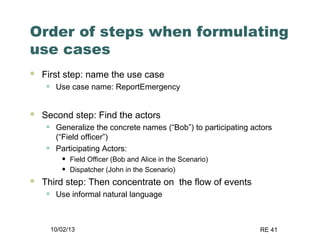
 The multidisciplinary nature of requirements
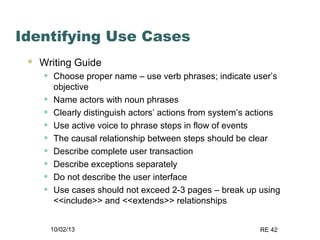
elicitation only adds to this complexity.
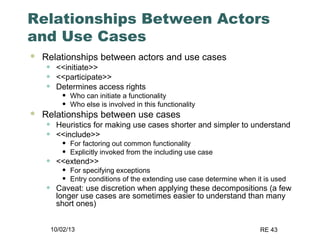
 In reality requirements elicitation is a multifaceted
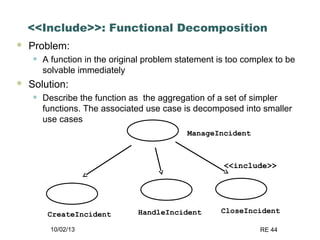
and iterative activity that relies heavily on the
communication skills of requirements engineers and
the commitment and cooperation of the system
stakeholders.
 One of the main problems facing software
development project teams is communication
barriers and agreement about the requirements.
10/02/13 RE 6
Issues
 The main concepts which are clearly defined to one
community of participants can be entirely opaque to
members of another.
 The fact that this situation exists often goes unnoticed
in the course of elicitation unless specific attention is
paid to the problem.
 For example, it can be said that the method employed
for a custom built embedded control system is likely to
be substantially different to that of a commercially
available inventory management system.
 Furthermore, project teams may be spread across
different geographical locations and from diverse
cultural backgrounds.
 The specific elicitation techniques used for a particular
situation often depend on a variety of additional factors
including time and cost, the availability of resources,
the safety criticality of the system, and any legal or
regulatory constraints.
10/02/13 RE 7
What is Requirements
Elicitation?
 Very little uniformity in RE research and practice
concerning a standard definition for requirements
elicitation.
 Requirements elicitation is concerned with learning and
understanding the needs of users and project sponsors
with the ultimate aim of communicating these needs to
the system developers.
 Robertson and Robertson refer to this process as
“trawling for requirements” to highlight the fact that
through this process you are likely to get more
requirements than expected.
 This implies that gathering a few extraneous
requirements initially is always better than gathering
less.
10/02/13 RE 8
Requirements elicitation- term
The term suggest that the process is a
simple knowledge transfer process
where req engineers elicit and document
existing customer knowledge
In reality, the process is much more
complex
It is not a process of ‘fishing’ for
requirements
The author prefer the term requirements
discovery to reflect the uncertainties
10/02/13 RE 9
Davis (1993)
 Avoids the term elicitation and equates this
discovery process to a process of problem analysis
and understanding.
 Problem analysis is defined as the activity that
encompasses learning about the problem to be
solved (often through brainstorming and/or
questioning), understanding the needs of
potential users, trying to find out who the user
really is and understanding all the constraints on
the solution
 But this implies that the activity is only concerned
with understanding the details of a specific problem
which requires some kind of systems solution
10/02/13 RE 10
Dimensions of requirements
elicitation by Kotonya and
Sommerville (1998)
10/02/13 RE 11
Elicitation activities
 Application domain understanding
• Application domain knowledge is knowledge of the general
area where the system is applied.
 Problem understanding
• The details of the specific customer problem where the
system will be applied must be understood.
 Business understanding
• You must understand how systems interact and contribute
to overall business goals.
 Understanding the needs and constraints of system stakeholders
• You must understand, in detail, the specific needs of people
who require system support in their work.
10/02/13 RE 12
Requirements Elicitation
Techniques
 Interviewing and questionnaires
 Requirements workshops
 Brain Storming and idea reduction
 Storyboards
 Use Cases
 Role Playing
 Prototyping
10/02/13 RE 13
Technique: Interviewing
 Simple direct technique
 Context-free questions can help achieve bias-free
interviews
 Then, it may be appropriate to search for undiscovered
requirements by exploring solutions.
 Convergence on some common needs will initiate a
“requirements repository” for use during the project.
 A questionnaire is no substitute for an interview.
10/02/13 RE 14
Technique: Requirements
Workshop
 The requirements workshop is perhaps the
most powerful technique for eliciting
requirements.
 It gathers all keykey stakeholders together for a
short but intensely focused period.
 The use of an outside facilitator experienced in
requirements management can ensure the
success of the workshop.
 Brainstorming is the most important part of the
workshop.
10/02/13 RE 15
Technique: Brainstorming
 Brainstorming involves both idea generation
and idea reduction.
 The most creative, innovative ideas often
result from combining, seemingly unrelated
ideas.
 Various voting techniques may be used to
prioritize the ideas created.
 Although live brainstorming is preferred, web-
based brainstorming may be a viable
alternative in some situations
10/02/13 RE 16
Rules for Brainstorming
 Do not allow criticism or debate.
 Let your imagination soar
 Generate as many ideas as possible
 Mutate and combine ideas
 Idea Reduction
• Pruning ideas that are not worthy of further discussion
• Grouping of similar ideas into one super topic
 Prioritize the remaining ideas
10/02/13 RE 17
Storyboarding
 The purpose of storyboarding is to gain an early
reaction from the users on the concepts proposed for
the application.
• Storyboards offer an effective technique for addressing the
"Yes, But" syndrome.
 Storyboarding
• Is extremely inexpensive
• Is user friendly, informal, and interactive
• Provides an early review of the user interfaces of the system
• Is easy to create and easy to modify
10/02/13 RE 18
Technique: Storyboarding
 Storyboards identify the players, explain what
happens to them, and describes how it
happens.
 Make the storyboard sketchy, easy to modify,
and unshipable.
 Storyboard early and often on every project
with new or innovative content.
10/02/13 RE 19
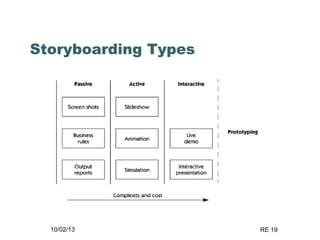
Storyboarding Types
10/02/13 RE 20
Technique: Use Cases
 Use Cases, like storyboards, identify the who,
what, and how of system behavior.
 Use Cases describe the interactions between a
user and a system, focusing on what they system
“does” for the user.
 The Use Case model describes the totality of the
systems functional behavior.
 Early stages: After you have an overview of the
use cases, perhaps only by a phrase apiece,
expand 10% of them in detail.
10/02/13 RE 21
Technique: Role Playing –
variant on use cases
 Role playing allows stakeholders to
experience the user’s world from the
user’s perspective.
 A scripted walkthrough may replace role
playing in some situations, with the script
becoming a live storyboard.
(Class-Responsibility-Collaboration (CRC)
cards, often used in object-oriented
analysis, are a derivative of role playing.)
10/02/13 RE 22
Technique: Prototyping
 Prototyping is especially effective in
addressing the “Yes, But” and the
“Undiscovered Ruins” syndromes.
 A software requirements prototype is a partial
implementation of a software system, built to
help developers, users, and customers better
understand system requirements.
 Prototype the “fuzzy” requirements: those that,
although known or implied, are poorly defined
and poorly understood.
10/02/13 RE 23
Effective Requirements
Elicitation
Is very important because if the customer’s
real requirements are not discovered, they
are unlikely to be satisfied with the final
system
Requirements engineers faced some
problems in req elicitation inherent to the
multi-dimensional nature of req elicitation
10/02/13 RE 24
Problems of requirements
elicitation can be grouped into
three categories (Christel & Kang,
1992):
problems of scope, in which the requirements
may address too little or too much
information;
problems of understanding, within groups as
well as between groups such as users and
developers; and
problems of volatility, i.e., the changing
nature of requirement
10/02/13 RE 25
PROBLEMS OF SCOPE
• the boundary of the system is ill-defined
• unnecessary design information may be given
10/02/13 RE 26
PROBLEMS OF UNDERSTANDING
• users have incomplete understanding of their
needs
• users have poor understanding of computer
capabilities and limitations
• analysts have poor knowledge of problem
domain
• user and analyst speak different languages
• conflicting views of different users
• requirements are often vague and untestable,
e.g., “user friendly” and “robust”
10/02/13 RE 27
PROBLEMS OF VOLATILITY
• requirements evolve over time
10/02/13 RE 28
MAIN ACTIVITIES IN RE
 Typical activities of the requirements elicitation process can be
divided into five fundamental types as described below:
 (1) Understanding the Application Domain –
• It is important when beginning the process of requirements
elicitation to investigate and examine in detail the situation or “real
world” in which the system will ultimately reside (sometimes called
the application domain)
• The current environment needs to be thoroughly explored
including the political, organizational, and social aspects related to
the system, in addition to any constraints they may enforce upon
the system and its development.
• Existing work processes and the related problems to be solved by
the system need to be described with respect to the key business
goals and issues.
10/02/13 RE 29
 (2) Identifying the Sources of Requirements –
• Requirements may be spread across many sources and
exist in a variety of formats.
• Stakeholders represent the most obvious source of
requirements for the system.
• Users and subject matter experts are used to supply
detailed information about the problems and user needs.
• Existing systems and processes represent another source
for eliciting requirements, particularly when the project
involves replacing a current or legacy system.
• Existing documentation about the current systems and
business processes including manuals, forms, and reports
can provide useful information about the organization and
environment, as well as requirements for the new system
and their supporting rationale and importance.
10/02/13 RE 30
 Analyzing the Stakeholders –
• Stakeholders are people who have an interest in the system or
are affected in some way by the development and
implementation of the system and hence must be consulted
during requirements elicitation.
• Typically stakeholders include groups and individuals internal
and external to the organization.
• The customer, and more specifically the project sponsor, is
usually the most apparent stakeholder of the system.
• In some cases however the actual users of the system may be
the most important. For Example….?
• Other parties whose sphere of interest may extend to some
part of the system operations, such as those responsible for
work process standards, customers, and partners, should also
be regarded as stakeholders if affected.
• One of the first steps in requirements elicitation therefore is to
analyze and involve all the relevant stakeholders.
• The process of analyzing the stakeholders also often includes
the identification of key user representatives and product
champions.
10/02/13 RE 31
Selecting the Techniques, Approaches, and
Tools to Use –
• Although some may advocate that just one elicitation
technique or a single methodology is sufficient and
may be applied to all cases, it is generally accepted
that an individual requirements elicitation technique
or approach cannot possibly be suitable for all
projects.
• The choice of techniques to be employed is
dependent on the specific context of the project and
is often a critical factor in the success of the
elicitation process .
10/02/13 RE 32
• Hickey and Davis have investigated the elicitation
technique selection and stated that a particular
elicitation technique may be selected for a variety
of reasons.
• (a) the technique selected is the only one the analyst knows,
• (b) the technique selected is the analyst’s favorite,
• (c) the selected technique is the one prescribed by a specific
methodology that is being followed for the system
development, and
• (d) the choice of technique is governed solely by the intuition
of the analyst to be effective in the current context.
• Clearly requirements elicitation is best performed
using a variety of techniques. In the majority of
projects several methods are employed during and
at different stages in the software development life
cycle, often in cooperation where complementary.
10/02/13 RE 33
 Eliciting the Requirements from Stakeholders and Other
Sources –
 Once the sources of requirements and the specific
stakeholders have been identified, the actual elicitation of the
core requirements then begins using the selected elicitation
techniques, approaches, and tools.
 During this activity it is important to establish the level of
scope for the system and investigate in detail the needs and
wants of the stakeholders, especially the users.
 It is also essential to determine the future processes the
system will perform with respect to the business operations,
and examine the ways in which the system may support
them in order to satisfy the major objectives and address the
key problems of the business.
10/02/13 RE 34
 It is important to remember that requirements elicitation
does not occur in a vacuum.
 It is strongly related to the context in which it is
conducted and specific characteristics of the project,
organization, and environment .
 In practice the budget and schedule of the project have
a significant effect on the process and the way in which
it is performed.
 The structure and maturity of the organization will
determine how requirements are elicited, as will the
way in which the system will interact with users and
other systems.
 The level of volatility within a project must also be
considered, as this will directly affect the quality of
requirements and the elicitation process itself
10/02/13 RE 35
Requirements Elicitation
Activities
 Identifying Actors
 Identifying Scenarios
 Identifying Use Cases
 Refining Use Cases
 Identifying Relationships between Actors
and Use Cases
 Identifying Initial Analysis Objects
 Identifying Nonfunctional Requirements
10/02/13 RE 36
Identifying Actors
 Actors – person or machine using the system in a particular role
 Actors usually correspond to existing roles within the client
organization
 Related roles can be grouped together according to viewpoints
 Guide Questions
• Which user groups are supported by the system to perform their work?
• Which user groups execute the system’s main functions?
• Which user groups perform secondary functions, such as maintenance and
administration?
• With what external hardware or software system will the system interact?
10/02/13 RE 37
Identifying Scenarios
 Scenario
• “A narrative description of what people do and experience as they
try to make use of computer systems and applications” [Carrol,
Scenario-based Design, 1995]
• Informal description of a single feature from the viewpoint of a
single actor
 Types of Scenarios
• As-is scenarios – describes current situation
• Visionary scenarios – describes future system
• Evaluation scenarios – describes user tasks for evaluating the
system (acceptance criteria)
• Training scenarios – introduces new users to the system
10/02/13 RE 38
Heuristics for Identifying Scenarios
 Ask yourself or the client the following questions:
• What are the primary tasks that the system needs to perform?
• What data will the actor create, store, change, remove or add in
the system? Who else can modify this data?
• What external changes does the system need to know about?
• What changes or events will the actor of the system need to be
informed about?
 However, don’t rely on questionnaires alone.
 Insist on task observation (ethnography) if the system
already exists
• Ask to speak to the end user, not just to the software contractor
• Expect resistance and try to overcome it
10/02/13 RE 39
Identifying Use Cases
 Use Case
• Specifies all possible scenarios for a given functionality
• Initiated by an actor
 Motivations for use cases
• Generalizing related scenarios help developers define the
scope of the system
• The role of each user of the system is clarified
 Use Case Descriptions
• Entry and exit conditions
• Flow of events
• Quality requirements
10/02/13 RE 40
Heuristics: How do I find use
cases?
 Select a narrow vertical slice of the system (i.e. one
scenario)
• Discuss it in detail with the user to understand the user’s
preferred style of interaction
 Select a horizontal slice (i.e. many scenarios) to define
the scope of the system.
• Discuss the scope with the user
 Use illustrative prototypes (mock-ups) as visual
support
 Find out what the user does
• Task observation (Good)
• Questionnaires (Bad)
10/02/13 RE 41
Order of steps when formulating
use cases
 First step: name the use case
• Use case name: ReportEmergency
 Second step: Find the actors
• Generalize the concrete names (“Bob”) to participating actors
(“Field officer”)
• Participating Actors:
• Field Officer (Bob and Alice in the Scenario)
• Dispatcher (John in the Scenario)
 Third step: Then concentrate on the flow of events
• Use informal natural language
10/02/13 RE 42
Identifying Use Cases
 Writing Guide
• Choose proper name – use verb phrases; indicate user’s
objective
• Name actors with noun phrases
• Clearly distinguish actors’ actions from system’s actions
• Use active voice to phrase steps in flow of events
• The causal relationship between steps should be clear
• Describe complete user transaction
• Describe exceptions separately
• Do not describe the user interface
• Use cases should not exceed 2-3 pages – break up using
<<include>> and <<extends>> relationships
10/02/13 RE 43
Relationships Between Actors
and Use Cases
 Relationships between actors and use cases
• <<initiate>>
• <<participate>>
• Determines access rights
• Who can initiate a functionality
• Who else is involved in this functionality
 Relationships between use cases
• Heuristics for making use cases shorter and simpler to understand
• <<include>>
• For factoring out common functionality
• Explicitly invoked from the including use case
• <<extend>>
• For specifying exceptions
• Entry conditions of the extending use case determine when it is used
• Caveat: use discretion when applying these decompositions (a few
longer use cases are sometimes easier to understand than many
short ones)
10/02/13 RE 44
<<Include>>: Functional Decomposition
 Problem:
• A function in the original problem statement is too complex to be
solvable immediately
 Solution:
• Describe the function as the aggregation of a set of simpler
functions. The associated use case is decomposed into smaller
use cases
ManageIncident
CreateIncident HandleIncident CloseIncident
<<include>>
10/02/13 RE 45
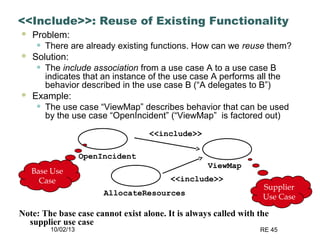
<<Include>>: Reuse of Existing Functionality
 Problem:
• There are already existing functions. How can we reuse them?
 Solution:
• The include association from a use case A to a use case B
indicates that an instance of the use case A performs all the
behavior described in the use case B (“A delegates to B”)
 Example:
• The use case “ViewMap” describes behavior that can be used
by the use case “OpenIncident” (“ViewMap” is factored out)
ViewMap
OpenIncident
AllocateResources
<<include>>
<<include>>
Base Use
Case
Supplier
Use Case
Note: The base case cannot exist alone. It is always called with the
supplier use case
10/02/13 RE 46
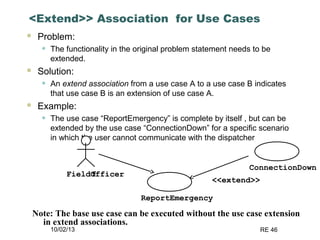
<Extend>> Association for Use Cases
 Problem:
• The functionality in the original problem statement needs to be
extended.
 Solution:
• An extend association from a use case A to a use case B indicates
that use case B is an extension of use case A.
 Example:
• The use case “ReportEmergency” is complete by itself , but can be
extended by the use case “ConnectionDown” for a specific scenario
in which the user cannot communicate with the dispatcher
ReportEmergency
FieldOfficerf
ConnectionDown
<<extend>>
Note: The base use case can be executed without the use case extension
in extend associations.
10/02/13 RE 48
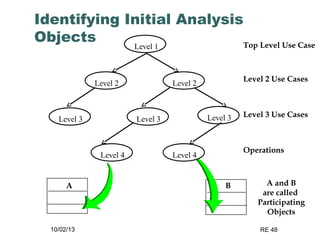
Identifying Initial Analysis
Objects Top Level Use Case
A and B
are called
Participating
Objects
Level 1
A B
Level 3 Use Cases
Level 3 Level 3 Level 3
Operations
Level 4 Level 4
Level 2 Use Cases
Level 2 Level 2
10/02/13 RE 49
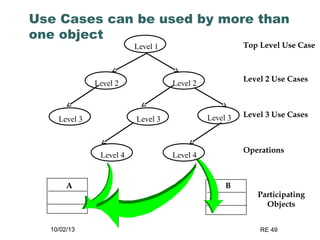
Use Cases can be used by more than
one object
Top Level Use Case
Level 2 Use Cases
Level 3 Use Cases
Operations
Participating
Objects
Level 2
Level 1
Level 2
Level 3 Level 3
Level 4 Level 4
Level 3
A B
10/02/13 RE 50
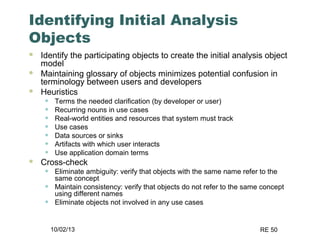
Identifying Initial Analysis
Objects
 Identify the participating objects to create the initial analysis object
model
 Maintaining glossary of objects minimizes potential confusion in
terminology between users and developers
 Heuristics
• Terms the needed clarification (by developer or user)
• Recurring nouns in use cases
• Real-world entities and resources that system must track
• Use cases
• Data sources or sinks
• Artifacts with which user interacts
• Use application domain terms
 Cross-check
• Eliminate ambiguity: verify that objects with the same name refer to the
same concept
• Maintain consistency: verify that objects do not refer to the same concept
using different names
• Eliminate objects not involved in any use cases
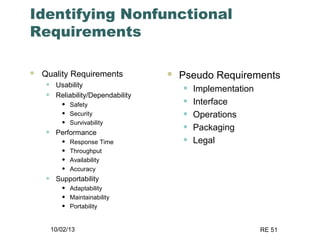
10/02/13 RE 51
Identifying Nonfunctional
Requirements
 Quality Requirements
• Usability
• Reliability/Dependability
• Safety
• Security
• Survivability
• Performance
• Response Time
• Throughput
• Availability
• Accuracy
• Supportability
• Adaptability
• Maintainability
• Portability
 Pseudo Requirements
• Implementation
• Interface
• Operations
• Packaging
• Legal
10/02/13 RE 52
Identifying Nonfunctional
Requirements
 Heuristics
• Use a taxonomy (e.g., FURPS+) to generate
checklists
• Give different checklists to users in
appropriate roles
• Checklists vary depending on application
domain
10/02/13 RE 53
Constraints (Pseudo Requirements)
 Constraint:
• Any client restriction on the solution domain
 Examples:
• The target platform must be an IBM/360
• The implementation language must be COBOL
• The documentation standard X must be used
• A dataglove must be used
• ActiveX must be used
• The system must interface to a papertape reader
10/02/13 RE 54
Elicitation
 The requirements elicitation process involves a set
of activities that must allow for communication,
prioritization, negotiation, and collaboration with all
the relevant stakeholders.
 Requirements elicitation involves activities that are
intensely communicative.
 These activities increase in significance when one
considers the “culture gap” or basic semantic
differences dividing the problem owning and the
problem solving communities when attempting to
engage in meaningful dialogue.

Requirements elicitation

  • 1.
  • 2.
    10/02/13 RE 2 Week4 Requirements Elicitation: A Survey of Techniques, Approaches, and Tools
  • 3.
    10/02/13 RE 3 The elicitation of requirements represents an early but continuous and critical stage in the development of software systems.  The requirements for a software system may be spread across many sources. • the problem owners, • the stakeholders, • documentation, and other existing systems.  Because of the communication rich nature of requirements elicitation activities, many of the effective techniques do not originate from the traditional areas of software engineering or computer science research. • Some of the techniques are derived mostly from the social sciences, organizational theory, group dynamics, knowledge engineering, and very often from practical experience.
  • 4.
    10/02/13 RE 4 Theprocess of requirements elicitation is generally accepted as one of the critical activities in the RE process. • but it’s a difficult part of software development projects. A recent field study of fifteen RE teams carried out by Hofmann and Lehner identified key RE practices that should lead to project success. • Effective elicitation of requirements was arguably among the most important of the resulting recommended good RE practices.
  • 5.
    10/02/13 RE 5 Natureof Req. Elicitation activities  Requirements elicitation itself is a very complex process involving many activities, with multiple techniques available to perform these activities.  The multidisciplinary nature of requirements elicitation only adds to this complexity.  In reality requirements elicitation is a multifaceted and iterative activity that relies heavily on the communication skills of requirements engineers and the commitment and cooperation of the system stakeholders.  One of the main problems facing software development project teams is communication barriers and agreement about the requirements.
  • 6.
    10/02/13 RE 6 Issues The main concepts which are clearly defined to one community of participants can be entirely opaque to members of another.  The fact that this situation exists often goes unnoticed in the course of elicitation unless specific attention is paid to the problem.  For example, it can be said that the method employed for a custom built embedded control system is likely to be substantially different to that of a commercially available inventory management system.  Furthermore, project teams may be spread across different geographical locations and from diverse cultural backgrounds.  The specific elicitation techniques used for a particular situation often depend on a variety of additional factors including time and cost, the availability of resources, the safety criticality of the system, and any legal or regulatory constraints.
  • 7.
    10/02/13 RE 7 Whatis Requirements Elicitation?  Very little uniformity in RE research and practice concerning a standard definition for requirements elicitation.  Requirements elicitation is concerned with learning and understanding the needs of users and project sponsors with the ultimate aim of communicating these needs to the system developers.  Robertson and Robertson refer to this process as “trawling for requirements” to highlight the fact that through this process you are likely to get more requirements than expected.  This implies that gathering a few extraneous requirements initially is always better than gathering less.
  • 8.
    10/02/13 RE 8 Requirementselicitation- term The term suggest that the process is a simple knowledge transfer process where req engineers elicit and document existing customer knowledge In reality, the process is much more complex It is not a process of ‘fishing’ for requirements The author prefer the term requirements discovery to reflect the uncertainties
  • 9.
    10/02/13 RE 9 Davis(1993)  Avoids the term elicitation and equates this discovery process to a process of problem analysis and understanding.  Problem analysis is defined as the activity that encompasses learning about the problem to be solved (often through brainstorming and/or questioning), understanding the needs of potential users, trying to find out who the user really is and understanding all the constraints on the solution  But this implies that the activity is only concerned with understanding the details of a specific problem which requires some kind of systems solution
  • 10.
    10/02/13 RE 10 Dimensionsof requirements elicitation by Kotonya and Sommerville (1998)
  • 11.
    10/02/13 RE 11 Elicitationactivities  Application domain understanding • Application domain knowledge is knowledge of the general area where the system is applied.  Problem understanding • The details of the specific customer problem where the system will be applied must be understood.  Business understanding • You must understand how systems interact and contribute to overall business goals.  Understanding the needs and constraints of system stakeholders • You must understand, in detail, the specific needs of people who require system support in their work.
  • 12.
    10/02/13 RE 12 RequirementsElicitation Techniques  Interviewing and questionnaires  Requirements workshops  Brain Storming and idea reduction  Storyboards  Use Cases  Role Playing  Prototyping
  • 13.
    10/02/13 RE 13 Technique:Interviewing  Simple direct technique  Context-free questions can help achieve bias-free interviews  Then, it may be appropriate to search for undiscovered requirements by exploring solutions.  Convergence on some common needs will initiate a “requirements repository” for use during the project.  A questionnaire is no substitute for an interview.
  • 14.
    10/02/13 RE 14 Technique:Requirements Workshop  The requirements workshop is perhaps the most powerful technique for eliciting requirements.  It gathers all keykey stakeholders together for a short but intensely focused period.  The use of an outside facilitator experienced in requirements management can ensure the success of the workshop.  Brainstorming is the most important part of the workshop.
  • 15.
    10/02/13 RE 15 Technique:Brainstorming  Brainstorming involves both idea generation and idea reduction.  The most creative, innovative ideas often result from combining, seemingly unrelated ideas.  Various voting techniques may be used to prioritize the ideas created.  Although live brainstorming is preferred, web- based brainstorming may be a viable alternative in some situations
  • 16.
    10/02/13 RE 16 Rulesfor Brainstorming  Do not allow criticism or debate.  Let your imagination soar  Generate as many ideas as possible  Mutate and combine ideas  Idea Reduction • Pruning ideas that are not worthy of further discussion • Grouping of similar ideas into one super topic  Prioritize the remaining ideas
  • 17.
    10/02/13 RE 17 Storyboarding The purpose of storyboarding is to gain an early reaction from the users on the concepts proposed for the application. • Storyboards offer an effective technique for addressing the "Yes, But" syndrome.  Storyboarding • Is extremely inexpensive • Is user friendly, informal, and interactive • Provides an early review of the user interfaces of the system • Is easy to create and easy to modify
  • 18.
    10/02/13 RE 18 Technique:Storyboarding  Storyboards identify the players, explain what happens to them, and describes how it happens.  Make the storyboard sketchy, easy to modify, and unshipable.  Storyboard early and often on every project with new or innovative content.
  • 19.
  • 20.
    10/02/13 RE 20 Technique:Use Cases  Use Cases, like storyboards, identify the who, what, and how of system behavior.  Use Cases describe the interactions between a user and a system, focusing on what they system “does” for the user.  The Use Case model describes the totality of the systems functional behavior.  Early stages: After you have an overview of the use cases, perhaps only by a phrase apiece, expand 10% of them in detail.
  • 21.
    10/02/13 RE 21 Technique:Role Playing – variant on use cases  Role playing allows stakeholders to experience the user’s world from the user’s perspective.  A scripted walkthrough may replace role playing in some situations, with the script becoming a live storyboard. (Class-Responsibility-Collaboration (CRC) cards, often used in object-oriented analysis, are a derivative of role playing.)
  • 22.
    10/02/13 RE 22 Technique:Prototyping  Prototyping is especially effective in addressing the “Yes, But” and the “Undiscovered Ruins” syndromes.  A software requirements prototype is a partial implementation of a software system, built to help developers, users, and customers better understand system requirements.  Prototype the “fuzzy” requirements: those that, although known or implied, are poorly defined and poorly understood.
  • 23.
    10/02/13 RE 23 EffectiveRequirements Elicitation Is very important because if the customer’s real requirements are not discovered, they are unlikely to be satisfied with the final system Requirements engineers faced some problems in req elicitation inherent to the multi-dimensional nature of req elicitation
  • 24.
    10/02/13 RE 24 Problemsof requirements elicitation can be grouped into three categories (Christel & Kang, 1992): problems of scope, in which the requirements may address too little or too much information; problems of understanding, within groups as well as between groups such as users and developers; and problems of volatility, i.e., the changing nature of requirement
  • 25.
    10/02/13 RE 25 PROBLEMSOF SCOPE • the boundary of the system is ill-defined • unnecessary design information may be given
  • 26.
    10/02/13 RE 26 PROBLEMSOF UNDERSTANDING • users have incomplete understanding of their needs • users have poor understanding of computer capabilities and limitations • analysts have poor knowledge of problem domain • user and analyst speak different languages • conflicting views of different users • requirements are often vague and untestable, e.g., “user friendly” and “robust”
  • 27.
    10/02/13 RE 27 PROBLEMSOF VOLATILITY • requirements evolve over time
  • 28.
    10/02/13 RE 28 MAINACTIVITIES IN RE  Typical activities of the requirements elicitation process can be divided into five fundamental types as described below:  (1) Understanding the Application Domain – • It is important when beginning the process of requirements elicitation to investigate and examine in detail the situation or “real world” in which the system will ultimately reside (sometimes called the application domain) • The current environment needs to be thoroughly explored including the political, organizational, and social aspects related to the system, in addition to any constraints they may enforce upon the system and its development. • Existing work processes and the related problems to be solved by the system need to be described with respect to the key business goals and issues.
  • 29.
    10/02/13 RE 29 (2) Identifying the Sources of Requirements – • Requirements may be spread across many sources and exist in a variety of formats. • Stakeholders represent the most obvious source of requirements for the system. • Users and subject matter experts are used to supply detailed information about the problems and user needs. • Existing systems and processes represent another source for eliciting requirements, particularly when the project involves replacing a current or legacy system. • Existing documentation about the current systems and business processes including manuals, forms, and reports can provide useful information about the organization and environment, as well as requirements for the new system and their supporting rationale and importance.
  • 30.
    10/02/13 RE 30 Analyzing the Stakeholders – • Stakeholders are people who have an interest in the system or are affected in some way by the development and implementation of the system and hence must be consulted during requirements elicitation. • Typically stakeholders include groups and individuals internal and external to the organization. • The customer, and more specifically the project sponsor, is usually the most apparent stakeholder of the system. • In some cases however the actual users of the system may be the most important. For Example….? • Other parties whose sphere of interest may extend to some part of the system operations, such as those responsible for work process standards, customers, and partners, should also be regarded as stakeholders if affected. • One of the first steps in requirements elicitation therefore is to analyze and involve all the relevant stakeholders. • The process of analyzing the stakeholders also often includes the identification of key user representatives and product champions.
  • 31.
    10/02/13 RE 31 Selectingthe Techniques, Approaches, and Tools to Use – • Although some may advocate that just one elicitation technique or a single methodology is sufficient and may be applied to all cases, it is generally accepted that an individual requirements elicitation technique or approach cannot possibly be suitable for all projects. • The choice of techniques to be employed is dependent on the specific context of the project and is often a critical factor in the success of the elicitation process .
  • 32.
    10/02/13 RE 32 •Hickey and Davis have investigated the elicitation technique selection and stated that a particular elicitation technique may be selected for a variety of reasons. • (a) the technique selected is the only one the analyst knows, • (b) the technique selected is the analyst’s favorite, • (c) the selected technique is the one prescribed by a specific methodology that is being followed for the system development, and • (d) the choice of technique is governed solely by the intuition of the analyst to be effective in the current context. • Clearly requirements elicitation is best performed using a variety of techniques. In the majority of projects several methods are employed during and at different stages in the software development life cycle, often in cooperation where complementary.
  • 33.
    10/02/13 RE 33 Eliciting the Requirements from Stakeholders and Other Sources –  Once the sources of requirements and the specific stakeholders have been identified, the actual elicitation of the core requirements then begins using the selected elicitation techniques, approaches, and tools.  During this activity it is important to establish the level of scope for the system and investigate in detail the needs and wants of the stakeholders, especially the users.  It is also essential to determine the future processes the system will perform with respect to the business operations, and examine the ways in which the system may support them in order to satisfy the major objectives and address the key problems of the business.
  • 34.
    10/02/13 RE 34 It is important to remember that requirements elicitation does not occur in a vacuum.  It is strongly related to the context in which it is conducted and specific characteristics of the project, organization, and environment .  In practice the budget and schedule of the project have a significant effect on the process and the way in which it is performed.  The structure and maturity of the organization will determine how requirements are elicited, as will the way in which the system will interact with users and other systems.  The level of volatility within a project must also be considered, as this will directly affect the quality of requirements and the elicitation process itself
  • 35.
    10/02/13 RE 35 RequirementsElicitation Activities  Identifying Actors  Identifying Scenarios  Identifying Use Cases  Refining Use Cases  Identifying Relationships between Actors and Use Cases  Identifying Initial Analysis Objects  Identifying Nonfunctional Requirements
  • 36.
    10/02/13 RE 36 IdentifyingActors  Actors – person or machine using the system in a particular role  Actors usually correspond to existing roles within the client organization  Related roles can be grouped together according to viewpoints  Guide Questions • Which user groups are supported by the system to perform their work? • Which user groups execute the system’s main functions? • Which user groups perform secondary functions, such as maintenance and administration? • With what external hardware or software system will the system interact?
  • 37.
    10/02/13 RE 37 IdentifyingScenarios  Scenario • “A narrative description of what people do and experience as they try to make use of computer systems and applications” [Carrol, Scenario-based Design, 1995] • Informal description of a single feature from the viewpoint of a single actor  Types of Scenarios • As-is scenarios – describes current situation • Visionary scenarios – describes future system • Evaluation scenarios – describes user tasks for evaluating the system (acceptance criteria) • Training scenarios – introduces new users to the system
  • 38.
    10/02/13 RE 38 Heuristicsfor Identifying Scenarios  Ask yourself or the client the following questions: • What are the primary tasks that the system needs to perform? • What data will the actor create, store, change, remove or add in the system? Who else can modify this data? • What external changes does the system need to know about? • What changes or events will the actor of the system need to be informed about?  However, don’t rely on questionnaires alone.  Insist on task observation (ethnography) if the system already exists • Ask to speak to the end user, not just to the software contractor • Expect resistance and try to overcome it
  • 39.
    10/02/13 RE 39 IdentifyingUse Cases  Use Case • Specifies all possible scenarios for a given functionality • Initiated by an actor  Motivations for use cases • Generalizing related scenarios help developers define the scope of the system • The role of each user of the system is clarified  Use Case Descriptions • Entry and exit conditions • Flow of events • Quality requirements
  • 40.
    10/02/13 RE 40 Heuristics:How do I find use cases?  Select a narrow vertical slice of the system (i.e. one scenario) • Discuss it in detail with the user to understand the user’s preferred style of interaction  Select a horizontal slice (i.e. many scenarios) to define the scope of the system. • Discuss the scope with the user  Use illustrative prototypes (mock-ups) as visual support  Find out what the user does • Task observation (Good) • Questionnaires (Bad)
  • 41.
    10/02/13 RE 41 Orderof steps when formulating use cases  First step: name the use case • Use case name: ReportEmergency  Second step: Find the actors • Generalize the concrete names (“Bob”) to participating actors (“Field officer”) • Participating Actors: • Field Officer (Bob and Alice in the Scenario) • Dispatcher (John in the Scenario)  Third step: Then concentrate on the flow of events • Use informal natural language
  • 42.
    10/02/13 RE 42 IdentifyingUse Cases  Writing Guide • Choose proper name – use verb phrases; indicate user’s objective • Name actors with noun phrases • Clearly distinguish actors’ actions from system’s actions • Use active voice to phrase steps in flow of events • The causal relationship between steps should be clear • Describe complete user transaction • Describe exceptions separately • Do not describe the user interface • Use cases should not exceed 2-3 pages – break up using <<include>> and <<extends>> relationships
  • 43.
    10/02/13 RE 43 RelationshipsBetween Actors and Use Cases  Relationships between actors and use cases • <<initiate>> • <<participate>> • Determines access rights • Who can initiate a functionality • Who else is involved in this functionality  Relationships between use cases • Heuristics for making use cases shorter and simpler to understand • <<include>> • For factoring out common functionality • Explicitly invoked from the including use case • <<extend>> • For specifying exceptions • Entry conditions of the extending use case determine when it is used • Caveat: use discretion when applying these decompositions (a few longer use cases are sometimes easier to understand than many short ones)
  • 44.
    10/02/13 RE 44 <<Include>>:Functional Decomposition  Problem: • A function in the original problem statement is too complex to be solvable immediately  Solution: • Describe the function as the aggregation of a set of simpler functions. The associated use case is decomposed into smaller use cases ManageIncident CreateIncident HandleIncident CloseIncident <<include>>
  • 45.
    10/02/13 RE 45 <<Include>>:Reuse of Existing Functionality  Problem: • There are already existing functions. How can we reuse them?  Solution: • The include association from a use case A to a use case B indicates that an instance of the use case A performs all the behavior described in the use case B (“A delegates to B”)  Example: • The use case “ViewMap” describes behavior that can be used by the use case “OpenIncident” (“ViewMap” is factored out) ViewMap OpenIncident AllocateResources <<include>> <<include>> Base Use Case Supplier Use Case Note: The base case cannot exist alone. It is always called with the supplier use case
  • 46.
    10/02/13 RE 46 <Extend>>Association for Use Cases  Problem: • The functionality in the original problem statement needs to be extended.  Solution: • An extend association from a use case A to a use case B indicates that use case B is an extension of use case A.  Example: • The use case “ReportEmergency” is complete by itself , but can be extended by the use case “ConnectionDown” for a specific scenario in which the user cannot communicate with the dispatcher ReportEmergency FieldOfficerf ConnectionDown <<extend>> Note: The base use case can be executed without the use case extension in extend associations.
  • 47.
    10/02/13 RE 48 IdentifyingInitial Analysis Objects Top Level Use Case A and B are called Participating Objects Level 1 A B Level 3 Use Cases Level 3 Level 3 Level 3 Operations Level 4 Level 4 Level 2 Use Cases Level 2 Level 2
  • 48.
    10/02/13 RE 49 UseCases can be used by more than one object Top Level Use Case Level 2 Use Cases Level 3 Use Cases Operations Participating Objects Level 2 Level 1 Level 2 Level 3 Level 3 Level 4 Level 4 Level 3 A B
  • 49.
    10/02/13 RE 50 IdentifyingInitial Analysis Objects  Identify the participating objects to create the initial analysis object model  Maintaining glossary of objects minimizes potential confusion in terminology between users and developers  Heuristics • Terms the needed clarification (by developer or user) • Recurring nouns in use cases • Real-world entities and resources that system must track • Use cases • Data sources or sinks • Artifacts with which user interacts • Use application domain terms  Cross-check • Eliminate ambiguity: verify that objects with the same name refer to the same concept • Maintain consistency: verify that objects do not refer to the same concept using different names • Eliminate objects not involved in any use cases
  • 50.
    10/02/13 RE 51 IdentifyingNonfunctional Requirements  Quality Requirements • Usability • Reliability/Dependability • Safety • Security • Survivability • Performance • Response Time • Throughput • Availability • Accuracy • Supportability • Adaptability • Maintainability • Portability  Pseudo Requirements • Implementation • Interface • Operations • Packaging • Legal
  • 51.
    10/02/13 RE 52 IdentifyingNonfunctional Requirements  Heuristics • Use a taxonomy (e.g., FURPS+) to generate checklists • Give different checklists to users in appropriate roles • Checklists vary depending on application domain
  • 52.
    10/02/13 RE 53 Constraints(Pseudo Requirements)  Constraint: • Any client restriction on the solution domain  Examples: • The target platform must be an IBM/360 • The implementation language must be COBOL • The documentation standard X must be used • A dataglove must be used • ActiveX must be used • The system must interface to a papertape reader
  • 53.
    10/02/13 RE 54 Elicitation The requirements elicitation process involves a set of activities that must allow for communication, prioritization, negotiation, and collaboration with all the relevant stakeholders.  Requirements elicitation involves activities that are intensely communicative.  These activities increase in significance when one considers the “culture gap” or basic semantic differences dividing the problem owning and the problem solving communities when attempting to engage in meaningful dialogue.

Editor's Notes

  • #14 Context free question Goal is to prevent narrow-mindedness the user’s response to the questions. Examples: Who is the user? Who is the customer? Are their needs different? Where else can a solution to this problem be found? Context-free questions also parallel the questions salespeople are taught to ask as part of a technique called “solutions selling.” After context-free questions are asked, suggested solutions can be explored.
  • #15 Role of the Facilitator Workshop Agenda Running the Workshop Workshop Problems and Suggestions -Selling the workshop concept to stakeholders    -Ensuring the Participation of the Right Stakeholders    -Logistics    -Try and prevent Murphy’s law    -Includes travel, lighting, and even “afternoon sugar filled snacks.”    -Warm-up materials    -Project-specific information    -Out-of-box thinking preparation
  • #17 Banning criticism and banning debate is not just an attempt to “be nice”. It is necessary to not squelch creative thinking.
  • #21 Weakness of Use Cases -- we miss the “ilities”, the quality attributes. Those must be addressed explicitly eventually.