http://www.pcthreat.com/parasitebyid-48241en.html
 Mystartsearch.com is a search tool
which redirects to Google.com. Even
though this search tool is authentic, you
cannot trust Mystartsearch.com.
 Mystartsearch.com can be identified as
a browser hijacker in those cases when it
enters the PC illegally.
http://www.pcthreat.com/parasitebyid-48241en.html
 Mystartsearch.com is distributed by
unpredictable third-party installers.
 Mystartsearch.com can be installed with
browser hijackers, adware, potentially
unwanted programs, tracking cookies,
and other unreliable software that you
need to remove from your PC.
http://www.pcthreat.com/parasitebyid-48241en.html
 Mystartsearch.com cannot download
malware onto your PC, but it could be
installed in the same bundle…
http://www.pcthreat.com/parasitebyid-48241en.html
 Even though the searches (presented via
google.com) might be reliable, you
cannot trust Mystartsearch.com!!!
 Mystartsearch.com installs tracking
cookies, presents sponsored search
results, and displays unreliable ads…
http://www.pcthreat.com/parasitebyid-48241en.html
 Some users choose to ignore
Mystartsearch.com, but this is not
something that you should do.
 Mystartsearch.com silently spies on you
and records browsing history, and this
will not stop unless you delete
Mystartsearch.com from your PC!
http://www.pcthreat.com/parasitebyid-48241en.html
 The only obstacle that users face when
removing Mystartsearch.com is the
Target modifications.
 If you modify the Target successfully, all
you need to do is remove
Mystartsearch.com from the browsers in
a regular manner.
http://www.pcthreat.com/parasitebyid-48241en.html
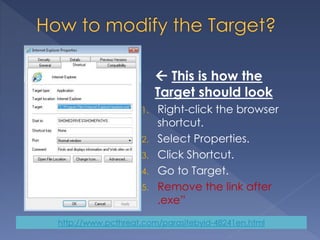
 This is how the
Target should look
1. Right-click the browser
shortcut.
2. Select Properties.
3. Click Shortcut.
4. Go to Target.
5. Remove the link after
.exe”
http://www.pcthreat.com/parasitebyid-48241en.html
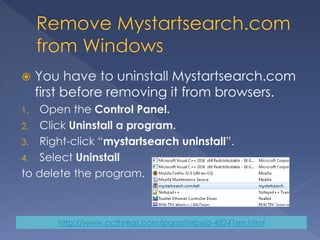
 You have to uninstall Mystartsearch.com
first before removing it from browsers.
1. Open the Control Panel.
2. Click Uninstall a program.
3. Right-click “mystartsearch uninstall”.
4. Select Uninstall
to delete the program.
http://www.pcthreat.com/parasitebyid-48241en.html
 Remove Mystartsearch.com from IE
1. Open the browser and tap Alt+T.
2. Select Search Providers and Remove the
undesirable search provider. Click Close.
3. Tap Alt+T again and click Internet Options.
4. Click the General tab and find Home Page.
5. Remove/modify the URL and click OK.
Click the LINK below to find more instructions…
http://www.pcthreat.com/parasitebyid-48241en.html

Remove Mystartsearch.com

  • 1.
  • 2.
     Mystartsearch.com isa search tool which redirects to Google.com. Even though this search tool is authentic, you cannot trust Mystartsearch.com.  Mystartsearch.com can be identified as a browser hijacker in those cases when it enters the PC illegally. http://www.pcthreat.com/parasitebyid-48241en.html
  • 3.
  • 4.
     Mystartsearch.com isdistributed by unpredictable third-party installers.  Mystartsearch.com can be installed with browser hijackers, adware, potentially unwanted programs, tracking cookies, and other unreliable software that you need to remove from your PC. http://www.pcthreat.com/parasitebyid-48241en.html
  • 5.
     Mystartsearch.com cannotdownload malware onto your PC, but it could be installed in the same bundle… http://www.pcthreat.com/parasitebyid-48241en.html
  • 6.
     Even thoughthe searches (presented via google.com) might be reliable, you cannot trust Mystartsearch.com!!!  Mystartsearch.com installs tracking cookies, presents sponsored search results, and displays unreliable ads… http://www.pcthreat.com/parasitebyid-48241en.html
  • 7.
     Some userschoose to ignore Mystartsearch.com, but this is not something that you should do.  Mystartsearch.com silently spies on you and records browsing history, and this will not stop unless you delete Mystartsearch.com from your PC! http://www.pcthreat.com/parasitebyid-48241en.html
  • 8.
     The onlyobstacle that users face when removing Mystartsearch.com is the Target modifications.  If you modify the Target successfully, all you need to do is remove Mystartsearch.com from the browsers in a regular manner. http://www.pcthreat.com/parasitebyid-48241en.html
  • 9.
     This ishow the Target should look 1. Right-click the browser shortcut. 2. Select Properties. 3. Click Shortcut. 4. Go to Target. 5. Remove the link after .exe” http://www.pcthreat.com/parasitebyid-48241en.html
  • 10.
     You haveto uninstall Mystartsearch.com first before removing it from browsers. 1. Open the Control Panel. 2. Click Uninstall a program. 3. Right-click “mystartsearch uninstall”. 4. Select Uninstall to delete the program. http://www.pcthreat.com/parasitebyid-48241en.html
  • 11.
     Remove Mystartsearch.comfrom IE 1. Open the browser and tap Alt+T. 2. Select Search Providers and Remove the undesirable search provider. Click Close. 3. Tap Alt+T again and click Internet Options. 4. Click the General tab and find Home Page. 5. Remove/modify the URL and click OK. Click the LINK below to find more instructions… http://www.pcthreat.com/parasitebyid-48241en.html