
appliedframeworks.com
AGILE CONSULTING | ONLINE TRAINING | CLASSROOM TRAINING
Remote PI Planning
April 2020
Introductions
Laura Richardson
Webinar Host &
SVP Sales, CSM, SPC
lrichardson@appliedframeworks.com
John Mulligan
Principal Consultant
CSM, CSP-SM, CSPO, SPC
jmulligan@appliedframeworks.com
Kevin Rosengren,
Engagement Director
CSP-PO, CSP-SM, SPC
krosengren@appliedframeworks.com
The Challenge
● The response to COVID-19 has
prevented companies from collaborating
face-to-face
● The “show must go on” for many
companies to continue to collaborate in
the face of distributed teams
● Holding off on planning activities will
impact how businesses will recover and
maintain competitive positioning
Remote planning faces several challenges
● Planning remotely is different and should be treated differently
● An extended runway is needed for preparation
● Maintaining communications among team members is critical
Four key elements of effective remote
planning
1. Thoughtful advanced scheduling and preparation
2. Extended timeline for fully remote participation
3. Added logistics and coordinated remote facilitation
4. Collaboration tools required to facilitate remote interaction
Schedules for remote planning differ from
in-person events
• Consider scheduling and sequencing events based on dependencies
• Devote fewer hours across more days
○ Recommend 4 days; maximum 4 hours of focused, online collaboration
○ Use the 45/15 rule: 15 minutes break after 45 minutes of online collaboration
• Breakout sessions/teams require facilitators for each
• Remote presentations require effective Q&A and feedback coordination
• Expect the unexpected in extraordinary times
○ Acknowledge parents managing children at home
○ Prepare for bandwidth issues with high usage
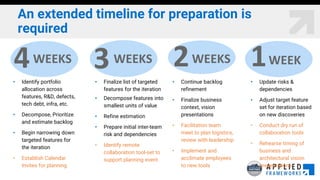
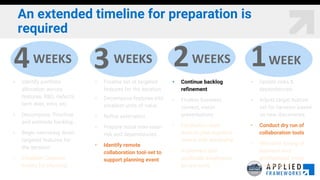
An extended timeline for preparation is
required
• Identify portfolio
allocation across
features, R&D, defects,
tech debt, infra, etc.
• Decompose, Prioritize
and estimate backlog
• Begin narrowing down
targeted features for
the iteration
• Establish Calendar
Invites for planning
• Finalize list of targeted
features for the iteration
• Decompose features into
smallest units of value
• Refine estimation
• Prepare initial inter-team
risk and dependencies
• Identify remote
collaboration tool-set to
support planning event
4WEEKS 3WEEKS 2WEEKS 1WEEK
• Continue backlog
refinement
• Finalize business
context, vision
presentations
• Facilitation team
meet to plan logistics,
review with leadership
• Implement and
acclimate employees
to new tools
• Update risks &
dependencies
• Adjust target feature
set for iteration based
on new discoveries
• Conduct dry run of
collaboration tools
• Rehearse timing of
business and
architectural vision
presentations
An extended timeline for preparation is
required
• Identify portfolio
allocation across
features, R&D, defects,
tech debt, infra, etc.
• Decompose, Prioritize
and estimate backlog
• Begin narrowing down
targeted features for
the iteration
• Establish Calendar
Invites for planning
• Finalize list of targeted
features for the iteration
• Decompose features into
smallest units of value
• Refine estimation
• Prepare initial inter-team
risk and dependencies
• Identify remote
collaboration tool-set to
support planning event
4WEEKS 3WEEKS 2WEEKS 1WEEK
• Continue backlog
refinement
• Finalize business
context, vision
presentations
• Facilitation team
meet to plan logistics,
review with leadership
• Implement and
acclimate employees
to new tools
• Update risks &
dependencies
• Adjust target feature
set for iteration based
on new discoveries
• Conduct dry run of
collaboration tools
• Rehearse timing of
business and
architectural vision
presentations
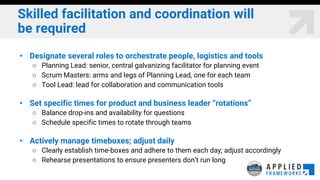
Skilled facilitation and coordination will
be required
• Designate several roles to orchestrate people, logistics and tools
○ Planning Lead: senior, central galvanizing facilitator for planning event
○ Scrum Masters: arms and legs of Planning Lead, one for each team
○ Tool Lead: lead for collaboration and communication tools
• Set specific times for product and business leader “rotations”
○ Balance drop-ins and availability for questions
○ Schedule specific times to rotate through teams
• Actively manage timeboxes; adjust daily
○ Clearly establish time-boxes and adhere to them each day; adjust accordingly
○ Rehearse presentations to ensure presenters don’t run long
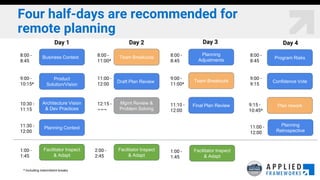
Four half-days are recommended for
remote planning
Business Context
Planning Context
Product
Solution/Vision
Architecture Vision
& Dev Practices
Final Plan Review
Mgmt Review &
Problem Solving
Draft Plan Review
Team Breakouts
Team Breakouts
Planning
Adjustments Program Risks
8:00 -
8:45
9:00 -
10:15*
10:30 -
11:15
11:30 -
12:00
8:00 -
11:00*
11:00 -
12:00
12:15 -
~~~
8:00 -
8:45
9:00 -
11:00*
11:10 -
12:00
8:00 -
8:45
9:00 -
9:15
Confidence Vote
Plan rework
Planning
Retrospective
9:15 -
10:45*
11:00 -
12:00
* Including intermittent breaks
Facilitator Inspect
& Adapt
1:00 -
1:45
Facilitator Inspect
& Adapt
2:00 -
2:45
Facilitator Inspect
& Adapt
1:00 -
1:45
Day 1 Day 2 Day 3 Day 4
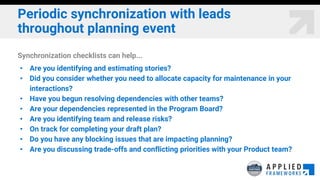
Periodic synchronization with leads
throughout planning event
Synchronization checklists can help...
• Are you identifying and estimating stories?
• Did you consider whether you need to allocate capacity for maintenance in your
interactions?
• Have you begun resolving dependencies with other teams?
• Are your dependencies represented in the Program Board?
• Are you identifying team and release risks?
• On track for completing your draft plan?
• Do you have any blocking issues that are impacting planning?
• Are you discussing trade-offs and conflicting priorities with your Product team?
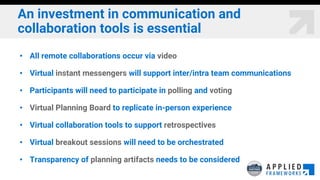
An investment in communication and
collaboration tools is essential
• All remote collaborations occur via video
• Virtual instant messengers will support inter/intra team communications
• Participants will need to participate in polling and voting
• Virtual Planning Board to replicate in-person experience
• Virtual collaboration tools to support retrospectives
• Virtual breakout sessions will need to be orchestrated
• Transparency of planning artifacts needs to be considered
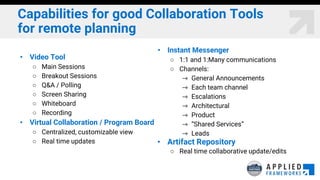
Capabilities for good Collaboration Tools
for remote planning
• Video Tool
○ Main Sessions
○ Breakout Sessions
○ Q&A / Polling
○ Screen Sharing
○ Whiteboard
○ Recording
• Virtual Collaboration / Program Board
○ Centralized, customizable view
○ Real time updates
• Instant Messenger
○ 1:1 and 1:Many communications
○ Channels:
⇾ General Announcements
⇾ Each team channel
⇾ Escalations
⇾ Architectural
⇾ Product
⇾ “Shared Services”
⇾ Leads
• Artifact Repository
○ Real time collaborative update/edits
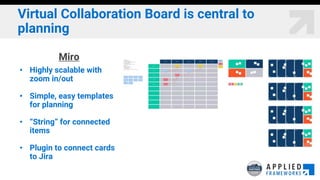
Virtual Collaboration Board is central to
planning
Miro
• Highly scalable with
zoom in/out
• Simple, easy templates
for planning
• “String” for connected
items
• Plugin to connect cards
to Jira
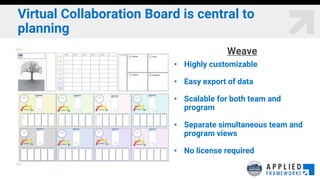
Virtual Collaboration Board is central to
planning
Weave
• Highly customizable
• Easy export of data
• Scalable for both team and
program
• Separate simultaneous team and
program views
• No license required
appliedframeworks.com
AGILE CONSULTING | ONLINE TRAINING | CLASSROOM TRAINING
You have questions, we’re here to help...

Remote PI Planning: ScrumMaster & RTE Edition

  • 1.
    appliedframeworks.com AGILE CONSULTING |ONLINE TRAINING | CLASSROOM TRAINING Remote PI Planning April 2020
  • 2.
    Introductions Laura Richardson Webinar Host& SVP Sales, CSM, SPC lrichardson@appliedframeworks.com John Mulligan Principal Consultant CSM, CSP-SM, CSPO, SPC jmulligan@appliedframeworks.com Kevin Rosengren, Engagement Director CSP-PO, CSP-SM, SPC krosengren@appliedframeworks.com
  • 3.
    The Challenge ● Theresponse to COVID-19 has prevented companies from collaborating face-to-face ● The “show must go on” for many companies to continue to collaborate in the face of distributed teams ● Holding off on planning activities will impact how businesses will recover and maintain competitive positioning
  • 4.
    Remote planning facesseveral challenges ● Planning remotely is different and should be treated differently ● An extended runway is needed for preparation ● Maintaining communications among team members is critical
  • 5.
    Four key elementsof effective remote planning 1. Thoughtful advanced scheduling and preparation 2. Extended timeline for fully remote participation 3. Added logistics and coordinated remote facilitation 4. Collaboration tools required to facilitate remote interaction
  • 6.
    Schedules for remoteplanning differ from in-person events • Consider scheduling and sequencing events based on dependencies • Devote fewer hours across more days ○ Recommend 4 days; maximum 4 hours of focused, online collaboration ○ Use the 45/15 rule: 15 minutes break after 45 minutes of online collaboration • Breakout sessions/teams require facilitators for each • Remote presentations require effective Q&A and feedback coordination • Expect the unexpected in extraordinary times ○ Acknowledge parents managing children at home ○ Prepare for bandwidth issues with high usage
  • 7.
    An extended timelinefor preparation is required • Identify portfolio allocation across features, R&D, defects, tech debt, infra, etc. • Decompose, Prioritize and estimate backlog • Begin narrowing down targeted features for the iteration • Establish Calendar Invites for planning • Finalize list of targeted features for the iteration • Decompose features into smallest units of value • Refine estimation • Prepare initial inter-team risk and dependencies • Identify remote collaboration tool-set to support planning event 4WEEKS 3WEEKS 2WEEKS 1WEEK • Continue backlog refinement • Finalize business context, vision presentations • Facilitation team meet to plan logistics, review with leadership • Implement and acclimate employees to new tools • Update risks & dependencies • Adjust target feature set for iteration based on new discoveries • Conduct dry run of collaboration tools • Rehearse timing of business and architectural vision presentations
  • 8.
    An extended timelinefor preparation is required • Identify portfolio allocation across features, R&D, defects, tech debt, infra, etc. • Decompose, Prioritize and estimate backlog • Begin narrowing down targeted features for the iteration • Establish Calendar Invites for planning • Finalize list of targeted features for the iteration • Decompose features into smallest units of value • Refine estimation • Prepare initial inter-team risk and dependencies • Identify remote collaboration tool-set to support planning event 4WEEKS 3WEEKS 2WEEKS 1WEEK • Continue backlog refinement • Finalize business context, vision presentations • Facilitation team meet to plan logistics, review with leadership • Implement and acclimate employees to new tools • Update risks & dependencies • Adjust target feature set for iteration based on new discoveries • Conduct dry run of collaboration tools • Rehearse timing of business and architectural vision presentations
  • 9.
    Skilled facilitation andcoordination will be required • Designate several roles to orchestrate people, logistics and tools ○ Planning Lead: senior, central galvanizing facilitator for planning event ○ Scrum Masters: arms and legs of Planning Lead, one for each team ○ Tool Lead: lead for collaboration and communication tools • Set specific times for product and business leader “rotations” ○ Balance drop-ins and availability for questions ○ Schedule specific times to rotate through teams • Actively manage timeboxes; adjust daily ○ Clearly establish time-boxes and adhere to them each day; adjust accordingly ○ Rehearse presentations to ensure presenters don’t run long
  • 10.
    Four half-days arerecommended for remote planning Business Context Planning Context Product Solution/Vision Architecture Vision & Dev Practices Final Plan Review Mgmt Review & Problem Solving Draft Plan Review Team Breakouts Team Breakouts Planning Adjustments Program Risks 8:00 - 8:45 9:00 - 10:15* 10:30 - 11:15 11:30 - 12:00 8:00 - 11:00* 11:00 - 12:00 12:15 - ~~~ 8:00 - 8:45 9:00 - 11:00* 11:10 - 12:00 8:00 - 8:45 9:00 - 9:15 Confidence Vote Plan rework Planning Retrospective 9:15 - 10:45* 11:00 - 12:00 * Including intermittent breaks Facilitator Inspect & Adapt 1:00 - 1:45 Facilitator Inspect & Adapt 2:00 - 2:45 Facilitator Inspect & Adapt 1:00 - 1:45 Day 1 Day 2 Day 3 Day 4
  • 11.
    Periodic synchronization withleads throughout planning event Synchronization checklists can help... • Are you identifying and estimating stories? • Did you consider whether you need to allocate capacity for maintenance in your interactions? • Have you begun resolving dependencies with other teams? • Are your dependencies represented in the Program Board? • Are you identifying team and release risks? • On track for completing your draft plan? • Do you have any blocking issues that are impacting planning? • Are you discussing trade-offs and conflicting priorities with your Product team?
  • 12.
    An investment incommunication and collaboration tools is essential • All remote collaborations occur via video • Virtual instant messengers will support inter/intra team communications • Participants will need to participate in polling and voting • Virtual Planning Board to replicate in-person experience • Virtual collaboration tools to support retrospectives • Virtual breakout sessions will need to be orchestrated • Transparency of planning artifacts needs to be considered
  • 13.
    Capabilities for goodCollaboration Tools for remote planning • Video Tool ○ Main Sessions ○ Breakout Sessions ○ Q&A / Polling ○ Screen Sharing ○ Whiteboard ○ Recording • Virtual Collaboration / Program Board ○ Centralized, customizable view ○ Real time updates • Instant Messenger ○ 1:1 and 1:Many communications ○ Channels: ⇾ General Announcements ⇾ Each team channel ⇾ Escalations ⇾ Architectural ⇾ Product ⇾ “Shared Services” ⇾ Leads • Artifact Repository ○ Real time collaborative update/edits
  • 14.
    Virtual Collaboration Boardis central to planning Miro • Highly scalable with zoom in/out • Simple, easy templates for planning • “String” for connected items • Plugin to connect cards to Jira
  • 15.
    Virtual Collaboration Boardis central to planning Weave • Highly customizable • Easy export of data • Scalable for both team and program • Separate simultaneous team and program views • No license required
  • 16.
    appliedframeworks.com AGILE CONSULTING |ONLINE TRAINING | CLASSROOM TRAINING You have questions, we’re here to help...