Regular Expressions From Beginner To Expert By Varun
Date: December 24, 2018
In this document want to show how to master regex. I wasn’t good at regex until I realized its power and
the necessity to understand and master it.
---- Avoid writing lines and lines of code by using power of regex.
---- The regex shown here will take you from a simple example to the complex patterns.
---- Lot of tools apart from all the programming languages support regex.
---- I personally know integration tools such as Ca-Api-Gateway, Apigee, TibcoFlogo, Mulesoft where
regex can be used and match complex patterns, save unnecessary code for pattern match.
---- Logging slutions like ELK, Splunk support full on regex.
---- Analytical tools such as Tableau support full on regex.
---- Please follow ths document and practice along by the end of it. You will start writing complex regex
on your own.
Regexp By Varun Kumar 3134330169
Page 1 of 50
Contents
Introduction ......................................................................................................................................3
What are regular expressions.....................................................................................................3
Why to learn regular expressions ..............................................................................................3
How regex is created ...................................................................................................................3
Tools Used....................................................................................................................................4
Basic Syntax Regex .....................................................................................................................5
All About Characters .......................................................................................................................5
Character Literals.........................................................................................................................5
Character Classes........................................................................................................................6
Forward Boundary .......................................................................................................................7
Character Range...........................................................................................................................8
Regex Live Example ..................................................................................................................10
Negation Characters ..................................................................................................................12
Meta Characters .............................................................................................................................13
What are Meta Characters .........................................................................................................13
Wild Card Meta Characters Part 1 ............................................................................................15
Escaping Meta Characters ........................................................................................................19
Predifined Character Classes ...................................................................................................20
Anchors And Word Boundary.......................................................................................................22
Anchors.......................................................................................................................................22
Word Boundary ..........................................................................................................................24
Quantifiers ......................................................................................................................................26
? quantifier..................................................................................................................................26
* Quantifier..................................................................................................................................28
Matching Example......................................................................................................................28
+ Quantifier .................................................................................................................................32
{} Quantifiers To Limit Range ...................................................................................................33
{min,} Quantifiers .......................................................................................................................33
{min,max} Quantifiers................................................................................................................34
Greedy Quantifiers.....................................................................................................................35
Regexp By Varun Kumar 3134330169
Page 2 of 50
Lazy Or Reluctant Quantifiers...................................................................................................36
Alternative For Lazy Quantifiers...........................................................................................36
Greedy Quantifiers vs Lazy Quantifiers...............................................................................38
Increasing the performance of the RegeX...........................................................................39
Groups In Regex ............................................................................................................................40
Group Examples.........................................................................................................................40
Back Refrencing In Groups.......................................................................................................42
Non-Capturing Groups ..............................................................................................................43
Alteration In Groups ..................................................................................................................43
Nesting in Groups/Alternation ..................................................................................................44
Assertions.......................................................................................................................................45
Look Ahead Assertion ...............................................................................................................45
Positive Look Ahead Assertion ................................................................................................45
Negative Look Ahead Assertion ...............................................................................................46
Look Behind Assertions............................................................................................................46
Positive Look Behind Assertion...............................................................................................46
Negative Look Behind Assertion..............................................................................................47
Real Life Scenarios ........................................................................................................................47
Example From My Project Work ...................................................................................................49
Regexp By Varun Kumar 3134330169
Page 3 of 50
Introduction
What are regular expressions
Why to learn regular expressions
Used in all programming languages. Also used in caApiGateway and Apigee
For example validating user input into a form
How regex is created
Regexp By Varun Kumar 3134330169
Page 4 of 50
Tools Used
Tools used for learning the regex during the course of this document.
Online regex tester
https://regex101.com
https://regexr.com
https://www/regextester.com
Offline Regex Testers
https://atom.io
reach regex by using ctrl+F or below steps
Regexp By Varun Kumar 3134330169
Page 5 of 50
Regexp are case sensitive.
Basic Syntax Regex
Used in all programming languages. Also used in Api Management tools such as, caApiGateway and Apigee
All About Characters
Character Literals
Takes the string as it is.
Regexp By Varun Kumar 3134330169
Page 6 of 50
Regexby default is case sensitive.
:/Java/gm (Case sensitive)
:/Java/gmi (Case insensitive)
Regex starts searching from left to right
Character Classes
Character class are enclosed in [] brackets
Regexp By Varun Kumar 3134330169
Page 7 of 50
Forward Boundary
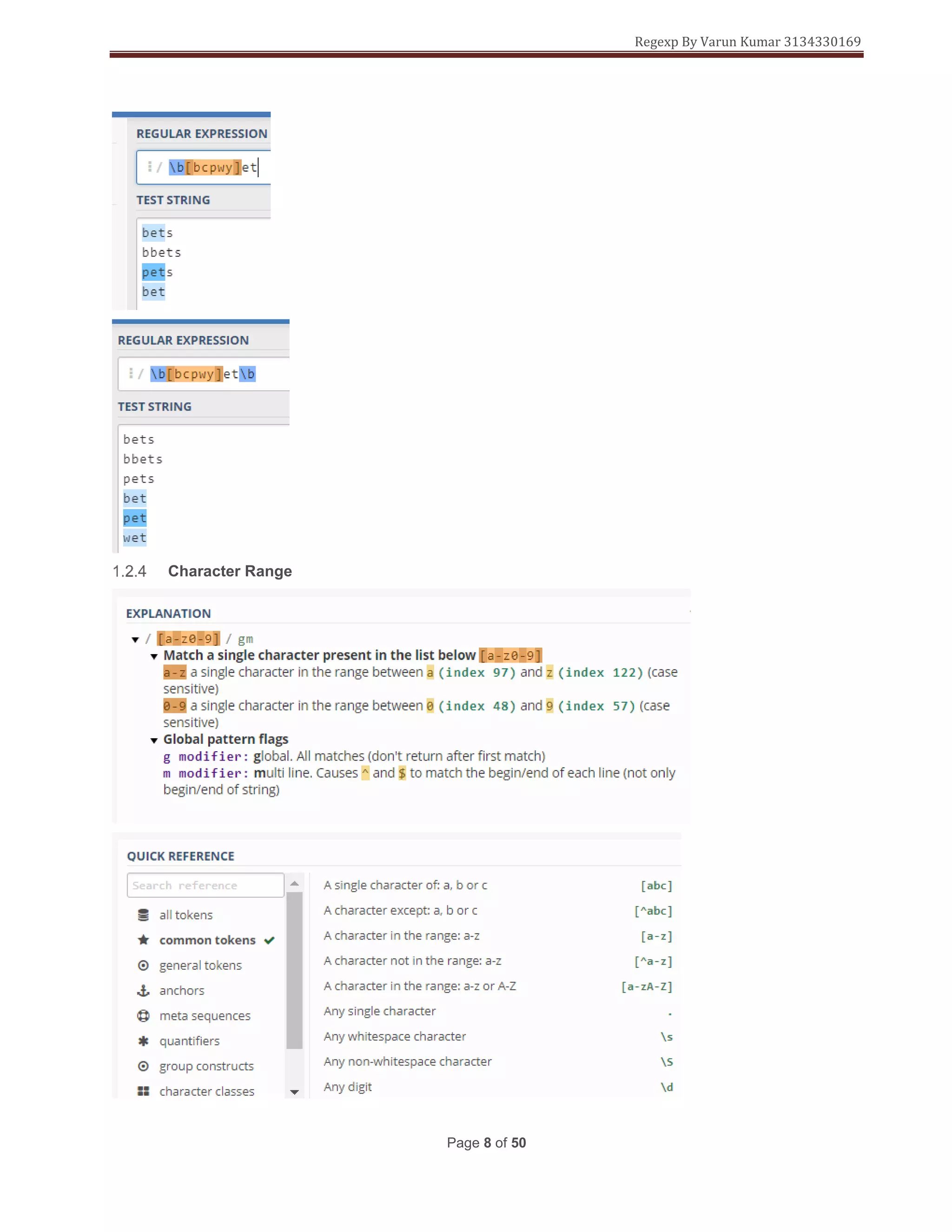
>> Forward boundary uses the following pattern ‘b’
say in this you want to match only the word bet and not sub string that may contain bet.
Regexp By Varun Kumar 3134330169
Page 8 of 50
Character Range
Regexp By Varun Kumar 3134330169
Page 9 of 50
Say there are 5 employes and you want to match only the emp 1,2,3
Write a regex to match the first 3 words.
Indexes of alphabets and numbers
Regexp By Varun Kumar 3134330169
Page 10 of 50
You needs to match the index when defining the character ranges you need to go from small to big
[A-z] This is correct
[a-Z] This is wrong.
Regex Live Example
<!DOCTYPE html>
<html>
<head>
<title>Testing Regular Expressions in HTML forms</title>
</head>
<body>
<h1>Test your Regular Expressions here</h1>
<fieldset>
<legend>Write your Regular expressions</legend>
<form>
<div>
<label for="display-name"> Prove that you are not a robot:
<span class="warning">*(Enter a single English capital letter.)</span>
</label>
<input type="text" id="display-name" name="ip-display"
pattern="[A-Z]"
title="Enter any single English capital Letter only"/>
</div>
<div>
<input type="submit" class="submit" value="Submit" />
</div>
</form>
</fieldset>
</body>
</html>
Regexp By Varun Kumar 3134330169
Page 11 of 50
Regexp By Varun Kumar 3134330169
Page 12 of 50
Negation Characters
Are represented with a ^ symbol inside [] brackets.
[^a-e] will match all characters except a-e
Example 1:-
 The First Character should be any character except a comma(,)
 The Second Character must be a comma(,)
 The Third Character should be any character except a comma(,)
Example 2:-
 The First Character must be a vowel(a,e,i,o,u)
 The Second Character must be a English alphabet(it can be lowercase or
uppercase English alphabets)
Regexp By Varun Kumar 3134330169
Page 13 of 50
 The Third Character must a single number
 The Fourth Character should be any character except a Hyphen(-)
 The Fifth Character must be a Hyphen(-)
 The Sixth Character should be any character except a Hyphen(-)
Meta Characters
What are Meta Characters
In regex each character is described as normal character or meta character.
Special character that have special meaning.
Regexp By Varun Kumar 3134330169
Page 14 of 50
 used to preceed a meta char or predefine character class.
^ negation character and used in anchors
^ Is also used for matching a boundary at the start of the line
$ Is used for matching a boundary at the end of the line
. used to match any character aprart from new line
? quantifiers
* quantifiers
+ quantifiers
{} quantifiers
| Alternation
() Grouping
[] Ranges
= Assertions (look ahead, look behind)
! Assertions (look ahead, look behind)
Regexp By Varun Kumar 3134330169
Page 15 of 50
Wild Card Meta Characters Part 1
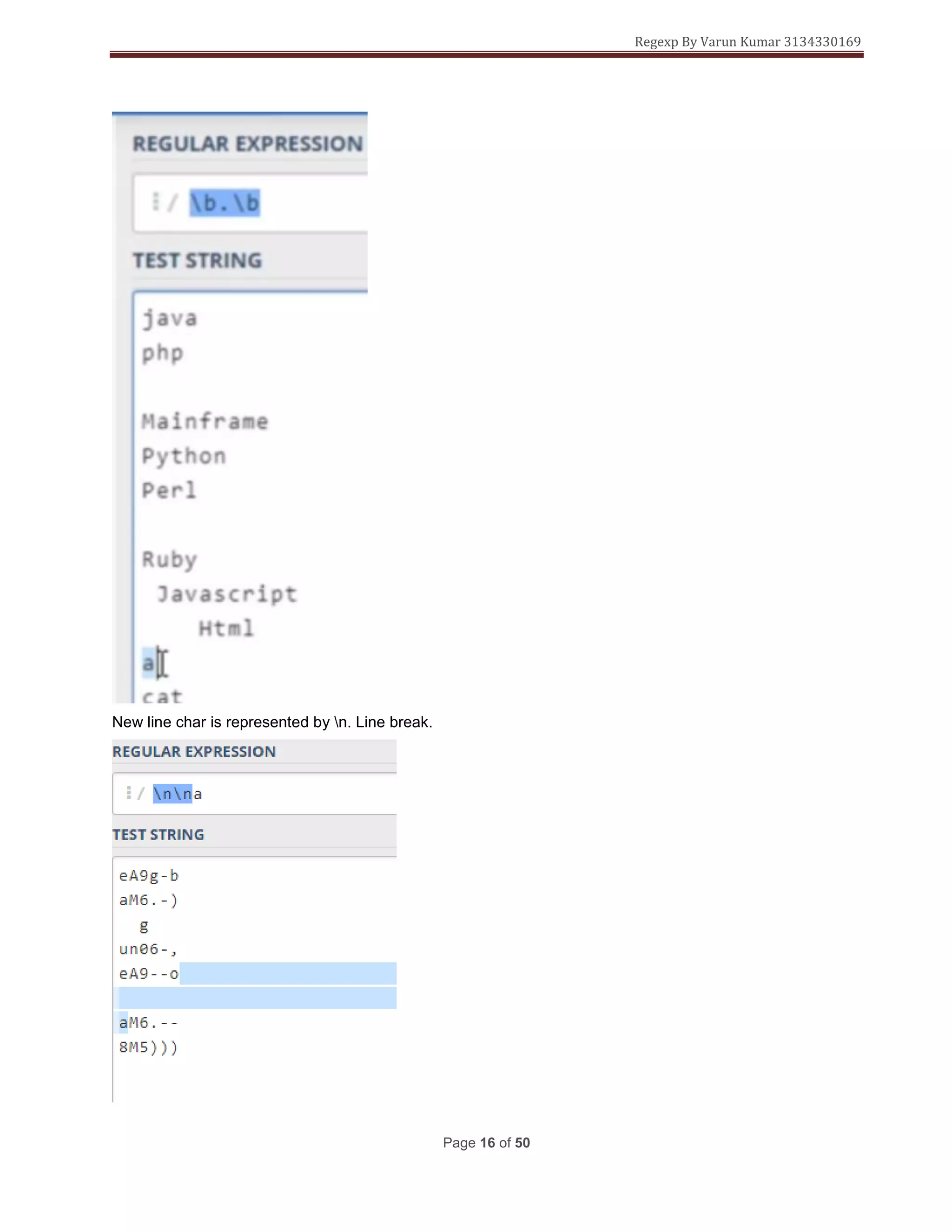
. meta character is also called wild card metacharacter
To match only one character
Regexp By Varun Kumar 3134330169
Page 16 of 50
New line char is represented by n. Line break.
Regexp By Varun Kumar 3134330169
Page 17 of 50
s whitespace
Matches new line followed by whitespace
b is a boundary between a word and a non word character
Regexp By Varun Kumar 3134330169
Page 18 of 50
Regexp By Varun Kumar 3134330169
Page 19 of 50
Escaping Meta Characters
Meta characters are escaped by
Regexp By Varun Kumar 3134330169
Page 20 of 50
Predifined Character Classes
To capture a 3 digit number within “”
Regexp By Varun Kumar 3134330169
Page 21 of 50
Regexp By Varun Kumar 3134330169
Page 22 of 50
Anchors And Word Boundary
Anchors
Are used match before the beginning or end of
1) String
2) Line
Regexp By Varun Kumar 3134330169
Page 23 of 50
Regexp By Varun Kumar 3134330169
Page 24 of 50
Word Boundary
Is used to match the boundary between word and non-word character.
Regexp By Varun Kumar 3134330169
Page 25 of 50
Captures all word boundaries
All non-word boundary characters.
Regexp By Varun Kumar 3134330169
Page 26 of 50
Quantifiers
In regx there are 4 types of Quantifiers.
A quantifier is used after a charcter or group and decides how the character or group before the quantifier
will occur.
? quantifier
Regexp By Varun Kumar 3134330169
Page 27 of 50
Regexp By Varun Kumar 3134330169
Page 28 of 50
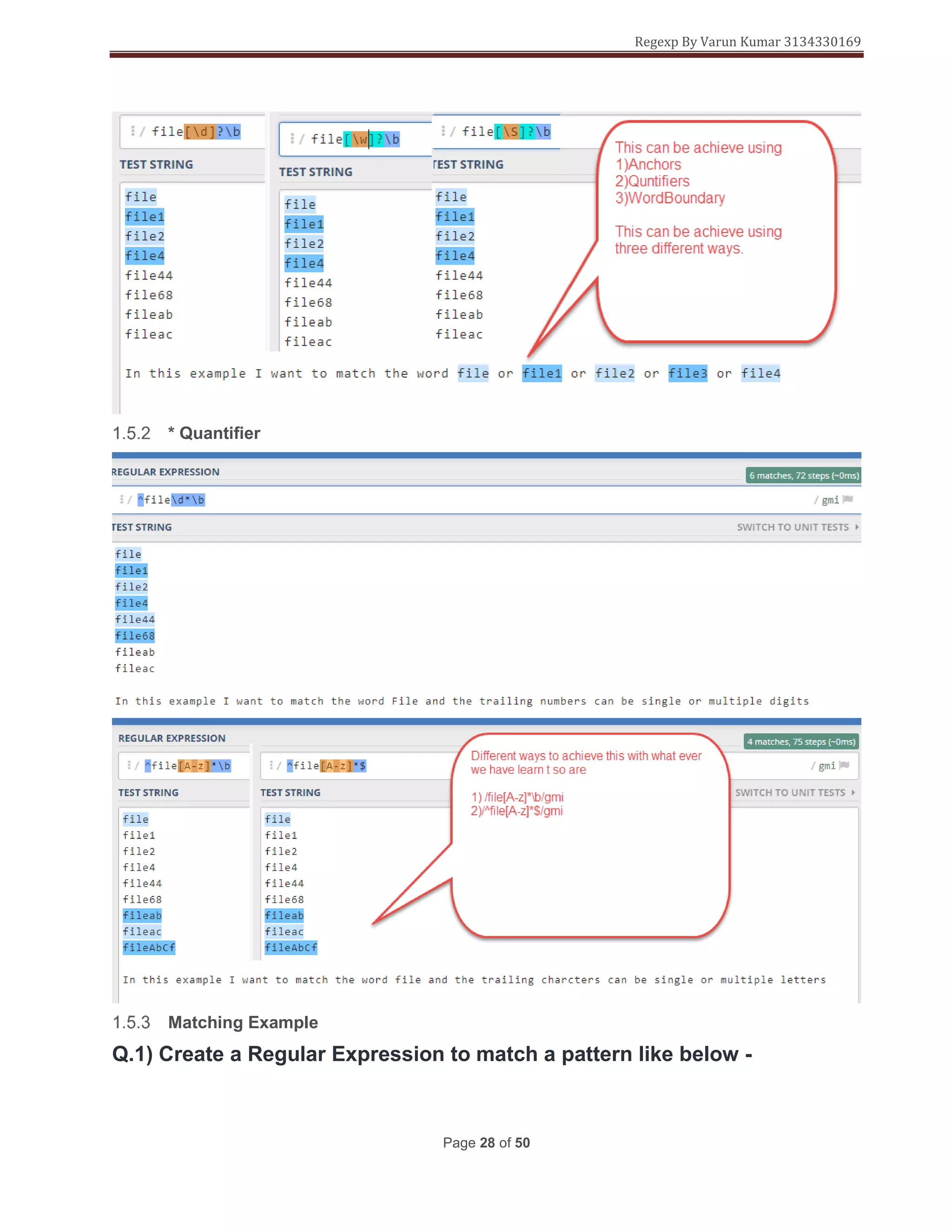
* Quantifier
Matching Example
Q.1) Create a Regular Expression to match a pattern like below -
Regexp By Varun Kumar 3134330169
Page 29 of 50
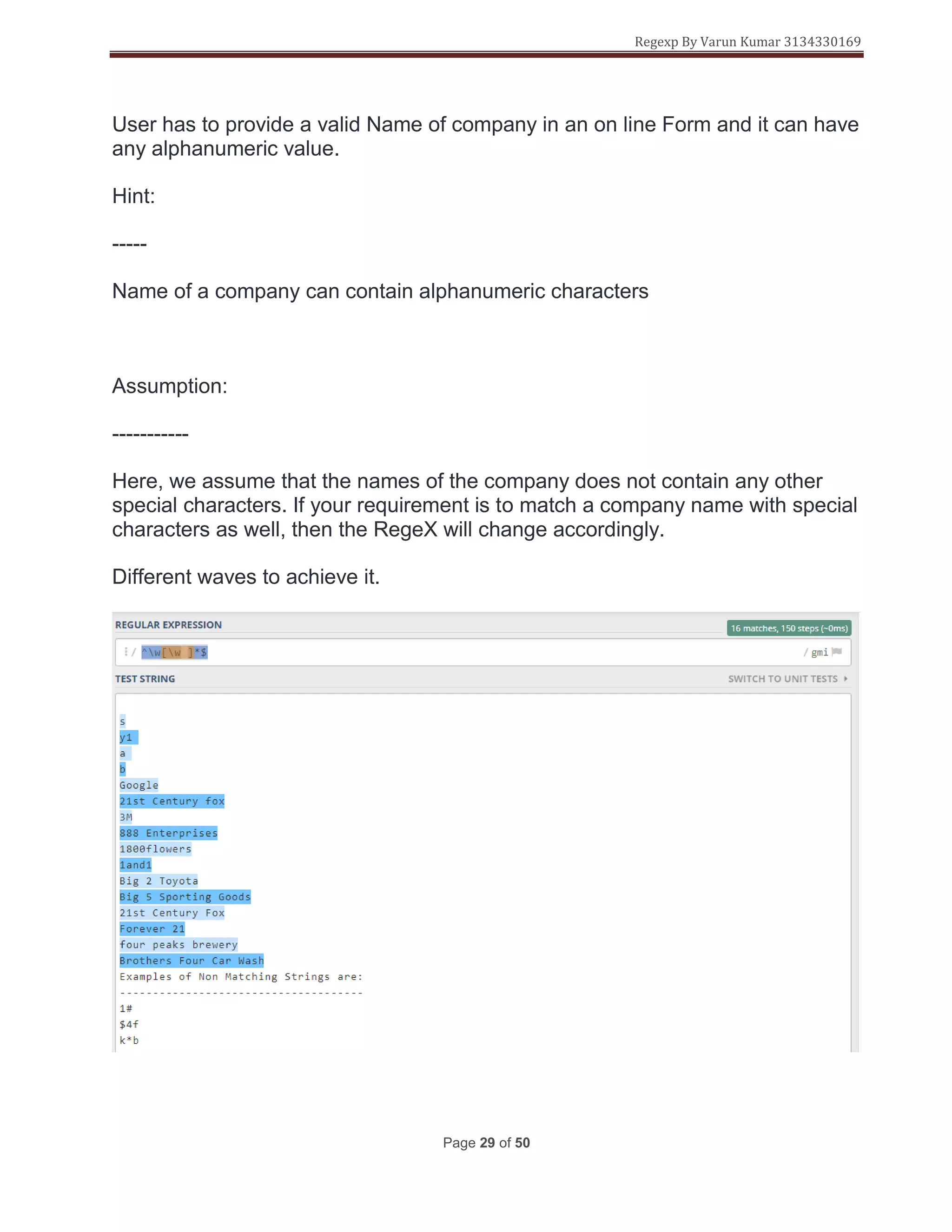
User has to provide a valid Name of company in an on line Form and it can have
any alphanumeric value.
Hint:
-----
Name of a company can contain alphanumeric characters
Assumption:
-----------
Here, we assume that the names of the company does not contain any other
special characters. If your requirement is to match a company name with special
characters as well, then the RegeX will change accordingly.
Different waves to achieve it.
Regexp By Varun Kumar 3134330169
Page 30 of 50
Regexp By Varun Kumar 3134330169
Page 31 of 50
<!DOCTYPE html>
<html>
<head>
<title>Testing Regular Expressions in HTML forms</title>
</head>
<body>
<h1>Test your Regular Expressions here</h1>
<fieldset>
<legend>Write your Regular expressions</legend>
<form>
<div>
<label for="display-name"> Enter a company name here:
<span class="warning">*(Enter an alpha numeric character.)</span>
</label>
<input type="text" id="display-name" name="ip-display"
pattern="^[0-z][A-zds]*$"
title="Special Characters Not Allowed"/>
</div>
<div>
<input type="submit" class="submit" value="Submit" />
</div>
</form>
</fieldset>
</body>
</html>
Command explanation.
Regexp By Varun Kumar 3134330169
Page 32 of 50
+ Quantifier
Regexp By Varun Kumar 3134330169
Page 33 of 50
{} Quantifiers To Limit Range
{min,} Quantifiers
Regexp By Varun Kumar 3134330169
Page 34 of 50
{min,max} Quantifiers
Regexp By Varun Kumar 3134330169
Page 35 of 50
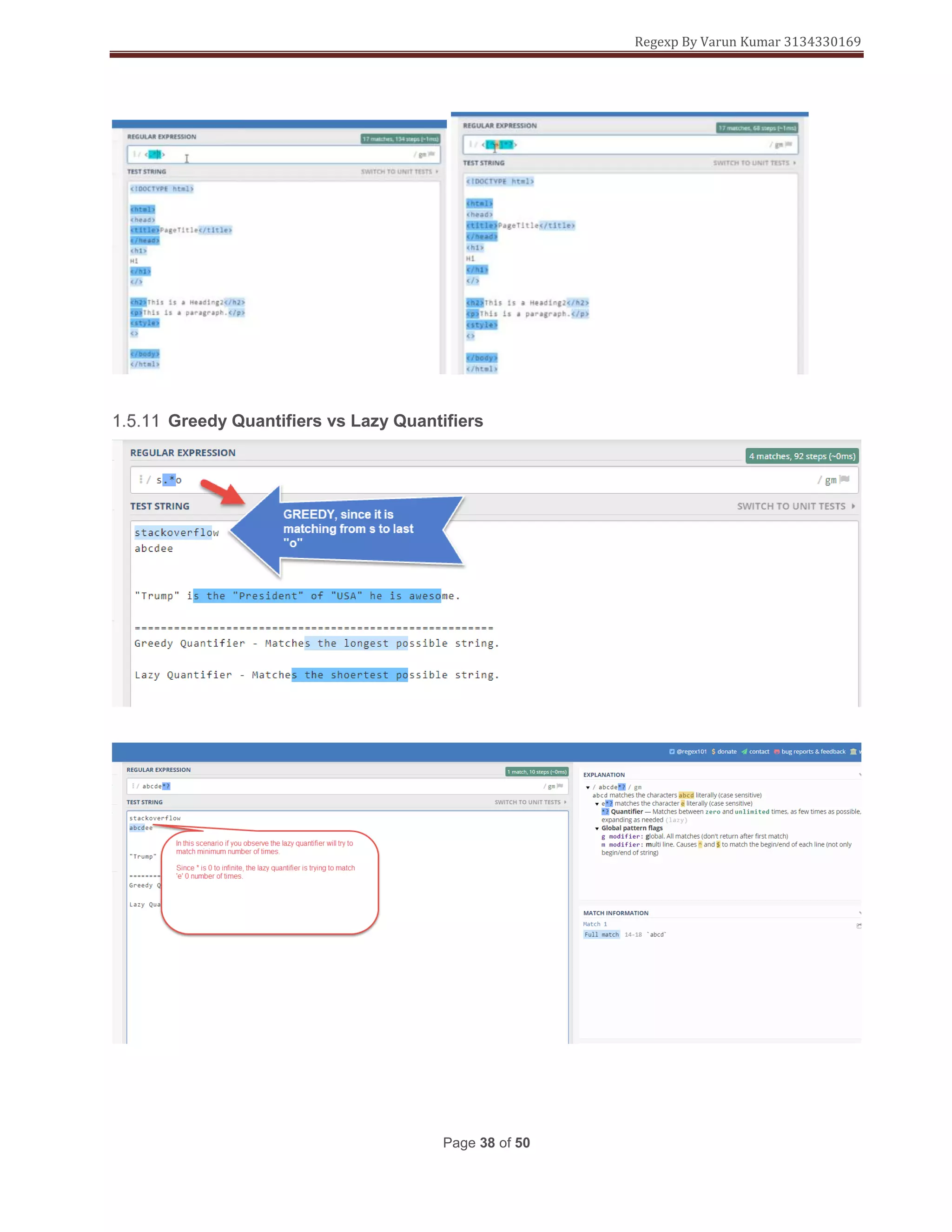
Greedy Quantifiers
There is a fix for the greedy natures of the quantifiers by making the quantifiers “Lazy” or “Reluctant”
quantifiers.
Regexp By Varun Kumar 3134330169
Page 36 of 50
Lazy Or Reluctant Quantifiers
Alternative For Lazy Quantifiers
When making a quantifier Lazy this will result in increased processing time and this when used in
applications(bulding live applications) will cause lags. This can be over come by using negation characters.
Regexp By Varun Kumar 3134330169
Page 37 of 50
Regexp By Varun Kumar 3134330169
Page 38 of 50
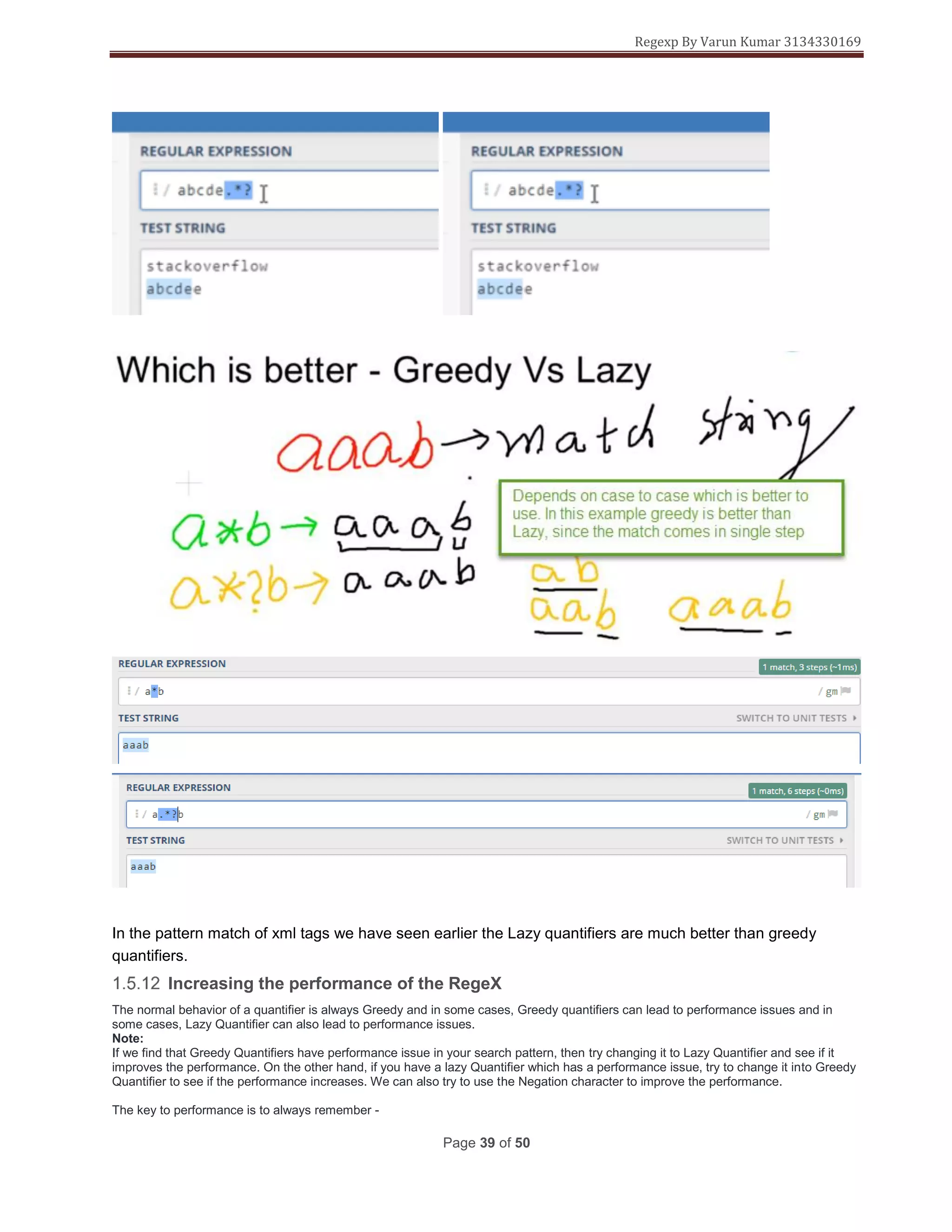
Greedy Quantifiers vs Lazy Quantifiers
Regexp By Varun Kumar 3134330169
Page 39 of 50
In the pattern match of xml tags we have seen earlier the Lazy quantifiers are much better than greedy
quantifiers.
Increasing the performance of the RegeX
The normal behavior of a quantifier is always Greedy and in some cases, Greedy quantifiers can lead to performance issues and in
some cases, Lazy Quantifier can also lead to performance issues.
Note:
If we find that Greedy Quantifiers have performance issue in your search pattern, then try changing it to Lazy Quantifier and see if it
improves the performance. On the other hand, if you have a lazy Quantifier which has a performance issue, try to change it into Greedy
Quantifier to see if the performance increases. We can also try to use the Negation character to improve the performance.
The key to performance is to always remember -
Regexp By Varun Kumar 3134330169
Page 40 of 50
** Greedy matches the longest possible string
** Lazy matches the smallest possible string
So, remember this, if we try to make Greedy quantifier as Lazy then the meaning will change like this -
{min,max}? - Repeat minimum 'min' times and maximum 'max' times, but as few times as possible(lowest is 'min' times)
{min,}? - Repeat minimum 'min' times and maximum any times, but as few times as possible(lowest is 'min' times)
*? - Repeat any number of times, but as few times as possible(lowest is 0 time)
+? - Repeat any number of times, but as few times as possible(lowest is 1 time)
?? - Repeat either 0 time or 1 time, but as few times as possible(lowest is 0 time)
Groups In Regex
1) Improves the redability of regex
2) Groups can be reused in complex expressions.
Group Examples
Regexp By Varun Kumar 3134330169
Page 41 of 50
The above regex is to match word regex and match only 3 numbers after it.
Regexp By Varun Kumar 3134330169
Page 42 of 50
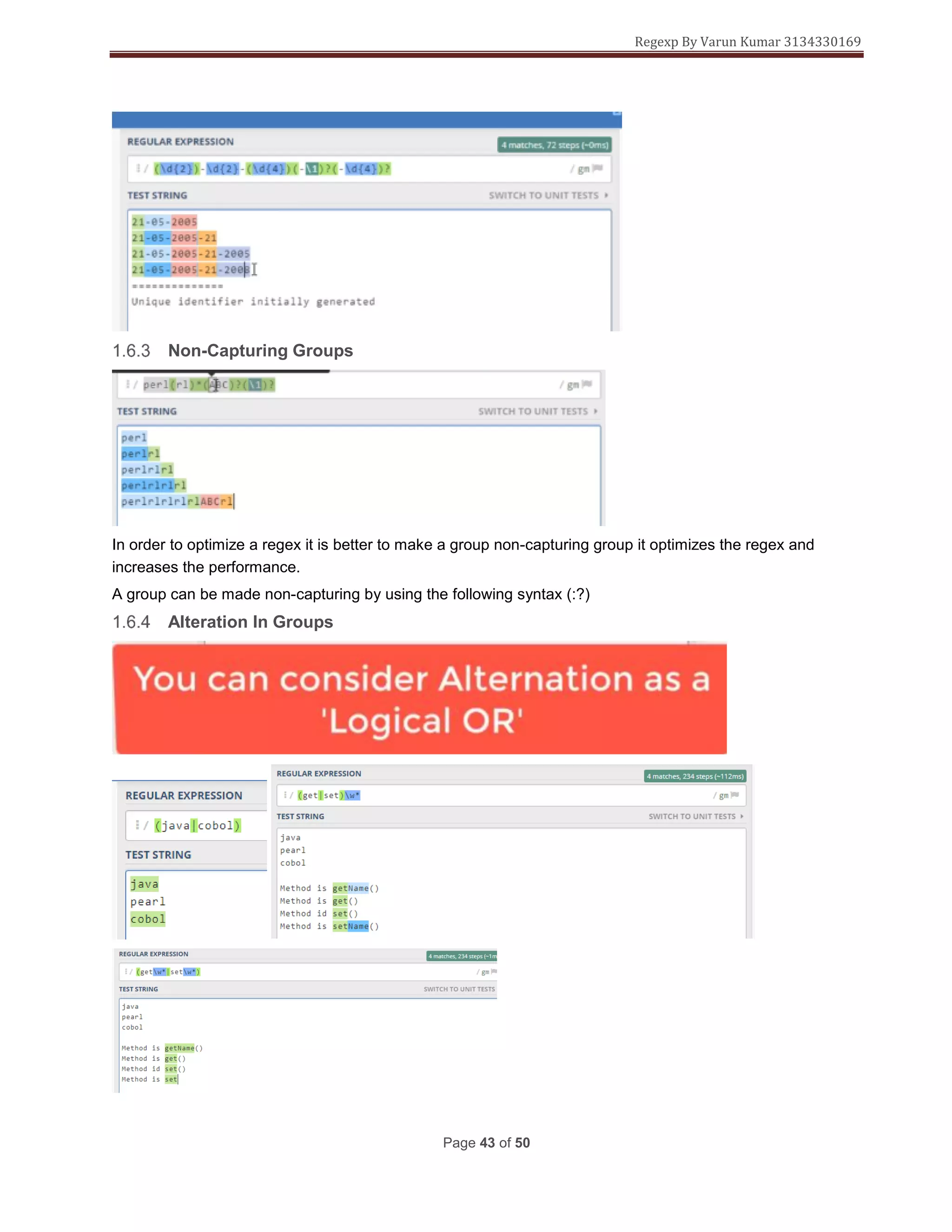
Back Refrencing In Groups
In order to match all the words in the list
Regexp By Varun Kumar 3134330169
Page 43 of 50
Non-Capturing Groups
In order to optimize a regex it is better to make a group non-capturing group it optimizes the regex and
increases the performance.
A group can be made non-capturing by using the following syntax (:?)
Alteration In Groups
Regexp By Varun Kumar 3134330169
Page 44 of 50
Nesting in Groups/Alternation
Regexp By Varun Kumar 3134330169
Page 45 of 50
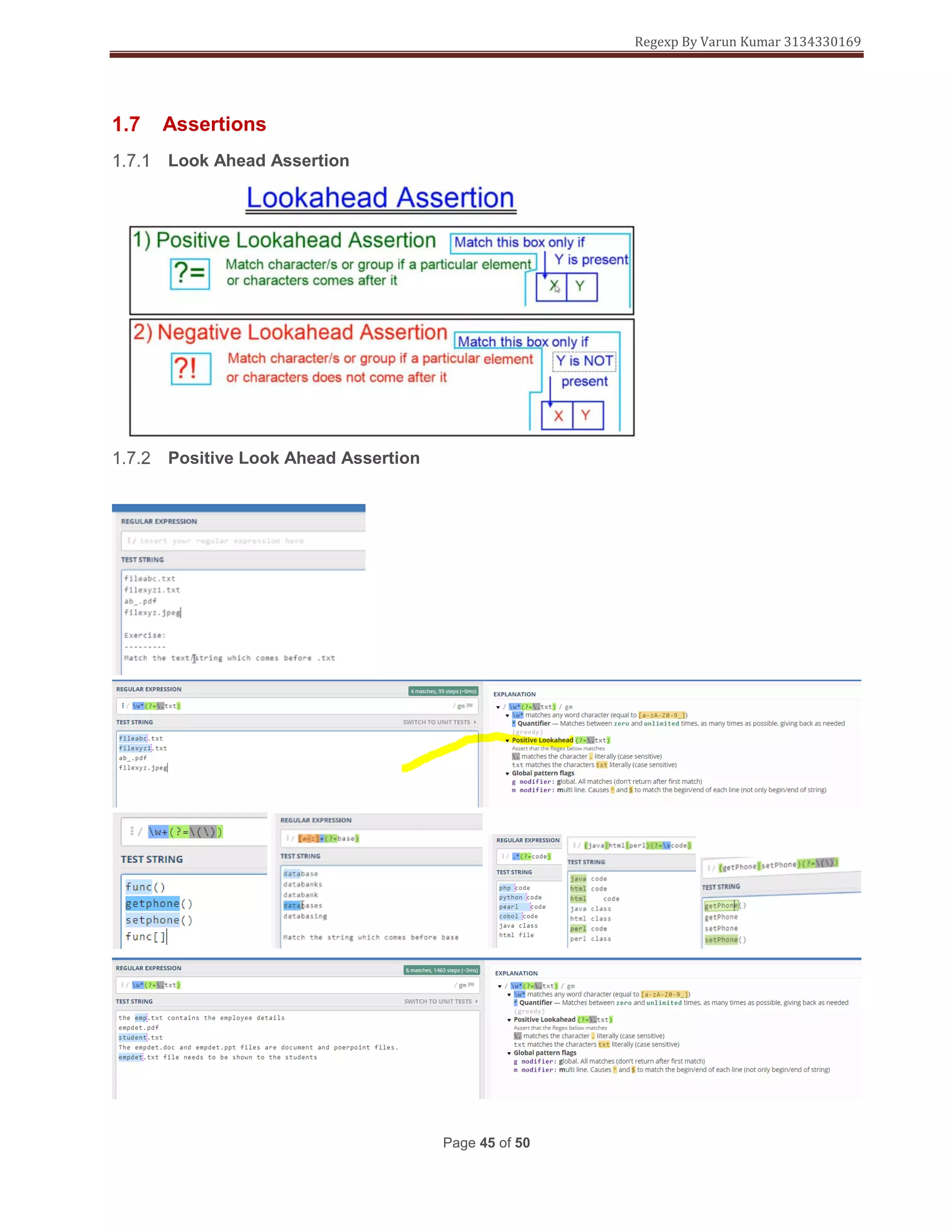
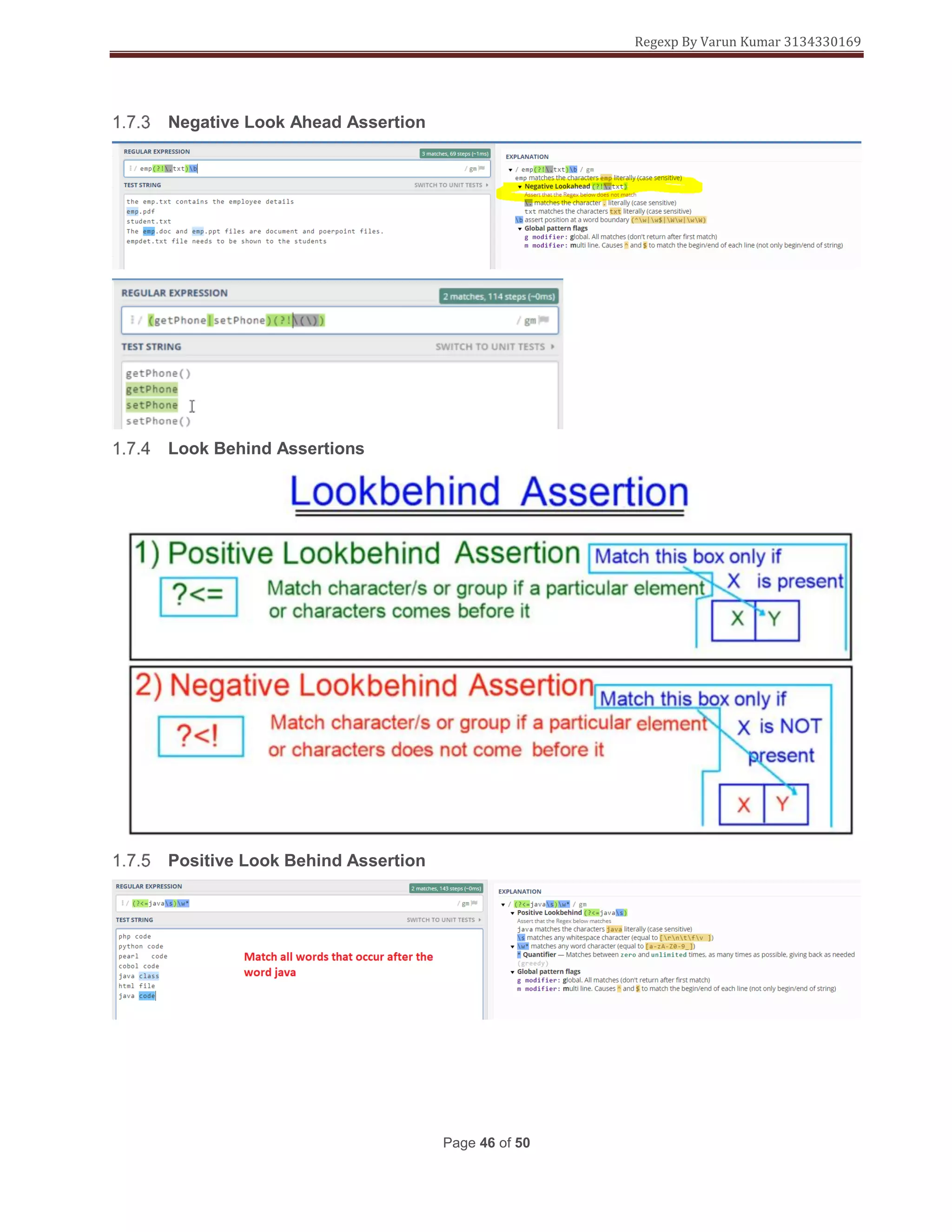
Assertions
Look Ahead Assertion
Positive Look Ahead Assertion
Regexp By Varun Kumar 3134330169
Page 46 of 50
Negative Look Ahead Assertion
Look Behind Assertions
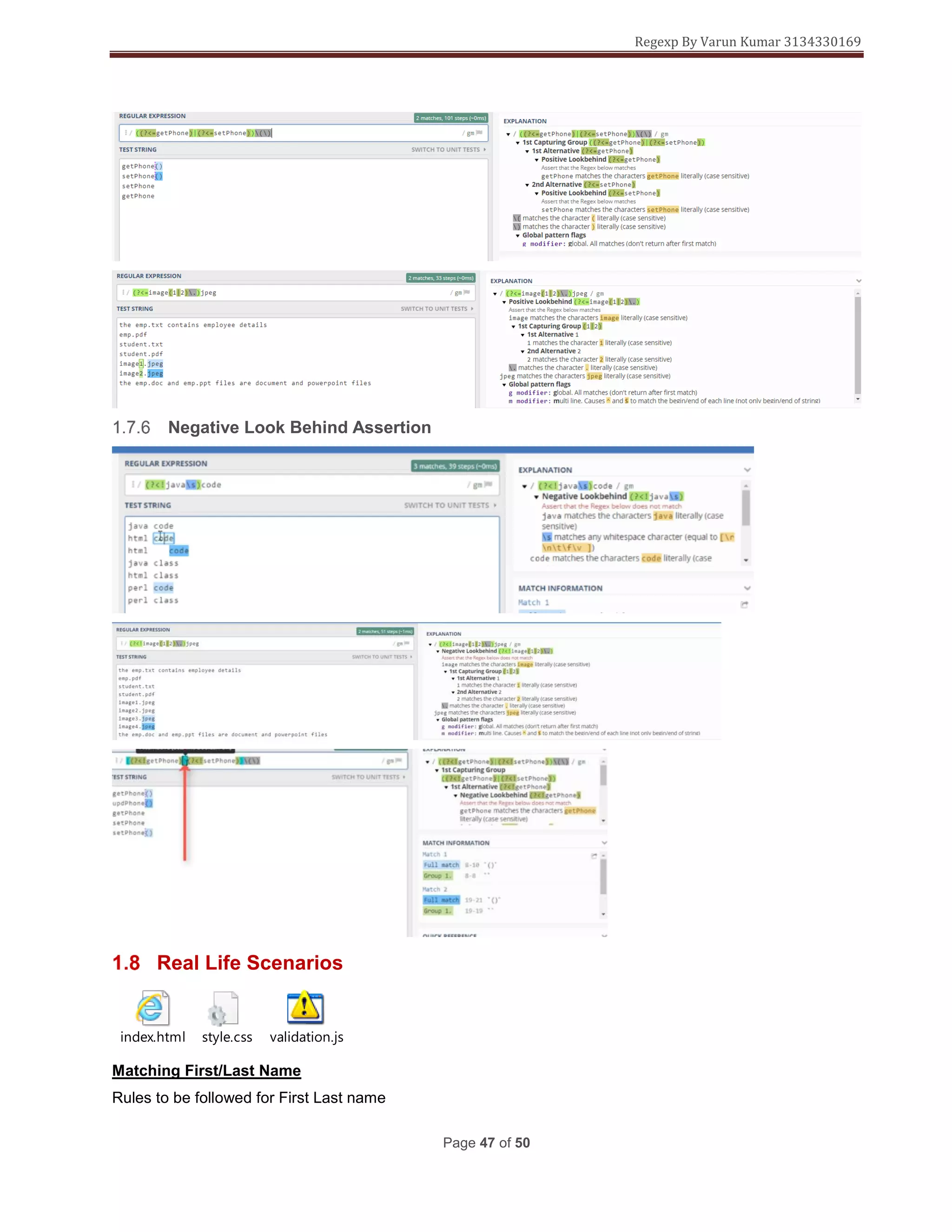
Positive Look Behind Assertion
Regexp By Varun Kumar 3134330169
Page 47 of 50
Negative Look Behind Assertion
Real Life Scenarios
index.html style.css validation.js
Matching First/Last Name
Rules to be followed for First Last name
Regexp By Varun Kumar 3134330169
Page 48 of 50
Modify the first/last name as shown below
Matching Username
Modify the .js as shown
Matching Passwords
Regexp By Varun Kumar 3134330169
Page 49 of 50
Matching Email
Matching Phone Number
Example From Real World
After learning what I learnt from the start till this point in this document was able to do complex regex directly
in the real world.
Payload
{
"shipments": [
{
"pickup": "1000000061",
"distributionCenter": "CLSCL1",
"packages": [
{
"consigneeAddress": {
"address1": "apt 123",
"address2": "apt 123",
"address3": "SANTIAGO",
"city": "REGION METROPOLITANA",
"country": "CL",
Regexp By Varun Kumar 3134330169
Page 50 of 50
"email": "test@email.com",
"name": "Test Name",
"phone": "5555555",
"state": "REGION METROPOLITANA"
},
"packageDetails": {
"currency": "CLP",
"orderedProduct": "501180",
"packageDesc": "Desc",
"packageId": "TEST1234L1",
"weight": 10,
"weightUom": "G"
}
}
]
}
]
}
Match "shipments": [ from the payload

Regular expressions

  • 1.
    Regular Expressions FromBeginner To Expert By Varun Date: December 24, 2018 In this document want to show how to master regex. I wasn’t good at regex until I realized its power and the necessity to understand and master it. ---- Avoid writing lines and lines of code by using power of regex. ---- The regex shown here will take you from a simple example to the complex patterns. ---- Lot of tools apart from all the programming languages support regex. ---- I personally know integration tools such as Ca-Api-Gateway, Apigee, TibcoFlogo, Mulesoft where regex can be used and match complex patterns, save unnecessary code for pattern match. ---- Logging slutions like ELK, Splunk support full on regex. ---- Analytical tools such as Tableau support full on regex. ---- Please follow ths document and practice along by the end of it. You will start writing complex regex on your own.
  • 2.
    Regexp By VarunKumar 3134330169 Page 1 of 50 Contents Introduction ......................................................................................................................................3 What are regular expressions.....................................................................................................3 Why to learn regular expressions ..............................................................................................3 How regex is created ...................................................................................................................3 Tools Used....................................................................................................................................4 Basic Syntax Regex .....................................................................................................................5 All About Characters .......................................................................................................................5 Character Literals.........................................................................................................................5 Character Classes........................................................................................................................6 Forward Boundary .......................................................................................................................7 Character Range...........................................................................................................................8 Regex Live Example ..................................................................................................................10 Negation Characters ..................................................................................................................12 Meta Characters .............................................................................................................................13 What are Meta Characters .........................................................................................................13 Wild Card Meta Characters Part 1 ............................................................................................15 Escaping Meta Characters ........................................................................................................19 Predifined Character Classes ...................................................................................................20 Anchors And Word Boundary.......................................................................................................22 Anchors.......................................................................................................................................22 Word Boundary ..........................................................................................................................24 Quantifiers ......................................................................................................................................26 ? quantifier..................................................................................................................................26 * Quantifier..................................................................................................................................28 Matching Example......................................................................................................................28 + Quantifier .................................................................................................................................32 {} Quantifiers To Limit Range ...................................................................................................33 {min,} Quantifiers .......................................................................................................................33 {min,max} Quantifiers................................................................................................................34 Greedy Quantifiers.....................................................................................................................35
  • 3.
    Regexp By VarunKumar 3134330169 Page 2 of 50 Lazy Or Reluctant Quantifiers...................................................................................................36 Alternative For Lazy Quantifiers...........................................................................................36 Greedy Quantifiers vs Lazy Quantifiers...............................................................................38 Increasing the performance of the RegeX...........................................................................39 Groups In Regex ............................................................................................................................40 Group Examples.........................................................................................................................40 Back Refrencing In Groups.......................................................................................................42 Non-Capturing Groups ..............................................................................................................43 Alteration In Groups ..................................................................................................................43 Nesting in Groups/Alternation ..................................................................................................44 Assertions.......................................................................................................................................45 Look Ahead Assertion ...............................................................................................................45 Positive Look Ahead Assertion ................................................................................................45 Negative Look Ahead Assertion ...............................................................................................46 Look Behind Assertions............................................................................................................46 Positive Look Behind Assertion...............................................................................................46 Negative Look Behind Assertion..............................................................................................47 Real Life Scenarios ........................................................................................................................47 Example From My Project Work ...................................................................................................49
  • 4.
    Regexp By VarunKumar 3134330169 Page 3 of 50 Introduction What are regular expressions Why to learn regular expressions Used in all programming languages. Also used in caApiGateway and Apigee For example validating user input into a form How regex is created
  • 5.
    Regexp By VarunKumar 3134330169 Page 4 of 50 Tools Used Tools used for learning the regex during the course of this document. Online regex tester https://regex101.com https://regexr.com https://www/regextester.com Offline Regex Testers https://atom.io reach regex by using ctrl+F or below steps
  • 6.
    Regexp By VarunKumar 3134330169 Page 5 of 50 Regexp are case sensitive. Basic Syntax Regex Used in all programming languages. Also used in Api Management tools such as, caApiGateway and Apigee All About Characters Character Literals Takes the string as it is.
  • 7.
    Regexp By VarunKumar 3134330169 Page 6 of 50 Regexby default is case sensitive. :/Java/gm (Case sensitive) :/Java/gmi (Case insensitive) Regex starts searching from left to right Character Classes Character class are enclosed in [] brackets
  • 8.
    Regexp By VarunKumar 3134330169 Page 7 of 50 Forward Boundary >> Forward boundary uses the following pattern ‘b’ say in this you want to match only the word bet and not sub string that may contain bet.
  • 9.
    Regexp By VarunKumar 3134330169 Page 8 of 50 Character Range
  • 10.
    Regexp By VarunKumar 3134330169 Page 9 of 50 Say there are 5 employes and you want to match only the emp 1,2,3 Write a regex to match the first 3 words. Indexes of alphabets and numbers
  • 11.
    Regexp By VarunKumar 3134330169 Page 10 of 50 You needs to match the index when defining the character ranges you need to go from small to big [A-z] This is correct [a-Z] This is wrong. Regex Live Example <!DOCTYPE html> <html> <head> <title>Testing Regular Expressions in HTML forms</title> </head> <body> <h1>Test your Regular Expressions here</h1> <fieldset> <legend>Write your Regular expressions</legend> <form> <div> <label for="display-name"> Prove that you are not a robot: <span class="warning">*(Enter a single English capital letter.)</span> </label> <input type="text" id="display-name" name="ip-display" pattern="[A-Z]" title="Enter any single English capital Letter only"/> </div> <div> <input type="submit" class="submit" value="Submit" /> </div> </form> </fieldset> </body> </html>
  • 12.
    Regexp By VarunKumar 3134330169 Page 11 of 50
  • 13.
    Regexp By VarunKumar 3134330169 Page 12 of 50 Negation Characters Are represented with a ^ symbol inside [] brackets. [^a-e] will match all characters except a-e Example 1:-  The First Character should be any character except a comma(,)  The Second Character must be a comma(,)  The Third Character should be any character except a comma(,) Example 2:-  The First Character must be a vowel(a,e,i,o,u)  The Second Character must be a English alphabet(it can be lowercase or uppercase English alphabets)
  • 14.
    Regexp By VarunKumar 3134330169 Page 13 of 50  The Third Character must a single number  The Fourth Character should be any character except a Hyphen(-)  The Fifth Character must be a Hyphen(-)  The Sixth Character should be any character except a Hyphen(-) Meta Characters What are Meta Characters In regex each character is described as normal character or meta character. Special character that have special meaning.
  • 15.
    Regexp By VarunKumar 3134330169 Page 14 of 50 used to preceed a meta char or predefine character class. ^ negation character and used in anchors ^ Is also used for matching a boundary at the start of the line $ Is used for matching a boundary at the end of the line . used to match any character aprart from new line ? quantifiers * quantifiers + quantifiers {} quantifiers | Alternation () Grouping [] Ranges = Assertions (look ahead, look behind) ! Assertions (look ahead, look behind)
  • 16.
    Regexp By VarunKumar 3134330169 Page 15 of 50 Wild Card Meta Characters Part 1 . meta character is also called wild card metacharacter To match only one character
  • 17.
    Regexp By VarunKumar 3134330169 Page 16 of 50 New line char is represented by n. Line break.
  • 18.
    Regexp By VarunKumar 3134330169 Page 17 of 50 s whitespace Matches new line followed by whitespace b is a boundary between a word and a non word character
  • 19.
    Regexp By VarunKumar 3134330169 Page 18 of 50
  • 20.
    Regexp By VarunKumar 3134330169 Page 19 of 50 Escaping Meta Characters Meta characters are escaped by
  • 21.
    Regexp By VarunKumar 3134330169 Page 20 of 50 Predifined Character Classes To capture a 3 digit number within “”
  • 22.
    Regexp By VarunKumar 3134330169 Page 21 of 50
  • 23.
    Regexp By VarunKumar 3134330169 Page 22 of 50 Anchors And Word Boundary Anchors Are used match before the beginning or end of 1) String 2) Line
  • 24.
    Regexp By VarunKumar 3134330169 Page 23 of 50
  • 25.
    Regexp By VarunKumar 3134330169 Page 24 of 50 Word Boundary Is used to match the boundary between word and non-word character.
  • 26.
    Regexp By VarunKumar 3134330169 Page 25 of 50 Captures all word boundaries All non-word boundary characters.
  • 27.
    Regexp By VarunKumar 3134330169 Page 26 of 50 Quantifiers In regx there are 4 types of Quantifiers. A quantifier is used after a charcter or group and decides how the character or group before the quantifier will occur. ? quantifier
  • 28.
    Regexp By VarunKumar 3134330169 Page 27 of 50
  • 29.
    Regexp By VarunKumar 3134330169 Page 28 of 50 * Quantifier Matching Example Q.1) Create a Regular Expression to match a pattern like below -
  • 30.
    Regexp By VarunKumar 3134330169 Page 29 of 50 User has to provide a valid Name of company in an on line Form and it can have any alphanumeric value. Hint: ----- Name of a company can contain alphanumeric characters Assumption: ----------- Here, we assume that the names of the company does not contain any other special characters. If your requirement is to match a company name with special characters as well, then the RegeX will change accordingly. Different waves to achieve it.
  • 31.
    Regexp By VarunKumar 3134330169 Page 30 of 50
  • 32.
    Regexp By VarunKumar 3134330169 Page 31 of 50 <!DOCTYPE html> <html> <head> <title>Testing Regular Expressions in HTML forms</title> </head> <body> <h1>Test your Regular Expressions here</h1> <fieldset> <legend>Write your Regular expressions</legend> <form> <div> <label for="display-name"> Enter a company name here: <span class="warning">*(Enter an alpha numeric character.)</span> </label> <input type="text" id="display-name" name="ip-display" pattern="^[0-z][A-zds]*$" title="Special Characters Not Allowed"/> </div> <div> <input type="submit" class="submit" value="Submit" /> </div> </form> </fieldset> </body> </html> Command explanation.
  • 33.
    Regexp By VarunKumar 3134330169 Page 32 of 50 + Quantifier
  • 34.
    Regexp By VarunKumar 3134330169 Page 33 of 50 {} Quantifiers To Limit Range {min,} Quantifiers
  • 35.
    Regexp By VarunKumar 3134330169 Page 34 of 50 {min,max} Quantifiers
  • 36.
    Regexp By VarunKumar 3134330169 Page 35 of 50 Greedy Quantifiers There is a fix for the greedy natures of the quantifiers by making the quantifiers “Lazy” or “Reluctant” quantifiers.
  • 37.
    Regexp By VarunKumar 3134330169 Page 36 of 50 Lazy Or Reluctant Quantifiers Alternative For Lazy Quantifiers When making a quantifier Lazy this will result in increased processing time and this when used in applications(bulding live applications) will cause lags. This can be over come by using negation characters.
  • 38.
    Regexp By VarunKumar 3134330169 Page 37 of 50
  • 39.
    Regexp By VarunKumar 3134330169 Page 38 of 50 Greedy Quantifiers vs Lazy Quantifiers
  • 40.
    Regexp By VarunKumar 3134330169 Page 39 of 50 In the pattern match of xml tags we have seen earlier the Lazy quantifiers are much better than greedy quantifiers. Increasing the performance of the RegeX The normal behavior of a quantifier is always Greedy and in some cases, Greedy quantifiers can lead to performance issues and in some cases, Lazy Quantifier can also lead to performance issues. Note: If we find that Greedy Quantifiers have performance issue in your search pattern, then try changing it to Lazy Quantifier and see if it improves the performance. On the other hand, if you have a lazy Quantifier which has a performance issue, try to change it into Greedy Quantifier to see if the performance increases. We can also try to use the Negation character to improve the performance. The key to performance is to always remember -
  • 41.
    Regexp By VarunKumar 3134330169 Page 40 of 50 ** Greedy matches the longest possible string ** Lazy matches the smallest possible string So, remember this, if we try to make Greedy quantifier as Lazy then the meaning will change like this - {min,max}? - Repeat minimum 'min' times and maximum 'max' times, but as few times as possible(lowest is 'min' times) {min,}? - Repeat minimum 'min' times and maximum any times, but as few times as possible(lowest is 'min' times) *? - Repeat any number of times, but as few times as possible(lowest is 0 time) +? - Repeat any number of times, but as few times as possible(lowest is 1 time) ?? - Repeat either 0 time or 1 time, but as few times as possible(lowest is 0 time) Groups In Regex 1) Improves the redability of regex 2) Groups can be reused in complex expressions. Group Examples
  • 42.
    Regexp By VarunKumar 3134330169 Page 41 of 50 The above regex is to match word regex and match only 3 numbers after it.
  • 43.
    Regexp By VarunKumar 3134330169 Page 42 of 50 Back Refrencing In Groups In order to match all the words in the list
  • 44.
    Regexp By VarunKumar 3134330169 Page 43 of 50 Non-Capturing Groups In order to optimize a regex it is better to make a group non-capturing group it optimizes the regex and increases the performance. A group can be made non-capturing by using the following syntax (:?) Alteration In Groups
  • 45.
    Regexp By VarunKumar 3134330169 Page 44 of 50 Nesting in Groups/Alternation
  • 46.
    Regexp By VarunKumar 3134330169 Page 45 of 50 Assertions Look Ahead Assertion Positive Look Ahead Assertion
  • 47.
    Regexp By VarunKumar 3134330169 Page 46 of 50 Negative Look Ahead Assertion Look Behind Assertions Positive Look Behind Assertion
  • 48.
    Regexp By VarunKumar 3134330169 Page 47 of 50 Negative Look Behind Assertion Real Life Scenarios index.html style.css validation.js Matching First/Last Name Rules to be followed for First Last name
  • 49.
    Regexp By VarunKumar 3134330169 Page 48 of 50 Modify the first/last name as shown below Matching Username Modify the .js as shown Matching Passwords
  • 50.
    Regexp By VarunKumar 3134330169 Page 49 of 50 Matching Email Matching Phone Number Example From Real World After learning what I learnt from the start till this point in this document was able to do complex regex directly in the real world. Payload { "shipments": [ { "pickup": "1000000061", "distributionCenter": "CLSCL1", "packages": [ { "consigneeAddress": { "address1": "apt 123", "address2": "apt 123", "address3": "SANTIAGO", "city": "REGION METROPOLITANA", "country": "CL",
  • 51.
    Regexp By VarunKumar 3134330169 Page 50 of 50 "email": "test@email.com", "name": "Test Name", "phone": "5555555", "state": "REGION METROPOLITANA" }, "packageDetails": { "currency": "CLP", "orderedProduct": "501180", "packageDesc": "Desc", "packageId": "TEST1234L1", "weight": 10, "weightUom": "G" } } ] } ] } Match "shipments": [ from the payload