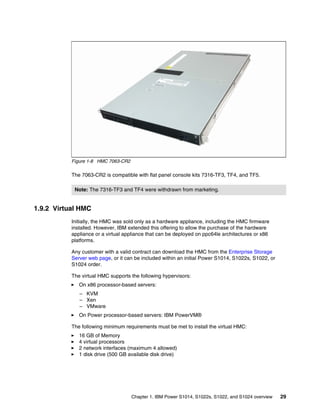
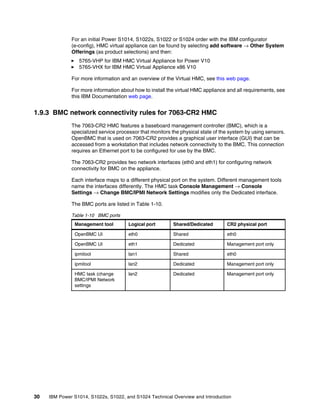
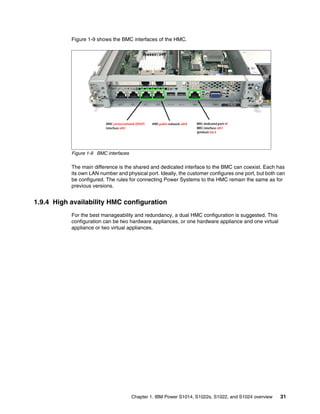
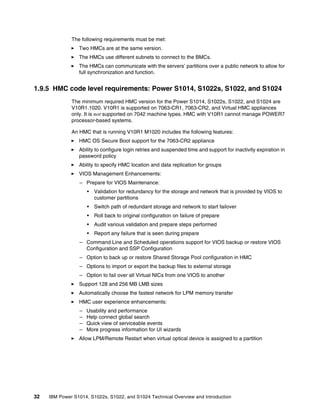
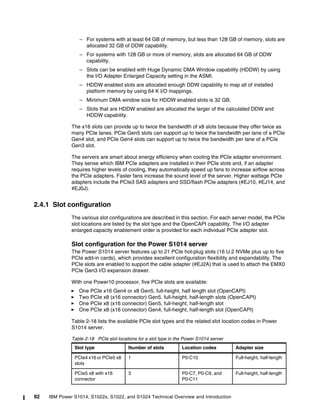
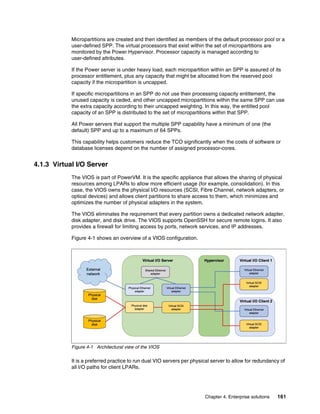
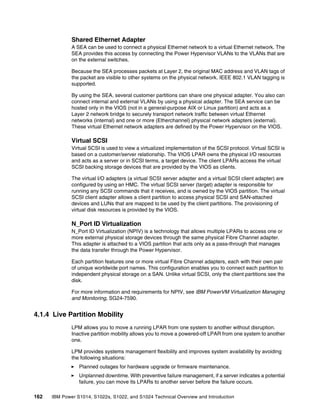
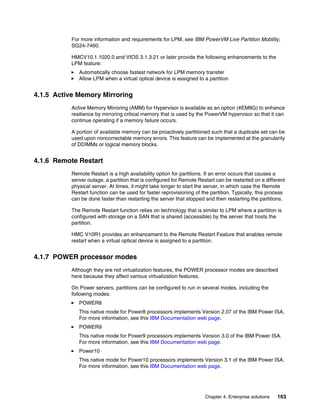
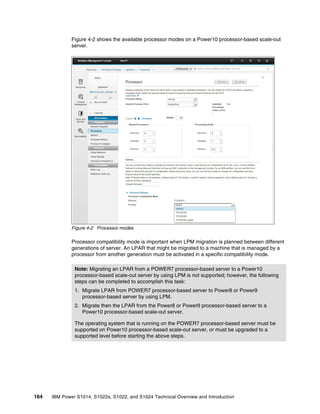
Redpaper
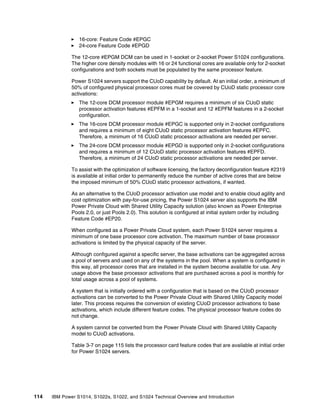
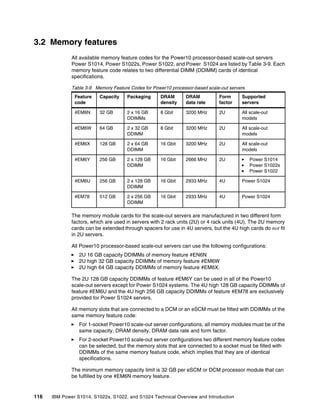
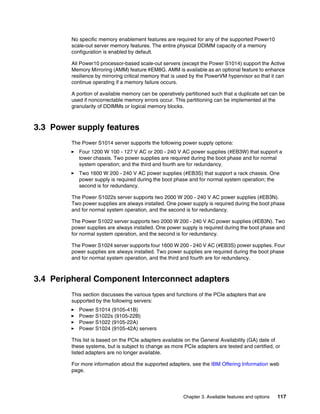
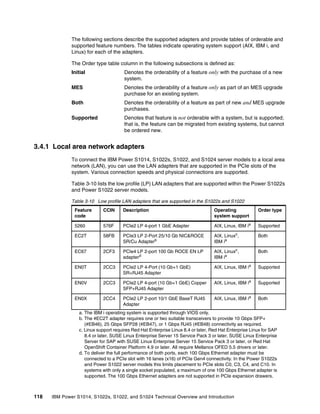
Front cover
IBM Power S1014, S1022s,
S1022, and S1024
Technical Overview and Introduction
Giuliano Anselmi
Young Hoon Cho
Andrew Laidlaw
Armin Röll
Tsvetomir Spasov
IBM Redbooks
IBM Power S1014, S1022s, S1022, and S1024 Technical
Overview and Introduction
August 2022
REDP-5675-00
© Copyright International Business Machines Corporation 2022. All rights reserved.
Note to U.S. Government Users Restricted Rights -- Use, duplication or disclosure restricted by GSA ADP Schedule
Contract with IBM Corp.
First Edition (August 2022)
This edition applies to the IBM Power S1014 (9105-41B), IBM Power S1022s (9105-22B), IBM Power S1022
(9105-22A), and IBM Power S1024 (9105-42A) servers.
This document was created or updated on April 25, 2023.
Note: Before using this information and the product it supports, read the information in “Notices” on
page vii.
© Copyright IBM Corp. 2022. iii
Contents
Notices . . . . . . . . . . . . . . . . . . . . . . . . . . . . . . . . . . . . . . . . . . . . . . . . . . . . . . . . . . . . . . . . . vii
Trademarks . . . . . . . . . . . . . . . . . . . . . . . . . . . . . . . . . . . . . . . . . . . . . . . . . . . . . . . . . . . . . viii
Preface . . . . . . . . . . . . . . . . . . . . . . . . . . . . . . . . . . . . . . . . . . . . . . . . . . . . . . . . . . . . . . . . . ix
Authors. . . . . . . . . . . . . . . . . . . . . . . . . . . . . . . . . . . . . . . . . . . . . . . . . . . . . . . . . . . . . . . . . . .x
Now you can become a published author, too! . . . . . . . . . . . . . . . . . . . . . . . . . . . . . . . . . . . xi
Comments welcome. . . . . . . . . . . . . . . . . . . . . . . . . . . . . . . . . . . . . . . . . . . . . . . . . . . . . . . . xi
Stay connected to IBM Redbooks . . . . . . . . . . . . . . . . . . . . . . . . . . . . . . . . . . . . . . . . . . . . . xi
Chapter 1. IBM Power S1014, S1022s, S1022, and S1024 overview. . . . . . . . . . . . . . . . 1
1.1 Introduction . . . . . . . . . . . . . . . . . . . . . . . . . . . . . . . . . . . . . . . . . . . . . . . . . . . . . . . . . . . 2
1.2 Systems overview . . . . . . . . . . . . . . . . . . . . . . . . . . . . . . . . . . . . . . . . . . . . . . . . . . . . . . 3
1.2.1 Power S1014 server . . . . . . . . . . . . . . . . . . . . . . . . . . . . . . . . . . . . . . . . . . . . . . . . 3
1.2.2 Power S1022s server . . . . . . . . . . . . . . . . . . . . . . . . . . . . . . . . . . . . . . . . . . . . . . . 4
1.2.3 Power S1022 server . . . . . . . . . . . . . . . . . . . . . . . . . . . . . . . . . . . . . . . . . . . . . . . . 5
1.2.4 Power S1024 server . . . . . . . . . . . . . . . . . . . . . . . . . . . . . . . . . . . . . . . . . . . . . . . . 7
1.3 Operating environment . . . . . . . . . . . . . . . . . . . . . . . . . . . . . . . . . . . . . . . . . . . . . . . . . . 8
1.4 Physical package . . . . . . . . . . . . . . . . . . . . . . . . . . . . . . . . . . . . . . . . . . . . . . . . . . . . . 10
1.4.1 Tower model . . . . . . . . . . . . . . . . . . . . . . . . . . . . . . . . . . . . . . . . . . . . . . . . . . . . . 10
1.4.2 Rack-mount models . . . . . . . . . . . . . . . . . . . . . . . . . . . . . . . . . . . . . . . . . . . . . . . 10
1.5 System features . . . . . . . . . . . . . . . . . . . . . . . . . . . . . . . . . . . . . . . . . . . . . . . . . . . . . . 11
1.5.1 Power S1014 server features . . . . . . . . . . . . . . . . . . . . . . . . . . . . . . . . . . . . . . . . 11
1.5.2 Power S1022s server features . . . . . . . . . . . . . . . . . . . . . . . . . . . . . . . . . . . . . . . 12
1.5.3 Power S1022 server features . . . . . . . . . . . . . . . . . . . . . . . . . . . . . . . . . . . . . . . . 13
1.5.4 Power S1024 server features . . . . . . . . . . . . . . . . . . . . . . . . . . . . . . . . . . . . . . . . 14
1.6 Minimum configurations . . . . . . . . . . . . . . . . . . . . . . . . . . . . . . . . . . . . . . . . . . . . . . . . 15
1.7 PCIe adapter slots. . . . . . . . . . . . . . . . . . . . . . . . . . . . . . . . . . . . . . . . . . . . . . . . . . . . . 16
1.8 Operating system support . . . . . . . . . . . . . . . . . . . . . . . . . . . . . . . . . . . . . . . . . . . . . . . 19
1.8.1 AIX operating system . . . . . . . . . . . . . . . . . . . . . . . . . . . . . . . . . . . . . . . . . . . . . . 19
1.8.2 IBM i operating system . . . . . . . . . . . . . . . . . . . . . . . . . . . . . . . . . . . . . . . . . . . . . 21
1.8.3 Linux operating system distributions. . . . . . . . . . . . . . . . . . . . . . . . . . . . . . . . . . . 23
1.8.4 Red Hat OpenShift Container Platform. . . . . . . . . . . . . . . . . . . . . . . . . . . . . . . . . 24
1.8.5 Virtual I/O Server . . . . . . . . . . . . . . . . . . . . . . . . . . . . . . . . . . . . . . . . . . . . . . . . . 25
1.8.6 Entitled System Support . . . . . . . . . . . . . . . . . . . . . . . . . . . . . . . . . . . . . . . . . . . . 25
1.8.7 Update Access Keys. . . . . . . . . . . . . . . . . . . . . . . . . . . . . . . . . . . . . . . . . . . . . . . 26
1.9 Hardware Management Console overview . . . . . . . . . . . . . . . . . . . . . . . . . . . . . . . . . . 28
1.9.1 HMC 7063-CR2 . . . . . . . . . . . . . . . . . . . . . . . . . . . . . . . . . . . . . . . . . . . . . . . . . . 28
1.9.2 Virtual HMC. . . . . . . . . . . . . . . . . . . . . . . . . . . . . . . . . . . . . . . . . . . . . . . . . . . . . . 29
1.9.3 BMC network connectivity rules for 7063-CR2 HMC . . . . . . . . . . . . . . . . . . . . . . 30
1.9.4 High availability HMC configuration . . . . . . . . . . . . . . . . . . . . . . . . . . . . . . . . . . . 31
1.9.5 HMC code level requirements: Power S1014, S1022s, S1022, and S1024 . . . . . 32
1.9.6 HMC currency . . . . . . . . . . . . . . . . . . . . . . . . . . . . . . . . . . . . . . . . . . . . . . . . . . . . 33
1.10 IBM Power solutions . . . . . . . . . . . . . . . . . . . . . . . . . . . . . . . . . . . . . . . . . . . . . . . . . . 33
1.10.1 IBM PowerSC 2.1 . . . . . . . . . . . . . . . . . . . . . . . . . . . . . . . . . . . . . . . . . . . . . . . . 34
1.10.2 IBM PowerSC Multi-Factor Authentication . . . . . . . . . . . . . . . . . . . . . . . . . . . . . 34
1.10.3 IBM Cloud PowerVC for Private Cloud . . . . . . . . . . . . . . . . . . . . . . . . . . . . . . . . 35
1.10.4 IBM VM Recovery Manager DR . . . . . . . . . . . . . . . . . . . . . . . . . . . . . . . . . . . . . 36
1.10.5 IBM Cloud Management Console . . . . . . . . . . . . . . . . . . . . . . . . . . . . . . . . . . . . 37
1.11 IBM Power platform modernization . . . . . . . . . . . . . . . . . . . . . . . . . . . . . . . . . . . . . . . 37
iv IBM Power S1014, S1022s, S1022, and S1024 Technical Overview and Introduction
1.11.1 IBM Power Virtual Servers . . . . . . . . . . . . . . . . . . . . . . . . . . . . . . . . . . . . . . . . . 37
1.11.2 Red Hat OpenShift Container Platform for Power. . . . . . . . . . . . . . . . . . . . . . . . 38
1.11.3 Hybrid Cloud Management Edition . . . . . . . . . . . . . . . . . . . . . . . . . . . . . . . . . . . 38
Chapter 2. Architecture and technical overview . . . . . . . . . . . . . . . . . . . . . . . . . . . . . . 41
2.1 Overview . . . . . . . . . . . . . . . . . . . . . . . . . . . . . . . . . . . . . . . . . . . . . . . . . . . . . . . . . . . . 42
2.2 IBM Power10 processor . . . . . . . . . . . . . . . . . . . . . . . . . . . . . . . . . . . . . . . . . . . . . . . . 46
2.2.1 Power10 processor overview . . . . . . . . . . . . . . . . . . . . . . . . . . . . . . . . . . . . . . . . 47
2.2.2 Processor modules for S1014, S1022s, S1022, and S1024 servers . . . . . . . . . . 49
2.2.3 Power10 processor core . . . . . . . . . . . . . . . . . . . . . . . . . . . . . . . . . . . . . . . . . . . . 54
2.2.4 Simultaneous multithreading. . . . . . . . . . . . . . . . . . . . . . . . . . . . . . . . . . . . . . . . . 56
2.2.5 Matrix math accelerator AI workload acceleration . . . . . . . . . . . . . . . . . . . . . . . . 57
2.2.6 Power10 compatibility modes . . . . . . . . . . . . . . . . . . . . . . . . . . . . . . . . . . . . . . . . 58
2.2.7 Processor module options . . . . . . . . . . . . . . . . . . . . . . . . . . . . . . . . . . . . . . . . . . 58
2.2.8 On-chip L3 cache and intelligent caching . . . . . . . . . . . . . . . . . . . . . . . . . . . . . . . 60
2.2.9 Open memory interface . . . . . . . . . . . . . . . . . . . . . . . . . . . . . . . . . . . . . . . . . . . . 61
2.2.10 Pervasive memory encryption. . . . . . . . . . . . . . . . . . . . . . . . . . . . . . . . . . . . . . . 63
2.2.11 Nest accelerator . . . . . . . . . . . . . . . . . . . . . . . . . . . . . . . . . . . . . . . . . . . . . . . . . 65
2.2.12 SMP interconnect and accelerator interface . . . . . . . . . . . . . . . . . . . . . . . . . . . . 66
2.2.13 Power and performance management . . . . . . . . . . . . . . . . . . . . . . . . . . . . . . . . 70
2.2.14 Comparing Power10, Power9, and Power8 processors . . . . . . . . . . . . . . . . . . . 74
2.3 Memory subsystem . . . . . . . . . . . . . . . . . . . . . . . . . . . . . . . . . . . . . . . . . . . . . . . . . . . . 75
2.3.1 Memory feature and placement rules . . . . . . . . . . . . . . . . . . . . . . . . . . . . . . . . . . 78
2.3.2 Memory bandwidth . . . . . . . . . . . . . . . . . . . . . . . . . . . . . . . . . . . . . . . . . . . . . . . . 88
2.4 Internal I/O subsystem . . . . . . . . . . . . . . . . . . . . . . . . . . . . . . . . . . . . . . . . . . . . . . . . . 90
2.4.1 Slot configuration . . . . . . . . . . . . . . . . . . . . . . . . . . . . . . . . . . . . . . . . . . . . . . . . . 92
2.4.2 System port. . . . . . . . . . . . . . . . . . . . . . . . . . . . . . . . . . . . . . . . . . . . . . . . . . . . . . 98
2.5 Enterprise Baseboard Management Controller. . . . . . . . . . . . . . . . . . . . . . . . . . . . . . . 99
2.5.1 Managing the system by using the ASMI GUI . . . . . . . . . . . . . . . . . . . . . . . . . . . 99
2.5.2 Managing the system by using DMTF Redfish . . . . . . . . . . . . . . . . . . . . . . . . . . 105
2.5.3 Managing the system by using the Intelligent Platform Management Interface . 108
Chapter 3. Available features and options . . . . . . . . . . . . . . . . . . . . . . . . . . . . . . . . . . 109
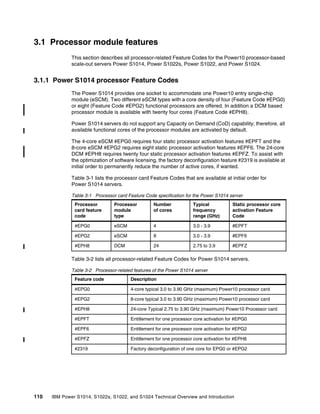
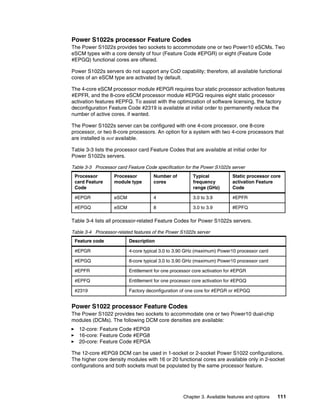
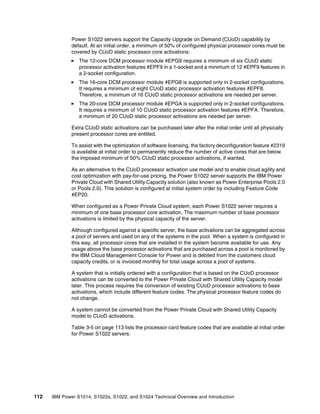
3.1 Processor module features . . . . . . . . . . . . . . . . . . . . . . . . . . . . . . . . . . . . . . . . . . . . . 110
3.1.1 Power S1014 processor Feature Codes. . . . . . . . . . . . . . . . . . . . . . . . . . . . . . . 110
3.2 Memory features . . . . . . . . . . . . . . . . . . . . . . . . . . . . . . . . . . . . . . . . . . . . . . . . . . . . . 116
3.3 Power supply features. . . . . . . . . . . . . . . . . . . . . . . . . . . . . . . . . . . . . . . . . . . . . . . . . 117
3.4 Peripheral Component Interconnect adapters . . . . . . . . . . . . . . . . . . . . . . . . . . . . . . 117
3.4.1 Local area network adapters. . . . . . . . . . . . . . . . . . . . . . . . . . . . . . . . . . . . . . . . 118
3.4.2 Fibre Channel adapters . . . . . . . . . . . . . . . . . . . . . . . . . . . . . . . . . . . . . . . . . . . 120
3.4.3 SAS adapters . . . . . . . . . . . . . . . . . . . . . . . . . . . . . . . . . . . . . . . . . . . . . . . . . . . 121
3.4.4 USB adapters . . . . . . . . . . . . . . . . . . . . . . . . . . . . . . . . . . . . . . . . . . . . . . . . . . . 122
3.4.5 Cryptographic coprocessor adapters . . . . . . . . . . . . . . . . . . . . . . . . . . . . . . . . . 122
3.5 Internal storage . . . . . . . . . . . . . . . . . . . . . . . . . . . . . . . . . . . . . . . . . . . . . . . . . . . . . . 124
3.5.1 S1022s and S1022 Backplane . . . . . . . . . . . . . . . . . . . . . . . . . . . . . . . . . . . . . . 125
3.5.2 S1014 and S1024 Backplane . . . . . . . . . . . . . . . . . . . . . . . . . . . . . . . . . . . . . . . 125
3.5.3 NVMe JBOF to backplane cabling . . . . . . . . . . . . . . . . . . . . . . . . . . . . . . . . . . . 126
3.5.4 NVMe support . . . . . . . . . . . . . . . . . . . . . . . . . . . . . . . . . . . . . . . . . . . . . . . . . . . 127
3.5.5 RAID support . . . . . . . . . . . . . . . . . . . . . . . . . . . . . . . . . . . . . . . . . . . . . . . . . . . 130
3.6 External SAS ports . . . . . . . . . . . . . . . . . . . . . . . . . . . . . . . . . . . . . . . . . . . . . . . . . . . 130
3.7 Media drawers. . . . . . . . . . . . . . . . . . . . . . . . . . . . . . . . . . . . . . . . . . . . . . . . . . . . . . . 131
3.7.1 External DVD drives . . . . . . . . . . . . . . . . . . . . . . . . . . . . . . . . . . . . . . . . . . . . . . 131
3.7.2 RDX removable disk drives. . . . . . . . . . . . . . . . . . . . . . . . . . . . . . . . . . . . . . . . . 131
Contents v
3.8 Disk and media features . . . . . . . . . . . . . . . . . . . . . . . . . . . . . . . . . . . . . . . . . . . . . . . 132
3.9 External IO subsystems . . . . . . . . . . . . . . . . . . . . . . . . . . . . . . . . . . . . . . . . . . . . . . . 136
3.9.1 PCIe Gen3 I/O expansion drawer . . . . . . . . . . . . . . . . . . . . . . . . . . . . . . . . . . . . 136
3.9.2 EXP24SX SAS Storage Enclosure . . . . . . . . . . . . . . . . . . . . . . . . . . . . . . . . . . . 142
3.9.3 IBM Storage . . . . . . . . . . . . . . . . . . . . . . . . . . . . . . . . . . . . . . . . . . . . . . . . . . . . 146
3.10 System racks. . . . . . . . . . . . . . . . . . . . . . . . . . . . . . . . . . . . . . . . . . . . . . . . . . . . . . . 147
3.10.1 IBM Enterprise 42U Slim Rack 7965-S42. . . . . . . . . . . . . . . . . . . . . . . . . . . . . 147
3.10.2 AC power distribution units . . . . . . . . . . . . . . . . . . . . . . . . . . . . . . . . . . . . . . . . 148
3.10.3 Rack-mounting rules . . . . . . . . . . . . . . . . . . . . . . . . . . . . . . . . . . . . . . . . . . . . . 150
3.10.4 Useful rack additions. . . . . . . . . . . . . . . . . . . . . . . . . . . . . . . . . . . . . . . . . . . . . 151
3.10.5 Original equipment manufacturer racks . . . . . . . . . . . . . . . . . . . . . . . . . . . . . . 153
Chapter 4. Enterprise solutions. . . . . . . . . . . . . . . . . . . . . . . . . . . . . . . . . . . . . . . . . . . 155
4.1 PowerVM virtualization . . . . . . . . . . . . . . . . . . . . . . . . . . . . . . . . . . . . . . . . . . . . . . . . 156
4.1.1 IBM Power Hypervisor . . . . . . . . . . . . . . . . . . . . . . . . . . . . . . . . . . . . . . . . . . . . 156
4.1.2 Multiple shared processor pools . . . . . . . . . . . . . . . . . . . . . . . . . . . . . . . . . . . . . 160
4.1.3 Virtual I/O Server . . . . . . . . . . . . . . . . . . . . . . . . . . . . . . . . . . . . . . . . . . . . . . . . 161
4.1.4 Live Partition Mobility . . . . . . . . . . . . . . . . . . . . . . . . . . . . . . . . . . . . . . . . . . . . . 162
4.1.5 Active Memory Mirroring . . . . . . . . . . . . . . . . . . . . . . . . . . . . . . . . . . . . . . . . . . . 163
4.1.6 Remote Restart. . . . . . . . . . . . . . . . . . . . . . . . . . . . . . . . . . . . . . . . . . . . . . . . . . 163
4.1.7 POWER processor modes . . . . . . . . . . . . . . . . . . . . . . . . . . . . . . . . . . . . . . . . . 163
4.1.8 Single Root I/O virtualization. . . . . . . . . . . . . . . . . . . . . . . . . . . . . . . . . . . . . . . . 165
4.2 IBM PowerVC overview . . . . . . . . . . . . . . . . . . . . . . . . . . . . . . . . . . . . . . . . . . . . . . . 165
4.2.1 IBM PowerVC functions and advantages . . . . . . . . . . . . . . . . . . . . . . . . . . . . . . 166
4.3 Digital transformation and IT modernization . . . . . . . . . . . . . . . . . . . . . . . . . . . . . . . . 167
4.3.1 Application and services modernization . . . . . . . . . . . . . . . . . . . . . . . . . . . . . . . 167
4.3.2 System automation with Ansible . . . . . . . . . . . . . . . . . . . . . . . . . . . . . . . . . . . . . 168
4.4 Protect trust from core to cloud . . . . . . . . . . . . . . . . . . . . . . . . . . . . . . . . . . . . . . . . . . 172
4.4.1 Power10 processor-based, technology-integrated security ecosystem . . . . . . . 173
4.4.2 Cryptographic engines and transparent memory encryption . . . . . . . . . . . . . . . 174
4.4.3 Quantum-safe cryptography support. . . . . . . . . . . . . . . . . . . . . . . . . . . . . . . . . . 174
4.4.4 IBM PCIe3 Crypto Coprocessor BSC-Gen3 4769 . . . . . . . . . . . . . . . . . . . . . . . 175
4.4.5 IBM PowerSC support . . . . . . . . . . . . . . . . . . . . . . . . . . . . . . . . . . . . . . . . . . . . 176
4.4.6 Secure and Trusted boot . . . . . . . . . . . . . . . . . . . . . . . . . . . . . . . . . . . . . . . . . . 177
4.4.7 Enhanced CPU: BMC isolation . . . . . . . . . . . . . . . . . . . . . . . . . . . . . . . . . . . . . . 177
4.5 Running AI where operational data is created, processed, and stored. . . . . . . . . . . . 178
4.5.1 Train anywhere, deploy on Power10 processor-based server . . . . . . . . . . . . . . 179
4.6 Oracle Database Standard Edition 2 on Power S1014 . . . . . . . . . . . . . . . . . . . . . . . . 180
Related publications . . . . . . . . . . . . . . . . . . . . . . . . . . . . . . . . . . . . . . . . . . . . . . . . . . . . 183
IBM Redbooks . . . . . . . . . . . . . . . . . . . . . . . . . . . . . . . . . . . . . . . . . . . . . . . . . . . . . . . . . . 183
Online resources . . . . . . . . . . . . . . . . . . . . . . . . . . . . . . . . . . . . . . . . . . . . . . . . . . . . . . . . 184
Help from IBM . . . . . . . . . . . . . . . . . . . . . . . . . . . . . . . . . . . . . . . . . . . . . . . . . . . . . . . . . . 184
vi IBM Power S1014, S1022s, S1022, and S1024 Technical Overview and Introduction
© Copyright IBM Corp. 2022. vii
Notices
This information was developed for products and services offered in the US. This material might be available
from IBM in other languages. However, you may be required to own a copy of the product or product version in
that language in order to access it.
IBM may not offer the products, services, or features discussed in this document in other countries. Consult
your local IBM representative for information on the products and services currently available in your area. Any
reference to an IBM product, program, or service is not intended to state or imply that only that IBM product,
program, or service may be used. Any functionally equivalent product, program, or service that does not
infringe any IBM intellectual property right may be used instead. However, it is the user’s responsibility to
evaluate and verify the operation of any non-IBM product, program, or service.
IBM may have patents or pending patent applications covering subject matter described in this document. The
furnishing of this document does not grant you any license to these patents. You can send license inquiries, in
writing, to:
IBM Director of Licensing, IBM Corporation, North Castle Drive, MD-NC119, Armonk, NY 10504-1785, US
INTERNATIONAL BUSINESS MACHINES CORPORATION PROVIDES THIS PUBLICATION “AS IS”
WITHOUT WARRANTY OF ANY KIND, EITHER EXPRESS OR IMPLIED, INCLUDING, BUT NOT LIMITED
TO, THE IMPLIED WARRANTIES OF NON-INFRINGEMENT, MERCHANTABILITY OR FITNESS FOR A
PARTICULAR PURPOSE. Some jurisdictions do not allow disclaimer of express or implied warranties in
certain transactions, therefore, this statement may not apply to you.
This information could include technical inaccuracies or typographical errors. Changes are periodically made
to the information herein; these changes will be incorporated in new editions of the publication. IBM may make
improvements and/or changes in the product(s) and/or the program(s) described in this publication at any time
without notice.
Any references in this information to non-IBM websites are provided for convenience only and do not in any
manner serve as an endorsement of those websites. The materials at those websites are not part of the
materials for this IBM product and use of those websites is at your own risk.
IBM may use or distribute any of the information you provide in any way it believes appropriate without
incurring any obligation to you.
The performance data and client examples cited are presented for illustrative purposes only. Actual
performance results may vary depending on specific configurations and operating conditions.
Information concerning non-IBM products was obtained from the suppliers of those products, their published
announcements or other publicly available sources. IBM has not tested those products and cannot confirm the
accuracy of performance, compatibility or any other claims related to non-IBM products. Questions on the
capabilities of non-IBM products should be addressed to the suppliers of those products.
Statements regarding IBM’s future direction or intent are subject to change or withdrawal without notice, and
represent goals and objectives only.
This information contains examples of data and reports used in daily business operations. To illustrate them
as completely as possible, the examples include the names of individuals, companies, brands, and products.
All of these names are fictitious and any similarity to actual people or business enterprises is entirely
coincidental.
COPYRIGHT LICENSE:
This information contains sample application programs in source language, which illustrate programming
techniques on various operating platforms. You may copy, modify, and distribute these sample programs in
any form without payment to IBM, for the purposes of developing, using, marketing or distributing application
programs conforming to the application programming interface for the operating platform for which the sample
programs are written. These examples have not been thoroughly tested under all conditions. IBM, therefore,
cannot guarantee or imply reliability, serviceability, or function of these programs. The sample programs are
provided “AS IS”, without warranty of any kind. IBM shall not be liable for any damages arising out of your use
of the sample programs.
viii IBM Power S1014, S1022s, S1022, and S1024 Technical Overview and Introduction
Trademarks
IBM, the IBM logo, and ibm.com are trademarks or registered trademarks of International Business Machines
Corporation, registered in many jurisdictions worldwide. Other product and service names might be
trademarks of IBM or other companies. A current list of IBM trademarks is available on the web at “Copyright
and trademark information” at http://www.ibm.com/legal/copytrade.shtml
The following terms are trademarks or registered trademarks of International Business Machines Corporation,
and might also be trademarks or registered trademarks in other countries.
AIX®
C3®
Db2®
DS8000®
Enterprise Storage Server®
IBM®
IBM Cloud®
IBM Cloud Pak®
IBM Elastic Storage®
IBM FlashSystem®
IBM Security®
IBM Spectrum®
IBM Watson®
Instana®
Interconnect®
Micro-Partitioning®
PIN®
POWER®
Power Architecture®
POWER8®
POWER9™
PowerHA®
PowerPC®
PowerVM®
QRadar®
Redbooks®
Redbooks (logo) ®
Storwize®
Turbonomic®
The following terms are trademarks of other companies:
Intel, Intel logo, Intel Inside logo, and Intel Centrino logo are trademarks or registered trademarks of Intel
Corporation or its subsidiaries in the United States and other countries.
The registered trademark Linux® is used pursuant to a sublicense from the Linux Foundation, the exclusive
licensee of Linus Torvalds, owner of the mark on a worldwide basis.
LTO, Ultrium, the LTO Logo and the Ultrium logo are trademarks of HP, IBM Corp. and Quantum in the U.S.
and other countries.
Ansible, OpenShift, Red Hat, are trademarks or registered trademarks of Red Hat, Inc. or its subsidiaries in
the United States and other countries.
VMware, and the VMware logo are registered trademarks or trademarks of VMware, Inc. or its subsidiaries in
the United States and/or other jurisdictions.
Other company, product, or service names may be trademarks or service marks of others.
© Copyright IBM Corp. 2022. ix
Preface
This IBM® Redpaper™ publication is a comprehensive guide that covers the
IBM Power® S1014 (9105-41B), IBM Power S1022s (9105-22B), IBM Power S1022
(9105-22A), and IBM Power S1024 (9105-42A) servers that use the latest IBM Power10
processor-based technology and support the IBM AIX®, IBM i, and Linux operating systems.
The goal of this paper is to provide a hardware architecture analysis and highlight the
changes, new technologies, and major features that are introduced in these systems, such as
the following examples:
򐂰 The latest IBM Power10 processor design, including the Dual Chip Module (DCM) and
Entry Single Chip Module (eSCM) packaging, which is available in various configurations
of 4 - 24 cores per socket.
򐂰 Native Peripheral Component Interconnect® Express (PCIe) 5th generation (Gen5)
connectivity from the processor socket to deliver higher performance and bandwidth for
connected adapters.
򐂰 Open Memory Interface (OMI) connected differential DIMM (DDIMM) memory cards that
deliver increased performance, resilience, and security over industry-standard memory
technologies, including the implementation of transparent memory encryption.
򐂰 Enhanced internal storage performance with the use of native PCIe connected
Non-Volatile Memory Express (NVMe) devices in up to 16 internal storage slots to deliver
up to 102.4 TB of high-performance, low-latency storage in a single, two-socket system.
򐂰 Consumption-based pricing in the Power Private Cloud with Shared Utility Capacity
commercial model that allows customers to use resources more flexibly and efficiently,
including IBM AIX, IBM i, Red Hat Enterprise Linux, SUSE Linux Enterprise Server, and
Red Hat OpenShift Container Platform workloads.
This publication is intended for the following professionals who want to acquire a better
understanding of IBM Power server products:
򐂰 IBM Power customers
򐂰 Sales and marketing professionals
򐂰 Technical support professionals
򐂰 IBM Business Partners
򐂰 Independent software vendors (ISVs)
This paper expands the set of IBM Power documentation by providing a desktop reference
that offers a detailed technical description of the Power10 processor-based Scale Out server
models.
x IBM Power S1014, S1022s, S1022, and S1024 Technical Overview and Introduction
Authors
This paper was produced by a team of specialists from around the world working at IBM
Redbooks, Poughkeepsie Center.
Giuliano Anselmi is an IBM® Power Digital Sales Technical Advisor in IBM Digital Sales
Dublin. He joined IBM and focused on Power processor-based technology. For almost 20
years, he covered several technical roles. He is an important resource for the mission of his
group and serves a reference for Business Partners and customers.
Young Hoon Cho is IBM Power Top Gun with the post-sales Technical Support Team for IBM
in Korea. He has over 10 years of experience working on IBM RS/6000, IBM System p, and
Power products. He provides second-line technical support to Field Engineers who are
working on IBM Power and system management.
Andrew Laidlaw is a Senior Power Technical Seller in the United Kingdom. He has 9 years of
experience in the IBM IT Infrastructure team, during which time he worked with the latest
technologies and developments. His areas of expertise include open source technologies,
including Linux and Kubernetes, open source databases, and artificial intelligence
frameworks, and tooling. His current focus area is on the Hybrid Cloud tools and capabilities
that support IBM customers in delivering modernization across their Power estate. He has
presented extensively on all of these topics across the world, including at the IBM Systems
Technical University conferences. He has been an author of many other IBM Redbooks®
publications.
Armin Röll works as a IBM Power IT specialist in Germany. He holds a degree in
Experimental Physics from the University of Hamburg, Germany. Armin has 25 years of
experience in IBM Power and AIX® pre-sales technical support. He has written several IBM
Redbooks publications about AIX and IBM Power systems hardware and is a Platinum
Redbooks author.
Tsvetomir Spasov is a IBM Power SME at IBM Bulgaria. His main area of expertise is FSP,
eBMC, HMC, POWERLC, and GTMS. He has been with IBM since 2016, providing reactive
break-fix, proactive, preventative, and cognitive support. He has conducted several technical
trainings and workshops.
The project that produced this material was managed by:
Scott Vetter
PMP, IBM Poughkeepsie, US
Thanks to the following people for their contributions to this project:
Ryan Achilles, Brian Allison, Ron Arroyo, Joanna Bartz, Bart Blaner, Gareth Coates,
Arnold Flores, Austin Fowler, George Gaylord, Douglas Gibbs, Nigel Griffiths,
Daniel Henderson, Markesha L Hill, Stephanie Jensen, Kyle Keaty,
Rajaram B Krishnamurthy, Charles Marino, Michael Mueller, Vincent Mulligan,
Hariganesh Muralidharan, Kaveh Naderi, Mark Nellen, Brandon Pederson,
Michael Quaranta, Hassan Rahimi, Ian Robinson, Todd Rosedahl, Bruno Spruth,
Nicole Schwartz, Bill Starke, Brian W. Thompto, Madhavi Valluri, Jacobo Vargas,
Madeline Vega, Russ Young
IBM
A special thanks to John Banchy for his relentless support of IBM Redbooks and his
contributions and corrections to them over the years.
Preface xi
Now you can become a published author, too!
Here’s an opportunity to spotlight your skills, grow your career, and become a published
author—all at the same time! Join an IBM Redbooks residency project and help write a book
in your area of expertise, while honing your experience using leading-edge technologies. Your
efforts will help to increase product acceptance and customer satisfaction, as you expand
your network of technical contacts and relationships. Residencies run from two to six weeks
in length, and you can participate either in person or as a remote resident working from your
home base.
Find out more about the residency program, browse the residency index, and apply online at:
ibm.com/redbooks/residencies.html
Comments welcome
Your comments are important to us!
We want our papers to be as helpful as possible. Send us your comments about this paper or
other IBM Redbooks publications in one of the following ways:
򐂰 Use the online Contact us review Redbooks form found at:
ibm.com/redbooks
򐂰 Send your comments in an email to:
redbooks@us.ibm.com
򐂰 Mail your comments to:
IBM Corporation, IBM Redbooks
Dept. HYTD Mail Station P099
2455 South Road
Poughkeepsie, NY 12601-5400
Stay connected to IBM Redbooks
򐂰 Find us on LinkedIn:
http://www.linkedin.com/groups?home=&gid=2130806
򐂰 Explore new Redbooks publications, residencies, and workshops with the IBM Redbooks
weekly newsletter:
https://www.redbooks.ibm.com/Redbooks.nsf/subscribe?OpenForm
򐂰 Stay current on recent Redbooks publications with RSS Feeds:
http://www.redbooks.ibm.com/rss.html
xii IBM Power S1014, S1022s, S1022, and S1024 Technical Overview and Introduction
© Copyright IBM Corp. 2022. 1
Chapter 1. IBM Power S1014, S1022s,
S1022, and S1024 overview
In this chapter, we introduce the IBM Power S1014 (9105-41B), IBM Power S1022s
(9105-22B), IBM Power S1022 (9105-22A), and IBM Power S1024 (9105-42A) server
models. These servers are built upon the Power10 processor architecture to deliver a
uniquely designed platform that is designed to help securely and efficiently scale core
operational and AI applications in a Hybrid Cloud environment.
This chapter includes the following topics:
򐂰 1.1, “Introduction” on page 2
򐂰 1.2, “Systems overview” on page 3
򐂰 1.3, “Operating environment” on page 8
򐂰 1.4, “Physical package” on page 10
򐂰 1.5, “System features” on page 11
򐂰 1.6, “Minimum configurations” on page 15
򐂰 1.7, “PCIe adapter slots” on page 16
򐂰 1.8, “Operating system support” on page 19
򐂰 1.9, “Hardware Management Console overview” on page 28
򐂰 1.10, “IBM Power solutions” on page 33
򐂰 1.11, “IBM Power platform modernization” on page 37
1
2 IBM Power S1014, S1022s, S1022, and S1024 Technical Overview and Introduction
1.1 Introduction
The Power10 processor-based Scale Out servers use the capabilities of the latest Power10
processor technology to deliver unprecedented security, reliability, and manageability for your
cloud and cognitive strategy and delivers industry-leading price and performance for your
mission-critical workloads.
The inclusion of PCIe Gen5 interconnects allows for high data transfer rates to provide higher
I/O performance or consolidation of the I/O demands of the system to fewer adapters running
at higher rates. This situation can result in greater system performance at a lower cost,
particularly when I/O demands are high.
The Power S1022s and S1022 servers deliver the performance of the Power10 processor
technology in a dense 2U (EIA units), rack-optimized form factor that is ideal for consolidating
multiple workloads with security and reliability. These systems are ready for hybrid cloud
deployment, with Enterprise grade virtualization capabilities built in to the system firmware
with the PowerVM hypervisor.
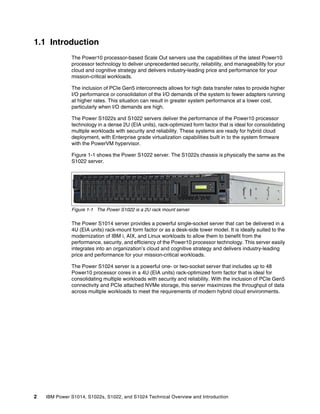
Figure 1-1 shows the Power S1022 server. The S1022s chassis is physically the same as the
S1022 server.
Figure 1-1 The Power S1022 is a 2U rack mount server
The Power S1014 server provides a powerful single-socket server that can be delivered in a
4U (EIA units) rack-mount form factor or as a desk-side tower model. It is ideally suited to the
modernization of IBM i, AIX, and Linux workloads to allow them to benefit from the
performance, security, and efficiency of the Power10 processor technology. This server easily
integrates into an organization’s cloud and cognitive strategy and delivers industry-leading
price and performance for your mission-critical workloads.
The Power S1024 server is a powerful one- or two-socket server that includes up to 48
Power10 processor cores in a 4U (EIA units) rack-optimized form factor that is ideal for
consolidating multiple workloads with security and reliability. With the inclusion of PCIe Gen5
connectivity and PCIe attached NVMe storage, this server maximizes the throughput of data
across multiple workloads to meet the requirements of modern hybrid cloud environments.
Chapter 1. IBM Power S1014, S1022s, S1022, and S1024 overview 3
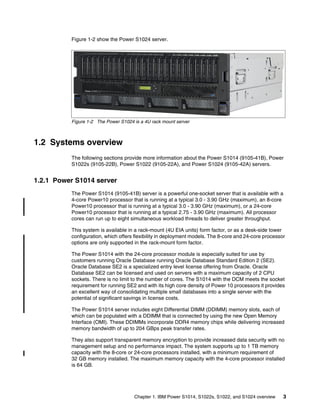
Figure 1-2 show the Power S1024 server.
Figure 1-2 The Power S1024 is a 4U rack mount server
1.2 Systems overview
The following sections provide more information about the Power S1014 (9105-41B), Power
S1022s (9105-22B), Power S1022 (9105-22A), and Power S1024 (9105-42A) servers.
1.2.1 Power S1014 server
The Power S1014 (9105-41B) server is a powerful one-socket server that is available with a
4-core Power10 processor that is running at a typical 3.0 - 3.90 GHz (maximum), an 8-core
Power10 processor that is running at a typical 3.0 - 3.90 GHz (maximum), or a 24-core
Power10 processor that is running at a typical 2.75 - 3.90 GHz (maximum). All processor
cores can run up to eight simultaneous workload threads to deliver greater throughput.
This system is available in a rack-mount (4U EIA units) form factor, or as a desk-side tower
configuration, which offers flexibility in deployment models. The 8-core and 24-core processor
options are only supported in the rack-mount form factor.
The Power S1014 with the 24-core processor module is especially suited for use by
customers running Oracle Database running Oracle Database Standard Edition 2 (SE2).
Oracle Database SE2 is a specialized entry level license offering from Oracle. Oracle
Database SE2 can be licensed and used on servers with a maximum capacity of 2 CPU
sockets. There is no limit to the number of cores. The S1014 with the DCM meets the socket
requirement for running SE2 and with its high core density of Power 10 processors it provides
an excellent way of consolidating multiple small databases into a single server with the
potential of significant savings in license costs.
The Power S1014 server includes eight Differential DIMM (DDIMM) memory slots, each of
which can be populated with a DDIMM that is connected by using the new Open Memory
Interface (OMI). These DDIMMs incorporate DDR4 memory chips while delivering increased
memory bandwidth of up to 204 GBps peak transfer rates.
They also support transparent memory encryption to provide increased data security with no
management setup and no performance impact. The system supports up to 1 TB memory
capacity with the 8-core or 24-core processors installed, with a minimum requirement of
32 GB memory installed. The maximum memory capacity with the 4-core processor installed
is 64 GB.
4 IBM Power S1014, S1022s, S1022, and S1024 Technical Overview and Introduction
Active Memory Mirroring is not supported on the Power S1014 model.
The Power S1014 server includes five usable PCIe adapter slots, four of which support PCIe
Gen5 adapters, while the fifth is a PCIe Gen4 adapter slot. These slots can be populated with
a range of adapters that cover LAN, Fibre Channel, SAS, USB, and cryptographic
accelerators. At least one network adapter must be included in each system. The 8-core or
24-core models can deliver more PCIe adapter slots through the addition of a PCIe
Expansion drawer (#EMX0) for a maximum of 10 PCIe adapter slots.
Internal storage for the Power S1014 is exclusively NVMe based, which connects directly into
the system PCIe lanes to deliver high performance and efficiency. A maximum of 16 U.2
form-factor NVMe devices can be installed, which offers a maximum storage capacity of
102.4 TB in a single server. More hard disk drive (HDD) or solid-state device (SSD) storage
can be connected to the 8-core system by way of SAS expansion drawers (the EXP24SX) or
Fibre Channel connectivity to an external storage array.
The Power S1014 server includes PowerVM Enterprise Edition to deliver virtualized
environments and to support a frictionless hybrid cloud experience. Workloads can run the
AIX, IBM i, and Linux operating systems, including Red Hat OpenShift Container Platform.

1.2.2 Power S1022s server
The Power S1022s (9105-22B) server is a powerful one- or two-socket server that is available
with one or two processors per system, with an option of a 4-core eSCM Power10 processor
running at a typical 3.0 - 3.90 GHz (maximum) or an 8-core eSCM Power10 processor
running at a typical 3.0 - 3.90 GHz (maximum). All processor cores can run up to eight
simultaneous threads to deliver greater throughput. When two sockets are populated, both
must be the same processor model.
This system is a rack-mount (2U EIA units) form factor with an increased depth over previous
2U Power servers. A rack extension is recommended when installing the Power S1022s
server into an IBM Enterprise S42 rack.
The Power S1022s server includes 16 DDIMM memory slots, of which eight are usable when
only one processor socket is populated. Each of the memory slots can be populated with a
DDIMM that is connected by using the new OMI.
These DDIMMs incorporate DDR4 memory chips while delivering increased memory
bandwidth of up to 409 GBps peak transfer rates per socket. They also support transparent
memory encryption to provide increased data security with no management setup and no
performance impact.
The system supports up to 2 TB memory capacity with both sockets populated, with a
minimum requirement of 32 GB installed per socket.
Note: The 128 GB DDIMMs will be made available on 9 December 2022; until that date,
the maximum memory capacity of an 8-core S1014 server is 512 GB.
Note: The 4-core Power S1014 model does not support the connection of PCIe expansion
or storage expansion drawers.
Note: The 128 GB DDIMMs will be made available on 9 December 2022; until that date,
the maximum memory capacity of an S1022s server is 1 TB.
Chapter 1. IBM Power S1014, S1022s, S1022, and S1024 overview 5
Active Memory Mirroring is available as an option to enhance resilience by mirroring critical
memory that is used by the PowerVM hypervisor.
The Power S1022s server includes 10 usable PCIe adapter slots, of which five are usable
when only one processor socket is populated. Eight of the PCIe adapter slots support PCIe
Gen5 adapters, while the remaining two (one per socket) are PCIe Gen4 adapter slots. These
slots can be populated with a range of adapters covering LAN, Fibre Channel, SAS, USB, and
cryptographic accelerators. At least one network adapter must be included in each system.
A system with one socket that is populated can deliver more PCIe adapter slots through the
addition of a PCIe expansion drawer (#EMX0) for a maximum of 10 PCIe adapter slots. A
system with two sockets that are populated can support up to 30 PCIe adapters with the
addition of PCIe expansion drawers.
Internal storage for the Power S1022s is exclusively NVMe-based, which connects directly
into the system PCIe lanes to deliver high performance and efficiency. A maximum of eight
U.2 form-factor NVMe devices can be installed, which offers a maximum storage capacity of
51.2 TB in a single server. More HDD or SSD storage can be connected to the 8-core system
by way of SAS expansion drawers (the EXP24SX) or Fibre Channel connectivity to an
external storage array.
The Power S1022s server includes PowerVM Enterprise Edition to deliver virtualized
environments and to support a frictionless hybrid cloud experience. Workloads can run the
AIX, IBM i, and Linux operating systems, including Red Hat OpenShift Container Platform.

Multiple IBM i partitions are supported to run on the Power S1022s server with the 8-core
processor feature, but each partition is limited to a maximum of four cores. These partitions
must use virtual I/O connections, and at least one VIOS partition is required. These partitions
can be run on systems that also run workloads that are based on the AIX and Linux operating
systems.
1.2.3 Power S1022 server
The Power S1022 (9105-22A) server is a powerful one- or two-socket server that is available
with one or two processors per system, with the following options:
򐂰 One or two 12-core Power10 processors running at a typical 2.90 - 4.0 GHz (maximum)
򐂰 Two 16-core Power10 processors running at a typical 2.75 - 4.0 GHz (maximum)
򐂰 Two 20 core Power10 processor running at a typical 2.45 - 3.90 GHz (maximum)
All processor cores can run up to eight simultaneous threads to deliver greater throughput.
When two sockets are populated, both must be the same processor model.
The Power S1022 supports Capacity Upgrade on Demand, where processor activations can
be purchased when they are required by workloads. A minimum of 50% of the installed
processor cores must be activated and available for use, with activations for the other
installed processor cores available to purchase as part of the initial order or as a future
upgrade. Static activations are linked only to the system for which they are purchased.
The Power S1022 server also can be purchased as part of a Power Private Cloud with
Shared Utility Capacity pool. In this case, the system can be purchased with one or more
base processor activations, which are shared within the pool of systems. More base
Note: The IBM i operating system is not supported on the Power S1022s model with
four-core processor option.
6 IBM Power S1014, S1022s, S1022, and S1024 Technical Overview and Introduction
processor activations can be added to the pool in the future. A system with static activations
can be converted to become part of a Power Private Cloud with Shared Utility Capacity pool.
This system is a rack-mount (2U EIA units) form factor with an increased depth over previous
2U Power servers. A rack extension is recommended when installing the Power S1022 server
into an IBM Enterprise S42 rack.
The Power S1022 server includes 32 DDIMM memory slots, of which 16 are usable when
only one processor socket is populated.
Each of the memory slots can be populated with a DDIMM that is connected by using the new
OMI. These DDIMMs incorporate DDR4 memory chips while delivering increased memory
bandwidth of up to 409 GBps peak transfer rates per socket. They also support transparent
memory encryption to provide increased data security with no management setup and no
performance impact.
The system supports up to 4 TB memory capacity with both sockets populated, with a
minimum requirement of 32 GB installed per socket.
Active Memory Mirroring is available as an option to enhance resilience by mirroring critical
memory that is used by the PowerVM hypervisor
The Power S1022 server includes 10 usable PCIe adapter slots, of which five are usable
when only one processor socket is populated. Eight of the PCIe adapter slots support PCIe
Gen5 adapters, while the remaining two (one per socket) are PCIe Gen4 adapter slots. These
slots can be populated with a range of adapters that covers LAN, Fibre Channel, SAS, USB,
and cryptographic accelerators. At least one network adapter must be included in each
system.
A system with one socket that is populated can deliver more PCIe adapter slots through the
addition of a PCIe expansion drawer (#EMX0) for a maximum of 10 PCIe adapter slots. A
system with two sockets that are populated can deliver up to 30 PCIe adapters with the
addition of PCIe expansion drawers.
Internal storage for the Power S1022 is exclusively NVMe based, which connects directly into
the system PCIe lanes to deliver high performance and efficiency. A maximum of eight U.2
form-factor NVMe devices can be installed, which offers a maximum storage capacity of
51.2 TB in a single server. More HDD or SSD storage can be connected to the system by
using SAS expansion drawers (the EXP24SX) or Fibre Channel connectivity to an external
storage array.
The Power S1022 server includes PowerVM Enterprise Edition to deliver virtualized
environments and to support a frictionless hybrid cloud experience. Workloads can run the
AIX, IBM i, and Linux operating systems, including Red Hat OpenShift Container Platform.

Multiple IBM i partitions are supported to run on the Power S1022 server, but each partition is
limited to a maximum of four cores. These partitions must use virtual I/O connections, and at
least one VIOS partition is required. These partitions can be run on systems that also run
workloads that are based on the AIX and Linux operating systems.
Note: The 128 GB DDIMMs will be made available on 9 December 2022; until that date,
the maximum memory capacity of an S1022 server is 2 TB.
Chapter 1. IBM Power S1014, S1022s, S1022, and S1024 overview 7
1.2.4 Power S1024 server
The Power S1024 (9105-42A) server is a powerful one- or two-socket server that is available
with one or two processors per system, with an option of a 12 core Power10 processor
running at a typical 3.40 - 4.0 GHz (maximum), a 16 core Power10 processor running at a
typical 3.10 - 4.0 GHz (maximum) or a 24 core Power10 processor running at a typical 2.75 -
3.90 GHz (maximum).
All processor cores can run up to eight simultaneous threads to deliver greater throughput.
When two sockets are populated, both must be the same processor model. A maximum of 48
Power10 cores are supported in a single system, which delivers up to 384 simultaneous
workload threads.
The Power S1024 supports Capacity Upgrade on Demand, where processor activations can
be purchased when they are required by workloads. A minimum of 50% of the installed
processor cores must be activated and available for use, with activations for the other
installed processor cores available to purchase as part of the initial order or as a future
upgrade. These static activations are linked only to the system for which they are purchased.
The Power S1024 server also can be purchased as part of a Power Private Cloud with
Shared Utility Capacity pool. In this case, the system can be purchased with one or more
base processor activations that are shared within the pool of systems. More base processor
activations can be added to the pool in the future. It is possible to convert a system with static
activations to become part of a Power Private Cloud with Shared Utility Capacity pool.
This system is a rack-mount (4U EIA units) form factor.
The Power S1024 server includes 32 DDIMM memory slots, of which 16 are usable when
only one processor socket is populated. Each of the memory slots can be populated with a
DDIMM that is connected by using the new OMI. These DDIMMs incorporate DDR4 memory
chips while delivering increased memory bandwidth of up to 409 GBps peak transfer rates
per socket.
They also support transparent memory encryption to provide increased data security with no
management setup and no performance impact. The system supports up to 8 TB memory
capacity with both sockets populated, with a minimum requirement of 32 GB installed per
socket.
Active Memory Mirroring is available as an option to enhance resilience by mirroring critical
memory that is used by the PowerVM hypervisor
The Power S1024 server includes 10 usable PCIe adapter slots, of which five are usable
when only one processor socket is populated. Eight of the PCIe adapter slots support PCIe
Gen5 adapters, while the remaining two (one per socket) are PCIe Gen4 adapter slots. These
slots can be populated with a range of adapters that covers LAN, Fibre Channel, SAS, USB,
and cryptographic accelerators. At least one network adapter must be included in each
system.
A system with one socket that is populated can deliver more PCIe adapter slots through the
addition of a PCIe expansion drawer (#EMX0) for a maximum of 10 PCIe adapter slots. A
system with two sockets that are populated can support up to 30 PCIe adapters with the
addition of PCIe expansion drawers.
Note: The 128 GB and 256 GB DDIMMs will be made available on November 2022; until
that date, the maximum memory capacity of an S1024 server is 2 TB.
8 IBM Power S1014, S1022s, S1022, and S1024 Technical Overview and Introduction
Internal storage for the Power S1024 is exclusively NVMe-based, which connects directly into
the system PCIe lanes to deliver high performance and efficiency. A maximum of eight U.2
form-factor NVMe devices can be installed, which offers a maximum storage capacity of
102.4 TB in a single server. HDD or SSD storage can be connected to the system by using
SAS expansion drawers (the EXP24SX) or Fibre Channel connectivity to an external storage
array.
The Power S1024 server includes PowerVM Enterprise Edition to deliver virtualized
environments and support a frictionless hybrid cloud experience. Workloads can run the AIX,
IBM i, and Linux operating systems, including Red Hat OpenShift Container Platform.
1.3 Operating environment
The Power10 processor-based Scale Out servers are installed in industry-standard, 19-inch
racks that are housed in data centers. The exception is the Power S1014, which also is
available in a desk-side tower form factor.
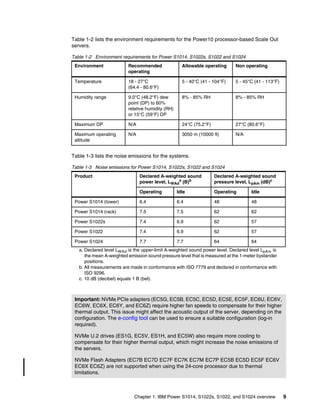
Table 1-1 lists the electrical characteristics of the Power S1014, S1022s, S1022, and S1024
servers.
Table 1-1 Electrical characteristics for Power S1014, S1022s, S1022, and S1024 servers
Electrical
characteristics
Properties
Power S1014 server Power S1022s server Power S1022 server Power S1024 server
Operating
voltage
1200 W power supply
100 - 127 V AC or 200
- 240 V AC
or
1600 W power supply
200 - 240 V AC
1000 W power supply
100 - 127 V AC or 200 -
240 V AC
2000 W power supply
200 - 240 V AC
1600 W power supply
200 - 240 V AC
Operating
frequency
50/60 ±3 Hz 50/60 ±3 Hz 50/60 ±3 Hz 50/60 ±3 Hz
Thermal output 3668 Btu/hour
(maximum)
7643 Btu/hour
(maximum)
7643 Btu/hour
(maximum)
9383 Btu/hour
(maximum)
Power
consumption
1075 watts
(maximum)
2240 watts (maximum) 2240 watts
(maximum)
2750 watts
(maximum)
Power-source
loading
1.105 kVa (maximum
configuration)
2.31 kVa (maximum
configuration)
2.31 kVa (maximum
configuration)
2.835 kVa (maximum
configuration)
Phase Single Single Single Single
Note: The maximum measured value is the worst-case power consumption that is
expected from a fully populated server under an intensive workload. The maximum
measured value also accounts for component tolerance and non ideal operating
conditions. Power consumption and heat load vary greatly by server configuration and
utilization. The IBM Systems Energy Estimator can be used to obtain a heat output
estimate that is based on a specific configuration.
Chapter 1. IBM Power S1014, S1022s, S1022, and S1024 overview 9
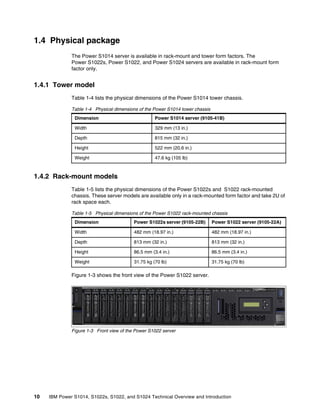
Table 1-2 lists the environment requirements for the Power10 processor-based Scale Out
servers.
Table 1-2 Environment requirements for Power S1014, S1022s, S1022 and S1024
Table 1-3 lists the noise emissions for the systems.
Table 1-3 Noise emissions for Power S1014, S1022s, S1022 and S1024
Environment Recommended
operating
Allowable operating Non operating
Temperature 18 - 27°C
(64.4 - 80.6°F)
5 - 40°C (41 - 104°F) 5 - 45°C (41 - 113°F)
Humidity range 9.0°C (48.2°F) dew
point (DP) to 60%
relative humidity (RH)
or 15°C (59°F) DP
8% - 85% RH 8% - 85% RH
Maximum DP N/A 24°C (75.2°F) 27°C (80.6°F)
Maximum operating
altitude
N/A 3050 m (10000 ft) N/A
Product Declared A-weighted sound
power level, LWAd
a (B)b
a. Declared level LWAd is the upper-limit A-weighted sound power level. Declared level LpAm is
the mean A-weighted emission sound pressure level that is measured at the 1-meter bystander
positions.
b. All measurements are made in conformance with ISO 7779 and declared in conformance with
ISO 9296.
Declared A-weighted sound
pressure level, LpAm (dB)c
c. 10 dB (decibel) equals 1 B (bel).
Operating Idle Operating Idle
Power S1014 (tower) 6.4 6.4 48 48
Power S1014 (rack) 7.5 7.5 62 62
Power S1022s 7.4 6.9 62 57
Power S1022 7.4 6.9 62 57
Power S1024 7.7 7.7 64 64
Important: NVMe PCIe adapters (EC5G, EC5B, EC5C, EC5D, EC5E, EC5F, EC6U, EC6V,
EC6W, EC6X, EC6Y, and EC6Z) require higher fan speeds to compensate for their higher
thermal output. This issue might affect the acoustic output of the server, depending on the
configuration. The e-config tool can be used to ensure a suitable configuration (log-in
required).
NVMe U.2 drives (ES1G, EC5V, ES1H, and EC5W) also require more cooling to
compensate for their higher thermal output, which might increase the noise emissions of
the servers.
NVMe Flash Adapters (EC7B EC7D EC7F EC7K EC7M EC7P EC5B EC5D EC5F EC6V
EC6X EC6Z) are not supported when using the 24-core processor due to thermal
limitations.
10 IBM Power S1014, S1022s, S1022, and S1024 Technical Overview and Introduction
1.4 Physical package
The Power S1014 server is available in rack-mount and tower form factors. The
Power S1022s, Power S1022, and Power S1024 servers are available in rack-mount form
factor only.
1.4.1 Tower model
Table 1-4 lists the physical dimensions of the Power S1014 tower chassis.
Table 1-4 Physical dimensions of the Power S1014 tower chassis
1.4.2 Rack-mount models
Table 1-5 lists the physical dimensions of the Power S1022s and S1022 rack-mounted
chassis. These server models are available only in a rack-mounted form factor and take 2U of
rack space each.
Table 1-5 Physical dimensions of the Power S1022 rack-mounted chassis
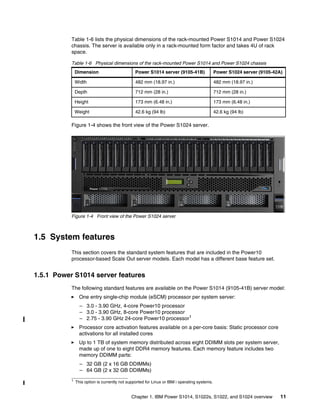
Figure 1-3 shows the front view of the Power S1022 server.
Figure 1-3 Front view of the Power S1022 server
Dimension Power S1014 server (9105-41B)
Width 329 mm (13 in.)
Depth 815 mm (32 in.)
Height 522 mm (20.6 in.)
Weight 47.6 kg (105 lb)
Dimension Power S1022s server (9105-22B) Power S1022 server (9105-22A)
Width 482 mm (18.97 in.) 482 mm (18.97 in.)
Depth 813 mm (32 in.) 813 mm (32 in.)
Height 86.5 mm (3.4 in.) 86.5 mm (3.4 in.)
Weight 31.75 kg (70 lb) 31.75 kg (70 lb)
Chapter 1. IBM Power S1014, S1022s, S1022, and S1024 overview 11
Table 1-6 lists the physical dimensions of the rack-mounted Power S1014 and Power S1024
chassis. The server is available only in a rack-mounted form factor and takes 4U of rack
space.
Table 1-6 Physical dimensions of the rack-mounted Power S1014 and Power S1024 chassis
Figure 1-4 shows the front view of the Power S1024 server.
Figure 1-4 Front view of the Power S1024 server
1.5 System features
This section covers the standard system features that are included in the Power10
processor-based Scale Out server models. Each model has a different base feature set.
1.5.1 Power S1014 server features
The following standard features are available on the Power S1014 (9105-41B) server model:
򐂰 One entry single-chip module (eSCM) processor per system server:
– 3.0 - 3.90 GHz, 4-core Power10 processor
– 3.0 - 3.90 GHz, 8-core Power10 processor
– 2.75 - 3.90 GHz 24-core Power10 processor1
򐂰 Processor core activation features available on a per-core basis: Static processor core
activations for all installed cores
򐂰 Up to 1 TB of system memory distributed across eight DDIMM slots per system server,
made up of one to eight DDR4 memory features. Each memory feature includes two
memory DDIMM parts:
– 32 GB (2 x 16 GB DDIMMs)
– 64 GB (2 x 32 GB DDIMMs)
Dimension Power S1014 server (9105-41B) Power S1024 server (9105-42A)
Width 482 mm (18.97 in.) 482 mm (18.97 in.)
Depth 712 mm (28 in.) 712 mm (28 in.)
Height 173 mm (6.48 in.) 173 mm (6.48 in.)
Weight 42.6 kg (94 lb) 42.6 kg (94 lb)
1 This option is currently not supported for Linux or IBM i operating systems.
12 IBM Power S1014, S1022s, S1022, and S1024 Technical Overview and Introduction
– 128 GB (2 x 64 GB DDIMMs)
– 256 GB (2 x 128 GB DDIMMs)2
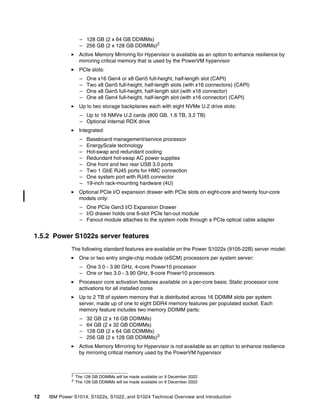
򐂰 Active Memory Mirroring for Hypervisor is available as an option to enhance resilience by
mirroring critical memory that is used by the PowerVM hypervisor
򐂰 PCIe slots:
– One x16 Gen4 or x8 Gen5 full-height, half-length slot (CAPI)
– Two x8 Gen5 full-height, half-length slots (with x16 connectors) (CAPI)
– One x8 Gen5 full-height, half-length slot (with x16 connector)
– One x8 Gen4 full-height, half-length slot (with x16 connector) (CAPI)
򐂰 Up to two storage backplanes each with eight NVMe U.2 drive slots:
– Up to 16 NMVe U.2 cards (800 GB, 1.6 TB, 3.2 TB)
– Optional internal RDX drive
򐂰 Integrated:
– Baseboard management/service processor
– EnergyScale technology
– Hot-swap and redundant cooling
– Redundant hot-swap AC power supplies
– One front and two rear USB 3.0 ports
– Two 1 GbE RJ45 ports for HMC connection
– One system port with RJ45 connector
– 19-inch rack-mounting hardware (4U)
򐂰 Optional PCIe I/O expansion drawer with PCIe slots on eight-core and twenty four-core
models only:
– One PCIe Gen3 I/O Expansion Drawer
– I/O drawer holds one 6-slot PCIe fan-out module
– Fanout module attaches to the system node through a PCIe optical cable adapter
1.5.2 Power S1022s server features
The following standard features are available on the Power S1022s (9105-22B) server model:
򐂰 One or two entry single-chip module (eSCM) processors per system server:
– One 3.0 - 3.90 GHz, 4-core Power10 processor
– One or two 3.0 - 3.90 GHz, 8-core Power10 processors
򐂰 Processor core activation features available on a per-core basis: Static processor core
activations for all installed cores
򐂰 Up to 2 TB of system memory that is distributed across 16 DDIMM slots per system
server, made up of one to eight DDR4 memory features per populated socket. Each
memory feature includes two memory DDIMM parts:
– 32 GB (2 x 16 GB DDIMMs)
– 64 GB (2 x 32 GB DDIMMs)
– 128 GB (2 x 64 GB DDIMMs)
– 256 GB (2 x 128 GB DDIMMs)3
򐂰 Active Memory Mirroring for Hypervisor is not available as an option to enhance resilience
by mirroring critical memory used by the PowerVM hypervisor
2
The 128 GB DDIMMs will be made available on 9 December 2022
3 The 128 GB DDIMMs will be made available on 9 December 2022
Chapter 1. IBM Power S1014, S1022s, S1022, and S1024 overview 13
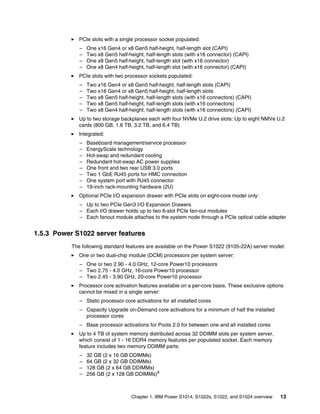
򐂰 PCIe slots with a single processor socket populated:
– One x16 Gen4 or x8 Gen5 half-height, half-length slot (CAPI)
– Two x8 Gen5 half-height, half-length slots (with x16 connector) (CAPI)
– One x8 Gen5 half-height, half-length slot (with x16 connector)
– One x8 Gen4 half-height, half-length slot (with x16 connector) (CAPI)
򐂰 PCIe slots with two processor sockets populated:
– Two x16 Gen4 or x8 Gen5 half-height, half-length slots (CAPI)
– Two x16 Gen4 or x8 Gen5 half-height, half-length slots
– Two x8 Gen5 half-height, half-length slots (with x16 connectors) (CAPI)
– Two x8 Gen5 half-height, half-length slots (with x16 connectors)
– Two x8 Gen4 half-height, half-length slots (with x16 connectors) (CAPI)
򐂰 Up to two storage backplanes each with four NVMe U.2 drive slots: Up to eight NMVe U.2
cards (800 GB, 1.6 TB, 3.2 TB, and 6.4 TB)
򐂰 Integrated:
– Baseboard management/service processor
– EnergyScale technology
– Hot-swap and redundant cooling
– Redundant hot-swap AC power supplies
– One front and two rear USB 3.0 ports
– Two 1 GbE RJ45 ports for HMC connection
– One system port with RJ45 connector
– 19-inch rack-mounting hardware (2U)
򐂰 Optional PCIe I/O expansion drawer with PCIe slots on eight-core model only:
– Up to two PCIe Gen3 I/O Expansion Drawers
– Each I/O drawer holds up to two 6-slot PCIe fan-out modules
– Each fanout module attaches to the system node through a PCIe optical cable adapter
1.5.3 Power S1022 server features
The following standard features are available on the Power S1022 (9105-22A) server model:
򐂰 One or two dual-chip module (DCM) processors per system server:
– One or two 2.90 - 4.0 GHz, 12-core Power10 processors
– Two 2.75 - 4.0 GHz, 16-core Power10 processor
– Two 2.45 - 3.90 GHz, 20-core Power10 processor
򐂰 Processor core activation features available on a per-core basis. These exclusive options
cannot be mixed in a single server:
– Static processor core activations for all installed cores
– Capacity Upgrade on-Demand core activations for a minimum of half the installed
processor cores
– Base processor activations for Pools 2.0 for between one and all installed cores
򐂰 Up to 4 TB of system memory distributed across 32 DDIMM slots per system server,
which consist of 1 - 16 DDR4 memory features per populated socket. Each memory
feature includes two memory DDIMM parts:
– 32 GB (2 x 16 GB DDIMMs)
– 64 GB (2 x 32 GB DDIMMs)
– 128 GB (2 x 64 GB DDIMMs)
– 256 GB (2 x 128 GB DDIMMs)4
14 IBM Power S1014, S1022s, S1022, and S1024 Technical Overview and Introduction
򐂰 Active Memory Mirroring for Hypervisor is available as an option to enhance resilience by
mirroring critical memory used by the PowerVM hypervisor
򐂰 PCIe slots with a single processor socket populated:
– One x16 Gen4 or x8 Gen5 half-height, half-length slot (CAPI)
– Two x8 Gen5 half-height, half-length slots (with x16 connector) (CAPI)
– One x8 Gen5 half-height, half-length slot (with x16 connector)
– One x8 Gen4 half-height, half-length slot (with x16 connector) (CAPI)
򐂰 PCIe slots with two processor sockets populated:
– Two x16 Gen4 or x8 Gen5 half-height, half-length slots (CAPI)
– Two x16 Gen4 or x8 Gen5 half-height, half-length slots
– Two x8 Gen5 half-height, half-length slots (with x16 connectors) (CAPI)
– Two x8 Gen5 half-height, half-length slots (with x16 connectors)
– Two x8 Gen4 half-height, half-length slots (with x16 connectors) (CAPI)
򐂰 Up to two storage backplanes each with four NVMe U.2 drive slots: Up to eight NMVe U.2
cards (800 GB, 1.6 TB, 3.2 TB, and 6.4 TB)
򐂰 Integrated:
– Baseboard management/service processor
– EnergyScale technology
– Hot-swap and redundant cooling
– Redundant hot-swap AC power supplies
– One front and two rear USB 3.0 ports
– Two 1 GbE RJ45 ports for HMC connection
– One system port with RJ45 connector
– 19-inch rack-mounting hardware (2U)
򐂰 Optional PCIe I/O expansion drawer with PCIe slots:
– Up to two PCIe Gen3 I/O Expansion Drawers
– Each I/O drawer holds up to two 6-slot PCIe fan-out modules
– Each fanout module attaches to the system node through a PCIe optical cable adapter
1.5.4 Power S1024 server features
The following standard features are available on the Power S1024 (9105-42A) server model:
򐂰 One or two dual-chip module (DCM) processors per system server:
– One or two 3.40 - 4.0 GHz, 12-core Power10 processors
– Two 3.10 - 4.0 GHz, 16-core Power10 processor
– Two 2.75 - 3.90 GHz, 24-core Power10 processor
򐂰 Processor core activation features available on a per-core basis. These exclusive options
cannot be mixed in a single server:
– Static processor core activations for all installed cores
– Capacity Upgrade on-Demand core activations for a minimum of half the installed
processor cores
– Base processor activations for Pools 2.0 for between one and all installed cores
򐂰 Up to 8 TB of system memory that is distributed across 32 DDIMM slots per system
server, made up of one to 16 DDR4 memory features per populated socket. Each memory
feature includes two memory DDIMM parts:
– 32 GB (2 x 16 GB DDIMMs)
4 The 128 GB DDIMMs will be made available on 9 December 2022.
Chapter 1. IBM Power S1014, S1022s, S1022, and S1024 overview 15
– 64 GB (2 x 32 GB DDIMMs)
– 128 GB (2 x 64 GB DDIMMs)
– 256 GB (2 x 128 GB DDIMMs)5
– 512 GB (2 x 256 GB DDIMMs)5
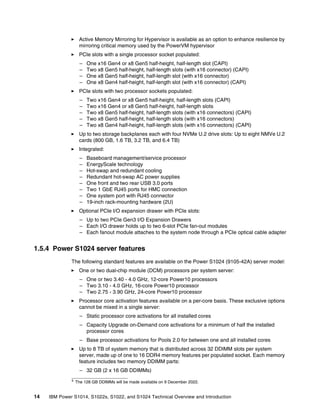
򐂰 Active Memory Mirroring for Hypervisor is available as an option to enhance resilience by
mirroring critical memory used by the PowerVM hypervisor
򐂰 PCIe slots with a single processor socket populated:
– One x16 Gen4 or x8 Gen5 full-height, half-length slot (CAPI)
– Two x8 Gen5 full-height, half-length slots (with x16 connector) (CAPI)
– One x8 Gen5 full-height, half-length slot (with x16 connector)
– One x8 Gen4 full-height, half-length slot (with x16 connector) (CAPI)
򐂰 PCIe slots with two processor sockets populated:
– Two x16 Gen4 or x8 Gen5 full-height, half-length slots (CAPI)
– Two x16 Gen4 or x8 Gen5 full-height, half-length slots
– Two x8 Gen5 full-height, half-length slots (with x16 connectors) (CAPI)
– Two x8 Gen5 full-height, half-length slots (with x16 connectors)
– Two x8 Gen4 full-height, half-length slots (with x16 connectors) (CAPI)
򐂰 Up to two storage backplanes each with eight NVMe U.2 drive slots:
– Up to 16 NMVe U.2 cards (800 GB, 1.6 TB, 3.2 TB, and 6.4 TB)
– Optional internal RDX drive
򐂰 Integrated:
– Baseboard management/service processor
– EnergyScale technology
– Hot-swap and redundant cooling
– Redundant hot-swap AC power supplies
– One front and two rear USB 3.0 ports
– Two 1 GbE RJ45 ports for HMC connection
– One system port with RJ45 connector
– 19-inch rack-mounting hardware (2U)
򐂰 Optional PCIe I/O expansion drawer with PCIe slots:
– Up to two PCIe Gen3 I/O Expansion Drawers
– Each I/O drawer holds up to two 6-slot PCIe fan-out modules
– Each fanout module attaches to the system node through a PCIe optical cable adapter
1.6 Minimum configurations
The minimum Power_S1014, S1022s, S1022, and S1024 servers initial order must include
the following components:
򐂰 Processor module
򐂰 One LAN adapter
򐂰 At least two power supplies and power cords
򐂰 An operating system indicator
򐂰 An Operator-panel (required only for IBM i; optional for AIX/Linux)
򐂰 A cover set indicator
򐂰 Language Group Specify
5 The 128 GB and 256 GB DDIMMs will be made available on 9 December 2022.
16 IBM Power S1014, S1022s, S1022, and S1024 Technical Overview and Introduction
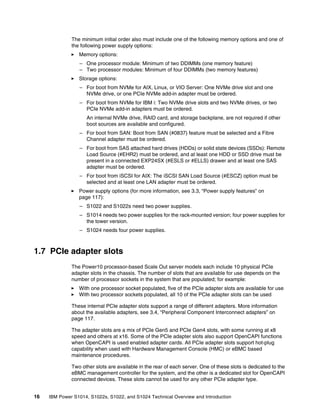
The minimum initial order also must include one of the following memory options and one of
the following power supply options:
򐂰 Memory options:
– One processor module: Minimum of two DDIMMs (one memory feature)
– Two processor modules: Minimum of four DDIMMs (two memory features)
򐂰 Storage options:
– For boot from NVMe for AIX, Linux, or VIO Server: One NVMe drive slot and one
NVMe drive, or one PCIe NVMe add-in adapter must be ordered.
– For boot from NVMe for IBM i: Two NVMe drive slots and two NVMe drives, or two
PCIe NVMe add-in adapters must be ordered.
An internal NVMe drive, RAID card, and storage backplane, are not required if other
boot sources are available and configured.
– For boot from SAN: Boot from SAN (#0837) feature must be selected and a Fibre
Channel adapter must be ordered.
– For boot from SAS attached hard drives (HDDs) or solid state devices (SSDs): Remote
Load Source (#EHR2) must be ordered, and at least one HDD or SSD drive must be
present in a connected EXP24SX (#ESLS or #ELLS) drawer and at least one SAS
adapter must be ordered.
– For boot from iSCSI for AIX: The iSCSI SAN Load Source (#ESCZ) option must be
selected and at least one LAN adapter must be ordered.
򐂰 Power supply options (for more information, see 3.3, “Power supply features” on
page 117):
– S1022 and S1022s need two power supplies.
– S1014 needs two power supplies for the rack-mounted version; four power supplies for
the tower version.
– S1024 needs four power supplies.
1.7 PCIe adapter slots
The Power10 processor-based Scale Out server models each include 10 physical PCIe
adapter slots in the chassis. The number of slots that are available for use depends on the
number of processor sockets in the system that are populated; for example:
򐂰 With one processor socket populated, five of the PCIe adapter slots are available for use
򐂰 With two processor sockets populated, all 10 of the PCIe adapter slots can be used
These internal PCIe adapter slots support a range of different adapters. More information
about the available adapters, see 3.4, “Peripheral Component Interconnect adapters” on
page 117.
The adapter slots are a mix of PCIe Gen5 and PCIe Gen4 slots, with some running at x8
speed and others at x16. Some of the PCIe adapter slots also support OpenCAPI functions
when OpenCAPI is used enabled adapter cards. All PCIe adapter slots support hot-plug
capability when used with Hardware Management Console (HMC) or eBMC based
maintenance procedures.
Two other slots are available in the rear of each server. One of these slots is dedicated to the
eBMC management controller for the system, and the other is a dedicated slot for OpenCAPI
connected devices. These slots cannot be used for any other PCIe adapter type.
Chapter 1. IBM Power S1014, S1022s, S1022, and S1024 overview 17
Each system requires at least one LAN adapter to support connection to local networks. This
requirement allows for initial system testing and configuration, and the preinstallation of any
operating systems, if required. By default, this server is the #5899 in the S1014 server, the
#EC2T in the S1022s or S1022 servers, or the #EC2U in the S1024 server. Alternative LAN
adapters can be installed instead. This required network adapter is installed by default in slot
C10.
Table 1-7 lists the adapter slots that are available in the Power10 processor-based Scale Out
servers in various configurations.
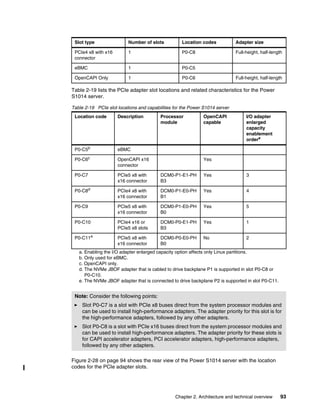
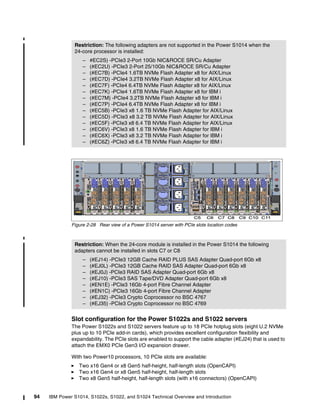
Table 1-7 PCIe slot details for Power S1014, S1022s, S1022, and S1024 servers
Adapter slot Type Sockets populated OpenCAPI enabled
P0-C0 PCIe4 x16 or PCIe5 x8
slots
2 only No
P0-C1 PCIe4 x8 with x16
connector
2 only Yes
P0-C2 PCIe5 x8 with x16
connector
2 only No
P0-C3 PCIe4 x16 or PCIe5 x8
slots
2 only Yes
P0-C4 PCIe4 x16 or PCIe5 x8
slots
2 only No
P0-C5a
a. Used for eBMC only.
eBMC All systems N/A
P0-C6b
b. Used for devices with OpenCAPI connections only.
OpenCAPI x16
connector
1 or 2 Yes
P0-C7 PCIe5 x8 with x16
connector
1 or 2 Yes
P0-C8 PCIe4 x8 with x16
connector
1 or 2 Yes
P0-C9 PCIe5 x8 with x16
connector
1 or 2 Yes
P0-C10 PCIe4 x16 or PCIe5 x8
slots
1 or 2 Yes
P0-C11 PCIe5 x8 with x16
connector
1 or 2 No
18 IBM Power S1014, S1022s, S1022, and S1024 Technical Overview and Introduction
The Power S1014 and S1024 servers are 4U (EIA units), and support the installation of
full-height PCIe adapters. Figure 1-5 shows the PCIe adapter slot locations for the
Power S1014 and S1024 server models.
Figure 1-5 PCIe adapter slot locations on the Power S1014 and S1024 server models
The Power S1022s and S1022 servers are 2U (EIA units), and support the installation of
low-profile PCIe adapters. Figure 1-6 shows the PCIe adapter slot locations for the
Power S1022s and S1022 server models.
Figure 1-6 PCIe adapter slot locations on the Power S1022sand S1022 server models
The total number of PCIe adapter slots available can be increased by adding PCIe Gen3 I/O
expansion drawers. With one processor socket populated (except the S1014 four core
option), one I/O expansion drawer that is installed with one fan-out module is supported.
When two processor sockets are populated, up to two I/O expansion drawers with up to four
fanout modules are supported. The connection of each fan out module in a PCIe Gen3
expansion drawer requires the installation of a PCIe optical cable adapter in one of the
internal PCIe x16 adapter slots (C0, C3®, C4, or C10).
For more information about the connectivity of the internal I/O bus and the PCIe adapter slots,
see 2.4, “Internal I/O subsystem” on page 90.
Chapter 1. IBM Power S1014, S1022s, S1022, and S1024 overview 19
1.8 Operating system support
The Power10 processor-based Scale Out servers support the following families of operating
systems:
򐂰 AIX
򐂰 IBM i
򐂰 Linux
In addition, the Virtual I/O Server (VIOS) can be installed in special partitions that provide
virtualization of I/O capabilities, such as network and storage connectivity. Multiple VIOS
partitions can be installed to provide support and services to other partitions running AIX,
IBM i, or Linux, such as virtualized devices and Live Partition Mobility capabilities.
For more information about the Operating System and other software that is available on
Power, see this IBM Infrastructure web page.
The minimum supported levels of IBM AIX, IBM i, and Linux at the time of announcement are
described in the following sections. For more information about hardware features and
Operating System level support, see this IBM Support web page.
This tool helps to plan a successful system upgrade by providing the prerequisite information
for features that are in use or planned to be added to a system. A machine type and model
can be selected and the prerequisites, supported operating system levels and other
information can be determined.
The machine types and model for the Power10 processor-based Scale Out systems are listed
given in Table 1-8.
Table 1-8 Machine types and models of S1014, S1022s, S1022, and S1024 server models
1.8.1 AIX operating system
At announcement, the Power S1014, S1022s, S1022, and S1024 servers support the
following minimum levels of the AIX operating system when installed with virtual I/O:
򐂰 AIX Version 7.3 with Technology Level 7300-00 and Service Pack 7300-00-01-2148
򐂰 AIX Version 7.2 with Technology Level 7200-05 and Service Pack 7200-05-01-2038
򐂰 AIX Version 7.2 with Technology Level 7200-04 and Service Pack 7200-04-02-2016
򐂰 AIX Version 7.1 with Technology Level 7100-05 and Service Pack 7100-05-06-2016
At announcement, the Power S1014, S1022s, S1022, and S1024 servers support the
following minimum levels of the AIX operating system when installed by using direct I/O
connectivity:
򐂰 AIX Version 7.3 with Technology Level 7300-00 and Service Pack 7300-00-02-2220
򐂰 AIX Version 7.2 with Technology Level 7200-05 and Service Pack 7200-05-04-2220
򐂰 AIX Version 7.2 with Technology Level 7200-04 and Service Pack 7200-04-06-2220
Server name Machine type and model
S1014 9105-41B
S1022s 9105-22B
S1022 9105-22A
S1024 9105-42A
20 IBM Power S1014, S1022s, S1022, and S1024 Technical Overview and Introduction
Consider the following points:
򐂰 AIX 7.1 instances must run in an LPAR in IBM POWER8® compatibility mode with
VIOS-based virtual storage and networking.
򐂰 AIX 7.2 instances can use physical and virtual I/O adapters, but must run in an LPAR in
IBM POWER9™ compatibility mode.
򐂰 AIX 7.3 instances can use physical and virtual I/O adapters, and can run in an LPAR in
native Power10 mode.
IBM periodically releases maintenance packages (service packs or technology levels) for the
AIX operating system. For more information about these packages, downloading, and
obtaining the installation packages, see this IBM Support Fix Central web page.
For more information about hardware features compatibility and the corresponding AIX
Technology Levels, see this IBM Support web page.
The Service Update Management Assistant (SUMA), which can help you automate the task
of checking and downloading operating system downloads, is part of the base operating
system. For more information about the suma command, see this IBM Documentation web
page.
The AIX Operating System can be licensed by using different methods, including the following
examples:
򐂰 Stand-alone as AIX Standard Edition
򐂰 With other software tools as part of AIX Enterprise Edition
򐂰 As part of the IBM Power Private Cloud Edition software bundle
Subscription licensing model
AIX Standard Edition also is available under a subscription licensing model that provides
access to an IBM program and IBM software maintenance for a specified subscription term
(one or three years). The subscription term begins on the start date and ends on the
expiration date, which is reflected in Entitled Systems Support (IBM Enterprise Storage
Server®).
Customers are licensed to run the product through the expiration date of the 1- or 3-year
subscription term. Then, they can renew at the end of the subscription to continue the use
other product. This model provides flexible and predictable pricing over a specific term, with
lower up-front costs of acquisition.
Another benefit of this model is that the licenses are customer-number entitled, which means
they are not tied to a specific hardware serial number as with a standard license grant.
Therefore, the licenses can be moved between on-premises and cloud if needed, something
that is becoming more of a requirement with hybrid workloads.
The subscription licenses are orderable through IBM configurator. The standard AIX license
grant and monthly term licenses for standard edition are still available.
Note: AIX Version 7.2 with Technology Level 7200-04 and Service Pack 7200-04-06-2220
is planned to be available from 16 September 2022.
Chapter 1. IBM Power S1014, S1022s, S1022, and S1024 overview 21
1.8.2 IBM i operating system
At announcement, the Power S1014, S1022s, S1022, and S1024 servers support the
following minimum levels of IBM i:
򐂰 IBM i 7.5
򐂰 IBM i 7.4 Technology Release 6 or later
򐂰 IBM i 7.3 Technology Release 12 or later
Some limitations exist when running the IBM i operating system on the Power S1022s or
Power S1022 servers. Virtual I/O by way of VIOS is required, and partitions must be set to
“restricted I/O” mode.
The maximum size of the partition also is limited. Up to four cores (real or virtual) per IBM i
partition are supported. Multiple IBM i partitions can be created and run concurrently, and
individual partitions can have up to four cores.
IBM periodically releases maintenance packages (service packs or technology releases) for
the IBM i. For more information about these packages, downloading, and obtaining the
installation packages, see this IBM Support Fix Central web page.
For more information about hardware feature compatibility and the corresponding IBM i
Technology Releases, see this IBM Support web page.
IBM i operating system transfer
IBM i customers can move IBM i entitlements to new Power10 processor-based Scale Out
servers, just as with previous new system, preserving upgrades or replacements if the
required criteria are met.
IBM i license terms and conditions require that IBM i operating system license entitlements
remain with the machine for which they were originally purchased. Under qualifying
conditions, IBM allows the transfer of IBM i processor and user entitlements from one
machine to another. This capability helps facilitate machine replacement, server
consolidation, and load rebalancing while protecting a customer’s investment in IBM i
software.
When requirements are met, IBM i license transfer can be configured by using IBM
configurator tools.
The following prerequisites must be met for transfers:
򐂰 The IBM i entitlements are owned by the user’s enterprise.
򐂰 The donor machine and receiving machine are owned by the user’s enterprise.
򐂰 The donor machine was owned in the same user’s enterprise as the receiving machine for
a minimum of one year.
򐂰 Current Software Maintenance (SWMA) is on the donor machine. Each software
entitlement that is to be transferred includes SWMA coverage.
򐂰 An electronic Proof of Entitlement (ePoE) exists for the entitlements to be transferred.
򐂰 The donor machine entitlements are for IBM i 5.4 or later.
򐂰 The receiving machine includes activated processors that are available to accommodate
the transferred entitlements.
Note: The IBM i operating system is not supported on the Power S1022s model with the
four-core processor option.
22 IBM Power S1014, S1022s, S1022, and S1024 Technical Overview and Introduction
A charge is incurred for the transfer of IBM i entitlements between servers. Each IBM i
processor entitlement that is transferred to a target machine includes one year of new SWMA
at no extra charge. Extra years of coverage or 24x7 support are available options for an extra
charge.
IBM i virtual serial numbers
IBM now offers a customer the ability to acquire a Virtual Serial Number (VSN) and assign it
to a logical partition. IBM i software can then be ordered against or transferred to the VSN
instead of being tied to a physical IBM Power machine’s serial number.
Having the IBM i entitlement, keys, and support entitlement on a VSN provides the flexibility
to move the partition to a different Power machine without transferring the entitlement.
With VSNs, each partition can have its own serial number that is not tied to the hardware
serial number. If VSNs are not used, an IBM i partition still defaults to the use of the physical
host serial number.
In the first phase of VSN deployment, only one partition can use a single VSN at any time;
therefore, multiple IBM i LPARs cannot use the same VSN. In the first phase, VSNs are not
supported within Power Private Cloud (Power Enterprise Pools 2.0) environments.
VSNs are supported for partitions that are running any version of IBM i that is supported on
the Power10 processor-based Scale Out servers, although some other PTFs might be
required.
IBM i software tiers
The IBM i operating system is licensed per processor core that is used by the operating
system, and by the number of users that are interacting with the system. Different licensing
requirements depend on the capability of the server model and processor performance.
These systems are designated with a software tier that determines the licensing that is
required for workloads running on each server, as listed in Table 1-9.
Table 1-9 IBM i software tiers for the Power S1014, S1022s, S1022, and S1024
Note: VSNs can be ordered in specific countries. For more information, see the local
announcement letters.
Server model Processor IBM i software tier
S1014 4-core (#EPG0) P05
S1014 8-core (#EPG2) P10
S1022s 4-core (#EPGR) N/Aa
a. IBM i does not support the 4-core processor (#EPGR) in the S1022s server.
S1022s 8-core (#EPGQ) P10b
b. IBM i partitions are limited to four cores on the S1022s and S1022 models.
S1022 12-core (#EPG9) P10b
S1022 16-core (#EPG8) P10b
S1022 20-core (#EPPGA) P10b
S1024 12-core (#EPGM) P20
S1024 16-core (#EPGC) P30
S1024 24-core (#EPGE) P30
Chapter 1. IBM Power S1014, S1022s, S1022, and S1024 overview 23
1.8.3 Linux operating system distributions
Linux is an open source, cross-platform operating system that runs on numerous platforms
from embedded systems to mainframe computers. It provides an UNIX-like implementation
across many computer architectures.
The Linux distributions that are described next are supported on the Power S1014, S1022s,
S1022, and S1024 server models. Other distributions, including open source releases, can
run on these servers, but do not include any formal Enterprise Grade support.
Red Hat Enterprise Linux
The latest version of the Red Hat Enterprise Linux (RHEL) distribution from Red Hat is
supported in native Power10 mode, which allows it to access all of the features of the
Power10 processor and platform.
At announcement, the Power S1014, S1022s, S1022, and S1024 servers support the
following minimum levels of the Red Hat Enterprise Linux operating system:
򐂰 Red Hat Enterprise Linux 8.4 for Power LE, or later
򐂰 Red Hat Enterprise Linux for SAP with Red Hat Enterprise Linux 8.4 for Power LE, or later
򐂰 Red Hat Enterprise Linux 9.0 for Power LE, or later
Red Hat Enterprise Linux is sold on a subscription basis, with initial subscriptions and support
available for one, three, or five years. Support is available directly from Red Hat or IBM
Technical Support Services.
Red Hat Enterprise Linux 8 for Power LE subscriptions cover up to four cores and up to four
LPARs, and can be stacked to cover a larger number of cores or LPARs.
When you order RHEL from IBM, a subscription activation code is automatically published in
Enterprise Storage Server. After retrieving this code from Enterprise Storage Server, you use
it to establish proof of entitlement and download the software from Red Hat.
SUSE Linux Enterprise Server
The latest version of the SUSE Linux Enterprise Server distribution of Linux from SUSE is
supported in native Power10 mode, which allows it to access all of the features of the
Power10 processor and platform.
At announcement, the Power S1014, S1022s, S1022, and S1024 servers support the
following minimum levels of the SUSE Linux Enterprise Server operating system:
򐂰 SUSE Linux Enterprise Server 15 Service Pack 3, or later
򐂰 SUSE Linux Enterprise Server for SAP with SUSE Linux Enterprise Server 15 Service
Pack 3, or later
SUSE Linux Enterprise Server is sold on a subscription basis, with initial subscriptions and
support available for one, three, or five years. Support is available directly from SUSE or from
IBM Technical Support Services.
SUSE Linux Enterprise Server 15 subscriptions cover up to one socket or one LPAR, and can
be stacked to cover a larger number of sockets or LPARs.
When you order SLES from IBM, a subscription activation code is automatically published in
Enterprise Storage Server, you use it to establish proof of entitlement and download the
software from SUSE.
24 IBM Power S1014, S1022s, S1022, and S1024 Technical Overview and Introduction
Linux and Power10 technology
The Power10 specific toolchain is available in the IBM Advance Toolchain for Linux version
15.0, which allows customers and developers to use all new Power10 processor-based
technology instructions when programming. Cross-module function call overhead was
reduced because of a new PC-relative addressing mode.
One specific benefit of Power10 technology is a 10x to 20x advantage over Power9
processor-based technology for AI inferencing workloads because of increased memory
bandwidth and new instructions. One example is the new special purpose-built matrix math
accelerator (MMA) that was tailored for the demands of machine learning and deep learning
inference. It also supports many AI data types.
Network virtualization is an area with significant evolution and improvements, which benefit
virtual and containerized environments. The following recent improvements were made for
Linux networking features on Power10 processor-based servers:
򐂰 SR-IOV allows virtualization of network adapters at the controller level without the need to
create virtual Shared Ethernet Adapters in the VIOS partition. It is enhanced with virtual
Network Interface Controller (vNIC), which allows data to be transferred directly from the
partitions to or from the SR-IOV physical adapter without transiting through a VIOS
partition.
򐂰 Hybrid Network Virtualization (HNV) allows Linux partitions to use the efficiency and
performance benefits of SR-IOV logical ports and participate in mobility operations, such
as active and inactive Live Partition Mobility (LPM) and Simplified Remote Restart (SRR).
HNV is enabled by selecting a new migratable option when an SR-IOV logical port is
configured.
Security
Security is a top priority for IBM and our distribution partners. Linux security on IBM Power is
a vast topic; however, improvements in the areas of hardening, integrity protection,
performance, platform security, and certifications are introduced with this section.
Hardening and integrity protection deal with protecting the Linux kernel from unauthorized
tampering while allowing upgrading and servicing to the kernel. These topics become even
more important when in a containerized environment is run with an immutable operating
system, such as RHEL CoreOS, as the underlying operating system for the Red Hat
OpenShift Container Platform.
Performance also is an important security topic because specific hardening mitigation
strategies (for example, against side-channel attacks) can have a significant performance
effect. In addition, cryptography can use significant compute cycles.
1.8.4 Red Hat OpenShift Container Platform
The Red Hat OpenShift Container Platform (OCP) is supported to run on IBM Power servers,
including the Power10 processor-based Scale Out server models. OCP is a container
orchestration and management platform that provides a resilient and flexible environment in
which to develop and deploy applications. It extends the open source Kubernetes project to
provide an Enterprise grade platform to run and manage workloads that uses Linux container
technology.
A Red Hat OpenShift Container Platform cluster consists of several nodes, which can run on
physical or virtual machines. A minimum of three control plane nodes are required to support
the cluster management functions. At least two compute nodes are required to provide the
Chapter 1. IBM Power S1014, S1022s, S1022, and S1024 overview 25
capacity to run workloads. During installation, another bootstrap node is required to host the
files that are required for installation and initial setup.
The bootstrap and control plane nodes are all based on the Red Hat Enterprise Linux
CoreOS operating system, which is a minimal immutable container host version of the Red
Hat Enterprise Linux distribution. It and inherits the associated hardware support statements.
The compute nodes can run on Red Hat Enterprise Linux or RHEL CoreOS.
The Red Hat OpenShift Container Platform is available on a subscription basis, with initial
subscriptions and support available for one, three, or five years. Support is available directly
from Red Hat or from IBM Technical Support Services. Red Hat OpenShift Container Platform
subscriptions cover two processor cores each, and can be stacked to cover many cores. Only
the compute nodes require subscription coverage.
At announcement, the Power S1014, S1022s, S1022, and S1024 servers support the
following minimum levels of the operating systems that are supported for Red Hat OpenShift
Container Platform:
򐂰 Red Hat Enterprise Linux CoreOS 4.9 for Power LE, or later
򐂰 Red Hat Enterprise Linux 8.4 for Power LE, or later
Red Hat OpenShift Container Platform 4.9 for IBM Power is the minimum level of the Red Hat
OpenShift Container Platform on the Power10 processor-based Scale Out servers.
When you order Red Hat OpenShift Container Platform from IBM, a subscription activation
code automatically is published in Enterprise Storage Server, you use it to establish proof of
entitlement and download the software from Red Hat.
For more information about running Red Hat OpenShift Container Platform on IBM Power,
see this Red Hat OpenShift Documentation web page.
1.8.5 Virtual I/O Server
The minimum required level of VIOS for the Power S1014, S1022s, S1022 and S1024 server
models is VIOS 3.1.3.21 or later.
IBM regularly updates the VIOS code. For more information, see this IBM Fix Central web
page.
1.8.6 Entitled System Support
IBM’s Enterprise Storage Server web page is available to view and manage Power and
Storage software and hardware. In general, most products that are offered by IBM Systems
that are purchased through our IBM Digital Sales representatives or Business Partners are
accessed on this site when the IBM Configurator is used.
The site features the following three main sections:
򐂰 My entitled software: Activities are listed that are related to Power and Storage software,
including the ability to download licensed, free, and trial software media, place software
update orders, and manage software keys.
򐂰 My entitled hardware: Activities are listed related to Power and Storage hardware
including the ability to renew Update Access Keys, buy and use Elastic Capacity on
Demand, assign or buy credits for new and existing pools in a Power Private Cloud
environment (Enterprise Pools 2.0), download Storage Capacity on-Demand codes, and
manage Hybrid Capacity credits.
26 IBM Power S1014, S1022s, S1022, and S1024 Technical Overview and Introduction
򐂰 My inventory: Activities related to Power and Storage inventory including the ability to
browse software license, software maintenance, and hardware inventory, manage
inventory retrievals by way of Base Composer or generate several types of reports.
1.8.7 Update Access Keys
Since the introduction of the Power8 processor-based servers, IBM uses the concept of an
Update Access Key (UAK) for each server.
When system firmware updates are applied to the system, the UAK and its expiration date are
checked. System firmware updates include a release date. If the release date for the firmware
updates is past the expiration date for the update access key when attempting to apply
system firmware updates, the updates are not processed.
As update access keys expire, they must be replaced by using the Hardware Management
Console (HMC) or the ASMI on the eBMC.
By default, newly delivered systems include an UAK that expires after three years. Thereafter,
the UAK can be extended every six months, but only if a current hardware maintenance
contract exists for that server. The contract can be verified on the Enterprise Storage Server
web page.
Checking the validity and expiration date of the current UAK can be done through the HMC or
eBMC graphical interfaces or command-line interfaces. However, the expiration date also can
be displayed by using the suitable AIX or IBM i command.
UAK expiration date by using AIX 7.1
In the case of AIX 7.1, use the following command:
lscfg -vpl sysplanar0 | grep -p "System Firmware"
The output is similar to the output that is shown in Example 1-1 (the Microcode Entitlement
Date represents the UAK expiration date).
Example 1-1 Output of the command to check UAK expiration date by way of AIX 7.1
$ lscfg -vpl sysplanar0 | grep -p "System Firmware"
System Firmware:
...
Microcode Image.............NL1020_035 NL1020_033 NL1020_035
Microcode Level.............FW1020.00 FW1020.00 FW1020.00
Microcode Build Date........20220527 20220527 20220527
Microcode Entitlement Date..20220515
Hardware Location Code......U9105.42A.XXXXXXX-Y1
Physical Location: U9105.42A.XXXXXXX-Y1
UAK expiration date by using AIX 7.2 and 7.3
In the case of AIX 7.2 and 7.3, the output is slightly different from AIX 7.1. Use the following
command:
lscfg -vpl sysplanar0 |grep -p "System Firmware"
The output is similar to the output that is shown in Example 1-2 on page 27 (the Update
Access Key Exp Date represents the UAK expiration date).
Chapter 1. IBM Power S1014, S1022s, S1022, and S1024 overview 27
Example 1-2 Output of the command to check UAK expiration date by way of AIX 7.2 and 7.3
$ lscfg -vpl sysplanar0 |grep -p "System Firmware"
System Firmware:
...
Microcode Image.............NL1020_035 NL1020_033 NL1020_035
Microcode Level.............FW1020.00 FW1020.00 FW1020.00
Microcode Build Date........20220527 20220527 20220527
Update Access Key Exp Date..20220515
Hardware Location Code......U9105.42A.XXXXXXX-Y1
Physical Location: U9105.42A.XXXXXXX-Y1
UAK expiration date by using IBM i
When IBM i is used as an operating system, the status of the UAK can be checked by using
the Display Firmware Status window.
If the update access key expired, proceed to the Enterprise Storage Server web page to
replace your update access key. Figure 1-7 shows the output in the IBM i 7.1 and 7.2
releases. In the 7.3 and 7.4 releases, the text changes to Update Access Key Expiration
Date. The line that is highlighted in Figure 1-7 is displayed whether the system is operating
system managed or HMC managed.
Figure 1-7 Display Firmware Status window
28 IBM Power S1014, S1022s, S1022, and S1024 Technical Overview and Introduction
1.9 Hardware Management Console overview
The HMC can be a hardware or virtual appliance that can be used to configure and manage
your systems. The HMC connects to one or more managed systems and provides capabilities
for the following primary functions:
򐂰 Provide systems management functions, including the following examples:
– Power off
– Power on
– System settings
– Capacity on Demand
– Enterprise Pools
– Shared Processor Pools
– Performance and Capacity Monitoring
– Starting Advanced System Management Interface (ASMI) for managed systems
򐂰 Deliver virtualization management through support for creating, managing, and deleting
Logical Partitions, Live Partition Mobility, Remote Restart, configuring SRIOV, managing
Virtual IO Servers, dynamic resource allocation, and operating system terminals.
򐂰 Acts as the service focal point for systems and supports service functions, including call
home, dump management, guided repair and verify, concurrent firmware updates for
managed systems, and around-the-clock error reporting with Electronic Service Agent for
faster support.
򐂰 Provides appliance management capabilities for configuring network, users on the HMC,
and updating and upgrading the HMC.
We discuss the available HMC offerings next.
1.9.1 HMC 7063-CR2
The 7063-CR2 IBM Power HMC (see Figure 1-8 on page 29) is a second-generation Power
processor-based HMC. It includes the following features:
򐂰 6-core Power9 130W processor chip
򐂰 64 GB (4x16 GB) or 128 GB (4x32 GB) of memory
򐂰 1.8 TB of internal disk capacity with RAID1 protection
򐂰 4-ports 1 Gbps Ethernet (RJ-45), 2-ports 10 Gbps Ethernet (RJ-45), two USB 3.0 ports
(front side) and two USB 3.0 ports (rear side), and 1 Gbps IPMI Ethernet (RJ-45)
򐂰 Two 900W power supply units
򐂰 Remote Management Service: IPMI port (OpenBMC) and Redfish application
programming interface (API)
򐂰 Base Warranty is 1-year 9x5 with available optional upgrades
A USB Smart Drive is not included.
Note: The recovery media for V10R1 is the same for 7063-CR2 and 7063-CR1.
Chapter 1. IBM Power S1014, S1022s, S1022, and S1024 overview 29
Figure 1-8 HMC 7063-CR2
The 7063-CR2 is compatible with flat panel console kits 7316-TF3, TF4, and TF5.
1.9.2 Virtual HMC
Initially, the HMC was sold only as a hardware appliance, including the HMC firmware
installed. However, IBM extended this offering to allow the purchase of the hardware
appliance or a virtual appliance that can be deployed on ppc64le architectures or x86
platforms.
Any customer with a valid contract can download the HMC from the Enterprise Storage
Server web page, or it can be included within an initial Power S1014, S1022s, S1022, or
S1024 order.
The virtual HMC supports the following hypervisors:
򐂰 On x86 processor-based servers:
– KVM
– Xen
– VMware
򐂰 On Power processor-based servers: IBM PowerVM®
The following minimum requirements must be met to install the virtual HMC:
򐂰 16 GB of Memory
򐂰 4 virtual processors
򐂰 2 network interfaces (maximum 4 allowed)
򐂰 1 disk drive (500 GB available disk drive)
Note: The 7316-TF3 and TF4 were withdrawn from marketing.
30 IBM Power S1014, S1022s, S1022, and S1024 Technical Overview and Introduction
For an initial Power S1014, S1022s, S1022 or S1024 order with the IBM configurator
(e-config), HMC virtual appliance can be found by selecting add software → Other System
Offerings (as product selections) and then:
򐂰 5765-VHP for IBM HMC Virtual Appliance for Power V10
򐂰 5765-VHX for IBM HMC Virtual Appliance x86 V10
For more information and an overview of the Virtual HMC, see this web page.
For more information about how to install the virtual HMC appliance and all requirements, see
this IBM Documentation web page.
1.9.3 BMC network connectivity rules for 7063-CR2 HMC
The 7063-CR2 HMC features a baseboard management controller (BMC), which is a
specialized service processor that monitors the physical state of the system by using sensors.
OpenBMC that is used on 7063-CR2 provides a graphical user interface (GUI) that can be
accessed from a workstation that includes network connectivity to the BMC. This connection
requires an Ethernet port to be configured for use by the BMC.
The 7063-CR2 provides two network interfaces (eth0 and eth1) for configuring network
connectivity for BMC on the appliance.
Each interface maps to a different physical port on the system. Different management tools
name the interfaces differently. The HMC task Console Management → Console
Settings → Change BMC/IPMI Network Settings modifies only the Dedicated interface.
The BMC ports are listed in Table 1-10.
Table 1-10 BMC ports
Management tool Logical port Shared/Dedicated CR2 physical port
OpenBMC UI eth0 Shared eth0
OpenBMC UI eth1 Dedicated Management port only
ipmitool lan1 Shared eth0
ipmitool lan2 Dedicated Management port only
HMC task (change
BMC/IPMI Network
settings
lan2 Dedicated Management port only
Chapter 1. IBM Power S1014, S1022s, S1022, and S1024 overview 31
Figure 1-9 shows the BMC interfaces of the HMC.
Figure 1-9 BMC interfaces
The main difference is the shared and dedicated interface to the BMC can coexist. Each has
its own LAN number and physical port. Ideally, the customer configures one port, but both can
be configured. The rules for connecting Power Systems to the HMC remain the same as for
previous versions.
1.9.4 High availability HMC configuration
For the best manageability and redundancy, a dual HMC configuration is suggested. This
configuration can be two hardware appliances, or one hardware appliance and one virtual
appliance or two virtual appliances.
32 IBM Power S1014, S1022s, S1022, and S1024 Technical Overview and Introduction
The following requirements must be met:
򐂰 Two HMCs are at the same version.
򐂰 The HMCs use different subnets to connect to the BMCs.
򐂰 The HMCs can communicate with the servers’ partitions over a public network to allow for
full synchronization and function.
1.9.5 HMC code level requirements: Power S1014, S1022s, S1022, and S1024
The minimum required HMC version for the Power S1014, S1022s, S1022, and S1024 are
V10R1.1020. V10R1 is supported on 7063-CR1, 7063-CR2, and Virtual HMC appliances
only. It is not supported on 7042 machine types. HMC with V10R1 cannot manage POWER7
processor-based systems.
An HMC that is running V10R1 M1020 includes the following features:
򐂰 HMC OS Secure Boot support for the 7063-CR2 appliance
򐂰 Ability to configure login retries and suspended time and support for inactivity expiration in
password policy
򐂰 Ability to specify HMC location and data replication for groups
򐂰 VIOS Management Enhancements:
– Prepare for VIOS Maintenance:
• Validation for redundancy for the storage and network that is provided by VIOS to
customer partitions
• Switch path of redundant storage and network to start failover
• Roll back to original configuration on failure of prepare
• Audit various validation and prepare steps performed
• Report any failure that is seen during prepare
– Command Line and Scheduled operations support for VIOS backup or restore VIOS
Configuration and SSP Configuration
– Option to back up or restore Shared Storage Pool configuration in HMC
– Options to import or export the backup files to external storage
– Option to fail over all Virtual NICs from one VIOS to another
򐂰 Support 128 and 256 MB LMB sizes
򐂰 Automatically choose the fastest network for LPM memory transfer
򐂰 HMC user experience enhancements:
– Usability and performance
– Help connect global search
– Quick view of serviceable events
– More progress information for UI wizards
򐂰 Allow LPM/Remote Restart when virtual optical device is assigned to a partition
Chapter 1. IBM Power S1014, S1022s, S1022, and S1024 overview 33
򐂰 UAK support
򐂰 Scheduled operation function: In the Electronic Service Agent, a new feature that allows
customers to receive message alerts only if scheduled operations fail (see Figure 1-10).
Figure 1-10 HMC alert feature
Log retention of the HMC audit trail also is increased.
1.9.6 HMC currency
In recent years, cybersecurity emerged as a national security issue and an increasingly
critical concern for CIOs and enterprise IT managers.
The IBM Power processor-based architecture always ranked highly in terms of end-to-end
security, which is why it remains a platform of choice for mission-critical enterprise workloads.
A key aspect of maintaining a secure Power environment is ensuring that the HMC (or virtual
HMC) is current and fully supported (including hardware, software, and Power firmware
updates).
Outdated or unsupported HMCs represent a technology risk that can quickly and easily be
mitigated by upgrading to a current release.
1.10 IBM Power solutions
The Power10 processor-based, scale-out servers are delivered cloud-enabled with integrated
PowerVM Enterprise capabilities.
The IBM Power Private Cloud Edition V1.8 is a complete package that adds flexible licensing
models in the cloud era. It helps you to rapidly deploy multi-cloud infrastructures with a
compelling set of cloud-enabled capabilities. The Power Private Cloud Edition primarily
provides value for clients that use AIX and Linux on Power, with simplified licensing models
and advanced features.
The IBM Private Cloud Edition (5765-ECB) includes:
򐂰 IBM PowerSC 2.1
򐂰 IBM Cloud® PowerVC for Private Cloud
򐂰 IBM VM Recovery Manager DR
򐂰 IBM Cloud Management Console for IBM Power
34 IBM Power S1014, S1022s, S1022, and S1024 Technical Overview and Introduction
If you use IBM AIX as a primary OS, a specific offering is available: IBM Private Cloud Edition
with AIX 7 1.8.0 (5765-CBA). The offering includes:
򐂰 IBM AIX 7.3 or IBM AIX 7.2
򐂰 IBM PowerSC 2.1
򐂰 IBM Cloud PowerVC for Private Cloud
򐂰 IBM VM Recovery Manager DR
򐂰 IBM Cloud Management Console for IBM Power
1.10.1 IBM PowerSC 2.1
IBM PowerSC 2.1 (5765-SC2) provides a security and compliance solution that is optimized
for virtualized environments on IBM Power running IBM PowerVM and IBM AIX, IBM i, or
Linux on Power. Security control and compliance are some of the key components that are
needed to defend virtualized data centers and a cloud infrastructure against evolving data
security threats.
The PowerSC 2.1 product contains the following enhancements:
򐂰 Blocklisting anti-virus feature to allow selective, on-demand hash searches across
endpoints that are managed through PowerSC.
򐂰 Linux on Intel support for PowerSC endpoints, including Multi-Factor Authentication on
Power (MFA).
򐂰 Single sign-on (SSO) support
Users can log in to PowerSC through SSO with their OpenID Connect (OIDC) Enterprise
identity provider and MFA, which enables integration with any application user interface
(UI).
򐂰 MFA support for RSA web API
User MFA includes RSA through the web API and no longer uses the access control entry
(ACE) protocol.
򐂰 User-defined alt-disk for technology level (TL) and service pack (SP) updates
Users can specify alt-disk through Trusted Network Connect (TNC) for TL and SP updates
on AIX endpoints.
For more information, see this Announcement letter.
1.10.2 IBM PowerSC Multi-Factor Authentication
IBM PowerSC Multi-Factor Authentication (MFA) provides alternative authentication
mechanisms for systems that are used with RSA SecurID-based authentication systems, and
certificate authentication options, such as Common Access Card (CAC) and Personal
Identification Verification (PIV) cards. IBM PowerSC MFA allows the use of alternative
authentication mechanisms instead of the standard password.
You can use IBM PowerSC MFA with various applications, such as Remote Shell (RSH),
Telnet, and Secure Shell (SSH).
IBM PowerSC Multi-Factor Authentication raises the level of assurance of your mission-critical
systems with a flexible and tightly integrated MFA solution for IBM AIX and Linux on Power
virtual workloads that are running on Power servers.
IBM PowerSC MFA is part of the PowerSC 2.1 software offering; therefore, it also is included
in the IBM Power Private Cloud Edition software bundle.
Chapter 1. IBM Power S1014, S1022s, S1022, and S1024 overview 35
For more information, see this Announcement Letter.
1.10.3 IBM Cloud PowerVC for Private Cloud
IBM PowerVC for Private Cloud (PowerVC for Private Cloud) works with IBM Power
Virtualization Center to provide an end-to-end cloud solution. PowerVC for Private Cloud
allows you to provision workloads and manage virtual images.
With PowerVC for Private Cloud, you can perform several operations, depending on your role
within a project.
Administrators can perform the following tasks:
򐂰 Create projects and assign images to projects to give team-specific access to images
򐂰 Set policies on projects to specify default virtual machine expiration, and so on
򐂰 Authorize users to projects
򐂰 Create expiration policies to reduce abandoned virtual machines
򐂰 Specify which actions require approvals and approving requests
򐂰 Create, edit, delete, and deploy templates
򐂰 Deploy an image from a template
򐂰 Approve or deny user requests
򐂰 Perform life-cycle operations on virtual machines, such as capture, start, stop, delete,
resume, and resize
򐂰 Monitor usage (metering) data across the project or per user
Users can perform the following tasks on resources to which they are authorized. Some
actions might require administrator approval. When a user tries to perform a task for which
approval is required, the task moves to the request queue before it is performed (or rejected):
򐂰 Perform life-cycle operations on virtual machines, such as capture, start, stop, delete,
resume, and resize
򐂰 Deploy an image from a deploy template
򐂰 View and withdraw outstanding requests
򐂰 Request virtual machine expiration extension
򐂰 View their own usage data
PowerVC version 2.0.0 UI
IBM Power Virtualization Center version 2.0.0 introduces an all new user interface that is
based on the Carbon framework. Carbon is an open source design system from IBM for
products and digital experiences. With the IBM Design Language as its foundation, the
system consists of working code, design tools and resources, human interface guidelines,
and a vibrant community of contributors.
IBM Power Virtualization Center version 2.0.0 features a new UI, and many new features and
enhancements. IBM listens to our client requirements and implements them along with our
benchmark innovation strategies that take PowerVC to the next level every release.
36 IBM Power S1014, S1022s, S1022, and S1024 Technical Overview and Introduction
Because IBM Power Virtualization Center is built on the OpenStack technology, you might
see some terminology in messages or other text that is not the same as you might see
elsewhere in PowerVC. Some terminology also might be used that can be different from what
you are used to seeing in other IBM Power software products.
Feature support for PowerVC editions
PowerVC offers different functions, depending on the edition that is installed.
IBM Cloud PowerVC for Private Cloud includes all the functions of the PowerVC Standard
Edition plus the following features:
򐂰 A self-service portal that allows the provisioning of new VMs without direct system
administrator intervention. An option is for policy approvals for the requests that are
received from the self-service portal.
򐂰 Templates can be deployed that simplify cloud deployments.
򐂰 Cloud management policies are available that simplify managing cloud deployments.
򐂰 Metering data is available that can be used for chargeback.
For more information, see this Announcement Letter.
1.10.4 IBM VM Recovery Manager DR
IBM VM Recovery Manager DR is an automated DR solution that enables Power users to
achieve low recovery times for both planned and unplanned outages. It introduces support for
more storage replication solutions and for an extra guest operating system, which broadens
the offering’s applicability to a wider range of client requirements.
IBM VM Recovery Manager DR offers support for:
򐂰 IBM i as a guest operating system, which adds to the current support for IBM AIX and
Linux
򐂰 IBM DS8000® Global Mirror
򐂰 IBM SAN Volume Controller and IBM Storwize® Metro and Global Mirror as used in IBM
FlashSystem® storage arrays
򐂰 EMC Symmetrix Remote Data Facility (SRDF) synchronous replication
򐂰 Hitachi Virtual Storage Platform (VSP) G1000 and Hitachi VSP G400
򐂰 Boot device selection for IBM Power8 and later processor-based systems
For more information, see this Announcement Letter.
Chapter 1. IBM Power S1014, S1022s, S1022, and S1024 overview 37
1.10.5 IBM Cloud Management Console
IBM Cloud Management Console for Power (CMC) runs as a hosted service in the IBM
Cloud. It provides a view of the entire IBM Power estate that is managed by a customer,
covering traditional and private cloud deployments of workloads.
The CMC interface collates and presents information about the IBM Power hardware
environment and the virtual machines that are deployed across that infrastructure. The CMC
provides access to tools for:
򐂰 Monitor the status of your IBM Power inventory
򐂰 Access insights from consolidated logging across all workloads
򐂰 Monitor the performance and see use trends across the estate
򐂰 Perform patch planning for hardware, operating systems, and other software
򐂰 Manage the use and credits for a Power Private Cloud environment
Data is collected from on-premises HMC devices by using a secure cloud connector
component. This configuration ensures that the CMC provides accurate and current
information about your IBM Power environment.
For more information, see IBM Power Systems Private Cloud with Shared Utility Capacity:
Featuring Power Enterprise Pools 2.0, SG24-8478.
1.11 IBM Power platform modernization
Cloud capabilities are a prerequisite for the use of enterprise-level IT resources. In addition to
the Power Private Cloud Edition offering that is described in 1.10, “IBM Power solutions” on
page 33, a rich infrastructure around IBM Power is available to help modernize services with
the strategic initiatives of your business.
The most important products are:
򐂰 IBM Power Virtual Servers
򐂰 Red Hat OpenShift Container Platform for Power
1.11.1 IBM Power Virtual Servers
IBM Power Virtual Server (PowerVS) on IBM Cloud is an infrastructure as a service (IaaS)
offering that you can use to deploy a virtual server, also known as a logical partition (LPAR),
in a matter of minutes.
Power clients who often relied on an on-premises only infrastructure can now quickly and
economically extend their Power IT resources into the cloud. The use of IBM Power Virtual
Server on IBM Cloud is an alternative to the large capital expense or added risk when
replatforming and moving your essential workloads to another public cloud.
PowerVS on IBM Cloud integrates your IBM AIX and IBM i capabilities into the IBM Cloud
experience, which means you get fast, self-service provisioning, flexible management
on-premises and off, and access to a stack of enterprise IBM Cloud services all with
pay-as-you-use billing that lets you easily scale up and out.
38 IBM Power S1014, S1022s, S1022, and S1024 Technical Overview and Introduction
You can quickly deploy an IBM Power Virtual Server on IBM Cloud instance to meet your
specific business needs. With IBM Power Virtual Server on IBM Cloud, you can create a
hybrid cloud environment that allows you to easily control workload demands.
For more information, see this IBM Cloud Docs web page.
1.11.2 Red Hat OpenShift Container Platform for Power
Red Hat OpenShift Container Platform for Power (5639-OCP) provides a secure,
enterprise-grade platform for on-premises, private platform-as-a-service (PaaS) clouds on
IBM Power servers. It brings together industry-leading container orchestration from
Kubernetes, advanced application build and delivery automation, and Red Hat Enterprise
Linux certified containers for Power.
Red Hat OpenShift Container Platform brings developers and IT operations together with a
common platform. It provides applications, platforms, and services for creating and delivering
cloud-native applications and management so IT can ensure that the environment is secure
and available.
Red Hat OpenShift Container Platform for Power provides enterprises the same functions as
the Red Hat OpenShift Container Platform offering on other platforms. Key features include:
򐂰 A self-service environment for application and development teams.
򐂰 Pluggable architecture that supports a choice of container run times, networking, storage,
Continuous Integration/Continuous Deployment (CI-CD), and more.
򐂰 Ability to automate routine tasks for application teams.
Red Hat OpenShift Container Platform subscriptions are offered in two core increments that
are designed to run in a virtual guest.
For more information, see 5639-RLE Red Hat Enterprise Linux for Power, little endian V7.0.
1.11.3 Hybrid Cloud Management Edition
Many enterprises continue to develop hybrid cloud environments as they host many of their
core business workloads on-premises while creating or migrating newer workloads to public
cloud or private cloud environments.
Managing these environments can be a daunting task. Organizations need the right tools to
tackle the challenges that are posed by these heterogeneous environments to accomplish
their objectives.
Collectively, the capabilities that are listed in this section work well together to create a
consistent management platform between client data centers, public cloud providers, and
multiple hardware platforms (fully inclusive of IBM Power), all of which provide all of the
necessary elements for a comprehensive hybrid cloud platform.
The following capabilities are available:
򐂰 IBM Cloud Pak® for Watson AIOps
򐂰 IBM Observability by Instana®
򐂰 IBM Turbonomic®
򐂰 Red Hat Advanced Cluster Management for Kubernetes (RHACM)
򐂰 IBM Power servers
򐂰 IBM Power Virtual Server
Chapter 1. IBM Power S1014, S1022s, S1022, and S1024 overview 39
40 IBM Power S1014, S1022s, S1022, and S1024 Technical Overview and Introduction
© Copyright IBM Corp. 2022. 41
Chapter 2. Architecture and technical
overview
This chapter describes the overall system architecture for the Power10 processor-based
scale-out servers IBM Power S1014 (9105-41B), IBM Power S1022s (9105-22B),
IBM Power S1022 (9105-22A), and IBM Power S1024 (9105-42A).
This chapter includes the following topics:
򐂰 2.1, “Overview” on page 42
򐂰 2.2, “IBM Power10 processor” on page 46
򐂰 2.3, “Memory subsystem” on page 75
򐂰 2.4, “Internal I/O subsystem” on page 90
򐂰 2.5, “Enterprise Baseboard Management Controller” on page 99
2
42 IBM Power S1014, S1022s, S1022, and S1024 Technical Overview and Introduction
2.1 Overview
All scale-out servers share a common system planar design that provides the physical
resources for the following features and options:
򐂰 Two sockets to support 1- or 2-socket configurations
򐂰 32 physical slots to accommodate memory modules of various capacity specifications
򐂰 10 physical slots to support PCI Express (PCIe) adapter cards
򐂰 One physical slot that is dedicated to the enterprise baseboard management controller
(eBMC)
򐂰 One physical internal connector to hold the system’s Trusted Platform Module (TPM) card
򐂰 Six open coherent accelerator processor interface (OpenCAPI) ports
򐂰 Two internal receptacles to hold the voltage regulator modules (VRMs) for configured
sockets
The Power10 processor-based scale-out servers introduce two new Power10 processor
module packages. System planar sockets of a scale-out server are populated with dual-chip
models (DCMs) or entry single chip modules (eSCMs).
The DCM module type combines two Power10 processor chips in a tightly integrated unit and
each chip contributes core, memory interface, and PCIe interface resources.
The eSCM also consists of two Power10 chips, but differs from the DCM by the fact that core
and memory resources are provided by only one (chip-0) of the two chips. The other
processor chip (chip-1) on the eSCM only facilitates access to more PCIe interfaces,
essentially a switch.
Figure 2-1 on page 43 shows a logical diagram of Power S1022 and Power S1024 in a
2-socket DCM configuration.
Figure 2-1 on page 43 also shows the following components:
򐂰 All interface ports (OP) that are used for intra-DCM and inter-DCM chip-to-chip
connections
򐂰 Open memory interfaces (OMIs), which includes the location codes for the associated 32
DIMM slots
򐂰 OpenCAPI connectors
򐂰 PCIe slots (C0 - C4 and C6 - C11) and their respective number of PCIe lanes
򐂰 eBMC card in slot C5 and all available 1 Gbps Ethernet and USB ports
The relevant busses and links are labeled with their respective speeds.
Chapter 2. Architecture and technical overview 43
Figure 2-1 Logical diagram of Power S1022 or Power S1024 servers in 2-socket configurations
The logical diagram of Power S1022 and Power S1024 1-socket configurations can be
deduced by conceptually omitting the second socket (DCM-1). The number of memory slots
and PCIe slots is reduced by half if only one socket (DCM-0) is populated.
The logical architecture of a 2-socket Power S1022s configuration is shown in Figure 2-2 on
page 44.
Unlike the Power S1022 and Power S1024 servers, the sockets do not host DCM modules;
instead, they are occupied by eSCM models. This configuration implies that the number of
active memory interfaces decreases from 16 to 8, the number of available memory slots
decreases from 32 to 16, and all memory DDIMMs are connected to the first Power10 chip
(chip-0) of each eSCM.
DCM-0
P0 / Chip-0
DCM-0
P1 / Chip-1
OP4
OP6
OP1
OP2
E0
E1
OP4
OP7
OP7
OP6
E0
E1
DCM-1
P3 / Chip-1
DCM-1
P2 / Chip-0
OP2
OP1
OP6
OP4
OP7
OP6
E1
E0
OP4
OP7
E1
E0
SMP 2 x9
@ 32 Gbps
SMP 2 x9
@ 32 Gbps
SMP
2
x9
@
32
Gbps
SMP
2
x9
@
32
Gbps
SMP
2
x9
@
32
Gbps
SMP
2
x9
@
32
Gbps
C0 - PCIe Gen4 x16 or PCIe Gen5 x8 FHHL slot
C4 - PCIe Gen4 x16 or PCIe Gen5 x8 FHHL slot
C3 - PCIe Gen4 x16 or PCIe Gen5 x8 FHHL slot
C10 - PCIe Gen4 x16 or PCIe Gen5 x8 FHHL slot
C1 - PCIe Gen4 x8 FHHL slot w/ x16 connectors
C8 - PCIe Gen4 x8 FHHL slot w/ x16 connectors
C2 - PCIe Gen5 x8 FHHL slot w/ x16 connectors
C11 - PCIe Gen5 x8 FHHL slot w/ x16 connectors
C7 - PCIe Gen5 x8 FHHL slot w/ x16 connectors
C9 - PCIe Gen5 x8 FHHL slot w/ x16 connectors
OMI0
OMI1
OMI2
OMI3
P0-C12
DDR4
Differential
DIMM
OMI0A
P0-C13
DDR4
Differential
DIMM
OMI0B
P0-C27
DDR4
Differential
DIMM
OMI1A
P0-C23
DDR4
Differential
DIMM
OMI1B
P0-C28
DDR4
Differential
DIMM
OMI2A
P0-C29
DDR4
Differential
DIMM
OMI2B
P0-C31
DDR4
Differential
DIMM
OMI3A
P0-C30
DDR4
Differential
DIMM
OMI3B
OP3A
OP3B
OMI7
OMI6
OMI5
OMI4
P0-C34
DDR4
Differential
DIMM
OMI7A
P0-C33
DDR4
Differential
DIMM
OMI7B
P0-C37
DDR4
Differential
DIMM
OMI6A
P0-C36
DDR4
Differential
DIMM
OMI6B
P0-C16
DDR4
Differential
DIMM
OMI5A
P0-C35
DDR4
Differential
DIMM
OMI5B
P0-C18
DDR4
Differential
DIMM
OMI4A
P0-C17
DDR4
Differential
DIMM
OMI4B
OMI0
OMI1
OMI2
OMI3
P0-C19
DDR4
Differential
DIMM
OMI0A
P0-C20
DDR4
Differential
DIMM
OMI0B
P0-C21
DDR4
Differential
DIMM
OMI1A
P0-C40
DDR4
Differential
DIMM
OMI1B
P0-C38
DDR4
Differential
DIMM
OMI2A
P0-C39
DDR4
Differential
DIMM
OMI2B
P0-C41
DDR4
Differential
DIMM
OMI3A
P0-C42
DDR4
Differential
DIMM
OMI3B
OMI7
OMI6
OMI5
OMI4
P0-C44
DDR4
Differential
DIMM
OMI7A
P0-C45
DDR4
Differential
DIMM
OMI7B
P0-C47
DDR4
Differential
DIMM
OMI6A
P0-C46
DDR4
Differential
DIMM
OMI6B
P0-C48
DDR4
Differential
DIMM
OMI5A
P0-C43
DDR4
Differential
DIMM
OMI5B
P0-C25
DDR4
Differential
DIMM
OMI4A
P0-C26
DDR4
Differential
DIMM
OMI4B
1 GbE Controller
1 GbE Controller
Host USB 3.0
RJ45 (rear)
BMC Display Port (rear)
BMC USB / UPS (rear)
USB 3.0 (rear)
RJ45 (rear)
USB 3.0 (front)
RDX (internal)
C5
eBMC
Chip
OpenCAPI SlimSAS connector
OP0A
OP0B
OpenCAPI SlimSAS connector
OP0B
OpenCAPI SlimSAS connector
OP3A
OpenCAPI SlimSAS connector
OpenCAPI x8 ports @ 25 Gbps OpenCAPI x8 port @ 25 Gbps
OpenCAPI x8 port @ 25 Gbps
OpenCAPI x8 ports @ 25 Gbps
8 OMI links
@ 32 Gbps
8 OMI links
@ 32 Gbps
8 OMI links
@ 32 Gbps
8 OMI links
@ 32 Gbps
C6 - OpenCAPI only FHHL slot w/ x16 connectors
OpenCAPI SlimSAS connector
44 IBM Power S1014, S1022s, S1022, and S1024 Technical Overview and Introduction
Figure 2-2 Logical diagram of the Power S1022s server in a 2-socket configuration
Also, the eSCM-based systems do not support OpenCAPI ports. However, the PCIe
infrastructure of the Power S1022s is identical to PCIe layout of the DCM-based Power S1022
and Power S1024 servers and the number and the specification of the PCIe slots is the same.
The logical diagram of Power S1022s 1-socket configurations can be deducted by
conceptually omitting the second socket (eSCM-1) from the logical diagram. The number of
memory slots and the number of PCIe slots is reduced by half if only one socket (eSCM-0) is
populated.
By design the Power S1014 is a 1-socket server. The 4-core and 8-core modules are based
on eSCM modules and the design is shown in Figure 2-3 on page 45 while the 24-core
module is DCM based and its design is shown in Figure 2-4 on page 45. Four memory
interfaces and the associated eight DDIMM slots are present in Chip-0 for both the eSCM and
the DCM modules to provide main memory access and memory capacity. Similar to the one
socket implementation in the two socket servers, the number of available PCIe slots is
reduced to five, which is half of the PCIe slots that are offered by Power10 scale-out servers
in 2-socket configurations.
eSCM-0
P0 / Chip-0
eSCM-0
Switch
P1 / Chip-1
OP4
OP6
OP1
OP2
E0
E1
OP4
OP7
OP7
OP6
E0
E1
eSCM-1
Switch
P3 / Chip-1
eSCM-1
P2 / Chip-0
OP2
OP1
OP6
OP4
OP7
OP6
E1
E0
OP4
OP7
E1
E0
SMP 2 x9
@ 32 Gbps
SMP 2 x9
@ 32 Gbps
SMP
2
x9
@
32
Gbps
SMP
2
x9
@
32
Gbps
SMP
2
x9
@
32
Gbps
SMP
2
x9
@
32
Gbps
C0 - PCIe Gen4 x16 or PCIe Gen5 x8 FHHL slot
C4 - PCIe Gen4 x16 or PCIe Gen5 x8 FHHL slot
C3 - PCIe Gen4 x16 or PCIe Gen5 x8 FHHL slot
C10 - PCIe Gen4 x16 or PCIe Gen5 x8 FHHL slot
C1 - PCIe Gen4 x8 FHHL slot w/ x16 connectors
C8 - PCIe Gen4 x8 FHHL slot w/ x16 connectors
C2 - PCIe Gen5 x8 FHHL slot w/ x16 connectors
C11 - PCIe Gen5 x8 FHHL slot w/ x16 connectors
C7 - PCIe Gen5 x8 FHHL slot w/ x16 connectors
C9 - PCIe Gen5 x8 FHHL slot w/ x16 connectors
OMI0
OMI1
OMI2
OMI3
P0-C12
DDR4
Differential
DIMM
OMI0A
P0-C13
DDR4
Differential
DIMM
OMI0B
P0-C27
DDR4
Differential
DIMM
OMI1A
P0-C23
DDR4
Differential
DIMM
OMI1B
P0-C28
DDR4
Differential
DIMM
OMI2A
P0-C29
DDR4
Differential
DIMM
OMI2B
P0-C31
DDR4
Differential
DIMM
OMI3A
P0-C30
DDR4
Differential
DIMM
OMI3B
OMI0
OMI1
OMI2
OMI3
P0-C19
DDR4
Differential
DIMM
OMI0A
P0-C20
DDR4
Differential
DIMM
OMI0B
P0-C21
DDR4
Differential
DIMM
OMI1A
P0-C40
DDR4
Differential
DIMM
OMI1B
P0-C38
DDR4
Differential
DIMM
OMI2A
P0-C39
DDR4
Differential
DIMM
OMI2B
P0-C41
DDR4
Differential
DIMM
OMI3A
P0-C42
DDR4
Differential
DIMM
OMI3B
1 GbE Controller
1 GbE Controller
Host USB 3.0
RJ45 (rear)
BMC Display Port (rear)
BMC USB / UPS (rear)
USB 3.0 (rear)
RJ45 (rear)
USB 3.0 (front)
RDX (internal)
C5
eBMC
Chip
8 OMI links
@ 32 Gbps
8 OMI links
@ 32 Gbps
Chapter 2. Architecture and technical overview 45
Figure 2-3 Logical diagram of the Power S1014 server with eSCM
Figure 2-4 Logical diagram of the Power S1014 server with DCM
46 IBM Power S1014, S1022s, S1022, and S1024 Technical Overview and Introduction
2.2 IBM Power10 processor
The IBM Power10 processor was introduced to the general public on 17 August 2020 at the
32nd HOT CHIPS1
semiconductor conference. At that meeting, the new capabilities and
features of the latest POWER processor microarchitecture and the Power Instruction Set
Architecture (ISA) v3.1B were revealed and categorized according to the following Power10
processor design priority focus areas:
򐂰 Data plane bandwidth
Terabyte per second signaling bandwidth on processor functional interfaces, petabyte
system memory capacities, 16-socket symmetric multiprocessing (SMP) scalability, and
memory clustering and memory inception capability.
򐂰 Powerful enterprise core
New core micro-architecture, flexibility, larger caches, and reduced latencies.
򐂰 End-to-end security
Hardware-enabled security features that are co-optimized with PowerVM hypervisor
support.
򐂰 Energy efficiency
Up to threefold energy-efficiency improvement in comparison to Power9 processor
technology.
򐂰 Artificial intelligence (AI)-infused core
A 10-20x matrix math performance improvement per socket compared to the Power9
processor technology capability.
Note: The bandwidths that are provided throughout the chapter are theoretical maximums
that are used for reference. The speeds that are shown are at an individual component
level. Multiple components and application implementation are key to achieving the best
performance. Always conduct the performance sizing at the application workload
environment level and evaluate performance by using real-world performance
measurements and production workloads.
Restriction: When using the 24-core processor option in the S1014 the following adapters
are not supported in slots p7 and p8:
– EJ14 - PCIe3 12GB Cache RAID PLUS SAS Adapter Quad-port 6Gb x8
– EJ0L - PCIe3 12GB Cache RAID SAS Adapter Quad-port 6Gb x8
– EJ0J - PCIe3 RAID SAS Adapter Quad-port 6Gb x8
– EJ10 - PCIe3 SAS Tape/DVD Adapter Quad-port 6Gb x8
– EN1E - PCIe3 16Gb 4-port Fibre Channel Adapter
– EN1C - PCIe3 16Gb 4-port Fibre Channel Adapter
– EJ32 - PCIe3 Crypto Coprocessor no BSC 4767
– EJ35 - PCIe3 Crypto Coprocessor no BSC 4769
1 https://hotchips.org/
Chapter 2. Architecture and technical overview 47
The remainder of this section provides more specific information about the Power10
processor technology as it is used in the Power S1014, S1022s, S1022, and S1024 server.
The IBM Power10 Processor session material as presented at the 32nd HOT CHIPS
conference is available at this web page.
2.2.1 Power10 processor overview
The Power10 processor is a superscalar symmetric multiprocessor that is manufactured in
complimentary metal-oxide-semiconductor (CMOS) 7 nm lithography with 18 layers of metal.
The processor contains up to 15 cores that support eight simultaneous multithreading (SMT8)
independent execution contexts.
Each core has private access to 2 MB L2 cache and local access to 8 MB of L3 cache
capacity. The local L3 cache region of a specific core also is accessible from all other cores
on the processor chip. The cores of one Power10 processor share up to 120 MB of latency
optimized nonuniform cache access (NUCA) L3 cache.
The processor supports the following three distinct functional interfaces that all can run with a
signaling rate of up to 32 Gigatransfers per second (GTps):
򐂰 Open memory interface
The Power10 processor has eight memory controller unit (MCU) channels that support
one open memory interface (OMI) port with two OMI links each2
. One OMI link aggregates
eight lanes that are running at 32 GTps and connects to one memory buffer-based
differential DIMM (DDIMM) slot to access main memory.
Physically, the OMI interface is implemented in two separate die areas of eight OMI links
each. The maximum theoretical full-duplex bandwidth aggregated over all 128 OMI lanes
is 1 TBps.
򐂰 SMP fabric interconnect (PowerAXON)
A total of 144 lanes are available in the Power10 processor to facilitate the connectivity to
other processors in a symmetric multiprocessing (SMP) architecture configuration. Each
SMP connection requires 18 lanes, eight data lanes plus one spare lane per direction
(2 x(8+1)). In this way, the processor can support a maximum of eight SMP connections
with a total of 128 data lanes per processor. This configuration yields a maximum
theoretical full-duplex bandwidth aggregated over all SMP connections of 1 TBps.
The generic nature of the interface implementation also allows the use of 128 data lanes
to potentially connect accelerator or memory devices through the OpenCAPI protocols.
Also, it can support memory cluster and memory interception architectures.
Because of the versatile characteristic of the technology, it is also referred to as
PowerAXON interface (Power A-bus/X-bus/OpenCAPI/Networking3
). The OpenCAPI and
the memory clustering and memory interception use cases can be pursued in the future
and as of this writing are not used by available technology products.
2
The OMI links are also referred to as OMI subchannels.
3 A-busses (between CEC drawers) and X-busses (within CEC drawers) provide SMP fabric ports.
48 IBM Power S1014, S1022s, S1022, and S1024 Technical Overview and Introduction
򐂰 PCIe Version 5.0 interface
To support external I/O connectivity and access to internal storage devices, the Power10
processor provides differential Peripheral Component Interconnect Express version 5.0
interface busses (PCIe Gen 5) with a total of 32 lanes.
The lanes are grouped in two sets of 16 lanes that can be used in one of the following
configurations:
– 1 x16 PCIe Gen 4
– 2 x8 PCIe Gen 4
– 1 x8, 2 x4 PCIe Gen 4
– 1 x8 PCIe Gen 5, 1 x8 PCIe Gen 4
– 1 x8 PCIe Gen 5, 2 x4 PCIe Gen 4
Figure 2-5 shows the Power10 processor chip with several functional units labeled. A total of
16 SMT8 processor cores are shown, but only 4-, 6-, 8-,10-, or 15-core processor options are
available for Power10 processor-based scale-out server configurations.
Figure 2-5 The Power10 processor chip
Chapter 2. Architecture and technical overview 49
Important Power10 processor characteristics are listed in Table 2-1.
Table 2-1 Summary of the Power10 processor chip and processor core technology
2.2.2 Processor modules for S1014, S1022s, S1022, and S1024 servers
For the Power10 processor-based scale-out servers, the Power10 processor is packaged as
a DCM or as an eSCM:
򐂰 The DCM contains two directly coupled Power10 processor chips (chip-0 and chip-1) plus
more logic that is needed to facilitate power supply and external connectivity to the
module.
򐂰 The eSCM is a special derivative of the DCM where all active compute cores run on the
first chip (chip-0) and the second chip (chip-1) contributes only extra PCIe connectivity,
essentially a switch:
– Power S1022 and the Power S1024 servers use DCM modules
– Power S1014 24-core processor option is a DCM module.
– Power S1014 (4-core and 8-core options) and the Power S1022s servers are based on
eSCM technology
A total of 36 X-bus lanes are used for two chip-to-chip, module internal connections. Each
connection runs at 32 GTps (32 Gbps) speed and bundles 18 lanes, eight data lanes plus one
spare lane per direction (2 x(8+1)).
In this way, the DCM’s internal total aggregated full-duplex bandwidth between chip-0 and
chip-1 culminates at 256 GBps.
The DCM internal connections are implemented by using the interface ports OP2 and OP6 on
chip-0 and OP1 and OP4 on chip-1:
򐂰 2 × 9 OP2 lanes of chip-0 connect to 2 x 9 OP1 lanes of chip-1
򐂰 2 × 9 OP6 lanes of chip-0 connect to 2 × 9 OP4 lanes of chip-1
In addition to the interface ports OP2 and OP6 on chip-0 and OP1 and OP4 on chip-1, the
DCM offers 216 A-bus/X-bus/OpenCAPI lanes that are grouped in 12 other interface ports:
򐂰 OP0, OP1, OP3, OP4, OP5, OP7 on chip-0
򐂰 OP0, OP2, OP3, OP5, OP6, OP7 on chip-1
Technology Power10 processor
Processor die size 602 mm2
Fabrication technology 򐂰 CMOSa
7-nm lithography
򐂰 18 layers of metal
a. Complimentary metal-oxide-semiconductor (CMOS)
Maximum processor cores per chip 15
Maximum execution threads per core / chip 8/120
Maximum L2 cache core 2 MB
Maximum On-chip L3 cache per core / chip 8 MB/120 MB
Number of transistors 18 billion
Processor compatibility modes Support for Power ISAb
of Power8 and Power9
b. Power instruction set architecture (Power ISA)
50 IBM Power S1014, S1022s, S1022, and S1024 Technical Overview and Introduction
Power10 dual-chip module
Figure 2-6 shows the logical diagram of the Power10 DCM.
Figure 2-6 Power10 dual-chip module logical diagram
In the Power S1014 with the 24-core DCM module, only the memory interfaces in Chip-0 are
used. In 2-socket configurations of the Power S1022 or Power S1024 server, the interface
ports OP4 and OP7 on chip-0 and OP6 and OP7 on chip-1 are used to implement direct
chip-to-chip SMP connections across the two DCM modules.
The interface port OP3 on chip-0 and OP0 on chip-1 implement OpenCAPI interfaces that are
accessible through connectors that are on the mainboard of Power S1022 and Power S1024
servers.
The interface ports OP0, OP1, and OP5 on chip-0 and OP2, OP3, and OP5 on chip-1 are
physically present, but not used by DCMs in Power S1022 and Power S1024 servers. This
status is indicated by the dashed lines that are shown in Figure 2-1 on page 43.
In addition to the chip-to-chip DCM internal connections, the cross DCM SMP links, and the
OpenCAPI interfaces, the DCM facilitates eight open memory interface ports (OMI0 - OMI7)
with two OMI links each to provide access to the buffered main memory differential DIMMs
(DDIMMs):
򐂰 OMI0 - OMI3 of chip-0
򐂰 OMI4 - OMI7 of chip-1
Note: Although the OpenCAPI interfaces likely can be used in the future, they are not used
by available technology products as of this writing.
Power10
Chip-0
Power10
Chip-1
OP1
OP2
OP4
OP6
74.5 mm x 85.75 mm
OMI0
OMI1
OMI2
OMI3
64 OMI lanes
to bottom
of module
OMI4
OMI5
OMI6
OMI7
64 OMI lanes
to bottom
of module
64 PCIe5 lanes
to bottom of module
E0 E1 E0 E1
OP0
OP1
OP3
OP4
OP5
OP7
OP0
OP2
OP3
OP5
OP6
OP7
216 A-bus/X-bus/OpenCAPI lanes to bottom of module
Chapter 2. Architecture and technical overview 51
Finally, the DCM also offers differential Peripheral Component Interconnect Express version
5.0 interface busses (PCIe Gen 5) with a total of 64 lanes. Every chip of the DCM contributes
32 PCIe Gen5 lanes, which are grouped in two PCIe host bridges (E0, E1) with 16 PCIe Gen5
lanes each:
򐂰 E0, E1 on chip-0
򐂰 E0, E1 on chip-1
Figure 2-7 shows the physical diagram of the Power10 DCM. Interface ports that are not used
by Power S1022 and Power S1024 servers (OP0, OP1, and OP5 on chip-0 and OP2, OP3,
and OP5 on chip-1) are shown, but no specification labels are shown.
Figure 2-7 Power10 dual-chip module physical diagram
Note: The OMI interfaces are driven by eight on-chip memory controller units (MCUs) and
are implemented in two separate physical building blocks that lie in opposite areas at the
outer edge of the Power10 processor chip. One MCU directly controls one OMI port.
Therefore, a total of 16 OMI ports (OMI0 - OMI7 on chip-0 and OMI0 - OMI7 on chip-1) are
physically present on a Power10 DCM. However, because the chips on the DCM are tightly
integrated and the aggregated memory bandwidth of eight OMI ports culminates at
1 TBps, only half of the OMI ports are active. OMI4 to OMI7 on chip-0 and OMI0 to OMI3 of
chip-1 are disabled.
2 x9 SMP 32 Gbps
Power10
Chip-0
AXON
AXON
AXON
AXON
AXON
AXON
AX
AX
OMI [0:3]
OMI
I/O
MISC
PCIe
PCIe
E0
E1
OP3
OP0
OP5
OP7
OP4 OP1
Power10
Chip-1
AXON
AXON
AXON
AXON
AXON
AXON
AX
AX
OMI
OMI [4:7]
I/O
MISC
PCIe
PCIe
E0
E1
OP3
OP0
OP5
OP7
OP4 OP1
OP6 OP2
OP6 OP2
1 x16 Gen4 or
2 x8 Gen4 or
1 x8, 2 x4 Gen4 or
1 x8 Gen5, 1 x8 Gen4 or
1 x8 Gen5, 2 x4 Gen4
1 x16 Gen4 or
2 x8 Gen4 or
1 x8, 2 x4 Gen4 or
1 x8 Gen5, 1 x8 Gen4 or
1 x8 Gen5, 2 x4 Gen4
2 x8 OpenCAPI 32 Gbps
1 x16 Gen4 or
2 x8 Gen4 or
1 x8, 2 x4 Gen4 or
1 x8 Gen5, 1 x8 Gen4 or
1 x8 Gen5, 2 x4 Gen4
1 x16 Gen4 or
2 x8 Gen4 or
1 x8, 2 x4 Gen4 or
1 x8 Gen5, 1 x8 Gen4 or
1 x8 Gen5, 2 x4 Gen4
2 x8 OpenCAPI 32 Gbps
2 x9 SMP 32 Gbps
2 x9 SMP 32 Gbps
2 x9 SMP 32 Gbps
64 open memory interface
lanes (8 x8) 32 Gbps
64 open memory interface
lanes (8 x8) 32 Gbps
52 IBM Power S1014, S1022s, S1022, and S1024 Technical Overview and Introduction
To conserve energy, the unused OMI on the lower side of chip-0 and on the upper side of
chip-1 are grounded on the DCM package. For the same reason, the interface ports OP0 and
OP1 in the upper right corner of chip-0 and OP2 and OP3 in the lower right corner of chip-1
are grounded on the system planar.
Entry single chip module
The Power S1014 4-core and 8-core modules and the Power S1022s server are based on the
eSCM processor package. Figure 2-8 shows the logical diagram of the Power10 eSCM.
The main differences between the eSCM and the DCM structure include the following
examples:
򐂰 All active cores are on chip-0 and no active cores are on chip-1.
򐂰 Chip-1 works with chip-0 as a switch to facilitate more I/O connections.
򐂰 All active OMI interfaces are on chip-0 and no active OMI interfaces on chip-1.
򐂰 No OpenCAPI connectors are supported through any of the interface ports.
The eSCM internal chip-to-chip connectivity, the SMP links across the eSCM in 2-socket
configurations, and the PCIe Gen5 bus structure are identical to the Power10 DCM
implementation.
As with the Power10 DCM 36 X-bus, lanes are used for two chip-to-chip connections. These
eSCM internal connections are implemented by the interface ports OP2 and OP6 on chip-0
and OP1 and OP4 on chip-1:
򐂰 2 × 9 OP2 lanes of chip-0 connect to 2 x 9 OP1 lanes of chip-1
򐂰 2 × 9 OP6 lanes of chip-0 connect to 2 × 9 OP4 lanes of chip-1
The eSCM module internal chip-to-chip links exhibit the theoretical maximum full-duplex
bandwidth of 256 GBps.
Figure 2-8 Power10 entry single chip module logical diagram
The Power S1014 servers are available only in 1-socket configurations and no other interface
ports than OP2 and OP6 on chip-0 and OP1 and OP4 on chip-1 are operational. The same
interface port constellation applies to 1-socket configurations of the Power S1022s server.
Power10
Chip-0
Power10
Switch
Chip-1
OP1
OP2
OP4
OP6
74.5 mm x 85.75 mm
OMI0
OMI1
OMI2
OMI3
64 OMI lanes
to bottom
of module
64 PCIe5 lanes
to bottom of module
E0 E1 E0 E1
OP4
OP7
OP6
OP7
72 A-bus/X-bus/OpenCAPI lanes to bottom of module
Chapter 2. Architecture and technical overview 53
Figure 2-3 on page 45 shows the logical system diagram of the Power S1014 1-socket server
based on a single eSCM.
However, in 2-socket eSCM configurations of the Power S1022s server, the interface ports
OP4 and OP7 on chip-0 and OP6 and OP7 on chip-1 of the processor module are active and
used to implement direct chip-to-chip SMP connections between the two eSCM modules.
Figure 2-2 on page 44 shows logical system diagram of the Power S1022s 2-socket server
that is based on two eSCM modules. (The 1-socket constellation can easily be deduced from
Figure 2-2 on page 44 if eSCM-1 is conceptually omitted.)
As with the DCM, the eSCM offers differential PCIe Gen 5 with a total of 64 lanes. Every chip
of the eSCM contributes 32 PCIe Gen5 lanes, which are grouped in two PCIe host bridges
(E0, E1) with 16 PCIe Gen5 lanes each:
򐂰 E0, E1 on chip-0
򐂰 E0, E1 on chip-1
Figure 2-9 shows the physical diagram of the Power10 entry single chip module. The most
important difference in comparison to the physical diagram of the Power10 DCM that is
shown in Figure 2-7 on page 51 is that chip-1 has no active cores or memory interfaces. Also,
because the eSCM does not support any OpenCAPI connectivity, the interface port OP3 on
chip-0 and OP0 on chip-1 are disabled.
Figure 2-9 Power10 entry single chip module physical diagram
2 x9 SMP 32 Gbps
Power10
Chip-0
AXON
AXON
AXON
AXON
AXON
AXON
AX
AX
OMI [0:3]
OMI
I/O
MISC
PCIe
PCIe
E0
E1
OP3
OP0
OP5
OP7
OP4 OP1
Power10
Switch
Chip-1
AXON
AXON
AXON
AXON
AXON
AXON
AX
AX
OMI
OMI [4:7]
I/O
MISC
PCIe
PCIe
E0
E1
OP3
OP0
OP5
OP7
OP4 OP1
OP6 OP2
OP6 OP2
1 x16 Gen4 or
2 x8 Gen4 or
1 x8, 2 x4 Gen4 or
1 x8 Gen5, 1 x8 Gen4 or
1 x8 Gen5, 2 x4 Gen4
1 x16 Gen4 or
2 x8 Gen4 or
1 x8, 2 x4 Gen4 or
1 x8 Gen5, 1 x8 Gen4 or
1 x8 Gen5, 2 x4 Gen4
1 x16 Gen4 or
2 x8 Gen4 or
1 x8, 2 x4 Gen4 or
1 x8 Gen5, 1 x8 Gen4 or
1 x8 Gen5, 2 x4 Gen4
1 x16 Gen4 or
2 x8 Gen4 or
1 x8, 2 x4 Gen4 or
1 x8 Gen5, 1 x8 Gen4 or
1 x8 Gen5, 2 x4 Gen4
2 x9 SMP 32 Gbps
2 x9 SMP 32 Gbps
2 x9 SMP 32 Gbps
64 open memory interface
lanes (8 x8) 32 Gbps
54 IBM Power S1014, S1022s, S1022, and S1024 Technical Overview and Introduction
2.2.3 Power10 processor core
The Power10 processor core inherits the modular architecture of the Power9 processor core,
but the redesigned and enhanced micro-architecture that significantly increases the
processor core performance and processing efficiency.
The peak computational throughput is markedly improved by new execution capabilities and
optimized cache bandwidth characteristics. Extra matrix math acceleration engines can
deliver significant performance gains for machine learning, particularly for AI inferencing
workloads.
The Power10 processor-based scale-out servers uses the Power10 enterprise-class
processor variant in which each core can run with up to eight independent hardware threads.
If all threads are active, the mode of operation is referred to as 8-way simultaneous
multithreading (SMT8) mode. A Power10 core with SMT8 capability is named Power10 SMT8
core (SMT8 core). The Power10 core also supports modes with four active threads (SMT4),
two active threads (SMT2), and one single active thread (ST).
The SMT8 core includes two execution resource domains. Each domain provides the
functional units to service up to four hardware threads.
Figure 2-10 shows the functional units of an SMT8 core where all eight threads are active.
The two execution resource domains are highlighted with colored backgrounds in two
different shades of blue.
Figure 2-10 Power10 SMT8 core
Each of the two execution resource domains supports 1 - 4 threads and includes four vector
scalar units (VSU) of 128-bit width, two matrix math accelerator (MMA) units, and one
quad-precision floating-point (QP) and decimal floating-point (DF) unit.
One VSU and the directly associated logic are called an execution slice. Two neighboring
slices also can be used as a combined execution resource, which is then named super-slice.
When operating in SMT8 mode, eight SMT threads are subdivided in pairs that collectively
run on two adjacent slices, as indicated by colored backgrounds in different shades of green
in Figure 2-10.
In SMT4 or lower thread modes, one to two threads each share a four-slice resource domain.
Figure 2-10 also shows other essential resources that are shared among the SMT threads,
such as instruction cache, instruction buffer, and L1 data cache.
Chapter 2. Architecture and technical overview 55
The SMT8 core supports automatic workload balancing to change the operational SMT
thread level. Depending on the workload characteristics, the number of threads that is running
on one chiplet can be reduced from four to two and even further to only one active thread. An
individual thread can benefit in terms of performance if fewer threads run against the core’s
executions resources.
Micro-architecture performance and efficiency optimization lead to a significant improvement
of the performance per watt signature compared with the previous Power9 core
implementation. The overall energy efficiency per socket is better by a factor of approximately
2.6, which demonstrates the advancement in processor design that is manifested by the
Power10 processor.
The Power10 processor core includes the following key features and improvements that affect
performance:
򐂰 Enhanced load and store bandwidth
򐂰 Deeper and wider instruction windows
򐂰 Enhanced data prefetch
򐂰 Branch execution and prediction enhancements
򐂰 Instruction fusion
Enhancements in the area of computation resources, working set size, and data access
latency are described next. The change in relation to the Power9 processor core
implementation is provided in square parentheses.
Enhanced computation resources
The following computational resource enhancements are available:
򐂰 Eight vector scalar unit (VSU) execution slices, each supporting 64-bit scalar or 128-bit
single instructions multiple data (SIMD) [+100% for permute, fixed-point, floating-point,
and crypto (Advanced Encryption Standard (AES)/SHA) +400% operations].
򐂰 Four units for matrix math accelerator (MMA) acceleration each capable of producing a
512-bit result per cycle (new) [+400% Single and Double precision FLOPS plus support for
reduced precision AI acceleration].
򐂰 Two units for quad-precision floating-point and decimal floating-point operations instruction
types
Larger working sets
The following major changes were implemented in working set sizes:
򐂰 L1 instruction cache: 2 x 48 KB 6-way (96 KB total); +50%
򐂰 L2 cache: 2 MB 8-way; +400%
򐂰 L2 translation lookaside buffer (TLB): 2 x 4K entries (8K total); +400%
Data access with reduced latencies
The following major changes reduce latency for load data:
򐂰 L1 data cache access at four cycles nominal with zero penalty for store-forwarding;
(- 2 cycles) for store forwarding
򐂰 L2 data access at 13.5 cycles nominal (-2 cycles)
򐂰 L3 data access at 27.5 cycles nominal (-8 cycles)
򐂰 Translation lookaside buffer (TLB) access at 8.5 cycles nominal for effective-to-real
address translation (ERAT) miss, including for nested translation (-7 cycles)
56 IBM Power S1014, S1022s, S1022, and S1024 Technical Overview and Introduction
Micro-architectural innovations that complement physical and logic design techniques and
specifically address energy efficiency include the following examples:
򐂰 Improved clock-gating
򐂰 Reduced flush rates with improved branch prediction accuracy
򐂰 Fusion and gather operating merging
򐂰 Reduced number of ports and reduced access to selected structures
򐂰 Effective address (EA)-tagged L1 data and instruction cache yield ERAT access on a
cache miss only
In addition to significant improvements in performance and energy efficiency, security
represents a major architectural focus area. The Power10 processor core supports the
following security features:
򐂰 Enhanced hardware support that provides improved performance while mitigating for
speculation-based attacks
򐂰 Dynamic Execution Control Register (DEXCR) support
򐂰 Return oriented programming (ROP) protection
2.2.4 Simultaneous multithreading
Each core of the Power10 processor supports multiple hardware threads that represent
independent execution contexts. If only one hardware thread is used, the processor core runs
in single-threaded (ST) mode.
If more than one hardware thread is active, the processor runs in SMT mode. In addition to
the ST mode, the Power10 processor core supports the following SMT modes:
򐂰 SMT2: Two hardware threads active
򐂰 SMT4: Four hardware threads active
򐂰 SMT8: Eight hardware threads active
SMT enables a single physical processor core to simultaneously dispatch instructions from
more than one hardware thread context. Computational workloads can use the processor
core’s execution units with a higher degree of parallelism. This ability significantly enhances
the throughput and scalability of multi-threaded applications and optimizes the compute
density for single-threaded workloads.
SMT is primarily beneficial in commercial environments where the speed of an individual
transaction is not as critical as the total number of transactions that are performed. SMT
typically increases the throughput of most workloads, especially those workloads with large or
frequently changing working sets, such as database servers and web servers.
Table 2-2 on page 57 lists a historic account of the SMT capabilities that are supported by
each implementation of the IBM Power Architecture® since Power4.
Chapter 2. Architecture and technical overview 57
Table 2-2 SMT levels that are supported by IBM POWER® processors
All Power10 processor-based scale-out servers support the ST, SMT2, SMT4, and SMT8
hardware threading modes. Table 2-3 lists the maximum hardware threads per partition for
each scale-out server model.
Table 2-3 Maximum hardware threads supported by Power10 processor-based scale-out servers
2.2.5 Matrix math accelerator AI workload acceleration
The matrix math accelerator (MMA) facility was introduced by the Power Instruction Set
Architecture (ISA) v3.1. The related instructions implement numerical linear algebra
operations on small matrices and are meant to accelerate computation-intensive kernels,
such as matrix multiplication, convolution, and discrete Fourier transform.
To efficiently accelerate MMA operations, the Power10 processor core implements a dense
math engine (DME) microarchitecture that effectively provides an accelerator for cognitive
computing, machine learning, and AI inferencing workloads.
The DME encapsulates compute efficient pipelines, a physical register file, and associated
data-flow that keeps resulting accumulator data local to the compute units. Each MMA
pipeline performs outer-product matrix operations, reading from and writing back a 512-bit
accumulator register.
Power10 implements the MMA accumulator architecture without adding a designed state.
Each designed 512-bit accumulator register is backed by four 128-bit Vector Scalar eXtension
(VSX) registers.
Technology Maximum cores
per system
Supported hardware
threading modes
Maximum hardware
threads per partition
IBM Power4 32 ST 32
IBM Power5 64 ST, SMT2 128
IBM POWER6 64 ST, SMT2 128
IBM POWER7 256 ST, SMT2, SMT4 1024
IBM Power8 192 ST, SMT2, SMT4, SMT8 1536
IBM Power9 192 ST, SMT2, SMT4, SMT8 1536
IBM Power10 240 ST, SMT2, SMT4, SMT8 1920a
a. The PHYP hypervisor supports a maximum 240 x SMT8 = 1920. AIX supports up to 1920
(240xSMT8) total threads in a single partition, starting with AIX v7.3 on Power10 based
systems.
Server Maximum cores per system Maximum hardware threads
per partition
Power S1014 8 64
Power S1022s 16 128
Power S1022 40 320
Power S1024 48 384
58 IBM Power S1014, S1022s, S1022, and S1024 Technical Overview and Introduction
Code that uses the MMA instructions is included in OpenBLAS and Eigen libraries. This
library can be built by using the most recent versions of GNU Compiler Collection (GCC)
compiler. The latest version of OpenBLAS is available at this web page.
OpenBLAS is used by Python-NumPy library, PyTorch, and other frameworks, which makes it
easy to use the performance benefit of the Power10 MMA accelerator for AI workloads.
The Power10 MMA accelerator technology also is used by the IBM Engineering and Scientific
Subroutine Library for AIX on POWER 7.1 (program number 5765-EAP).
Program code that is written in C/C++ or Fortran can benefit from the potential performance
gains by using the MMA facility if compiled by the following IBM compiler products:
򐂰 IBM Open XL C/C++ for AIX 17.1 (program numbers 5765-J18, 5765-J16, and 5725-C72)
򐂰 IBM Open XL Fortran for AIX 17.1 (program numbers 5765-J19, 5765-J17, and 5725-C74)
For more information about the implementation of the Power10 processor’s high throughput
math engine, see the white paper A matrix math facility for Power ISA processors.
For more information about fundamental MMA architecture principles with detailed instruction
set usage, register file management concepts, and various supporting facilities, see
Matrix-Multiply Assist Best Practices Guide, REDP-5612.
2.2.6 Power10 compatibility modes
The Power10 core implements the Processor Compatibility Register (PCR) as described in
the Power instruction set architecture (ISA) version 3.1, primarily to facilitate live partition
mobility (LPM) to and from previous generations of IBM Power hardware.
Depending on the specific settings of the PCR, the Power10 core runs in a compatibility mode
that pertains to Power9 (Power ISA version 3.0) or Power8 (Power ISA version 2.07)
processors. The support for processor compatibility modes also enables older operating
systems versions of AIX, IBM i, Linux, or Virtual I/O server environments to run on Power10
processor-based systems.
The Power10 processor-based scale-out servers support the Power8, Power9 Base, Power9,
and Power10 compatibility modes.
2.2.7 Processor module options
Power10 processor-based scale-out servers use DCMs or eSCMs:
򐂰 Power S1014 (four core and eight core options) and Power S1022s server sockets are
populated with eSCM modules.
򐂰 Power S1022, Power S1024 and Power S1014 (twenty four core option) server sockets
are populated with DCM modules.
Depending on the scale-out server model and the number of populated sockets, the following
core densities are available for the supported processor module types:
򐂰 Power S1014 server is offered with four or eight functional cores per eSCM and also is
offered with a twenty four core DCM option. The Power S1014 is available only as 1-socket
server. The Power S1022s supports the 4-core eSCM only in a 1-socket configuration, and
the 8-core eSCM in 1- and 2-socket configurations.
Chapter 2. Architecture and technical overview 59
򐂰 Power S1022 servers can be configured with 12, 16, or 20 functional cores per DCM. The
12-core DCM module is available for 1-socket and 2-socket configurations. The 16-core
and 20-core DCM modules are supported only in configurations in which both sockets are
populated.
򐂰 Power S1024 servers support 12, 16, or 24 functional cores per DCM. Regarding the
12-core DCM, the Power S1024 allows configurations with one or two populated sockets.
However, both sockets of the Power S1024 server must be configured if 16-core or 24-core
DCMs are chosen.
The supported processor activation types and use models vary with the Power10
processor-based scale-out server model type:
򐂰 Static processor activations
The eSCM models with 4-core or 8-core processor density in Power S1014 and
Power S1022s servers support the classical static processor activation model as does the
24-core DCM based S1014. All functional cores of the configured modules are delivered
with processor activation features at initial order. This use model provides static and
permanent processor activations and is the default for the named servers.
򐂰 Capacity Upgrade on Demand (CUoD) processor activations
The Power S1022 and Power S1024 servers support the Capacity Upgrade on Demand
(CUoD) technology option. For these servers, a minimum of 50% of the configured total
processor capacity must be activated through the related CUoD processor activation
features at the time of initial order.
Later, more CUoD processor activations can be purchased through a miscellaneous
equipment specification (MES) upgrade order. The CUoD is the default use model of
Power S1022 and Power S1024 servers. It offers static and permanent processor
activations with the added flexibility to adjust the processor capacity between half of the
physically present cores and the maximum of the configured processor module capacity
as required by the workload demand.
򐂰 Power Private Cloud with Shared Utility Capacity use model
The Power S1022 and Power S1024 servers also support the IBM Power Private Cloud
with Shared Utility Capacity solution (Power Enterprise Pools 2.0), which is an
infrastructure offering model that enables cloud agility and cost optimization with
pay-for-use pricing.
This use model requires the configuration of the Power Enterprise Pools 2.0 Enablement
feature (#EP20) for the specific server and a minimum of one Base Processor Activation
for Pools 2.0 feature is needed. The base processor activations are permanent and shared
within a pool of servers. More processor resources that are needed beyond the capacity
that is provided by the base processor activations are metered by the minute and paid
through capacity credits.
To assist with the optimization of software licensing, the factory deconfiguration feature
(#2319) is available at initial order for all scale-out server models to permanently reduce the
number of active cores that is less than the minimum processor core activation requirement.
Factory deconfigurations are permanent and they are available only in the context of the static
processor activation use model and the CUoD processor activation use model.
Note: In 2-socket Power10 processor-based scale-out servers, the processor module
types must be identical in terms of the number of functional cores and the related
processor typical frequency range of operation.
60 IBM Power S1014, S1022s, S1022, and S1024 Technical Overview and Introduction
Table 2-4 lists the processor module options that are available for Power10 processor-based
scale-out servers. The list is sorted by increasing order of the processor module capacity.
Table 2-4 Processor module options for Power10 processor-based scale-out servers
For each processor module option the module type (eSCM / DCM), the support for CUoD, the
availability of the Pools 2.0 option, and the minimum number of sockets that must be
populated are indicated.
Power10 processors automatically optimize their core frequencies based on workload
requirements, thermal conditions, and power consumption characteristics. Therefore, each
processor module option that is listed is associated with a processor core frequency range
within which the DCM or eSCM cores typically operate.
Depending on the different physical characteristics of the Power S1022 and Power S1024
servers. two distinct, model-specific frequency ranges are available for processor modules
with 12- and 16-core density.
The last four columns of Table 2-4 list the availability matrix between a specific processor
module capacity and frequency specification on one side and the Power10 processor-base
scale-out server models on the other side. (Available combinations are labeled with “X” and
unavailable combinations are indicated by a “—” hyphen.)
2.2.8 On-chip L3 cache and intelligent caching
The Power10 processor includes a large on-chip L3 cache of up to 120 MB with a NUCA
architecture that provides mechanisms to distribute and share cache footprints across a set of
L3 cache regions. Each processor core can access an associated local 8 MB of L3 cache. It
also can access the data in the other L3 cache regions on the chip and throughout the
system.
Note: The static activation usage model, the CUoD technology usage model, and the
Power Private Cloud Shared Utility Capacity (Power Enterprise Pools 2.0) offering models
are all mutually exclusive in respect to each other.
Module
capacity
Module
type
CUoD
support
Pools2.0
option
Typical
frequency
range
[GHz]
Minimum
quantity
per
server
Power
S1014
Power
S1022s
Power
S1022
Power
S1024
4-core eSCM No No 3.0 - 3.9 1 X X — —
8-core eSCM No No 3.0 - 3.9 1 X X — —
12-core DCM Yes Yes 2.9 - 4.0 1 — — X —
3.4 - 4.0 1 — — — X
16-core DCM Yes Yes 2.75 - 4.0 2 — — X —
3.1 - 4.0 2 — — — X
20-core DCM Yes Yes 2.45 - 3.9 2 — — X —
24-core DCM No No 2.75 - 3.9 1 X — — —
24-core DCM Yes Yes 2.75 - 3.9 2 — — — X
Chapter 2. Architecture and technical overview 61
Each L3 region serves as a victim cache for its associated L2 cache and can provide
aggregate storage for the on-chip cache footprint.
Intelligent L3 cache management enables the Power10 processor to optimize the access to
L3 cache lines and minimize cache latencies. The L3 includes a replacement algorithm with
data type and reuse awareness.
It also supports an array of prefetch requests from the core, including instruction and data,
and works cooperatively with the core, memory controller, and SMP interconnection fabric to
manage prefetch traffic, which optimizes system throughput and data latency.
The L3 cache supports the following key features:
򐂰 Enhanced bandwidth that supports up to 64 bytes per core processor cycle to each SMT8
core.
򐂰 Enhanced data prefetch that is enabled by 96 L3 prefetch request machines that service
prefetch requests to memory for each SMT8 core.
򐂰 Plus-one prefetching at the memory controller for enhanced effective prefetch depth and
rate.
򐂰 Power10 software prefetch modes that support fetching blocks of data into the L3 cache.
򐂰 Data access with reduced latencies.
2.2.9 Open memory interface
The Power10 processor introduces a new and innovative OMI. The OMI is driven by eight
on-chip MCUs and is implemented in two separate physical building blocks that lie in opposite
areas at the outer edge of the Power10 die. Each area supports 64 OMI lanes that are
grouped in four OMI ports. One port in turn consists of two OMI links with eight lanes each,
which operate in a latency-optimized manner with unprecedented bandwidth and scale at
32 Gbps speed.
One Power10 processor chip supports the following functional elements to access main
memory:
򐂰 Eight MCUs
򐂰 Eight OMI ports that are controlled one-to-one through a dedicated MCU
򐂰 Two OMI links per OMI port for a total of 16 OMI links
򐂰 Eight lanes per OMI link for a total of 128 lanes, all running at 32 Gbps speed
The Power10 processor provides natively an aggregated maximum theoretical full-duplex
memory interface bandwidth of 1 TBps per chip.
Memory interface architecture for dual-chip modules
The DCM, which is used in Power S1022, Power S1024 servers, and the 24-core module in
the Power S1014 combines two Power10 processor chips in one processor package.
Therefore, a total of 2 x 8 = 16 OMI ports and 2 x 16 = 32 OMI links are physically present on
a Power10 DCM.
However, because the chips on the DCM are tightly integrated and the aggregated memory
bandwidth of eight OMI ports culminates at a maximum theoretical full-duplex bandwidth of
1 TBps, only half of the OMI ports are active when used in the Power S1022 and Power
S1024. When used in the 24-core module of the Power S1014, only the four OMI ports and
eight OMI links on Chip-0 are available.
62 IBM Power S1014, S1022s, S1022, and S1024 Technical Overview and Introduction
Each chip of the DCM contributes four OMI ports and eight OMI links to facilitate main
memory access. For more information about the OMI port designation and the physical
location of the active OMI units of a DCM, see Figure 2-6 on page 50 and Figure 2-7 on
page 51.
In summary, one DCM supports the following functional elements to access main memory in
the Power S1022 and Power S1024:
򐂰 Four active MCUs per chip for a total of eight MCUs per module
򐂰 Each MCU maps one-to-one to an OMI port
򐂰 Four OMI ports per chip for at total of eight OMI ports per module
򐂰 Two OMI links per OMI port for a total of eight OMI links per chip and 16 OMI links per
module
򐂰 Eight lanes per OMI link for a total of 128 lanes per module, all running at 32 Gbps
򐂰 The Power10 DCM provides an aggregated maximum theoretical full-duplex memory
interface bandwidth of 512 GBps per chip and 1 TBps per module.
For the Power S1014 with the 24-core module, one DCM supports the following functional
elements to access main memory:
򐂰 Four active MCUs on Chip-0
򐂰 Each MCU maps one-to-one to an OMI port
򐂰 Four OMI ports on Chip-0
򐂰 Two OMI links per OMI port for a total of eight OMI links on Chip-0
򐂰 Eight lanes per OMI link for a total of 64 lanes per module, all running at 32 Gbps
򐂰 The Power10 DCM provides an aggregated maximum theoretical full-duplex memory
interface bandwidth of 512 GBps per module.
Memory interface architecture of single-chip modules
Because the eSCM as used in Power S1014 4-core and 8-core modules and the
Power S1022s servers is a derivative of the DCM module, it combines two Power10
processor chips in one processor package. However, unlike the DCM package. only one of
the chips (chip-0) hosts active processor cores and active memory interfaces. This
configuration implies that 16 OMI ports and 32 OMI links are physically present on the eSCM,
but only the first Power10 chip (chip-0) contributes four OMI ports and eight OMI links.
The second Power10 chip (chip-1) is dedicated to drive PCIe Gen5 and Gen4 interfaces
exclusively. For more information about for the OMI port designation and physical location of
the active OMI units of an eSCM, see Figure 2-8 on page 52 and Figure 2-9 on page 53.
In summary, one eSCM supports the following elements to access main memory:
򐂰 Four active MCUs per module
򐂰 Each MCU maps one-to-one to an OMI port
򐂰 Four OMI ports per module
򐂰 Two OMI links per OMI port for a total of eight OMI links per module
򐂰 Eight lanes per OMI link for a total of 64 lanes, all running at 32 Gbps speed
The Power10 eSCM provides an aggregated maximum theoretical full-duplex memory
interface bandwidth of 512 GBps per module.
Chapter 2. Architecture and technical overview 63
The OMI physical interface enables low-latency, high-bandwidth, technology-agnostic host
memory semantics to the processor and allows attaching established and emerging memory
elements.
With the Power10 processor-based scale-out servers, OMI initially supports one main tier,
low-latency, enterprise-grade Double Data Rate 4 (DDR4) DDIMM per OMI link. This
architecture yields a total memory module capacity of:
򐂰 8 DDIMMs per socket for eSCM-based Power S1014 and Power S1022s server
򐂰 8 DDIMMs per socket for DCM-based Power S1014 server
򐂰 16 DDIMMs per socket for DCM-based Power S1022 and Power S1024 servers
The memory bandwidth and the total memory capacity depend on the DDIMM density and
the associated DDIMM frequency that is configured for a specific Power10 processor-base
scale-out server.
Table 2-5 list the maximum memory bandwidth for Power S1014, Power S1022s,
Power S1022, and Power S1024 servers under the assumption that the maximum number of
supported sockets are configured and all available slots are populated with DDIMMs of the
named density and speed.
Table 2-5 Maximum theoretical memory bandwidth for Power10 processor-based scale-out servers
2.2.10 Pervasive memory encryption
The Power10 MCU provides the system memory interface between the on-chip symmetric
multiprocessing (SMP) interconnect fabric and the OMI links. This design qualifies the MCU
as ideal functional unit to implement memory encryption logic. The Power10 on-chip MCU
encrypts and decrypts all traffic to and from system memory that is based on the AES
technology.
The Power10 processor supports the following modes of operation:
򐂰 AES XTS mode
The xor–encrypt–xor (XTS)-based tweaked-codebook mode features ciphertext stealing.
AES XTS provides a block cipher with strong encryption, which is useful to encrypt
persistent memory.
Server model DDIMM
density
(GB)
DDIMM
frequency
(MHz)
Maximum memory
capacity
(GB)
Maximum theoretical
memory bandwidth
(GBps)
Power S1014 128a
a. The 128 GB and 256 GB DDIMMs are planned to be available from 9 December 2022.
2666 1024 170
64, 32, 16 3200 512b
b. Based on DDIMMs of 64 GB density.
204
Power S1022s 128 2666 2048 341
64, 32, 16 3200 1024 409
Power S1022 128 2666 4096 682
64, 32, 16 3200 2048 818
Power S1024 256, 128 2933 8192c
c. Based on DDIMMs of 256 GB density.
750
64, 32, 16 3200 2048 818
64 IBM Power S1014, S1022s, S1022, and S1024 Technical Overview and Introduction
Persistent DIMM technology retains the data that is stored inside the memory DIMMs,
even if the power is turned off. A malicious attacker who gains physical access to the
DIMMs can steal memory cards. The data that is stored in the DIMMs can leave the data
center in the clear, if not encrypted.
Also, memory cards that leave the data center for repair or replacement can be a potential
security breach. Because the attacker might have arbitrary access to the persistent DIMM
data, the stronger encryption of the AES XTS mode is required for persistent memory. The
AES XTS mode of the Power10 processor is supported for future use if persistent memory
solutions become available for IBM Power servers.
򐂰 AES CTR mode
The Counter (CTR) mode of operation designates a low-latency AES bock cipher.
Although the level of encryption is not as strong as with the XTS mode, the low-latency
characteristics make it the preferred mode for memory encryption for volatile memory.
AES CTR makes it more difficult to physically gain access to data through the memory
card interfaces. The goal is to protect against physical attacks, which becomes
increasingly important in the context of cloud deployments.
The Power10 processor-based scale-out servers support the AES CTR mode for
pervasive memory encryption. Each Power10 processor holds a 128-bit encryption key
that is used by the processor’s MCU to encrypt the data of the differential DIMMs that are
attached to the OMI links.
The MCU crypto engine is transparently integrated into the data path, which ensures that
the data fetch and store bandwidth are not compromised by the AES CTR encryption
mode. Because the encryption has no noticeable performance effect and because of the
obvious security benefit, the pervasive memory encryption is enabled by default and
cannot be switched off through any administrative interface.
Note: Consider the following points:
򐂰 The pervasive memory encryption of the Power10 processor does not affect the encryption status
of a system memory dump content. All data from the DDIMMs is decrypted by the memory
controller unit before it is passed onto the memory dump devices under the control of the memory
dump program code. This statement applies to the traditional system dump under the operating
system control and the firmware assist dump utility.
򐂰 The PowerVM Live Partition Mobility (LPM) data encryption does not interfere with the pervasive
memory encryption. Data transfer that occurs during an LPM operation uses the following general
flow:
a. On the source server, the Mover Server Partition (MSP) provides the hypervisor with a buffer.
b. The hypervisor of the source system copies the partition memory into the buffer.
c. The MSP transmits the data over the network.
d. The data is received by the MSP on the target server and copied in to the related buffer.
e. The hypervisor of the target system copies the data from the buffer into the memory space of
the target partition.
To facilitate LPM data compression and encryption, the hypervisor on the source system presents
the LPM buffer to the on-chip nest accelerator (NX) unit as part of process in Step b. The reverse
decryption and decompress operation is applied on the target server as part of process in Step d.
The pervasive memory encryption logic of the MCU decrypts the memory data before it is
compressed and encrypted by the NX unit on the source server. It also encrypts the data before it is
written to memory, but after it is decrypted and decompressed by the NX unit of the target server.
Chapter 2. Architecture and technical overview 65
2.2.11 Nest accelerator
The Power10 processor features an on-chip accelerator that is called the nest accelerator
unit (NX unit). The coprocessor features that are available on the Power10 processor are
similar to the features of the Power9 processor. These coprocessors provide specialized
functions, such as the following examples:
򐂰 IBM proprietary data compression and decompression
򐂰 Industry-standard Gzip compression and decompression
򐂰 AES and Secure Hash Algorithm (SHA) cryptography
򐂰 Random number generation
Figure 2-11 shows a block diagram of the NX unit.
Figure 2-11 Block diagram of the NX unit
Each one of the AES/SHA engines, data compression, and Gzip units consist of a
coprocessor type and the NX unit features three coprocessor types. The NX unit also
includes more support hardware to support coprocessor invocation by user code, use of
effective addresses, high-bandwidth storage access, and interrupt notification of job
completion.
The direct memory access (DMA) controller of the NX unit helps to start the coprocessors
and move data on behalf of coprocessors. SMP interconnect unit (SIU) provides the interface
between the Power10 SMP interconnect and the DMA controller.
The NX coprocessors can be started transparently through library or operating system kernel
calls to speed up operations that are related to:
򐂰 Data compression
򐂰 Live partition mobility migration
򐂰 IPsec
򐂰 JFS2 encrypted file systems
66 IBM Power S1014, S1022s, S1022, and S1024 Technical Overview and Introduction
򐂰 PKCS11 encryption
򐂰 Random number generation
򐂰 The most recently announced logical volume encryption
In effect, this on-chip NX unit on Power10 systems implements a high throughput engine that
can perform the equivalent work of multiple cores. The system performance can benefit by
off-loading these expensive operations to on-chip accelerators, which in turn can greatly
reduce the CPU usage and improve the performance of applications.
The accelerators are shared among the logical partitions (LPARs) under the control of the
PowerVM hypervisor and accessed by way of a hypervisor call. The operating system, along
with the PowerVM hypervisor, provides a send address space that is unique per process that
is requesting the coprocessor access. This configuration allows the user process to directly
post entries to the first in-first out (FIFO) queues that are associated with the NX accelerators.
Each NX coprocessor type features a unique receive address space that corresponds to a
unique FIFO for each of the accelerators.
For more information about the use of the xgzip tool that uses the Gzip accelerator engine,
see the following resources:
򐂰 IBM support article: Using the POWER9 NX (gzip) accelerator in AIX
򐂰 IBM Power community article: Power9 GZIP Data Acceleration with IBM AIX
򐂰 AIX community article: Performance improvement in openssh with on-chip data
compression accelerator in power9
򐂰 IBM Documentation: nxstat Command
2.2.12 SMP interconnect and accelerator interface
The Power10 processor provides a highly optimized, 32 Gbps differential signaling
technology interface that is structured in 16 entities. Each entity consists of eight data lanes
and one spare lane. This interface can facilitate the following functional purposes:
򐂰 First- or second-tier, symmetric multiprocessing link interface, which enables up to 16
Power10 processors to be combined into a large, robustly scalable, single-system image.
򐂰 Open Coherent Accelerator Processor Interface (OpenCAPI) to attach cache coherent
and I/O-coherent computational accelerators, load or store addressable host memory
devices, low latency network controllers, and intelligent storage controllers.
򐂰 Host-to-host integrated memory clustering interconnect, which enabling multiple Power10
systems to directly use memory throughout the cluster.
Because of the versatile nature of signaling technology, the 32 Gbps interface also is referred
to as Power/A-bus/X-bus/OpenCAPI/Networking (PowerAXON) interface. The IBM
proprietary X-bus links connect two processors on a board with a common reference clock.
The IBM proprietary A-bus links connect two processors in different drawers on different
reference clocks by using a cable.
Note: The OpenCAPI interface and the memory clustering interconnect are Power10
technology options for future use.
Chapter 2. Architecture and technical overview 67
OpenCAPI is an open interface architecture that allows any microprocessor to attach to the
following components:
򐂰 Coherent user-level accelerators and I/O devices
򐂰 Advanced memories that are accessible through read/write or user-level DMA semantics
The OpenCAPI technology is developed, enabled, and standardized by the OpenCAPI
Consortium. For more information about the consortium’s mission and the OpenCAPI
protocol specification, see OpenCAPI Consortium.
The PowerAXON interface is implemented on dedicated areas that are at each corner of the
Power10 processor die.
The Power10 processor-based scale-out servers use this interface to implement:
򐂰 DCM internal chip-to-chip connections
򐂰 eSCM internal chip-to-chip connections
򐂰 Chip-to-chip SMP interconnects between DCMs and eSCMs in 2-socket configurations
򐂰 OpenCAPI accelerator interface connections
The chip-to-chip DCM internal (see Figure 2-6 on page 50) and eSCM internal (see
Figure 2-8 on page 52) chip-to-chip connections are implemented by using the interface ports
OP2 and OP6 on chip-0 and OP1 and OP4 on chip-1:
򐂰 2 × 9 OP2 lanes of chip-0 connect to 2 x 9 OP1 lanes of chip-1
򐂰 2 × 9 OP6 lanes of chip-0 connect to 2 × 9 OP4 lanes of chip-1
The processor module internal chip-to-chip connections feature the following common
properties:
򐂰 Two (2 x 9)-bit buses implement two independent connections between the module chips
򐂰 Eight data lanes, plus one spare lane in each direction per chip-to-chip connection
򐂰 32 Gbps signaling rate that provides 128 GBps per chip-to-chip connection bandwidth,
which yields a maximum theoretical full-duplex bandwidth between the two processor
module chips of 256 GBps
In addition to the interface ports OP2 and OP6 on chip-0 and OP1 and OP4 on chip-1, the
DCM offers 216 A-bus/X-bus/OpenCAPI lanes that are grouped in 12 other interface ports:
򐂰 OP0, OP1, OP3, OP4, OP5, OP7 on chip-0
򐂰 OP0, OP2, OP3, OP5, OP6, OP7 on chip-1
Each OP1 and OP2 interface port runs as a 2 × 9 SMP bus at 32 Gbps whereas the OP0,
OP3, OP4, OP5, OP6, and OP7 interface ports can run in one of the following two modes:
򐂰 2 × 9 SMP at 32 Gbps
򐂰 2 × 8 OpenCAPI at 32 Gbps
68 IBM Power S1014, S1022s, S1022, and S1024 Technical Overview and Introduction
SMP topology and accelerator interfaces for DCM-based servers
Figure 2-12 shows the flat, one-hop SMP topology and the associated interface ports for
Power S1022 and Power S1024 servers in 2-socket configurations (all interfaces that do not
contribute to the SMP fabric were omitted for clarity).
Figure 2-12 SMP connectivity for Power S1022 or Power S1024 servers in 2-socket configurations
The interface ports OP4, OP6, and OP7 are used to implement direct SMP connections
between the first DCM chip (DCM-0) and the second DCM chip (DCM-1), as shown in the
following example:
򐂰 2 x 9 OP4 lanes of chip-0 on DCM-0 connect to 2 x 9 OP7 lanes of chip-0 on DCM-1
򐂰 2 x 9 OP7 lanes of chip-0 on DCM-0 connect to 2 x 9 OP6 lanes of chip-1 on DCM-1
򐂰 2 x 9 OP7 lanes of chip-1 on DCM-0 connect to 2 x 9 OP4 lanes of chip-0 on DCM-1
򐂰 2 x 9 OP6 lanes of chip-1 on DCM-0 connect to 2 x 9 OP7 lanes of chip-1 on DCM-1
Each inter-DCM chip-to-chip SMP link provides a maximum theoretical full-duplex bandwidth
of 128 GBps.
The interface port OP3 on chip-0 and OP0 on chip-1 of the DCM are used to implement
OpenCAPI interfaces through connectors that are on the mainboard of Power S1022 and
Power S1024 servers. The relevant interface ports are subdivided in two bundles of eight
lanes, which are designated by the capital letters A and B respectively. Therefore, the named
ports OP3A, OP3B, OP0A, and OP0B represent one bundle of eight lanes that can support
one OpenCAPI interface in turn.
In a 1-socket Power S1022 or Power S1024 server, a total of 4 OpenCAPI interfaces are
implemented through DCM-0, as shown in the following example:
򐂰 OP3A and OP3B on chip-0 of DCM-0
򐂰 OP0A and OP0B on chip-1 of DCM-0
In a 2-socket Power S1022 or Power S1024 server, two other OpenCAPI interfaces are
provided through DCM-1, as shown in the following example:
򐂰 OP3A on chip-0 of DCM-1
򐂰 OP0B on chip-1 of DCM-1
DCM-0
P0 / Chip-0
DCM-0
P1 / Chip-1
OP4
OP6
OP1
OP2
OP4
OP7
OP7
OP6
DCM-1
P3 / Chip-1
DCM-1
P2 / Chip-0
OP2
OP1
OP6
OP4
OP7
OP6
OP4
OP7
SMP 2 x9
@ 32 Gbps
SMP 2 x9
@ 32 Gbps
SMP
2
x9
@
32
Gbps
SMP
2
x9
@
32
Gbps
SMP
2
x9
@
32
Gbps
SMP
2
x9
@
32
Gbps
Chapter 2. Architecture and technical overview 69
The 2-socket logical diagram of the Power S1022 and the Power S1024 server that is shown
in Figure 2-1 on page 43 shows the OpenCAPI interfaces that are represented by their
SlimSAS connectors. The 1-socket constellation can be deduced from Figure 2-1 on page 43
if DCM-1 is conceptually omitted.
SMP topology for eSCM based servers
The flat, one-hop SMP topology and the associated interface ports for the Power S1022s
2-socket configuration is shown in Figure 2-13. All active interface ports contribute to the SMP
fabric. Unlike the DCM, no other interface ports are enabled to support OpenCAPI interfaces.
Figure 2-13 SMP connectivity for a Power S1022s server in 2-socket configuration
In 2-socket eSCM configurations of the Power S1022s server, the interface ports OP4 and
OP7 on chip-0 and OP6 and OP7 on chip-1 of the processor module are active. They are
used to implement direct SMP connections between the first eSCM (eSCM-0) and the second
eSCM (eSCM-1) in the same way for the 2-socket DCM configurations of the Power S1022
and Power S1024 servers.
However, the eSCM constellation differs by the fact that no active cores (0-cores) are on
chip-1 of eSCM-0 and chip-1 of eSCM-1. These chips operate as switches. For more
information about the Power S1022s 2-socket server that is based on two eSCM modules,
see Figure 2-2 on page 44.
In summary, the SMP interconnect between the eSCMs of a Power S1022s server in 2-socket
configuration and between the DCMs of a Power S1022 or Power S1024 server in 2-socket
configuration features the following properties:
򐂰 One (2 x 9)-bit buses per chip-to-chip connection across the processor modules
򐂰 Eight data lanes plus one spare lane in each direction per chip-to-chip connection
Note: The implemented OpenCAPI interfaces can be used in the future and are not used
by available technology products as of this writing.
eSCM-0
P0 / Chip-0
eSCM-0
Switch
P1 / Chip-1
OP4
OP6
OP1
OP2
OP4
OP7
OP7
OP6
eSCM-1
Switch
P3 / Chip-1
eSCM-1
P2 / Chip-0
OP2
OP1
OP6
OP4
OP7
OP6
OP4
OP7
SMP 2 x9
@ 32 Gbps
SMP 2 x9
@ 32 Gbps
SMP
2
x9
@
32
Gbps
SMP
2
x9
@
32
Gbps
SMP
2
x9
@
32
Gbps
SMP
2
x9
@
32
Gbps
70 IBM Power S1014, S1022s, S1022, and S1024 Technical Overview and Introduction
򐂰 Flat, 1-hop SMP topology through direct connection between all chips
򐂰 32 Gbps signaling rate, which provides 128 GBps bandwidth per chip-to-chip connection
an increase of 33% compared to the Power9 processor-based scale-out servers
implementation
2.2.13 Power and performance management
Power10 processor-based servers implement an enhanced version of the power
management EnergyScale technology. As in the previous Power9 EnergyScale
implementation, the Power10 EnergyScale technology supports dynamic processor
frequency changes that depend on several factors, such as workload characteristics, the
number of active cores, and environmental conditions.
Based on the extensive experience that was gained over the past few years, the Power10
EnergyScale technology evolved to use the following effective and simplified set of
operational modes:
򐂰 Power saving mode
򐂰 Static mode (nominal frequency)
򐂰 Maximum performance mode (MPM)
The Power9 dynamic performance mode (DPM) has many features in common with the
Power9 maximum performance mode (MPM). Because of this redundant nature of
characteristics, the DPM for Power10 processor-based systems was removed in favor of an
enhanced MPM. For example, the maximum frequency is now achievable in the Power10
enhanced maximum performance mode (regardless of the number of active cores), which
was not always the case with Power9 processor-based servers.
The Power10 processor-based scale-out servers feature MPM enabled by default. This mode
dynamically adjusts processor frequency to maximize performance and enable a much higher
processor frequency range. Each of the power saver modes deliver consistent system
performance without any variation if the nominal operating environment limits are met.
For Power10 processor-based systems that are under control of the PowerVM hypervisor, the
MPM is a system-wide configuration setting, but each processor module frequency is
optimized separately.
The following factors determine the maximum frequency at which a processor module can
run:
򐂰 Processor utilization: Lighter workloads run at higher frequencies.
򐂰 Number of active cores: Fewer active cores run at higher frequencies.
򐂰 Environmental conditions: At lower ambient temperatures, cores are enabled to run at
higher frequencies.
The following Power10 EnergyScale modes are available:
򐂰 Power saving mode
The frequency is set to the minimum frequency to reduce energy consumption. Enabling
this feature reduces power consumption by lowering the processor clock frequency and
voltage to fixed values. This configuration reduces power consumption of the system while
delivering predictable performance.
Chapter 2. Architecture and technical overview 71
򐂰 Static mode
The frequency is set to a fixed point that can be maintained with all normal workloads and
in all normal environmental conditions. This frequency is also referred to as nominal
frequency.
򐂰 Maximum performance mode
Workloads run at the highest frequency possible, depending on workload, active core
count, and environmental conditions. The frequency does not fall below the static
frequency for all normal workloads and in all normal environmental conditions.
In MPM, the workload is run at the highest frequency possible. The higher power draw
enables the processor modules to run in an MPM typical frequency range (MTFR), where
the lower limit is greater than the nominal frequency and the upper limit is given by the
system’s maximum frequency.
The MTFR is published as part of the system specifications of a specific Power10 system
if it is running by default in MPM. The higher power draw potentially increases the fan
speed of the respective system node to meet the higher cooling requirements, which in
turn causes a higher noise emission level of up to 15 decibels.
The processor frequency typically stays within the limits that are set by the MTFR, but can
be lowered to frequencies between the MTFR lower limit and the nominal frequency at
high ambient temperatures greater than 27 °C (80.6 °F).
If the data center ambient environment is less than 27 °C, the frequency in MPM is
consistently in the upper range of the MTFR (roughly 10% - 20% better than nominal). At
lower ambient temperatures (less than 27 °C, or 80.6 °F), MPM mode also provides
deterministic performance. As the ambient temperature increases above 27 °C,
determinism can no longer be ensured. This mode is the default mode for all Power10
processor-based scale-out servers.
򐂰 Idle power saver mode (IPS)
IPS mode lowers the frequency to the minimum if the entire system (all cores of all
sockets) is idle. It can be enabled or disabled separately from all other modes.
Figure 2-14 shows the comparative frequency ranges for the Power10 power saving
mode, static or nominal mode, and the maximum performance mode. The frequency
adjustments for different workload characteristics, ambient conditions, and idle states are
also indicated.
Figure 2-14 Power10 power management modes and related frequency ranges
72 IBM Power S1014, S1022s, S1022, and S1024 Technical Overview and Introduction
Table 2-6, Table 2-7, Table 2-8, and Table 2-9 show the power saving mode, the static mode
frequencies, and the frequency ranges of the MPM for all processor module types that are
available for the Power S1014, Power S1022s, Power S1022, and Power S1024 servers.
Table 2-6 Characteristic frequencies and frequency ranges for Power S1014 servers
Table 2-7 Characteristic frequencies and frequency ranges for Power S1022s servers
Table 2-8 Characteristic frequencies and frequency ranges for Power S1022 servers
Table 2-9 Characteristic frequencies and frequency ranges for Power S1024 servers
The controls for all power saver modes are available on the Advanced System Management
Interface (ASMI) and can be dynamically modified. A system administrator can also use the
Hardware Management Console (HMC) to set power saver mode or to enable static mode or
MPM.
Note: For all Power10 processor-based scale-out systems, the MPM is enabled by default.
Feature
code
Cores per
module
Power saving
mode frequency
[GHz]
Static mode
frequency
[GHz]
Maximumperformancemode
frequency range
[GHz]
#EPG0 4a
a. Processor is eSCM based
2.0 3.0 3.0 to 3.90 (max)
#EPG2 8 2.0 3.0 3.0 to 3.90 (max)
#EPH8 24b
b. Processor is DCM based
2.0 2.75 2.75 - 3.90 (max)
Feature
code
Cores per
eSCM
Power saving
mode frequency
[GHz]
Static mode
frequency
[GHz]
Maximumperformancemode
frequency range
[GHz]
#EPGR 4 2.0 3.0 3.0 to 3.90 (max)
#EPGQ 8 2.0 3.0 3.0 to 3.90 (max)
Feature
code
Cores per
dual-chip
module
Power saving
mode frequency
[GHz]
Static mode
frequency
[GHz]
Maximumperformancemode
frequency range
[GHz]
#EPG9 12 2.0 2.90 2.90 to 4.0 (max)
#EPG8 16 2.0 2.75 2.75 to 4.0 (max)
#EPGA 20 2.0 2.45 2.45 to 3.9 (max)
Feature
code
Cores per
dual-chip
module
Power saving
mode frequency
[GHz]
Static mode
frequency
[GHz]
Maximumperformancemode
frequency range
[GHz]
#EPGM 12 2.0 3.40 3.40 - 4.0
#EPGC 16 2.0 3.10 3.10 - 4.0
#EPGD 24 2.0 2.75 2.75 - 3.9
Chapter 2. Architecture and technical overview 73
Figure 2-15 shows the ASM interface menu for Power and Performance Mode Setup on a
Power10 processor-based scale-out server.
Figure 2-15 ASMI menu for Power and Performance Mode setup
Figure 2-16 shows the HMC menu for power and performance mode setup.
Figure 2-16 HMC menu for Power and Performance Mode setup
74 IBM Power S1014, S1022s, S1022, and S1024 Technical Overview and Introduction
2.2.14 Comparing Power10, Power9, and Power8 processors
The Power10 processor-based systems are available in three different processor module
packages:
򐂰 Single-chip modules (SCMs), which are based on one Power10 chip. These modules
allow for the highest core performance.
򐂰 Dual-chip modules (DCMs), which combine two Power10 chips where both Power10 chips
contribute active processor cores. This configuration allows for processors with the
memory and I/O bandwidth of two Power10 chips in a single socket.
򐂰 eSCMs, which combine two Power10 chips but all active processor core resources are
bundled on one of the two chips. This configuration allows for processors with a lower core
count, but the full I/O bandwidth of both Power10 chips.
The Power E1080 enterprise class systems exclusively use SCM modules with up to 15
active SMT8 capable cores. These SCM processor modules are structural and performance
optimized for usage in scale-up multi-socket systems.
The Power E1050 enterprise class system exclusively uses DCM modules with up to 24
active SMT8 capable cores. This configuration maximizes the core density and I/O
capabilities of these servers.
DCM modules with up to 24 active SMT8-capable cores are used in 1 socket Power S1014, 1-
or 2-socket Power S1022 and Power S1024 servers. eSCMs with up to eight active
SMT8-capable cores are used in 1-socket Power S1014 and 1- or 2-socket Power S1022s
servers.
DCM and eSCM modules are designed to support scale-out 1- to 4-socket Power10
processor-based servers.
Table 2-10 compares key features and characteristics of the Power10, Power9, and Power8
processor implementations as used in the range of Power10 processor-based servers.
Table 2-10 Comparison of the Power10 processor technology to prior processor generations
Characteristics Power10 Power9 Power8
DCM eSCM SCM
Technology 7 nm 14 nm 22 nm
Die size 2 x 602 mm2 2 x 602 mm2 602 mm2 693 mm2 649 mm2
Processor module size 74.5 mm x
85.75 mm
74.5 mm x
85.75 mm
68.5 mm x
77.5 mm
68.5 mm x
68.5 mm
71.5 mm x
71.5 mm
Number of transistors 2 x 18 billion 2 x 18 billion 18 billion 8 billion 4.2 billion
Maximum cores 24 8 15 12 12
Maximum hardware threads
per core
8 8 8
Maximum static frequency /
high-performancefrequency
rangea
3.4 - 4.0 GHz 3.0 - 3.9 GHz 3.6 - 4.15 GHz 3.9 - 4.0 GHz 4.15 GHz
L2 Cache per core 2048 KB 512 KB 512 KB
Chapter 2. Architecture and technical overview 75
2.3 Memory subsystem
The Power10 processor contains eight independent MCUs that provide the system memory
interface between the on-chip SMP interconnect fabric and the OMI links. Each MCU maps in
a one-to-one relation to an OMI port, which is also referred to as memory channel. Each OMI
port in turn supports two OMI links, for a total of 16 OMI links per chip. The OMI links of a
specific OMI port are also referred to as memory subchannel A and B.
As used in Power S1022 and Power S1024 servers, the Power10 DCM only half of the MCUs
and OMI links on each Power10 chip are used, which results in 16 total OMI links per DCM.
One IBM DDIMM connects to each OMI link, for a total of 32 DDIMMs when two DCM
modules are configured.
As used in Power S1014 and Power S1022s servers, the Power10 eSCM and the Power10
DCM on the 24-core processor supports only eight configured OMI links per module, which is
the total available for one socket servers. When using the second socket in a two socket
server there are a total of 16 DDIMMs.
The DDIMM cards are available in two rack unit (2U) and four rack unit (4U) form factors and
are based on DDR4 DRAM technology. Depending on the form factor and the module
capacity of 16 GB, 32 GB, 64 GB, 128 GB, or 256 GB data rates of 2666 MHz, 2933 MHz, or
3200 MHz are supported.
DDIMM cards contain an OMI attached memory buffer, power management interface
controllers (PMICs), an Electrically Erasable Programmable Read-only Memory (EEPROM)
chip for vital product data, and the DRAM elements.
The PMICs supply all voltage levels that are required by the DDIMM card so that no separate
voltage regulator modules are needed. For each 2U DDIMM card, one PMIC plus one spare
are used.
L3 Cache 8 MB of L3 cache per core with each core having
access to the full 120 MB of L3 cache, on-chip
high-efficiency SRAMb
10 MB of L3
cache per core
with each core
having access
to the full
120 MB of L3
cache, on-chip
eDRAMc
8 MB of L3
cache per core
with each core
having access
to the full
96 MB of L3
cache, on-chip
eDRAM
Supported
memory technology
DDR4d
: Packaged on differential DIMMs with more
performance and resilience capabilities
DDR4 and
DDR3e
DDR3 and
DDR4
I/O bus PCIe Gen 5 PCIe Gen 4 PCIe Gen 3
a. Best of class typical frequency range where the lower limit of the range coincides with the maximum
static/nominal frequency.
b. Static random-access memory.
c. Embedded dynamic random-access memory.
d. The Power10 processor memory logic and the memory subsystem of Power10 processor-based servers can
support DDR5 or other memory technologies in the future.
e. Only DDR3 memory CDIMMs, which are transferred in the context of a model upgrade from Power E870, Power
E870C, Power E880, or Power E880C systems to a Power E980 server, are supported.
Characteristics Power10 Power9 Power8
DCM eSCM SCM
76 IBM Power S1014, S1022s, S1022, and S1024 Technical Overview and Introduction
For each 4U DDIMM card, two PMICs plus two spares are used. Because the PMICs operate
as redundant pairs, no DDIMM is called for replacement if one PMIC in each of the redundant
pairs is still functional.
Figure 2-17 shows the memory logical diagram for DCM-based Power S1022 and Power
S1024 scale-out servers.
Figure 2-17 Memory logical diagram of DCM-based Power S1022 and Power S1024 servers
All active OMI subchannels are indicated by the labels OMI1A/OMI1B to OMI7A/OMI7B for
the respective DCM chips.
The DDIMM label begins with the DCM-chip-link designation. For example, D1P1-OMI4A
refers to a memory module that is connected to the OMI link OMI4A on chip-1 (processor-1)
of DCM-1.
The DDIMM label concludes with the physical location code of the memory slot. In our
example of the D1P1-OMI4A connected DDIMM, the location code P0-C25 reveals that the
DDIMM is plugged into slot connector 25 (C25) on the main board (P0). Although Figure 2-17
resembles the physical placement and the physical grouping of the memory slots, some slot
positions were moved for the sake of improved clarity.
The memory logical diagram for 1-socket DCM-based Power10 scale-out servers easily can
be seen in Figure 2-17 if you conceptually omit the DCM-1 processor module, including all of
the attached DDIMM memory modules.
P0-C16
P0-C17
P0-C20
P0-C21
OP2
OP1
OP6
OP4
OP4 OP1
OP6 OP2
DCM-1
P1 / Chip-1
DCM-1
P0 / Chip-0
DCM-0
P0 / Chip-0
DCM-0
P1 / Chip-1
D0P0-OMI0A DDR4 Differential DIMM: P0-C12
D0P0-OMI0B DDR4 Differential DIMM: P0-C13
D0P0-OMI1A DDR4 Differential DIMM: P0-C27
D0P0-OMI2A DDR4 Differential DIMM: P0-C28
D0P0-OMI2B DDR4 Differential DIMM: P0-C29
D0P0-OMI3A DDR4 Differential DIMM: P0-C31
D0P0-OMI3B DDR4 Differential DIMM: P0-C30
D0P0-OMI1B DDR4 Differential DIMM: P0-C32
D0P1-OMI7A DDR4 Differential DIMM: P0-C34
D0P1-OMI7B DDR4 Differential DIMM: P0-C33
D0P1-OMI5B DDR4 Differential DIMM: P0-C35
D0P1-OMI6A DDR4 Differential DIMM: P0-C37
D0P1-OMI6B DDR4 Differential DIMM: P0-C36
OMI0B
OMI0A
OMI1B
OMI1A
OMI3B
OMI3A
OMI2B
OMI2A
OMI7A
OMI7B
OMI6A
OMI6B
OMI4A
OMI4B
OMI5A
OMI5B
D0P1-OMI5A DDR4 Differential DIMM: P0-C16
D0P1-OMI4B DDR4 Differential DIMM: P0-C17
D0P1-OMI4A DDR4 Differential DIMM: P0-C18
D1P0-OMI0A DDR4 Differential DIMM: P0-C19
D1P0-OMI0B DDR4 Differential DIMM: P0-C20
D1P0-OMI1A DDR4 Differential DIMM: P0-C21
OMI0B
OMI0A
OMI1B
OMI1A
OMI3B
OMI3A
OMI2B
OMI2A D1P0-OMI2A DDR4 Differential DIMM: P0-C38
D1P0-OMI1B DDR4 Differential DIMM: P0-C40
D1P0-OMI3A DDR4 Differential DIMM: P0-C41
D1P0-OMI3B DDR4 Differential DIMM: P0-C42
D1P1-OMI7B DDR4 Differential DIMM: P0-C45
D1P0-OMI2B DDR4 Differential DIMM: P0-C39
D1P1-OMI6B DDR4 Differential DIMM: P0-C46
D1P1-OMI7A DDR4 Differential DIMM: P0-C44
P1D1-OMI5A DDR4 Differential DIMM: P0-C48
P1D1-OMI5B DDR4 Differential DIMM: P0-C43
D1P1-OMI6A DDR4 Differential DIMM: P0-C47
OMI7A
OMI7B
OMI6A
OMI6B
OMI4A
OMI4B
OMI5A
OMI5B
D1P1-OMI4B DDR4 Differential DIMM: P0-C26
D1P1-OMI4A DDR4 Differential DIMM: P0-C25
Chapter 2. Architecture and technical overview 77
Figure 2-18 shows the memory logical diagram for eSCM-based Power10 scale-out servers
and the DCM based 24-core module in the Power S1014. Only half of the OMI links are
available for eSCMs when compared to DCMs in the Power S0122 and Power S1024 and all
active OMI links are on chip-0 of each eSCM or 24-core DCM.
Figure 2-18 Memory logical diagram of eSCM-based Power S1022s server
Again, the memory logical diagram for 1-socket eSCM-based Power10 scale-out servers can
easily be deduced from Figure 2-18 if you conceptually omit the eSCM-1 processor module
including all of the attached DDIMM memory modules. The memory logical diagram of the
24-core S1014 can also be deduced by taking the single socket view, but using a second fully
functional Power10 chip in Chip-1 position while all of the memory connections remain on
Chip-0.
Physically, the memory slots are organized into the following groups, as shown in Figure 2-19
on page 78:
򐂰 C12 and C13 are placed at the outward-facing side of eSCM-0/DCM-0 and are connected
to chip-0 of the named processor modules.
򐂰 C25 and C26 are placed at the outward-facing side of eSCM-1/DCM-1 and are connected
to chip-1 of the named processor modules.
򐂰 C27 to C37 (11 slots) are placed toward the front of the server and are assigned to the first
processor module (eSCM-0/DCM-0).
򐂰 C38 to C48 (11 slots) are placed toward the front of the server and are assigned to the
second processor module (eSCM-1/DCM-1).
P0-C20
P0-C21
OP2
OP1
OP6
OP4
OP4 OP1
OP6 OP2
eSCM-1
P1 / Chip-1
eSCM-1
P0 / Chip-0
eSCM-0
P0 / Chip-0
eSCM-0
P1 / Chip-1
S0P0-OMI0A DDR4 Differential DIMM: P0-C12
S0P0-OMI0B DDR4 Differential DIMM: P0-C13
S0P0-OMI1A DDR4 Differential DIMM: P0-C27
S0P0-OMI2A DDR4 Differential DIMM: P0-C28
S0P0-OMI2B DDR4 Differential DIMM: P0-C29
S0P0-OMI3A DDR4 Differential DIMM: P0-C31
S0P0-OMI3B DDR4 Differential DIMM: P0-C30
S0P0-OMI1B DDR4 Differential DIMM: P0-C32
OMI0B
OMI0A
OMI1B
OMI1A
OMI3B
OMI3A
OMI2B
OMI2A
S1P0-OMI0A DDR4 Differential DIMM: P0-C19
S1P0-OMI0B DDR4 Differential DIMM: P0-C20
S1P0-OMI1A DDR4 Differential DIMM: P0-C21
OMI0B
OMI0A
OMI1B
OMI1A
OMI3B
OMI3A
OMI2B
OMI2A S1P0-OMI2A DDR4 Differential DIMM: P0-C38
S1P0-OMI1B DDR4 Differential DIMM: P0-C40
S1P0-OMI3A DDR4 Differential DIMM: P0-C41
S1P0-OMI3B DDR4 Differential DIMM: P0-C42
S1P0-OMI2B DDR4 Differential DIMM: P0-C39
78 IBM Power S1014, S1022s, S1022, and S1024 Technical Overview and Introduction
򐂰 C16 to C21 (six slots) are placed between the processor modules where the first half (C16
to C18) is wired to eSCM-0/DCM-0 and the second half (C19 to C21) to eSCM-1/DCM-1.
Figure 2-19 Memory module physical slot locations and DDIMM location codes
Figure 2-19 also shows the physical location of the ten PCIe adapter slots C0 to C4 and C7 to
C11. Slot C5 is always occupied by the eBMC and slot C6 reserves the option to establish an
external OpenCAPI based connection in the future.
2.3.1 Memory feature and placement rules
This section discusses the memory feature codes, memory feature order rules, and memory
placement rules for the Power10 processor-based scale-out servers:
򐂰 Power S1014 memory feature and placement rules
򐂰 Power S1022s memory feature and placement rules
򐂰 Power S1022 and Power S1024 memory feature and placement rules
In general, the preferred approach is to install memory evenly across all processor modules in
the system. Balancing memory across the installed processor modules enables memory
access in a consistent manner and typically results in the best possible performance for your
configuration. Account for any plans for future memory upgrades when you decide which
memory feature size to use at the time of the initial system order.
Power S1014 memory feature and placement rules
Table 2-11 on page 79 lists the available memory feature codes for Power S1014 servers. No
specific memory enablement features are required and the entire physical DDIMM capacity of
a memory feature is enabled by default. The memory placement rules are the same for both
the eSCM modules and the DCM module.
P0-C25 P0-C26
P0-C16
P0-C17
P0-C18
P0-C19
P0-C20
P0-C21
DCM-1 /
eSCM-1
DCM-0 /
eSCM-0
P0-C12 P0-C13 P0-C27
P0-C28
P0-C29
P0-C30
P0-C31
P0-C32
P0-C33
P0-C34
P0-C35
P0-C36
P0-C37
P0-C38
P0-C39
P0-C40
P0-C41
P0-C42
P0-C43
P0-C44
P0-C45
P0-C46
P0-C47
P0-C48
P0-C0
P0-C1
P0-C2
P0-C3
P0-C4
P0-C5 eBMC
P0-C6 OpenCAPI
P0-C7
P0-C8
P0-C9
P0-C10
P0-C11
Power Supply Units
Optional
NVMe
Devices
Optional
NVMe
Devices
Chapter 2. Architecture and technical overview 79
Table 2-11 Memory feature codes for Power S1014 servers
The memory DDIMMs must be ordered in pairs by using the following feature codes:
򐂰 16 GB: #EM6N
򐂰 32 GB: #EM6W
򐂰 64 GB: EM6X
򐂰 128 GB: EM6Y
The minimum ordering granularity is one memory feature and all DDIMMs must be of the
same feature code type for a Power S1014 server. A maximum of four memory feature codes
can be configured to cover all of the available eight memory slots.
The minimum memory capacity requirement of the Power S1014 server is 32 GB, which can
be fulfilled by one #EM6N feature.
The maximum memory capacity is 64 GB if the 4-core eSCM module (#EPG0) was chosen
and IBM i is the primary operating system for the server. This configuration can be realized by
using one #EM6W memory feature or two #EM6N memory features.
If the Power S1014 server is based on the 8-core eSCM module or the 24-core DCM module,
a maximum memory capacity of 1 TB is supported. This specific maximum configuration
requires four #EM6Y memory features. Until the availability of the 128 GB memory DDIMMs
(planned for 18 November 2022), the maximum memory capacity is 512 GB.
Figure 2-20 shows the DDIMM plug sequence for Power S1014 servers.
Figure 2-20 DDIMM plug sequence for Power S1014 servers
All memory modules are attached to the first chip (chip-0) and are of the same type as
highlighted by the cells that are shaded in green in Figure 2-20.
The memory controllers and the related open memory interface (OMI) channels are
highlighted in bright yellow in Figure 2-20 and labeled OMI0, OMI1, OMI2, and OMI3.
The related OMI links (subchannels A and B) are highlighted in light yellow in Figure 2-20 and
the physical memory slot location codes are highlighted in light blue:
򐂰 First DDIMM pair is installed on links OMI1A and OMI1B in slots C27 and C32
Feature code Description
#EM6N 32 GB (2x16GB) DDIMMs, 3200 MHz, 8 Gbit DDR4 memory
#EM6W 64 GB (2x32 GB) DDIMMs, 3200 MHz, 8 Gbit DDR4 memory
#EM6X 128 GB (2x64 GB) DDIMMs, 3200 MHz, 16 Gbit DDR4 memory
#EM6Ya
a. The 128 GB DDIMM parts in feature code #EM6Y are planned to be available on 9 December
2022.
256 GB (2x128 GB) DDIMMs, 2666 MHz, 16 Gbit DDR4 memory
A B A B A B A B
C12 C13 C27 C32 C28 C29 C31 C30
1 1
2 2
3 3
4 4
Power10 eSCM-0 Chip-0
OMI0 OMI1 OMI2 OMI3
80 IBM Power S1014, S1022s, S1022, and S1024 Technical Overview and Introduction
򐂰 Second DDIMM pair is installed on links OMI1A and OMI1B in slots C12 and C13
򐂰 Third DDIMM pair is installed on links OMI2A and OMI2B in slots C28 and C29
򐂰 Fourth DDIMM pair is installed on links OMI3A and OMI3B in slots C31 and C30
Power S1022s memory feature and placement rules
Table 2-12 lists the available memory feature codes for Power S1022s servers. No specific
memory enablement features are required and the entire physical DDIMM capacity of a
memory feature is enabled by default.
Table 2-12 Memory feature codes for Power S1022s servers
The memory DDIMMs are bundled in pairs by using the following feature codes:
򐂰 16 GB: #EM6N
򐂰 32 GB: #EM6W
򐂰 64 GB: #EM6X
򐂰 128 GB: #EM6Y
The Power S1022s server supports the Active Memory Mirroring (AMM) feature #EM8G.
AMM requires a minimum four configured memory feature codes with a total of eight DDIMM
modules.
Memory rules for 1-socket Power S1022s servers
The minimum ordering granularity is one memory feature and all DDIMMs must be of the
same feature code type for a Power S1022s server in 1-socket configuration. A maximum of
four memory feature codes can be configured to cover all of the available eight memory slots.
The minimum memory capacity limit of the Power S1022s 1-socket server is 32 GB, which
can be fulfilled by one #EM6N feature.
The maximum memory capacity of the 1-socket Power S1022s is 1 TB. This specific
maximum configuration requires four #EM6Y memory features. Until the availability of the
128 GB memory DDIMMs (planned for 9 December 2022), the maximum memory capacity is
512 GB.
Feature code Description
#EM6N 32 GB (2x16GB) DDIMMs, 3200 MHz, 8 Gbit DDR4 memory
#EM6W 64 GB (2x32GB) DDIMMs, 3200 MHz, 8 Gbit DDR4 memory
#EM6X 128 GB (2x64GB) DDIMMs, 3200 MHz, 16 Gbit DDR4 memory
#EM6Ya
a. The 128 GB DDIMM parts in feature code #EM6Y are planned to be available on 9 December
2022
256 GB (2x128GB) DDIMMs, 2666 MHz, 16 Gbit DDR4 memory
Chapter 2. Architecture and technical overview 81
Figure 2-21 shows the DDIMM plug sequence for Power S1022s servers in 1-socket
configurations (the rules are identical to the previously described for Power S1014 servers).
Figure 2-21 DDIMM plug sequence for Power S1022s 1-socket servers
All memory modules are attached to the first chip (chip-0) of the single eSCM (eSCM-0) and
are of the same type as highlighted in green in Figure 2-21.
The memory controllers and the related open memory interface (OMI) channels are
highlighted in bright yellow in Figure 2-21 and labeled OMI0, OMI1, OMI2, and OMI3.
The related OMI links (subchannels A and B) are highlighted in light yellow in Figure 2-21 and
the physical memory slot location codes are highlighted in light blue:
򐂰 First DDIMM pair is installed on links OMI1A and OMI1B in slots C27 and C32
򐂰 Second DDIMM pair is installed on links OMI1A and OMI1B in slots C12 and C13
򐂰 Third DDIMM pair is installed on links OMI2A and OMI2B in slots C28 and C29
򐂰 Fourth DDIMM pair is installed on links OMI3A and OMI3B in slots C31 and C30
Memory rules for 2-socket Power S1022s servers
If only one memory feature type is used throughout the Power S1022s server, the minimum
ordering granularity is one memory feature. In this scenario, all of the DDIMMs adhere to the
same technical specification.
Figure 2-22 shows the DDIMM plug sequence for Power S1022s servers in 2-socket
configuration when only a single memory feature code type is used.
Figure 2-22 DDIMM plug sequence for Power S1022s 2-socket servers with single memory feature
The memory modules are attached to the first chip (chip-0) of the first eSCM (eSCM-0) or to
the first chip (chip-0) of the second eSCM (eSCM-1) and are of the same type, as highlighted
in green in Figure 2-22.
The memory controllers and the related open memory interface (OMI) channels are
highlighted in bright yellow in Figure 2-22 and labeled OMI0, OMI1, OMI2, and OMI3.
A B A B A B A B
C12 C13 C27 C32 C28 C29 C31 C30
1 1
2 2
3 3
4 4
Power10 eSCM-0 Chip-0
OMI0 OMI1 OMI2 OMI3
A B A B A B A B A B A B A B A B
C12 C13 C27 C32 C28 C29 C31 C30 C19 C20 C21 C40 C38 C39 C41 C42
1 1
2 2
3 3
4 4
5 5
6 6
7 7
8 8
Power10 eSCM-0 Chip-0
OMI0 OMI1 OMI2 OMI3
Power10 eSCM-1 Chip-0
OMI0 OMI1 OMI2 OMI3
82 IBM Power S1014, S1022s, S1022, and S1024 Technical Overview and Introduction
The related OMI links (subchannels A and B) are highlighted in light yellow in Figure 2-22 on
page 81 and the physical memory slot location codes are highlighted in light blue:
򐂰 First DDIMM pair is installed on links OMI1A and OMI1B in slots C27 and C32 of eSCM-0
򐂰 Second DDIMM pair is installed on links OMI1A and OMI1B in slots C21 and C40 of
eSCM-1
򐂰 Third DDIMM pair is installed on links OMI0A and OMI0B in slots C12 and C13 of eSCM-0
򐂰 Fourth DDIMM pair is installed on links OMI0A and OMI0B in slots C19 and C20 of
eSCM-1
򐂰 Fifth DDIMM pair is installed on links OMI2A and OMI2B in slots C28 and C29 of eSCM-0
򐂰 Sixth DDIMM pair is installed on links OMI2A and OMI2B in slots C38 and C39 of eSCM-1
򐂰 Seventh DDIMM pair is installed on links OMI3A and OMI3B in slots C31 and C30 of
eSCM-0
򐂰 Eighth DDIMM pair is installed on links OMI3A and OMI3B in slots C41 and C42 of
eSCM-1
If the 2-socket configuration is based on two different memory feature types, the minimum
ordering granularity is two identical memory feature codes (4 DDIMMs). All DDIMMs that are
attached to a eSCM must be of the same technical specification, which implies that they are
of the same memory feature code type.
It is not required to configure equal quantities of the two memory feature types. A maximum of
four configured entities of each memory feature type (eight DDIMMs of equal specification)
can be used.
Configurations with more than two memory feature types are not supported.
Figure 2-23 shows the DDIMM plug sequence for Power S1022s servers in 2-socket
configuration when that two different memory feature code types are used.
Figure 2-23 DDIMM plug sequence for Power S1022s 2-socket servers with two memory feature types
The memory modules of the first feature type are attached to the first chip (chip-0) of the first
eSCM (eSCM-0) and are highlighted in green in Figure 2-23. The memory modules of the
second feature type are attached to the first chip (chip-0) of the second eSCM (eSCM-1) and
are highlighted in purple.
The memory controllers and the related open memory interface (OMI) channels are
highlighted in bright yellow in Figure 2-23 and labeled OMI0, OMI1, OMI2, and OMI3 for both
eSCMs.
A B A B A B A B A B A B A B A B
C12 C13 C27 C32 C28 C29 C31 C30 C19 C20 C21 C40 C38 C39 C41 C42
1 1
1 1
2 2
2 2
3 3
3 3
4 4
4 4
Power10 eSCM-0 Chip-0 Power10 eSCM-1 Chip-0
OMI0 OMI1 OMI2 OMI3 OMI0 OMI1 OMI2 OMI3
Chapter 2. Architecture and technical overview 83
The related OMI links (subchannels A and B) are highlighted in light yellow in Figure 2-23 on
page 82 and the physical memory slot location codes are highlighted in light blue. Each
eSCM can be viewed as an independent memory feature type domain with its own inherent
plug sequence.
The following plug sequence is used for the memory feature type for eSCM-0:
򐂰 First DDIMM pair is installed on links OMI1A and OMI1B in slots C27 and C32 of eSCM-0
򐂰 Second DDIMM pair is installed on links OMI1A and OMI1B in slots C12 and C13 of
eSCM-0
򐂰 Third DDIMM pair is installed on links OMI2A and OMI2B in slots C28 and C29 of eSCM-0
򐂰 Fourth DDIMM pair is installed on links OMI3A and OMI3B in slots C31 and C30 of
eSCM-0
The following plug sequence is used for the memory feature type for eSCM-1:
򐂰 First DDIMM pair is installed on links OMI1A and OMI1B in slots C21 and C40 of eSCM-1
򐂰 Second DDIMM pair is installed on links OMI0A and OMI0B in slots C19 and C20 of
eSCM-1
򐂰 Third DDIMM pair is installed on links OMI2A and OMI2B in slots C38 and C39 of eSCM-1
򐂰 Fourth DDIMM pair is installed on links OMI3A and OMI3B in slots C41 and C42 of
eSCM-1
The maximum memory capacity of the 2-socket Power S1022s is 2 TB. This specific
maximum configuration requires eight #EM6Y memory features with a total of 16 128-GB
DDIMM modules. Until the availability of the 128 GB memory DDIMMs (planned for
18 November 2022), the maximum memory capacity is 1 TB.
Power S1022 and Power S1024 memory feature and placement rules
Table 2-13 lists the available memory feature codes for Power S1022 servers. No specific
memory enablement features are required and the entire physical DDIMM capacity of a
memory feature is enabled by default.
Table 2-13 Memory feature codes for Power S1022 servers
The 16 GB, 32 GB, 64 GB, and 128 GB memory DDIMMs for Power S1022 servers are
bundled in pairs through the related memory feature codes #EM6N, #EM6W, EM6X, and
EM6Y.
The DDIMMs of all memory features are in a form factor suitable for two rack units (2U) high
Power S1022 servers.
Feature code Description
#EM6N 32 GB (2x16GB) DDIMMs, 3200 MHz, 8 Gbit DDR4 memory
#EM6W 64 GB (2x32GB) DDIMMs, 3200 MHz, 8 Gbit DDR4 memory
#EM6X 128 GB (2x64GB) DDIMMs, 3200 MHz, 16 Gbit DDR4 memory
#EM6Ya
a. The 128 GB DDIMM parts in feature code #EM6Y are planned to be available on November
18th 2022
256 GB (2x128GB) DDIMMs, 2666 MHz, 16 Gbit DDR4 memory
84 IBM Power S1014, S1022s, S1022, and S1024 Technical Overview and Introduction
Table 2-14 on page 84 lists the available memory feature codes for Power S1024 servers. No
specific memory enablement features are required and the entire physical DDIMM capacity of
a memory feature is enabled by default.
Table 2-14 Memory feature codes for Power S1024 servers
The memory DDIMMs for Power S1024 servers are bundled by using the following memory
feature codes:
򐂰 16 GB: #EM6N
򐂰 32 GB: #EM6W
򐂰 64 GB: #EM6X
򐂰 128 GB: #EM6U
򐂰 256 GB: #EM78
The DDIMMs of the memory features #EM6N, #EM6W, and #EM6X are in a form factor of two
rack units (2U). The DDIMMs of this types are extended by spacers to fit in four rack units
(4U) high Power S1024 servers.
The 128 GB and 256 GB DDIMMs of memory features #EM6U and #EM78 are of higher
capacity that is compared with their 16 GB, 32 GB, and 64 GB counterparts; therefore, they
must fully use the 4U height of Power S1024 servers.
The Power S1024 server does not support a memory configuration that includes DDIMMs of
different form factors. All memory modules must be 2U DDIMM memory feature codes
(#EM6N, EM6W, and EM6X) or all memory modules must be 4U DDIMM memory feature
codes (EM6U and EM78).
The Power S1022 and Power S1024 servers support the Active Memory Mirroring (AMM)
Feature Code #EM8G. AMM requires a minimum four configured memory feature codes with
a total of eight DDIMM modules.
The Power S1022 and Power S1024 server share most of the memory feature and placement
rules, which are described next.
Memory rules for 1-socket Power S1022 and Power S1024 servers
The minimum ordering granularity is one memory feature (two DDIMMs) and all DDIMMs
must be of the same Feature Code type for a Power S1022 or Power S1024 server in
1-socket configuration. A maximum of eight memory feature codes can be configured to cover
all of the available (16) memory slots.
Feature code Description
#EM6N 32 GB (2x16GB) DDIMMs, 3200 MHz, 8-bit DDR4 memory
#EM6W 64 GB (2x32GB) DDIMMs, 3200 MHz, 8-Gbit DDR4 memory
#EM6X 128 GB (2x64GB) DDIMMs, 3200 MHz, 16-Gbit DDR4 memory
#EM6Ua
a. The 128 GB DDIMM parts in feature code #EM6U and 256 GB DDIMM parts in feature code
#EM78 are planned to be available on November 18th 2022
256 GB (2x128GB) DDIMMs, 2933 MHz, 16-Gbit DDR4 memory
#EM78 512 GB (2x256GB) DDIMM, 2933 MHz, 16-Gbit DDR4 memory
Note: Power S1024 servers in 2-socket configuration do not support the 4U DDIMM
memory feature codes #EM6U and #EM78 if the RDX USB Internal Docking Station for
Removable Disk Cartridge feature is installed.
Chapter 2. Architecture and technical overview 85
The minimum memory capacity limit of the Power S1022 or the Power S1024 1-socket server
is 32 GB, which can be fulfilled by one #EM6N feature.
The maximum memory capacity of the Power S1022 in 1-socket configuration is 2 TB. This
specific maximum configuration requires eight #EM6Y memory features. Until the availability
of the 128 GB memory DDIMMs (planned for 9 December 2022), the maximum memory
capacity is 1 TB.
The maximum memory capacity of the Power S1024 in 1-socket configuration is 4 TB. This
specific maximum configuration requires eight #EM78 memory features. Until the availability
of the 128 GB memory DDIMMs and 256 GB memory DDIMMs (planned for 9 December
2022), the maximum memory capacity is 1 TB.
Figure 2-24 shows the DDIMM plug sequence for Power S1022 or Power S1024 servers in
1-socket configuration.
Figure 2-24 DDIMM plug sequence for Power S1022 and Power S1024 1-socket servers
The memory modules are attached to the first chip (chip-0) or the second chip (chip-1) of the
configured DCM (DCM-0). All memory modules are of the same type as highlighted in green
in Figure 2-24.
The memory controllers and the related OMI channels are highlighted in bright yellow in
Figure 2-24 and labeled OMI0, OMI1, OMI2, OMI3, OMI4, OMI5, OMI6, OMI7, and OMI8.
The related OMI links (subchannels A and B) are highlighted in light yellow in Figure 2-24 and
the physical memory slot location codes are highlighted in light blue:
򐂰 First DDIMM pair is installed on links OMI1A and OMI1B in slots C27 and C32 of chip-0
򐂰 Second DDIMM pair is installed on links OMI5A and OMI5B in slots C16 and C35 of chip-1
򐂰 Third DDIMM pair is installed on links OMI0A and OMI0B in slots C12 and C13 of chip-0
򐂰 Fourth DDIMM pair is installed on links OMI4A and OMI4B in slots C18 and C17 of chip-1
򐂰 Fifth DDIMM pair is installed on links OMI2A and OMI2B in slots C28 and C29 of chip-0
򐂰 Sixth DDIMM pair is installed on links OMI6A and OMI6B in slots C37 and C36 of chip-1
򐂰 Seventh DDIMM pair is installed on links OMI3A and OMI3B in slots C31 and C30 of
chip-0
򐂰 Eighth DDIMM pair is installed on links OMI7A and OMI7B in slots C34 and C33 of chip-1
A B A B A B A B A B A B A B A B
C12 C13 C27 C32 C28 C29 C31 C30 C18 C17 C16 C35 C37 C36 C34 C33
1 1
2 2
3 3
4 4
5 5
6 6
7 7
8 8
Power10 DCM-0
Chip-0
OMI0 OMI1 OMI2 OMI3
Chip-1
OMI4 OMI5 OMI6 OMI7
86 IBM Power S1014, S1022s, S1022, and S1024 Technical Overview and Introduction
Memory rules for 2-socket Power S1022 and Power S1024 servers
The minimum ordering granularity is two identical memory feature codes (four DDIMMs) for
Power S1022 or Power S1024 server in 2-socket configuration.
The minimum memory capacity limit of the Power S1022 or the Power S1024 2-socket server
is 64 GB, which can be fulfilled by two #EM6N features.
The maximum memory capacity of the Power S1022 in 2-socket configuration is 4 TB. This
specific maximum configuration requires 16 #EM6Y memory features. Until the availability of
the 128 GB memory DDIMMs (planned for 9 December 2022), the maximum memory
capacity is 2 TB.
The maximum memory capacity of the Power S1024 in 2-socket configuration is 8 TB. This
specific maximum configuration requires 16 #EM78 memory features. Until the availability of
the 128 GB memory DDIMMs and 256 GB memory DDIMMs (planned for 9 December 2022),
the maximum memory capacity is 2 TB.
Regarding the memory plugging rules, the following configuration scenarios are supported
and must be considered separately:
򐂰 Only one memory feature type is used across both sockets and all of the DDIMMs adhere
to the same technical specification.
򐂰 Two different memory feature codes with the corresponding different DDIMM
characteristics are configured. Each memory feature code type is assigned in a
one-to-one relation to one of the two DCM sockets.
It is not required to configure equal quantities of the two memory feature types. A
maximum of eight configured entities of each memory feature type (16 DDIMMs of equal
specification) are allowed.
Figure 2-25 shows the DDIMM plug sequence for Power S1022 and Power S1024 servers in
2-socket configuration when only a single memory feature code type is used. Each chip
(chip-0 and chip-1) of each DCM (DCM-0 and DCM-1) provide four memory channels for
memory module access. All memory DDIMMs are of the same type, as highlighted in green in
Figure 2-25.
Figure 2-25 DDIMM plug sequence for Power S1022 and Power S1024 2-socket servers
Note: The Power S1022 nor the Power S1024 servers support memory configurations that
are based on more than two memory feature types.
A B A B A B A B A B A B A B A B A B A B A B A B A B A B A B A B
C12 C13 C27 C32 C28 C29 C31 C30 C18 C17 C16 C35 C37 C36 C34 C33 C19 C20 C21 C30 C38 C39 C41 C42 C25 C26 C48 C43 C47 C46 C44 C45
1 1 1 1
2 2 2 2
3 3 3 3
4 4 4 4
5 5 5 5
6 6 6 6
7 7 7 7
8 8 8 8
Power10 DCM-0
Chip-0 Chip-1
OMI0 OMI1 OMI2 OMI3 OMI4 OMI5 OMI6
Power10 DCM-1
Chip-0 Chip-1
OMI0 OMI1 OMI2 OMI3 OMI4 OMI5 OMI6 OMI7
OMI7
Chapter 2. Architecture and technical overview 87
The memory controllers and the related OMI channels are highlighted in bright yellow in
Figure 2-25 on page 86 and labeled OMI0, OMI1, OMI2, OMI3, OMI4, OMI5, OMI6, OMI7,
and OMI8 for each configured DCM. The related OMI links (subchannels A and B) are
highlighted in light yellow in Figure 2-25 on page 86 and the physical memory slot location
codes are highlighted in light blue:
򐂰 First double DDIMM pair is installed on links OMI1A and OMI1B in slots C27 and C32 of
chip-0 on DCM-0 and OMI1A and OMI1B in slots C21 and C30 of chip-0 on DCM-1
򐂰 Second double DDIMM pair is installed on links OMI5A and OMI5B in slots C16 and C35
of chip-1 on DCM-0 and OMI5A and OMI5B in slots C48 and C43 of chip-1 on DCM-1
򐂰 Third double DDIMM pair is installed on links OMI0A and OMI0B in slots C12 and C13 of
chip-0 on DCM-0 and OMI0A and OMI0B in slots C19 and C20 of chip-0 on DCM-1
򐂰 Fourth double DDIMM pair is installed on links OMI4A and OMI4B in slots C18 and C17 of
chip-1 on DCM-0 and OMI4A and OMI4B in slots C25 and C26 of chip-1 on DCM-1
򐂰 Fifth double DDIMM pair is installed on links OMI2A and OMI2B in slots C28 and C29 of
chip-0 on DCM-0 and OMI2A and OMI2B in slots C38 and C39 of chip-0 on DCM-1
򐂰 Sixth double DDIMM pair is installed on links OMI6A and OMI6B in slots C37 and C36 of
chip-1 on DCM-0 and OMI6A and OMI6B in slots C47 and C46 of chip-1 on DCM-1
򐂰 Seventh double DDIMM pair is installed on links OMI3A and OMI3B in slots C31 and C30
of chip-0 on DCM-0 and OMI3A and OMI3B in slots C41 and C42 of chip-0 on DCM-1
򐂰 Eighth double DDIMM pair is installed on links OMI7A and OMI7B in slots C34 and C33 of
chip-1 on DCM-0 and OMI7A and OMI7B in slots C44 and C45 of chip-1 on DCM-1
Figure 2-26 shows the DDIMM plug sequence for Power S1022 and Power S1024 servers in
2-socket configuration when two different memory feature code types are used.
Figure 2-26 DDIMM plug sequence for Power S1022 and Power S1024 2-socket servers
The memory modules of the first memory feature type are attached to the first chip (chip-0)
and second chip (chip-1) of the first DCM (DCM-0) as highlighted in green in FIGURE. The
memory modules of the second memory feature type are attached to the first chip (chip-0)
and second chip (chip-1) of the second DCM (DCM-1) as highlighted purple in Figure 2-26.
Each DCM can be viewed as an independent memory feature type domain with its own
inherent plug sequence.
The following plug sequence is used for the memory feature type for DCM-0:
򐂰 First double DDIMM pair is installed on links OMI1A and OMI1B in slots C27 and C32 of
chip-0 and OMI5A and OMI5B in slots C16 and C35 of chip-1 on DCM-0
A B A B A B A B A B A B A B A B A B A B A B A B A B A B A B A B
C1
2 C1
3 C27 C32 C28 C29 C31 C30 C1
8 C1
7 C1
6 C35 C37 C36 C34 C33 C1
9 C20 C21 C30 C38 C39 C41 C42 C25 C26 C48 C43 C47 C46 C44 C45
1 1 1 1
2 2 2 2
3 3 3 3
4 4 4 4
5 5 5 5
6 6 6 6
7 7 7 7
8 8 8 8
A B A B A B A B A B A B A B A B A B A B A B A B A B A B A B A B
C1
2 C1
3 C27 C32 C28 C29 C31 C30 C1
8 C1
7 C1
6 C35 C37 C36 C34 C33 C1
9 C20 C21 C30 C38 C39 C41 C42 C25 C26 C48 C43 C47 C46 C44 C45
1 1 1 1
1 1 1 1
2 2 2 2
2 2 2 2
3 3 3 3
3 3 3 3
4 4 4 4
4 4 4 4
OM I5 OM I6 OM I7
OM I6 OM I7 OM I0 OM I1 OM I2 OM I3
OM I5
OM I6 OM I7
P o we r1
0 D C M - 0 P o we r1
0 D C M - 1
Chip-0 Chip-1 Chip-0 Chip-1
OM I7
OM I0 OM I1 OM I2 OM I3 OM I4 OM I4
P o we r1
0 D C M - 1
Chip-0 Chip-1
OM I0 OM I1 OM I2 OM I3 OM I4 OM I5
P o we r1
0 D C M - 0
Chip-0 Chip-1
OM I0 OM I1 OM I2 OM I3 OM I4 OM I5 OM I6
88 IBM Power S1014, S1022s, S1022, and S1024 Technical Overview and Introduction
򐂰 Second double DDIMM pair is installed on links OMI0A and OMI0B in slots C12 and C13
of chip-0 and OMI4A and OMI4B in slots C16 and C35 of chip-1 on DCM-0
򐂰 Third double DDIMM pair is installed on links OMI2A and OMI2B in slots C28 and C29 of
chip-0 and OMI6A and OMI6B in slots C37 and C36 of chip-1 on DCM-0
򐂰 Fourth double DDIMM pair is installed on links OMI3A and OMI3B in slots C31 and C30 of
chip-0 and OMI7A and OMI7B in slots C34 and C33 of chip-1 on DCM-0
The following plug sequence is used for the memory feature type for DCM-1:
򐂰 First double DDIMM pair is installed on links OMI1A and OMI1B in slots C21 and C40 of
chip-0 and OMI5A and OMI5B in slots C48 and C43 of chip-1 on DCM-1
򐂰 Second double DDIMM pair is installed on links OMI0A and OMI0B in slots C19 and C20
of chip-0 and OMI4A and OMI4B in slots C25 and C26 of chip-1 on DCM-1
򐂰 Third double DDIMM pair is installed on links OMI2A and OMI2B in slots C38 and C39 of
chip-0 and OMI6A and OMI6B in slots C47 and C46 of chip-1 on DCM-1
򐂰 Fourth double DDIMM pair is installed on links OMI3A and OMI3B in slots C41 and C42 of
chip-0 and OMI7A and OMI7B in slots C44 and C45 of chip-1 on DCM-1
2.3.2 Memory bandwidth
The Power10 DCM supports 16 open memory interface (OMI) links, and the Power10 eSCM
supports eight OMI links. One DDIMM is driven by each OMI link in turn. One OMI link
represents a bundle of eight lanes that can transfer 1 byte with one transaction per direction.
The Power10 processor-based scale-out servers offers four different DDIMM sizes for all
server models: 16 GB, 32 GB, 64 GB, and 128 GB. The 16 GB, 32 GB, and 64 GB DDIMMs
run at a data rate of 3200 Mbps.
The DDIMMs of 128 GB capacity and 2U form factor are configurable for Power S1014,
Power S1022s, and Power S1024 servers and run at a data rate of 2666 Mbps.
The 128 GB DDIMMs of 4U form factor are exclusively available for Power S1024 servers,
which run at a slightly higher data rate of 2933 Mbps. Only Power S1024 servers can use an
other 4U form factor DDIMM type that holds 256 GB of data and is running at 2933 Mbps.
Table 2-15 lists the available DDIMM capacities and their related maximum theoretical
bandwidth figures per OMI link, Power10 eSCM, and Power10 DCM.
Table 2-15 Memory bandwidth of supported DDIMM sizes
DDIMM capacity DRAM data
rate
Maximum
theoretical
bandwidth per
OMI link
Maximum
theoretical
bandwidth per
eSCMa
a. DDIMM modules that are attached to one DCM or eSCM must be all of the same size.
Maximum
theoretical
bandwidth per
DCM
16 GB, 32 GB, 64 GB 3200 Mbps 25.6 GBps 204.8 GBps 409.6 GBps
128 GB 2666 Mbps 21.3 GBps 170.4 GBps 340.8 GBps
128 GB, 256 GB 2933 Mbps 23.5 GBps 187.7 GBps 375.4 GBps
Chapter 2. Architecture and technical overview 89
Memory bandwidth considerations
Power10 processor-based scale-out servers are memory performance-optimized with eight
DDIMM slots that are available per eSCM processor module and 16 DDIMM slots per DCM
processor module.
Each DDIMM slot is serviced by one OMI link (memory subchannel). The maximum
bandwidth of the system depends on the number of OMI links that are used and the data rate
of the DDIMMs that populate the configured links.
To calculate the maximum memory bandwidth of a system, use the following formula:
򐂰 1-socket and 2-socket configurations are based on one memory feature code type:
Maximum Bandwidth = Number of DDIMMs x maximum bandwidth per OMI link as
determined by the DRAM data rate
򐂰 2-socket configurations based on two memory feature code type:
Maximum Bandwidth = Number of DDIMMs of the first memory feature code type x
maximum bandwidth per OMI link as determined by the related DRAM data rate + Number
of DDIMMs of the second memory feature code type x maximum bandwidth per OMI link
as determined by the related DRAM data rate.
Table 2-16 lists the maximum memory bandwidth for the Power S1014 and Power S1022s
servers, depending on the number of DDIMMs that are used and the DRAM data rate of the
selected DDIMM type. The listing accounts for the minimum memory feature code order
granularity. Unsupported configurations are indicated by a “—” hyphen.
Table 2-16 Maximum memory bandwidth for the Power S1014 and Power S1022s servers
Important: For the best possible performance, it is generally recommended that memory
is installed evenly in all memory slots and across all configured processor modules.
Balancing memory across the installed system planar cards enables memory access in a
consistent manner and typically results in better performance for your configuration.
DDIMM
quantity
Maximum bandwidth based on
3200 Mbps data rate DDIMMs (GBps)a
a. Numbers are rounded to the nearest integer.
Maximum bandwidth based on
2666 Mbps data rate DDIMMs (GBps)
Power S1014 Power S1022s Power S1014 Power S1022s
2 51 51 43 43
4 102 102 85 85
6 154 154 128 128
8 205 205 170 170
10 — 256 — 213
12 — 307 — 256
14 — 358 — 298
16 — 410 — 341
90 IBM Power S1014, S1022s, S1022, and S1024 Technical Overview and Introduction
Table 2-17 lists the maximum memory bandwidth for the DCM-based Power S1022 and
Power S1024 servers, depending on the number of DDIMMs that are used, the DRAM data
rate of the selected DDIMM type, and the number of configured sockets. The listing accounts
for the minimum memory feature code order granularity and pertains to configurations that
are based on only one single memory feature code type. Unsupported configurations are
indicated by a “—” hyphen.
Table 2-17 Maximum memory bandwidth for the Power S1022 and Power S1024 servers
2.4 Internal I/O subsystem
The internal I/O subsystem of the Power S1014, S1022s, S1022, and S1024 servers is
connected to the PCIe Express controllers on the Power10 chips in the system. Each chip
features two PCI Express controllers (PECs), which support up to three PCI host bridges
(PHBs) that directly connect to a PCIe slot or device.
PEC0 and PEC1 can be configured as shown in the following example:
򐂰 1 x16 Gen4 PHB/1 x8 Gen5 PHB
򐂰 OR 1 x8 Gen5 and 1 x8 Gen4 PHB
򐂰 OR 1 x8 Gen5 PHB and 2 x4 Gen4 PHBs
DDIMM
quantity
Power S1022 and Power S1024
maximum bandwidth based on
3200 Mbps data rate DDIMMs (GBs)a
a. Numbers are rounded to the nearest integer.
Power S1024 maximum bandwidth based
on 2933 Mbps data rate DDIMMs (GBs)
1-socket
configuration
2-socket
configuration
1-socket
configuration
2-socket
configuration
2 51 — 47 —
4 102 102 94 94
6 154 — 141 —
8 205 205 188 188
10 256 — 235 —
12 307 307 282 282
14 358 — 329 —
16 410 410 376 376
18 — — — —
20 — 512 — 470
22 — — — —
24 — 614 — 564
26 — — — —
28 — 717 — 658
30 — — — —
32 — 819 — 752
Chapter 2. Architecture and technical overview 91
The Power10 chip is installed in pairs in a DCM or eSCM that plugs into a socket in the
system board of the systems.
The following versions of Power10 processor modules are used on the Power10
processor-based scale-out servers:
򐂰 A DCM in which both chips are fully functional with cores, memory, and I/O.
򐂰 A DCM in which the first chip (P0) is fully function with cores, memory, and I/O and the
second chip (P1) provides cores and I/O only, but no memory.
򐂰 An eSCM in which the first chip (P0) is fully function with cores, memory, and I/O and the
second chip (P1) supports I/O only.
The PCIe slot internal connections of 2 DCM server are shown in Figure 2-27.
Figure 2-27 PCIe slot internal connections of a 2-socket DCM server
All PCIe slots support hot-plug adapter installation and maintenance when service
procedures are used that are activated by way of the eBMC or HMC interfaces, and enhanced
error handling (EEH).
PCIe EEH-enabled adapters respond to a special data packet that is generated from the
affected PCIe slot hardware by calling system firmware, which examines the affected bus,
allows the device driver to reset it, and continues without a system restart.
For Linux, EEH support extends to most of the frequently used devices, although some
third-party PCI devices might not provide native EEH support.
All PCIe adapter slots support hardware-backed network virtualization through single root IO
virtualization (SR-IOV) technology. Configuring an SR-IOV adapter into SR-IOV shared mode
might require more hypervisor memory. If sufficient hypervisor memory is not available, the
request to move to SR-IOV shared mode fails. The user is then instructed to free up extra
memory and attempt the operation again.
The server PCIe slots are allocated DMA space that use the following algorithm:
򐂰 All slots are allocated a 2 GB default DMA window.
򐂰 All I/O adapter slots (except the embedded USB) are allocated Dynamic DMA Window
(DDW) capability that is based on installed platform memory. DDW capability is calculated
assuming 4 K I/O mappings. Consider the following points:
– For systems with less than 64 GB of memory, slots are allocated 16 GB of DDW
capability.
D C M -0
P 0 / C h i p -0
D C M -0
P 1 / C h ip -1
( f u lly f u n ct io n o r I/O o n ly)
D C M -1
P 2 / C h ip -0
P E C 0
P E C 1
C 3 = G4 x 1 6 o r G5 x 8 s lo t
C 0 = G4 x 1 6 o r G5 x 8 s lo t
C 1 0 = G4 x 1 6 o r G5 x 8 s lo t
C 11 = G5 x 8 w / x 1 6 c s lo t P E C 0
P E C 1
P E C 0
P E C 1
C 7 = G5 x 8 w / x 1 6 c s lo t
C 4 = G4 x 1 6 o r G5 x 8 s lo t
C 2 = G5 x 8 w / x 1 6 c s lo t
C 8 = G4 x 8 w / x 1 6 c s lo t C 1 = G4 x 8 w / x 1 6 c s lo t
C 9 = G5 x 8 w / x 1 6 c s lo t
D C M -1
P 3 / C h ip -1
( f u lly f u n ct io n o r I/O o n ly)
P E C 0
P E C 1
92 IBM Power S1014, S1022s, S1022, and S1024 Technical Overview and Introduction
– For systems with at least 64 GB of memory, but less than 128 GB of memory, slots are
allocated 32 GB of DDW capability.
– For systems with 128 GB or more of memory, slots are allocated 64 GB of DDW
capability.
– Slots can be enabled with Huge Dynamic DMA Window capability (HDDW) by using
the I/O Adapter Enlarged Capacity setting in the ASMI.
– HDDW enabled slots are allocated enough DDW capability to map all of installed
platform memory by using 64 K I/O mappings.
– Minimum DMA window size for HDDW enabled slots is 32 GB.
– Slots that are HDDW enabled are allocated the larger of the calculated DDW and
HDDW capability.
The x16 slots can provide up to twice the bandwidth of x8 slots because they offer twice as
many PCIe lanes. PCIe Gen5 slots can support up to twice the bandwidth per lane of a PCIe
Gen4 slot, and PCIe Gen4 slots can support up to twice the bandwidth per lane of a PCIe
Gen3 slot.
The servers are smart about energy efficiency when cooling the PCIe adapter environment.
They sense which IBM PCIe adapters are installed in their PCIe slots and, if an adapter
requires higher levels of cooling, they automatically speed up fans to increase airflow across
the PCIe adapters. Faster fans increase the sound level of the server. Higher wattage PCIe
adapters include the PCIe3 SAS adapters and SSD/flash PCIe adapters (#EJ10, #EJ14, and
#EJ0J).
2.4.1 Slot configuration
The various slot configurations are described in this section. For each server model, the PCIe
slot locations are listed by the slot type and the OpenCAPI capability. The I/O adapter
enlarged capacity enablement order is provided for each individual PCIe adapter slot.
Slot configuration for the Power S1014 server
The Power S1014 server features up to 21 PCIe hot-plug slots (16 U.2 NVMe plus up to five
PCIe add-in cards), which provides excellent configuration flexibility and expandability. The
PCIe slots are enabled to support the cable adapter (#EJ2A) that is used to attach the EMX0
PCIe Gen3 I/O expansion drawer.
With one Power10 processor, five PCIe slots are available:
򐂰 One PCIe x16 Gen4 or x8 Gen5, full-height, half length slot (OpenCAPI)
򐂰 Two PCIe x8 (x16 connector) Gen5, full-height, half-length slots (OpenCAPI)
򐂰 One PCIe x8 (x16 connector) Gen5, full-height, half-length slot
򐂰 One PCIe x8 (x16 connector) Gen4, full-height, half-length slot (OpenCAPI)
Table 2-18 lists the available PCIe slot types and the related slot location codes in Power
S1014 server.
Table 2-18 PCIe slot locations for a slot type in the Power S1014 server
Slot type Number of slots Location codes Adapter size
PCIe4 x16 or PCIe5 x8
slots
1 P0-C10 Full-height, half-length
PCIe5 x8 with x16
connector
3 P0-C7, P0-C9, and
P0-C11
Full-height, half-length
Chapter 2. Architecture and technical overview 93
Table 2-19 lists the PCIe adapter slot locations and related characteristics for the Power
S1014 server.
Table 2-19 PCIe slot locations and capabilities for the Power S1014 server
Figure 2-28 on page 94 shows the rear view of the Power S1014 server with the location
codes for the PCIe adapter slots.
PCIe4 x8 with x16
connector
1 P0-C8 Full-height, half-length
eBMC 1 P0-C5
OpenCAPI Only 1 P0-C6 Full-height, half-length
Location code Description Processor
module
OpenCAPI
capable
I/O adapter
enlarged
capacity
enablement
ordera
a. Enabling the I/O adapter enlarged capacity option affects only Linux partitions.
P0-C5b
b. Only used for eBMC.
eBMC
P0-C6c
c. OpenCAPI only.
OpenCAPI x16
connector
Yes
P0-C7 PCIe5 x8 with
x16 connector
DCM0-P1-E1-PH
B3
Yes 3
P0-C8d
d. The NVMe JBOF adapter that is cabled to drive backplane P1 is supported in slot P0-C8 or
P0-C10.
PCIe4 x8 with
x16 connector
DCM0-P1-E0-PH
B1
Yes 4
P0-C9 PCIe5 x8 with
x16 connector
DCM0-P1-E0-PH
B0
Yes 5
P0-C10 PCIe4 x16 or
PCIe5 x8 slots
DCM0-P0-E1-PH
B3
Yes 1
P0-C11e
e. The NVMe JBOF adapter that is connected to drive backplane P2 is supported in slot P0-C11.
PCIe5 x8 with
x16 connector
DCM0-P0-E0-PH
B0
No 2
Note: Consider the following points:
򐂰 Slot P0-C7 is a slot with PCIe x8 buses direct from the system processor modules and
can be used to install high-performance adapters. The adapter priority for this slot is for
the high-performance adapters, followed by any other adapters.
򐂰 Slot P0-C8 is a slot with PCIe x16 buses direct from the system processor modules and
can be used to install high-performance adapters. The adapter priority for these slots is
for CAPI accelerator adapters, PCI accelerator adapters, high-performance adapters,
followed by any other adapters.
Slot type Number of slots Location codes Adapter size
94 IBM Power S1014, S1022s, S1022, and S1024 Technical Overview and Introduction
Figure 2-28 Rear view of a Power S1014 server with PCIe slots location codes
Slot configuration for the Power S1022s and S1022 servers
The Power S1022s and S1022 servers feature up to 18 PCIe hotplug slots (eight U.2 NVMe
plus up to 10 PCIe add-in cards), which provides excellent configuration flexibility and
expandability. The PCIe slots are enabled to support the cable adapter (#EJ24) that is used to
attach the EMX0 PCIe Gen3 I/O expansion drawer.
With two Power10 processors, 10 PCIe slots are available:
򐂰 Two x16 Gen4 or x8 Gen5 half-height, half-length slots (OpenCAPI)
򐂰 Two x16 Gen4 or x8 Gen5 half-height, half-length slots
򐂰 Two x8 Gen5 half-height, half-length slots (with x16 connectors) (OpenCAPI)
Restriction: The following adapters are not supported in the Power S1014 when the
24-core processor is installed:
– #EC2S) -PCIe3 2-Port 10Gb NIC&ROCE SR/Cu Adapter
– (#EC2U) -PCIe3 2-Port 25/10Gb NIC&ROCE SR/Cu Adapter
– (#EC7B) -PCIe4 1.6TB NVMe Flash Adapter x8 for AIX/Linux
– (#EC7D) -PCIe4 3.2TB NVMe Flash Adapter x8 for AIX/Linux
– (#EC7F) -PCIe4 6.4TB NVMe Flash Adapter x8 for AIX/Linux
– (#EC7K) -PCIe4 1.6TB NVMe Flash Adapter x8 for IBM i
– (#EC7M) -PCIe4 3.2TB NVMe Flash Adapter x8 for IBM i
– (#EC7P) -PCIe4 6.4TB NVMe Flash Adapter x8 for IBM i
– (#EC5B) -PCIe3 x8 1.6 TB NVMe Flash Adapter for AIX/Linux
– (#EC5D) -PCIe3 x8 3.2 TB NVMe Flash Adapter for AIX/Linux
– (#EC5F) -PCIe3 x8 6.4 TB NVMe Flash Adapter for AIX/Linux
– (#EC6V) -PCIe3 x8 1.6 TB NVMe Flash Adapter for IBM i
– (#EC6X) -PCIe3 x8 3.2 TB NVMe Flash Adapter for IBM i
– (#EC6Z) -PCIe3 x8 6.4 TB NVMe Flash Adapter for IBM i
Restriction: When the 24-core module is installed in the Power S1014 the following
adapters cannot be installed in slots C7 or C8
– (#EJ14) -PCIe3 12GB Cache RAID PLUS SAS Adapter Quad-port 6Gb x8
– (#EJ0L) -PCIe3 12GB Cache RAID SAS Adapter Quad-port 6Gb x8
– (#EJ0J) -PCIe3 RAID SAS Adapter Quad-port 6Gb x8
– (#EJ10) -PCIe3 SAS Tape/DVD Adapter Quad-port 6Gb x8
– (#EN1E) -PCIe3 16Gb 4-port Fibre Channel Adapter
– (#EN1C) -PCIe3 16Gb 4-port Fibre Channel Adapter
– (#EJ32) -PCIe3 Crypto Coprocessor no BSC 4767
– (#EJ35) -PCIe3 Crypto Coprocessor no BSC 4769
Chapter 2. Architecture and technical overview 95
򐂰 Two x8 Gen5 half-height, half-length slots (with x16 connectors)
򐂰 Two x8 Gen4 half-height, half-length slots (with x16 connectors) (OpenCAPI)
With one Power10 processor, five PCIe slots are available:
򐂰 One PCIe x16 Gen4 or x8 Gen5, half-height, half-length slots (OpenCAPI)
򐂰 Two PCIe x8 (x16 connector) Gen5, half-height, half-length slots (OpenCAPI)
򐂰 One PCIe x8 (x16 connector) Gen5, half-height, half-length slots
򐂰 One PCIe x8 (x16 connector) Gen4, half-height, half-length slots (OpenCAPI)
Table 2-20 lists the available PCIe slot types and the related slot location codes in Power
S1022s and S1022 servers.
Table 2-20 PCIe slot locations for a slot type in the Power S1022s and S1022 servers
Table 2-21 lists the PCIe adapter slot locations and related characteristics for the Power
S1022s and S1022 servers.
Table 2-21 PCIe slot locations and capabilities for the Power S1022s and S1022 servers
Slot type Number of slots Location codes Adapter size
PCIe4 x16 or PCIe5 x8
slots
4 P0-C0, P0-C3, P0-C4,
and P0-C10
Half-height,half-length
PCIe5 x8 with x16
connector
4 P0-C2, P0-C7, P0-C9,
and P0-C11
Half-height,half-length
PCIe4 x8 with x16
connector
2 P0-C1 and P0-C8 Half-height,half-length
eBMC 1 P0-C5
OpenCAPI Only 1 P0-C6 Half-height,half-length
Location code Description Processor
module
OpenCAPI
capable
I/O adapter
enlarged
capacity
enablement
ordera
P0-C0 PCIe4 x16 or
PCIe5 x8 slots
DCM1-P1-E1-PH
B3
No 2
P0-C1 PCIe4 x8 with
x16 connector
DCM1-P1-E0-PH
B1
Yes 8
P0-C2 PCIe5 x8 with
x16 connector
DCM1-P1-E0-PH
B0
No 10
P0-C3 PCIe4 x16 or
PCIe5 x8 slots
DCM1-P0-E1-PH
B3
Yes 3
P0-C4 PCIe4 x16 or
PCIe5 x8 slots
DCM1-P0-E0-PH
B0
No 4
P0-C5b
eBMC
P0-C6c
OpenCAPI x16
connector
Yes
P0-C7 PCIe5 x8 with
x16 connector
DCM0-P1-E1-PH
B3
Yes 6
96 IBM Power S1014, S1022s, S1022, and S1024 Technical Overview and Introduction
Figure 2-29 shows the rear view of the Power S1022s and S1022 servers with the location
codes for the PCIe adapter slots.
Figure 2-29 Rear view of Power S1022s and S1022 servers with PCIe slots location codes
Slot configuration for the Power S1024 server
The Power S1024 server features up to 26 PCIe hotplug slots (16 U.2 NVMe plus up to 10
PCIe add-in cards), which provides excellent configuration flexibility and expandability. The
PCIe slots are enabled to support the cable adapter (#EJ2A) that is used to attach the EMX0
PCIe Gen3 I/O expansion drawer.
With two Power10 processor DCMs, 10 PCIe slots are available:
򐂰 Two x16 Gen4 or x8 Gen5 full-height, half-length slots (CAPI)
򐂰 Two x16 Gen4 or x8 Gen5 full-height, half-length slots
򐂰 Two x8 Gen5 full-height, half-length slots (with x16 connectors) (CAPI)
P0-C8d PCIe4 x8 with
x16 connector
DCM0-P1-E0-PH
B1
Yes 7
P0-C9 PCIe5 x8 with
x16 connector
DCM0-P1-E0-PH
B0
Yes 9
P0-C10 PCIe4 x16 or
PCIe5 x8 slots
DCM0-P0-E1-PH
B3
Yes 1
P0-C11e
PCIe5 x8 with
x16 connector
DCM0-P0-E0-PH
B0
No 5
a. Enabling the I/O adapter enlarged capacity option affects only Linux partitions.
b. Only used for eBMC.
c. OpenCAPI only.
d. The NVMe JBOF adapter that is cabled to drive backplane P1 is supported in slot P0-C8 or
P0-C10.
e. The NVMe JBOF adapter that is connected to drive backplane P2 is supported in slot P0-C11.
Note: Consider the following points:
򐂰 Slots P0-C1 and P0-C7 are slots with PCIe x8 buses direct from the system processor
modules and can be used to install high-performance adapters. The adapter priority for
this slot is for the high-performance adapters, followed by any other adapters.
򐂰 Slots P0-C2, P0-C3, and P0-C8 are slots with PCIe x16 buses direct from the system
processor modules and can be used to install high-performance adapters. The adapter
priority for these slots is for CAPI accelerator adapters, PCI accelerator adapters,
high-performance adapters, followed by any other adapters.
Location code Description Processor
module
OpenCAPI
capable
I/O adapter
enlarged
capacity
enablement
ordera
Chapter 2. Architecture and technical overview 97
򐂰 Two x8 Gen5 full-height, half-length slots (with x16 connectors)
򐂰 Two x8 Gen4 full-height, half-length slots (with x16 connectors) (CAPI)
With one Power10 processor DCM, five PCIe slots are available:
򐂰 One PCIe x16 Gen4 or x8 Gen5, full-height, half-length slots (CAPI)
򐂰 Two PCIe x8 Gen5, full-height, half-length slots (with x16 connector) (CAPI)
򐂰 One PCIe x8 Gen5, full-height, half-length slots (with x16 connector)
򐂰 One PCIe x8 Gen4, full-height, half-length slots (with x16 connector) (CAPI)
Table 2-22 lists the available PCIe slot types and related slot location codes in the Power
S1024 server.
Table 2-22 PCIe slot locations for each slot type in the Power S1024 server
Table 2-23 lists the PCIe adapter slot locations and related characteristics for the Power
S1024 server.
Table 2-23 PCIe slot locations and capabilities for the Power S1024 servers
Slot type Number of slots Location codes Adapter size
PCIe4 x16 or PCIe5 x8
slots
4 P0-C0, P0-C3, P0-C4,
and P0-C10
Full-height, half-length
PCIe5 x8 with x16
connector
4 P0-C2, P0-C7, P0-C9,
and P0-C11
Full-height, half-length
PCIe4 x8 with x16
connector
2 P0-C1 and P0-C8 Full-height, half-length
eBMC 1 P0-C5
OpenCAPI Only 1 P0-C6 Full-height, half-length
Location code Description Processor
module
OpenCAPI
capable
I/O adapter
enlarged
capacity
enablement
ordera
P0-C0 PCIe4 x16 or
PCIe5 x8 slots
DCM1-P1-E1-PH
B3
No 2
P0-C1 PCIe4 x8 with
x16 connector
DCM1-P1-E0-PH
B1
Yes 8
P0-C2 PCIe5 x8 with
x16 connector
DCM1-P1-E0-PH
B0
No 10
P0-C3 PCIe4 x16 or
PCIe5 x8 slots
DCM1-P0-E1-PH
B3
Yes 3
P0-C4 PCIe4 x16 or
PCIe5 x8 slots
DCM1-P0-E0-PH
B0
No 4
P0-C5b
eBMC
P0-C6c
OpenCAPI x16
connector
Yes
P0-C7 PCIe5 x8 with
x16 connector
DCM0-P1-E1-PH
B3
Yes 6
98 IBM Power S1014, S1022s, S1022, and S1024 Technical Overview and Introduction
Figure 2-30 shows the rear view of the Power S1024 server with the location codes for the
PCIe adapter slots.
Figure 2-30 Rear view of a Power S1024 server with PCIe slots location codes
2.4.2 System port
The Power S1014, S1022s, S1022, and S1024 servers do not include a system port.
P0-C8d PCIe4 x8 with
x16 connector
DCM0-P1-E0-PH
B1
Yes 7
P0-C9 PCIe5 x8 with
x16 connector
DCM0-P1-E0-PH
B0
Yes 9
P0-C10 PCIe4 x16 or
PCIe5 x8 slots
DCM0-P0-E1-PH
B3
Yes 1
P0-C11e
PCIe5 x8 with
x16 connector
DCM0-P0-E0-PH
B0
No 5
a. Enabling the I/O adapter enlarged capacity option affects only Linux partitions.
b. Only used for eBMC.
c. OpenCAPI only.
d. The NVMe JBOF adapter that is cabled to drive backplane P1 is supported in either slot P0-C8
or P0-C10.
e. The NVMe JBOF adapter that is connected to drive backplane P2 is supported in slot P0-C11.
Note: Consider the following points:
򐂰 Slots P0-C1 and P0-C7 are slots with PCIe x8 buses direct from the system processor
modules and can be used to install high-performance adapters. The adapter priority for
this slot is for the high-performance adapters, followed by any other adapters.
򐂰 Slots P0-C2, P0-C3, and P0-C8 are slots with PCIe x16 buses direct from the system
processor modules and can be used to install high-performance adapters. The adapter
priority for these slots is for CAPI accelerator adapters, PCI accelerator adapters,
high-performance adapters, followed by any other adapters.
Location code Description Processor
module
OpenCAPI
capable
I/O adapter
enlarged
capacity
enablement
ordera
Chapter 2. Architecture and technical overview 99
2.5 Enterprise Baseboard Management Controller
The Power10 scale-out systems use an eBMC for system service management, monitoring,
maintenance, and control. The eBMC also provides access to the system event log files
(SEL).
The eBMC is a specialized service processor that monitors the physical state of the system
by using sensors. A system administrator or service representative can communicate with the
eBMC through an independent connection.
2.5.1 Managing the system by using the ASMI GUI
The ASMI is the GUI to the eBMC. It is similar in terms of its function to the ASMI of Flexible
Service Processor (FSP)-managed servers (for example, the Power E1080 server), but it is a
complete redesign of the UI that was driven by customer feedback that was received during a
Design Thinking workshop.
To enter the ASMI GUI, you can use the HMC by selecting the server and then selecting
Operations → Launch Advanced System Management. A window opens that displays the
name of the system; model, type, and serial; and the IP of the service processor (eBMC).
Click OK and the ASMI window opens.
If the eBMC is connected to a network that also is accessible from your workstation, you can
connect directly by entering https://<eBMC IP> in your web browser.
Figure 2-31 shows the ASMI login window.
Figure 2-31 ASMI login window
100 IBM Power S1014, S1022s, S1022, and S1024 Technical Overview and Introduction
After you log in, the Overview window is shown, which includes server, firmware, network,
power, and status information, as shown in Figure 2-32.
When you log in for the first time, the default username and password is admin, but
invalidated. That is, after the first login, you must immediately change the admin password.
This change also must be made after a factory reset of the system. This policy change helps
to enforce that the eBMC is not left in a state with a well-known password, which improves the
security posture of the system.
The password must meet specific criteria (for example, a password of abcd1234 is invalid).
For more information about password rules, see this IBM Documentation web page.
Figure 2-32 ASMI overview window
The new ASMI for eBMC managed servers feature some important differences from the ASMI
version that is used by FSP-based systems. It also delivers some valuable new features:
򐂰 Update system firmware
A firmware update can be installed for the server by using the ASMI GUI, even if the
system is managed by an HMC. In this case, the firmware update always is disruptive.
To install a concurrent firmware update, the HMC must be used, which is not possible by
using the ASMI GUI.
Chapter 2. Architecture and technical overview 101
򐂰 Download memory dumps
Memory dumps can be downloaded by using the HMC. Also, they also download them
from the ASMI menu if necessary.
It also is possible to start a memory dump from the ASMI. Click Logs → Dumps and then,
select the memory dump type and click Initiate memory dump. The following memory
dump types are available:
– BMC memory dump (nondisruptive)
– Resource memory dump
– System memory dump (disruptive)
򐂰 Network Time Protocol (NTP) server support
򐂰 Lightweight directory access protocol (LDAP) for user management
򐂰 Host console
By using the host console, you can monitor the server’s start process. The host console
also can be used to access the operating system when only a single LPAR uses all of the
resources.
򐂰 User management
You can create your own users in the eBMC. This feature also can be used to create an
individual user that can be used for the HMC to access the server.
A user features the following types privileges:
– Administrator
– ReadOnly (you cannot modify anything (except the password of that user); therefore, a
user with this privilege level cannot be used for HMC access to the server.
򐂰 IBM security by way of Access Control Files
To get “root access” to the service processor by using the user celogin in FSP-managed
servers, the IBM support team generated a password by using the serial number and the
date.
In eBMC managed systems, the support team generates an Access Control File (ACF).
This file must be uploaded to the server to get access. This procedure is needed (for
example) if the admin password must be reset. This process requires physical access to
the system.
򐂰 Jumper reset
Everything on the server on be reset by using a physical jumper. This factory reset
process resets everything on the server, such as LPAR definitions, eBMC settings, and the
NVRAM.
Next, we discuss some functions of the ASMI.
Realtime progress indicator
The ASMI of an eBMC server also provides a real-time progress indicator to see the operator
panel codes. To open the window that shows the codes, click Logs → Progress logs and
then, click View code in real time.
Note: The host console also can be accessed by using an SSH client over port 2200
and logging in as the admin user.
102 IBM Power S1014, S1022s, S1022, and S1024 Technical Overview and Introduction
Inventory and LEDs
Under Hardware status → Inventory and LEDs, you can find most of the hardware
components with their current state, and controls for an identification LED for each
component, the system identification LED, and the system attention LED. You can switch all
identification LEDs on and off individually. The system attention LED can be turned off only.
A component also can be displayed. This feature is helpful to see details; for example, the
size of a DDIMM or the part number of a component if something must be exchanged.
Sensors
The ASMI features data from various sensors that are available within the server and many
components by clicking Hardware status → Sensors. The loading of the sensor data takes
some time, during which you see a progress bar on the top of the window.
Figure 2-33 shows an example of the sensors window.
Figure 2-33 ASMI sensors
Network settings
The default network settings for the two eBMC ports are to use DHCP. Therefore, when you
connect a port to a private HMC network with the HMC as a DHCP server, the new system
receives its IP address from the HMC during the start of the firmware. Then, the new system
automatically appears in the HMC and can be configured.
DHCP is the recommended way to attach the eBMC of a server to the HMC.
Note: Although the progress bar might be finished, it can take some extra time until the
sensor data is shown.
Chapter 2. Architecture and technical overview 103
If you do not use DHCP and want to use a static IP, you can set the IP in the ASMI GUI.
However, before you can make this change, you must connect to the ASMI. Because no
default IPs are the same for every server, you first must determine the configured IP.
To determine the configured IP, use the operator window. This optional component includes
the recommendation that one operator window is purchased per rack of Power10
processor-based scale-out servers.
In the control window, complete the following steps:
1. Use the Increment or Decrement options to scroll to function 02.
2. Click Enter until the value changes from N (normal) to M (manual).
This process activates access to function 30.
3. Scroll to function 30 and click Enter until 30** appears.
4. Scroll to 3000 and click Enter, which displays the IP of the ETH0 port. If you scroll to 3001
and click Enter, the IP of ETH1 is displayed.
5. After you determine the IP, scroll again to function 02 and set the value back from M to N.
For more information about function 30 in the operator window, see this IBM Documentation
web page.
Now that you determined the IP, you can configure any computer with a web browser to an IP
in the same subnet (class C) and connect the computer to the correct Ethernet port of the
server.
After connecting the cable, you can now use a web browser to access the ASMI with
https://<IP address> and then, configure the network port address settings.
To configure the network ports, click Settings → Network and select the correct adapter to
configure.
Figure 2-34 on page 104 shows and example of changing eth1. Before you can configure a
static IP address, switch off DHCP. Several static IPs can be configured on one physical
Ethernet port.
In the ASMI network settings window, you cannot configure the VMI address. The VMI
address is another IP that is configured on the physical eBMC Ethernet port of the server to
mange the Virtualization of the server. The VMI address can be configured in the HMC only.
Hint: Most connections work by using a standard Ethernet cable. If you do not see a link
with the standard Ethernet cable, use a crossover cable where the send and receive wires
are crossed.
104 IBM Power S1014, S1022s, S1022, and S1024 Technical Overview and Introduction
Figure 2-34 ASMI network settings
Using an Access Control File
If you lost the access password for the ASMI service user, you can access the ASMI by using
an ACF. The ACF is a digital certificate that is provided by IBM support when you open a
support case. To use the ACF, the system must be enabled at the server by using the operator
panel.
Complete the following steps:
1. On the operator panel, use the Increment or Decrement buttons to scroll to function 74.
2. Click Enter and then, select 00 to accept the function (FF rejects it). Now, the ACF
function is active for 30 minutes. To use it, complete the following steps:
a. Enter the ASMI login window.
b. Click Upload service login certificate to upload the ACF into the system and allow
the user to enter the ASMI with the associated password that aso is supplied by IBM
support.
For more information, see this IBM Documentation web page.
Policies
In Security and access → Policies, you can switch security related functions on and off; for
example, whether management over Intelligent Platform Management Interface (IPMI) is
enabled.
Chapter 2. Architecture and technical overview 105
Some customers require that the USB ports of the server must be disabled. This change can
be made in the Policies window. Switch off Host USB enablement, as shown in Figure 2-35.
Figure 2-35 Switching off the USB ports of the server
2.5.2 Managing the system by using DMTF Redfish
eBMC-based systems also can be managed by using the DMTF Redfish APIs. Redfish is a
REST API that is used for platform management and is standardized by the Distributed
Management Task Force, Inc. For more information, see this web page.
You can work with Redfish by using several methods, ll of which require an https connection
to the eBMC. One possibility is to use the curl operating system command. The following
examples show how to work with curl and Redfish.
Before you can acquire data from the server or run systems management tasks by using
Redfish, you must authenticate against the server. In return for supplying a valid username
and password, you receive a token that is used to authenticate requests (see Example 2-1).
Example 2-1 Receiving a token from Redfish
# export eBMC=<IP>
# export USER=admin
# export PASSWORD=<PW>
# export TOKEN=`curl -k -H "Content-Type: application/json" -X POST https://${eBMC}/login
-d "{"username" : "${USER}", "password" : "${PASSWORD}"}" | grep token | awk
'{print $2;}' | tr -d '"'`
106 IBM Power S1014, S1022s, S1022, and S1024 Technical Overview and Introduction
With this token, you now can receive data from the server. You start by requesting data of the
Redfish root with /Redfish/v1. You receive data with other branches in the Redfish tree; for
example, Chassis.
For more data, you can use the newly discovered odata.id field information
/Redfish/v1/Chassis, as shown in Example 2-2.
Example 2-2 Get chassis data from Redfish
#curl -s -k -H "X-Auth-Token: $TOKEN" -X GET https://${eBMC}/redfish/v1
{
"@odata.id": "/redfish/v1",
"@odata.type": "#ServiceRoot.v1_12_0.ServiceRoot",
"AccountService": {
"@odata.id": "/redfish/v1/AccountService"
},
"Cables": {
"@odata.id": "/redfish/v1/Cables"
},
"CertificateService": {
"@odata.id": "/redfish/v1/CertificateService"
},
"Chassis": {
"@odata.id": "/redfish/v1/Chassis"
},
# curl -k -H "X-Auth-Token: $TOKEN" -X GET https://${eBMC}/Redfish/v1/Chassis
{
"@odata.id": "/Redfish/v1/Chassis",
"@odata.type": "#ChassisCollection.ChassisCollection",
"Members": [
{
"@odata.id": "/Redfish/v1/Chassis/chassis"
}
],
"Members@odata.count": 1,
"Name": "Chassis Collection"
# curl -k -H "X-Auth-Token: $TOKEN" -X GET https://${eBMC}/Redfish/v1/Chassis/chassis
{
"@odata.id": "/Redfish/v1/Chassis/chassis",
"@odata.type": "#Chassis.v1_16_0.Chassis",
"Actions": {
...
"PCIeSlots": {
"@odata.id": "/Redfish/v1/Chassis/chassis/PCIeSlots"
},
...
"Sensors": {
"@odata.id": "/Redfish/v1/Chassis/chassis/Sensors"
},
...
Under Chassis, another chassis is available (with lower case c). We can now use the tree with
both; that is, /Redfish/v1/Chassis/chassis. After running the tool, you can see in
Example 2-2 PCIeSlots and Sensors are available as examples of other resources on the
server.
Chapter 2. Architecture and technical overview 107
In Example 2-3, you see what is available through the Sensors endpoint. Here, you can find
the same sensors as in the ASMI GUI (see Figure 2-33 on page 102).
For example, in the output, you find the sensor total_power. When you ask for more
information about that sensor (see Example 2-3), you can see that the server needed 1.426
watts at the time of running the command. Having programmatic access to this type of data
allows you to build a view of the electrical power consumption of your Power environment in
real time, or to report usage over a period.
Example 2-3 Sensor data from Redfish
# curl -k -H "X-Auth-Token: $TOKEN" -X GET
https://${eBMC}/Redfish/v1/Chassis/chassis/Sensors
{
"@odata.id": "/Redfish/v1/Chassis/chassis/Sensors",
"@odata.type": "#SensorCollection.SensorCollection",
"Description": "Collection of Sensors for this Chassis",
"Members": [
{
"@odata.id": "/Redfish/v1/Chassis/chassis/Sensors/Altitude"
},
{
"@odata.id": "/Redfish/v1/Chassis/chassis/Sensors/1V1CS_0167_p1_rail_iout"
},
...
{
"@odata.id": "/Redfish/v1/Chassis/chassis/Sensors/total_power"
},
# curl -k -H "X-Auth-Token: $TOKEN" -X GET 
https://${eBMC}/Redfish/v1/Chassis/chassis/Sensors/total_power
{
"@odata.id": "/Redfish/v1/Chassis/chassis/Sensors/total_power",
"@odata.type": "#Sensor.v1_0_0.Sensor",
"Id": "total_power",
"Name": "total power",
"Reading": 1426.0,
"ReadingRangeMax": null,
"ReadingRangeMin": null,
"ReadingType": "Power",
"ReadingUnits": "W",
"Status": {
"Health": "OK",
"State": "Enabled"
}
The following other strings are useful:
򐂰 Type/Model of the server:
# curl -s -k -H "X-Auth-Token: $TOKEN" -X GET
https://${eBMC}/Redfish/v1/Systems/system | grep Model | grep -v SubModel |
grep  -v ""
"Model": "9043-MRX",
򐂰 Serial number:
# curl -s -k -H "X-Auth-Token: $TOKEN" -X GET
https://${eBMC}/redfish/v1/Systems/system | grep SerialNumber 
"SerialNumber": "<SN>",
108 IBM Power S1014, S1022s, S1022, and S1024 Technical Overview and Introduction
򐂰 Type/Model/SN:
#curl -s -k -H "X-Auth-Token: $TOKEN" -X GET
https://${eBMC}/redfish/v1/Systems/system | grep AssetTag
"AssetTag": "Server-9043-MRX-<SN>",
򐂰 System indicator LED:
#curl -s -k -H "X-Auth-Token: $TOKEN" -X GET
https://${eBMC}/redfish/v1/Systems/system | grep IndicatorLED
"IndicatorLED": "Off",
򐂰 Total Memory:
# curl -s -k -H "X-Auth-Token: $TOKEN" -X GET
https://${eBMC}/redfish/v1/Systems/system | grep TotalSystemMemoryGiB
"TotalSystemMemoryGiB": 8192
򐂰 Power State:
# curl -s -k -H "X-Auth-Token: $TOKEN" -X GET
https://${eBMC}/redfish/v1/Systems/system | grep PowerState
"PowerState": "On",
Operations also can be run on the server by using the POST method to the Redfish API
interface. The following curl commands can be used to start or stop the server (these
commands work only if you are authenticated as a user with administrator privileges):
򐂰 Power on server:
# curl -k -H "X-Auth-Token: $TOKEN" -X POST https://${eBMC}/redfish/v1/Systems/
system/Actions/Reset -d '{"ResetType":"On"}'
򐂰 Power off server:
# curl -k -H "X-Auth-Token: $TOKEN" -X POST https://${eBMC}/redfish/v1/Systems/
system/Actions/Reset -d '{"ResetType":"ForceOff"}'
For more information about Redfish, see this IBM Documentation web page.
For more information about how to work with Redfish in Power systems, see this IBM
Documentation web page.
2.5.3 Managing the system by using the Intelligent Platform Management
Interface
The server can also be managed by using the IPMI, although for security reasons the IPMI is
disabled by default on the system.
Because inherent security vulnerabilities are associated with the IPMI, consider the use of
Redfish APIs or the GUI to manage your system.
If you want to use IPMI, this service must be enabled first. This process can be done by
clicking Security and access → Policies. There, you find the policy Network IPMI
(out-of-band IPMI) that must be enabled to support IPMI access.
For more information about common IPMI commands, see this IBM Documentation web
page.
© Copyright IBM Corp. 2022. 109
Chapter 3. Available features and options
In this chapter, we discuss the major features and options that are available.
This chapter includes the following topics:
򐂰 3.1, “Processor module features” on page 110
򐂰 3.2, “Memory features” on page 116
򐂰 3.3, “Power supply features” on page 117
򐂰 3.4, “Peripheral Component Interconnect adapters” on page 117
򐂰 3.5, “Internal storage” on page 124
򐂰 3.6, “External SAS ports” on page 130
򐂰 3.7, “Media drawers” on page 131
򐂰 3.8, “Disk and media features” on page 132
򐂰 3.9, “External IO subsystems” on page 136
򐂰 3.10, “System racks” on page 146
3
110 IBM Power S1014, S1022s, S1022, and S1024 Technical Overview and Introduction
3.1 Processor module features
This section describes all processor-related Feature Codes for the Power10 processor-based
scale-out servers Power S1014, Power S1022s, Power S1022, and Power S1024.
3.1.1 Power S1014 processor Feature Codes
The Power S1014 provides one socket to accommodate one Power10 entry single-chip
module (eSCM). Two different eSCM types with a core density of four (Feature Code #EPG0)
or eight (Feature Code #EPG2) functional processors are offered. In addition a DCM based
processor module is available with twenty four cores (Feature Code #EPH8).
Power S1014 servers do not support any Capacity on Demand (CoD) capability; therefore, all
available functional cores of the processor modules are activated by default.
The 4-core eSCM #EPG0 requires four static processor activation features #EPFT and the
8-core eSCM #EPG2 requires eight static processor activation features #EPF6. The 24-core
DCM #EPH8 requires twenty four static processor activation features #EPFZ. To assist with
the optimization of software licensing, the factory deconfiguration feature #2319 is available at
initial order to permanently reduce the number of active cores, if wanted.
Table 3-1 lists the processor card Feature Codes that are available at initial order for
Power S1014 servers.
Table 3-1 Processor card Feature Code specification for the Power S1014 server
Table 3-2 lists all processor-related Feature Codes for Power S1014 servers.
Table 3-2 Processor-related features of the Power S1014 server
Processor
card feature
code
Processor
module
type
Number
of cores
Typical
frequency
range (GHz)
Static processor core
activation Feature
Code
#EPG0 eSCM 4 3.0 - 3.9 #EPFT
#EPG2 eSCM 8 3.0 - 3.9 #EPF6
#EPH8 DCM 24 2.75 to 3.9 #EPFZ
Feature code Description
#EPG0 4-core typical 3.0 to 3.90 GHz (maximum) Power10 processor card
#EPG2 8-core typical 3.0 to 3.90 GHz (maximum) Power10 processor card
#EPH8 24-core Typical 2.75 to 3.90 GHz (maximum) Power10 Processor card
#EPFT Entitlement for one processor core activation for #EPG0
#EPF6 Entitlement for one processor core activation for #EPG2
#EPFZ Entitlement for one processor core activation for #EPH8
#2319 Factory deconfiguration of one core for EPG0 or #EPG2
Chapter 3. Available features and options 111
Power S1022s processor Feature Codes
The Power S1022s provides two sockets to accommodate one or two Power10 eSCMs. Two
eSCM types with a core density of four (Feature Code #EPGR) or eight (Feature Code
#EPGQ) functional cores are offered.
Power S1022s servers do not support any CoD capability; therefore, all available functional
cores of an eSCM type are activated by default.
The 4-core eSCM processor module #EPGR requires four static processor activation features
#EPFR, and the 8-core eSCM processor module #EPGQ requires eight static processor
activation features #EPFQ. To assist with the optimization of software licensing, the factory
deconfiguration Feature Code #2319 is available at initial order to permanently reduce the
number of active cores. if wanted.
The Power S1022s server can be configured with one 4-core processor, one 8-core
processor, or two 8-core processors. An option for a system with two 4-core processors that
are installed is not available.
Table 3-3 lists the processor card Feature Codes that are available at initial order for
Power S1022s servers.
Table 3-3 Processor card Feature Code specification for the Power S1022s server
Table 3-4 lists all processor-related Feature Codes for Power S1022s servers.
Table 3-4 Processor-related features of the Power S1022s server
Power S1022 processor Feature Codes
The Power S1022 provides two sockets to accommodate one or two Power10 dual-chip
modules (DCMs). The following DCM core densities are available:
򐂰 12-core: Feature Code #EPG9
򐂰 16-core: Feature Code #EPG8
򐂰 20-core: Feature Code #EPGA
The 12-core #EPG9 DCM can be used in 1-socket or 2-socket Power S1022 configurations.
The higher core density modules with 16 or 20 functional cores are available only in 2-socket
configurations and both sockets must be populated by the same processor feature.
Processor
card Feature
Code
Processor
module type
Number of
cores
Typical
frequency
range (GHz)
Static processor core
activation Feature
Code
#EPGR eSCM 4 3.0 to 3.9 #EPFR
#EPGQ eSCM 8 3.0 to 3.9 #EPFQ
Feature code Description
#EPGR 4-core typical 3.0 to 3.90 GHz (maximum) Power10 processor card
#EPGQ 8-core typical 3.0 to 3.90 GHz (maximum) Power10 processor card
#EPFR Entitlement for one processor core activation for #EPGR
#EPFQ Entitlement for one processor core activation for #EPGQ
#2319 Factory deconfiguration of one core for #EPGR or #EPGQ
112 IBM Power S1014, S1022s, S1022, and S1024 Technical Overview and Introduction
Power S1022 servers support the Capacity Upgrade on Demand (CUoD) capability by
default. At an initial order, a minimum of 50% of configured physical processor cores must be
covered by CUoD static processor core activations:
򐂰 The 12-core DCM processor module #EPG9 requires a minimum of six CUoD static
processor activation features #EPF9 in a 1-socket and a minimum of 12 #EPF9 features in
a 2-socket configuration.
򐂰 The 16-core DCM processor module #EPG8 is supported only in 2-socket configurations.
It requires a minimum of eight CUoD static processor activation features #EPF8.
Therefore, a minimum of 16 CUoD static processor activations are needed per server.
򐂰 The 20-core DCM processor module #EPGA is supported only in 2-socket configurations.
It requires a minimum of 10 CUoD static processor activation features #EPFA. Therefore,
a minimum of 20 CUoD static processor activations are needed per server.
Extra CUoD static activations can be purchased later after the initial order until all physically
present processor cores are entitled.
To assist with the optimization of software licensing, the factory deconfiguration feature #2319
is available at initial order to permanently reduce the number of active cores that are below
the imposed minimum of 50% CUoD static processor activations, if wanted.
As an alternative to the CUoD processor activation use model and to enable cloud agility and
cost optimization with pay-for-use pricing, the Power S1022 server supports the IBM Power
Private Cloud with Shared Utility Capacity solution (also known as Power Enterprise Pools 2.0
or Pools 2.0). This solution is configured at initial system order by including Feature Code
#EP20.
When configured as a Power Private Cloud system, each Power S1022 server requires a
minimum of one base processor core activation. The maximum number of base processor
activations is limited by the physical capacity of the server.
Although configured against a specific server, the base activations can be aggregated across
a pool of servers and used on any of the systems in the pool. When a system is configured in
this way, all processor cores that are installed in the system become available for use. Any
usage above the base processor activations that are purchased across a pool is monitored by
the IBM Cloud Management Console for Power and is debited from the customers cloud
capacity credits, or is invoiced monthly for total usage across a pool of systems.
A system that is initially ordered with a configuration that is based on the CUoD processor
activations can be converted to the Power Private Cloud with Shared Utility Capacity model
later. This process requires the conversion of existing CUoD processor activations to base
activations, which include different feature codes. The physical processor feature codes do
not change.
A system cannot be converted from the Power Private Cloud with Shared Utility Capacity
model to CUoD activations.
Table 3-5 on page 113 lists the processor card feature codes that are available at initial order
for Power S1022 servers.
Chapter 3. Available features and options 113
Table 3-5 Processor feature code specification for the Power 1022 server
Table 3-6 lists all processor-related feature codes for Power S1022 servers.
Table 3-6 Processor-related features of the Power S1022 server
Power S1024 processor feature codes
The Power S1024 provides two sockets to accommodate one or two Power10 DCMs. The
following DCM core densities are available:
򐂰 12-core: Feature Code #EPGM
Processor
card
feature
code
Processor
module
type
Number
of cores
Typical
frequency
range
[GHz]
CUoDa
static
processor core
activation
Feature Code
Base processor
core activation
Feature Code for
Pools 2.0
Base core
activations
converted
from CUoD
static
activations
#EPG9 DCM 12 2.90 to 4.0 #EPF9 #EUCB #EUCH
#EPG8 DCM 16 2.75 to 4.0 #EPF8 #EUCA #EUCG
#EPGA DCM 20 2.45 to 3.9 #EPFA #EUCC #EUCJ
a. Capacity Upgrade on Demand
Feature Code Description
#EPG9 12-core typical 2.90 to 4.0 GHz (maximum) Power10 processor card, available in
quantity of one (1-socket configuration) or two (2-socket configuration)
#EPG8 16-core typical 2.75 to 4.0 GHz (maximum) Power10 processor card, available in
quantity of two (2-socket configuration) only
#EPGA 20-core typical 2.45 to 3.90 GHz (maximum) Power10 processor card, available in
quantity of two (2-socket configuration) only
#EPF9 One CUoD static processor core activation for #EPG9
#EPF8 One CUoD static processor core activation for #EPG8
#EPFA One CUoD static processor core activation for #EPGA
#2319 Factory deconfiguration of one core for #EPG9, #EPG8, or #EPGA
#EP20 Power Enterprise Pools 2.0 enablement
#EUCB One base processor core activation on processor card #EPG9 for Pools 2.0 to
support any operating system
#EUCA One base processor core activation on processor card #EPG8 for Pools 2.0 to
support any operating system
#EUCC One base processor core activation on processor card #EPGA for Pools 2.0 to
support any operating system
#EUCH One base processor core activation on processor card #EPG9 for Pools 2.0 to
support any operating system (converted from #EPF9)
#EUCG One base processor core activation on processor card #EPG8for Pools 2.0 to
support any operating system (converted from #EPF8)
#EUCJ One base processor core activation on processor card #EPGA for Pools 2.0 to
support any operating system (converted from #EPFA)
114 IBM Power S1014, S1022s, S1022, and S1024 Technical Overview and Introduction
򐂰 16-core: Feature Code #EPGC
򐂰 24-core Feature Code #EPGD
The 12-core #EPGM DCM can be used in 1-socket or 2-socket Power S1024 configurations.
The higher core density modules with 16 or 24 functional cores are available only for 2-socket
configurations and both sockets must be populated by the same processor feature.
Power S1024 servers support the CUoD capability by default. At an initial order, a minimum of
50% of configured physical processor cores must be covered by CUoD static processor core
activations:
򐂰 The 12-core DCM processor module #EPGM requires a minimum of six CUoD static
processor activation features #EPFM in a 1-socket and 12 #EPFM features in a 2-socket
configuration.
򐂰 The 16-core DCM processor module #EPGC is supported only in 2-socket configurations
and requires a minimum of eight CUoD static processor activation features #EPFC.
Therefore, a minimum of 16 CUoD static processor activations are needed per server.
򐂰 The 24-core DCM processor module #EPGD is supported only in 2-socket configurations
and requires a minimum of 12 CUoD static processor activation features #EPFD.
Therefore, a minimum of 24 CUoD static processor activations are needed per server.
To assist with the optimization of software licensing, the factory deconfiguration feature #2319
is available at initial order to permanently reduce the number of active cores that are below
the imposed minimum of 50% CUoD static processor activations, if wanted.
As an alternative to the CUoD processor activation use model and to enable cloud agility and
cost optimization with pay-for-use pricing, the Power S1024 server also supports the IBM
Power Private Cloud with Shared Utility Capacity solution (also known as Power Enterprise
Pools 2.0, or just Pools 2.0). This solution is configured at initial system order by including
Feature Code #EP20.
When configured as a Power Private Cloud system, each Power S1024 server requires a
minimum of one base processor core activation. The maximum number of base processor
activations is limited by the physical capacity of the server.
Although configured against a specific server, the base activations can be aggregated across
a pool of servers and used on any of the systems in the pool. When a system is configured in
this way, all processor cores that are installed in the system become available for use. Any
usage above the base processor activations that are purchased across a pool is monthly for
total usage across a pool of systems.
A system that is initially ordered with a configuration that is based on the CUoD processor
activations can be converted to the Power Private Cloud with Shared Utility Capacity model
later. This process requires the conversion of existing CUoD processor activations to base
activations, which include different feature codes. The physical processor feature codes do
not change.
A system cannot be converted from the Power Private Cloud with Shared Utility Capacity
model to CUoD activations.
Table 3-7 on page 115 lists the processor card feature codes that are available at initial order
for Power S1024 servers.
Chapter 3. Available features and options 115
Table 3-7 Processor feature code specification for the Power S1024 server
Table 3-8 lists all processor-related feature codes for Power S1024 servers.
Table 3-8 Processor-related features of the Power S1024 server
Processor
card
feature
code
Processor
module
type
Number
of cores
Typical
frequency
range
[GHz]
CUoD static
processor core
activation
Feature Code
Base processor
core activation
Feature Code for
Pools 2.0
Base core
activations
converted
from CUoD
static
activations
#EPGM DCM 12 3.40 - 4.0 #EPFM #EUBX #EUBZ
#EPGC DCM 16 3.10 - 4.0 #EPFC #EUCK #EUCR
#EPGD DCM 24 2.75 - 3.9 #EPFD #EUCS #EUCT
Feature code Description
#EPGM 12-core typical 3.40 to 4.0 GHz (maximum) Power10 processor card, available in
quantity of one (1-socket configuration) or two (2-socket configuration)
#EPGC 16-core typical 3.10 to 4.0 GHz (maximum) Power10 processor card, available in
quantity of two (2-socket configuration) only
#EPGD 24-core typical 2.75 to 3.9 GHz (maximum) Power10 processor card, available in
quantity of two (2-socket configuration) only
#EPFM One CUoD static processor core activation for #EPGM
#EPFC One CUoD static processor core activation for #EPGC
#EPFD One CUoD static processor core activation for #EPGD
#2319 Factory deconfiguration of one core for #EPGM, #EPGC, or #EPGD
#EP20 Power Enterprise Pools 2.0 enablement
#EUBX One base processor core activation on processor card #EPGM for Pools 2.0 to
support any operating system
#EUCK One base processor core activation on processor card #EPGC for Pools 2.0 to
support any operating system
#EUCL One base processor core activation on processor card #EPGD for Pools 2.0 to
support any operating system
#EUBZ One base processor core activation on processor card #EUGM for Pools 2.0 to
support any operating system converted from #EPFM
#EUCR One base processor core activation on processor card #EUGC for Pools 2.0 to
support any operating system converted from #EPFC
#EUCT One base processor core activation on processor card #EUGD for Pools 2.0 to
support any operating system converted from #EPFD
116 IBM Power S1014, S1022s, S1022, and S1024 Technical Overview and Introduction
3.2 Memory features
All available memory feature codes for the Power10 processor-based scale-out servers
Power S1014, Power S1022s, Power S1022, and Power S1024 are listed by Table 3-9. Each
memory feature code relates to two differential DIMM (DDIMM) cards of identical
specifications.
Table 3-9 Memory Feature Codes for Power10 processor-based scale-out servers
The memory module cards for the scale-out servers are manufactured in two different form
factors, which are used in servers with 2 rack units (2U) or 4 rack units (4U). The 2U memory
cards can be extended through spacers for use in 4U servers, but the 4U high cards do not fit
in 2U servers.
All Power10 processor-based scale-out servers can use the following configurations:
򐂰 2U 16 GB capacity DDIMMs of memory feature #EN6N
򐂰 2U high 32 GB capacity DDIMMs of memory feature #EM6W
򐂰 2U high 64 GB capacity DDIMMs of memory feature #EM6X.
The 2U 128 GB capacity DDIMMs of feature #EM6Y can be used in all of the Power10
scale-out servers except for Power S1024 systems. The 4U high 128 GB capacity DDIMMs of
feature #EM6U and the 4U high 256 GB capacity DDIMMs of feature #EM78 are exclusively
provided for Power S1024 servers.
All memory slots that are connected to a DCM or an eSCM must be fitted with DDIMMs of the
same memory feature code:
򐂰 For 1-socket Power10 scale-out server configurations, all memory modules must be of the
same capacity, DRAM density, DRAM data rate and form factor.
򐂰 For 2-socket Power10 scale-out server configurations two different memory feature codes
can be selected, but the memory slots that are connected to a socket must be filled with
DDIMMs of the same memory feature code, which implies that they are of identical
specifications.
The minimum memory capacity limit is 32 GB per eSCM or DCM processor module that can
be fulfilled by one #EM6N memory feature.
Feature
code
Capacity Packaging DRAM
density
DRAM
data rate
Form
factor
Supported
servers
#EM6N 32 GB 2 x 16 GB
DDIMMs
8 Gbit 3200 MHz 2U All scale-out
models
#EM6W 64 GB 2 x 32 GB
DDIMM
8 Gbit 3200 MHz 2U All scale-out
models
#EM6X 128 GB 2 x 64 GB
DDIMM
16 Gbit 3200 MHz 2U All scale-out
models
#EM6Y 256 GB 2 x 128 GB
DDIMM
16 Gbit 2666 MHz 2U 򐂰 Power S1014
򐂰 Power S1022s
򐂰 Power S1022
#EM6U 256 GB 2 x 128 GB
DDIMM
16 Gbit 2933 MHz 4U Power S1024
#EM78 512 GB 2 x 256 GB
DDIMM
16 Gbit 2933 MHz 4U Power S1024
Chapter 3. Available features and options 117
No specific memory enablement features are required for any of the supported Power10
scale-out server memory features. The entire physical DDIMM capacity of a memory
configuration is enabled by default.
All Power10 processor-based scale-out servers (except the Power S1014) support the Active
Memory Mirroring (AMM) feature #EM8G. AMM is available as an optional feature to enhance
resilience by mirroring critical memory that is used by the PowerVM hypervisor so that it can
continue operating if a memory failure occurs.
A portion of available memory can be operatively partitioned such that a duplicate set can be
used if noncorrectable memory errors occur. This partitioning can be implemented at the
granularity of DDIMMs or logical memory blocks.
3.3 Power supply features
The Power S1014 server supports the following power supply options:
򐂰 Four 1200 W 100 - 127 V AC or 200 - 240 V AC power supplies (#EB3W) that support a
tower chassis. Two power supplies are required during the boot phase and for normal
system operation; and the third and fourth are for redundancy.
򐂰 Two 1600 W 200 - 240 V AC power supplies (#EB3S) that support a rack chassis. One
power supply is required during the boot phase and for normal system operation; the
second is for redundancy.
The Power S1022s server supports two 2000 W 200 - 240 V AC power supplies (#EB3N).
Two power supplies are always installed. One power supply is required during the boot phase
and for normal system operation, and the second is for redundancy.
The Power S1022 server supports two 2000 W 200 - 240 V AC power supplies (#EB3N). Two
power supplies are always installed. One power supply is required during the boot phase and
for normal system operation, and the second is for redundancy.
The Power S1024 server supports four 1600 W 200 - 240 V AC (#EB3S) power supplies. Four
power supplies are always installed. Two power supplies are required during the boot phase
and for normal system operation, and the third and fourth are for redundancy.
3.4 Peripheral Component Interconnect adapters
This section discusses the various types and functions of the PCIe adapters that are
supported by the following servers:
򐂰 Power S1014 (9105-41B)
򐂰 Power S1022s (9105-22B)
򐂰 Power S1022 (9105-22A)
򐂰 Power S1024 (9105-42A) servers
This list is based on the PCIe adapters available on the General Availability (GA) date of
these systems, but is subject to change as more PCIe adapters are tested and certified, or
listed adapters are no longer available.
For more information about the supported adapters, see the IBM Offering Information web
page.
118 IBM Power S1014, S1022s, S1022, and S1024 Technical Overview and Introduction
The following sections describe the supported adapters and provide tables of orderable and
supported feature numbers. The tables indicate operating system support (AIX, IBM i, and
Linux) for each of the adapters.
The Order type table column in the following subsections is defined as:
Initial Denotes the orderability of a feature only with the purchase of a new
system.
MES Denotes the orderability of a feature only as part of an MES upgrade
purchase for an existing system.
Both Denotes the orderability of a feature as part of new and MES upgrade
purchases.
Supported Denotes that feature is not orderable with a system, but is supported;
that is, the feature can be migrated from existing systems, but cannot
be ordered new.
3.4.1 Local area network adapters
To connect the IBM Power S1014, S1022s, S1022, and S1024 server models to a local area
network (LAN), you can use the LAN adapters that are supported in the PCIe slots of the
system. Various connection speeds and physical connections are supported.
Table 3-10 lists the low profile (LP) LAN adapters that are supported within the Power S1022s
and Power S1022 server models.
Table 3-10 Low profile LAN adapters that are supported in the S1022s and S1022
Feature
code
CCIN Description Operating
system support
Order type
5260 576F PCIe2 LP 4-port 1 GbE Adapter AIX, Linux, IBM ia
a. The IBM i operating system is supported through VIOS only.
Supported
EC2T 58FB PCIe3 LP 2-Port 25/10 Gb NIC&ROCE
SR/Cu Adapterb
b. The #EC2T adapter requires one or two suitable transceivers to provide 10 Gbps SFP+
(#EB46), 25 Gbps SFP28 (#EB47), or 1 Gbps RJ45 (#EB48) connectivity as required.
AIX, Linuxc
,
IBM ia
c. Linux support requires Red Hat Enterprise Linux 8.4 or later, Red Hat Enterprise Linux for SAP
8.4 or later, SUSE Linux Enterprise Server 15 Service Pack 3 or later, SUSE Linux Enterprise
Server for SAP with SUSE Linux Enterprise Server 15 Service Pack 3 or later, or Red Hat
OpenShift Container Platform 4.9 or later. All require Mellanox OFED 5.5 drivers or later.
Both
EC67 2CF3 PCIe4 LP 2-port 100 Gb ROCE EN LP
adapterd
d. To deliver the full performance of both ports, each 100 Gbps Ethernet adapter must be
connected to a PCIe slot with 16 lanes (x16) of PCIe Gen4 connectivity. In the Power S1022s
and Power S1022 server models this limits placement to PCIe slots C0, C3, C4, and C10. In
systems with only a single socket populated, a maximum of one 100 Gbps Ethernet adapter is
supported. The 100 Gbps Ethernet adapters are not supported in PCIe expansion drawers.
AIX, Linuxc
,
IBM ia
Both
EN0T 2CC3 PCIe2 LP 4-Port (10 Gb+1 GbE)
SR+RJ45 Adapter
AIX, Linux, IBM ia Supported
EN0V 2CC3 PCIe2 LP 4-port (10 Gb+1 GbE) Copper
SFP+RJ45 Adapter
AIX, Linux, IBM ia Supported
EN0X 2CC4 PCIe2 LP 2-port 10/1 GbE BaseT RJ45
Adapter
AIX, Linux, IBM ia Both
Chapter 3. Available features and options 119
Table 3-11 lists the full-height LAN adapters that are supported within the Power S1014 and
Power S1024 server models, and within the PCIe expansion drawer (EMX0) connected to any
of the Power10 processor-based scale-out server models.
Table 3-11 Full-height LAN adapters supported in the S1014, S1024, and PCIe expansion drawers
Two full-height LAN adapters with 100 Gbps connectivity are available that are supported only
when they are installed within the Power S1014 or Power S1024 server models. To deliver the
full performance of both ports, each 100 Gbps Ethernet adapter must be connected to a PCIe
slot with 16 lanes (x16) of PCIe Gen4 connectivity.
In the Power S1014 or the Power S1024 with only a single socket that is populated, this
requirement limits placement to PCIe slot C10. In the Power S1024 with both sockets
populated, this requirement limits placement to PCIe slots C0, C3, C4, and C10. These 100
Gbps Ethernet adapters are not supported in PCIe expansion drawers.
Table 3-12 on page 120 lists the 100 Gbps LAN adapters that are supported within the
Power S1014 and Power S1024 servers only.
Feature
code
CCIN Description Operating
system support
Order type
5899 576F PCIe2 4-port 1 GbE Adapter AIX, Linux, IBM ia
a. When this adapter is installed in an expansion drawer that is connected to an S1022s or S1022 server,
IBM i is supported through VIOS only.
Supported
EC2U 58FB PCIe3 2-Port 25/10 Gb NIC&ROCE
SR/Cu Adapterb
b. The #EC2U adapter requires one or two suitable transceivers to provide 10 Gbps SFP+ (#EB46), 25 Gbps
SFP28 (#EB47), or 1 Gbps RJ45 (#EB48) connectivity as required.
AIX, Linuxc
,
IBM ia
c. Linux support covers Requires Red Hat Enterprise Linux 8.4 or later, Requires Red Hat Enterprise Linux
for SAP 8.4 or later, SUSE Linux Enterprise Server 15 Service Pack 3 or later, SUSE Linux Enterprise
Server for SAP with SUSE Linux Enterprise Server 15 Service Pack 3 or later, or Red Hat OpenShift
Container Platform 4.9 or later. All require Mellanox OFED 5.5 drivers or later.
Both
EN0S 2CC3 PCIe2 4-Port (10 Gb+1 GbE) SR+RJ45
Adapter
AIX, Linux, IBM i
(through VIOS)
Supported
EN0U 2CC3 PCIe2 L4-port (10 Gb+1 GbE) Copper
SFP+RJ45 Adapter
AIX, Linux, IBM i
(through VIOS)
Supported
EN0W 2CC4 PCIe2 2-port 10/1 GbE BaseT RJ45
Adapter
AIX, Linux, IBM i
(through VIOS)
Both
EN2W 2F04 PCIe3 4-port 10GbE BaseT RJ45
Adapter
AIX, Linux, IBM i
(through VIOS)
Both
120 IBM Power S1014, S1022s, S1022, and S1024 Technical Overview and Introduction
Table 3-12 Full-height 100 Gbps LAN adapters that are supported in the S1014 and S1024 only
3.4.2 Fibre Channel adapters
The Power10 processor-based scale-out servers support connection to devices that use
Fibre Channel connectivity directly or through a Storage Area Network (SAN). A range of
PCIe-connected Fibre Channel adapters are available in low profile and full-height form
factors.
All supported Fibre Channel adapters feature LC connections. If you are attaching a switch or
a device with an SC type fiber connector, an LC-SC 50-Micron Fibre Converter Cable or an
LC-SC 62.5-Micron Fiber Converter Cable is required.
Table 3-13 lists the low profile Fibre Channel adapters that are supported within the
Power S1022s and Power S1022 server models.
Table 3-13 Low profile FC adapters that are supported in the S1022s and S1022
Feature
code
CCIN Description Operating
system support
Order type
EC66 2CF3 PCIe4 2-port 100 Gb ROCE EN adapter AIX, Linux, IBM i
(through VIOS)a
a. Linux support covers Requires Red Hat Enterprise Linux 8.4 or later, Requires Red Hat Enterprise Linux
for SAP 8.4 or later, SUSE Linux Enterprise Server 15 Service Pack 3 or later, SUSE Linux Enterprise
Server for SAP with SUSE Linux Enterprise Server 15 Service Pack 3 or later, or Red Hat OpenShift
Container Platform 4.9 or later. All require Mellanox OFED 5.5 drivers or later.
Both
EC78 2CFA PCIe4 2-port 100 Gb Crypto ConnectX-6
DX QFSP56
IBM i onlyb
b. The #EC78 adapter is supported only by IBM i 7.3 or later and runs in dedicated mode only (no PowerVM
virtualization). RoCE and IP Security (IPsec) are supported only by IBM i 7.4 or later (RoCE and IPsec are
supported only by IBM i Db2® Mirror).
Feature
code
CCIN Description Operating
system support
Order type
EN1B 578F PCIe3 LP 32 Gb 2-port Fibre Channel
Adapter
AIX, Linux, IBM i
(through VIOS)
Both
EN1D 578E PCIe3 LP 16 Gb 4-port Fibre Channel
Adapter
AIX, Linux, IBM i
(through VIOS)
EN1F 579A PCIe3 LP 16 Gb 4-port Fibre Channel
Adapter
AIX, Linux, IBM i
(through VIOS)
EN1H 579B PCIe3 LP 2-Port 16 Gb Fibre Channel
Adapter
AIX, Linux
EN1K 579C PCIe4 LP 32 Gb 2-port Optical Fibre
Channel Adapter
AIX, Linux, IBM i
(through VIOS)
EN2B 579D PCIe3 LP 16 Gb 2-port Fibre Channel
Adapter
AIX, Linux, IBM i
(through VIOS)
Chapter 3. Available features and options 121
Table 3-14 lists the full-height Fibre Channel adapters that are supported within the
Power S1014 and Power S1024 server models, and within the PCIe expansion drawer
(EMX0) that is connected to any of the Power10 processor-based scale-out server models.
Table 3-14 Full-height FC adapters supported in the S1014, S1024, and PCIe expansion drawers
3.4.3 SAS adapters
The internal storage in the Power10 processor-based, scale-out servers is all based on
nonvolatile memory express (NVMe) devices that are connected over PCIe directly. More
storage expansion drawers can be connected to the system by using Serial Attached SCSI
(SAS) connections.
Table 3-15 lists the low profile SAS adapters that are supported within the Power S1022s and
Power S1022 server models.
Table 3-15 Low profile SAS adapters that are supported in the S1022s and S1022
Feature
code
CCIN Description Operating
system support
Order type
EN1A 578F PCIe3 LP 32 Gb 2-port Fibre Channel
Adapter
AIX, Linux, IBM i Both
EN1C 578E PCIe3 LP 16 Gb 4-port Fibre Channel
Adapter
AIX, Linux, IBM i Both
EN1E 579A PCIe3 LP 16 Gb 4-port Fibre Channel
Adapter
AIX, Linux, IBM i
(through VIOS)
Both
EN1G 579B PCIe3 LP 2-Port 16 Gb Fibre Channel
Adapter
AIX, Linux Both
EN1J 579C PCIe4 LP 32 Gb 2-port Optical Fibre
Channel Adapter
AIX, Linux, IBM ia
a. IBM i support is limited to IBM i 7.5 or later, or IBM i 7.4 TR6 or later.
Both
EN2A 579D PCIe3 LP 16 Gb 2-port Fibre Channel
Adapter
AIX, Linux, IBM i Both
Feature
code
CCIN Description Operating
system
support
Order type
EJ0M 57B4 PCIe3 LP RAID SAS Adapter Quad-Port 6
Gb x8
AIX, Linux, IBM i
(through VIOS)
Both
EJ11 57B4 PCIe3 LP SAS Tape/DVD Adapter
Quad-port 6 Gb x8
AIX, Linux, IBM i
(through VIOS)
122 IBM Power S1014, S1022s, S1022, and S1024 Technical Overview and Introduction
Table 3-16 list the full-height SAS adapters that are supported within the Power S1014 and
Power S1024 server models, and within the PCIe expansion drawer (EMX0) that is connected
to any of the Power10 processor-based scale-out server models.
Table 3-16 Full-height SAS adapters supported in the S1014, S1024, and PCIe expansion drawers
3.4.4 USB adapters
Universal Serial Bus (USB) adapters are available to support the connection of devices, such
as external DVD drives to the Power10 processor-based scale-out server models.
Table 3-17 lists the low profile USB adapter that is supported within the Power S1022s and
Power S1022 server models.
Table 3-17 Low profile USB adapter that is supported in the S1022s and S1022
Table 3-18 lists the full-height USB adapter that is supported within the Power S1014 and
Power S1024 server models, and within the PCIe expansion drawer (EMX0) connected to any
of the Power10 processor-based scale-out server models.
Table 3-18 Full-height USB adapter supported in the S1014, S1024, and PCIe expansion drawers
3.4.5 Cryptographic coprocessor adapters
Two different Cryptographic coprocessors or accelerators are supported by the Power10
processor-based scale-out server models, both of which are full-height adapters. These
adapters work with the IBM Common Cryptographic Architecture (CCA) to deliver
acceleration to cryptographic workloads.
For more information about the cryptographic coprocessors, the available associated
software, and the available CCA, see this IBM Security® web page.
Feature
code
CCIN Description Operating
system
support
Order type
EJ0J 57B4 PCIe3 RAID SAS Adapter Quad-Port 6 Gb
x8
AIX, Linux, IBM i
(through VIOS)
Both
EJ10 57B4 PCIe3 SAS Tape/DVD Adapter Quad-port 6
Gb x8
AIX, Linux, IBM i
(through VIOS)
EJ14 57B1 PCIe3 12 GB Cache RAID PLUS SAS
Adapter Quad-port 6 Gb x8
AIX, Linux, IBM i
(through VIOS)
Feature
code
CCIN Description Operating system support Order
type
EC6J 590F PCIe2 LP 2-Port USB 3.0
Adapter
AIX, Linux, IBM i (through
VIOS)
Both
Feature
code
CCIN Description Operating system support Order
type
EC6K 590F PCIe2 LP 2-Port USB 3.0
Adapter
AIX, Linux, IBM i (through
VIOS)
Both
Chapter 3. Available features and options 123
PCIe Gen3 cryptographic coprocessor 4767
Secure-key adapter provides cryptographic coprocessor and accelerator functions in a single
PCIe card. The adapter is suited to applications that require high-speed, security-sensitive,
RSA acceleration; cryptographic operations for data encryption and digital signing; secure
management, and the use of cryptographic keys or custom cryptographic applications.
It provides secure storage of cryptographic keys in a tamper-resistant hardware security
module that meets FIPS 140-2 Level 4 security requirements. The adapter is a PCIe Gen3 x4
full-height, half-length card. The adapter runs in dedicated mode only (no PowerVM
virtualization).
This adapter is available only in full-height form factor, and is available in two variations with
two different Feature Codes:
򐂰 #EJ32 does not include a Blind Swap Cassette (BSC) and can be installed only within the
chassis of a Power S1014 or Power S1024 server.
򐂰 #EJ33 includes a Blind Swap Cassette housing, and can be installed only in a PCIe Gen3
I/O expansion drawer enclosure. This option is supported only for the Power S1022s and
Power S1022 server models.
PCIe Gen3 cryptographic coprocessor 4769
The 4769 PCIe Cryptographic Coprocessor features a PCIe local bus-compatible interface.
The coprocessor holds a security-enabled subsystem module and batteries for backup power.
The hardened encapsulated subsystem contains redundant IBM PowerPC® 476 processors,
custom symmetric key and hashing engines to perform AES, DES, TDES, SHA-1 and SHA-
2, MD5 and HMAC, and public key cryptographic algorithm support for RSA and Elliptic Curve
Cryptography.
Other hardware support includes a secure real-time clock, a hardware random number
generator, and a prime number generator. It also contains a separate service processor that
is used to manage self-test and firmware updates. The secure module is protected by a
tamper responding design that protects against various system attacks.
It includes acceleration for: AES; DES; Triple DES; HMAC; CMAC; MD5; multiple SHA
hashing methods; modular-exponentiation hardware, such as RSA and ECC; and full-duplex
direct memory access (DMA) communications.
A security-enabled code-loading arrangement allows control program and application
program loading and refreshes after coprocessor installation in your server. IBM offers an
embedded subsystem control program and a cryptographic application programming
interface (API) that implements the IBM Common Cryptographic Architecture.
The IBM 4769 is verified by NIST at FIPS 140-2 Level 4, the highest level of certification that
is achievable as of this writing for commercial cryptographic devices.
This adapter is available only in full-height form factor, and is available in two variations with
two different Feature Codes:
򐂰 #EJ35 does not include a Blind Swap Cassette (BSC) and can be installed only within the
chassis of a Power S1014 or Power S1024 server.
򐂰 #EJ37 includes a Blind Swap Cassette housing, and can be installed only in a PCIe Gen3
I/O expansion drawer enclosure. This option is supported only for the Power S1022s and
Power S1022 server models.
124 IBM Power S1014, S1022s, S1022, and S1024 Technical Overview and Introduction
Table 3-19 lists the cryptographic coprocessor and accelerator adapters that are supported in
the Power10 processor based scale-out servers.
Table 3-19 Cryptographic adapters supported in the Power S1014, S1024, and PCIe expansion drawer
3.5 Internal storage
NVMe solid-state devices (SSD) are used for internal storage in the Power S1014, S1022s,
S1022, and S1024 servers. The Power S1014 and S1024 servers support up to 16 NVMe
drives and the Power S1022s and S1022 servers support up to 8 NVMe drives.
General PCIe slots (C10/C8 and C11) support NVMe just a bunch of flash (JBOF) adapters
and are cabled to the NVMe backplane. Each NVMe JBOF card contains a 52-lane PCIe
Gen4 switch. The connected NVMe devices are individually addressable, and can be
allocated individually to LPARs that are running on the system.
Table 3-20 lists the available internal storage options.
Table 3-20 Internal storage summary
Feature
code
CCIN Description Operating
system
support
Order type
EJ32 4767 PCIe3 Crypto Coprocessor no BSC 4767
(S1014 or S1024 chassis only)
AIX, Linux, IBM i
Direct onlya
a. PowerVM virtualization is not supported for this adapter.
Both
EJ33 4767 PCIe3 Crypto Coprocessor BSC-Gen3
4767 (PCIe expansion drawer only)
AIX, Linux, IBM i
Direct onlya
EJ35 C0AF PCIe3 Crypto Coprocessor no BSC 4769
(S1014 or S1024 chassis only)
AIX, Linux, IBM i
Direct only
EJ37 C0AF PCIe3 Crypto Coprocessor BSC-Gen3
4769 (PCIe expansion drawer only)
AIX, Linux, IBM i
Direct only
Power S1022s and
S1022
Power S1014 Power S1024
NVMe 8-device
backplane without
RDX
N/A 1-2
Up to 16 devices
1-2
Up to 16 devices
NVMe 8-device
backplane with RDX
N/A 1-2
Up to 16 devices
1-2
Up to 16 devices
NVMe 4-device
backplane
1-2
Up to 8 devices
N/A N/A
NVMe U.2 7 mm
devices (Max 4)
800 GB
NVMe U.2 15 mm
devices
0.8, 1.6, 3.2, and 6.4 TB
Concurrently
Maintainable NVMe
Yes
RDX (optional) No Yes Yes
Chapter 3. Available features and options 125
3.5.1 S1022s and S1022 Backplane
The Storage backplane with four NVMe U.2 drive slots (#EJ1X) is the base storage
backplane. The internal NVMe is attached to the processor by using a plug-in PCIe NVMe
JBOF card that is included with each storage backplane.
Up to 2 NVMe JBOF cards can be populated in the Power S1022s and S1022 servers with a
1:1 correspondence between the card and the storage backplane. Each JBOF card contains
four connectors that are cabled to connectors on a single 4-device backplane, with each cable
containing signals for two NVMe devices. Only two cables are installed to support a total of
four devices per backplane.
The NVMe JBOF card and storage backplane connection is shown in Figure 3-1.
Figure 3-1 NVMe JBOF card and storage backplane connection
The NVMe JBOF card is treated as a regular cable card, with the similar EEH support as a
planar switch. The card is not concurrently maintainable because of the cabling that is
required to the NVMe backplane.
3.5.2 S1014 and S1024 Backplane
The Storage backplane with eight NVMe U.2 device slots (#EJ1Y) is the base storage
backplane. The internal NVMe is attached to the processor by using a plug-in PCIe NVMe
JBOF card that ship with each storage backplane.
Up to two NVMe JBOF cards can be populated in the Power S1014 and S1024 servers with a
1:1 correspondence between the card and the storage backplane. Each JBOF card contains
four connectors that are cabled to four connectors on a single 8-device backplane, with each
cable containing signals for two NVMe devices.
Gen4
52-lane
Switch
PCIeG4 x16slot
U.2drive slot
NVMe JBOF Card
G
4 x16
U.2drive slot
U.2drive slot
U.2drive slot
Storage
Backplane
Cables
2x4
2x4
126 IBM Power S1014, S1022s, S1022, and S1024 Technical Overview and Introduction
The NVMe JBOF card and storage backplane connection is shown in Table 3-2.
Figure 3-2 NVMe JBOF card and storage backplane connection
The NVMe JBOF card is treated as a regular cable card, with the similar EEH support as a
planar switch. The card is not concurrently maintainable because of the cabling that is
required to the NVMe backplane.
3.5.3 NVMe JBOF to backplane cabling
Three PCIe slots support NVMe JBOF cards: C8, C10, and C11. Each of these PCIe slots
can be cabled only to one single NVMe Backplane location. C8 and C10 are mutually
exclusive, such that if a JBOF card is plugged in C10, a JBOF card cannot be in C8. Also, if a
JBOF card is plugged in C8, a JBOF card cannot be in C10.
PCIe slots C8 and C10 can be cabled only to NVMe backplane P1 and PCIe slot C11 can be
cabled only to NVMe backplane P2. A JBOF card never can be plugged in a lower numbered
slot than an OpenCAPI adapter.
Table 3-21 lists the NVMe JBOF card slots that are cabled to NVMe backplanes under various
configurations.
Table 3-21 NVMe JBOF to backplane mappings
Gen4
52-lane
Switch
PCIe G4 x16 slot
U.2 drive slot
NVMe JBOF Card
G4 x16
U.2 drive slot
U.2 drive slot
U.2 drive slot
Storage
Backplane
Cables
2 x4
2 x4
U.2 drive slot
U.2 drive slot
U.2 drive slot
U.2 drive slot
2 x4
2 x4
Cables
NVMe backplane
P1 (Left) P2 (Middle)
Default JBOF card locationa
a. JBOF cards are plugged in x16 slot first by default.
C10 C11
JBOF card location when x16 adapter is
required in C10
C8 C11
JBOF card location when OpenCAPI is in
C10b
b. JBOF card is not allowed in lower slot than OpenCAPI.
N/A C11
Chapter 3. Available features and options 127
Each connector on the JBOF card cables to the corresponding connector on the backplane:
򐂰 C0 provides signaling for NVMe drives 0 and 1
򐂰 C1 provides signaling for drives 2 and 3
򐂰 C2 provides signaling for drives 4 and 5
򐂰 C3 provides signaling for drives 6 and 7
In the Power S1022s and S1022 servers, only C1 and C2 are connected. The other
connectors on the JBOF and backplane are left unconnected.
Figure 3-3 shows the connector numbering on the NVMe JBOF card on the left and the
NVMe backplane on the right.
Figure 3-3 Connector locations for JBOF card and NVMe backplane
The following methods are used to reduce the likelihood of mis-cabling:
򐂰 Cable lengths allow cabling only from a specific PCIe slot to a specific backplane.
򐂰 Labeling connectors 0 - 3 on the NVMe JBOF card and the backplane indicates how to
install the cables.
򐂰 Four bits in each cable are used by the hypervisor for topology checking to confirm
whether the JBOF card is cabled to the correct backplane and that each of the four
connectors on the JBOF card is cabled to the corresponding connectors on the backplane.
3.5.4 NVMe support
This section provides information about the available PCIe based NVMe storage devices for
the Power S1014, S1022s, S1022, and S1024 servers. These servers are based on the same
PCIe form factor as other PCIe adapters, and are connected to the PCIe slots in the rear of
each server. These servers are different from the U.2 form factor NVMe devices that are
installed in the front of the system and are connected by using the JBOF adapters and
storage backplanes.
For more information about the U.2 form factor NVMe storage devices, see 3.8, “Disk and
media features” on page 132.
T0 = NVMe C0/C1
T1 = NVMe C2/C3
T3 = NVMe C4/C5
T4 = NVMe C6/C7
128 IBM Power S1014, S1022s, S1022, and S1024 Technical Overview and Introduction
Table 3-22 lists the PCIe based NVMe storage devices that are available for the Power
S1022s and S1022 servers.
Table 3-22 PCIe-based NVMe storage devices for the Power S1022s and S1022 servers
Table 3-23 lists the PCIe-based NVMe storage devices that are available for the Power S1014
server.
Table 3-23 PCIe based NVMe storage adapters for the Power S1014 server
Feature Code CCIN Description Minimum Maximum Operating
system support
EC5C 58FD PCIe3 x8 LP 3.2 TB NVMe Flash adapter for
AIX and Linux
0 9 򐂰 IBM ia
򐂰 Linux
򐂰 AIX
a. IBM i supported through VIOS.
EC5E 58FE PCIe3 x8 LP 6.4 TB NVMe Flash adapter for
AIX and Linux
0 9
EC5G 58FC PCIe3 x8 LP 1.6 TB NVMe Flash Adapter for
AIX and Linux
0 9
EC7A 594A PCIe4 LP 1.6 TB NVMe Flash Adapter x8 for
AIX and Linux
0 9
EC7C 594B PCIe4 LP 3.2 TB NVMe Flash Adapter x8 for
AIX and Linux
0 9
EC7E 594C PCIe4 LP 6.4 TB NVMe Flash Adapter x8 for
AIX and Linux
0 9
Feature Code CCIN Description Minimum Maximum Operating
system support
EC5B 58FC PCIe3 x8 1.6 TB NVMe Flash Adapter for
AIX/Linux
0 4 򐂰 IBM ia
򐂰 AIX
򐂰 Linux
EC5D 58FD PCIe3 x8 3.2 TB NVMe Flash Adapter for
AIX/Linux
0 4
EC5F 58FE PCIe3 x8 6.4 TB NVMe Flash Adapter for
AIX/Linux
0 4
EC6V 58FC PCIe3 x8 1.6 TB NVMe Flash Adapter for
IBM i
0 4 IBM ib
EC6X 58FD PCIe3 x8 3.2 TB NVMe Flash Adapter for
IBM i
0 4
EC6Z 58FE PCIe3 x8 6.4 TB NVMe Flash Adapter for
IBM i
0 4
EC7B 594A PCIe4 1.6 TB NVMe Flash Adapter x8 for
AIX/Linux
0 4 򐂰 IBM i
򐂰 AIX
򐂰 Linux
EC7D 594B PCIe4 3.2 TB NVMe Flash Adapter x8 for
AIX/Linux
0 4
EC7F 594C PCIe4 6.4 TB NVMe Flash Adapter x8 for
AIX/Linux
0 4
EC7K 594A PCIe4 1.6 TB NVMe Flash Adapter x8 for
IBM i
0 4 IBM ib
Chapter 3. Available features and options 129
Table 3-24 lists the PCIe-based NVMe storage devices that are available for the Power S1024
server.
Table 3-24 PCIe based NVMe storage devices for the Power S1024 server
EC7M 594B PCIe4 3.2 TB NVMe Flash Adapter x8 for
IBM i
0 4 IBM ib
EC7P 594C PCIe4 6.4 TB NVMe Flash Adapter x8 for
IBM i
0 4
a. IBM i supported through VIOS.
b. IBM i 7.5, or later, IBM i 7.4 TR6.
Feature Code CCIN Description Minimum Maximum Operating
system support
Feature code CCIN Description Min Max Operating
system support
EC5B 58FC PCIe3 x8 1.6 TB NVMe Flash
Adapter for AIX/Linux
0 9 򐂰 IBM ia
򐂰 AIX
򐂰 Linux
a. IBM i supported through VIOS.
EC5D 58FD PCIe3 x8 3.2 TB NVMe Flash
Adapter for AIX/Linux
0 9
EC5F 58FE PCIe3 x8 6.4 TB NVMe Flash
Adapter for AIX/Linux
0 9
EC6V 58FC PCIe3 x8 1.6 TB NVMe Flash
Adapter for IBM i
0 9 IBM ib
b. IBM i 7.5, or later, IBM i 7.4 TR6.
EC6X 58FD PCIe3 x8 3.2 TB NVMe Flash
Adapter for IBM i
0 9
EC6Z 58FE PCIe3 x8 6.4 TB NVMe Flash
Adapter for IBM i
0 9
EC7B 594A PCIe4 1.6 TB NVMe Flash Adapter
x8 for AIX/Linux
0 9 򐂰 IBM ia
򐂰 AIX
򐂰 Linux
EC7D 594B PCIe4 3.2 TB NVMe Flash Adapter
x8 for AIX/Linux
0 9
EC7F 594C PCIe4 6.4 TB NVMe Flash Adapter
x8 for AIX/Linux
0 9
EC7K 594A PCIe4 1.6 TB NVMe Flash Adapter
x8 for IBM i
0 9 IBM ib
EC7M 594B PCIe4 3.2 TB NVMe Flash Adapter
x8 for IBM i
0 9
EC7P 594C PCIe4 6.4 TB NVMe Flash Adapter
x8 for IBM i
0 9
130 IBM Power S1014, S1022s, S1022, and S1024 Technical Overview and Introduction
3.5.5 RAID support
Data protection functions for NVMe storage devices in the system unit are provided by
operating system mirroring. Typically, NVMe devices support mirroring (RAID1), with devices
plugged in multiples of two. Operating systems can successfully mirror by using an odd
number of NVMe devices that use “namespaces” on the NVMe devices and mirroring the
name spaces.
Several protection options are available for hard disk drives (HDDs) or SSDs that are in
disk-only I/O drawers. Although protecting drives is always preferred, AIX and Linux users can
choose to leave a few or all drives unprotected at their own risk. IBM supports these
configurations.
Supported RAID functions
The following supported PCIe based SAS adapters (see 3.4.3, “SAS adapters” on page 121)
provide hardware support for RAID 0, 5, 6, and 10:
򐂰 RAID 0 provides striping for performance, but does not offer any fault tolerance.
The failure of a single drive results in the loss of all data on the array. This version of RAID
increases I/O bandwidth by simultaneously accessing multiple data paths.
򐂰 RAID 5 uses block-level data striping with distributed parity.
RAID 5 stripes both data and parity information across three or more drives. Fault
tolerance is maintained by ensuring that the parity information for any block of data is
placed on a drive that is separate from the ones that are used to store the data. This
version of RAID provides data resiliency if a single drive fails in a RAID 5 array.
򐂰 RAID 6 uses block-level data striping with dual distributed parity.
RAID 6 is the same as RAID 5, except that it uses a second level of independently
calculated and distributed parity information for more fault tolerance. A RAID 6
configuration requires N+2 drives to accommodate the added parity data, which makes it
less cost-effective than RAID 5 for equivalent storage capacity.
This version of RAID provides data resiliency if one or two drives fail in a RAID 6 array.
When you work with large capacity disks, RAID 6 enables you to sustain data parity during
the rebuild process.
򐂰 RAID 10 is a striped set of mirrored arrays.
RAID 10 is a combination of RAID 0 and RAID 1. A RAID 0 stripe set of the data is created
across a two-disk array for performance benefits. A duplicate of the first stripe set is then
mirrored on another two-disk array for fault tolerance.
This version of RAID provides data resiliency if a single drive fails, and it can provide
resiliency for multiple drive failures.
3.6 External SAS ports
No external SAS ports are available in the Power S1014, S1022s, S1022, and S1024 servers.
Chapter 3. Available features and options 131
3.7 Media drawers
The IBM System Storage 7226 Model 1U3 Multi-Media Enclosure can accommodate up to
two LTO tape drives, two RDX removable disk drive docking stations, or up to four DVD-RAM
drives. The 7226 offers SAS, USB, and FC electronic interface drive options for attachment to
the Power S1014, S1022s, S1022, and S1024 servers.
The 7226-1U3 multi-media expansion enclosure is a 1U rack-mountable dual bay enclosure
with storage device options of LTO7, 8, and 9 tape drives with SAS or Fibre Channel interface.
The 7226 also offers DVD-RAM SAS and USB drive features and RDX 3.0 docking station
options. Up to two devices (or four DVD-RAM drives) can be installed in any combination in
the 7226 enclosure.
The 7226 offers the following drive features:
򐂰 RDX 3.0 Removable Disk Drive Docking Station (#EU03)
򐂰 DVD Sled with DVD-RAM SATA/SAS Drive (#1420)
򐂰 DVD Sled with DVD-RAM USB Drive (#5762)
򐂰 Half-High LTO Ultrium 7 SAS Tape Drive (#8441)
򐂰 Half-High LTO Ultrium 7 FC Tape Drive (#8446)
򐂰 Half-High LTO Ultrium 8 SAS Tape Drive (#8541)
򐂰 Half-High LTO Ultrium 8 FC Tape Drive (#8546)
򐂰 Half-High LTO Ultrium 9 SAS Tape Drive (#8641)
򐂰 Half-High LTO Ultrium 9 FC Tape Drive (#8646)
For more information about the 7226-1U3 multi-media expansion enclosure and supported
options, see 3.10.4, “Useful rack additions” on page 150.
3.7.1 External DVD drives
The Stand-alone USB DVD drive (#EUA5) is an optional, stand-alone external USB-DVD
device. It requires high current at 5V and must use the front USB 3.0 port on the Power
S1014, S1022s, S1022, and S1024 servers. This device includes a USB cable, which
provides the data path and power to this drive.
3.7.2 RDX removable disk drives
The RDX USB External Docking Station (#EUA4) accommodates RDX removable disk
cartridges of any capacity. The disk is in a protective rugged cartridge enclosure that plugs
into the docking station. The docking station holds one removable rugged disk drive or
cartridge at a time. The rugged removable disk cartridge and docking station can be used in a
similar way to a tape drive.
The RDX USB External Docking Station attaches to a Power server by way of a USB cable,
which carries data and control information. It is not powered by the USB port on the Power
server or Power server USB adapter, but has a separate electrical power cord.
Physically, the docking station is a stand-alone enclosure that is approximately 2.0 x 7.0 x
4.25 inches and can sit on a shelf or on top of equipment in a rack.
132 IBM Power S1014, S1022s, S1022, and S1024 Technical Overview and Introduction
Various disk drives are available, as listed in Table 3-25.
Table 3-25 RDX removable disk drives
3.8 Disk and media features
NVMe SSDs are used for internal storage in the Power S1014, S1022s, S1022, and S1024
servers. The Power S1014 and S1024 servers support up to 16 NVMe drives and the Power
S1022s and S1022 servers support up to eight NVMe drives.
General PCIe slots (C10/C8, C11) support NVMe JBOF cards that are cabled to an NVMe
backplane. NVMe JBOF cards contain a 52-lane PCIe Gen4 switch.
The Power S1014 and S1024 servers also support an optional internal RDX drive that is
attached by way of the USB controller.
Table 3-26 lists the available internal storage options that can be installed in the Power S1014
and S1024 servers.
Table 3-26 Internal storage options in the Power S1014 and S1024 servers
Feature code Description
1107 USB 500 GB Removable Disk Drive
EU01 1TB Removable Disk Drive Cartridge
EU08a
a. Supported only. The feature can be migrated from existing systems only.
RDX 320 GB Removable Disk Drive
EU15a
1.5TB Removable Disk Drive Cartridge
EU2T 2TB Removable Disk Drive Cartridge
Feature code Description Maximum
EJ1Ya
a. Each backplane ships with 1 NVMe JBOF card that plugs into a PCIe slot.
The Power S1014 and S1024 servers with two storage backplanes and RDX drive are shown
in Figure 3-4 on page 133.
Storage backplane with eight NVMe U.2 drive slots 2
EUA0 RDX USB Internal Docking Station 1
Chapter 3. Available features and options 133
Figure 3-4 The Power S1014 and S1024 servers with two storage backplanes and RDX drive
Table 3-27 lists the available U.2 form factor NVMe drive Feature Codes for the Power S1014
and S1024 servers. These codes are different from the PCIe based NVMe storage devices
that can be installed in the PCIe slots in the rear of the server. For more information about the
available PCIe-based NVMe adapters, see 3.5.4, “NVMe support” on page 127.
Table 3-27 U.2 form factor NVMe device features in the Power S1014 and S1024 servers
Feature code CCIN Description Minimum Maximum Operating system
support
EC5V 59BA Enterprise 6.4 TB SSD PCIe4 NVMe
U.2 module for AIX/Linux
0 16 AIX, IBM ia
, and Linux
EC5W 59BA Enterprise 6.4 TB SSD PCIe4 NVMe
U.2 module for IBM i
0 16 IBM ib
EC5X 59B7 Mainstream 800 GB SSD PCIe3 NVMe
U.2 module for AIX/Linux
0 4 AIX and Linux
EC7T 59B7 800 GB Mainstream NVMe U.2 SSD 4k
for AIX/Linux
0 4
EKF2 5B53 Enterprise 800 GB SSD PCIe4 NVMe
U.2 module for IBM i
0 16 IBM i
EKF3 5B52 Enterprise 1.6 TB SSD PCIe4 NVMe
U.2 module for AIX/Linux
0 16 AIX, IBM ia
, and Linux
EKF4 5B52 Enterprise 1.6 TB SSD PCIe4 NVMe
U.2 module for IBM i
0 16 IBM i
EKF5 5B51 Enterprise 3.2 TB SSD PCIe4 NVMe
U.2 module for AIX/Linux
0 16 AIX, IBM ia
, and Linux
EKF6 5B51 Enterprise 3.2 TB SSD PCIe4 NVMe
U.2 module for IBM i
0 16 IBM i
134 IBM Power S1014, S1022s, S1022, and S1024 Technical Overview and Introduction
Table 3-28 lists the available internal storage option that can be installed in the Power S1022s
and S1022 servers.
Table 3-28 Internal storage option in the Power S1022s and S1022 servers
EKF7 5B50 Enterprise 6.4 TB SSD PCIe4 NVMe
U.2 module for AIX/Linux
0 16 AIX, IBM ia
, and Linux
EKF8 5B50 Enterprise 6.4 TB SSD PCIe4 NVMe
U.2 module for IBM i
0 16 IBM ia
ES1E 59B8 Enterprise 1.6 TB SSD PCIe4 NVMe
U.2 module for AIX/Linux
0 16 AIX, IBM ia
, and Linux
ES1F 59B8 Enterprise 1.6 TB SSD PCIe4 NVMe
U.2 module for IBM i
0 16 AIX and IBM ib
ES1G 59B9 Enterprise 3.2 TB SSD PCIe4 NVMe
U.2 module for AIX/Linux
0 16 AIX, IBM ia
, and Linux
ES1H 59B9 Enterprise 3.2 TB SSD PCIe4 NVMe
U.2 module for IBM i
0 16 IBM ib
ES1K 5947 Enterprise 800 GB SSD PCIe4 NVMe
U.2 module for IBM i
0 16 IBM ib
ES3A 5B53 Enterprise 800 GB SSD PCIe4 NVMe
U.2 module for IBM i
0 16 IBM i
ES3B 5B34 Enterprise 1.6 TB SSD PCIe4 NVMe
U.2 module for AIX/Linux
0 16 AIX, IBM ia
, and Linux
ES3C 5B52 Enterprise 1.6 TB SSD PCIe4 NVMe
U.2 module for IBM i
0 16 IBM i
ES3D 5B51 Enterprise 3.2 TB SSD PCIe4 NVMe
U.2 module for AIX/Linux
0 16 AIX, IBM ia
, and Linux
ES3E 5B51 Enterprise 3.2 TB SSD PCIe4 NVMe
U.2 module for IBM i
0 16 IBM i
ES3F 5B50 Enterprise 6.4 TB SSD PCIe4 NVMe
U.2 module for AIX/Linux
0 16 AIX, IBM ia
, and Linux
ES3G 5B50 Enterprise 6.4 TB SSD PCIe4 NVMe
U.2 module for IBM i
0 16 IBM ib
a. IBM i supported through VIOS.
b. IBM i 7.5, or later, IBM i 7.4 TR6, or later.
Feature code CCIN Description Minimum Maximum Operating system
support
Feature code Description Maximum
EJ1Xa
a. Each backplane ships with 1 NVMe JBOF card that plugs into a PCIe slot.
Storage backplane with four NVMe U.2 drive slots 2
Chapter 3. Available features and options 135
Table 3-29 lists the available U.2 form factor NVMe drive Feature Codes for the
Power S1022s and S1022 servers. These codes are different from the PCIe based NVMe
storage devices that can be installed in the PCIe slots in the rear of the server. For more
information about the available PCIe-based NVMe adapters, see 3.5.4, “NVMe support” on
page 127.
Table 3-29 U.2 form factor NVMe device features in the Power S1022s and S1022 servers
The Stand-alone USB DVD drive (#EUA5) is an optional, stand-alone external USB-DVD
device. This device includes a USB cable. The cable provides the data path and power to this
drive.
SAS backplane is not supported on the Power S1014, S1022s, S1022, and S1024 servers.
SAS drives can be placed only in IBM EXP24SX SAS Storage Enclosures, which are
connected to system units by using a serial-attached SCSI (SAS) ports in PCIe based SAS
adapters.
For more information about the available SAS adapters, see 3.4.3, “SAS adapters” on
page 121.
Feature code CCIN Description Minimum Maximum Operating system
support
EC5V 59BA Enterprise 6.4 TB SSD PCIe4 NVMe
U.2 module for AIX/Linux
0 8 򐂰 AIX
򐂰 IBM ia
򐂰 Linux
a. IBM i supported through VIOS.
EC5X 59B7 Mainstream 800 GB SSD PCIe3
NVMe U.2 module for AIX/Linux
0 4 AIX and Linux
EC7T 59B7 800 GB Mainstream NVMe U.2 SSD
4k for AIX/Linux
0 4
EKF3 5B52 Enterprise 1.6 TB SSD PCIe4 NVMe
U.2 module for AIX/Linux
0 8 򐂰 AIX
򐂰 IBM ia
򐂰 Linux
EKF5 5B51 Enterprise 3.2 TB SSD PCIe4 NVMe
U.2 module for AIX/Linux
0 8
EKF7 5B50 Enterprise 6.4 TB SSD PCIe4 NVMe
U.2 module for AIX/Linux
0 8
ES1E 59B8 Enterprise 1.6 TB SSD PCIe4 NVMe
U.2 module for AIX/Linux
0 8
ES1G 59B9 Enterprise 3.2 TB SSD PCIe4 NVMe
U.2 module for AIX/Linux
0 8
ES3B 5B34 Enterprise 1.6 TB SSD PCIe4 NVMe
U.2 module for AIX/Linux
0 8
ES3D 5B51 Enterprise 3.2 TB SSD PCIe4 NVMe
U.2 module for AIX/Linux
0 8
ES3F 5B50 Enterprise 6.4 TB SSD PCIe4 NVMe
U.2 module for AIX/Linux
0 8
136 IBM Power S1014, S1022s, S1022, and S1024 Technical Overview and Introduction
3.9 External IO subsystems
If more PCIe slots beyond the system node slots are required, the Power S1014, S1022s,
S1022, and S1024 servers support adding I/O expansion drawers.
If you need more directly connected storage capacity than is available within the internal
NVMe storage device bays, you can attach external disk subsystems to the Power S1014,
S1022s, S1022, and S1024 servers:
򐂰 EXP24SX SAS Storage Enclosures
򐂰 IBM System Storage
3.9.1 PCIe Gen3 I/O expansion drawer
This 19-inch, 4U (4 EIA) enclosure provides PCIe Gen3 slots outside of the system unit. It has
two module bays. One 6-slot fan-out Module (#EMXH) can be placed in each module bay.
Two 6-slot modules provide a total of 12 PCIe Gen3 slots. Each fan-out module is connected
to a PCIe3 Optical Cable adapter that is installed in the system unit over an active optical
CXP cable (AOC) pair or CXP copper cable pair.
The PCIe Gen3 I/O Expansion Drawer has two redundant, hot-plug power supplies. Each
power supply has its own separately ordered power cord. The two power cords plug into a
power supply conduit that connects to the power supply. The single-phase AC power supply is
rated at 1030 W and can use 100 - 120 V or 200 - 240 V. If 100 - 120 V is used, the maximum
is 950 W. It is a best practice that the power supply connects to a power distribution unit
(PDU) in the rack. IBM Power PDUs are designed for a 200 - 240 V electrical source.
A blind swap cassette (BSC) is used to house the full-height adapters that are installed in
these slots. The BSC is the same BSC that is used with previous generation 12X attached I/O
drawers (#5802, #5803, #5877, and #5873). The drawer includes a full set of BSCs, even if
the BSCs are empty.
Concurrent repair, and adding or removing PCIe adapters, is done by HMC-guided menus or
by operating system support utilities.
Figure 3-5 shows a PCIe Gen3 I/O expansion drawer.
Figure 3-5 PCIe Gen3 I/O expansion drawer
Chapter 3. Available features and options 137
Figure 3-6 shows the back view of the PCIe Gen3 I/O expansion drawer.
Figure 3-6 Rear view of the PCIe Gen3 I/O expansion drawer
I/O drawers and usable PCI slots
Figure 3-7 shows the rear view of the PCIe Gen3 I/O expansion drawer that is equipped with
two PCIe3 6-slot fan-out modules with the location codes for the PCIe adapter slots.
Figure 3-7 Rear view of a PCIe Gen3 I/O expansion drawer with PCIe slots location codes
Fan-out Module
6 PCIe G3 Slots
4 x8 & 2 x16
4 x8 & 2 x16
Fan-out Module
6 PCIe G3 Slots
4 x8 & 2 x16
4 x8 & 2 x16 Dual Power Cords
PCIe Optical Interface to CEC PCIe Optical Interface to CEC
P1-C3
P1-C2
P1-C1
P1-C4
P1-C5
P1-C6
P2-C1
P2-C2
P2-C3
P2-C6
P2-C5
P2-C4
138 IBM Power S1014, S1022s, S1022, and S1024 Technical Overview and Introduction
Table 3-30 lists the PCI slots in the PCIe Gen3 I/O expansion drawer that is equipped with two
PCIe3 6-slot fan-out modules.
Table 3-30 PCIe slot locations for the PCIe Gen3 I/O expansion drawer with two fan-out modules
Consider the following points about Table 3-30 on page 138:
򐂰 All slots support full-length, full-height adapters or short (LP) adapters with a full-height tail
stock in single-wide, Gen3, BSC.
򐂰 Slots C1 and C4 in each PCIe3 6-slot fan-out module are x16 PCIe3 buses, and slots C2,
C3, C5, and C6 are x8 PCIe buses.
򐂰 All slots support enhanced error handling (EEH).
򐂰 All PCIe slots are hot-swappable and support concurrent maintenance.
Table 3-31 lists the maximum number of I/O drawers that are supported and the total number
of PCI slots that are available to the server.
Table 3-31 Maximum number of I/O drawers that are supported and total number of PCI slots
Slot Location code Description
Slot 1 P1-C1 PCIe3, x16
Slot 2 P1-C2 PCIe3, x8
Slot 3 P1-C3 PCIe3, x8
Slot 4 P1-C4 PCIe3, x16
Slot 5 P1-C5 PCIe3, x8
Slot 6 P1-C6 PCIe3, x8
Slot 7 P2-C1 PCIe3, x16
Slot 8 P2-C2 PCIe3, x8
Slot 9 P2-C3 PCIe3, x8
Slot 10 P2-C4 PCIe3, x16
Slot 11 P2-C5 PCIe3, x8
Slot 12 P2-C6 PCIe3, x8
Server Maximum number of
I/O exp drawers
Maximum number of
I/O fan-out modules
Maximum PCIe
slots
Power S1014 (1-socket)a
a. The PCIe expansion drawer (#EMX0) cannot be used with the four-core configuration Power
S1014 server.
1b
b. The empty PCIe module bay must be populated by a filler module.
1 10
Power S1022s (1-socket) 1b
1 10
Power S1022s (2-socket) 2 4 30
Power S1022 (1-socket) 1b 1 10
Power S1022 (2-socket) 2 4 30
Power S1024 (1-socket) 1b 1 10
Power S1024 (2-socket) 2 4 30
Chapter 3. Available features and options 139
PCIe3 x16 to CXP Converter Adapter
The PCIe3 x16 to CXP Converter adapter provides two ports for the attachment of two
expansion drawer cables. One adapter supports the attachment of one PCIe3 6-slot fanout
module in an EMX0 PCIe Gen3 I/O expansion drawer.
Table 3-32 lists the available converter adapter that can be installed in the Power S1022s and
S1022 servers.
Table 3-32 Available converter adapter in the Power S1022s and S1022
Table 3-33 lists the available converter adapter that can be installed in the Power S1014 and
S1024 servers.
Table 3-33 Available converter adapter in the Power S1014 and S1024
The PCIe3 x16 to CXP Converter Adapter (#EJ24) is shown in Figure 3-8.
Figure 3-8 PCIe3 x16 to CXP Converter Adapter (#EJ24)
PCIe Gen3 I/O expansion drawer optical cabling
I/O drawers are connected to the adapters in the system node through data transfer cables:
򐂰 3 m Active Optical Cable Pair for PCIe3 Expansion Drawer (#ECCX)
򐂰 10 m Active Optical Cable Pair for PCIe3 Expansion Drawer (#ECCY)
Feature code Slot priorities
(one processor)
Maximum
number of
adapters
supported
Slot priorities
(two
processors)
Maximum
number of
adapters
supported
EJ24a
a. single-wide, low-profile
10 1 3, 0, 4, 10 4
Feature code Slot priorities
(one processor)
Maximum
number of
adapters
supported
Slot priorities
(two
processors)
Maximum
number of
adapters
supported
EJ24a
a. single-wide, full-height
10 1 3, 0, 4, 10 4
T1
T2
140 IBM Power S1014, S1022s, S1022, and S1024 Technical Overview and Introduction
򐂰 3 m Copper CXP Cable Pair for PCIe3 Expansion Drawer (#ECCS)
Although these cables are not redundant, the loss of one cable reduces the I/O bandwidth
(that is, the number of lanes that are available to the I/O module) by 50%.
A minimum of one PCIe3 x16 to CXP Converter adapter for PCIe3 Expansion Drawer is
required to connect to the PCIe3 6-slot fan-out module in the I/O expansion drawer. The
fan-out module has two CXP ports. The top CXP port of the fan-out module is cabled to the
top CXP port of the PCIe3 x16 to CXP Converter adapter. The bottom CXP port of the fan-out
module is cabled to the bottom CXP port of the same PCIe3 x16 to CXP Converter adapter.
To set up the cabling correctly, complete the following steps:
1. Connect an optical cable or copper CXP cable to connector T1 on the PCIe3 x16 to CXP
Converter adapter in your server.
2. Connect the other end of the optical cable or copper CXP cable to connector T1 on one of
the PCIe3 6-slot fan-out modules in your expansion drawer.
3. Connect another cable to connector T2 on the PCIe3 x16 to CXP Converter adapter in
your server.
4. Connect the other end of the cable to connector T2 on the PCIe3 6-slot fan-out module in
your expansion drawer.
5. Repeat steps 1 - 4 for the other PCIe3 6-slot fan-out module in the expansion drawer, if
required.
Note: Consider the following points:
򐂰 Use the 3 m cables for intra-rack installations. Use the 10 m cables for inter-rack
installations.
򐂰 You cannot mix copper and optical cables on the same PCIe Gen3 I/O drawer. Both
fan-out modules use copper cables or both use optical cables.
Drawer connections: Each fan-out module in a PCIe3 Expansion Drawer can be
connected only to a single PCIe3 x16 to CXP Converter adapter for PCIe3 Expansion
Drawer.
Chapter 3. Available features and options 141
Figure 3-9 shows the connector locations for the PCIe Gen3 I/O Expansion Drawer.
Figure 3-9 Connector locations for the PCIe Gen3 I/O expansion drawer
Figure 3-10 shows the typical optical cable connections.
Figure 3-10 Typical optical cable connections
T1
T2
Optical cable adapter
T1
T2
Optical cable adapter
T1
T2
Fanout module
T1
T2
Fanout module
Optical cables
Optical cables
Server I/O Expansion Drawer
142 IBM Power S1014, S1022s, S1022, and S1024 Technical Overview and Introduction
PCIe Gen3 I/O expansion drawer system power control network cabling
No system power control network (SPCN) is used to control and monitor the status of power
and cooling within the I/O drawer. SPCN capabilities are integrated into the optical cables.
3.9.2 EXP24SX SAS Storage Enclosure
The EXP24SX SAS storage enclosure (#ESLS) is the only direct attached storage device
(DASD) drawer that is available for the Power S1014, S1022s, S1022, and S1024 servers to
provide non-NVMe storage device capacity.
The EXP24SX drawer is a storage expansion enclosure with 24 2.5-inch SFF SAS drive bays.
It supports up to 24 hot-plug HDDs or SSDs in only 2 EIA rack units (2U) of space in a 19-inch
rack. The EXP24SX SFF bays use SFF Gen2 (SFF-2) carriers or trays.
The EXP24SX drawers feature the following high-reliability design points:
򐂰 SAS bays that support hot-swap
򐂰 Redundant and hot-plug power and fan assemblies
򐂰 Dual power cords
򐂰 Redundant and hot-plug Enclosure Services Managers (ESMs)
򐂰 Redundant data paths to all drives
򐂰 LED indicators on drives, bays, ESMs, and power supplies that support problem
identification
򐂰 Through the SAS adapters and controllers, drives can be protected with RAID and
mirroring and hot-spare capability
Figure 3-11 shows the EXP24SX drawer.
Figure 3-11 EXP24SX drawer
With AIX/Linux/VIOS, the EXP24SX can be ordered as configured with four sets of 6 bays
(mode 4), two sets of 12 bays (mode 2), or one set of 24 bays (mode 1). With IBM i, one set of
24 bays (mode 1) is supported. It is possible to change the mode setting in the field by using
software commands along with a documented procedure.
Chapter 3. Available features and options 143
The front view of the #ESLS storage enclosure with mode group and drive locations is shown
in Figure 3-12.
Figure 3-12 Front view of the ESLS storage enclosure with mode groups and drive locations
Four mini-SAS HD ports on the EXP24SX are attached to PCIe Gen3 SAS adapters. The
following PCIe3 SAS adapters support the EXP24SX:
򐂰 PCIe3 RAID SAS Adapter Quad-port 6 Gb x8 (#EJ0J)
򐂰 PCIe3 12 GB Cache RAID Plus SAS Adapter Quad-port 6 Gb x8 (#EJ14)
򐂰 PCIe3 LP RAID SAS Adapter Quad-port 6 Gb x8 (#EJ0M)
The attachment between the EXP24SX drawer and the PCIe Gen 3 SAS adapter is through
SAS YO12 or X12 cables. The PCIe Gen 3 SAS adapters support 6 Gb throughput. The
EXP24SX drawer can support up to 12 Gb throughput if future SAS adapters support that
capability.
The following cable options are available:
Note: Consider the following points:
򐂰 For the EXP24SX drawer, a maximum of 24 2.5-inch SSDs or 2.5-inch HDDs are
supported in the 24 SAS bays. HDDs and SSDs cannot be mixed in the same mode-1
drawer. HDDs and SSDs can be mixed in a mode-2 or mode-4 drawer, but they cannot
be mixed within a logical split of the drawer. For example, in a mode-2 drawer with two
sets of 12 bays, one set can hold SSDs and one set can hold HDDs, but SSDs and
HDDs cannot be mixed in the same set of 12 bays.
򐂰 When changing modes, a skilled, technically qualified person must follow the special
documented procedures. Improperly changing modes can destroy RAID sets, which
prevents access to data, or might allow partitions to access data from another partition.
P
1
-
D
1
P
1
-
D
1
P
1
-
D
2
P
1
-
D
3
P
1
-
D
4
P
1
-
D
5
P
1
-
D
6
P
1
-
D
7
P
1
-
D
8
P
1
-
D
9
P
1
-
D
1
0
P
1
-
D
1
1
P
1
-
D
1
2
P
1
-
D
1
3
P
1
-
D
1
4
P
1
-
D
1
5
P
1
-
D
1
6
P
1
-
D
1
7
P
1
-
D
1
8
P
1
-
D
1
9
P
1
-
D
2
0
P
1
-
D
2
1
P
1
-
D
2
2
P
1
-
D
2
3
P
1
-
D
2
4
GROUP1
GROUP1 GROUP 2
GROUP1 GROUP2 GROUP3 GROUP4
M
ODE1
M
ODE2
M
ODE4
24disksx1
12disksx2
6disksx4
144 IBM Power S1014, S1022s, S1022, and S1024 Technical Overview and Introduction
򐂰 X12 cable: 3-meter copper (#ECDJ), 4.5-meter optical (#ECDK), 10-meter optical
(#ECDL)
򐂰 YO12 cables: 1.5-meter copper (feature ECDT), 3-meter copper (#ECDU)
򐂰 1 M 100 GbE Optical Cable QSFP28 (AOC) (#EB5K)
򐂰 1.5 M 100 GbE Optical Cable QSFP28 (AOC) (#EB5L)
򐂰 2 M 100 GbE Optical Cable QSFP28 (AOC) (#EB5M)
򐂰 3 M 100 GbE Optical Cable QSFP28 (AOC) (#EB5R)
򐂰 5 M 100 GbE Optical Cable QSFP28 (AOC) (#EB5S)
򐂰 10 M 100 GbE Optical Cable QSFP28 (AOC) (#EB5T)
򐂰 15 M 100 GbE Optical Cable QSFP28 (AOC) (#EB5U)
򐂰 20 M 100 GbE Optical Cable QSFP28 (AOC) (#EB5V)
򐂰 30 M 100 GbE Optical Cable QSFP28 (AOC) (#EB5W)
򐂰 50 M 100 GbE Optical Cable QSFP28 (AOC) (#EB5X)
Six SAS connectors are at the rear of the EXP24SX drawers to which SAS adapters or
controllers are attached. They are labeled T1 T2, and T3; two T1s, two T2s, and two T3s
connectors. Consider the following points:
򐂰 In mode 1, two or four of the six ports are used. Two T2 ports are used for a single SAS
adapter, and two T2 and two T3 ports are used with a paired set of two adapters or a dual
adapters configuration.
򐂰 In mode 2 or mode 4, four ports are used, two T2s and two T3 connectors to access all the
SAS bays.
򐂰 The T1 connectors are not used.
Chapter 3. Available features and options 145
Figure 3-13 shows the connector locations for the EXP24SX storage enclosure.
Figure 3-13 Rear view of the EXP24SX with location codes and different split modes
For more information about SAS cabling and cabling configurations, see this IBM
Documentation web page.
3.9.3 IBM Storage
With IBM Storage, every bit of your organization’s data is available to you in the most secure
and insightful way possible, so that you can take informed action on it quickly and
consistently.
For more information about the various offerings, see Data Storage Solutions.
The following sections highlight some of the offerings.
IBM Elastic Storage System
IBM Elastic Storage® System is a modern implementation of software-defined storage (SDS).
The IBM Elastic Storage System 3500 and IBM Elastic Storage System 5000 make it easier
for you to deploy fast, highly scalable storage for AI and big data.
With the low latency and high-performance NVMe storage technology and up to 8 YB global
file system and global data services of IBM Spectrum® Scale, the IBM Elastic Storage
System 3500 and 5000 nodes can grow to multi-yottabyte configurations. They also can be
integrated into a federated global storage system.
For more information, see IBM Elastic Storage System.
1
2
3
4
5
6
7
8
9
10
11
12
13
14
15
16
17
18
19
20
21
22
23
24
T3
T1
T2
T3
T1
T2
1
2
3
4
5
6
7
8
9
10
11
12
13
14
15
16
17
18
19
20
21
22
23
24
T1
T3
T1
T2
1
2
3
4
5
6
7
8
9
10
11
12
13
14
15
16
17
18
19
20
21
22
23
24
T3
T1
T2
T3
T1
T2
T3
T2
MODE 1 MODE 2 MODE 4
S
h
a
r
e
d
P
o
r
t
s
X
C
a
b
l
e
s
R
e
q
u
i
r
e
d
ESM1 ESM2 ESM1 ESM2 ESM1 ESM2
146 IBM Power S1014, S1022s, S1022, and S1024 Technical Overview and Introduction
IBM FlashSystem: Flash data storage
The IBM FlashSystem family is a portfolio of cloud-enabled storage systems that can be
easily deployed and quickly scaled to help optimize storage configurations, streamline issue
resolution, and reduce storage costs.
IBM FlashSystem is built with IBM Spectrum Virtualize software to help deploy sophisticated
hybrid cloud storage solutions, accelerate infrastructure modernization, address
cybersecurity needs, and maximize value by using the power of AI. New IBM FlashSystem
models deliver the performance to facilitate cyber security without compromising production
workloads.
For more information, see IBM FlashSystem.
IBM DS8000 Storage system
IBM DS8900F is the next generation of enterprise data systems, which are built with
advanced Power9 processor technology. Designed for data-intensive and mission-critical
workloads, DS8900F adds next-level performance, data protection, resiliency, and availability
across your hybrid cloud solutions. It accomplishes this goal by using ultra-low latency, better
than 99.99999 (seven nines) availability, transparent cloud tiering, and advanced data
protection against malware and ransomware.
For more information, see IBM DS8000 Storage system.
3.10 System racks
Except for the S1014 tower model IBM Power S1014, the S1022s, S1022, and S1024 servers
fit into a standard 19-inch rack. These server models are all certified and tested in the IBM
Enterprise racks (7965-S42, 7014-T42, or 7014-T00). Customers can choose to place the
server in other racks if they are confident that those racks have the strength, rigidity, depth,
and hole pattern characteristics that are needed. Contact IBM Support to determine whether
other racks are suitable.
If a system is installed in a rack or cabinet that is not from IBM, ensure that the rack meets the
requirements that are described in 3.10.5, “Original equipment manufacturer racks” on
page 152.
3.10.1 IBM Enterprise 42U Slim Rack 7965-S42
The 2.0-meter (79-inch) Model 7965-S42 is compatible with past and present IBM Power
servers and provides an excellent 19-inch rack enclosure for your data center. Its 600 mm
(23.6 in.) width combined with its 1100 mm (43.3 in.) depth plus its 42 EIA unit enclosure
Order information: Only the IBM Enterprise 42U slim rack (7965-S42) is available and
supported for factory integration and installation of the server. The other Enterprise racks
(7014-T42 and 7014-T00) are supported only for installation into existing racks. Multiple
servers can be installed into a single IBM Enterprise rack in the factory or field.
Responsibility: The customer is responsible for ensuring the installation of the server in
the preferred rack or cabinet results in a configuration that is stable, serviceable, and safe.
It also must be compatible with the drawer requirements for power, cooling, cable
management, weight, and rail security.
Chapter 3. Available features and options 147
capacity provides great footprint efficiency for your systems. It can be placed easily on
standard 24-inch floor tiles.
The 7965-S42 rack includes space for up to four PDUs in side pockets. Extra PDUs beyond
four are mounted horizontally and each uses 1U of rack space.
The Enterprise Slim Rack comes with options for the installed front door:
򐂰 Basic Black/Flat (#ECRM)
򐂰 High-End appearance (#ECRF)
򐂰 OEM Black (#ECRE)
All options include perforated steel, which provides ventilation, physical security, and visibility
of indicator lights in the installed equipment within. All options also include a lock and
mechanism that is identical to the lock on the rear doors.
Only one front door must be included for each rack ordered. The basic door (#ECRM) and
OEM door (#ECRE) can be hinged on the left or right side.
At the rear of the rack, a perforated steel rear door (#ECRG) or a Rear Door Heat Exchanger
(RDHX) can be installed. The only supported Rear Door Heat Exchanger is IBM machine
type 1164-95X, which can remove up to 30,000 watts (102,000 BTU) of heat per hour by
using chilled water. The no-charge Feature Code #ECR2 is included with the Enterprise Slim
Rack as an indicator when the Rear Door Heat Exchanger is ordered.
The basic door (#ECRG) can be hinged on the left or right side, and includes a lock and
mechanism identical to the lock on the front door. The basic rear door (#ECRG) or the RDHX
indicator (#ECR2) must be included with the order of a new Enterprise Slim Rack.
Because of the depth of the S1022s and S1022 server models, the 5-inch rear rack extension
(#ECRK) is required for the Enterprise Slim Rack to accommodate these systems. This
extension expands the space available for cable management and allows the rear door to
close safely.
3.10.2 AC power distribution units
The IBM Enterprise Slim Rack can be ordered with a selection of different Power Distribution
Units (PDUs) that deliver power to the individual servers from an incoming AC power source.
The choice and number of PDUs to install in the rack depends on the incoming power supply
available on site, the number of systems being powered, and the power consumption of those
systems.
Rack-integrated system orders require at least two PDU devices be installed in the rack to
support independent connection of redundant power supplies in the server.
Standard Power Distribution Unit
The standard PDU (#7188) mounts in a 19-inch rack and provides 12 C13 power outlets. The
PDU has six 16 A circuit breakers, with two power outlets per circuit breaker.
To connect to the standard PDU, and system units and expansion units must use a power
cord with a C14 plug to connect to #7188. One of the following power cords must be used to
distribute power from a wall outlet to the #7188 PDU: #6489, #6491, #6492, #6653, #6654,
#6655, #6656, #6657, #6658, or #6667.
Orientation: #ECRF must not be flipped because the IBM logo is upside down.
148 IBM Power S1014, S1022s, S1022, and S1024 Technical Overview and Introduction
High-function Power Distribution Unit
High-function PDUs provide more electrical power per PDU and offer better “PDU footprint”
efficiency. In addition, they are intelligent PDUs that provide insight to power usage by
receptacle and remote power on and off capability for easier support by individual receptacle.
The following high-function PDUs are orderable as #ECJJ, #ECJL, #ECJN, and #ECJQ:
򐂰 High Function 9xC19 PDU plus (#ECJJ)
This intelligent, switched 200 - 240 volt AC PDU includes nine C19 receptacles on the
front of the PDU and three C13 receptacles on the rear of the PDU. The PDU is mounted
on the rear of the rack, which makes the nine C19 receptacles easily accessible.
򐂰 High Function 9xC19 PDU plus 3-Phase (#ECJL)
This intelligent, switched 208-volt 3-phase AC PDU includes nine C19 receptacles on the
front of the PDU and three C13 receptacles on the rear of the PDU. The PDU is mounted
on the rear of the rack, which makes the nine C19 receptacles easily accessible.
򐂰 High Function 12xC13 PDU plus (#ECJN)
This intelligent, switched 200 - 240 volt AC PDU includes 12 C13 receptacles on the front
of the PDU. The PDU is mounted on the rear of the rack, which makes the 12 C13
receptacles easily accessible.
򐂰 High Function 12xC13 PDU plus 3-Phase (#ECJQ)
This intelligent, switched 208-volt 3-phase AC PDU includes 12 C13 receptacles on the
front of the PDU. The PDU is mounted on the rear of the rack, which makes the 12 C13
receptacles easily accessible.
Table 3-34 lists the Feature Codes for the high-function PDUs.
Table 3-34 High-function PDUs available with IBM Enterprise Slim Rack (7965-S42)
The PDU receives power through a UTG0247 power-line connector. Each PDU requires one
PDU-to-wall power cord. Various power cord features are available for various countries and
applications by varying the PDU-to-wall power cord, which must be ordered separately.
Each power cord provides the unique design characteristics for the specific power
requirements. To match new power requirements and save previous investments, these
power cords can be requested with an initial order of the rack, or with a later upgrade of the
rack features.
PDUs 1-phase or 3-phase
depending on country wiring
standards
3-phase 208 V depending on
country wiring standards
Nine C19 receptacles ECJJ ECJL
Twelve C13 receptacles ECJN ECJQ
Chapter 3. Available features and options 149
Table 3-35 lists the available PDU-to-wall power cord options for the PDU features, which
must be ordered separately.
Table 3-35 PDU-to-wall power cord options for the PDU features
For maximum availability, a preferred approach is to connect power cords from the same
system to two separate PDUs in the rack, and to connect each PDU to independent power
sources.
For more information about power requirements of and the power cord for the 7965-S42 rack,
see this IBM Documentation web page.
PDU installation
The IBM Enterprise Slim Rack includes four side mount pockets to allow for the vertical
installation of PDUs. This configuration frees up more of the horizontal space in the rack for
the installation of systems and other equipment. Up to four PDU devices can be installed
vertically in each rack, so any other PDU devices must be installed horizontally. When PDUs
are mounted horizontally in a rack, they each use 1 EIA (1U) of rack space.
Feature
code
Wall plug Rated voltage
(V AC)
Phase Rated amperage Geography
6489 IEC 309, 3P+N+G,
32 A
230 3 32 amps/phase EMEA
6491 IEC 309, P+N+G,
63 A
230 1 63 amps
6492 IEC 309, 2P+G,
60 A
200 - 208, 240 1 48 amps US, Canada, LA,
and Japan
6653 IEC 309, 3P+N+G,
16 A
230 3 16 amps/phase Internationally
available
6654 NEMA L6-30 200 - 208, 240 1 24 amps US, Canada, LA,
and Japan
6655 RS 3750DP
(watertight)
200 - 208, 240 1 24 amps
6656 IEC 309,P+N+G,
32 A
230 1 24 amps EMEA
6657 PDL 230-240 1 32 amps Australia, New
Zealand
6658 Korean plug 220 1 30 amps North and South
Korea
6667 PDL 380-415 3 32 amps Australia, New
Zealand
Notes: Ensure that a suitable power cord feature is configured to support the power that is
being supplied. Based on the power cord that is used, the PDU can supply 4.8 - 19.2 kVA.
The power of all the drawers that are plugged into the PDU must not exceed the power
cord limitation.
150 IBM Power S1014, S1022s, S1022, and S1024 Technical Overview and Introduction
3.10.3 Rack-mounting rules
Consider the following primary rules when you mount the system into a rack:
򐂰 The system can be placed at any location in the rack. For rack stability, start filling the rack
from the bottom.
򐂰 IBM recommends the use of an IBM approved lift tool for installation of systems into any
IBM or non-IBM rack.
򐂰 IBM does not support installation of the server nodes higher than the 29U position.
򐂰 Any remaining space in the rack can be used to install other systems or peripheral
devices. Ensure that the maximum permissible weight of the rack is not exceeded and the
installation rules for these devices are followed.
򐂰 Before placing the system into the service position, follow the rack manufacturer’s safety
instructions regarding rack stability.
3.10.4 Useful rack additions
This section highlights several rack addition solutions for IBM Power rack-based systems.
IBM System Storage 7226 Model 1U3 Multi-Media Enclosure
The IBM System Storage 7226 Model 1U3 Multi-Media Enclosure can accommodate up to
two tape drives, two RDX removable disk drive docking stations, or up to four DVD-RAM
drives.
The IBM System Storage 7226 Multi-Media Enclosure supports LTO Ultrium and DAT160
Tape technology, DVD-RAM, and RDX removable storage requirements on the following IBM
systems:
򐂰 IBM POWER6 processor-based systems
򐂰 IBM POWER7 processor-based systems
򐂰 IBM POWER8 processor-based systems
򐂰 IBM POWER9 processor-based systems
򐂰 IBM POWER10 processor-based systems
The IBM System Storage 7226 Multi-Media Enclosure offers the drive feature options that are
listed in Table 3-36.
Table 3-36 Supported drive features for the 7226-1U3
Note: When a new IBM Power server is factory installed in an IBM rack that also includes a
PCIe expansion drawer, all of the PDUs for that rack are installed horizontally by default.
This configuration allows for extra space in the sides of the rack to enhance cable
management.
Feature code Description
1420 DVD-RAM SATA/SAS optical drive
1422 Extra DVD-RAM SATA/SAS optical drive for #1420
5762 DVD-RAM USB optical drive
5757 Extra DVD-RAM USB optical drive for #5762
8441 LTO Ultrium 7 half height SAS tape drive
Chapter 3. Available features and options 151
The following options are available:
򐂰 The LTO Ultrium 7 drive offers a data rate of up to 300 MBps with compression. It also
provides read/write compatibility with Ultrium 7 and Ultrium 6 media formats, and
read-only compatibility with Ultrium 5 media formats. By using data compression, an
LTO-7 cartridge can store up to 15 TB of data.
򐂰 The LTO Ultrium 8 drive offers a data rate of up to 750 MBps with compression. It also
provides read/write compatibility with Ultrium 8 and Ultrium 7 media formats. It is not read
or write compatible with other Ultrium media formats. By using data compression, an
LTO-8 cartridge can store up to 30 TB of data.
򐂰 The LTO Ultrium 9 drive offers a data rate of up to 1000 MBps with compression. It also
provides read/write compatibility with Ultrium 9 and Ultrium 8 media formats. It is not read
or write compatible with other Ultrium media formats. By using data compression, an
LTO-9 cartridge can store up to 45 TB of data.
򐂰 DVD-RAM: The 9.4 GB SAS Slim Optical Drive with a SATA/SAS or USB interface option
is compatible with most standard DVD disks.
򐂰 RDX removable disk drives: The RDX USB docking station is compatible with most RDX
removable disk drive cartridges when it is used in the same operating system. The 7226
offers the following RDX removable drive capacity options:
– 500 GB (#1107)
– 1.0 TB (#EU01)
– 2.0 TB (#EU2T)
Removable RDX drives are in a rugged cartridge that inserts in to an RDX removable (USB)
disk docking station (#EU03). RDX drives are compatible with docking stations, which are
installed internally in Power8, Power9, and Power10 processor-based servers (where
applicable) or the IBM System Storage 7226 Multi-Media Enclosure (7226-1U3).
Figure 3-14 shows the IBM System Storage 7226 Multi-Media Enclosure with a single RDX
docking station and two DVD-RAM devices installed.
Figure 3-14 IBM System Storage 7226 Multi-Media Enclosure
8446 LTO Ultrium 7 half height Fibre Channel tape drive
8541 LTO Ultrium 8 half height SAS tape drive
8546 LTO Ultrium 8 half height Fibre Channel tape drive
8641 LTO Ultrium 9 half height SAS tape drive
8646 LTO Ultrium 9 half height Fibre Channel tape drive
EU03 RDX 3.0 Removable Disk Docking Station
Feature code Description
152 IBM Power S1014, S1022s, S1022, and S1024 Technical Overview and Introduction
The IBM System Storage 7226 Multi-Media Enclosure offers a customer-replaceable unit
(CRU) maintenance service to help make the installation or replacement of new drives
efficient. Other 7226 components also are designed for CRU maintenance.
The IBM System Storage 7226 Multi-Media Enclosure is compatible with most Power8,
Power9, and Power10 processor-based systems that offer current level AIX, IBM i, and Linux
operating systems.
For a complete list of host software versions and release levels that support the IBM System
Storage 7226 Multi-Media Enclosure, see System Storage Interoperation Center (SSIC).
Flat panel display options
The IBM 7316 Model TF5 is a rack-mountable flat panel console kit that also can be
configured with the tray pulled forward and the monitor folded up, which provides full viewing
and keying capability for the HMC operator.
The Model TF5 is a follow-on product to the Model TF4 and offers the following features:
򐂰 A slim, sleek, and lightweight monitor design that occupies only 1U (1.75 in.) in a 19-inch
standard rack
򐂰 A 18.5-inch (409.8 mm x 230.4 mm) flat panel TFT monitor with truly accurate images and
virtually no distortion
򐂰 The ability to mount the IBM Travel Keyboard in the 7316-TF5 rack keyboard tray
3.10.5 Original equipment manufacturer racks
The system can be installed in a suitable OEM rack if that the rack conforms to the EIA-310-D
standard for 19-inch racks. This standard is published by the Electrical Industries Alliance. For
more information, see this IBM Documentation web page.
The IBM Documentation provides the general rack specifications, including the following
information:
򐂰 The rack or cabinet must meet the EIA Standard EIA-310-D for 19-inch racks that was
published 24 August 1992. The EIA-310-D standard specifies internal dimensions; for
example, the width of the rack opening (width of the chassis), the width of the module
mounting flanges, and the mounting hole spacing.
򐂰 The front rack opening must be a minimum of 450 mm (17.72 in.) wide, and the
rail-mounting holes must be 465 mm +/- 1.6 mm (18.3 in. +/- 0.06 in.) apart on center
(horizontal width between vertical columns of holes on the two front-mounting flanges and
on the two rear-mounting flanges).
Unsupported: IBM i does not support 7226 USB devices.
Chapter 3. Available features and options 153
Figure 3-15 is a top view showing the rack specification dimensions.
Figure 3-15 Rack specifications (top-down view)
򐂰 The vertical distance between mounting holes must consist of sets of three holes that are
spaced (from bottom to top) 15.9 mm (0.625 in.), 15.9 mm (0.625 in.), and 12.7 mm
(0.5 in.) on center, which makes each three-hole set of vertical hole spacing 44.45 mm
(1.75 in.) apart on center.
Figure 3-16 shows the vertical distances between the mounting holes.
Figure 3-16 Vertical distances between mounting holes
154 IBM Power S1014, S1022s, S1022, and S1024 Technical Overview and Introduction
򐂰 The following rack hole sizes are supported for racks where IBM hardware is mounted:
– 7.1 mm (0.28 in.) plus or minus 0.1 mm (round)
– 9.5 mm (0.37 in.) plus or minus 0.1 mm (square)
The rack or cabinet must support an average load of 20 kg (44 lb.) of product weight per EIA
unit. For example, a four EIA drawer has a maximum drawer weight of 80 kg (176 lb.).
© Copyright IBM Corp. 2022. 155
Chapter 4. Enterprise solutions
In this chapter, we describe the major pillars that can help enterprises achieve their business
goals and the reasons why Power10 processor-based scale-out servers provide a significant
contribution to that end.
This chapter includes the following topics:
򐂰 4.1, “PowerVM virtualization” on page 156
򐂰 4.2, “IBM PowerVC overview” on page 165
򐂰 4.3, “Digital transformation and IT modernization” on page 167
򐂰 4.4, “Protect trust from core to cloud” on page 172
򐂰 4.5, “Running AI where operational data is created, processed, and stored” on page 178
4
156 IBM Power S1014, S1022s, S1022, and S1024 Technical Overview and Introduction
4.1 PowerVM virtualization
The PowerVM platform is the family of technologies, capabilities, and offerings that delivers
industry-leading virtualization for enterprises. It is the umbrella branding term for the Power
processor-based server virtualization products, including the following examples:
򐂰 IBM Power Hypervisor
򐂰 Logical partitioning
򐂰 IBM Micro-Partitioning®
򐂰 VIOS
򐂰 Live Partition Mobility (LPM)
PowerVM is a combination of hardware enablement and software.
4.1.1 IBM Power Hypervisor
Power processor-based servers are combined with PowerVM technology and offer the
following key capabilities that can help to consolidate and simplify IT environments:
򐂰 Improve server usage and share I/O resources to reduce the total cost of ownership
(TCO) and better use IT assets.
򐂰 Improve business responsiveness and operational speed by dynamically reallocating
resources to applications as needed to better match changing business needs or handle
unexpected changes in demand.
򐂰 Simplify IT infrastructure management by making workloads independent of hardware
resources so that business-driven policies can be used to deliver resources that are based
on time, cost, and service-level requirements.
Combined with features in the Power10 processor-based scale-out servers, the IBM Power
Hypervisor delivers functions that enable other system technologies, including the following
examples:
򐂰 Logical partitioning (LPAR)
򐂰 Virtualized processors
򐂰 IEEE virtual local area network (VLAN)-compatible virtual switches
򐂰 Virtual SCSI adapters
򐂰 Virtual Fibre Channel adapters
򐂰 Virtual consoles
The Power Hypervisor is a basic component of the system’s firmware and offers the following
functions:
򐂰 Provides an abstraction between the physical hardware resources and the LPARs that use
them.
򐂰 Enforces partition integrity by providing a security layer between LPARs.
򐂰 Controls the dispatch of virtual processors to physical processors.
򐂰 Saves and restores all processor state information during a logical processor context
switch.
Note: PowerVM Enterprise Edition license entitlement is included with each Power10
processor-based, scale-out server. PowerVM Enterprise Edition is available as a hardware
feature (#5228) and supports up to 20 partitions per core, VIOS, and multiple shared
processor pools (SPPs), and offers LPM.
Chapter 4. Enterprise solutions 157
򐂰 Controls hardware I/O interrupt management facilities for LPARs.
򐂰 Provides VLAN channels between LPARs that help reduce the need for physical Ethernet
adapters for inter-partition communication.
򐂰 Monitors the enterprise baseboard management controller (eBMC) or the flexible service
processor (FSP) of the system and performs a reset or reload if it detects the loss of one
of the eBMC or FSP controllers, and notifies the operating system if the problem is not
corrected.
The Power Hypervisor is always active, regardless of the system configuration or whether it is
connected to the managed console. It requires memory to support the resource assignment
of the LPARs on the server.
The amount of memory that is required by the Power Hypervisor firmware varies according to
the following memory usage factors:
򐂰 For hardware page tables (HPTs)
򐂰 To support I/O devices
򐂰 For virtualization
Memory usage for hardware page tables
Each partition on the system includes its own HPT that contributes to hypervisor memory
usage. The HPT is used by the operating system to translate from effective addresses to
physical real addresses in the hardware. This translation allows multiple operating systems to
run simultaneously in their own logical address space.
Whenever a virtual processor for a partition is dispatched on a physical processor, the
hypervisor indicates to the hardware the location of the partition HPT that can be used when
translating addresses.
The amount of memory for the HPT is based on the maximum memory size of the partition
and the HPT ratio. The default HPT ratio is 1/128th (for AIX, Virtual I/O Server [VIOS], and
Linux partitions) of the maximum memory size of the partition. AIX, VIOS, and Linux use
larger page sizes (16 and 64 KB) instead of the use of 4 KB pages.
The use of larger page sizes reduces the overall number of pages that must be tracked;
therefore, the overall size of the HPT can be reduced. For example, the HPT is 2 GB for an
AIX partition with a maximum memory size of 256 GB.
When defining a partition, the maximum memory size that is specified is based on the amount
of memory that can be dynamically added to the dynamic partition (DLPAR) without changing
the configuration and restarting the partition.
In addition to setting the maximum memory size, the HPT ratio can be configured. The
hpt_ratio parameter for the chsyscfg Hardware Management Console (HMC) command can
be issued to define the HPT ratio that is used for a partition profile. The following values are
valid:
򐂰 1:32
򐂰 1:64
򐂰 1:128
򐂰 1:256
򐂰 1:512
158 IBM Power S1014, S1022s, S1022, and S1024 Technical Overview and Introduction
Specifying a smaller absolute ratio (1/512 is the smallest value) decreases the overall
memory that is assigned to the HPT. Testing is required when changing the HPT ratio
because a smaller HPT might incur more CPU consumption because the operating system
might need to reload the entries in the HPT more frequently. Most customers choose to use
the IBM provided default values for the HPT ratios.
Memory usage for I/O devices
In support of I/O operations, the hypervisor maintains structures that are called the
translation control entities (TCEs), which provide an information path between I/O devices
and partitions.
The TCEs also provide the address of the I/O buffer, which is an indication of read versus
write requests, and other I/O-related attributes. Many TCEs are used per I/O device, so
multiple requests can be active simultaneously to the same physical device. To provide better
affinity, the TCEs are spread across multiple processor chips or drawers to improve
performance while accessing the TCEs.
For physical I/O devices, the base amount of space for the TCEs is defined by the hypervisor
that is based on the number of I/O devices that are supported. A system that supports
high-speed adapters also can be configured to allocate more memory to improve I/O
performance. Linux is the only operating system that uses these extra TCEs so that the
memory can be freed for use by partitions if the system uses only AIX or IBM i operating
systems.
Memory usage for virtualization features
Virtualization requires more memory to be allocated by the Power Hypervisor for hardware
statesave areas and various virtualization technologies. For example, on Power10
processor-based systems, each processor core supports up to eight simultaneous
multithreading (SMT) threads of execution, and each thread contains over 80 different
registers.
The Power Hypervisor must set aside save areas for the register contents for the maximum
number of virtual processors that are configured. The greater the number of physical
hardware devices, the greater the number of virtual devices, the greater the amount of
virtualization, and the more hypervisor memory is required.
For efficient memory consumption, wanted and maximum values for various attributes
(processors, memory, and virtual adapters) must be based on business needs, and not set to
values that are significantly higher than requirements.
Predicting memory that is used by the Power Hypervisor
The IBM System Planning Tool (SPT) can be used to estimate the amount of hypervisor
memory that is required for a specific server configuration. After the SPT executable file is
downloaded and installed, you can define a configuration by selecting the correct hardware
platform and the installed processors and memory, and defining partitions and partition
attributes. SPT can estimate the amount of memory that is assigned to the hypervisor, which
assists you when you change a configuration or deploy new servers.
The Power Hypervisor provides the following types of virtual I/O adapters:
򐂰 Virtual SCSI
The Power Hypervisor provides a virtual SCSI mechanism for the virtualization of storage
devices. The storage virtualization is accomplished by using two paired adapters: a virtual
SCSI server adapter and a virtual SCSI customer adapter.
Chapter 4. Enterprise solutions 159
򐂰 Virtual Ethernet
The Power Hypervisor provides a virtual Ethernet switch function that allows partitions fast
and secure communication on the same server without any need for physical
interconnection or connectivity outside of the server if a Layer 2 bridge to a physical
Ethernet adapter is set in one VIOS partition, also known as Shared Ethernet Adapter
(SEA).
򐂰 Virtual Fibre Channel
A virtual Fibre Channel adapter is a virtual adapter that provides customer LPARs with a
Fibre Channel connection to a storage area network through the VIOS partition. The VIOS
partition provides the connection between the virtual Fibre Channel adapters on the VIOS
partition and the physical Fibre Channel adapters on the managed system.
򐂰 Virtual (tty) console
Each partition must have access to a system console. Tasks, such as operating system
installation, network setup, and various problem analysis activities, require a dedicated
system console. The Power Hypervisor provides the virtual console by using a virtual tty
and a set of hypervisor calls to operate on them. Virtual tty does not require the purchase
of any other features or software, such as the PowerVM Edition features.
Logical partitions
LPARs and the use of virtualization increase the usage of system resources while adding a
level of configuration possibilities.
Logical partitioning is the ability to make a server run as though it were two or more
independent servers. When you logically partition a server, you divide the resources on the
server into subsets, called LPARs. You can install software on an LPAR, and the LPAR runs
as an independent logical server with the resources that you allocated to the LPAR.
LPARs are also referred to in some documentation as virtual machines (VMs), which make
them appear to be similar to what other hypervisors offer. However, LPARs provide a higher
level of security and isolation and other features.
Processors, memory, and I/O devices can be assigned to LPARs. AIX, IBM i, Linux, and VIOS
can run on LPARs. VIOS provides virtual I/O resources to other LPARs with general-purpose
operating systems.
LPARs share a few system attributes, such as the system serial number, system model, and
processor FCs. All other system attributes can vary from one LPAR to another.
Micro-Partitioning
When you use the Micro-Partitioning technology, you can allocate fractions of processors to
an LPAR. An LPAR that uses fractions of processors is also known as a shared processor
partition or micropartition. Micropartitions run over a set of processors that is called a shared
processor pool (SPP), and virtual processors are used to enable the operating system to
manage the fractions of processing power that are assigned to the LPAR.
From an operating system perspective, a virtual processor cannot be distinguished from a
physical processor, unless the operating system is enhanced to determine the difference.
Physical processors are abstracted into virtual processors that are available to partitions.
160 IBM Power S1014, S1022s, S1022, and S1024 Technical Overview and Introduction
On the Power10 processor-based server, a partition can be defined with a processor capacity
as small as 0.05 processing units. This number represents 0.05 of a physical core. Each
physical core can be shared by up to 20 shared processor partitions, and the partition’s
entitlement can be incremented fractionally by as little as 0.05 of the processor.
The shared processor partitions are dispatched and time-sliced on the physical processors
under the control of the Power Hypervisor. The shared processor partitions are created and
managed by the HMC.
Processing mode
When you create an LPAR, you can assign entire processors for dedicated use, or you can
assign partial processing units from an SPP. This setting defines the processing mode of the
LPAR.
Dedicated mode
In dedicated mode, physical processors are assigned as a whole to partitions. The SMT
feature in the Power10 processor core allows the core to run instructions from one, two, four,
or eight independent software threads simultaneously.
Shared dedicated mode
On Power10 processor-based servers, you can configure dedicated partitions to become
processor donors for idle processors that they own, which allows for the donation of spare
CPU cycles from dedicated processor partitions to an SPP.
The dedicated partition maintains absolute priority for dedicated CPU cycles. Enabling this
feature can help increase system usage without compromising the computing power for
critical workloads in a dedicated processor mode LPAR.
Shared mode
In shared mode, LPARs use virtual processors to access fractions of physical processors.
Shared partitions can define any number of virtual processors (the maximum number is 20
times the number of processing units that are assigned to the partition).
The Power Hypervisor dispatches virtual processors to physical processors according to the
partition’s processing units entitlement. One processing unit represents one physical
processor’s processing capacity. All partitions receive a total CPU time equal to their
processing unit’s entitlement.
The logical processors are defined on top of virtual processors. Therefore, even with a virtual
processor, the concept of a logical processor exists, and the number of logical processors
depends on whether SMT is turned on or off.
4.1.2 Multiple shared processor pools
Multiple SPPs are supported on Power10 processor-based servers. This capability allows a
system administrator to create a set of micropartitions with the purpose of controlling the
processor capacity that can be used from the physical SPP.
Note: Although the Power10 processor-based scale-out server supports up to 20 shared
processor partitions per core, the real limit depends on application workload demands that
are used on the server.
Chapter 4. Enterprise solutions 161
Micropartitions are created and then identified as members of the default processor pool or a
user-defined SPP. The virtual processors that exist within the set of micropartitions are
monitored by the Power Hypervisor. Processor capacity is managed according to
user-defined attributes.
If the Power server is under heavy load, each micropartition within an SPP is assured of its
processor entitlement, plus any capacity that might be allocated from the reserved pool
capacity if the micropartition is uncapped.
If specific micropartitions in an SPP do not use their processing capacity entitlement, the
unused capacity is ceded, and other uncapped micropartitions within the same SPP can use
the extra capacity according to their uncapped weighting. In this way, the entitled pool
capacity of an SPP is distributed to the set of micropartitions within that SPP.
All Power servers that support the multiple SPP capability have a minimum of one (the
default) SPP and up to a maximum of 64 SPPs.
This capability helps customers reduce the TCO significantly when the costs of software or
database licenses depend on the number of assigned processor-cores.
4.1.3 Virtual I/O Server
The VIOS is part of PowerVM. It is the specific appliance that allows the sharing of physical
resources among LPARs to allow more efficient usage (for example, consolidation). In this
case, the VIOS owns the physical I/O resources (SCSI, Fibre Channel, network adapters, or
optical devices) and allows client partitions to share access to them, which minimizes and
optimizes the number of physical adapters in the system.
The VIOS eliminates the requirement that every partition owns a dedicated network adapter,
disk adapter, and disk drive. The VIOS supports OpenSSH for secure remote logins. It also
provides a firewall for limiting access by ports, network services, and IP addresses.
Figure 4-1 shows an overview of a VIOS configuration.
Figure 4-1 Architectural view of the VIOS
It is a preferred practice to run dual VIO servers per physical server to allow for redundancy of
all I/O paths for client LPARs.
162 IBM Power S1014, S1022s, S1022, and S1024 Technical Overview and Introduction
Shared Ethernet Adapter
A SEA can be used to connect a physical Ethernet network to a virtual Ethernet network. The
SEA provides this access by connecting the Power Hypervisor VLANs to the VLANs that are
on the external switches.
Because the SEA processes packets at Layer 2, the original MAC address and VLAN tags of
the packet are visible to other systems on the physical network. IEEE 802.1 VLAN tagging is
supported.
By using the SEA, several customer partitions can share one physical adapter. You also can
connect internal and external VLANs by using a physical adapter. The SEA service can be
hosted only in the VIOS (not in a general-purpose AIX or Linux partition) and acts as a
Layer 2 network bridge to securely transport network traffic between virtual Ethernet
networks (internal) and one or more (Etherchannel) physical network adapters (external).
These virtual Ethernet network adapters are defined by the Power Hypervisor on the VIOS.
Virtual SCSI
Virtual SCSI is used to view a virtualized implementation of the SCSI protocol. Virtual SCSI is
based on a customer/server relationship. The VIOS LPAR owns the physical I/O resources
and acts as a server or in SCSI terms, a target device. The client LPARs access the virtual
SCSI backing storage devices that are provided by the VIOS as clients.
The virtual I/O adapters (a virtual SCSI server adapter and a virtual SCSI client adapter) are
configured by using an HMC. The virtual SCSI server (target) adapter is responsible for
running any SCSI commands that it receives, and is owned by the VIOS partition. The virtual
SCSI client adapter allows a client partition to access physical SCSI and SAN-attached
devices and LUNs that are mapped to be used by the client partitions. The provisioning of
virtual disk resources is provided by the VIOS.
N_Port ID Virtualization
N_Port ID Virtualization (NPIV) is a technology that allows multiple LPARs to access one or
more external physical storage devices through the same physical Fibre Channel adapter.
This adapter is attached to a VIOS partition that acts only as a pass-through that manages
the data transfer through the Power Hypervisor.
Each partition features one or more virtual Fibre Channel adapters, each with their own pair
of unique worldwide port names. This configuration enables you to connect each partition to
independent physical storage on a SAN. Unlike virtual SCSI, only the client partitions see the
disk.
For more information and requirements for NPIV, see IBM PowerVM Virtualization Managing
and Monitoring, SG24-7590.
4.1.4 Live Partition Mobility
LPM allows you to move a running LPAR from one system to another without disruption.
Inactive partition mobility allows you to move a powered-off LPAR from one system to another
one.
LPM provides systems management flexibility and improves system availability by avoiding
the following situations:
򐂰 Planned outages for hardware upgrade or firmware maintenance.
򐂰 Unplanned downtime. With preventive failure management, if a server indicates a potential
failure, you can move its LPARs to another server before the failure occurs.
Chapter 4. Enterprise solutions 163
For more information and requirements for LPM, see IBM PowerVM Live Partition Mobility,
SG24-7460.
HMCV10.1.1020.0 and VIOS 3.1.3.21 or later provide the following enhancements to the
LPM feature:
򐂰 Automatically choose fastest network for LPM memory transfer
򐂰 Allow LPM when a virtual optical device is assigned to a partition
4.1.5 Active Memory Mirroring
Active Memory Mirroring (AMM) for Hypervisor is available as an option (#EM8G) to enhance
resilience by mirroring critical memory that is used by the PowerVM hypervisor so that it can
continue operating if a memory failure occurs.
A portion of available memory can be proactively partitioned such that a duplicate set can be
used upon noncorrectable memory errors. This feature can be implemented at the granularity
of DDIMMs or logical memory blocks.
4.1.6 Remote Restart
Remote Restart is a high availability option for partitions. If an error occurs that causes a
server outage, a partition that is configured for Remote Restart can be restarted on a different
physical server. At times, it might take longer to start the server, in which case the Remote
Restart function can be used for faster reprovisioning of the partition. Typically, this process
can be done faster than restarting the server that stopped and then restarting the partitions.
The Remote Restart function relies on technology that is similar to LPM where a partition is
configured with storage on a SAN that is shared (accessible) by the server that hosts the
partition.
HMC V10R1 provides an enhancement to the Remote Restart Feature that enables remote
restart when a virtual optical device is assigned to a partition.
4.1.7 POWER processor modes
Although they are not virtualization features, the POWER processor modes are described
here because they affect various virtualization features.
On Power servers, partitions can be configured to run in several modes, including the
following modes:
򐂰 POWER8
This native mode for Power8 processors implements Version 2.07 of the IBM Power ISA.
For more information, see this IBM Documentation web page.
򐂰 POWER9
This native mode for Power9 processors implements Version 3.0 of the IBM Power ISA.
For more information, see this IBM Documentation web page.
򐂰 Power10
This native mode for Power10 processors implements Version 3.1 of the IBM Power ISA.
For more information, see this IBM Documentation web page.
164 IBM Power S1014, S1022s, S1022, and S1024 Technical Overview and Introduction
Figure 4-2 shows the available processor modes on a Power10 processor-based scale-out
server.
Figure 4-2 Processor modes
Processor compatibility mode is important when LPM migration is planned between different
generations of server. An LPAR that might be migrated to a machine that is managed by a
processor from another generation must be activated in a specific compatibility mode.
Note: Migrating an LPAR from a POWER7 processor-based server to a Power10
processor-based scale-out server by using LPM is not supported; however, the following
steps can be completed to accomplish this task:
1. Migrate LPAR from POWER7 processor-based server to Power8 or Power9
processor-based server by using LPM.
2. Migrate then the LPAR from the Power8 or Power9 processor-based server to a
Power10 processor-based scale-out server.
The operating system that is running on the POWER7 processor-based server must be
supported on Power10 processor-based scale-out server, or must be upgraded to a
supported level before starting the above steps.
Chapter 4. Enterprise solutions 165
4.1.8 Single Root I/O virtualization
Single Root I/O Virtualization (SR-IOV) is an extension to the Peripheral Component
Interconnect Express (PCIe) specification that allows multiple operating systems to
simultaneously share a PCIe adapter with little or no runtime involvement from a hypervisor or
other virtualization intermediary.
SR-IOV is a PCI standard architecture that enables PCIe adapters to become self-virtualizing.
It enables adapter consolidation through sharing, much like logical partitioning enables server
consolidation. With an adapter capable of SR-IOV, you can assign virtual slices of a single
physical adapter to multiple partitions through logical ports;, which is done without a VIOS.
For more information about the virtualization features, see the following publications:
򐂰 IBM PowerVM Best Practices, SG24-8062
򐂰 IBM PowerVM Virtualization Introduction and Configuration, SG24-7940
򐂰 IBM PowerVM Virtualization Managing and Monitoring, SG24-7590
򐂰 IBM Power Systems SR-IOV: Technical Overview and Introduction, REDP-5065
4.2 IBM PowerVC overview
IBM Power Virtualization Center (PowerVC) is an advanced virtualization and cloud
management offering that provides simplified virtualization management and cloud
deployments for IBM AIX, IBM i, and Linux VMs, including Red Hat OpenShift (CoreOS) that
is running on IBM Power. It is built on the Open Source OpenStack project to ensure
consistent APIs and interfaces with other cloud management tools. PowerVC is designed to
improve administrator productivity and to simplify the cloud management of VMs on Power
servers.
By using PowerVC, the following tasks can be performed:
򐂰 Create VMs and resize the VMs CPU and memory.
򐂰 Attach disk volumes or other networks to those VMs.
򐂰 Import VMs and volumes so that they can be managed by IBM PowerVC.
򐂰 Deploy new VMs with storage and network from an image in a few minutes.
򐂰 Monitor the use of resources in your environment.
򐂰 Take snapshots of a VM or clone a VM.
򐂰 Migrate VMs while they are running (live migration between physical servers).
򐂰 Automated Remote restart VMs if a server failure occurs.
򐂰 Automatically balance cloud workloads by using the Dynamic Resource Optimizer (DRO).
򐂰 Use advanced storage technologies, such as VDisk mirroring, IBM HyperSwap, and IBM
Global mirror.
򐂰 Put a server into maintenance mode with automatic distribution of LPARs to other server
and back using LPM.
򐂰 Create a private cloud with different projects or tenants that are independent from each
other but use the same resources.
򐂰 Create a self-service portal with an approval workflow.
򐂰 Meter resource usage as basis for cost allocation.
166 IBM Power S1014, S1022s, S1022, and S1024 Technical Overview and Introduction
The use of PowerVC management tools in a Power environment includes the following
benefits:
򐂰 Improve resource usage to reduce capital expense and power consumption.
򐂰 Increase agility and execution to respond quickly to changing business requirements.
򐂰 Increase IT productivity and responsiveness.
򐂰 Simplify Power virtualization management.
򐂰 Accelerate repeatable, error-free virtualization deployments.
IBM PowerVC can manage AIX, IBM i, and Linux-based VMs that are running under
PowerVM virtualization and are connected to an HMC or by using NovaLink. As of this writing,
the release supports the scale-out and the enterprise Power servers that are built on IBM
Power8, IBM Power9, and Power10.
4.2.1 IBM PowerVC functions and advantages
When more than 70% of IT budgets are spent on operations and maintenance, IT customers
expect vendors to focus their new development efforts to reduce IT costs and foster
innovation within IT departments.
IBM PowerVC gives IBM Power customers the following advantages:
򐂰 It is deeply integrated with IBM Power hardware and software.
򐂰 It provides virtualization management tools.
򐂰 It eases the integration of servers that are managed by PowerVM in automated IT
environments, such as clouds.
򐂰 It is a building block of IBM Infrastructure as a Service (IaaS), based on Power.
򐂰 PowerVC integrates with other cloud management tools, such as Ansible, Terraform, or
Red Hat OpenShift, and can be integrated into orchestration tools, such as VMware
vRealize, or the SAP Landscape Management (LaMa).
򐂰 PowerVC also provides an easy exchange of VM images between private and
public clouds by using the integration of Cloud Object Storage into PowerVC.
IBM PowerVC is an addition to the PowerVM set of enterprise virtualization technologies that
provide virtualization management. It is based on open standards and integrates server
management with storage and network management.
Because IBM PowerVC is based on the OpenStack initiative, Power can be managed by tools
that are compatible with OpenStack standards. When a system is controlled by IBM
PowerVC, it can be managed in one of three ways:
򐂰 By a system administrator that uses the IBM PowerVC graphical user interface (GUI)
򐂰 By a system administrator that uses scripts that contain the IBM PowerVC
Representational State Transfer (REST) APIs
򐂰 By higher-level tools that call IBM PowerVC by using standard OpenStack API
The following PowerVC offerings are available:
򐂰 IBM PowerVC
򐂰 IBM PowerVC for Private Cloud
Note: The Power S1014, S1022s, S1022, and S1024 servers are supported by PowerVC
2.0.3 or later. More fix packs might be required. For more information, see this IBM
Support Fix Central web page.
Chapter 4. Enterprise solutions 167
The PowerVC for Private Cloud edition adds a self-service portal with which users can deploy
and manage their own LPARs and workloads, and offers further cloud management functions.
These functions include more project level metering, approval flows, and notification
capabilities.
PowerVC provides a systems management product that enterprise customers require to
effectively manage the advanced features that are offered by IBM premium hardware. It
reduces resource use and manages workloads for performance and availability.
For more information about PowerVC, see IBM PowerVC Version 2.0 Introduction and
Configuration, SG24-8477.
4.3 Digital transformation and IT modernization
Digital transformation is the process of the use of digital technologies to create business
processes, or modify processes. It also means changing the culture and experiences to meet
the changing needs of the business and the market. This reimagining of business in the digital
age is at the heart of digital transformation.
In the IBM vision, digital transformation takes a customer-centric and digital-centric approach
to all aspects of business: from business models to customer experiences, processes and
operations. It uses artificial intelligence, automation, hybrid cloud, and other digital
technologies to use data and drive intelligent workflows, enable faster and smarter decision
making, and a real-time response to market disruptions. Ultimately, it changes customer
expectations and creates business opportunities.
To date, one of the main technologies that is recognized as an enabler to digital
transformation and as the path to application modernization, is the Red Hat OpenShift
Container Platform. Associating OpenShift Container Platform with the IBM Power
processor-based platform realizes several advantages, which are described next.
4.3.1 Application and services modernization
Modernizing established and cloud native applications and services by using containers that
are deployed by way of a platform that is designed with Kubernetes orchestration at its core is
arguably the most forward-looking strategy from which any business benefits. Unsurprisingly,
it is also at the heart of the IBM and Red Hat strategy for the hybrid multicloud reality of the
digital landscape of tomorrow.
Red Hat OpenShift Container Platfom is a container orchestration platform that is based on
Kubernetes that helps develop containerized applications with open source technology that is
ready for the Enterprise. Red Hat OpenShift Container Platfom facilitates management and
deployments in hybrid and multicloud environments by using full-stack automated operations.
Containers are key elements of the IT transformation journey toward modernization.
Containers are software executable units in which the application code is packaged (along
with its libraries and dependencies) in common and consistent ways so that it can be run
anywhere on desktop computers and any type of server or on the cloud.
To do this, containers take advantage of a form of operating system virtualization, in which
operating system functions are used effectively to isolate processes and control the amount
of CPU, memory, and disk to which those processes can access.
168 IBM Power S1014, S1022s, S1022, and S1024 Technical Overview and Introduction
Containers are small, fast, and portable because, unlike a VM, they do not need to include a
guest operating system in every instance. Instead, they can instead use the functions and
resources of the host operating system.
Containers first appeared decades ago with releases, such as FreeBSD jails and AIX
Workload Partitions (WPARs). However, most modern developers remember 2013 as the
beginning of the modern container era with the introduction of Docker.
One way to better understand a container is to understand how it differs from a traditional VM.
In traditional virtualization (on-premises and in the cloud), a hypervisor is used to virtualize
the physical hardware. Therefore, each VM contains a guest operating system and a virtual
copy of the hardware that the operating system requires to run, with an application and its
associated libraries and dependencies.
Instead of virtualizing the underlying hardware, containers virtualize the operating system
(usually Linux) so that each individual container includes only the application and its libraries
and dependencies. The absence of the guest operating system is the reason why containers
are so light and therefore, fast and portable.
In addition to AIX WPARs, IBM i projects came from the 1980s. The IBM i team devised an
approach to create a container for objects (that is, programs, databases, security objects, and
so on). This container can be converted into an image that can be transported from a
development environment to a test environment, another system, or the cloud. A significant
difference between this version of containers and the containers that we know today is the
name: on IBM i they are called libraries and a container image is called a backup file.
The IBM Power platform delivers a high container density per core, with multiple CPU threads
to enable higher throughput. By using PowerVM virtualization, cloud native applications also
can be colocated alongside applications that are related to AIX or IBM i worlds. This ability
makes available API connections to business-critical data for higher bandwidth and lower
latency than other technologies.
Only with IBM Power can you have a flexible and efficient use of resources, manage peaks,
and support traditional and modern workloads with the capabilities of capacity on demand or
shared processor pools. Hardware is not just a commodity; rather, it must be carefully
evaluated.
4.3.2 System automation with Ansible
Enterprises can spend large amounts of IT administrative time performing repetitive tasks and
running manual processes. Tasks, such as updating, patching, compliance checks,
provisioning new VMs or LPARs, and ensuring that the correct security updates are in place,
are taking time away from more valuable business activities.
The ability to automate by using Red Hat Ansible returns valuable time to the system
administrators.
The Red Hat Ansible Automation Platform for Power is fully enabled, so enterprises can
automate several tasks within AIX, IBM i, and Linux all the way up to provisioning VMs and
deploying applications. Ansible also can be combined with HMC, PowerVC, and Power Virtual
Server to provision infrastructure anywhere you need, including cloud solutions from other
IBM Business Partners or third-party providers that are based on Power processor-based
servers.
Chapter 4. Enterprise solutions 169
A first task after the initial installation or set-up of a new LPAR is to ensure that the correct
patches are installed. Also, extra software (whether it is open source software, ISV software,
or perhaps their own enterprise software) must be installed. Ansible features a set of
capabilities to roll out new software, which makes it popular in Continuous
Integration/Continuous Delivery (CI/CD) pipeline environments. Orchestration and integration
of automation with security products represent other ways in which Ansible can be applied
within the data center.
Despite the wide adoption of AIX and IBM i in many different business sectors by different
types of customers, Ansible can help introduce the Power processor-based technology to
customers who believe that AIX and IBM i skills are a rare commodity that is difficult to locate
in the marketplace, but want to take advantage of all the features of the hardware platform.
The Ansible experience is identical across Power or x86 processor-based technology and the
same tools can be used in IBM Cloud and other cloud providers.
AIX and IBM i skilled customers can also benefit from the extreme automation solutions that
are provided by Ansible.
The Power processor-based architecture features unique advantages over commodity server
platforms, such as x86, because the engineering teams that are working on the processor,
system boards, virtualization. and management appliances collaborate closely to ensure an
integrated stack that works seamlessly. This approach is in stark contrast to the multivendor
x86 processor-based technology approach, in which the processor, server, management, and
virtualization must be purchased from different (and sometimes competing) vendors.
The Power stack engineering teams partnered closely to deliver the enterprise server
platform, which results in an IT architecture with industry-leading performance, scalability, and
security (see Figure 4-3).
Figure 4-3 Power stack
Every layer in the Power stack is optimized to make the Power10 processor-based technology
the platform of choice for mission-critical enterprise workloads. This stack includes the
Ansible Automation Platform, which is described next.
170 IBM Power S1014, S1022s, S1022, and S1024 Technical Overview and Introduction
Ansible Automation Platform
The Ansible Automation Platform integrates with IBM Power processor-based technology,
which is included in the Certified Integrations section of the Red Hat Ansible website.
Many Ansible collections are available for IBM Power processor-based technology, which (at
the time of this writing) were downloaded more than 25,000 times by customers, are now
included in the Red Hat Ansible Automation Platform. As a result, these modules are covered
by Red Hat’s 24x7 enterprise support team, which collaborates with the respective Power
processor-based technology development teams.
IBM Power in the Ansible ecosystem
A series of Ansible collections is available for the Power processor-based platform. A
collection is a group of modules, Playbooks, and roles. Embracing Ansible in the Power
community, our AIX and IBM i community feature a comprehensive set of modules available.
Some examples are development of tools to manage AIX logical volumes, which put module
interfaces over the installation key command, or managing the AIX init tab entries.
From an IBM i perspective, a pertinent example is the ability to run SQL queries against the
integrated IBM Db2 database that is built into the IBM i platform, manage object authorities,
and so on. All of these modules and playbooks can be combined by an AIX administrator or
IBM i administrator to perform complex tasks rapidly and consistently.
The IBM operating system development teams, alongside community contributors, develop
modules that are sent to an open source community (named Ansible Galaxy). Every
developer can post any object that can be a candidate for a collection in the open Ansible
Galaxy community and possibly certified to be supported by IBM with a subscription to Red
Hat Ansible Automation Platform (see Figure 4-4).
Figure 4-4 Power content in the Ansible ecosystem
Ansible modules for AIX
As part of the broader offering of Ansible Content for IBM Power, the IBM Power - AIX
collection is available from Ansible Galaxy and has community support.
The collection includes modules and sample playbooks that help to automate tasks and is
available at this web page.
Chapter 4. Enterprise solutions 171
Ansible modules for IBM i
Ansible Content for IBM Power - IBM i provides modules, action plug-ins, roles, and sample
playbooks to automate tasks on IBM i workloads, including the following examples:
򐂰 Command execution
򐂰 System and application configuration
򐂰 Work management
򐂰 Fix management
򐂰 Application deployment
For more information about the collection, see this web page.
Ansible modules for HMC
The IBM Power - HMC collection provides modules that can be used to manage
configurations and deployments of HMC systems and the servers that they manage. The
collection content helps to include workloads on Power processor-based platforms as part of
an enterprise automation strategy through the Ansible ecosystem.
For more information about this collection, see this web page.
Ansible modules for VIOS
The IBM Power - VIOS collection provides modules that can be used to manage
configurations and deployments of Power VIOS systems. The collection content helps to
include workloads on Power processor-based platforms as part of an enterprise automation
strategy through the Ansible system.
For more information, see this web page.
Ansible modules for Oracle on AIX
This repository contains a collection that can be used to install and manage Oracle single
instance database 19c on AIX operating system and creates test database on AIX file system
and on Oracle ASM. This collection automates Oracle 19c database installation and creation
steps.
For more information, see this web page.
Ansible modules for Oracle RAC on AIX
This collection provides modules that can be used to install and manage Oracle 19c RAC on
AIX operating system. This collection also automates Oracle 19c RAC installation and
creation steps.
For more information, see this web page.
Ansible modules for SAP on AIX
The Ansible Content for SAP Software on AIX provides roles to automate administrator tasks
for SAP installations on AIX, such as installing the SAP Host Agent, starting and stopping
SAP instances, and upgrading the SAP kernel.
For more information, see this web page.
172 IBM Power S1014, S1022s, S1022, and S1024 Technical Overview and Introduction
Ansible modules for SAP on IBM i
The Ansible Content for SAP Software on IBM i provides roles to automate administrator
tasks for SAP installations on IBM i, such as installing the SAP Host Agent, starting and
stopping SAP instances, and upgrading the SAP kernel.
For more information, see this web page.
4.4 Protect trust from core to cloud
The IT industry has long relied on perimeter security strategies to protect its most valuable
assets, such as user data and intellectual property. The use of firewalls and other
network-based tools to inspect and validate users that are entering and leaving the network is
no longer enough as digital transformation and the shift to hybrid cloud infrastructure are
changing the way industries do business.
Many organizations also are adapting their business models, and have thousands of people
that are connecting from home computers that are outside the control of an IT department.
Users, data, and resources are scattered all over the world, which makes it difficult to connect
them quickly and securely. Also, without a traditional local infrastructure for security,
employees’ homes are more vulnerable to compromise, which puts the business at risk.
Many companies are operating with a set of security solutions and tools, even without them
being fully integrated or automated. As a result, security teams spend more time on manual
tasks. They lack the context and information that is needed to effectively reduce the attack
surface of their organization. Rising numbers of data breaches and increasing global
regulations make securing networks difficult.
Applications, users, and devices need fast and secure access to data, so much so that an
entire industry of security tools and architectures was created to protect them.
Although enforcing a data encryption policy is an effective way to minimize the risk of a data
breach that, in turn, minimizes costs, only a few enterprises at the worldwide level have an
encryption strategy that is applied consistently across the entire organization. This is true in
large part because such policies add complexity and cost, and negatively affect performance,
which can mean missed SLAs to the business.
The rapidly evolving cyberthreat landscape also requires focus on cyber-resilience. Persistent
and end-to-end security is the best way to reduce exposure to threats.
Prevention is the best protection
Because prevention is the best protection, Power10 processor-based servers provide
industry-leading isolation, and integrity that help prevent ransomware from being installed.
The following features and implementation help IBM Power customers to protect their
business:
򐂰 Host and firmware secure and trusted boot.
򐂰 Guest operating system secure boot (AIX now, Linux upcoming).
򐂰 Built-in operating system runtime integrity: AIX Trusted Execution and Linux IMA.
򐂰 Most secure multi-tenant environment with orders of magnitude lower Common
Vulnerabilities and Exposures (CVE) versus x86 hypervisors.
Chapter 4. Enterprise solutions 173
򐂰 Orders of magnitude lower operating system CVEs for AIX and IBM i.
򐂰 Simplified patching with PowerSC.
򐂰 Multi-Factor Authentication with PowerSC.
Early Detection is critical
Integrated security and compliance management with PowerSC makes it more difficult to
misconfigure systems and easier to detect anomalies. Third-party offerings, for example, IBM
Security QRadar®, enhance inherent security with early anomaly detection.
Fast and Efficient Recovery
It is easier to deploy resiliency strategies with IBM PowerHA® and IBM Storage safeguarded
copies, while also using the collaboration with IBM Storage and security services for fast
detection and automated recovery of affected data.
4.4.1 Power10 processor-based, technology-integrated security ecosystem
The IBM Power processor-based platform offers the most secure and reliable servers in their
class. Introducing Power10 processor-based technology in 2021, IBM further extended the
industry-leading security and reliability of the Power processor-based platform, with focus on
protecting applications and data across hybrid cloud environments.
Also introduced were significant innovations along the following major dimensions:
򐂰 Advanced Data Protection that offers simple to use and efficient capabilities to protect
sensitive data through mechanisms, such as encryption and multi-factor authentication.
򐂰 Platform Security ensures that the server is hardened against tampering, continuously
protecting its integrity, and ensuring strong isolation among multi-tenant workloads.
Without strong platform security, all other system security measures are at risk.
򐂰 Security Innovation for Modern Threats provides the ability to stay ahead of new types of
cybersecurity threats by using emerging technologies.
򐂰 Integrated Security Management addresses the key challenge of ensuring correct
configuration of the many security features across the stack, monitoring them, and
reacting if unexpected changes are detected.
The Power10 processor-based servers are enhanced to simplify and integrate security
management across the stack, which reduces the likelihood of administrator errors.
In the Power10 processor-based scale-out servers, all data is protected by a greatly simplified
end-to-end encryption that extends across the hybrid cloud without detectable performance
impact and prepares for future cyberthreats.
Power10 processor-core technology features built-in security integration:
򐂰 Stay ahead of current and future data threats with better cryptographic performance and
support for quantum-safe cryptography and fully homomorphic encryption (FHE).
򐂰 Enhance the security of applications with more hardened defense against return-oriented
programming (ROP) attacks.
򐂰 Simplified single-interface hybrid cloud security management without any required setup.
򐂰 Protect your applications and data with the most secure VM isolation in the industry with
orders of magnitude lower CVEs than hypervisors related to x86 processor-based servers.
174 IBM Power S1014, S1022s, S1022, and S1024 Technical Overview and Introduction
Also, workloads on the Power10 processor-based scale-out servers benefit from
cryptographic algorithm acceleration, which allows algorithms, such as Advanced Encryption
Standard (AES), SHA2, and SHA3 to run significantly faster than Power9 processor-based
servers on a per core basis. This performance acceleration allows features, such as AIX
Logical Volume Encryption, to be enabled with low-performance overhead.
4.4.2 Cryptographic engines and transparent memory encryption
Power10 processor technology is engineered to achieve significantly faster encryption
performance in comparison to IBM Power9 processor-based servers. Power10
processor-based scale-out servers are updated for today’s most demanding encryption
standards and anticipated future cryptographic standards, such as post-quantum and FHE,
and brings new enhancements to container security.
Transparent memory encryption is designed to simplify the deployment of encryption, and
support end-to-end security without affecting performance by using hardware features for a
seamless user experience. The protection that is introduced in all layers of an infrastructure is
shown in Figure 4-5.
Figure 4-5 Protect data in memory with transparent memory encryption
4.4.3 Quantum-safe cryptography support
To be prepared for the Quantum era, the Power S1014, S1022s, S1022, and S1024 are built
to efficiently support future cryptography, such as Quantum-safe cryptography and FHE. The
software libraries for these solutions are optimized for the Power10 processor-chip instruction
set architecture (ISA) and are to be available in the respective open source communities.
Quantum-safe cryptography refers to the efforts to identify algorithms that are resistant to
attacks by classical and quantum computers in preparation for the time when large-scale
quantum computers are built.
Chapter 4. Enterprise solutions 175
Homomorphic encryption refers to encryption techniques that permit systems to perform
computations on encrypted data without decrypting the data first. The software libraries for
these solutions are optimized for the Power processor-chip ISA.
4.4.4 IBM PCIe3 Crypto Coprocessor BSC-Gen3 4769
IBM PCIe3 Crypto Coprocessor BSC-Gen3 4769 (#EJ35 or #EJ37) provides hardware
security protection for the most sensitive secrets. As described in 3.4.5, “Cryptographic
coprocessor adapters” on page 122, this adapter supports IBM AIX, IBM i without the use of
the VIO server, or supported distribution of Linux operating systems.
It provides a comprehensive set of cryptographic functions, including the common AES,
TDES, RSA, and ECC functions for data confidentiality and data integrity support. In addition,
CCA features extensive functions for key management and many functions of special interest
to the banking and finance industry.
The coprocessor holds a security-enabled subsystem module and batteries for backup power.
The hardened encapsulated subsystem contains two sets of two 32-bit PowerPC 476FP
reduced-instruction-set-computer (RISC) processors running in lockstep with cross-checking
to detect soft errors in the hardware.
It also contains a separate service processor that is used to manage:
򐂰 Self-test and firmware updates.
򐂰 RAM, flash memory and battery-powered memory.
򐂰 Secure time-of-day.
򐂰 Cryptographic quality random number generator.
򐂰 AES, DES, triple DES, HMAC, CMAC, MD5, and multiple SHA hashing methods.
򐂰 Modular-exponentiation hardware, such as RSA and ECC.
򐂰 Full-duplex direct memory access (DMA) communications.
A security-enabled code-loading arrangement allows control program and application
program loading and refreshes after coprocessor installation in your server.
IBM offers an embedded subsystem control program and a cryptographic API that
implements the IBM Common Cryptographic Architecture (CCA) Support Program that can
be accessed from the internet at no charge to the user.
Feature #EJ35 and #EJ37 are feature codes that represent the same physical card with the
same CCIN of C0AF. Different feature codes are used to indicate whether a blind swap
cassette is used and its type: #EJ35 indicates no blind swap cassette, #EJ37 indicates a
Gen 3 blind swap cassette.
The 4769 PCIe Cryptographic Coprocessor is designed to deliver the following functions:
򐂰 X.509 certificate services support
򐂰 ANSI X9 TR34-2019 key exchange services that use the public key infrastructure (PKI)
򐂰 ECDSA secp256k1
򐂰 CRYSTALS-Dilithium, a quantum-safe algorithm for digital signature generation and
verification
򐂰 Rivest-Shamir-Adleman (RSA) algorithm for digital signature generation and verification
with keys up to 4096 bits
176 IBM Power S1014, S1022s, S1022, and S1024 Technical Overview and Introduction
򐂰 High-throughput Secure Hash Algorithm (SHA), MD5 message digest algorithm,
Hash-Based Message Authentication Code (HMAC), Cipher-based Message
Authentication Code (CMAC), Data Encryption Standard (DES), Triple Data Encryption
Standard (Triple DES), and Advanced Encryption Standard (AES)-based encryption for
data integrity assurance and confidentiality, including AES Key Wrap (AESKW) that
conforms to ANSI X9.102.
򐂰 Elliptic-curve cryptography (ECC) for digital signature and key agreement.
򐂰 Support for smart card applications and personal identification number (PIN) processing.
򐂰 Secure time-of-day.
򐂰 Visa Data Secure Platform (DSP) point-to-point encryption (P2PE) with standard Visa
format-preserving encryption (FPE) and format-preserving, Feistel-based Format
Preserving Encryption (FF1, FF2, FF2.1). Format Preserving Counter Mode (FPCM), as
defined in x9.24 Part 2.
4.4.5 IBM PowerSC support
The Power10 processor-based scale-out servers benefit from the integrated security
management capabilities that are offered by IBM PowerSC. This Power software portfolio
manages security and compliance on every Power processor-based platform that is running
the following operating systems:
򐂰 AIX
򐂰 IBM i
򐂰 The supported distributions and versions of Linux
PowerSC is introducing more features to help customers manage security end-to-end across
the stack to stay ahead of various threats. Specifically, PowerSC 2.0 adds support for
Endpoint Detection and Response (EDR), host-based intrusion detection, block listing, and
Linux.
Security features are beneficial only if they can be easily and accurately managed. Power10
processor-based scale-out servers benefit from the integrated security management
capabilities that are offered by IBM PowerSC.
PowerSC is a key part of the Power solution stack. It provides features, such as compliance
automation, to help with various industry standards, real-time file integrity monitoring,
reporting to support security audits, patch management, trusted logging, and more.
By providing all of these capabilities within a clear and modern web-based user interface,
PowerSC simplifies the management of security and compliance significantly.
The PowerSC Multi-Factor Authentication (MFA) capability provides more assurance that only
authorized people access the environments by requiring at least one extra authentication
factor to prove that you are the person you say you are. MFA is included in PowerSC 2.0.
Because stolen or guessed passwords are still one of the most common ways for hackers to
access systems, having an MFA solution in place allows you to prevent a high percentage of
potential breaches.
This step is important on the journey toward implementing a zero trust security posture.
Chapter 4. Enterprise solutions 177
PowerSC 2.0 also includes Endpoint Detection and Response (EDR), which provides the
following features:
򐂰 Intrusion Detection and Prevention (IDP)
򐂰 Log inspection and analysis
򐂰 Anomaly detection, correlation, and incident response
򐂰 Response triggers
򐂰 Event context and filtering
4.4.6 Secure and Trusted boot
IBM Power servers provide a highly secure server platform. IBM Power10 processor-based
hardware and firmware includes PowerVM features to provide a more secure platform for
on-premises and cloud deployments.
The key PowerVM features include the following examples:
򐂰 A secure initial program load (IPL) process feature that is called Secure Boot allows only
suitably signed firmware components to run on the system processors. Each component
of the firmware stack, including host boot, the Power Hypervisor (PHYP), and partition
firmware (PFW), is signed by the platform manufacturer and verified as part of the IPL
process.
򐂰 A framework to support remote attestation of the system firmware stack through a
hardware trusted platform module (TPM).
The terms Secure Boot and Trusted Boot have specific connotations. The terms are used as
distinct, yet complementary concepts, as described next.
Secure Boot
This feature protects system integrity by using digital signatures to perform a
hardware-protected verification of all firmware components. It also distinguishes between the
host system trust domain and the eBMC or FSP trust domain by controlling service processor
and service interface access to sensitive system memory regions.
Trusted Boot
This feature creates cryptographically strong and protected platform measurements that
prove that specific firmware components ran on the system. You can assess the
measurements by using trusted protocols to determine the state of the system and use that
information to make informed security decisions.
4.4.7 Enhanced CPU: BMC isolation
Separating CPU and service processor trust domains in Power10 processor-based scale-out
servers improves the protection from external attacks.
Power10 technology introduces innovations to address emerging threats, specifically with
extra features and enhancements to defend against application domain vulnerabilities, such
as return-oriented programming (ROP) attacks (a security leverage technique is used by
attackers to run code on a target system). This capability uses a new in-core hardware
architecture that imparts minimal performance overhead (approximately only 1 - 2% for some
sample workloads tested).
178 IBM Power S1014, S1022s, S1022, and S1024 Technical Overview and Introduction
In the Power10 processor-based scale-out servers, the eBMC chip is connected to the two
network interface cards by using NCSI (to support the connection to HMCs) and also have a
PCIe x1 connection that connects to the backplane. This connection is used by PowerVM for
partition management traffic, but cannot be used for guest LPAR traffic. A guest LPAR needs
its own physical or virtual network interface PCIe card (or cards) for external connection.
Hardware assist is necessary to avoid tampering with the stack. The Power platform added
four instructions (hashst, hashchk, hashstp, and hashchkp) to handle ROP in the Power ISA
3.1B.
4.5 Running AI where operational data is created, processed,
and stored
Maintaining separate platforms for AI and business applications make deploying AI in
production difficult. The following results are possible:
򐂰 Reduced end-to-end availability for applications and data access
򐂰 Increased risk of violating service level agreements because of overhead of sending
operational data and receiving predictions from external AI platforms
򐂰 Increased complexity and cost of managing different environments and external
accelerators
Because AI is set to deploy everywhere, attention is turning from how fast data science teams
can build AImodels to how fast inference can be run against new data with those trained AI
models. Enterprises are asking their engineers and scientists to review new solutions and
new business models where the use of GPUs is no longer fundamental, especially because
this method became more expensive.
To support this shift, the Power10 processor-based server delivers faster business insights by
running AI in place with four Matrix Math Accelerator (MMA) units to accelerate AI in each
Power10 technology-based processor-core. The robust execution capability of the processor
cores with MMA acceleration, enhanced SIMD, and enhanced data bandwidth, provides an
alternative to external accelerators, such as GPUs.
It also reduces the time and cost that is associated with the related device management for
execution of statistical machine learning and inferencing workloads. These features, which
are combined with the possibility to consolidate multiple environments for AI model execution
on a Power10 processor-based server together with other different types of environments,
reduces costs and leads to a greatly simplified solution stack for the deployment of AI
workloads.
Operationalizing AI inferencing directly on a Power10 processor-based server brings AI closer
to data. This ability allows AI to inherit and benefit from the Enterprise Qualities of Service
(QoS): reliability, availability, and security of the Power10 processor-based platform and
support a performance boost. Enterprise business workflows can now readily and
consistently use insights that are built with the support of AI.
The use of data gravity on Power10 processor-cores enables AI to run during a database
operation or concurrently with an application, for example. This feature is key for
time-sensitive use cases. It delivers fresh input data to AI faster and enhances the quality and
speed of insight.
Chapter 4. Enterprise solutions 179
As no-code application development, pay-for-use model repositories, auto-machine learning,
and AI-enabled application vendors continue to evolve and grow, the corresponding software
products are brought over to the Power10 processor-based platform. Python and code from
major frameworks and tools, such as TensorFlow, PyTorch, and XGBoost, run on the
Power10 processor-based platform without any changes.
Open Neural Network Exchange (ONNX) models can be brought over from x86 or Arm
processor-based servers or other platforms and small-sized VMs or Power Virtual Server
(PowerVS) instances for deployment on Power10 processor-based servers. This Power10
technology gives customers the ability to train models on independent hardware but deploy
on enterprise grade servers.
The Power10 processor-core architecture includes an embedded MMA. This MMA is
extrapolated for a Power10 processor-based server to provide up to 5x faster AI inference for
32-bit floating point (FP32) precision to infuse AI into business applications and drive greater
insights. Up to 10x faster AI inference can be realized by using reduced precision data types,
such as 16-bit brain float (Bfloat16) and 8-bit integer (INT8), when compared with a previous
generation Power9 processor-based server.
The IBM development teams optimized common math libraries so that AI tools benefit from
the acceleration that is provided by the MMA units of the Power10 chip. The benefits of MMA
acceleration can be realized for statistical machine learning and inferencing, which provides a
cost-effective alternative to external accelerators or GPUs.
4.5.1 Train anywhere, deploy on Power10 processor-based server
IBM Power10 processor-based technology addresses challenges through hardware and
software innovation. Machine learning and deep learning models that are trained on any
system or cloud that is based on Power or x86 processor-based servers (even with different
endianness) can be deployed on the Power10 processor-based server and run without any
changes.
Because Power10 cores are equipped with four MMAs for matrix and tensor math,
applications can run models against colocated data without the need for external
accelerators, GPUs, or separate AI platforms. Power10 technology uses the “train anywhere,
deploy here” principle to operationalize AI.
A model can be trained on a public or private cloud and then deployed on a Power server (see
Figure 4-6 on page 180) by using the following procedure:
1. The trained model is registered with its version in the model vault. This vault is a VM or
LPAR with tools, such as IBM Watson® OpenScale, BentoML, or Tensorflow Serving, to
manage the model lifecycle.
2. The model is pushed out to the destination (in this case, a VM or an LPAR that is running
a database with an application). The model might be used by the database or the
application.
3. Transactions that are received by the database and application trigger model execution
and generate predictions or classifications. These predictions also can be stored locally.
For example, these predictions can be the risk or fraud that is associated with the
transaction or product classifications that are to be used by downstream applications.
4. A copy of the model output (prediction or classification) is sent to the model operations
(ModelOps) engine for calculation of drift by comparison with Ground Truth.
180 IBM Power S1014, S1022s, S1022, and S1024 Technical Overview and Introduction
5. If the drift exceeds a threshold, the model retrain triggers are generated, and a new model
is trained by using a current data set. Otherwise, a new model is not trained.
6. Retrained models are then taken through steps 1 - 5.
Figure 4-6 Operationalizing AI
By using a combination of software and hardware innovation, the Power10 processor-based
scale-out server models can meet the model performance, response time, and throughput
KPIs of databases and applications that are infused with AI.
4.6 Oracle Database Standard Edition 2 on Power S1014
Databases have been a critical component in running your business for several years. Many
enterprises have turned to Oracle to provide the database technology that they require. The
challenge is that for small to medium size applications, the cost of the database is a
significant part of the total application cost and the number of databases is expanding rapidly
as new applications come online.
Oracle has multiple options for running your database. For high end databases, the best
option is using Oracle Enterprise Edition which has all of the features to support your
enterprise class applications. For smaller databases, Oracle has another option that can save
up to 33% of the costs on each DB instance, Oracle Standard Edition 2 (SE2).
The savings opportunity when using Oracle SE2 comes from the fact while Oracle Enterprise
Edition is charged per core (based on a core factor for the processor type being used) Oracle
SE2 is charged per socket, no matter how many cores are provided per socket. For
consolidating a number of smaller databases, Oracle SE2 is a good option.
There are some restrictions involved with running Oracle SE2. The first one is that it is limited
to servers with a maximum of two sockets. Oracle considers a single Power10 DCM to be two
sockets, so the only Power10 server eligible to run SE2 is the S1014. The other restriction is
that SE2 limits each database to a maximum of sixteen threads. With Power10 utilizing
SMRT8, this is even a stronger reason to consider consolidating multiple databases to a
single Power10 server - especially now that we have the 24 core option available.
Chapter 4. Enterprise solutions 181
The Power S1014 brings all of the benefits of Power 10 to the Oracle environment. With the
built in power hypervisor, described in 4.1.1, “IBM Power Hypervisor” on page 156,
consolidation of multiple servers is easy and efficient and does not have the overhead of
software virtualization products as seen in the x86 world. Add to that the proven reliability and
security of the Power platform over time and you have even more advantages compared to
x86 alternatives.
Power10 adds additional benefits with its built in transparent memory encryption, described in
4.4.2, “Cryptographic engines and transparent memory encryption” on page 174, further
adding to the security or your enterprise critical databases. If you are looking to add AI
capabilities, Power 10 provides built in AI inferencing capability as discussed in 4.5.1, “Train
anywhere, deploy on Power10 processor-based server” on page 179.
For smaller environments, the Power S1014 with the 8-core processor might be a good fit and
this could replace older Power8 and Power9 servers currently running SE2. With the 2.8x
performance per core advantage of Power10 over x86 options, this might also be a good
option for upgrading your x86 SE2 implementations. With the 24-core Power S1014
processor option you can support 50% more database instances compared to the best x86
competitor or you can run additional workloads along with your database instances.
182 IBM Power S1014, S1022s, S1022, and S1024 Technical Overview and Introduction
© Copyright IBM Corp. 2022. 183
Related publications
The publications that are listed in this section are considered particularly suitable for a more
detailed discussion of the topics that are covered in this paper.
IBM Redbooks
The following IBM Redbooks publications provide more information about the topics in this
document. Some publications that are referenced in this list might be available in softcopy
only:
򐂰 IBM Power Private Cloud with Shared Utility Capacity: Featuring Power Enterprise Pools
2.0, SG24-8476
򐂰 SAP HANA Data Management and Performance on IBM Power Systems, REDP-5570
򐂰 IBM PowerAI: Deep Learning Unleashed on IBM Power Systems Servers, SG24-8409
򐂰 IBM Power E1080 Technical Overview and Introduction, REDP-5649
򐂰 IBM Power E1050 Technical Overview and Introduction, REDP-5684
򐂰 IBM Power System AC922 Technical Overview and Introduction, REDP-5494
򐂰 IBM Power System E950: Technical Overview and Introduction, REDP-5509
򐂰 IBM Power System E980: Technical Overview and Introduction, REDP-5510
򐂰 IBM Power System L922 Technical Overview and Introduction, REDP-5496
򐂰 IBM Power System S822LC for High Performance Computing Introduction and Technical
Overview, REDP-5405
򐂰 IBM Power Systems H922 and H924 Technical Overview and Introduction, REDP-5498
򐂰 IBM Power Systems LC921 and LC922: Technical Overview and Introduction,
REDP-5495
򐂰 IBM Power Systems S922, S914, and S924 Technical Overview and Introduction
Featuring PCIe Gen 4 Technology, REDP-5595
򐂰 IBM PowerVM Best Practices, SG24-8062
򐂰 IBM PowerVM Virtualization Introduction and Configuration, SG24-7940
򐂰 IBM PowerVM Virtualization Managing and Monitoring, SG24-7590
򐂰 IBM PowerVC Version 2.0 Introduction and Configuration, SG24-8477
You can search for, view, download, or order these documents and other Redbooks
publications, Redpapers, web docs, drafts, and additional materials, at the following website:
ibm.com/redbooks
184 IBM Power S1014, S1022s, S1022, and S1024 Technical Overview and Introduction
Online resources
The following websites are also relevant as further information sources:
򐂰 IBM Fix Central:
http://www.ibm.com/support/fixcentral/
򐂰 IBM documentation:
https://www.ibm.com/docs/en
򐂰 IBM Power10 documentation:
https://www.ibm.com/docs/en/power10
򐂰 IBM Portal for OpenPOWER - POWER9 Monza Module:
https://www.ibm.com/systems/power/openpower/tgcmDocumentRepository.xhtml?aliasI
d=POWER9_Monza
򐂰 IBM Power:
https://www.ibm.com/it-infrastructure/power
򐂰 IBM Storage:
https://www.ibm.com/it-infrastructure/storage
򐂰 IBM Systems Energy Estimator:
https://ibm.biz/energy-estimator
򐂰 IBM System Planning Tool:
https://www.ibm.com/support/pages/ibm-system-planning-tool-power-processor-base
d-systems-0
򐂰 OpenCAPI:
http://opencapi.org/technical/use-cases/
򐂰 OpenPOWER Foundation:
https://openpowerfoundation.org/
򐂰 Power Systems Capacity on Demand:
http://www.ibm.com/systems/power/hardware/cod/
򐂰 Support for IBM Systems:
https://www.ibm.com/mysupport/s/?language=en_US
Help from IBM
IBM Support and downloads
ibm.com/support
IBM Global Services
ibm.com/services
ibm.com/redbooks
Printed in U.S.A.
Back cover
ISBN 0738460761
REDP-5675-00
®

IBM Power10.pdf

  • 1.
    Redpaper Front cover IBM PowerS1014, S1022s, S1022, and S1024 Technical Overview and Introduction Giuliano Anselmi Young Hoon Cho Andrew Laidlaw Armin Röll Tsvetomir Spasov
  • 3.
    IBM Redbooks IBM PowerS1014, S1022s, S1022, and S1024 Technical Overview and Introduction August 2022 REDP-5675-00
  • 4.
    © Copyright InternationalBusiness Machines Corporation 2022. All rights reserved. Note to U.S. Government Users Restricted Rights -- Use, duplication or disclosure restricted by GSA ADP Schedule Contract with IBM Corp. First Edition (August 2022) This edition applies to the IBM Power S1014 (9105-41B), IBM Power S1022s (9105-22B), IBM Power S1022 (9105-22A), and IBM Power S1024 (9105-42A) servers. This document was created or updated on April 25, 2023. Note: Before using this information and the product it supports, read the information in “Notices” on page vii.
  • 5.
    © Copyright IBMCorp. 2022. iii Contents Notices . . . . . . . . . . . . . . . . . . . . . . . . . . . . . . . . . . . . . . . . . . . . . . . . . . . . . . . . . . . . . . . . . vii Trademarks . . . . . . . . . . . . . . . . . . . . . . . . . . . . . . . . . . . . . . . . . . . . . . . . . . . . . . . . . . . . . viii Preface . . . . . . . . . . . . . . . . . . . . . . . . . . . . . . . . . . . . . . . . . . . . . . . . . . . . . . . . . . . . . . . . . ix Authors. . . . . . . . . . . . . . . . . . . . . . . . . . . . . . . . . . . . . . . . . . . . . . . . . . . . . . . . . . . . . . . . . . .x Now you can become a published author, too! . . . . . . . . . . . . . . . . . . . . . . . . . . . . . . . . . . . xi Comments welcome. . . . . . . . . . . . . . . . . . . . . . . . . . . . . . . . . . . . . . . . . . . . . . . . . . . . . . . . xi Stay connected to IBM Redbooks . . . . . . . . . . . . . . . . . . . . . . . . . . . . . . . . . . . . . . . . . . . . . xi Chapter 1. IBM Power S1014, S1022s, S1022, and S1024 overview. . . . . . . . . . . . . . . . 1 1.1 Introduction . . . . . . . . . . . . . . . . . . . . . . . . . . . . . . . . . . . . . . . . . . . . . . . . . . . . . . . . . . . 2 1.2 Systems overview . . . . . . . . . . . . . . . . . . . . . . . . . . . . . . . . . . . . . . . . . . . . . . . . . . . . . . 3 1.2.1 Power S1014 server . . . . . . . . . . . . . . . . . . . . . . . . . . . . . . . . . . . . . . . . . . . . . . . . 3 1.2.2 Power S1022s server . . . . . . . . . . . . . . . . . . . . . . . . . . . . . . . . . . . . . . . . . . . . . . . 4 1.2.3 Power S1022 server . . . . . . . . . . . . . . . . . . . . . . . . . . . . . . . . . . . . . . . . . . . . . . . . 5 1.2.4 Power S1024 server . . . . . . . . . . . . . . . . . . . . . . . . . . . . . . . . . . . . . . . . . . . . . . . . 7 1.3 Operating environment . . . . . . . . . . . . . . . . . . . . . . . . . . . . . . . . . . . . . . . . . . . . . . . . . . 8 1.4 Physical package . . . . . . . . . . . . . . . . . . . . . . . . . . . . . . . . . . . . . . . . . . . . . . . . . . . . . 10 1.4.1 Tower model . . . . . . . . . . . . . . . . . . . . . . . . . . . . . . . . . . . . . . . . . . . . . . . . . . . . . 10 1.4.2 Rack-mount models . . . . . . . . . . . . . . . . . . . . . . . . . . . . . . . . . . . . . . . . . . . . . . . 10 1.5 System features . . . . . . . . . . . . . . . . . . . . . . . . . . . . . . . . . . . . . . . . . . . . . . . . . . . . . . 11 1.5.1 Power S1014 server features . . . . . . . . . . . . . . . . . . . . . . . . . . . . . . . . . . . . . . . . 11 1.5.2 Power S1022s server features . . . . . . . . . . . . . . . . . . . . . . . . . . . . . . . . . . . . . . . 12 1.5.3 Power S1022 server features . . . . . . . . . . . . . . . . . . . . . . . . . . . . . . . . . . . . . . . . 13 1.5.4 Power S1024 server features . . . . . . . . . . . . . . . . . . . . . . . . . . . . . . . . . . . . . . . . 14 1.6 Minimum configurations . . . . . . . . . . . . . . . . . . . . . . . . . . . . . . . . . . . . . . . . . . . . . . . . 15 1.7 PCIe adapter slots. . . . . . . . . . . . . . . . . . . . . . . . . . . . . . . . . . . . . . . . . . . . . . . . . . . . . 16 1.8 Operating system support . . . . . . . . . . . . . . . . . . . . . . . . . . . . . . . . . . . . . . . . . . . . . . . 19 1.8.1 AIX operating system . . . . . . . . . . . . . . . . . . . . . . . . . . . . . . . . . . . . . . . . . . . . . . 19 1.8.2 IBM i operating system . . . . . . . . . . . . . . . . . . . . . . . . . . . . . . . . . . . . . . . . . . . . . 21 1.8.3 Linux operating system distributions. . . . . . . . . . . . . . . . . . . . . . . . . . . . . . . . . . . 23 1.8.4 Red Hat OpenShift Container Platform. . . . . . . . . . . . . . . . . . . . . . . . . . . . . . . . . 24 1.8.5 Virtual I/O Server . . . . . . . . . . . . . . . . . . . . . . . . . . . . . . . . . . . . . . . . . . . . . . . . . 25 1.8.6 Entitled System Support . . . . . . . . . . . . . . . . . . . . . . . . . . . . . . . . . . . . . . . . . . . . 25 1.8.7 Update Access Keys. . . . . . . . . . . . . . . . . . . . . . . . . . . . . . . . . . . . . . . . . . . . . . . 26 1.9 Hardware Management Console overview . . . . . . . . . . . . . . . . . . . . . . . . . . . . . . . . . . 28 1.9.1 HMC 7063-CR2 . . . . . . . . . . . . . . . . . . . . . . . . . . . . . . . . . . . . . . . . . . . . . . . . . . 28 1.9.2 Virtual HMC. . . . . . . . . . . . . . . . . . . . . . . . . . . . . . . . . . . . . . . . . . . . . . . . . . . . . . 29 1.9.3 BMC network connectivity rules for 7063-CR2 HMC . . . . . . . . . . . . . . . . . . . . . . 30 1.9.4 High availability HMC configuration . . . . . . . . . . . . . . . . . . . . . . . . . . . . . . . . . . . 31 1.9.5 HMC code level requirements: Power S1014, S1022s, S1022, and S1024 . . . . . 32 1.9.6 HMC currency . . . . . . . . . . . . . . . . . . . . . . . . . . . . . . . . . . . . . . . . . . . . . . . . . . . . 33 1.10 IBM Power solutions . . . . . . . . . . . . . . . . . . . . . . . . . . . . . . . . . . . . . . . . . . . . . . . . . . 33 1.10.1 IBM PowerSC 2.1 . . . . . . . . . . . . . . . . . . . . . . . . . . . . . . . . . . . . . . . . . . . . . . . . 34 1.10.2 IBM PowerSC Multi-Factor Authentication . . . . . . . . . . . . . . . . . . . . . . . . . . . . . 34 1.10.3 IBM Cloud PowerVC for Private Cloud . . . . . . . . . . . . . . . . . . . . . . . . . . . . . . . . 35 1.10.4 IBM VM Recovery Manager DR . . . . . . . . . . . . . . . . . . . . . . . . . . . . . . . . . . . . . 36 1.10.5 IBM Cloud Management Console . . . . . . . . . . . . . . . . . . . . . . . . . . . . . . . . . . . . 37 1.11 IBM Power platform modernization . . . . . . . . . . . . . . . . . . . . . . . . . . . . . . . . . . . . . . . 37

  • 6.
    iv IBM PowerS1014, S1022s, S1022, and S1024 Technical Overview and Introduction 1.11.1 IBM Power Virtual Servers . . . . . . . . . . . . . . . . . . . . . . . . . . . . . . . . . . . . . . . . . 37 1.11.2 Red Hat OpenShift Container Platform for Power. . . . . . . . . . . . . . . . . . . . . . . . 38 1.11.3 Hybrid Cloud Management Edition . . . . . . . . . . . . . . . . . . . . . . . . . . . . . . . . . . . 38 Chapter 2. Architecture and technical overview . . . . . . . . . . . . . . . . . . . . . . . . . . . . . . 41 2.1 Overview . . . . . . . . . . . . . . . . . . . . . . . . . . . . . . . . . . . . . . . . . . . . . . . . . . . . . . . . . . . . 42 2.2 IBM Power10 processor . . . . . . . . . . . . . . . . . . . . . . . . . . . . . . . . . . . . . . . . . . . . . . . . 46 2.2.1 Power10 processor overview . . . . . . . . . . . . . . . . . . . . . . . . . . . . . . . . . . . . . . . . 47 2.2.2 Processor modules for S1014, S1022s, S1022, and S1024 servers . . . . . . . . . . 49 2.2.3 Power10 processor core . . . . . . . . . . . . . . . . . . . . . . . . . . . . . . . . . . . . . . . . . . . . 54 2.2.4 Simultaneous multithreading. . . . . . . . . . . . . . . . . . . . . . . . . . . . . . . . . . . . . . . . . 56 2.2.5 Matrix math accelerator AI workload acceleration . . . . . . . . . . . . . . . . . . . . . . . . 57 2.2.6 Power10 compatibility modes . . . . . . . . . . . . . . . . . . . . . . . . . . . . . . . . . . . . . . . . 58 2.2.7 Processor module options . . . . . . . . . . . . . . . . . . . . . . . . . . . . . . . . . . . . . . . . . . 58 2.2.8 On-chip L3 cache and intelligent caching . . . . . . . . . . . . . . . . . . . . . . . . . . . . . . . 60 2.2.9 Open memory interface . . . . . . . . . . . . . . . . . . . . . . . . . . . . . . . . . . . . . . . . . . . . 61 2.2.10 Pervasive memory encryption. . . . . . . . . . . . . . . . . . . . . . . . . . . . . . . . . . . . . . . 63 2.2.11 Nest accelerator . . . . . . . . . . . . . . . . . . . . . . . . . . . . . . . . . . . . . . . . . . . . . . . . . 65 2.2.12 SMP interconnect and accelerator interface . . . . . . . . . . . . . . . . . . . . . . . . . . . . 66 2.2.13 Power and performance management . . . . . . . . . . . . . . . . . . . . . . . . . . . . . . . . 70 2.2.14 Comparing Power10, Power9, and Power8 processors . . . . . . . . . . . . . . . . . . . 74 2.3 Memory subsystem . . . . . . . . . . . . . . . . . . . . . . . . . . . . . . . . . . . . . . . . . . . . . . . . . . . . 75 2.3.1 Memory feature and placement rules . . . . . . . . . . . . . . . . . . . . . . . . . . . . . . . . . . 78 2.3.2 Memory bandwidth . . . . . . . . . . . . . . . . . . . . . . . . . . . . . . . . . . . . . . . . . . . . . . . . 88 2.4 Internal I/O subsystem . . . . . . . . . . . . . . . . . . . . . . . . . . . . . . . . . . . . . . . . . . . . . . . . . 90 2.4.1 Slot configuration . . . . . . . . . . . . . . . . . . . . . . . . . . . . . . . . . . . . . . . . . . . . . . . . . 92 2.4.2 System port. . . . . . . . . . . . . . . . . . . . . . . . . . . . . . . . . . . . . . . . . . . . . . . . . . . . . . 98 2.5 Enterprise Baseboard Management Controller. . . . . . . . . . . . . . . . . . . . . . . . . . . . . . . 99 2.5.1 Managing the system by using the ASMI GUI . . . . . . . . . . . . . . . . . . . . . . . . . . . 99 2.5.2 Managing the system by using DMTF Redfish . . . . . . . . . . . . . . . . . . . . . . . . . . 105 2.5.3 Managing the system by using the Intelligent Platform Management Interface . 108 Chapter 3. Available features and options . . . . . . . . . . . . . . . . . . . . . . . . . . . . . . . . . . 109 3.1 Processor module features . . . . . . . . . . . . . . . . . . . . . . . . . . . . . . . . . . . . . . . . . . . . . 110 3.1.1 Power S1014 processor Feature Codes. . . . . . . . . . . . . . . . . . . . . . . . . . . . . . . 110 3.2 Memory features . . . . . . . . . . . . . . . . . . . . . . . . . . . . . . . . . . . . . . . . . . . . . . . . . . . . . 116 3.3 Power supply features. . . . . . . . . . . . . . . . . . . . . . . . . . . . . . . . . . . . . . . . . . . . . . . . . 117 3.4 Peripheral Component Interconnect adapters . . . . . . . . . . . . . . . . . . . . . . . . . . . . . . 117 3.4.1 Local area network adapters. . . . . . . . . . . . . . . . . . . . . . . . . . . . . . . . . . . . . . . . 118 3.4.2 Fibre Channel adapters . . . . . . . . . . . . . . . . . . . . . . . . . . . . . . . . . . . . . . . . . . . 120 3.4.3 SAS adapters . . . . . . . . . . . . . . . . . . . . . . . . . . . . . . . . . . . . . . . . . . . . . . . . . . . 121 3.4.4 USB adapters . . . . . . . . . . . . . . . . . . . . . . . . . . . . . . . . . . . . . . . . . . . . . . . . . . . 122 3.4.5 Cryptographic coprocessor adapters . . . . . . . . . . . . . . . . . . . . . . . . . . . . . . . . . 122 3.5 Internal storage . . . . . . . . . . . . . . . . . . . . . . . . . . . . . . . . . . . . . . . . . . . . . . . . . . . . . . 124 3.5.1 S1022s and S1022 Backplane . . . . . . . . . . . . . . . . . . . . . . . . . . . . . . . . . . . . . . 125 3.5.2 S1014 and S1024 Backplane . . . . . . . . . . . . . . . . . . . . . . . . . . . . . . . . . . . . . . . 125 3.5.3 NVMe JBOF to backplane cabling . . . . . . . . . . . . . . . . . . . . . . . . . . . . . . . . . . . 126 3.5.4 NVMe support . . . . . . . . . . . . . . . . . . . . . . . . . . . . . . . . . . . . . . . . . . . . . . . . . . . 127 3.5.5 RAID support . . . . . . . . . . . . . . . . . . . . . . . . . . . . . . . . . . . . . . . . . . . . . . . . . . . 130 3.6 External SAS ports . . . . . . . . . . . . . . . . . . . . . . . . . . . . . . . . . . . . . . . . . . . . . . . . . . . 130 3.7 Media drawers. . . . . . . . . . . . . . . . . . . . . . . . . . . . . . . . . . . . . . . . . . . . . . . . . . . . . . . 131 3.7.1 External DVD drives . . . . . . . . . . . . . . . . . . . . . . . . . . . . . . . . . . . . . . . . . . . . . . 131 3.7.2 RDX removable disk drives. . . . . . . . . . . . . . . . . . . . . . . . . . . . . . . . . . . . . . . . . 131
  • 7.
    Contents v 3.8 Diskand media features . . . . . . . . . . . . . . . . . . . . . . . . . . . . . . . . . . . . . . . . . . . . . . . 132 3.9 External IO subsystems . . . . . . . . . . . . . . . . . . . . . . . . . . . . . . . . . . . . . . . . . . . . . . . 136 3.9.1 PCIe Gen3 I/O expansion drawer . . . . . . . . . . . . . . . . . . . . . . . . . . . . . . . . . . . . 136 3.9.2 EXP24SX SAS Storage Enclosure . . . . . . . . . . . . . . . . . . . . . . . . . . . . . . . . . . . 142 3.9.3 IBM Storage . . . . . . . . . . . . . . . . . . . . . . . . . . . . . . . . . . . . . . . . . . . . . . . . . . . . 146 3.10 System racks. . . . . . . . . . . . . . . . . . . . . . . . . . . . . . . . . . . . . . . . . . . . . . . . . . . . . . . 147 3.10.1 IBM Enterprise 42U Slim Rack 7965-S42. . . . . . . . . . . . . . . . . . . . . . . . . . . . . 147 3.10.2 AC power distribution units . . . . . . . . . . . . . . . . . . . . . . . . . . . . . . . . . . . . . . . . 148 3.10.3 Rack-mounting rules . . . . . . . . . . . . . . . . . . . . . . . . . . . . . . . . . . . . . . . . . . . . . 150 3.10.4 Useful rack additions. . . . . . . . . . . . . . . . . . . . . . . . . . . . . . . . . . . . . . . . . . . . . 151 3.10.5 Original equipment manufacturer racks . . . . . . . . . . . . . . . . . . . . . . . . . . . . . . 153 Chapter 4. Enterprise solutions. . . . . . . . . . . . . . . . . . . . . . . . . . . . . . . . . . . . . . . . . . . 155 4.1 PowerVM virtualization . . . . . . . . . . . . . . . . . . . . . . . . . . . . . . . . . . . . . . . . . . . . . . . . 156 4.1.1 IBM Power Hypervisor . . . . . . . . . . . . . . . . . . . . . . . . . . . . . . . . . . . . . . . . . . . . 156 4.1.2 Multiple shared processor pools . . . . . . . . . . . . . . . . . . . . . . . . . . . . . . . . . . . . . 160 4.1.3 Virtual I/O Server . . . . . . . . . . . . . . . . . . . . . . . . . . . . . . . . . . . . . . . . . . . . . . . . 161 4.1.4 Live Partition Mobility . . . . . . . . . . . . . . . . . . . . . . . . . . . . . . . . . . . . . . . . . . . . . 162 4.1.5 Active Memory Mirroring . . . . . . . . . . . . . . . . . . . . . . . . . . . . . . . . . . . . . . . . . . . 163 4.1.6 Remote Restart. . . . . . . . . . . . . . . . . . . . . . . . . . . . . . . . . . . . . . . . . . . . . . . . . . 163 4.1.7 POWER processor modes . . . . . . . . . . . . . . . . . . . . . . . . . . . . . . . . . . . . . . . . . 163 4.1.8 Single Root I/O virtualization. . . . . . . . . . . . . . . . . . . . . . . . . . . . . . . . . . . . . . . . 165 4.2 IBM PowerVC overview . . . . . . . . . . . . . . . . . . . . . . . . . . . . . . . . . . . . . . . . . . . . . . . 165 4.2.1 IBM PowerVC functions and advantages . . . . . . . . . . . . . . . . . . . . . . . . . . . . . . 166 4.3 Digital transformation and IT modernization . . . . . . . . . . . . . . . . . . . . . . . . . . . . . . . . 167 4.3.1 Application and services modernization . . . . . . . . . . . . . . . . . . . . . . . . . . . . . . . 167 4.3.2 System automation with Ansible . . . . . . . . . . . . . . . . . . . . . . . . . . . . . . . . . . . . . 168 4.4 Protect trust from core to cloud . . . . . . . . . . . . . . . . . . . . . . . . . . . . . . . . . . . . . . . . . . 172 4.4.1 Power10 processor-based, technology-integrated security ecosystem . . . . . . . 173 4.4.2 Cryptographic engines and transparent memory encryption . . . . . . . . . . . . . . . 174 4.4.3 Quantum-safe cryptography support. . . . . . . . . . . . . . . . . . . . . . . . . . . . . . . . . . 174 4.4.4 IBM PCIe3 Crypto Coprocessor BSC-Gen3 4769 . . . . . . . . . . . . . . . . . . . . . . . 175 4.4.5 IBM PowerSC support . . . . . . . . . . . . . . . . . . . . . . . . . . . . . . . . . . . . . . . . . . . . 176 4.4.6 Secure and Trusted boot . . . . . . . . . . . . . . . . . . . . . . . . . . . . . . . . . . . . . . . . . . 177 4.4.7 Enhanced CPU: BMC isolation . . . . . . . . . . . . . . . . . . . . . . . . . . . . . . . . . . . . . . 177 4.5 Running AI where operational data is created, processed, and stored. . . . . . . . . . . . 178 4.5.1 Train anywhere, deploy on Power10 processor-based server . . . . . . . . . . . . . . 179 4.6 Oracle Database Standard Edition 2 on Power S1014 . . . . . . . . . . . . . . . . . . . . . . . . 180 Related publications . . . . . . . . . . . . . . . . . . . . . . . . . . . . . . . . . . . . . . . . . . . . . . . . . . . . 183 IBM Redbooks . . . . . . . . . . . . . . . . . . . . . . . . . . . . . . . . . . . . . . . . . . . . . . . . . . . . . . . . . . 183 Online resources . . . . . . . . . . . . . . . . . . . . . . . . . . . . . . . . . . . . . . . . . . . . . . . . . . . . . . . . 184 Help from IBM . . . . . . . . . . . . . . . . . . . . . . . . . . . . . . . . . . . . . . . . . . . . . . . . . . . . . . . . . . 184
  • 8.
    vi IBM PowerS1014, S1022s, S1022, and S1024 Technical Overview and Introduction
  • 9.
    © Copyright IBMCorp. 2022. vii Notices This information was developed for products and services offered in the US. This material might be available from IBM in other languages. However, you may be required to own a copy of the product or product version in that language in order to access it. IBM may not offer the products, services, or features discussed in this document in other countries. Consult your local IBM representative for information on the products and services currently available in your area. Any reference to an IBM product, program, or service is not intended to state or imply that only that IBM product, program, or service may be used. Any functionally equivalent product, program, or service that does not infringe any IBM intellectual property right may be used instead. However, it is the user’s responsibility to evaluate and verify the operation of any non-IBM product, program, or service. IBM may have patents or pending patent applications covering subject matter described in this document. The furnishing of this document does not grant you any license to these patents. You can send license inquiries, in writing, to: IBM Director of Licensing, IBM Corporation, North Castle Drive, MD-NC119, Armonk, NY 10504-1785, US INTERNATIONAL BUSINESS MACHINES CORPORATION PROVIDES THIS PUBLICATION “AS IS” WITHOUT WARRANTY OF ANY KIND, EITHER EXPRESS OR IMPLIED, INCLUDING, BUT NOT LIMITED TO, THE IMPLIED WARRANTIES OF NON-INFRINGEMENT, MERCHANTABILITY OR FITNESS FOR A PARTICULAR PURPOSE. Some jurisdictions do not allow disclaimer of express or implied warranties in certain transactions, therefore, this statement may not apply to you. This information could include technical inaccuracies or typographical errors. Changes are periodically made to the information herein; these changes will be incorporated in new editions of the publication. IBM may make improvements and/or changes in the product(s) and/or the program(s) described in this publication at any time without notice. Any references in this information to non-IBM websites are provided for convenience only and do not in any manner serve as an endorsement of those websites. The materials at those websites are not part of the materials for this IBM product and use of those websites is at your own risk. IBM may use or distribute any of the information you provide in any way it believes appropriate without incurring any obligation to you. The performance data and client examples cited are presented for illustrative purposes only. Actual performance results may vary depending on specific configurations and operating conditions. Information concerning non-IBM products was obtained from the suppliers of those products, their published announcements or other publicly available sources. IBM has not tested those products and cannot confirm the accuracy of performance, compatibility or any other claims related to non-IBM products. Questions on the capabilities of non-IBM products should be addressed to the suppliers of those products. Statements regarding IBM’s future direction or intent are subject to change or withdrawal without notice, and represent goals and objectives only. This information contains examples of data and reports used in daily business operations. To illustrate them as completely as possible, the examples include the names of individuals, companies, brands, and products. All of these names are fictitious and any similarity to actual people or business enterprises is entirely coincidental. COPYRIGHT LICENSE: This information contains sample application programs in source language, which illustrate programming techniques on various operating platforms. You may copy, modify, and distribute these sample programs in any form without payment to IBM, for the purposes of developing, using, marketing or distributing application programs conforming to the application programming interface for the operating platform for which the sample programs are written. These examples have not been thoroughly tested under all conditions. IBM, therefore, cannot guarantee or imply reliability, serviceability, or function of these programs. The sample programs are provided “AS IS”, without warranty of any kind. IBM shall not be liable for any damages arising out of your use of the sample programs.
  • 10.
    viii IBM PowerS1014, S1022s, S1022, and S1024 Technical Overview and Introduction Trademarks IBM, the IBM logo, and ibm.com are trademarks or registered trademarks of International Business Machines Corporation, registered in many jurisdictions worldwide. Other product and service names might be trademarks of IBM or other companies. A current list of IBM trademarks is available on the web at “Copyright and trademark information” at http://www.ibm.com/legal/copytrade.shtml The following terms are trademarks or registered trademarks of International Business Machines Corporation, and might also be trademarks or registered trademarks in other countries. AIX® C3® Db2® DS8000® Enterprise Storage Server® IBM® IBM Cloud® IBM Cloud Pak® IBM Elastic Storage® IBM FlashSystem® IBM Security® IBM Spectrum® IBM Watson® Instana® Interconnect® Micro-Partitioning® PIN® POWER® Power Architecture® POWER8® POWER9™ PowerHA® PowerPC® PowerVM® QRadar® Redbooks® Redbooks (logo) ® Storwize® Turbonomic® The following terms are trademarks of other companies: Intel, Intel logo, Intel Inside logo, and Intel Centrino logo are trademarks or registered trademarks of Intel Corporation or its subsidiaries in the United States and other countries. The registered trademark Linux® is used pursuant to a sublicense from the Linux Foundation, the exclusive licensee of Linus Torvalds, owner of the mark on a worldwide basis. LTO, Ultrium, the LTO Logo and the Ultrium logo are trademarks of HP, IBM Corp. and Quantum in the U.S. and other countries. Ansible, OpenShift, Red Hat, are trademarks or registered trademarks of Red Hat, Inc. or its subsidiaries in the United States and other countries. VMware, and the VMware logo are registered trademarks or trademarks of VMware, Inc. or its subsidiaries in the United States and/or other jurisdictions. Other company, product, or service names may be trademarks or service marks of others.
  • 11.
    © Copyright IBMCorp. 2022. ix Preface This IBM® Redpaper™ publication is a comprehensive guide that covers the IBM Power® S1014 (9105-41B), IBM Power S1022s (9105-22B), IBM Power S1022 (9105-22A), and IBM Power S1024 (9105-42A) servers that use the latest IBM Power10 processor-based technology and support the IBM AIX®, IBM i, and Linux operating systems. The goal of this paper is to provide a hardware architecture analysis and highlight the changes, new technologies, and major features that are introduced in these systems, such as the following examples: 򐂰 The latest IBM Power10 processor design, including the Dual Chip Module (DCM) and Entry Single Chip Module (eSCM) packaging, which is available in various configurations of 4 - 24 cores per socket. 򐂰 Native Peripheral Component Interconnect® Express (PCIe) 5th generation (Gen5) connectivity from the processor socket to deliver higher performance and bandwidth for connected adapters. 򐂰 Open Memory Interface (OMI) connected differential DIMM (DDIMM) memory cards that deliver increased performance, resilience, and security over industry-standard memory technologies, including the implementation of transparent memory encryption. 򐂰 Enhanced internal storage performance with the use of native PCIe connected Non-Volatile Memory Express (NVMe) devices in up to 16 internal storage slots to deliver up to 102.4 TB of high-performance, low-latency storage in a single, two-socket system. 򐂰 Consumption-based pricing in the Power Private Cloud with Shared Utility Capacity commercial model that allows customers to use resources more flexibly and efficiently, including IBM AIX, IBM i, Red Hat Enterprise Linux, SUSE Linux Enterprise Server, and Red Hat OpenShift Container Platform workloads. This publication is intended for the following professionals who want to acquire a better understanding of IBM Power server products: 򐂰 IBM Power customers 򐂰 Sales and marketing professionals 򐂰 Technical support professionals 򐂰 IBM Business Partners 򐂰 Independent software vendors (ISVs) This paper expands the set of IBM Power documentation by providing a desktop reference that offers a detailed technical description of the Power10 processor-based Scale Out server models.
  • 12.
    x IBM PowerS1014, S1022s, S1022, and S1024 Technical Overview and Introduction Authors This paper was produced by a team of specialists from around the world working at IBM Redbooks, Poughkeepsie Center. Giuliano Anselmi is an IBM® Power Digital Sales Technical Advisor in IBM Digital Sales Dublin. He joined IBM and focused on Power processor-based technology. For almost 20 years, he covered several technical roles. He is an important resource for the mission of his group and serves a reference for Business Partners and customers. Young Hoon Cho is IBM Power Top Gun with the post-sales Technical Support Team for IBM in Korea. He has over 10 years of experience working on IBM RS/6000, IBM System p, and Power products. He provides second-line technical support to Field Engineers who are working on IBM Power and system management. Andrew Laidlaw is a Senior Power Technical Seller in the United Kingdom. He has 9 years of experience in the IBM IT Infrastructure team, during which time he worked with the latest technologies and developments. His areas of expertise include open source technologies, including Linux and Kubernetes, open source databases, and artificial intelligence frameworks, and tooling. His current focus area is on the Hybrid Cloud tools and capabilities that support IBM customers in delivering modernization across their Power estate. He has presented extensively on all of these topics across the world, including at the IBM Systems Technical University conferences. He has been an author of many other IBM Redbooks® publications. Armin Röll works as a IBM Power IT specialist in Germany. He holds a degree in Experimental Physics from the University of Hamburg, Germany. Armin has 25 years of experience in IBM Power and AIX® pre-sales technical support. He has written several IBM Redbooks publications about AIX and IBM Power systems hardware and is a Platinum Redbooks author. Tsvetomir Spasov is a IBM Power SME at IBM Bulgaria. His main area of expertise is FSP, eBMC, HMC, POWERLC, and GTMS. He has been with IBM since 2016, providing reactive break-fix, proactive, preventative, and cognitive support. He has conducted several technical trainings and workshops. The project that produced this material was managed by: Scott Vetter PMP, IBM Poughkeepsie, US Thanks to the following people for their contributions to this project: Ryan Achilles, Brian Allison, Ron Arroyo, Joanna Bartz, Bart Blaner, Gareth Coates, Arnold Flores, Austin Fowler, George Gaylord, Douglas Gibbs, Nigel Griffiths, Daniel Henderson, Markesha L Hill, Stephanie Jensen, Kyle Keaty, Rajaram B Krishnamurthy, Charles Marino, Michael Mueller, Vincent Mulligan, Hariganesh Muralidharan, Kaveh Naderi, Mark Nellen, Brandon Pederson, Michael Quaranta, Hassan Rahimi, Ian Robinson, Todd Rosedahl, Bruno Spruth, Nicole Schwartz, Bill Starke, Brian W. Thompto, Madhavi Valluri, Jacobo Vargas, Madeline Vega, Russ Young IBM A special thanks to John Banchy for his relentless support of IBM Redbooks and his contributions and corrections to them over the years.
  • 13.
    Preface xi Now youcan become a published author, too! Here’s an opportunity to spotlight your skills, grow your career, and become a published author—all at the same time! Join an IBM Redbooks residency project and help write a book in your area of expertise, while honing your experience using leading-edge technologies. Your efforts will help to increase product acceptance and customer satisfaction, as you expand your network of technical contacts and relationships. Residencies run from two to six weeks in length, and you can participate either in person or as a remote resident working from your home base. Find out more about the residency program, browse the residency index, and apply online at: ibm.com/redbooks/residencies.html Comments welcome Your comments are important to us! We want our papers to be as helpful as possible. Send us your comments about this paper or other IBM Redbooks publications in one of the following ways: 򐂰 Use the online Contact us review Redbooks form found at: ibm.com/redbooks 򐂰 Send your comments in an email to: redbooks@us.ibm.com 򐂰 Mail your comments to: IBM Corporation, IBM Redbooks Dept. HYTD Mail Station P099 2455 South Road Poughkeepsie, NY 12601-5400 Stay connected to IBM Redbooks 򐂰 Find us on LinkedIn: http://www.linkedin.com/groups?home=&gid=2130806 򐂰 Explore new Redbooks publications, residencies, and workshops with the IBM Redbooks weekly newsletter: https://www.redbooks.ibm.com/Redbooks.nsf/subscribe?OpenForm 򐂰 Stay current on recent Redbooks publications with RSS Feeds: http://www.redbooks.ibm.com/rss.html
  • 14.
    xii IBM PowerS1014, S1022s, S1022, and S1024 Technical Overview and Introduction
  • 15.
    © Copyright IBMCorp. 2022. 1 Chapter 1. IBM Power S1014, S1022s, S1022, and S1024 overview In this chapter, we introduce the IBM Power S1014 (9105-41B), IBM Power S1022s (9105-22B), IBM Power S1022 (9105-22A), and IBM Power S1024 (9105-42A) server models. These servers are built upon the Power10 processor architecture to deliver a uniquely designed platform that is designed to help securely and efficiently scale core operational and AI applications in a Hybrid Cloud environment. This chapter includes the following topics: 򐂰 1.1, “Introduction” on page 2 򐂰 1.2, “Systems overview” on page 3 򐂰 1.3, “Operating environment” on page 8 򐂰 1.4, “Physical package” on page 10 򐂰 1.5, “System features” on page 11 򐂰 1.6, “Minimum configurations” on page 15 򐂰 1.7, “PCIe adapter slots” on page 16 򐂰 1.8, “Operating system support” on page 19 򐂰 1.9, “Hardware Management Console overview” on page 28 򐂰 1.10, “IBM Power solutions” on page 33 򐂰 1.11, “IBM Power platform modernization” on page 37 1
  • 16.
    2 IBM PowerS1014, S1022s, S1022, and S1024 Technical Overview and Introduction 1.1 Introduction The Power10 processor-based Scale Out servers use the capabilities of the latest Power10 processor technology to deliver unprecedented security, reliability, and manageability for your cloud and cognitive strategy and delivers industry-leading price and performance for your mission-critical workloads. The inclusion of PCIe Gen5 interconnects allows for high data transfer rates to provide higher I/O performance or consolidation of the I/O demands of the system to fewer adapters running at higher rates. This situation can result in greater system performance at a lower cost, particularly when I/O demands are high. The Power S1022s and S1022 servers deliver the performance of the Power10 processor technology in a dense 2U (EIA units), rack-optimized form factor that is ideal for consolidating multiple workloads with security and reliability. These systems are ready for hybrid cloud deployment, with Enterprise grade virtualization capabilities built in to the system firmware with the PowerVM hypervisor. Figure 1-1 shows the Power S1022 server. The S1022s chassis is physically the same as the S1022 server. Figure 1-1 The Power S1022 is a 2U rack mount server The Power S1014 server provides a powerful single-socket server that can be delivered in a 4U (EIA units) rack-mount form factor or as a desk-side tower model. It is ideally suited to the modernization of IBM i, AIX, and Linux workloads to allow them to benefit from the performance, security, and efficiency of the Power10 processor technology. This server easily integrates into an organization’s cloud and cognitive strategy and delivers industry-leading price and performance for your mission-critical workloads. The Power S1024 server is a powerful one- or two-socket server that includes up to 48 Power10 processor cores in a 4U (EIA units) rack-optimized form factor that is ideal for consolidating multiple workloads with security and reliability. With the inclusion of PCIe Gen5 connectivity and PCIe attached NVMe storage, this server maximizes the throughput of data across multiple workloads to meet the requirements of modern hybrid cloud environments.
  • 17.
    Chapter 1. IBMPower S1014, S1022s, S1022, and S1024 overview 3 Figure 1-2 show the Power S1024 server. Figure 1-2 The Power S1024 is a 4U rack mount server 1.2 Systems overview The following sections provide more information about the Power S1014 (9105-41B), Power S1022s (9105-22B), Power S1022 (9105-22A), and Power S1024 (9105-42A) servers. 1.2.1 Power S1014 server The Power S1014 (9105-41B) server is a powerful one-socket server that is available with a 4-core Power10 processor that is running at a typical 3.0 - 3.90 GHz (maximum), an 8-core Power10 processor that is running at a typical 3.0 - 3.90 GHz (maximum), or a 24-core Power10 processor that is running at a typical 2.75 - 3.90 GHz (maximum). All processor cores can run up to eight simultaneous workload threads to deliver greater throughput. This system is available in a rack-mount (4U EIA units) form factor, or as a desk-side tower configuration, which offers flexibility in deployment models. The 8-core and 24-core processor options are only supported in the rack-mount form factor. The Power S1014 with the 24-core processor module is especially suited for use by customers running Oracle Database running Oracle Database Standard Edition 2 (SE2). Oracle Database SE2 is a specialized entry level license offering from Oracle. Oracle Database SE2 can be licensed and used on servers with a maximum capacity of 2 CPU sockets. There is no limit to the number of cores. The S1014 with the DCM meets the socket requirement for running SE2 and with its high core density of Power 10 processors it provides an excellent way of consolidating multiple small databases into a single server with the potential of significant savings in license costs. The Power S1014 server includes eight Differential DIMM (DDIMM) memory slots, each of which can be populated with a DDIMM that is connected by using the new Open Memory Interface (OMI). These DDIMMs incorporate DDR4 memory chips while delivering increased memory bandwidth of up to 204 GBps peak transfer rates. They also support transparent memory encryption to provide increased data security with no management setup and no performance impact. The system supports up to 1 TB memory capacity with the 8-core or 24-core processors installed, with a minimum requirement of 32 GB memory installed. The maximum memory capacity with the 4-core processor installed is 64 GB.
  • 18.
    4 IBM PowerS1014, S1022s, S1022, and S1024 Technical Overview and Introduction Active Memory Mirroring is not supported on the Power S1014 model. The Power S1014 server includes five usable PCIe adapter slots, four of which support PCIe Gen5 adapters, while the fifth is a PCIe Gen4 adapter slot. These slots can be populated with a range of adapters that cover LAN, Fibre Channel, SAS, USB, and cryptographic accelerators. At least one network adapter must be included in each system. The 8-core or 24-core models can deliver more PCIe adapter slots through the addition of a PCIe Expansion drawer (#EMX0) for a maximum of 10 PCIe adapter slots. Internal storage for the Power S1014 is exclusively NVMe based, which connects directly into the system PCIe lanes to deliver high performance and efficiency. A maximum of 16 U.2 form-factor NVMe devices can be installed, which offers a maximum storage capacity of 102.4 TB in a single server. More hard disk drive (HDD) or solid-state device (SSD) storage can be connected to the 8-core system by way of SAS expansion drawers (the EXP24SX) or Fibre Channel connectivity to an external storage array. The Power S1014 server includes PowerVM Enterprise Edition to deliver virtualized environments and to support a frictionless hybrid cloud experience. Workloads can run the AIX, IBM i, and Linux operating systems, including Red Hat OpenShift Container Platform. 1.2.2 Power S1022s server The Power S1022s (9105-22B) server is a powerful one- or two-socket server that is available with one or two processors per system, with an option of a 4-core eSCM Power10 processor running at a typical 3.0 - 3.90 GHz (maximum) or an 8-core eSCM Power10 processor running at a typical 3.0 - 3.90 GHz (maximum). All processor cores can run up to eight simultaneous threads to deliver greater throughput. When two sockets are populated, both must be the same processor model. This system is a rack-mount (2U EIA units) form factor with an increased depth over previous 2U Power servers. A rack extension is recommended when installing the Power S1022s server into an IBM Enterprise S42 rack. The Power S1022s server includes 16 DDIMM memory slots, of which eight are usable when only one processor socket is populated. Each of the memory slots can be populated with a DDIMM that is connected by using the new OMI. These DDIMMs incorporate DDR4 memory chips while delivering increased memory bandwidth of up to 409 GBps peak transfer rates per socket. They also support transparent memory encryption to provide increased data security with no management setup and no performance impact. The system supports up to 2 TB memory capacity with both sockets populated, with a minimum requirement of 32 GB installed per socket. Note: The 128 GB DDIMMs will be made available on 9 December 2022; until that date, the maximum memory capacity of an 8-core S1014 server is 512 GB. Note: The 4-core Power S1014 model does not support the connection of PCIe expansion or storage expansion drawers. Note: The 128 GB DDIMMs will be made available on 9 December 2022; until that date, the maximum memory capacity of an S1022s server is 1 TB.
  • 19.
    Chapter 1. IBMPower S1014, S1022s, S1022, and S1024 overview 5 Active Memory Mirroring is available as an option to enhance resilience by mirroring critical memory that is used by the PowerVM hypervisor. The Power S1022s server includes 10 usable PCIe adapter slots, of which five are usable when only one processor socket is populated. Eight of the PCIe adapter slots support PCIe Gen5 adapters, while the remaining two (one per socket) are PCIe Gen4 adapter slots. These slots can be populated with a range of adapters covering LAN, Fibre Channel, SAS, USB, and cryptographic accelerators. At least one network adapter must be included in each system. A system with one socket that is populated can deliver more PCIe adapter slots through the addition of a PCIe expansion drawer (#EMX0) for a maximum of 10 PCIe adapter slots. A system with two sockets that are populated can support up to 30 PCIe adapters with the addition of PCIe expansion drawers. Internal storage for the Power S1022s is exclusively NVMe-based, which connects directly into the system PCIe lanes to deliver high performance and efficiency. A maximum of eight U.2 form-factor NVMe devices can be installed, which offers a maximum storage capacity of 51.2 TB in a single server. More HDD or SSD storage can be connected to the 8-core system by way of SAS expansion drawers (the EXP24SX) or Fibre Channel connectivity to an external storage array. The Power S1022s server includes PowerVM Enterprise Edition to deliver virtualized environments and to support a frictionless hybrid cloud experience. Workloads can run the AIX, IBM i, and Linux operating systems, including Red Hat OpenShift Container Platform. Multiple IBM i partitions are supported to run on the Power S1022s server with the 8-core processor feature, but each partition is limited to a maximum of four cores. These partitions must use virtual I/O connections, and at least one VIOS partition is required. These partitions can be run on systems that also run workloads that are based on the AIX and Linux operating systems. 1.2.3 Power S1022 server The Power S1022 (9105-22A) server is a powerful one- or two-socket server that is available with one or two processors per system, with the following options: 򐂰 One or two 12-core Power10 processors running at a typical 2.90 - 4.0 GHz (maximum) 򐂰 Two 16-core Power10 processors running at a typical 2.75 - 4.0 GHz (maximum) 򐂰 Two 20 core Power10 processor running at a typical 2.45 - 3.90 GHz (maximum) All processor cores can run up to eight simultaneous threads to deliver greater throughput. When two sockets are populated, both must be the same processor model. The Power S1022 supports Capacity Upgrade on Demand, where processor activations can be purchased when they are required by workloads. A minimum of 50% of the installed processor cores must be activated and available for use, with activations for the other installed processor cores available to purchase as part of the initial order or as a future upgrade. Static activations are linked only to the system for which they are purchased. The Power S1022 server also can be purchased as part of a Power Private Cloud with Shared Utility Capacity pool. In this case, the system can be purchased with one or more base processor activations, which are shared within the pool of systems. More base Note: The IBM i operating system is not supported on the Power S1022s model with four-core processor option.
  • 20.
    6 IBM PowerS1014, S1022s, S1022, and S1024 Technical Overview and Introduction processor activations can be added to the pool in the future. A system with static activations can be converted to become part of a Power Private Cloud with Shared Utility Capacity pool. This system is a rack-mount (2U EIA units) form factor with an increased depth over previous 2U Power servers. A rack extension is recommended when installing the Power S1022 server into an IBM Enterprise S42 rack. The Power S1022 server includes 32 DDIMM memory slots, of which 16 are usable when only one processor socket is populated. Each of the memory slots can be populated with a DDIMM that is connected by using the new OMI. These DDIMMs incorporate DDR4 memory chips while delivering increased memory bandwidth of up to 409 GBps peak transfer rates per socket. They also support transparent memory encryption to provide increased data security with no management setup and no performance impact. The system supports up to 4 TB memory capacity with both sockets populated, with a minimum requirement of 32 GB installed per socket. Active Memory Mirroring is available as an option to enhance resilience by mirroring critical memory that is used by the PowerVM hypervisor The Power S1022 server includes 10 usable PCIe adapter slots, of which five are usable when only one processor socket is populated. Eight of the PCIe adapter slots support PCIe Gen5 adapters, while the remaining two (one per socket) are PCIe Gen4 adapter slots. These slots can be populated with a range of adapters that covers LAN, Fibre Channel, SAS, USB, and cryptographic accelerators. At least one network adapter must be included in each system. A system with one socket that is populated can deliver more PCIe adapter slots through the addition of a PCIe expansion drawer (#EMX0) for a maximum of 10 PCIe adapter slots. A system with two sockets that are populated can deliver up to 30 PCIe adapters with the addition of PCIe expansion drawers. Internal storage for the Power S1022 is exclusively NVMe based, which connects directly into the system PCIe lanes to deliver high performance and efficiency. A maximum of eight U.2 form-factor NVMe devices can be installed, which offers a maximum storage capacity of 51.2 TB in a single server. More HDD or SSD storage can be connected to the system by using SAS expansion drawers (the EXP24SX) or Fibre Channel connectivity to an external storage array. The Power S1022 server includes PowerVM Enterprise Edition to deliver virtualized environments and to support a frictionless hybrid cloud experience. Workloads can run the AIX, IBM i, and Linux operating systems, including Red Hat OpenShift Container Platform. Multiple IBM i partitions are supported to run on the Power S1022 server, but each partition is limited to a maximum of four cores. These partitions must use virtual I/O connections, and at least one VIOS partition is required. These partitions can be run on systems that also run workloads that are based on the AIX and Linux operating systems. Note: The 128 GB DDIMMs will be made available on 9 December 2022; until that date, the maximum memory capacity of an S1022 server is 2 TB.
  • 21.
    Chapter 1. IBMPower S1014, S1022s, S1022, and S1024 overview 7 1.2.4 Power S1024 server The Power S1024 (9105-42A) server is a powerful one- or two-socket server that is available with one or two processors per system, with an option of a 12 core Power10 processor running at a typical 3.40 - 4.0 GHz (maximum), a 16 core Power10 processor running at a typical 3.10 - 4.0 GHz (maximum) or a 24 core Power10 processor running at a typical 2.75 - 3.90 GHz (maximum). All processor cores can run up to eight simultaneous threads to deliver greater throughput. When two sockets are populated, both must be the same processor model. A maximum of 48 Power10 cores are supported in a single system, which delivers up to 384 simultaneous workload threads. The Power S1024 supports Capacity Upgrade on Demand, where processor activations can be purchased when they are required by workloads. A minimum of 50% of the installed processor cores must be activated and available for use, with activations for the other installed processor cores available to purchase as part of the initial order or as a future upgrade. These static activations are linked only to the system for which they are purchased. The Power S1024 server also can be purchased as part of a Power Private Cloud with Shared Utility Capacity pool. In this case, the system can be purchased with one or more base processor activations that are shared within the pool of systems. More base processor activations can be added to the pool in the future. It is possible to convert a system with static activations to become part of a Power Private Cloud with Shared Utility Capacity pool. This system is a rack-mount (4U EIA units) form factor. The Power S1024 server includes 32 DDIMM memory slots, of which 16 are usable when only one processor socket is populated. Each of the memory slots can be populated with a DDIMM that is connected by using the new OMI. These DDIMMs incorporate DDR4 memory chips while delivering increased memory bandwidth of up to 409 GBps peak transfer rates per socket. They also support transparent memory encryption to provide increased data security with no management setup and no performance impact. The system supports up to 8 TB memory capacity with both sockets populated, with a minimum requirement of 32 GB installed per socket. Active Memory Mirroring is available as an option to enhance resilience by mirroring critical memory that is used by the PowerVM hypervisor The Power S1024 server includes 10 usable PCIe adapter slots, of which five are usable when only one processor socket is populated. Eight of the PCIe adapter slots support PCIe Gen5 adapters, while the remaining two (one per socket) are PCIe Gen4 adapter slots. These slots can be populated with a range of adapters that covers LAN, Fibre Channel, SAS, USB, and cryptographic accelerators. At least one network adapter must be included in each system. A system with one socket that is populated can deliver more PCIe adapter slots through the addition of a PCIe expansion drawer (#EMX0) for a maximum of 10 PCIe adapter slots. A system with two sockets that are populated can support up to 30 PCIe adapters with the addition of PCIe expansion drawers. Note: The 128 GB and 256 GB DDIMMs will be made available on November 2022; until that date, the maximum memory capacity of an S1024 server is 2 TB.
  • 22.
    8 IBM PowerS1014, S1022s, S1022, and S1024 Technical Overview and Introduction Internal storage for the Power S1024 is exclusively NVMe-based, which connects directly into the system PCIe lanes to deliver high performance and efficiency. A maximum of eight U.2 form-factor NVMe devices can be installed, which offers a maximum storage capacity of 102.4 TB in a single server. HDD or SSD storage can be connected to the system by using SAS expansion drawers (the EXP24SX) or Fibre Channel connectivity to an external storage array. The Power S1024 server includes PowerVM Enterprise Edition to deliver virtualized environments and support a frictionless hybrid cloud experience. Workloads can run the AIX, IBM i, and Linux operating systems, including Red Hat OpenShift Container Platform. 1.3 Operating environment The Power10 processor-based Scale Out servers are installed in industry-standard, 19-inch racks that are housed in data centers. The exception is the Power S1014, which also is available in a desk-side tower form factor. Table 1-1 lists the electrical characteristics of the Power S1014, S1022s, S1022, and S1024 servers. Table 1-1 Electrical characteristics for Power S1014, S1022s, S1022, and S1024 servers Electrical characteristics Properties Power S1014 server Power S1022s server Power S1022 server Power S1024 server Operating voltage 1200 W power supply 100 - 127 V AC or 200 - 240 V AC or 1600 W power supply 200 - 240 V AC 1000 W power supply 100 - 127 V AC or 200 - 240 V AC 2000 W power supply 200 - 240 V AC 1600 W power supply 200 - 240 V AC Operating frequency 50/60 ±3 Hz 50/60 ±3 Hz 50/60 ±3 Hz 50/60 ±3 Hz Thermal output 3668 Btu/hour (maximum) 7643 Btu/hour (maximum) 7643 Btu/hour (maximum) 9383 Btu/hour (maximum) Power consumption 1075 watts (maximum) 2240 watts (maximum) 2240 watts (maximum) 2750 watts (maximum) Power-source loading 1.105 kVa (maximum configuration) 2.31 kVa (maximum configuration) 2.31 kVa (maximum configuration) 2.835 kVa (maximum configuration) Phase Single Single Single Single Note: The maximum measured value is the worst-case power consumption that is expected from a fully populated server under an intensive workload. The maximum measured value also accounts for component tolerance and non ideal operating conditions. Power consumption and heat load vary greatly by server configuration and utilization. The IBM Systems Energy Estimator can be used to obtain a heat output estimate that is based on a specific configuration.
  • 23.
    Chapter 1. IBMPower S1014, S1022s, S1022, and S1024 overview 9 Table 1-2 lists the environment requirements for the Power10 processor-based Scale Out servers. Table 1-2 Environment requirements for Power S1014, S1022s, S1022 and S1024 Table 1-3 lists the noise emissions for the systems. Table 1-3 Noise emissions for Power S1014, S1022s, S1022 and S1024 Environment Recommended operating Allowable operating Non operating Temperature 18 - 27°C (64.4 - 80.6°F) 5 - 40°C (41 - 104°F) 5 - 45°C (41 - 113°F) Humidity range 9.0°C (48.2°F) dew point (DP) to 60% relative humidity (RH) or 15°C (59°F) DP 8% - 85% RH 8% - 85% RH Maximum DP N/A 24°C (75.2°F) 27°C (80.6°F) Maximum operating altitude N/A 3050 m (10000 ft) N/A Product Declared A-weighted sound power level, LWAd a (B)b a. Declared level LWAd is the upper-limit A-weighted sound power level. Declared level LpAm is the mean A-weighted emission sound pressure level that is measured at the 1-meter bystander positions. b. All measurements are made in conformance with ISO 7779 and declared in conformance with ISO 9296. Declared A-weighted sound pressure level, LpAm (dB)c c. 10 dB (decibel) equals 1 B (bel). Operating Idle Operating Idle Power S1014 (tower) 6.4 6.4 48 48 Power S1014 (rack) 7.5 7.5 62 62 Power S1022s 7.4 6.9 62 57 Power S1022 7.4 6.9 62 57 Power S1024 7.7 7.7 64 64 Important: NVMe PCIe adapters (EC5G, EC5B, EC5C, EC5D, EC5E, EC5F, EC6U, EC6V, EC6W, EC6X, EC6Y, and EC6Z) require higher fan speeds to compensate for their higher thermal output. This issue might affect the acoustic output of the server, depending on the configuration. The e-config tool can be used to ensure a suitable configuration (log-in required). NVMe U.2 drives (ES1G, EC5V, ES1H, and EC5W) also require more cooling to compensate for their higher thermal output, which might increase the noise emissions of the servers. NVMe Flash Adapters (EC7B EC7D EC7F EC7K EC7M EC7P EC5B EC5D EC5F EC6V EC6X EC6Z) are not supported when using the 24-core processor due to thermal limitations.
  • 24.
    10 IBM PowerS1014, S1022s, S1022, and S1024 Technical Overview and Introduction 1.4 Physical package The Power S1014 server is available in rack-mount and tower form factors. The Power S1022s, Power S1022, and Power S1024 servers are available in rack-mount form factor only. 1.4.1 Tower model Table 1-4 lists the physical dimensions of the Power S1014 tower chassis. Table 1-4 Physical dimensions of the Power S1014 tower chassis 1.4.2 Rack-mount models Table 1-5 lists the physical dimensions of the Power S1022s and S1022 rack-mounted chassis. These server models are available only in a rack-mounted form factor and take 2U of rack space each. Table 1-5 Physical dimensions of the Power S1022 rack-mounted chassis Figure 1-3 shows the front view of the Power S1022 server. Figure 1-3 Front view of the Power S1022 server Dimension Power S1014 server (9105-41B) Width 329 mm (13 in.) Depth 815 mm (32 in.) Height 522 mm (20.6 in.) Weight 47.6 kg (105 lb) Dimension Power S1022s server (9105-22B) Power S1022 server (9105-22A) Width 482 mm (18.97 in.) 482 mm (18.97 in.) Depth 813 mm (32 in.) 813 mm (32 in.) Height 86.5 mm (3.4 in.) 86.5 mm (3.4 in.) Weight 31.75 kg (70 lb) 31.75 kg (70 lb)
  • 25.
    Chapter 1. IBMPower S1014, S1022s, S1022, and S1024 overview 11 Table 1-6 lists the physical dimensions of the rack-mounted Power S1014 and Power S1024 chassis. The server is available only in a rack-mounted form factor and takes 4U of rack space. Table 1-6 Physical dimensions of the rack-mounted Power S1014 and Power S1024 chassis Figure 1-4 shows the front view of the Power S1024 server. Figure 1-4 Front view of the Power S1024 server 1.5 System features This section covers the standard system features that are included in the Power10 processor-based Scale Out server models. Each model has a different base feature set. 1.5.1 Power S1014 server features The following standard features are available on the Power S1014 (9105-41B) server model: 򐂰 One entry single-chip module (eSCM) processor per system server: – 3.0 - 3.90 GHz, 4-core Power10 processor – 3.0 - 3.90 GHz, 8-core Power10 processor – 2.75 - 3.90 GHz 24-core Power10 processor1 򐂰 Processor core activation features available on a per-core basis: Static processor core activations for all installed cores 򐂰 Up to 1 TB of system memory distributed across eight DDIMM slots per system server, made up of one to eight DDR4 memory features. Each memory feature includes two memory DDIMM parts: – 32 GB (2 x 16 GB DDIMMs) – 64 GB (2 x 32 GB DDIMMs) Dimension Power S1014 server (9105-41B) Power S1024 server (9105-42A) Width 482 mm (18.97 in.) 482 mm (18.97 in.) Depth 712 mm (28 in.) 712 mm (28 in.) Height 173 mm (6.48 in.) 173 mm (6.48 in.) Weight 42.6 kg (94 lb) 42.6 kg (94 lb) 1 This option is currently not supported for Linux or IBM i operating systems.
  • 26.
    12 IBM PowerS1014, S1022s, S1022, and S1024 Technical Overview and Introduction – 128 GB (2 x 64 GB DDIMMs) – 256 GB (2 x 128 GB DDIMMs)2 򐂰 Active Memory Mirroring for Hypervisor is available as an option to enhance resilience by mirroring critical memory that is used by the PowerVM hypervisor 򐂰 PCIe slots: – One x16 Gen4 or x8 Gen5 full-height, half-length slot (CAPI) – Two x8 Gen5 full-height, half-length slots (with x16 connectors) (CAPI) – One x8 Gen5 full-height, half-length slot (with x16 connector) – One x8 Gen4 full-height, half-length slot (with x16 connector) (CAPI) 򐂰 Up to two storage backplanes each with eight NVMe U.2 drive slots: – Up to 16 NMVe U.2 cards (800 GB, 1.6 TB, 3.2 TB) – Optional internal RDX drive 򐂰 Integrated: – Baseboard management/service processor – EnergyScale technology – Hot-swap and redundant cooling – Redundant hot-swap AC power supplies – One front and two rear USB 3.0 ports – Two 1 GbE RJ45 ports for HMC connection – One system port with RJ45 connector – 19-inch rack-mounting hardware (4U) 򐂰 Optional PCIe I/O expansion drawer with PCIe slots on eight-core and twenty four-core models only: – One PCIe Gen3 I/O Expansion Drawer – I/O drawer holds one 6-slot PCIe fan-out module – Fanout module attaches to the system node through a PCIe optical cable adapter 1.5.2 Power S1022s server features The following standard features are available on the Power S1022s (9105-22B) server model: 򐂰 One or two entry single-chip module (eSCM) processors per system server: – One 3.0 - 3.90 GHz, 4-core Power10 processor – One or two 3.0 - 3.90 GHz, 8-core Power10 processors 򐂰 Processor core activation features available on a per-core basis: Static processor core activations for all installed cores 򐂰 Up to 2 TB of system memory that is distributed across 16 DDIMM slots per system server, made up of one to eight DDR4 memory features per populated socket. Each memory feature includes two memory DDIMM parts: – 32 GB (2 x 16 GB DDIMMs) – 64 GB (2 x 32 GB DDIMMs) – 128 GB (2 x 64 GB DDIMMs) – 256 GB (2 x 128 GB DDIMMs)3 򐂰 Active Memory Mirroring for Hypervisor is not available as an option to enhance resilience by mirroring critical memory used by the PowerVM hypervisor 2 The 128 GB DDIMMs will be made available on 9 December 2022 3 The 128 GB DDIMMs will be made available on 9 December 2022
  • 27.
    Chapter 1. IBMPower S1014, S1022s, S1022, and S1024 overview 13 򐂰 PCIe slots with a single processor socket populated: – One x16 Gen4 or x8 Gen5 half-height, half-length slot (CAPI) – Two x8 Gen5 half-height, half-length slots (with x16 connector) (CAPI) – One x8 Gen5 half-height, half-length slot (with x16 connector) – One x8 Gen4 half-height, half-length slot (with x16 connector) (CAPI) 򐂰 PCIe slots with two processor sockets populated: – Two x16 Gen4 or x8 Gen5 half-height, half-length slots (CAPI) – Two x16 Gen4 or x8 Gen5 half-height, half-length slots – Two x8 Gen5 half-height, half-length slots (with x16 connectors) (CAPI) – Two x8 Gen5 half-height, half-length slots (with x16 connectors) – Two x8 Gen4 half-height, half-length slots (with x16 connectors) (CAPI) 򐂰 Up to two storage backplanes each with four NVMe U.2 drive slots: Up to eight NMVe U.2 cards (800 GB, 1.6 TB, 3.2 TB, and 6.4 TB) 򐂰 Integrated: – Baseboard management/service processor – EnergyScale technology – Hot-swap and redundant cooling – Redundant hot-swap AC power supplies – One front and two rear USB 3.0 ports – Two 1 GbE RJ45 ports for HMC connection – One system port with RJ45 connector – 19-inch rack-mounting hardware (2U) 򐂰 Optional PCIe I/O expansion drawer with PCIe slots on eight-core model only: – Up to two PCIe Gen3 I/O Expansion Drawers – Each I/O drawer holds up to two 6-slot PCIe fan-out modules – Each fanout module attaches to the system node through a PCIe optical cable adapter 1.5.3 Power S1022 server features The following standard features are available on the Power S1022 (9105-22A) server model: 򐂰 One or two dual-chip module (DCM) processors per system server: – One or two 2.90 - 4.0 GHz, 12-core Power10 processors – Two 2.75 - 4.0 GHz, 16-core Power10 processor – Two 2.45 - 3.90 GHz, 20-core Power10 processor 򐂰 Processor core activation features available on a per-core basis. These exclusive options cannot be mixed in a single server: – Static processor core activations for all installed cores – Capacity Upgrade on-Demand core activations for a minimum of half the installed processor cores – Base processor activations for Pools 2.0 for between one and all installed cores 򐂰 Up to 4 TB of system memory distributed across 32 DDIMM slots per system server, which consist of 1 - 16 DDR4 memory features per populated socket. Each memory feature includes two memory DDIMM parts: – 32 GB (2 x 16 GB DDIMMs) – 64 GB (2 x 32 GB DDIMMs) – 128 GB (2 x 64 GB DDIMMs) – 256 GB (2 x 128 GB DDIMMs)4
  • 28.
    14 IBM PowerS1014, S1022s, S1022, and S1024 Technical Overview and Introduction 򐂰 Active Memory Mirroring for Hypervisor is available as an option to enhance resilience by mirroring critical memory used by the PowerVM hypervisor 򐂰 PCIe slots with a single processor socket populated: – One x16 Gen4 or x8 Gen5 half-height, half-length slot (CAPI) – Two x8 Gen5 half-height, half-length slots (with x16 connector) (CAPI) – One x8 Gen5 half-height, half-length slot (with x16 connector) – One x8 Gen4 half-height, half-length slot (with x16 connector) (CAPI) 򐂰 PCIe slots with two processor sockets populated: – Two x16 Gen4 or x8 Gen5 half-height, half-length slots (CAPI) – Two x16 Gen4 or x8 Gen5 half-height, half-length slots – Two x8 Gen5 half-height, half-length slots (with x16 connectors) (CAPI) – Two x8 Gen5 half-height, half-length slots (with x16 connectors) – Two x8 Gen4 half-height, half-length slots (with x16 connectors) (CAPI) 򐂰 Up to two storage backplanes each with four NVMe U.2 drive slots: Up to eight NMVe U.2 cards (800 GB, 1.6 TB, 3.2 TB, and 6.4 TB) 򐂰 Integrated: – Baseboard management/service processor – EnergyScale technology – Hot-swap and redundant cooling – Redundant hot-swap AC power supplies – One front and two rear USB 3.0 ports – Two 1 GbE RJ45 ports for HMC connection – One system port with RJ45 connector – 19-inch rack-mounting hardware (2U) 򐂰 Optional PCIe I/O expansion drawer with PCIe slots: – Up to two PCIe Gen3 I/O Expansion Drawers – Each I/O drawer holds up to two 6-slot PCIe fan-out modules – Each fanout module attaches to the system node through a PCIe optical cable adapter 1.5.4 Power S1024 server features The following standard features are available on the Power S1024 (9105-42A) server model: 򐂰 One or two dual-chip module (DCM) processors per system server: – One or two 3.40 - 4.0 GHz, 12-core Power10 processors – Two 3.10 - 4.0 GHz, 16-core Power10 processor – Two 2.75 - 3.90 GHz, 24-core Power10 processor 򐂰 Processor core activation features available on a per-core basis. These exclusive options cannot be mixed in a single server: – Static processor core activations for all installed cores – Capacity Upgrade on-Demand core activations for a minimum of half the installed processor cores – Base processor activations for Pools 2.0 for between one and all installed cores 򐂰 Up to 8 TB of system memory that is distributed across 32 DDIMM slots per system server, made up of one to 16 DDR4 memory features per populated socket. Each memory feature includes two memory DDIMM parts: – 32 GB (2 x 16 GB DDIMMs) 4 The 128 GB DDIMMs will be made available on 9 December 2022.
  • 29.
    Chapter 1. IBMPower S1014, S1022s, S1022, and S1024 overview 15 – 64 GB (2 x 32 GB DDIMMs) – 128 GB (2 x 64 GB DDIMMs) – 256 GB (2 x 128 GB DDIMMs)5 – 512 GB (2 x 256 GB DDIMMs)5 򐂰 Active Memory Mirroring for Hypervisor is available as an option to enhance resilience by mirroring critical memory used by the PowerVM hypervisor 򐂰 PCIe slots with a single processor socket populated: – One x16 Gen4 or x8 Gen5 full-height, half-length slot (CAPI) – Two x8 Gen5 full-height, half-length slots (with x16 connector) (CAPI) – One x8 Gen5 full-height, half-length slot (with x16 connector) – One x8 Gen4 full-height, half-length slot (with x16 connector) (CAPI) 򐂰 PCIe slots with two processor sockets populated: – Two x16 Gen4 or x8 Gen5 full-height, half-length slots (CAPI) – Two x16 Gen4 or x8 Gen5 full-height, half-length slots – Two x8 Gen5 full-height, half-length slots (with x16 connectors) (CAPI) – Two x8 Gen5 full-height, half-length slots (with x16 connectors) – Two x8 Gen4 full-height, half-length slots (with x16 connectors) (CAPI) 򐂰 Up to two storage backplanes each with eight NVMe U.2 drive slots: – Up to 16 NMVe U.2 cards (800 GB, 1.6 TB, 3.2 TB, and 6.4 TB) – Optional internal RDX drive 򐂰 Integrated: – Baseboard management/service processor – EnergyScale technology – Hot-swap and redundant cooling – Redundant hot-swap AC power supplies – One front and two rear USB 3.0 ports – Two 1 GbE RJ45 ports for HMC connection – One system port with RJ45 connector – 19-inch rack-mounting hardware (2U) 򐂰 Optional PCIe I/O expansion drawer with PCIe slots: – Up to two PCIe Gen3 I/O Expansion Drawers – Each I/O drawer holds up to two 6-slot PCIe fan-out modules – Each fanout module attaches to the system node through a PCIe optical cable adapter 1.6 Minimum configurations The minimum Power_S1014, S1022s, S1022, and S1024 servers initial order must include the following components: 򐂰 Processor module 򐂰 One LAN adapter 򐂰 At least two power supplies and power cords 򐂰 An operating system indicator 򐂰 An Operator-panel (required only for IBM i; optional for AIX/Linux) 򐂰 A cover set indicator 򐂰 Language Group Specify 5 The 128 GB and 256 GB DDIMMs will be made available on 9 December 2022.
  • 30.
    16 IBM PowerS1014, S1022s, S1022, and S1024 Technical Overview and Introduction The minimum initial order also must include one of the following memory options and one of the following power supply options: 򐂰 Memory options: – One processor module: Minimum of two DDIMMs (one memory feature) – Two processor modules: Minimum of four DDIMMs (two memory features) 򐂰 Storage options: – For boot from NVMe for AIX, Linux, or VIO Server: One NVMe drive slot and one NVMe drive, or one PCIe NVMe add-in adapter must be ordered. – For boot from NVMe for IBM i: Two NVMe drive slots and two NVMe drives, or two PCIe NVMe add-in adapters must be ordered. An internal NVMe drive, RAID card, and storage backplane, are not required if other boot sources are available and configured. – For boot from SAN: Boot from SAN (#0837) feature must be selected and a Fibre Channel adapter must be ordered. – For boot from SAS attached hard drives (HDDs) or solid state devices (SSDs): Remote Load Source (#EHR2) must be ordered, and at least one HDD or SSD drive must be present in a connected EXP24SX (#ESLS or #ELLS) drawer and at least one SAS adapter must be ordered. – For boot from iSCSI for AIX: The iSCSI SAN Load Source (#ESCZ) option must be selected and at least one LAN adapter must be ordered. 򐂰 Power supply options (for more information, see 3.3, “Power supply features” on page 117): – S1022 and S1022s need two power supplies. – S1014 needs two power supplies for the rack-mounted version; four power supplies for the tower version. – S1024 needs four power supplies. 1.7 PCIe adapter slots The Power10 processor-based Scale Out server models each include 10 physical PCIe adapter slots in the chassis. The number of slots that are available for use depends on the number of processor sockets in the system that are populated; for example: 򐂰 With one processor socket populated, five of the PCIe adapter slots are available for use 򐂰 With two processor sockets populated, all 10 of the PCIe adapter slots can be used These internal PCIe adapter slots support a range of different adapters. More information about the available adapters, see 3.4, “Peripheral Component Interconnect adapters” on page 117. The adapter slots are a mix of PCIe Gen5 and PCIe Gen4 slots, with some running at x8 speed and others at x16. Some of the PCIe adapter slots also support OpenCAPI functions when OpenCAPI is used enabled adapter cards. All PCIe adapter slots support hot-plug capability when used with Hardware Management Console (HMC) or eBMC based maintenance procedures. Two other slots are available in the rear of each server. One of these slots is dedicated to the eBMC management controller for the system, and the other is a dedicated slot for OpenCAPI connected devices. These slots cannot be used for any other PCIe adapter type.
  • 31.
    Chapter 1. IBMPower S1014, S1022s, S1022, and S1024 overview 17 Each system requires at least one LAN adapter to support connection to local networks. This requirement allows for initial system testing and configuration, and the preinstallation of any operating systems, if required. By default, this server is the #5899 in the S1014 server, the #EC2T in the S1022s or S1022 servers, or the #EC2U in the S1024 server. Alternative LAN adapters can be installed instead. This required network adapter is installed by default in slot C10. Table 1-7 lists the adapter slots that are available in the Power10 processor-based Scale Out servers in various configurations. Table 1-7 PCIe slot details for Power S1014, S1022s, S1022, and S1024 servers Adapter slot Type Sockets populated OpenCAPI enabled P0-C0 PCIe4 x16 or PCIe5 x8 slots 2 only No P0-C1 PCIe4 x8 with x16 connector 2 only Yes P0-C2 PCIe5 x8 with x16 connector 2 only No P0-C3 PCIe4 x16 or PCIe5 x8 slots 2 only Yes P0-C4 PCIe4 x16 or PCIe5 x8 slots 2 only No P0-C5a a. Used for eBMC only. eBMC All systems N/A P0-C6b b. Used for devices with OpenCAPI connections only. OpenCAPI x16 connector 1 or 2 Yes P0-C7 PCIe5 x8 with x16 connector 1 or 2 Yes P0-C8 PCIe4 x8 with x16 connector 1 or 2 Yes P0-C9 PCIe5 x8 with x16 connector 1 or 2 Yes P0-C10 PCIe4 x16 or PCIe5 x8 slots 1 or 2 Yes P0-C11 PCIe5 x8 with x16 connector 1 or 2 No
  • 32.
    18 IBM PowerS1014, S1022s, S1022, and S1024 Technical Overview and Introduction The Power S1014 and S1024 servers are 4U (EIA units), and support the installation of full-height PCIe adapters. Figure 1-5 shows the PCIe adapter slot locations for the Power S1014 and S1024 server models. Figure 1-5 PCIe adapter slot locations on the Power S1014 and S1024 server models The Power S1022s and S1022 servers are 2U (EIA units), and support the installation of low-profile PCIe adapters. Figure 1-6 shows the PCIe adapter slot locations for the Power S1022s and S1022 server models. Figure 1-6 PCIe adapter slot locations on the Power S1022sand S1022 server models The total number of PCIe adapter slots available can be increased by adding PCIe Gen3 I/O expansion drawers. With one processor socket populated (except the S1014 four core option), one I/O expansion drawer that is installed with one fan-out module is supported. When two processor sockets are populated, up to two I/O expansion drawers with up to four fanout modules are supported. The connection of each fan out module in a PCIe Gen3 expansion drawer requires the installation of a PCIe optical cable adapter in one of the internal PCIe x16 adapter slots (C0, C3®, C4, or C10). For more information about the connectivity of the internal I/O bus and the PCIe adapter slots, see 2.4, “Internal I/O subsystem” on page 90.
  • 33.
    Chapter 1. IBMPower S1014, S1022s, S1022, and S1024 overview 19 1.8 Operating system support The Power10 processor-based Scale Out servers support the following families of operating systems: 򐂰 AIX 򐂰 IBM i 򐂰 Linux In addition, the Virtual I/O Server (VIOS) can be installed in special partitions that provide virtualization of I/O capabilities, such as network and storage connectivity. Multiple VIOS partitions can be installed to provide support and services to other partitions running AIX, IBM i, or Linux, such as virtualized devices and Live Partition Mobility capabilities. For more information about the Operating System and other software that is available on Power, see this IBM Infrastructure web page. The minimum supported levels of IBM AIX, IBM i, and Linux at the time of announcement are described in the following sections. For more information about hardware features and Operating System level support, see this IBM Support web page. This tool helps to plan a successful system upgrade by providing the prerequisite information for features that are in use or planned to be added to a system. A machine type and model can be selected and the prerequisites, supported operating system levels and other information can be determined. The machine types and model for the Power10 processor-based Scale Out systems are listed given in Table 1-8. Table 1-8 Machine types and models of S1014, S1022s, S1022, and S1024 server models 1.8.1 AIX operating system At announcement, the Power S1014, S1022s, S1022, and S1024 servers support the following minimum levels of the AIX operating system when installed with virtual I/O: 򐂰 AIX Version 7.3 with Technology Level 7300-00 and Service Pack 7300-00-01-2148 򐂰 AIX Version 7.2 with Technology Level 7200-05 and Service Pack 7200-05-01-2038 򐂰 AIX Version 7.2 with Technology Level 7200-04 and Service Pack 7200-04-02-2016 򐂰 AIX Version 7.1 with Technology Level 7100-05 and Service Pack 7100-05-06-2016 At announcement, the Power S1014, S1022s, S1022, and S1024 servers support the following minimum levels of the AIX operating system when installed by using direct I/O connectivity: 򐂰 AIX Version 7.3 with Technology Level 7300-00 and Service Pack 7300-00-02-2220 򐂰 AIX Version 7.2 with Technology Level 7200-05 and Service Pack 7200-05-04-2220 򐂰 AIX Version 7.2 with Technology Level 7200-04 and Service Pack 7200-04-06-2220 Server name Machine type and model S1014 9105-41B S1022s 9105-22B S1022 9105-22A S1024 9105-42A
  • 34.
    20 IBM PowerS1014, S1022s, S1022, and S1024 Technical Overview and Introduction Consider the following points: 򐂰 AIX 7.1 instances must run in an LPAR in IBM POWER8® compatibility mode with VIOS-based virtual storage and networking. 򐂰 AIX 7.2 instances can use physical and virtual I/O adapters, but must run in an LPAR in IBM POWER9™ compatibility mode. 򐂰 AIX 7.3 instances can use physical and virtual I/O adapters, and can run in an LPAR in native Power10 mode. IBM periodically releases maintenance packages (service packs or technology levels) for the AIX operating system. For more information about these packages, downloading, and obtaining the installation packages, see this IBM Support Fix Central web page. For more information about hardware features compatibility and the corresponding AIX Technology Levels, see this IBM Support web page. The Service Update Management Assistant (SUMA), which can help you automate the task of checking and downloading operating system downloads, is part of the base operating system. For more information about the suma command, see this IBM Documentation web page. The AIX Operating System can be licensed by using different methods, including the following examples: 򐂰 Stand-alone as AIX Standard Edition 򐂰 With other software tools as part of AIX Enterprise Edition 򐂰 As part of the IBM Power Private Cloud Edition software bundle Subscription licensing model AIX Standard Edition also is available under a subscription licensing model that provides access to an IBM program and IBM software maintenance for a specified subscription term (one or three years). The subscription term begins on the start date and ends on the expiration date, which is reflected in Entitled Systems Support (IBM Enterprise Storage Server®). Customers are licensed to run the product through the expiration date of the 1- or 3-year subscription term. Then, they can renew at the end of the subscription to continue the use other product. This model provides flexible and predictable pricing over a specific term, with lower up-front costs of acquisition. Another benefit of this model is that the licenses are customer-number entitled, which means they are not tied to a specific hardware serial number as with a standard license grant. Therefore, the licenses can be moved between on-premises and cloud if needed, something that is becoming more of a requirement with hybrid workloads. The subscription licenses are orderable through IBM configurator. The standard AIX license grant and monthly term licenses for standard edition are still available. Note: AIX Version 7.2 with Technology Level 7200-04 and Service Pack 7200-04-06-2220 is planned to be available from 16 September 2022.
  • 35.
    Chapter 1. IBMPower S1014, S1022s, S1022, and S1024 overview 21 1.8.2 IBM i operating system At announcement, the Power S1014, S1022s, S1022, and S1024 servers support the following minimum levels of IBM i: 򐂰 IBM i 7.5 򐂰 IBM i 7.4 Technology Release 6 or later 򐂰 IBM i 7.3 Technology Release 12 or later Some limitations exist when running the IBM i operating system on the Power S1022s or Power S1022 servers. Virtual I/O by way of VIOS is required, and partitions must be set to “restricted I/O” mode. The maximum size of the partition also is limited. Up to four cores (real or virtual) per IBM i partition are supported. Multiple IBM i partitions can be created and run concurrently, and individual partitions can have up to four cores. IBM periodically releases maintenance packages (service packs or technology releases) for the IBM i. For more information about these packages, downloading, and obtaining the installation packages, see this IBM Support Fix Central web page. For more information about hardware feature compatibility and the corresponding IBM i Technology Releases, see this IBM Support web page. IBM i operating system transfer IBM i customers can move IBM i entitlements to new Power10 processor-based Scale Out servers, just as with previous new system, preserving upgrades or replacements if the required criteria are met. IBM i license terms and conditions require that IBM i operating system license entitlements remain with the machine for which they were originally purchased. Under qualifying conditions, IBM allows the transfer of IBM i processor and user entitlements from one machine to another. This capability helps facilitate machine replacement, server consolidation, and load rebalancing while protecting a customer’s investment in IBM i software. When requirements are met, IBM i license transfer can be configured by using IBM configurator tools. The following prerequisites must be met for transfers: 򐂰 The IBM i entitlements are owned by the user’s enterprise. 򐂰 The donor machine and receiving machine are owned by the user’s enterprise. 򐂰 The donor machine was owned in the same user’s enterprise as the receiving machine for a minimum of one year. 򐂰 Current Software Maintenance (SWMA) is on the donor machine. Each software entitlement that is to be transferred includes SWMA coverage. 򐂰 An electronic Proof of Entitlement (ePoE) exists for the entitlements to be transferred. 򐂰 The donor machine entitlements are for IBM i 5.4 or later. 򐂰 The receiving machine includes activated processors that are available to accommodate the transferred entitlements. Note: The IBM i operating system is not supported on the Power S1022s model with the four-core processor option.
  • 36.
    22 IBM PowerS1014, S1022s, S1022, and S1024 Technical Overview and Introduction A charge is incurred for the transfer of IBM i entitlements between servers. Each IBM i processor entitlement that is transferred to a target machine includes one year of new SWMA at no extra charge. Extra years of coverage or 24x7 support are available options for an extra charge. IBM i virtual serial numbers IBM now offers a customer the ability to acquire a Virtual Serial Number (VSN) and assign it to a logical partition. IBM i software can then be ordered against or transferred to the VSN instead of being tied to a physical IBM Power machine’s serial number. Having the IBM i entitlement, keys, and support entitlement on a VSN provides the flexibility to move the partition to a different Power machine without transferring the entitlement. With VSNs, each partition can have its own serial number that is not tied to the hardware serial number. If VSNs are not used, an IBM i partition still defaults to the use of the physical host serial number. In the first phase of VSN deployment, only one partition can use a single VSN at any time; therefore, multiple IBM i LPARs cannot use the same VSN. In the first phase, VSNs are not supported within Power Private Cloud (Power Enterprise Pools 2.0) environments. VSNs are supported for partitions that are running any version of IBM i that is supported on the Power10 processor-based Scale Out servers, although some other PTFs might be required. IBM i software tiers The IBM i operating system is licensed per processor core that is used by the operating system, and by the number of users that are interacting with the system. Different licensing requirements depend on the capability of the server model and processor performance. These systems are designated with a software tier that determines the licensing that is required for workloads running on each server, as listed in Table 1-9. Table 1-9 IBM i software tiers for the Power S1014, S1022s, S1022, and S1024 Note: VSNs can be ordered in specific countries. For more information, see the local announcement letters. Server model Processor IBM i software tier S1014 4-core (#EPG0) P05 S1014 8-core (#EPG2) P10 S1022s 4-core (#EPGR) N/Aa a. IBM i does not support the 4-core processor (#EPGR) in the S1022s server. S1022s 8-core (#EPGQ) P10b b. IBM i partitions are limited to four cores on the S1022s and S1022 models. S1022 12-core (#EPG9) P10b S1022 16-core (#EPG8) P10b S1022 20-core (#EPPGA) P10b S1024 12-core (#EPGM) P20 S1024 16-core (#EPGC) P30 S1024 24-core (#EPGE) P30
  • 37.
    Chapter 1. IBMPower S1014, S1022s, S1022, and S1024 overview 23 1.8.3 Linux operating system distributions Linux is an open source, cross-platform operating system that runs on numerous platforms from embedded systems to mainframe computers. It provides an UNIX-like implementation across many computer architectures. The Linux distributions that are described next are supported on the Power S1014, S1022s, S1022, and S1024 server models. Other distributions, including open source releases, can run on these servers, but do not include any formal Enterprise Grade support. Red Hat Enterprise Linux The latest version of the Red Hat Enterprise Linux (RHEL) distribution from Red Hat is supported in native Power10 mode, which allows it to access all of the features of the Power10 processor and platform. At announcement, the Power S1014, S1022s, S1022, and S1024 servers support the following minimum levels of the Red Hat Enterprise Linux operating system: 򐂰 Red Hat Enterprise Linux 8.4 for Power LE, or later 򐂰 Red Hat Enterprise Linux for SAP with Red Hat Enterprise Linux 8.4 for Power LE, or later 򐂰 Red Hat Enterprise Linux 9.0 for Power LE, or later Red Hat Enterprise Linux is sold on a subscription basis, with initial subscriptions and support available for one, three, or five years. Support is available directly from Red Hat or IBM Technical Support Services. Red Hat Enterprise Linux 8 for Power LE subscriptions cover up to four cores and up to four LPARs, and can be stacked to cover a larger number of cores or LPARs. When you order RHEL from IBM, a subscription activation code is automatically published in Enterprise Storage Server. After retrieving this code from Enterprise Storage Server, you use it to establish proof of entitlement and download the software from Red Hat. SUSE Linux Enterprise Server The latest version of the SUSE Linux Enterprise Server distribution of Linux from SUSE is supported in native Power10 mode, which allows it to access all of the features of the Power10 processor and platform. At announcement, the Power S1014, S1022s, S1022, and S1024 servers support the following minimum levels of the SUSE Linux Enterprise Server operating system: 򐂰 SUSE Linux Enterprise Server 15 Service Pack 3, or later 򐂰 SUSE Linux Enterprise Server for SAP with SUSE Linux Enterprise Server 15 Service Pack 3, or later SUSE Linux Enterprise Server is sold on a subscription basis, with initial subscriptions and support available for one, three, or five years. Support is available directly from SUSE or from IBM Technical Support Services. SUSE Linux Enterprise Server 15 subscriptions cover up to one socket or one LPAR, and can be stacked to cover a larger number of sockets or LPARs. When you order SLES from IBM, a subscription activation code is automatically published in Enterprise Storage Server, you use it to establish proof of entitlement and download the software from SUSE.
  • 38.
    24 IBM PowerS1014, S1022s, S1022, and S1024 Technical Overview and Introduction Linux and Power10 technology The Power10 specific toolchain is available in the IBM Advance Toolchain for Linux version 15.0, which allows customers and developers to use all new Power10 processor-based technology instructions when programming. Cross-module function call overhead was reduced because of a new PC-relative addressing mode. One specific benefit of Power10 technology is a 10x to 20x advantage over Power9 processor-based technology for AI inferencing workloads because of increased memory bandwidth and new instructions. One example is the new special purpose-built matrix math accelerator (MMA) that was tailored for the demands of machine learning and deep learning inference. It also supports many AI data types. Network virtualization is an area with significant evolution and improvements, which benefit virtual and containerized environments. The following recent improvements were made for Linux networking features on Power10 processor-based servers: 򐂰 SR-IOV allows virtualization of network adapters at the controller level without the need to create virtual Shared Ethernet Adapters in the VIOS partition. It is enhanced with virtual Network Interface Controller (vNIC), which allows data to be transferred directly from the partitions to or from the SR-IOV physical adapter without transiting through a VIOS partition. 򐂰 Hybrid Network Virtualization (HNV) allows Linux partitions to use the efficiency and performance benefits of SR-IOV logical ports and participate in mobility operations, such as active and inactive Live Partition Mobility (LPM) and Simplified Remote Restart (SRR). HNV is enabled by selecting a new migratable option when an SR-IOV logical port is configured. Security Security is a top priority for IBM and our distribution partners. Linux security on IBM Power is a vast topic; however, improvements in the areas of hardening, integrity protection, performance, platform security, and certifications are introduced with this section. Hardening and integrity protection deal with protecting the Linux kernel from unauthorized tampering while allowing upgrading and servicing to the kernel. These topics become even more important when in a containerized environment is run with an immutable operating system, such as RHEL CoreOS, as the underlying operating system for the Red Hat OpenShift Container Platform. Performance also is an important security topic because specific hardening mitigation strategies (for example, against side-channel attacks) can have a significant performance effect. In addition, cryptography can use significant compute cycles. 1.8.4 Red Hat OpenShift Container Platform The Red Hat OpenShift Container Platform (OCP) is supported to run on IBM Power servers, including the Power10 processor-based Scale Out server models. OCP is a container orchestration and management platform that provides a resilient and flexible environment in which to develop and deploy applications. It extends the open source Kubernetes project to provide an Enterprise grade platform to run and manage workloads that uses Linux container technology. A Red Hat OpenShift Container Platform cluster consists of several nodes, which can run on physical or virtual machines. A minimum of three control plane nodes are required to support the cluster management functions. At least two compute nodes are required to provide the

  • 39.
    Chapter 1. IBMPower S1014, S1022s, S1022, and S1024 overview 25 capacity to run workloads. During installation, another bootstrap node is required to host the files that are required for installation and initial setup. The bootstrap and control plane nodes are all based on the Red Hat Enterprise Linux CoreOS operating system, which is a minimal immutable container host version of the Red Hat Enterprise Linux distribution. It and inherits the associated hardware support statements. The compute nodes can run on Red Hat Enterprise Linux or RHEL CoreOS. The Red Hat OpenShift Container Platform is available on a subscription basis, with initial subscriptions and support available for one, three, or five years. Support is available directly from Red Hat or from IBM Technical Support Services. Red Hat OpenShift Container Platform subscriptions cover two processor cores each, and can be stacked to cover many cores. Only the compute nodes require subscription coverage. At announcement, the Power S1014, S1022s, S1022, and S1024 servers support the following minimum levels of the operating systems that are supported for Red Hat OpenShift Container Platform: 򐂰 Red Hat Enterprise Linux CoreOS 4.9 for Power LE, or later 򐂰 Red Hat Enterprise Linux 8.4 for Power LE, or later Red Hat OpenShift Container Platform 4.9 for IBM Power is the minimum level of the Red Hat OpenShift Container Platform on the Power10 processor-based Scale Out servers. When you order Red Hat OpenShift Container Platform from IBM, a subscription activation code automatically is published in Enterprise Storage Server, you use it to establish proof of entitlement and download the software from Red Hat. For more information about running Red Hat OpenShift Container Platform on IBM Power, see this Red Hat OpenShift Documentation web page. 1.8.5 Virtual I/O Server The minimum required level of VIOS for the Power S1014, S1022s, S1022 and S1024 server models is VIOS 3.1.3.21 or later. IBM regularly updates the VIOS code. For more information, see this IBM Fix Central web page. 1.8.6 Entitled System Support IBM’s Enterprise Storage Server web page is available to view and manage Power and Storage software and hardware. In general, most products that are offered by IBM Systems that are purchased through our IBM Digital Sales representatives or Business Partners are accessed on this site when the IBM Configurator is used. The site features the following three main sections: 򐂰 My entitled software: Activities are listed that are related to Power and Storage software, including the ability to download licensed, free, and trial software media, place software update orders, and manage software keys. 򐂰 My entitled hardware: Activities are listed related to Power and Storage hardware including the ability to renew Update Access Keys, buy and use Elastic Capacity on Demand, assign or buy credits for new and existing pools in a Power Private Cloud environment (Enterprise Pools 2.0), download Storage Capacity on-Demand codes, and manage Hybrid Capacity credits.
  • 40.
    26 IBM PowerS1014, S1022s, S1022, and S1024 Technical Overview and Introduction 򐂰 My inventory: Activities related to Power and Storage inventory including the ability to browse software license, software maintenance, and hardware inventory, manage inventory retrievals by way of Base Composer or generate several types of reports. 1.8.7 Update Access Keys Since the introduction of the Power8 processor-based servers, IBM uses the concept of an Update Access Key (UAK) for each server. When system firmware updates are applied to the system, the UAK and its expiration date are checked. System firmware updates include a release date. If the release date for the firmware updates is past the expiration date for the update access key when attempting to apply system firmware updates, the updates are not processed. As update access keys expire, they must be replaced by using the Hardware Management Console (HMC) or the ASMI on the eBMC. By default, newly delivered systems include an UAK that expires after three years. Thereafter, the UAK can be extended every six months, but only if a current hardware maintenance contract exists for that server. The contract can be verified on the Enterprise Storage Server web page. Checking the validity and expiration date of the current UAK can be done through the HMC or eBMC graphical interfaces or command-line interfaces. However, the expiration date also can be displayed by using the suitable AIX or IBM i command. UAK expiration date by using AIX 7.1 In the case of AIX 7.1, use the following command: lscfg -vpl sysplanar0 | grep -p "System Firmware" The output is similar to the output that is shown in Example 1-1 (the Microcode Entitlement Date represents the UAK expiration date). Example 1-1 Output of the command to check UAK expiration date by way of AIX 7.1 $ lscfg -vpl sysplanar0 | grep -p "System Firmware" System Firmware: ... Microcode Image.............NL1020_035 NL1020_033 NL1020_035 Microcode Level.............FW1020.00 FW1020.00 FW1020.00 Microcode Build Date........20220527 20220527 20220527 Microcode Entitlement Date..20220515 Hardware Location Code......U9105.42A.XXXXXXX-Y1 Physical Location: U9105.42A.XXXXXXX-Y1 UAK expiration date by using AIX 7.2 and 7.3 In the case of AIX 7.2 and 7.3, the output is slightly different from AIX 7.1. Use the following command: lscfg -vpl sysplanar0 |grep -p "System Firmware" The output is similar to the output that is shown in Example 1-2 on page 27 (the Update Access Key Exp Date represents the UAK expiration date).
  • 41.
    Chapter 1. IBMPower S1014, S1022s, S1022, and S1024 overview 27 Example 1-2 Output of the command to check UAK expiration date by way of AIX 7.2 and 7.3 $ lscfg -vpl sysplanar0 |grep -p "System Firmware" System Firmware: ... Microcode Image.............NL1020_035 NL1020_033 NL1020_035 Microcode Level.............FW1020.00 FW1020.00 FW1020.00 Microcode Build Date........20220527 20220527 20220527 Update Access Key Exp Date..20220515 Hardware Location Code......U9105.42A.XXXXXXX-Y1 Physical Location: U9105.42A.XXXXXXX-Y1 UAK expiration date by using IBM i When IBM i is used as an operating system, the status of the UAK can be checked by using the Display Firmware Status window. If the update access key expired, proceed to the Enterprise Storage Server web page to replace your update access key. Figure 1-7 shows the output in the IBM i 7.1 and 7.2 releases. In the 7.3 and 7.4 releases, the text changes to Update Access Key Expiration Date. The line that is highlighted in Figure 1-7 is displayed whether the system is operating system managed or HMC managed. Figure 1-7 Display Firmware Status window
  • 42.
    28 IBM PowerS1014, S1022s, S1022, and S1024 Technical Overview and Introduction 1.9 Hardware Management Console overview The HMC can be a hardware or virtual appliance that can be used to configure and manage your systems. The HMC connects to one or more managed systems and provides capabilities for the following primary functions: 򐂰 Provide systems management functions, including the following examples: – Power off – Power on – System settings – Capacity on Demand – Enterprise Pools – Shared Processor Pools – Performance and Capacity Monitoring – Starting Advanced System Management Interface (ASMI) for managed systems 򐂰 Deliver virtualization management through support for creating, managing, and deleting Logical Partitions, Live Partition Mobility, Remote Restart, configuring SRIOV, managing Virtual IO Servers, dynamic resource allocation, and operating system terminals. 򐂰 Acts as the service focal point for systems and supports service functions, including call home, dump management, guided repair and verify, concurrent firmware updates for managed systems, and around-the-clock error reporting with Electronic Service Agent for faster support. 򐂰 Provides appliance management capabilities for configuring network, users on the HMC, and updating and upgrading the HMC. We discuss the available HMC offerings next. 1.9.1 HMC 7063-CR2 The 7063-CR2 IBM Power HMC (see Figure 1-8 on page 29) is a second-generation Power processor-based HMC. It includes the following features: 򐂰 6-core Power9 130W processor chip 򐂰 64 GB (4x16 GB) or 128 GB (4x32 GB) of memory 򐂰 1.8 TB of internal disk capacity with RAID1 protection 򐂰 4-ports 1 Gbps Ethernet (RJ-45), 2-ports 10 Gbps Ethernet (RJ-45), two USB 3.0 ports (front side) and two USB 3.0 ports (rear side), and 1 Gbps IPMI Ethernet (RJ-45) 򐂰 Two 900W power supply units 򐂰 Remote Management Service: IPMI port (OpenBMC) and Redfish application programming interface (API) 򐂰 Base Warranty is 1-year 9x5 with available optional upgrades A USB Smart Drive is not included. Note: The recovery media for V10R1 is the same for 7063-CR2 and 7063-CR1.
  • 43.
    Chapter 1. IBMPower S1014, S1022s, S1022, and S1024 overview 29 Figure 1-8 HMC 7063-CR2 The 7063-CR2 is compatible with flat panel console kits 7316-TF3, TF4, and TF5. 1.9.2 Virtual HMC Initially, the HMC was sold only as a hardware appliance, including the HMC firmware installed. However, IBM extended this offering to allow the purchase of the hardware appliance or a virtual appliance that can be deployed on ppc64le architectures or x86 platforms. Any customer with a valid contract can download the HMC from the Enterprise Storage Server web page, or it can be included within an initial Power S1014, S1022s, S1022, or S1024 order. The virtual HMC supports the following hypervisors: 򐂰 On x86 processor-based servers: – KVM – Xen – VMware 򐂰 On Power processor-based servers: IBM PowerVM® The following minimum requirements must be met to install the virtual HMC: 򐂰 16 GB of Memory 򐂰 4 virtual processors 򐂰 2 network interfaces (maximum 4 allowed) 򐂰 1 disk drive (500 GB available disk drive) Note: The 7316-TF3 and TF4 were withdrawn from marketing.
  • 44.
    30 IBM PowerS1014, S1022s, S1022, and S1024 Technical Overview and Introduction For an initial Power S1014, S1022s, S1022 or S1024 order with the IBM configurator (e-config), HMC virtual appliance can be found by selecting add software → Other System Offerings (as product selections) and then: 򐂰 5765-VHP for IBM HMC Virtual Appliance for Power V10 򐂰 5765-VHX for IBM HMC Virtual Appliance x86 V10 For more information and an overview of the Virtual HMC, see this web page. For more information about how to install the virtual HMC appliance and all requirements, see this IBM Documentation web page. 1.9.3 BMC network connectivity rules for 7063-CR2 HMC The 7063-CR2 HMC features a baseboard management controller (BMC), which is a specialized service processor that monitors the physical state of the system by using sensors. OpenBMC that is used on 7063-CR2 provides a graphical user interface (GUI) that can be accessed from a workstation that includes network connectivity to the BMC. This connection requires an Ethernet port to be configured for use by the BMC. The 7063-CR2 provides two network interfaces (eth0 and eth1) for configuring network connectivity for BMC on the appliance. Each interface maps to a different physical port on the system. Different management tools name the interfaces differently. The HMC task Console Management → Console Settings → Change BMC/IPMI Network Settings modifies only the Dedicated interface. The BMC ports are listed in Table 1-10. Table 1-10 BMC ports Management tool Logical port Shared/Dedicated CR2 physical port OpenBMC UI eth0 Shared eth0 OpenBMC UI eth1 Dedicated Management port only ipmitool lan1 Shared eth0 ipmitool lan2 Dedicated Management port only HMC task (change BMC/IPMI Network settings lan2 Dedicated Management port only
  • 45.
    Chapter 1. IBMPower S1014, S1022s, S1022, and S1024 overview 31 Figure 1-9 shows the BMC interfaces of the HMC. Figure 1-9 BMC interfaces The main difference is the shared and dedicated interface to the BMC can coexist. Each has its own LAN number and physical port. Ideally, the customer configures one port, but both can be configured. The rules for connecting Power Systems to the HMC remain the same as for previous versions. 1.9.4 High availability HMC configuration For the best manageability and redundancy, a dual HMC configuration is suggested. This configuration can be two hardware appliances, or one hardware appliance and one virtual appliance or two virtual appliances.
  • 46.
    32 IBM PowerS1014, S1022s, S1022, and S1024 Technical Overview and Introduction The following requirements must be met: 򐂰 Two HMCs are at the same version. 򐂰 The HMCs use different subnets to connect to the BMCs. 򐂰 The HMCs can communicate with the servers’ partitions over a public network to allow for full synchronization and function. 1.9.5 HMC code level requirements: Power S1014, S1022s, S1022, and S1024 The minimum required HMC version for the Power S1014, S1022s, S1022, and S1024 are V10R1.1020. V10R1 is supported on 7063-CR1, 7063-CR2, and Virtual HMC appliances only. It is not supported on 7042 machine types. HMC with V10R1 cannot manage POWER7 processor-based systems. An HMC that is running V10R1 M1020 includes the following features: 򐂰 HMC OS Secure Boot support for the 7063-CR2 appliance 򐂰 Ability to configure login retries and suspended time and support for inactivity expiration in password policy 򐂰 Ability to specify HMC location and data replication for groups 򐂰 VIOS Management Enhancements: – Prepare for VIOS Maintenance: • Validation for redundancy for the storage and network that is provided by VIOS to customer partitions • Switch path of redundant storage and network to start failover • Roll back to original configuration on failure of prepare • Audit various validation and prepare steps performed • Report any failure that is seen during prepare – Command Line and Scheduled operations support for VIOS backup or restore VIOS Configuration and SSP Configuration – Option to back up or restore Shared Storage Pool configuration in HMC – Options to import or export the backup files to external storage – Option to fail over all Virtual NICs from one VIOS to another 򐂰 Support 128 and 256 MB LMB sizes 򐂰 Automatically choose the fastest network for LPM memory transfer 򐂰 HMC user experience enhancements: – Usability and performance – Help connect global search – Quick view of serviceable events – More progress information for UI wizards 򐂰 Allow LPM/Remote Restart when virtual optical device is assigned to a partition
  • 47.
    Chapter 1. IBMPower S1014, S1022s, S1022, and S1024 overview 33 򐂰 UAK support 򐂰 Scheduled operation function: In the Electronic Service Agent, a new feature that allows customers to receive message alerts only if scheduled operations fail (see Figure 1-10). Figure 1-10 HMC alert feature Log retention of the HMC audit trail also is increased. 1.9.6 HMC currency In recent years, cybersecurity emerged as a national security issue and an increasingly critical concern for CIOs and enterprise IT managers. The IBM Power processor-based architecture always ranked highly in terms of end-to-end security, which is why it remains a platform of choice for mission-critical enterprise workloads. A key aspect of maintaining a secure Power environment is ensuring that the HMC (or virtual HMC) is current and fully supported (including hardware, software, and Power firmware updates). Outdated or unsupported HMCs represent a technology risk that can quickly and easily be mitigated by upgrading to a current release. 1.10 IBM Power solutions The Power10 processor-based, scale-out servers are delivered cloud-enabled with integrated PowerVM Enterprise capabilities. The IBM Power Private Cloud Edition V1.8 is a complete package that adds flexible licensing models in the cloud era. It helps you to rapidly deploy multi-cloud infrastructures with a compelling set of cloud-enabled capabilities. The Power Private Cloud Edition primarily provides value for clients that use AIX and Linux on Power, with simplified licensing models and advanced features. The IBM Private Cloud Edition (5765-ECB) includes: 򐂰 IBM PowerSC 2.1 򐂰 IBM Cloud® PowerVC for Private Cloud 򐂰 IBM VM Recovery Manager DR 򐂰 IBM Cloud Management Console for IBM Power
  • 48.
    34 IBM PowerS1014, S1022s, S1022, and S1024 Technical Overview and Introduction If you use IBM AIX as a primary OS, a specific offering is available: IBM Private Cloud Edition with AIX 7 1.8.0 (5765-CBA). The offering includes: 򐂰 IBM AIX 7.3 or IBM AIX 7.2 򐂰 IBM PowerSC 2.1 򐂰 IBM Cloud PowerVC for Private Cloud 򐂰 IBM VM Recovery Manager DR 򐂰 IBM Cloud Management Console for IBM Power 1.10.1 IBM PowerSC 2.1 IBM PowerSC 2.1 (5765-SC2) provides a security and compliance solution that is optimized for virtualized environments on IBM Power running IBM PowerVM and IBM AIX, IBM i, or Linux on Power. Security control and compliance are some of the key components that are needed to defend virtualized data centers and a cloud infrastructure against evolving data security threats. The PowerSC 2.1 product contains the following enhancements: 򐂰 Blocklisting anti-virus feature to allow selective, on-demand hash searches across endpoints that are managed through PowerSC. 򐂰 Linux on Intel support for PowerSC endpoints, including Multi-Factor Authentication on Power (MFA). 򐂰 Single sign-on (SSO) support Users can log in to PowerSC through SSO with their OpenID Connect (OIDC) Enterprise identity provider and MFA, which enables integration with any application user interface (UI). 򐂰 MFA support for RSA web API User MFA includes RSA through the web API and no longer uses the access control entry (ACE) protocol. 򐂰 User-defined alt-disk for technology level (TL) and service pack (SP) updates Users can specify alt-disk through Trusted Network Connect (TNC) for TL and SP updates on AIX endpoints. For more information, see this Announcement letter. 1.10.2 IBM PowerSC Multi-Factor Authentication IBM PowerSC Multi-Factor Authentication (MFA) provides alternative authentication mechanisms for systems that are used with RSA SecurID-based authentication systems, and certificate authentication options, such as Common Access Card (CAC) and Personal Identification Verification (PIV) cards. IBM PowerSC MFA allows the use of alternative authentication mechanisms instead of the standard password. You can use IBM PowerSC MFA with various applications, such as Remote Shell (RSH), Telnet, and Secure Shell (SSH). IBM PowerSC Multi-Factor Authentication raises the level of assurance of your mission-critical systems with a flexible and tightly integrated MFA solution for IBM AIX and Linux on Power virtual workloads that are running on Power servers. IBM PowerSC MFA is part of the PowerSC 2.1 software offering; therefore, it also is included in the IBM Power Private Cloud Edition software bundle.
  • 49.
    Chapter 1. IBMPower S1014, S1022s, S1022, and S1024 overview 35 For more information, see this Announcement Letter. 1.10.3 IBM Cloud PowerVC for Private Cloud IBM PowerVC for Private Cloud (PowerVC for Private Cloud) works with IBM Power Virtualization Center to provide an end-to-end cloud solution. PowerVC for Private Cloud allows you to provision workloads and manage virtual images. With PowerVC for Private Cloud, you can perform several operations, depending on your role within a project. Administrators can perform the following tasks: 򐂰 Create projects and assign images to projects to give team-specific access to images 򐂰 Set policies on projects to specify default virtual machine expiration, and so on 򐂰 Authorize users to projects 򐂰 Create expiration policies to reduce abandoned virtual machines 򐂰 Specify which actions require approvals and approving requests 򐂰 Create, edit, delete, and deploy templates 򐂰 Deploy an image from a template 򐂰 Approve or deny user requests 򐂰 Perform life-cycle operations on virtual machines, such as capture, start, stop, delete, resume, and resize 򐂰 Monitor usage (metering) data across the project or per user Users can perform the following tasks on resources to which they are authorized. Some actions might require administrator approval. When a user tries to perform a task for which approval is required, the task moves to the request queue before it is performed (or rejected): 򐂰 Perform life-cycle operations on virtual machines, such as capture, start, stop, delete, resume, and resize 򐂰 Deploy an image from a deploy template 򐂰 View and withdraw outstanding requests 򐂰 Request virtual machine expiration extension 򐂰 View their own usage data PowerVC version 2.0.0 UI IBM Power Virtualization Center version 2.0.0 introduces an all new user interface that is based on the Carbon framework. Carbon is an open source design system from IBM for products and digital experiences. With the IBM Design Language as its foundation, the system consists of working code, design tools and resources, human interface guidelines, and a vibrant community of contributors. IBM Power Virtualization Center version 2.0.0 features a new UI, and many new features and enhancements. IBM listens to our client requirements and implements them along with our benchmark innovation strategies that take PowerVC to the next level every release.
  • 50.
    36 IBM PowerS1014, S1022s, S1022, and S1024 Technical Overview and Introduction Because IBM Power Virtualization Center is built on the OpenStack technology, you might see some terminology in messages or other text that is not the same as you might see elsewhere in PowerVC. Some terminology also might be used that can be different from what you are used to seeing in other IBM Power software products. Feature support for PowerVC editions PowerVC offers different functions, depending on the edition that is installed. IBM Cloud PowerVC for Private Cloud includes all the functions of the PowerVC Standard Edition plus the following features: 򐂰 A self-service portal that allows the provisioning of new VMs without direct system administrator intervention. An option is for policy approvals for the requests that are received from the self-service portal. 򐂰 Templates can be deployed that simplify cloud deployments. 򐂰 Cloud management policies are available that simplify managing cloud deployments. 򐂰 Metering data is available that can be used for chargeback. For more information, see this Announcement Letter. 1.10.4 IBM VM Recovery Manager DR IBM VM Recovery Manager DR is an automated DR solution that enables Power users to achieve low recovery times for both planned and unplanned outages. It introduces support for more storage replication solutions and for an extra guest operating system, which broadens the offering’s applicability to a wider range of client requirements. IBM VM Recovery Manager DR offers support for: 򐂰 IBM i as a guest operating system, which adds to the current support for IBM AIX and Linux 򐂰 IBM DS8000® Global Mirror 򐂰 IBM SAN Volume Controller and IBM Storwize® Metro and Global Mirror as used in IBM FlashSystem® storage arrays 򐂰 EMC Symmetrix Remote Data Facility (SRDF) synchronous replication 򐂰 Hitachi Virtual Storage Platform (VSP) G1000 and Hitachi VSP G400 򐂰 Boot device selection for IBM Power8 and later processor-based systems For more information, see this Announcement Letter.
  • 51.
    Chapter 1. IBMPower S1014, S1022s, S1022, and S1024 overview 37 1.10.5 IBM Cloud Management Console IBM Cloud Management Console for Power (CMC) runs as a hosted service in the IBM Cloud. It provides a view of the entire IBM Power estate that is managed by a customer, covering traditional and private cloud deployments of workloads. The CMC interface collates and presents information about the IBM Power hardware environment and the virtual machines that are deployed across that infrastructure. The CMC provides access to tools for: 򐂰 Monitor the status of your IBM Power inventory 򐂰 Access insights from consolidated logging across all workloads 򐂰 Monitor the performance and see use trends across the estate 򐂰 Perform patch planning for hardware, operating systems, and other software 򐂰 Manage the use and credits for a Power Private Cloud environment Data is collected from on-premises HMC devices by using a secure cloud connector component. This configuration ensures that the CMC provides accurate and current information about your IBM Power environment. For more information, see IBM Power Systems Private Cloud with Shared Utility Capacity: Featuring Power Enterprise Pools 2.0, SG24-8478. 1.11 IBM Power platform modernization Cloud capabilities are a prerequisite for the use of enterprise-level IT resources. In addition to the Power Private Cloud Edition offering that is described in 1.10, “IBM Power solutions” on page 33, a rich infrastructure around IBM Power is available to help modernize services with the strategic initiatives of your business. The most important products are: 򐂰 IBM Power Virtual Servers 򐂰 Red Hat OpenShift Container Platform for Power 1.11.1 IBM Power Virtual Servers IBM Power Virtual Server (PowerVS) on IBM Cloud is an infrastructure as a service (IaaS) offering that you can use to deploy a virtual server, also known as a logical partition (LPAR), in a matter of minutes. Power clients who often relied on an on-premises only infrastructure can now quickly and economically extend their Power IT resources into the cloud. The use of IBM Power Virtual Server on IBM Cloud is an alternative to the large capital expense or added risk when replatforming and moving your essential workloads to another public cloud. PowerVS on IBM Cloud integrates your IBM AIX and IBM i capabilities into the IBM Cloud experience, which means you get fast, self-service provisioning, flexible management on-premises and off, and access to a stack of enterprise IBM Cloud services all with pay-as-you-use billing that lets you easily scale up and out.
  • 52.
    38 IBM PowerS1014, S1022s, S1022, and S1024 Technical Overview and Introduction You can quickly deploy an IBM Power Virtual Server on IBM Cloud instance to meet your specific business needs. With IBM Power Virtual Server on IBM Cloud, you can create a hybrid cloud environment that allows you to easily control workload demands. For more information, see this IBM Cloud Docs web page. 1.11.2 Red Hat OpenShift Container Platform for Power Red Hat OpenShift Container Platform for Power (5639-OCP) provides a secure, enterprise-grade platform for on-premises, private platform-as-a-service (PaaS) clouds on IBM Power servers. It brings together industry-leading container orchestration from Kubernetes, advanced application build and delivery automation, and Red Hat Enterprise Linux certified containers for Power. Red Hat OpenShift Container Platform brings developers and IT operations together with a common platform. It provides applications, platforms, and services for creating and delivering cloud-native applications and management so IT can ensure that the environment is secure and available. Red Hat OpenShift Container Platform for Power provides enterprises the same functions as the Red Hat OpenShift Container Platform offering on other platforms. Key features include: 򐂰 A self-service environment for application and development teams. 򐂰 Pluggable architecture that supports a choice of container run times, networking, storage, Continuous Integration/Continuous Deployment (CI-CD), and more. 򐂰 Ability to automate routine tasks for application teams. Red Hat OpenShift Container Platform subscriptions are offered in two core increments that are designed to run in a virtual guest. For more information, see 5639-RLE Red Hat Enterprise Linux for Power, little endian V7.0. 1.11.3 Hybrid Cloud Management Edition Many enterprises continue to develop hybrid cloud environments as they host many of their core business workloads on-premises while creating or migrating newer workloads to public cloud or private cloud environments. Managing these environments can be a daunting task. Organizations need the right tools to tackle the challenges that are posed by these heterogeneous environments to accomplish their objectives. Collectively, the capabilities that are listed in this section work well together to create a consistent management platform between client data centers, public cloud providers, and multiple hardware platforms (fully inclusive of IBM Power), all of which provide all of the necessary elements for a comprehensive hybrid cloud platform. The following capabilities are available: 򐂰 IBM Cloud Pak® for Watson AIOps 򐂰 IBM Observability by Instana® 򐂰 IBM Turbonomic® 򐂰 Red Hat Advanced Cluster Management for Kubernetes (RHACM) 򐂰 IBM Power servers 򐂰 IBM Power Virtual Server
  • 53.
    Chapter 1. IBMPower S1014, S1022s, S1022, and S1024 overview 39
  • 54.
    40 IBM PowerS1014, S1022s, S1022, and S1024 Technical Overview and Introduction
  • 55.
    © Copyright IBMCorp. 2022. 41 Chapter 2. Architecture and technical overview This chapter describes the overall system architecture for the Power10 processor-based scale-out servers IBM Power S1014 (9105-41B), IBM Power S1022s (9105-22B), IBM Power S1022 (9105-22A), and IBM Power S1024 (9105-42A). This chapter includes the following topics: 򐂰 2.1, “Overview” on page 42 򐂰 2.2, “IBM Power10 processor” on page 46 򐂰 2.3, “Memory subsystem” on page 75 򐂰 2.4, “Internal I/O subsystem” on page 90 򐂰 2.5, “Enterprise Baseboard Management Controller” on page 99 2
  • 56.
    42 IBM PowerS1014, S1022s, S1022, and S1024 Technical Overview and Introduction 2.1 Overview All scale-out servers share a common system planar design that provides the physical resources for the following features and options: 򐂰 Two sockets to support 1- or 2-socket configurations 򐂰 32 physical slots to accommodate memory modules of various capacity specifications 򐂰 10 physical slots to support PCI Express (PCIe) adapter cards 򐂰 One physical slot that is dedicated to the enterprise baseboard management controller (eBMC) 򐂰 One physical internal connector to hold the system’s Trusted Platform Module (TPM) card 򐂰 Six open coherent accelerator processor interface (OpenCAPI) ports 򐂰 Two internal receptacles to hold the voltage regulator modules (VRMs) for configured sockets The Power10 processor-based scale-out servers introduce two new Power10 processor module packages. System planar sockets of a scale-out server are populated with dual-chip models (DCMs) or entry single chip modules (eSCMs). The DCM module type combines two Power10 processor chips in a tightly integrated unit and each chip contributes core, memory interface, and PCIe interface resources. The eSCM also consists of two Power10 chips, but differs from the DCM by the fact that core and memory resources are provided by only one (chip-0) of the two chips. The other processor chip (chip-1) on the eSCM only facilitates access to more PCIe interfaces, essentially a switch. Figure 2-1 on page 43 shows a logical diagram of Power S1022 and Power S1024 in a 2-socket DCM configuration. Figure 2-1 on page 43 also shows the following components: 򐂰 All interface ports (OP) that are used for intra-DCM and inter-DCM chip-to-chip connections 򐂰 Open memory interfaces (OMIs), which includes the location codes for the associated 32 DIMM slots 򐂰 OpenCAPI connectors 򐂰 PCIe slots (C0 - C4 and C6 - C11) and their respective number of PCIe lanes 򐂰 eBMC card in slot C5 and all available 1 Gbps Ethernet and USB ports The relevant busses and links are labeled with their respective speeds.
  • 57.
    Chapter 2. Architectureand technical overview 43 Figure 2-1 Logical diagram of Power S1022 or Power S1024 servers in 2-socket configurations The logical diagram of Power S1022 and Power S1024 1-socket configurations can be deduced by conceptually omitting the second socket (DCM-1). The number of memory slots and PCIe slots is reduced by half if only one socket (DCM-0) is populated. The logical architecture of a 2-socket Power S1022s configuration is shown in Figure 2-2 on page 44. Unlike the Power S1022 and Power S1024 servers, the sockets do not host DCM modules; instead, they are occupied by eSCM models. This configuration implies that the number of active memory interfaces decreases from 16 to 8, the number of available memory slots decreases from 32 to 16, and all memory DDIMMs are connected to the first Power10 chip (chip-0) of each eSCM. DCM-0 P0 / Chip-0 DCM-0 P1 / Chip-1 OP4 OP6 OP1 OP2 E0 E1 OP4 OP7 OP7 OP6 E0 E1 DCM-1 P3 / Chip-1 DCM-1 P2 / Chip-0 OP2 OP1 OP6 OP4 OP7 OP6 E1 E0 OP4 OP7 E1 E0 SMP 2 x9 @ 32 Gbps SMP 2 x9 @ 32 Gbps SMP 2 x9 @ 32 Gbps SMP 2 x9 @ 32 Gbps SMP 2 x9 @ 32 Gbps SMP 2 x9 @ 32 Gbps C0 - PCIe Gen4 x16 or PCIe Gen5 x8 FHHL slot C4 - PCIe Gen4 x16 or PCIe Gen5 x8 FHHL slot C3 - PCIe Gen4 x16 or PCIe Gen5 x8 FHHL slot C10 - PCIe Gen4 x16 or PCIe Gen5 x8 FHHL slot C1 - PCIe Gen4 x8 FHHL slot w/ x16 connectors C8 - PCIe Gen4 x8 FHHL slot w/ x16 connectors C2 - PCIe Gen5 x8 FHHL slot w/ x16 connectors C11 - PCIe Gen5 x8 FHHL slot w/ x16 connectors C7 - PCIe Gen5 x8 FHHL slot w/ x16 connectors C9 - PCIe Gen5 x8 FHHL slot w/ x16 connectors OMI0 OMI1 OMI2 OMI3 P0-C12 DDR4 Differential DIMM OMI0A P0-C13 DDR4 Differential DIMM OMI0B P0-C27 DDR4 Differential DIMM OMI1A P0-C23 DDR4 Differential DIMM OMI1B P0-C28 DDR4 Differential DIMM OMI2A P0-C29 DDR4 Differential DIMM OMI2B P0-C31 DDR4 Differential DIMM OMI3A P0-C30 DDR4 Differential DIMM OMI3B OP3A OP3B OMI7 OMI6 OMI5 OMI4 P0-C34 DDR4 Differential DIMM OMI7A P0-C33 DDR4 Differential DIMM OMI7B P0-C37 DDR4 Differential DIMM OMI6A P0-C36 DDR4 Differential DIMM OMI6B P0-C16 DDR4 Differential DIMM OMI5A P0-C35 DDR4 Differential DIMM OMI5B P0-C18 DDR4 Differential DIMM OMI4A P0-C17 DDR4 Differential DIMM OMI4B OMI0 OMI1 OMI2 OMI3 P0-C19 DDR4 Differential DIMM OMI0A P0-C20 DDR4 Differential DIMM OMI0B P0-C21 DDR4 Differential DIMM OMI1A P0-C40 DDR4 Differential DIMM OMI1B P0-C38 DDR4 Differential DIMM OMI2A P0-C39 DDR4 Differential DIMM OMI2B P0-C41 DDR4 Differential DIMM OMI3A P0-C42 DDR4 Differential DIMM OMI3B OMI7 OMI6 OMI5 OMI4 P0-C44 DDR4 Differential DIMM OMI7A P0-C45 DDR4 Differential DIMM OMI7B P0-C47 DDR4 Differential DIMM OMI6A P0-C46 DDR4 Differential DIMM OMI6B P0-C48 DDR4 Differential DIMM OMI5A P0-C43 DDR4 Differential DIMM OMI5B P0-C25 DDR4 Differential DIMM OMI4A P0-C26 DDR4 Differential DIMM OMI4B 1 GbE Controller 1 GbE Controller Host USB 3.0 RJ45 (rear) BMC Display Port (rear) BMC USB / UPS (rear) USB 3.0 (rear) RJ45 (rear) USB 3.0 (front) RDX (internal) C5 eBMC Chip OpenCAPI SlimSAS connector OpenCAPI SlimSAS connector OP0A OP0B OpenCAPI SlimSAS connector OP0B OpenCAPI SlimSAS connector OP3A OpenCAPI SlimSAS connector OpenCAPI x8 ports @ 25 Gbps OpenCAPI x8 port @ 25 Gbps OpenCAPI x8 port @ 25 Gbps OpenCAPI x8 ports @ 25 Gbps 8 OMI links @ 32 Gbps 8 OMI links @ 32 Gbps 8 OMI links @ 32 Gbps 8 OMI links @ 32 Gbps C6 - OpenCAPI only FHHL slot w/ x16 connectors OpenCAPI SlimSAS connector
  • 58.
    44 IBM PowerS1014, S1022s, S1022, and S1024 Technical Overview and Introduction Figure 2-2 Logical diagram of the Power S1022s server in a 2-socket configuration Also, the eSCM-based systems do not support OpenCAPI ports. However, the PCIe infrastructure of the Power S1022s is identical to PCIe layout of the DCM-based Power S1022 and Power S1024 servers and the number and the specification of the PCIe slots is the same. The logical diagram of Power S1022s 1-socket configurations can be deducted by conceptually omitting the second socket (eSCM-1) from the logical diagram. The number of memory slots and the number of PCIe slots is reduced by half if only one socket (eSCM-0) is populated. By design the Power S1014 is a 1-socket server. The 4-core and 8-core modules are based on eSCM modules and the design is shown in Figure 2-3 on page 45 while the 24-core module is DCM based and its design is shown in Figure 2-4 on page 45. Four memory interfaces and the associated eight DDIMM slots are present in Chip-0 for both the eSCM and the DCM modules to provide main memory access and memory capacity. Similar to the one socket implementation in the two socket servers, the number of available PCIe slots is reduced to five, which is half of the PCIe slots that are offered by Power10 scale-out servers in 2-socket configurations. eSCM-0 P0 / Chip-0 eSCM-0 Switch P1 / Chip-1 OP4 OP6 OP1 OP2 E0 E1 OP4 OP7 OP7 OP6 E0 E1 eSCM-1 Switch P3 / Chip-1 eSCM-1 P2 / Chip-0 OP2 OP1 OP6 OP4 OP7 OP6 E1 E0 OP4 OP7 E1 E0 SMP 2 x9 @ 32 Gbps SMP 2 x9 @ 32 Gbps SMP 2 x9 @ 32 Gbps SMP 2 x9 @ 32 Gbps SMP 2 x9 @ 32 Gbps SMP 2 x9 @ 32 Gbps C0 - PCIe Gen4 x16 or PCIe Gen5 x8 FHHL slot C4 - PCIe Gen4 x16 or PCIe Gen5 x8 FHHL slot C3 - PCIe Gen4 x16 or PCIe Gen5 x8 FHHL slot C10 - PCIe Gen4 x16 or PCIe Gen5 x8 FHHL slot C1 - PCIe Gen4 x8 FHHL slot w/ x16 connectors C8 - PCIe Gen4 x8 FHHL slot w/ x16 connectors C2 - PCIe Gen5 x8 FHHL slot w/ x16 connectors C11 - PCIe Gen5 x8 FHHL slot w/ x16 connectors C7 - PCIe Gen5 x8 FHHL slot w/ x16 connectors C9 - PCIe Gen5 x8 FHHL slot w/ x16 connectors OMI0 OMI1 OMI2 OMI3 P0-C12 DDR4 Differential DIMM OMI0A P0-C13 DDR4 Differential DIMM OMI0B P0-C27 DDR4 Differential DIMM OMI1A P0-C23 DDR4 Differential DIMM OMI1B P0-C28 DDR4 Differential DIMM OMI2A P0-C29 DDR4 Differential DIMM OMI2B P0-C31 DDR4 Differential DIMM OMI3A P0-C30 DDR4 Differential DIMM OMI3B OMI0 OMI1 OMI2 OMI3 P0-C19 DDR4 Differential DIMM OMI0A P0-C20 DDR4 Differential DIMM OMI0B P0-C21 DDR4 Differential DIMM OMI1A P0-C40 DDR4 Differential DIMM OMI1B P0-C38 DDR4 Differential DIMM OMI2A P0-C39 DDR4 Differential DIMM OMI2B P0-C41 DDR4 Differential DIMM OMI3A P0-C42 DDR4 Differential DIMM OMI3B 1 GbE Controller 1 GbE Controller Host USB 3.0 RJ45 (rear) BMC Display Port (rear) BMC USB / UPS (rear) USB 3.0 (rear) RJ45 (rear) USB 3.0 (front) RDX (internal) C5 eBMC Chip 8 OMI links @ 32 Gbps 8 OMI links @ 32 Gbps
  • 59.
    Chapter 2. Architectureand technical overview 45 Figure 2-3 Logical diagram of the Power S1014 server with eSCM Figure 2-4 Logical diagram of the Power S1014 server with DCM
  • 60.
    46 IBM PowerS1014, S1022s, S1022, and S1024 Technical Overview and Introduction 2.2 IBM Power10 processor The IBM Power10 processor was introduced to the general public on 17 August 2020 at the 32nd HOT CHIPS1 semiconductor conference. At that meeting, the new capabilities and features of the latest POWER processor microarchitecture and the Power Instruction Set Architecture (ISA) v3.1B were revealed and categorized according to the following Power10 processor design priority focus areas: 򐂰 Data plane bandwidth Terabyte per second signaling bandwidth on processor functional interfaces, petabyte system memory capacities, 16-socket symmetric multiprocessing (SMP) scalability, and memory clustering and memory inception capability. 򐂰 Powerful enterprise core New core micro-architecture, flexibility, larger caches, and reduced latencies. 򐂰 End-to-end security Hardware-enabled security features that are co-optimized with PowerVM hypervisor support. 򐂰 Energy efficiency Up to threefold energy-efficiency improvement in comparison to Power9 processor technology. 򐂰 Artificial intelligence (AI)-infused core A 10-20x matrix math performance improvement per socket compared to the Power9 processor technology capability. Note: The bandwidths that are provided throughout the chapter are theoretical maximums that are used for reference. The speeds that are shown are at an individual component level. Multiple components and application implementation are key to achieving the best performance. Always conduct the performance sizing at the application workload environment level and evaluate performance by using real-world performance measurements and production workloads. Restriction: When using the 24-core processor option in the S1014 the following adapters are not supported in slots p7 and p8: – EJ14 - PCIe3 12GB Cache RAID PLUS SAS Adapter Quad-port 6Gb x8 – EJ0L - PCIe3 12GB Cache RAID SAS Adapter Quad-port 6Gb x8 – EJ0J - PCIe3 RAID SAS Adapter Quad-port 6Gb x8 – EJ10 - PCIe3 SAS Tape/DVD Adapter Quad-port 6Gb x8 – EN1E - PCIe3 16Gb 4-port Fibre Channel Adapter – EN1C - PCIe3 16Gb 4-port Fibre Channel Adapter – EJ32 - PCIe3 Crypto Coprocessor no BSC 4767 – EJ35 - PCIe3 Crypto Coprocessor no BSC 4769 1 https://hotchips.org/
  • 61.
    Chapter 2. Architectureand technical overview 47 The remainder of this section provides more specific information about the Power10 processor technology as it is used in the Power S1014, S1022s, S1022, and S1024 server. The IBM Power10 Processor session material as presented at the 32nd HOT CHIPS conference is available at this web page. 2.2.1 Power10 processor overview The Power10 processor is a superscalar symmetric multiprocessor that is manufactured in complimentary metal-oxide-semiconductor (CMOS) 7 nm lithography with 18 layers of metal. The processor contains up to 15 cores that support eight simultaneous multithreading (SMT8) independent execution contexts. Each core has private access to 2 MB L2 cache and local access to 8 MB of L3 cache capacity. The local L3 cache region of a specific core also is accessible from all other cores on the processor chip. The cores of one Power10 processor share up to 120 MB of latency optimized nonuniform cache access (NUCA) L3 cache. The processor supports the following three distinct functional interfaces that all can run with a signaling rate of up to 32 Gigatransfers per second (GTps): 򐂰 Open memory interface The Power10 processor has eight memory controller unit (MCU) channels that support one open memory interface (OMI) port with two OMI links each2 . One OMI link aggregates eight lanes that are running at 32 GTps and connects to one memory buffer-based differential DIMM (DDIMM) slot to access main memory. Physically, the OMI interface is implemented in two separate die areas of eight OMI links each. The maximum theoretical full-duplex bandwidth aggregated over all 128 OMI lanes is 1 TBps. 򐂰 SMP fabric interconnect (PowerAXON) A total of 144 lanes are available in the Power10 processor to facilitate the connectivity to other processors in a symmetric multiprocessing (SMP) architecture configuration. Each SMP connection requires 18 lanes, eight data lanes plus one spare lane per direction (2 x(8+1)). In this way, the processor can support a maximum of eight SMP connections with a total of 128 data lanes per processor. This configuration yields a maximum theoretical full-duplex bandwidth aggregated over all SMP connections of 1 TBps. The generic nature of the interface implementation also allows the use of 128 data lanes to potentially connect accelerator or memory devices through the OpenCAPI protocols. Also, it can support memory cluster and memory interception architectures. Because of the versatile characteristic of the technology, it is also referred to as PowerAXON interface (Power A-bus/X-bus/OpenCAPI/Networking3 ). The OpenCAPI and the memory clustering and memory interception use cases can be pursued in the future and as of this writing are not used by available technology products. 2 The OMI links are also referred to as OMI subchannels. 3 A-busses (between CEC drawers) and X-busses (within CEC drawers) provide SMP fabric ports.
  • 62.
    48 IBM PowerS1014, S1022s, S1022, and S1024 Technical Overview and Introduction 򐂰 PCIe Version 5.0 interface To support external I/O connectivity and access to internal storage devices, the Power10 processor provides differential Peripheral Component Interconnect Express version 5.0 interface busses (PCIe Gen 5) with a total of 32 lanes. The lanes are grouped in two sets of 16 lanes that can be used in one of the following configurations: – 1 x16 PCIe Gen 4 – 2 x8 PCIe Gen 4 – 1 x8, 2 x4 PCIe Gen 4 – 1 x8 PCIe Gen 5, 1 x8 PCIe Gen 4 – 1 x8 PCIe Gen 5, 2 x4 PCIe Gen 4 Figure 2-5 shows the Power10 processor chip with several functional units labeled. A total of 16 SMT8 processor cores are shown, but only 4-, 6-, 8-,10-, or 15-core processor options are available for Power10 processor-based scale-out server configurations. Figure 2-5 The Power10 processor chip
  • 63.
    Chapter 2. Architectureand technical overview 49 Important Power10 processor characteristics are listed in Table 2-1. Table 2-1 Summary of the Power10 processor chip and processor core technology 2.2.2 Processor modules for S1014, S1022s, S1022, and S1024 servers For the Power10 processor-based scale-out servers, the Power10 processor is packaged as a DCM or as an eSCM: 򐂰 The DCM contains two directly coupled Power10 processor chips (chip-0 and chip-1) plus more logic that is needed to facilitate power supply and external connectivity to the module. 򐂰 The eSCM is a special derivative of the DCM where all active compute cores run on the first chip (chip-0) and the second chip (chip-1) contributes only extra PCIe connectivity, essentially a switch: – Power S1022 and the Power S1024 servers use DCM modules – Power S1014 24-core processor option is a DCM module. – Power S1014 (4-core and 8-core options) and the Power S1022s servers are based on eSCM technology A total of 36 X-bus lanes are used for two chip-to-chip, module internal connections. Each connection runs at 32 GTps (32 Gbps) speed and bundles 18 lanes, eight data lanes plus one spare lane per direction (2 x(8+1)). In this way, the DCM’s internal total aggregated full-duplex bandwidth between chip-0 and chip-1 culminates at 256 GBps. The DCM internal connections are implemented by using the interface ports OP2 and OP6 on chip-0 and OP1 and OP4 on chip-1: 򐂰 2 × 9 OP2 lanes of chip-0 connect to 2 x 9 OP1 lanes of chip-1 򐂰 2 × 9 OP6 lanes of chip-0 connect to 2 × 9 OP4 lanes of chip-1 In addition to the interface ports OP2 and OP6 on chip-0 and OP1 and OP4 on chip-1, the DCM offers 216 A-bus/X-bus/OpenCAPI lanes that are grouped in 12 other interface ports: 򐂰 OP0, OP1, OP3, OP4, OP5, OP7 on chip-0 򐂰 OP0, OP2, OP3, OP5, OP6, OP7 on chip-1 Technology Power10 processor Processor die size 602 mm2 Fabrication technology 򐂰 CMOSa 7-nm lithography 򐂰 18 layers of metal a. Complimentary metal-oxide-semiconductor (CMOS) Maximum processor cores per chip 15 Maximum execution threads per core / chip 8/120 Maximum L2 cache core 2 MB Maximum On-chip L3 cache per core / chip 8 MB/120 MB Number of transistors 18 billion Processor compatibility modes Support for Power ISAb of Power8 and Power9 b. Power instruction set architecture (Power ISA)
  • 64.
    50 IBM PowerS1014, S1022s, S1022, and S1024 Technical Overview and Introduction Power10 dual-chip module Figure 2-6 shows the logical diagram of the Power10 DCM. Figure 2-6 Power10 dual-chip module logical diagram In the Power S1014 with the 24-core DCM module, only the memory interfaces in Chip-0 are used. In 2-socket configurations of the Power S1022 or Power S1024 server, the interface ports OP4 and OP7 on chip-0 and OP6 and OP7 on chip-1 are used to implement direct chip-to-chip SMP connections across the two DCM modules. The interface port OP3 on chip-0 and OP0 on chip-1 implement OpenCAPI interfaces that are accessible through connectors that are on the mainboard of Power S1022 and Power S1024 servers. The interface ports OP0, OP1, and OP5 on chip-0 and OP2, OP3, and OP5 on chip-1 are physically present, but not used by DCMs in Power S1022 and Power S1024 servers. This status is indicated by the dashed lines that are shown in Figure 2-1 on page 43. In addition to the chip-to-chip DCM internal connections, the cross DCM SMP links, and the OpenCAPI interfaces, the DCM facilitates eight open memory interface ports (OMI0 - OMI7) with two OMI links each to provide access to the buffered main memory differential DIMMs (DDIMMs): 򐂰 OMI0 - OMI3 of chip-0 򐂰 OMI4 - OMI7 of chip-1 Note: Although the OpenCAPI interfaces likely can be used in the future, they are not used by available technology products as of this writing. Power10 Chip-0 Power10 Chip-1 OP1 OP2 OP4 OP6 74.5 mm x 85.75 mm OMI0 OMI1 OMI2 OMI3 64 OMI lanes to bottom of module OMI4 OMI5 OMI6 OMI7 64 OMI lanes to bottom of module 64 PCIe5 lanes to bottom of module E0 E1 E0 E1 OP0 OP1 OP3 OP4 OP5 OP7 OP0 OP2 OP3 OP5 OP6 OP7 216 A-bus/X-bus/OpenCAPI lanes to bottom of module
  • 65.
    Chapter 2. Architectureand technical overview 51 Finally, the DCM also offers differential Peripheral Component Interconnect Express version 5.0 interface busses (PCIe Gen 5) with a total of 64 lanes. Every chip of the DCM contributes 32 PCIe Gen5 lanes, which are grouped in two PCIe host bridges (E0, E1) with 16 PCIe Gen5 lanes each: 򐂰 E0, E1 on chip-0 򐂰 E0, E1 on chip-1 Figure 2-7 shows the physical diagram of the Power10 DCM. Interface ports that are not used by Power S1022 and Power S1024 servers (OP0, OP1, and OP5 on chip-0 and OP2, OP3, and OP5 on chip-1) are shown, but no specification labels are shown. Figure 2-7 Power10 dual-chip module physical diagram Note: The OMI interfaces are driven by eight on-chip memory controller units (MCUs) and are implemented in two separate physical building blocks that lie in opposite areas at the outer edge of the Power10 processor chip. One MCU directly controls one OMI port. Therefore, a total of 16 OMI ports (OMI0 - OMI7 on chip-0 and OMI0 - OMI7 on chip-1) are physically present on a Power10 DCM. However, because the chips on the DCM are tightly integrated and the aggregated memory bandwidth of eight OMI ports culminates at 1 TBps, only half of the OMI ports are active. OMI4 to OMI7 on chip-0 and OMI0 to OMI3 of chip-1 are disabled. 2 x9 SMP 32 Gbps Power10 Chip-0 AXON AXON AXON AXON AXON AXON AX AX OMI [0:3] OMI I/O MISC PCIe PCIe E0 E1 OP3 OP0 OP5 OP7 OP4 OP1 Power10 Chip-1 AXON AXON AXON AXON AXON AXON AX AX OMI OMI [4:7] I/O MISC PCIe PCIe E0 E1 OP3 OP0 OP5 OP7 OP4 OP1 OP6 OP2 OP6 OP2 1 x16 Gen4 or 2 x8 Gen4 or 1 x8, 2 x4 Gen4 or 1 x8 Gen5, 1 x8 Gen4 or 1 x8 Gen5, 2 x4 Gen4 1 x16 Gen4 or 2 x8 Gen4 or 1 x8, 2 x4 Gen4 or 1 x8 Gen5, 1 x8 Gen4 or 1 x8 Gen5, 2 x4 Gen4 2 x8 OpenCAPI 32 Gbps 1 x16 Gen4 or 2 x8 Gen4 or 1 x8, 2 x4 Gen4 or 1 x8 Gen5, 1 x8 Gen4 or 1 x8 Gen5, 2 x4 Gen4 1 x16 Gen4 or 2 x8 Gen4 or 1 x8, 2 x4 Gen4 or 1 x8 Gen5, 1 x8 Gen4 or 1 x8 Gen5, 2 x4 Gen4 2 x8 OpenCAPI 32 Gbps 2 x9 SMP 32 Gbps 2 x9 SMP 32 Gbps 2 x9 SMP 32 Gbps 64 open memory interface lanes (8 x8) 32 Gbps 64 open memory interface lanes (8 x8) 32 Gbps
  • 66.
    52 IBM PowerS1014, S1022s, S1022, and S1024 Technical Overview and Introduction To conserve energy, the unused OMI on the lower side of chip-0 and on the upper side of chip-1 are grounded on the DCM package. For the same reason, the interface ports OP0 and OP1 in the upper right corner of chip-0 and OP2 and OP3 in the lower right corner of chip-1 are grounded on the system planar. Entry single chip module The Power S1014 4-core and 8-core modules and the Power S1022s server are based on the eSCM processor package. Figure 2-8 shows the logical diagram of the Power10 eSCM. The main differences between the eSCM and the DCM structure include the following examples: 򐂰 All active cores are on chip-0 and no active cores are on chip-1. 򐂰 Chip-1 works with chip-0 as a switch to facilitate more I/O connections. 򐂰 All active OMI interfaces are on chip-0 and no active OMI interfaces on chip-1. 򐂰 No OpenCAPI connectors are supported through any of the interface ports. The eSCM internal chip-to-chip connectivity, the SMP links across the eSCM in 2-socket configurations, and the PCIe Gen5 bus structure are identical to the Power10 DCM implementation. As with the Power10 DCM 36 X-bus, lanes are used for two chip-to-chip connections. These eSCM internal connections are implemented by the interface ports OP2 and OP6 on chip-0 and OP1 and OP4 on chip-1: 򐂰 2 × 9 OP2 lanes of chip-0 connect to 2 x 9 OP1 lanes of chip-1 򐂰 2 × 9 OP6 lanes of chip-0 connect to 2 × 9 OP4 lanes of chip-1 The eSCM module internal chip-to-chip links exhibit the theoretical maximum full-duplex bandwidth of 256 GBps. Figure 2-8 Power10 entry single chip module logical diagram The Power S1014 servers are available only in 1-socket configurations and no other interface ports than OP2 and OP6 on chip-0 and OP1 and OP4 on chip-1 are operational. The same interface port constellation applies to 1-socket configurations of the Power S1022s server. Power10 Chip-0 Power10 Switch Chip-1 OP1 OP2 OP4 OP6 74.5 mm x 85.75 mm OMI0 OMI1 OMI2 OMI3 64 OMI lanes to bottom of module 64 PCIe5 lanes to bottom of module E0 E1 E0 E1 OP4 OP7 OP6 OP7 72 A-bus/X-bus/OpenCAPI lanes to bottom of module
  • 67.
    Chapter 2. Architectureand technical overview 53 Figure 2-3 on page 45 shows the logical system diagram of the Power S1014 1-socket server based on a single eSCM. However, in 2-socket eSCM configurations of the Power S1022s server, the interface ports OP4 and OP7 on chip-0 and OP6 and OP7 on chip-1 of the processor module are active and used to implement direct chip-to-chip SMP connections between the two eSCM modules. Figure 2-2 on page 44 shows logical system diagram of the Power S1022s 2-socket server that is based on two eSCM modules. (The 1-socket constellation can easily be deduced from Figure 2-2 on page 44 if eSCM-1 is conceptually omitted.) As with the DCM, the eSCM offers differential PCIe Gen 5 with a total of 64 lanes. Every chip of the eSCM contributes 32 PCIe Gen5 lanes, which are grouped in two PCIe host bridges (E0, E1) with 16 PCIe Gen5 lanes each: 򐂰 E0, E1 on chip-0 򐂰 E0, E1 on chip-1 Figure 2-9 shows the physical diagram of the Power10 entry single chip module. The most important difference in comparison to the physical diagram of the Power10 DCM that is shown in Figure 2-7 on page 51 is that chip-1 has no active cores or memory interfaces. Also, because the eSCM does not support any OpenCAPI connectivity, the interface port OP3 on chip-0 and OP0 on chip-1 are disabled. Figure 2-9 Power10 entry single chip module physical diagram 2 x9 SMP 32 Gbps Power10 Chip-0 AXON AXON AXON AXON AXON AXON AX AX OMI [0:3] OMI I/O MISC PCIe PCIe E0 E1 OP3 OP0 OP5 OP7 OP4 OP1 Power10 Switch Chip-1 AXON AXON AXON AXON AXON AXON AX AX OMI OMI [4:7] I/O MISC PCIe PCIe E0 E1 OP3 OP0 OP5 OP7 OP4 OP1 OP6 OP2 OP6 OP2 1 x16 Gen4 or 2 x8 Gen4 or 1 x8, 2 x4 Gen4 or 1 x8 Gen5, 1 x8 Gen4 or 1 x8 Gen5, 2 x4 Gen4 1 x16 Gen4 or 2 x8 Gen4 or 1 x8, 2 x4 Gen4 or 1 x8 Gen5, 1 x8 Gen4 or 1 x8 Gen5, 2 x4 Gen4 1 x16 Gen4 or 2 x8 Gen4 or 1 x8, 2 x4 Gen4 or 1 x8 Gen5, 1 x8 Gen4 or 1 x8 Gen5, 2 x4 Gen4 1 x16 Gen4 or 2 x8 Gen4 or 1 x8, 2 x4 Gen4 or 1 x8 Gen5, 1 x8 Gen4 or 1 x8 Gen5, 2 x4 Gen4 2 x9 SMP 32 Gbps 2 x9 SMP 32 Gbps 2 x9 SMP 32 Gbps 64 open memory interface lanes (8 x8) 32 Gbps
  • 68.
    54 IBM PowerS1014, S1022s, S1022, and S1024 Technical Overview and Introduction 2.2.3 Power10 processor core The Power10 processor core inherits the modular architecture of the Power9 processor core, but the redesigned and enhanced micro-architecture that significantly increases the processor core performance and processing efficiency. The peak computational throughput is markedly improved by new execution capabilities and optimized cache bandwidth characteristics. Extra matrix math acceleration engines can deliver significant performance gains for machine learning, particularly for AI inferencing workloads. The Power10 processor-based scale-out servers uses the Power10 enterprise-class processor variant in which each core can run with up to eight independent hardware threads. If all threads are active, the mode of operation is referred to as 8-way simultaneous multithreading (SMT8) mode. A Power10 core with SMT8 capability is named Power10 SMT8 core (SMT8 core). The Power10 core also supports modes with four active threads (SMT4), two active threads (SMT2), and one single active thread (ST). The SMT8 core includes two execution resource domains. Each domain provides the functional units to service up to four hardware threads. Figure 2-10 shows the functional units of an SMT8 core where all eight threads are active. The two execution resource domains are highlighted with colored backgrounds in two different shades of blue. Figure 2-10 Power10 SMT8 core Each of the two execution resource domains supports 1 - 4 threads and includes four vector scalar units (VSU) of 128-bit width, two matrix math accelerator (MMA) units, and one quad-precision floating-point (QP) and decimal floating-point (DF) unit. One VSU and the directly associated logic are called an execution slice. Two neighboring slices also can be used as a combined execution resource, which is then named super-slice. When operating in SMT8 mode, eight SMT threads are subdivided in pairs that collectively run on two adjacent slices, as indicated by colored backgrounds in different shades of green in Figure 2-10. In SMT4 or lower thread modes, one to two threads each share a four-slice resource domain. Figure 2-10 also shows other essential resources that are shared among the SMT threads, such as instruction cache, instruction buffer, and L1 data cache.
  • 69.
    Chapter 2. Architectureand technical overview 55 The SMT8 core supports automatic workload balancing to change the operational SMT thread level. Depending on the workload characteristics, the number of threads that is running on one chiplet can be reduced from four to two and even further to only one active thread. An individual thread can benefit in terms of performance if fewer threads run against the core’s executions resources. Micro-architecture performance and efficiency optimization lead to a significant improvement of the performance per watt signature compared with the previous Power9 core implementation. The overall energy efficiency per socket is better by a factor of approximately 2.6, which demonstrates the advancement in processor design that is manifested by the Power10 processor. The Power10 processor core includes the following key features and improvements that affect performance: 򐂰 Enhanced load and store bandwidth 򐂰 Deeper and wider instruction windows 򐂰 Enhanced data prefetch 򐂰 Branch execution and prediction enhancements 򐂰 Instruction fusion Enhancements in the area of computation resources, working set size, and data access latency are described next. The change in relation to the Power9 processor core implementation is provided in square parentheses. Enhanced computation resources The following computational resource enhancements are available: 򐂰 Eight vector scalar unit (VSU) execution slices, each supporting 64-bit scalar or 128-bit single instructions multiple data (SIMD) [+100% for permute, fixed-point, floating-point, and crypto (Advanced Encryption Standard (AES)/SHA) +400% operations]. 򐂰 Four units for matrix math accelerator (MMA) acceleration each capable of producing a 512-bit result per cycle (new) [+400% Single and Double precision FLOPS plus support for reduced precision AI acceleration]. 򐂰 Two units for quad-precision floating-point and decimal floating-point operations instruction types Larger working sets The following major changes were implemented in working set sizes: 򐂰 L1 instruction cache: 2 x 48 KB 6-way (96 KB total); +50% 򐂰 L2 cache: 2 MB 8-way; +400% 򐂰 L2 translation lookaside buffer (TLB): 2 x 4K entries (8K total); +400% Data access with reduced latencies The following major changes reduce latency for load data: 򐂰 L1 data cache access at four cycles nominal with zero penalty for store-forwarding; (- 2 cycles) for store forwarding 򐂰 L2 data access at 13.5 cycles nominal (-2 cycles) 򐂰 L3 data access at 27.5 cycles nominal (-8 cycles) 򐂰 Translation lookaside buffer (TLB) access at 8.5 cycles nominal for effective-to-real address translation (ERAT) miss, including for nested translation (-7 cycles)
  • 70.
    56 IBM PowerS1014, S1022s, S1022, and S1024 Technical Overview and Introduction Micro-architectural innovations that complement physical and logic design techniques and specifically address energy efficiency include the following examples: 򐂰 Improved clock-gating 򐂰 Reduced flush rates with improved branch prediction accuracy 򐂰 Fusion and gather operating merging 򐂰 Reduced number of ports and reduced access to selected structures 򐂰 Effective address (EA)-tagged L1 data and instruction cache yield ERAT access on a cache miss only In addition to significant improvements in performance and energy efficiency, security represents a major architectural focus area. The Power10 processor core supports the following security features: 򐂰 Enhanced hardware support that provides improved performance while mitigating for speculation-based attacks 򐂰 Dynamic Execution Control Register (DEXCR) support 򐂰 Return oriented programming (ROP) protection 2.2.4 Simultaneous multithreading Each core of the Power10 processor supports multiple hardware threads that represent independent execution contexts. If only one hardware thread is used, the processor core runs in single-threaded (ST) mode. If more than one hardware thread is active, the processor runs in SMT mode. In addition to the ST mode, the Power10 processor core supports the following SMT modes: 򐂰 SMT2: Two hardware threads active 򐂰 SMT4: Four hardware threads active 򐂰 SMT8: Eight hardware threads active SMT enables a single physical processor core to simultaneously dispatch instructions from more than one hardware thread context. Computational workloads can use the processor core’s execution units with a higher degree of parallelism. This ability significantly enhances the throughput and scalability of multi-threaded applications and optimizes the compute density for single-threaded workloads. SMT is primarily beneficial in commercial environments where the speed of an individual transaction is not as critical as the total number of transactions that are performed. SMT typically increases the throughput of most workloads, especially those workloads with large or frequently changing working sets, such as database servers and web servers. Table 2-2 on page 57 lists a historic account of the SMT capabilities that are supported by each implementation of the IBM Power Architecture® since Power4.
  • 71.
    Chapter 2. Architectureand technical overview 57 Table 2-2 SMT levels that are supported by IBM POWER® processors All Power10 processor-based scale-out servers support the ST, SMT2, SMT4, and SMT8 hardware threading modes. Table 2-3 lists the maximum hardware threads per partition for each scale-out server model. Table 2-3 Maximum hardware threads supported by Power10 processor-based scale-out servers 2.2.5 Matrix math accelerator AI workload acceleration The matrix math accelerator (MMA) facility was introduced by the Power Instruction Set Architecture (ISA) v3.1. The related instructions implement numerical linear algebra operations on small matrices and are meant to accelerate computation-intensive kernels, such as matrix multiplication, convolution, and discrete Fourier transform. To efficiently accelerate MMA operations, the Power10 processor core implements a dense math engine (DME) microarchitecture that effectively provides an accelerator for cognitive computing, machine learning, and AI inferencing workloads. The DME encapsulates compute efficient pipelines, a physical register file, and associated data-flow that keeps resulting accumulator data local to the compute units. Each MMA pipeline performs outer-product matrix operations, reading from and writing back a 512-bit accumulator register. Power10 implements the MMA accumulator architecture without adding a designed state. Each designed 512-bit accumulator register is backed by four 128-bit Vector Scalar eXtension (VSX) registers. Technology Maximum cores per system Supported hardware threading modes Maximum hardware threads per partition IBM Power4 32 ST 32 IBM Power5 64 ST, SMT2 128 IBM POWER6 64 ST, SMT2 128 IBM POWER7 256 ST, SMT2, SMT4 1024 IBM Power8 192 ST, SMT2, SMT4, SMT8 1536 IBM Power9 192 ST, SMT2, SMT4, SMT8 1536 IBM Power10 240 ST, SMT2, SMT4, SMT8 1920a a. The PHYP hypervisor supports a maximum 240 x SMT8 = 1920. AIX supports up to 1920 (240xSMT8) total threads in a single partition, starting with AIX v7.3 on Power10 based systems. Server Maximum cores per system Maximum hardware threads per partition Power S1014 8 64 Power S1022s 16 128 Power S1022 40 320 Power S1024 48 384
  • 72.
    58 IBM PowerS1014, S1022s, S1022, and S1024 Technical Overview and Introduction Code that uses the MMA instructions is included in OpenBLAS and Eigen libraries. This library can be built by using the most recent versions of GNU Compiler Collection (GCC) compiler. The latest version of OpenBLAS is available at this web page. OpenBLAS is used by Python-NumPy library, PyTorch, and other frameworks, which makes it easy to use the performance benefit of the Power10 MMA accelerator for AI workloads. The Power10 MMA accelerator technology also is used by the IBM Engineering and Scientific Subroutine Library for AIX on POWER 7.1 (program number 5765-EAP). Program code that is written in C/C++ or Fortran can benefit from the potential performance gains by using the MMA facility if compiled by the following IBM compiler products: 򐂰 IBM Open XL C/C++ for AIX 17.1 (program numbers 5765-J18, 5765-J16, and 5725-C72) 򐂰 IBM Open XL Fortran for AIX 17.1 (program numbers 5765-J19, 5765-J17, and 5725-C74) For more information about the implementation of the Power10 processor’s high throughput math engine, see the white paper A matrix math facility for Power ISA processors. For more information about fundamental MMA architecture principles with detailed instruction set usage, register file management concepts, and various supporting facilities, see Matrix-Multiply Assist Best Practices Guide, REDP-5612. 2.2.6 Power10 compatibility modes The Power10 core implements the Processor Compatibility Register (PCR) as described in the Power instruction set architecture (ISA) version 3.1, primarily to facilitate live partition mobility (LPM) to and from previous generations of IBM Power hardware. Depending on the specific settings of the PCR, the Power10 core runs in a compatibility mode that pertains to Power9 (Power ISA version 3.0) or Power8 (Power ISA version 2.07) processors. The support for processor compatibility modes also enables older operating systems versions of AIX, IBM i, Linux, or Virtual I/O server environments to run on Power10 processor-based systems. The Power10 processor-based scale-out servers support the Power8, Power9 Base, Power9, and Power10 compatibility modes. 2.2.7 Processor module options Power10 processor-based scale-out servers use DCMs or eSCMs: 򐂰 Power S1014 (four core and eight core options) and Power S1022s server sockets are populated with eSCM modules. 򐂰 Power S1022, Power S1024 and Power S1014 (twenty four core option) server sockets are populated with DCM modules. Depending on the scale-out server model and the number of populated sockets, the following core densities are available for the supported processor module types: 򐂰 Power S1014 server is offered with four or eight functional cores per eSCM and also is offered with a twenty four core DCM option. The Power S1014 is available only as 1-socket server. The Power S1022s supports the 4-core eSCM only in a 1-socket configuration, and the 8-core eSCM in 1- and 2-socket configurations.
  • 73.
    Chapter 2. Architectureand technical overview 59 򐂰 Power S1022 servers can be configured with 12, 16, or 20 functional cores per DCM. The 12-core DCM module is available for 1-socket and 2-socket configurations. The 16-core and 20-core DCM modules are supported only in configurations in which both sockets are populated. 򐂰 Power S1024 servers support 12, 16, or 24 functional cores per DCM. Regarding the 12-core DCM, the Power S1024 allows configurations with one or two populated sockets. However, both sockets of the Power S1024 server must be configured if 16-core or 24-core DCMs are chosen. The supported processor activation types and use models vary with the Power10 processor-based scale-out server model type: 򐂰 Static processor activations The eSCM models with 4-core or 8-core processor density in Power S1014 and Power S1022s servers support the classical static processor activation model as does the 24-core DCM based S1014. All functional cores of the configured modules are delivered with processor activation features at initial order. This use model provides static and permanent processor activations and is the default for the named servers. 򐂰 Capacity Upgrade on Demand (CUoD) processor activations The Power S1022 and Power S1024 servers support the Capacity Upgrade on Demand (CUoD) technology option. For these servers, a minimum of 50% of the configured total processor capacity must be activated through the related CUoD processor activation features at the time of initial order. Later, more CUoD processor activations can be purchased through a miscellaneous equipment specification (MES) upgrade order. The CUoD is the default use model of Power S1022 and Power S1024 servers. It offers static and permanent processor activations with the added flexibility to adjust the processor capacity between half of the physically present cores and the maximum of the configured processor module capacity as required by the workload demand. 򐂰 Power Private Cloud with Shared Utility Capacity use model The Power S1022 and Power S1024 servers also support the IBM Power Private Cloud with Shared Utility Capacity solution (Power Enterprise Pools 2.0), which is an infrastructure offering model that enables cloud agility and cost optimization with pay-for-use pricing. This use model requires the configuration of the Power Enterprise Pools 2.0 Enablement feature (#EP20) for the specific server and a minimum of one Base Processor Activation for Pools 2.0 feature is needed. The base processor activations are permanent and shared within a pool of servers. More processor resources that are needed beyond the capacity that is provided by the base processor activations are metered by the minute and paid through capacity credits. To assist with the optimization of software licensing, the factory deconfiguration feature (#2319) is available at initial order for all scale-out server models to permanently reduce the number of active cores that is less than the minimum processor core activation requirement. Factory deconfigurations are permanent and they are available only in the context of the static processor activation use model and the CUoD processor activation use model. Note: In 2-socket Power10 processor-based scale-out servers, the processor module types must be identical in terms of the number of functional cores and the related processor typical frequency range of operation.
  • 74.
    60 IBM PowerS1014, S1022s, S1022, and S1024 Technical Overview and Introduction Table 2-4 lists the processor module options that are available for Power10 processor-based scale-out servers. The list is sorted by increasing order of the processor module capacity. Table 2-4 Processor module options for Power10 processor-based scale-out servers For each processor module option the module type (eSCM / DCM), the support for CUoD, the availability of the Pools 2.0 option, and the minimum number of sockets that must be populated are indicated. Power10 processors automatically optimize their core frequencies based on workload requirements, thermal conditions, and power consumption characteristics. Therefore, each processor module option that is listed is associated with a processor core frequency range within which the DCM or eSCM cores typically operate. Depending on the different physical characteristics of the Power S1022 and Power S1024 servers. two distinct, model-specific frequency ranges are available for processor modules with 12- and 16-core density. The last four columns of Table 2-4 list the availability matrix between a specific processor module capacity and frequency specification on one side and the Power10 processor-base scale-out server models on the other side. (Available combinations are labeled with “X” and unavailable combinations are indicated by a “—” hyphen.) 2.2.8 On-chip L3 cache and intelligent caching The Power10 processor includes a large on-chip L3 cache of up to 120 MB with a NUCA architecture that provides mechanisms to distribute and share cache footprints across a set of L3 cache regions. Each processor core can access an associated local 8 MB of L3 cache. It also can access the data in the other L3 cache regions on the chip and throughout the system. Note: The static activation usage model, the CUoD technology usage model, and the Power Private Cloud Shared Utility Capacity (Power Enterprise Pools 2.0) offering models are all mutually exclusive in respect to each other. Module capacity Module type CUoD support Pools2.0 option Typical frequency range [GHz] Minimum quantity per server Power S1014 Power S1022s Power S1022 Power S1024 4-core eSCM No No 3.0 - 3.9 1 X X — — 8-core eSCM No No 3.0 - 3.9 1 X X — — 12-core DCM Yes Yes 2.9 - 4.0 1 — — X — 3.4 - 4.0 1 — — — X 16-core DCM Yes Yes 2.75 - 4.0 2 — — X — 3.1 - 4.0 2 — — — X 20-core DCM Yes Yes 2.45 - 3.9 2 — — X — 24-core DCM No No 2.75 - 3.9 1 X — — — 24-core DCM Yes Yes 2.75 - 3.9 2 — — — X
  • 75.
    Chapter 2. Architectureand technical overview 61 Each L3 region serves as a victim cache for its associated L2 cache and can provide aggregate storage for the on-chip cache footprint. Intelligent L3 cache management enables the Power10 processor to optimize the access to L3 cache lines and minimize cache latencies. The L3 includes a replacement algorithm with data type and reuse awareness. It also supports an array of prefetch requests from the core, including instruction and data, and works cooperatively with the core, memory controller, and SMP interconnection fabric to manage prefetch traffic, which optimizes system throughput and data latency. The L3 cache supports the following key features: 򐂰 Enhanced bandwidth that supports up to 64 bytes per core processor cycle to each SMT8 core. 򐂰 Enhanced data prefetch that is enabled by 96 L3 prefetch request machines that service prefetch requests to memory for each SMT8 core. 򐂰 Plus-one prefetching at the memory controller for enhanced effective prefetch depth and rate. 򐂰 Power10 software prefetch modes that support fetching blocks of data into the L3 cache. 򐂰 Data access with reduced latencies. 2.2.9 Open memory interface The Power10 processor introduces a new and innovative OMI. The OMI is driven by eight on-chip MCUs and is implemented in two separate physical building blocks that lie in opposite areas at the outer edge of the Power10 die. Each area supports 64 OMI lanes that are grouped in four OMI ports. One port in turn consists of two OMI links with eight lanes each, which operate in a latency-optimized manner with unprecedented bandwidth and scale at 32 Gbps speed. One Power10 processor chip supports the following functional elements to access main memory: 򐂰 Eight MCUs 򐂰 Eight OMI ports that are controlled one-to-one through a dedicated MCU 򐂰 Two OMI links per OMI port for a total of 16 OMI links 򐂰 Eight lanes per OMI link for a total of 128 lanes, all running at 32 Gbps speed The Power10 processor provides natively an aggregated maximum theoretical full-duplex memory interface bandwidth of 1 TBps per chip. Memory interface architecture for dual-chip modules The DCM, which is used in Power S1022, Power S1024 servers, and the 24-core module in the Power S1014 combines two Power10 processor chips in one processor package. Therefore, a total of 2 x 8 = 16 OMI ports and 2 x 16 = 32 OMI links are physically present on a Power10 DCM. However, because the chips on the DCM are tightly integrated and the aggregated memory bandwidth of eight OMI ports culminates at a maximum theoretical full-duplex bandwidth of 1 TBps, only half of the OMI ports are active when used in the Power S1022 and Power S1024. When used in the 24-core module of the Power S1014, only the four OMI ports and eight OMI links on Chip-0 are available.
  • 76.
    62 IBM PowerS1014, S1022s, S1022, and S1024 Technical Overview and Introduction Each chip of the DCM contributes four OMI ports and eight OMI links to facilitate main memory access. For more information about the OMI port designation and the physical location of the active OMI units of a DCM, see Figure 2-6 on page 50 and Figure 2-7 on page 51. In summary, one DCM supports the following functional elements to access main memory in the Power S1022 and Power S1024: 򐂰 Four active MCUs per chip for a total of eight MCUs per module 򐂰 Each MCU maps one-to-one to an OMI port 򐂰 Four OMI ports per chip for at total of eight OMI ports per module 򐂰 Two OMI links per OMI port for a total of eight OMI links per chip and 16 OMI links per module 򐂰 Eight lanes per OMI link for a total of 128 lanes per module, all running at 32 Gbps 򐂰 The Power10 DCM provides an aggregated maximum theoretical full-duplex memory interface bandwidth of 512 GBps per chip and 1 TBps per module. For the Power S1014 with the 24-core module, one DCM supports the following functional elements to access main memory: 򐂰 Four active MCUs on Chip-0 򐂰 Each MCU maps one-to-one to an OMI port 򐂰 Four OMI ports on Chip-0 򐂰 Two OMI links per OMI port for a total of eight OMI links on Chip-0 򐂰 Eight lanes per OMI link for a total of 64 lanes per module, all running at 32 Gbps 򐂰 The Power10 DCM provides an aggregated maximum theoretical full-duplex memory interface bandwidth of 512 GBps per module. Memory interface architecture of single-chip modules Because the eSCM as used in Power S1014 4-core and 8-core modules and the Power S1022s servers is a derivative of the DCM module, it combines two Power10 processor chips in one processor package. However, unlike the DCM package. only one of the chips (chip-0) hosts active processor cores and active memory interfaces. This configuration implies that 16 OMI ports and 32 OMI links are physically present on the eSCM, but only the first Power10 chip (chip-0) contributes four OMI ports and eight OMI links. The second Power10 chip (chip-1) is dedicated to drive PCIe Gen5 and Gen4 interfaces exclusively. For more information about for the OMI port designation and physical location of the active OMI units of an eSCM, see Figure 2-8 on page 52 and Figure 2-9 on page 53. In summary, one eSCM supports the following elements to access main memory: 򐂰 Four active MCUs per module 򐂰 Each MCU maps one-to-one to an OMI port 򐂰 Four OMI ports per module 򐂰 Two OMI links per OMI port for a total of eight OMI links per module 򐂰 Eight lanes per OMI link for a total of 64 lanes, all running at 32 Gbps speed The Power10 eSCM provides an aggregated maximum theoretical full-duplex memory interface bandwidth of 512 GBps per module.
  • 77.
    Chapter 2. Architectureand technical overview 63 The OMI physical interface enables low-latency, high-bandwidth, technology-agnostic host memory semantics to the processor and allows attaching established and emerging memory elements. With the Power10 processor-based scale-out servers, OMI initially supports one main tier, low-latency, enterprise-grade Double Data Rate 4 (DDR4) DDIMM per OMI link. This architecture yields a total memory module capacity of: 򐂰 8 DDIMMs per socket for eSCM-based Power S1014 and Power S1022s server 򐂰 8 DDIMMs per socket for DCM-based Power S1014 server 򐂰 16 DDIMMs per socket for DCM-based Power S1022 and Power S1024 servers The memory bandwidth and the total memory capacity depend on the DDIMM density and the associated DDIMM frequency that is configured for a specific Power10 processor-base scale-out server. Table 2-5 list the maximum memory bandwidth for Power S1014, Power S1022s, Power S1022, and Power S1024 servers under the assumption that the maximum number of supported sockets are configured and all available slots are populated with DDIMMs of the named density and speed. Table 2-5 Maximum theoretical memory bandwidth for Power10 processor-based scale-out servers 2.2.10 Pervasive memory encryption The Power10 MCU provides the system memory interface between the on-chip symmetric multiprocessing (SMP) interconnect fabric and the OMI links. This design qualifies the MCU as ideal functional unit to implement memory encryption logic. The Power10 on-chip MCU encrypts and decrypts all traffic to and from system memory that is based on the AES technology. The Power10 processor supports the following modes of operation: 򐂰 AES XTS mode The xor–encrypt–xor (XTS)-based tweaked-codebook mode features ciphertext stealing. AES XTS provides a block cipher with strong encryption, which is useful to encrypt persistent memory. Server model DDIMM density (GB) DDIMM frequency (MHz) Maximum memory capacity (GB) Maximum theoretical memory bandwidth (GBps) Power S1014 128a a. The 128 GB and 256 GB DDIMMs are planned to be available from 9 December 2022. 2666 1024 170 64, 32, 16 3200 512b b. Based on DDIMMs of 64 GB density. 204 Power S1022s 128 2666 2048 341 64, 32, 16 3200 1024 409 Power S1022 128 2666 4096 682 64, 32, 16 3200 2048 818 Power S1024 256, 128 2933 8192c c. Based on DDIMMs of 256 GB density. 750 64, 32, 16 3200 2048 818
  • 78.
    64 IBM PowerS1014, S1022s, S1022, and S1024 Technical Overview and Introduction Persistent DIMM technology retains the data that is stored inside the memory DIMMs, even if the power is turned off. A malicious attacker who gains physical access to the DIMMs can steal memory cards. The data that is stored in the DIMMs can leave the data center in the clear, if not encrypted. Also, memory cards that leave the data center for repair or replacement can be a potential security breach. Because the attacker might have arbitrary access to the persistent DIMM data, the stronger encryption of the AES XTS mode is required for persistent memory. The AES XTS mode of the Power10 processor is supported for future use if persistent memory solutions become available for IBM Power servers. 򐂰 AES CTR mode The Counter (CTR) mode of operation designates a low-latency AES bock cipher. Although the level of encryption is not as strong as with the XTS mode, the low-latency characteristics make it the preferred mode for memory encryption for volatile memory. AES CTR makes it more difficult to physically gain access to data through the memory card interfaces. The goal is to protect against physical attacks, which becomes increasingly important in the context of cloud deployments. The Power10 processor-based scale-out servers support the AES CTR mode for pervasive memory encryption. Each Power10 processor holds a 128-bit encryption key that is used by the processor’s MCU to encrypt the data of the differential DIMMs that are attached to the OMI links. The MCU crypto engine is transparently integrated into the data path, which ensures that the data fetch and store bandwidth are not compromised by the AES CTR encryption mode. Because the encryption has no noticeable performance effect and because of the obvious security benefit, the pervasive memory encryption is enabled by default and cannot be switched off through any administrative interface. Note: Consider the following points: 򐂰 The pervasive memory encryption of the Power10 processor does not affect the encryption status of a system memory dump content. All data from the DDIMMs is decrypted by the memory controller unit before it is passed onto the memory dump devices under the control of the memory dump program code. This statement applies to the traditional system dump under the operating system control and the firmware assist dump utility. 򐂰 The PowerVM Live Partition Mobility (LPM) data encryption does not interfere with the pervasive memory encryption. Data transfer that occurs during an LPM operation uses the following general flow: a. On the source server, the Mover Server Partition (MSP) provides the hypervisor with a buffer. b. The hypervisor of the source system copies the partition memory into the buffer. c. The MSP transmits the data over the network. d. The data is received by the MSP on the target server and copied in to the related buffer. e. The hypervisor of the target system copies the data from the buffer into the memory space of the target partition. To facilitate LPM data compression and encryption, the hypervisor on the source system presents the LPM buffer to the on-chip nest accelerator (NX) unit as part of process in Step b. The reverse decryption and decompress operation is applied on the target server as part of process in Step d. The pervasive memory encryption logic of the MCU decrypts the memory data before it is compressed and encrypted by the NX unit on the source server. It also encrypts the data before it is written to memory, but after it is decrypted and decompressed by the NX unit of the target server.
  • 79.
    Chapter 2. Architectureand technical overview 65 2.2.11 Nest accelerator The Power10 processor features an on-chip accelerator that is called the nest accelerator unit (NX unit). The coprocessor features that are available on the Power10 processor are similar to the features of the Power9 processor. These coprocessors provide specialized functions, such as the following examples: 򐂰 IBM proprietary data compression and decompression 򐂰 Industry-standard Gzip compression and decompression 򐂰 AES and Secure Hash Algorithm (SHA) cryptography 򐂰 Random number generation Figure 2-11 shows a block diagram of the NX unit. Figure 2-11 Block diagram of the NX unit Each one of the AES/SHA engines, data compression, and Gzip units consist of a coprocessor type and the NX unit features three coprocessor types. The NX unit also includes more support hardware to support coprocessor invocation by user code, use of effective addresses, high-bandwidth storage access, and interrupt notification of job completion. The direct memory access (DMA) controller of the NX unit helps to start the coprocessors and move data on behalf of coprocessors. SMP interconnect unit (SIU) provides the interface between the Power10 SMP interconnect and the DMA controller. The NX coprocessors can be started transparently through library or operating system kernel calls to speed up operations that are related to: 򐂰 Data compression 򐂰 Live partition mobility migration 򐂰 IPsec 򐂰 JFS2 encrypted file systems
  • 80.
    66 IBM PowerS1014, S1022s, S1022, and S1024 Technical Overview and Introduction 򐂰 PKCS11 encryption 򐂰 Random number generation 򐂰 The most recently announced logical volume encryption In effect, this on-chip NX unit on Power10 systems implements a high throughput engine that can perform the equivalent work of multiple cores. The system performance can benefit by off-loading these expensive operations to on-chip accelerators, which in turn can greatly reduce the CPU usage and improve the performance of applications. The accelerators are shared among the logical partitions (LPARs) under the control of the PowerVM hypervisor and accessed by way of a hypervisor call. The operating system, along with the PowerVM hypervisor, provides a send address space that is unique per process that is requesting the coprocessor access. This configuration allows the user process to directly post entries to the first in-first out (FIFO) queues that are associated with the NX accelerators. Each NX coprocessor type features a unique receive address space that corresponds to a unique FIFO for each of the accelerators. For more information about the use of the xgzip tool that uses the Gzip accelerator engine, see the following resources: 򐂰 IBM support article: Using the POWER9 NX (gzip) accelerator in AIX 򐂰 IBM Power community article: Power9 GZIP Data Acceleration with IBM AIX 򐂰 AIX community article: Performance improvement in openssh with on-chip data compression accelerator in power9 򐂰 IBM Documentation: nxstat Command 2.2.12 SMP interconnect and accelerator interface The Power10 processor provides a highly optimized, 32 Gbps differential signaling technology interface that is structured in 16 entities. Each entity consists of eight data lanes and one spare lane. This interface can facilitate the following functional purposes: 򐂰 First- or second-tier, symmetric multiprocessing link interface, which enables up to 16 Power10 processors to be combined into a large, robustly scalable, single-system image. 򐂰 Open Coherent Accelerator Processor Interface (OpenCAPI) to attach cache coherent and I/O-coherent computational accelerators, load or store addressable host memory devices, low latency network controllers, and intelligent storage controllers. 򐂰 Host-to-host integrated memory clustering interconnect, which enabling multiple Power10 systems to directly use memory throughout the cluster. Because of the versatile nature of signaling technology, the 32 Gbps interface also is referred to as Power/A-bus/X-bus/OpenCAPI/Networking (PowerAXON) interface. The IBM proprietary X-bus links connect two processors on a board with a common reference clock. The IBM proprietary A-bus links connect two processors in different drawers on different reference clocks by using a cable. Note: The OpenCAPI interface and the memory clustering interconnect are Power10 technology options for future use.
  • 81.
    Chapter 2. Architectureand technical overview 67 OpenCAPI is an open interface architecture that allows any microprocessor to attach to the following components: 򐂰 Coherent user-level accelerators and I/O devices 򐂰 Advanced memories that are accessible through read/write or user-level DMA semantics The OpenCAPI technology is developed, enabled, and standardized by the OpenCAPI Consortium. For more information about the consortium’s mission and the OpenCAPI protocol specification, see OpenCAPI Consortium. The PowerAXON interface is implemented on dedicated areas that are at each corner of the Power10 processor die. The Power10 processor-based scale-out servers use this interface to implement: 򐂰 DCM internal chip-to-chip connections 򐂰 eSCM internal chip-to-chip connections 򐂰 Chip-to-chip SMP interconnects between DCMs and eSCMs in 2-socket configurations 򐂰 OpenCAPI accelerator interface connections The chip-to-chip DCM internal (see Figure 2-6 on page 50) and eSCM internal (see Figure 2-8 on page 52) chip-to-chip connections are implemented by using the interface ports OP2 and OP6 on chip-0 and OP1 and OP4 on chip-1: 򐂰 2 × 9 OP2 lanes of chip-0 connect to 2 x 9 OP1 lanes of chip-1 򐂰 2 × 9 OP6 lanes of chip-0 connect to 2 × 9 OP4 lanes of chip-1 The processor module internal chip-to-chip connections feature the following common properties: 򐂰 Two (2 x 9)-bit buses implement two independent connections between the module chips 򐂰 Eight data lanes, plus one spare lane in each direction per chip-to-chip connection 򐂰 32 Gbps signaling rate that provides 128 GBps per chip-to-chip connection bandwidth, which yields a maximum theoretical full-duplex bandwidth between the two processor module chips of 256 GBps In addition to the interface ports OP2 and OP6 on chip-0 and OP1 and OP4 on chip-1, the DCM offers 216 A-bus/X-bus/OpenCAPI lanes that are grouped in 12 other interface ports: 򐂰 OP0, OP1, OP3, OP4, OP5, OP7 on chip-0 򐂰 OP0, OP2, OP3, OP5, OP6, OP7 on chip-1 Each OP1 and OP2 interface port runs as a 2 × 9 SMP bus at 32 Gbps whereas the OP0, OP3, OP4, OP5, OP6, and OP7 interface ports can run in one of the following two modes: 򐂰 2 × 9 SMP at 32 Gbps 򐂰 2 × 8 OpenCAPI at 32 Gbps
  • 82.
    68 IBM PowerS1014, S1022s, S1022, and S1024 Technical Overview and Introduction SMP topology and accelerator interfaces for DCM-based servers Figure 2-12 shows the flat, one-hop SMP topology and the associated interface ports for Power S1022 and Power S1024 servers in 2-socket configurations (all interfaces that do not contribute to the SMP fabric were omitted for clarity). Figure 2-12 SMP connectivity for Power S1022 or Power S1024 servers in 2-socket configurations The interface ports OP4, OP6, and OP7 are used to implement direct SMP connections between the first DCM chip (DCM-0) and the second DCM chip (DCM-1), as shown in the following example: 򐂰 2 x 9 OP4 lanes of chip-0 on DCM-0 connect to 2 x 9 OP7 lanes of chip-0 on DCM-1 򐂰 2 x 9 OP7 lanes of chip-0 on DCM-0 connect to 2 x 9 OP6 lanes of chip-1 on DCM-1 򐂰 2 x 9 OP7 lanes of chip-1 on DCM-0 connect to 2 x 9 OP4 lanes of chip-0 on DCM-1 򐂰 2 x 9 OP6 lanes of chip-1 on DCM-0 connect to 2 x 9 OP7 lanes of chip-1 on DCM-1 Each inter-DCM chip-to-chip SMP link provides a maximum theoretical full-duplex bandwidth of 128 GBps. The interface port OP3 on chip-0 and OP0 on chip-1 of the DCM are used to implement OpenCAPI interfaces through connectors that are on the mainboard of Power S1022 and Power S1024 servers. The relevant interface ports are subdivided in two bundles of eight lanes, which are designated by the capital letters A and B respectively. Therefore, the named ports OP3A, OP3B, OP0A, and OP0B represent one bundle of eight lanes that can support one OpenCAPI interface in turn. In a 1-socket Power S1022 or Power S1024 server, a total of 4 OpenCAPI interfaces are implemented through DCM-0, as shown in the following example: 򐂰 OP3A and OP3B on chip-0 of DCM-0 򐂰 OP0A and OP0B on chip-1 of DCM-0 In a 2-socket Power S1022 or Power S1024 server, two other OpenCAPI interfaces are provided through DCM-1, as shown in the following example: 򐂰 OP3A on chip-0 of DCM-1 򐂰 OP0B on chip-1 of DCM-1 DCM-0 P0 / Chip-0 DCM-0 P1 / Chip-1 OP4 OP6 OP1 OP2 OP4 OP7 OP7 OP6 DCM-1 P3 / Chip-1 DCM-1 P2 / Chip-0 OP2 OP1 OP6 OP4 OP7 OP6 OP4 OP7 SMP 2 x9 @ 32 Gbps SMP 2 x9 @ 32 Gbps SMP 2 x9 @ 32 Gbps SMP 2 x9 @ 32 Gbps SMP 2 x9 @ 32 Gbps SMP 2 x9 @ 32 Gbps
  • 83.
    Chapter 2. Architectureand technical overview 69 The 2-socket logical diagram of the Power S1022 and the Power S1024 server that is shown in Figure 2-1 on page 43 shows the OpenCAPI interfaces that are represented by their SlimSAS connectors. The 1-socket constellation can be deduced from Figure 2-1 on page 43 if DCM-1 is conceptually omitted. SMP topology for eSCM based servers The flat, one-hop SMP topology and the associated interface ports for the Power S1022s 2-socket configuration is shown in Figure 2-13. All active interface ports contribute to the SMP fabric. Unlike the DCM, no other interface ports are enabled to support OpenCAPI interfaces. Figure 2-13 SMP connectivity for a Power S1022s server in 2-socket configuration In 2-socket eSCM configurations of the Power S1022s server, the interface ports OP4 and OP7 on chip-0 and OP6 and OP7 on chip-1 of the processor module are active. They are used to implement direct SMP connections between the first eSCM (eSCM-0) and the second eSCM (eSCM-1) in the same way for the 2-socket DCM configurations of the Power S1022 and Power S1024 servers. However, the eSCM constellation differs by the fact that no active cores (0-cores) are on chip-1 of eSCM-0 and chip-1 of eSCM-1. These chips operate as switches. For more information about the Power S1022s 2-socket server that is based on two eSCM modules, see Figure 2-2 on page 44. In summary, the SMP interconnect between the eSCMs of a Power S1022s server in 2-socket configuration and between the DCMs of a Power S1022 or Power S1024 server in 2-socket configuration features the following properties: 򐂰 One (2 x 9)-bit buses per chip-to-chip connection across the processor modules 򐂰 Eight data lanes plus one spare lane in each direction per chip-to-chip connection Note: The implemented OpenCAPI interfaces can be used in the future and are not used by available technology products as of this writing. eSCM-0 P0 / Chip-0 eSCM-0 Switch P1 / Chip-1 OP4 OP6 OP1 OP2 OP4 OP7 OP7 OP6 eSCM-1 Switch P3 / Chip-1 eSCM-1 P2 / Chip-0 OP2 OP1 OP6 OP4 OP7 OP6 OP4 OP7 SMP 2 x9 @ 32 Gbps SMP 2 x9 @ 32 Gbps SMP 2 x9 @ 32 Gbps SMP 2 x9 @ 32 Gbps SMP 2 x9 @ 32 Gbps SMP 2 x9 @ 32 Gbps
  • 84.
    70 IBM PowerS1014, S1022s, S1022, and S1024 Technical Overview and Introduction 򐂰 Flat, 1-hop SMP topology through direct connection between all chips 򐂰 32 Gbps signaling rate, which provides 128 GBps bandwidth per chip-to-chip connection an increase of 33% compared to the Power9 processor-based scale-out servers implementation 2.2.13 Power and performance management Power10 processor-based servers implement an enhanced version of the power management EnergyScale technology. As in the previous Power9 EnergyScale implementation, the Power10 EnergyScale technology supports dynamic processor frequency changes that depend on several factors, such as workload characteristics, the number of active cores, and environmental conditions. Based on the extensive experience that was gained over the past few years, the Power10 EnergyScale technology evolved to use the following effective and simplified set of operational modes: 򐂰 Power saving mode 򐂰 Static mode (nominal frequency) 򐂰 Maximum performance mode (MPM) The Power9 dynamic performance mode (DPM) has many features in common with the Power9 maximum performance mode (MPM). Because of this redundant nature of characteristics, the DPM for Power10 processor-based systems was removed in favor of an enhanced MPM. For example, the maximum frequency is now achievable in the Power10 enhanced maximum performance mode (regardless of the number of active cores), which was not always the case with Power9 processor-based servers. The Power10 processor-based scale-out servers feature MPM enabled by default. This mode dynamically adjusts processor frequency to maximize performance and enable a much higher processor frequency range. Each of the power saver modes deliver consistent system performance without any variation if the nominal operating environment limits are met. For Power10 processor-based systems that are under control of the PowerVM hypervisor, the MPM is a system-wide configuration setting, but each processor module frequency is optimized separately. The following factors determine the maximum frequency at which a processor module can run: 򐂰 Processor utilization: Lighter workloads run at higher frequencies. 򐂰 Number of active cores: Fewer active cores run at higher frequencies. 򐂰 Environmental conditions: At lower ambient temperatures, cores are enabled to run at higher frequencies. The following Power10 EnergyScale modes are available: 򐂰 Power saving mode The frequency is set to the minimum frequency to reduce energy consumption. Enabling this feature reduces power consumption by lowering the processor clock frequency and voltage to fixed values. This configuration reduces power consumption of the system while delivering predictable performance.
  • 85.
    Chapter 2. Architectureand technical overview 71 򐂰 Static mode The frequency is set to a fixed point that can be maintained with all normal workloads and in all normal environmental conditions. This frequency is also referred to as nominal frequency. 򐂰 Maximum performance mode Workloads run at the highest frequency possible, depending on workload, active core count, and environmental conditions. The frequency does not fall below the static frequency for all normal workloads and in all normal environmental conditions. In MPM, the workload is run at the highest frequency possible. The higher power draw enables the processor modules to run in an MPM typical frequency range (MTFR), where the lower limit is greater than the nominal frequency and the upper limit is given by the system’s maximum frequency. The MTFR is published as part of the system specifications of a specific Power10 system if it is running by default in MPM. The higher power draw potentially increases the fan speed of the respective system node to meet the higher cooling requirements, which in turn causes a higher noise emission level of up to 15 decibels. The processor frequency typically stays within the limits that are set by the MTFR, but can be lowered to frequencies between the MTFR lower limit and the nominal frequency at high ambient temperatures greater than 27 °C (80.6 °F). If the data center ambient environment is less than 27 °C, the frequency in MPM is consistently in the upper range of the MTFR (roughly 10% - 20% better than nominal). At lower ambient temperatures (less than 27 °C, or 80.6 °F), MPM mode also provides deterministic performance. As the ambient temperature increases above 27 °C, determinism can no longer be ensured. This mode is the default mode for all Power10 processor-based scale-out servers. 򐂰 Idle power saver mode (IPS) IPS mode lowers the frequency to the minimum if the entire system (all cores of all sockets) is idle. It can be enabled or disabled separately from all other modes. Figure 2-14 shows the comparative frequency ranges for the Power10 power saving mode, static or nominal mode, and the maximum performance mode. The frequency adjustments for different workload characteristics, ambient conditions, and idle states are also indicated. Figure 2-14 Power10 power management modes and related frequency ranges
  • 86.
    72 IBM PowerS1014, S1022s, S1022, and S1024 Technical Overview and Introduction Table 2-6, Table 2-7, Table 2-8, and Table 2-9 show the power saving mode, the static mode frequencies, and the frequency ranges of the MPM for all processor module types that are available for the Power S1014, Power S1022s, Power S1022, and Power S1024 servers. Table 2-6 Characteristic frequencies and frequency ranges for Power S1014 servers Table 2-7 Characteristic frequencies and frequency ranges for Power S1022s servers Table 2-8 Characteristic frequencies and frequency ranges for Power S1022 servers Table 2-9 Characteristic frequencies and frequency ranges for Power S1024 servers The controls for all power saver modes are available on the Advanced System Management Interface (ASMI) and can be dynamically modified. A system administrator can also use the Hardware Management Console (HMC) to set power saver mode or to enable static mode or MPM. Note: For all Power10 processor-based scale-out systems, the MPM is enabled by default. Feature code Cores per module Power saving mode frequency [GHz] Static mode frequency [GHz] Maximumperformancemode frequency range [GHz] #EPG0 4a a. Processor is eSCM based 2.0 3.0 3.0 to 3.90 (max) #EPG2 8 2.0 3.0 3.0 to 3.90 (max) #EPH8 24b b. Processor is DCM based 2.0 2.75 2.75 - 3.90 (max) Feature code Cores per eSCM Power saving mode frequency [GHz] Static mode frequency [GHz] Maximumperformancemode frequency range [GHz] #EPGR 4 2.0 3.0 3.0 to 3.90 (max) #EPGQ 8 2.0 3.0 3.0 to 3.90 (max) Feature code Cores per dual-chip module Power saving mode frequency [GHz] Static mode frequency [GHz] Maximumperformancemode frequency range [GHz] #EPG9 12 2.0 2.90 2.90 to 4.0 (max) #EPG8 16 2.0 2.75 2.75 to 4.0 (max) #EPGA 20 2.0 2.45 2.45 to 3.9 (max) Feature code Cores per dual-chip module Power saving mode frequency [GHz] Static mode frequency [GHz] Maximumperformancemode frequency range [GHz] #EPGM 12 2.0 3.40 3.40 - 4.0 #EPGC 16 2.0 3.10 3.10 - 4.0 #EPGD 24 2.0 2.75 2.75 - 3.9
  • 87.
    Chapter 2. Architectureand technical overview 73 Figure 2-15 shows the ASM interface menu for Power and Performance Mode Setup on a Power10 processor-based scale-out server. Figure 2-15 ASMI menu for Power and Performance Mode setup Figure 2-16 shows the HMC menu for power and performance mode setup. Figure 2-16 HMC menu for Power and Performance Mode setup
  • 88.
    74 IBM PowerS1014, S1022s, S1022, and S1024 Technical Overview and Introduction 2.2.14 Comparing Power10, Power9, and Power8 processors The Power10 processor-based systems are available in three different processor module packages: 򐂰 Single-chip modules (SCMs), which are based on one Power10 chip. These modules allow for the highest core performance. 򐂰 Dual-chip modules (DCMs), which combine two Power10 chips where both Power10 chips contribute active processor cores. This configuration allows for processors with the memory and I/O bandwidth of two Power10 chips in a single socket. 򐂰 eSCMs, which combine two Power10 chips but all active processor core resources are bundled on one of the two chips. This configuration allows for processors with a lower core count, but the full I/O bandwidth of both Power10 chips. The Power E1080 enterprise class systems exclusively use SCM modules with up to 15 active SMT8 capable cores. These SCM processor modules are structural and performance optimized for usage in scale-up multi-socket systems. The Power E1050 enterprise class system exclusively uses DCM modules with up to 24 active SMT8 capable cores. This configuration maximizes the core density and I/O capabilities of these servers. DCM modules with up to 24 active SMT8-capable cores are used in 1 socket Power S1014, 1- or 2-socket Power S1022 and Power S1024 servers. eSCMs with up to eight active SMT8-capable cores are used in 1-socket Power S1014 and 1- or 2-socket Power S1022s servers. DCM and eSCM modules are designed to support scale-out 1- to 4-socket Power10 processor-based servers. Table 2-10 compares key features and characteristics of the Power10, Power9, and Power8 processor implementations as used in the range of Power10 processor-based servers. Table 2-10 Comparison of the Power10 processor technology to prior processor generations Characteristics Power10 Power9 Power8 DCM eSCM SCM Technology 7 nm 14 nm 22 nm Die size 2 x 602 mm2 2 x 602 mm2 602 mm2 693 mm2 649 mm2 Processor module size 74.5 mm x 85.75 mm 74.5 mm x 85.75 mm 68.5 mm x 77.5 mm 68.5 mm x 68.5 mm 71.5 mm x 71.5 mm Number of transistors 2 x 18 billion 2 x 18 billion 18 billion 8 billion 4.2 billion Maximum cores 24 8 15 12 12 Maximum hardware threads per core 8 8 8 Maximum static frequency / high-performancefrequency rangea 3.4 - 4.0 GHz 3.0 - 3.9 GHz 3.6 - 4.15 GHz 3.9 - 4.0 GHz 4.15 GHz L2 Cache per core 2048 KB 512 KB 512 KB
  • 89.
    Chapter 2. Architectureand technical overview 75 2.3 Memory subsystem The Power10 processor contains eight independent MCUs that provide the system memory interface between the on-chip SMP interconnect fabric and the OMI links. Each MCU maps in a one-to-one relation to an OMI port, which is also referred to as memory channel. Each OMI port in turn supports two OMI links, for a total of 16 OMI links per chip. The OMI links of a specific OMI port are also referred to as memory subchannel A and B. As used in Power S1022 and Power S1024 servers, the Power10 DCM only half of the MCUs and OMI links on each Power10 chip are used, which results in 16 total OMI links per DCM. One IBM DDIMM connects to each OMI link, for a total of 32 DDIMMs when two DCM modules are configured. As used in Power S1014 and Power S1022s servers, the Power10 eSCM and the Power10 DCM on the 24-core processor supports only eight configured OMI links per module, which is the total available for one socket servers. When using the second socket in a two socket server there are a total of 16 DDIMMs. The DDIMM cards are available in two rack unit (2U) and four rack unit (4U) form factors and are based on DDR4 DRAM technology. Depending on the form factor and the module capacity of 16 GB, 32 GB, 64 GB, 128 GB, or 256 GB data rates of 2666 MHz, 2933 MHz, or 3200 MHz are supported. DDIMM cards contain an OMI attached memory buffer, power management interface controllers (PMICs), an Electrically Erasable Programmable Read-only Memory (EEPROM) chip for vital product data, and the DRAM elements. The PMICs supply all voltage levels that are required by the DDIMM card so that no separate voltage regulator modules are needed. For each 2U DDIMM card, one PMIC plus one spare are used. L3 Cache 8 MB of L3 cache per core with each core having access to the full 120 MB of L3 cache, on-chip high-efficiency SRAMb 10 MB of L3 cache per core with each core having access to the full 120 MB of L3 cache, on-chip eDRAMc 8 MB of L3 cache per core with each core having access to the full 96 MB of L3 cache, on-chip eDRAM Supported memory technology DDR4d : Packaged on differential DIMMs with more performance and resilience capabilities DDR4 and DDR3e DDR3 and DDR4 I/O bus PCIe Gen 5 PCIe Gen 4 PCIe Gen 3 a. Best of class typical frequency range where the lower limit of the range coincides with the maximum static/nominal frequency. b. Static random-access memory. c. Embedded dynamic random-access memory. d. The Power10 processor memory logic and the memory subsystem of Power10 processor-based servers can support DDR5 or other memory technologies in the future. e. Only DDR3 memory CDIMMs, which are transferred in the context of a model upgrade from Power E870, Power E870C, Power E880, or Power E880C systems to a Power E980 server, are supported. Characteristics Power10 Power9 Power8 DCM eSCM SCM
  • 90.
    76 IBM PowerS1014, S1022s, S1022, and S1024 Technical Overview and Introduction For each 4U DDIMM card, two PMICs plus two spares are used. Because the PMICs operate as redundant pairs, no DDIMM is called for replacement if one PMIC in each of the redundant pairs is still functional. Figure 2-17 shows the memory logical diagram for DCM-based Power S1022 and Power S1024 scale-out servers. Figure 2-17 Memory logical diagram of DCM-based Power S1022 and Power S1024 servers All active OMI subchannels are indicated by the labels OMI1A/OMI1B to OMI7A/OMI7B for the respective DCM chips. The DDIMM label begins with the DCM-chip-link designation. For example, D1P1-OMI4A refers to a memory module that is connected to the OMI link OMI4A on chip-1 (processor-1) of DCM-1. The DDIMM label concludes with the physical location code of the memory slot. In our example of the D1P1-OMI4A connected DDIMM, the location code P0-C25 reveals that the DDIMM is plugged into slot connector 25 (C25) on the main board (P0). Although Figure 2-17 resembles the physical placement and the physical grouping of the memory slots, some slot positions were moved for the sake of improved clarity. The memory logical diagram for 1-socket DCM-based Power10 scale-out servers easily can be seen in Figure 2-17 if you conceptually omit the DCM-1 processor module, including all of the attached DDIMM memory modules. P0-C16 P0-C17 P0-C20 P0-C21 OP2 OP1 OP6 OP4 OP4 OP1 OP6 OP2 DCM-1 P1 / Chip-1 DCM-1 P0 / Chip-0 DCM-0 P0 / Chip-0 DCM-0 P1 / Chip-1 D0P0-OMI0A DDR4 Differential DIMM: P0-C12 D0P0-OMI0B DDR4 Differential DIMM: P0-C13 D0P0-OMI1A DDR4 Differential DIMM: P0-C27 D0P0-OMI2A DDR4 Differential DIMM: P0-C28 D0P0-OMI2B DDR4 Differential DIMM: P0-C29 D0P0-OMI3A DDR4 Differential DIMM: P0-C31 D0P0-OMI3B DDR4 Differential DIMM: P0-C30 D0P0-OMI1B DDR4 Differential DIMM: P0-C32 D0P1-OMI7A DDR4 Differential DIMM: P0-C34 D0P1-OMI7B DDR4 Differential DIMM: P0-C33 D0P1-OMI5B DDR4 Differential DIMM: P0-C35 D0P1-OMI6A DDR4 Differential DIMM: P0-C37 D0P1-OMI6B DDR4 Differential DIMM: P0-C36 OMI0B OMI0A OMI1B OMI1A OMI3B OMI3A OMI2B OMI2A OMI7A OMI7B OMI6A OMI6B OMI4A OMI4B OMI5A OMI5B D0P1-OMI5A DDR4 Differential DIMM: P0-C16 D0P1-OMI4B DDR4 Differential DIMM: P0-C17 D0P1-OMI4A DDR4 Differential DIMM: P0-C18 D1P0-OMI0A DDR4 Differential DIMM: P0-C19 D1P0-OMI0B DDR4 Differential DIMM: P0-C20 D1P0-OMI1A DDR4 Differential DIMM: P0-C21 OMI0B OMI0A OMI1B OMI1A OMI3B OMI3A OMI2B OMI2A D1P0-OMI2A DDR4 Differential DIMM: P0-C38 D1P0-OMI1B DDR4 Differential DIMM: P0-C40 D1P0-OMI3A DDR4 Differential DIMM: P0-C41 D1P0-OMI3B DDR4 Differential DIMM: P0-C42 D1P1-OMI7B DDR4 Differential DIMM: P0-C45 D1P0-OMI2B DDR4 Differential DIMM: P0-C39 D1P1-OMI6B DDR4 Differential DIMM: P0-C46 D1P1-OMI7A DDR4 Differential DIMM: P0-C44 P1D1-OMI5A DDR4 Differential DIMM: P0-C48 P1D1-OMI5B DDR4 Differential DIMM: P0-C43 D1P1-OMI6A DDR4 Differential DIMM: P0-C47 OMI7A OMI7B OMI6A OMI6B OMI4A OMI4B OMI5A OMI5B D1P1-OMI4B DDR4 Differential DIMM: P0-C26 D1P1-OMI4A DDR4 Differential DIMM: P0-C25
  • 91.
    Chapter 2. Architectureand technical overview 77 Figure 2-18 shows the memory logical diagram for eSCM-based Power10 scale-out servers and the DCM based 24-core module in the Power S1014. Only half of the OMI links are available for eSCMs when compared to DCMs in the Power S0122 and Power S1024 and all active OMI links are on chip-0 of each eSCM or 24-core DCM. Figure 2-18 Memory logical diagram of eSCM-based Power S1022s server Again, the memory logical diagram for 1-socket eSCM-based Power10 scale-out servers can easily be deduced from Figure 2-18 if you conceptually omit the eSCM-1 processor module including all of the attached DDIMM memory modules. The memory logical diagram of the 24-core S1014 can also be deduced by taking the single socket view, but using a second fully functional Power10 chip in Chip-1 position while all of the memory connections remain on Chip-0. Physically, the memory slots are organized into the following groups, as shown in Figure 2-19 on page 78: 򐂰 C12 and C13 are placed at the outward-facing side of eSCM-0/DCM-0 and are connected to chip-0 of the named processor modules. 򐂰 C25 and C26 are placed at the outward-facing side of eSCM-1/DCM-1 and are connected to chip-1 of the named processor modules. 򐂰 C27 to C37 (11 slots) are placed toward the front of the server and are assigned to the first processor module (eSCM-0/DCM-0). 򐂰 C38 to C48 (11 slots) are placed toward the front of the server and are assigned to the second processor module (eSCM-1/DCM-1). P0-C20 P0-C21 OP2 OP1 OP6 OP4 OP4 OP1 OP6 OP2 eSCM-1 P1 / Chip-1 eSCM-1 P0 / Chip-0 eSCM-0 P0 / Chip-0 eSCM-0 P1 / Chip-1 S0P0-OMI0A DDR4 Differential DIMM: P0-C12 S0P0-OMI0B DDR4 Differential DIMM: P0-C13 S0P0-OMI1A DDR4 Differential DIMM: P0-C27 S0P0-OMI2A DDR4 Differential DIMM: P0-C28 S0P0-OMI2B DDR4 Differential DIMM: P0-C29 S0P0-OMI3A DDR4 Differential DIMM: P0-C31 S0P0-OMI3B DDR4 Differential DIMM: P0-C30 S0P0-OMI1B DDR4 Differential DIMM: P0-C32 OMI0B OMI0A OMI1B OMI1A OMI3B OMI3A OMI2B OMI2A S1P0-OMI0A DDR4 Differential DIMM: P0-C19 S1P0-OMI0B DDR4 Differential DIMM: P0-C20 S1P0-OMI1A DDR4 Differential DIMM: P0-C21 OMI0B OMI0A OMI1B OMI1A OMI3B OMI3A OMI2B OMI2A S1P0-OMI2A DDR4 Differential DIMM: P0-C38 S1P0-OMI1B DDR4 Differential DIMM: P0-C40 S1P0-OMI3A DDR4 Differential DIMM: P0-C41 S1P0-OMI3B DDR4 Differential DIMM: P0-C42 S1P0-OMI2B DDR4 Differential DIMM: P0-C39
  • 92.
    78 IBM PowerS1014, S1022s, S1022, and S1024 Technical Overview and Introduction 򐂰 C16 to C21 (six slots) are placed between the processor modules where the first half (C16 to C18) is wired to eSCM-0/DCM-0 and the second half (C19 to C21) to eSCM-1/DCM-1. Figure 2-19 Memory module physical slot locations and DDIMM location codes Figure 2-19 also shows the physical location of the ten PCIe adapter slots C0 to C4 and C7 to C11. Slot C5 is always occupied by the eBMC and slot C6 reserves the option to establish an external OpenCAPI based connection in the future. 2.3.1 Memory feature and placement rules This section discusses the memory feature codes, memory feature order rules, and memory placement rules for the Power10 processor-based scale-out servers: 򐂰 Power S1014 memory feature and placement rules 򐂰 Power S1022s memory feature and placement rules 򐂰 Power S1022 and Power S1024 memory feature and placement rules In general, the preferred approach is to install memory evenly across all processor modules in the system. Balancing memory across the installed processor modules enables memory access in a consistent manner and typically results in the best possible performance for your configuration. Account for any plans for future memory upgrades when you decide which memory feature size to use at the time of the initial system order. Power S1014 memory feature and placement rules Table 2-11 on page 79 lists the available memory feature codes for Power S1014 servers. No specific memory enablement features are required and the entire physical DDIMM capacity of a memory feature is enabled by default. The memory placement rules are the same for both the eSCM modules and the DCM module. P0-C25 P0-C26 P0-C16 P0-C17 P0-C18 P0-C19 P0-C20 P0-C21 DCM-1 / eSCM-1 DCM-0 / eSCM-0 P0-C12 P0-C13 P0-C27 P0-C28 P0-C29 P0-C30 P0-C31 P0-C32 P0-C33 P0-C34 P0-C35 P0-C36 P0-C37 P0-C38 P0-C39 P0-C40 P0-C41 P0-C42 P0-C43 P0-C44 P0-C45 P0-C46 P0-C47 P0-C48 P0-C0 P0-C1 P0-C2 P0-C3 P0-C4 P0-C5 eBMC P0-C6 OpenCAPI P0-C7 P0-C8 P0-C9 P0-C10 P0-C11 Power Supply Units Optional NVMe Devices Optional NVMe Devices
  • 93.
    Chapter 2. Architectureand technical overview 79 Table 2-11 Memory feature codes for Power S1014 servers The memory DDIMMs must be ordered in pairs by using the following feature codes: 򐂰 16 GB: #EM6N 򐂰 32 GB: #EM6W 򐂰 64 GB: EM6X 򐂰 128 GB: EM6Y The minimum ordering granularity is one memory feature and all DDIMMs must be of the same feature code type for a Power S1014 server. A maximum of four memory feature codes can be configured to cover all of the available eight memory slots. The minimum memory capacity requirement of the Power S1014 server is 32 GB, which can be fulfilled by one #EM6N feature. The maximum memory capacity is 64 GB if the 4-core eSCM module (#EPG0) was chosen and IBM i is the primary operating system for the server. This configuration can be realized by using one #EM6W memory feature or two #EM6N memory features. If the Power S1014 server is based on the 8-core eSCM module or the 24-core DCM module, a maximum memory capacity of 1 TB is supported. This specific maximum configuration requires four #EM6Y memory features. Until the availability of the 128 GB memory DDIMMs (planned for 18 November 2022), the maximum memory capacity is 512 GB. Figure 2-20 shows the DDIMM plug sequence for Power S1014 servers. Figure 2-20 DDIMM plug sequence for Power S1014 servers All memory modules are attached to the first chip (chip-0) and are of the same type as highlighted by the cells that are shaded in green in Figure 2-20. The memory controllers and the related open memory interface (OMI) channels are highlighted in bright yellow in Figure 2-20 and labeled OMI0, OMI1, OMI2, and OMI3. The related OMI links (subchannels A and B) are highlighted in light yellow in Figure 2-20 and the physical memory slot location codes are highlighted in light blue: 򐂰 First DDIMM pair is installed on links OMI1A and OMI1B in slots C27 and C32 Feature code Description #EM6N 32 GB (2x16GB) DDIMMs, 3200 MHz, 8 Gbit DDR4 memory #EM6W 64 GB (2x32 GB) DDIMMs, 3200 MHz, 8 Gbit DDR4 memory #EM6X 128 GB (2x64 GB) DDIMMs, 3200 MHz, 16 Gbit DDR4 memory #EM6Ya a. The 128 GB DDIMM parts in feature code #EM6Y are planned to be available on 9 December 2022. 256 GB (2x128 GB) DDIMMs, 2666 MHz, 16 Gbit DDR4 memory A B A B A B A B C12 C13 C27 C32 C28 C29 C31 C30 1 1 2 2 3 3 4 4 Power10 eSCM-0 Chip-0 OMI0 OMI1 OMI2 OMI3
  • 94.
    80 IBM PowerS1014, S1022s, S1022, and S1024 Technical Overview and Introduction 򐂰 Second DDIMM pair is installed on links OMI1A and OMI1B in slots C12 and C13 򐂰 Third DDIMM pair is installed on links OMI2A and OMI2B in slots C28 and C29 򐂰 Fourth DDIMM pair is installed on links OMI3A and OMI3B in slots C31 and C30 Power S1022s memory feature and placement rules Table 2-12 lists the available memory feature codes for Power S1022s servers. No specific memory enablement features are required and the entire physical DDIMM capacity of a memory feature is enabled by default. Table 2-12 Memory feature codes for Power S1022s servers The memory DDIMMs are bundled in pairs by using the following feature codes: 򐂰 16 GB: #EM6N 򐂰 32 GB: #EM6W 򐂰 64 GB: #EM6X 򐂰 128 GB: #EM6Y The Power S1022s server supports the Active Memory Mirroring (AMM) feature #EM8G. AMM requires a minimum four configured memory feature codes with a total of eight DDIMM modules. Memory rules for 1-socket Power S1022s servers The minimum ordering granularity is one memory feature and all DDIMMs must be of the same feature code type for a Power S1022s server in 1-socket configuration. A maximum of four memory feature codes can be configured to cover all of the available eight memory slots. The minimum memory capacity limit of the Power S1022s 1-socket server is 32 GB, which can be fulfilled by one #EM6N feature. The maximum memory capacity of the 1-socket Power S1022s is 1 TB. This specific maximum configuration requires four #EM6Y memory features. Until the availability of the 128 GB memory DDIMMs (planned for 9 December 2022), the maximum memory capacity is 512 GB. Feature code Description #EM6N 32 GB (2x16GB) DDIMMs, 3200 MHz, 8 Gbit DDR4 memory #EM6W 64 GB (2x32GB) DDIMMs, 3200 MHz, 8 Gbit DDR4 memory #EM6X 128 GB (2x64GB) DDIMMs, 3200 MHz, 16 Gbit DDR4 memory #EM6Ya a. The 128 GB DDIMM parts in feature code #EM6Y are planned to be available on 9 December 2022 256 GB (2x128GB) DDIMMs, 2666 MHz, 16 Gbit DDR4 memory
  • 95.
    Chapter 2. Architectureand technical overview 81 Figure 2-21 shows the DDIMM plug sequence for Power S1022s servers in 1-socket configurations (the rules are identical to the previously described for Power S1014 servers). Figure 2-21 DDIMM plug sequence for Power S1022s 1-socket servers All memory modules are attached to the first chip (chip-0) of the single eSCM (eSCM-0) and are of the same type as highlighted in green in Figure 2-21. The memory controllers and the related open memory interface (OMI) channels are highlighted in bright yellow in Figure 2-21 and labeled OMI0, OMI1, OMI2, and OMI3. The related OMI links (subchannels A and B) are highlighted in light yellow in Figure 2-21 and the physical memory slot location codes are highlighted in light blue: 򐂰 First DDIMM pair is installed on links OMI1A and OMI1B in slots C27 and C32 򐂰 Second DDIMM pair is installed on links OMI1A and OMI1B in slots C12 and C13 򐂰 Third DDIMM pair is installed on links OMI2A and OMI2B in slots C28 and C29 򐂰 Fourth DDIMM pair is installed on links OMI3A and OMI3B in slots C31 and C30 Memory rules for 2-socket Power S1022s servers If only one memory feature type is used throughout the Power S1022s server, the minimum ordering granularity is one memory feature. In this scenario, all of the DDIMMs adhere to the same technical specification. Figure 2-22 shows the DDIMM plug sequence for Power S1022s servers in 2-socket configuration when only a single memory feature code type is used. Figure 2-22 DDIMM plug sequence for Power S1022s 2-socket servers with single memory feature The memory modules are attached to the first chip (chip-0) of the first eSCM (eSCM-0) or to the first chip (chip-0) of the second eSCM (eSCM-1) and are of the same type, as highlighted in green in Figure 2-22. The memory controllers and the related open memory interface (OMI) channels are highlighted in bright yellow in Figure 2-22 and labeled OMI0, OMI1, OMI2, and OMI3. A B A B A B A B C12 C13 C27 C32 C28 C29 C31 C30 1 1 2 2 3 3 4 4 Power10 eSCM-0 Chip-0 OMI0 OMI1 OMI2 OMI3 A B A B A B A B A B A B A B A B C12 C13 C27 C32 C28 C29 C31 C30 C19 C20 C21 C40 C38 C39 C41 C42 1 1 2 2 3 3 4 4 5 5 6 6 7 7 8 8 Power10 eSCM-0 Chip-0 OMI0 OMI1 OMI2 OMI3 Power10 eSCM-1 Chip-0 OMI0 OMI1 OMI2 OMI3
  • 96.
    82 IBM PowerS1014, S1022s, S1022, and S1024 Technical Overview and Introduction The related OMI links (subchannels A and B) are highlighted in light yellow in Figure 2-22 on page 81 and the physical memory slot location codes are highlighted in light blue: 򐂰 First DDIMM pair is installed on links OMI1A and OMI1B in slots C27 and C32 of eSCM-0 򐂰 Second DDIMM pair is installed on links OMI1A and OMI1B in slots C21 and C40 of eSCM-1 򐂰 Third DDIMM pair is installed on links OMI0A and OMI0B in slots C12 and C13 of eSCM-0 򐂰 Fourth DDIMM pair is installed on links OMI0A and OMI0B in slots C19 and C20 of eSCM-1 򐂰 Fifth DDIMM pair is installed on links OMI2A and OMI2B in slots C28 and C29 of eSCM-0 򐂰 Sixth DDIMM pair is installed on links OMI2A and OMI2B in slots C38 and C39 of eSCM-1 򐂰 Seventh DDIMM pair is installed on links OMI3A and OMI3B in slots C31 and C30 of eSCM-0 򐂰 Eighth DDIMM pair is installed on links OMI3A and OMI3B in slots C41 and C42 of eSCM-1 If the 2-socket configuration is based on two different memory feature types, the minimum ordering granularity is two identical memory feature codes (4 DDIMMs). All DDIMMs that are attached to a eSCM must be of the same technical specification, which implies that they are of the same memory feature code type. It is not required to configure equal quantities of the two memory feature types. A maximum of four configured entities of each memory feature type (eight DDIMMs of equal specification) can be used. Configurations with more than two memory feature types are not supported. Figure 2-23 shows the DDIMM plug sequence for Power S1022s servers in 2-socket configuration when that two different memory feature code types are used. Figure 2-23 DDIMM plug sequence for Power S1022s 2-socket servers with two memory feature types The memory modules of the first feature type are attached to the first chip (chip-0) of the first eSCM (eSCM-0) and are highlighted in green in Figure 2-23. The memory modules of the second feature type are attached to the first chip (chip-0) of the second eSCM (eSCM-1) and are highlighted in purple. The memory controllers and the related open memory interface (OMI) channels are highlighted in bright yellow in Figure 2-23 and labeled OMI0, OMI1, OMI2, and OMI3 for both eSCMs. A B A B A B A B A B A B A B A B C12 C13 C27 C32 C28 C29 C31 C30 C19 C20 C21 C40 C38 C39 C41 C42 1 1 1 1 2 2 2 2 3 3 3 3 4 4 4 4 Power10 eSCM-0 Chip-0 Power10 eSCM-1 Chip-0 OMI0 OMI1 OMI2 OMI3 OMI0 OMI1 OMI2 OMI3
  • 97.
    Chapter 2. Architectureand technical overview 83 The related OMI links (subchannels A and B) are highlighted in light yellow in Figure 2-23 on page 82 and the physical memory slot location codes are highlighted in light blue. Each eSCM can be viewed as an independent memory feature type domain with its own inherent plug sequence. The following plug sequence is used for the memory feature type for eSCM-0: 򐂰 First DDIMM pair is installed on links OMI1A and OMI1B in slots C27 and C32 of eSCM-0 򐂰 Second DDIMM pair is installed on links OMI1A and OMI1B in slots C12 and C13 of eSCM-0 򐂰 Third DDIMM pair is installed on links OMI2A and OMI2B in slots C28 and C29 of eSCM-0 򐂰 Fourth DDIMM pair is installed on links OMI3A and OMI3B in slots C31 and C30 of eSCM-0 The following plug sequence is used for the memory feature type for eSCM-1: 򐂰 First DDIMM pair is installed on links OMI1A and OMI1B in slots C21 and C40 of eSCM-1 򐂰 Second DDIMM pair is installed on links OMI0A and OMI0B in slots C19 and C20 of eSCM-1 򐂰 Third DDIMM pair is installed on links OMI2A and OMI2B in slots C38 and C39 of eSCM-1 򐂰 Fourth DDIMM pair is installed on links OMI3A and OMI3B in slots C41 and C42 of eSCM-1 The maximum memory capacity of the 2-socket Power S1022s is 2 TB. This specific maximum configuration requires eight #EM6Y memory features with a total of 16 128-GB DDIMM modules. Until the availability of the 128 GB memory DDIMMs (planned for 18 November 2022), the maximum memory capacity is 1 TB. Power S1022 and Power S1024 memory feature and placement rules Table 2-13 lists the available memory feature codes for Power S1022 servers. No specific memory enablement features are required and the entire physical DDIMM capacity of a memory feature is enabled by default. Table 2-13 Memory feature codes for Power S1022 servers The 16 GB, 32 GB, 64 GB, and 128 GB memory DDIMMs for Power S1022 servers are bundled in pairs through the related memory feature codes #EM6N, #EM6W, EM6X, and EM6Y. The DDIMMs of all memory features are in a form factor suitable for two rack units (2U) high Power S1022 servers. Feature code Description #EM6N 32 GB (2x16GB) DDIMMs, 3200 MHz, 8 Gbit DDR4 memory #EM6W 64 GB (2x32GB) DDIMMs, 3200 MHz, 8 Gbit DDR4 memory #EM6X 128 GB (2x64GB) DDIMMs, 3200 MHz, 16 Gbit DDR4 memory #EM6Ya a. The 128 GB DDIMM parts in feature code #EM6Y are planned to be available on November 18th 2022 256 GB (2x128GB) DDIMMs, 2666 MHz, 16 Gbit DDR4 memory
  • 98.
    84 IBM PowerS1014, S1022s, S1022, and S1024 Technical Overview and Introduction Table 2-14 on page 84 lists the available memory feature codes for Power S1024 servers. No specific memory enablement features are required and the entire physical DDIMM capacity of a memory feature is enabled by default. Table 2-14 Memory feature codes for Power S1024 servers The memory DDIMMs for Power S1024 servers are bundled by using the following memory feature codes: 򐂰 16 GB: #EM6N 򐂰 32 GB: #EM6W 򐂰 64 GB: #EM6X 򐂰 128 GB: #EM6U 򐂰 256 GB: #EM78 The DDIMMs of the memory features #EM6N, #EM6W, and #EM6X are in a form factor of two rack units (2U). The DDIMMs of this types are extended by spacers to fit in four rack units (4U) high Power S1024 servers. The 128 GB and 256 GB DDIMMs of memory features #EM6U and #EM78 are of higher capacity that is compared with their 16 GB, 32 GB, and 64 GB counterparts; therefore, they must fully use the 4U height of Power S1024 servers. The Power S1024 server does not support a memory configuration that includes DDIMMs of different form factors. All memory modules must be 2U DDIMM memory feature codes (#EM6N, EM6W, and EM6X) or all memory modules must be 4U DDIMM memory feature codes (EM6U and EM78). The Power S1022 and Power S1024 servers support the Active Memory Mirroring (AMM) Feature Code #EM8G. AMM requires a minimum four configured memory feature codes with a total of eight DDIMM modules. The Power S1022 and Power S1024 server share most of the memory feature and placement rules, which are described next. Memory rules for 1-socket Power S1022 and Power S1024 servers The minimum ordering granularity is one memory feature (two DDIMMs) and all DDIMMs must be of the same Feature Code type for a Power S1022 or Power S1024 server in 1-socket configuration. A maximum of eight memory feature codes can be configured to cover all of the available (16) memory slots. Feature code Description #EM6N 32 GB (2x16GB) DDIMMs, 3200 MHz, 8-bit DDR4 memory #EM6W 64 GB (2x32GB) DDIMMs, 3200 MHz, 8-Gbit DDR4 memory #EM6X 128 GB (2x64GB) DDIMMs, 3200 MHz, 16-Gbit DDR4 memory #EM6Ua a. The 128 GB DDIMM parts in feature code #EM6U and 256 GB DDIMM parts in feature code #EM78 are planned to be available on November 18th 2022 256 GB (2x128GB) DDIMMs, 2933 MHz, 16-Gbit DDR4 memory #EM78 512 GB (2x256GB) DDIMM, 2933 MHz, 16-Gbit DDR4 memory Note: Power S1024 servers in 2-socket configuration do not support the 4U DDIMM memory feature codes #EM6U and #EM78 if the RDX USB Internal Docking Station for Removable Disk Cartridge feature is installed.
  • 99.
    Chapter 2. Architectureand technical overview 85 The minimum memory capacity limit of the Power S1022 or the Power S1024 1-socket server is 32 GB, which can be fulfilled by one #EM6N feature. The maximum memory capacity of the Power S1022 in 1-socket configuration is 2 TB. This specific maximum configuration requires eight #EM6Y memory features. Until the availability of the 128 GB memory DDIMMs (planned for 9 December 2022), the maximum memory capacity is 1 TB. The maximum memory capacity of the Power S1024 in 1-socket configuration is 4 TB. This specific maximum configuration requires eight #EM78 memory features. Until the availability of the 128 GB memory DDIMMs and 256 GB memory DDIMMs (planned for 9 December 2022), the maximum memory capacity is 1 TB. Figure 2-24 shows the DDIMM plug sequence for Power S1022 or Power S1024 servers in 1-socket configuration. Figure 2-24 DDIMM plug sequence for Power S1022 and Power S1024 1-socket servers The memory modules are attached to the first chip (chip-0) or the second chip (chip-1) of the configured DCM (DCM-0). All memory modules are of the same type as highlighted in green in Figure 2-24. The memory controllers and the related OMI channels are highlighted in bright yellow in Figure 2-24 and labeled OMI0, OMI1, OMI2, OMI3, OMI4, OMI5, OMI6, OMI7, and OMI8. The related OMI links (subchannels A and B) are highlighted in light yellow in Figure 2-24 and the physical memory slot location codes are highlighted in light blue: 򐂰 First DDIMM pair is installed on links OMI1A and OMI1B in slots C27 and C32 of chip-0 򐂰 Second DDIMM pair is installed on links OMI5A and OMI5B in slots C16 and C35 of chip-1 򐂰 Third DDIMM pair is installed on links OMI0A and OMI0B in slots C12 and C13 of chip-0 򐂰 Fourth DDIMM pair is installed on links OMI4A and OMI4B in slots C18 and C17 of chip-1 򐂰 Fifth DDIMM pair is installed on links OMI2A and OMI2B in slots C28 and C29 of chip-0 򐂰 Sixth DDIMM pair is installed on links OMI6A and OMI6B in slots C37 and C36 of chip-1 򐂰 Seventh DDIMM pair is installed on links OMI3A and OMI3B in slots C31 and C30 of chip-0 򐂰 Eighth DDIMM pair is installed on links OMI7A and OMI7B in slots C34 and C33 of chip-1 A B A B A B A B A B A B A B A B C12 C13 C27 C32 C28 C29 C31 C30 C18 C17 C16 C35 C37 C36 C34 C33 1 1 2 2 3 3 4 4 5 5 6 6 7 7 8 8 Power10 DCM-0 Chip-0 OMI0 OMI1 OMI2 OMI3 Chip-1 OMI4 OMI5 OMI6 OMI7
  • 100.
    86 IBM PowerS1014, S1022s, S1022, and S1024 Technical Overview and Introduction Memory rules for 2-socket Power S1022 and Power S1024 servers The minimum ordering granularity is two identical memory feature codes (four DDIMMs) for Power S1022 or Power S1024 server in 2-socket configuration. The minimum memory capacity limit of the Power S1022 or the Power S1024 2-socket server is 64 GB, which can be fulfilled by two #EM6N features. The maximum memory capacity of the Power S1022 in 2-socket configuration is 4 TB. This specific maximum configuration requires 16 #EM6Y memory features. Until the availability of the 128 GB memory DDIMMs (planned for 9 December 2022), the maximum memory capacity is 2 TB. The maximum memory capacity of the Power S1024 in 2-socket configuration is 8 TB. This specific maximum configuration requires 16 #EM78 memory features. Until the availability of the 128 GB memory DDIMMs and 256 GB memory DDIMMs (planned for 9 December 2022), the maximum memory capacity is 2 TB. Regarding the memory plugging rules, the following configuration scenarios are supported and must be considered separately: 򐂰 Only one memory feature type is used across both sockets and all of the DDIMMs adhere to the same technical specification. 򐂰 Two different memory feature codes with the corresponding different DDIMM characteristics are configured. Each memory feature code type is assigned in a one-to-one relation to one of the two DCM sockets. It is not required to configure equal quantities of the two memory feature types. A maximum of eight configured entities of each memory feature type (16 DDIMMs of equal specification) are allowed. Figure 2-25 shows the DDIMM plug sequence for Power S1022 and Power S1024 servers in 2-socket configuration when only a single memory feature code type is used. Each chip (chip-0 and chip-1) of each DCM (DCM-0 and DCM-1) provide four memory channels for memory module access. All memory DDIMMs are of the same type, as highlighted in green in Figure 2-25. Figure 2-25 DDIMM plug sequence for Power S1022 and Power S1024 2-socket servers Note: The Power S1022 nor the Power S1024 servers support memory configurations that are based on more than two memory feature types. A B A B A B A B A B A B A B A B A B A B A B A B A B A B A B A B C12 C13 C27 C32 C28 C29 C31 C30 C18 C17 C16 C35 C37 C36 C34 C33 C19 C20 C21 C30 C38 C39 C41 C42 C25 C26 C48 C43 C47 C46 C44 C45 1 1 1 1 2 2 2 2 3 3 3 3 4 4 4 4 5 5 5 5 6 6 6 6 7 7 7 7 8 8 8 8 Power10 DCM-0 Chip-0 Chip-1 OMI0 OMI1 OMI2 OMI3 OMI4 OMI5 OMI6 Power10 DCM-1 Chip-0 Chip-1 OMI0 OMI1 OMI2 OMI3 OMI4 OMI5 OMI6 OMI7 OMI7
  • 101.
    Chapter 2. Architectureand technical overview 87 The memory controllers and the related OMI channels are highlighted in bright yellow in Figure 2-25 on page 86 and labeled OMI0, OMI1, OMI2, OMI3, OMI4, OMI5, OMI6, OMI7, and OMI8 for each configured DCM. The related OMI links (subchannels A and B) are highlighted in light yellow in Figure 2-25 on page 86 and the physical memory slot location codes are highlighted in light blue: 򐂰 First double DDIMM pair is installed on links OMI1A and OMI1B in slots C27 and C32 of chip-0 on DCM-0 and OMI1A and OMI1B in slots C21 and C30 of chip-0 on DCM-1 򐂰 Second double DDIMM pair is installed on links OMI5A and OMI5B in slots C16 and C35 of chip-1 on DCM-0 and OMI5A and OMI5B in slots C48 and C43 of chip-1 on DCM-1 򐂰 Third double DDIMM pair is installed on links OMI0A and OMI0B in slots C12 and C13 of chip-0 on DCM-0 and OMI0A and OMI0B in slots C19 and C20 of chip-0 on DCM-1 򐂰 Fourth double DDIMM pair is installed on links OMI4A and OMI4B in slots C18 and C17 of chip-1 on DCM-0 and OMI4A and OMI4B in slots C25 and C26 of chip-1 on DCM-1 򐂰 Fifth double DDIMM pair is installed on links OMI2A and OMI2B in slots C28 and C29 of chip-0 on DCM-0 and OMI2A and OMI2B in slots C38 and C39 of chip-0 on DCM-1 򐂰 Sixth double DDIMM pair is installed on links OMI6A and OMI6B in slots C37 and C36 of chip-1 on DCM-0 and OMI6A and OMI6B in slots C47 and C46 of chip-1 on DCM-1 򐂰 Seventh double DDIMM pair is installed on links OMI3A and OMI3B in slots C31 and C30 of chip-0 on DCM-0 and OMI3A and OMI3B in slots C41 and C42 of chip-0 on DCM-1 򐂰 Eighth double DDIMM pair is installed on links OMI7A and OMI7B in slots C34 and C33 of chip-1 on DCM-0 and OMI7A and OMI7B in slots C44 and C45 of chip-1 on DCM-1 Figure 2-26 shows the DDIMM plug sequence for Power S1022 and Power S1024 servers in 2-socket configuration when two different memory feature code types are used. Figure 2-26 DDIMM plug sequence for Power S1022 and Power S1024 2-socket servers The memory modules of the first memory feature type are attached to the first chip (chip-0) and second chip (chip-1) of the first DCM (DCM-0) as highlighted in green in FIGURE. The memory modules of the second memory feature type are attached to the first chip (chip-0) and second chip (chip-1) of the second DCM (DCM-1) as highlighted purple in Figure 2-26. Each DCM can be viewed as an independent memory feature type domain with its own inherent plug sequence. The following plug sequence is used for the memory feature type for DCM-0: 򐂰 First double DDIMM pair is installed on links OMI1A and OMI1B in slots C27 and C32 of chip-0 and OMI5A and OMI5B in slots C16 and C35 of chip-1 on DCM-0 A B A B A B A B A B A B A B A B A B A B A B A B A B A B A B A B C1 2 C1 3 C27 C32 C28 C29 C31 C30 C1 8 C1 7 C1 6 C35 C37 C36 C34 C33 C1 9 C20 C21 C30 C38 C39 C41 C42 C25 C26 C48 C43 C47 C46 C44 C45 1 1 1 1 2 2 2 2 3 3 3 3 4 4 4 4 5 5 5 5 6 6 6 6 7 7 7 7 8 8 8 8 A B A B A B A B A B A B A B A B A B A B A B A B A B A B A B A B C1 2 C1 3 C27 C32 C28 C29 C31 C30 C1 8 C1 7 C1 6 C35 C37 C36 C34 C33 C1 9 C20 C21 C30 C38 C39 C41 C42 C25 C26 C48 C43 C47 C46 C44 C45 1 1 1 1 1 1 1 1 2 2 2 2 2 2 2 2 3 3 3 3 3 3 3 3 4 4 4 4 4 4 4 4 OM I5 OM I6 OM I7 OM I6 OM I7 OM I0 OM I1 OM I2 OM I3 OM I5 OM I6 OM I7 P o we r1 0 D C M - 0 P o we r1 0 D C M - 1 Chip-0 Chip-1 Chip-0 Chip-1 OM I7 OM I0 OM I1 OM I2 OM I3 OM I4 OM I4 P o we r1 0 D C M - 1 Chip-0 Chip-1 OM I0 OM I1 OM I2 OM I3 OM I4 OM I5 P o we r1 0 D C M - 0 Chip-0 Chip-1 OM I0 OM I1 OM I2 OM I3 OM I4 OM I5 OM I6
  • 102.
    88 IBM PowerS1014, S1022s, S1022, and S1024 Technical Overview and Introduction 򐂰 Second double DDIMM pair is installed on links OMI0A and OMI0B in slots C12 and C13 of chip-0 and OMI4A and OMI4B in slots C16 and C35 of chip-1 on DCM-0 򐂰 Third double DDIMM pair is installed on links OMI2A and OMI2B in slots C28 and C29 of chip-0 and OMI6A and OMI6B in slots C37 and C36 of chip-1 on DCM-0 򐂰 Fourth double DDIMM pair is installed on links OMI3A and OMI3B in slots C31 and C30 of chip-0 and OMI7A and OMI7B in slots C34 and C33 of chip-1 on DCM-0 The following plug sequence is used for the memory feature type for DCM-1: 򐂰 First double DDIMM pair is installed on links OMI1A and OMI1B in slots C21 and C40 of chip-0 and OMI5A and OMI5B in slots C48 and C43 of chip-1 on DCM-1 򐂰 Second double DDIMM pair is installed on links OMI0A and OMI0B in slots C19 and C20 of chip-0 and OMI4A and OMI4B in slots C25 and C26 of chip-1 on DCM-1 򐂰 Third double DDIMM pair is installed on links OMI2A and OMI2B in slots C38 and C39 of chip-0 and OMI6A and OMI6B in slots C47 and C46 of chip-1 on DCM-1 򐂰 Fourth double DDIMM pair is installed on links OMI3A and OMI3B in slots C41 and C42 of chip-0 and OMI7A and OMI7B in slots C44 and C45 of chip-1 on DCM-1 2.3.2 Memory bandwidth The Power10 DCM supports 16 open memory interface (OMI) links, and the Power10 eSCM supports eight OMI links. One DDIMM is driven by each OMI link in turn. One OMI link represents a bundle of eight lanes that can transfer 1 byte with one transaction per direction. The Power10 processor-based scale-out servers offers four different DDIMM sizes for all server models: 16 GB, 32 GB, 64 GB, and 128 GB. The 16 GB, 32 GB, and 64 GB DDIMMs run at a data rate of 3200 Mbps. The DDIMMs of 128 GB capacity and 2U form factor are configurable for Power S1014, Power S1022s, and Power S1024 servers and run at a data rate of 2666 Mbps. The 128 GB DDIMMs of 4U form factor are exclusively available for Power S1024 servers, which run at a slightly higher data rate of 2933 Mbps. Only Power S1024 servers can use an other 4U form factor DDIMM type that holds 256 GB of data and is running at 2933 Mbps. Table 2-15 lists the available DDIMM capacities and their related maximum theoretical bandwidth figures per OMI link, Power10 eSCM, and Power10 DCM. Table 2-15 Memory bandwidth of supported DDIMM sizes DDIMM capacity DRAM data rate Maximum theoretical bandwidth per OMI link Maximum theoretical bandwidth per eSCMa a. DDIMM modules that are attached to one DCM or eSCM must be all of the same size. Maximum theoretical bandwidth per DCM 16 GB, 32 GB, 64 GB 3200 Mbps 25.6 GBps 204.8 GBps 409.6 GBps 128 GB 2666 Mbps 21.3 GBps 170.4 GBps 340.8 GBps 128 GB, 256 GB 2933 Mbps 23.5 GBps 187.7 GBps 375.4 GBps
  • 103.
    Chapter 2. Architectureand technical overview 89 Memory bandwidth considerations Power10 processor-based scale-out servers are memory performance-optimized with eight DDIMM slots that are available per eSCM processor module and 16 DDIMM slots per DCM processor module. Each DDIMM slot is serviced by one OMI link (memory subchannel). The maximum bandwidth of the system depends on the number of OMI links that are used and the data rate of the DDIMMs that populate the configured links. To calculate the maximum memory bandwidth of a system, use the following formula: 򐂰 1-socket and 2-socket configurations are based on one memory feature code type: Maximum Bandwidth = Number of DDIMMs x maximum bandwidth per OMI link as determined by the DRAM data rate 򐂰 2-socket configurations based on two memory feature code type: Maximum Bandwidth = Number of DDIMMs of the first memory feature code type x maximum bandwidth per OMI link as determined by the related DRAM data rate + Number of DDIMMs of the second memory feature code type x maximum bandwidth per OMI link as determined by the related DRAM data rate. Table 2-16 lists the maximum memory bandwidth for the Power S1014 and Power S1022s servers, depending on the number of DDIMMs that are used and the DRAM data rate of the selected DDIMM type. The listing accounts for the minimum memory feature code order granularity. Unsupported configurations are indicated by a “—” hyphen. Table 2-16 Maximum memory bandwidth for the Power S1014 and Power S1022s servers Important: For the best possible performance, it is generally recommended that memory is installed evenly in all memory slots and across all configured processor modules. Balancing memory across the installed system planar cards enables memory access in a consistent manner and typically results in better performance for your configuration. DDIMM quantity Maximum bandwidth based on 3200 Mbps data rate DDIMMs (GBps)a a. Numbers are rounded to the nearest integer. Maximum bandwidth based on 2666 Mbps data rate DDIMMs (GBps) Power S1014 Power S1022s Power S1014 Power S1022s 2 51 51 43 43 4 102 102 85 85 6 154 154 128 128 8 205 205 170 170 10 — 256 — 213 12 — 307 — 256 14 — 358 — 298 16 — 410 — 341
  • 104.
    90 IBM PowerS1014, S1022s, S1022, and S1024 Technical Overview and Introduction Table 2-17 lists the maximum memory bandwidth for the DCM-based Power S1022 and Power S1024 servers, depending on the number of DDIMMs that are used, the DRAM data rate of the selected DDIMM type, and the number of configured sockets. The listing accounts for the minimum memory feature code order granularity and pertains to configurations that are based on only one single memory feature code type. Unsupported configurations are indicated by a “—” hyphen. Table 2-17 Maximum memory bandwidth for the Power S1022 and Power S1024 servers 2.4 Internal I/O subsystem The internal I/O subsystem of the Power S1014, S1022s, S1022, and S1024 servers is connected to the PCIe Express controllers on the Power10 chips in the system. Each chip features two PCI Express controllers (PECs), which support up to three PCI host bridges (PHBs) that directly connect to a PCIe slot or device. PEC0 and PEC1 can be configured as shown in the following example: 򐂰 1 x16 Gen4 PHB/1 x8 Gen5 PHB 򐂰 OR 1 x8 Gen5 and 1 x8 Gen4 PHB 򐂰 OR 1 x8 Gen5 PHB and 2 x4 Gen4 PHBs DDIMM quantity Power S1022 and Power S1024 maximum bandwidth based on 3200 Mbps data rate DDIMMs (GBs)a a. Numbers are rounded to the nearest integer. Power S1024 maximum bandwidth based on 2933 Mbps data rate DDIMMs (GBs) 1-socket configuration 2-socket configuration 1-socket configuration 2-socket configuration 2 51 — 47 — 4 102 102 94 94 6 154 — 141 — 8 205 205 188 188 10 256 — 235 — 12 307 307 282 282 14 358 — 329 — 16 410 410 376 376 18 — — — — 20 — 512 — 470 22 — — — — 24 — 614 — 564 26 — — — — 28 — 717 — 658 30 — — — — 32 — 819 — 752
  • 105.
    Chapter 2. Architectureand technical overview 91 The Power10 chip is installed in pairs in a DCM or eSCM that plugs into a socket in the system board of the systems. The following versions of Power10 processor modules are used on the Power10 processor-based scale-out servers: 򐂰 A DCM in which both chips are fully functional with cores, memory, and I/O. 򐂰 A DCM in which the first chip (P0) is fully function with cores, memory, and I/O and the second chip (P1) provides cores and I/O only, but no memory. 򐂰 An eSCM in which the first chip (P0) is fully function with cores, memory, and I/O and the second chip (P1) supports I/O only. The PCIe slot internal connections of 2 DCM server are shown in Figure 2-27. Figure 2-27 PCIe slot internal connections of a 2-socket DCM server All PCIe slots support hot-plug adapter installation and maintenance when service procedures are used that are activated by way of the eBMC or HMC interfaces, and enhanced error handling (EEH). PCIe EEH-enabled adapters respond to a special data packet that is generated from the affected PCIe slot hardware by calling system firmware, which examines the affected bus, allows the device driver to reset it, and continues without a system restart. For Linux, EEH support extends to most of the frequently used devices, although some third-party PCI devices might not provide native EEH support. All PCIe adapter slots support hardware-backed network virtualization through single root IO virtualization (SR-IOV) technology. Configuring an SR-IOV adapter into SR-IOV shared mode might require more hypervisor memory. If sufficient hypervisor memory is not available, the request to move to SR-IOV shared mode fails. The user is then instructed to free up extra memory and attempt the operation again. The server PCIe slots are allocated DMA space that use the following algorithm: 򐂰 All slots are allocated a 2 GB default DMA window. 򐂰 All I/O adapter slots (except the embedded USB) are allocated Dynamic DMA Window (DDW) capability that is based on installed platform memory. DDW capability is calculated assuming 4 K I/O mappings. Consider the following points: – For systems with less than 64 GB of memory, slots are allocated 16 GB of DDW capability. D C M -0 P 0 / C h i p -0 D C M -0 P 1 / C h ip -1 ( f u lly f u n ct io n o r I/O o n ly) D C M -1 P 2 / C h ip -0 P E C 0 P E C 1 C 3 = G4 x 1 6 o r G5 x 8 s lo t C 0 = G4 x 1 6 o r G5 x 8 s lo t C 1 0 = G4 x 1 6 o r G5 x 8 s lo t C 11 = G5 x 8 w / x 1 6 c s lo t P E C 0 P E C 1 P E C 0 P E C 1 C 7 = G5 x 8 w / x 1 6 c s lo t C 4 = G4 x 1 6 o r G5 x 8 s lo t C 2 = G5 x 8 w / x 1 6 c s lo t C 8 = G4 x 8 w / x 1 6 c s lo t C 1 = G4 x 8 w / x 1 6 c s lo t C 9 = G5 x 8 w / x 1 6 c s lo t D C M -1 P 3 / C h ip -1 ( f u lly f u n ct io n o r I/O o n ly) P E C 0 P E C 1
  • 106.
    92 IBM PowerS1014, S1022s, S1022, and S1024 Technical Overview and Introduction – For systems with at least 64 GB of memory, but less than 128 GB of memory, slots are allocated 32 GB of DDW capability. – For systems with 128 GB or more of memory, slots are allocated 64 GB of DDW capability. – Slots can be enabled with Huge Dynamic DMA Window capability (HDDW) by using the I/O Adapter Enlarged Capacity setting in the ASMI. – HDDW enabled slots are allocated enough DDW capability to map all of installed platform memory by using 64 K I/O mappings. – Minimum DMA window size for HDDW enabled slots is 32 GB. – Slots that are HDDW enabled are allocated the larger of the calculated DDW and HDDW capability. The x16 slots can provide up to twice the bandwidth of x8 slots because they offer twice as many PCIe lanes. PCIe Gen5 slots can support up to twice the bandwidth per lane of a PCIe Gen4 slot, and PCIe Gen4 slots can support up to twice the bandwidth per lane of a PCIe Gen3 slot. The servers are smart about energy efficiency when cooling the PCIe adapter environment. They sense which IBM PCIe adapters are installed in their PCIe slots and, if an adapter requires higher levels of cooling, they automatically speed up fans to increase airflow across the PCIe adapters. Faster fans increase the sound level of the server. Higher wattage PCIe adapters include the PCIe3 SAS adapters and SSD/flash PCIe adapters (#EJ10, #EJ14, and #EJ0J). 2.4.1 Slot configuration The various slot configurations are described in this section. For each server model, the PCIe slot locations are listed by the slot type and the OpenCAPI capability. The I/O adapter enlarged capacity enablement order is provided for each individual PCIe adapter slot. Slot configuration for the Power S1014 server The Power S1014 server features up to 21 PCIe hot-plug slots (16 U.2 NVMe plus up to five PCIe add-in cards), which provides excellent configuration flexibility and expandability. The PCIe slots are enabled to support the cable adapter (#EJ2A) that is used to attach the EMX0 PCIe Gen3 I/O expansion drawer. With one Power10 processor, five PCIe slots are available: 򐂰 One PCIe x16 Gen4 or x8 Gen5, full-height, half length slot (OpenCAPI) 򐂰 Two PCIe x8 (x16 connector) Gen5, full-height, half-length slots (OpenCAPI) 򐂰 One PCIe x8 (x16 connector) Gen5, full-height, half-length slot 򐂰 One PCIe x8 (x16 connector) Gen4, full-height, half-length slot (OpenCAPI) Table 2-18 lists the available PCIe slot types and the related slot location codes in Power S1014 server. Table 2-18 PCIe slot locations for a slot type in the Power S1014 server Slot type Number of slots Location codes Adapter size PCIe4 x16 or PCIe5 x8 slots 1 P0-C10 Full-height, half-length PCIe5 x8 with x16 connector 3 P0-C7, P0-C9, and P0-C11 Full-height, half-length
  • 107.
    Chapter 2. Architectureand technical overview 93 Table 2-19 lists the PCIe adapter slot locations and related characteristics for the Power S1014 server. Table 2-19 PCIe slot locations and capabilities for the Power S1014 server Figure 2-28 on page 94 shows the rear view of the Power S1014 server with the location codes for the PCIe adapter slots. PCIe4 x8 with x16 connector 1 P0-C8 Full-height, half-length eBMC 1 P0-C5 OpenCAPI Only 1 P0-C6 Full-height, half-length Location code Description Processor module OpenCAPI capable I/O adapter enlarged capacity enablement ordera a. Enabling the I/O adapter enlarged capacity option affects only Linux partitions. P0-C5b b. Only used for eBMC. eBMC P0-C6c c. OpenCAPI only. OpenCAPI x16 connector Yes P0-C7 PCIe5 x8 with x16 connector DCM0-P1-E1-PH B3 Yes 3 P0-C8d d. The NVMe JBOF adapter that is cabled to drive backplane P1 is supported in slot P0-C8 or P0-C10. PCIe4 x8 with x16 connector DCM0-P1-E0-PH B1 Yes 4 P0-C9 PCIe5 x8 with x16 connector DCM0-P1-E0-PH B0 Yes 5 P0-C10 PCIe4 x16 or PCIe5 x8 slots DCM0-P0-E1-PH B3 Yes 1 P0-C11e e. The NVMe JBOF adapter that is connected to drive backplane P2 is supported in slot P0-C11. PCIe5 x8 with x16 connector DCM0-P0-E0-PH B0 No 2 Note: Consider the following points: 򐂰 Slot P0-C7 is a slot with PCIe x8 buses direct from the system processor modules and can be used to install high-performance adapters. The adapter priority for this slot is for the high-performance adapters, followed by any other adapters. 򐂰 Slot P0-C8 is a slot with PCIe x16 buses direct from the system processor modules and can be used to install high-performance adapters. The adapter priority for these slots is for CAPI accelerator adapters, PCI accelerator adapters, high-performance adapters, followed by any other adapters. Slot type Number of slots Location codes Adapter size
  • 108.
    94 IBM PowerS1014, S1022s, S1022, and S1024 Technical Overview and Introduction Figure 2-28 Rear view of a Power S1014 server with PCIe slots location codes Slot configuration for the Power S1022s and S1022 servers The Power S1022s and S1022 servers feature up to 18 PCIe hotplug slots (eight U.2 NVMe plus up to 10 PCIe add-in cards), which provides excellent configuration flexibility and expandability. The PCIe slots are enabled to support the cable adapter (#EJ24) that is used to attach the EMX0 PCIe Gen3 I/O expansion drawer. With two Power10 processors, 10 PCIe slots are available: 򐂰 Two x16 Gen4 or x8 Gen5 half-height, half-length slots (OpenCAPI) 򐂰 Two x16 Gen4 or x8 Gen5 half-height, half-length slots 򐂰 Two x8 Gen5 half-height, half-length slots (with x16 connectors) (OpenCAPI) Restriction: The following adapters are not supported in the Power S1014 when the 24-core processor is installed: – #EC2S) -PCIe3 2-Port 10Gb NIC&ROCE SR/Cu Adapter – (#EC2U) -PCIe3 2-Port 25/10Gb NIC&ROCE SR/Cu Adapter – (#EC7B) -PCIe4 1.6TB NVMe Flash Adapter x8 for AIX/Linux – (#EC7D) -PCIe4 3.2TB NVMe Flash Adapter x8 for AIX/Linux – (#EC7F) -PCIe4 6.4TB NVMe Flash Adapter x8 for AIX/Linux – (#EC7K) -PCIe4 1.6TB NVMe Flash Adapter x8 for IBM i – (#EC7M) -PCIe4 3.2TB NVMe Flash Adapter x8 for IBM i – (#EC7P) -PCIe4 6.4TB NVMe Flash Adapter x8 for IBM i – (#EC5B) -PCIe3 x8 1.6 TB NVMe Flash Adapter for AIX/Linux – (#EC5D) -PCIe3 x8 3.2 TB NVMe Flash Adapter for AIX/Linux – (#EC5F) -PCIe3 x8 6.4 TB NVMe Flash Adapter for AIX/Linux – (#EC6V) -PCIe3 x8 1.6 TB NVMe Flash Adapter for IBM i – (#EC6X) -PCIe3 x8 3.2 TB NVMe Flash Adapter for IBM i – (#EC6Z) -PCIe3 x8 6.4 TB NVMe Flash Adapter for IBM i Restriction: When the 24-core module is installed in the Power S1014 the following adapters cannot be installed in slots C7 or C8 – (#EJ14) -PCIe3 12GB Cache RAID PLUS SAS Adapter Quad-port 6Gb x8 – (#EJ0L) -PCIe3 12GB Cache RAID SAS Adapter Quad-port 6Gb x8 – (#EJ0J) -PCIe3 RAID SAS Adapter Quad-port 6Gb x8 – (#EJ10) -PCIe3 SAS Tape/DVD Adapter Quad-port 6Gb x8 – (#EN1E) -PCIe3 16Gb 4-port Fibre Channel Adapter – (#EN1C) -PCIe3 16Gb 4-port Fibre Channel Adapter – (#EJ32) -PCIe3 Crypto Coprocessor no BSC 4767 – (#EJ35) -PCIe3 Crypto Coprocessor no BSC 4769
  • 109.
    Chapter 2. Architectureand technical overview 95 򐂰 Two x8 Gen5 half-height, half-length slots (with x16 connectors) 򐂰 Two x8 Gen4 half-height, half-length slots (with x16 connectors) (OpenCAPI) With one Power10 processor, five PCIe slots are available: 򐂰 One PCIe x16 Gen4 or x8 Gen5, half-height, half-length slots (OpenCAPI) 򐂰 Two PCIe x8 (x16 connector) Gen5, half-height, half-length slots (OpenCAPI) 򐂰 One PCIe x8 (x16 connector) Gen5, half-height, half-length slots 򐂰 One PCIe x8 (x16 connector) Gen4, half-height, half-length slots (OpenCAPI) Table 2-20 lists the available PCIe slot types and the related slot location codes in Power S1022s and S1022 servers. Table 2-20 PCIe slot locations for a slot type in the Power S1022s and S1022 servers Table 2-21 lists the PCIe adapter slot locations and related characteristics for the Power S1022s and S1022 servers. Table 2-21 PCIe slot locations and capabilities for the Power S1022s and S1022 servers Slot type Number of slots Location codes Adapter size PCIe4 x16 or PCIe5 x8 slots 4 P0-C0, P0-C3, P0-C4, and P0-C10 Half-height,half-length PCIe5 x8 with x16 connector 4 P0-C2, P0-C7, P0-C9, and P0-C11 Half-height,half-length PCIe4 x8 with x16 connector 2 P0-C1 and P0-C8 Half-height,half-length eBMC 1 P0-C5 OpenCAPI Only 1 P0-C6 Half-height,half-length Location code Description Processor module OpenCAPI capable I/O adapter enlarged capacity enablement ordera P0-C0 PCIe4 x16 or PCIe5 x8 slots DCM1-P1-E1-PH B3 No 2 P0-C1 PCIe4 x8 with x16 connector DCM1-P1-E0-PH B1 Yes 8 P0-C2 PCIe5 x8 with x16 connector DCM1-P1-E0-PH B0 No 10 P0-C3 PCIe4 x16 or PCIe5 x8 slots DCM1-P0-E1-PH B3 Yes 3 P0-C4 PCIe4 x16 or PCIe5 x8 slots DCM1-P0-E0-PH B0 No 4 P0-C5b eBMC P0-C6c OpenCAPI x16 connector Yes P0-C7 PCIe5 x8 with x16 connector DCM0-P1-E1-PH B3 Yes 6
  • 110.
    96 IBM PowerS1014, S1022s, S1022, and S1024 Technical Overview and Introduction Figure 2-29 shows the rear view of the Power S1022s and S1022 servers with the location codes for the PCIe adapter slots. Figure 2-29 Rear view of Power S1022s and S1022 servers with PCIe slots location codes Slot configuration for the Power S1024 server The Power S1024 server features up to 26 PCIe hotplug slots (16 U.2 NVMe plus up to 10 PCIe add-in cards), which provides excellent configuration flexibility and expandability. The PCIe slots are enabled to support the cable adapter (#EJ2A) that is used to attach the EMX0 PCIe Gen3 I/O expansion drawer. With two Power10 processor DCMs, 10 PCIe slots are available: 򐂰 Two x16 Gen4 or x8 Gen5 full-height, half-length slots (CAPI) 򐂰 Two x16 Gen4 or x8 Gen5 full-height, half-length slots 򐂰 Two x8 Gen5 full-height, half-length slots (with x16 connectors) (CAPI) P0-C8d PCIe4 x8 with x16 connector DCM0-P1-E0-PH B1 Yes 7 P0-C9 PCIe5 x8 with x16 connector DCM0-P1-E0-PH B0 Yes 9 P0-C10 PCIe4 x16 or PCIe5 x8 slots DCM0-P0-E1-PH B3 Yes 1 P0-C11e PCIe5 x8 with x16 connector DCM0-P0-E0-PH B0 No 5 a. Enabling the I/O adapter enlarged capacity option affects only Linux partitions. b. Only used for eBMC. c. OpenCAPI only. d. The NVMe JBOF adapter that is cabled to drive backplane P1 is supported in slot P0-C8 or P0-C10. e. The NVMe JBOF adapter that is connected to drive backplane P2 is supported in slot P0-C11. Note: Consider the following points: 򐂰 Slots P0-C1 and P0-C7 are slots with PCIe x8 buses direct from the system processor modules and can be used to install high-performance adapters. The adapter priority for this slot is for the high-performance adapters, followed by any other adapters. 򐂰 Slots P0-C2, P0-C3, and P0-C8 are slots with PCIe x16 buses direct from the system processor modules and can be used to install high-performance adapters. The adapter priority for these slots is for CAPI accelerator adapters, PCI accelerator adapters, high-performance adapters, followed by any other adapters. Location code Description Processor module OpenCAPI capable I/O adapter enlarged capacity enablement ordera
  • 111.
    Chapter 2. Architectureand technical overview 97 򐂰 Two x8 Gen5 full-height, half-length slots (with x16 connectors) 򐂰 Two x8 Gen4 full-height, half-length slots (with x16 connectors) (CAPI) With one Power10 processor DCM, five PCIe slots are available: 򐂰 One PCIe x16 Gen4 or x8 Gen5, full-height, half-length slots (CAPI) 򐂰 Two PCIe x8 Gen5, full-height, half-length slots (with x16 connector) (CAPI) 򐂰 One PCIe x8 Gen5, full-height, half-length slots (with x16 connector) 򐂰 One PCIe x8 Gen4, full-height, half-length slots (with x16 connector) (CAPI) Table 2-22 lists the available PCIe slot types and related slot location codes in the Power S1024 server. Table 2-22 PCIe slot locations for each slot type in the Power S1024 server Table 2-23 lists the PCIe adapter slot locations and related characteristics for the Power S1024 server. Table 2-23 PCIe slot locations and capabilities for the Power S1024 servers Slot type Number of slots Location codes Adapter size PCIe4 x16 or PCIe5 x8 slots 4 P0-C0, P0-C3, P0-C4, and P0-C10 Full-height, half-length PCIe5 x8 with x16 connector 4 P0-C2, P0-C7, P0-C9, and P0-C11 Full-height, half-length PCIe4 x8 with x16 connector 2 P0-C1 and P0-C8 Full-height, half-length eBMC 1 P0-C5 OpenCAPI Only 1 P0-C6 Full-height, half-length Location code Description Processor module OpenCAPI capable I/O adapter enlarged capacity enablement ordera P0-C0 PCIe4 x16 or PCIe5 x8 slots DCM1-P1-E1-PH B3 No 2 P0-C1 PCIe4 x8 with x16 connector DCM1-P1-E0-PH B1 Yes 8 P0-C2 PCIe5 x8 with x16 connector DCM1-P1-E0-PH B0 No 10 P0-C3 PCIe4 x16 or PCIe5 x8 slots DCM1-P0-E1-PH B3 Yes 3 P0-C4 PCIe4 x16 or PCIe5 x8 slots DCM1-P0-E0-PH B0 No 4 P0-C5b eBMC P0-C6c OpenCAPI x16 connector Yes P0-C7 PCIe5 x8 with x16 connector DCM0-P1-E1-PH B3 Yes 6
  • 112.
    98 IBM PowerS1014, S1022s, S1022, and S1024 Technical Overview and Introduction Figure 2-30 shows the rear view of the Power S1024 server with the location codes for the PCIe adapter slots. Figure 2-30 Rear view of a Power S1024 server with PCIe slots location codes 2.4.2 System port The Power S1014, S1022s, S1022, and S1024 servers do not include a system port. P0-C8d PCIe4 x8 with x16 connector DCM0-P1-E0-PH B1 Yes 7 P0-C9 PCIe5 x8 with x16 connector DCM0-P1-E0-PH B0 Yes 9 P0-C10 PCIe4 x16 or PCIe5 x8 slots DCM0-P0-E1-PH B3 Yes 1 P0-C11e PCIe5 x8 with x16 connector DCM0-P0-E0-PH B0 No 5 a. Enabling the I/O adapter enlarged capacity option affects only Linux partitions. b. Only used for eBMC. c. OpenCAPI only. d. The NVMe JBOF adapter that is cabled to drive backplane P1 is supported in either slot P0-C8 or P0-C10. e. The NVMe JBOF adapter that is connected to drive backplane P2 is supported in slot P0-C11. Note: Consider the following points: 򐂰 Slots P0-C1 and P0-C7 are slots with PCIe x8 buses direct from the system processor modules and can be used to install high-performance adapters. The adapter priority for this slot is for the high-performance adapters, followed by any other adapters. 򐂰 Slots P0-C2, P0-C3, and P0-C8 are slots with PCIe x16 buses direct from the system processor modules and can be used to install high-performance adapters. The adapter priority for these slots is for CAPI accelerator adapters, PCI accelerator adapters, high-performance adapters, followed by any other adapters. Location code Description Processor module OpenCAPI capable I/O adapter enlarged capacity enablement ordera
  • 113.
    Chapter 2. Architectureand technical overview 99 2.5 Enterprise Baseboard Management Controller The Power10 scale-out systems use an eBMC for system service management, monitoring, maintenance, and control. The eBMC also provides access to the system event log files (SEL). The eBMC is a specialized service processor that monitors the physical state of the system by using sensors. A system administrator or service representative can communicate with the eBMC through an independent connection. 2.5.1 Managing the system by using the ASMI GUI The ASMI is the GUI to the eBMC. It is similar in terms of its function to the ASMI of Flexible Service Processor (FSP)-managed servers (for example, the Power E1080 server), but it is a complete redesign of the UI that was driven by customer feedback that was received during a Design Thinking workshop. To enter the ASMI GUI, you can use the HMC by selecting the server and then selecting Operations → Launch Advanced System Management. A window opens that displays the name of the system; model, type, and serial; and the IP of the service processor (eBMC). Click OK and the ASMI window opens. If the eBMC is connected to a network that also is accessible from your workstation, you can connect directly by entering https://<eBMC IP> in your web browser. Figure 2-31 shows the ASMI login window. Figure 2-31 ASMI login window
  • 114.
    100 IBM PowerS1014, S1022s, S1022, and S1024 Technical Overview and Introduction After you log in, the Overview window is shown, which includes server, firmware, network, power, and status information, as shown in Figure 2-32. When you log in for the first time, the default username and password is admin, but invalidated. That is, after the first login, you must immediately change the admin password. This change also must be made after a factory reset of the system. This policy change helps to enforce that the eBMC is not left in a state with a well-known password, which improves the security posture of the system. The password must meet specific criteria (for example, a password of abcd1234 is invalid). For more information about password rules, see this IBM Documentation web page. Figure 2-32 ASMI overview window The new ASMI for eBMC managed servers feature some important differences from the ASMI version that is used by FSP-based systems. It also delivers some valuable new features: 򐂰 Update system firmware A firmware update can be installed for the server by using the ASMI GUI, even if the system is managed by an HMC. In this case, the firmware update always is disruptive. To install a concurrent firmware update, the HMC must be used, which is not possible by using the ASMI GUI.
  • 115.
    Chapter 2. Architectureand technical overview 101 򐂰 Download memory dumps Memory dumps can be downloaded by using the HMC. Also, they also download them from the ASMI menu if necessary. It also is possible to start a memory dump from the ASMI. Click Logs → Dumps and then, select the memory dump type and click Initiate memory dump. The following memory dump types are available: – BMC memory dump (nondisruptive) – Resource memory dump – System memory dump (disruptive) 򐂰 Network Time Protocol (NTP) server support 򐂰 Lightweight directory access protocol (LDAP) for user management 򐂰 Host console By using the host console, you can monitor the server’s start process. The host console also can be used to access the operating system when only a single LPAR uses all of the resources. 򐂰 User management You can create your own users in the eBMC. This feature also can be used to create an individual user that can be used for the HMC to access the server. A user features the following types privileges: – Administrator – ReadOnly (you cannot modify anything (except the password of that user); therefore, a user with this privilege level cannot be used for HMC access to the server. 򐂰 IBM security by way of Access Control Files To get “root access” to the service processor by using the user celogin in FSP-managed servers, the IBM support team generated a password by using the serial number and the date. In eBMC managed systems, the support team generates an Access Control File (ACF). This file must be uploaded to the server to get access. This procedure is needed (for example) if the admin password must be reset. This process requires physical access to the system. 򐂰 Jumper reset Everything on the server on be reset by using a physical jumper. This factory reset process resets everything on the server, such as LPAR definitions, eBMC settings, and the NVRAM. Next, we discuss some functions of the ASMI. Realtime progress indicator The ASMI of an eBMC server also provides a real-time progress indicator to see the operator panel codes. To open the window that shows the codes, click Logs → Progress logs and then, click View code in real time. Note: The host console also can be accessed by using an SSH client over port 2200 and logging in as the admin user.
  • 116.
    102 IBM PowerS1014, S1022s, S1022, and S1024 Technical Overview and Introduction Inventory and LEDs Under Hardware status → Inventory and LEDs, you can find most of the hardware components with their current state, and controls for an identification LED for each component, the system identification LED, and the system attention LED. You can switch all identification LEDs on and off individually. The system attention LED can be turned off only. A component also can be displayed. This feature is helpful to see details; for example, the size of a DDIMM or the part number of a component if something must be exchanged. Sensors The ASMI features data from various sensors that are available within the server and many components by clicking Hardware status → Sensors. The loading of the sensor data takes some time, during which you see a progress bar on the top of the window. Figure 2-33 shows an example of the sensors window. Figure 2-33 ASMI sensors Network settings The default network settings for the two eBMC ports are to use DHCP. Therefore, when you connect a port to a private HMC network with the HMC as a DHCP server, the new system receives its IP address from the HMC during the start of the firmware. Then, the new system automatically appears in the HMC and can be configured. DHCP is the recommended way to attach the eBMC of a server to the HMC. Note: Although the progress bar might be finished, it can take some extra time until the sensor data is shown.
  • 117.
    Chapter 2. Architectureand technical overview 103 If you do not use DHCP and want to use a static IP, you can set the IP in the ASMI GUI. However, before you can make this change, you must connect to the ASMI. Because no default IPs are the same for every server, you first must determine the configured IP. To determine the configured IP, use the operator window. This optional component includes the recommendation that one operator window is purchased per rack of Power10 processor-based scale-out servers. In the control window, complete the following steps: 1. Use the Increment or Decrement options to scroll to function 02. 2. Click Enter until the value changes from N (normal) to M (manual). This process activates access to function 30. 3. Scroll to function 30 and click Enter until 30** appears. 4. Scroll to 3000 and click Enter, which displays the IP of the ETH0 port. If you scroll to 3001 and click Enter, the IP of ETH1 is displayed. 5. After you determine the IP, scroll again to function 02 and set the value back from M to N. For more information about function 30 in the operator window, see this IBM Documentation web page. Now that you determined the IP, you can configure any computer with a web browser to an IP in the same subnet (class C) and connect the computer to the correct Ethernet port of the server. After connecting the cable, you can now use a web browser to access the ASMI with https://<IP address> and then, configure the network port address settings. To configure the network ports, click Settings → Network and select the correct adapter to configure. Figure 2-34 on page 104 shows and example of changing eth1. Before you can configure a static IP address, switch off DHCP. Several static IPs can be configured on one physical Ethernet port. In the ASMI network settings window, you cannot configure the VMI address. The VMI address is another IP that is configured on the physical eBMC Ethernet port of the server to mange the Virtualization of the server. The VMI address can be configured in the HMC only. Hint: Most connections work by using a standard Ethernet cable. If you do not see a link with the standard Ethernet cable, use a crossover cable where the send and receive wires are crossed.
  • 118.
    104 IBM PowerS1014, S1022s, S1022, and S1024 Technical Overview and Introduction Figure 2-34 ASMI network settings Using an Access Control File If you lost the access password for the ASMI service user, you can access the ASMI by using an ACF. The ACF is a digital certificate that is provided by IBM support when you open a support case. To use the ACF, the system must be enabled at the server by using the operator panel. Complete the following steps: 1. On the operator panel, use the Increment or Decrement buttons to scroll to function 74. 2. Click Enter and then, select 00 to accept the function (FF rejects it). Now, the ACF function is active for 30 minutes. To use it, complete the following steps: a. Enter the ASMI login window. b. Click Upload service login certificate to upload the ACF into the system and allow the user to enter the ASMI with the associated password that aso is supplied by IBM support. For more information, see this IBM Documentation web page. Policies In Security and access → Policies, you can switch security related functions on and off; for example, whether management over Intelligent Platform Management Interface (IPMI) is enabled.
  • 119.
    Chapter 2. Architectureand technical overview 105 Some customers require that the USB ports of the server must be disabled. This change can be made in the Policies window. Switch off Host USB enablement, as shown in Figure 2-35. Figure 2-35 Switching off the USB ports of the server 2.5.2 Managing the system by using DMTF Redfish eBMC-based systems also can be managed by using the DMTF Redfish APIs. Redfish is a REST API that is used for platform management and is standardized by the Distributed Management Task Force, Inc. For more information, see this web page. You can work with Redfish by using several methods, ll of which require an https connection to the eBMC. One possibility is to use the curl operating system command. The following examples show how to work with curl and Redfish. Before you can acquire data from the server or run systems management tasks by using Redfish, you must authenticate against the server. In return for supplying a valid username and password, you receive a token that is used to authenticate requests (see Example 2-1). Example 2-1 Receiving a token from Redfish # export eBMC=<IP> # export USER=admin # export PASSWORD=<PW> # export TOKEN=`curl -k -H "Content-Type: application/json" -X POST https://${eBMC}/login -d "{"username" : "${USER}", "password" : "${PASSWORD}"}" | grep token | awk '{print $2;}' | tr -d '"'`
  • 120.
    106 IBM PowerS1014, S1022s, S1022, and S1024 Technical Overview and Introduction With this token, you now can receive data from the server. You start by requesting data of the Redfish root with /Redfish/v1. You receive data with other branches in the Redfish tree; for example, Chassis. For more data, you can use the newly discovered odata.id field information /Redfish/v1/Chassis, as shown in Example 2-2. Example 2-2 Get chassis data from Redfish #curl -s -k -H "X-Auth-Token: $TOKEN" -X GET https://${eBMC}/redfish/v1 { "@odata.id": "/redfish/v1", "@odata.type": "#ServiceRoot.v1_12_0.ServiceRoot", "AccountService": { "@odata.id": "/redfish/v1/AccountService" }, "Cables": { "@odata.id": "/redfish/v1/Cables" }, "CertificateService": { "@odata.id": "/redfish/v1/CertificateService" }, "Chassis": { "@odata.id": "/redfish/v1/Chassis" }, # curl -k -H "X-Auth-Token: $TOKEN" -X GET https://${eBMC}/Redfish/v1/Chassis { "@odata.id": "/Redfish/v1/Chassis", "@odata.type": "#ChassisCollection.ChassisCollection", "Members": [ { "@odata.id": "/Redfish/v1/Chassis/chassis" } ], "Members@odata.count": 1, "Name": "Chassis Collection" # curl -k -H "X-Auth-Token: $TOKEN" -X GET https://${eBMC}/Redfish/v1/Chassis/chassis { "@odata.id": "/Redfish/v1/Chassis/chassis", "@odata.type": "#Chassis.v1_16_0.Chassis", "Actions": { ... "PCIeSlots": { "@odata.id": "/Redfish/v1/Chassis/chassis/PCIeSlots" }, ... "Sensors": { "@odata.id": "/Redfish/v1/Chassis/chassis/Sensors" }, ... Under Chassis, another chassis is available (with lower case c). We can now use the tree with both; that is, /Redfish/v1/Chassis/chassis. After running the tool, you can see in Example 2-2 PCIeSlots and Sensors are available as examples of other resources on the server.
  • 121.
    Chapter 2. Architectureand technical overview 107 In Example 2-3, you see what is available through the Sensors endpoint. Here, you can find the same sensors as in the ASMI GUI (see Figure 2-33 on page 102). For example, in the output, you find the sensor total_power. When you ask for more information about that sensor (see Example 2-3), you can see that the server needed 1.426 watts at the time of running the command. Having programmatic access to this type of data allows you to build a view of the electrical power consumption of your Power environment in real time, or to report usage over a period. Example 2-3 Sensor data from Redfish # curl -k -H "X-Auth-Token: $TOKEN" -X GET https://${eBMC}/Redfish/v1/Chassis/chassis/Sensors { "@odata.id": "/Redfish/v1/Chassis/chassis/Sensors", "@odata.type": "#SensorCollection.SensorCollection", "Description": "Collection of Sensors for this Chassis", "Members": [ { "@odata.id": "/Redfish/v1/Chassis/chassis/Sensors/Altitude" }, { "@odata.id": "/Redfish/v1/Chassis/chassis/Sensors/1V1CS_0167_p1_rail_iout" }, ... { "@odata.id": "/Redfish/v1/Chassis/chassis/Sensors/total_power" }, # curl -k -H "X-Auth-Token: $TOKEN" -X GET https://${eBMC}/Redfish/v1/Chassis/chassis/Sensors/total_power { "@odata.id": "/Redfish/v1/Chassis/chassis/Sensors/total_power", "@odata.type": "#Sensor.v1_0_0.Sensor", "Id": "total_power", "Name": "total power", "Reading": 1426.0, "ReadingRangeMax": null, "ReadingRangeMin": null, "ReadingType": "Power", "ReadingUnits": "W", "Status": { "Health": "OK", "State": "Enabled" } The following other strings are useful: 򐂰 Type/Model of the server: # curl -s -k -H "X-Auth-Token: $TOKEN" -X GET https://${eBMC}/Redfish/v1/Systems/system | grep Model | grep -v SubModel | grep -v "" "Model": "9043-MRX", 򐂰 Serial number: # curl -s -k -H "X-Auth-Token: $TOKEN" -X GET https://${eBMC}/redfish/v1/Systems/system | grep SerialNumber "SerialNumber": "<SN>",
  • 122.
    108 IBM PowerS1014, S1022s, S1022, and S1024 Technical Overview and Introduction 򐂰 Type/Model/SN: #curl -s -k -H "X-Auth-Token: $TOKEN" -X GET https://${eBMC}/redfish/v1/Systems/system | grep AssetTag "AssetTag": "Server-9043-MRX-<SN>", 򐂰 System indicator LED: #curl -s -k -H "X-Auth-Token: $TOKEN" -X GET https://${eBMC}/redfish/v1/Systems/system | grep IndicatorLED "IndicatorLED": "Off", 򐂰 Total Memory: # curl -s -k -H "X-Auth-Token: $TOKEN" -X GET https://${eBMC}/redfish/v1/Systems/system | grep TotalSystemMemoryGiB "TotalSystemMemoryGiB": 8192 򐂰 Power State: # curl -s -k -H "X-Auth-Token: $TOKEN" -X GET https://${eBMC}/redfish/v1/Systems/system | grep PowerState "PowerState": "On", Operations also can be run on the server by using the POST method to the Redfish API interface. The following curl commands can be used to start or stop the server (these commands work only if you are authenticated as a user with administrator privileges): 򐂰 Power on server: # curl -k -H "X-Auth-Token: $TOKEN" -X POST https://${eBMC}/redfish/v1/Systems/ system/Actions/Reset -d '{"ResetType":"On"}' 򐂰 Power off server: # curl -k -H "X-Auth-Token: $TOKEN" -X POST https://${eBMC}/redfish/v1/Systems/ system/Actions/Reset -d '{"ResetType":"ForceOff"}' For more information about Redfish, see this IBM Documentation web page. For more information about how to work with Redfish in Power systems, see this IBM Documentation web page. 2.5.3 Managing the system by using the Intelligent Platform Management Interface The server can also be managed by using the IPMI, although for security reasons the IPMI is disabled by default on the system. Because inherent security vulnerabilities are associated with the IPMI, consider the use of Redfish APIs or the GUI to manage your system. If you want to use IPMI, this service must be enabled first. This process can be done by clicking Security and access → Policies. There, you find the policy Network IPMI (out-of-band IPMI) that must be enabled to support IPMI access. For more information about common IPMI commands, see this IBM Documentation web page.
  • 123.
    © Copyright IBMCorp. 2022. 109 Chapter 3. Available features and options In this chapter, we discuss the major features and options that are available. This chapter includes the following topics: 򐂰 3.1, “Processor module features” on page 110 򐂰 3.2, “Memory features” on page 116 򐂰 3.3, “Power supply features” on page 117 򐂰 3.4, “Peripheral Component Interconnect adapters” on page 117 򐂰 3.5, “Internal storage” on page 124 򐂰 3.6, “External SAS ports” on page 130 򐂰 3.7, “Media drawers” on page 131 򐂰 3.8, “Disk and media features” on page 132 򐂰 3.9, “External IO subsystems” on page 136 򐂰 3.10, “System racks” on page 146 3
  • 124.
    110 IBM PowerS1014, S1022s, S1022, and S1024 Technical Overview and Introduction 3.1 Processor module features This section describes all processor-related Feature Codes for the Power10 processor-based scale-out servers Power S1014, Power S1022s, Power S1022, and Power S1024. 3.1.1 Power S1014 processor Feature Codes The Power S1014 provides one socket to accommodate one Power10 entry single-chip module (eSCM). Two different eSCM types with a core density of four (Feature Code #EPG0) or eight (Feature Code #EPG2) functional processors are offered. In addition a DCM based processor module is available with twenty four cores (Feature Code #EPH8). Power S1014 servers do not support any Capacity on Demand (CoD) capability; therefore, all available functional cores of the processor modules are activated by default. The 4-core eSCM #EPG0 requires four static processor activation features #EPFT and the 8-core eSCM #EPG2 requires eight static processor activation features #EPF6. The 24-core DCM #EPH8 requires twenty four static processor activation features #EPFZ. To assist with the optimization of software licensing, the factory deconfiguration feature #2319 is available at initial order to permanently reduce the number of active cores, if wanted. Table 3-1 lists the processor card Feature Codes that are available at initial order for Power S1014 servers. Table 3-1 Processor card Feature Code specification for the Power S1014 server Table 3-2 lists all processor-related Feature Codes for Power S1014 servers. Table 3-2 Processor-related features of the Power S1014 server Processor card feature code Processor module type Number of cores Typical frequency range (GHz) Static processor core activation Feature Code #EPG0 eSCM 4 3.0 - 3.9 #EPFT #EPG2 eSCM 8 3.0 - 3.9 #EPF6 #EPH8 DCM 24 2.75 to 3.9 #EPFZ Feature code Description #EPG0 4-core typical 3.0 to 3.90 GHz (maximum) Power10 processor card #EPG2 8-core typical 3.0 to 3.90 GHz (maximum) Power10 processor card #EPH8 24-core Typical 2.75 to 3.90 GHz (maximum) Power10 Processor card #EPFT Entitlement for one processor core activation for #EPG0 #EPF6 Entitlement for one processor core activation for #EPG2 #EPFZ Entitlement for one processor core activation for #EPH8 #2319 Factory deconfiguration of one core for EPG0 or #EPG2
  • 125.
    Chapter 3. Availablefeatures and options 111 Power S1022s processor Feature Codes The Power S1022s provides two sockets to accommodate one or two Power10 eSCMs. Two eSCM types with a core density of four (Feature Code #EPGR) or eight (Feature Code #EPGQ) functional cores are offered. Power S1022s servers do not support any CoD capability; therefore, all available functional cores of an eSCM type are activated by default. The 4-core eSCM processor module #EPGR requires four static processor activation features #EPFR, and the 8-core eSCM processor module #EPGQ requires eight static processor activation features #EPFQ. To assist with the optimization of software licensing, the factory deconfiguration Feature Code #2319 is available at initial order to permanently reduce the number of active cores. if wanted. The Power S1022s server can be configured with one 4-core processor, one 8-core processor, or two 8-core processors. An option for a system with two 4-core processors that are installed is not available. Table 3-3 lists the processor card Feature Codes that are available at initial order for Power S1022s servers. Table 3-3 Processor card Feature Code specification for the Power S1022s server Table 3-4 lists all processor-related Feature Codes for Power S1022s servers. Table 3-4 Processor-related features of the Power S1022s server Power S1022 processor Feature Codes The Power S1022 provides two sockets to accommodate one or two Power10 dual-chip modules (DCMs). The following DCM core densities are available: 򐂰 12-core: Feature Code #EPG9 򐂰 16-core: Feature Code #EPG8 򐂰 20-core: Feature Code #EPGA The 12-core #EPG9 DCM can be used in 1-socket or 2-socket Power S1022 configurations. The higher core density modules with 16 or 20 functional cores are available only in 2-socket configurations and both sockets must be populated by the same processor feature. Processor card Feature Code Processor module type Number of cores Typical frequency range (GHz) Static processor core activation Feature Code #EPGR eSCM 4 3.0 to 3.9 #EPFR #EPGQ eSCM 8 3.0 to 3.9 #EPFQ Feature code Description #EPGR 4-core typical 3.0 to 3.90 GHz (maximum) Power10 processor card #EPGQ 8-core typical 3.0 to 3.90 GHz (maximum) Power10 processor card #EPFR Entitlement for one processor core activation for #EPGR #EPFQ Entitlement for one processor core activation for #EPGQ #2319 Factory deconfiguration of one core for #EPGR or #EPGQ
  • 126.
    112 IBM PowerS1014, S1022s, S1022, and S1024 Technical Overview and Introduction Power S1022 servers support the Capacity Upgrade on Demand (CUoD) capability by default. At an initial order, a minimum of 50% of configured physical processor cores must be covered by CUoD static processor core activations: 򐂰 The 12-core DCM processor module #EPG9 requires a minimum of six CUoD static processor activation features #EPF9 in a 1-socket and a minimum of 12 #EPF9 features in a 2-socket configuration. 򐂰 The 16-core DCM processor module #EPG8 is supported only in 2-socket configurations. It requires a minimum of eight CUoD static processor activation features #EPF8. Therefore, a minimum of 16 CUoD static processor activations are needed per server. 򐂰 The 20-core DCM processor module #EPGA is supported only in 2-socket configurations. It requires a minimum of 10 CUoD static processor activation features #EPFA. Therefore, a minimum of 20 CUoD static processor activations are needed per server. Extra CUoD static activations can be purchased later after the initial order until all physically present processor cores are entitled. To assist with the optimization of software licensing, the factory deconfiguration feature #2319 is available at initial order to permanently reduce the number of active cores that are below the imposed minimum of 50% CUoD static processor activations, if wanted. As an alternative to the CUoD processor activation use model and to enable cloud agility and cost optimization with pay-for-use pricing, the Power S1022 server supports the IBM Power Private Cloud with Shared Utility Capacity solution (also known as Power Enterprise Pools 2.0 or Pools 2.0). This solution is configured at initial system order by including Feature Code #EP20. When configured as a Power Private Cloud system, each Power S1022 server requires a minimum of one base processor core activation. The maximum number of base processor activations is limited by the physical capacity of the server. Although configured against a specific server, the base activations can be aggregated across a pool of servers and used on any of the systems in the pool. When a system is configured in this way, all processor cores that are installed in the system become available for use. Any usage above the base processor activations that are purchased across a pool is monitored by the IBM Cloud Management Console for Power and is debited from the customers cloud capacity credits, or is invoiced monthly for total usage across a pool of systems. A system that is initially ordered with a configuration that is based on the CUoD processor activations can be converted to the Power Private Cloud with Shared Utility Capacity model later. This process requires the conversion of existing CUoD processor activations to base activations, which include different feature codes. The physical processor feature codes do not change. A system cannot be converted from the Power Private Cloud with Shared Utility Capacity model to CUoD activations. Table 3-5 on page 113 lists the processor card feature codes that are available at initial order for Power S1022 servers.
  • 127.
    Chapter 3. Availablefeatures and options 113 Table 3-5 Processor feature code specification for the Power 1022 server Table 3-6 lists all processor-related feature codes for Power S1022 servers. Table 3-6 Processor-related features of the Power S1022 server Power S1024 processor feature codes The Power S1024 provides two sockets to accommodate one or two Power10 DCMs. The following DCM core densities are available: 򐂰 12-core: Feature Code #EPGM Processor card feature code Processor module type Number of cores Typical frequency range [GHz] CUoDa static processor core activation Feature Code Base processor core activation Feature Code for Pools 2.0 Base core activations converted from CUoD static activations #EPG9 DCM 12 2.90 to 4.0 #EPF9 #EUCB #EUCH #EPG8 DCM 16 2.75 to 4.0 #EPF8 #EUCA #EUCG #EPGA DCM 20 2.45 to 3.9 #EPFA #EUCC #EUCJ a. Capacity Upgrade on Demand Feature Code Description #EPG9 12-core typical 2.90 to 4.0 GHz (maximum) Power10 processor card, available in quantity of one (1-socket configuration) or two (2-socket configuration) #EPG8 16-core typical 2.75 to 4.0 GHz (maximum) Power10 processor card, available in quantity of two (2-socket configuration) only #EPGA 20-core typical 2.45 to 3.90 GHz (maximum) Power10 processor card, available in quantity of two (2-socket configuration) only #EPF9 One CUoD static processor core activation for #EPG9 #EPF8 One CUoD static processor core activation for #EPG8 #EPFA One CUoD static processor core activation for #EPGA #2319 Factory deconfiguration of one core for #EPG9, #EPG8, or #EPGA #EP20 Power Enterprise Pools 2.0 enablement #EUCB One base processor core activation on processor card #EPG9 for Pools 2.0 to support any operating system #EUCA One base processor core activation on processor card #EPG8 for Pools 2.0 to support any operating system #EUCC One base processor core activation on processor card #EPGA for Pools 2.0 to support any operating system #EUCH One base processor core activation on processor card #EPG9 for Pools 2.0 to support any operating system (converted from #EPF9) #EUCG One base processor core activation on processor card #EPG8for Pools 2.0 to support any operating system (converted from #EPF8) #EUCJ One base processor core activation on processor card #EPGA for Pools 2.0 to support any operating system (converted from #EPFA)
  • 128.
    114 IBM PowerS1014, S1022s, S1022, and S1024 Technical Overview and Introduction 򐂰 16-core: Feature Code #EPGC 򐂰 24-core Feature Code #EPGD The 12-core #EPGM DCM can be used in 1-socket or 2-socket Power S1024 configurations. The higher core density modules with 16 or 24 functional cores are available only for 2-socket configurations and both sockets must be populated by the same processor feature. Power S1024 servers support the CUoD capability by default. At an initial order, a minimum of 50% of configured physical processor cores must be covered by CUoD static processor core activations: 򐂰 The 12-core DCM processor module #EPGM requires a minimum of six CUoD static processor activation features #EPFM in a 1-socket and 12 #EPFM features in a 2-socket configuration. 򐂰 The 16-core DCM processor module #EPGC is supported only in 2-socket configurations and requires a minimum of eight CUoD static processor activation features #EPFC. Therefore, a minimum of 16 CUoD static processor activations are needed per server. 򐂰 The 24-core DCM processor module #EPGD is supported only in 2-socket configurations and requires a minimum of 12 CUoD static processor activation features #EPFD. Therefore, a minimum of 24 CUoD static processor activations are needed per server. To assist with the optimization of software licensing, the factory deconfiguration feature #2319 is available at initial order to permanently reduce the number of active cores that are below the imposed minimum of 50% CUoD static processor activations, if wanted. As an alternative to the CUoD processor activation use model and to enable cloud agility and cost optimization with pay-for-use pricing, the Power S1024 server also supports the IBM Power Private Cloud with Shared Utility Capacity solution (also known as Power Enterprise Pools 2.0, or just Pools 2.0). This solution is configured at initial system order by including Feature Code #EP20. When configured as a Power Private Cloud system, each Power S1024 server requires a minimum of one base processor core activation. The maximum number of base processor activations is limited by the physical capacity of the server. Although configured against a specific server, the base activations can be aggregated across a pool of servers and used on any of the systems in the pool. When a system is configured in this way, all processor cores that are installed in the system become available for use. Any usage above the base processor activations that are purchased across a pool is monthly for total usage across a pool of systems. A system that is initially ordered with a configuration that is based on the CUoD processor activations can be converted to the Power Private Cloud with Shared Utility Capacity model later. This process requires the conversion of existing CUoD processor activations to base activations, which include different feature codes. The physical processor feature codes do not change. A system cannot be converted from the Power Private Cloud with Shared Utility Capacity model to CUoD activations. Table 3-7 on page 115 lists the processor card feature codes that are available at initial order for Power S1024 servers.
  • 129.
    Chapter 3. Availablefeatures and options 115 Table 3-7 Processor feature code specification for the Power S1024 server Table 3-8 lists all processor-related feature codes for Power S1024 servers. Table 3-8 Processor-related features of the Power S1024 server Processor card feature code Processor module type Number of cores Typical frequency range [GHz] CUoD static processor core activation Feature Code Base processor core activation Feature Code for Pools 2.0 Base core activations converted from CUoD static activations #EPGM DCM 12 3.40 - 4.0 #EPFM #EUBX #EUBZ #EPGC DCM 16 3.10 - 4.0 #EPFC #EUCK #EUCR #EPGD DCM 24 2.75 - 3.9 #EPFD #EUCS #EUCT Feature code Description #EPGM 12-core typical 3.40 to 4.0 GHz (maximum) Power10 processor card, available in quantity of one (1-socket configuration) or two (2-socket configuration) #EPGC 16-core typical 3.10 to 4.0 GHz (maximum) Power10 processor card, available in quantity of two (2-socket configuration) only #EPGD 24-core typical 2.75 to 3.9 GHz (maximum) Power10 processor card, available in quantity of two (2-socket configuration) only #EPFM One CUoD static processor core activation for #EPGM #EPFC One CUoD static processor core activation for #EPGC #EPFD One CUoD static processor core activation for #EPGD #2319 Factory deconfiguration of one core for #EPGM, #EPGC, or #EPGD #EP20 Power Enterprise Pools 2.0 enablement #EUBX One base processor core activation on processor card #EPGM for Pools 2.0 to support any operating system #EUCK One base processor core activation on processor card #EPGC for Pools 2.0 to support any operating system #EUCL One base processor core activation on processor card #EPGD for Pools 2.0 to support any operating system #EUBZ One base processor core activation on processor card #EUGM for Pools 2.0 to support any operating system converted from #EPFM #EUCR One base processor core activation on processor card #EUGC for Pools 2.0 to support any operating system converted from #EPFC #EUCT One base processor core activation on processor card #EUGD for Pools 2.0 to support any operating system converted from #EPFD
  • 130.
    116 IBM PowerS1014, S1022s, S1022, and S1024 Technical Overview and Introduction 3.2 Memory features All available memory feature codes for the Power10 processor-based scale-out servers Power S1014, Power S1022s, Power S1022, and Power S1024 are listed by Table 3-9. Each memory feature code relates to two differential DIMM (DDIMM) cards of identical specifications. Table 3-9 Memory Feature Codes for Power10 processor-based scale-out servers The memory module cards for the scale-out servers are manufactured in two different form factors, which are used in servers with 2 rack units (2U) or 4 rack units (4U). The 2U memory cards can be extended through spacers for use in 4U servers, but the 4U high cards do not fit in 2U servers. All Power10 processor-based scale-out servers can use the following configurations: 򐂰 2U 16 GB capacity DDIMMs of memory feature #EN6N 򐂰 2U high 32 GB capacity DDIMMs of memory feature #EM6W 򐂰 2U high 64 GB capacity DDIMMs of memory feature #EM6X. The 2U 128 GB capacity DDIMMs of feature #EM6Y can be used in all of the Power10 scale-out servers except for Power S1024 systems. The 4U high 128 GB capacity DDIMMs of feature #EM6U and the 4U high 256 GB capacity DDIMMs of feature #EM78 are exclusively provided for Power S1024 servers. All memory slots that are connected to a DCM or an eSCM must be fitted with DDIMMs of the same memory feature code: 򐂰 For 1-socket Power10 scale-out server configurations, all memory modules must be of the same capacity, DRAM density, DRAM data rate and form factor. 򐂰 For 2-socket Power10 scale-out server configurations two different memory feature codes can be selected, but the memory slots that are connected to a socket must be filled with DDIMMs of the same memory feature code, which implies that they are of identical specifications. The minimum memory capacity limit is 32 GB per eSCM or DCM processor module that can be fulfilled by one #EM6N memory feature. Feature code Capacity Packaging DRAM density DRAM data rate Form factor Supported servers #EM6N 32 GB 2 x 16 GB DDIMMs 8 Gbit 3200 MHz 2U All scale-out models #EM6W 64 GB 2 x 32 GB DDIMM 8 Gbit 3200 MHz 2U All scale-out models #EM6X 128 GB 2 x 64 GB DDIMM 16 Gbit 3200 MHz 2U All scale-out models #EM6Y 256 GB 2 x 128 GB DDIMM 16 Gbit 2666 MHz 2U 򐂰 Power S1014 򐂰 Power S1022s 򐂰 Power S1022 #EM6U 256 GB 2 x 128 GB DDIMM 16 Gbit 2933 MHz 4U Power S1024 #EM78 512 GB 2 x 256 GB DDIMM 16 Gbit 2933 MHz 4U Power S1024
  • 131.
    Chapter 3. Availablefeatures and options 117 No specific memory enablement features are required for any of the supported Power10 scale-out server memory features. The entire physical DDIMM capacity of a memory configuration is enabled by default. All Power10 processor-based scale-out servers (except the Power S1014) support the Active Memory Mirroring (AMM) feature #EM8G. AMM is available as an optional feature to enhance resilience by mirroring critical memory that is used by the PowerVM hypervisor so that it can continue operating if a memory failure occurs. A portion of available memory can be operatively partitioned such that a duplicate set can be used if noncorrectable memory errors occur. This partitioning can be implemented at the granularity of DDIMMs or logical memory blocks. 3.3 Power supply features The Power S1014 server supports the following power supply options: 򐂰 Four 1200 W 100 - 127 V AC or 200 - 240 V AC power supplies (#EB3W) that support a tower chassis. Two power supplies are required during the boot phase and for normal system operation; and the third and fourth are for redundancy. 򐂰 Two 1600 W 200 - 240 V AC power supplies (#EB3S) that support a rack chassis. One power supply is required during the boot phase and for normal system operation; the second is for redundancy. The Power S1022s server supports two 2000 W 200 - 240 V AC power supplies (#EB3N). Two power supplies are always installed. One power supply is required during the boot phase and for normal system operation, and the second is for redundancy. The Power S1022 server supports two 2000 W 200 - 240 V AC power supplies (#EB3N). Two power supplies are always installed. One power supply is required during the boot phase and for normal system operation, and the second is for redundancy. The Power S1024 server supports four 1600 W 200 - 240 V AC (#EB3S) power supplies. Four power supplies are always installed. Two power supplies are required during the boot phase and for normal system operation, and the third and fourth are for redundancy. 3.4 Peripheral Component Interconnect adapters This section discusses the various types and functions of the PCIe adapters that are supported by the following servers: 򐂰 Power S1014 (9105-41B) 򐂰 Power S1022s (9105-22B) 򐂰 Power S1022 (9105-22A) 򐂰 Power S1024 (9105-42A) servers This list is based on the PCIe adapters available on the General Availability (GA) date of these systems, but is subject to change as more PCIe adapters are tested and certified, or listed adapters are no longer available. For more information about the supported adapters, see the IBM Offering Information web page.
  • 132.
    118 IBM PowerS1014, S1022s, S1022, and S1024 Technical Overview and Introduction The following sections describe the supported adapters and provide tables of orderable and supported feature numbers. The tables indicate operating system support (AIX, IBM i, and Linux) for each of the adapters. The Order type table column in the following subsections is defined as: Initial Denotes the orderability of a feature only with the purchase of a new system. MES Denotes the orderability of a feature only as part of an MES upgrade purchase for an existing system. Both Denotes the orderability of a feature as part of new and MES upgrade purchases. Supported Denotes that feature is not orderable with a system, but is supported; that is, the feature can be migrated from existing systems, but cannot be ordered new. 3.4.1 Local area network adapters To connect the IBM Power S1014, S1022s, S1022, and S1024 server models to a local area network (LAN), you can use the LAN adapters that are supported in the PCIe slots of the system. Various connection speeds and physical connections are supported. Table 3-10 lists the low profile (LP) LAN adapters that are supported within the Power S1022s and Power S1022 server models. Table 3-10 Low profile LAN adapters that are supported in the S1022s and S1022 Feature code CCIN Description Operating system support Order type 5260 576F PCIe2 LP 4-port 1 GbE Adapter AIX, Linux, IBM ia a. The IBM i operating system is supported through VIOS only. Supported EC2T 58FB PCIe3 LP 2-Port 25/10 Gb NIC&ROCE SR/Cu Adapterb b. The #EC2T adapter requires one or two suitable transceivers to provide 10 Gbps SFP+ (#EB46), 25 Gbps SFP28 (#EB47), or 1 Gbps RJ45 (#EB48) connectivity as required. AIX, Linuxc , IBM ia c. Linux support requires Red Hat Enterprise Linux 8.4 or later, Red Hat Enterprise Linux for SAP 8.4 or later, SUSE Linux Enterprise Server 15 Service Pack 3 or later, SUSE Linux Enterprise Server for SAP with SUSE Linux Enterprise Server 15 Service Pack 3 or later, or Red Hat OpenShift Container Platform 4.9 or later. All require Mellanox OFED 5.5 drivers or later. Both EC67 2CF3 PCIe4 LP 2-port 100 Gb ROCE EN LP adapterd d. To deliver the full performance of both ports, each 100 Gbps Ethernet adapter must be connected to a PCIe slot with 16 lanes (x16) of PCIe Gen4 connectivity. In the Power S1022s and Power S1022 server models this limits placement to PCIe slots C0, C3, C4, and C10. In systems with only a single socket populated, a maximum of one 100 Gbps Ethernet adapter is supported. The 100 Gbps Ethernet adapters are not supported in PCIe expansion drawers. AIX, Linuxc , IBM ia Both EN0T 2CC3 PCIe2 LP 4-Port (10 Gb+1 GbE) SR+RJ45 Adapter AIX, Linux, IBM ia Supported EN0V 2CC3 PCIe2 LP 4-port (10 Gb+1 GbE) Copper SFP+RJ45 Adapter AIX, Linux, IBM ia Supported EN0X 2CC4 PCIe2 LP 2-port 10/1 GbE BaseT RJ45 Adapter AIX, Linux, IBM ia Both
  • 133.
    Chapter 3. Availablefeatures and options 119 Table 3-11 lists the full-height LAN adapters that are supported within the Power S1014 and Power S1024 server models, and within the PCIe expansion drawer (EMX0) connected to any of the Power10 processor-based scale-out server models. Table 3-11 Full-height LAN adapters supported in the S1014, S1024, and PCIe expansion drawers Two full-height LAN adapters with 100 Gbps connectivity are available that are supported only when they are installed within the Power S1014 or Power S1024 server models. To deliver the full performance of both ports, each 100 Gbps Ethernet adapter must be connected to a PCIe slot with 16 lanes (x16) of PCIe Gen4 connectivity. In the Power S1014 or the Power S1024 with only a single socket that is populated, this requirement limits placement to PCIe slot C10. In the Power S1024 with both sockets populated, this requirement limits placement to PCIe slots C0, C3, C4, and C10. These 100 Gbps Ethernet adapters are not supported in PCIe expansion drawers. Table 3-12 on page 120 lists the 100 Gbps LAN adapters that are supported within the Power S1014 and Power S1024 servers only. Feature code CCIN Description Operating system support Order type 5899 576F PCIe2 4-port 1 GbE Adapter AIX, Linux, IBM ia a. When this adapter is installed in an expansion drawer that is connected to an S1022s or S1022 server, IBM i is supported through VIOS only. Supported EC2U 58FB PCIe3 2-Port 25/10 Gb NIC&ROCE SR/Cu Adapterb b. The #EC2U adapter requires one or two suitable transceivers to provide 10 Gbps SFP+ (#EB46), 25 Gbps SFP28 (#EB47), or 1 Gbps RJ45 (#EB48) connectivity as required. AIX, Linuxc , IBM ia c. Linux support covers Requires Red Hat Enterprise Linux 8.4 or later, Requires Red Hat Enterprise Linux for SAP 8.4 or later, SUSE Linux Enterprise Server 15 Service Pack 3 or later, SUSE Linux Enterprise Server for SAP with SUSE Linux Enterprise Server 15 Service Pack 3 or later, or Red Hat OpenShift Container Platform 4.9 or later. All require Mellanox OFED 5.5 drivers or later. Both EN0S 2CC3 PCIe2 4-Port (10 Gb+1 GbE) SR+RJ45 Adapter AIX, Linux, IBM i (through VIOS) Supported EN0U 2CC3 PCIe2 L4-port (10 Gb+1 GbE) Copper SFP+RJ45 Adapter AIX, Linux, IBM i (through VIOS) Supported EN0W 2CC4 PCIe2 2-port 10/1 GbE BaseT RJ45 Adapter AIX, Linux, IBM i (through VIOS) Both EN2W 2F04 PCIe3 4-port 10GbE BaseT RJ45 Adapter AIX, Linux, IBM i (through VIOS) Both
  • 134.
    120 IBM PowerS1014, S1022s, S1022, and S1024 Technical Overview and Introduction Table 3-12 Full-height 100 Gbps LAN adapters that are supported in the S1014 and S1024 only 3.4.2 Fibre Channel adapters The Power10 processor-based scale-out servers support connection to devices that use Fibre Channel connectivity directly or through a Storage Area Network (SAN). A range of PCIe-connected Fibre Channel adapters are available in low profile and full-height form factors. All supported Fibre Channel adapters feature LC connections. If you are attaching a switch or a device with an SC type fiber connector, an LC-SC 50-Micron Fibre Converter Cable or an LC-SC 62.5-Micron Fiber Converter Cable is required. Table 3-13 lists the low profile Fibre Channel adapters that are supported within the Power S1022s and Power S1022 server models. Table 3-13 Low profile FC adapters that are supported in the S1022s and S1022 Feature code CCIN Description Operating system support Order type EC66 2CF3 PCIe4 2-port 100 Gb ROCE EN adapter AIX, Linux, IBM i (through VIOS)a a. Linux support covers Requires Red Hat Enterprise Linux 8.4 or later, Requires Red Hat Enterprise Linux for SAP 8.4 or later, SUSE Linux Enterprise Server 15 Service Pack 3 or later, SUSE Linux Enterprise Server for SAP with SUSE Linux Enterprise Server 15 Service Pack 3 or later, or Red Hat OpenShift Container Platform 4.9 or later. All require Mellanox OFED 5.5 drivers or later. Both EC78 2CFA PCIe4 2-port 100 Gb Crypto ConnectX-6 DX QFSP56 IBM i onlyb b. The #EC78 adapter is supported only by IBM i 7.3 or later and runs in dedicated mode only (no PowerVM virtualization). RoCE and IP Security (IPsec) are supported only by IBM i 7.4 or later (RoCE and IPsec are supported only by IBM i Db2® Mirror). Feature code CCIN Description Operating system support Order type EN1B 578F PCIe3 LP 32 Gb 2-port Fibre Channel Adapter AIX, Linux, IBM i (through VIOS) Both EN1D 578E PCIe3 LP 16 Gb 4-port Fibre Channel Adapter AIX, Linux, IBM i (through VIOS) EN1F 579A PCIe3 LP 16 Gb 4-port Fibre Channel Adapter AIX, Linux, IBM i (through VIOS) EN1H 579B PCIe3 LP 2-Port 16 Gb Fibre Channel Adapter AIX, Linux EN1K 579C PCIe4 LP 32 Gb 2-port Optical Fibre Channel Adapter AIX, Linux, IBM i (through VIOS) EN2B 579D PCIe3 LP 16 Gb 2-port Fibre Channel Adapter AIX, Linux, IBM i (through VIOS)
  • 135.
    Chapter 3. Availablefeatures and options 121 Table 3-14 lists the full-height Fibre Channel adapters that are supported within the Power S1014 and Power S1024 server models, and within the PCIe expansion drawer (EMX0) that is connected to any of the Power10 processor-based scale-out server models. Table 3-14 Full-height FC adapters supported in the S1014, S1024, and PCIe expansion drawers 3.4.3 SAS adapters The internal storage in the Power10 processor-based, scale-out servers is all based on nonvolatile memory express (NVMe) devices that are connected over PCIe directly. More storage expansion drawers can be connected to the system by using Serial Attached SCSI (SAS) connections. Table 3-15 lists the low profile SAS adapters that are supported within the Power S1022s and Power S1022 server models. Table 3-15 Low profile SAS adapters that are supported in the S1022s and S1022 Feature code CCIN Description Operating system support Order type EN1A 578F PCIe3 LP 32 Gb 2-port Fibre Channel Adapter AIX, Linux, IBM i Both EN1C 578E PCIe3 LP 16 Gb 4-port Fibre Channel Adapter AIX, Linux, IBM i Both EN1E 579A PCIe3 LP 16 Gb 4-port Fibre Channel Adapter AIX, Linux, IBM i (through VIOS) Both EN1G 579B PCIe3 LP 2-Port 16 Gb Fibre Channel Adapter AIX, Linux Both EN1J 579C PCIe4 LP 32 Gb 2-port Optical Fibre Channel Adapter AIX, Linux, IBM ia a. IBM i support is limited to IBM i 7.5 or later, or IBM i 7.4 TR6 or later. Both EN2A 579D PCIe3 LP 16 Gb 2-port Fibre Channel Adapter AIX, Linux, IBM i Both Feature code CCIN Description Operating system support Order type EJ0M 57B4 PCIe3 LP RAID SAS Adapter Quad-Port 6 Gb x8 AIX, Linux, IBM i (through VIOS) Both EJ11 57B4 PCIe3 LP SAS Tape/DVD Adapter Quad-port 6 Gb x8 AIX, Linux, IBM i (through VIOS)
  • 136.
    122 IBM PowerS1014, S1022s, S1022, and S1024 Technical Overview and Introduction Table 3-16 list the full-height SAS adapters that are supported within the Power S1014 and Power S1024 server models, and within the PCIe expansion drawer (EMX0) that is connected to any of the Power10 processor-based scale-out server models. Table 3-16 Full-height SAS adapters supported in the S1014, S1024, and PCIe expansion drawers 3.4.4 USB adapters Universal Serial Bus (USB) adapters are available to support the connection of devices, such as external DVD drives to the Power10 processor-based scale-out server models. Table 3-17 lists the low profile USB adapter that is supported within the Power S1022s and Power S1022 server models. Table 3-17 Low profile USB adapter that is supported in the S1022s and S1022 Table 3-18 lists the full-height USB adapter that is supported within the Power S1014 and Power S1024 server models, and within the PCIe expansion drawer (EMX0) connected to any of the Power10 processor-based scale-out server models. Table 3-18 Full-height USB adapter supported in the S1014, S1024, and PCIe expansion drawers 3.4.5 Cryptographic coprocessor adapters Two different Cryptographic coprocessors or accelerators are supported by the Power10 processor-based scale-out server models, both of which are full-height adapters. These adapters work with the IBM Common Cryptographic Architecture (CCA) to deliver acceleration to cryptographic workloads. For more information about the cryptographic coprocessors, the available associated software, and the available CCA, see this IBM Security® web page. Feature code CCIN Description Operating system support Order type EJ0J 57B4 PCIe3 RAID SAS Adapter Quad-Port 6 Gb x8 AIX, Linux, IBM i (through VIOS) Both EJ10 57B4 PCIe3 SAS Tape/DVD Adapter Quad-port 6 Gb x8 AIX, Linux, IBM i (through VIOS) EJ14 57B1 PCIe3 12 GB Cache RAID PLUS SAS Adapter Quad-port 6 Gb x8 AIX, Linux, IBM i (through VIOS) Feature code CCIN Description Operating system support Order type EC6J 590F PCIe2 LP 2-Port USB 3.0 Adapter AIX, Linux, IBM i (through VIOS) Both Feature code CCIN Description Operating system support Order type EC6K 590F PCIe2 LP 2-Port USB 3.0 Adapter AIX, Linux, IBM i (through VIOS) Both
  • 137.
    Chapter 3. Availablefeatures and options 123 PCIe Gen3 cryptographic coprocessor 4767 Secure-key adapter provides cryptographic coprocessor and accelerator functions in a single PCIe card. The adapter is suited to applications that require high-speed, security-sensitive, RSA acceleration; cryptographic operations for data encryption and digital signing; secure management, and the use of cryptographic keys or custom cryptographic applications. It provides secure storage of cryptographic keys in a tamper-resistant hardware security module that meets FIPS 140-2 Level 4 security requirements. The adapter is a PCIe Gen3 x4 full-height, half-length card. The adapter runs in dedicated mode only (no PowerVM virtualization). This adapter is available only in full-height form factor, and is available in two variations with two different Feature Codes: 򐂰 #EJ32 does not include a Blind Swap Cassette (BSC) and can be installed only within the chassis of a Power S1014 or Power S1024 server. 򐂰 #EJ33 includes a Blind Swap Cassette housing, and can be installed only in a PCIe Gen3 I/O expansion drawer enclosure. This option is supported only for the Power S1022s and Power S1022 server models. PCIe Gen3 cryptographic coprocessor 4769 The 4769 PCIe Cryptographic Coprocessor features a PCIe local bus-compatible interface. The coprocessor holds a security-enabled subsystem module and batteries for backup power. The hardened encapsulated subsystem contains redundant IBM PowerPC® 476 processors, custom symmetric key and hashing engines to perform AES, DES, TDES, SHA-1 and SHA- 2, MD5 and HMAC, and public key cryptographic algorithm support for RSA and Elliptic Curve Cryptography. Other hardware support includes a secure real-time clock, a hardware random number generator, and a prime number generator. It also contains a separate service processor that is used to manage self-test and firmware updates. The secure module is protected by a tamper responding design that protects against various system attacks. It includes acceleration for: AES; DES; Triple DES; HMAC; CMAC; MD5; multiple SHA hashing methods; modular-exponentiation hardware, such as RSA and ECC; and full-duplex direct memory access (DMA) communications. A security-enabled code-loading arrangement allows control program and application program loading and refreshes after coprocessor installation in your server. IBM offers an embedded subsystem control program and a cryptographic application programming interface (API) that implements the IBM Common Cryptographic Architecture. The IBM 4769 is verified by NIST at FIPS 140-2 Level 4, the highest level of certification that is achievable as of this writing for commercial cryptographic devices. This adapter is available only in full-height form factor, and is available in two variations with two different Feature Codes: 򐂰 #EJ35 does not include a Blind Swap Cassette (BSC) and can be installed only within the chassis of a Power S1014 or Power S1024 server. 򐂰 #EJ37 includes a Blind Swap Cassette housing, and can be installed only in a PCIe Gen3 I/O expansion drawer enclosure. This option is supported only for the Power S1022s and Power S1022 server models.
  • 138.
    124 IBM PowerS1014, S1022s, S1022, and S1024 Technical Overview and Introduction Table 3-19 lists the cryptographic coprocessor and accelerator adapters that are supported in the Power10 processor based scale-out servers. Table 3-19 Cryptographic adapters supported in the Power S1014, S1024, and PCIe expansion drawer 3.5 Internal storage NVMe solid-state devices (SSD) are used for internal storage in the Power S1014, S1022s, S1022, and S1024 servers. The Power S1014 and S1024 servers support up to 16 NVMe drives and the Power S1022s and S1022 servers support up to 8 NVMe drives. General PCIe slots (C10/C8 and C11) support NVMe just a bunch of flash (JBOF) adapters and are cabled to the NVMe backplane. Each NVMe JBOF card contains a 52-lane PCIe Gen4 switch. The connected NVMe devices are individually addressable, and can be allocated individually to LPARs that are running on the system. Table 3-20 lists the available internal storage options. Table 3-20 Internal storage summary Feature code CCIN Description Operating system support Order type EJ32 4767 PCIe3 Crypto Coprocessor no BSC 4767 (S1014 or S1024 chassis only) AIX, Linux, IBM i Direct onlya a. PowerVM virtualization is not supported for this adapter. Both EJ33 4767 PCIe3 Crypto Coprocessor BSC-Gen3 4767 (PCIe expansion drawer only) AIX, Linux, IBM i Direct onlya EJ35 C0AF PCIe3 Crypto Coprocessor no BSC 4769 (S1014 or S1024 chassis only) AIX, Linux, IBM i Direct only EJ37 C0AF PCIe3 Crypto Coprocessor BSC-Gen3 4769 (PCIe expansion drawer only) AIX, Linux, IBM i Direct only Power S1022s and S1022 Power S1014 Power S1024 NVMe 8-device backplane without RDX N/A 1-2 Up to 16 devices 1-2 Up to 16 devices NVMe 8-device backplane with RDX N/A 1-2 Up to 16 devices 1-2 Up to 16 devices NVMe 4-device backplane 1-2 Up to 8 devices N/A N/A NVMe U.2 7 mm devices (Max 4) 800 GB NVMe U.2 15 mm devices 0.8, 1.6, 3.2, and 6.4 TB Concurrently Maintainable NVMe Yes RDX (optional) No Yes Yes
  • 139.
    Chapter 3. Availablefeatures and options 125 3.5.1 S1022s and S1022 Backplane The Storage backplane with four NVMe U.2 drive slots (#EJ1X) is the base storage backplane. The internal NVMe is attached to the processor by using a plug-in PCIe NVMe JBOF card that is included with each storage backplane. Up to 2 NVMe JBOF cards can be populated in the Power S1022s and S1022 servers with a 1:1 correspondence between the card and the storage backplane. Each JBOF card contains four connectors that are cabled to connectors on a single 4-device backplane, with each cable containing signals for two NVMe devices. Only two cables are installed to support a total of four devices per backplane. The NVMe JBOF card and storage backplane connection is shown in Figure 3-1. Figure 3-1 NVMe JBOF card and storage backplane connection The NVMe JBOF card is treated as a regular cable card, with the similar EEH support as a planar switch. The card is not concurrently maintainable because of the cabling that is required to the NVMe backplane. 3.5.2 S1014 and S1024 Backplane The Storage backplane with eight NVMe U.2 device slots (#EJ1Y) is the base storage backplane. The internal NVMe is attached to the processor by using a plug-in PCIe NVMe JBOF card that ship with each storage backplane. Up to two NVMe JBOF cards can be populated in the Power S1014 and S1024 servers with a 1:1 correspondence between the card and the storage backplane. Each JBOF card contains four connectors that are cabled to four connectors on a single 8-device backplane, with each cable containing signals for two NVMe devices. Gen4 52-lane Switch PCIeG4 x16slot U.2drive slot NVMe JBOF Card G 4 x16 U.2drive slot U.2drive slot U.2drive slot Storage Backplane Cables 2x4 2x4
  • 140.
    126 IBM PowerS1014, S1022s, S1022, and S1024 Technical Overview and Introduction The NVMe JBOF card and storage backplane connection is shown in Table 3-2. Figure 3-2 NVMe JBOF card and storage backplane connection The NVMe JBOF card is treated as a regular cable card, with the similar EEH support as a planar switch. The card is not concurrently maintainable because of the cabling that is required to the NVMe backplane. 3.5.3 NVMe JBOF to backplane cabling Three PCIe slots support NVMe JBOF cards: C8, C10, and C11. Each of these PCIe slots can be cabled only to one single NVMe Backplane location. C8 and C10 are mutually exclusive, such that if a JBOF card is plugged in C10, a JBOF card cannot be in C8. Also, if a JBOF card is plugged in C8, a JBOF card cannot be in C10. PCIe slots C8 and C10 can be cabled only to NVMe backplane P1 and PCIe slot C11 can be cabled only to NVMe backplane P2. A JBOF card never can be plugged in a lower numbered slot than an OpenCAPI adapter. Table 3-21 lists the NVMe JBOF card slots that are cabled to NVMe backplanes under various configurations. Table 3-21 NVMe JBOF to backplane mappings Gen4 52-lane Switch PCIe G4 x16 slot U.2 drive slot NVMe JBOF Card G4 x16 U.2 drive slot U.2 drive slot U.2 drive slot Storage Backplane Cables 2 x4 2 x4 U.2 drive slot U.2 drive slot U.2 drive slot U.2 drive slot 2 x4 2 x4 Cables NVMe backplane P1 (Left) P2 (Middle) Default JBOF card locationa a. JBOF cards are plugged in x16 slot first by default. C10 C11 JBOF card location when x16 adapter is required in C10 C8 C11 JBOF card location when OpenCAPI is in C10b b. JBOF card is not allowed in lower slot than OpenCAPI. N/A C11
  • 141.
    Chapter 3. Availablefeatures and options 127 Each connector on the JBOF card cables to the corresponding connector on the backplane: 򐂰 C0 provides signaling for NVMe drives 0 and 1 򐂰 C1 provides signaling for drives 2 and 3 򐂰 C2 provides signaling for drives 4 and 5 򐂰 C3 provides signaling for drives 6 and 7 In the Power S1022s and S1022 servers, only C1 and C2 are connected. The other connectors on the JBOF and backplane are left unconnected. Figure 3-3 shows the connector numbering on the NVMe JBOF card on the left and the NVMe backplane on the right. Figure 3-3 Connector locations for JBOF card and NVMe backplane The following methods are used to reduce the likelihood of mis-cabling: 򐂰 Cable lengths allow cabling only from a specific PCIe slot to a specific backplane. 򐂰 Labeling connectors 0 - 3 on the NVMe JBOF card and the backplane indicates how to install the cables. 򐂰 Four bits in each cable are used by the hypervisor for topology checking to confirm whether the JBOF card is cabled to the correct backplane and that each of the four connectors on the JBOF card is cabled to the corresponding connectors on the backplane. 3.5.4 NVMe support This section provides information about the available PCIe based NVMe storage devices for the Power S1014, S1022s, S1022, and S1024 servers. These servers are based on the same PCIe form factor as other PCIe adapters, and are connected to the PCIe slots in the rear of each server. These servers are different from the U.2 form factor NVMe devices that are installed in the front of the system and are connected by using the JBOF adapters and storage backplanes. For more information about the U.2 form factor NVMe storage devices, see 3.8, “Disk and media features” on page 132. T0 = NVMe C0/C1 T1 = NVMe C2/C3 T3 = NVMe C4/C5 T4 = NVMe C6/C7
  • 142.
    128 IBM PowerS1014, S1022s, S1022, and S1024 Technical Overview and Introduction Table 3-22 lists the PCIe based NVMe storage devices that are available for the Power S1022s and S1022 servers. Table 3-22 PCIe-based NVMe storage devices for the Power S1022s and S1022 servers Table 3-23 lists the PCIe-based NVMe storage devices that are available for the Power S1014 server. Table 3-23 PCIe based NVMe storage adapters for the Power S1014 server Feature Code CCIN Description Minimum Maximum Operating system support EC5C 58FD PCIe3 x8 LP 3.2 TB NVMe Flash adapter for AIX and Linux 0 9 򐂰 IBM ia 򐂰 Linux 򐂰 AIX a. IBM i supported through VIOS. EC5E 58FE PCIe3 x8 LP 6.4 TB NVMe Flash adapter for AIX and Linux 0 9 EC5G 58FC PCIe3 x8 LP 1.6 TB NVMe Flash Adapter for AIX and Linux 0 9 EC7A 594A PCIe4 LP 1.6 TB NVMe Flash Adapter x8 for AIX and Linux 0 9 EC7C 594B PCIe4 LP 3.2 TB NVMe Flash Adapter x8 for AIX and Linux 0 9 EC7E 594C PCIe4 LP 6.4 TB NVMe Flash Adapter x8 for AIX and Linux 0 9 Feature Code CCIN Description Minimum Maximum Operating system support EC5B 58FC PCIe3 x8 1.6 TB NVMe Flash Adapter for AIX/Linux 0 4 򐂰 IBM ia 򐂰 AIX 򐂰 Linux EC5D 58FD PCIe3 x8 3.2 TB NVMe Flash Adapter for AIX/Linux 0 4 EC5F 58FE PCIe3 x8 6.4 TB NVMe Flash Adapter for AIX/Linux 0 4 EC6V 58FC PCIe3 x8 1.6 TB NVMe Flash Adapter for IBM i 0 4 IBM ib EC6X 58FD PCIe3 x8 3.2 TB NVMe Flash Adapter for IBM i 0 4 EC6Z 58FE PCIe3 x8 6.4 TB NVMe Flash Adapter for IBM i 0 4 EC7B 594A PCIe4 1.6 TB NVMe Flash Adapter x8 for AIX/Linux 0 4 򐂰 IBM i 򐂰 AIX 򐂰 Linux EC7D 594B PCIe4 3.2 TB NVMe Flash Adapter x8 for AIX/Linux 0 4 EC7F 594C PCIe4 6.4 TB NVMe Flash Adapter x8 for AIX/Linux 0 4 EC7K 594A PCIe4 1.6 TB NVMe Flash Adapter x8 for IBM i 0 4 IBM ib
  • 143.
    Chapter 3. Availablefeatures and options 129 Table 3-24 lists the PCIe-based NVMe storage devices that are available for the Power S1024 server. Table 3-24 PCIe based NVMe storage devices for the Power S1024 server EC7M 594B PCIe4 3.2 TB NVMe Flash Adapter x8 for IBM i 0 4 IBM ib EC7P 594C PCIe4 6.4 TB NVMe Flash Adapter x8 for IBM i 0 4 a. IBM i supported through VIOS. b. IBM i 7.5, or later, IBM i 7.4 TR6. Feature Code CCIN Description Minimum Maximum Operating system support Feature code CCIN Description Min Max Operating system support EC5B 58FC PCIe3 x8 1.6 TB NVMe Flash Adapter for AIX/Linux 0 9 򐂰 IBM ia 򐂰 AIX 򐂰 Linux a. IBM i supported through VIOS. EC5D 58FD PCIe3 x8 3.2 TB NVMe Flash Adapter for AIX/Linux 0 9 EC5F 58FE PCIe3 x8 6.4 TB NVMe Flash Adapter for AIX/Linux 0 9 EC6V 58FC PCIe3 x8 1.6 TB NVMe Flash Adapter for IBM i 0 9 IBM ib b. IBM i 7.5, or later, IBM i 7.4 TR6. EC6X 58FD PCIe3 x8 3.2 TB NVMe Flash Adapter for IBM i 0 9 EC6Z 58FE PCIe3 x8 6.4 TB NVMe Flash Adapter for IBM i 0 9 EC7B 594A PCIe4 1.6 TB NVMe Flash Adapter x8 for AIX/Linux 0 9 򐂰 IBM ia 򐂰 AIX 򐂰 Linux EC7D 594B PCIe4 3.2 TB NVMe Flash Adapter x8 for AIX/Linux 0 9 EC7F 594C PCIe4 6.4 TB NVMe Flash Adapter x8 for AIX/Linux 0 9 EC7K 594A PCIe4 1.6 TB NVMe Flash Adapter x8 for IBM i 0 9 IBM ib EC7M 594B PCIe4 3.2 TB NVMe Flash Adapter x8 for IBM i 0 9 EC7P 594C PCIe4 6.4 TB NVMe Flash Adapter x8 for IBM i 0 9
  • 144.
    130 IBM PowerS1014, S1022s, S1022, and S1024 Technical Overview and Introduction 3.5.5 RAID support Data protection functions for NVMe storage devices in the system unit are provided by operating system mirroring. Typically, NVMe devices support mirroring (RAID1), with devices plugged in multiples of two. Operating systems can successfully mirror by using an odd number of NVMe devices that use “namespaces” on the NVMe devices and mirroring the name spaces. Several protection options are available for hard disk drives (HDDs) or SSDs that are in disk-only I/O drawers. Although protecting drives is always preferred, AIX and Linux users can choose to leave a few or all drives unprotected at their own risk. IBM supports these configurations. Supported RAID functions The following supported PCIe based SAS adapters (see 3.4.3, “SAS adapters” on page 121) provide hardware support for RAID 0, 5, 6, and 10: 򐂰 RAID 0 provides striping for performance, but does not offer any fault tolerance. The failure of a single drive results in the loss of all data on the array. This version of RAID increases I/O bandwidth by simultaneously accessing multiple data paths. 򐂰 RAID 5 uses block-level data striping with distributed parity. RAID 5 stripes both data and parity information across three or more drives. Fault tolerance is maintained by ensuring that the parity information for any block of data is placed on a drive that is separate from the ones that are used to store the data. This version of RAID provides data resiliency if a single drive fails in a RAID 5 array. 򐂰 RAID 6 uses block-level data striping with dual distributed parity. RAID 6 is the same as RAID 5, except that it uses a second level of independently calculated and distributed parity information for more fault tolerance. A RAID 6 configuration requires N+2 drives to accommodate the added parity data, which makes it less cost-effective than RAID 5 for equivalent storage capacity. This version of RAID provides data resiliency if one or two drives fail in a RAID 6 array. When you work with large capacity disks, RAID 6 enables you to sustain data parity during the rebuild process. 򐂰 RAID 10 is a striped set of mirrored arrays. RAID 10 is a combination of RAID 0 and RAID 1. A RAID 0 stripe set of the data is created across a two-disk array for performance benefits. A duplicate of the first stripe set is then mirrored on another two-disk array for fault tolerance. This version of RAID provides data resiliency if a single drive fails, and it can provide resiliency for multiple drive failures. 3.6 External SAS ports No external SAS ports are available in the Power S1014, S1022s, S1022, and S1024 servers.
  • 145.
    Chapter 3. Availablefeatures and options 131 3.7 Media drawers The IBM System Storage 7226 Model 1U3 Multi-Media Enclosure can accommodate up to two LTO tape drives, two RDX removable disk drive docking stations, or up to four DVD-RAM drives. The 7226 offers SAS, USB, and FC electronic interface drive options for attachment to the Power S1014, S1022s, S1022, and S1024 servers. The 7226-1U3 multi-media expansion enclosure is a 1U rack-mountable dual bay enclosure with storage device options of LTO7, 8, and 9 tape drives with SAS or Fibre Channel interface. The 7226 also offers DVD-RAM SAS and USB drive features and RDX 3.0 docking station options. Up to two devices (or four DVD-RAM drives) can be installed in any combination in the 7226 enclosure. The 7226 offers the following drive features: 򐂰 RDX 3.0 Removable Disk Drive Docking Station (#EU03) 򐂰 DVD Sled with DVD-RAM SATA/SAS Drive (#1420) 򐂰 DVD Sled with DVD-RAM USB Drive (#5762) 򐂰 Half-High LTO Ultrium 7 SAS Tape Drive (#8441) 򐂰 Half-High LTO Ultrium 7 FC Tape Drive (#8446) 򐂰 Half-High LTO Ultrium 8 SAS Tape Drive (#8541) 򐂰 Half-High LTO Ultrium 8 FC Tape Drive (#8546) 򐂰 Half-High LTO Ultrium 9 SAS Tape Drive (#8641) 򐂰 Half-High LTO Ultrium 9 FC Tape Drive (#8646) For more information about the 7226-1U3 multi-media expansion enclosure and supported options, see 3.10.4, “Useful rack additions” on page 150. 3.7.1 External DVD drives The Stand-alone USB DVD drive (#EUA5) is an optional, stand-alone external USB-DVD device. It requires high current at 5V and must use the front USB 3.0 port on the Power S1014, S1022s, S1022, and S1024 servers. This device includes a USB cable, which provides the data path and power to this drive. 3.7.2 RDX removable disk drives The RDX USB External Docking Station (#EUA4) accommodates RDX removable disk cartridges of any capacity. The disk is in a protective rugged cartridge enclosure that plugs into the docking station. The docking station holds one removable rugged disk drive or cartridge at a time. The rugged removable disk cartridge and docking station can be used in a similar way to a tape drive. The RDX USB External Docking Station attaches to a Power server by way of a USB cable, which carries data and control information. It is not powered by the USB port on the Power server or Power server USB adapter, but has a separate electrical power cord. Physically, the docking station is a stand-alone enclosure that is approximately 2.0 x 7.0 x 4.25 inches and can sit on a shelf or on top of equipment in a rack.
  • 146.
    132 IBM PowerS1014, S1022s, S1022, and S1024 Technical Overview and Introduction Various disk drives are available, as listed in Table 3-25. Table 3-25 RDX removable disk drives 3.8 Disk and media features NVMe SSDs are used for internal storage in the Power S1014, S1022s, S1022, and S1024 servers. The Power S1014 and S1024 servers support up to 16 NVMe drives and the Power S1022s and S1022 servers support up to eight NVMe drives. General PCIe slots (C10/C8, C11) support NVMe JBOF cards that are cabled to an NVMe backplane. NVMe JBOF cards contain a 52-lane PCIe Gen4 switch. The Power S1014 and S1024 servers also support an optional internal RDX drive that is attached by way of the USB controller. Table 3-26 lists the available internal storage options that can be installed in the Power S1014 and S1024 servers. Table 3-26 Internal storage options in the Power S1014 and S1024 servers Feature code Description 1107 USB 500 GB Removable Disk Drive EU01 1TB Removable Disk Drive Cartridge EU08a a. Supported only. The feature can be migrated from existing systems only. RDX 320 GB Removable Disk Drive EU15a 1.5TB Removable Disk Drive Cartridge EU2T 2TB Removable Disk Drive Cartridge Feature code Description Maximum EJ1Ya a. Each backplane ships with 1 NVMe JBOF card that plugs into a PCIe slot. The Power S1014 and S1024 servers with two storage backplanes and RDX drive are shown in Figure 3-4 on page 133. Storage backplane with eight NVMe U.2 drive slots 2 EUA0 RDX USB Internal Docking Station 1
  • 147.
    Chapter 3. Availablefeatures and options 133 Figure 3-4 The Power S1014 and S1024 servers with two storage backplanes and RDX drive Table 3-27 lists the available U.2 form factor NVMe drive Feature Codes for the Power S1014 and S1024 servers. These codes are different from the PCIe based NVMe storage devices that can be installed in the PCIe slots in the rear of the server. For more information about the available PCIe-based NVMe adapters, see 3.5.4, “NVMe support” on page 127. Table 3-27 U.2 form factor NVMe device features in the Power S1014 and S1024 servers Feature code CCIN Description Minimum Maximum Operating system support EC5V 59BA Enterprise 6.4 TB SSD PCIe4 NVMe U.2 module for AIX/Linux 0 16 AIX, IBM ia , and Linux EC5W 59BA Enterprise 6.4 TB SSD PCIe4 NVMe U.2 module for IBM i 0 16 IBM ib EC5X 59B7 Mainstream 800 GB SSD PCIe3 NVMe U.2 module for AIX/Linux 0 4 AIX and Linux EC7T 59B7 800 GB Mainstream NVMe U.2 SSD 4k for AIX/Linux 0 4 EKF2 5B53 Enterprise 800 GB SSD PCIe4 NVMe U.2 module for IBM i 0 16 IBM i EKF3 5B52 Enterprise 1.6 TB SSD PCIe4 NVMe U.2 module for AIX/Linux 0 16 AIX, IBM ia , and Linux EKF4 5B52 Enterprise 1.6 TB SSD PCIe4 NVMe U.2 module for IBM i 0 16 IBM i EKF5 5B51 Enterprise 3.2 TB SSD PCIe4 NVMe U.2 module for AIX/Linux 0 16 AIX, IBM ia , and Linux EKF6 5B51 Enterprise 3.2 TB SSD PCIe4 NVMe U.2 module for IBM i 0 16 IBM i
  • 148.
    134 IBM PowerS1014, S1022s, S1022, and S1024 Technical Overview and Introduction Table 3-28 lists the available internal storage option that can be installed in the Power S1022s and S1022 servers. Table 3-28 Internal storage option in the Power S1022s and S1022 servers EKF7 5B50 Enterprise 6.4 TB SSD PCIe4 NVMe U.2 module for AIX/Linux 0 16 AIX, IBM ia , and Linux EKF8 5B50 Enterprise 6.4 TB SSD PCIe4 NVMe U.2 module for IBM i 0 16 IBM ia ES1E 59B8 Enterprise 1.6 TB SSD PCIe4 NVMe U.2 module for AIX/Linux 0 16 AIX, IBM ia , and Linux ES1F 59B8 Enterprise 1.6 TB SSD PCIe4 NVMe U.2 module for IBM i 0 16 AIX and IBM ib ES1G 59B9 Enterprise 3.2 TB SSD PCIe4 NVMe U.2 module for AIX/Linux 0 16 AIX, IBM ia , and Linux ES1H 59B9 Enterprise 3.2 TB SSD PCIe4 NVMe U.2 module for IBM i 0 16 IBM ib ES1K 5947 Enterprise 800 GB SSD PCIe4 NVMe U.2 module for IBM i 0 16 IBM ib ES3A 5B53 Enterprise 800 GB SSD PCIe4 NVMe U.2 module for IBM i 0 16 IBM i ES3B 5B34 Enterprise 1.6 TB SSD PCIe4 NVMe U.2 module for AIX/Linux 0 16 AIX, IBM ia , and Linux ES3C 5B52 Enterprise 1.6 TB SSD PCIe4 NVMe U.2 module for IBM i 0 16 IBM i ES3D 5B51 Enterprise 3.2 TB SSD PCIe4 NVMe U.2 module for AIX/Linux 0 16 AIX, IBM ia , and Linux ES3E 5B51 Enterprise 3.2 TB SSD PCIe4 NVMe U.2 module for IBM i 0 16 IBM i ES3F 5B50 Enterprise 6.4 TB SSD PCIe4 NVMe U.2 module for AIX/Linux 0 16 AIX, IBM ia , and Linux ES3G 5B50 Enterprise 6.4 TB SSD PCIe4 NVMe U.2 module for IBM i 0 16 IBM ib a. IBM i supported through VIOS. b. IBM i 7.5, or later, IBM i 7.4 TR6, or later. Feature code CCIN Description Minimum Maximum Operating system support Feature code Description Maximum EJ1Xa a. Each backplane ships with 1 NVMe JBOF card that plugs into a PCIe slot. Storage backplane with four NVMe U.2 drive slots 2
  • 149.
    Chapter 3. Availablefeatures and options 135 Table 3-29 lists the available U.2 form factor NVMe drive Feature Codes for the Power S1022s and S1022 servers. These codes are different from the PCIe based NVMe storage devices that can be installed in the PCIe slots in the rear of the server. For more information about the available PCIe-based NVMe adapters, see 3.5.4, “NVMe support” on page 127. Table 3-29 U.2 form factor NVMe device features in the Power S1022s and S1022 servers The Stand-alone USB DVD drive (#EUA5) is an optional, stand-alone external USB-DVD device. This device includes a USB cable. The cable provides the data path and power to this drive. SAS backplane is not supported on the Power S1014, S1022s, S1022, and S1024 servers. SAS drives can be placed only in IBM EXP24SX SAS Storage Enclosures, which are connected to system units by using a serial-attached SCSI (SAS) ports in PCIe based SAS adapters. For more information about the available SAS adapters, see 3.4.3, “SAS adapters” on page 121. Feature code CCIN Description Minimum Maximum Operating system support EC5V 59BA Enterprise 6.4 TB SSD PCIe4 NVMe U.2 module for AIX/Linux 0 8 򐂰 AIX 򐂰 IBM ia 򐂰 Linux a. IBM i supported through VIOS. EC5X 59B7 Mainstream 800 GB SSD PCIe3 NVMe U.2 module for AIX/Linux 0 4 AIX and Linux EC7T 59B7 800 GB Mainstream NVMe U.2 SSD 4k for AIX/Linux 0 4 EKF3 5B52 Enterprise 1.6 TB SSD PCIe4 NVMe U.2 module for AIX/Linux 0 8 򐂰 AIX 򐂰 IBM ia 򐂰 Linux EKF5 5B51 Enterprise 3.2 TB SSD PCIe4 NVMe U.2 module for AIX/Linux 0 8 EKF7 5B50 Enterprise 6.4 TB SSD PCIe4 NVMe U.2 module for AIX/Linux 0 8 ES1E 59B8 Enterprise 1.6 TB SSD PCIe4 NVMe U.2 module for AIX/Linux 0 8 ES1G 59B9 Enterprise 3.2 TB SSD PCIe4 NVMe U.2 module for AIX/Linux 0 8 ES3B 5B34 Enterprise 1.6 TB SSD PCIe4 NVMe U.2 module for AIX/Linux 0 8 ES3D 5B51 Enterprise 3.2 TB SSD PCIe4 NVMe U.2 module for AIX/Linux 0 8 ES3F 5B50 Enterprise 6.4 TB SSD PCIe4 NVMe U.2 module for AIX/Linux 0 8
  • 150.
    136 IBM PowerS1014, S1022s, S1022, and S1024 Technical Overview and Introduction 3.9 External IO subsystems If more PCIe slots beyond the system node slots are required, the Power S1014, S1022s, S1022, and S1024 servers support adding I/O expansion drawers. If you need more directly connected storage capacity than is available within the internal NVMe storage device bays, you can attach external disk subsystems to the Power S1014, S1022s, S1022, and S1024 servers: 򐂰 EXP24SX SAS Storage Enclosures 򐂰 IBM System Storage 3.9.1 PCIe Gen3 I/O expansion drawer This 19-inch, 4U (4 EIA) enclosure provides PCIe Gen3 slots outside of the system unit. It has two module bays. One 6-slot fan-out Module (#EMXH) can be placed in each module bay. Two 6-slot modules provide a total of 12 PCIe Gen3 slots. Each fan-out module is connected to a PCIe3 Optical Cable adapter that is installed in the system unit over an active optical CXP cable (AOC) pair or CXP copper cable pair. The PCIe Gen3 I/O Expansion Drawer has two redundant, hot-plug power supplies. Each power supply has its own separately ordered power cord. The two power cords plug into a power supply conduit that connects to the power supply. The single-phase AC power supply is rated at 1030 W and can use 100 - 120 V or 200 - 240 V. If 100 - 120 V is used, the maximum is 950 W. It is a best practice that the power supply connects to a power distribution unit (PDU) in the rack. IBM Power PDUs are designed for a 200 - 240 V electrical source. A blind swap cassette (BSC) is used to house the full-height adapters that are installed in these slots. The BSC is the same BSC that is used with previous generation 12X attached I/O drawers (#5802, #5803, #5877, and #5873). The drawer includes a full set of BSCs, even if the BSCs are empty. Concurrent repair, and adding or removing PCIe adapters, is done by HMC-guided menus or by operating system support utilities. Figure 3-5 shows a PCIe Gen3 I/O expansion drawer. Figure 3-5 PCIe Gen3 I/O expansion drawer
  • 151.
    Chapter 3. Availablefeatures and options 137 Figure 3-6 shows the back view of the PCIe Gen3 I/O expansion drawer. Figure 3-6 Rear view of the PCIe Gen3 I/O expansion drawer I/O drawers and usable PCI slots Figure 3-7 shows the rear view of the PCIe Gen3 I/O expansion drawer that is equipped with two PCIe3 6-slot fan-out modules with the location codes for the PCIe adapter slots. Figure 3-7 Rear view of a PCIe Gen3 I/O expansion drawer with PCIe slots location codes Fan-out Module 6 PCIe G3 Slots 4 x8 & 2 x16 4 x8 & 2 x16 Fan-out Module 6 PCIe G3 Slots 4 x8 & 2 x16 4 x8 & 2 x16 Dual Power Cords PCIe Optical Interface to CEC PCIe Optical Interface to CEC P1-C3 P1-C2 P1-C1 P1-C4 P1-C5 P1-C6 P2-C1 P2-C2 P2-C3 P2-C6 P2-C5 P2-C4
  • 152.
    138 IBM PowerS1014, S1022s, S1022, and S1024 Technical Overview and Introduction Table 3-30 lists the PCI slots in the PCIe Gen3 I/O expansion drawer that is equipped with two PCIe3 6-slot fan-out modules. Table 3-30 PCIe slot locations for the PCIe Gen3 I/O expansion drawer with two fan-out modules Consider the following points about Table 3-30 on page 138: 򐂰 All slots support full-length, full-height adapters or short (LP) adapters with a full-height tail stock in single-wide, Gen3, BSC. 򐂰 Slots C1 and C4 in each PCIe3 6-slot fan-out module are x16 PCIe3 buses, and slots C2, C3, C5, and C6 are x8 PCIe buses. 򐂰 All slots support enhanced error handling (EEH). 򐂰 All PCIe slots are hot-swappable and support concurrent maintenance. Table 3-31 lists the maximum number of I/O drawers that are supported and the total number of PCI slots that are available to the server. Table 3-31 Maximum number of I/O drawers that are supported and total number of PCI slots Slot Location code Description Slot 1 P1-C1 PCIe3, x16 Slot 2 P1-C2 PCIe3, x8 Slot 3 P1-C3 PCIe3, x8 Slot 4 P1-C4 PCIe3, x16 Slot 5 P1-C5 PCIe3, x8 Slot 6 P1-C6 PCIe3, x8 Slot 7 P2-C1 PCIe3, x16 Slot 8 P2-C2 PCIe3, x8 Slot 9 P2-C3 PCIe3, x8 Slot 10 P2-C4 PCIe3, x16 Slot 11 P2-C5 PCIe3, x8 Slot 12 P2-C6 PCIe3, x8 Server Maximum number of I/O exp drawers Maximum number of I/O fan-out modules Maximum PCIe slots Power S1014 (1-socket)a a. The PCIe expansion drawer (#EMX0) cannot be used with the four-core configuration Power S1014 server. 1b b. The empty PCIe module bay must be populated by a filler module. 1 10 Power S1022s (1-socket) 1b 1 10 Power S1022s (2-socket) 2 4 30 Power S1022 (1-socket) 1b 1 10 Power S1022 (2-socket) 2 4 30 Power S1024 (1-socket) 1b 1 10 Power S1024 (2-socket) 2 4 30
  • 153.
    Chapter 3. Availablefeatures and options 139 PCIe3 x16 to CXP Converter Adapter The PCIe3 x16 to CXP Converter adapter provides two ports for the attachment of two expansion drawer cables. One adapter supports the attachment of one PCIe3 6-slot fanout module in an EMX0 PCIe Gen3 I/O expansion drawer. Table 3-32 lists the available converter adapter that can be installed in the Power S1022s and S1022 servers. Table 3-32 Available converter adapter in the Power S1022s and S1022 Table 3-33 lists the available converter adapter that can be installed in the Power S1014 and S1024 servers. Table 3-33 Available converter adapter in the Power S1014 and S1024 The PCIe3 x16 to CXP Converter Adapter (#EJ24) is shown in Figure 3-8. Figure 3-8 PCIe3 x16 to CXP Converter Adapter (#EJ24) PCIe Gen3 I/O expansion drawer optical cabling I/O drawers are connected to the adapters in the system node through data transfer cables: 򐂰 3 m Active Optical Cable Pair for PCIe3 Expansion Drawer (#ECCX) 򐂰 10 m Active Optical Cable Pair for PCIe3 Expansion Drawer (#ECCY) Feature code Slot priorities (one processor) Maximum number of adapters supported Slot priorities (two processors) Maximum number of adapters supported EJ24a a. single-wide, low-profile 10 1 3, 0, 4, 10 4 Feature code Slot priorities (one processor) Maximum number of adapters supported Slot priorities (two processors) Maximum number of adapters supported EJ24a a. single-wide, full-height 10 1 3, 0, 4, 10 4 T1 T2
  • 154.
    140 IBM PowerS1014, S1022s, S1022, and S1024 Technical Overview and Introduction 򐂰 3 m Copper CXP Cable Pair for PCIe3 Expansion Drawer (#ECCS) Although these cables are not redundant, the loss of one cable reduces the I/O bandwidth (that is, the number of lanes that are available to the I/O module) by 50%. A minimum of one PCIe3 x16 to CXP Converter adapter for PCIe3 Expansion Drawer is required to connect to the PCIe3 6-slot fan-out module in the I/O expansion drawer. The fan-out module has two CXP ports. The top CXP port of the fan-out module is cabled to the top CXP port of the PCIe3 x16 to CXP Converter adapter. The bottom CXP port of the fan-out module is cabled to the bottom CXP port of the same PCIe3 x16 to CXP Converter adapter. To set up the cabling correctly, complete the following steps: 1. Connect an optical cable or copper CXP cable to connector T1 on the PCIe3 x16 to CXP Converter adapter in your server. 2. Connect the other end of the optical cable or copper CXP cable to connector T1 on one of the PCIe3 6-slot fan-out modules in your expansion drawer. 3. Connect another cable to connector T2 on the PCIe3 x16 to CXP Converter adapter in your server. 4. Connect the other end of the cable to connector T2 on the PCIe3 6-slot fan-out module in your expansion drawer. 5. Repeat steps 1 - 4 for the other PCIe3 6-slot fan-out module in the expansion drawer, if required. Note: Consider the following points: 򐂰 Use the 3 m cables for intra-rack installations. Use the 10 m cables for inter-rack installations. 򐂰 You cannot mix copper and optical cables on the same PCIe Gen3 I/O drawer. Both fan-out modules use copper cables or both use optical cables. Drawer connections: Each fan-out module in a PCIe3 Expansion Drawer can be connected only to a single PCIe3 x16 to CXP Converter adapter for PCIe3 Expansion Drawer.
  • 155.
    Chapter 3. Availablefeatures and options 141 Figure 3-9 shows the connector locations for the PCIe Gen3 I/O Expansion Drawer. Figure 3-9 Connector locations for the PCIe Gen3 I/O expansion drawer Figure 3-10 shows the typical optical cable connections. Figure 3-10 Typical optical cable connections T1 T2 Optical cable adapter T1 T2 Optical cable adapter T1 T2 Fanout module T1 T2 Fanout module Optical cables Optical cables Server I/O Expansion Drawer
  • 156.
    142 IBM PowerS1014, S1022s, S1022, and S1024 Technical Overview and Introduction PCIe Gen3 I/O expansion drawer system power control network cabling No system power control network (SPCN) is used to control and monitor the status of power and cooling within the I/O drawer. SPCN capabilities are integrated into the optical cables. 3.9.2 EXP24SX SAS Storage Enclosure The EXP24SX SAS storage enclosure (#ESLS) is the only direct attached storage device (DASD) drawer that is available for the Power S1014, S1022s, S1022, and S1024 servers to provide non-NVMe storage device capacity. The EXP24SX drawer is a storage expansion enclosure with 24 2.5-inch SFF SAS drive bays. It supports up to 24 hot-plug HDDs or SSDs in only 2 EIA rack units (2U) of space in a 19-inch rack. The EXP24SX SFF bays use SFF Gen2 (SFF-2) carriers or trays. The EXP24SX drawers feature the following high-reliability design points: 򐂰 SAS bays that support hot-swap 򐂰 Redundant and hot-plug power and fan assemblies 򐂰 Dual power cords 򐂰 Redundant and hot-plug Enclosure Services Managers (ESMs) 򐂰 Redundant data paths to all drives 򐂰 LED indicators on drives, bays, ESMs, and power supplies that support problem identification 򐂰 Through the SAS adapters and controllers, drives can be protected with RAID and mirroring and hot-spare capability Figure 3-11 shows the EXP24SX drawer. Figure 3-11 EXP24SX drawer With AIX/Linux/VIOS, the EXP24SX can be ordered as configured with four sets of 6 bays (mode 4), two sets of 12 bays (mode 2), or one set of 24 bays (mode 1). With IBM i, one set of 24 bays (mode 1) is supported. It is possible to change the mode setting in the field by using software commands along with a documented procedure.
  • 157.
    Chapter 3. Availablefeatures and options 143 The front view of the #ESLS storage enclosure with mode group and drive locations is shown in Figure 3-12. Figure 3-12 Front view of the ESLS storage enclosure with mode groups and drive locations Four mini-SAS HD ports on the EXP24SX are attached to PCIe Gen3 SAS adapters. The following PCIe3 SAS adapters support the EXP24SX: 򐂰 PCIe3 RAID SAS Adapter Quad-port 6 Gb x8 (#EJ0J) 򐂰 PCIe3 12 GB Cache RAID Plus SAS Adapter Quad-port 6 Gb x8 (#EJ14) 򐂰 PCIe3 LP RAID SAS Adapter Quad-port 6 Gb x8 (#EJ0M) The attachment between the EXP24SX drawer and the PCIe Gen 3 SAS adapter is through SAS YO12 or X12 cables. The PCIe Gen 3 SAS adapters support 6 Gb throughput. The EXP24SX drawer can support up to 12 Gb throughput if future SAS adapters support that capability. The following cable options are available: Note: Consider the following points: 򐂰 For the EXP24SX drawer, a maximum of 24 2.5-inch SSDs or 2.5-inch HDDs are supported in the 24 SAS bays. HDDs and SSDs cannot be mixed in the same mode-1 drawer. HDDs and SSDs can be mixed in a mode-2 or mode-4 drawer, but they cannot be mixed within a logical split of the drawer. For example, in a mode-2 drawer with two sets of 12 bays, one set can hold SSDs and one set can hold HDDs, but SSDs and HDDs cannot be mixed in the same set of 12 bays. 򐂰 When changing modes, a skilled, technically qualified person must follow the special documented procedures. Improperly changing modes can destroy RAID sets, which prevents access to data, or might allow partitions to access data from another partition. P 1 - D 1 P 1 - D 1 P 1 - D 2 P 1 - D 3 P 1 - D 4 P 1 - D 5 P 1 - D 6 P 1 - D 7 P 1 - D 8 P 1 - D 9 P 1 - D 1 0 P 1 - D 1 1 P 1 - D 1 2 P 1 - D 1 3 P 1 - D 1 4 P 1 - D 1 5 P 1 - D 1 6 P 1 - D 1 7 P 1 - D 1 8 P 1 - D 1 9 P 1 - D 2 0 P 1 - D 2 1 P 1 - D 2 2 P 1 - D 2 3 P 1 - D 2 4 GROUP1 GROUP1 GROUP 2 GROUP1 GROUP2 GROUP3 GROUP4 M ODE1 M ODE2 M ODE4 24disksx1 12disksx2 6disksx4
  • 158.
    144 IBM PowerS1014, S1022s, S1022, and S1024 Technical Overview and Introduction 򐂰 X12 cable: 3-meter copper (#ECDJ), 4.5-meter optical (#ECDK), 10-meter optical (#ECDL) 򐂰 YO12 cables: 1.5-meter copper (feature ECDT), 3-meter copper (#ECDU) 򐂰 1 M 100 GbE Optical Cable QSFP28 (AOC) (#EB5K) 򐂰 1.5 M 100 GbE Optical Cable QSFP28 (AOC) (#EB5L) 򐂰 2 M 100 GbE Optical Cable QSFP28 (AOC) (#EB5M) 򐂰 3 M 100 GbE Optical Cable QSFP28 (AOC) (#EB5R) 򐂰 5 M 100 GbE Optical Cable QSFP28 (AOC) (#EB5S) 򐂰 10 M 100 GbE Optical Cable QSFP28 (AOC) (#EB5T) 򐂰 15 M 100 GbE Optical Cable QSFP28 (AOC) (#EB5U) 򐂰 20 M 100 GbE Optical Cable QSFP28 (AOC) (#EB5V) 򐂰 30 M 100 GbE Optical Cable QSFP28 (AOC) (#EB5W) 򐂰 50 M 100 GbE Optical Cable QSFP28 (AOC) (#EB5X) Six SAS connectors are at the rear of the EXP24SX drawers to which SAS adapters or controllers are attached. They are labeled T1 T2, and T3; two T1s, two T2s, and two T3s connectors. Consider the following points: 򐂰 In mode 1, two or four of the six ports are used. Two T2 ports are used for a single SAS adapter, and two T2 and two T3 ports are used with a paired set of two adapters or a dual adapters configuration. 򐂰 In mode 2 or mode 4, four ports are used, two T2s and two T3 connectors to access all the SAS bays. 򐂰 The T1 connectors are not used.
  • 159.
    Chapter 3. Availablefeatures and options 145 Figure 3-13 shows the connector locations for the EXP24SX storage enclosure. Figure 3-13 Rear view of the EXP24SX with location codes and different split modes For more information about SAS cabling and cabling configurations, see this IBM Documentation web page. 3.9.3 IBM Storage With IBM Storage, every bit of your organization’s data is available to you in the most secure and insightful way possible, so that you can take informed action on it quickly and consistently. For more information about the various offerings, see Data Storage Solutions. The following sections highlight some of the offerings. IBM Elastic Storage System IBM Elastic Storage® System is a modern implementation of software-defined storage (SDS). The IBM Elastic Storage System 3500 and IBM Elastic Storage System 5000 make it easier for you to deploy fast, highly scalable storage for AI and big data. With the low latency and high-performance NVMe storage technology and up to 8 YB global file system and global data services of IBM Spectrum® Scale, the IBM Elastic Storage System 3500 and 5000 nodes can grow to multi-yottabyte configurations. They also can be integrated into a federated global storage system. For more information, see IBM Elastic Storage System. 1 2 3 4 5 6 7 8 9 10 11 12 13 14 15 16 17 18 19 20 21 22 23 24 T3 T1 T2 T3 T1 T2 1 2 3 4 5 6 7 8 9 10 11 12 13 14 15 16 17 18 19 20 21 22 23 24 T1 T3 T1 T2 1 2 3 4 5 6 7 8 9 10 11 12 13 14 15 16 17 18 19 20 21 22 23 24 T3 T1 T2 T3 T1 T2 T3 T2 MODE 1 MODE 2 MODE 4 S h a r e d P o r t s X C a b l e s R e q u i r e d ESM1 ESM2 ESM1 ESM2 ESM1 ESM2
  • 160.
    146 IBM PowerS1014, S1022s, S1022, and S1024 Technical Overview and Introduction IBM FlashSystem: Flash data storage The IBM FlashSystem family is a portfolio of cloud-enabled storage systems that can be easily deployed and quickly scaled to help optimize storage configurations, streamline issue resolution, and reduce storage costs. IBM FlashSystem is built with IBM Spectrum Virtualize software to help deploy sophisticated hybrid cloud storage solutions, accelerate infrastructure modernization, address cybersecurity needs, and maximize value by using the power of AI. New IBM FlashSystem models deliver the performance to facilitate cyber security without compromising production workloads. For more information, see IBM FlashSystem. IBM DS8000 Storage system IBM DS8900F is the next generation of enterprise data systems, which are built with advanced Power9 processor technology. Designed for data-intensive and mission-critical workloads, DS8900F adds next-level performance, data protection, resiliency, and availability across your hybrid cloud solutions. It accomplishes this goal by using ultra-low latency, better than 99.99999 (seven nines) availability, transparent cloud tiering, and advanced data protection against malware and ransomware. For more information, see IBM DS8000 Storage system. 3.10 System racks Except for the S1014 tower model IBM Power S1014, the S1022s, S1022, and S1024 servers fit into a standard 19-inch rack. These server models are all certified and tested in the IBM Enterprise racks (7965-S42, 7014-T42, or 7014-T00). Customers can choose to place the server in other racks if they are confident that those racks have the strength, rigidity, depth, and hole pattern characteristics that are needed. Contact IBM Support to determine whether other racks are suitable. If a system is installed in a rack or cabinet that is not from IBM, ensure that the rack meets the requirements that are described in 3.10.5, “Original equipment manufacturer racks” on page 152. 3.10.1 IBM Enterprise 42U Slim Rack 7965-S42 The 2.0-meter (79-inch) Model 7965-S42 is compatible with past and present IBM Power servers and provides an excellent 19-inch rack enclosure for your data center. Its 600 mm (23.6 in.) width combined with its 1100 mm (43.3 in.) depth plus its 42 EIA unit enclosure Order information: Only the IBM Enterprise 42U slim rack (7965-S42) is available and supported for factory integration and installation of the server. The other Enterprise racks (7014-T42 and 7014-T00) are supported only for installation into existing racks. Multiple servers can be installed into a single IBM Enterprise rack in the factory or field. Responsibility: The customer is responsible for ensuring the installation of the server in the preferred rack or cabinet results in a configuration that is stable, serviceable, and safe. It also must be compatible with the drawer requirements for power, cooling, cable management, weight, and rail security.
  • 161.
    Chapter 3. Availablefeatures and options 147 capacity provides great footprint efficiency for your systems. It can be placed easily on standard 24-inch floor tiles. The 7965-S42 rack includes space for up to four PDUs in side pockets. Extra PDUs beyond four are mounted horizontally and each uses 1U of rack space. The Enterprise Slim Rack comes with options for the installed front door: 򐂰 Basic Black/Flat (#ECRM) 򐂰 High-End appearance (#ECRF) 򐂰 OEM Black (#ECRE) All options include perforated steel, which provides ventilation, physical security, and visibility of indicator lights in the installed equipment within. All options also include a lock and mechanism that is identical to the lock on the rear doors. Only one front door must be included for each rack ordered. The basic door (#ECRM) and OEM door (#ECRE) can be hinged on the left or right side. At the rear of the rack, a perforated steel rear door (#ECRG) or a Rear Door Heat Exchanger (RDHX) can be installed. The only supported Rear Door Heat Exchanger is IBM machine type 1164-95X, which can remove up to 30,000 watts (102,000 BTU) of heat per hour by using chilled water. The no-charge Feature Code #ECR2 is included with the Enterprise Slim Rack as an indicator when the Rear Door Heat Exchanger is ordered. The basic door (#ECRG) can be hinged on the left or right side, and includes a lock and mechanism identical to the lock on the front door. The basic rear door (#ECRG) or the RDHX indicator (#ECR2) must be included with the order of a new Enterprise Slim Rack. Because of the depth of the S1022s and S1022 server models, the 5-inch rear rack extension (#ECRK) is required for the Enterprise Slim Rack to accommodate these systems. This extension expands the space available for cable management and allows the rear door to close safely. 3.10.2 AC power distribution units The IBM Enterprise Slim Rack can be ordered with a selection of different Power Distribution Units (PDUs) that deliver power to the individual servers from an incoming AC power source. The choice and number of PDUs to install in the rack depends on the incoming power supply available on site, the number of systems being powered, and the power consumption of those systems. Rack-integrated system orders require at least two PDU devices be installed in the rack to support independent connection of redundant power supplies in the server. Standard Power Distribution Unit The standard PDU (#7188) mounts in a 19-inch rack and provides 12 C13 power outlets. The PDU has six 16 A circuit breakers, with two power outlets per circuit breaker. To connect to the standard PDU, and system units and expansion units must use a power cord with a C14 plug to connect to #7188. One of the following power cords must be used to distribute power from a wall outlet to the #7188 PDU: #6489, #6491, #6492, #6653, #6654, #6655, #6656, #6657, #6658, or #6667. Orientation: #ECRF must not be flipped because the IBM logo is upside down.
  • 162.
    148 IBM PowerS1014, S1022s, S1022, and S1024 Technical Overview and Introduction High-function Power Distribution Unit High-function PDUs provide more electrical power per PDU and offer better “PDU footprint” efficiency. In addition, they are intelligent PDUs that provide insight to power usage by receptacle and remote power on and off capability for easier support by individual receptacle. The following high-function PDUs are orderable as #ECJJ, #ECJL, #ECJN, and #ECJQ: 򐂰 High Function 9xC19 PDU plus (#ECJJ) This intelligent, switched 200 - 240 volt AC PDU includes nine C19 receptacles on the front of the PDU and three C13 receptacles on the rear of the PDU. The PDU is mounted on the rear of the rack, which makes the nine C19 receptacles easily accessible. 򐂰 High Function 9xC19 PDU plus 3-Phase (#ECJL) This intelligent, switched 208-volt 3-phase AC PDU includes nine C19 receptacles on the front of the PDU and three C13 receptacles on the rear of the PDU. The PDU is mounted on the rear of the rack, which makes the nine C19 receptacles easily accessible. 򐂰 High Function 12xC13 PDU plus (#ECJN) This intelligent, switched 200 - 240 volt AC PDU includes 12 C13 receptacles on the front of the PDU. The PDU is mounted on the rear of the rack, which makes the 12 C13 receptacles easily accessible. 򐂰 High Function 12xC13 PDU plus 3-Phase (#ECJQ) This intelligent, switched 208-volt 3-phase AC PDU includes 12 C13 receptacles on the front of the PDU. The PDU is mounted on the rear of the rack, which makes the 12 C13 receptacles easily accessible. Table 3-34 lists the Feature Codes for the high-function PDUs. Table 3-34 High-function PDUs available with IBM Enterprise Slim Rack (7965-S42) The PDU receives power through a UTG0247 power-line connector. Each PDU requires one PDU-to-wall power cord. Various power cord features are available for various countries and applications by varying the PDU-to-wall power cord, which must be ordered separately. Each power cord provides the unique design characteristics for the specific power requirements. To match new power requirements and save previous investments, these power cords can be requested with an initial order of the rack, or with a later upgrade of the rack features. PDUs 1-phase or 3-phase depending on country wiring standards 3-phase 208 V depending on country wiring standards Nine C19 receptacles ECJJ ECJL Twelve C13 receptacles ECJN ECJQ
  • 163.
    Chapter 3. Availablefeatures and options 149 Table 3-35 lists the available PDU-to-wall power cord options for the PDU features, which must be ordered separately. Table 3-35 PDU-to-wall power cord options for the PDU features For maximum availability, a preferred approach is to connect power cords from the same system to two separate PDUs in the rack, and to connect each PDU to independent power sources. For more information about power requirements of and the power cord for the 7965-S42 rack, see this IBM Documentation web page. PDU installation The IBM Enterprise Slim Rack includes four side mount pockets to allow for the vertical installation of PDUs. This configuration frees up more of the horizontal space in the rack for the installation of systems and other equipment. Up to four PDU devices can be installed vertically in each rack, so any other PDU devices must be installed horizontally. When PDUs are mounted horizontally in a rack, they each use 1 EIA (1U) of rack space. Feature code Wall plug Rated voltage (V AC) Phase Rated amperage Geography 6489 IEC 309, 3P+N+G, 32 A 230 3 32 amps/phase EMEA 6491 IEC 309, P+N+G, 63 A 230 1 63 amps 6492 IEC 309, 2P+G, 60 A 200 - 208, 240 1 48 amps US, Canada, LA, and Japan 6653 IEC 309, 3P+N+G, 16 A 230 3 16 amps/phase Internationally available 6654 NEMA L6-30 200 - 208, 240 1 24 amps US, Canada, LA, and Japan 6655 RS 3750DP (watertight) 200 - 208, 240 1 24 amps 6656 IEC 309,P+N+G, 32 A 230 1 24 amps EMEA 6657 PDL 230-240 1 32 amps Australia, New Zealand 6658 Korean plug 220 1 30 amps North and South Korea 6667 PDL 380-415 3 32 amps Australia, New Zealand Notes: Ensure that a suitable power cord feature is configured to support the power that is being supplied. Based on the power cord that is used, the PDU can supply 4.8 - 19.2 kVA. The power of all the drawers that are plugged into the PDU must not exceed the power cord limitation.
  • 164.
    150 IBM PowerS1014, S1022s, S1022, and S1024 Technical Overview and Introduction 3.10.3 Rack-mounting rules Consider the following primary rules when you mount the system into a rack: 򐂰 The system can be placed at any location in the rack. For rack stability, start filling the rack from the bottom. 򐂰 IBM recommends the use of an IBM approved lift tool for installation of systems into any IBM or non-IBM rack. 򐂰 IBM does not support installation of the server nodes higher than the 29U position. 򐂰 Any remaining space in the rack can be used to install other systems or peripheral devices. Ensure that the maximum permissible weight of the rack is not exceeded and the installation rules for these devices are followed. 򐂰 Before placing the system into the service position, follow the rack manufacturer’s safety instructions regarding rack stability. 3.10.4 Useful rack additions This section highlights several rack addition solutions for IBM Power rack-based systems. IBM System Storage 7226 Model 1U3 Multi-Media Enclosure The IBM System Storage 7226 Model 1U3 Multi-Media Enclosure can accommodate up to two tape drives, two RDX removable disk drive docking stations, or up to four DVD-RAM drives. The IBM System Storage 7226 Multi-Media Enclosure supports LTO Ultrium and DAT160 Tape technology, DVD-RAM, and RDX removable storage requirements on the following IBM systems: 򐂰 IBM POWER6 processor-based systems 򐂰 IBM POWER7 processor-based systems 򐂰 IBM POWER8 processor-based systems 򐂰 IBM POWER9 processor-based systems 򐂰 IBM POWER10 processor-based systems The IBM System Storage 7226 Multi-Media Enclosure offers the drive feature options that are listed in Table 3-36. Table 3-36 Supported drive features for the 7226-1U3 Note: When a new IBM Power server is factory installed in an IBM rack that also includes a PCIe expansion drawer, all of the PDUs for that rack are installed horizontally by default. This configuration allows for extra space in the sides of the rack to enhance cable management. Feature code Description 1420 DVD-RAM SATA/SAS optical drive 1422 Extra DVD-RAM SATA/SAS optical drive for #1420 5762 DVD-RAM USB optical drive 5757 Extra DVD-RAM USB optical drive for #5762 8441 LTO Ultrium 7 half height SAS tape drive
  • 165.
    Chapter 3. Availablefeatures and options 151 The following options are available: 򐂰 The LTO Ultrium 7 drive offers a data rate of up to 300 MBps with compression. It also provides read/write compatibility with Ultrium 7 and Ultrium 6 media formats, and read-only compatibility with Ultrium 5 media formats. By using data compression, an LTO-7 cartridge can store up to 15 TB of data. 򐂰 The LTO Ultrium 8 drive offers a data rate of up to 750 MBps with compression. It also provides read/write compatibility with Ultrium 8 and Ultrium 7 media formats. It is not read or write compatible with other Ultrium media formats. By using data compression, an LTO-8 cartridge can store up to 30 TB of data. 򐂰 The LTO Ultrium 9 drive offers a data rate of up to 1000 MBps with compression. It also provides read/write compatibility with Ultrium 9 and Ultrium 8 media formats. It is not read or write compatible with other Ultrium media formats. By using data compression, an LTO-9 cartridge can store up to 45 TB of data. 򐂰 DVD-RAM: The 9.4 GB SAS Slim Optical Drive with a SATA/SAS or USB interface option is compatible with most standard DVD disks. 򐂰 RDX removable disk drives: The RDX USB docking station is compatible with most RDX removable disk drive cartridges when it is used in the same operating system. The 7226 offers the following RDX removable drive capacity options: – 500 GB (#1107) – 1.0 TB (#EU01) – 2.0 TB (#EU2T) Removable RDX drives are in a rugged cartridge that inserts in to an RDX removable (USB) disk docking station (#EU03). RDX drives are compatible with docking stations, which are installed internally in Power8, Power9, and Power10 processor-based servers (where applicable) or the IBM System Storage 7226 Multi-Media Enclosure (7226-1U3). Figure 3-14 shows the IBM System Storage 7226 Multi-Media Enclosure with a single RDX docking station and two DVD-RAM devices installed. Figure 3-14 IBM System Storage 7226 Multi-Media Enclosure 8446 LTO Ultrium 7 half height Fibre Channel tape drive 8541 LTO Ultrium 8 half height SAS tape drive 8546 LTO Ultrium 8 half height Fibre Channel tape drive 8641 LTO Ultrium 9 half height SAS tape drive 8646 LTO Ultrium 9 half height Fibre Channel tape drive EU03 RDX 3.0 Removable Disk Docking Station Feature code Description
  • 166.
    152 IBM PowerS1014, S1022s, S1022, and S1024 Technical Overview and Introduction The IBM System Storage 7226 Multi-Media Enclosure offers a customer-replaceable unit (CRU) maintenance service to help make the installation or replacement of new drives efficient. Other 7226 components also are designed for CRU maintenance. The IBM System Storage 7226 Multi-Media Enclosure is compatible with most Power8, Power9, and Power10 processor-based systems that offer current level AIX, IBM i, and Linux operating systems. For a complete list of host software versions and release levels that support the IBM System Storage 7226 Multi-Media Enclosure, see System Storage Interoperation Center (SSIC). Flat panel display options The IBM 7316 Model TF5 is a rack-mountable flat panel console kit that also can be configured with the tray pulled forward and the monitor folded up, which provides full viewing and keying capability for the HMC operator. The Model TF5 is a follow-on product to the Model TF4 and offers the following features: 򐂰 A slim, sleek, and lightweight monitor design that occupies only 1U (1.75 in.) in a 19-inch standard rack 򐂰 A 18.5-inch (409.8 mm x 230.4 mm) flat panel TFT monitor with truly accurate images and virtually no distortion 򐂰 The ability to mount the IBM Travel Keyboard in the 7316-TF5 rack keyboard tray 3.10.5 Original equipment manufacturer racks The system can be installed in a suitable OEM rack if that the rack conforms to the EIA-310-D standard for 19-inch racks. This standard is published by the Electrical Industries Alliance. For more information, see this IBM Documentation web page. The IBM Documentation provides the general rack specifications, including the following information: 򐂰 The rack or cabinet must meet the EIA Standard EIA-310-D for 19-inch racks that was published 24 August 1992. The EIA-310-D standard specifies internal dimensions; for example, the width of the rack opening (width of the chassis), the width of the module mounting flanges, and the mounting hole spacing. 򐂰 The front rack opening must be a minimum of 450 mm (17.72 in.) wide, and the rail-mounting holes must be 465 mm +/- 1.6 mm (18.3 in. +/- 0.06 in.) apart on center (horizontal width between vertical columns of holes on the two front-mounting flanges and on the two rear-mounting flanges). Unsupported: IBM i does not support 7226 USB devices.
  • 167.
    Chapter 3. Availablefeatures and options 153 Figure 3-15 is a top view showing the rack specification dimensions. Figure 3-15 Rack specifications (top-down view) 򐂰 The vertical distance between mounting holes must consist of sets of three holes that are spaced (from bottom to top) 15.9 mm (0.625 in.), 15.9 mm (0.625 in.), and 12.7 mm (0.5 in.) on center, which makes each three-hole set of vertical hole spacing 44.45 mm (1.75 in.) apart on center. Figure 3-16 shows the vertical distances between the mounting holes. Figure 3-16 Vertical distances between mounting holes
  • 168.
    154 IBM PowerS1014, S1022s, S1022, and S1024 Technical Overview and Introduction 򐂰 The following rack hole sizes are supported for racks where IBM hardware is mounted: – 7.1 mm (0.28 in.) plus or minus 0.1 mm (round) – 9.5 mm (0.37 in.) plus or minus 0.1 mm (square) The rack or cabinet must support an average load of 20 kg (44 lb.) of product weight per EIA unit. For example, a four EIA drawer has a maximum drawer weight of 80 kg (176 lb.).
  • 169.
    © Copyright IBMCorp. 2022. 155 Chapter 4. Enterprise solutions In this chapter, we describe the major pillars that can help enterprises achieve their business goals and the reasons why Power10 processor-based scale-out servers provide a significant contribution to that end. This chapter includes the following topics: 򐂰 4.1, “PowerVM virtualization” on page 156 򐂰 4.2, “IBM PowerVC overview” on page 165 򐂰 4.3, “Digital transformation and IT modernization” on page 167 򐂰 4.4, “Protect trust from core to cloud” on page 172 򐂰 4.5, “Running AI where operational data is created, processed, and stored” on page 178 4
  • 170.
    156 IBM PowerS1014, S1022s, S1022, and S1024 Technical Overview and Introduction 4.1 PowerVM virtualization The PowerVM platform is the family of technologies, capabilities, and offerings that delivers industry-leading virtualization for enterprises. It is the umbrella branding term for the Power processor-based server virtualization products, including the following examples: 򐂰 IBM Power Hypervisor 򐂰 Logical partitioning 򐂰 IBM Micro-Partitioning® 򐂰 VIOS 򐂰 Live Partition Mobility (LPM) PowerVM is a combination of hardware enablement and software. 4.1.1 IBM Power Hypervisor Power processor-based servers are combined with PowerVM technology and offer the following key capabilities that can help to consolidate and simplify IT environments: 򐂰 Improve server usage and share I/O resources to reduce the total cost of ownership (TCO) and better use IT assets. 򐂰 Improve business responsiveness and operational speed by dynamically reallocating resources to applications as needed to better match changing business needs or handle unexpected changes in demand. 򐂰 Simplify IT infrastructure management by making workloads independent of hardware resources so that business-driven policies can be used to deliver resources that are based on time, cost, and service-level requirements. Combined with features in the Power10 processor-based scale-out servers, the IBM Power Hypervisor delivers functions that enable other system technologies, including the following examples: 򐂰 Logical partitioning (LPAR) 򐂰 Virtualized processors 򐂰 IEEE virtual local area network (VLAN)-compatible virtual switches 򐂰 Virtual SCSI adapters 򐂰 Virtual Fibre Channel adapters 򐂰 Virtual consoles The Power Hypervisor is a basic component of the system’s firmware and offers the following functions: 򐂰 Provides an abstraction between the physical hardware resources and the LPARs that use them. 򐂰 Enforces partition integrity by providing a security layer between LPARs. 򐂰 Controls the dispatch of virtual processors to physical processors. 򐂰 Saves and restores all processor state information during a logical processor context switch. Note: PowerVM Enterprise Edition license entitlement is included with each Power10 processor-based, scale-out server. PowerVM Enterprise Edition is available as a hardware feature (#5228) and supports up to 20 partitions per core, VIOS, and multiple shared processor pools (SPPs), and offers LPM.
  • 171.
    Chapter 4. Enterprisesolutions 157 򐂰 Controls hardware I/O interrupt management facilities for LPARs. 򐂰 Provides VLAN channels between LPARs that help reduce the need for physical Ethernet adapters for inter-partition communication. 򐂰 Monitors the enterprise baseboard management controller (eBMC) or the flexible service processor (FSP) of the system and performs a reset or reload if it detects the loss of one of the eBMC or FSP controllers, and notifies the operating system if the problem is not corrected. The Power Hypervisor is always active, regardless of the system configuration or whether it is connected to the managed console. It requires memory to support the resource assignment of the LPARs on the server. The amount of memory that is required by the Power Hypervisor firmware varies according to the following memory usage factors: 򐂰 For hardware page tables (HPTs) 򐂰 To support I/O devices 򐂰 For virtualization Memory usage for hardware page tables Each partition on the system includes its own HPT that contributes to hypervisor memory usage. The HPT is used by the operating system to translate from effective addresses to physical real addresses in the hardware. This translation allows multiple operating systems to run simultaneously in their own logical address space. Whenever a virtual processor for a partition is dispatched on a physical processor, the hypervisor indicates to the hardware the location of the partition HPT that can be used when translating addresses. The amount of memory for the HPT is based on the maximum memory size of the partition and the HPT ratio. The default HPT ratio is 1/128th (for AIX, Virtual I/O Server [VIOS], and Linux partitions) of the maximum memory size of the partition. AIX, VIOS, and Linux use larger page sizes (16 and 64 KB) instead of the use of 4 KB pages. The use of larger page sizes reduces the overall number of pages that must be tracked; therefore, the overall size of the HPT can be reduced. For example, the HPT is 2 GB for an AIX partition with a maximum memory size of 256 GB. When defining a partition, the maximum memory size that is specified is based on the amount of memory that can be dynamically added to the dynamic partition (DLPAR) without changing the configuration and restarting the partition. In addition to setting the maximum memory size, the HPT ratio can be configured. The hpt_ratio parameter for the chsyscfg Hardware Management Console (HMC) command can be issued to define the HPT ratio that is used for a partition profile. The following values are valid: 򐂰 1:32 򐂰 1:64 򐂰 1:128 򐂰 1:256 򐂰 1:512
  • 172.
    158 IBM PowerS1014, S1022s, S1022, and S1024 Technical Overview and Introduction Specifying a smaller absolute ratio (1/512 is the smallest value) decreases the overall memory that is assigned to the HPT. Testing is required when changing the HPT ratio because a smaller HPT might incur more CPU consumption because the operating system might need to reload the entries in the HPT more frequently. Most customers choose to use the IBM provided default values for the HPT ratios. Memory usage for I/O devices In support of I/O operations, the hypervisor maintains structures that are called the translation control entities (TCEs), which provide an information path between I/O devices and partitions. The TCEs also provide the address of the I/O buffer, which is an indication of read versus write requests, and other I/O-related attributes. Many TCEs are used per I/O device, so multiple requests can be active simultaneously to the same physical device. To provide better affinity, the TCEs are spread across multiple processor chips or drawers to improve performance while accessing the TCEs. For physical I/O devices, the base amount of space for the TCEs is defined by the hypervisor that is based on the number of I/O devices that are supported. A system that supports high-speed adapters also can be configured to allocate more memory to improve I/O performance. Linux is the only operating system that uses these extra TCEs so that the memory can be freed for use by partitions if the system uses only AIX or IBM i operating systems. Memory usage for virtualization features Virtualization requires more memory to be allocated by the Power Hypervisor for hardware statesave areas and various virtualization technologies. For example, on Power10 processor-based systems, each processor core supports up to eight simultaneous multithreading (SMT) threads of execution, and each thread contains over 80 different registers. The Power Hypervisor must set aside save areas for the register contents for the maximum number of virtual processors that are configured. The greater the number of physical hardware devices, the greater the number of virtual devices, the greater the amount of virtualization, and the more hypervisor memory is required. For efficient memory consumption, wanted and maximum values for various attributes (processors, memory, and virtual adapters) must be based on business needs, and not set to values that are significantly higher than requirements. Predicting memory that is used by the Power Hypervisor The IBM System Planning Tool (SPT) can be used to estimate the amount of hypervisor memory that is required for a specific server configuration. After the SPT executable file is downloaded and installed, you can define a configuration by selecting the correct hardware platform and the installed processors and memory, and defining partitions and partition attributes. SPT can estimate the amount of memory that is assigned to the hypervisor, which assists you when you change a configuration or deploy new servers. The Power Hypervisor provides the following types of virtual I/O adapters: 򐂰 Virtual SCSI The Power Hypervisor provides a virtual SCSI mechanism for the virtualization of storage devices. The storage virtualization is accomplished by using two paired adapters: a virtual SCSI server adapter and a virtual SCSI customer adapter.
  • 173.
    Chapter 4. Enterprisesolutions 159 򐂰 Virtual Ethernet The Power Hypervisor provides a virtual Ethernet switch function that allows partitions fast and secure communication on the same server without any need for physical interconnection or connectivity outside of the server if a Layer 2 bridge to a physical Ethernet adapter is set in one VIOS partition, also known as Shared Ethernet Adapter (SEA). 򐂰 Virtual Fibre Channel A virtual Fibre Channel adapter is a virtual adapter that provides customer LPARs with a Fibre Channel connection to a storage area network through the VIOS partition. The VIOS partition provides the connection between the virtual Fibre Channel adapters on the VIOS partition and the physical Fibre Channel adapters on the managed system. 򐂰 Virtual (tty) console Each partition must have access to a system console. Tasks, such as operating system installation, network setup, and various problem analysis activities, require a dedicated system console. The Power Hypervisor provides the virtual console by using a virtual tty and a set of hypervisor calls to operate on them. Virtual tty does not require the purchase of any other features or software, such as the PowerVM Edition features. Logical partitions LPARs and the use of virtualization increase the usage of system resources while adding a level of configuration possibilities. Logical partitioning is the ability to make a server run as though it were two or more independent servers. When you logically partition a server, you divide the resources on the server into subsets, called LPARs. You can install software on an LPAR, and the LPAR runs as an independent logical server with the resources that you allocated to the LPAR. LPARs are also referred to in some documentation as virtual machines (VMs), which make them appear to be similar to what other hypervisors offer. However, LPARs provide a higher level of security and isolation and other features. Processors, memory, and I/O devices can be assigned to LPARs. AIX, IBM i, Linux, and VIOS can run on LPARs. VIOS provides virtual I/O resources to other LPARs with general-purpose operating systems. LPARs share a few system attributes, such as the system serial number, system model, and processor FCs. All other system attributes can vary from one LPAR to another. Micro-Partitioning When you use the Micro-Partitioning technology, you can allocate fractions of processors to an LPAR. An LPAR that uses fractions of processors is also known as a shared processor partition or micropartition. Micropartitions run over a set of processors that is called a shared processor pool (SPP), and virtual processors are used to enable the operating system to manage the fractions of processing power that are assigned to the LPAR. From an operating system perspective, a virtual processor cannot be distinguished from a physical processor, unless the operating system is enhanced to determine the difference. Physical processors are abstracted into virtual processors that are available to partitions.
  • 174.
    160 IBM PowerS1014, S1022s, S1022, and S1024 Technical Overview and Introduction On the Power10 processor-based server, a partition can be defined with a processor capacity as small as 0.05 processing units. This number represents 0.05 of a physical core. Each physical core can be shared by up to 20 shared processor partitions, and the partition’s entitlement can be incremented fractionally by as little as 0.05 of the processor. The shared processor partitions are dispatched and time-sliced on the physical processors under the control of the Power Hypervisor. The shared processor partitions are created and managed by the HMC. Processing mode When you create an LPAR, you can assign entire processors for dedicated use, or you can assign partial processing units from an SPP. This setting defines the processing mode of the LPAR. Dedicated mode In dedicated mode, physical processors are assigned as a whole to partitions. The SMT feature in the Power10 processor core allows the core to run instructions from one, two, four, or eight independent software threads simultaneously. Shared dedicated mode On Power10 processor-based servers, you can configure dedicated partitions to become processor donors for idle processors that they own, which allows for the donation of spare CPU cycles from dedicated processor partitions to an SPP. The dedicated partition maintains absolute priority for dedicated CPU cycles. Enabling this feature can help increase system usage without compromising the computing power for critical workloads in a dedicated processor mode LPAR. Shared mode In shared mode, LPARs use virtual processors to access fractions of physical processors. Shared partitions can define any number of virtual processors (the maximum number is 20 times the number of processing units that are assigned to the partition). The Power Hypervisor dispatches virtual processors to physical processors according to the partition’s processing units entitlement. One processing unit represents one physical processor’s processing capacity. All partitions receive a total CPU time equal to their processing unit’s entitlement. The logical processors are defined on top of virtual processors. Therefore, even with a virtual processor, the concept of a logical processor exists, and the number of logical processors depends on whether SMT is turned on or off. 4.1.2 Multiple shared processor pools Multiple SPPs are supported on Power10 processor-based servers. This capability allows a system administrator to create a set of micropartitions with the purpose of controlling the processor capacity that can be used from the physical SPP. Note: Although the Power10 processor-based scale-out server supports up to 20 shared processor partitions per core, the real limit depends on application workload demands that are used on the server.
  • 175.
    Chapter 4. Enterprisesolutions 161 Micropartitions are created and then identified as members of the default processor pool or a user-defined SPP. The virtual processors that exist within the set of micropartitions are monitored by the Power Hypervisor. Processor capacity is managed according to user-defined attributes. If the Power server is under heavy load, each micropartition within an SPP is assured of its processor entitlement, plus any capacity that might be allocated from the reserved pool capacity if the micropartition is uncapped. If specific micropartitions in an SPP do not use their processing capacity entitlement, the unused capacity is ceded, and other uncapped micropartitions within the same SPP can use the extra capacity according to their uncapped weighting. In this way, the entitled pool capacity of an SPP is distributed to the set of micropartitions within that SPP. All Power servers that support the multiple SPP capability have a minimum of one (the default) SPP and up to a maximum of 64 SPPs. This capability helps customers reduce the TCO significantly when the costs of software or database licenses depend on the number of assigned processor-cores. 4.1.3 Virtual I/O Server The VIOS is part of PowerVM. It is the specific appliance that allows the sharing of physical resources among LPARs to allow more efficient usage (for example, consolidation). In this case, the VIOS owns the physical I/O resources (SCSI, Fibre Channel, network adapters, or optical devices) and allows client partitions to share access to them, which minimizes and optimizes the number of physical adapters in the system. The VIOS eliminates the requirement that every partition owns a dedicated network adapter, disk adapter, and disk drive. The VIOS supports OpenSSH for secure remote logins. It also provides a firewall for limiting access by ports, network services, and IP addresses. Figure 4-1 shows an overview of a VIOS configuration. Figure 4-1 Architectural view of the VIOS It is a preferred practice to run dual VIO servers per physical server to allow for redundancy of all I/O paths for client LPARs.
  • 176.
    162 IBM PowerS1014, S1022s, S1022, and S1024 Technical Overview and Introduction Shared Ethernet Adapter A SEA can be used to connect a physical Ethernet network to a virtual Ethernet network. The SEA provides this access by connecting the Power Hypervisor VLANs to the VLANs that are on the external switches. Because the SEA processes packets at Layer 2, the original MAC address and VLAN tags of the packet are visible to other systems on the physical network. IEEE 802.1 VLAN tagging is supported. By using the SEA, several customer partitions can share one physical adapter. You also can connect internal and external VLANs by using a physical adapter. The SEA service can be hosted only in the VIOS (not in a general-purpose AIX or Linux partition) and acts as a Layer 2 network bridge to securely transport network traffic between virtual Ethernet networks (internal) and one or more (Etherchannel) physical network adapters (external). These virtual Ethernet network adapters are defined by the Power Hypervisor on the VIOS. Virtual SCSI Virtual SCSI is used to view a virtualized implementation of the SCSI protocol. Virtual SCSI is based on a customer/server relationship. The VIOS LPAR owns the physical I/O resources and acts as a server or in SCSI terms, a target device. The client LPARs access the virtual SCSI backing storage devices that are provided by the VIOS as clients. The virtual I/O adapters (a virtual SCSI server adapter and a virtual SCSI client adapter) are configured by using an HMC. The virtual SCSI server (target) adapter is responsible for running any SCSI commands that it receives, and is owned by the VIOS partition. The virtual SCSI client adapter allows a client partition to access physical SCSI and SAN-attached devices and LUNs that are mapped to be used by the client partitions. The provisioning of virtual disk resources is provided by the VIOS. N_Port ID Virtualization N_Port ID Virtualization (NPIV) is a technology that allows multiple LPARs to access one or more external physical storage devices through the same physical Fibre Channel adapter. This adapter is attached to a VIOS partition that acts only as a pass-through that manages the data transfer through the Power Hypervisor. Each partition features one or more virtual Fibre Channel adapters, each with their own pair of unique worldwide port names. This configuration enables you to connect each partition to independent physical storage on a SAN. Unlike virtual SCSI, only the client partitions see the disk. For more information and requirements for NPIV, see IBM PowerVM Virtualization Managing and Monitoring, SG24-7590. 4.1.4 Live Partition Mobility LPM allows you to move a running LPAR from one system to another without disruption. Inactive partition mobility allows you to move a powered-off LPAR from one system to another one. LPM provides systems management flexibility and improves system availability by avoiding the following situations: 򐂰 Planned outages for hardware upgrade or firmware maintenance. 򐂰 Unplanned downtime. With preventive failure management, if a server indicates a potential failure, you can move its LPARs to another server before the failure occurs.
  • 177.
    Chapter 4. Enterprisesolutions 163 For more information and requirements for LPM, see IBM PowerVM Live Partition Mobility, SG24-7460. HMCV10.1.1020.0 and VIOS 3.1.3.21 or later provide the following enhancements to the LPM feature: 򐂰 Automatically choose fastest network for LPM memory transfer 򐂰 Allow LPM when a virtual optical device is assigned to a partition 4.1.5 Active Memory Mirroring Active Memory Mirroring (AMM) for Hypervisor is available as an option (#EM8G) to enhance resilience by mirroring critical memory that is used by the PowerVM hypervisor so that it can continue operating if a memory failure occurs. A portion of available memory can be proactively partitioned such that a duplicate set can be used upon noncorrectable memory errors. This feature can be implemented at the granularity of DDIMMs or logical memory blocks. 4.1.6 Remote Restart Remote Restart is a high availability option for partitions. If an error occurs that causes a server outage, a partition that is configured for Remote Restart can be restarted on a different physical server. At times, it might take longer to start the server, in which case the Remote Restart function can be used for faster reprovisioning of the partition. Typically, this process can be done faster than restarting the server that stopped and then restarting the partitions. The Remote Restart function relies on technology that is similar to LPM where a partition is configured with storage on a SAN that is shared (accessible) by the server that hosts the partition. HMC V10R1 provides an enhancement to the Remote Restart Feature that enables remote restart when a virtual optical device is assigned to a partition. 4.1.7 POWER processor modes Although they are not virtualization features, the POWER processor modes are described here because they affect various virtualization features. On Power servers, partitions can be configured to run in several modes, including the following modes: 򐂰 POWER8 This native mode for Power8 processors implements Version 2.07 of the IBM Power ISA. For more information, see this IBM Documentation web page. 򐂰 POWER9 This native mode for Power9 processors implements Version 3.0 of the IBM Power ISA. For more information, see this IBM Documentation web page. 򐂰 Power10 This native mode for Power10 processors implements Version 3.1 of the IBM Power ISA. For more information, see this IBM Documentation web page.
  • 178.
    164 IBM PowerS1014, S1022s, S1022, and S1024 Technical Overview and Introduction Figure 4-2 shows the available processor modes on a Power10 processor-based scale-out server. Figure 4-2 Processor modes Processor compatibility mode is important when LPM migration is planned between different generations of server. An LPAR that might be migrated to a machine that is managed by a processor from another generation must be activated in a specific compatibility mode. Note: Migrating an LPAR from a POWER7 processor-based server to a Power10 processor-based scale-out server by using LPM is not supported; however, the following steps can be completed to accomplish this task: 1. Migrate LPAR from POWER7 processor-based server to Power8 or Power9 processor-based server by using LPM. 2. Migrate then the LPAR from the Power8 or Power9 processor-based server to a Power10 processor-based scale-out server. The operating system that is running on the POWER7 processor-based server must be supported on Power10 processor-based scale-out server, or must be upgraded to a supported level before starting the above steps.
  • 179.
    Chapter 4. Enterprisesolutions 165 4.1.8 Single Root I/O virtualization Single Root I/O Virtualization (SR-IOV) is an extension to the Peripheral Component Interconnect Express (PCIe) specification that allows multiple operating systems to simultaneously share a PCIe adapter with little or no runtime involvement from a hypervisor or other virtualization intermediary. SR-IOV is a PCI standard architecture that enables PCIe adapters to become self-virtualizing. It enables adapter consolidation through sharing, much like logical partitioning enables server consolidation. With an adapter capable of SR-IOV, you can assign virtual slices of a single physical adapter to multiple partitions through logical ports;, which is done without a VIOS. For more information about the virtualization features, see the following publications: 򐂰 IBM PowerVM Best Practices, SG24-8062 򐂰 IBM PowerVM Virtualization Introduction and Configuration, SG24-7940 򐂰 IBM PowerVM Virtualization Managing and Monitoring, SG24-7590 򐂰 IBM Power Systems SR-IOV: Technical Overview and Introduction, REDP-5065 4.2 IBM PowerVC overview IBM Power Virtualization Center (PowerVC) is an advanced virtualization and cloud management offering that provides simplified virtualization management and cloud deployments for IBM AIX, IBM i, and Linux VMs, including Red Hat OpenShift (CoreOS) that is running on IBM Power. It is built on the Open Source OpenStack project to ensure consistent APIs and interfaces with other cloud management tools. PowerVC is designed to improve administrator productivity and to simplify the cloud management of VMs on Power servers. By using PowerVC, the following tasks can be performed: 򐂰 Create VMs and resize the VMs CPU and memory. 򐂰 Attach disk volumes or other networks to those VMs. 򐂰 Import VMs and volumes so that they can be managed by IBM PowerVC. 򐂰 Deploy new VMs with storage and network from an image in a few minutes. 򐂰 Monitor the use of resources in your environment. 򐂰 Take snapshots of a VM or clone a VM. 򐂰 Migrate VMs while they are running (live migration between physical servers). 򐂰 Automated Remote restart VMs if a server failure occurs. 򐂰 Automatically balance cloud workloads by using the Dynamic Resource Optimizer (DRO). 򐂰 Use advanced storage technologies, such as VDisk mirroring, IBM HyperSwap, and IBM Global mirror. 򐂰 Put a server into maintenance mode with automatic distribution of LPARs to other server and back using LPM. 򐂰 Create a private cloud with different projects or tenants that are independent from each other but use the same resources. 򐂰 Create a self-service portal with an approval workflow. 򐂰 Meter resource usage as basis for cost allocation.
  • 180.
    166 IBM PowerS1014, S1022s, S1022, and S1024 Technical Overview and Introduction The use of PowerVC management tools in a Power environment includes the following benefits: 򐂰 Improve resource usage to reduce capital expense and power consumption. 򐂰 Increase agility and execution to respond quickly to changing business requirements. 򐂰 Increase IT productivity and responsiveness. 򐂰 Simplify Power virtualization management. 򐂰 Accelerate repeatable, error-free virtualization deployments. IBM PowerVC can manage AIX, IBM i, and Linux-based VMs that are running under PowerVM virtualization and are connected to an HMC or by using NovaLink. As of this writing, the release supports the scale-out and the enterprise Power servers that are built on IBM Power8, IBM Power9, and Power10. 4.2.1 IBM PowerVC functions and advantages When more than 70% of IT budgets are spent on operations and maintenance, IT customers expect vendors to focus their new development efforts to reduce IT costs and foster innovation within IT departments. IBM PowerVC gives IBM Power customers the following advantages: 򐂰 It is deeply integrated with IBM Power hardware and software. 򐂰 It provides virtualization management tools. 򐂰 It eases the integration of servers that are managed by PowerVM in automated IT environments, such as clouds. 򐂰 It is a building block of IBM Infrastructure as a Service (IaaS), based on Power. 򐂰 PowerVC integrates with other cloud management tools, such as Ansible, Terraform, or Red Hat OpenShift, and can be integrated into orchestration tools, such as VMware vRealize, or the SAP Landscape Management (LaMa). 򐂰 PowerVC also provides an easy exchange of VM images between private and public clouds by using the integration of Cloud Object Storage into PowerVC. IBM PowerVC is an addition to the PowerVM set of enterprise virtualization technologies that provide virtualization management. It is based on open standards and integrates server management with storage and network management. Because IBM PowerVC is based on the OpenStack initiative, Power can be managed by tools that are compatible with OpenStack standards. When a system is controlled by IBM PowerVC, it can be managed in one of three ways: 򐂰 By a system administrator that uses the IBM PowerVC graphical user interface (GUI) 򐂰 By a system administrator that uses scripts that contain the IBM PowerVC Representational State Transfer (REST) APIs 򐂰 By higher-level tools that call IBM PowerVC by using standard OpenStack API The following PowerVC offerings are available: 򐂰 IBM PowerVC 򐂰 IBM PowerVC for Private Cloud Note: The Power S1014, S1022s, S1022, and S1024 servers are supported by PowerVC 2.0.3 or later. More fix packs might be required. For more information, see this IBM Support Fix Central web page.
  • 181.
    Chapter 4. Enterprisesolutions 167 The PowerVC for Private Cloud edition adds a self-service portal with which users can deploy and manage their own LPARs and workloads, and offers further cloud management functions. These functions include more project level metering, approval flows, and notification capabilities. PowerVC provides a systems management product that enterprise customers require to effectively manage the advanced features that are offered by IBM premium hardware. It reduces resource use and manages workloads for performance and availability. For more information about PowerVC, see IBM PowerVC Version 2.0 Introduction and Configuration, SG24-8477. 4.3 Digital transformation and IT modernization Digital transformation is the process of the use of digital technologies to create business processes, or modify processes. It also means changing the culture and experiences to meet the changing needs of the business and the market. This reimagining of business in the digital age is at the heart of digital transformation. In the IBM vision, digital transformation takes a customer-centric and digital-centric approach to all aspects of business: from business models to customer experiences, processes and operations. It uses artificial intelligence, automation, hybrid cloud, and other digital technologies to use data and drive intelligent workflows, enable faster and smarter decision making, and a real-time response to market disruptions. Ultimately, it changes customer expectations and creates business opportunities. To date, one of the main technologies that is recognized as an enabler to digital transformation and as the path to application modernization, is the Red Hat OpenShift Container Platform. Associating OpenShift Container Platform with the IBM Power processor-based platform realizes several advantages, which are described next. 4.3.1 Application and services modernization Modernizing established and cloud native applications and services by using containers that are deployed by way of a platform that is designed with Kubernetes orchestration at its core is arguably the most forward-looking strategy from which any business benefits. Unsurprisingly, it is also at the heart of the IBM and Red Hat strategy for the hybrid multicloud reality of the digital landscape of tomorrow. Red Hat OpenShift Container Platfom is a container orchestration platform that is based on Kubernetes that helps develop containerized applications with open source technology that is ready for the Enterprise. Red Hat OpenShift Container Platfom facilitates management and deployments in hybrid and multicloud environments by using full-stack automated operations. Containers are key elements of the IT transformation journey toward modernization. Containers are software executable units in which the application code is packaged (along with its libraries and dependencies) in common and consistent ways so that it can be run anywhere on desktop computers and any type of server or on the cloud. To do this, containers take advantage of a form of operating system virtualization, in which operating system functions are used effectively to isolate processes and control the amount of CPU, memory, and disk to which those processes can access.

  • 182.
    168 IBM PowerS1014, S1022s, S1022, and S1024 Technical Overview and Introduction Containers are small, fast, and portable because, unlike a VM, they do not need to include a guest operating system in every instance. Instead, they can instead use the functions and resources of the host operating system. Containers first appeared decades ago with releases, such as FreeBSD jails and AIX Workload Partitions (WPARs). However, most modern developers remember 2013 as the beginning of the modern container era with the introduction of Docker. One way to better understand a container is to understand how it differs from a traditional VM. In traditional virtualization (on-premises and in the cloud), a hypervisor is used to virtualize the physical hardware. Therefore, each VM contains a guest operating system and a virtual copy of the hardware that the operating system requires to run, with an application and its associated libraries and dependencies. Instead of virtualizing the underlying hardware, containers virtualize the operating system (usually Linux) so that each individual container includes only the application and its libraries and dependencies. The absence of the guest operating system is the reason why containers are so light and therefore, fast and portable. In addition to AIX WPARs, IBM i projects came from the 1980s. The IBM i team devised an approach to create a container for objects (that is, programs, databases, security objects, and so on). This container can be converted into an image that can be transported from a development environment to a test environment, another system, or the cloud. A significant difference between this version of containers and the containers that we know today is the name: on IBM i they are called libraries and a container image is called a backup file. The IBM Power platform delivers a high container density per core, with multiple CPU threads to enable higher throughput. By using PowerVM virtualization, cloud native applications also can be colocated alongside applications that are related to AIX or IBM i worlds. This ability makes available API connections to business-critical data for higher bandwidth and lower latency than other technologies. Only with IBM Power can you have a flexible and efficient use of resources, manage peaks, and support traditional and modern workloads with the capabilities of capacity on demand or shared processor pools. Hardware is not just a commodity; rather, it must be carefully evaluated. 4.3.2 System automation with Ansible Enterprises can spend large amounts of IT administrative time performing repetitive tasks and running manual processes. Tasks, such as updating, patching, compliance checks, provisioning new VMs or LPARs, and ensuring that the correct security updates are in place, are taking time away from more valuable business activities. The ability to automate by using Red Hat Ansible returns valuable time to the system administrators. The Red Hat Ansible Automation Platform for Power is fully enabled, so enterprises can automate several tasks within AIX, IBM i, and Linux all the way up to provisioning VMs and deploying applications. Ansible also can be combined with HMC, PowerVC, and Power Virtual Server to provision infrastructure anywhere you need, including cloud solutions from other IBM Business Partners or third-party providers that are based on Power processor-based servers.
  • 183.
    Chapter 4. Enterprisesolutions 169 A first task after the initial installation or set-up of a new LPAR is to ensure that the correct patches are installed. Also, extra software (whether it is open source software, ISV software, or perhaps their own enterprise software) must be installed. Ansible features a set of capabilities to roll out new software, which makes it popular in Continuous Integration/Continuous Delivery (CI/CD) pipeline environments. Orchestration and integration of automation with security products represent other ways in which Ansible can be applied within the data center. Despite the wide adoption of AIX and IBM i in many different business sectors by different types of customers, Ansible can help introduce the Power processor-based technology to customers who believe that AIX and IBM i skills are a rare commodity that is difficult to locate in the marketplace, but want to take advantage of all the features of the hardware platform. The Ansible experience is identical across Power or x86 processor-based technology and the same tools can be used in IBM Cloud and other cloud providers. AIX and IBM i skilled customers can also benefit from the extreme automation solutions that are provided by Ansible. The Power processor-based architecture features unique advantages over commodity server platforms, such as x86, because the engineering teams that are working on the processor, system boards, virtualization. and management appliances collaborate closely to ensure an integrated stack that works seamlessly. This approach is in stark contrast to the multivendor x86 processor-based technology approach, in which the processor, server, management, and virtualization must be purchased from different (and sometimes competing) vendors. The Power stack engineering teams partnered closely to deliver the enterprise server platform, which results in an IT architecture with industry-leading performance, scalability, and security (see Figure 4-3). Figure 4-3 Power stack Every layer in the Power stack is optimized to make the Power10 processor-based technology the platform of choice for mission-critical enterprise workloads. This stack includes the Ansible Automation Platform, which is described next.
  • 184.
    170 IBM PowerS1014, S1022s, S1022, and S1024 Technical Overview and Introduction Ansible Automation Platform The Ansible Automation Platform integrates with IBM Power processor-based technology, which is included in the Certified Integrations section of the Red Hat Ansible website. Many Ansible collections are available for IBM Power processor-based technology, which (at the time of this writing) were downloaded more than 25,000 times by customers, are now included in the Red Hat Ansible Automation Platform. As a result, these modules are covered by Red Hat’s 24x7 enterprise support team, which collaborates with the respective Power processor-based technology development teams. IBM Power in the Ansible ecosystem A series of Ansible collections is available for the Power processor-based platform. A collection is a group of modules, Playbooks, and roles. Embracing Ansible in the Power community, our AIX and IBM i community feature a comprehensive set of modules available. Some examples are development of tools to manage AIX logical volumes, which put module interfaces over the installation key command, or managing the AIX init tab entries. From an IBM i perspective, a pertinent example is the ability to run SQL queries against the integrated IBM Db2 database that is built into the IBM i platform, manage object authorities, and so on. All of these modules and playbooks can be combined by an AIX administrator or IBM i administrator to perform complex tasks rapidly and consistently. The IBM operating system development teams, alongside community contributors, develop modules that are sent to an open source community (named Ansible Galaxy). Every developer can post any object that can be a candidate for a collection in the open Ansible Galaxy community and possibly certified to be supported by IBM with a subscription to Red Hat Ansible Automation Platform (see Figure 4-4). Figure 4-4 Power content in the Ansible ecosystem Ansible modules for AIX As part of the broader offering of Ansible Content for IBM Power, the IBM Power - AIX collection is available from Ansible Galaxy and has community support. The collection includes modules and sample playbooks that help to automate tasks and is available at this web page.
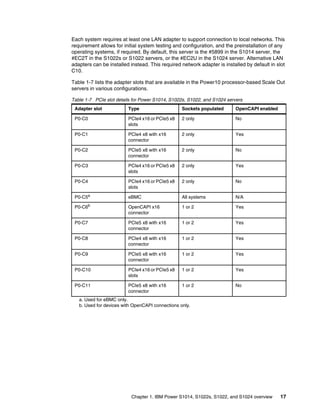
  • 185.
    Chapter 4. Enterprisesolutions 171 Ansible modules for IBM i Ansible Content for IBM Power - IBM i provides modules, action plug-ins, roles, and sample playbooks to automate tasks on IBM i workloads, including the following examples: 򐂰 Command execution 򐂰 System and application configuration 򐂰 Work management 򐂰 Fix management 򐂰 Application deployment For more information about the collection, see this web page. Ansible modules for HMC The IBM Power - HMC collection provides modules that can be used to manage configurations and deployments of HMC systems and the servers that they manage. The collection content helps to include workloads on Power processor-based platforms as part of an enterprise automation strategy through the Ansible ecosystem. For more information about this collection, see this web page. Ansible modules for VIOS The IBM Power - VIOS collection provides modules that can be used to manage configurations and deployments of Power VIOS systems. The collection content helps to include workloads on Power processor-based platforms as part of an enterprise automation strategy through the Ansible system. For more information, see this web page. Ansible modules for Oracle on AIX This repository contains a collection that can be used to install and manage Oracle single instance database 19c on AIX operating system and creates test database on AIX file system and on Oracle ASM. This collection automates Oracle 19c database installation and creation steps. For more information, see this web page. Ansible modules for Oracle RAC on AIX This collection provides modules that can be used to install and manage Oracle 19c RAC on AIX operating system. This collection also automates Oracle 19c RAC installation and creation steps. For more information, see this web page. Ansible modules for SAP on AIX The Ansible Content for SAP Software on AIX provides roles to automate administrator tasks for SAP installations on AIX, such as installing the SAP Host Agent, starting and stopping SAP instances, and upgrading the SAP kernel. For more information, see this web page.
  • 186.
    172 IBM PowerS1014, S1022s, S1022, and S1024 Technical Overview and Introduction Ansible modules for SAP on IBM i The Ansible Content for SAP Software on IBM i provides roles to automate administrator tasks for SAP installations on IBM i, such as installing the SAP Host Agent, starting and stopping SAP instances, and upgrading the SAP kernel. For more information, see this web page. 4.4 Protect trust from core to cloud The IT industry has long relied on perimeter security strategies to protect its most valuable assets, such as user data and intellectual property. The use of firewalls and other network-based tools to inspect and validate users that are entering and leaving the network is no longer enough as digital transformation and the shift to hybrid cloud infrastructure are changing the way industries do business. Many organizations also are adapting their business models, and have thousands of people that are connecting from home computers that are outside the control of an IT department. Users, data, and resources are scattered all over the world, which makes it difficult to connect them quickly and securely. Also, without a traditional local infrastructure for security, employees’ homes are more vulnerable to compromise, which puts the business at risk. Many companies are operating with a set of security solutions and tools, even without them being fully integrated or automated. As a result, security teams spend more time on manual tasks. They lack the context and information that is needed to effectively reduce the attack surface of their organization. Rising numbers of data breaches and increasing global regulations make securing networks difficult. Applications, users, and devices need fast and secure access to data, so much so that an entire industry of security tools and architectures was created to protect them. Although enforcing a data encryption policy is an effective way to minimize the risk of a data breach that, in turn, minimizes costs, only a few enterprises at the worldwide level have an encryption strategy that is applied consistently across the entire organization. This is true in large part because such policies add complexity and cost, and negatively affect performance, which can mean missed SLAs to the business. The rapidly evolving cyberthreat landscape also requires focus on cyber-resilience. Persistent and end-to-end security is the best way to reduce exposure to threats. Prevention is the best protection Because prevention is the best protection, Power10 processor-based servers provide industry-leading isolation, and integrity that help prevent ransomware from being installed. The following features and implementation help IBM Power customers to protect their business: 򐂰 Host and firmware secure and trusted boot. 򐂰 Guest operating system secure boot (AIX now, Linux upcoming). 򐂰 Built-in operating system runtime integrity: AIX Trusted Execution and Linux IMA. 򐂰 Most secure multi-tenant environment with orders of magnitude lower Common Vulnerabilities and Exposures (CVE) versus x86 hypervisors.
  • 187.
    Chapter 4. Enterprisesolutions 173 򐂰 Orders of magnitude lower operating system CVEs for AIX and IBM i. 򐂰 Simplified patching with PowerSC. 򐂰 Multi-Factor Authentication with PowerSC. Early Detection is critical Integrated security and compliance management with PowerSC makes it more difficult to misconfigure systems and easier to detect anomalies. Third-party offerings, for example, IBM Security QRadar®, enhance inherent security with early anomaly detection. Fast and Efficient Recovery It is easier to deploy resiliency strategies with IBM PowerHA® and IBM Storage safeguarded copies, while also using the collaboration with IBM Storage and security services for fast detection and automated recovery of affected data. 4.4.1 Power10 processor-based, technology-integrated security ecosystem The IBM Power processor-based platform offers the most secure and reliable servers in their class. Introducing Power10 processor-based technology in 2021, IBM further extended the industry-leading security and reliability of the Power processor-based platform, with focus on protecting applications and data across hybrid cloud environments. Also introduced were significant innovations along the following major dimensions: 򐂰 Advanced Data Protection that offers simple to use and efficient capabilities to protect sensitive data through mechanisms, such as encryption and multi-factor authentication. 򐂰 Platform Security ensures that the server is hardened against tampering, continuously protecting its integrity, and ensuring strong isolation among multi-tenant workloads. Without strong platform security, all other system security measures are at risk. 򐂰 Security Innovation for Modern Threats provides the ability to stay ahead of new types of cybersecurity threats by using emerging technologies. 򐂰 Integrated Security Management addresses the key challenge of ensuring correct configuration of the many security features across the stack, monitoring them, and reacting if unexpected changes are detected. The Power10 processor-based servers are enhanced to simplify and integrate security management across the stack, which reduces the likelihood of administrator errors. In the Power10 processor-based scale-out servers, all data is protected by a greatly simplified end-to-end encryption that extends across the hybrid cloud without detectable performance impact and prepares for future cyberthreats. Power10 processor-core technology features built-in security integration: 򐂰 Stay ahead of current and future data threats with better cryptographic performance and support for quantum-safe cryptography and fully homomorphic encryption (FHE). 򐂰 Enhance the security of applications with more hardened defense against return-oriented programming (ROP) attacks. 򐂰 Simplified single-interface hybrid cloud security management without any required setup. 򐂰 Protect your applications and data with the most secure VM isolation in the industry with orders of magnitude lower CVEs than hypervisors related to x86 processor-based servers.
  • 188.
    174 IBM PowerS1014, S1022s, S1022, and S1024 Technical Overview and Introduction Also, workloads on the Power10 processor-based scale-out servers benefit from cryptographic algorithm acceleration, which allows algorithms, such as Advanced Encryption Standard (AES), SHA2, and SHA3 to run significantly faster than Power9 processor-based servers on a per core basis. This performance acceleration allows features, such as AIX Logical Volume Encryption, to be enabled with low-performance overhead. 4.4.2 Cryptographic engines and transparent memory encryption Power10 processor technology is engineered to achieve significantly faster encryption performance in comparison to IBM Power9 processor-based servers. Power10 processor-based scale-out servers are updated for today’s most demanding encryption standards and anticipated future cryptographic standards, such as post-quantum and FHE, and brings new enhancements to container security. Transparent memory encryption is designed to simplify the deployment of encryption, and support end-to-end security without affecting performance by using hardware features for a seamless user experience. The protection that is introduced in all layers of an infrastructure is shown in Figure 4-5. Figure 4-5 Protect data in memory with transparent memory encryption 4.4.3 Quantum-safe cryptography support To be prepared for the Quantum era, the Power S1014, S1022s, S1022, and S1024 are built to efficiently support future cryptography, such as Quantum-safe cryptography and FHE. The software libraries for these solutions are optimized for the Power10 processor-chip instruction set architecture (ISA) and are to be available in the respective open source communities. Quantum-safe cryptography refers to the efforts to identify algorithms that are resistant to attacks by classical and quantum computers in preparation for the time when large-scale quantum computers are built.
  • 189.
    Chapter 4. Enterprisesolutions 175 Homomorphic encryption refers to encryption techniques that permit systems to perform computations on encrypted data without decrypting the data first. The software libraries for these solutions are optimized for the Power processor-chip ISA. 4.4.4 IBM PCIe3 Crypto Coprocessor BSC-Gen3 4769 IBM PCIe3 Crypto Coprocessor BSC-Gen3 4769 (#EJ35 or #EJ37) provides hardware security protection for the most sensitive secrets. As described in 3.4.5, “Cryptographic coprocessor adapters” on page 122, this adapter supports IBM AIX, IBM i without the use of the VIO server, or supported distribution of Linux operating systems. It provides a comprehensive set of cryptographic functions, including the common AES, TDES, RSA, and ECC functions for data confidentiality and data integrity support. In addition, CCA features extensive functions for key management and many functions of special interest to the banking and finance industry. The coprocessor holds a security-enabled subsystem module and batteries for backup power. The hardened encapsulated subsystem contains two sets of two 32-bit PowerPC 476FP reduced-instruction-set-computer (RISC) processors running in lockstep with cross-checking to detect soft errors in the hardware. It also contains a separate service processor that is used to manage: 򐂰 Self-test and firmware updates. 򐂰 RAM, flash memory and battery-powered memory. 򐂰 Secure time-of-day. 򐂰 Cryptographic quality random number generator. 򐂰 AES, DES, triple DES, HMAC, CMAC, MD5, and multiple SHA hashing methods. 򐂰 Modular-exponentiation hardware, such as RSA and ECC. 򐂰 Full-duplex direct memory access (DMA) communications. A security-enabled code-loading arrangement allows control program and application program loading and refreshes after coprocessor installation in your server. IBM offers an embedded subsystem control program and a cryptographic API that implements the IBM Common Cryptographic Architecture (CCA) Support Program that can be accessed from the internet at no charge to the user. Feature #EJ35 and #EJ37 are feature codes that represent the same physical card with the same CCIN of C0AF. Different feature codes are used to indicate whether a blind swap cassette is used and its type: #EJ35 indicates no blind swap cassette, #EJ37 indicates a Gen 3 blind swap cassette. The 4769 PCIe Cryptographic Coprocessor is designed to deliver the following functions: 򐂰 X.509 certificate services support 򐂰 ANSI X9 TR34-2019 key exchange services that use the public key infrastructure (PKI) 򐂰 ECDSA secp256k1 򐂰 CRYSTALS-Dilithium, a quantum-safe algorithm for digital signature generation and verification 򐂰 Rivest-Shamir-Adleman (RSA) algorithm for digital signature generation and verification with keys up to 4096 bits
  • 190.
    176 IBM PowerS1014, S1022s, S1022, and S1024 Technical Overview and Introduction 򐂰 High-throughput Secure Hash Algorithm (SHA), MD5 message digest algorithm, Hash-Based Message Authentication Code (HMAC), Cipher-based Message Authentication Code (CMAC), Data Encryption Standard (DES), Triple Data Encryption Standard (Triple DES), and Advanced Encryption Standard (AES)-based encryption for data integrity assurance and confidentiality, including AES Key Wrap (AESKW) that conforms to ANSI X9.102. 򐂰 Elliptic-curve cryptography (ECC) for digital signature and key agreement. 򐂰 Support for smart card applications and personal identification number (PIN) processing. 򐂰 Secure time-of-day. 򐂰 Visa Data Secure Platform (DSP) point-to-point encryption (P2PE) with standard Visa format-preserving encryption (FPE) and format-preserving, Feistel-based Format Preserving Encryption (FF1, FF2, FF2.1). Format Preserving Counter Mode (FPCM), as defined in x9.24 Part 2. 4.4.5 IBM PowerSC support The Power10 processor-based scale-out servers benefit from the integrated security management capabilities that are offered by IBM PowerSC. This Power software portfolio manages security and compliance on every Power processor-based platform that is running the following operating systems: 򐂰 AIX 򐂰 IBM i 򐂰 The supported distributions and versions of Linux PowerSC is introducing more features to help customers manage security end-to-end across the stack to stay ahead of various threats. Specifically, PowerSC 2.0 adds support for Endpoint Detection and Response (EDR), host-based intrusion detection, block listing, and Linux. Security features are beneficial only if they can be easily and accurately managed. Power10 processor-based scale-out servers benefit from the integrated security management capabilities that are offered by IBM PowerSC. PowerSC is a key part of the Power solution stack. It provides features, such as compliance automation, to help with various industry standards, real-time file integrity monitoring, reporting to support security audits, patch management, trusted logging, and more. By providing all of these capabilities within a clear and modern web-based user interface, PowerSC simplifies the management of security and compliance significantly. The PowerSC Multi-Factor Authentication (MFA) capability provides more assurance that only authorized people access the environments by requiring at least one extra authentication factor to prove that you are the person you say you are. MFA is included in PowerSC 2.0. Because stolen or guessed passwords are still one of the most common ways for hackers to access systems, having an MFA solution in place allows you to prevent a high percentage of potential breaches. This step is important on the journey toward implementing a zero trust security posture.
  • 191.
    Chapter 4. Enterprisesolutions 177 PowerSC 2.0 also includes Endpoint Detection and Response (EDR), which provides the following features: 򐂰 Intrusion Detection and Prevention (IDP) 򐂰 Log inspection and analysis 򐂰 Anomaly detection, correlation, and incident response 򐂰 Response triggers 򐂰 Event context and filtering 4.4.6 Secure and Trusted boot IBM Power servers provide a highly secure server platform. IBM Power10 processor-based hardware and firmware includes PowerVM features to provide a more secure platform for on-premises and cloud deployments. The key PowerVM features include the following examples: 򐂰 A secure initial program load (IPL) process feature that is called Secure Boot allows only suitably signed firmware components to run on the system processors. Each component of the firmware stack, including host boot, the Power Hypervisor (PHYP), and partition firmware (PFW), is signed by the platform manufacturer and verified as part of the IPL process. 򐂰 A framework to support remote attestation of the system firmware stack through a hardware trusted platform module (TPM). The terms Secure Boot and Trusted Boot have specific connotations. The terms are used as distinct, yet complementary concepts, as described next. Secure Boot This feature protects system integrity by using digital signatures to perform a hardware-protected verification of all firmware components. It also distinguishes between the host system trust domain and the eBMC or FSP trust domain by controlling service processor and service interface access to sensitive system memory regions. Trusted Boot This feature creates cryptographically strong and protected platform measurements that prove that specific firmware components ran on the system. You can assess the measurements by using trusted protocols to determine the state of the system and use that information to make informed security decisions. 4.4.7 Enhanced CPU: BMC isolation Separating CPU and service processor trust domains in Power10 processor-based scale-out servers improves the protection from external attacks. Power10 technology introduces innovations to address emerging threats, specifically with extra features and enhancements to defend against application domain vulnerabilities, such as return-oriented programming (ROP) attacks (a security leverage technique is used by attackers to run code on a target system). This capability uses a new in-core hardware architecture that imparts minimal performance overhead (approximately only 1 - 2% for some sample workloads tested).
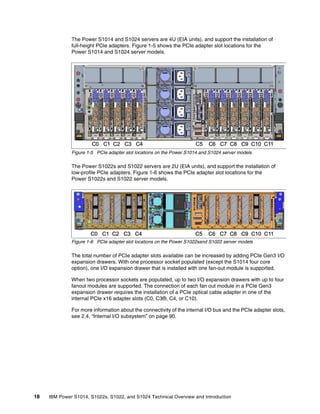
  • 192.
    178 IBM PowerS1014, S1022s, S1022, and S1024 Technical Overview and Introduction In the Power10 processor-based scale-out servers, the eBMC chip is connected to the two network interface cards by using NCSI (to support the connection to HMCs) and also have a PCIe x1 connection that connects to the backplane. This connection is used by PowerVM for partition management traffic, but cannot be used for guest LPAR traffic. A guest LPAR needs its own physical or virtual network interface PCIe card (or cards) for external connection. Hardware assist is necessary to avoid tampering with the stack. The Power platform added four instructions (hashst, hashchk, hashstp, and hashchkp) to handle ROP in the Power ISA 3.1B. 4.5 Running AI where operational data is created, processed, and stored Maintaining separate platforms for AI and business applications make deploying AI in production difficult. The following results are possible: 򐂰 Reduced end-to-end availability for applications and data access 򐂰 Increased risk of violating service level agreements because of overhead of sending operational data and receiving predictions from external AI platforms 򐂰 Increased complexity and cost of managing different environments and external accelerators Because AI is set to deploy everywhere, attention is turning from how fast data science teams can build AImodels to how fast inference can be run against new data with those trained AI models. Enterprises are asking their engineers and scientists to review new solutions and new business models where the use of GPUs is no longer fundamental, especially because this method became more expensive. To support this shift, the Power10 processor-based server delivers faster business insights by running AI in place with four Matrix Math Accelerator (MMA) units to accelerate AI in each Power10 technology-based processor-core. The robust execution capability of the processor cores with MMA acceleration, enhanced SIMD, and enhanced data bandwidth, provides an alternative to external accelerators, such as GPUs. It also reduces the time and cost that is associated with the related device management for execution of statistical machine learning and inferencing workloads. These features, which are combined with the possibility to consolidate multiple environments for AI model execution on a Power10 processor-based server together with other different types of environments, reduces costs and leads to a greatly simplified solution stack for the deployment of AI workloads. Operationalizing AI inferencing directly on a Power10 processor-based server brings AI closer to data. This ability allows AI to inherit and benefit from the Enterprise Qualities of Service (QoS): reliability, availability, and security of the Power10 processor-based platform and support a performance boost. Enterprise business workflows can now readily and consistently use insights that are built with the support of AI. The use of data gravity on Power10 processor-cores enables AI to run during a database operation or concurrently with an application, for example. This feature is key for time-sensitive use cases. It delivers fresh input data to AI faster and enhances the quality and speed of insight.
  • 193.
    Chapter 4. Enterprisesolutions 179 As no-code application development, pay-for-use model repositories, auto-machine learning, and AI-enabled application vendors continue to evolve and grow, the corresponding software products are brought over to the Power10 processor-based platform. Python and code from major frameworks and tools, such as TensorFlow, PyTorch, and XGBoost, run on the Power10 processor-based platform without any changes. Open Neural Network Exchange (ONNX) models can be brought over from x86 or Arm processor-based servers or other platforms and small-sized VMs or Power Virtual Server (PowerVS) instances for deployment on Power10 processor-based servers. This Power10 technology gives customers the ability to train models on independent hardware but deploy on enterprise grade servers. The Power10 processor-core architecture includes an embedded MMA. This MMA is extrapolated for a Power10 processor-based server to provide up to 5x faster AI inference for 32-bit floating point (FP32) precision to infuse AI into business applications and drive greater insights. Up to 10x faster AI inference can be realized by using reduced precision data types, such as 16-bit brain float (Bfloat16) and 8-bit integer (INT8), when compared with a previous generation Power9 processor-based server. The IBM development teams optimized common math libraries so that AI tools benefit from the acceleration that is provided by the MMA units of the Power10 chip. The benefits of MMA acceleration can be realized for statistical machine learning and inferencing, which provides a cost-effective alternative to external accelerators or GPUs. 4.5.1 Train anywhere, deploy on Power10 processor-based server IBM Power10 processor-based technology addresses challenges through hardware and software innovation. Machine learning and deep learning models that are trained on any system or cloud that is based on Power or x86 processor-based servers (even with different endianness) can be deployed on the Power10 processor-based server and run without any changes. Because Power10 cores are equipped with four MMAs for matrix and tensor math, applications can run models against colocated data without the need for external accelerators, GPUs, or separate AI platforms. Power10 technology uses the “train anywhere, deploy here” principle to operationalize AI. A model can be trained on a public or private cloud and then deployed on a Power server (see Figure 4-6 on page 180) by using the following procedure: 1. The trained model is registered with its version in the model vault. This vault is a VM or LPAR with tools, such as IBM Watson® OpenScale, BentoML, or Tensorflow Serving, to manage the model lifecycle. 2. The model is pushed out to the destination (in this case, a VM or an LPAR that is running a database with an application). The model might be used by the database or the application. 3. Transactions that are received by the database and application trigger model execution and generate predictions or classifications. These predictions also can be stored locally. For example, these predictions can be the risk or fraud that is associated with the transaction or product classifications that are to be used by downstream applications. 4. A copy of the model output (prediction or classification) is sent to the model operations (ModelOps) engine for calculation of drift by comparison with Ground Truth.
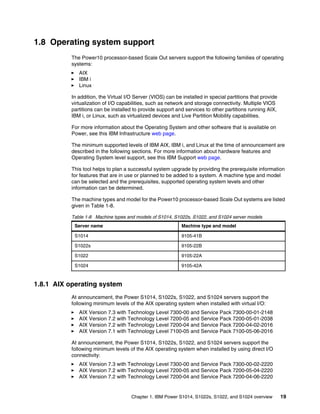

  • 194.
    180 IBM PowerS1014, S1022s, S1022, and S1024 Technical Overview and Introduction 5. If the drift exceeds a threshold, the model retrain triggers are generated, and a new model is trained by using a current data set. Otherwise, a new model is not trained. 6. Retrained models are then taken through steps 1 - 5. Figure 4-6 Operationalizing AI By using a combination of software and hardware innovation, the Power10 processor-based scale-out server models can meet the model performance, response time, and throughput KPIs of databases and applications that are infused with AI. 4.6 Oracle Database Standard Edition 2 on Power S1014 Databases have been a critical component in running your business for several years. Many enterprises have turned to Oracle to provide the database technology that they require. The challenge is that for small to medium size applications, the cost of the database is a significant part of the total application cost and the number of databases is expanding rapidly as new applications come online. Oracle has multiple options for running your database. For high end databases, the best option is using Oracle Enterprise Edition which has all of the features to support your enterprise class applications. For smaller databases, Oracle has another option that can save up to 33% of the costs on each DB instance, Oracle Standard Edition 2 (SE2). The savings opportunity when using Oracle SE2 comes from the fact while Oracle Enterprise Edition is charged per core (based on a core factor for the processor type being used) Oracle SE2 is charged per socket, no matter how many cores are provided per socket. For consolidating a number of smaller databases, Oracle SE2 is a good option. There are some restrictions involved with running Oracle SE2. The first one is that it is limited to servers with a maximum of two sockets. Oracle considers a single Power10 DCM to be two sockets, so the only Power10 server eligible to run SE2 is the S1014. The other restriction is that SE2 limits each database to a maximum of sixteen threads. With Power10 utilizing SMRT8, this is even a stronger reason to consider consolidating multiple databases to a single Power10 server - especially now that we have the 24 core option available.
  • 195.
    Chapter 4. Enterprisesolutions 181 The Power S1014 brings all of the benefits of Power 10 to the Oracle environment. With the built in power hypervisor, described in 4.1.1, “IBM Power Hypervisor” on page 156, consolidation of multiple servers is easy and efficient and does not have the overhead of software virtualization products as seen in the x86 world. Add to that the proven reliability and security of the Power platform over time and you have even more advantages compared to x86 alternatives. Power10 adds additional benefits with its built in transparent memory encryption, described in 4.4.2, “Cryptographic engines and transparent memory encryption” on page 174, further adding to the security or your enterprise critical databases. If you are looking to add AI capabilities, Power 10 provides built in AI inferencing capability as discussed in 4.5.1, “Train anywhere, deploy on Power10 processor-based server” on page 179. For smaller environments, the Power S1014 with the 8-core processor might be a good fit and this could replace older Power8 and Power9 servers currently running SE2. With the 2.8x performance per core advantage of Power10 over x86 options, this might also be a good option for upgrading your x86 SE2 implementations. With the 24-core Power S1014 processor option you can support 50% more database instances compared to the best x86 competitor or you can run additional workloads along with your database instances.
  • 196.
    182 IBM PowerS1014, S1022s, S1022, and S1024 Technical Overview and Introduction
  • 197.
    © Copyright IBMCorp. 2022. 183 Related publications The publications that are listed in this section are considered particularly suitable for a more detailed discussion of the topics that are covered in this paper. IBM Redbooks The following IBM Redbooks publications provide more information about the topics in this document. Some publications that are referenced in this list might be available in softcopy only: 򐂰 IBM Power Private Cloud with Shared Utility Capacity: Featuring Power Enterprise Pools 2.0, SG24-8476 򐂰 SAP HANA Data Management and Performance on IBM Power Systems, REDP-5570 򐂰 IBM PowerAI: Deep Learning Unleashed on IBM Power Systems Servers, SG24-8409 򐂰 IBM Power E1080 Technical Overview and Introduction, REDP-5649 򐂰 IBM Power E1050 Technical Overview and Introduction, REDP-5684 򐂰 IBM Power System AC922 Technical Overview and Introduction, REDP-5494 򐂰 IBM Power System E950: Technical Overview and Introduction, REDP-5509 򐂰 IBM Power System E980: Technical Overview and Introduction, REDP-5510 򐂰 IBM Power System L922 Technical Overview and Introduction, REDP-5496 򐂰 IBM Power System S822LC for High Performance Computing Introduction and Technical Overview, REDP-5405 򐂰 IBM Power Systems H922 and H924 Technical Overview and Introduction, REDP-5498 򐂰 IBM Power Systems LC921 and LC922: Technical Overview and Introduction, REDP-5495 򐂰 IBM Power Systems S922, S914, and S924 Technical Overview and Introduction Featuring PCIe Gen 4 Technology, REDP-5595 򐂰 IBM PowerVM Best Practices, SG24-8062 򐂰 IBM PowerVM Virtualization Introduction and Configuration, SG24-7940 򐂰 IBM PowerVM Virtualization Managing and Monitoring, SG24-7590 򐂰 IBM PowerVC Version 2.0 Introduction and Configuration, SG24-8477 You can search for, view, download, or order these documents and other Redbooks publications, Redpapers, web docs, drafts, and additional materials, at the following website: ibm.com/redbooks
  • 198.
    184 IBM PowerS1014, S1022s, S1022, and S1024 Technical Overview and Introduction Online resources The following websites are also relevant as further information sources: 򐂰 IBM Fix Central: http://www.ibm.com/support/fixcentral/ 򐂰 IBM documentation: https://www.ibm.com/docs/en 򐂰 IBM Power10 documentation: https://www.ibm.com/docs/en/power10 򐂰 IBM Portal for OpenPOWER - POWER9 Monza Module: https://www.ibm.com/systems/power/openpower/tgcmDocumentRepository.xhtml?aliasI d=POWER9_Monza 򐂰 IBM Power: https://www.ibm.com/it-infrastructure/power 򐂰 IBM Storage: https://www.ibm.com/it-infrastructure/storage 򐂰 IBM Systems Energy Estimator: https://ibm.biz/energy-estimator 򐂰 IBM System Planning Tool: https://www.ibm.com/support/pages/ibm-system-planning-tool-power-processor-base d-systems-0 򐂰 OpenCAPI: http://opencapi.org/technical/use-cases/ 򐂰 OpenPOWER Foundation: https://openpowerfoundation.org/ 򐂰 Power Systems Capacity on Demand: http://www.ibm.com/systems/power/hardware/cod/ 򐂰 Support for IBM Systems: https://www.ibm.com/mysupport/s/?language=en_US Help from IBM IBM Support and downloads ibm.com/support IBM Global Services ibm.com/services
  • 200.
    ibm.com/redbooks Printed in U.S.A. Backcover ISBN 0738460761 REDP-5675-00 ®