Recommendations for improving authentication for our online systems at Pace
Authentication practices in Higher Education -  from  bad  to  good No authentication Weak Passwords Complex Passwords Complex Passwords with frequent mandatory changes, depending on risk Biometrics Multi-Factor bad good
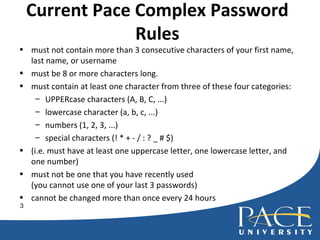
Current Pace Complex Password Rules must not contain more than 3 consecutive characters of your first name, last name, or username must be 8 or more characters long. must contain at least one character from three of these four categories:  UPPERcase characters (A, B, C, ...) lowercase character (a, b, c, ...) numbers (1, 2, 3, ...) special characters (! * + - / : ? _ # $) (i.e. must have at least one uppercase letter, one lowercase letter, and one number) must not be one that you have recently used (you cannot use one of your last 3 passwords) cannot be changed more than once every 24 hours
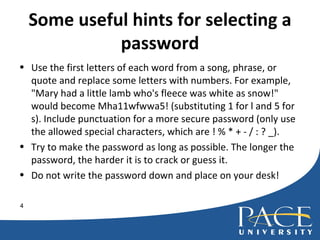
Some useful hints for selecting a password Use the first letters of each word from a song, phrase, or quote and replace some letters with numbers. For example, "Mary had a little lamb who's fleece was white as snow!" would become Mha11wfwwa5! (substituting 1 for l and 5 for s). Include punctuation for a more secure password (only use the allowed special characters, which are ! % * + - / : ? _). Try to make the password as long as possible. The longer the password, the harder it is to crack or guess it. Do not write the password down and place on your desk!
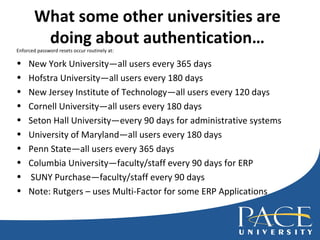
What some other universities are doing about authentication… Enforced password resets occur routinely at: New York University—all users every 365 days Hofstra University—all users every 180 days New Jersey Institute of Technology—all users every 120 days Cornell University—all users every 180 days Seton Hall University—every 90 days for administrative systems University of Maryland—all users every 180 days Penn State—all users every 365 days Columbia University—faculty/staff every 90 days for ERP SUNY Purchase—faculty/staff every 90 days Note: Rutgers – uses Multi-Factor for some ERP Applications
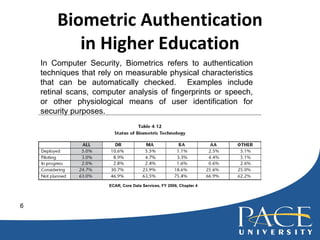
Biometric Authentication in Higher Education ECAR, Core Data Services, FY 2006, Chapter 4 In Computer Security, Biometrics refers to authentication techniques that rely on measurable physical characteristics that can be automatically checked.  Examples include retinal scans, computer analysis of fingerprints or speech, or other physiological means of user identification for security purposes.
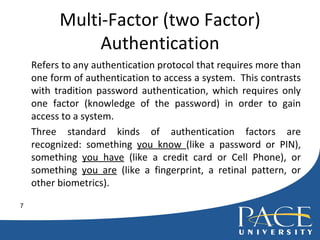
Multi-Factor (two Factor) Authentication Refers to any authentication protocol that requires more than one form of authentication to access a system.  This contrasts with tradition password authentication, which requires only one factor (knowledge of the password) in order to gain access to a system.  Three standard kinds of authentication factors are recognized: something  you know  (like a password or PIN), something  you have  (like a credit card or Cell Phone), or something  you are  (like a fingerprint, a retinal pattern, or other biometrics).
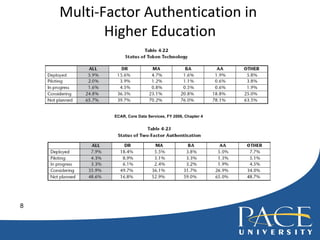
Multi-Factor Authentication in  Higher Education ECAR, Core Data Services, FY 2006, Chapter 4
How to change your password go to Pace’s  Password Reset Utility  (PRU) located at  http://pru.pace.edu   select  Click here  at the top of the page for guidelines and help when choosing a complex password review these guidelines and then select  Click here  to return to the PRU homepage  change your password by selecting  Change your password  and following the prompts
Recommendation We should have the  technical  ability to assign risk categories to various classes of users in February, 2008. Once we have this capability, we should publish and enforce guidelines that ask those with the highest access rights to change their passwords more often than those with less access rights. We should continue to investigate Biometrics and Multi-factor for specific user groups
Questions? More information is available from the  Division of Information Technology: phone:  914 – 773 - 3648 via web:  http:// doithelpdesk.pace.edu   [email_address] , 914-923-2658

Recommendation For Improving Authentication For Our Online Systems At Pace V2.0

  • 1.
    Recommendations for improvingauthentication for our online systems at Pace
  • 2.
    Authentication practices inHigher Education - from bad to good No authentication Weak Passwords Complex Passwords Complex Passwords with frequent mandatory changes, depending on risk Biometrics Multi-Factor bad good
  • 3.
    Current Pace ComplexPassword Rules must not contain more than 3 consecutive characters of your first name, last name, or username must be 8 or more characters long. must contain at least one character from three of these four categories: UPPERcase characters (A, B, C, ...) lowercase character (a, b, c, ...) numbers (1, 2, 3, ...) special characters (! * + - / : ? _ # $) (i.e. must have at least one uppercase letter, one lowercase letter, and one number) must not be one that you have recently used (you cannot use one of your last 3 passwords) cannot be changed more than once every 24 hours
  • 4.
    Some useful hintsfor selecting a password Use the first letters of each word from a song, phrase, or quote and replace some letters with numbers. For example, "Mary had a little lamb who's fleece was white as snow!" would become Mha11wfwwa5! (substituting 1 for l and 5 for s). Include punctuation for a more secure password (only use the allowed special characters, which are ! % * + - / : ? _). Try to make the password as long as possible. The longer the password, the harder it is to crack or guess it. Do not write the password down and place on your desk!
  • 5.
    What some otheruniversities are doing about authentication… Enforced password resets occur routinely at: New York University—all users every 365 days Hofstra University—all users every 180 days New Jersey Institute of Technology—all users every 120 days Cornell University—all users every 180 days Seton Hall University—every 90 days for administrative systems University of Maryland—all users every 180 days Penn State—all users every 365 days Columbia University—faculty/staff every 90 days for ERP SUNY Purchase—faculty/staff every 90 days Note: Rutgers – uses Multi-Factor for some ERP Applications
  • 6.
    Biometric Authentication inHigher Education ECAR, Core Data Services, FY 2006, Chapter 4 In Computer Security, Biometrics refers to authentication techniques that rely on measurable physical characteristics that can be automatically checked. Examples include retinal scans, computer analysis of fingerprints or speech, or other physiological means of user identification for security purposes.
  • 7.
    Multi-Factor (two Factor)Authentication Refers to any authentication protocol that requires more than one form of authentication to access a system. This contrasts with tradition password authentication, which requires only one factor (knowledge of the password) in order to gain access to a system. Three standard kinds of authentication factors are recognized: something you know (like a password or PIN), something you have (like a credit card or Cell Phone), or something you are (like a fingerprint, a retinal pattern, or other biometrics).
  • 8.
    Multi-Factor Authentication in Higher Education ECAR, Core Data Services, FY 2006, Chapter 4
  • 9.
    How to changeyour password go to Pace’s Password Reset Utility (PRU) located at http://pru.pace.edu select Click here at the top of the page for guidelines and help when choosing a complex password review these guidelines and then select Click here to return to the PRU homepage change your password by selecting Change your password and following the prompts
  • 10.
    Recommendation We shouldhave the technical ability to assign risk categories to various classes of users in February, 2008. Once we have this capability, we should publish and enforce guidelines that ask those with the highest access rights to change their passwords more often than those with less access rights. We should continue to investigate Biometrics and Multi-factor for specific user groups
  • 11.
    Questions? More informationis available from the Division of Information Technology: phone: 914 – 773 - 3648 via web: http:// doithelpdesk.pace.edu [email_address] , 914-923-2658