Kwame Nkrumah Universityof
Science & Technology, Kumasi, Ghana
EE 158 – Introduction to Python
Programming and Computer
Networks
Recitation
Week 2
2.
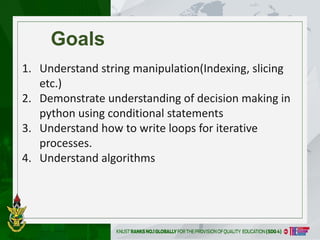
Goals
1. Understand stringmanipulation(Indexing, slicing
etc.)
2. Demonstrate understanding of decision making in
python using conditional statements
3. Understand how to write loops for iterative
processes.
4. Understand algorithms
4
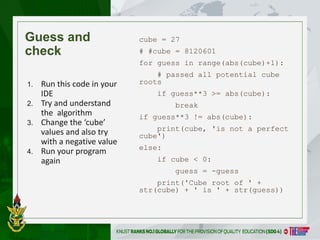
Guess and
check
cube =27
# #cube = 8120601
for guess in range(abs(cube)+1):
# passed all potential cube
roots
if guess**3 >= abs(cube):
break
if guess**3 != abs(cube):
print(cube, 'is not a perfect
cube')
else:
if cube < 0:
guess = -guess
print('Cube root of ' +
str(cube) + ' is ' + str(guess))
1. Run this code in your
IDE
2. Try and understand
the algorithm
3. Change the ‘cube’
values and also try
with a negative value
4. Run your program
again
5.
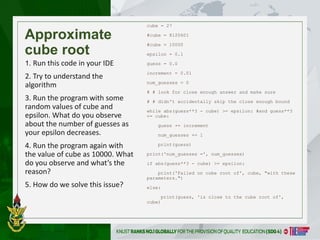
Approximate
cube root
cube =27
#cube = 8120601
#cube = 10000
epsilon = 0.1
guess = 0.0
increment = 0.01
num_guesses = 0
# # look for close enough answer and make sure
# # didn't accidentally skip the close enough bound
while abs(guess**3 - cube) >= epsilon: #and guess**3
<= cube:
guess += increment
num_guesses += 1
print(guess)
print('num_guesses =', num_guesses)
if abs(guess**3 - cube) >= epsilon:
print('Failed on cube root of', cube, "with these
parameters.")
else:
print(guess, 'is close to the cube root of',
cube)
1. Run this code in your IDE
2. Try to understand the
algorithm
3. Run the program with some
random values of cube and
epsilon. What do you observe
about the number of guesses as
your epsilon decreases.
4. Run the program again with
the value of cube as 10000. What
do you observe and what’s the
reason?
5. How do we solve this issue?
5
6.
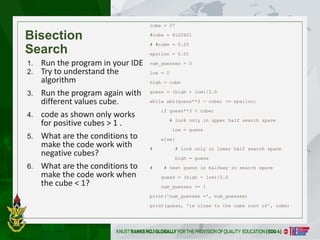
Bisection
Search
cube = 27
#cube= 8120601
# #cube = 0.25
epsilon = 0.01
num_guesses = 0
low = 0
high = cube
guess = (high + low)/2.0
while abs(guess**3 - cube) >= epsilon:
if guess**3 < cube:
# look only in upper half search space
low = guess
else:
# # look only in lower half search space
high = guess
# # next guess is halfway in search space
guess = (high + low)/2.0
num_guesses += 1
print('num_guesses =', num_guesses)
print(guess, 'is close to the cube root of', cube)
1. Run the program in your IDE
2. Try to understand the
algorithm
3. Run the program again with
different values cube.
4. code as shown only works
for positive cubes > 1 .
5. What are the conditions to
make the code work with
negative cubes?
6. What are the conditions to
make the code work when
the cube < 1?
6
7.
Goals
Understand how toiterative using for loop over a
String object.
Task: Rewrite the code snippet in a more Pythonic
way using the for loop.
8.
Kwame Nkrumah Universityof
Science & Technology, Kumasi, Ghana
CODE EXAMPLE: ROBOT CHEERLEADERS
an_letters = "aefhilmnorsxAEFHILMNORSX"
word = input("I will cheer for you! Enter a word:")
times = int(input("Enthusiasm level (1-10): "))
i = 0
while i < len(word):
char = word[i]
if char in an_letters:
print("Give me an " + char + "! " + char)
else:
print("Give me a " + char + "! " +
char)
i += 1
print("What does that spell?")
for i in range(times):
print(word, "!!!")
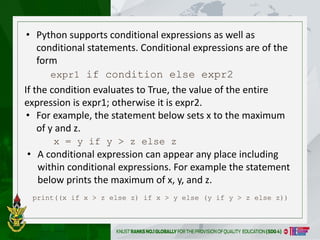
• Python supportsconditional expressions as well as
conditional statements. Conditional expressions are of the
form
expr1 if condition else expr2
print((x if x > z else z) if x > y else (y if y > z else z))
If the condition evaluates to True, the value of the entire
expression is expr1; otherwise it is expr2.
• For example, the statement below sets x to the maximum
of y and z.
x = y if y > z else z
• A conditional expression can appear any place including
within conditional expressions. For example the statement
below prints the maximum of x, y, and z.
11.
Kwame Nkrumah Universityof
Science & Technology, Kumasi, Ghana
11
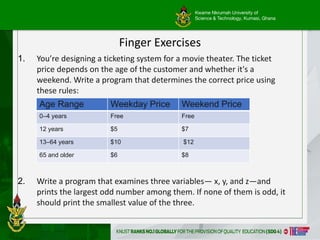
Finger Exercises
1. You’re designing a ticketing system for a movie theater. The ticket
price depends on the age of the customer and whether it's a
weekend. Write a program that determines the correct price using
these rules:
2. Write a program that examines three variables— x, y, and z—and
prints the largest odd number among them. If none of them is odd, it
should print the smallest value of the three.
Age Range Weekday Price Weekend Price
0–4 years Free Free
12 years $5 $7
13–64 years $10 $12
65 and older $6 $8
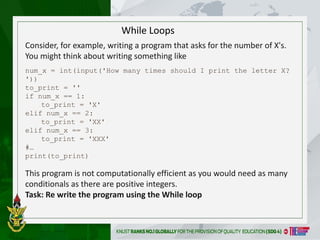
While Loops
Consider, forexample, writing a program that asks for the number of X's.
You might think about writing something like
num_x = int(input('How many times should I print the letter X?
'))
to_print = ''
if num_x == 1:
to_print = 'X'
elif num_x == 2:
to_print = 'XX'
elif num_x == 3:
to_print = 'XXX'
#…
print(to_print)
This program is not computationally efficient as you would need as many
conditionals as there are positive integers.
Task: Re write the program using the While loop
14.
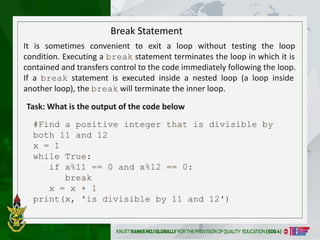
It is sometimesconvenient to exit a loop without testing the loop
condition. Executing a break statement terminates the loop in which it is
contained and transfers control to the code immediately following the loop.
If a break statement is executed inside a nested loop (a loop inside
another loop), the break will terminate the inner loop.
#Find a positive integer that is divisible by
both 11 and 12
x = 1
while True:
if x%11 == 0 and x%12 == 0:
break
x = x + 1
print(x, 'is divisible by 11 and 12')
Break Statement
Task: What is the output of the code below
15.
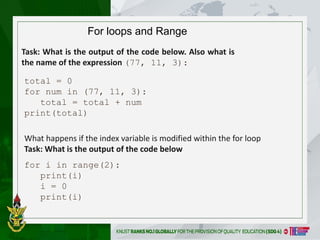
For loops andRange
total = 0
for num in (77, 11, 3):
total = total + num
print(total)
for i in range(2):
print(i)
i = 0
print(i)
Task: What is the output of the code below. Also what is
the name of the expression (77, 11, 3):
What happens if the index variable is modified within the for loop
Task: What is the output of the code below

![Kwame Nkrumah University of
Science & Technology, Kumasi, Ghana
CODE EXAMPLE: ROBOT CHEERLEADERS
an_letters = "aefhilmnorsxAEFHILMNORSX"
word = input("I will cheer for you! Enter a word:")
times = int(input("Enthusiasm level (1-10): "))
i = 0
while i < len(word):
char = word[i]
if char in an_letters:
print("Give me an " + char + "! " + char)
else:
print("Give me a " + char + "! " +
char)
i += 1
print("What does that spell?")
for i in range(times):
print(word, "!!!")](https://image.slidesharecdn.com/week2-250609083652-ece1146a/85/Recitation2IntroductionToPython-pptx-pdf-8-320.jpg)