Reading
(settings->reading)
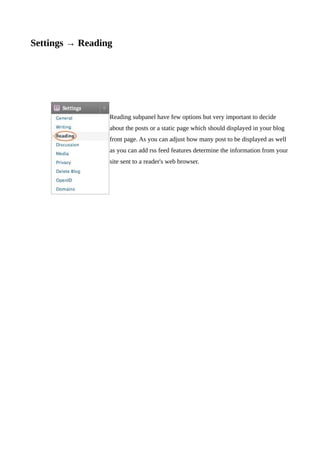
Settings → Reading


                 Reading subpanel have few options but very important to decide
                 about the posts or a static page which should displayed in your blog
                 front page. As you can adjust how many post to be displayed as well
                 as you can add rss feed features determine the information from your
                 site sent to a reader's web browser.
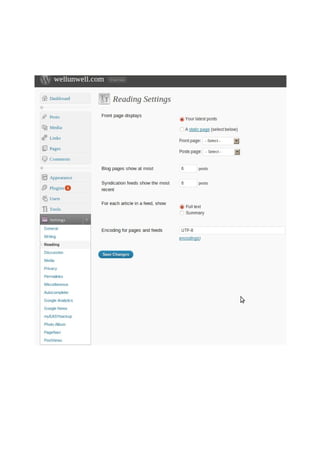
Reading Settings
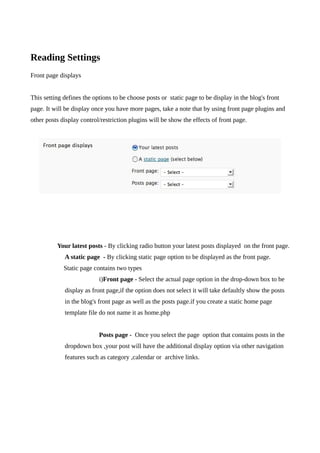
Front page displays


This setting defines the options to be choose posts or static page to be display in the blog's front
page. It will be display once you have more pages, take a note that by using front page plugins and
other posts display control/restriction plugins will be show the effects of front page.


          Your latest posts - By clicking radio button your latest posts displayed on the front page.
             A static page - By clicking static page option to be displayed as the front page.
             Static page contains two types
                           i)Front page - Select the actual page option in the drop-down box to be
             display as front page,if the option does not select it will take defaultly show the posts
             in the blog's front page as well as the posts page.if you create a static home page
             template file do not name it as home.php


                           Posts page - Once you select the page option that contains posts in the
             dropdown box ,your post will have the additional display option via other navigation
             features such as category ,calendar or archive links.
Blog pages show at most


             • [ x] posts - Enter the number of posts to be displayed, per page, on your site.


Syndication feeds show the most recent

  [ x ] posts - Enter the number of posts people will see when they download one of your site's
feeds.


For each article in a feed, show
         Determines whether or not the feed will include the full article or just a summary.
             • Full text - Click this radio button to include the full content of each post
             • Summary - Click this radio button include a summary of the post. This could save
                bandwidth.
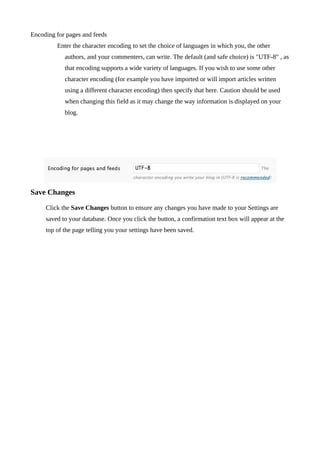
Encoding for pages and feeds
         Enter the character encoding to set the choice of languages in which you, the other
            authors, and your commenters, can write. The default (and safe choice) is "UTF-8" , as
            that encoding supports a wide variety of languages. If you wish to use some other
            character encoding (for example you have imported or will import articles written
            using a different character encoding) then specify that here. Caution should be used
            when changing this field as it may change the way information is displayed on your
            blog.


Save Changes

     Click the Save Changes button to ensure any changes you have made to your Settings are
     saved to your database. Once you click the button, a confirmation text box will appear at the
     top of the page telling you your settings have been saved.
Reading123

Reading123

  • 1.
  • 3.
    Settings → Reading Reading subpanel have few options but very important to decide about the posts or a static page which should displayed in your blog front page. As you can adjust how many post to be displayed as well as you can add rss feed features determine the information from your site sent to a reader's web browser.
  • 4.
    Reading Settings Front pagedisplays This setting defines the options to be choose posts or static page to be display in the blog's front page. It will be display once you have more pages, take a note that by using front page plugins and other posts display control/restriction plugins will be show the effects of front page. Your latest posts - By clicking radio button your latest posts displayed on the front page. A static page - By clicking static page option to be displayed as the front page. Static page contains two types i)Front page - Select the actual page option in the drop-down box to be display as front page,if the option does not select it will take defaultly show the posts in the blog's front page as well as the posts page.if you create a static home page template file do not name it as home.php Posts page - Once you select the page option that contains posts in the dropdown box ,your post will have the additional display option via other navigation features such as category ,calendar or archive links.
  • 5.
    Blog pages showat most • [ x] posts - Enter the number of posts to be displayed, per page, on your site. Syndication feeds show the most recent [ x ] posts - Enter the number of posts people will see when they download one of your site's feeds. For each article in a feed, show Determines whether or not the feed will include the full article or just a summary. • Full text - Click this radio button to include the full content of each post • Summary - Click this radio button include a summary of the post. This could save bandwidth.
  • 6.
    Encoding for pagesand feeds Enter the character encoding to set the choice of languages in which you, the other authors, and your commenters, can write. The default (and safe choice) is "UTF-8" , as that encoding supports a wide variety of languages. If you wish to use some other character encoding (for example you have imported or will import articles written using a different character encoding) then specify that here. Caution should be used when changing this field as it may change the way information is displayed on your blog. Save Changes Click the Save Changes button to ensure any changes you have made to your Settings are saved to your database. Once you click the button, a confirmation text box will appear at the top of the page telling you your settings have been saved.