Babel Coder
A JAVASCRIPT LIBRARY
FOR BUILDING USER INTERFACES
Declarative
Component-Based
Learn Once, Write Anywhere
Babel Coder
IMPERATIVE VS DECLARATIVE
HTML
<div id="counter">0</div>
<button id="incBtn">inc</button>
JavaScript
let count = 0
const incBtn = document.getElementById("incBtn")
const counter = document.getElementById("counter")
incBtn.onclick = function() {
counter.textContent = ++count
}
JSX
function Counter() {
const [count, setCount] = useState(0)
return (
<>
<div>{count}</div>
<button onClick={() => setCount(count + 1)}>inc</button>
</>
)
}
Imperative Declarative
Babel Coder
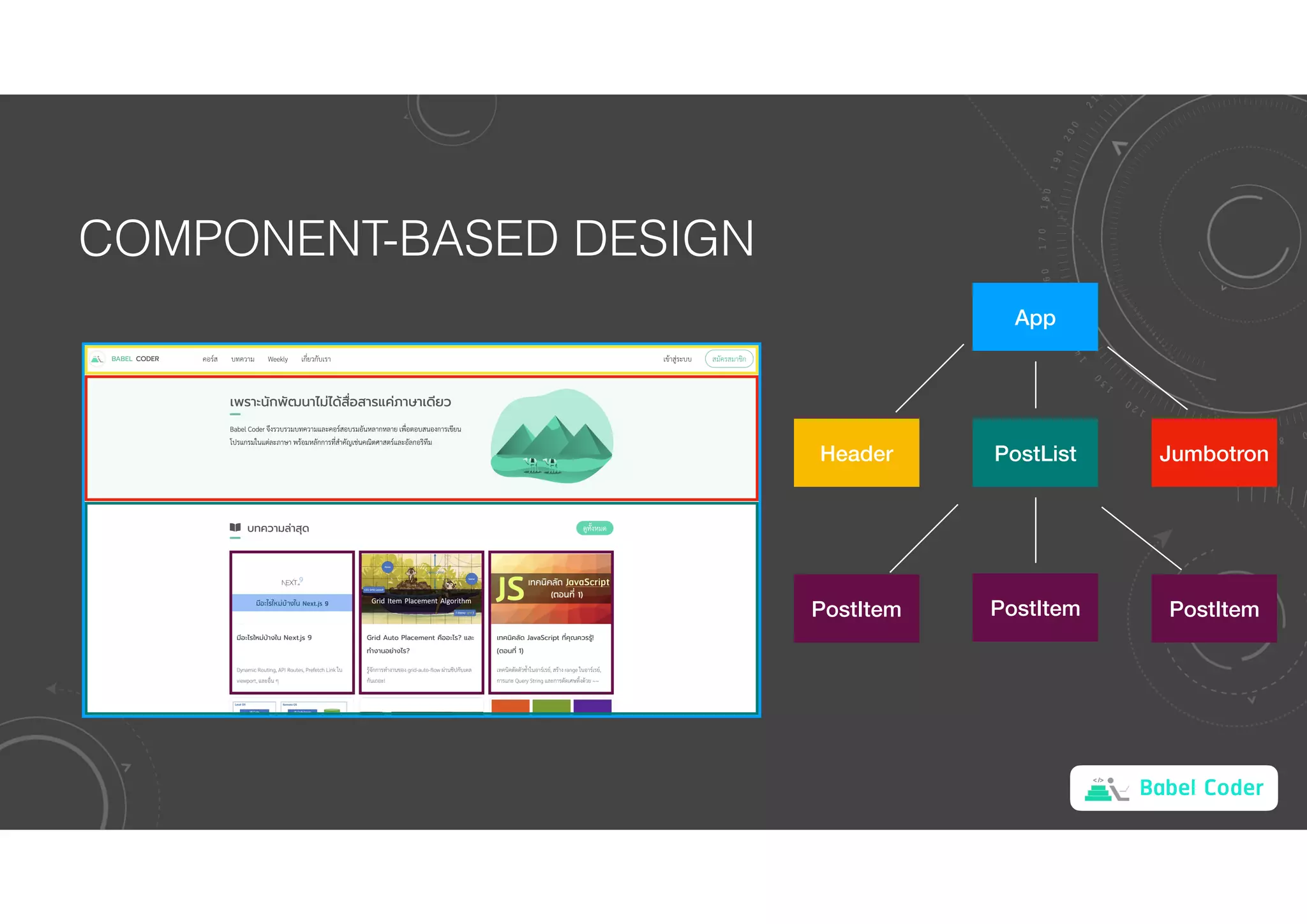
COMPONENT-BASED DESIGN
App
Jumbotron
Header PostList
PostItem
PostItem PostItem
Babel Coder
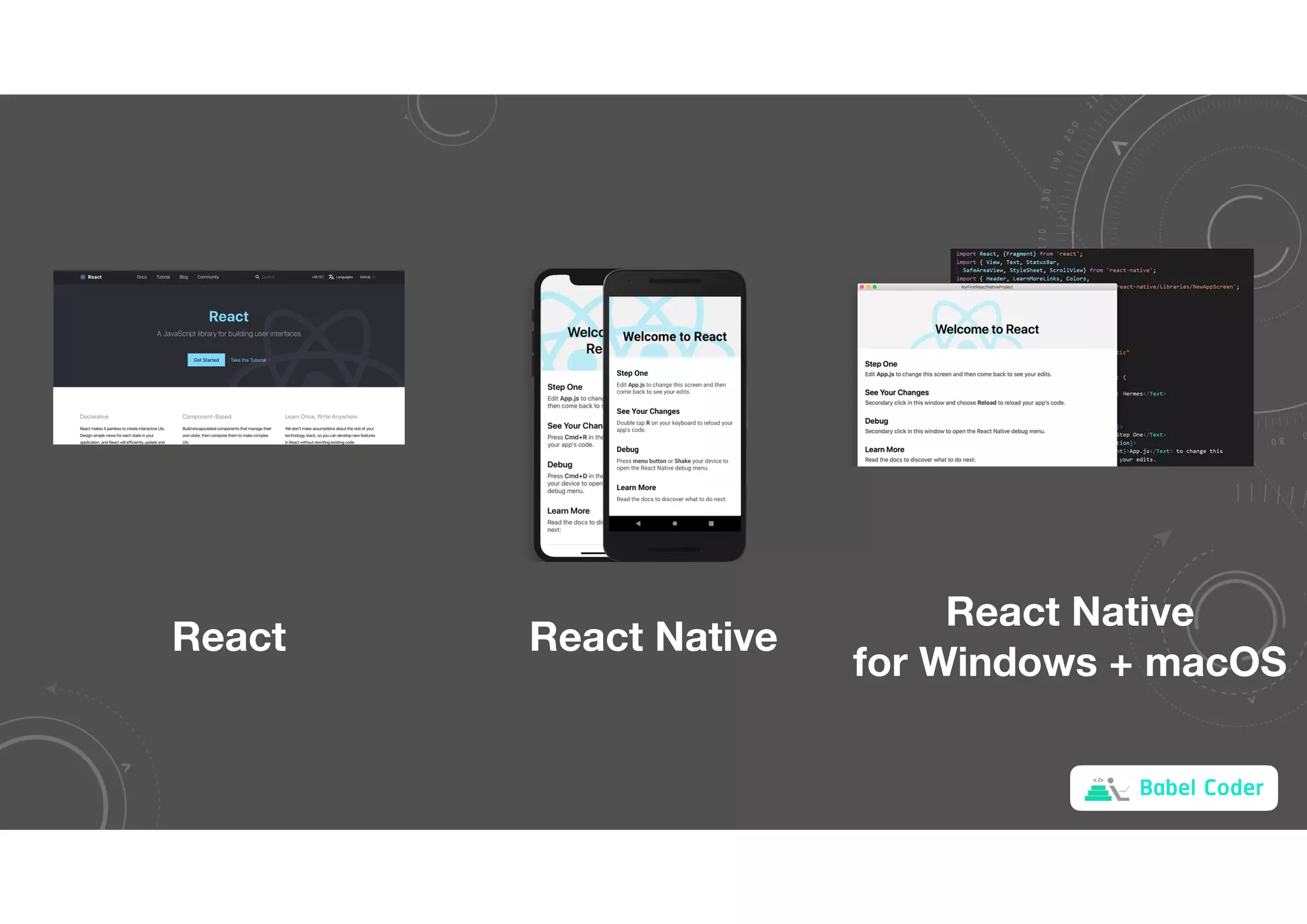
React React Native
React Native
for Windows + macOS
Babel Coder
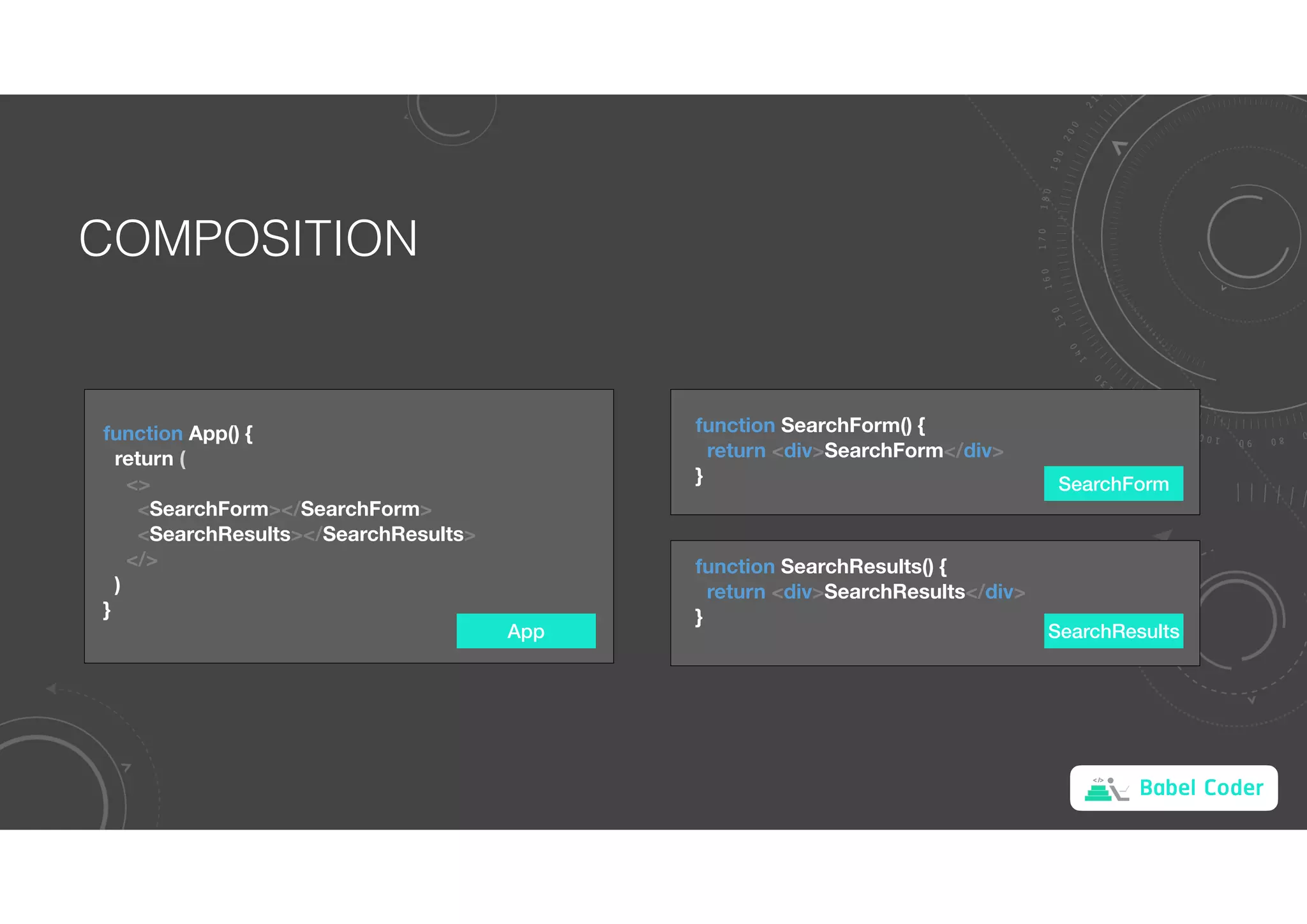
COMPOSITION
App
function App() {
return (
<>
<SearchForm></SearchForm>
<SearchResults></SearchResults>
</>
)
}
function SearchForm() {
return <div>SearchForm</div>
}
function SearchResults() {
return <div>SearchResults</div>
}
SearchForm
SearchResults
Babel Coder
STATE
App
import React, { useState } from 'react'
function App() {
const [titles, setTitles] = useState(initialTitles)
return (
<>
<SearchForm></SearchForm>
<SearchResults></SearchResults>
</>
)
}
useState returns a pair: the current state value
and a function that lets you update it.
The only argument to useState is the initial state.
const initialTitles = [
'Reactive Programming !ออะไร',
'เป(ยบเ+ยบ React, Vue และ Angular',
'Server Rendering'
]
Babel Coder
PROPS
App SearchResults
function App() {
const [titles, setTitles] = useState(initialTitles)
return (
<>
<SearchForm></SearchForm>
<SearchResults titles={titles}></SearchResults>
</>
)
}
function SearchResults(props) {
return <div>{props.titles[0]}</div>
}
App
SearchForm SearchResults
titles
titles
props
Babel Coder
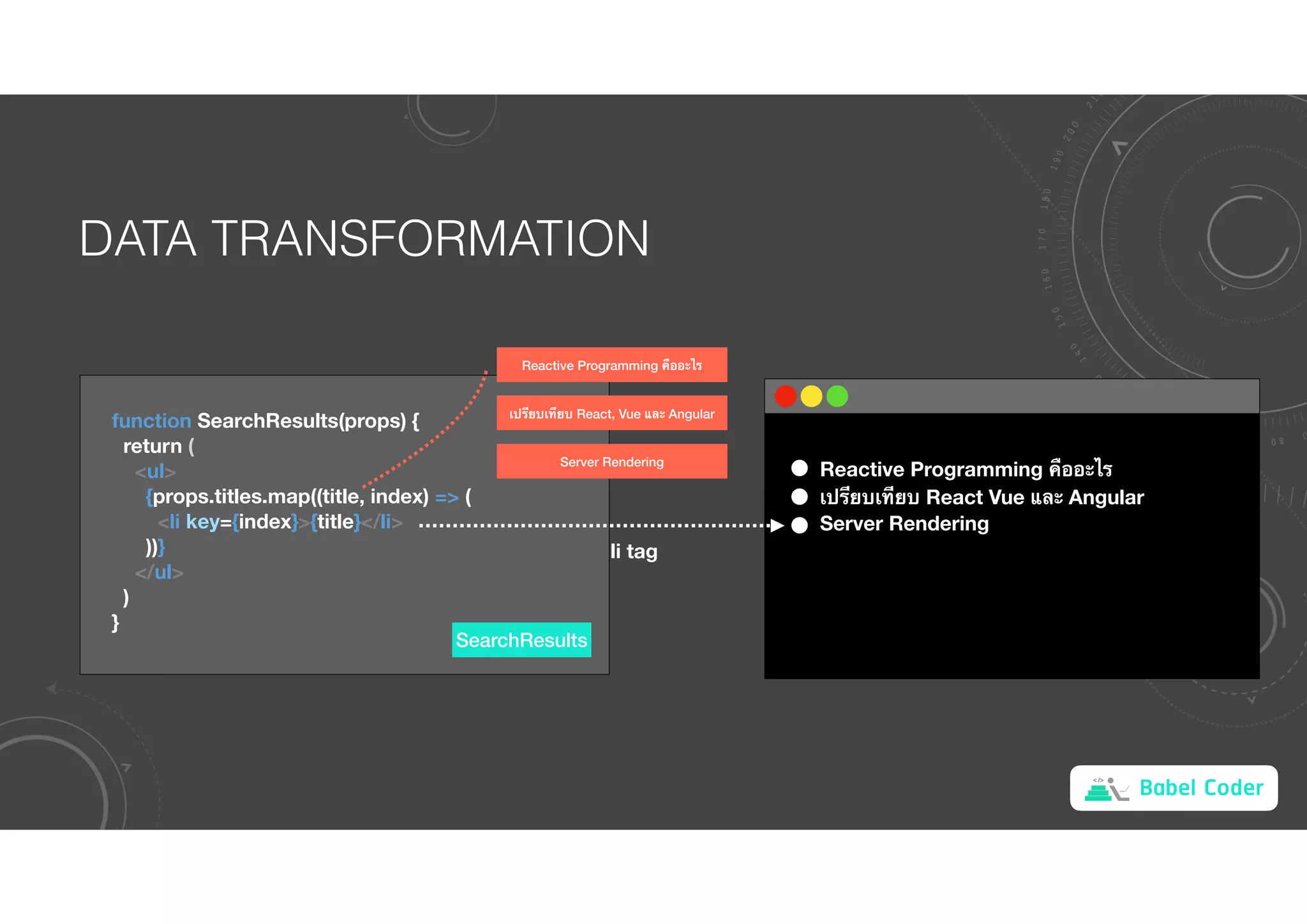
DATA TRANSFORMATION
SearchResults
function SearchResults(props) {
return (
<ul>
{props.titles.map((title, index) => (
<li key={index}>{title}</li>
))}
</ul>
)
}
Reactive Programming !ออะไร
เป(ยบเ+ยบ React, Vue และ Angular
Server Rendering
Reactive Programming !ออะไร
เป(ยบเ+ยบ React Vue และ Angular
Server Rendering
li tag
Babel Coder
EVENT HANDLER
App
function SearchForm() {
const [input, setInput] = useState('')
const onInputChange = event => setInput(event.target.value)
return (
<input
type="text"
value={input}
onChange={onInputChange}
/>
)
}
state
[input setInput]
Input Tag
value onChange
event.target.value
Babel Coder
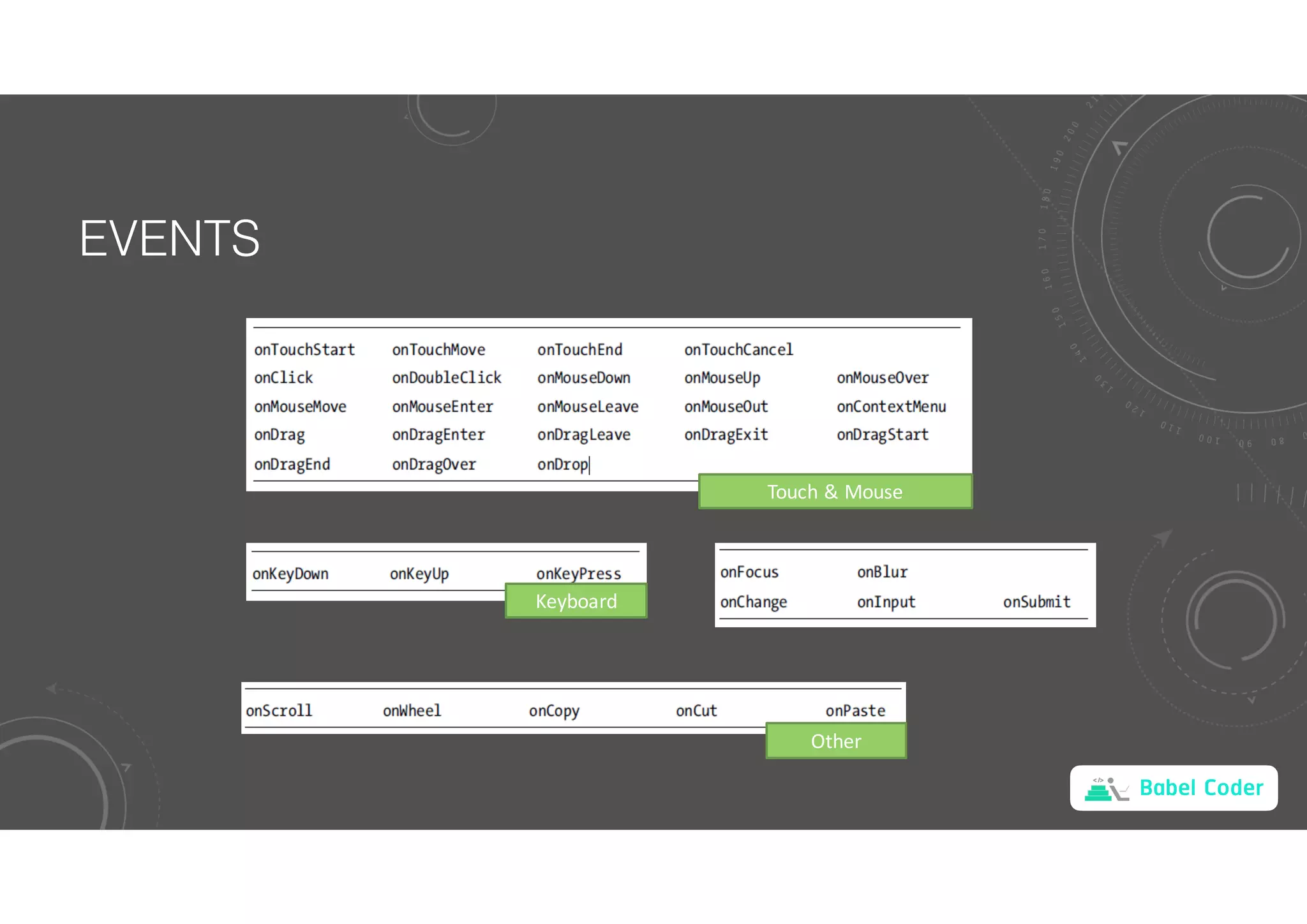
EVENTS
Touch & Mouse
Keyboard
Other
Babel Coder
PARENT-CHILD COMMUNICATION
App
function App() {
const [titles, setTitles] = useState(initialTitles)
const search = keyword => {
const result =
keyword === ''
? initialTitles
: titles.filter(title => title.includes(keyword))
setTitles(result)
}
return (
<>
<SearchForm onSubmit={search}></SearchForm>
<SearchResults titles={titles}></SearchResults>
</>
)
} SearchForm
function SearchForm(props) {
const [input, setInput] = useState('')
const onInputChange = event => {
const input = event.target.value
setInput(input)
props.onSubmit(input)
}
return (
<input type="text"
value={input}
onChange={onInputChange} />
}
Babel Coder
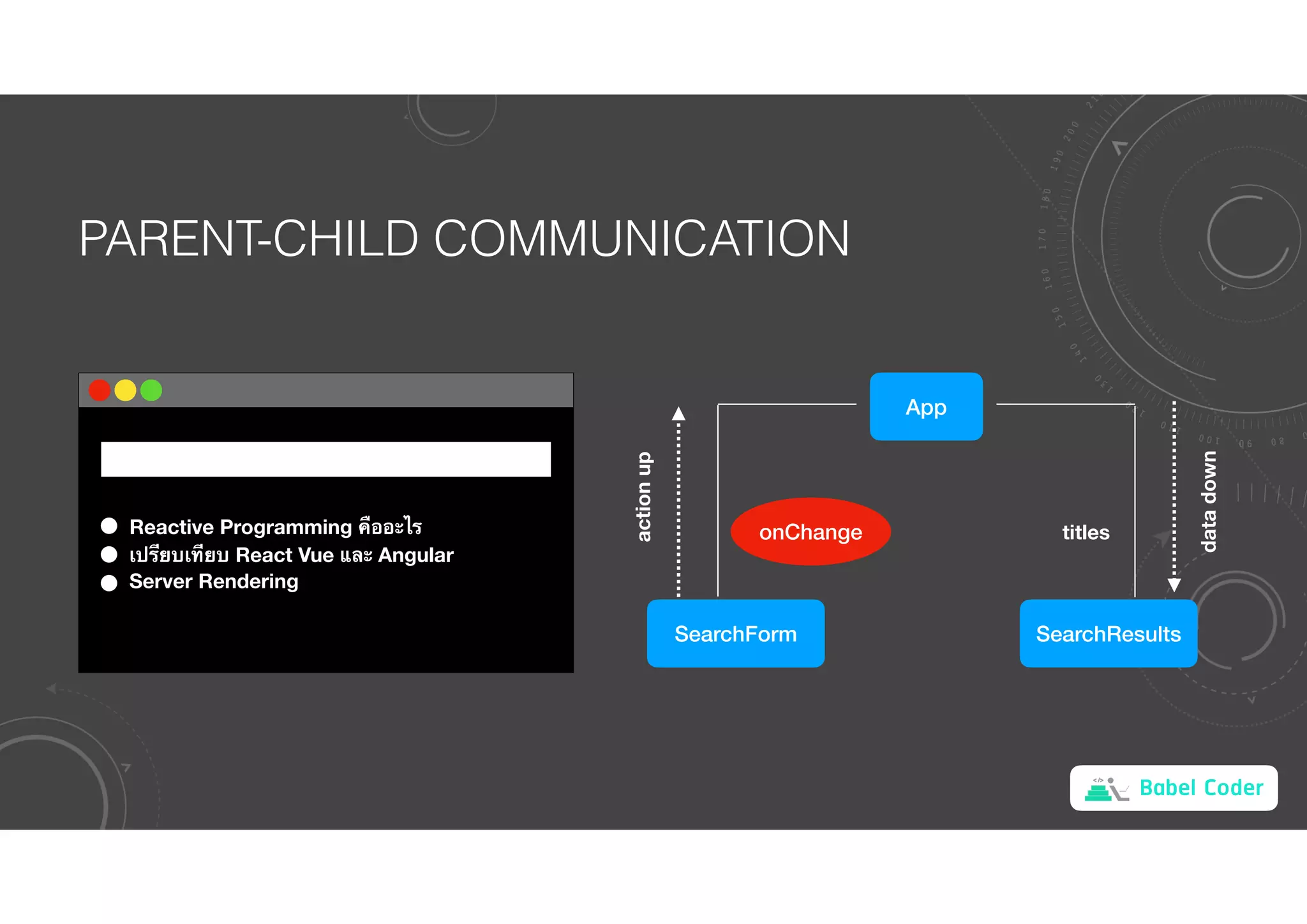
PARENT-CHILD COMMUNICATION
Reactive Programming !ออะไร
เป(ยบเ+ยบ React Vue และ Angular
Server Rendering
App
SearchForm SearchResults
titles
onChange
action
up
data
down
Babel Coder
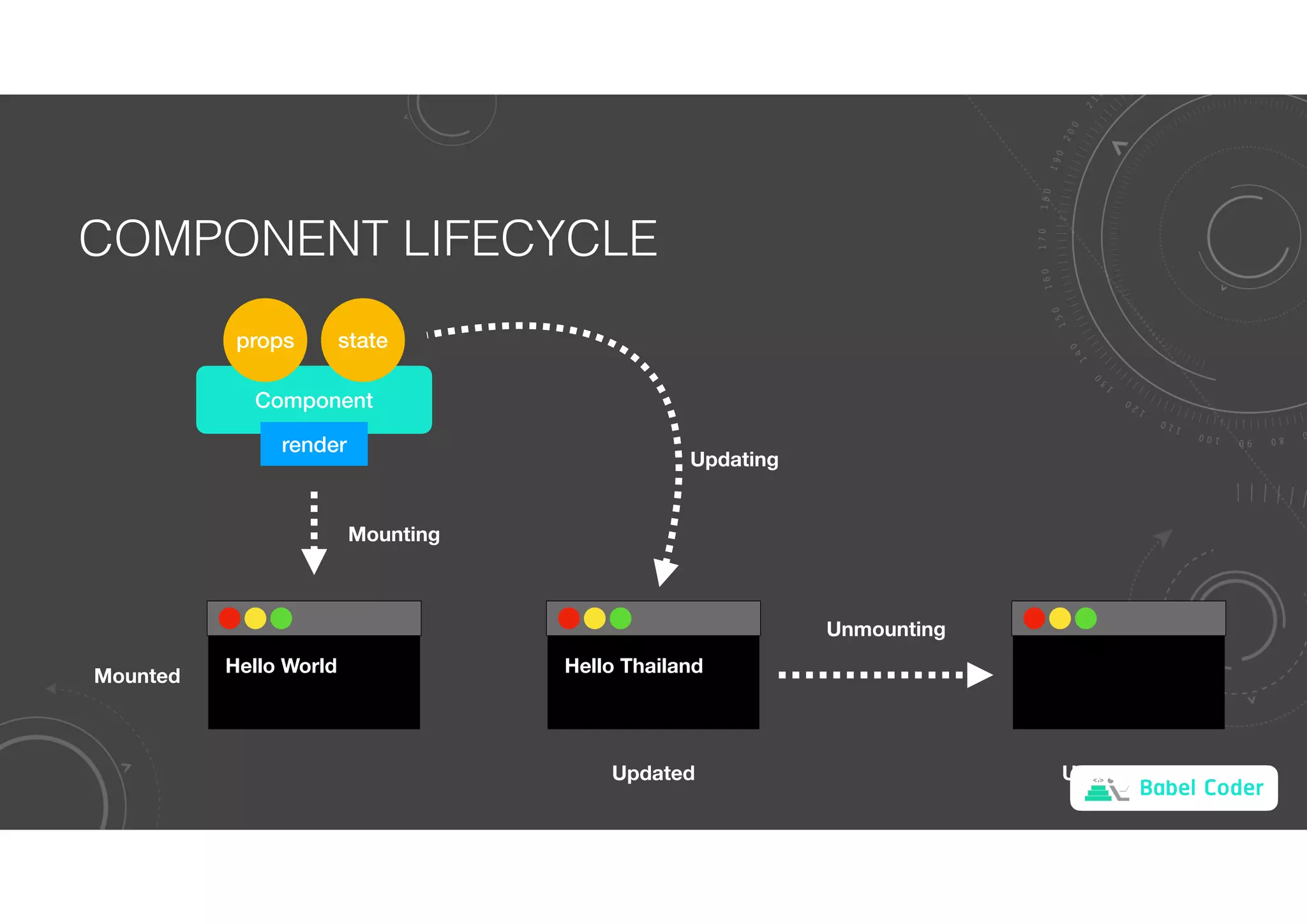
COMPONENT LIFECYCLE
Component
state
render
Hello World
Mounting
Mounted Hello Thailand
Updating
Unmounting
Updated Unmounted
props
Babel Coder
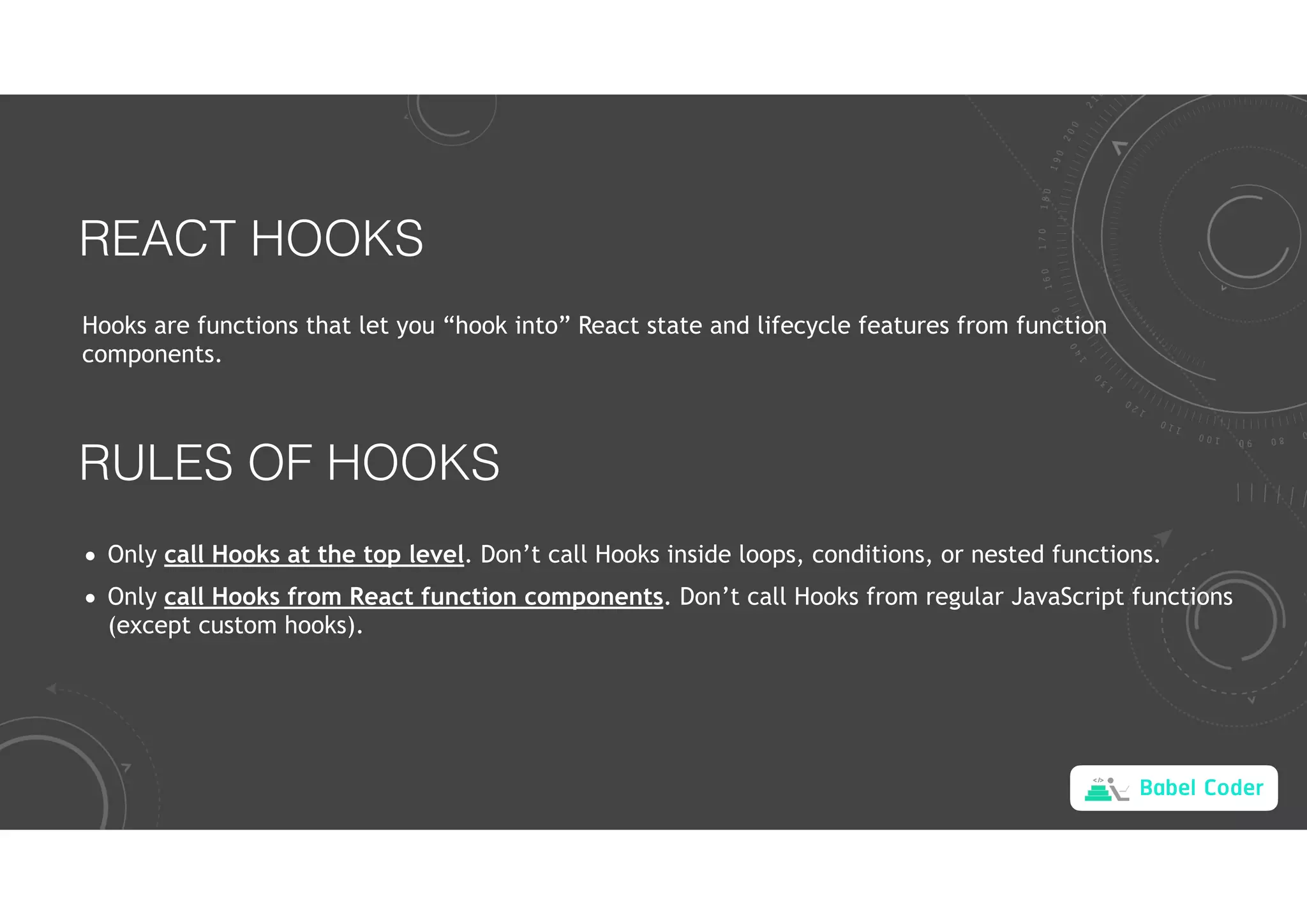
REACT HOOKS
Hooks are functions that let you “hook into” React state and lifecycle features from function
components.
RULES OF HOOKS
• Only call Hooks at the top level. Don’t call Hooks inside loops, conditions, or nested functions.
• Only call Hooks from React function components. Don’t call Hooks from regular JavaScript functions
(except custom hooks).
Babel Coder
STATE MANAGEMENT
import React, { useState } from 'react'
function App() {
const [count, setCount] = useState(0)
return (
<button
onClick={() => setCount(count + 1)}>
{count}
</button>
)
}
0
count
onClick
setCount
Babel Coder
LIFECYCLE MANAGEMENT
function App() {
const [count, setCount] = useState(0)
useEffect(() => {
const timer = setInterval(() => setCount(count + 1), 1000)
return () => clearInterval(timer)
}, [count])
return <div>{count}</div>
}
Call after mounted and updated
Call before unmounted
Babel Coder
EXAMPLE 1
App
function App() {
const [msg, setMsg] = useState('')
return (
<>
<input
type="text"
value={msg}
onChange={event => setMsg(event.target.value)}
/>
<Counter msg={msg}></Counter>
</>
)
}
Counter
function Counter({ msg }) {
const [count, setCount] = useState(0)
useEffect(() => {
const timer = setInterval(() => setCount(count + 1), 1000)
document.title = `${msg} ${count}`
return () => clearInterval(timer)
}, [count, msg])
return <div>{count}</div>
}
Babel Coder
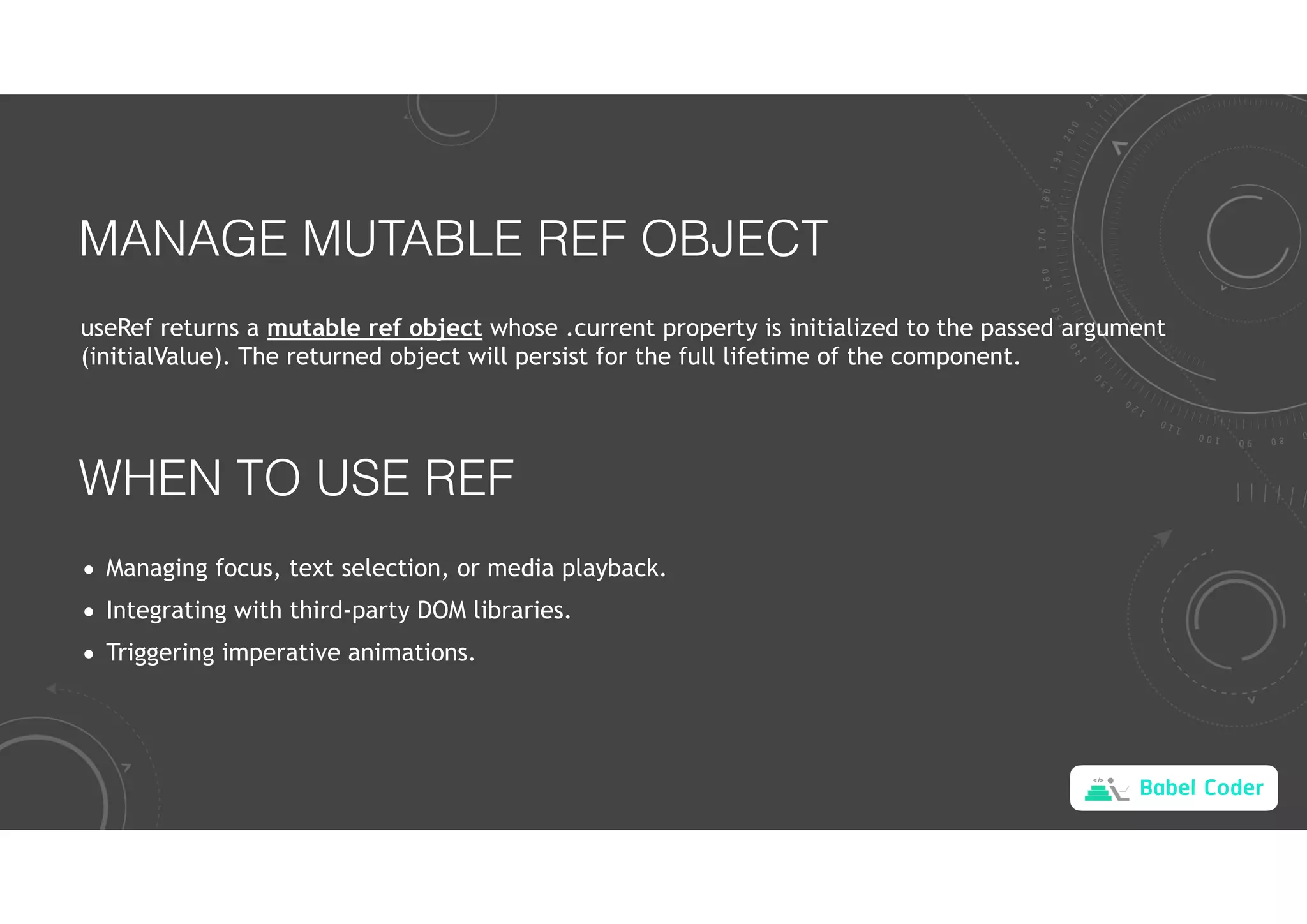
MANAGE MUTABLE REF OBJECT
useRef returns a mutable ref object whose .current property is initialized to the passed argument
(initialValue). The returned object will persist for the full lifetime of the component.
WHEN TO USE REF
• Managing focus, text selection, or media playback.
• Integrating with third-party DOM libraries.
• Triggering imperative animations.
Babel Coder
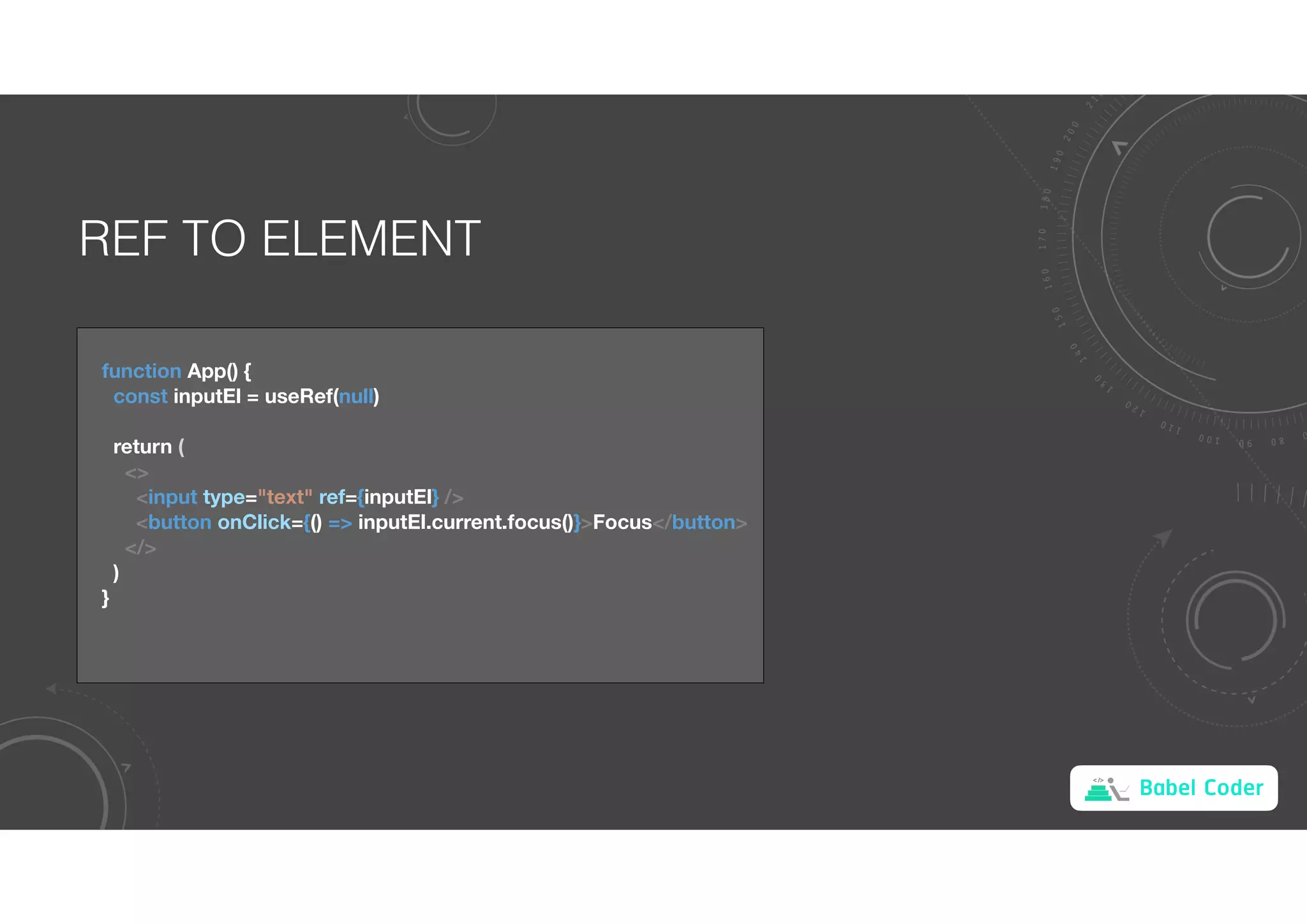
REF TO ELEMENT
function App() {
const inputEl = useRef(null)
return (
<>
<input type="text" ref={inputEl} />
<button onClick={() => inputEl.current.focus()}>Focus</button>
</>
)
}
Babel Coder
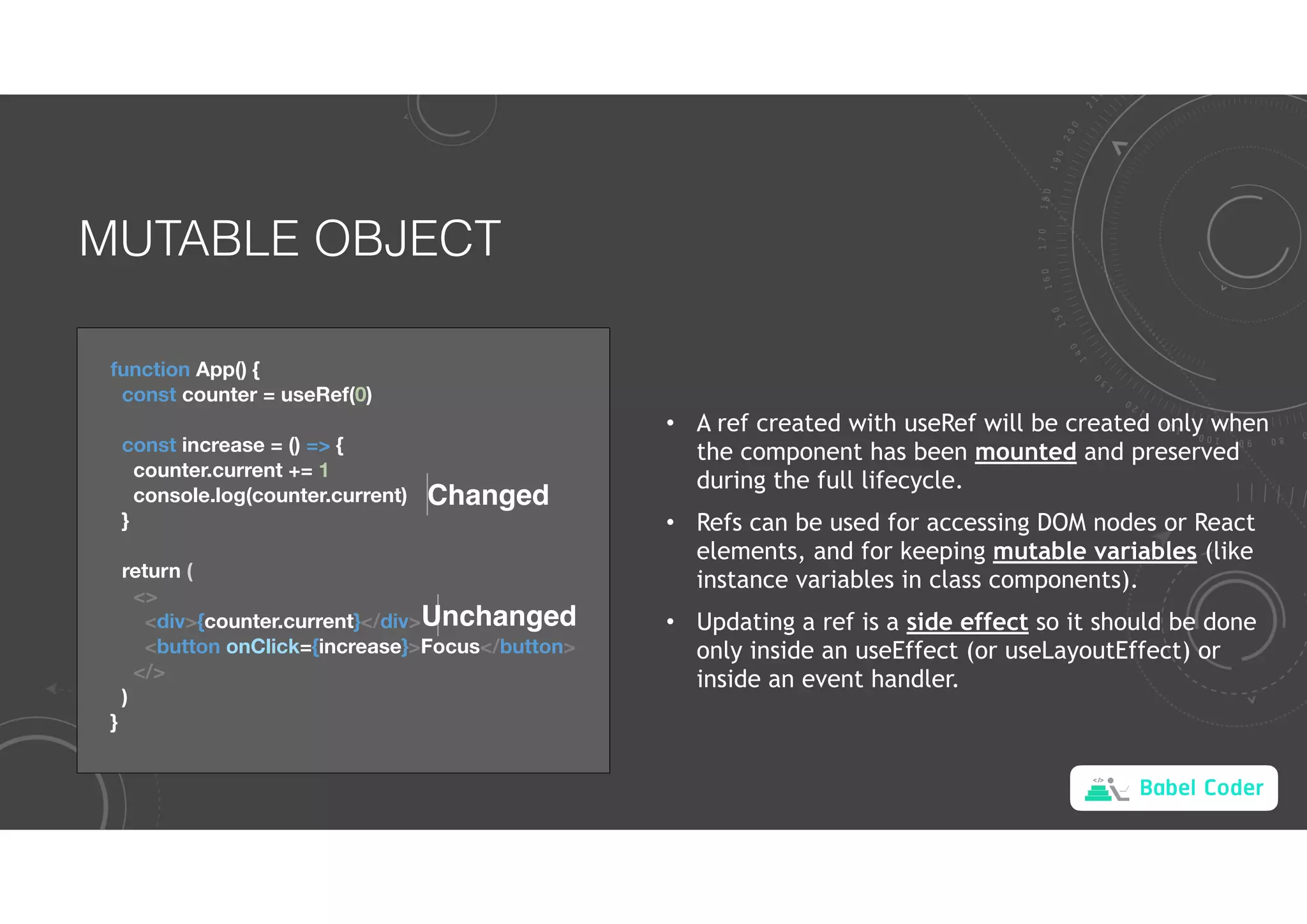
MUTABLE OBJECT
function App() {
const counter = useRef(0)
const increase = () => {
counter.current += 1
console.log(counter.current)
}
return (
<>
<div>{counter.current}</div>
<button onClick={increase}>Focus</button>
</>
)
}
Changed
Unchanged
• A ref created with useRef will be created only when
the component has been mounted and preserved
during the full lifecycle.
• Refs can be used for accessing DOM nodes or React
elements, and for keeping mutable variables (like
instance variables in class components).
• Updating a ref is a side effect so it should be done
only inside an useEffect (or useLayoutEffect) or
inside an event handler.
Babel Coder
CUSTOM HOOKS
function useInterval(initialCount) {
const [count, setCount] = useState(initialCount)
useEffect(() => {
const timer = setInterval(() => setCount(count + 1), 1000)
return () => clearInterval(timer)
})
return count
}
function App() {
const count = useInterval(0)
return <div>{count}</div>
}
Babel Coder
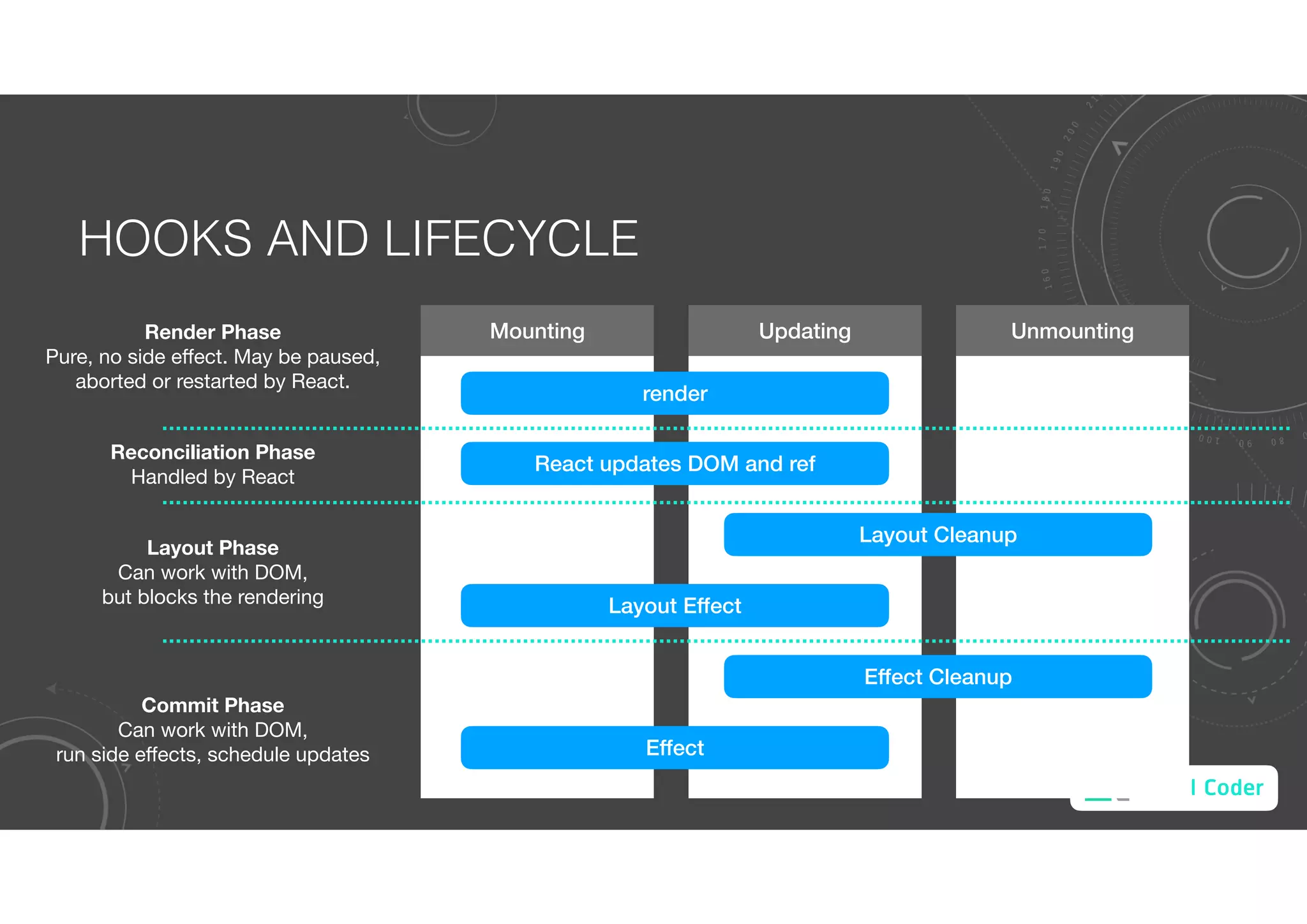
HOOKS AND LIFECYCLE
Mounting Updating Unmounting
render
React updates DOM and ref
Layout Cleanup
Layout Effect
Effect Cleanup
Effect
Render Phase
Pure, no side effect. May be paused,
aborted or restarted by React.
Reconciliation Phase
Handled by React
Layout Phase
Can work with DOM,
but blocks the rendering
Commit Phase
Can work with DOM,
run side effects, schedule updates
Babel Coder
CONTEXT
const themes = {
light: {
foreground: '#000000',
background: '#eeeeee'
},
dark: {
foreground: '#ffffff',
background: '#222222'
}
}
function App() {
const [theme, setTheme] = useState(themes.light)
return <AddressBook theme={theme}></AddressBook>
}
function AddressBook({ theme }) {
return <AddressList theme={theme}></AddressList>
}
function AddressList({ theme }) {
return <div style={{ background: theme.background }}></div>
}
Babel Coder
CONTEXT
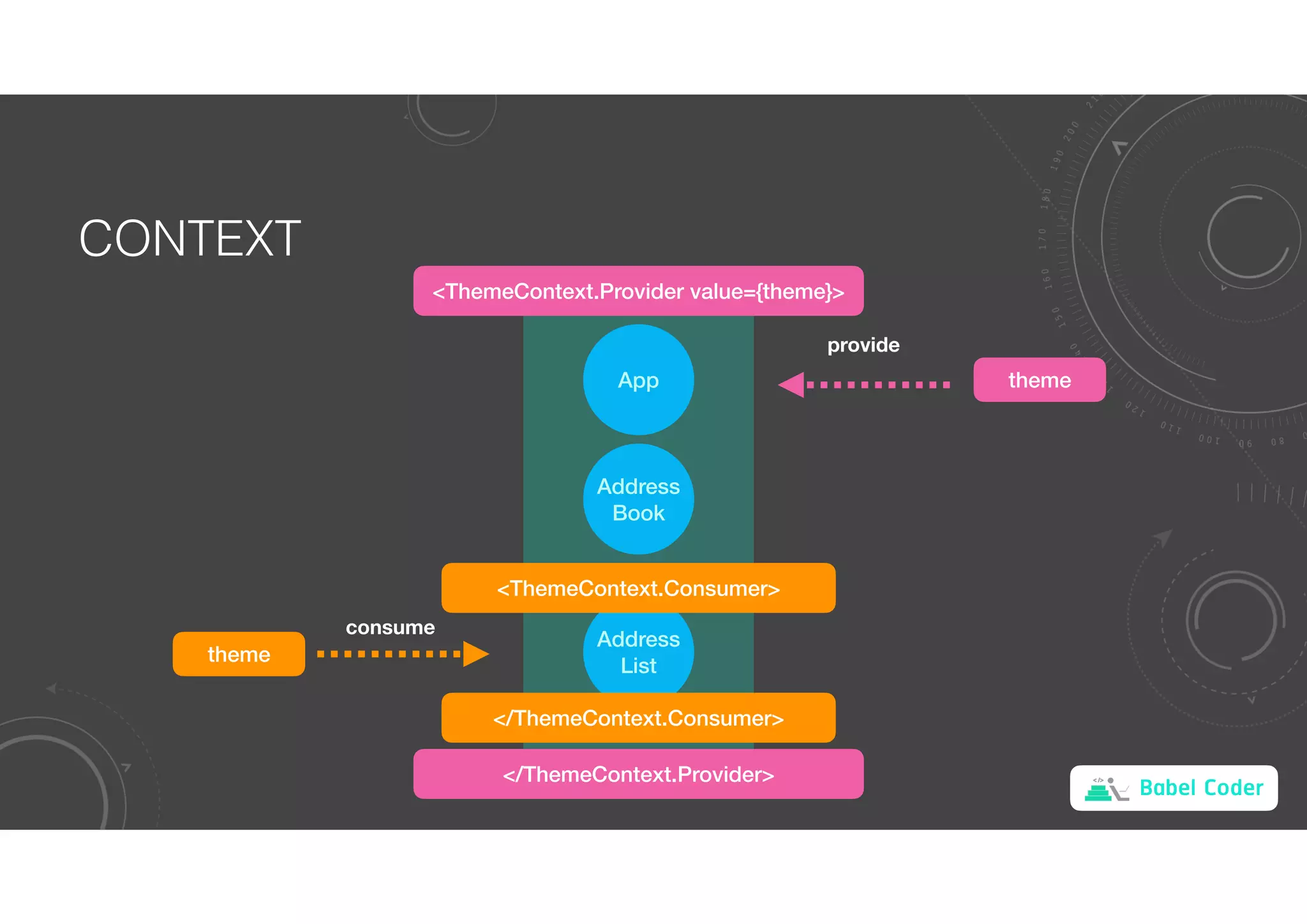
App
Address
Book
Address
List
theme
provide
consume
theme
<ThemeContext.Provider value={theme}>
</ThemeContext.Provider>
<ThemeContext.Consumer>
</ThemeContext.Consumer>
Babel Coder
CONTEXT
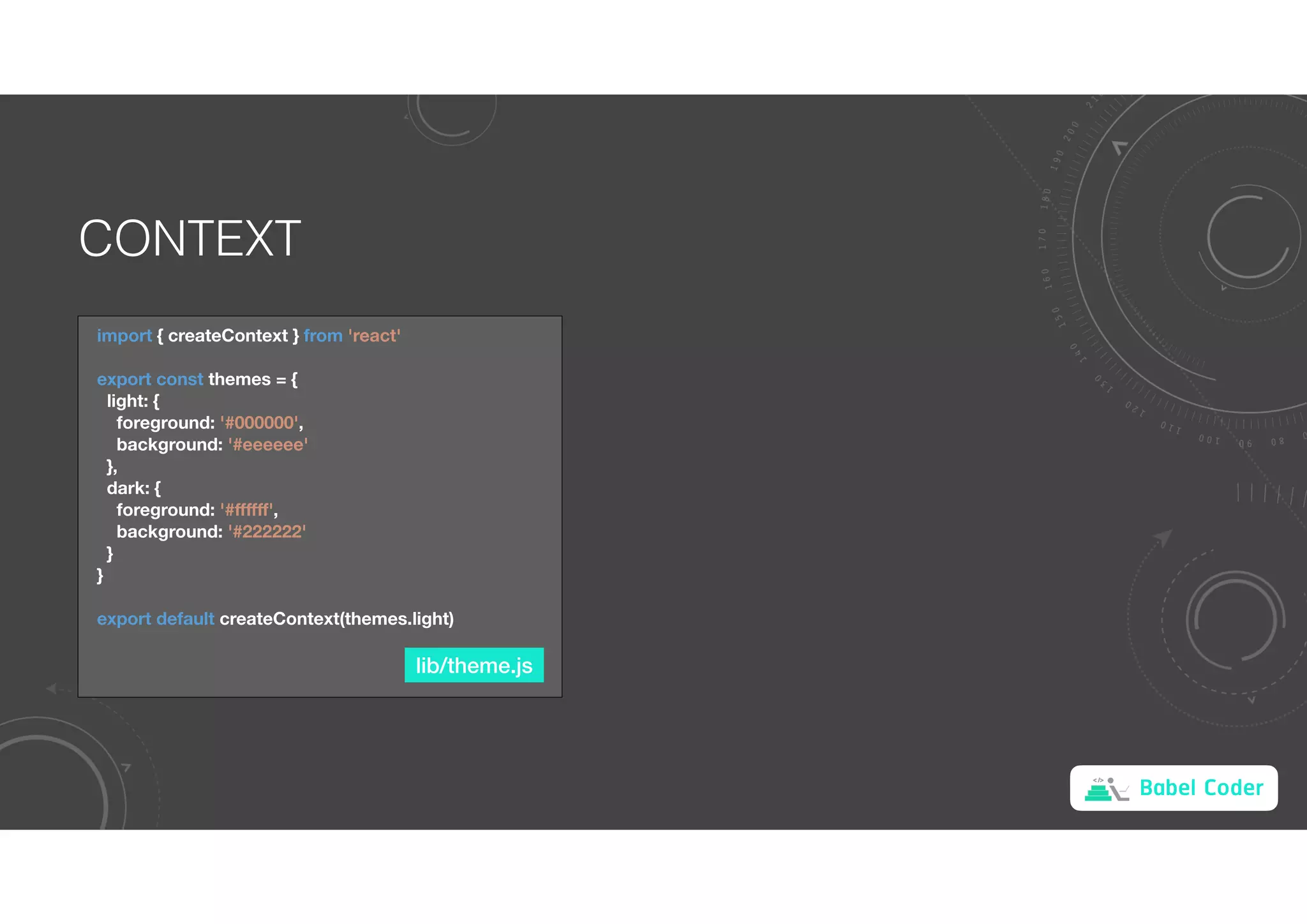
import { createContext } from 'react'
export const themes = {
light: {
foreground: '#000000',
background: '#eeeeee'
},
dark: {
foreground: '#ffffff',
background: '#222222'
}
}
export default createContext(themes.light)
lib/theme.js
Babel Coder
CONTEXT
import ThemeContext, { themes } from './lib/theme'
import AddressBook from './AddressBook'
export default function App() {
const [theme, setTheme] = useState(themes.light)
const switchTheme = () => {
setTheme(theme === themes.light ? themes.dark : themes.light)
}
return (
<ThemeContext.Provider value={theme}>
<button onClick={switchTheme}>Switch Theme</button>
<AddressBook></AddressBook>
</ThemeContext.Provider>
)
}
function AddressList({ addresses }) {
return (
<ThemeContext.Consumer>
{theme => (
<ul style={{ background: theme.background, color: theme.foreground }}>
{addresses.map(({ id, address }) => (
<li key={id}>{address}</li>
))}
</ul>
)}
</ThemeContext.Consumer>
)
}
App AddressList
Babel Coder
CONTEXT
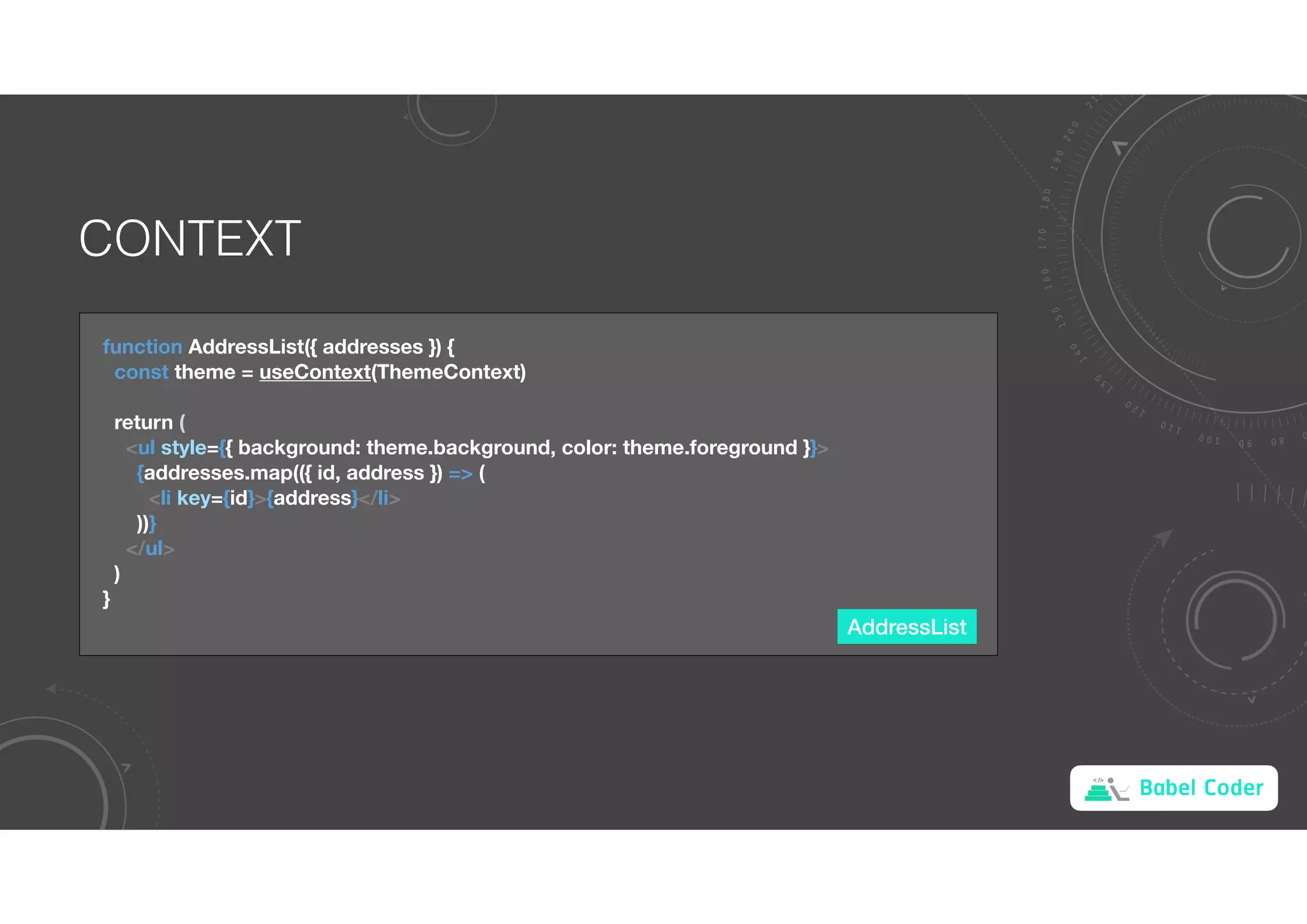
AddressList
function AddressList({ addresses }) {
const theme = useContext(ThemeContext)
return (
<ul style={{ background: theme.background, color: theme.foreground }}>
{addresses.map(({ id, address }) => (
<li key={id}>{address}</li>
))}
</ul>
)
}

react.pdf

  • 1.
    Babel Coder A JAVASCRIPTLIBRARY FOR BUILDING USER INTERFACES Declarative Component-Based Learn Once, Write Anywhere
  • 2.
    Babel Coder IMPERATIVE VSDECLARATIVE HTML <div id="counter">0</div> <button id="incBtn">inc</button> JavaScript let count = 0 const incBtn = document.getElementById("incBtn") const counter = document.getElementById("counter") incBtn.onclick = function() { counter.textContent = ++count } JSX function Counter() { const [count, setCount] = useState(0) return ( <> <div>{count}</div> <button onClick={() => setCount(count + 1)}>inc</button> </> ) } Imperative Declarative
  • 3.
  • 4.
    Babel Coder React ReactNative React Native for Windows + macOS
  • 5.
    Babel Coder COMPOSITION App function App(){ return ( <> <SearchForm></SearchForm> <SearchResults></SearchResults> </> ) } function SearchForm() { return <div>SearchForm</div> } function SearchResults() { return <div>SearchResults</div> } SearchForm SearchResults
  • 6.
    Babel Coder STATE App import React,{ useState } from 'react' function App() { const [titles, setTitles] = useState(initialTitles) return ( <> <SearchForm></SearchForm> <SearchResults></SearchResults> </> ) } useState returns a pair: the current state value and a function that lets you update it. The only argument to useState is the initial state. const initialTitles = [ 'Reactive Programming !ออะไร', 'เป(ยบเ+ยบ React, Vue และ Angular', 'Server Rendering' ]
  • 7.
    Babel Coder PROPS App SearchResults functionApp() { const [titles, setTitles] = useState(initialTitles) return ( <> <SearchForm></SearchForm> <SearchResults titles={titles}></SearchResults> </> ) } function SearchResults(props) { return <div>{props.titles[0]}</div> } App SearchForm SearchResults titles titles props
  • 8.
    Babel Coder DATA TRANSFORMATION SearchResults functionSearchResults(props) { return ( <ul> {props.titles.map((title, index) => ( <li key={index}>{title}</li> ))} </ul> ) } Reactive Programming !ออะไร เป(ยบเ+ยบ React, Vue และ Angular Server Rendering Reactive Programming !ออะไร เป(ยบเ+ยบ React Vue และ Angular Server Rendering li tag
  • 9.
    Babel Coder EVENT HANDLER App functionSearchForm() { const [input, setInput] = useState('') const onInputChange = event => setInput(event.target.value) return ( <input type="text" value={input} onChange={onInputChange} /> ) } state [input setInput] Input Tag value onChange event.target.value
  • 10.
    Babel Coder EVENTS Touch &Mouse Keyboard Other
  • 11.
    Babel Coder PARENT-CHILD COMMUNICATION App functionApp() { const [titles, setTitles] = useState(initialTitles) const search = keyword => { const result = keyword === '' ? initialTitles : titles.filter(title => title.includes(keyword)) setTitles(result) } return ( <> <SearchForm onSubmit={search}></SearchForm> <SearchResults titles={titles}></SearchResults> </> ) } SearchForm function SearchForm(props) { const [input, setInput] = useState('') const onInputChange = event => { const input = event.target.value setInput(input) props.onSubmit(input) } return ( <input type="text" value={input} onChange={onInputChange} /> }
  • 12.
    Babel Coder PARENT-CHILD COMMUNICATION ReactiveProgramming !ออะไร เป(ยบเ+ยบ React Vue และ Angular Server Rendering App SearchForm SearchResults titles onChange action up data down
  • 13.
    Babel Coder COMPONENT LIFECYCLE Component state render HelloWorld Mounting Mounted Hello Thailand Updating Unmounting Updated Unmounted props
  • 14.
    Babel Coder REACT HOOKS Hooksare functions that let you “hook into” React state and lifecycle features from function components. RULES OF HOOKS • Only call Hooks at the top level. Don’t call Hooks inside loops, conditions, or nested functions. • Only call Hooks from React function components. Don’t call Hooks from regular JavaScript functions (except custom hooks).
  • 15.
    Babel Coder STATE MANAGEMENT importReact, { useState } from 'react' function App() { const [count, setCount] = useState(0) return ( <button onClick={() => setCount(count + 1)}> {count} </button> ) } 0 count onClick setCount
  • 16.
    Babel Coder LIFECYCLE MANAGEMENT functionApp() { const [count, setCount] = useState(0) useEffect(() => { const timer = setInterval(() => setCount(count + 1), 1000) return () => clearInterval(timer) }, [count]) return <div>{count}</div> } Call after mounted and updated Call before unmounted
  • 17.
    Babel Coder EXAMPLE 1 App functionApp() { const [msg, setMsg] = useState('') return ( <> <input type="text" value={msg} onChange={event => setMsg(event.target.value)} /> <Counter msg={msg}></Counter> </> ) } Counter function Counter({ msg }) { const [count, setCount] = useState(0) useEffect(() => { const timer = setInterval(() => setCount(count + 1), 1000) document.title = `${msg} ${count}` return () => clearInterval(timer) }, [count, msg]) return <div>{count}</div> }
  • 18.
    Babel Coder MANAGE MUTABLEREF OBJECT useRef returns a mutable ref object whose .current property is initialized to the passed argument (initialValue). The returned object will persist for the full lifetime of the component. WHEN TO USE REF • Managing focus, text selection, or media playback. • Integrating with third-party DOM libraries. • Triggering imperative animations.
  • 19.
    Babel Coder REF TOELEMENT function App() { const inputEl = useRef(null) return ( <> <input type="text" ref={inputEl} /> <button onClick={() => inputEl.current.focus()}>Focus</button> </> ) }
  • 20.
    Babel Coder MUTABLE OBJECT functionApp() { const counter = useRef(0) const increase = () => { counter.current += 1 console.log(counter.current) } return ( <> <div>{counter.current}</div> <button onClick={increase}>Focus</button> </> ) } Changed Unchanged • A ref created with useRef will be created only when the component has been mounted and preserved during the full lifecycle. • Refs can be used for accessing DOM nodes or React elements, and for keeping mutable variables (like instance variables in class components). • Updating a ref is a side effect so it should be done only inside an useEffect (or useLayoutEffect) or inside an event handler.
  • 21.
    Babel Coder CUSTOM HOOKS functionuseInterval(initialCount) { const [count, setCount] = useState(initialCount) useEffect(() => { const timer = setInterval(() => setCount(count + 1), 1000) return () => clearInterval(timer) }) return count } function App() { const count = useInterval(0) return <div>{count}</div> }
  • 22.
    Babel Coder HOOKS ANDLIFECYCLE Mounting Updating Unmounting render React updates DOM and ref Layout Cleanup Layout Effect Effect Cleanup Effect Render Phase Pure, no side effect. May be paused, aborted or restarted by React. Reconciliation Phase Handled by React Layout Phase Can work with DOM, but blocks the rendering Commit Phase Can work with DOM, run side effects, schedule updates
  • 23.
    Babel Coder CONTEXT const themes= { light: { foreground: '#000000', background: '#eeeeee' }, dark: { foreground: '#ffffff', background: '#222222' } } function App() { const [theme, setTheme] = useState(themes.light) return <AddressBook theme={theme}></AddressBook> } function AddressBook({ theme }) { return <AddressList theme={theme}></AddressList> } function AddressList({ theme }) { return <div style={{ background: theme.background }}></div> }
  • 24.
  • 25.
    Babel Coder CONTEXT import {createContext } from 'react' export const themes = { light: { foreground: '#000000', background: '#eeeeee' }, dark: { foreground: '#ffffff', background: '#222222' } } export default createContext(themes.light) lib/theme.js
  • 26.
    Babel Coder CONTEXT import ThemeContext,{ themes } from './lib/theme' import AddressBook from './AddressBook' export default function App() { const [theme, setTheme] = useState(themes.light) const switchTheme = () => { setTheme(theme === themes.light ? themes.dark : themes.light) } return ( <ThemeContext.Provider value={theme}> <button onClick={switchTheme}>Switch Theme</button> <AddressBook></AddressBook> </ThemeContext.Provider> ) } function AddressList({ addresses }) { return ( <ThemeContext.Consumer> {theme => ( <ul style={{ background: theme.background, color: theme.foreground }}> {addresses.map(({ id, address }) => ( <li key={id}>{address}</li> ))} </ul> )} </ThemeContext.Consumer> ) } App AddressList
  • 27.
    Babel Coder CONTEXT AddressList function AddressList({addresses }) { const theme = useContext(ThemeContext) return ( <ul style={{ background: theme.background, color: theme.foreground }}> {addresses.map(({ id, address }) => ( <li key={id}>{address}</li> ))} </ul> ) }