Reactive Extensions for .NET
Mark Allan
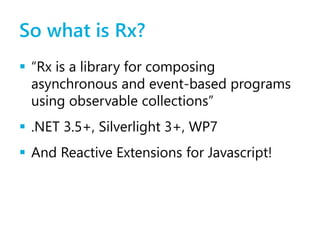
So what is Rx?
 “Rx is a library for composing
asynchronous and event-based programs
using observable collections”
 .NET 3.5+, Silverlight 3+, WP7
 And Reactive Extensions for Javascript!
Pull collections
 public interface IEnumerable<T>
{
IEnumerator<T> GetEnumerator();
}
 public interface IEnumerator<T>
{
bool MoveNext();
T Current { get; }
void Reset();
}
Push collections
 public interface IObservable<T>
{
IDisposable Subscribe(IObserver<T> observer);
}
 public interface IObserver<T>
{
void OnNext(T value);
void OnError(Exception exception);
void OnCompleted();
}
A simple example
IObservable<int> source = Observable.GenerateWithTime(
1,
x => x < 100,
x => x,
x => TimeSpan.FromMilliseconds(x),
x => x + 1);
using (source.Subscribe(
x => Console.WriteLine("OnNext: {0}", x),
ex => Console.WriteLine("OnError: {0}", ex),
() => Console.WriteLine("OnCompleted")))
{
Console.WriteLine("Press ENTER to unsubscribe...");
Console.ReadLine();
}
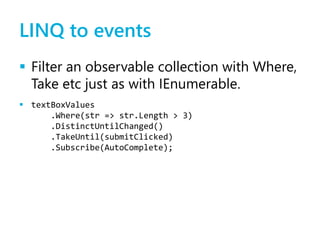
LINQ to events
 Filter an observable collection with Where,
Take etc just as with IEnumerable.
 textBoxValues
.Where(str => str.Length > 3)
.DistinctUntilChanged()
.TakeUntil(submitClicked)
.Subscribe(AutoComplete);
Working with .NET events
 So how do we get “textBoxValues”?
 IObservable<string> textBoxValues =
Observable.FromEvent<EventArgs>(txt, "TextChanged")
.Select(evt => ((TextBox)evt.Sender).Text);
Asynchronous pattern
 A very similar method is used to wrap
BeginXXX/EndXXX.
 var request = WebRequest.Create("http://w3c.org");
IObservable<WebResponse> resp =
Observable.FromAsyncPattern<WebResponse>(
request.BeginGetResponse,
request.EndGetResponse)();
resp.Subscribe(
r => Console.WriteLine(r.ContentType));
Concurrency and synchronisation
 Want to run your OnNext code on the UI
thread?
 events.ObserveOnDispatcher().Subscribe(methodToRunOnUI)
 Want to spawn a new thread for each
event? Or use the thread pool?
 events.SubscribeOn(Scheduler.NewThread).Subscribe(…)
 events.SubscribeOn(Scheduler.ThreadPool).Subscribe(…)
Another example
 To run multiple network requests,
update the UI as they come in and
stop the progress bar when they’re
all complete.
 requests
.SubscribeOn(Scheduler.NewThread)
.ObserveOnDispatcher()
.Take(count)
.Finally(stopProgressBar)
.Subscribe(updateUI);
Finally, test it
 Testing traditional event-driven code can
be a bit ugly.
 Not so with Rx:
 var testEvents = new[] { event1, event2, event3
}.ToObservable();
Questions?

Reactive Extensions (Rx)

  • 1.
    Reactive Extensions for.NET Mark Allan
  • 2.
    So what isRx?  “Rx is a library for composing asynchronous and event-based programs using observable collections”  .NET 3.5+, Silverlight 3+, WP7  And Reactive Extensions for Javascript!
  • 3.
    Pull collections  publicinterface IEnumerable<T> { IEnumerator<T> GetEnumerator(); }  public interface IEnumerator<T> { bool MoveNext(); T Current { get; } void Reset(); }
  • 4.
    Push collections  publicinterface IObservable<T> { IDisposable Subscribe(IObserver<T> observer); }  public interface IObserver<T> { void OnNext(T value); void OnError(Exception exception); void OnCompleted(); }
  • 5.
    A simple example IObservable<int>source = Observable.GenerateWithTime( 1, x => x < 100, x => x, x => TimeSpan.FromMilliseconds(x), x => x + 1); using (source.Subscribe( x => Console.WriteLine("OnNext: {0}", x), ex => Console.WriteLine("OnError: {0}", ex), () => Console.WriteLine("OnCompleted"))) { Console.WriteLine("Press ENTER to unsubscribe..."); Console.ReadLine(); }
  • 6.
    LINQ to events Filter an observable collection with Where, Take etc just as with IEnumerable.  textBoxValues .Where(str => str.Length > 3) .DistinctUntilChanged() .TakeUntil(submitClicked) .Subscribe(AutoComplete);
  • 7.
    Working with .NETevents  So how do we get “textBoxValues”?  IObservable<string> textBoxValues = Observable.FromEvent<EventArgs>(txt, "TextChanged") .Select(evt => ((TextBox)evt.Sender).Text);
  • 8.
    Asynchronous pattern  Avery similar method is used to wrap BeginXXX/EndXXX.  var request = WebRequest.Create("http://w3c.org"); IObservable<WebResponse> resp = Observable.FromAsyncPattern<WebResponse>( request.BeginGetResponse, request.EndGetResponse)(); resp.Subscribe( r => Console.WriteLine(r.ContentType));
  • 9.
    Concurrency and synchronisation Want to run your OnNext code on the UI thread?  events.ObserveOnDispatcher().Subscribe(methodToRunOnUI)  Want to spawn a new thread for each event? Or use the thread pool?  events.SubscribeOn(Scheduler.NewThread).Subscribe(…)  events.SubscribeOn(Scheduler.ThreadPool).Subscribe(…)
  • 10.
    Another example  Torun multiple network requests, update the UI as they come in and stop the progress bar when they’re all complete.  requests .SubscribeOn(Scheduler.NewThread) .ObserveOnDispatcher() .Take(count) .Finally(stopProgressBar) .Subscribe(updateUI);
  • 11.
    Finally, test it Testing traditional event-driven code can be a bit ugly.  Not so with Rx:  var testEvents = new[] { event1, event2, event3 }.ToObservable();
  • 12.