RDLC
Umar Ishfaq BCSF13A037
Imran Afzal BCSF13A058
Bilal Honey BCSF13A033
Moeen Ahmed BCSF13A010
Agenda
• What is RDLC?
• How are reports created and managed?
• Demo
What is RDLC
• Full meaning of RDLC is Report Definition Language Client-side. It is the
extension of report file. It is used to create report s using Microsoft
reporting technology. These files are created by the Visual Studio 2005
version of Report Designer. RDLC reports can be executed directly by the
ReportViewer control in client side.
What is RDLC?
• Now a days for reporting purposes we have a lots of choice. RDLC report is
one of the most popular reporting engine for Asp.net developers. Using
RDLC report you can easily represent data to the end user. You can
also export the report in Excel, PDF & MS Word format. Print
functionality also in built in this ReportViewer control
RDLC File
• The .rdlc is the format of a report file used by the MICROSOFT reporting
system. Mainly MICROSOFT Visual Studio creates this rdlc FILE
EXTENSION that contain report definitions. This article describes about
the basic over view of RDLC file and the difference between .rdl and .rdlc
files.
The .rdlc is the format of a report file used by theMICROSOFT reporting system. MainlyMICROSOFT Visual Studio creates this rdlcFILE EXTENSION that contain report definitions. This article describes about the
.rdl VS .rdlc files
The difference between .rdl and .rdlc files are given bellow:
.rdl
RDL files are created by the SQL Server 2005 version of Report Designer
It is used in SQL Server Reporting Services
It is remote report
Need a Reporting Services instance
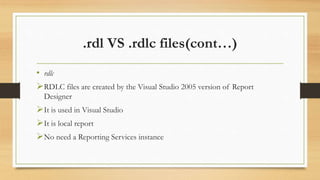
.rdl VS .rdlc files(cont…)
• rdlc
RDLC files are created by the Visual Studio 2005 version of Report
Designer
It is used in Visual Studio
It is local report
No need a Reporting Services instance
How to Add a rdlc Report in a project?
• The steps to add a new rdlc file in a project is given bellow:
• In the Project or Web Site menu or write click on Solution Explorer, select Add
New Item. Add New Item dialog box will be open
• From the Installed Templates pane select Visual Basic or Visual C#
• From the Templates pane select Report or Report Wizard
• If you select Report a blank .rdlc file will be added to the project
• If you select Report Wizard the Report Wizard will be started to guide you through
the steps in creating a report
How to Display the rdlc Report in a
ReportViewer Control in Application?
• In Microsoft Visual Studio open the application project or Web site
• Select the form or page that will display the report
• From the Toolbox add a ReportViewer control to the Web page or form
• Set the Size and position of the control on the page or form
• In the ReportViewer Tasks Smart tags panel select an existing .rdlc file in the
Choose Report drop-down list Or click Design a new report to create a new report
using the Report Wizard
• To preview the report build or deploy the application and browse that page or form
Demo
• Here I am providing “Creating RDLC report Step by Step in Asp.Net
C# & VB.Net“. Hope it will help you.
Demo
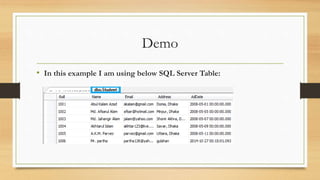
• In this example I am using below SQL Server Table:
Demo
• 1. Add your connection string in Web.Config file like below:
Demo
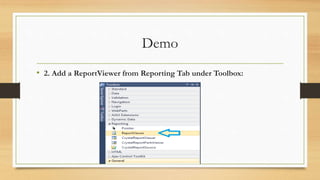
• 2. Add a ReportViewer from Reporting Tab under Toolbox:
Demo
• 3. Now go to the Design View of your page. Select the ReportViewer
control. Click on smart menu and click on “Design a new report”:
Demo
• 4. Now choose your Data Connection:
Demo
• 5. Now click on Next and select the “Student” table:
Demo
• 6. Click Finish, Click Next. An “Arrange Fields” page will popup.
Move all columns from “Available Fields” to “Values” Field. Click on
“Roll” column and uncheck the column:
Demo
Demo
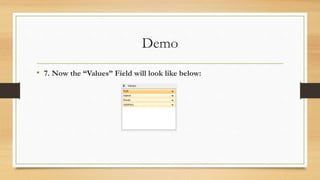
• 7. Now the “Values” Field will look like below:
Demo
• 8. Now click Next, click Next. Now choose your report style from left
pane:
Demo
• 9. Now open your page in design view. Click on ReportViewer control.
Click on smart menu. Select “Report1.rdlc” from “Choose Report”
DropDown List:
Demo
• 10. Now run the project. Oops you will get the error “The Report
Viewer Web Control requires a System.Web.UI.ScriptManager on the
web form”:
Demo
• 11. To resolve the error add a “ScriptManager” in your page:
Demo
• 12. Now run the project. Hope you will get a report like below:
Thankyou for Watching
• Any Questions ?

Rdlc (1)

  • 1.
    RDLC Umar Ishfaq BCSF13A037 ImranAfzal BCSF13A058 Bilal Honey BCSF13A033 Moeen Ahmed BCSF13A010
  • 2.
    Agenda • What isRDLC? • How are reports created and managed? • Demo
  • 3.
    What is RDLC •Full meaning of RDLC is Report Definition Language Client-side. It is the extension of report file. It is used to create report s using Microsoft reporting technology. These files are created by the Visual Studio 2005 version of Report Designer. RDLC reports can be executed directly by the ReportViewer control in client side.
  • 4.
    What is RDLC? •Now a days for reporting purposes we have a lots of choice. RDLC report is one of the most popular reporting engine for Asp.net developers. Using RDLC report you can easily represent data to the end user. You can also export the report in Excel, PDF & MS Word format. Print functionality also in built in this ReportViewer control
  • 5.
    RDLC File • The.rdlc is the format of a report file used by the MICROSOFT reporting system. Mainly MICROSOFT Visual Studio creates this rdlc FILE EXTENSION that contain report definitions. This article describes about the basic over view of RDLC file and the difference between .rdl and .rdlc files. The .rdlc is the format of a report file used by theMICROSOFT reporting system. MainlyMICROSOFT Visual Studio creates this rdlcFILE EXTENSION that contain report definitions. This article describes about the
  • 6.
    .rdl VS .rdlcfiles The difference between .rdl and .rdlc files are given bellow: .rdl RDL files are created by the SQL Server 2005 version of Report Designer It is used in SQL Server Reporting Services It is remote report Need a Reporting Services instance
  • 7.
    .rdl VS .rdlcfiles(cont…) • rdlc RDLC files are created by the Visual Studio 2005 version of Report Designer It is used in Visual Studio It is local report No need a Reporting Services instance
  • 8.
    How to Adda rdlc Report in a project? • The steps to add a new rdlc file in a project is given bellow: • In the Project or Web Site menu or write click on Solution Explorer, select Add New Item. Add New Item dialog box will be open • From the Installed Templates pane select Visual Basic or Visual C# • From the Templates pane select Report or Report Wizard • If you select Report a blank .rdlc file will be added to the project • If you select Report Wizard the Report Wizard will be started to guide you through the steps in creating a report
  • 9.
    How to Displaythe rdlc Report in a ReportViewer Control in Application? • In Microsoft Visual Studio open the application project or Web site • Select the form or page that will display the report • From the Toolbox add a ReportViewer control to the Web page or form • Set the Size and position of the control on the page or form • In the ReportViewer Tasks Smart tags panel select an existing .rdlc file in the Choose Report drop-down list Or click Design a new report to create a new report using the Report Wizard • To preview the report build or deploy the application and browse that page or form
  • 10.
    Demo • Here Iam providing “Creating RDLC report Step by Step in Asp.Net C# & VB.Net“. Hope it will help you.
  • 11.
    Demo • In thisexample I am using below SQL Server Table:
  • 12.
    Demo • 1. Addyour connection string in Web.Config file like below:
  • 13.
    Demo • 2. Adda ReportViewer from Reporting Tab under Toolbox:
  • 14.
    Demo • 3. Nowgo to the Design View of your page. Select the ReportViewer control. Click on smart menu and click on “Design a new report”:
  • 15.
    Demo • 4. Nowchoose your Data Connection:
  • 16.
    Demo • 5. Nowclick on Next and select the “Student” table:
  • 17.
    Demo • 6. ClickFinish, Click Next. An “Arrange Fields” page will popup. Move all columns from “Available Fields” to “Values” Field. Click on “Roll” column and uncheck the column:
  • 18.
  • 19.
    Demo • 7. Nowthe “Values” Field will look like below:
  • 20.
    Demo • 8. Nowclick Next, click Next. Now choose your report style from left pane:
  • 21.
    Demo • 9. Nowopen your page in design view. Click on ReportViewer control. Click on smart menu. Select “Report1.rdlc” from “Choose Report” DropDown List:
  • 22.
    Demo • 10. Nowrun the project. Oops you will get the error “The Report Viewer Web Control requires a System.Web.UI.ScriptManager on the web form”:
  • 23.
    Demo • 11. Toresolve the error add a “ScriptManager” in your page:
  • 24.
    Demo • 12. Nowrun the project. Hope you will get a report like below:
  • 25.