Download to read offline


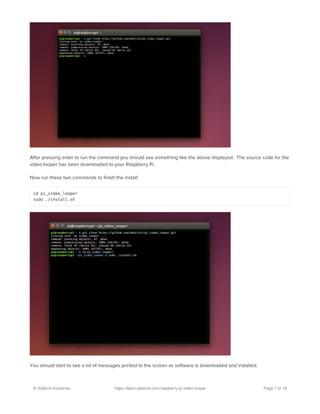

![video_looper.ini file in a text editor.
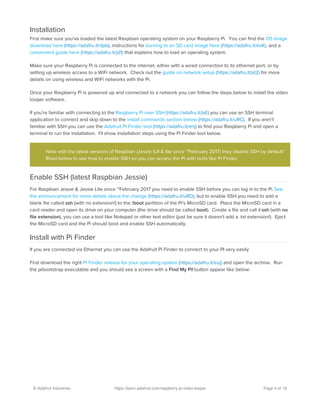
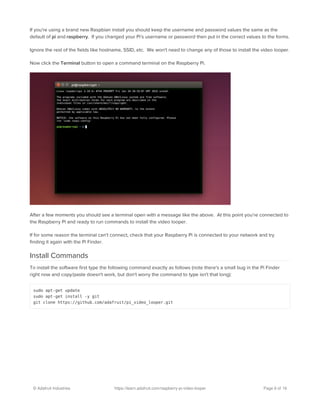
At the top of the configuration file you'll see text like:
Lines that start with # are comments which will be completely ignored. Read the comments to help understand what
options are available in the configuration.
Two of the most common options to change are at the top of the file, the video_player option and the file_read option.
video_player controls what video player will be used to play movies. You can pick one of two options for the video
player configuration:
omxplayer is the default video player and works great for playing videos in typical video formats like .avi, .mov,
etc. Videos will play with sound output over both the HDMI and analog audio output by default. However,
omxplayer has a small delay when looping videos. See the looping tips (https://adafru.it/uRE) section for hints on
how to reduce the impact of this delay in your videos.
hello_video is a more limited video player but with very fast andseamless looping of videos. Unfortunately
hello_video does not support playing audio, and requires movies to be converted into a raw H.264 stream.
Video files in formats like .avi, .mov, etc. won't play directly. You can find out how to convert a video into the
format used by hello_video on this page (https://adafru.it/uRF).
If you'd like to change from omxplayer to hello_video, update the configuration to look like (notice the omxplayer line is
commented and the hello_video line is uncommented):
file_reader controls where videos are found, either on USB drives or from a directory on the Raspberry Pi. Again you
# Main configuration file for video looper.
# You can change settings like what video player is used or where to search for
# movie files. Lines that begin with # are comments that will be ignored.
# Uncomment a line by removing its preceding # character.
# Video looper configuration block follows.
[video_looper]
# What video player will be used to play movies. Can be either omxplayer or
# hello_video. omxplayer can play common formats like avi, mov, mp4, etc. and
# with full audio and video, but it has a small ~100ms delay between loops.
# hello_video is a simpler player that doesn't do audio and only plays raw H264
# streams, but loops seemlessly. The default is omxplayer.
video_player = omxplayer
#video_player = hello_video
# Where to find movie files. Can be either usb_drive or directory. When using
# usb_drive any USB stick inserted in to the Pi will be automatically mounted
# and searched for video files (only in the root directory). Alternatively the
# directory option will search only a specified directory on the SD card for
# movie files. Note that you change the directory by modifying the setting in
# the [directory] section below. The default is usb_drive.
file_reader = usb_drive
#file_reader = directory
#video_player = omxplayer
video_player = hello_video
© Adafruit Industries https://learn.adafruit.com/raspberry-pi-video-looper Page 11 of 16](https://image.slidesharecdn.com/raspberry-pi-video-looper-200528091801/85/Raspberry-pi-video-looper-11-320.jpg)
![can pick one of two options:
usb_drive is the default and will search all attached USB drives for movies. You can plug in a USB drive and it
will automatically be searched for movies to play.
directory will search a single directory on the Raspberry Pi for movies. This is useful if you can't have a USB drive
attached to the Raspberry Pi.
If you'd like to change from usb_drive to directory, update the configuration to look like:
To choose the directory that will be used for movies, scroll down to this part of the configuration and change the value
of the path configuration:
There are more setting in the full configuration file (https://adafru.it/evS) which will change video looper's behavior and
appearance, like if it prints messages on the screen, the color of the background, and more. It's not common to
change these settings but you can read through the the comments in the configuration to learn more about them.
Once you've finished editing the configuration file you should save it, dismount the micro SD card from your computer,
and insert the card back in the Raspberry Pi. Boot up the Raspberry Pi and video looper should load the updated
configuration.
Disable Video Looper
Once installed video looper will run automatically every time the Raspberry Pi is booted. If you'd like to stop or disable
video looper you have a few options available.
To temporarily stop video looper, connect to the Raspberry Pi in a terminal/SSH session (you can use Pi Finder like
mentioned in the installation) and run this command:
After a few moments video looper should stop playing movies and exit. TVideo looper will not run again until the
Raspberry Pi is rebooted.
To permanently disable video looper, i.e. to prevent it from ever starting on boot again, you can run a small script
included with the video looper code. Connect to the Raspberry Pi in a terminal/SSH session and navigate to the folder
where video_looper was downloaded. If you followed the installation in this guide then run:
Now run the disable script by executing:
#file_reader = usb_drive
file_reader = directory
# Directory file reader configuration follows.
[directory]
# The path to search for movies when using the directory file reader.
path = /home/pi
sudo supervisorctl stop video_looper
cd pi_video_looper
© Adafruit Industries https://learn.adafruit.com/raspberry-pi-video-looper Page 12 of 16](https://image.slidesharecdn.com/raspberry-pi-video-looper-200528091801/85/Raspberry-pi-video-looper-12-320.jpg)

This document provides instructions for setting up a Raspberry Pi to continuously loop videos using software called the Raspberry Pi Video Looper. It discusses downloading and installing the necessary software onto the Raspberry Pi. Once installed, videos placed on a USB drive connected to the Pi will play sequentially in a loop. The software is optimized to minimize delays between consecutive videos for a seamless viewing experience. Customizations like changing the video source or disabling on-screen messages can be done by editing the software's configuration file.


