







Model Basics
Business Logic Goes Here
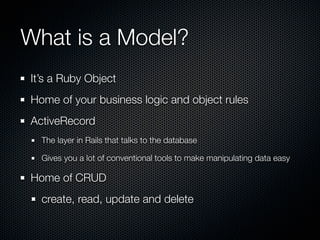
What is a Model?
It’s a Ruby Object
Home of your business logic and object rules
ActiveRecord
  The layer in Rails that talks to the database

  Gives you a lot of conventional tools to make manipulating data easy

Home of CRUD
  create, read, update and delete
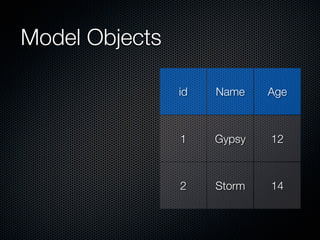
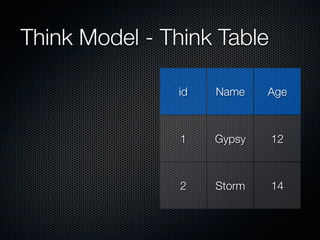
Think Model - Think Table

               id   Name    Age


                1   Gypsy   12


                2   Storm   14
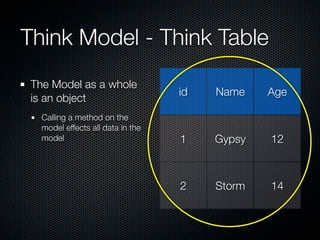
Think Model - Think Table
 The Model as a whole
                                   id   Name    Age
 is an object
   Calling a method on the
   model effects all data in the
   model                           1    Gypsy   12


                                   2    Storm   14
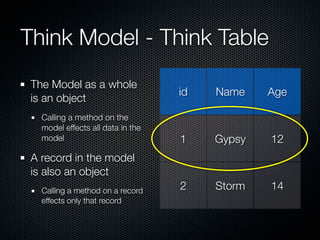
Think Model - Think Table
 The Model as a whole
                                   id   Name    Age
 is an object
   Calling a method on the
   model effects all data in the
   model                           1    Gypsy   12
 A record in the model
 is also an object
   Calling a method on a record    2    Storm   14
   effects only that record
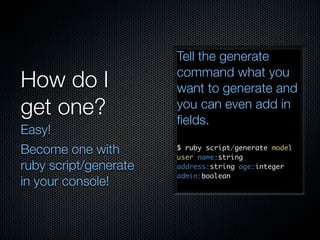
How do I
get one?
How do I
get one?
Easy!
Become one with
ruby script/generate
in your console!
Tell the generate
                       command what you
How do I               want to generate and
get one?               you can even add in
                       fields.
Easy!
Become one with        $ ruby script/generate model
                       user name:string
ruby script/generate   address:string age:integer
                       admin:boolean
in your console!
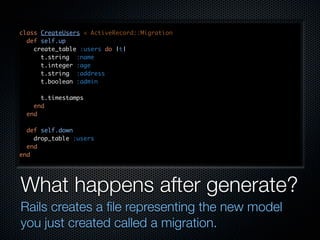
class CreateUsers < ActiveRecord::Migration
  def self.up
    create_table :users do |t|
      t.string :name
      t.integer :age
      t.string :address
      t.boolean :admin

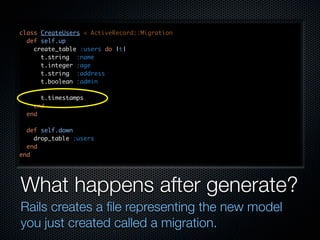
      t.timestamps
    end
  end

  def self.down
    drop_table :users
  end
end


What happens after generate?
Rails creates a file representing the new model
you just created called a migration.
class CreateUsers < ActiveRecord::Migration
  def self.up
    create_table :users do |t|
      t.string :name
      t.integer :age
      t.string :address
      t.boolean :admin

      t.timestamps
    end
  end

  def self.down
    drop_table :users
  end
end


What happens after generate?
Rails creates a file representing the new model
you just created called a migration.
Magic Fields
Magic Fields
Rails adds a few magic fields to your model
Magic Fields
Rails adds a few magic fields to your model
  id - this is the record’s unique id. Every model has
  one, even though it doesn’t appear in the migration
Magic Fields
Rails adds a few magic fields to your model
  id - this is the record’s unique id. Every model has
  one, even though it doesn’t appear in the migration
  timestamps
Magic Fields
Rails adds a few magic fields to your model
  id - this is the record’s unique id. Every model has
  one, even though it doesn’t appear in the migration
  timestamps
    created_at - puts a time stamp when a new record
    is created
Magic Fields
Rails adds a few magic fields to your model
  id - this is the record’s unique id. Every model has
  one, even though it doesn’t appear in the migration
  timestamps
    created_at - puts a time stamp when a new record
    is created
    updated_at - puts a time stamp when a record is
    changed
So I have this migration.
Now what?
 Generating the model
 is half the battle
 Now you have to tie it
 into the Rails
 infrastructure
 How? Why, run a rake
 task, of course!
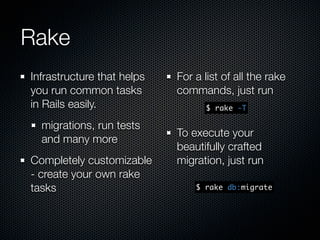
Rake
Rake
Infrastructure that helps
you run common tasks
in Rails easily.
  migrations, run tests
  and many more
Rake
Infrastructure that helps
you run common tasks
in Rails easily.
  migrations, run tests
  and many more
Completely customizable
- create your own rake
tasks
Rake
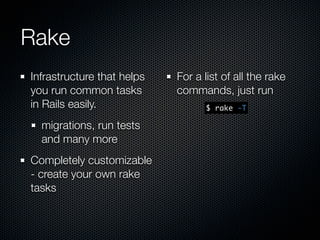
Infrastructure that helps   For a list of all the rake
you run common tasks        commands, just run
in Rails easily.                  $ rake -T

  migrations, run tests
  and many more
Completely customizable
- create your own rake
tasks
Rake
Infrastructure that helps   For a list of all the rake
you run common tasks        commands, just run
in Rails easily.                  $ rake -T

  migrations, run tests
                            To execute your
  and many more
                            beautifully crafted
Completely customizable     migration, just run
- create your own rake
tasks                           $ rake db:migrate
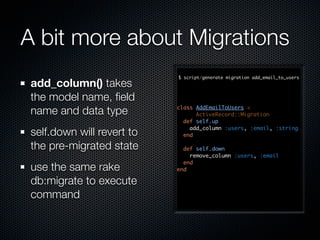
A bit more about Migrations
                            $ script/generate migration add_email_to_users
 add_column() takes
 the model name, field
 name and data type         class AddEmailToUsers <
                                  ActiveRecord::Migration
                              def self.up
                                add_column :users, :email, :string
 self.down will revert to     end

 the pre-migrated state       def self.down
                                remove_column :users, :email
                              end
 use the same rake          end

 db:migrate to execute
 command
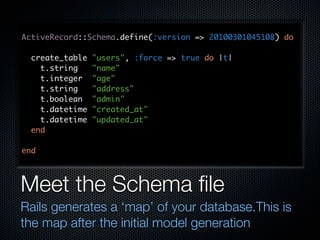
ActiveRecord::Schema.define(:version => 20100301045108) do

  create_table   "users", :force => true do |t|
    t.string     "name"
    t.integer    "age"
    t.string     "address"
    t.boolean    "admin"
    t.datetime   "created_at"
    t.datetime   "updated_at"
  end

end


Meet the Schema file
Rails generates a ‘map’ of your database.This is
the map after the initial model generation
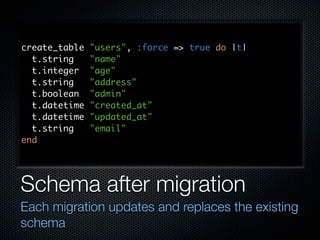
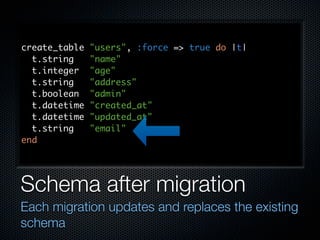
create_table   "users", :force => true do |t|
  t.string     "name"
  t.integer    "age"
  t.string     "address"
  t.boolean    "admin"
  t.datetime   "created_at"
  t.datetime   "updated_at"
  t.string     "email"
end


Schema after migration
Each migration updates and replaces the existing
schema
create_table   "users", :force => true do |t|
  t.string     "name"
  t.integer    "age"
  t.string     "address"
  t.boolean    "admin"
  t.datetime   "created_at"
  t.datetime   "updated_at"
  t.string     "email"
end


Schema after migration
Each migration updates and replaces the existing
schema
Let’s play with some CRUD

CRUD stands for Create, Read, Update and Delete
Let’s play with some CRUD

CRUD stands for Create, Read, Update and Delete
These are the heart of ActiveRecord and the primary
purpose of the model
Let’s play with some CRUD

CRUD stands for Create, Read, Update and Delete
These are the heart of ActiveRecord and the primary
purpose of the model
Between these four actions, you can accomplish pretty
much anything in your database
C is for Create
C is for Create
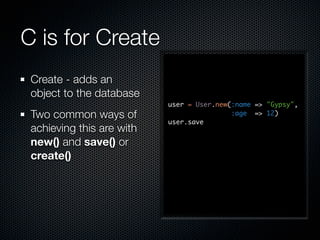
 Create - adds an
 object to the database
C is for Create
 Create - adds an
 object to the database
                           user = User.new(:name => "Gypsy",
 Two common ways of                        :age => 12)
                           user.save
 achieving this are with
 new() and save() or
 create()
C is for Create
 Create - adds an
 object to the database
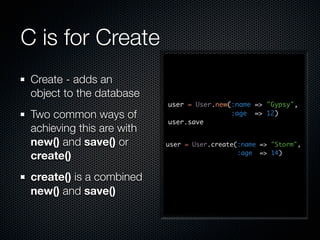
                           user = User.new(:name => "Gypsy",
 Two common ways of                        :age => 12)
                           user.save
 achieving this are with
 new() and save() or       user = User.create(:name => "Storm",

 create()                                     :age => 14)


 create() is a combined
 new() and save()
R is for Read

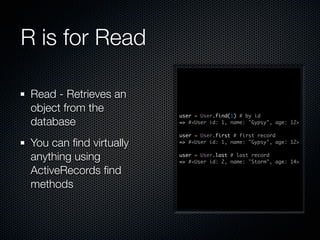
 Read - Retrieves an
 object from the
                         user = User.find(1) # by id
 database                => #<User id: 1, name: "Gypsy", age: 12>

                         user = User.first # first record
 You can find virtually   => #<User id: 1, name: "Gypsy", age: 12>


 anything using          user = User.last # last record
                         => #<User id: 2, name: "Storm", age: 14>

 ActiveRecords find
 methods
Some more Read methods

                         user = User.find_by_name("Storm")
You can pass in          => #<User id: 2, name: "Storm", age: 14, >


arguments to find_by()    users = User.all # returns an array of all users
                         => [#<User id: 1, name: "Gypsy", age: 12>,
                             #<User id: 2, name: "Storm", age: 14>]

You an also use SQL to   user = User.all(:order => 'age DESC')
                         => [#<User id: 2, name: "Storm", age: 14>,
locate data within           #<User id: 1, name: "Gypsy", age: 12>]


specific criteria         user = User.first(:conditions => 'age > 12')
                         => #<User id: 2, name: "Storm", age: 14>
U is for Update

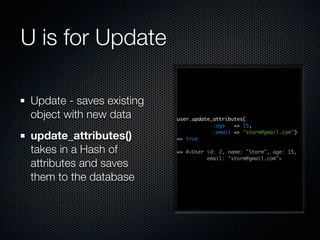
 Update - saves existing
 object with new data      user.update_attributes(
                                       :age   => 15,

 update_attributes()       => true
                                       :email => "storm@gmail.com")


 takes in a Hash of        => #<User id: 2, name: "Storm", age: 15,
                                     email: "storm@gmail.com">
 attributes and saves
 them to the database
D is for Delete

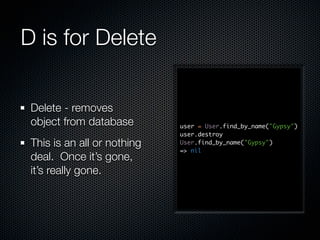
 Delete - removes
 object from database        user = User.find_by_name("Gypsy")
                             user.destroy
 This is an all or nothing   User.find_by_name("Gypsy")
                             => nil
 deal. Once it’s gone,
 it’s really gone.
Fetching and updating
individual attributes
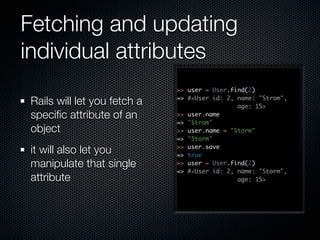
                             >> user = User.find(2)

Rails will let you fetch a   => #<User id: 2, name: "Strom",
                                              age: 15>
specific attribute of an      >> user.name
                             => "Strom"
object                       >> user.name = "Storm"
                             => "Storm"

it will also let you         >> user.save
                             => true
manipulate that single       >> user = User.find(2)
                             => #<User id: 2, name: "Storm",
attribute                                     age: 15>
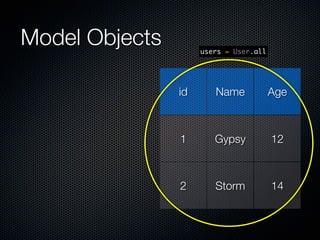
Model Objects

                id   Name    Age


                1    Gypsy   12


                2    Storm   14
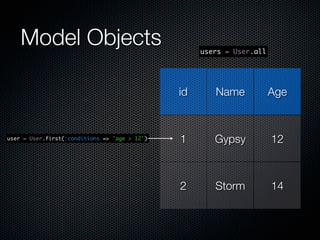
Model Objects        users = User.all


                id      Name            Age


                1       Gypsy           12


                2       Storm           14
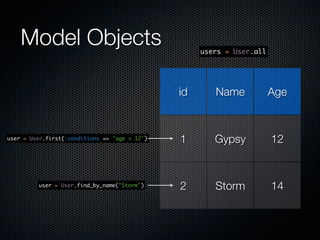
Model Objects                                   users = User.all


                                               id      Name            Age


user = User.first(:conditions => 'age > 12')   1       Gypsy           12


                                               2       Storm           14
Model Objects                                   users = User.all


                                               id      Name            Age


user = User.first(:conditions => 'age > 12')   1       Gypsy           12


         user = User.find_by_name("Storm")     2       Storm           14
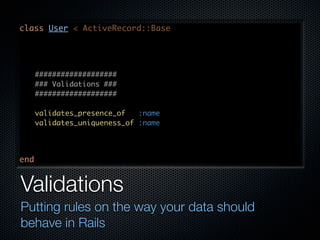
class User < ActiveRecord::Base


      ###################
      ### Validations ###
      ###################

      validates_presence_of   :name
      validates_uniqueness_of :name


end


Validations
Putting rules on the way your data should
behave in Rails
Validation Power
Validation Power

Adding validations ensures you get the data you are
expecting
Validation Power

Adding validations ensures you get the data you are
expecting
Enforces certain rules and expectations so you can
count on them later
Validation Power

Adding validations ensures you get the data you are
expecting
Enforces certain rules and expectations so you can
count on them later
Rails has several predefined validations
Validation Power

Adding validations ensures you get the data you are
expecting
Enforces certain rules and expectations so you can
count on them later
Rails has several predefined validations
  validates_uniqueness_of, validates_presence_of,
  validates_numericality_of, validates_format_of, etc
validates_format_of :email,
                    :with => /A[^s@]+@[^s@]+.[^s@]+z/,
                    :message => "is not a valid address"


validates_presence_of   :name, :age


Always call the type of validation followed by the
method or methods and any additional rules,
such as formatting and messages
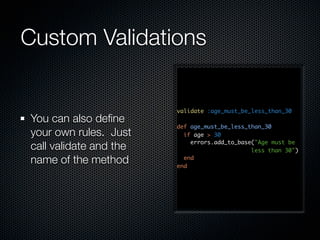
Custom Validations


                        validate :age_must_be_less_than_30
You can also define
                        def age_must_be_less_than_30
your own rules. Just      if age > 30
                            errors.add_to_base("Age must be
call validate and the                         less than 30")
name of the method        end
                        end
>>   user = User.new(:name => "Tipper", :age => 45)
 =>   #<User id: nil, name: "Tipper", age: 45>
 >>   user.save
 =>   false
 >>   user.errors.full_messages
 =>   ["Age must be less than 30"]


Validation explosion
When a record won’t save, calling
errors.full_messages will show you what went wrong
Questions?
Starting a Database Lab
Your book has instructions for building your first
models with validations and creating some data

Rails Model Basics

  • 1.
  • 2.
    What is aModel? It’s a Ruby Object Home of your business logic and object rules ActiveRecord The layer in Rails that talks to the database Gives you a lot of conventional tools to make manipulating data easy Home of CRUD create, read, update and delete
  • 3.
    Think Model -Think Table id Name Age 1 Gypsy 12 2 Storm 14
  • 4.
    Think Model -Think Table The Model as a whole id Name Age is an object Calling a method on the model effects all data in the model 1 Gypsy 12 2 Storm 14
  • 5.
    Think Model -Think Table The Model as a whole id Name Age is an object Calling a method on the model effects all data in the model 1 Gypsy 12 A record in the model is also an object Calling a method on a record 2 Storm 14 effects only that record
  • 7.
  • 8.
    How do I getone? Easy! Become one with ruby script/generate in your console!
  • 9.
    Tell the generate command what you How do I want to generate and get one? you can even add in fields. Easy! Become one with $ ruby script/generate model user name:string ruby script/generate address:string age:integer admin:boolean in your console!
  • 10.
    class CreateUsers <ActiveRecord::Migration def self.up create_table :users do |t| t.string :name t.integer :age t.string :address t.boolean :admin t.timestamps end end def self.down drop_table :users end end What happens after generate? Rails creates a file representing the new model you just created called a migration.
  • 11.
    class CreateUsers <ActiveRecord::Migration def self.up create_table :users do |t| t.string :name t.integer :age t.string :address t.boolean :admin t.timestamps end end def self.down drop_table :users end end What happens after generate? Rails creates a file representing the new model you just created called a migration.
  • 12.
  • 13.
    Magic Fields Rails addsa few magic fields to your model
  • 14.
    Magic Fields Rails addsa few magic fields to your model id - this is the record’s unique id. Every model has one, even though it doesn’t appear in the migration
  • 15.
    Magic Fields Rails addsa few magic fields to your model id - this is the record’s unique id. Every model has one, even though it doesn’t appear in the migration timestamps
  • 16.
    Magic Fields Rails addsa few magic fields to your model id - this is the record’s unique id. Every model has one, even though it doesn’t appear in the migration timestamps created_at - puts a time stamp when a new record is created
  • 17.
    Magic Fields Rails addsa few magic fields to your model id - this is the record’s unique id. Every model has one, even though it doesn’t appear in the migration timestamps created_at - puts a time stamp when a new record is created updated_at - puts a time stamp when a record is changed
  • 18.
    So I havethis migration. Now what? Generating the model is half the battle Now you have to tie it into the Rails infrastructure How? Why, run a rake task, of course!
  • 19.
  • 20.
    Rake Infrastructure that helps yourun common tasks in Rails easily. migrations, run tests and many more
  • 21.
    Rake Infrastructure that helps yourun common tasks in Rails easily. migrations, run tests and many more Completely customizable - create your own rake tasks
  • 22.
    Rake Infrastructure that helps For a list of all the rake you run common tasks commands, just run in Rails easily. $ rake -T migrations, run tests and many more Completely customizable - create your own rake tasks
  • 23.
    Rake Infrastructure that helps For a list of all the rake you run common tasks commands, just run in Rails easily. $ rake -T migrations, run tests To execute your and many more beautifully crafted Completely customizable migration, just run - create your own rake tasks $ rake db:migrate
  • 24.
    A bit moreabout Migrations $ script/generate migration add_email_to_users add_column() takes the model name, field name and data type class AddEmailToUsers < ActiveRecord::Migration def self.up add_column :users, :email, :string self.down will revert to end the pre-migrated state def self.down remove_column :users, :email end use the same rake end db:migrate to execute command
  • 25.
    ActiveRecord::Schema.define(:version => 20100301045108)do create_table "users", :force => true do |t| t.string "name" t.integer "age" t.string "address" t.boolean "admin" t.datetime "created_at" t.datetime "updated_at" end end Meet the Schema file Rails generates a ‘map’ of your database.This is the map after the initial model generation
  • 26.
    create_table "users", :force => true do |t| t.string "name" t.integer "age" t.string "address" t.boolean "admin" t.datetime "created_at" t.datetime "updated_at" t.string "email" end Schema after migration Each migration updates and replaces the existing schema
  • 27.
    create_table "users", :force => true do |t| t.string "name" t.integer "age" t.string "address" t.boolean "admin" t.datetime "created_at" t.datetime "updated_at" t.string "email" end Schema after migration Each migration updates and replaces the existing schema
  • 28.
  • 29.
    Let’s play withsome CRUD CRUD stands for Create, Read, Update and Delete
  • 30.
    Let’s play withsome CRUD CRUD stands for Create, Read, Update and Delete These are the heart of ActiveRecord and the primary purpose of the model
  • 31.
    Let’s play withsome CRUD CRUD stands for Create, Read, Update and Delete These are the heart of ActiveRecord and the primary purpose of the model Between these four actions, you can accomplish pretty much anything in your database
  • 32.
    C is forCreate
  • 33.
    C is forCreate Create - adds an object to the database
  • 34.
    C is forCreate Create - adds an object to the database user = User.new(:name => "Gypsy", Two common ways of :age => 12) user.save achieving this are with new() and save() or create()
  • 35.
    C is forCreate Create - adds an object to the database user = User.new(:name => "Gypsy", Two common ways of :age => 12) user.save achieving this are with new() and save() or user = User.create(:name => "Storm", create() :age => 14) create() is a combined new() and save()
  • 36.
    R is forRead Read - Retrieves an object from the user = User.find(1) # by id database => #<User id: 1, name: "Gypsy", age: 12> user = User.first # first record You can find virtually => #<User id: 1, name: "Gypsy", age: 12> anything using user = User.last # last record => #<User id: 2, name: "Storm", age: 14> ActiveRecords find methods
  • 37.
    Some more Readmethods user = User.find_by_name("Storm") You can pass in => #<User id: 2, name: "Storm", age: 14, > arguments to find_by() users = User.all # returns an array of all users => [#<User id: 1, name: "Gypsy", age: 12>, #<User id: 2, name: "Storm", age: 14>] You an also use SQL to user = User.all(:order => 'age DESC') => [#<User id: 2, name: "Storm", age: 14>, locate data within #<User id: 1, name: "Gypsy", age: 12>] specific criteria user = User.first(:conditions => 'age > 12') => #<User id: 2, name: "Storm", age: 14>
  • 38.
    U is forUpdate Update - saves existing object with new data user.update_attributes( :age => 15, update_attributes() => true :email => "storm@gmail.com") takes in a Hash of => #<User id: 2, name: "Storm", age: 15, email: "storm@gmail.com"> attributes and saves them to the database
  • 39.
    D is forDelete Delete - removes object from database user = User.find_by_name("Gypsy") user.destroy This is an all or nothing User.find_by_name("Gypsy") => nil deal. Once it’s gone, it’s really gone.
  • 40.
    Fetching and updating individualattributes >> user = User.find(2) Rails will let you fetch a => #<User id: 2, name: "Strom", age: 15> specific attribute of an >> user.name => "Strom" object >> user.name = "Storm" => "Storm" it will also let you >> user.save => true manipulate that single >> user = User.find(2) => #<User id: 2, name: "Storm", attribute age: 15>
  • 41.
    Model Objects id Name Age 1 Gypsy 12 2 Storm 14
  • 42.
    Model Objects users = User.all id Name Age 1 Gypsy 12 2 Storm 14
  • 43.
    Model Objects users = User.all id Name Age user = User.first(:conditions => 'age > 12') 1 Gypsy 12 2 Storm 14
  • 44.
    Model Objects users = User.all id Name Age user = User.first(:conditions => 'age > 12') 1 Gypsy 12 user = User.find_by_name("Storm") 2 Storm 14
  • 45.
    class User <ActiveRecord::Base ################### ### Validations ### ################### validates_presence_of :name validates_uniqueness_of :name end Validations Putting rules on the way your data should behave in Rails
  • 46.
  • 47.
    Validation Power Adding validationsensures you get the data you are expecting
  • 48.
    Validation Power Adding validationsensures you get the data you are expecting Enforces certain rules and expectations so you can count on them later
  • 49.
    Validation Power Adding validationsensures you get the data you are expecting Enforces certain rules and expectations so you can count on them later Rails has several predefined validations
  • 50.
    Validation Power Adding validationsensures you get the data you are expecting Enforces certain rules and expectations so you can count on them later Rails has several predefined validations validates_uniqueness_of, validates_presence_of, validates_numericality_of, validates_format_of, etc
  • 51.
    validates_format_of :email, :with => /A[^s@]+@[^s@]+.[^s@]+z/, :message => "is not a valid address" validates_presence_of :name, :age Always call the type of validation followed by the method or methods and any additional rules, such as formatting and messages
  • 52.
    Custom Validations validate :age_must_be_less_than_30 You can also define def age_must_be_less_than_30 your own rules. Just if age > 30 errors.add_to_base("Age must be call validate and the less than 30") name of the method end end
  • 53.
    >> user = User.new(:name => "Tipper", :age => 45) => #<User id: nil, name: "Tipper", age: 45> >> user.save => false >> user.errors.full_messages => ["Age must be less than 30"] Validation explosion When a record won’t save, calling errors.full_messages will show you what went wrong
  • 54.
  • 55.
    Starting a DatabaseLab Your book has instructions for building your first models with validations and creating some data