8/31/15 | Code Bloger
codebloger.blogspot.in/2012/02/creating-template-columns.html 1/3
Home
Wednesday, February 22, 2012
Creating template columns programmatically for Telerik Rad
Grid
protected void Page_Init(object sender, EventArgs e)
{
RadGrid grid = new RadGrid();
grid.AutoGenerateColumns = false;
grid.DataSourceID = "SqlDataSource1";
string templateColumnName = "ContactName";
GridTemplateColumn templateColumn = new GridTemplateColumn();
templateColumn.ItemTemplate = new MyTemplate(templateColumnName);
templateColumn.HeaderText = templateColumnName;
GridBoundColumn boundColumn1 = new GridBoundColumn();
boundColumn1.DataField = "ContactName";
boundColumn1.UniqueName = "ConactName";
boundColumn1.HeaderText = "Bound Column";
grid.MasterTableView.Columns.Add(templateColumn);
grid.MasterTableView.Columns.Add(boundColumn1);
grid.AllowPaging = true;
grid.PageSize = 3;
grid.Skin = "Outlook";
PlaceHolder1.Controls.Add(grid);
}
private class MyTemplate : ITemplate
{
protected LiteralControl lControl;
protected RequiredFieldValidator validatorTextBox;
protected HyperLink searchGoogle;
protected TextBox textBox;
protected CheckBox boolValue;
private string colname;
public MyTemplate(string cName)
{
colname = cName;
}
public void InstantiateIn(System.Web.UI.Control container)
{
lControl = new LiteralControl();
lControl.ID = "lControl";
lControl.DataBinding += new EventHandler(lControl_DataBinding);
textBox = new TextBox();
textBox.ID = "templateColumnTextBox";
validatorTextBox = new RequiredFieldValidator();
validatorTextBox.ControlToValidate = "templateColumnTextBox";
validatorTextBox.ErrorMessage = "*";
searchGoogle = new HyperLink();
searchGoogle.ID = "searchGoogle";
searchGoogle.DataBinding += new EventHandler(searchGoogle_DataBinding);
boolValue = new CheckBox();
About Me
A LEX BROW N
Expert in C#, .NET, and T-SQL
with database analysis and
design and having more then 6
years of experience in Microsoft.NET
Technology.
Popular Posts
Creating template columns programmatically for
Telerik Rad Grid
ASP.NET Multiple File Upload With Drag & Drop
and Progress Bar Using HTML5
Ajax Enabled Popup Message Box in C#
set selected value after jQuery populated
Dropdownlist
Laptop Battery Full Charge Notification
jQuery methods and UpdatePanel
iPhone 5
Convert Generic List to DataTable
Pivot tables in SQL Server
Gets Fast Visual Studio 2010
Latest Technology News
Ashley Madison site 'still growing'
Facebook tool to tackle video theft
ICYMI: Gunshot broadcast live online
Are we addicted to technology?
VIDEO: Boeing laser shoots drone from sky
Blog Archive
▼ 2012 (14)
► September (4)
► August (1)
► July (3)
► May (2)
▼ February (4)
Tags
Asp.Net
(8) C# (3)
Jquery (4)
Visual Studio (4)
CO DE BLO G ER
/*First, solve the problem. Then, write the code*/
Ajax (1)
HTML5
(1) JavaScript (2)
RadGrid
(2) SQL (2) VB.NET (1)
8/31/15 | Code Bloger
codebloger.blogspot.in/2012/02/creating-template-columns.html 2/3
boolValue.ID = "boolValue";
boolValue.DataBinding += new EventHandler(boolValue_DataBinding);
boolValue.Enabled = false;
Table table = new Table();
TableRow row1 = new TableRow();
TableRow row2 = new TableRow();
TableCell cell11 = new TableCell();
TableCell cell12 = new TableCell();
TableCell cell21 = new TableCell();
TableCell cell22 = new TableCell();
row1.Cells.Add(cell11);
row1.Cells.Add(cell12);
row2.Cells.Add(cell21);
row2.Cells.Add(cell22);
table.Rows.Add(row1);
table.Rows.Add(row2);
cell11.Text = colname + ": ";
cell12.Controls.Add(lControl);
cell21.Text = "Search Google for: ";
cell22.Controls.Add(searchGoogle);
container.Controls.Add(textBox);
container.Controls.Add(validatorTextBox);
container.Controls.Add(table);
container.Controls.Add(new LiteralControl("
"));
container.Controls.Add(boolValue);
}
void boolValue_DataBinding(object sender, EventArgs e)
{
CheckBox cBox = (CheckBox)sender;
GridDataItem container = (GridDataItem)cBox.NamingContainer;
cBox.Checked = (bool)((DataRowView)container.DataItem)["Bool"];
}
void searchGoogle_DataBinding(object sender, EventArgs e)
{
HyperLink link = (HyperLink)sender;
GridDataItem container = (GridDataItem)link.NamingContainer;
link.Text = ((DataRowView)container.DataItem)[colname].ToString();
link.NavigateUrl = "http://www.google.com/search?hl=en&q=" + ((DataRowView)cont
ainer.DataItem)["ContactName"].ToString() + "&btnG=Google+Search";
}
public void lControl_DataBinding(object sender, EventArgs e)
{
LiteralControl l = (LiteralControl)sender;
GridDataItem container = (GridDataItem)l.NamingContainer;
l.Text = ((DataRowView)container.DataItem)[colname].ToString() + "
";
}
}
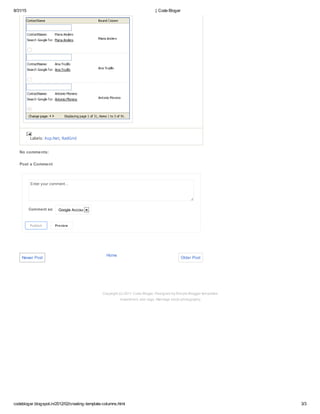
The code above result in the following grid:
Pivot tables in SQL
Server
Creating template
columns
programmatically
for Tel...
set selected value
after jQuery
populated
Dropdown...
jQuery methods
and
UpdatePanel
Who are visited
Live Traffic Feed
Real-time view · Get Feedjit
A visitor from Chennai, Tamil
Nadu viewed "| Code Bloger" 3
mins ago
A visitor from Bangalore,
Karnataka viewed "| Code Bloger"
6 hrs 37 mins ago
A visitor from Ahmedabad,
Gujarat viewed "| Code Bloger" 3
days 4 hours ago
A visitor from France viewed "|
Code Bloger" 3 days 5 hours ago
A visitor from Columbus, Ohio
viewed "| Code Bloger" 3 days 23
hours ago
A visitor from Manila viewed "|
Code Bloger" 4 days 5 hours ago
A visitor from Round Rock, Texas
viewed "| Code Bloger" 4 days 6
hours ago
A visitor from Lima viewed "|
Code Bloger" 4 days 11 hours ago
A visitor from Fremont, California
viewed "| Code Bloger" 4 days 17
hours ago
A visitor from Minneapolis,
Minnesota viewed "| Code Bloger"
4 days 18 hours ago
8/31/15 | Code Bloger
codebloger.blogspot.in/2012/02/creating-template-columns.html 3/3
Newer Post Older Post
Labels: Asp.Net, RadGrid
No comments:
Post a Comment
Enter your comment...
Comment as: Google Account
Publish Preview
Home
Copyright (c) 2011 Code Bloger. Designed by Simple Blogger templates
Investment, skin tags, Marriage stock photography

Radgrid

  • 1.
    8/31/15 | CodeBloger codebloger.blogspot.in/2012/02/creating-template-columns.html 1/3 Home Wednesday, February 22, 2012 Creating template columns programmatically for Telerik Rad Grid protected void Page_Init(object sender, EventArgs e) { RadGrid grid = new RadGrid(); grid.AutoGenerateColumns = false; grid.DataSourceID = "SqlDataSource1"; string templateColumnName = "ContactName"; GridTemplateColumn templateColumn = new GridTemplateColumn(); templateColumn.ItemTemplate = new MyTemplate(templateColumnName); templateColumn.HeaderText = templateColumnName; GridBoundColumn boundColumn1 = new GridBoundColumn(); boundColumn1.DataField = "ContactName"; boundColumn1.UniqueName = "ConactName"; boundColumn1.HeaderText = "Bound Column"; grid.MasterTableView.Columns.Add(templateColumn); grid.MasterTableView.Columns.Add(boundColumn1); grid.AllowPaging = true; grid.PageSize = 3; grid.Skin = "Outlook"; PlaceHolder1.Controls.Add(grid); } private class MyTemplate : ITemplate { protected LiteralControl lControl; protected RequiredFieldValidator validatorTextBox; protected HyperLink searchGoogle; protected TextBox textBox; protected CheckBox boolValue; private string colname; public MyTemplate(string cName) { colname = cName; } public void InstantiateIn(System.Web.UI.Control container) { lControl = new LiteralControl(); lControl.ID = "lControl"; lControl.DataBinding += new EventHandler(lControl_DataBinding); textBox = new TextBox(); textBox.ID = "templateColumnTextBox"; validatorTextBox = new RequiredFieldValidator(); validatorTextBox.ControlToValidate = "templateColumnTextBox"; validatorTextBox.ErrorMessage = "*"; searchGoogle = new HyperLink(); searchGoogle.ID = "searchGoogle"; searchGoogle.DataBinding += new EventHandler(searchGoogle_DataBinding); boolValue = new CheckBox(); About Me A LEX BROW N Expert in C#, .NET, and T-SQL with database analysis and design and having more then 6 years of experience in Microsoft.NET Technology. Popular Posts Creating template columns programmatically for Telerik Rad Grid ASP.NET Multiple File Upload With Drag & Drop and Progress Bar Using HTML5 Ajax Enabled Popup Message Box in C# set selected value after jQuery populated Dropdownlist Laptop Battery Full Charge Notification jQuery methods and UpdatePanel iPhone 5 Convert Generic List to DataTable Pivot tables in SQL Server Gets Fast Visual Studio 2010 Latest Technology News Ashley Madison site 'still growing' Facebook tool to tackle video theft ICYMI: Gunshot broadcast live online Are we addicted to technology? VIDEO: Boeing laser shoots drone from sky Blog Archive ▼ 2012 (14) ► September (4) ► August (1) ► July (3) ► May (2) ▼ February (4) Tags Asp.Net (8) C# (3) Jquery (4) Visual Studio (4) CO DE BLO G ER /*First, solve the problem. Then, write the code*/ Ajax (1) HTML5 (1) JavaScript (2) RadGrid (2) SQL (2) VB.NET (1)
  • 2.
    8/31/15 | CodeBloger codebloger.blogspot.in/2012/02/creating-template-columns.html 2/3 boolValue.ID = "boolValue"; boolValue.DataBinding += new EventHandler(boolValue_DataBinding); boolValue.Enabled = false; Table table = new Table(); TableRow row1 = new TableRow(); TableRow row2 = new TableRow(); TableCell cell11 = new TableCell(); TableCell cell12 = new TableCell(); TableCell cell21 = new TableCell(); TableCell cell22 = new TableCell(); row1.Cells.Add(cell11); row1.Cells.Add(cell12); row2.Cells.Add(cell21); row2.Cells.Add(cell22); table.Rows.Add(row1); table.Rows.Add(row2); cell11.Text = colname + ": "; cell12.Controls.Add(lControl); cell21.Text = "Search Google for: "; cell22.Controls.Add(searchGoogle); container.Controls.Add(textBox); container.Controls.Add(validatorTextBox); container.Controls.Add(table); container.Controls.Add(new LiteralControl(" ")); container.Controls.Add(boolValue); } void boolValue_DataBinding(object sender, EventArgs e) { CheckBox cBox = (CheckBox)sender; GridDataItem container = (GridDataItem)cBox.NamingContainer; cBox.Checked = (bool)((DataRowView)container.DataItem)["Bool"]; } void searchGoogle_DataBinding(object sender, EventArgs e) { HyperLink link = (HyperLink)sender; GridDataItem container = (GridDataItem)link.NamingContainer; link.Text = ((DataRowView)container.DataItem)[colname].ToString(); link.NavigateUrl = "http://www.google.com/search?hl=en&q=" + ((DataRowView)cont ainer.DataItem)["ContactName"].ToString() + "&btnG=Google+Search"; } public void lControl_DataBinding(object sender, EventArgs e) { LiteralControl l = (LiteralControl)sender; GridDataItem container = (GridDataItem)l.NamingContainer; l.Text = ((DataRowView)container.DataItem)[colname].ToString() + " "; } } The code above result in the following grid: Pivot tables in SQL Server Creating template columns programmatically for Tel... set selected value after jQuery populated Dropdown... jQuery methods and UpdatePanel Who are visited Live Traffic Feed Real-time view · Get Feedjit A visitor from Chennai, Tamil Nadu viewed "| Code Bloger" 3 mins ago A visitor from Bangalore, Karnataka viewed "| Code Bloger" 6 hrs 37 mins ago A visitor from Ahmedabad, Gujarat viewed "| Code Bloger" 3 days 4 hours ago A visitor from France viewed "| Code Bloger" 3 days 5 hours ago A visitor from Columbus, Ohio viewed "| Code Bloger" 3 days 23 hours ago A visitor from Manila viewed "| Code Bloger" 4 days 5 hours ago A visitor from Round Rock, Texas viewed "| Code Bloger" 4 days 6 hours ago A visitor from Lima viewed "| Code Bloger" 4 days 11 hours ago A visitor from Fremont, California viewed "| Code Bloger" 4 days 17 hours ago A visitor from Minneapolis, Minnesota viewed "| Code Bloger" 4 days 18 hours ago
  • 3.
    8/31/15 | CodeBloger codebloger.blogspot.in/2012/02/creating-template-columns.html 3/3 Newer Post Older Post Labels: Asp.Net, RadGrid No comments: Post a Comment Enter your comment... Comment as: Google Account Publish Preview Home Copyright (c) 2011 Code Bloger. Designed by Simple Blogger templates Investment, skin tags, Marriage stock photography