Download to read offline


![private _getListItemEntityTypeFullName(context: IWebPartContext):Promise<string> {
if (this._listItemEntityTypeFullName){
return Promise.resolve(this._listItemEntityTypeFullName);
}
return context.spHttpClient.get(context.pageContext["web"]["absoluteUrl"]
+ `/_api/web/lists/GetByTitle('${this._listName}')`, SPHttpClientConfigurations.v1)
.then((response: Response) => {
return response.json()
})
.then((value) => {
this._listItemEntityTypeFullName = value["ListItemEntityTypeFullName"];
return value["ListItemEntityTypeFullName"];
});
}](https://image.slidesharecdn.com/spfx-workingwithsharepointdata-181030205110/85/SPFx-Working-with-SharePoint-Content-5-320.jpg)
![export interface IListItem {
Id: number;
Title: string;
}
public getListItems(): Promise<IListItem[]> {
return this.context.spHttpClient.get(this.context.pageContext["web"]["absoluteUrl"]
+ `/_api/web/lists/GetByTitle('${this._listName}')/items?$select=Id,Title`, SPHttpClient.configurations.v1
)
.then((response: Response): Promise<any> => {
return response.json();
})
.then((data: any) : IListItem[] =>{
this._showSuccess(`Successfully loaded ${data.value.length} items`);
return data.value;
}, (error: any): void => {
this._showError(`Loading all items failed with error: ${error}`);
}) as Promise<IListItem[]>;
}](https://image.slidesharecdn.com/spfx-workingwithsharepointdata-181030205110/85/SPFx-Working-with-SharePoint-Content-6-320.jpg)
![const reqJSON: any = JSON.parse(
`{
"@odata.type": "${this._listItemEntityTypeFullName}",
"Title": "${title}"
}`);
this.context.spHttpClient.post(
this.context.pageContext["web"]["absoluteUrl"] +
`/_api/web/lists/GetByTitle('${this._listName}')
/items?$expand=ListItemAllFields`,
SPHttpClient.configurations.v1,
{
body: JSON.stringify(reqJSON),
headers: {
"accept": "application/json",
"content-type": "application/json"
}
}
)
.then((response: SPHttpClientResponse): Promise<IListItem> => {
return response.json();
})](https://image.slidesharecdn.com/spfx-workingwithsharepointdata-181030205110/85/SPFx-Working-with-SharePoint-Content-7-320.jpg)
![const reqJSON: any = JSON.parse(
`{
"@odata.type": "${this._listItemEntityTypeFullName}",
"Title": "${title}"
}`);
this.context.spHttpClient.post(
this.context.pageContext["web"]["absoluteUrl"] +
`/_api/web/lists/GetByTitle('${this._listName}')/items(${Id})`,
SPHttpClient.configurations.v1,
{
body: JSON.stringify(reqJSON),
headers: {
"IF-MATCH": "*",
"X-HTTP-Method":"MERGE",
"accept": "application/json",
"content-type": "application/json"
}
})
.then((response: SPHttpClientResponse): void => {
this._showSuccess(`Item with ID: ${Id} successfully updated`);
}, (error: any): void => {
this._showError(`Error updating item: + ${error}`);
});](https://image.slidesharecdn.com/spfx-workingwithsharepointdata-181030205110/85/SPFx-Working-with-SharePoint-Content-8-320.jpg)
![this.context.spHttpClient.post(
this.context.pageContext["web"]["absoluteUrl"] +
`/_api/web/lists/GetByTitle('${this._listName}')/items(${Id})`,
SPHttpClient.configurations.v1,
{
headers: {
"IF-MATCH": "*",
"X-HTTP-Method":"DELETE",
"accept": "application/json",
"content-type": "application/json"
}
})
.then((response: SPHttpClientResponse): void => {
ContainerNode.parentNode.removeChild(ContainerNode);
this._showSuccess(`Item with ID: ${Id} successfully deleted`);
}, (error: any): void => {
this._showError(`Error deleting item: ${error}`);
});](https://image.slidesharecdn.com/spfx-workingwithsharepointdata-181030205110/85/SPFx-Working-with-SharePoint-Content-9-320.jpg)
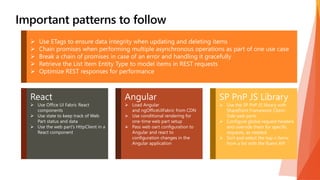






The document outlines a series of methods and configurations for interacting with SharePoint lists using SPHttpClient in a web part context. It includes functions for retrieving, creating, updating, and deleting list items, as well as guidance on using Office UI Fabric components and best practices for managing web part data and status. Additionally, it emphasizes the use of reusable components and required libraries such as SP PnP JS within the SharePoint framework.


