R - Practice
> 1 + 1
[1] 2
-----------
> 100:130
[1] 100 101 102 103 104 105 106 107 108 109 110 111 112 [14] 113
114 115 116 117 118 119 120 121 122 123 124 125 [25] 126 127 128
129 130
Error
> 3 % 5
Error: unexpected input in "3 % 5“
------
If you type an incomplete command and press Enter, R will display a + prompt,
which means it is waiting for you to type the rest of your command. Either finish
the command or hit Escape to start over:
> 5 -
+
+
1
[1] 4
Objects
R lets you save data by storing it inside an R object.
What’s an object?
Just a name that you can use to call up stored data. For example, you
can save data into an object like a or b
a <- 1
a # output: 1
a + 2 # output : 3
Object creation
< followed by –
die <- 1:6
die # Output: 1 2 3 4 5 6
Rules for Object creation:
name an object in R almost anything you want, but there are a few rules.
First, a name cannot start with a number.
Second, a name cannot use some special symbols, like ^, !, $, @, +, -, /, or *
Case sensitive
• R also understands capitalization (or is case-sensitive), so name and
Name will refer to different objects:
Name <- 1
name <- 0
Name + 1 # Output: 2
List of Objects ls()
Find object names you have already used with the function using ls:
ls()
#Output: "a" "die" "my_number" "name" "Name"
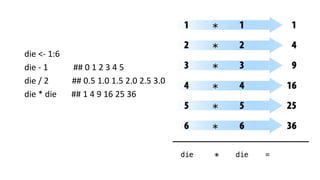
die <- 1:6
die - 1 ## 0 1 2 3 4 5
die / 2 ## 0.5 1.0 1.5 2.0 2.5 3.0
die * die ## 1 4 9 16 25 36
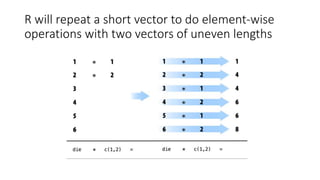
die ## 1 2 3 4 5 6
die + 1:2 ## 2 4 4 6 6 8 - HOW?
R will repeat a short vector to do element-wise
operations with two vectors of uneven lengths
Warning
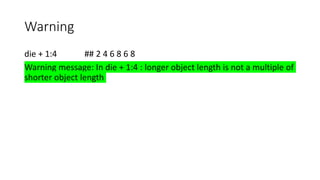
die + 1:4 ## 2 4 6 8 6 8
Warning message: In die + 1:4 : longer object length is not a multiple of
shorter object length
Creating Matrices For Multiplication
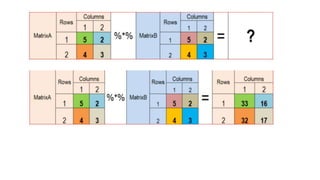
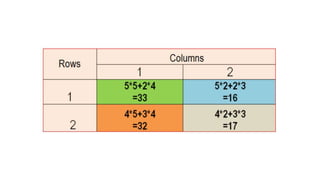
inner multiplication with the %*% operator
outer multiplication with the %o% operator
%*% - inner multiplication
die %*% die
Output: 91 - the output has been generated as a vector
die %o% die
Output:
[,1] [,2] [,3] [,4] [,5] [,6]
[1,] 1 2 3 4 5 6
--the output has been generated as a matrix of one row and one column
Functions
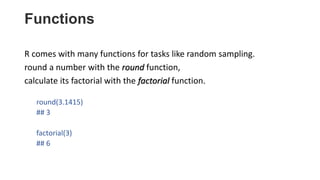
R comes with many functions for tasks like random sampling.
round a number with the round function,
calculate its factorial with the factorial function.
round(3.1415)
## 3
factorial(3)
## 6
Functions with Arguments
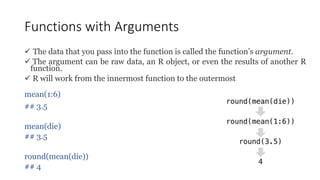
 The data that you pass into the function is called the function’s argument.
 The argument can be raw data, an R object, or even the results of another R
function.
 R will work from the innermost function to the outermost
mean(1:6)
## 3.5
mean(die)
## 3.5
round(mean(die))
## 4
• simulate a roll of the die with R’s sample function
sample(x = 1:4, size = 2)
## 3 2
Try:
die=1:6
sample(x = die, size = 1)
sample(size = 1, x = die) ## output random sample between 1 to 6
two arguments: a vector named x and a number named size
Note: Many R functions take multiple arguments
Writing Your Own Functions
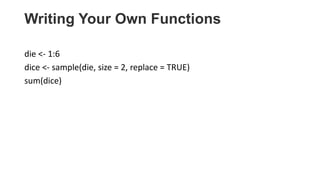
die <- 1:6
dice <- sample(die, size = 2, replace = TRUE)
sum(dice)
R - Practice.pptx

R - Practice.pptx

  • 1.
  • 2.
    > 1 +1 [1] 2 ----------- > 100:130 [1] 100 101 102 103 104 105 106 107 108 109 110 111 112 [14] 113 114 115 116 117 118 119 120 121 122 123 124 125 [25] 126 127 128 129 130
  • 3.
    Error > 3 %5 Error: unexpected input in "3 % 5“ ------ If you type an incomplete command and press Enter, R will display a + prompt, which means it is waiting for you to type the rest of your command. Either finish the command or hit Escape to start over: > 5 - + + 1 [1] 4
  • 4.
    Objects R lets yousave data by storing it inside an R object. What’s an object? Just a name that you can use to call up stored data. For example, you can save data into an object like a or b a <- 1 a # output: 1 a + 2 # output : 3
  • 5.
    Object creation < followedby – die <- 1:6 die # Output: 1 2 3 4 5 6 Rules for Object creation: name an object in R almost anything you want, but there are a few rules. First, a name cannot start with a number. Second, a name cannot use some special symbols, like ^, !, $, @, +, -, /, or *
  • 6.
    Case sensitive • Ralso understands capitalization (or is case-sensitive), so name and Name will refer to different objects: Name <- 1 name <- 0 Name + 1 # Output: 2
  • 7.
    List of Objectsls() Find object names you have already used with the function using ls: ls() #Output: "a" "die" "my_number" "name" "Name"
  • 8.
    die <- 1:6 die- 1 ## 0 1 2 3 4 5 die / 2 ## 0.5 1.0 1.5 2.0 2.5 3.0 die * die ## 1 4 9 16 25 36
  • 9.
    die ## 12 3 4 5 6 die + 1:2 ## 2 4 4 6 6 8 - HOW?
  • 10.
    R will repeata short vector to do element-wise operations with two vectors of uneven lengths
  • 11.
    Warning die + 1:4## 2 4 6 8 6 8 Warning message: In die + 1:4 : longer object length is not a multiple of shorter object length
  • 12.
    Creating Matrices ForMultiplication inner multiplication with the %*% operator outer multiplication with the %o% operator
  • 13.
    %*% - innermultiplication die %*% die Output: 91 - the output has been generated as a vector die %o% die Output: [,1] [,2] [,3] [,4] [,5] [,6] [1,] 1 2 3 4 5 6 --the output has been generated as a matrix of one row and one column
  • 16.
    Functions R comes withmany functions for tasks like random sampling. round a number with the round function, calculate its factorial with the factorial function. round(3.1415) ## 3 factorial(3) ## 6
  • 17.
    Functions with Arguments The data that you pass into the function is called the function’s argument.  The argument can be raw data, an R object, or even the results of another R function.  R will work from the innermost function to the outermost mean(1:6) ## 3.5 mean(die) ## 3.5 round(mean(die)) ## 4
  • 18.
    • simulate aroll of the die with R’s sample function sample(x = 1:4, size = 2) ## 3 2 Try: die=1:6 sample(x = die, size = 1) sample(size = 1, x = die) ## output random sample between 1 to 6 two arguments: a vector named x and a number named size Note: Many R functions take multiple arguments
  • 19.
    Writing Your OwnFunctions die <- 1:6 dice <- sample(die, size = 2, replace = TRUE) sum(dice)