Add Button Extended in Marketing Documents
In previous version of SAP Business One (before version 10), many users sometimes struggle with
documents. After they add documents, such as orders document, deliveries document, invoices
document, sometimes you want to look at it before print/email it. You can do it by clicking the “Previous
Record” button, but sometimes system viewing another user’s document that just added a second after
you add.
To prevent this hassle, and also save time, SAP Business One Version 10 introduce new features in the
“Add” button on every marketing document menu.
Feature:
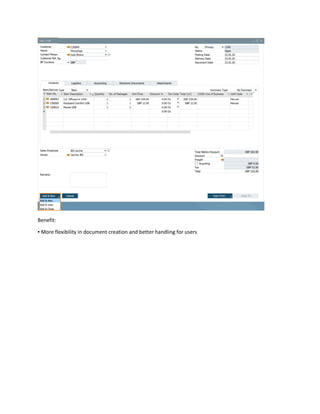
▪ The Add button in sales and purchase document creation is enhanced
▪ Additionally, to the previous common behavior (i.e. after creating and adding a document, the
window closes and a new window opens), the following options are now available:
▪ Add & New: Document is added, and a new window opens
▪ Add & View: Document is added, and is displayed
▪ Add & Close: Document is added, and window closes
▪ The user's last choice will be remembered for the given document for the next time
Benefit:
▪ More flexibility in document creation and better handling for users

Quickhits 2022 Add Button Extended In Marketing Documents

  • 1.
    Add Button Extendedin Marketing Documents In previous version of SAP Business One (before version 10), many users sometimes struggle with documents. After they add documents, such as orders document, deliveries document, invoices document, sometimes you want to look at it before print/email it. You can do it by clicking the “Previous Record” button, but sometimes system viewing another user’s document that just added a second after you add. To prevent this hassle, and also save time, SAP Business One Version 10 introduce new features in the “Add” button on every marketing document menu. Feature: ▪ The Add button in sales and purchase document creation is enhanced ▪ Additionally, to the previous common behavior (i.e. after creating and adding a document, the window closes and a new window opens), the following options are now available: ▪ Add & New: Document is added, and a new window opens ▪ Add & View: Document is added, and is displayed ▪ Add & Close: Document is added, and window closes ▪ The user's last choice will be remembered for the given document for the next time
  • 2.
    Benefit: ▪ More flexibilityin document creation and better handling for users