Qubino
The INNOVATIVE and SMALLEST
Flush 1 relay
ORDERING CODE Z-WAVE FREQUENCY
ZMNHAD1 868,4 MHz
ZMNHAD2 921,4 MHz
ZMNHAD3 908,4 MHz
ZMNHAD4 869,0 MHz
ZMNHAD5 916,0 MHz
This Z-Wave module is used for switching on or off the
electrical device (e.g. light, fan, etc ...). The module can be
controlled either through Z-wave network or through the
wall switch.
The module is designed to be mounted inside a “flush
mounting box”, hidden behind a traditional wall switch.
Module measures power consumption of electrical device
and supports connection of digital temperature sensor. It
is designed to act as repeater in order to improve range
and stability of Z-wave network.
Supported switches
Module supports mono-stable switches (push button)
and bi-stable switches. The module is factory set to
operate with bi-stable switches.
Installation
 Before the installation disconnect power supply.
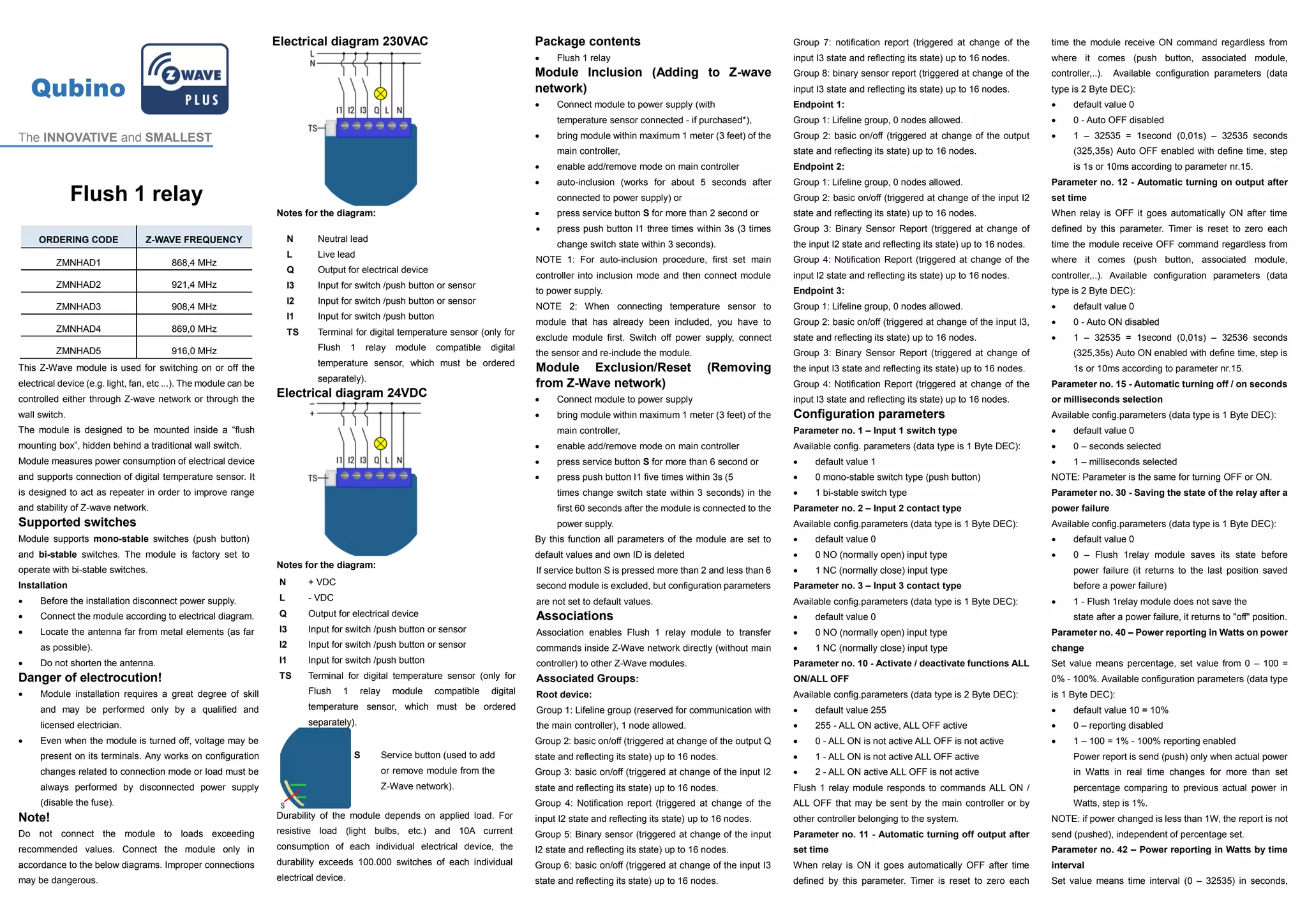
 Connect the module according to electrical diagram.
 Locate the antenna far from metal elements (as far
as possible).
 Do not shorten the antenna.
Danger of electrocution!
 Module installation requires a great degree of skill
and may be performed only by a qualified and
licensed electrician.
 Even when the module is turned off, voltage may be
present on its terminals. Any works on configuration
changes related to connection mode or load must be
always performed by disconnected power supply
(disable the fuse).
Note!
Do not connect the module to loads exceeding
recommended values. Connect the module only in
accordance to the below diagrams. Improper connections
may be dangerous.
Electrical diagram 230VAC
Notes for the diagram:
Electrical diagram 24VDC
Notes for the diagram:
Durability of the module depends on applied load. For
resistive load (light bulbs, etc.) and 10A current
consumption of each individual electrical device, the
durability exceeds 100.000 switches of each individual
electrical device.
Package contents
 Flush 1 relay
Module Inclusion (Adding to Z-wave
network)
 Connect module to power supply (with
temperature sensor connected - if purchased*),
 bring module within maximum 1 meter (3 feet) of the
main controller,
 enable add/remove mode on main controller
 auto-inclusion (works for about 5 seconds after
connected to power supply) or
 press service button S for more than 2 second or
 press push button I1 three times within 3s (3 times
change switch state within 3 seconds).
NOTE 1: For auto-inclusion procedure, first set main
controller into inclusion mode and then connect module
to power supply.
NOTE 2: When connecting temperature sensor to
module that has already been included, you have to
exclude module first. Switch off power supply, connect
the sensor and re-include the module.
Module Exclusion/Reset (Removing
from Z-Wave network)
 Connect module to power supply
 bring module within maximum 1 meter (3 feet) of the
main controller,
 enable add/remove mode on main controller
 press service button S for more than 6 second or
 press push button I1 five times within 3s (5
times change switch state within 3 seconds) in the
first 60 seconds after the module is connected to the
power supply.
By this function all parameters of the module are set to
default values and own ID is deleted
If service button S is pressed more than 2 and less than 6
second module is excluded, but configuration parameters
are not set to default values.
Associations
Association enables Flush 1 relay module to transfer
commands inside Z-Wave network directly (without main
controller) to other Z-Wave modules.
Associated Groups:
Root device:
Group 1: Lifeline group (reserved for communication with
the main controller), 1 node allowed.
Group 2: basic on/off (triggered at change of the output Q
state and reflecting its state) up to 16 nodes.
Group 3: basic on/off (triggered at change of the input I2
state and reflecting its state) up to 16 nodes.
Group 4: Notification report (triggered at change of the
input I2 state and reflecting its state) up to 16 nodes.
Group 5: Binary sensor (triggered at change of the input
I2 state and reflecting its state) up to 16 nodes.
Group 6: basic on/off (triggered at change of the input I3
state and reflecting its state) up to 16 nodes.
Group 7: notification report (triggered at change of the
input I3 state and reflecting its state) up to 16 nodes.
Group 8: binary sensor report (triggered at change of the
input I3 state and reflecting its state) up to 16 nodes.
Endpoint 1:
Group 1: Lifeline group, 0 nodes allowed.
Group 2: basic on/off (triggered at change of the output
state and reflecting its state) up to 16 nodes.
Endpoint 2:
Group 1: Lifeline group, 0 nodes allowed.
Group 2: basic on/off (triggered at change of the input I2
state and reflecting its state) up to 16 nodes.
Group 3: Binary Sensor Report (triggered at change of
the input I2 state and reflecting its state) up to 16 nodes.
Group 4: Notification Report (triggered at change of the
input I2 state and reflecting its state) up to 16 nodes.
Endpoint 3:
Group 1: Lifeline group, 0 nodes allowed.
Group 2: basic on/off (triggered at change of the input I3,
state and reflecting its state) up to 16 nodes.
Group 3: Binary Sensor Report (triggered at change of
the input I3 state and reflecting its state) up to 16 nodes.
Group 4: Notification Report (triggered at change of the
input I3 state and reflecting its state) up to 16 nodes.
Configuration parameters
Parameter no. 1 – Input 1 switch type
Available config. parameters (data type is 1 Byte DEC):
 default value 1
 0 mono-stable switch type (push button)
 1 bi-stable switch type
Parameter no. 2 – Input 2 contact type
Available config.parameters (data type is 1 Byte DEC):
 default value 0
 0 NO (normally open) input type
 1 NC (normally close) input type
Parameter no. 3 – Input 3 contact type
Available config.parameters (data type is 1 Byte DEC):
 default value 0
 0 NO (normally open) input type
 1 NC (normally close) input type
Parameter no. 10 - Activate / deactivate functions ALL
ON/ALL OFF
Available config.parameters (data type is 2 Byte DEC):
 default value 255
 255 - ALL ON active, ALL OFF active
 0 - ALL ON is not active ALL OFF is not active
 1 - ALL ON is not active ALL OFF active
 2 - ALL ON active ALL OFF is not active
Flush 1 relay module responds to commands ALL ON /
ALL OFF that may be sent by the main controller or by
other controller belonging to the system.
Parameter no. 11 - Automatic turning off output after
set time
When relay is ON it goes automatically OFF after time
defined by this parameter. Timer is reset to zero each
time the module receive ON command regardless from
where it comes (push button, associated module,
controller,..). Available configuration parameters (data
type is 2 Byte DEC):
 default value 0
 0 - Auto OFF disabled
 1 – 32535 = 1second (0,01s) – 32535 seconds
(325,35s) Auto OFF enabled with define time, step
is 1s or 10ms according to parameter nr.15.
Parameter no. 12 - Automatic turning on output after
set time
When relay is OFF it goes automatically ON after time
defined by this parameter. Timer is reset to zero each
time the module receive OFF command regardless from
where it comes (push button, associated module,
controller,..). Available configuration parameters (data
type is 2 Byte DEC):
 default value 0
 0 - Auto ON disabled
 1 – 32535 = 1second (0,01s) – 32536 seconds
(325,35s) Auto ON enabled with define time, step is
1s or 10ms according to parameter nr.15.
Parameter no. 15 - Automatic turning off / on seconds
or milliseconds selection
Available config.parameters (data type is 1 Byte DEC):
 default value 0
 0 – seconds selected
 1 – milliseconds selected
NOTE: Parameter is the same for turning OFF or ON.
Parameter no. 30 - Saving the state of the relay after a
power failure
Available config.parameters (data type is 1 Byte DEC):
 default value 0
 0 – Flush 1relay module saves its state before
power failure (it returns to the last position saved
before a power failure)
 1 - Flush 1relay module does not save the
state after a power failure, it returns to "off" position.
Parameter no. 40 – Power reporting in Watts on power
change
Set value means percentage, set value from 0 – 100 =
0% - 100%. Available configuration parameters (data type
is 1 Byte DEC):
 default value 10 = 10%
 0 – reporting disabled
 1 – 100 = 1% - 100% reporting enabled
Power report is send (push) only when actual power
in Watts in real time changes for more than set
percentage comparing to previous actual power in
Watts, step is 1%.
NOTE: if power changed is less than 1W, the report is not
send (pushed), independent of percentage set.
Parameter no. 42 – Power reporting in Watts by time
interval
Set value means time interval (0 – 32535) in seconds,
N Neutral lead
L Live lead
Q Output for electrical device
I3 Input for switch /push button or sensor
I2 Input for switch /push button or sensor
I1 Input for switch /push button
TS Terminal for digital temperature sensor (only for
Flush 1 relay module compatible digital
temperature sensor, which must be ordered
separately).
N + VDC
L - VDC
Q Output for electrical device
I3 Input for switch /push button or sensor
I2 Input for switch /push button or sensor
I1 Input for switch /push button
TS Terminal for digital temperature sensor (only for
Flush 1 relay module compatible digital
temperature sensor, which must be ordered
separately).
S Service button (used to add
or remove module from the
Z-Wave network).
when power report is send. Available configuration
parameters (data type is 2 Byte DEC):
 default value 300 = 300s
 0 – reporting disabled
 1 – 32535 = 1second – 32535 seconds.
Reporting enabled. Power report is send with time
interval set by entered value.
Parameter no. 63 – Output Switch selection
Set value means the type of the device that is connected
to the output. The device type can be normally open (NO)
or normally close (NC). Available configuration
parameters (data type is 1 Byte DEC):
 default value 0
 0 - When system is turned off the output is 0V (NC).
 1 - When system is turned off the output is 230V or
24V (NO).
Parameter no. 100 – Enable / Disable Endpoints I2 or
select Notification Type and Event
Enabling I2 means that Endpoint (I2) will be present on UI.
Disabling it will result in hiding the endpoint according to
the parameter set value. Additionally, a Notification Type
and Event can be selected for the endpoint. Available
configuration parameters (data type is 1 Byte DEC):
Endpoint device type selection:
- notification sensor (1 - 6):
GENERIC_TYPE_SENSOR_NOTIFICATION,
SPECIFIC_TYPE_NOTIFICATION_SENSOR
 default value 1
 1 – Home Security; Motion Detection, unknown
location
 2 – Carbon Monoxide; Carbon Monoxide detected,
unknown location.
 3 – Carbon Dioxide; Carbon Dioxide detected,
unknown location.
 4 – Water Alarm; Water Leak detected, unknown
location.
 5 – Heat Alarm; Overheat detected, unknown
location.
 6 - Smoke Alarm; Smoke detected, unknown
location.
 0 – Endpoint, I2 disabled
- sensor binary (9):
GENERIC_TYPE_SENSOR_BINARY,
SPECIFIC_TYPE_NOT_USED
 9 – Sensor binary
NOTE: After parameter change, module has to be re
included into the network in order setting to take effect!
Parameter no. 101 – Enable / Disable Endpoints I3 or
select Notification Type and Event
Enabling I3 means that Endpoint (I3) will be present on UI.
Disabling it will result in hiding the endpoint according to
the parameter set value. Additionally, a Notification Type
and Event can be selected for the endpoint. Available
configuration parameters (data type is 1 Byte DEC):
Endpoint device type selection:
- notification sensor (1 - 6):
GENERIC_TYPE_SENSOR_NOTIFICATION,
SPECIFIC_TYPE_NOTIFICATION_SENSOR
 default value 1
 1 – Home Security; Motion Detection, unknown
location
 2 – Carbon Monoxide; Carbon Monoxide detected,
unknown location.
 3 – Carbon Dioxide; Carbon Dioxide detected,
unknown location.
 4 – Water Alarm; Water Leak detected, unknown
location.
 5 – Heat Alarm; Overheat detected, unknown
location.
 6 – Smoke Alarm; Smoke detected, unknown
location.
 0 – Endpoint, I3 disabled
- sensor binary (9):
GENERIC_TYPE_SENSOR_BINARY,
SPECIFIC_TYPE_NOT_USED
 9 – Sensor binary
NOTE: After parameter change, module has to be re
included into the network in order setting to take effect!
Parameter no. 110 – Temperature sensor offset
settings
Set value is added or subtracted to actual measured
value by sensor. Available configuration parameters (data
type is 2 Byte DEC):
 default value 32536
 32536 – offset is 0.0C
 From 1 to 100–value from 0.1°C to 10.0°C is added
to actual measured temperature.
 From 1001 to 1100 – value from -0.1 °C to -10.0 °C
is subtracted to actual measured temperature.
Parameter no. 120 – Digital temperature sensor
reporting
If digital temperature sensor is connected, module reports
measured temperature on temperature change defined
by this parameter. Available configuration parameters
(data type is 1 Byte DEC):
 default value 5 = 0,5°C
 0 – Reporting disabled
 1- 127 = 0,1°C – 12,7°C, step is 0,1°C
Technical Specifications
Power supply 110 - 230 VAC ±10%
50/60Hz, 24-30VDC
Rated load current of AC
output (resistive load)*
1 X 10A / 230VAC
Rated load current of DC
output (resistive load)
1 X 10A / 30VDC
Output circuit power of AC
output (resistive load)
2300W (230VAC)
Output circuit power of DC
output (resistive load)
240W (24VDC)
Power measurement
accuracy
P=5-50W, +/-3W
P>50W, +/-3%
Digital temperature sensor
range (sensor must be
ordered separately)
-50 ~ +125°C
Operation temperature -10 ~ +40°C
Distance up to 30 m indoors
(depending on building
materials)
Dimensions (WxHxD)
(package)
41,8x36,8x15,4mm
(79x52x22mm)
Weight (Brutto with package) 28g (34g)
Electricity consumption 0,4W
For installation in boxes Ø ≥ 60mm or 2M
Switching Relay
* In case of load other than resistive, pay attention to the
value of cos φ and if necessary apply load lower than the
rated load. Max current for cos φ=0,4 is 3A at 250VAC,
3A at 24VDC L/R=7ms.
Z-Wave Device Class:
ZWAVEPLUS_INFO_REPORT_ROLE_TYPE_SLAVE_ALWAYS_0N
GENERIC_TYPE_SWITCH_BINARY
SPECIFIC_TYPE_POWER_SWITCH_BINARY
Z-Wave Supported Command Classes:
COMMAND_CLASS_ZWAVEPLUS_INFO
COMMAND_CLASS_VERSION_V2
COMMAND_CLASS_MANUFACTURER_SPECIFIC
COMMAND_CLASS_DEVICE_RESET_LOCALLY
COMMAND_CLASS_POWERLEVEL
COMMAND_CLASS_BASIC
COMMAND_CLASS_SWITCH_ALL
COMMAND_CLASS_SWITCH_BINARY
COMMAND_CLASS_METER_V4
COMMAND_CLASS_SENSOR_MULTILEVEL_V7
COMMAND_CLASS_NOTIFICATION_V5
COMMAND_CLASS_MULTI_CHANNEL_V4
COMMAND_CLASS_MULTI_CHANNEL_ASSOCIATION_V3
COMMAND_CLASS_ASSOCIATION_V2
COMMAND_CLASS_MULTI_CHANNEL_ASSOCIATION_V3
COMMAND_CLASS_ASSOCIATION_GRP_INFO_V2
COMMAND_CLASS_CONFIGURATION
COMMAND_CLASS_MARK
COMMAND_CLASS_BASIC
Endpoint 1
Device Class:
ZWAVEPLUS_INFO_REPORT_ROLE_TYPE_SLAVE_ALWAYS_0N
GENERIC_TYPE_SWITCH_BINARY
SPECIFIC_TYPE_POWER_SWITCH_BINARY
Command Classes:
COMMAND_CLASS_ZWAVEPLUS_INFO
COMMAND_CLASS_VERSION_V2
COMMAND_CLASS_MANUFACTURER_SPECIFIC
COMMAND_CLASS_DEVICE_RESET_LOCALLY
COMMAND_CLASS_POWERLEVEL
COMMAND_CLASS_BASIC
COMMAND_CLASS_SWITCH_ALL
COMMAND_CLASS_SWITCH_BINARY
COMMAND_CLASS_METER_V4
COMMAND_CLASS_SENSOR_MULTILEVEL_V7
COMMAND_CLASS_ASSOCIATION_V2
COMMAND_CLASS_MULTI_CHANNEL_ASSOCIATION_V3
COMMAND_CLASS_ASSOCIATION_GRP_INFO_V2
COMMAND_CLASS_CONFIGURATION
COMMAND_CLASS_MARK
COMMAND_CLASS_BASIC
Endpoint 2 (I2):
Device Class:
ZWAVEPLUS_INFO_REPORT_ROLE_TYPE_SLAVE_ALWAYS_0N
GENERIC_TYPE_SENSOR_NOTIFICATION
SPECIFIC_TYPE_NOTIFICATION_SENSOR
Command Classes:
COMMAND_CLASS_ZWAVEPLUS_INFO
COMMAND_CLASS_VERSION_V2
COMMAND_CLASS_SENSOR_BINARY
COMMAND_CLASS_BASIC
COMMAND_CLASS_NOTIFICATION_V5
COMMAND_CLASS_ASSOCIATION_V2
COMMAND_CLASS_MULTI_CHANNEL_ASSOCIATION_V3
COMMAND_CLASS_ASSOCIATION_GRP_INFO_V2
COMMAND_CLASS_MARK
COMMAND_CLASS_BASIC
COMMAND_CLASS_SENSOR_BINARY
COMMAND_CLASS_NOTIFICATION_V5
Endpoint 3 (I3):
Device Class:
ZWAVEPLUS_INFO_REPORT_ROLE_TYPE_SLAVE_ALWAYS_0N
GENERIC_TYPE_SENSOR_NOTIFICATION
SPECIFIC_TYPE_NOTIFICATION_SENSOR
Command Classes:
COMMAND_CLASS_ZWAVEPLUS_INFO
COMMAND_CLASS_VERSION_V2
COMMAND_CLASS_SENSOR_BINARY
COMMAND_CLASS_BASIC
COMMAND_CLASS_NOTIFICATION_V5
COMMAND_CLASS_ASSOCIATION_V2
COMMAND_CLASS_MULTI_CHANNEL_ASSOCIATION_V3
COMMAND_CLASS_ASSOCIATION_GRP_INFO_V2
COMMAND_CLASS_MARK
COMMAND_CLASS_BASIC
COMMAND_CLASS_SENSOR_BINARY
COMMAND_CLASS_NOTIFICATION_V5
NOTE: The above list is valid for the product with a
temperature sensor connected to TS terminal. In case the
sensor is not connected then following command class
isn’t supported:
COMMAND_CLASS_SENSOR_MULTILEVEL_V7
NOTE: The product supports the following
COMMAND_CLASS_NOTIFICATION_V5 events:
- Smoke Alarm v2 – Smoke detected, unknown
location (0x02)
- CO Alarm v2 – Carbon Monoxide detected,
unknown location (0x02)
- CO
2
Alarm – Carbon Dioxide detected, unknown
location (0x02)
- Heat Alarm v2 – Overheat detected, unknown
location (0x02)
- Water Alarm v2 – Water Leak detected, unknown
location (0x02)
- Home Security – Motion Detection, unknown
location (0x08)
This product can be included and operated in any
Z-Wave network with other Z-Wave certified devices from
any other manufacturers. All constantly powered nodes in
the same network will act as repeaters regardless of the
vendor in order to increase reliability of the network.
Important disclaimer
Z-Wave wireless communication is inherently not always
100% reliable, and as such, this product should not be
used in situations in which life and/or valuables are solely
dependent on its function.
Warning!
Do not dispose of electrical appliances as unsorted
municipal waste, use separate collection facilities.
Contact your local government for information regarding
the collection systems available. If electrical appliances
are disposed of in landfills or dumps, hazardous
substances can leak into the groundwater and get into
the food chain, damaging your health and well-being.
When replacing old appliances with new once, the retailer
is legally obligated to take back your old appliance for
disposal at least for free of charge.
This user manual is subject to change and improvement
without notice.
NOTE:
User manual is valid for module with SW version S1 (SW
version is part of P/N)! Example:P/N: ZMNHADx H1S1P1
Qubino
Goap d.o.o. Nova Gorica
Ulica Klementa Juga 007
5250 Solkan
Slovenia
E-mail: info@qubino.com
Tel: +386 5 335 95 00
Web: www.qubino.com
Date: 22.07.2015
Document: Qubino_Flush 1 relay
PLUS user manual_V1.0_eng

Qubino flush 1 relay plus user manual v1.0 eng1

  • 1.
    Qubino The INNOVATIVE andSMALLEST Flush 1 relay ORDERING CODE Z-WAVE FREQUENCY ZMNHAD1 868,4 MHz ZMNHAD2 921,4 MHz ZMNHAD3 908,4 MHz ZMNHAD4 869,0 MHz ZMNHAD5 916,0 MHz This Z-Wave module is used for switching on or off the electrical device (e.g. light, fan, etc ...). The module can be controlled either through Z-wave network or through the wall switch. The module is designed to be mounted inside a “flush mounting box”, hidden behind a traditional wall switch. Module measures power consumption of electrical device and supports connection of digital temperature sensor. It is designed to act as repeater in order to improve range and stability of Z-wave network. Supported switches Module supports mono-stable switches (push button) and bi-stable switches. The module is factory set to operate with bi-stable switches. Installation  Before the installation disconnect power supply.  Connect the module according to electrical diagram.  Locate the antenna far from metal elements (as far as possible).  Do not shorten the antenna. Danger of electrocution!  Module installation requires a great degree of skill and may be performed only by a qualified and licensed electrician.  Even when the module is turned off, voltage may be present on its terminals. Any works on configuration changes related to connection mode or load must be always performed by disconnected power supply (disable the fuse). Note! Do not connect the module to loads exceeding recommended values. Connect the module only in accordance to the below diagrams. Improper connections may be dangerous. Electrical diagram 230VAC Notes for the diagram: Electrical diagram 24VDC Notes for the diagram: Durability of the module depends on applied load. For resistive load (light bulbs, etc.) and 10A current consumption of each individual electrical device, the durability exceeds 100.000 switches of each individual electrical device. Package contents  Flush 1 relay Module Inclusion (Adding to Z-wave network)  Connect module to power supply (with temperature sensor connected - if purchased*),  bring module within maximum 1 meter (3 feet) of the main controller,  enable add/remove mode on main controller  auto-inclusion (works for about 5 seconds after connected to power supply) or  press service button S for more than 2 second or  press push button I1 three times within 3s (3 times change switch state within 3 seconds). NOTE 1: For auto-inclusion procedure, first set main controller into inclusion mode and then connect module to power supply. NOTE 2: When connecting temperature sensor to module that has already been included, you have to exclude module first. Switch off power supply, connect the sensor and re-include the module. Module Exclusion/Reset (Removing from Z-Wave network)  Connect module to power supply  bring module within maximum 1 meter (3 feet) of the main controller,  enable add/remove mode on main controller  press service button S for more than 6 second or  press push button I1 five times within 3s (5 times change switch state within 3 seconds) in the first 60 seconds after the module is connected to the power supply. By this function all parameters of the module are set to default values and own ID is deleted If service button S is pressed more than 2 and less than 6 second module is excluded, but configuration parameters are not set to default values. Associations Association enables Flush 1 relay module to transfer commands inside Z-Wave network directly (without main controller) to other Z-Wave modules. Associated Groups: Root device: Group 1: Lifeline group (reserved for communication with the main controller), 1 node allowed. Group 2: basic on/off (triggered at change of the output Q state and reflecting its state) up to 16 nodes. Group 3: basic on/off (triggered at change of the input I2 state and reflecting its state) up to 16 nodes. Group 4: Notification report (triggered at change of the input I2 state and reflecting its state) up to 16 nodes. Group 5: Binary sensor (triggered at change of the input I2 state and reflecting its state) up to 16 nodes. Group 6: basic on/off (triggered at change of the input I3 state and reflecting its state) up to 16 nodes. Group 7: notification report (triggered at change of the input I3 state and reflecting its state) up to 16 nodes. Group 8: binary sensor report (triggered at change of the input I3 state and reflecting its state) up to 16 nodes. Endpoint 1: Group 1: Lifeline group, 0 nodes allowed. Group 2: basic on/off (triggered at change of the output state and reflecting its state) up to 16 nodes. Endpoint 2: Group 1: Lifeline group, 0 nodes allowed. Group 2: basic on/off (triggered at change of the input I2 state and reflecting its state) up to 16 nodes. Group 3: Binary Sensor Report (triggered at change of the input I2 state and reflecting its state) up to 16 nodes. Group 4: Notification Report (triggered at change of the input I2 state and reflecting its state) up to 16 nodes. Endpoint 3: Group 1: Lifeline group, 0 nodes allowed. Group 2: basic on/off (triggered at change of the input I3, state and reflecting its state) up to 16 nodes. Group 3: Binary Sensor Report (triggered at change of the input I3 state and reflecting its state) up to 16 nodes. Group 4: Notification Report (triggered at change of the input I3 state and reflecting its state) up to 16 nodes. Configuration parameters Parameter no. 1 – Input 1 switch type Available config. parameters (data type is 1 Byte DEC):  default value 1  0 mono-stable switch type (push button)  1 bi-stable switch type Parameter no. 2 – Input 2 contact type Available config.parameters (data type is 1 Byte DEC):  default value 0  0 NO (normally open) input type  1 NC (normally close) input type Parameter no. 3 – Input 3 contact type Available config.parameters (data type is 1 Byte DEC):  default value 0  0 NO (normally open) input type  1 NC (normally close) input type Parameter no. 10 - Activate / deactivate functions ALL ON/ALL OFF Available config.parameters (data type is 2 Byte DEC):  default value 255  255 - ALL ON active, ALL OFF active  0 - ALL ON is not active ALL OFF is not active  1 - ALL ON is not active ALL OFF active  2 - ALL ON active ALL OFF is not active Flush 1 relay module responds to commands ALL ON / ALL OFF that may be sent by the main controller or by other controller belonging to the system. Parameter no. 11 - Automatic turning off output after set time When relay is ON it goes automatically OFF after time defined by this parameter. Timer is reset to zero each time the module receive ON command regardless from where it comes (push button, associated module, controller,..). Available configuration parameters (data type is 2 Byte DEC):  default value 0  0 - Auto OFF disabled  1 – 32535 = 1second (0,01s) – 32535 seconds (325,35s) Auto OFF enabled with define time, step is 1s or 10ms according to parameter nr.15. Parameter no. 12 - Automatic turning on output after set time When relay is OFF it goes automatically ON after time defined by this parameter. Timer is reset to zero each time the module receive OFF command regardless from where it comes (push button, associated module, controller,..). Available configuration parameters (data type is 2 Byte DEC):  default value 0  0 - Auto ON disabled  1 – 32535 = 1second (0,01s) – 32536 seconds (325,35s) Auto ON enabled with define time, step is 1s or 10ms according to parameter nr.15. Parameter no. 15 - Automatic turning off / on seconds or milliseconds selection Available config.parameters (data type is 1 Byte DEC):  default value 0  0 – seconds selected  1 – milliseconds selected NOTE: Parameter is the same for turning OFF or ON. Parameter no. 30 - Saving the state of the relay after a power failure Available config.parameters (data type is 1 Byte DEC):  default value 0  0 – Flush 1relay module saves its state before power failure (it returns to the last position saved before a power failure)  1 - Flush 1relay module does not save the state after a power failure, it returns to "off" position. Parameter no. 40 – Power reporting in Watts on power change Set value means percentage, set value from 0 – 100 = 0% - 100%. Available configuration parameters (data type is 1 Byte DEC):  default value 10 = 10%  0 – reporting disabled  1 – 100 = 1% - 100% reporting enabled Power report is send (push) only when actual power in Watts in real time changes for more than set percentage comparing to previous actual power in Watts, step is 1%. NOTE: if power changed is less than 1W, the report is not send (pushed), independent of percentage set. Parameter no. 42 – Power reporting in Watts by time interval Set value means time interval (0 – 32535) in seconds, N Neutral lead L Live lead Q Output for electrical device I3 Input for switch /push button or sensor I2 Input for switch /push button or sensor I1 Input for switch /push button TS Terminal for digital temperature sensor (only for Flush 1 relay module compatible digital temperature sensor, which must be ordered separately). N + VDC L - VDC Q Output for electrical device I3 Input for switch /push button or sensor I2 Input for switch /push button or sensor I1 Input for switch /push button TS Terminal for digital temperature sensor (only for Flush 1 relay module compatible digital temperature sensor, which must be ordered separately). S Service button (used to add or remove module from the Z-Wave network).
  • 2.
    when power reportis send. Available configuration parameters (data type is 2 Byte DEC):  default value 300 = 300s  0 – reporting disabled  1 – 32535 = 1second – 32535 seconds. Reporting enabled. Power report is send with time interval set by entered value. Parameter no. 63 – Output Switch selection Set value means the type of the device that is connected to the output. The device type can be normally open (NO) or normally close (NC). Available configuration parameters (data type is 1 Byte DEC):  default value 0  0 - When system is turned off the output is 0V (NC).  1 - When system is turned off the output is 230V or 24V (NO). Parameter no. 100 – Enable / Disable Endpoints I2 or select Notification Type and Event Enabling I2 means that Endpoint (I2) will be present on UI. Disabling it will result in hiding the endpoint according to the parameter set value. Additionally, a Notification Type and Event can be selected for the endpoint. Available configuration parameters (data type is 1 Byte DEC): Endpoint device type selection: - notification sensor (1 - 6): GENERIC_TYPE_SENSOR_NOTIFICATION, SPECIFIC_TYPE_NOTIFICATION_SENSOR  default value 1  1 – Home Security; Motion Detection, unknown location  2 – Carbon Monoxide; Carbon Monoxide detected, unknown location.  3 – Carbon Dioxide; Carbon Dioxide detected, unknown location.  4 – Water Alarm; Water Leak detected, unknown location.  5 – Heat Alarm; Overheat detected, unknown location.  6 - Smoke Alarm; Smoke detected, unknown location.  0 – Endpoint, I2 disabled - sensor binary (9): GENERIC_TYPE_SENSOR_BINARY, SPECIFIC_TYPE_NOT_USED  9 – Sensor binary NOTE: After parameter change, module has to be re included into the network in order setting to take effect! Parameter no. 101 – Enable / Disable Endpoints I3 or select Notification Type and Event Enabling I3 means that Endpoint (I3) will be present on UI. Disabling it will result in hiding the endpoint according to the parameter set value. Additionally, a Notification Type and Event can be selected for the endpoint. Available configuration parameters (data type is 1 Byte DEC): Endpoint device type selection: - notification sensor (1 - 6): GENERIC_TYPE_SENSOR_NOTIFICATION, SPECIFIC_TYPE_NOTIFICATION_SENSOR  default value 1  1 – Home Security; Motion Detection, unknown location  2 – Carbon Monoxide; Carbon Monoxide detected, unknown location.  3 – Carbon Dioxide; Carbon Dioxide detected, unknown location.  4 – Water Alarm; Water Leak detected, unknown location.  5 – Heat Alarm; Overheat detected, unknown location.  6 – Smoke Alarm; Smoke detected, unknown location.  0 – Endpoint, I3 disabled - sensor binary (9): GENERIC_TYPE_SENSOR_BINARY, SPECIFIC_TYPE_NOT_USED  9 – Sensor binary NOTE: After parameter change, module has to be re included into the network in order setting to take effect! Parameter no. 110 – Temperature sensor offset settings Set value is added or subtracted to actual measured value by sensor. Available configuration parameters (data type is 2 Byte DEC):  default value 32536  32536 – offset is 0.0C  From 1 to 100–value from 0.1°C to 10.0°C is added to actual measured temperature.  From 1001 to 1100 – value from -0.1 °C to -10.0 °C is subtracted to actual measured temperature. Parameter no. 120 – Digital temperature sensor reporting If digital temperature sensor is connected, module reports measured temperature on temperature change defined by this parameter. Available configuration parameters (data type is 1 Byte DEC):  default value 5 = 0,5°C  0 – Reporting disabled  1- 127 = 0,1°C – 12,7°C, step is 0,1°C Technical Specifications Power supply 110 - 230 VAC ±10% 50/60Hz, 24-30VDC Rated load current of AC output (resistive load)* 1 X 10A / 230VAC Rated load current of DC output (resistive load) 1 X 10A / 30VDC Output circuit power of AC output (resistive load) 2300W (230VAC) Output circuit power of DC output (resistive load) 240W (24VDC) Power measurement accuracy P=5-50W, +/-3W P>50W, +/-3% Digital temperature sensor range (sensor must be ordered separately) -50 ~ +125°C Operation temperature -10 ~ +40°C Distance up to 30 m indoors (depending on building materials) Dimensions (WxHxD) (package) 41,8x36,8x15,4mm (79x52x22mm) Weight (Brutto with package) 28g (34g) Electricity consumption 0,4W For installation in boxes Ø ≥ 60mm or 2M Switching Relay * In case of load other than resistive, pay attention to the value of cos φ and if necessary apply load lower than the rated load. Max current for cos φ=0,4 is 3A at 250VAC, 3A at 24VDC L/R=7ms. Z-Wave Device Class: ZWAVEPLUS_INFO_REPORT_ROLE_TYPE_SLAVE_ALWAYS_0N GENERIC_TYPE_SWITCH_BINARY SPECIFIC_TYPE_POWER_SWITCH_BINARY Z-Wave Supported Command Classes: COMMAND_CLASS_ZWAVEPLUS_INFO COMMAND_CLASS_VERSION_V2 COMMAND_CLASS_MANUFACTURER_SPECIFIC COMMAND_CLASS_DEVICE_RESET_LOCALLY COMMAND_CLASS_POWERLEVEL COMMAND_CLASS_BASIC COMMAND_CLASS_SWITCH_ALL COMMAND_CLASS_SWITCH_BINARY COMMAND_CLASS_METER_V4 COMMAND_CLASS_SENSOR_MULTILEVEL_V7 COMMAND_CLASS_NOTIFICATION_V5 COMMAND_CLASS_MULTI_CHANNEL_V4 COMMAND_CLASS_MULTI_CHANNEL_ASSOCIATION_V3 COMMAND_CLASS_ASSOCIATION_V2 COMMAND_CLASS_MULTI_CHANNEL_ASSOCIATION_V3 COMMAND_CLASS_ASSOCIATION_GRP_INFO_V2 COMMAND_CLASS_CONFIGURATION COMMAND_CLASS_MARK COMMAND_CLASS_BASIC Endpoint 1 Device Class: ZWAVEPLUS_INFO_REPORT_ROLE_TYPE_SLAVE_ALWAYS_0N GENERIC_TYPE_SWITCH_BINARY SPECIFIC_TYPE_POWER_SWITCH_BINARY Command Classes: COMMAND_CLASS_ZWAVEPLUS_INFO COMMAND_CLASS_VERSION_V2 COMMAND_CLASS_MANUFACTURER_SPECIFIC COMMAND_CLASS_DEVICE_RESET_LOCALLY COMMAND_CLASS_POWERLEVEL COMMAND_CLASS_BASIC COMMAND_CLASS_SWITCH_ALL COMMAND_CLASS_SWITCH_BINARY COMMAND_CLASS_METER_V4 COMMAND_CLASS_SENSOR_MULTILEVEL_V7 COMMAND_CLASS_ASSOCIATION_V2 COMMAND_CLASS_MULTI_CHANNEL_ASSOCIATION_V3 COMMAND_CLASS_ASSOCIATION_GRP_INFO_V2 COMMAND_CLASS_CONFIGURATION COMMAND_CLASS_MARK COMMAND_CLASS_BASIC Endpoint 2 (I2): Device Class: ZWAVEPLUS_INFO_REPORT_ROLE_TYPE_SLAVE_ALWAYS_0N GENERIC_TYPE_SENSOR_NOTIFICATION SPECIFIC_TYPE_NOTIFICATION_SENSOR Command Classes: COMMAND_CLASS_ZWAVEPLUS_INFO COMMAND_CLASS_VERSION_V2 COMMAND_CLASS_SENSOR_BINARY COMMAND_CLASS_BASIC COMMAND_CLASS_NOTIFICATION_V5 COMMAND_CLASS_ASSOCIATION_V2 COMMAND_CLASS_MULTI_CHANNEL_ASSOCIATION_V3 COMMAND_CLASS_ASSOCIATION_GRP_INFO_V2 COMMAND_CLASS_MARK COMMAND_CLASS_BASIC COMMAND_CLASS_SENSOR_BINARY COMMAND_CLASS_NOTIFICATION_V5 Endpoint 3 (I3): Device Class: ZWAVEPLUS_INFO_REPORT_ROLE_TYPE_SLAVE_ALWAYS_0N GENERIC_TYPE_SENSOR_NOTIFICATION SPECIFIC_TYPE_NOTIFICATION_SENSOR Command Classes: COMMAND_CLASS_ZWAVEPLUS_INFO COMMAND_CLASS_VERSION_V2 COMMAND_CLASS_SENSOR_BINARY COMMAND_CLASS_BASIC COMMAND_CLASS_NOTIFICATION_V5 COMMAND_CLASS_ASSOCIATION_V2 COMMAND_CLASS_MULTI_CHANNEL_ASSOCIATION_V3 COMMAND_CLASS_ASSOCIATION_GRP_INFO_V2 COMMAND_CLASS_MARK COMMAND_CLASS_BASIC COMMAND_CLASS_SENSOR_BINARY COMMAND_CLASS_NOTIFICATION_V5 NOTE: The above list is valid for the product with a temperature sensor connected to TS terminal. In case the sensor is not connected then following command class isn’t supported: COMMAND_CLASS_SENSOR_MULTILEVEL_V7 NOTE: The product supports the following COMMAND_CLASS_NOTIFICATION_V5 events: - Smoke Alarm v2 – Smoke detected, unknown location (0x02) - CO Alarm v2 – Carbon Monoxide detected, unknown location (0x02) - CO 2 Alarm – Carbon Dioxide detected, unknown location (0x02) - Heat Alarm v2 – Overheat detected, unknown location (0x02) - Water Alarm v2 – Water Leak detected, unknown location (0x02) - Home Security – Motion Detection, unknown location (0x08) This product can be included and operated in any Z-Wave network with other Z-Wave certified devices from any other manufacturers. All constantly powered nodes in the same network will act as repeaters regardless of the vendor in order to increase reliability of the network. Important disclaimer Z-Wave wireless communication is inherently not always 100% reliable, and as such, this product should not be used in situations in which life and/or valuables are solely dependent on its function. Warning! Do not dispose of electrical appliances as unsorted municipal waste, use separate collection facilities. Contact your local government for information regarding the collection systems available. If electrical appliances are disposed of in landfills or dumps, hazardous substances can leak into the groundwater and get into the food chain, damaging your health and well-being. When replacing old appliances with new once, the retailer is legally obligated to take back your old appliance for disposal at least for free of charge. This user manual is subject to change and improvement without notice. NOTE: User manual is valid for module with SW version S1 (SW version is part of P/N)! Example:P/N: ZMNHADx H1S1P1 Qubino Goap d.o.o. Nova Gorica Ulica Klementa Juga 007 5250 Solkan Slovenia E-mail: info@qubino.com Tel: +386 5 335 95 00 Web: www.qubino.com Date: 22.07.2015 Document: Qubino_Flush 1 relay PLUS user manual_V1.0_eng