For more QTP Scripts, www.ramupalanki.com
 1. How to select particular property in weblist from browser?


    First open object repository then click add objects then go to naukri homepage and click naukri
    homepage title bar then select weblist or entire properties then click ok.


    Now go to qtp then type script


    browser("Naukri.com - Search Jobs").Page("Naukri.com - Search Jobs").WebList("qf[]").Select
    "#3"


    output


    browser("Naukri.com - Search Jobs").Page("Naukri.com - Search Jobs").WebList("qf[]").Select
    "#2"


    output


 2. How to set values in web edit class?


www.ramupalanki.com
For more QTP Scripts, www.ramupalanki.com
       First login naukri account then go to others then go to personal details then add pincode
       property into object repository the go to qtp type the script


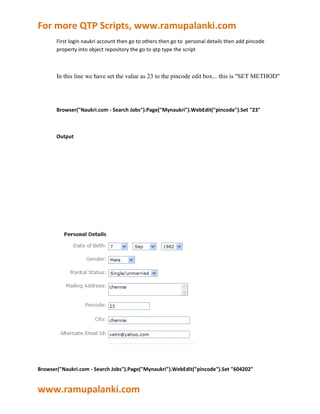
       In this line we have set the value as 23 to the pincode edit box... this is "SET METHOD"


       Browser("Naukri.com - Search Jobs").Page("Mynaukri").WebEdit("pincode").Set "23"


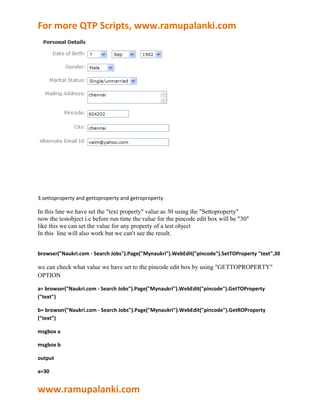
       Output


Browser("Naukri.com - Search Jobs").Page("Mynaukri").WebEdit("pincode").Set "604202"


www.ramupalanki.com
For more QTP Scripts, www.ramupalanki.com


3.settoproperty and gettoproperty and getroproperty

In this line we have set the "text property" value as 30 using the "Settoproperty"
now the testobject i.e before run time the value for the pincode edit box will be "30"
like this we can set the value for any property of a test object
In this line will also work but we can't see the result.


browser("Naukri.com - Search Jobs").Page("Mynaukri").WebEdit("pincode").SetTOProperty "text",30

we can check what value we have set to the pincode edit box by using "GETTOPROPERTY"
OPTION

a= browser("Naukri.com - Search Jobs").Page("Mynaukri").WebEdit("pincode").GetTOProperty
("text")

b= browser("Naukri.com - Search Jobs").Page("Mynaukri").WebEdit("pincode").GetROProperty
("text")

msgbox a

msgbox b

output

a=30


www.ramupalanki.com
For more QTP Scripts, www.ramupalanki.com
b=empty


There is no setroproperty. Test object contains only settoproperty and gettoproperty. Runtime object
contains only getro property.


4.test settings contains 7 tabs

1.properties,2.run,3.resourses,4.parameters,5.environment,6.web,7.recovery

5. how to multiple select at the same time

First login naukri account and go to work authorization property and add objects the type the script


browser("Naukri.com - Search
Jobs").page("Mynaukri").WebList("workAuthOtherCountries[]").Select"#1"

browser("Naukri.com - Search
Jobs").page("Mynaukri").WebList("workAuthOtherCountries[]").extendSelect"#3"

browser("Naukri.com - Search
Jobs").page("Mynaukri").WebList("workAuthOtherCountries[]").extendSelect"#5"


output


6. how to get all the link count or weblist count or web element count in the naukri home page

Set descobj = description.Create

descobj("micclass").value= "WebList"


www.ramupalanki.com
For more QTP Scripts, www.ramupalanki.com
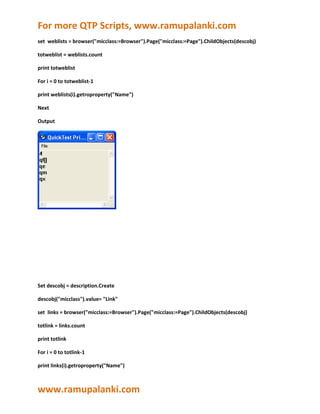
set weblists = browser("micclass:=Browser").Page("micclass:=Page").ChildObjects(descobj)

totweblist = weblists.count

print totweblist

For i = 0 to totweblist-1

print weblists(i).getroproperty("Name")

Next

Output


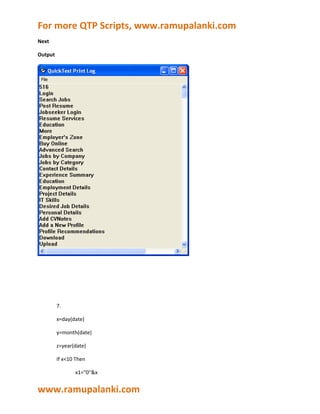
Set descobj = description.Create

descobj("micclass").value= "Link"

set links = browser("micclass:=Browser").Page("micclass:=Page").ChildObjects(descobj)

totlink = links.count

print totlink

For i = 0 to totlink-1

print links(i).getroproperty("Name")


www.ramupalanki.com
For more QTP Scripts, www.ramupalanki.com
Next

Output


         7.

         x=day(date)

         y=month(date)

         z=year(date)

         If x<10 Then

                x1="0"&x


www.ramupalanki.com
For more QTP Scripts, www.ramupalanki.com
               else

               x1=x

      End If

      If y<10 Then

               y1="0"&y

               else

               y1=y

      End If

      msgbox x1&"/"& y1 &"/"&z


      8.how to select particular property from weblist and how to set value in webedit ?


      browser("Naukri.com - Search Jobs").Page("Naukri.com - Search Jobs").weblist("qf[]").Select"#3"

      a=browser("Naukri.com - Search Jobs").Page("Naukri.com - Search
      Jobs").weblist("qf[]").getroproperty("value")

      msgbox a


      browser("Naukri.com - Search Jobs").Page("Mynaukri").WebEdit("pincode").Set"604202"

      a=Browser("Naukri.com - Search Jobs").Page("Mynaukri").WebEdit("pincode").
      GetROProperty("value")

      msgbox a


9. How to find Data Type of a Variable?


www.ramupalanki.com
For more QTP Scripts, www.ramupalanki.com
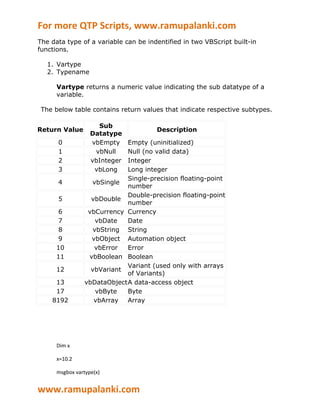
The data type of a variable can be indentified in two VBScript built-in
functions.

   1. Vartype
   2. Typename

      Vartype returns a numeric value indicating the sub datatype of a
      variable.

 The below table contains return values that indicate respective subtypes.

                     Sub
Return Value                           Description
                   Datatype
      0            vbEmpty   Empty (uninitialized)
      1             vbNull   Null (no valid data)
      2            vbInteger Integer
      3             vbLong   Long integer
                             Single-precision floating-point
      4            vbSingle
                             number
                             Double-precision floating-point
      5            vbDouble
                             number
       6          vbCurrency Currency
       7            vbDate   Date
       8           vbString String
       9           vbObject Automation object
      10            vbError  Error
      11          vbBoolean Boolean
                             Variant (used only with arrays
      12           vbVariant
                             of Variants)
     13          vbDataObjectA data-access object
     17             vbByte   Byte
    8192            vbArray  Array


      Dim x

      x=10.2

      msgbox vartype(x)


www.ramupalanki.com
For more QTP Scripts, www.ramupalanki.com

      output


      5


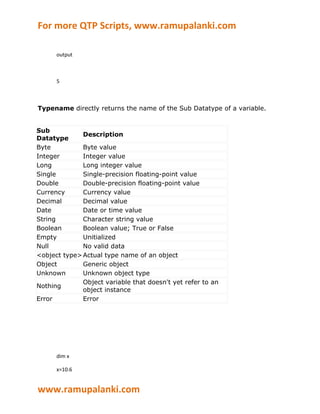
Typename directly returns the name of the Sub Datatype of a variable.


Sub
              Description
Datatype
Byte          Byte value
Integer       Integer value
Long          Long integer value
Single        Single-precision floating-point value
Double        Double-precision floating-point value
Currency      Currency value
Decimal       Decimal value
Date          Date or time value
String        Character string value
Boolean       Boolean value; True or False
Empty         Unitialized
Null          No valid data
<object type> Actual type name of an object
Object        Generic object
Unknown       Unknown object type
              Object variable that doesn't yet refer to an
Nothing
              object instance
Error         Error


      dim x

      x=10.6


www.ramupalanki.com
For more QTP Scripts, www.ramupalanki.com
        msgbox typename(x)


        output


        double


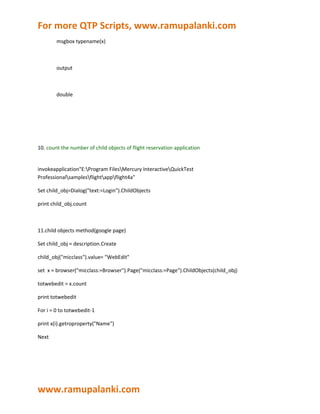
10. count the number of child objects of flight reservation application


invokeapplication"E:Program FilesMercury InteractiveQuickTest
Professionalsamplesflightappflight4a"

Set child_obj=Dialog("text:=Login").ChildObjects

print child_obj.count


11.child objects method(google page)

Set child_obj = description.Create

child_obj("micclass").value= "WebEdit"

set x = browser("micclass:=Browser").Page("micclass:=Page").ChildObjects(child_obj)

totwebedit = x.count

print totwebedit

For i = 0 to totwebedit-1

print x(i).getroproperty("Name")

Next


www.ramupalanki.com
For more QTP Scripts, www.ramupalanki.com
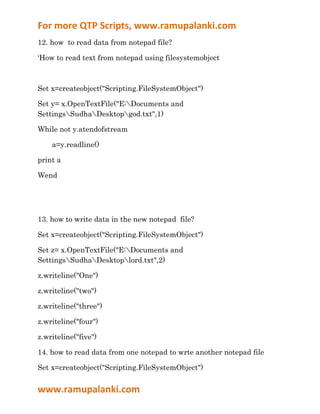
12. how to read data from notepad file?

‘How to read text from notepad using filesystemobject


Set x=createobject("Scripting.FileSystemObject")

Set y= x.OpenTextFile("E:Documents and
SettingsSudhaDesktopgod.txt",1)

While not y.atendofstream

    a=y.readline()

print a

Wend


13. how to write data in the new notepad file?

Set x=createobject("Scripting.FileSystemObject")

Set z= x.OpenTextFile("E:Documents and
SettingsSudhaDesktoplord.txt",2)

z.writeline("One")

z.writeline("two")

z.writeline("three")

z.writeline("four")

z.writeline("five")

14. how to read data from one notepad to wrte another notepad file

Set x=createobject("Scripting.FileSystemObject")


www.ramupalanki.com
For more QTP Scripts, www.ramupalanki.com
Set y= x.OpenTextFile("E:Documents and
SettingsSudhaDesktopgod.txt",1)

Set z= x.OpenTextFile("E:Documents and
SettingsSudhaDesktoplord.txt",2)

While not y.atendofstream

    a=y.readline()

          z.writeline(a)

print a

Wend


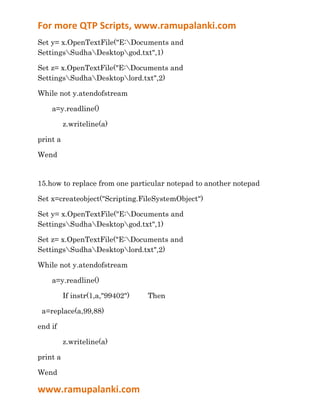
15.how to replace from one particular notepad to another notepad

Set x=createobject("Scripting.FileSystemObject")

Set y= x.OpenTextFile("E:Documents and
SettingsSudhaDesktopgod.txt",1)

Set z= x.OpenTextFile("E:Documents and
SettingsSudhaDesktoplord.txt",2)

While not y.atendofstream

    a=y.readline()

          If instr(1,a,"99402")   Then

 a=replace(a,99,88)

end if

          z.writeline(a)

print a

Wend

www.ramupalanki.com
For more QTP Scripts, www.ramupalanki.com


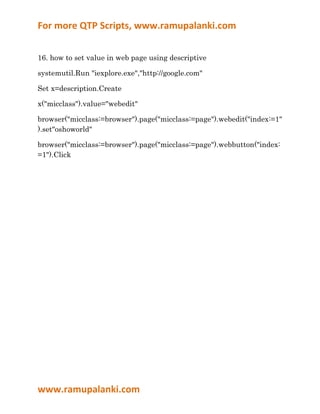
16. how to set value in web page using descriptive

systemutil.Run "iexplore.exe","http://google.com"

Set x=description.Create

x("micclass").value="webedit"

browser("micclass:=browser").page("micclass:=page").webedit("index:=1"
).set"oshoworld"

browser("micclass:=browser").page("micclass:=page").webbutton("index:
=1").Click


www.ramupalanki.com

Qtprealtimescripts 110103234828-phpapp02

  • 1.
    For more QTPScripts, www.ramupalanki.com 1. How to select particular property in weblist from browser? First open object repository then click add objects then go to naukri homepage and click naukri homepage title bar then select weblist or entire properties then click ok. Now go to qtp then type script browser("Naukri.com - Search Jobs").Page("Naukri.com - Search Jobs").WebList("qf[]").Select "#3" output browser("Naukri.com - Search Jobs").Page("Naukri.com - Search Jobs").WebList("qf[]").Select "#2" output 2. How to set values in web edit class? www.ramupalanki.com
  • 2.
    For more QTPScripts, www.ramupalanki.com First login naukri account then go to others then go to personal details then add pincode property into object repository the go to qtp type the script In this line we have set the value as 23 to the pincode edit box... this is "SET METHOD" Browser("Naukri.com - Search Jobs").Page("Mynaukri").WebEdit("pincode").Set "23" Output Browser("Naukri.com - Search Jobs").Page("Mynaukri").WebEdit("pincode").Set "604202" www.ramupalanki.com
  • 3.
    For more QTPScripts, www.ramupalanki.com 3.settoproperty and gettoproperty and getroproperty In this line we have set the "text property" value as 30 using the "Settoproperty" now the testobject i.e before run time the value for the pincode edit box will be "30" like this we can set the value for any property of a test object In this line will also work but we can't see the result. browser("Naukri.com - Search Jobs").Page("Mynaukri").WebEdit("pincode").SetTOProperty "text",30 we can check what value we have set to the pincode edit box by using "GETTOPROPERTY" OPTION a= browser("Naukri.com - Search Jobs").Page("Mynaukri").WebEdit("pincode").GetTOProperty ("text") b= browser("Naukri.com - Search Jobs").Page("Mynaukri").WebEdit("pincode").GetROProperty ("text") msgbox a msgbox b output a=30 www.ramupalanki.com
  • 4.
    For more QTPScripts, www.ramupalanki.com b=empty There is no setroproperty. Test object contains only settoproperty and gettoproperty. Runtime object contains only getro property. 4.test settings contains 7 tabs 1.properties,2.run,3.resourses,4.parameters,5.environment,6.web,7.recovery 5. how to multiple select at the same time First login naukri account and go to work authorization property and add objects the type the script browser("Naukri.com - Search Jobs").page("Mynaukri").WebList("workAuthOtherCountries[]").Select"#1" browser("Naukri.com - Search Jobs").page("Mynaukri").WebList("workAuthOtherCountries[]").extendSelect"#3" browser("Naukri.com - Search Jobs").page("Mynaukri").WebList("workAuthOtherCountries[]").extendSelect"#5" output 6. how to get all the link count or weblist count or web element count in the naukri home page Set descobj = description.Create descobj("micclass").value= "WebList" www.ramupalanki.com
  • 5.
    For more QTPScripts, www.ramupalanki.com set weblists = browser("micclass:=Browser").Page("micclass:=Page").ChildObjects(descobj) totweblist = weblists.count print totweblist For i = 0 to totweblist-1 print weblists(i).getroproperty("Name") Next Output Set descobj = description.Create descobj("micclass").value= "Link" set links = browser("micclass:=Browser").Page("micclass:=Page").ChildObjects(descobj) totlink = links.count print totlink For i = 0 to totlink-1 print links(i).getroproperty("Name") www.ramupalanki.com
  • 6.
    For more QTPScripts, www.ramupalanki.com Next Output 7. x=day(date) y=month(date) z=year(date) If x<10 Then x1="0"&x www.ramupalanki.com
  • 7.
    For more QTPScripts, www.ramupalanki.com else x1=x End If If y<10 Then y1="0"&y else y1=y End If msgbox x1&"/"& y1 &"/"&z 8.how to select particular property from weblist and how to set value in webedit ? browser("Naukri.com - Search Jobs").Page("Naukri.com - Search Jobs").weblist("qf[]").Select"#3" a=browser("Naukri.com - Search Jobs").Page("Naukri.com - Search Jobs").weblist("qf[]").getroproperty("value") msgbox a browser("Naukri.com - Search Jobs").Page("Mynaukri").WebEdit("pincode").Set"604202" a=Browser("Naukri.com - Search Jobs").Page("Mynaukri").WebEdit("pincode"). GetROProperty("value") msgbox a 9. How to find Data Type of a Variable? www.ramupalanki.com
  • 8.
    For more QTPScripts, www.ramupalanki.com The data type of a variable can be indentified in two VBScript built-in functions. 1. Vartype 2. Typename Vartype returns a numeric value indicating the sub datatype of a variable. The below table contains return values that indicate respective subtypes. Sub Return Value Description Datatype 0 vbEmpty Empty (uninitialized) 1 vbNull Null (no valid data) 2 vbInteger Integer 3 vbLong Long integer Single-precision floating-point 4 vbSingle number Double-precision floating-point 5 vbDouble number 6 vbCurrency Currency 7 vbDate Date 8 vbString String 9 vbObject Automation object 10 vbError Error 11 vbBoolean Boolean Variant (used only with arrays 12 vbVariant of Variants) 13 vbDataObjectA data-access object 17 vbByte Byte 8192 vbArray Array Dim x x=10.2 msgbox vartype(x) www.ramupalanki.com
  • 9.
    For more QTPScripts, www.ramupalanki.com output 5 Typename directly returns the name of the Sub Datatype of a variable. Sub Description Datatype Byte Byte value Integer Integer value Long Long integer value Single Single-precision floating-point value Double Double-precision floating-point value Currency Currency value Decimal Decimal value Date Date or time value String Character string value Boolean Boolean value; True or False Empty Unitialized Null No valid data <object type> Actual type name of an object Object Generic object Unknown Unknown object type Object variable that doesn't yet refer to an Nothing object instance Error Error dim x x=10.6 www.ramupalanki.com
  • 10.
    For more QTPScripts, www.ramupalanki.com msgbox typename(x) output double 10. count the number of child objects of flight reservation application invokeapplication"E:Program FilesMercury InteractiveQuickTest Professionalsamplesflightappflight4a" Set child_obj=Dialog("text:=Login").ChildObjects print child_obj.count 11.child objects method(google page) Set child_obj = description.Create child_obj("micclass").value= "WebEdit" set x = browser("micclass:=Browser").Page("micclass:=Page").ChildObjects(child_obj) totwebedit = x.count print totwebedit For i = 0 to totwebedit-1 print x(i).getroproperty("Name") Next www.ramupalanki.com
  • 11.
    For more QTPScripts, www.ramupalanki.com 12. how to read data from notepad file? ‘How to read text from notepad using filesystemobject Set x=createobject("Scripting.FileSystemObject") Set y= x.OpenTextFile("E:Documents and SettingsSudhaDesktopgod.txt",1) While not y.atendofstream a=y.readline() print a Wend 13. how to write data in the new notepad file? Set x=createobject("Scripting.FileSystemObject") Set z= x.OpenTextFile("E:Documents and SettingsSudhaDesktoplord.txt",2) z.writeline("One") z.writeline("two") z.writeline("three") z.writeline("four") z.writeline("five") 14. how to read data from one notepad to wrte another notepad file Set x=createobject("Scripting.FileSystemObject") www.ramupalanki.com
  • 12.
    For more QTPScripts, www.ramupalanki.com Set y= x.OpenTextFile("E:Documents and SettingsSudhaDesktopgod.txt",1) Set z= x.OpenTextFile("E:Documents and SettingsSudhaDesktoplord.txt",2) While not y.atendofstream a=y.readline() z.writeline(a) print a Wend 15.how to replace from one particular notepad to another notepad Set x=createobject("Scripting.FileSystemObject") Set y= x.OpenTextFile("E:Documents and SettingsSudhaDesktopgod.txt",1) Set z= x.OpenTextFile("E:Documents and SettingsSudhaDesktoplord.txt",2) While not y.atendofstream a=y.readline() If instr(1,a,"99402") Then a=replace(a,99,88) end if z.writeline(a) print a Wend www.ramupalanki.com
  • 13.
    For more QTPScripts, www.ramupalanki.com 16. how to set value in web page using descriptive systemutil.Run "iexplore.exe","http://google.com" Set x=description.Create x("micclass").value="webedit" browser("micclass:=browser").page("micclass:=page").webedit("index:=1" ).set"oshoworld" browser("micclass:=browser").page("micclass:=page").webbutton("index: =1").Click www.ramupalanki.com