DP 101 in 60 simple slides www.AdvancedQTP.com
What is DP? DP stands for  Descriptive Programming
But what  IS   DP? I t’s a cool way to work without QTP’s Object-Repository (OR)
Why would I want to do that?
Many reasons
You have to Functions & Recovery scenarios work with different actions Different actions = Different ORs
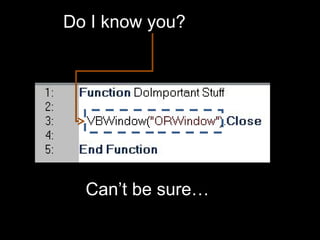
Do I know you? Can’t be sure…
You have to Can’t record certain objects Auto-hide panels Objects with changing hierarchies Nested inner-objects, Sub menus
Hold still, damnit! Even when you think you got it, all the properties turn out null
Simplicity Why kill a fly with an atom bomb? No need to use the OR for every one-time click button in the application
And, You can do VERY cool things with DP
OK, bring it on
First, we need to better understand the Object Repository What the OR is How does the OR work
I thought DP is all about NOT using the OR…
Well, yes, but under the hood, DP & the OR work the same way To understand the OR, is to understand DP
What is the OR?
A mysterious beast that records objects, in order to use them later
What is to record an object? Write down how to identify it
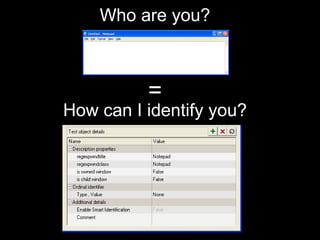
Who are you? = How can I identify you?
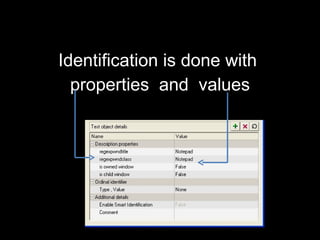
Identification is done with  properties  and  values
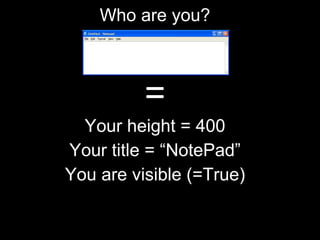
Who are you? = Your height = 400 Your title = “NotePad” You are visible (=True)
So, What IS the OR? Collections of properties & corresponding values Each collection represents an object No mysterious beast here
OK, So what IS DP? DP is a way for specifying the properties & values without using the OR interface No mysterious beast here, either
OK, I get it, there’s nothing more than properties and values Can we get on with it?
How do I  actually  use DP? There are two ways
1 Throw the properties and values straight into a command
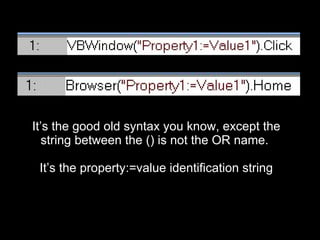
It’s the good old syntax you know, except the string between the () is not the OR name.  It’s the property:=value identification string
That’s kinda restrictive What if I want to use multiple identification properties?
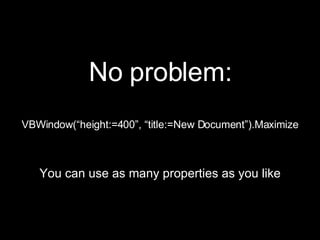
No problem: VBWindow(“height:=400”, “title:=New Document”).Maximize You can use as many properties as you like
All fine and well, but what if I want to use regular expressions?
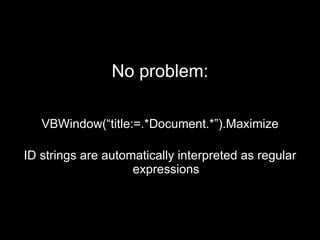
No problem: VBWindow(“title:=.*Document.*”).Maximize ID strings are automatically interpreted as regular expressions
2 Throw the properties & values into a description object, and throw IT into the command
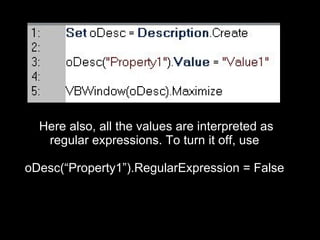
Here also, all the values are interpreted as regular expressions. To turn it off, use  oDesc(“Property1”).RegularExpression = False
Method 1 is faster, best used for one or two commands, tops
When you want to execute multiple commands on an object, method 2 is a better choice by far (allows one-time definitions, multiple uses)
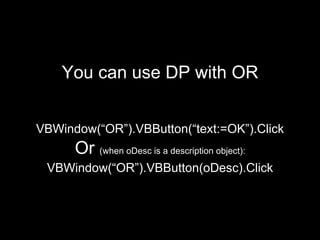
You can use DP with OR VBWindow(“OR”).VBButton(“text:=OK”).Click Or  (when oDesc is a description object): VBWindow(“OR”).VBButton(oDesc).Click
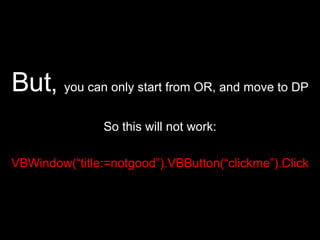
But ,  you can only start from OR, and move to DP So this will not work: VBWindow(“title:=notgood”).VBButton(“clickme”).Click
And that’s about it You can use each of the methods (or combine them), and you’ll be able to use objects that are not in the OR
You said I could do really cool stuff with DP!
Right you are We’ll cover some of the more popular tricks and tips These examples are only the tip of the iceberg. Play with them and see the true power of DP
The power of the string DP is nothing more than simple strings We can do such interesting things with strings…
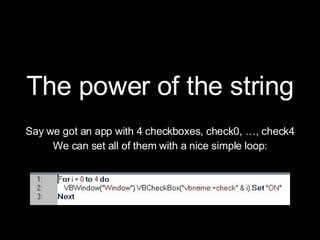
The power of the string Say we got an app with 4 checkboxes, check0, …, check4 We can set all of them with a nice simple loop:
The power of the string Very complex identification tasks can be done via strings manipulation Try different variations for yourself
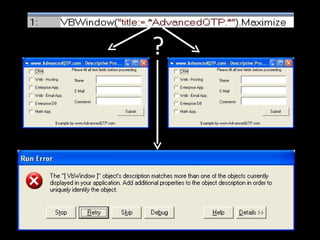
Solving double objects When QTP finds two object which match the same description, it freezes This kinda sucks
?
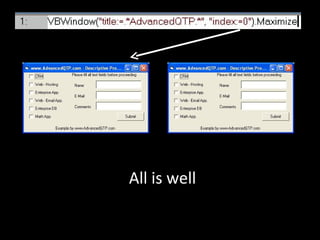
DP has a magic property: “index”, which allows us to tell the double objects apart Index is a zero-based counter
All is well
Getting objects collections This feature is so cool, deserves a title on its own
THE  coolest thing you can do with DP, is to get a collection of all the objects that math an identification
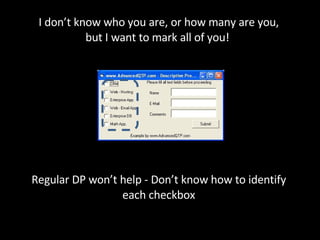
I don’t know who you are, or how many are you, but I want to mark all of you!  Regular DP won’t help - Don’t know how to identify each checkbox
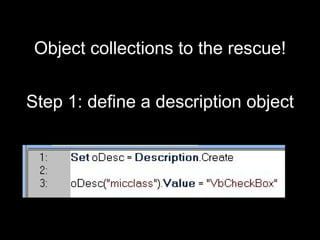
Object collections to the rescue! Step 1: define a description object
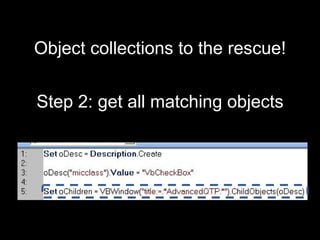
Object collections to the rescue! Step 2: get all matching objects
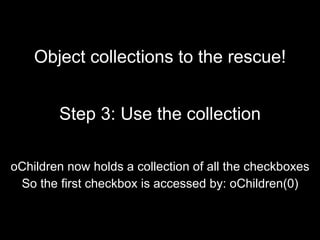
Object collections to the rescue! Step 3: Use the collection oChildren now holds a collection of all the checkboxes So the first checkbox is accessed by: oChildren(0)
What can we do with it? Anything we want
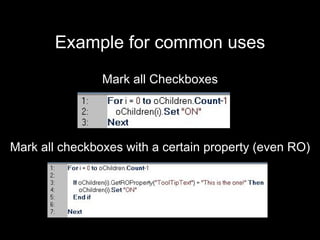
Example for common uses Mark all Checkboxes Mark all checkboxes with a certain property (even RO)
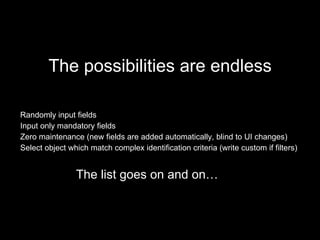
The possibilities are endless Randomly input fields Input only mandatory fields Zero maintenance (new fields are added automatically, blind to UI changes) Select object which match complex identification criteria (write custom if filters) The list goes on and on…
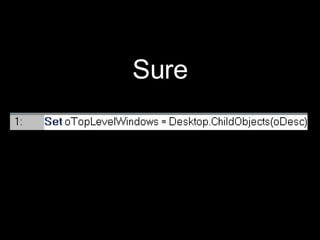
OK, this is indeed cool, but it only gets us the inner controls of a given window. Can we also get the application’s top level windows?
Sure
So, With DP we can work with no OR Sometimes we have to use it Other times it’s just more fun and useful DP also throws in a lot of extras that make it an inseparable part of good QTP automation Taste it, Experience it, Learn it, Use it, Love it It’s worth your while
And that was DP in 60 slides

Qtp Descriptive Programming 11200

  • 1.
    DP 101 in60 simple slides www.AdvancedQTP.com
  • 2.
    What is DP?DP stands for Descriptive Programming
  • 3.
    But what IS DP? I t’s a cool way to work without QTP’s Object-Repository (OR)
  • 4.
    Why would Iwant to do that?
  • 5.
  • 6.
    You have toFunctions & Recovery scenarios work with different actions Different actions = Different ORs
  • 7.
    Do I knowyou? Can’t be sure…
  • 8.
    You have toCan’t record certain objects Auto-hide panels Objects with changing hierarchies Nested inner-objects, Sub menus
  • 9.
    Hold still, damnit!Even when you think you got it, all the properties turn out null
  • 10.
    Simplicity Why killa fly with an atom bomb? No need to use the OR for every one-time click button in the application
  • 11.
    And, You cando VERY cool things with DP
  • 12.
  • 13.
    First, we needto better understand the Object Repository What the OR is How does the OR work
  • 14.
    I thought DPis all about NOT using the OR…
  • 15.
    Well, yes, butunder the hood, DP & the OR work the same way To understand the OR, is to understand DP
  • 16.
  • 17.
    A mysterious beastthat records objects, in order to use them later
  • 18.
    What is torecord an object? Write down how to identify it
  • 19.
    Who are you?= How can I identify you?
  • 20.
    Identification is donewith properties and values
  • 21.
    Who are you?= Your height = 400 Your title = “NotePad” You are visible (=True)
  • 22.
    So, What ISthe OR? Collections of properties & corresponding values Each collection represents an object No mysterious beast here
  • 23.
    OK, So whatIS DP? DP is a way for specifying the properties & values without using the OR interface No mysterious beast here, either
  • 24.
    OK, I getit, there’s nothing more than properties and values Can we get on with it?
  • 25.
    How do I actually use DP? There are two ways
  • 26.
    1 Throw theproperties and values straight into a command
  • 27.
    It’s the goodold syntax you know, except the string between the () is not the OR name. It’s the property:=value identification string
  • 28.
    That’s kinda restrictiveWhat if I want to use multiple identification properties?
  • 29.
    No problem: VBWindow(“height:=400”,“title:=New Document”).Maximize You can use as many properties as you like
  • 30.
    All fine andwell, but what if I want to use regular expressions?
  • 31.
    No problem: VBWindow(“title:=.*Document.*”).MaximizeID strings are automatically interpreted as regular expressions
  • 32.
    2 Throw theproperties & values into a description object, and throw IT into the command
  • 33.
    Here also, allthe values are interpreted as regular expressions. To turn it off, use oDesc(“Property1”).RegularExpression = False
  • 34.
    Method 1 isfaster, best used for one or two commands, tops
  • 35.
    When you wantto execute multiple commands on an object, method 2 is a better choice by far (allows one-time definitions, multiple uses)
  • 36.
    You can useDP with OR VBWindow(“OR”).VBButton(“text:=OK”).Click Or (when oDesc is a description object): VBWindow(“OR”).VBButton(oDesc).Click
  • 37.
    But , you can only start from OR, and move to DP So this will not work: VBWindow(“title:=notgood”).VBButton(“clickme”).Click
  • 38.
    And that’s aboutit You can use each of the methods (or combine them), and you’ll be able to use objects that are not in the OR
  • 39.
    You said Icould do really cool stuff with DP!
  • 40.
    Right you areWe’ll cover some of the more popular tricks and tips These examples are only the tip of the iceberg. Play with them and see the true power of DP
  • 41.
    The power ofthe string DP is nothing more than simple strings We can do such interesting things with strings…
  • 42.
    The power ofthe string Say we got an app with 4 checkboxes, check0, …, check4 We can set all of them with a nice simple loop:
  • 43.
    The power ofthe string Very complex identification tasks can be done via strings manipulation Try different variations for yourself
  • 44.
    Solving double objectsWhen QTP finds two object which match the same description, it freezes This kinda sucks
  • 45.
  • 46.
    DP has amagic property: “index”, which allows us to tell the double objects apart Index is a zero-based counter
  • 47.
  • 48.
    Getting objects collectionsThis feature is so cool, deserves a title on its own
  • 49.
    THE coolestthing you can do with DP, is to get a collection of all the objects that math an identification
  • 50.
    I don’t knowwho you are, or how many are you, but I want to mark all of you! Regular DP won’t help - Don’t know how to identify each checkbox
  • 51.
    Object collections tothe rescue! Step 1: define a description object
  • 52.
    Object collections tothe rescue! Step 2: get all matching objects
  • 53.
    Object collections tothe rescue! Step 3: Use the collection oChildren now holds a collection of all the checkboxes So the first checkbox is accessed by: oChildren(0)
  • 54.
    What can wedo with it? Anything we want
  • 55.
    Example for commonuses Mark all Checkboxes Mark all checkboxes with a certain property (even RO)
  • 56.
    The possibilities areendless Randomly input fields Input only mandatory fields Zero maintenance (new fields are added automatically, blind to UI changes) Select object which match complex identification criteria (write custom if filters) The list goes on and on…
  • 57.
    OK, this isindeed cool, but it only gets us the inner controls of a given window. Can we also get the application’s top level windows?
  • 58.
  • 59.
    So, With DPwe can work with no OR Sometimes we have to use it Other times it’s just more fun and useful DP also throws in a lot of extras that make it an inseparable part of good QTP automation Taste it, Experience it, Learn it, Use it, Love it It’s worth your while
  • 60.
    And that wasDP in 60 slides