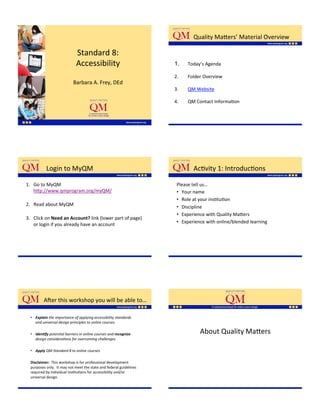
Quality'Ma;ers’'Material'Overview'

                             Standard'8:'
                             Accessibility'                           1.    Today’s'Agenda'

                                  '                                   2.  '' 'Folder'Overview'
                            Barbara'A.'Frey,'DEd''
                                                                      3.  '' 'QM'Website'

                                                                      4.  '' 'QM'Contact'InformaKon'


         ''Login'to'MyQM'                                                      AcKvity'1:'IntroducKons'

1.  Go'to'MyQM'                                                        Please'tell'us…''
    h;p://www.qmprogram.org/myQM/'                                     •  Your'name'
    '                                                                  •  Role'at'your'insKtuKon'
2.  Read'about'MyQM'                                                   •  Discipline'
    '
                                                                       •  Experience'with'Quality'Ma;ers'
3.  Click'on'Need$an$Account?$link'(lower'part'of'page)'
                                                                       •  Experience'with'online/blended'learning'
    or'login'if'you'already'have'an'account'


          A[er'this'workshop'you'will'be'able'to…'

  •  Explain(the$importance$of$applying$accessibility$standards$
     and$universal$design$principles$to$online$courses$$'

  •  Iden,fy(poten6al$barriers$in$online$courses$and$recognize$                   About'Quality'Ma;ers'
     design$considera6ons$for$overcoming$challenges$

  •  Apply'QM$Standard$8$to$online$courses$$
  '
  Disclaimer:$$This'workshop'is'for'professional'development'
  purposes'only.''It'may'not'meet'the'state'and'federal'guidelines'
  required'by'individual'insKtuKons'for'accessibility'and/or'
  universal'design.'
  '

  '
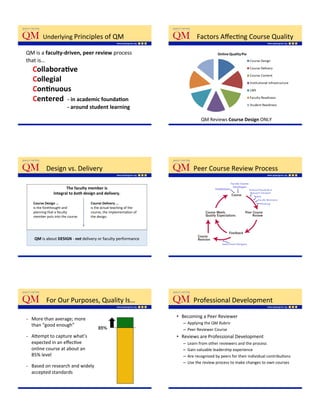
Underlying'Principles'of'QM'                                       ''Factors'AffecKng'Course'Quality'

QM'is'a'faculty6driven,$peer$review'process''
that'is…'
         $Collabora=ve'
         Collegial$
         Con=nuous$
         Centered$$6$in$academic$founda=on$
            $$$$$$$$$$$$$$ $ $$6$around$student$learning$
'                                                                                      QM'Reviews'Course$Design$ONLY'


               ''Design'vs.'Delivery'                                             Peer'Course'Review'Process'

                            The$faculty$member$is$$
                     integral$to(both(design$and$delivery.$

         Course$Design$…'''              Course$Delivery$…$
         is'the'forethought'and'         is'the'actual'teaching'of'the'
         planning'that'a'faculty'        course,'the'implementaKon'of'
         member'puts'into'the'course.'   the'design.'


                                     (
          QM'is'about'DESIGN'_'not'delivery'or'faculty'performance'
     '


               ''For'Our'Purposes,'Quality'Is…'                                   Professional'Development'

•        More'than'average;'more'                                         •  Becoming'a'Peer'Reviewer'
         than'“good'enough”'                                                 –  Applying'the'QM'Rubric'
                                                                             –  Peer'Reviewer'Course'
•        A;empt'to'capture'what’s'                                        •  Reviews'are'Professional'Development'
         expected'in'an'effecKve'                                             –  Learn'from'other'reviewers'and'the'process'
         online'course'at'about'an'                                          –  Gain'valuable'leadership'experience'
         85%'level'                                                          –  Are'recognized'by'peers'for'their'individual'contribuKons'
                                                                             –  Use'the'review'process'to'make'changes'to'own'courses'
•        Based'on'research'and'widely'
         accepted'standards'
'
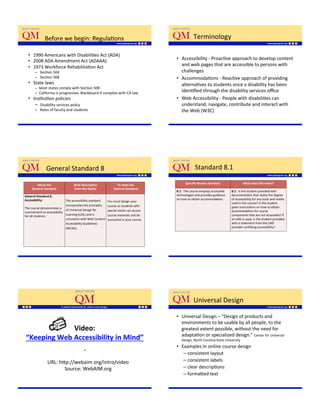
Before'we'begin:'RegulaKons'                                                              Terminology'

  •  1990'Americans'with'DisabiliKes'Act'(ADA)'
  •  2008'ADA'Amendment'Act'(ADAAA)'                                                        •  Accessibility'_'ProacKve'approach'to'develop'content'
  •  1973'Workforce'RehabilitaKon'Act'                                                         and'web'pages'that'are'accessible'to'persons'with'
       –  'SecKon'504'                                                                         challenges'
       –  'SecKon'508'                                                                      •  AccommodaKons'_'ReacKve'approach'of'providing'
  •  State'laws''                                                                              alternaKves'to'students'once'a'disability'has'been'
       –  Most'states'comply'with'SecKon'508'
       –  California'is'progressive;'Blackboard'9'complies'with'CA'law'                        idenKfied'through'the'disability'services'office'
  •  InsKtuKon'policies'                                                                    •  Web'Accessibility'_'People'with'disabiliKes'can'
      –  'Disability'services'policy'                                                          understand,'navigate,'contribute'and'interact'with'
       –  'Roles'of'faculty'and'students'                                                      the'Web'(W3C)'

                                                                                            '


             ''General'Standard'8'                                                                       Standard'8.1'

        About$the$$                 Brief$Descrip=on$$               To$meet$the$                 Specific$Review$Standard$                 What$does$this$mean?$
     General$Standard$              from$the$Rubric$              $General$Standard$$
                                                                                            8.1:''The'course'employs'accessible'   8.1:$$Is'the'student'provided'with'
General$Standard$8,$           '                                                            technologies'and'provides'guidance'    documentaKon'that'states'the'degree'
                                                              '
Accessibility:$                The'accessibility'standard'                                  on'how'to'obtain'accommodaKon.'        of'accessibility'for'any'tools'and'media'
                                                              You'must'design'your'
$                                                                                                                                  used'in'the'course?'Is'the'student'
                               incorporates'the'principles'   course'so'students'with'
The'course'demonstrates'a'                                                                                                         given'instrucKons'on'how'to'obtain'
                               of'Universal'Design'for'       special'needs'can'access'                                            accommodaKon'for'course'
commitment'to'accessibility'
for'all'students.''            Learning'(UDL)'and'is'         course'materials'and'be'                                             components'that'are'not'accessible?'If'
                               consistent'with'Web'Content'   successful'in'your'course.'                                          an'LMS'is'used,'is'the'student'provided'
                               Accessibility'Guidelines'                                                                           with'a'statement'from'the'LMS'
                               (WCAG).'                                                                                            provider'cerKfying'accessibility?'


                                                                                                        Universal'Design'

                                                                                            •  Universal'Design'–'“Design'of'products'and'
                                                                                               environments'to'be'usable'by'all'people,'to'the'
             Video:$$$                                                                         greatest'extent'possible,'without'the'need'for'
                                                                                               adaptaKon'or'specialized'design.”'Center'for'Universal'
“Keeping$Web$Accessibility$in$Mind”$                                                            Design,'North'Carolina'State'University'

                $                                                                           •  Examples'In'online'course'design'
                                                                                                 –  consistent'layout'
                URL:'h;p://webaim.org/intro/video'                                               –  consistent'labels'
                       Source:'WebAIM.org'                                                       –  clear'descripKons''
                                                                                                 –  forma;ed'text'
                                                                                               '
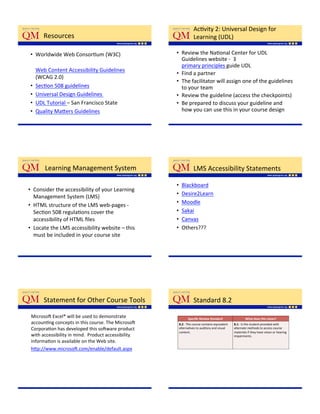
AcKvity'2:'Universal'Design'for'
       Resources'                                                    Learning'(UDL)'

•  Worldwide'Web'ConsorKum'(W3C)'''                    •  Review'the'NaKonal'Center'for'UDL'
                                                          Guidelines'website'_''3'
  '                                                       primary'principles'guide'UDL'
    Web'Content'Accessibility'Guidelines'
                                                       •  Find'a'partner'
    (WCAG'2.0)'
                                                       •  The'facilitator'will'assign'one'of'the'guidelines'
•  SecKon'508'guidelines'                                 to'your'team'
•  Universal'Design'Guidelines''                       •  Review'the'guideline'(access'the'checkpoints)'
•  UDL'Tutorial'–'San'Francisco'State'                 •  Be'prepared'to'discuss'your'guideline'and'
•  Quality'Ma;ers'Guidelines'                             how'you'can'use'this'in'your'course'design'
'


       Learning'Management'System'                                   LMS'Accessibility'Statements'

                                                       •    Blackboard'
•  Consider'the'accessibility'of'your'Learning'
                                                       •    Desire2Learn'
   Management'System'(LMS)'
                                                       •    Moodle'
•  HTML'structure'of'the'LMS'web_pages'_'
   SecKon'508'regulaKons'cover'the'                    •    Sakai'
   accessibility'of'HTML'files''                        •    Canvas'
•  Locate'the'LMS'accessibility'website'–'this'        •    Others???'
                                                            '''
   must'be'included'in'your'course'site''                   '


       Statement'for'Other'Course'Tools'                             Standard'8.2'

 Microso['Excel®'will'be'used'to'demonstrate'                     Specific$Review$Standard$              What$does$this$mean?$
 accounKng'concepts'in'this'course.'The'Microso['       8.2:''The'course'contains'equivalent'   8.1:$$Is'the'student'provided'with'
 CorporaKon'has'developed'this'so[ware'product'         alternaKves'to'auditory'and'visual'     alternate'methods'to'access'course'
                                                        content.'                               materials'if'they'have'vision'or'hearing'
 with'accessibility'in'mind.''Product'accessibility'                                            impairments.'
 informaKon'is'available'on'the'Web'site.''
 h;p://www.microso[.com/enable/default.aspx'
AlternaKves'for'MulKmedia'                                                       AcKvity'3:''CreaKng'AlternaKves'

•  Video:'need'to'include'capKons'for'spoken'word'and'                             •  For'this'acKvity,'work'with'a'partner'
   auditory'descripKons'for'whatever'is'taking'place'on'
   the'screen'                                                                        –  Consider'three'forms'of'mulKmedia'(e.g.,'images,'audio,'
•  Audio:'need'to'include'a'text'transcripKon.'The'file'                                  video,'simulaKons,'narrated'PowerPoints,'websites)''
   should'be'in'HTML'format'and'placed'near'the'audio'                                –  Next,'consider'how'students'with'vision,'hearing,'or'motor'
   file.'                                                                                 impairments'would'interact'with'these'forms'of'media'
                                                                                      –  How'would'you'provide'alternaKves?'
•  Plug_ins:'need'to'place'direcKons'for'plug_in'
   download'near'any'link'that'acKvates'a'plug_in'


           Standard'8.3'                                                                    Colors'

       Specific$Review$Standard$                   What$does$this$mean?$
                                                                                   •  Never'use'color'as'the'only'indicator'for'criKcal'acKviKes.'
 8.3:''The'course'design'facilitates'    8.3:$$Is'the'course'designed'using'          About'8%'of'males'and'about'1%'of'females'have'difficulty'
 readability'and'minimizes'distracKons.' appropriate'design'elements?'Do'the'         discriminaKng'colors.'Most'users'with'color'deficiencies'have'
 '                                       colors,'fonts,'spacing,'graphics,'and''      difficulty'seeing'colors'in'the'green'porKon'of'the'spectrum.''
                                         formapng'promote'readability'and'         •  Remove'all'the'color'from'your'images'to'see'if'they'sKll'have'
                                         minimize'distracKons'for'the'student.'       impact'
                                                                                   •  Try'to'avoid'placing'read'and'green'together'
                                                                                   •  Ensure'that'the'lightness'contrast'between'foreground'and'
                                                                                      background'colors'is'high'
                                                                                   •  Choose'your'colors'with'awareness'
                                                                                   •  Use'tools'to'see'what'Web'pages'will'look'like'when'seen'by'
                                                                                      color'deficient'users'


           Fonts,'Spacing,'&'Formapng'                                                      Images'
•  Fonts'                                                                          •  All'images'have'appropriate,'equivalent'
   –  Minimum'type'size'of'at'least'12'pts'                                           alternaKve'text'
   –  Use'real'text''rather'than'text'within'graphics'
   –  Avoid'italics,'blinking'or'moving'text,'and'pa;erned'                        •  All'linked'images'have'descripKve'alternaKve'text'
      backgrounds'                                                                 •  AlternaKves'for'complex'images'are'provided'(image'
   –  Be'sure'you'use'upper'and'lower'case'le;ers'
                                                                                      maps)'
•  Spacing'
   –  Clear'le;er'spacing'between'each'character'
   –  Provide'spacing'between'1.5'to'2'when'starKng'new'lines'
•  Formapng'
   –  Characters'have'consistent'stroke'widths'
AcKvity'4:'Your'Course''                                                  Standard'8.4'

•  For'this'acKvity'you'will'be'reviewing'your'own'distance'
   learning'course'site'and'compleKng'the'your'                                  Specific$Review$Standard$              What$does$this$mean?$

   “Improvement'Plan.”'                                                    8.4:''The'course'design'            8.4:$$Do'the'elements'contained'within'
   –  Check'to'see'if'you'are'using'colors'appropriately.'If'not,'what'    accommodates'the'use'of'assisKve'   the'course'work'with'assisKve'
                                                                           technologies.'                      technology?''
      do'you'need'to'do'to'ensure'your'course'is'accessible'
   –  Review'the'fonts'you'are'using:'are'they'large'enough,'an'
      appropriate'type,''and'do'you'use'all'upper'or'lower'case'text.'
      What'do'you'need'to'improve'the'accessibility'of'your'course.'
   –  Do'the'images'in'your'course'contain'“alternaKve”'text.'If'not,'
      does'your'LMS'enable'you'to'easily'add'this'to'the'images'or'
      will'you'need'help'from'your'technology'team.'


         AssisKve'Technologies'                                                    OperaKng'System'Accessibility''Tools'

•  AssisKve'Technologies'_'Any$item,$piece$of$
   equipment,$or$system,$…used$to$increase,$maintain,$                            •    Windows'XP'accessibility'demos''
   or$improve$func6onal$capabili6es$of$individuals$with$                          •    Windows'Vista'accessibility'demos''
   disabili6es$(hAp://www.sec6on508.gov)'                                         •    Windows'7'accessibility'features'
                                                                                  •    Apple'Mac'OS'X'


         Visual'Impairments'                                                       Range'of'Visual'Impairments'


                                                                          •  Low'vision'
                              Video:$$                                    •  Color'blindness'
    Student with a visual impairment                                      •  Blindness''


                   Source:'WebAIM.org  '
           URL:'h;p://webaim.org/arKcles/visual/
                       blind#howblind'
Challenges'for'Persons'with'Low'                         Challenges'for'Persons''
        Vision'or'Blindness'                                     with'Color'Blindness'


                                                                                 Source: WebAIM.org


      AssisKve'Technologies'–''
      Blind'&'Low'Vision'

•  Screen'readers'
  –  JAWS,'Window'Eyes,'Easy'Web'Browsing,'
     Windows'Accessibility'Tools'
                                                                            Video:''
•  Screen'Magnifiers'                                             Person'Using'a'Screen'Reader''
  –  Zoomtext,'MAGic,'Windows'Accessibility'Tools''
                                                                          Source:''University'of'Wisconsin'–'Madison,''
•  Braille'keyboard'                                                          Division'of'InformaKon'Technology''
                                                                                              URL:'
•  Voice'recogniKon'so[ware''                                          h;p://www.doit.wisc.edu/accessibility/video/intro/
                                                                                      intro_scrn_rdrs.mov'


        LimitaKons''                                            AcKvity'5:'DemonstraKon'

•  Screen'Readers'
                                                      •    Take'a'moment'and'close'your'eyes'
   –  EmoKon'or'voice'intonaKons''
                                                      •    Review'this'sample'instrucKonal'content''
   –  Images'
   –  Visual'layout'                                  •    Try'to'determine'what'is'being'conveyed'
   –  Inaccessible'and'non_descripKve'text'           •    What'did'you'learn?
   –  Data'tables'
   –  Chat'tools'or'instant'messaging''
•  Screen'Magnifiers'                                  URL: https://www.youtube.com/watch?v=YmwwrGV_aiE

•  Keyboard'Accessibility''
Hearing'Impairments'                            Hearing'Impairments'

                                                  •  Degrees'of'hearing'loss'
                      Video:$$                      –  Mild:'below'about'30'decibels'
                                                    –  Moderate:'below'about'50'decibels'
 Student with a hearing impairment                  –  Severe':''below'about'80'decibels'
                                                    –  Profound:''below'about'95'decibels'
                  Source:'WebAIM.org'


         AssisKve'Technologies'for''
         Hearing'Impaired'                               LimitaKons'

•    Hearing'aids'and'implants'                   •  Inability'to'hear'voice'intonaKons''
•    Text'Telephones'(TTYs)''
•    CapKoning'(closed'/'open)'                   •  Few'alternaKve'resources''
•    Instant'Messaging'(IM)'
•    AssisKve'Listening'System'(ALS)'


        AcKvity'6:'DemonstraKon'                        Motor'Impairment'

•    Mute'or'turn'off'the'audio'on'the'computer'
•    Review'this'sample'instrucKonal'content''
                                                                     Video:$$
•    Try'to'determine'what'is'being'conveyed'
•    What'did'you'learn?                           Student with a motor impairment

                                                                 Source:'WebAIM.org   '
                                                         URL:'h;p://webaim.org/arKcles/motor/
                                                                     motordisabiliKes
                                                                                    '
Motor'Impairments'                               Challenges'

•  Limited'or'absence'of'fine'or'gross'motor'         •  Limited'or'no'use'of'input'devices'such'as'
   skills'                                              mouse'and'keyboard'
•  Examples:'carpel'tunnel,'arthriKs,'paraplegia,'   •  Slowness'in'navigaKon'
   quadriplegia,'spina'bifoda,'muscular'             •  Easily'faKgued''
   dystrophy,'mulKple'sclerosis'(MS)'
'


           AssisKve'Technologies''
           for'Motor'Impairments'                          LimitaKons$$

•    Oversized'trackball'and'ergonomic'mouse'
•    Mouth'sKck'                                     •  Devices'cannot'perfectly'replicate'a'
•    Head'wand'                                         person’s'experience'without'the'disability'
•    Single'switch'access'
                                                     •  Accessing'online'content'may'take'more'
•    Sip'and'puff'switch''
                                                        Kme'and'effort'
•    AdapKve'keyboard'
•    Ergonomic'keyboard'
•    On_screen'keyboard'
•    Eye'tracking'
•    Voice'recogniKon'so[ware'
•    Word'PredicKon'So[ware'


           AcKvity'7:'DemonstraKon'

•  Try'to'navigate'your'computer'without'
   using'your'mouse'                                          Design'ConsideraKons:''
•  IdenKfy'the'challenges'you'faced'                           Applying'Standard'8'
•  How'did'it'limit'your'ability?
Development'Tools'                                Microso['Word®'

•    Microso['Word'
                                                    •  Apply'Heading'Styles'
•    Microso['PowerPoint'
                                                    •  Insert'a'Table'of'Contents'for'lengthy'
•    Adobe'Acrobat'Professional'
                                                       documents'
•    Adobe'Soundbooth'
•    Camtasia,'CapKvate,'ArKculate'                 •  Use'numbers'instead'of'bullets'
•    MAGpie''                                       •  Use'Sans'Serif'fonts'
•    Dragon'Naturally'Speaking'                     •  Add'Alt'Text'to'Images'
•    So[Chalk''                                     •  Save'as'a'tagged'PDF'or'HTML'


         Microso['PowerPoint'®'                            AcKvity'8:'Hands_On'PracKce'

•    Use'the'pre_defined'slide'layouts'              •  Use'the'File'Accessibility'feature'in'Word'to'
                                                       check'a'document'and'correct'issues'
•    Check'your'presentaKon'in'the'Outline'view''
                                                    •  Convert'a'syllabus'in'Word'document'format'
•    Use'sans'serif'fonts'
                                                       to'an'accessible'PDF'
•    Avoid'blinking'text'or'images'
•    Add'alt'tags'to'images''
•    Convert'PowerPoint'to'a'PDF'


         Top'8'for'Standard'8'                             Top'8'for'Standard'8'(conKnued)''

     8'–'Consider'mulKple'formats'for'content''       4'–'Design'with'color'contrast'for'text'and'
                                                         background;'use'sans'serif'fonts'
     7'–'Provide'links'or'e_Reserves'for'arKcles'
                                                      3'–'Use'templates'and'built_in'formapng'
        rather'then'scanning'
                                                         with'Word'and'PowerPoint''
     6'–'Use'consistent'Ktles,'formats,'and'          2'–'Verify'accessibility'of'course'content'and'
        layouts'in'online'courses''                      tools'
     5'–'Write'for'the'Web'                           1'–'Make'friends'with'your'disabiliKes'office'
                                                         and'instrucKonal'support'staff'
How'do'you'know'if'your'online'course/
        content'is'accessible?'                          ConKnue'the'Discussion'

•    Use'WAVE'tool'                                •  What'can'you'do'to'make'your'course'
•    Use'SecKon'508'toolbar''                         more'accessible?''
•    Use'Adobe'Professional''                      •  If'you'are'a'reviewer,'what'is'one'thing'you'
•    Consult'your'QM'review'team'                     will'check'to'determine'if'a'course'meets'
                                                      QM'Accessibility'Standards?'
•    Consult'your'insKtuKon’s'instrucKonal'
     technology'team'


        ConKnue'the'Discussion'


•  What'can'you'do'to'make'your'course'
   more'accessible?''                                          Thanks'to'YOU…..'
•  If'you'are'a'reviewer,'what'is'one'thing'you'               Quality'Ma;ers!''
   will'check'to'determine'if'a'course'meets'
   QM'Accessibility'Standards?'


               Evalua=on$
      Please'complete'the'session'evaluaKon:'
            h;p://Knyurl.com/caoyd2p'
                        '

QM Addressing Accessibility PPT Handout

  • 1.
    Quality'Ma;ers’'Material'Overview' Standard'8:' Accessibility' 1.  Today’s'Agenda' ' 2.  '' 'Folder'Overview' Barbara'A.'Frey,'DEd'' 3.  '' 'QM'Website' 4.  '' 'QM'Contact'InformaKon' ''Login'to'MyQM' AcKvity'1:'IntroducKons' 1.  Go'to'MyQM' Please'tell'us…'' h;p://www.qmprogram.org/myQM/' •  Your'name' ' •  Role'at'your'insKtuKon' 2.  Read'about'MyQM' •  Discipline' ' •  Experience'with'Quality'Ma;ers' 3.  Click'on'Need$an$Account?$link'(lower'part'of'page)' •  Experience'with'online/blended'learning' or'login'if'you'already'have'an'account' A[er'this'workshop'you'will'be'able'to…' •  Explain(the$importance$of$applying$accessibility$standards$ and$universal$design$principles$to$online$courses$$' •  Iden,fy(poten6al$barriers$in$online$courses$and$recognize$ About'Quality'Ma;ers' design$considera6ons$for$overcoming$challenges$ •  Apply'QM$Standard$8$to$online$courses$$ ' Disclaimer:$$This'workshop'is'for'professional'development' purposes'only.''It'may'not'meet'the'state'and'federal'guidelines' required'by'individual'insKtuKons'for'accessibility'and/or' universal'design.' ' '
  • 2.
    Underlying'Principles'of'QM' ''Factors'AffecKng'Course'Quality' QM'is'a'faculty6driven,$peer$review'process'' that'is…' $Collabora=ve' Collegial$ Con=nuous$ Centered$$6$in$academic$founda=on$ $$$$$$$$$$$$$$ $ $$6$around$student$learning$ ' QM'Reviews'Course$Design$ONLY' ''Design'vs.'Delivery' Peer'Course'Review'Process' The$faculty$member$is$$ integral$to(both(design$and$delivery.$ Course$Design$…''' Course$Delivery$…$ is'the'forethought'and' is'the'actual'teaching'of'the' planning'that'a'faculty' course,'the'implementaKon'of' member'puts'into'the'course.' the'design.' ( QM'is'about'DESIGN'_'not'delivery'or'faculty'performance' ' ''For'Our'Purposes,'Quality'Is…' Professional'Development' •  More'than'average;'more' •  Becoming'a'Peer'Reviewer' than'“good'enough”' –  Applying'the'QM'Rubric' –  Peer'Reviewer'Course' •  A;empt'to'capture'what’s' •  Reviews'are'Professional'Development' expected'in'an'effecKve' –  Learn'from'other'reviewers'and'the'process' online'course'at'about'an' –  Gain'valuable'leadership'experience' 85%'level' –  Are'recognized'by'peers'for'their'individual'contribuKons' –  Use'the'review'process'to'make'changes'to'own'courses' •  Based'on'research'and'widely' accepted'standards' '
  • 3.
    Before'we'begin:'RegulaKons' Terminology' •  1990'Americans'with'DisabiliKes'Act'(ADA)' •  2008'ADA'Amendment'Act'(ADAAA)' •  Accessibility'_'ProacKve'approach'to'develop'content' •  1973'Workforce'RehabilitaKon'Act' and'web'pages'that'are'accessible'to'persons'with' –  'SecKon'504' challenges' –  'SecKon'508' •  AccommodaKons'_'ReacKve'approach'of'providing' •  State'laws'' alternaKves'to'students'once'a'disability'has'been' –  Most'states'comply'with'SecKon'508' –  California'is'progressive;'Blackboard'9'complies'with'CA'law' idenKfied'through'the'disability'services'office' •  InsKtuKon'policies' •  Web'Accessibility'_'People'with'disabiliKes'can' –  'Disability'services'policy' understand,'navigate,'contribute'and'interact'with' –  'Roles'of'faculty'and'students' the'Web'(W3C)' ' ''General'Standard'8' Standard'8.1' About$the$$ Brief$Descrip=on$$ To$meet$the$ Specific$Review$Standard$ What$does$this$mean?$ General$Standard$ from$the$Rubric$ $General$Standard$$ 8.1:''The'course'employs'accessible' 8.1:$$Is'the'student'provided'with' General$Standard$8,$ ' technologies'and'provides'guidance' documentaKon'that'states'the'degree' ' Accessibility:$ The'accessibility'standard' on'how'to'obtain'accommodaKon.' of'accessibility'for'any'tools'and'media' You'must'design'your' $ used'in'the'course?'Is'the'student' incorporates'the'principles' course'so'students'with' The'course'demonstrates'a' given'instrucKons'on'how'to'obtain' of'Universal'Design'for' special'needs'can'access' accommodaKon'for'course' commitment'to'accessibility' for'all'students.'' Learning'(UDL)'and'is' course'materials'and'be' components'that'are'not'accessible?'If' consistent'with'Web'Content' successful'in'your'course.' an'LMS'is'used,'is'the'student'provided' Accessibility'Guidelines' with'a'statement'from'the'LMS' (WCAG).' provider'cerKfying'accessibility?' Universal'Design' •  Universal'Design'–'“Design'of'products'and' environments'to'be'usable'by'all'people,'to'the' Video:$$$ greatest'extent'possible,'without'the'need'for' adaptaKon'or'specialized'design.”'Center'for'Universal' “Keeping$Web$Accessibility$in$Mind”$ Design,'North'Carolina'State'University' $ •  Examples'In'online'course'design' –  consistent'layout' URL:'h;p://webaim.org/intro/video' –  consistent'labels' Source:'WebAIM.org' –  clear'descripKons'' –  forma;ed'text' '
  • 4.
    AcKvity'2:'Universal'Design'for' Resources' Learning'(UDL)' •  Worldwide'Web'ConsorKum'(W3C)''' •  Review'the'NaKonal'Center'for'UDL' Guidelines'website'_''3' ' primary'principles'guide'UDL' Web'Content'Accessibility'Guidelines' •  Find'a'partner' (WCAG'2.0)' •  The'facilitator'will'assign'one'of'the'guidelines' •  SecKon'508'guidelines' to'your'team' •  Universal'Design'Guidelines'' •  Review'the'guideline'(access'the'checkpoints)' •  UDL'Tutorial'–'San'Francisco'State' •  Be'prepared'to'discuss'your'guideline'and' •  Quality'Ma;ers'Guidelines' how'you'can'use'this'in'your'course'design' ' Learning'Management'System' LMS'Accessibility'Statements' •  Blackboard' •  Consider'the'accessibility'of'your'Learning' •  Desire2Learn' Management'System'(LMS)' •  Moodle' •  HTML'structure'of'the'LMS'web_pages'_' SecKon'508'regulaKons'cover'the' •  Sakai' accessibility'of'HTML'files'' •  Canvas' •  Locate'the'LMS'accessibility'website'–'this' •  Others???' ''' must'be'included'in'your'course'site'' ' Statement'for'Other'Course'Tools' Standard'8.2' Microso['Excel®'will'be'used'to'demonstrate' Specific$Review$Standard$ What$does$this$mean?$ accounKng'concepts'in'this'course.'The'Microso[' 8.2:''The'course'contains'equivalent' 8.1:$$Is'the'student'provided'with' CorporaKon'has'developed'this'so[ware'product' alternaKves'to'auditory'and'visual' alternate'methods'to'access'course' content.' materials'if'they'have'vision'or'hearing' with'accessibility'in'mind.''Product'accessibility' impairments.' informaKon'is'available'on'the'Web'site.'' h;p://www.microso[.com/enable/default.aspx'
  • 5.
    AlternaKves'for'MulKmedia' AcKvity'3:''CreaKng'AlternaKves' •  Video:'need'to'include'capKons'for'spoken'word'and' •  For'this'acKvity,'work'with'a'partner' auditory'descripKons'for'whatever'is'taking'place'on' the'screen' –  Consider'three'forms'of'mulKmedia'(e.g.,'images,'audio,' •  Audio:'need'to'include'a'text'transcripKon.'The'file' video,'simulaKons,'narrated'PowerPoints,'websites)'' should'be'in'HTML'format'and'placed'near'the'audio' –  Next,'consider'how'students'with'vision,'hearing,'or'motor' file.' impairments'would'interact'with'these'forms'of'media' –  How'would'you'provide'alternaKves?' •  Plug_ins:'need'to'place'direcKons'for'plug_in' download'near'any'link'that'acKvates'a'plug_in' Standard'8.3' Colors' Specific$Review$Standard$ What$does$this$mean?$ •  Never'use'color'as'the'only'indicator'for'criKcal'acKviKes.' 8.3:''The'course'design'facilitates' 8.3:$$Is'the'course'designed'using' About'8%'of'males'and'about'1%'of'females'have'difficulty' readability'and'minimizes'distracKons.' appropriate'design'elements?'Do'the' discriminaKng'colors.'Most'users'with'color'deficiencies'have' ' colors,'fonts,'spacing,'graphics,'and'' difficulty'seeing'colors'in'the'green'porKon'of'the'spectrum.'' formapng'promote'readability'and' •  Remove'all'the'color'from'your'images'to'see'if'they'sKll'have' minimize'distracKons'for'the'student.' impact' •  Try'to'avoid'placing'read'and'green'together' •  Ensure'that'the'lightness'contrast'between'foreground'and' background'colors'is'high' •  Choose'your'colors'with'awareness' •  Use'tools'to'see'what'Web'pages'will'look'like'when'seen'by' color'deficient'users' Fonts,'Spacing,'&'Formapng' Images' •  Fonts' •  All'images'have'appropriate,'equivalent' –  Minimum'type'size'of'at'least'12'pts' alternaKve'text' –  Use'real'text''rather'than'text'within'graphics' –  Avoid'italics,'blinking'or'moving'text,'and'pa;erned' •  All'linked'images'have'descripKve'alternaKve'text' backgrounds' •  AlternaKves'for'complex'images'are'provided'(image' –  Be'sure'you'use'upper'and'lower'case'le;ers' maps)' •  Spacing' –  Clear'le;er'spacing'between'each'character' –  Provide'spacing'between'1.5'to'2'when'starKng'new'lines' •  Formapng' –  Characters'have'consistent'stroke'widths'
  • 6.
    AcKvity'4:'Your'Course'' Standard'8.4' •  For'this'acKvity'you'will'be'reviewing'your'own'distance' learning'course'site'and'compleKng'the'your' Specific$Review$Standard$ What$does$this$mean?$ “Improvement'Plan.”' 8.4:''The'course'design' 8.4:$$Do'the'elements'contained'within' –  Check'to'see'if'you'are'using'colors'appropriately.'If'not,'what' accommodates'the'use'of'assisKve' the'course'work'with'assisKve' technologies.' technology?'' do'you'need'to'do'to'ensure'your'course'is'accessible' –  Review'the'fonts'you'are'using:'are'they'large'enough,'an' appropriate'type,''and'do'you'use'all'upper'or'lower'case'text.' What'do'you'need'to'improve'the'accessibility'of'your'course.' –  Do'the'images'in'your'course'contain'“alternaKve”'text.'If'not,' does'your'LMS'enable'you'to'easily'add'this'to'the'images'or' will'you'need'help'from'your'technology'team.' AssisKve'Technologies' OperaKng'System'Accessibility''Tools' •  AssisKve'Technologies'_'Any$item,$piece$of$ equipment,$or$system,$…used$to$increase,$maintain,$ •  Windows'XP'accessibility'demos'' or$improve$func6onal$capabili6es$of$individuals$with$ •  Windows'Vista'accessibility'demos'' disabili6es$(hAp://www.sec6on508.gov)' •  Windows'7'accessibility'features' •  Apple'Mac'OS'X' Visual'Impairments' Range'of'Visual'Impairments' •  Low'vision' Video:$$ •  Color'blindness' Student with a visual impairment •  Blindness'' Source:'WebAIM.org ' URL:'h;p://webaim.org/arKcles/visual/ blind#howblind'
  • 7.
    Challenges'for'Persons'with'Low' Challenges'for'Persons'' Vision'or'Blindness' with'Color'Blindness' Source: WebAIM.org AssisKve'Technologies'–'' Blind'&'Low'Vision' •  Screen'readers' –  JAWS,'Window'Eyes,'Easy'Web'Browsing,' Windows'Accessibility'Tools' Video:'' •  Screen'Magnifiers' Person'Using'a'Screen'Reader'' –  Zoomtext,'MAGic,'Windows'Accessibility'Tools'' Source:''University'of'Wisconsin'–'Madison,'' •  Braille'keyboard' Division'of'InformaKon'Technology'' URL:' •  Voice'recogniKon'so[ware'' h;p://www.doit.wisc.edu/accessibility/video/intro/ intro_scrn_rdrs.mov' LimitaKons'' AcKvity'5:'DemonstraKon' •  Screen'Readers' •  Take'a'moment'and'close'your'eyes' –  EmoKon'or'voice'intonaKons'' •  Review'this'sample'instrucKonal'content'' –  Images' –  Visual'layout' •  Try'to'determine'what'is'being'conveyed' –  Inaccessible'and'non_descripKve'text' •  What'did'you'learn? –  Data'tables' –  Chat'tools'or'instant'messaging'' •  Screen'Magnifiers' URL: https://www.youtube.com/watch?v=YmwwrGV_aiE •  Keyboard'Accessibility''
  • 8.
    Hearing'Impairments' Hearing'Impairments' •  Degrees'of'hearing'loss' Video:$$ –  Mild:'below'about'30'decibels' –  Moderate:'below'about'50'decibels' Student with a hearing impairment –  Severe':''below'about'80'decibels' –  Profound:''below'about'95'decibels' Source:'WebAIM.org' AssisKve'Technologies'for'' Hearing'Impaired' LimitaKons' •  Hearing'aids'and'implants' •  Inability'to'hear'voice'intonaKons'' •  Text'Telephones'(TTYs)'' •  CapKoning'(closed'/'open)' •  Few'alternaKve'resources'' •  Instant'Messaging'(IM)' •  AssisKve'Listening'System'(ALS)' AcKvity'6:'DemonstraKon' Motor'Impairment' •  Mute'or'turn'off'the'audio'on'the'computer' •  Review'this'sample'instrucKonal'content'' Video:$$ •  Try'to'determine'what'is'being'conveyed' •  What'did'you'learn? Student with a motor impairment Source:'WebAIM.org ' URL:'h;p://webaim.org/arKcles/motor/ motordisabiliKes '
  • 9.
    Motor'Impairments' Challenges' •  Limited'or'absence'of'fine'or'gross'motor' •  Limited'or'no'use'of'input'devices'such'as' skills' mouse'and'keyboard' •  Examples:'carpel'tunnel,'arthriKs,'paraplegia,' •  Slowness'in'navigaKon' quadriplegia,'spina'bifoda,'muscular' •  Easily'faKgued'' dystrophy,'mulKple'sclerosis'(MS)' ' AssisKve'Technologies'' for'Motor'Impairments' LimitaKons$$ •  Oversized'trackball'and'ergonomic'mouse' •  Mouth'sKck' •  Devices'cannot'perfectly'replicate'a' •  Head'wand' person’s'experience'without'the'disability' •  Single'switch'access' •  Accessing'online'content'may'take'more' •  Sip'and'puff'switch'' Kme'and'effort' •  AdapKve'keyboard' •  Ergonomic'keyboard' •  On_screen'keyboard' •  Eye'tracking' •  Voice'recogniKon'so[ware' •  Word'PredicKon'So[ware' AcKvity'7:'DemonstraKon' •  Try'to'navigate'your'computer'without' using'your'mouse' Design'ConsideraKons:'' •  IdenKfy'the'challenges'you'faced' Applying'Standard'8' •  How'did'it'limit'your'ability?
  • 10.
    Development'Tools' Microso['Word®' •  Microso['Word' •  Apply'Heading'Styles' •  Microso['PowerPoint' •  Insert'a'Table'of'Contents'for'lengthy' •  Adobe'Acrobat'Professional' documents' •  Adobe'Soundbooth' •  Camtasia,'CapKvate,'ArKculate' •  Use'numbers'instead'of'bullets' •  MAGpie'' •  Use'Sans'Serif'fonts' •  Dragon'Naturally'Speaking' •  Add'Alt'Text'to'Images' •  So[Chalk'' •  Save'as'a'tagged'PDF'or'HTML' Microso['PowerPoint'®' AcKvity'8:'Hands_On'PracKce' •  Use'the'pre_defined'slide'layouts' •  Use'the'File'Accessibility'feature'in'Word'to' check'a'document'and'correct'issues' •  Check'your'presentaKon'in'the'Outline'view'' •  Convert'a'syllabus'in'Word'document'format' •  Use'sans'serif'fonts' to'an'accessible'PDF' •  Avoid'blinking'text'or'images' •  Add'alt'tags'to'images'' •  Convert'PowerPoint'to'a'PDF' Top'8'for'Standard'8' Top'8'for'Standard'8'(conKnued)'' 8'–'Consider'mulKple'formats'for'content'' 4'–'Design'with'color'contrast'for'text'and' background;'use'sans'serif'fonts' 7'–'Provide'links'or'e_Reserves'for'arKcles' 3'–'Use'templates'and'built_in'formapng' rather'then'scanning' with'Word'and'PowerPoint'' 6'–'Use'consistent'Ktles,'formats,'and' 2'–'Verify'accessibility'of'course'content'and' layouts'in'online'courses'' tools' 5'–'Write'for'the'Web' 1'–'Make'friends'with'your'disabiliKes'office' and'instrucKonal'support'staff'
  • 11.
    How'do'you'know'if'your'online'course/ content'is'accessible?' ConKnue'the'Discussion' •  Use'WAVE'tool' •  What'can'you'do'to'make'your'course' •  Use'SecKon'508'toolbar'' more'accessible?'' •  Use'Adobe'Professional'' •  If'you'are'a'reviewer,'what'is'one'thing'you' •  Consult'your'QM'review'team' will'check'to'determine'if'a'course'meets' QM'Accessibility'Standards?' •  Consult'your'insKtuKon’s'instrucKonal' technology'team' ConKnue'the'Discussion' •  What'can'you'do'to'make'your'course' more'accessible?'' Thanks'to'YOU…..' •  If'you'are'a'reviewer,'what'is'one'thing'you' Quality'Ma;ers!'' will'check'to'determine'if'a'course'meets' QM'Accessibility'Standards?' Evalua=on$ Please'complete'the'session'evaluaKon:' h;p://Knyurl.com/caoyd2p' '