Q6. what have you learnt about
technologies from the process of
constructing this product?
By Georgia Ryall
Technologies I have used:
• Adobe Photoshop
• Quark Xpress
• Canon slr/Nikon Coolpix
• Internet Explorer/ Google Chrome
• Blogger/Slide share
• Microsoft word
• Microsoft Power Point
• YouTube
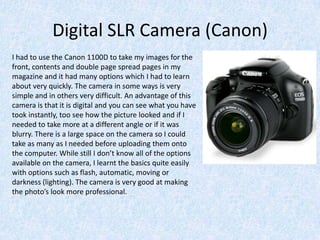
Digital SLR Camera (Canon)
I had to use the Canon 1100D to take my images for the
front, contents and double page spread pages in my
magazine and it had many options which I had to learn
about very quickly. The camera in some ways is very
simple and in others very difficult. An advantage of this
camera is that it is digital and you can see what you have
took instantly, too see how the picture looked and if I
needed to take more at a different angle or if it was
blurry. There is a large space on the camera so I could
take as many as I needed before uploading them onto
the computer. While still I don’t know all of the options
available on the camera, I learnt the basics quite easily
with options such as flash, automatic, moving or
darkness (lighting). The camera is very good at making
the photo’s look more professional.
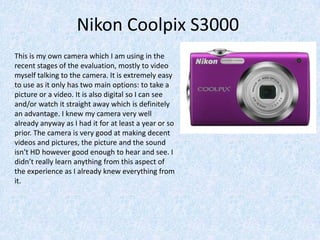
Nikon Coolpix S3000
This is my own camera which I am using in the
recent stages of the evaluation, mostly to video
myself talking to the camera. It is extremely easy
to use as it only has two main options: to take a
picture or a video. It is also digital so I can see
and/or watch it straight away which is definitely
an advantage. I knew my camera very well
already anyway as I had it for at least a year or so
prior. The camera is very good at making decent
videos and pictures, the picture and the sound
isn’t HD however good enough to hear and see. I
didn’t really learn anything from this aspect of
the experience as I already knew everything from
it.
Adobe Photoshop
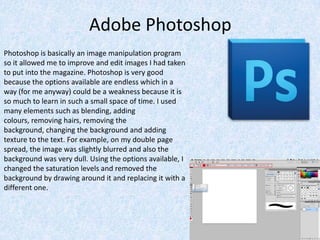
Photoshop is basically an image manipulation program
so it allowed me to improve and edit images I had taken
to put into the magazine. Photoshop is very good
because the options available are endless which in a
way (for me anyway) could be a weakness because it is
so much to learn in such a small space of time. I used
many elements such as blending, adding
colours, removing hairs, removing the
background, changing the background and adding
texture to the text. For example, on my double page
spread, the image was slightly blurred and also the
background was very dull. Using the options available, I
changed the saturation levels and removed the
background by drawing around it and replacing it with a
different one.
Adobe Photoshop (2)
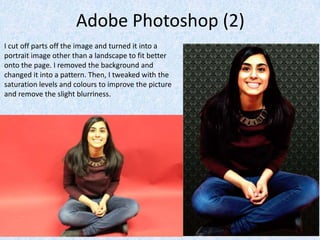
I cut off parts off the image and turned it into a
portrait image other than a landscape to fit better
onto the page. I removed the background and
changed it into a pattern. Then, I tweaked with the
saturation levels and colours to improve the picture
and remove the slight blurriness.
Quark Xpress
I used Quark Xpress to create my double page spread. This program was very
new to me; I had never used nor heard of it however it allowed me to create
a product I probably wouldn’t be able to otherwise.
The good thing about Quark is that it is fairly simple and easy to use and
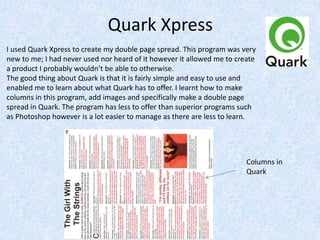
enabled me to learn about what Quark has to offer. I learnt how to make
columns in this program, add images and specifically make a double page
spread in Quark. The program has less to offer than superior programs such
as Photoshop however is a lot easier to manage as there are less to learn.
Columns in
Quark
Internet Explorer/Google Chrome
The internet was very important to two aspects of the project;
the researching and the creation to blog which allowed me to
document/save the work I had done.
Throughout the research process, the internet was extremely
useful as it allowed me to find out facts that I hadn’t knew
before, look into conventions of magazines, and look into media
distributions I knew nothing of before. The information on the
internet appears endless.
Another important aspect to my project from the internet was
the access to my blog. On the blog I was able to document/save
my work I did as I went along that was shown in such a
concise/clear way that I wouldn’t have been able to achieve by
writing. It also abled me to keep track of the experiences and
skills I acquired through the production and the post production
stages of making the magazine. The internet was key
throughout.
Slideshare (Internet continuing)
This online website enabled me to do two things: Store word/power point presentations
online all together and it also allowed me to embed those documents onto blogger as I
couldn’t do it directly. On the whole the website was very reliable and easy to use. I had
never used or heard of it prior, however I learnt extremely quickly as it was very simple. I
learnt how to embed a document onto an online blog which I had never knew how to
before. I would definitely use it again.
Microsoft (Word & PowerPoint)
I was both very aware and already very reliant on both on these
programs in my daily life for many years so I knew how to work
them with ease. For Word, I used it to prepare what to write in
each section previously and sometimes to draft my blog posts to
ensure I knew what I was writing about. I also saved bits of
research to it so I could find them at a later date.
For PowerPoint, I used in the majority for the evaluation section
and for several sections of the project. This enables me to put the
information/answer and images easily that are clear to see and
perhaps slightly more engaging as it more interacting.
YouTube
I was extremely familiar with YouTube before using it during
the project as I use it daily. The main purpose of using this
online video phoneme was to upload videos on to this site
to then embed onto Blogger. This was mainly during the
recent stage of the evaluation where some must be
video/audio files. It is very simple, as I had already knew
how to upload videos onto YouTube as I had done
previously. The only part that was knew to me was how to
embed them onto Blogger but that was also extremely
simple. That was the only part that I learnt about for
YouTube in this process.

Q6 Evaluation Media

  • 1.
    Q6. what haveyou learnt about technologies from the process of constructing this product? By Georgia Ryall
  • 2.
    Technologies I haveused: • Adobe Photoshop • Quark Xpress • Canon slr/Nikon Coolpix • Internet Explorer/ Google Chrome • Blogger/Slide share • Microsoft word • Microsoft Power Point • YouTube
  • 3.
    Digital SLR Camera(Canon) I had to use the Canon 1100D to take my images for the front, contents and double page spread pages in my magazine and it had many options which I had to learn about very quickly. The camera in some ways is very simple and in others very difficult. An advantage of this camera is that it is digital and you can see what you have took instantly, too see how the picture looked and if I needed to take more at a different angle or if it was blurry. There is a large space on the camera so I could take as many as I needed before uploading them onto the computer. While still I don’t know all of the options available on the camera, I learnt the basics quite easily with options such as flash, automatic, moving or darkness (lighting). The camera is very good at making the photo’s look more professional.
  • 4.
    Nikon Coolpix S3000 Thisis my own camera which I am using in the recent stages of the evaluation, mostly to video myself talking to the camera. It is extremely easy to use as it only has two main options: to take a picture or a video. It is also digital so I can see and/or watch it straight away which is definitely an advantage. I knew my camera very well already anyway as I had it for at least a year or so prior. The camera is very good at making decent videos and pictures, the picture and the sound isn’t HD however good enough to hear and see. I didn’t really learn anything from this aspect of the experience as I already knew everything from it.
  • 5.
    Adobe Photoshop Photoshop isbasically an image manipulation program so it allowed me to improve and edit images I had taken to put into the magazine. Photoshop is very good because the options available are endless which in a way (for me anyway) could be a weakness because it is so much to learn in such a small space of time. I used many elements such as blending, adding colours, removing hairs, removing the background, changing the background and adding texture to the text. For example, on my double page spread, the image was slightly blurred and also the background was very dull. Using the options available, I changed the saturation levels and removed the background by drawing around it and replacing it with a different one.
  • 6.
    Adobe Photoshop (2) Icut off parts off the image and turned it into a portrait image other than a landscape to fit better onto the page. I removed the background and changed it into a pattern. Then, I tweaked with the saturation levels and colours to improve the picture and remove the slight blurriness.
  • 7.
    Quark Xpress I usedQuark Xpress to create my double page spread. This program was very new to me; I had never used nor heard of it however it allowed me to create a product I probably wouldn’t be able to otherwise. The good thing about Quark is that it is fairly simple and easy to use and enabled me to learn about what Quark has to offer. I learnt how to make columns in this program, add images and specifically make a double page spread in Quark. The program has less to offer than superior programs such as Photoshop however is a lot easier to manage as there are less to learn. Columns in Quark
  • 8.
    Internet Explorer/Google Chrome Theinternet was very important to two aspects of the project; the researching and the creation to blog which allowed me to document/save the work I had done. Throughout the research process, the internet was extremely useful as it allowed me to find out facts that I hadn’t knew before, look into conventions of magazines, and look into media distributions I knew nothing of before. The information on the internet appears endless. Another important aspect to my project from the internet was the access to my blog. On the blog I was able to document/save my work I did as I went along that was shown in such a concise/clear way that I wouldn’t have been able to achieve by writing. It also abled me to keep track of the experiences and skills I acquired through the production and the post production stages of making the magazine. The internet was key throughout.
  • 9.
    Slideshare (Internet continuing) Thisonline website enabled me to do two things: Store word/power point presentations online all together and it also allowed me to embed those documents onto blogger as I couldn’t do it directly. On the whole the website was very reliable and easy to use. I had never used or heard of it prior, however I learnt extremely quickly as it was very simple. I learnt how to embed a document onto an online blog which I had never knew how to before. I would definitely use it again.
  • 10.
    Microsoft (Word &PowerPoint) I was both very aware and already very reliant on both on these programs in my daily life for many years so I knew how to work them with ease. For Word, I used it to prepare what to write in each section previously and sometimes to draft my blog posts to ensure I knew what I was writing about. I also saved bits of research to it so I could find them at a later date. For PowerPoint, I used in the majority for the evaluation section and for several sections of the project. This enables me to put the information/answer and images easily that are clear to see and perhaps slightly more engaging as it more interacting.
  • 11.
    YouTube I was extremelyfamiliar with YouTube before using it during the project as I use it daily. The main purpose of using this online video phoneme was to upload videos on to this site to then embed onto Blogger. This was mainly during the recent stage of the evaluation where some must be video/audio files. It is very simple, as I had already knew how to upload videos onto YouTube as I had done previously. The only part that was knew to me was how to embed them onto Blogger but that was also extremely simple. That was the only part that I learnt about for YouTube in this process.