Python
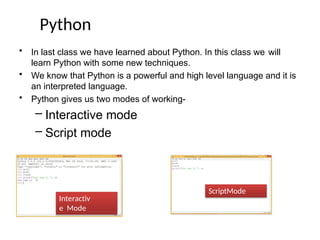
• In lastclass we have learned about Python. In this class we will
learn Python with some new techniques.
• We know that Python is a powerful and high level language and it is
an interpreted language.
• Python gives us two modes of working-
– Interactive mode
– Script mode
Interactiv
e Mode
ScriptMode
3.
Python
• It ispossible to develop various Appswith Python like–
– GUI Apps
– W
eb Apps
– Games
– DBMS Apps
– Scripting etc.
Python - Limitations
There are fewlimitationsin Python which can be neglected because of its
vast usage.
It is not a Fast
Language. Libraries are
very less.
It is weekin Type
binding.
4.
Token
Neha Tyagi, KV5 Jaipur II Shift
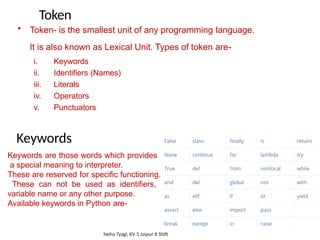
• Token- is the smallest unit of any programming language.
It is also known as Lexical Unit. Types of token are-
i. Keywords
ii. Identifiers (Names)
iii. Literals
iv. Operators
v. Punctuators
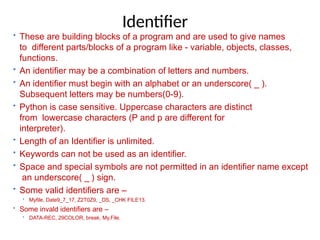
Keywords
Keywords are those words which provides
a special meaning to interpreter.
These are reserved for specific functioning.
These can not be used as identifiers,
variable name or any other purpose.
Available keywords in Python are-
5.
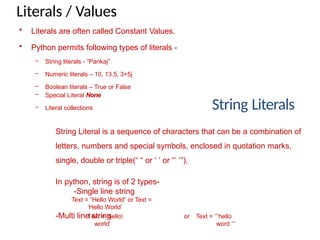
Identifier
• These arebuilding blocks of a program and are used to give names
to different parts/blocks of a program like - variable, objects, classes,
functions.
• An identifier may be a combination of letters and numbers.
• An identifier must begin with an alphabet or an underscore( _ ).
Subsequent letters may be numbers(0-9).
• Python is case sensitive. Uppercase characters are distinct
from lowercase characters (P and p are different for
interpreter).
• Length of an Identifier is unlimited.
• Keywords can not be used as an identifier.
• Space and special symbols are not permitted in an identifier name except
an underscore( _ ) sign.
• Some valid identifiers are –
• Myfile, Date9_7_17, Z2T0Z9, _DS, _CHK FILE13.
• Some invald identifiers are –
• DATA-REC, 29COLOR, break, My.File.
6.
Literals / Values
StringLiterals
String Literal is a sequence of characters that can be a combination of
letters, numbers and special symbols, enclosed in quotation marks,
single, double or triple(“ “ or ‘ ‘ or “’ ‘”).
In python, string is of 2 types-
-Single line string
Text = “Hello World” or Text =
‘Hello World’
-Multi line string
Text = ‘hello or
world’
Text = ‘’’hello
word ‘’’
• Literals are often called Constant Values.
• Python permits following types of literals -
– String literals - “Pankaj”
– Numeric literals – 10, 13.5, 3+5j
– Boolean literals – True or False
– Special Literal None
– Literal collections
7.
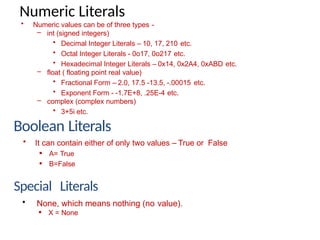
Numeric Literals
Boolean Literals
SpecialLiterals
• Numeric values can be of three types -
– int (signed integers)
• Decimal Integer Literals – 10, 17, 210 etc.
• Octal Integer Literals - 0o17, 0o217 etc.
• Hexadecimal Integer Literals – 0x14, 0x2A4, 0xABD etc.
– float ( floating point real value)
• Fractional Form – 2.0, 17.5 -13.5, -.00015 etc.
• Exponent Form - -1.7E+8, .25E-4 etc.
– complex (complex numbers)
• 3+5i etc.
• None, which means nothing (no value).
X = None
• It can contain either of only two values – True or False
A= True
B=False
8.
Operators
• An Operatoris a symbol that trigger some action
when
applied to identifier (s)/ operand (s)
• Therefore, an operator requires operand (s) to
compute upon. example :
c = a + b
Here, a, b, c are operands and operators are = and + which
are performing differently.
Punctuators
• In Python, punctuators are used to construct the program
and to make balance between instructions and statements.
Punctuators have their own syntactic and semantic
significance.
• Python has following Punctuators -
‘, ”, #, , (, ), [, ], {, }, @. ,, :, .. `, =
9.
DATA TYPES
• Datacan be of any type like- character, integer, real, string.
• Anything enclosed in “ “ is considered as string in Python.
• Any whole value is an integer value.
• Any value with fraction part is a real value.
• True or False value specifies boolean value.
• Python supports following core data types-
I. Numbers
II. String
III. List
IV. Tuple
V. Dictionary
(int like10, 5) (float like 3.5, 302.24) (complex like 3+5j)
(like “pankaj”, ‘pankaj’, ‘a’, “a” )
like [3,4,5,”pankaj”] its elements are Mutable.
like(3,4,5,”pankaj”) its elements are immutable.
like {‘a’:1, ‘e’:2, ‘I’:3, ‘o’:4, ‘u’:5} where a,e,i,o,u
are keys
and 1,2,3,4,5 are their values.
10.
CORE DATA TYPES
GraphicalView
10
CORE DATA
TYPE
Numbers
Integer
Boolean
Floating
Point
Complex
None Sequences
String Tuple List
Mappings
Dictionary
11.
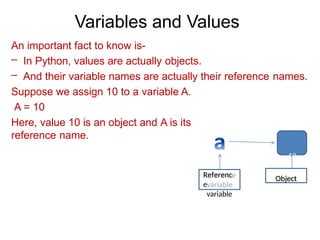
Variables and Values
Animportant fact to know is-
– In Python, values are actually objects.
– And their variable names are actually their reference names.
Suppose we assign 10 to a variable A.
A = 10
Here, value 10 is an object and A is its
reference name.
10
Referenc
e
variable
Object
12.
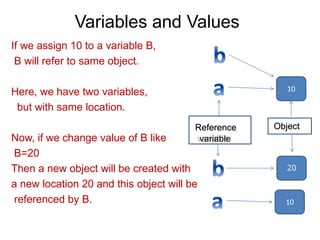
Variables and Values
10
10
20
Ifwe assign 10 to a variable B,
B will refer to same object.
Here, we have two variables,
but with same location.
Now, if we change value of B like
B=20
Then a new object will be created with
a new location 20 and this object will be
referenced by B.
Reference
variable
Object
13.
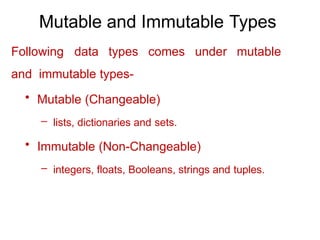
Mutable and ImmutableTypes
Following data types comes under mutable
and immutable types-
• Mutable (Changeable)
– lists, dictionaries and sets.
• Immutable (Non-Changeable)
– integers, floats, Booleans, strings and tuples.
14.
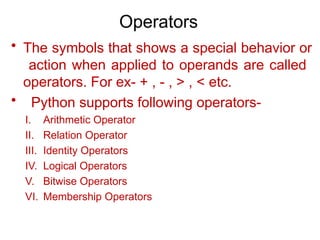
Operators
• The symbolsthat shows a special behavior or
action when applied to operands are called
operators. For ex- + , - , > , < etc.
• Python supports following operators-
I. Arithmetic Operator
II. Relation Operator
III. Identity Operators
IV. Logical Operators
V. Bitwise Operators
VI. Membership Operators
15.
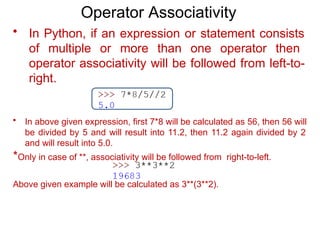
Operator Associativity
• InPython, if an expression or statement consists
of multiple or more than one operator then
operator associativity will be followed from left-to-
right.
• In above given expression, first 7*8 will be calculated as 56, then 56 will
be divided by 5 and will result into 11.2, then 11.2 again divided by 2
and will result into 5.0.
*Only in case of **, associativity will be followed from right-to-left.
Above given example will be calculated as 3**(3**2).
16.
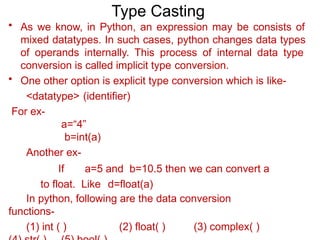
Type Casting
• Aswe know, in Python, an expression may be consists of
mixed datatypes. In such cases, python changes data types
of operands internally. This process of internal data type
conversion is called implicit type conversion.
• One other option is explicit type conversion which is like-
<datatype> (identifier)
For ex-
a=“4”
b=int(a)
Another ex-
If a=5 and b=10.5 then we can convert a
to float. Like d=float(a)
In python, following are the data conversion
functions-
(1) int ( ) (2) float( ) (3) complex( )
17.
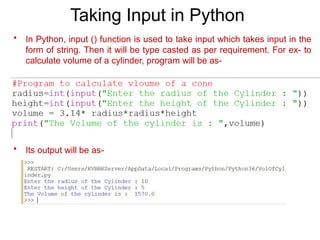
Taking Input inPython
• In Python, input () function is used to take input which takes input in the
form of string. Then it will be type casted as per requirement. For ex- to
calculate volume of a cylinder, program will be as-
• Its output will be as-
18.
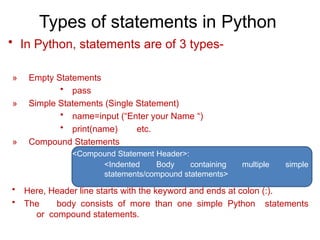
Types of statementsin Python
• In Python, statements are of 3 types-
» Empty Statements
• pass
» Simple Statements (Single Statement)
• name=input (“Enter your Name “)
• print(name) etc.
» Compound Statements
<Compound Statement Header>:
multiple simple
<Indented Body containing
statements/compound statements>
• Here, Header line starts with the keyword and ends at colon (:).
• The body consists of more than one simple Python statements
or compound statements.
19.
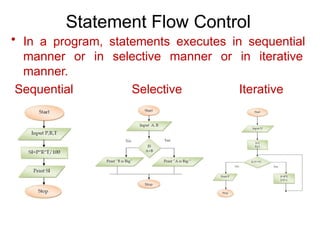
Statement Flow Control
•In a program, statements executes in sequential
manner or in selective manner or in iterative
manner.
Sequential Selective Iterative
20.
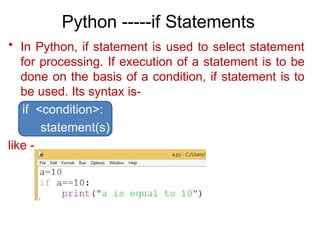
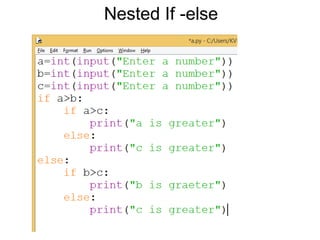
Python -----if Statements
•In Python, if statement is used to select statement
for processing. If execution of a statement is to be
done on the basis of a condition, if statement is to
be used. Its syntax is-
if <condition>:
statement(s)
like -
21.
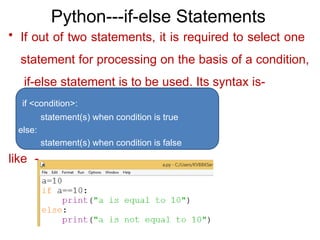
Python---if-else Statements
• Ifout of two statements, it is required to select one
statement for processing on the basis of a condition,
if-else statement is to be used. Its syntax is-
if <condition>:
statement(s) when condition is true
else:
statement(s) when condition is false
like -
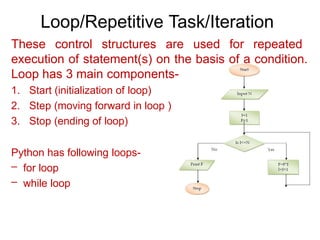
Loop/Repetitive Task/Iteration
These controlstructures are used for repeated
execution of statement(s) on the basis of a condition.
Loop has 3 main components-
1. Start (initialization of loop)
2. Step (moving forward in loop )
3. Stop (ending of loop)
Python has following loops-
– for loop
– while loop
24.
range () Function
•InPython, an important function is range( ).
its syntax is-
range ( <lower limit>,<upper limit>)
If we write - range (0,5 )
Then a list will be created with the values
[0,1,2,3,4] i.e. from lower limit to the value one less than
ending limit.
range (0,10,2) will have the
list [0,2,4,6,8]. range (5,0,-1) will have the
list [5,4,3,2,1].
25.
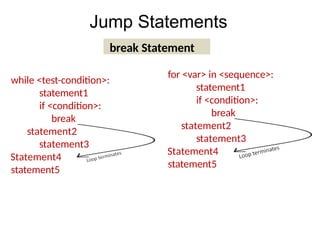
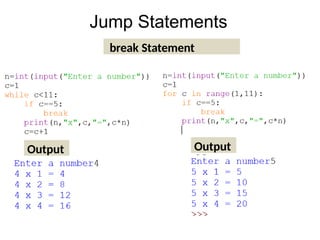
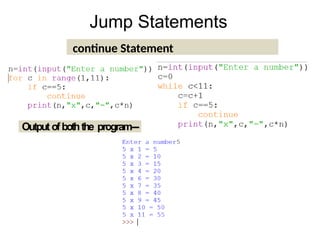
Jump Statements
break Statement
while<test-condition>:
statement1
if <condition>:
break
statement2
statement3
Statement4
statement5
for <var> in <sequence>:
statement1
if <condition>:
break
statement2
statement3
Statement4
statement5
in and notin operator
• in operator-
3 in [1,2,3,4] will return True.
5 in [1,2,3,4] will return False.
– not in operator-
5 not in [1,2,3,4] will return True.
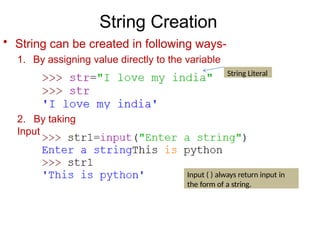
String Creation
String Literal
Input( ) always return input in
the form of a string.
• String can be created in following ways-
1. By assigning value directly to the variable
2. By taking
Input
31.
Output
Output
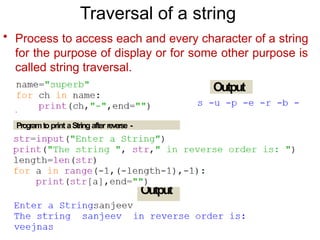
Traversal of astring
• Process to access each and every character of a string
for the purpose of display or for some other purpose is
called string traversal.
Programtoprint aString after reverse -
32.
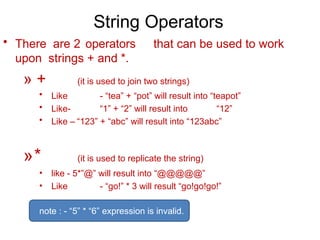
String Operators
• Thereare 2 operators that can be used to work
upon strings + and *.
» + (it is used to join two strings)
• Like - “tea” + “pot” will result into “teapot”
• Like- “1” + “2” will result into “12”
• Like – “123” + “abc” will result into “123abc”
»* (it is used to replicate the string)
• like - 5*”@” will result into “@@@@@”
• Like - “go!” * 3 will result “go!go!go!”
note : - “5” * “6” expression is invalid.
33.
String Slicing
0 12 3 4 5 6 7 8 9 10 11 12 13
R E S P O N S I B I L I T Y
-14 -13 -12 -11 -10 -9 -8 -7 -6 -5 -4 -3 -2 -1
• Look at following examples carefully-
Index
Word
Reverse index
word =
“RESPO
NSIBILIT
Y”
word[ 0 : 14 ] will result into‘RESPONSIBILITY’
word[ 0 : 3] will result into‘RES’
word[ 2 : 5 ] will result into‘SPO’
word[ -7 : -3 ] will result into‘IBIL’
word[ : 14 ] will result
into‘RESPONSIBILITY’
34.
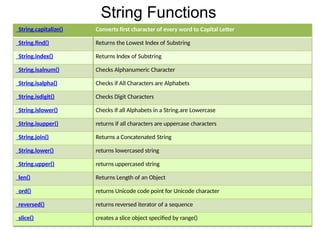
String Functions
String.capitalize() Convertsfirst character of every word to Capital Letter
String.find() Returns the Lowest Index of Substring
String.index() Returns Index of Substring
String.isalnum() Checks Alphanumeric Character
String.isalpha() Checks if All Characters are Alphabets
String.isdigit() Checks Digit Characters
String.islower() Checks if all Alphabets in a String.are Lowercase
String.isupper() returns if all characters are uppercase characters
String.join() Returns a Concatenated String
String.lower() returns lowercased string
String.upper() returns uppercased string
len() Returns Length of an Object
ord() returns Unicode code point for Unicode character
reversed() returns reversed iterator of a sequence
slice() creates a slice object specified by range()
35.
List Creation
• Listis a standard data type of Python. It is a sequence which
can store values of any kind.
•List is represented by square brackets “ [ ] “
For ex -
• [ ]
• [1, 2, 3]
• [1, 2.5, 5.6, 9]
• [ ‘a’, ‘b’, ‘c’]
Empty list
integers list
numbers
list (integer
and float)
characters
list
• [‘a’, 1, ‘b’, 3.5, ‘zero’] mixed values list
• [‘one’, ’two’, ’three’] string list
• In Python, only list and dictionary are mutable data types, rest
of all the data types are immutable data types.
36.
List Creation
This isa Tuple
Another method
• List can be created in following ways-
• Empty list -
L = [ ]
• list can also be created with the following statement-
L = list( )
• Long lists-
even = [0, 2, 4, 6, 8, 10 ,12 ,14 ,16 ,18 ,20 ]
• Nested list -
L = [ 3, 4, [ 5, 6 ], 7]
37.
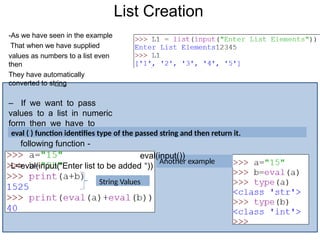
List Creation
String Values
Anotherexample
-As we have seen in the example
That when we have supplied
values as numbers to a list even
then
They have automatically
converted to string
– If we want to pass
values to a list in numeric
form then we have to
write
following function -
eval(input())
L=eval(input(“Enter list to be added “))
eval ( ) function identifies type of the passed string and then return it.
38.
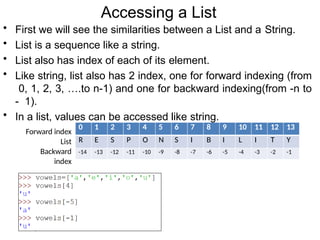
Accessing a List
01 2 3 4 5 6 7 8 9 10 11 12 13
R E S P O N S I B I L I T Y
-14 -13 -12 -11 -10 -9 -8 -7 -6 -5 -4 -3 -2 -1
• First we will see the similarities between a List and a String.
• List is a sequence like a string.
• List also has index of each of its element.
• Like string, list also has 2 index, one for forward indexing (from
0, 1, 2, 3, ….to n-1) and one for backward indexing(from -n to
- 1).
• In a list, values can be accessed like string.
Forward index
List
Backward
index
39.
Accessing a List
•len( ) function is used to get the length of a list.
Important 1:membership
operator (in, not in) works
in list similarly as they work
in other sequence.
• L[ i ] will return the values exists at i index.
• L [ i : j ] will return a new list with the values from i index to j index excluding
j index.
Important 2: + operator
adds a list at the end of
other list whereas *
operator repeats a list.
40.
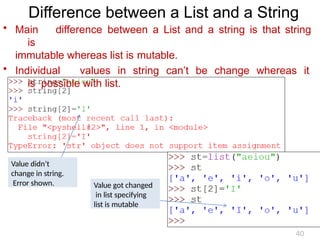
Difference between aList and a String
• Main difference between a List and a string is that string
is
immutable whereas list is mutable.
• Individual values in string can’t be change whereas it
is possible with list.
Value didn’t
change in string.
Error shown. Value got changed
in list specifying
list is mutable
40
41.
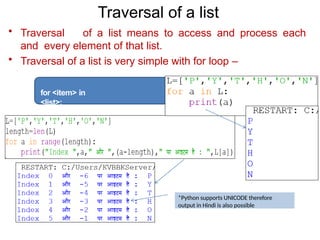
Traversal of alist
• Traversal of a list means to access and process each
and every element of that list.
• Traversal of a list is very simple with for loop –
for <item> in
<list>:
*Python supports UNICODE therefore
output in Hindi is also possible
42.
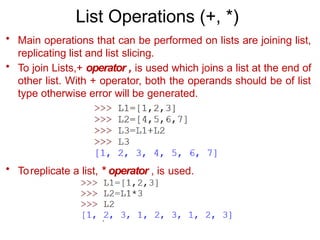
List Operations (+,*)
• Main operations that can be performed on lists are joining list,
replicating list and list slicing.
• To join Lists,+ operator , is used which joins a list at the end of
other list. With + operator, both the operands should be of list
type otherwise error will be generated.
• Toreplicate a list, * operator , is used.
43.
List Operations (Slicing)
•To slice a List, syntax is seq = list [ start : stop ]
• Another syntax for List slicing is –
seq=list[start:stop:step]
44.
• Look carefullyat following examples-
Use of slicing for list Modification
Here also, new value is being assigned.
New value is being assigned here.
See the difference between both the results.
144 is a value and not a sequence.
45.
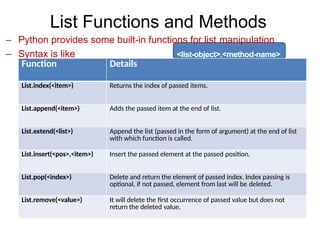
List Functions andMethods
– Python provides some built-in functions for list manipulation
– Syntax is like <list-object>.<method-name>
Function Details
List.index(<item>) Returns the index of passed items.
List.append(<item>) Adds the passed item at the end of list.
List.extend(<list>) Append the list (passed in the form of argument) at the end of list
with which function is called.
List.insert(<pos>,<item>) Insert the passed element at the passed position.
List.pop(<index>) Delete and return the element of passed index. Index passing is
optional, if not passed, element from last will be deleted.
List.remove(<value>) It will delete the first occurrence of passed value but does not
return the deleted value.
46.
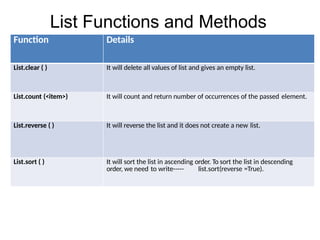
List Functions andMethods
Function Details
List.clear ( ) It will delete all values of list and gives an empty list.
List.count (<item>) It will count and return number of occurrences of the passed element.
List.reverse ( ) It will reverse the list and it does not create a new list.
List.sort ( ) It will sort the list in ascending order. To sort the list in descending
order, we need to write----- list.sort(reverse =True).
47.
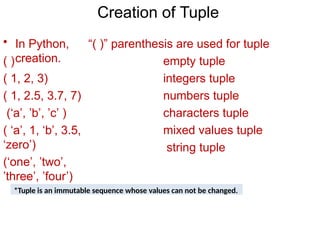
Creation of Tuple
•In Python, “( )” parenthesis are used for tuple
creation.
( )
( 1, 2, 3)
( 1, 2.5, 3.7, 7)
(‘a’, ’b’, ’c’ )
( ‘a’, 1, ‘b’, 3.5,
‘zero’)
(‘one’, ’two’,
’three’, ’four’)
empty tuple
integers tuple
numbers tuple
characters tuple
mixed values tuple
string tuple
*Tuple is an immutable sequence whose values can not be changed.
48.
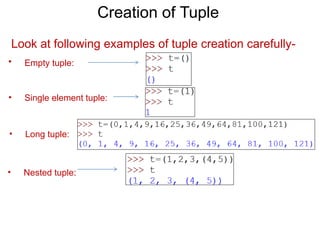
Creation of Tuple
Lookat following examples of tuple creation carefully-
• Empty tuple:
• Single element tuple:
• Long tuple:
• Nested tuple:
49.
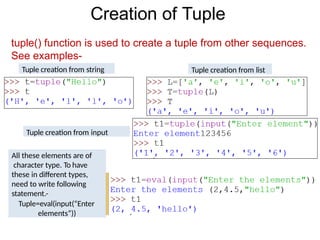
Creation of Tuple
tuple()function is used to create a tuple from other sequences.
See examples-
Tuple creation from string Tuple creation from list
Tuple creation from input
All these elements are of
character type. To have
these in different types,
need to write following
statement.-
Tuple=eval(input(“Enter
elements”))
50.
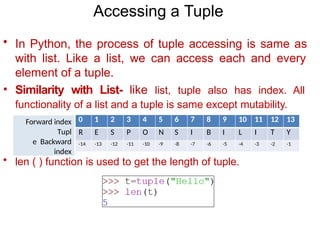
Accessing a Tuple
•In Python, the process of tuple accessing is same as
with list. Like a list, we can access each and every
element of a tuple.
• Similarity with List- like list, tuple also has index. All
functionality of a list and a tuple is same except mutability.
• len ( ) function is used to get the length of tuple.
Forward index
Tupl
e Backward
index
0 1 2 3 4 5 6 7 8 9 10 11 12 13
R E S P O N S I B I L I T Y
-14 -13 -12 -11 -10 -9 -8 -7 -6 -5 -4 -3 -2 -1
51.
Accessing a Tuple
•Indexing and Slicing:
• T[ i ]
• T[ i : j ]
returns the item present at index i.
returns a new tuple having all the items of T from
index i to j.
returns a new tuple having difference of n elements
of T from index i to j.
index i to j.
• T [ i : j : n ]
• Membership operator:
• Working of membership operator “in” and “not in” is same as
in a list. (for details see the chapter- list manipulation).
• Concatenation and Replication operators:
• + operator adds second tuple at the end of first tuple. * operator repeats
elements of tuple.
52.
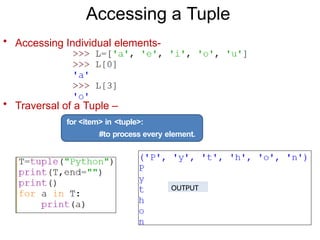
Accessing a Tuple
•Accessing Individual elements-
• Traversal of a Tuple –
for <item> in <tuple>:
#to process every element.
OUTPUT
53.
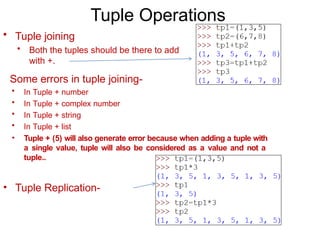
Tuple Operations
• Tuplejoining
• Both the tuples should be there to add
with +.
Some errors in tuple joining-
• In Tuple + number
• In Tuple + complex number
• In Tuple + string
• In Tuple + list
• Tuple + (5) will also generate error because when adding a tuple with
a single value, tuple will also be considered as a value and not a
tuple..
• Tuple Replication-
54.
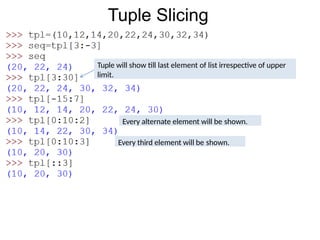
Tuple Slicing
Tuple willshow till last element of list irrespective of upper
limit.
Every alternate element will be shown.
Every third element will be shown.
55.
Dictionary Creation
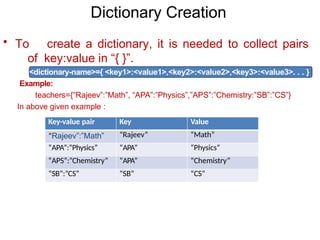
• Tocreate a dictionary, it is needed to collect pairs
of key:value in “{ }”.
<dictionary-name>={ <key1>:<value1>,<key2>:<value2>,<key3>:<value3>. . . }
Example:
teachers={“Rajeev”:”Math”, “APA”:”Physics”,”APS”:”Chemistry:”SB”:”CS”}
In above given example :
Key-value pair Key Value
“Rajeev”:”Math” “Rajeev” “Math”
“APA”:”Physics” “APA” “Physics”
“APS”:”Chemistry” “APA” “Chemistry”
“SB”:”CS” “SB” “CS”
56.
Dictionary Creation
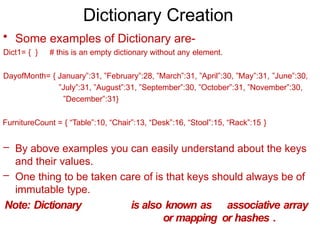
• Someexamples of Dictionary are-
Dict1= { } # this is an empty dictionary without any element.
DayofMonth= { January”:31, ”February”:28, ”March”:31, ”April”:30, ”May”:31, ”June”:30,
”July”:31, ”August”:31, ”September”:30, ”October”:31, ”November”:30,
”December”:31}
FurnitureCount = { “Table”:10, “Chair”:13, “Desk”:16, “Stool”:15, “Rack”:15 }
– By above examples you can easily understand about the keys
and their values.
– One thing to be taken care of is that keys should always be of
immutable type.
Note: Dictionary is also known as associative array
or mapping or hashes .
57.
Dictionary Creation
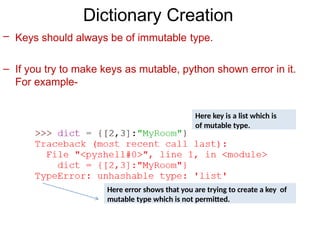
– Keysshould always be of immutable type.
– If you try to make keys as mutable, python shown error in it.
For example-
Here key is a list which is
of mutable type.
Here error shows that you are trying to create a key of
mutable type which is not permitted.
58.
Accessing a Dictionary
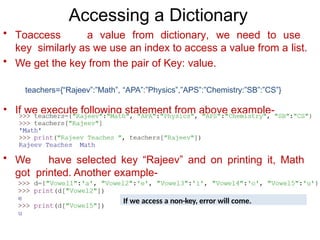
•Toaccess a value from dictionary, we need to use
key similarly as we use an index to access a value from a list.
• We get the key from the pair of Key: value.
teachers={“Rajeev”:”Math”, “APA”:”Physics”,”APS”:”Chemistry:”SB”:”CS”}
• If we execute following statement from above example-
• We have selected key “Rajeev” and on printing it, Math
got printed. Another example-
If we access a non-key, error will come.
59.
Traversal of aDictionary
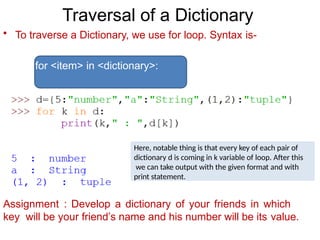
• To traverse a Dictionary, we use for loop. Syntax is-
for <item> in <dictionary>:
Assignment : Develop a dictionary of your friends in which
key will be your friend’s name and his number will be its value.
Here, notable thing is that every key of each pair of
dictionary d is coming in k variable of loop. After this
we can take output with the given format and with
print statement.
60.
Traversal of Dictionary
•To access key and value we need to use keys() and
values().for example-
• d.keys( ) function will display only key.
• d.values ( ) function will display value only.
61.
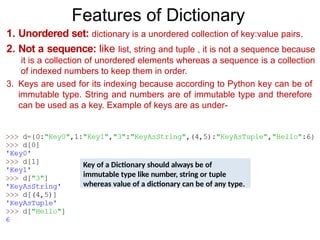
Features of Dictionary
1.Unordered set: dictionary is a unordered collection of key:value pairs.
2. Not a sequence: like list, string and tuple , it is not a sequence because
it is a collection of unordered elements whereas a sequence is a collection
of indexed numbers to keep them in order.
3. Keys are used for its indexing because according to Python key can be of
immutable type. String and numbers are of immutable type and therefore
can be used as a key. Example of keys are as under-
Key of a Dictionary should always be of
immutable type like number, string or tuple
whereas value of a dictionary can be of any type.
62.
Features of Dictionary
4.Keys should be unique : Because keys are used to
identify values so they should be unique.
5. Values of two unique keys can be same.
6. Dictionary is mutable hence we can change value of a certain
key. For this, syntax is-
<dictionary>[<key>] = <value>
4. Internally it is stored as a mapping. Its key:value are
connected to each other via an internal function called hash-
function**. Such process of linking is knows as mapping.
**Hash-function is an internal algorithm to link a and its
value.
63.
Working with
Dictionary
• Herewe will discuss about various operation of dictionary like element
adding, updation, deletion of an element etc. but first we will learn creation
of a dictionary.
• Dictionary initialization- For this we keep collection of pairs of
key:value separated by comma (,) and then place this
collection inside “{ }”.
• Addition of key:value pair to an empty dictionary. There
are two ways to create an empty dictionary-
1. Employee = { }
2. Employee = dict( )
After that use following syntax-
<dictionary>[<key>] = <value>
64.
Working with
Dictionary
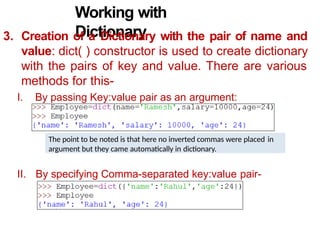
3. Creationof a Dictionary with the pair of name and
value: dict( ) constructor is used to create dictionary
with the pairs of key and value. There are various
methods for this-
I. By passing Key:value pair as an argument:
II. By specifying Comma-separated key:value pair-
The point to be noted is that here no inverted commas were placed in
argument but they came automatically in dictionary.
65.
Working with
Dictionary
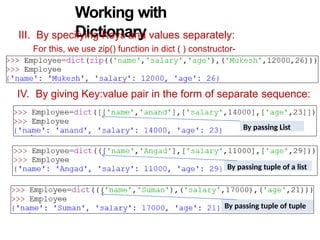
III. Byspecifying Keys and values separately:
For this, we use zip() function in dict ( ) constructor-
IV. By giving Key:value pair in the form of separate sequence:
By passing List
By passing tuple of a list
By passing tuple of tuple
66.
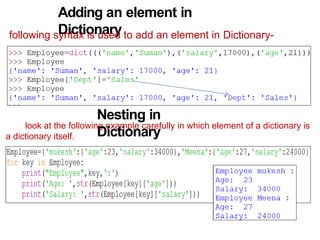
Adding an elementin
Dictionary
following syntax is used to add an element in Dictionary-
look at the following example carefully in which element of a dictionary is
a dictionary itself.
Nesting in
Dictionary
67.
Updation in a
Dictionary
followingsyntax is used to update an element in Dictionary-
<dictionary>[<ExistingKey>]=<value>
WAP to create a dictionary containing names of employee as key and their salary as
value
.
Output
68.
Deletion of anelement from a
Dictionary
following two syntaxes can be used to delete an element form a
Dictionary. For deletion, key should be there otherwise python
will give error.
1. del <dictionary>[<key>]- it only deletes the value and
does not return deleted value.
2. <dictionary>.pop(<key>) it returns the
deleted value after deletion.
Value returned after deletion.
If key does not match, given
message will be printed.
Value did not return after deletion.
69.
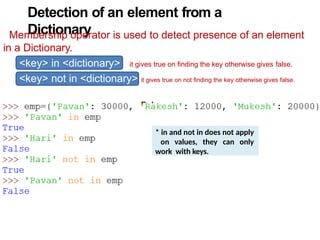
Detection of anelement from a
Dictionary
Membership operator is used to detect presence of an element
in a Dictionary.
<key> in <dictionary> it gives true on finding the key otherwise gives false.
<key> not in <dictionary> it gives true on not finding the key otherwise gives false.
Fals
e
* in and not in does not apply
on values, they can only
work with keys.
70.
Pretty Printing ofa
Dictionary
To print a Dictionary in a beautify manner, we need to
import
json module. After that following syntax of dumps ( ) will be used.
json.dumps(<>,indent=<n>)
71.
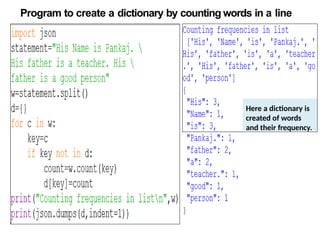
Program to createa dictionary by counting words in a line
Here a dictionary is
created of words
and their frequency.
72.
Dictionary Function and
Method
1.len( ) Method : it tells the length of dictionary.
2. clear( ) Method : it empties the dictionary.
3. get( ) Method : it returns value of the given key.
On non finding of a key, default message can be
given.
It works similarly as <dictionary>[<key> ]
73.
Dictionary Function and
Method
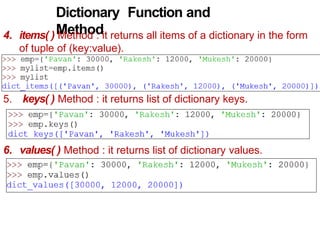
4.items( ) Method : it returns all items of a dictionary in the form
of tuple of (key:value).
5. keys( ) Method : it returns list of dictionary keys.
6. values( ) Method : it returns list of dictionary values.
74.
Dictionary Function and
Method
7.Update ( ) Method: This function merge the pair of key:value
of a dictionary into other dictionary. Change and addition in
this is possible as per need. Example-
In the above given example, you can see that change is done in
the values of similar keys whereas dissimilar keys got joined with
their values.
![Operators
• An Operator is a symbol that trigger some action
when
applied to identifier (s)/ operand (s)
• Therefore, an operator requires operand (s) to
compute upon. example :
c = a + b
Here, a, b, c are operands and operators are = and + which
are performing differently.
Punctuators
• In Python, punctuators are used to construct the program
and to make balance between instructions and statements.
Punctuators have their own syntactic and semantic
significance.
• Python has following Punctuators -
‘, ”, #, , (, ), [, ], {, }, @. ,, :, .. `, =](https://image.slidesharecdn.com/1-review-of-python-basics-260109134102-73cfbc1d/85/pythonbasics_Introduction-of-Python-pptx-8-320.jpg)
![DATA TYPES
• Data can be of any type like- character, integer, real, string.
• Anything enclosed in “ “ is considered as string in Python.
• Any whole value is an integer value.
• Any value with fraction part is a real value.
• True or False value specifies boolean value.
• Python supports following core data types-
I. Numbers
II. String
III. List
IV. Tuple
V. Dictionary
(int like10, 5) (float like 3.5, 302.24) (complex like 3+5j)
(like “pankaj”, ‘pankaj’, ‘a’, “a” )
like [3,4,5,”pankaj”] its elements are Mutable.
like(3,4,5,”pankaj”) its elements are immutable.
like {‘a’:1, ‘e’:2, ‘I’:3, ‘o’:4, ‘u’:5} where a,e,i,o,u
are keys
and 1,2,3,4,5 are their values.](https://image.slidesharecdn.com/1-review-of-python-basics-260109134102-73cfbc1d/85/pythonbasics_Introduction-of-Python-pptx-9-320.jpg)

![range () Function
• InPython, an important function is range( ).
its syntax is-
range ( <lower limit>,<upper limit>)
If we write - range (0,5 )
Then a list will be created with the values
[0,1,2,3,4] i.e. from lower limit to the value one less than
ending limit.
range (0,10,2) will have the
list [0,2,4,6,8]. range (5,0,-1) will have the
list [5,4,3,2,1].](https://image.slidesharecdn.com/1-review-of-python-basics-260109134102-73cfbc1d/85/pythonbasics_Introduction-of-Python-pptx-24-320.jpg)
![in and not in operator
• in operator-
3 in [1,2,3,4] will return True.
5 in [1,2,3,4] will return False.
– not in operator-
5 not in [1,2,3,4] will return True.](https://image.slidesharecdn.com/1-review-of-python-basics-260109134102-73cfbc1d/85/pythonbasics_Introduction-of-Python-pptx-27-320.jpg)
![String Slicing
0 1 2 3 4 5 6 7 8 9 10 11 12 13
R E S P O N S I B I L I T Y
-14 -13 -12 -11 -10 -9 -8 -7 -6 -5 -4 -3 -2 -1
• Look at following examples carefully-
Index
Word
Reverse index
word =
“RESPO
NSIBILIT
Y”
word[ 0 : 14 ] will result into‘RESPONSIBILITY’
word[ 0 : 3] will result into‘RES’
word[ 2 : 5 ] will result into‘SPO’
word[ -7 : -3 ] will result into‘IBIL’
word[ : 14 ] will result
into‘RESPONSIBILITY’](https://image.slidesharecdn.com/1-review-of-python-basics-260109134102-73cfbc1d/85/pythonbasics_Introduction-of-Python-pptx-33-320.jpg)
![List Creation
• List is a standard data type of Python. It is a sequence which
can store values of any kind.
•List is represented by square brackets “ [ ] “
For ex -
• [ ]
• [1, 2, 3]
• [1, 2.5, 5.6, 9]
• [ ‘a’, ‘b’, ‘c’]
Empty list
integers list
numbers
list (integer
and float)
characters
list
• [‘a’, 1, ‘b’, 3.5, ‘zero’] mixed values list
• [‘one’, ’two’, ’three’] string list
• In Python, only list and dictionary are mutable data types, rest
of all the data types are immutable data types.](https://image.slidesharecdn.com/1-review-of-python-basics-260109134102-73cfbc1d/85/pythonbasics_Introduction-of-Python-pptx-35-320.jpg)
![List Creation
This is a Tuple
Another method
• List can be created in following ways-
• Empty list -
L = [ ]
• list can also be created with the following statement-
L = list( )
• Long lists-
even = [0, 2, 4, 6, 8, 10 ,12 ,14 ,16 ,18 ,20 ]
• Nested list -
L = [ 3, 4, [ 5, 6 ], 7]](https://image.slidesharecdn.com/1-review-of-python-basics-260109134102-73cfbc1d/85/pythonbasics_Introduction-of-Python-pptx-36-320.jpg)
![Accessing a List
• len( ) function is used to get the length of a list.
Important 1:membership
operator (in, not in) works
in list similarly as they work
in other sequence.
• L[ i ] will return the values exists at i index.
• L [ i : j ] will return a new list with the values from i index to j index excluding
j index.
Important 2: + operator
adds a list at the end of
other list whereas *
operator repeats a list.](https://image.slidesharecdn.com/1-review-of-python-basics-260109134102-73cfbc1d/85/pythonbasics_Introduction-of-Python-pptx-39-320.jpg)
![List Operations (Slicing)
• To slice a List, syntax is seq = list [ start : stop ]
• Another syntax for List slicing is –
seq=list[start:stop:step]](https://image.slidesharecdn.com/1-review-of-python-basics-260109134102-73cfbc1d/85/pythonbasics_Introduction-of-Python-pptx-43-320.jpg)

![Accessing a Tuple
• Indexing and Slicing:
• T[ i ]
• T[ i : j ]
returns the item present at index i.
returns a new tuple having all the items of T from
index i to j.
returns a new tuple having difference of n elements
of T from index i to j.
index i to j.
• T [ i : j : n ]
• Membership operator:
• Working of membership operator “in” and “not in” is same as
in a list. (for details see the chapter- list manipulation).
• Concatenation and Replication operators:
• + operator adds second tuple at the end of first tuple. * operator repeats
elements of tuple.](https://image.slidesharecdn.com/1-review-of-python-basics-260109134102-73cfbc1d/85/pythonbasics_Introduction-of-Python-pptx-51-320.jpg)

![Features of Dictionary
4. Keys should be unique : Because keys are used to
identify values so they should be unique.
5. Values of two unique keys can be same.
6. Dictionary is mutable hence we can change value of a certain
key. For this, syntax is-
<dictionary>[<key>] = <value>
4. Internally it is stored as a mapping. Its key:value are
connected to each other via an internal function called hash-
function**. Such process of linking is knows as mapping.
**Hash-function is an internal algorithm to link a and its
value.](https://image.slidesharecdn.com/1-review-of-python-basics-260109134102-73cfbc1d/85/pythonbasics_Introduction-of-Python-pptx-62-320.jpg)
![Working with
Dictionary
• Here we will discuss about various operation of dictionary like element
adding, updation, deletion of an element etc. but first we will learn creation
of a dictionary.
• Dictionary initialization- For this we keep collection of pairs of
key:value separated by comma (,) and then place this
collection inside “{ }”.
• Addition of key:value pair to an empty dictionary. There
are two ways to create an empty dictionary-
1. Employee = { }
2. Employee = dict( )
After that use following syntax-
<dictionary>[<key>] = <value>](https://image.slidesharecdn.com/1-review-of-python-basics-260109134102-73cfbc1d/85/pythonbasics_Introduction-of-Python-pptx-63-320.jpg)
![Updation in a
Dictionary
following syntax is used to update an element in Dictionary-
<dictionary>[<ExistingKey>]=<value>
WAP to create a dictionary containing names of employee as key and their salary as
value
.
Output](https://image.slidesharecdn.com/1-review-of-python-basics-260109134102-73cfbc1d/85/pythonbasics_Introduction-of-Python-pptx-67-320.jpg)
![Deletion of an element from a
Dictionary
following two syntaxes can be used to delete an element form a
Dictionary. For deletion, key should be there otherwise python
will give error.
1. del <dictionary>[<key>]- it only deletes the value and
does not return deleted value.
2. <dictionary>.pop(<key>) it returns the
deleted value after deletion.
Value returned after deletion.
If key does not match, given
message will be printed.
Value did not return after deletion.](https://image.slidesharecdn.com/1-review-of-python-basics-260109134102-73cfbc1d/85/pythonbasics_Introduction-of-Python-pptx-68-320.jpg)

![Dictionary Function and
Method
1. len( ) Method : it tells the length of dictionary.
2. clear( ) Method : it empties the dictionary.
3. get( ) Method : it returns value of the given key.
On non finding of a key, default message can be
given.
It works similarly as <dictionary>[<key> ]](https://image.slidesharecdn.com/1-review-of-python-basics-260109134102-73cfbc1d/85/pythonbasics_Introduction-of-Python-pptx-72-320.jpg)