17CSC02-PYTHON
PROGRAMMING
Introduction to Python
UNIT - II
LEARNING OUTCOME
A student who successfully completes
the course will have the ability to:
Understand the basics of python
programming constructs.
2
UNIT – 1I
Introduction to Python
History-features-execution of python
program-flavors of python-comments-
data types-built in data types-
sequences-literals-operators-input and
output statements-conditional
statements-if-if-else-nested if else-for-
while-nested loops-break-continue-
pass-assert-return.
3
Computer Program
 A computer program is a collection of
instructions that performs a specific
task when executed by a computer.
 A computer requires programs to
function and typically executes
the program's instructions in a central
processing unit.
4
CHARACTERISTICS OF
COMPUTER PROGRAM
 Efficient-execute faster, utilize minimal
memory
 Good User Interface-friendly user
interface
 Reliable-handle unexpected errors,
give proper messages if error occur.
 Good communication-self explanatory
 Portable-platform independent, run on
variety of systems.
5
Programming Errors
 Syntax error- structure of the program
 Semantic error-meaning of the
syntactical structure.
 Runtime error-program executed
6
Natural Language Vs Formal
Language
 NL:
 - spoken by people
 Closer to humans
 Ambiguous in nature, more redundant
 Eg: french , english, german
 FL:
 -for specific applications
 -closer to computer code.
 -unambiguous in nature
 -less redundant
 Eg: all programming
7
Programming paradigms
 Two type:
 Procedural programming
 Object oriented programming
8
Procedural programming
 Data and operations on data are
seperated.
 Does not support the concept of data
hiding and encapsulation.
 Follows top down approach
 Global data sharing is allowed.
 Eg: c, pascal.
9
Object oriented programming
 Bottom up approach
 Supports data hiding and encapsulation.
 Data can be easily move between
methods and can be controlled through
access specifiers.
 Eg: java, c++.
Python is a procedure oriented
programming as well as object oriented
programming.
10
 Python is a typeless programming
language.
 Typeless-value of the variable
determines the type.
 Type checking is made at run time.
 Need not worry about the type of the
variable.
 Eg: python, perl, PHP.
11
PYTHON OVERVIEW
 Python is a high-level, interpreted,
interactive and object-oriented scripting
language. Python is designed to be
highly readable. It uses English
keywords frequently where as other
languages use punctuation, and it has
fewer syntactical constructions than
other languages.
 Python is Interpreted:
 Python is Interactive:
 Python is Object-Oriented:
 Python is a Beginner's Language:
12
 Python is Interpreted: Python is processed at
runtime by the interpreter. You do not need to
compile your program before executing it. This is
similar to PERL and PHP.
 Python is Interactive: You can actually sit at a
Python prompt and interact with the interpreter
directly to write your programs.
 Python is Object-Oriented: Python supports
Object-Oriented style or technique of
programming that encapsulates code within
objects.
 Python is a Beginner's Language: Python is a
great language for the beginner-level
programmers and supports the development of a
wide range of applications from simple text
processing to WWW browsers to games
13
History of Python
 Conceived in the late 1980’s.
 Developed in the year 1989 by Guido
van Rossum who was working for
centrum wiskunde & informatica(CWI) at
netherlands.
 as a successor to the ABC (programming
language) capable of exception
handling and interfacing with
the Amoeba operating system
 He published the first version of the
python(0.9.0) on February 1991.
14
 Python is derived from many other
languages, including ABC, Modula-3,
C, C++, Algol-68, SmallTalk, and Unix
shell and other scripting languages.
 Python is copyrighted. Like Perl,
Python source code is now available
under the GNU General Public
License (GPL).
15
VERSIONS OF PYTHON
 Release dates for the major and minor versions:[29]
 Python 1.0 - January 1994
◦ Python 1.5 - December 31, 1997
◦ Python 1.6 - September 5, 2000
 Python 2.0 - October 16, 2000
◦ Python 2.1 - April 17, 2001
◦ Python 2.2 - December 21, 2001
◦ Python 2.3 - July 29, 2003
◦ Python 2.4 - November 30, 2004
◦ Python 2.5 - September 19, 2006
◦ Python 2.6 - October 1, 2008
◦ Python 2.7 - July 3, 2010
 Python 3.0 - December 3, 2008
◦ Python 3.1 - June 27, 2009
◦ Python 3.2 - February 20, 2011
◦ Python 3.3 - September 29, 2012
◦ Python 3.4 - March 16, 2014
◦ Python 3.5 - September 13, 2015
◦ Python 3.6 - December 23, 2016
16
FEATURES OF PYTHON
 Easy-to-learn: Python has few keywords,
simple structure, and a clearly defined
syntax. This allows the student to pick up the
language quickly.
 Easy-to-read: Python code is more clearly
defined and visible to the eyes.
 Easy-to-maintain: Python's source code is
fairly easy-to-maintain.
 A broad standard library: Python's bulk of
the library is very portable and cross-platform
compatible on UNIX, Windows, and
Macintosh.
 Interactive Mode:Python has support for an
interactive mode which allows interactive
testing and debugging of snippets of code. 17
 Portable: Python can run on a wide variety of hardware
platforms and has the same interface on all platforms.
 Extendable: You can add low-level modules to the
Python interpreter. These modules enable programmers
to add to or customize their tools to be more efficient.
 Databases: Python provides interfaces to all major
commercial databases.
 GUI Programming: Python supports GUI applications
that can be created and ported to many system calls,
libraries and windows systems, such as Windows MFC,
Macintosh, and the X Window system of Unix.
 Scalable: Python provides a better structure and
support for large programs than shell scripting.
18
 Python has a big list of good features, few
are listed below:
 It supports functional and structured
programming methods as well as OOP.
 It can be used as a scripting language or can
be compiled to byte-code for building large
applications.
 It provides very high-level dynamic data types
and supports dynamic type checking.
 IT supports automatic garbage collection.
 It can be easily integrated with C, C++, COM,
ActiveX, CORBA, and Java.
19
EXECUTION OF PYTHON
 Python source code is compiled to a byte
code.
 The file has a .pyc extension.
 Program.py is compiled into
program.pyc.
 The byte code file is then inputted to the
PVM which interprets the byte code and
produces the desired output.
 The generation of byte code file and its
execution by the PVM is done
automatically in python and user need
not worry about it. 20
 If the python has write access on
computer, it stores the byte code in
computer (.pyc extension).
 Python saves byte code as its help in
start up speed optimization.
 The next time if we run the program
python will load the .pyc file and skip
compilation step.
 As long as we need not changed
source code since the byte code was
saved.
21
 If python does not have write access
on computer it generates the byte
code and stores it in memory which is
ultimately discard when the program
exits.
22
23
Program.py
Program.pyc
PVM
Python output
What is python?
 Python is a programming language
that combines the features of C and
java.
 Offers elegant style of developing
programs like C.
 When the programmers want to go for
object orientation, python offers
classes and objects like java.
24
Example-add two numbers
 a=b=10
 Print(“sum=“,(a+b)
 Python name-from TV show “monty
python’s flying circus”.
 Logo:
25
 Python is open source software, which
means anybody can download it from
www.python.org and use it to develop
programs.
26
Flavors of python
 Flavors-Different types of python
compilers.
 Used to include various programming
languages into python.
 CPython
 Jython
 IronPython
 PyPy
 RubyPython
 StacklessPython
 Pythonnxy
 AnacondaPython
27
Cpython:
 Standard python implemented in C.
 www.python.org/downloads/.
 In this any python program is internally
converted into byte code using C
language functions.
 Byte code is run on the interpreter
available in python Virtual Machine
(PVM)created in C.
 Possible to execute C and C++
functions and programs.
28
Jyhton:
 Known as JPython.
 Designed to run on java platform.
 In this compiler first compiles the
python program into java byte code.
 Byte code is executed by java virtual
machine(JVM).
 Libraries are useful for both python
and java programmers.
 www.jython.org
29
IronPython:
 Used for .NET Framework.
 Written in C# language.
 When compiled gives an IL which runs
on CLR to produce output.
 This flavor gives flexibility of using
both .NET and python libraries.
 www.ironpython.net/.
30
PyPy:
 Python implementation using python
language.
 Written in Rpython which was created
in python language.
 Rpyhton is useful for creating
language interpreters.
 PyPy programs run very faster since
there is a JIT(Just in Time) compiler
added with PVM.
 Pypy.org/download.html.
31
RubyPython
 Bridge between the Ruby and Python.
 Encloses python interpreter inside
ruby applications.
 Rubypythons.org/gems/rubypython/ve
rsions/0.6.3.
32
StacklessPython:
 Small tasks which should run
individually are called tasklets.
 Tasklets run independently on CPU
and can communicate via channels.
 A Channal is a manager that takes
care of scheduling the tasklets,
controlling them and suspending
them.
 A thread is a process which runs
hundreds of such tasklets. 33
 Create thread and tasklets in
stacklesspython which is
reimplementation of original python.
 Pypi.python.org/pypi/stack-less-
python/10.0
34
Pythonxy:
 Pronouned as python xy and written
as python(X,Y).
 Used for scientific and engineering
related packages.
 Python-xy.github.ioo/downloads.html
35
Anaconda python:
 Handling large scale data processing,
predictive analytics and scientific
computing- called anaconda python.
 Focus on large scale of data.
 www.continuum.io/downloads.
36
PVM
 Convert any program into machine
code before it is submitted to the
computer for execution
 Compiler normally converts program
source code to machine code.
 In python program code is converted
into byte code
37
PVM-what is byte code?
 Byte code represents the fixed set of
instructions created by python
developers representing all types of
operations.
 The size of each byte instruction is 1
byte.
 Python organization says that there
may be newer instructions added to
the existing byte code from time to
time.
38
Role of PVM:
 Convert the byte code instructions into
machine code .
 PVM is equipped with an interpreter.
 Interpreter converts the byte code to
machine code.
 So PVM is called as interpreter.
39
C and PYTHON
C Python
Procedure oriented language. Does not contain the features
like classes , object etc
Procedure oriented language. Does contain the features like
classes , object etc
Executes faster. Slower compared to C
Need to declare data types of variables, arrays Type declaration is not required
Type discipline is static and weak. Strong and dynamic
Pointers used in C Does not use pointers
No exception handling facility Handles exceptions.
C has while, do.. while, for loop Python has while and for loop.
Switch statement Does not have switch
The variable in the for loop does not incremented
automatically
The variable in the for loop incremented automatically
40
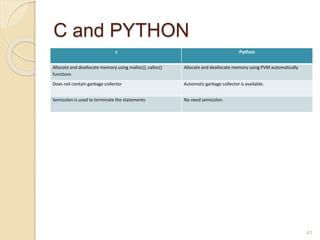
C and PYTHON
c Python
Allocate and deallocate memory using malloc(), calloc()
functions
Allocate and deallocate memory using PVM automatically
Does not contain garbage collector Automatic garbage collector is available.
Semicolon is used to terminate the statements No need semicolon.
41
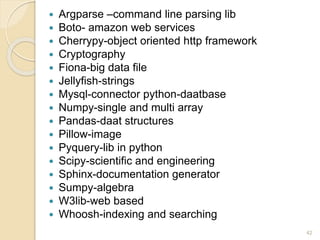
 Argparse –command line parsing lib
 Boto- amazon web services
 Cherrypy-object oriented http framework
 Cryptography
 Fiona-big data file
 Jellyfish-strings
 Mysql-connector python-daatbase
 Numpy-single and multi array
 Pandas-daat structures
 Pillow-image
 Pyquery-lib in python
 Scipy-scientific and engineering
 Sphinx-documentation generator
 Sumpy-algebra
 W3lib-web based
 Whoosh-indexing and searching
42
 C:>python –m dis program.py
43
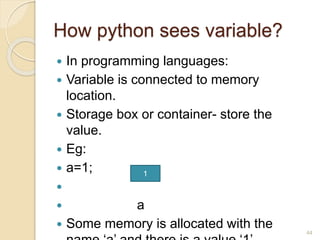
How python sees variable?
 In programming languages:
 Variable is connected to memory
location.
 Storage box or container- store the
value.
 Eg:
 a=1;

 a
 Some memory is allocated with the 44
1
 If we change the value of the variable ,
then the box will be updated with the
new value.
 a=2;
 a
 Int b=a;
 A new memory box is created by the
name ‘b’ and value of a is copied to ‘b’.

 b a
45
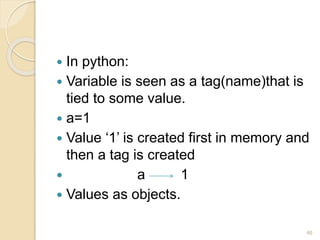
 In python:
 Variable is seen as a tag(name)that is
tied to some value.
 a=1
 Value ‘1’ is created first in memory and
then a tag is created
 a 1
 Values as objects.
46
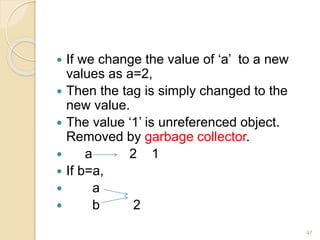
 If we change the value of ‘a’ to a new
values as a=2,
 Then the tag is simply changed to the
new value.
 The value ‘1’ is unreferenced object.
Removed by garbage collector.
 a 2 1
 If b=a,
 a
 b 2
47
 Python has tags to represent the
values.
 Only one memory referenced by two
names.
 Python is using memory efficiently.
48
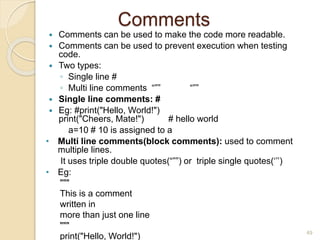
Comments
 Comments can be used to make the code more readable.
 Comments can be used to prevent execution when testing
code.
 Two types:
◦ Single line #
◦ Multi line comments “”” “””
 Single line comments: #
 Eg: #print("Hello, World!")
print("Cheers, Mate!") # hello world
a=10 # 10 is assigned to a
• Multi line comments(block comments): used to comment
multiple lines.
It uses triple double quotes(“””) or triple single quotes(‘’’)
• Eg:
"""
This is a comment
written in
more than just one line
"""
print("Hello, World!")
49
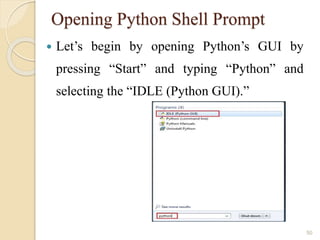
Opening Python Shell Prompt
 Let’s begin by opening Python’s GUI by
pressing “Start” and typing “Python” and
selecting the “IDLE (Python GUI).”
50
Python Running Modes
 Interpreter mode or Conversation mode called IDLE
 Script mode (“Filename.py”)
◦ Extension of python script is .py
◦ Press F5 key to run the script.
51
IDLE Development Environment
 IDLE is an Integrated Development Environment
for Python, typically used on Windows
 Multi-window text editor with syntax highlighting,
auto-completion, smart indent and other.
 Python shell with syntax highlighting.
 Integrated debugger with stepping and persistent
breakpoints
52
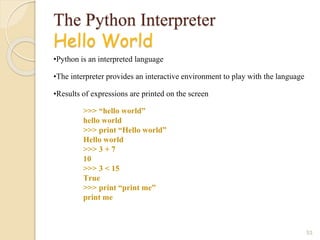
The Python Interpreter
Hello World
•Python is an interpreted language
•The interpreter provides an interactive environment to play with the language
•Results of expressions are printed on the screen
53
>>> “hello world”
hello world
>>> print “Hello world”
Hello world
>>> 3 + 7
10
>>> 3 < 15
True
>>> print “print me”
print me
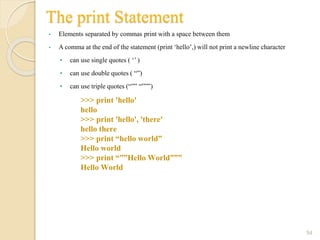
The print Statement
• Elements separated by commas print with a space between them
• A comma at the end of the statement (print ‘hello’,) will not print a newline character
• can use single quotes ( ‘’ )
• can use double quotes ( “”)
• can use triple quotes (“”” “”””)
54
>>> print 'hello'
hello
>>> print 'hello', 'there'
hello there
>>> print “hello world”
Hello world
>>> print “””Hello World”””
Hello World
Data types
 Type of data stored into a variable or
memory.
 1.Built-in data types
 2.User defined data types
55
Built in data types:
Five types:
 None type
 Numeric types
 Sequences
 Sets
 Mappings
56
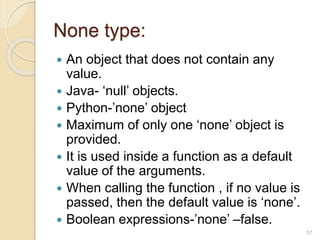
None type:
 An object that does not contain any
value.
 Java- ‘null’ objects.
 Python-’none’ object
 Maximum of only one ‘none’ object is
provided.
 It is used inside a function as a default
value of the arguments.
 When calling the function , if no value is
passed, then the default value is ‘none’.
 Boolean expressions-’none’ –false.
57
Numeric types:
Represent numbers. Three sub types;
1. int
2. float
3. Complex
58
Int type
 Represents an integer.
 Integere- wothout any decimal point.
 Eg: 122,0,-31225
 No limit for the size of an int datatype.
Examples
x = 20
#display x:
print(x)
#display the data type of x:
print(type(x))
Output
20
<class 'int'>
59
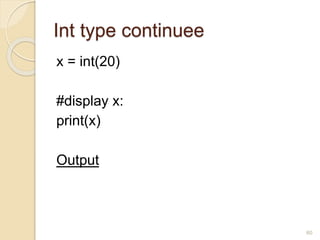
Int type continuee
x = int(20)
#display x:
print(x)
Output
60
Float type:
 Represents floating point number.
 Contain decimal number
 Eg: -3.2,0.12,782.23 etc.,
 Num=3.12
 Floating point number can also be written in scientific
notation ‘e’ or ‘E’ to represent the power of 10.
 Eg: 2.5 X 10⁴ -2,5E4
 Example
x = float(20.5)
#display x:
print(x)
Output:
61
Complex type:
 Complex number is written in the form of
a+bj or a+bJ
 Here ‘a’ represents the real part
 Here ‘b’ represents the imaginary part.
 Eg: 3+5j, 3+5J
Example
x = complex(1j)
#display x:
print(x)
Output
lj
62
Representing binary, Octal and
Hexadecimal numbers
 Binary number- 0b or 0B before the
value.
 Eg:0b11011
 Hexadecimal value:- 0x or 0X
 Octal number-0o or 0O
63
Converting data types
 Depending on the type of data , python
internally assume the type of variable.
 The programmer wants to convert one
data type into another data type- type
conversion or coercion.
 Possible by mentioning with parenthesis.
 Eg: int(num).
 Program(ty.txt)
 Convert.txt
64
 There is a function in the form of
int(str, base)- contvert string
into a decimal integer.
It should contain integer number in
string format.
‘base’- base of the number system.
Eg: base 2 represents binary number
16 indicates hexadecimal number.
Program-convert1.txt
65
 Bin() convert the number into binary
form
 oct() convert the number into octal
form
 hex() convert the number into
hexadecimal form.
66
Bool type
 Represent boolean values.
 Two values ‘true’ or ‘false’
 True=1, false=0
 A blank string “” is also represented as
false.
 Eg:
 a=10, b=20
 If(a<b):print(“hello”)
67
 a=10>4
 print(a)- displays true
a=4>10
Print(a)- display false
68
Sequences in python
 Group of elements or items.
 Eg: group of integer will form a
sequence.
 Six types
 1. str
 2. bytes
 3.bytearray
 4.list
 5.tuple
 6.range
69
Str data type
 Represents string data type.
 A string is represented by a group of
characters.
 String are enclosed with single or double
quotes.
 Both are valid.
Eg:
Str=“welcome”
Str=‘welcome’
Use “”” or’’’ quotes for representing a
group of lines including spaces.
70

python unit2.pptx

  • 1.
  • 2.
    LEARNING OUTCOME A studentwho successfully completes the course will have the ability to: Understand the basics of python programming constructs. 2
  • 3.
    UNIT – 1I Introductionto Python History-features-execution of python program-flavors of python-comments- data types-built in data types- sequences-literals-operators-input and output statements-conditional statements-if-if-else-nested if else-for- while-nested loops-break-continue- pass-assert-return. 3
  • 4.
    Computer Program  Acomputer program is a collection of instructions that performs a specific task when executed by a computer.  A computer requires programs to function and typically executes the program's instructions in a central processing unit. 4
  • 5.
    CHARACTERISTICS OF COMPUTER PROGRAM Efficient-execute faster, utilize minimal memory  Good User Interface-friendly user interface  Reliable-handle unexpected errors, give proper messages if error occur.  Good communication-self explanatory  Portable-platform independent, run on variety of systems. 5
  • 6.
    Programming Errors  Syntaxerror- structure of the program  Semantic error-meaning of the syntactical structure.  Runtime error-program executed 6
  • 7.
    Natural Language VsFormal Language  NL:  - spoken by people  Closer to humans  Ambiguous in nature, more redundant  Eg: french , english, german  FL:  -for specific applications  -closer to computer code.  -unambiguous in nature  -less redundant  Eg: all programming 7
  • 8.
    Programming paradigms  Twotype:  Procedural programming  Object oriented programming 8
  • 9.
    Procedural programming  Dataand operations on data are seperated.  Does not support the concept of data hiding and encapsulation.  Follows top down approach  Global data sharing is allowed.  Eg: c, pascal. 9
  • 10.
    Object oriented programming Bottom up approach  Supports data hiding and encapsulation.  Data can be easily move between methods and can be controlled through access specifiers.  Eg: java, c++. Python is a procedure oriented programming as well as object oriented programming. 10
  • 11.
     Python isa typeless programming language.  Typeless-value of the variable determines the type.  Type checking is made at run time.  Need not worry about the type of the variable.  Eg: python, perl, PHP. 11
  • 12.
    PYTHON OVERVIEW  Pythonis a high-level, interpreted, interactive and object-oriented scripting language. Python is designed to be highly readable. It uses English keywords frequently where as other languages use punctuation, and it has fewer syntactical constructions than other languages.  Python is Interpreted:  Python is Interactive:  Python is Object-Oriented:  Python is a Beginner's Language: 12
  • 13.
     Python isInterpreted: Python is processed at runtime by the interpreter. You do not need to compile your program before executing it. This is similar to PERL and PHP.  Python is Interactive: You can actually sit at a Python prompt and interact with the interpreter directly to write your programs.  Python is Object-Oriented: Python supports Object-Oriented style or technique of programming that encapsulates code within objects.  Python is a Beginner's Language: Python is a great language for the beginner-level programmers and supports the development of a wide range of applications from simple text processing to WWW browsers to games 13
  • 14.
    History of Python Conceived in the late 1980’s.  Developed in the year 1989 by Guido van Rossum who was working for centrum wiskunde & informatica(CWI) at netherlands.  as a successor to the ABC (programming language) capable of exception handling and interfacing with the Amoeba operating system  He published the first version of the python(0.9.0) on February 1991. 14
  • 15.
     Python isderived from many other languages, including ABC, Modula-3, C, C++, Algol-68, SmallTalk, and Unix shell and other scripting languages.  Python is copyrighted. Like Perl, Python source code is now available under the GNU General Public License (GPL). 15
  • 16.
    VERSIONS OF PYTHON Release dates for the major and minor versions:[29]  Python 1.0 - January 1994 ◦ Python 1.5 - December 31, 1997 ◦ Python 1.6 - September 5, 2000  Python 2.0 - October 16, 2000 ◦ Python 2.1 - April 17, 2001 ◦ Python 2.2 - December 21, 2001 ◦ Python 2.3 - July 29, 2003 ◦ Python 2.4 - November 30, 2004 ◦ Python 2.5 - September 19, 2006 ◦ Python 2.6 - October 1, 2008 ◦ Python 2.7 - July 3, 2010  Python 3.0 - December 3, 2008 ◦ Python 3.1 - June 27, 2009 ◦ Python 3.2 - February 20, 2011 ◦ Python 3.3 - September 29, 2012 ◦ Python 3.4 - March 16, 2014 ◦ Python 3.5 - September 13, 2015 ◦ Python 3.6 - December 23, 2016 16
  • 17.
    FEATURES OF PYTHON Easy-to-learn: Python has few keywords, simple structure, and a clearly defined syntax. This allows the student to pick up the language quickly.  Easy-to-read: Python code is more clearly defined and visible to the eyes.  Easy-to-maintain: Python's source code is fairly easy-to-maintain.  A broad standard library: Python's bulk of the library is very portable and cross-platform compatible on UNIX, Windows, and Macintosh.  Interactive Mode:Python has support for an interactive mode which allows interactive testing and debugging of snippets of code. 17
  • 18.
     Portable: Pythoncan run on a wide variety of hardware platforms and has the same interface on all platforms.  Extendable: You can add low-level modules to the Python interpreter. These modules enable programmers to add to or customize their tools to be more efficient.  Databases: Python provides interfaces to all major commercial databases.  GUI Programming: Python supports GUI applications that can be created and ported to many system calls, libraries and windows systems, such as Windows MFC, Macintosh, and the X Window system of Unix.  Scalable: Python provides a better structure and support for large programs than shell scripting. 18
  • 19.
     Python hasa big list of good features, few are listed below:  It supports functional and structured programming methods as well as OOP.  It can be used as a scripting language or can be compiled to byte-code for building large applications.  It provides very high-level dynamic data types and supports dynamic type checking.  IT supports automatic garbage collection.  It can be easily integrated with C, C++, COM, ActiveX, CORBA, and Java. 19
  • 20.
    EXECUTION OF PYTHON Python source code is compiled to a byte code.  The file has a .pyc extension.  Program.py is compiled into program.pyc.  The byte code file is then inputted to the PVM which interprets the byte code and produces the desired output.  The generation of byte code file and its execution by the PVM is done automatically in python and user need not worry about it. 20
  • 21.
     If thepython has write access on computer, it stores the byte code in computer (.pyc extension).  Python saves byte code as its help in start up speed optimization.  The next time if we run the program python will load the .pyc file and skip compilation step.  As long as we need not changed source code since the byte code was saved. 21
  • 22.
     If pythondoes not have write access on computer it generates the byte code and stores it in memory which is ultimately discard when the program exits. 22
  • 23.
  • 24.
    What is python? Python is a programming language that combines the features of C and java.  Offers elegant style of developing programs like C.  When the programmers want to go for object orientation, python offers classes and objects like java. 24
  • 25.
    Example-add two numbers a=b=10  Print(“sum=“,(a+b)  Python name-from TV show “monty python’s flying circus”.  Logo: 25
  • 26.
     Python isopen source software, which means anybody can download it from www.python.org and use it to develop programs. 26
  • 27.
    Flavors of python Flavors-Different types of python compilers.  Used to include various programming languages into python.  CPython  Jython  IronPython  PyPy  RubyPython  StacklessPython  Pythonnxy  AnacondaPython 27
  • 28.
    Cpython:  Standard pythonimplemented in C.  www.python.org/downloads/.  In this any python program is internally converted into byte code using C language functions.  Byte code is run on the interpreter available in python Virtual Machine (PVM)created in C.  Possible to execute C and C++ functions and programs. 28
  • 29.
    Jyhton:  Known asJPython.  Designed to run on java platform.  In this compiler first compiles the python program into java byte code.  Byte code is executed by java virtual machine(JVM).  Libraries are useful for both python and java programmers.  www.jython.org 29
  • 30.
    IronPython:  Used for.NET Framework.  Written in C# language.  When compiled gives an IL which runs on CLR to produce output.  This flavor gives flexibility of using both .NET and python libraries.  www.ironpython.net/. 30
  • 31.
    PyPy:  Python implementationusing python language.  Written in Rpython which was created in python language.  Rpyhton is useful for creating language interpreters.  PyPy programs run very faster since there is a JIT(Just in Time) compiler added with PVM.  Pypy.org/download.html. 31
  • 32.
    RubyPython  Bridge betweenthe Ruby and Python.  Encloses python interpreter inside ruby applications.  Rubypythons.org/gems/rubypython/ve rsions/0.6.3. 32
  • 33.
    StacklessPython:  Small taskswhich should run individually are called tasklets.  Tasklets run independently on CPU and can communicate via channels.  A Channal is a manager that takes care of scheduling the tasklets, controlling them and suspending them.  A thread is a process which runs hundreds of such tasklets. 33
  • 34.
     Create threadand tasklets in stacklesspython which is reimplementation of original python.  Pypi.python.org/pypi/stack-less- python/10.0 34
  • 35.
    Pythonxy:  Pronouned aspython xy and written as python(X,Y).  Used for scientific and engineering related packages.  Python-xy.github.ioo/downloads.html 35
  • 36.
    Anaconda python:  Handlinglarge scale data processing, predictive analytics and scientific computing- called anaconda python.  Focus on large scale of data.  www.continuum.io/downloads. 36
  • 37.
    PVM  Convert anyprogram into machine code before it is submitted to the computer for execution  Compiler normally converts program source code to machine code.  In python program code is converted into byte code 37
  • 38.
    PVM-what is bytecode?  Byte code represents the fixed set of instructions created by python developers representing all types of operations.  The size of each byte instruction is 1 byte.  Python organization says that there may be newer instructions added to the existing byte code from time to time. 38
  • 39.
    Role of PVM: Convert the byte code instructions into machine code .  PVM is equipped with an interpreter.  Interpreter converts the byte code to machine code.  So PVM is called as interpreter. 39
  • 40.
    C and PYTHON CPython Procedure oriented language. Does not contain the features like classes , object etc Procedure oriented language. Does contain the features like classes , object etc Executes faster. Slower compared to C Need to declare data types of variables, arrays Type declaration is not required Type discipline is static and weak. Strong and dynamic Pointers used in C Does not use pointers No exception handling facility Handles exceptions. C has while, do.. while, for loop Python has while and for loop. Switch statement Does not have switch The variable in the for loop does not incremented automatically The variable in the for loop incremented automatically 40
  • 41.
    C and PYTHON cPython Allocate and deallocate memory using malloc(), calloc() functions Allocate and deallocate memory using PVM automatically Does not contain garbage collector Automatic garbage collector is available. Semicolon is used to terminate the statements No need semicolon. 41
  • 42.
     Argparse –commandline parsing lib  Boto- amazon web services  Cherrypy-object oriented http framework  Cryptography  Fiona-big data file  Jellyfish-strings  Mysql-connector python-daatbase  Numpy-single and multi array  Pandas-daat structures  Pillow-image  Pyquery-lib in python  Scipy-scientific and engineering  Sphinx-documentation generator  Sumpy-algebra  W3lib-web based  Whoosh-indexing and searching 42
  • 43.
     C:>python –mdis program.py 43
  • 44.
    How python seesvariable?  In programming languages:  Variable is connected to memory location.  Storage box or container- store the value.  Eg:  a=1;   a  Some memory is allocated with the 44 1
  • 45.
     If wechange the value of the variable , then the box will be updated with the new value.  a=2;  a  Int b=a;  A new memory box is created by the name ‘b’ and value of a is copied to ‘b’.   b a 45
  • 46.
     In python: Variable is seen as a tag(name)that is tied to some value.  a=1  Value ‘1’ is created first in memory and then a tag is created  a 1  Values as objects. 46
  • 47.
     If wechange the value of ‘a’ to a new values as a=2,  Then the tag is simply changed to the new value.  The value ‘1’ is unreferenced object. Removed by garbage collector.  a 2 1  If b=a,  a  b 2 47
  • 48.
     Python hastags to represent the values.  Only one memory referenced by two names.  Python is using memory efficiently. 48
  • 49.
    Comments  Comments canbe used to make the code more readable.  Comments can be used to prevent execution when testing code.  Two types: ◦ Single line # ◦ Multi line comments “”” “””  Single line comments: #  Eg: #print("Hello, World!") print("Cheers, Mate!") # hello world a=10 # 10 is assigned to a • Multi line comments(block comments): used to comment multiple lines. It uses triple double quotes(“””) or triple single quotes(‘’’) • Eg: """ This is a comment written in more than just one line """ print("Hello, World!") 49
  • 50.
    Opening Python ShellPrompt  Let’s begin by opening Python’s GUI by pressing “Start” and typing “Python” and selecting the “IDLE (Python GUI).” 50
  • 51.
    Python Running Modes Interpreter mode or Conversation mode called IDLE  Script mode (“Filename.py”) ◦ Extension of python script is .py ◦ Press F5 key to run the script. 51
  • 52.
    IDLE Development Environment IDLE is an Integrated Development Environment for Python, typically used on Windows  Multi-window text editor with syntax highlighting, auto-completion, smart indent and other.  Python shell with syntax highlighting.  Integrated debugger with stepping and persistent breakpoints 52
  • 53.
    The Python Interpreter HelloWorld •Python is an interpreted language •The interpreter provides an interactive environment to play with the language •Results of expressions are printed on the screen 53 >>> “hello world” hello world >>> print “Hello world” Hello world >>> 3 + 7 10 >>> 3 < 15 True >>> print “print me” print me
  • 54.
    The print Statement •Elements separated by commas print with a space between them • A comma at the end of the statement (print ‘hello’,) will not print a newline character • can use single quotes ( ‘’ ) • can use double quotes ( “”) • can use triple quotes (“”” “”””) 54 >>> print 'hello' hello >>> print 'hello', 'there' hello there >>> print “hello world” Hello world >>> print “””Hello World””” Hello World
  • 55.
    Data types  Typeof data stored into a variable or memory.  1.Built-in data types  2.User defined data types 55
  • 56.
    Built in datatypes: Five types:  None type  Numeric types  Sequences  Sets  Mappings 56
  • 57.
    None type:  Anobject that does not contain any value.  Java- ‘null’ objects.  Python-’none’ object  Maximum of only one ‘none’ object is provided.  It is used inside a function as a default value of the arguments.  When calling the function , if no value is passed, then the default value is ‘none’.  Boolean expressions-’none’ –false. 57
  • 58.
    Numeric types: Represent numbers.Three sub types; 1. int 2. float 3. Complex 58
  • 59.
    Int type  Representsan integer.  Integere- wothout any decimal point.  Eg: 122,0,-31225  No limit for the size of an int datatype. Examples x = 20 #display x: print(x) #display the data type of x: print(type(x)) Output 20 <class 'int'> 59
  • 60.
    Int type continuee x= int(20) #display x: print(x) Output 60
  • 61.
    Float type:  Representsfloating point number.  Contain decimal number  Eg: -3.2,0.12,782.23 etc.,  Num=3.12  Floating point number can also be written in scientific notation ‘e’ or ‘E’ to represent the power of 10.  Eg: 2.5 X 10⁴ -2,5E4  Example x = float(20.5) #display x: print(x) Output: 61
  • 62.
    Complex type:  Complexnumber is written in the form of a+bj or a+bJ  Here ‘a’ represents the real part  Here ‘b’ represents the imaginary part.  Eg: 3+5j, 3+5J Example x = complex(1j) #display x: print(x) Output lj 62
  • 63.
    Representing binary, Octaland Hexadecimal numbers  Binary number- 0b or 0B before the value.  Eg:0b11011  Hexadecimal value:- 0x or 0X  Octal number-0o or 0O 63
  • 64.
    Converting data types Depending on the type of data , python internally assume the type of variable.  The programmer wants to convert one data type into another data type- type conversion or coercion.  Possible by mentioning with parenthesis.  Eg: int(num).  Program(ty.txt)  Convert.txt 64
  • 65.
     There isa function in the form of int(str, base)- contvert string into a decimal integer. It should contain integer number in string format. ‘base’- base of the number system. Eg: base 2 represents binary number 16 indicates hexadecimal number. Program-convert1.txt 65
  • 66.
     Bin() convertthe number into binary form  oct() convert the number into octal form  hex() convert the number into hexadecimal form. 66
  • 67.
    Bool type  Representboolean values.  Two values ‘true’ or ‘false’  True=1, false=0  A blank string “” is also represented as false.  Eg:  a=10, b=20  If(a<b):print(“hello”) 67
  • 68.
     a=10>4  print(a)-displays true a=4>10 Print(a)- display false 68
  • 69.
    Sequences in python Group of elements or items.  Eg: group of integer will form a sequence.  Six types  1. str  2. bytes  3.bytearray  4.list  5.tuple  6.range 69
  • 70.
    Str data type Represents string data type.  A string is represented by a group of characters.  String are enclosed with single or double quotes.  Both are valid. Eg: Str=“welcome” Str=‘welcome’ Use “”” or’’’ quotes for representing a group of lines including spaces. 70