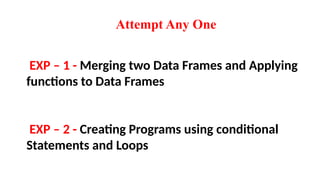
EXP – 1- Merging two Data Frames and Applying
functions to Data Frames
EXP – 2 - Creating Programs using conditional
Statements and Loops
Attempt Any One
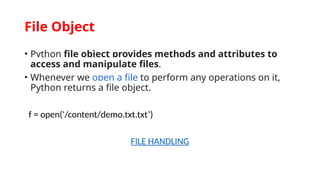
• Python fileobject provides methods and attributes to
access and manipulate files.
• Whenever we open a file to perform any operations on it,
Python returns a file object.
f = open('/content/demo.txt.txt’)
FILE HANDLING
File Object
5.
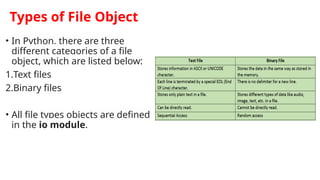
Types of FileObject
• In Python, there are three
different categories of a file
object, which are listed below:
1.Text files
2.Binary files
• All file types objects are defined
in the io module.
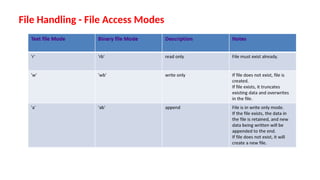
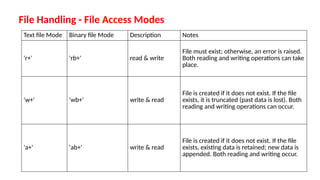
File Handling -File Access Modes
Text file Mode Binary file Mode Description Notes
'r+' 'rb+' read & write
File must exist; otherwise, an error is raised.
Both reading and writing operations can take
place.
'w+' 'wb+' write & read
File is created if it does not exist. If the file
exists, it is truncated (past data is lost). Both
reading and writing operations can occur.
'a+' 'ab+' write & read
File is created if it does not exist. If the file
exists, existing data is retained; new data is
appended. Both reading and writing occur.
8.
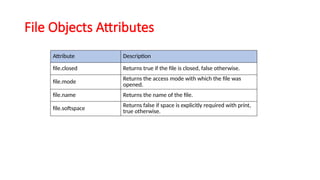
File Objects Attributes
AttributeDescription
file.closed Returns true if the file is closed, false otherwise.
file.mode Returns the access mode with which the file was
opened.
file.name Returns the name of the file.
file.softspace Returns false if space is explicitly required with print,
true otherwise.
Python Command LineArguments
input() Function: The input() function is a standard way to accept inputs in Python.
•It reads user input as a string from the command line.
Alternative to input(): Command Line Arguments:
•Inputs are passed to the program as arguments from the command line (terminal or
command prompt).
•To work with command line arguments in Python, you need to import the sys
module.
•sys.argv List: Command line arguments are stored in a list named argv within the sys
module. argv stands for "argument vector".
•sys.argv is a list that contains all the command line arguments passed to the script,
including the script name itself.
•The elements of sys.argv are of type string.
14.
Python Command LineArguments
•sys.argv is a list in Python that contains the command line arguments passed to a script.
•The elements in sys.argv can be accessed using an index, similar to how you access
elements in any list.
•The index starts from 0.
• The first element, sys.argv[0], is always the filename of the script.
• The actual command line arguments provided by the user start from sys.argv[1] onwards.
To use command line arguments in Python, first, you need to import the sys module:- import sys
You can print all the command line arguments passed to the script by using sys.argv: - print(sys.argv)
You can find the length of the list sys.argv using the len() function: - len(sys.argv)
15.
Python Command LineArguments
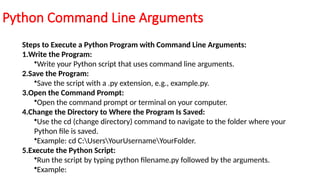
Steps to Execute a Python Program with Command Line Arguments:
1.Write the Program:
•Write your Python script that uses command line arguments.
2.Save the Program:
•Save the script with a .py extension, e.g., example.py.
3.Open the Command Prompt:
•Open the command prompt or terminal on your computer.
4.Change the Directory to Where the Program Is Saved:
•Use the cd (change directory) command to navigate to the folder where your
Python file is saved.
•Example: cd C:UsersYourUsernameYourFolder.
5.Execute the Python Script:
•Run the script by typing python filename.py followed by the arguments.
•Example:
16.
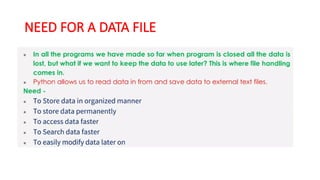
Persistent Storage Modules
Pythonprovides several modules for persistent storage,
allowing data to be stored permanently across program runs.
The term data persistence means it continues to exist even after the application has
ended.
Persistent storage means saving data in a way that allows it to be retrieved even after your program has
stopped running. Think of it like saving your work on a computer so you can open it later.
During the course of using any software application, user provides some data to be
processed. Data so received, is stored in computer’s main memory (RAM) in the form of various
data structures such as, variables and objects until the application is running. Thereafter,
memory contents from RAM are erased.
17.
Python Modules forPersistent Storage
a. Pickling (marshal and pickle modules):
• Pickling is a way to convert complex Python objects (like lists, dictionaries, or
custom objects) into a format that can be stored or sent over the network.
• marshal and pickle are modules that help with this conversion.
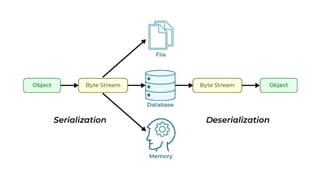
• They transform Python objects into a binary format (a series of bytes-
serialization) and back into objects(deserialization). This process is also called
flattening, serializing, or marshalling.
i. marshal: Works well for simple Python objects (numbers, lists, dictionaries, and
code). It’s mainly used for Python's internal purposes.
ii. pickle: Can handle more complex objects, including objects that reference other
objects, and custom classes. It’s more flexible and powerful than marshal
iii. cPickle: A faster version of pickle implemented in C for better performance.
19.
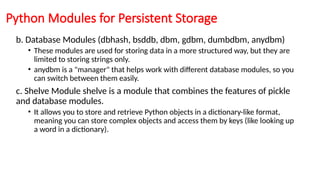
b. Database Modules(dbhash, bsddb, dbm, gdbm, dumbdbm, anydbm)
• These modules are used for storing data in a more structured way, but they are
limited to storing strings only.
• anydbm is a "manager" that helps work with different database modules, so you
can switch between them easily.
c. Shelve Module shelve is a module that combines the features of pickle
and database modules.
• It allows you to store and retrieve Python objects in a dictionary-like format,
meaning you can store complex objects and access them by keys (like looking up
a word in a dictionary).
Python Modules for Persistent Storage

![Python Command Line Arguments
•sys.argv is a list in Python that contains the command line arguments passed to a script.
•The elements in sys.argv can be accessed using an index, similar to how you access
elements in any list.
•The index starts from 0.
• The first element, sys.argv[0], is always the filename of the script.
• The actual command line arguments provided by the user start from sys.argv[1] onwards.
To use command line arguments in Python, first, you need to import the sys module:- import sys
You can print all the command line arguments passed to the script by using sys.argv: - print(sys.argv)
You can find the length of the list sys.argv using the len() function: - len(sys.argv)](https://image.slidesharecdn.com/9-250722065907-580078de/85/FILE-AND-OBJECT-ITS-PROPERTIES-IN-PYTHON-14-320.jpg)