Module 1
operations, basic operators,data types, variables,
basic input-output
Variables
Module 1 Variables
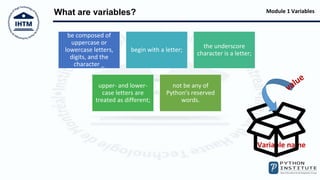
What are variables?
Variable name
be composed of
uppercase or
lowercase letters,
digits, and the
character _
begin with a letter;
the underscore
character is a letter;
upper- and lower-
case letters are
treated as different;
not be any of
Python's reserved
words.
Module 1 Variables
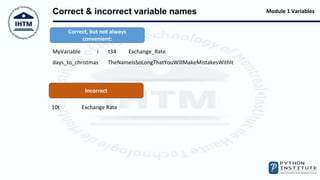
Correct & incorrect variable names
Correct, but not always
convenient:
Incorrect
MyVariable i t34 Exchange_Rate
days_to_christmas TheNameIsSoLongThatYouWillMakeMistakesWithIt
10t Exchange Rate
Module 1 Variables
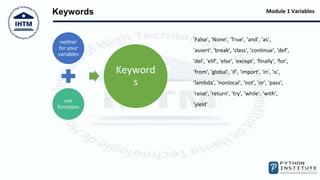
Keywords
neither
for your
variables
nor
functions
Keyword
s
'False', 'None', 'True', 'and', 'as',
'assert', 'break', 'class', 'continue', 'def',
'del', 'elif', 'else', 'except', 'finally', 'for',
'from', 'global', 'if', 'import', 'in', 'is',
'lambda', 'nonlocal', 'not', 'or', 'pass',
'raise', 'return', 'try', 'while', 'with',
'yield'
Module 1 Variables
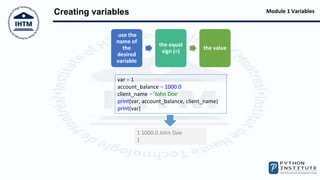
Creating variables
use the
name of
the
desired
variable
the equal
sign (=)
the value
var = 1
account_balance = 1000.0
client_name = 'John Doe'
print(var, account_balance, client_name)
print(var)
1 1000.0 John Doe
1
Module 1 Variables
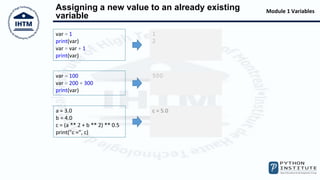
Assigning a new value to an already existing
variable
var = 1
print(var)
var = var + 1
print(var)
1
2
var = 100
var = 200 + 300
print(var)
500
a = 3.0
b = 4.0
c = (a ** 2 + b ** 2) ** 0.5
print("c =", c)
c = 5.0
Module 1 Variables
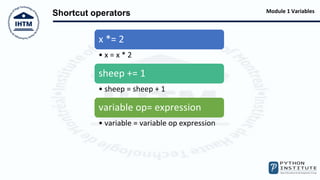
Shortcut operators
x *= 2
• x = x * 2
sheep += 1
• sheep = sheep + 1
variable op= expression
• variable = variable op expression
Module 1 Variables
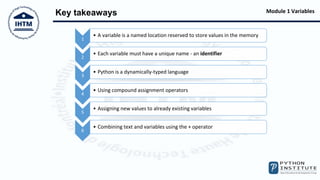
Key takeaways
1
• A variable is a named location reserved to store values in the memory
2
• Each variable must have a unique name - an identifier
3
• Python is a dynamically-typed language
4
• Using compound assignment operators
5
• Assigning new values to already existing variables
6
• Combining text and variables using the + operator
Module 1 Variables
LAB Practice
4. Variables
5. Variables: a simple converter
6. Operators and expressions

Python PCEP Variables

  • 1.
    Module 1 operations, basicoperators,data types, variables, basic input-output Variables
  • 2.
    Module 1 Variables Whatare variables? Variable name be composed of uppercase or lowercase letters, digits, and the character _ begin with a letter; the underscore character is a letter; upper- and lower- case letters are treated as different; not be any of Python's reserved words.
  • 3.
    Module 1 Variables Correct& incorrect variable names Correct, but not always convenient: Incorrect MyVariable i t34 Exchange_Rate days_to_christmas TheNameIsSoLongThatYouWillMakeMistakesWithIt 10t Exchange Rate
  • 4.
    Module 1 Variables Keywords neither foryour variables nor functions Keyword s 'False', 'None', 'True', 'and', 'as', 'assert', 'break', 'class', 'continue', 'def', 'del', 'elif', 'else', 'except', 'finally', 'for', 'from', 'global', 'if', 'import', 'in', 'is', 'lambda', 'nonlocal', 'not', 'or', 'pass', 'raise', 'return', 'try', 'while', 'with', 'yield'
  • 5.
    Module 1 Variables Creatingvariables use the name of the desired variable the equal sign (=) the value var = 1 account_balance = 1000.0 client_name = 'John Doe' print(var, account_balance, client_name) print(var) 1 1000.0 John Doe 1
  • 6.
    Module 1 Variables Assigninga new value to an already existing variable var = 1 print(var) var = var + 1 print(var) 1 2 var = 100 var = 200 + 300 print(var) 500 a = 3.0 b = 4.0 c = (a ** 2 + b ** 2) ** 0.5 print("c =", c) c = 5.0
  • 7.
    Module 1 Variables Shortcutoperators x *= 2 • x = x * 2 sheep += 1 • sheep = sheep + 1 variable op= expression • variable = variable op expression
  • 8.
    Module 1 Variables Keytakeaways 1 • A variable is a named location reserved to store values in the memory 2 • Each variable must have a unique name - an identifier 3 • Python is a dynamically-typed language 4 • Using compound assignment operators 5 • Assigning new values to already existing variables 6 • Combining text and variables using the + operator
  • 9.
    Module 1 Variables LABPractice 4. Variables 5. Variables: a simple converter 6. Operators and expressions