Python Map Automation:
Introduction to arcpy.mapping / arcpy.mp
Jeff Barrette
What is arcpy.mapping?
• Python mapping module that is part of the ArcPy site-package
• An API that allows users to:
- manage map documents, layer files, and their contents
- find a layer with data source X and replace with Y
- update a layer’s symbology in many MXDs
- generate reports that lists document information
- data sources, broken layers, spatial reference info, etc.
- Automate the exporting and printing of map documents
- Automate map production and create map books
- extend Data Driven Pages capabilities
UC2015 - Technical Workshop - Python Map Automation: Introduction to arcpy.mapping
Who is arcpy.mapping for? Why was it built?
• An easy to use, productive scripting environment for the GIS Analyst
- courser grained object model
- not a complete replacement for ArcObjects
• An environment to use for basic map/layer management and map
automation tasks
• A simple way to publish mapping tasks to the server environment
- arcpy.mapping scripts can be easily published as geoprocessing tools
UC2015 - Technical Workshop - Python Map Automation: Introduction to arcpy.mapping
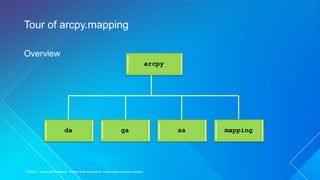
Overview
Tour of arcpy.mapping
sa
da ga mapping
arcpy
UC2015 - Technical Workshop - Python Map Automation: Introduction to arcpy.mapping
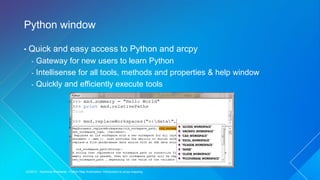
• Quick and easy access to Python and arcpy
- Gateway for new users to learn Python
- Intellisense for all tools, methods and properties & help window
- Quickly and efficiently execute tools
Python window
UC2015 - Technical Workshop - Python Map Automation: Introduction to arcpy.mapping
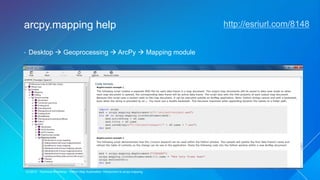
• Desktop  Geoprocessing  ArcPy  Mapping module
arcpy.mapping help http://esriurl.com/8148
UC2015 - Technical Workshop - Python Map Automation: Introduction to arcpy.mapping
• The Python Window and using the Desktop Help System
Demonstration
UC2015 - Technical Workshop - Python Map Automation: Introduction to arcpy.mapping
Referencing map documents
MapDocument class
MapDocument function
MapDocument(mxd_path) Methods
replaceWorkspaces
save
saveAsCopy
...
Properties:
activeDataFrame
author
credits
relativePaths
...
UC2015 - Technical Workshop - Python Map Automation: Introduction to arcpy.mapping
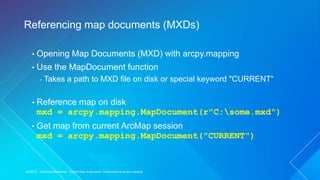
• Opening Map Documents (MXD) with arcpy.mapping
• Use the MapDocument function
- Takes a path to MXD file on disk or special keyword "CURRENT“
• Reference map on disk
mxd = arcpy.mapping.MapDocument(r"C:some.mxd")
• Get map from current ArcMap session
mxd = arcpy.mapping.MapDocument("CURRENT")
Referencing map documents (MXDs)
UC2015 - Technical Workshop - Python Map Automation: Introduction to arcpy.mapping
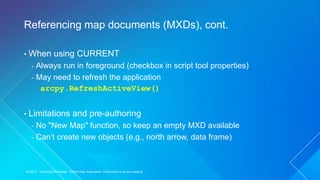
• When using CURRENT
- Always run in foreground (checkbox in script tool properties)
- May need to refresh the application
arcpy.RefreshActiveView()
• Limitations and pre-authoring
- No "New Map" function, so keep an empty MXD available
- Can’t create new objects (e.g., north arrow, data frame)
Referencing map documents (MXDs), cont.
UC2015 - Technical Workshop - Python Map Automation: Introduction to arcpy.mapping
• Working with Map Documents (MXDs)
• Use Python Window to change map document property info
• Evaluate relative paths, last saved, etc.
• Change the active view
• Save changes out to a new file
Demonstration
UC2015 - Technical Workshop - Python Map Automation: Introduction to arcpy.mapping
• The “List” functions
- ListLayers and ListDataFrames
- Watch the list indexes (it is easy to forget to use [0])
df = arcpy.mapping.ListDataFrames(MXD)[0]
• Layer properties
- Common properties are available (e.g., def query, visible)
- All properties can be updated via layer (.lyr) files
• DataFrame properties and methods
- Basic map navigation and settings
Layers and data frames
UC2015 - Technical Workshop - Python Map Automation: Introduction to arcpy.mapping
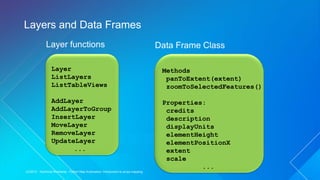
Layers and Data Frames
Data Frame Class
Layer
ListLayers
ListTableViews
AddLayer
AddLayerToGroup
InsertLayer
MoveLayer
RemoveLayer
UpdateLayer
...
Layer functions
Methods
panToExtent(extent)
zoomToSelectedFeatures()
Properties:
credits
description
displayUnits
elementHeight
elementPositionX
extent
scale
...
UC2015 - Technical Workshop - Python Map Automation: Introduction to arcpy.mapping
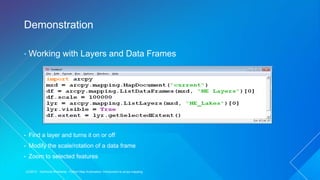
• Working with Layers and Data Frames
• Find a layer and turns it on or off
• Modify the scale/rotation of a data frame
• Zoom to selected features
Demonstration
UC2015 - Technical Workshop - Python Map Automation: Introduction to arcpy.mapping
• Must pre-author most elements
- Uniquely name your layout elements
- Set the appropriate anchor
• Only graphics and text can be cloned
• Move elements off the page
Page Layout Elements
UC2015 - Technical Workshop - Python Map Automation: Introduction to arcpy.mapping
• Working with layout elements
• Find a picture element and change its data source
Demonstration
UC2015 - Technical Workshop - Python Map Automation: Introduction to arcpy.mapping
Printing, exporting, server publishing, map books
CLASSES
DataDrivenPages
PDFDocument
FUNCTIONS
ExportReport
ExportToAI
ExportToBMP
ExportToEPS
ExportToGIF
ExportToJPEG
ExportToPDF
ExportToPNG
ExportToSVG
ExportToTIFF
PDFDocumentCreate
PDFDocumentOpen
PrintMap
CreateMapSDDraft
...
UC2015 - Technical Workshop - Python Map Automation: Introduction to arcpy.mapping
• Map output and map books
Map book that includes index pages using Python ReportLab
Sample: http://esriurl.com/4629
Demonstration
UC2015 - Technical Workshop - Python Map Automation: Introduction to arcpy.mapping
Updating data sources
• Use arcpy.mapping for migrating Map Documents and Layer files to
new data sources
• Fancier scripts can help mitigate migration pain: SQL syntax
changes, field name changes, etc
• A complete concept document is dedicated to this topic
- “Updating and fixing data sources with arcpy.mapping”
- http://esriurl.com/8149
UC2015 - Technical Workshop - Python Map Automation: Introduction to arcpy.mapping
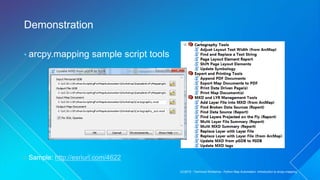
• arcpy.mapping sample script tools
• Sample: http://esriurl.com/4622
Demonstration
UC2015 - Technical Workshop - Python Map Automation: Introduction to arcpy.mapping
• ArcGIS Resource Center (web help) http://esriurl.com/8148
- Alphabetical lists of classes and functions
- Detailed discussions
- Multiple sample scripts for each class and function topic
• ArcGIS Online – arcpy.mapping / Map Automation group
- Download sample scripts http://esriurl.com/8899
Resources available
UC2015 - Technical Workshop - Python Map Automation: Introduction to arcpy.mapping
Migrating to ArcGIS Pro
• Help Topic: Migrating arcpy.mapping from ArcMap to ArcGIS Pro
- Python 3.4
- ArcGIS project file (.aprx)
- Stand-alone functions have moved to appropriate classes
- mapFrame.exportToPDF()
- map.addLayer(), map.insertLayer(), etc
- Layer files have changed
- DataFrame replace by Map, MapFrame, and Camera
- New Layout object
- Application always refreshes when using CURRENT
UC2015 - Technical Workshop - Python Map Automation: Introduction to arcpy.mapping
Desktop Mapping: Building Map Books
- Wednesday, 10:15am – 11:30am, Room 2
- Thursday, 8:30am - 9:45am, Room 05 B
Advanced Map Automation with Python
- Wednesday, 3:15pm – 4:30pm, Room 15 B
- Thursday, 1:30pm - 2:45pm, Room 07 A/B
Related Sessions
UC2015 - Technical Workshop - Python Map Automation: Introduction to arcpy.mapping
Python Map Automation - Introduction of Arcpy Mapping

Python Map Automation - Introduction of Arcpy Mapping

  • 1.
    Python Map Automation: Introductionto arcpy.mapping / arcpy.mp Jeff Barrette
  • 2.
    What is arcpy.mapping? •Python mapping module that is part of the ArcPy site-package • An API that allows users to: - manage map documents, layer files, and their contents - find a layer with data source X and replace with Y - update a layer’s symbology in many MXDs - generate reports that lists document information - data sources, broken layers, spatial reference info, etc. - Automate the exporting and printing of map documents - Automate map production and create map books - extend Data Driven Pages capabilities UC2015 - Technical Workshop - Python Map Automation: Introduction to arcpy.mapping
  • 3.
    Who is arcpy.mappingfor? Why was it built? • An easy to use, productive scripting environment for the GIS Analyst - courser grained object model - not a complete replacement for ArcObjects • An environment to use for basic map/layer management and map automation tasks • A simple way to publish mapping tasks to the server environment - arcpy.mapping scripts can be easily published as geoprocessing tools UC2015 - Technical Workshop - Python Map Automation: Introduction to arcpy.mapping
  • 4.
    Overview Tour of arcpy.mapping sa daga mapping arcpy UC2015 - Technical Workshop - Python Map Automation: Introduction to arcpy.mapping
  • 5.
    • Quick andeasy access to Python and arcpy - Gateway for new users to learn Python - Intellisense for all tools, methods and properties & help window - Quickly and efficiently execute tools Python window UC2015 - Technical Workshop - Python Map Automation: Introduction to arcpy.mapping
  • 6.
    • Desktop Geoprocessing  ArcPy  Mapping module arcpy.mapping help http://esriurl.com/8148 UC2015 - Technical Workshop - Python Map Automation: Introduction to arcpy.mapping
  • 7.
    • The PythonWindow and using the Desktop Help System Demonstration UC2015 - Technical Workshop - Python Map Automation: Introduction to arcpy.mapping
  • 8.
    Referencing map documents MapDocumentclass MapDocument function MapDocument(mxd_path) Methods replaceWorkspaces save saveAsCopy ... Properties: activeDataFrame author credits relativePaths ... UC2015 - Technical Workshop - Python Map Automation: Introduction to arcpy.mapping
  • 9.
    • Opening MapDocuments (MXD) with arcpy.mapping • Use the MapDocument function - Takes a path to MXD file on disk or special keyword "CURRENT“ • Reference map on disk mxd = arcpy.mapping.MapDocument(r"C:some.mxd") • Get map from current ArcMap session mxd = arcpy.mapping.MapDocument("CURRENT") Referencing map documents (MXDs) UC2015 - Technical Workshop - Python Map Automation: Introduction to arcpy.mapping
  • 10.
    • When usingCURRENT - Always run in foreground (checkbox in script tool properties) - May need to refresh the application arcpy.RefreshActiveView() • Limitations and pre-authoring - No "New Map" function, so keep an empty MXD available - Can’t create new objects (e.g., north arrow, data frame) Referencing map documents (MXDs), cont. UC2015 - Technical Workshop - Python Map Automation: Introduction to arcpy.mapping
  • 11.
    • Working withMap Documents (MXDs) • Use Python Window to change map document property info • Evaluate relative paths, last saved, etc. • Change the active view • Save changes out to a new file Demonstration UC2015 - Technical Workshop - Python Map Automation: Introduction to arcpy.mapping
  • 12.
    • The “List”functions - ListLayers and ListDataFrames - Watch the list indexes (it is easy to forget to use [0]) df = arcpy.mapping.ListDataFrames(MXD)[0] • Layer properties - Common properties are available (e.g., def query, visible) - All properties can be updated via layer (.lyr) files • DataFrame properties and methods - Basic map navigation and settings Layers and data frames UC2015 - Technical Workshop - Python Map Automation: Introduction to arcpy.mapping
  • 13.
    Layers and DataFrames Data Frame Class Layer ListLayers ListTableViews AddLayer AddLayerToGroup InsertLayer MoveLayer RemoveLayer UpdateLayer ... Layer functions Methods panToExtent(extent) zoomToSelectedFeatures() Properties: credits description displayUnits elementHeight elementPositionX extent scale ... UC2015 - Technical Workshop - Python Map Automation: Introduction to arcpy.mapping
  • 14.
    • Working withLayers and Data Frames • Find a layer and turns it on or off • Modify the scale/rotation of a data frame • Zoom to selected features Demonstration UC2015 - Technical Workshop - Python Map Automation: Introduction to arcpy.mapping
  • 15.
    • Must pre-authormost elements - Uniquely name your layout elements - Set the appropriate anchor • Only graphics and text can be cloned • Move elements off the page Page Layout Elements UC2015 - Technical Workshop - Python Map Automation: Introduction to arcpy.mapping
  • 16.
    • Working withlayout elements • Find a picture element and change its data source Demonstration UC2015 - Technical Workshop - Python Map Automation: Introduction to arcpy.mapping
  • 17.
    Printing, exporting, serverpublishing, map books CLASSES DataDrivenPages PDFDocument FUNCTIONS ExportReport ExportToAI ExportToBMP ExportToEPS ExportToGIF ExportToJPEG ExportToPDF ExportToPNG ExportToSVG ExportToTIFF PDFDocumentCreate PDFDocumentOpen PrintMap CreateMapSDDraft ... UC2015 - Technical Workshop - Python Map Automation: Introduction to arcpy.mapping
  • 18.
    • Map outputand map books Map book that includes index pages using Python ReportLab Sample: http://esriurl.com/4629 Demonstration UC2015 - Technical Workshop - Python Map Automation: Introduction to arcpy.mapping
  • 19.
    Updating data sources •Use arcpy.mapping for migrating Map Documents and Layer files to new data sources • Fancier scripts can help mitigate migration pain: SQL syntax changes, field name changes, etc • A complete concept document is dedicated to this topic - “Updating and fixing data sources with arcpy.mapping” - http://esriurl.com/8149 UC2015 - Technical Workshop - Python Map Automation: Introduction to arcpy.mapping
  • 20.
    • arcpy.mapping samplescript tools • Sample: http://esriurl.com/4622 Demonstration UC2015 - Technical Workshop - Python Map Automation: Introduction to arcpy.mapping
  • 21.
    • ArcGIS ResourceCenter (web help) http://esriurl.com/8148 - Alphabetical lists of classes and functions - Detailed discussions - Multiple sample scripts for each class and function topic • ArcGIS Online – arcpy.mapping / Map Automation group - Download sample scripts http://esriurl.com/8899 Resources available UC2015 - Technical Workshop - Python Map Automation: Introduction to arcpy.mapping
  • 22.
    Migrating to ArcGISPro • Help Topic: Migrating arcpy.mapping from ArcMap to ArcGIS Pro - Python 3.4 - ArcGIS project file (.aprx) - Stand-alone functions have moved to appropriate classes - mapFrame.exportToPDF() - map.addLayer(), map.insertLayer(), etc - Layer files have changed - DataFrame replace by Map, MapFrame, and Camera - New Layout object - Application always refreshes when using CURRENT UC2015 - Technical Workshop - Python Map Automation: Introduction to arcpy.mapping
  • 23.
    Desktop Mapping: BuildingMap Books - Wednesday, 10:15am – 11:30am, Room 2 - Thursday, 8:30am - 9:45am, Room 05 B Advanced Map Automation with Python - Wednesday, 3:15pm – 4:30pm, Room 15 B - Thursday, 1:30pm - 2:45pm, Room 07 A/B Related Sessions UC2015 - Technical Workshop - Python Map Automation: Introduction to arcpy.mapping