

Pyramid Deployment
 and Maintenance
    Carlos de la Guardia


 Plone Conference 2011
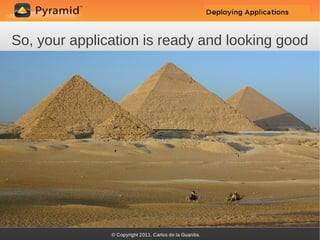
So, your application is ready and looking good
Time to deploy it and see how it holds up
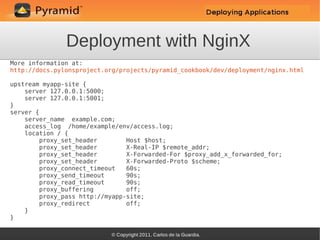
Deployment with NginX
More information at:
http://docs.pylonsproject.org/projects/pyramid_cookbook/dev/deployment/nginx.html

upstream myapp-site {
    server 127.0.0.1:5000;
    server 127.0.0.1:5001;
}
server {
    server_name example.com;
    access_log /home/example/env/access.log;
    location / {
        proxy_set_header        Host $host;
        proxy_set_header        X-Real-IP $remote_addr;
        proxy_set_header        X-Forwarded-For $proxy_add_x_forwarded_for;
        proxy_set_header        X-Forwarded-Proto $scheme;
        proxy_connect_timeout   60s;
        proxy_send_timeout      90s;
        proxy_read_timeout      90s;
        proxy_buffering         off;
        proxy_pass http://myapp-site;
        proxy_redirect          off;
    }
}
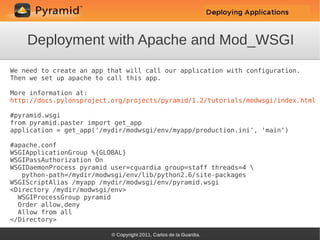
Deployment with Apache and Mod_WSGI
We need to create an app that will call our application with configuration.
Then we set up apache to call this app.

More information at:
http://docs.pylonsproject.org/projects/pyramid/1.2/tutorials/modwsgi/index.html

#pyramid.wsgi
from pyramid.paster import get_app
application = get_app('/mydir/modwsgi/env/myapp/production.ini', 'main')

#apache.conf
WSGIApplicationGroup %{GLOBAL}
WSGIPassAuthorization On
WSGIDaemonProcess pyramid user=cguardia group=staff threads=4 
   python-path=/mydir/modwsgi/env/lib/python2.6/site-packages
WSGIScriptAlias /myapp /mydir/modwsgi/env/pyramid.wsgi
<Directory /mydir/modwsgi/env>
  WSGIProcessGroup pyramid
  Order allow,deny
  Allow from all
</Directory>
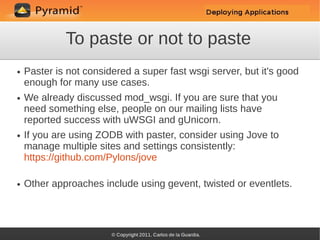
To paste or not to paste
●   Paster is not considered a super fast wsgi server, but it's good
    enough for many use cases.
●   We already discussed mod_wsgi. If you are sure that you
    need something else, people on our mailing lists have
    reported success with uWSGI and gUnicorn.
●   If you are using ZODB with paster, consider using Jove to
    manage multiple sites and settings consistently:
    https://github.com/Pylons/jove

●   Other approaches include using gevent, twisted or eventlets.
Putting all your eggs in the same basket
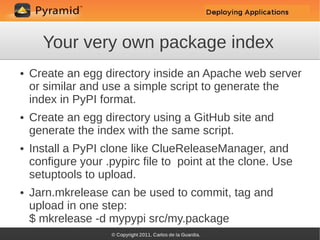
Your very own package index
●   Create an egg directory inside an Apache web server
    or similar and use a simple script to generate the
    index in PyPI format.
●   Create an egg directory using a GitHub site and
    generate the index with the same script.
●   Install a PyPI clone like ClueReleaseManager, and
    configure your .pypirc file to point at the clone. Use
    setuptools to upload.
●   Jarn.mkrelease can be used to commit, tag and
    upload in one step:
    $ mkrelease -d mypypi src/my.package
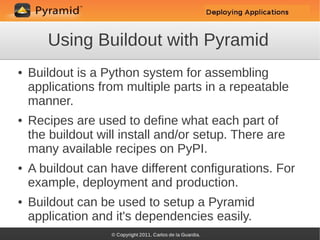
Using Buildout with Pyramid
●   Buildout is a Python system for assembling
    applications from multiple parts in a repeatable
    manner.
●   Recipes are used to define what each part of
    the buildout will install and/or setup. There are
    many available recipes on PyPI.
●   A buildout can have different configurations. For
    example, deployment and production.
●   Buildout can be used to setup a Pyramid
    application and it's dependencies easily.
Sample buildout
[buildout]
parts =
   myapp
   mkrelease

Develop = src/mypackage

index = http://example.github.com/myapp/staging/index/

[myapp]
recipe = zc.recipe.egg
eggs =
   some_dependency
   mypackage
interpreter = py

[mkrelease]
recipe = zc.recipe.egg
eggs = jarn.mkrelease
scripts = mkrelease
Supervisor
●   Supervisor is a client/server system that allows
    its users to monitor and control a number of
    processes on UNIX-like operating systems.
●   We can use supervisor to control our pyramid
    applications, either alone or together with other
    applications or services.
●   A very easy way to configure it is to simply add
    the supervisor egg to our buildout and include a
    configuration file.
Sample supervisor configuration
[inet_http_server]
port=127.0.0.1:9001

[supervisord]
logfile=%(here)s/var/supervisord.log
logfile_maxbytes=50MB
logfile_backups=10
loglevel=info
pidfile=%(here)s/var/supervisord.pid

[rpcinterface:supervisor]
supervisor.rpcinterface_factory = supervisor.rpcinterface:make_main_rpcinterface

[supervisorctl]
serverurl=http://127.0.0.1:9001

[program:core]
command = %(here)s/bin/paster serve %(here)s/src/inav2_core/development.ini
redirect_stderr = true
Useful maintenance tools
Scripting Pyramid
●   Web applications usually expect to interact with a request
    object of some kind and return a response.
●   Importing web application code from a command line
    script will not work when it depends on a request.
●   Pyramid offers a facility for generating an environment
    similar to what the application would get from a real
    request.
●   This makes it possible to easily write scripts for tasks like
    updating databases, create sample content or initialize
    application services.
Writing the script
●   To generate the proper environment we use
    pyramid.paster.bootstrap, like this:

    from pyramid.paster import bootstrap
    env = bootstrap('/path/to/my/development.ini')
    print env['request'].route_url('home')


●   We get back a dictionary with:
     –   sequest
     –   app
     –   root
     –   registry
     –   closer
Exception logging with pyramid_exclog
[loggers]
keys = exc_logger

[handlers]
keys = exc_handler

[formatters]
keys = exc_formatter

[logger_exc_logger]
level = ERROR
handlers = exc_handler
qualname = exc_logger

[handler_exc_handler]
class = handlers.SMTPHandler
args = (('localhost', 25), 'from@example.com', ['to@example.com'], 'myapp Exception')
level = ERROR
formatter = exc_formatter

[formatter_exc_formatter]
format = %(asctime)s %(message)s
Backups

For ZODB based applications:
●   Collective.recipe.backup


For Postgres based applications:
●   SQL dump
●   File system level backup
●   Continuous archiving
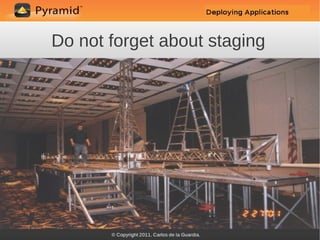
Do not forget about staging
Thinking about staging
●   A good deployment plan requires a good
    staging strategy.
●   It's important to be able to quickly deploy
    changes to staging before trying them in
    production.
●   Ideally, multiple branches could be deployed
    separately.
●   Take a look at octomotron:
    https://github.com/chrisrossi/octomotron
So much to do, so little time

Other deployment related tasks and decisions

  ●   Caching
  ●   Monitoring
  ●   Failover
  ●   Replication
  ●   Automated deployment
  ●   More...
Case Study: KARL
●   Open source web system for collaboration,
    organizational intranets, and knowledge
    management.
●   Mission-critical application used by
    organizations such as Open Society
    Foundations and Oxfam.
●   5000+ users (no anonymous access).
●   More than 75,000 Pages of content.
●   Nearly 100,000 lines of code.
How is KARL deployed?
●   Toolchain: Nginx, HAProxy, Paste, running
    under Supervisor.
●   Buildout for environment creation.
●   Custom package index stored on GitHub.
●   1 App Server, 1 DB Server.
●   Uses ZODB with RelStorage and PGTextIndex.
●   Deployment is done with a Python script that
    creates a parallel environment, backs up and
    evolves data, then restarts the instance.
Thank You!


       Email: cguardia@yahoo.com

          IRC: #pyramid, #pylons

http://groups.google.com/group/pylons-devel
Goodbye!

Pyramid Deployment and Maintenance

  • 1.
    Pyramid Deployment andMaintenance Carlos de la Guardia Plone Conference 2011
  • 2.
    So, your applicationis ready and looking good
  • 3.
    Time to deployit and see how it holds up
  • 4.
    Deployment with NginX Moreinformation at: http://docs.pylonsproject.org/projects/pyramid_cookbook/dev/deployment/nginx.html upstream myapp-site { server 127.0.0.1:5000; server 127.0.0.1:5001; } server { server_name example.com; access_log /home/example/env/access.log; location / { proxy_set_header Host $host; proxy_set_header X-Real-IP $remote_addr; proxy_set_header X-Forwarded-For $proxy_add_x_forwarded_for; proxy_set_header X-Forwarded-Proto $scheme; proxy_connect_timeout 60s; proxy_send_timeout 90s; proxy_read_timeout 90s; proxy_buffering off; proxy_pass http://myapp-site; proxy_redirect off; } }
  • 5.
    Deployment with Apacheand Mod_WSGI We need to create an app that will call our application with configuration. Then we set up apache to call this app. More information at: http://docs.pylonsproject.org/projects/pyramid/1.2/tutorials/modwsgi/index.html #pyramid.wsgi from pyramid.paster import get_app application = get_app('/mydir/modwsgi/env/myapp/production.ini', 'main') #apache.conf WSGIApplicationGroup %{GLOBAL} WSGIPassAuthorization On WSGIDaemonProcess pyramid user=cguardia group=staff threads=4 python-path=/mydir/modwsgi/env/lib/python2.6/site-packages WSGIScriptAlias /myapp /mydir/modwsgi/env/pyramid.wsgi <Directory /mydir/modwsgi/env> WSGIProcessGroup pyramid Order allow,deny Allow from all </Directory>
  • 6.
    To paste ornot to paste ● Paster is not considered a super fast wsgi server, but it's good enough for many use cases. ● We already discussed mod_wsgi. If you are sure that you need something else, people on our mailing lists have reported success with uWSGI and gUnicorn. ● If you are using ZODB with paster, consider using Jove to manage multiple sites and settings consistently: https://github.com/Pylons/jove ● Other approaches include using gevent, twisted or eventlets.
  • 7.
    Putting all youreggs in the same basket
  • 8.
    Your very ownpackage index ● Create an egg directory inside an Apache web server or similar and use a simple script to generate the index in PyPI format. ● Create an egg directory using a GitHub site and generate the index with the same script. ● Install a PyPI clone like ClueReleaseManager, and configure your .pypirc file to point at the clone. Use setuptools to upload. ● Jarn.mkrelease can be used to commit, tag and upload in one step: $ mkrelease -d mypypi src/my.package
  • 9.
    Using Buildout withPyramid ● Buildout is a Python system for assembling applications from multiple parts in a repeatable manner. ● Recipes are used to define what each part of the buildout will install and/or setup. There are many available recipes on PyPI. ● A buildout can have different configurations. For example, deployment and production. ● Buildout can be used to setup a Pyramid application and it's dependencies easily.
  • 10.
    Sample buildout [buildout] parts = myapp mkrelease Develop = src/mypackage index = http://example.github.com/myapp/staging/index/ [myapp] recipe = zc.recipe.egg eggs = some_dependency mypackage interpreter = py [mkrelease] recipe = zc.recipe.egg eggs = jarn.mkrelease scripts = mkrelease
  • 11.
    Supervisor ● Supervisor is a client/server system that allows its users to monitor and control a number of processes on UNIX-like operating systems. ● We can use supervisor to control our pyramid applications, either alone or together with other applications or services. ● A very easy way to configure it is to simply add the supervisor egg to our buildout and include a configuration file.
  • 12.
    Sample supervisor configuration [inet_http_server] port=127.0.0.1:9001 [supervisord] logfile=%(here)s/var/supervisord.log logfile_maxbytes=50MB logfile_backups=10 loglevel=info pidfile=%(here)s/var/supervisord.pid [rpcinterface:supervisor] supervisor.rpcinterface_factory= supervisor.rpcinterface:make_main_rpcinterface [supervisorctl] serverurl=http://127.0.0.1:9001 [program:core] command = %(here)s/bin/paster serve %(here)s/src/inav2_core/development.ini redirect_stderr = true
  • 13.
  • 14.
    Scripting Pyramid ● Web applications usually expect to interact with a request object of some kind and return a response. ● Importing web application code from a command line script will not work when it depends on a request. ● Pyramid offers a facility for generating an environment similar to what the application would get from a real request. ● This makes it possible to easily write scripts for tasks like updating databases, create sample content or initialize application services.
  • 15.
    Writing the script ● To generate the proper environment we use pyramid.paster.bootstrap, like this: from pyramid.paster import bootstrap env = bootstrap('/path/to/my/development.ini') print env['request'].route_url('home') ● We get back a dictionary with: – sequest – app – root – registry – closer
  • 16.
    Exception logging withpyramid_exclog [loggers] keys = exc_logger [handlers] keys = exc_handler [formatters] keys = exc_formatter [logger_exc_logger] level = ERROR handlers = exc_handler qualname = exc_logger [handler_exc_handler] class = handlers.SMTPHandler args = (('localhost', 25), 'from@example.com', ['to@example.com'], 'myapp Exception') level = ERROR formatter = exc_formatter [formatter_exc_formatter] format = %(asctime)s %(message)s
  • 17.
    Backups For ZODB basedapplications: ● Collective.recipe.backup For Postgres based applications: ● SQL dump ● File system level backup ● Continuous archiving
  • 18.
    Do not forgetabout staging
  • 19.
    Thinking about staging ● A good deployment plan requires a good staging strategy. ● It's important to be able to quickly deploy changes to staging before trying them in production. ● Ideally, multiple branches could be deployed separately. ● Take a look at octomotron: https://github.com/chrisrossi/octomotron
  • 20.
    So much todo, so little time Other deployment related tasks and decisions ● Caching ● Monitoring ● Failover ● Replication ● Automated deployment ● More...
  • 21.
    Case Study: KARL ● Open source web system for collaboration, organizational intranets, and knowledge management. ● Mission-critical application used by organizations such as Open Society Foundations and Oxfam. ● 5000+ users (no anonymous access). ● More than 75,000 Pages of content. ● Nearly 100,000 lines of code.
  • 22.
    How is KARLdeployed? ● Toolchain: Nginx, HAProxy, Paste, running under Supervisor. ● Buildout for environment creation. ● Custom package index stored on GitHub. ● 1 App Server, 1 DB Server. ● Uses ZODB with RelStorage and PGTextIndex. ● Deployment is done with a Python script that creates a parallel environment, backs up and evolves data, then restarts the instance.
  • 23.
    Thank You! Email: cguardia@yahoo.com IRC: #pyramid, #pylons http://groups.google.com/group/pylons-devel
  • 24.