IMPROVING
WORDPRESS
PERFORMANCE
Xdebug and PHP profiling
WordCamp Europe 2017
Otto Kekäläinen
Seravo.com
@ottokekalainen
● Linux and open source advocate
● Contributed to WordPress Core,
translations, Linux, Docker,
Nginx, Redis, MariaDB…
● CEO, sysadmin and developer at
Seravo.com – WordPress
hosting and upkeep
Otto Kekäläinen
Enterprise grade
hosting and upkeep
for WordPress
WORDPRESS SUCCESS FACTORS
1. Easy to use
2. Easy to extend
COMMON CHALLENGES
1. Security
2. Speed
A WEB FULL OF WRONG ADVICE
Most of the guides and tutorials on
security and speed lack evidence.
I’ve done mythbusting at many WordCamps with
WordPress Security 101
seravo.com/wordpress-security-101/
Now it is time to make sense out of
WordPress Speed
Performance
STEP 1: Measure
STEP 2: Optimize
STEP 3: Validate
STEP 4: Rinse and repeat
STEP 1: Measure
Find out your baseline to make sure your
optimizations later at least do not worsen
the performance!
FULL PAGE LOAD
Online tools
WebPageTest.org
GTMetrix.com
Pingdom Tools
Yellow Lab Tools
Pagelocity
KeyCDN Performance Test
Visualize:
HTML load time
CSS rendering
JavaScript loading
image files download
…
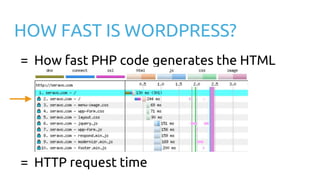
HOW FAST IS WORDPRESS?
= How fast PHP code generates the HTML
= HTTP request time
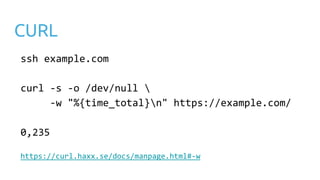
CURL
ssh example.com
curl -s -o /dev/null 
-w "%{time_total}n" https://example.com/
0,235
https://curl.haxx.se/docs/manpage.html#-w
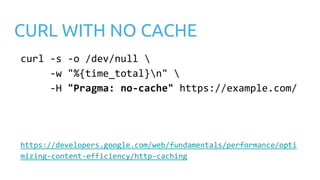
CURL WITH NO CACHE
curl -s -o /dev/null 
-w "%{time_total}n" 
-H "Pragma: no-cache" https://example.com/
https://developers.google.com/web/fundamentals/performance/opti
mizing-content-efficiency/http-caching
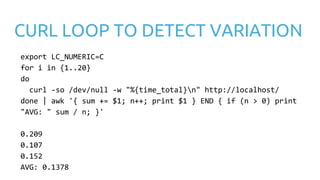
CURL LOOP TO DETECT VARIATION
export LC_NUMERIC=C
for i in {1..20}
do
curl -so /dev/null -w "%{time_total}n" http://localhost/
done | awk '{ sum += $1; n++; print $1 } END { if (n > 0) print
"AVG: " sum / n; }'
0.209
0.107
0.152
AVG: 0.1378
LOG HTTP REQUEST TIME
[29/May/2017:10:02:45 +0300] "POST /wp-admin/admin-ajax.php
HTTP/1.1" 200 58 "Mozilla/5.0 (KHTML, like Gecko)
Chrome/58.0.3029.110 Safari/537.36" - - 0.028
nginx.conf
log_format extensive '$host '
'$remote_addr - $remote_user [$time_local] '
'"$request" $status $body_bytes_sent '
'"$http_referer" "$http_user_agent" '
'$upstream_cache_status - '
'$request_time';
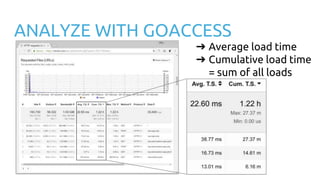
ANALYZE WITH GOACCESS
➔ Average load time
➔ Cumulative load time
= sum of all loads
STEP 2: Optimize
Find and solve the bottleneck
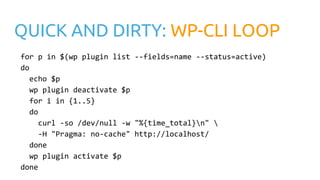
QUICK AND DIRTY: WP-CLI LOOP
for p in $(wp plugin list --fields=name --status=active)
do
echo $p
wp plugin deactivate $p
for i in {1..5}
do
curl -so /dev/null -w "%{time_total}n" 
-H "Pragma: no-cache" http://localhost/
done
wp plugin activate $p
done
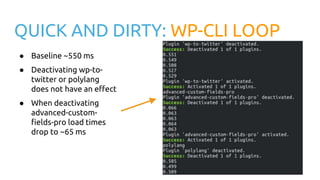
QUICK AND DIRTY: WP-CLI LOOP
● Baseline ~550 ms
● Deactivating wp-to-
twitter or polylang
does not have an effect
● When deactivating
advanced-custom-
fields-pro load times
drop to ~65 ms
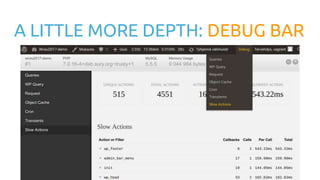
A LITTLE MORE DEPTH: DEBUG BAR
THE PROFESSIONAL WAY: XDEBUG
A tool for developers to
analyze PHP execution
find bottle necks
xdebug.org
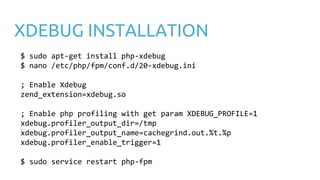
XDEBUG INSTALLATION
$ sudo apt-get install php-xdebug
$ nano /etc/php/fpm/conf.d/20-xdebug.ini
; Enable Xdebug
zend_extension=xdebug.so
; Enable php profiling with get param XDEBUG_PROFILE=1
xdebug.profiler_output_dir=/tmp
xdebug.profiler_output_name=cachegrind.out.%t.%p
xdebug.profiler_enable_trigger=1
$ sudo service restart php-fpm
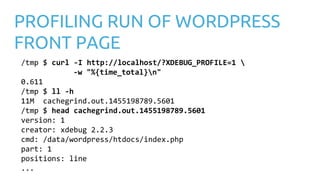
PROFILING RUN OF WORDPRESS
FRONT PAGE
/tmp $ curl -I http://localhost/?XDEBUG_PROFILE=1 
-w "%{time_total}n"
0.611
/tmp $ ll -h
11M cachegrind.out.1455198789.5601
/tmp $ head cachegrind.out.1455198789.5601
version: 1
creator: xdebug 2.2.3
cmd: /data/wordpress/htdocs/index.php
part: 1
positions: line
...
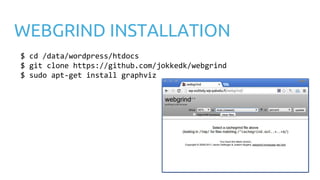
WEBGRIND INSTALLATION
$ cd /data/wordpress/htdocs
$ git clone https://github.com/jokkedk/webgrind
$ sudo apt-get install graphviz
PREINSTALLED IN VVV AND
SERAVO VAGRANT
laptop$ vagrant ssh
vagrant$ xdebug_on # Varying Vagrant Vagrants
vagrant$ wp-xdebug-on # Seravo Vagrant
Go profiling!
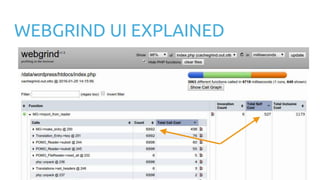
WEBGRIND UI EXPLAINED
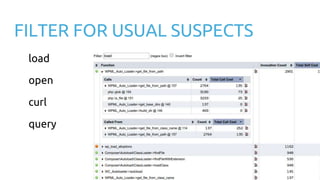
FILTER FOR USUAL SUSPECTS
load
open
curl
query
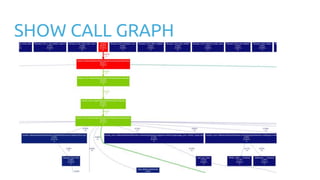
SHOW CALL GRAPH
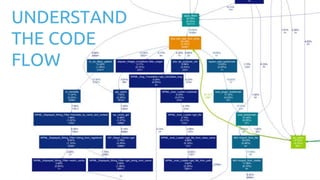
UNDERSTAND
THE CODE
FLOW
Typical issues and
solutions
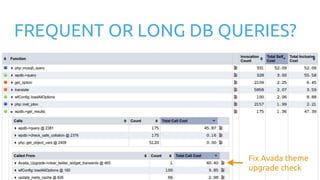
FREQUENT OR LONG DB QUERIES?
Fix Avada theme
upgrade check
WPML?
SWITCH
TO
POLYLANG
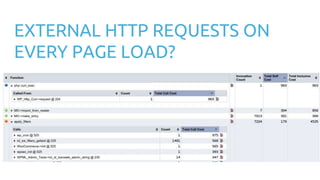
EXTERNAL HTTP REQUESTS ON
EVERY PAGE LOAD?
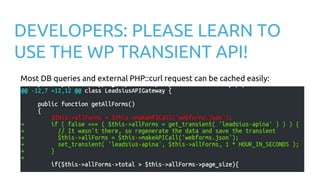
DEVELOPERS: PLEASE LEARN TO
USE THE WP TRANSIENT API!
Most DB queries and external PHP::curl request can be cached easily:
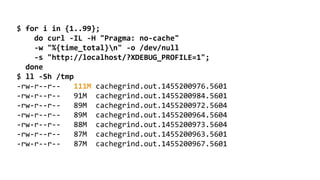
Hunt down that
rare beast
$ for i in {1..99};
do curl -IL -H "Pragma: no-cache"
-w "%{time_total}n" -o /dev/null
-s "http://localhost/?XDEBUG_PROFILE=1";
done
$ ll -Sh /tmp
-rw-r--r-- 111M cachegrind.out.1455200976.5601
-rw-r--r-- 91M cachegrind.out.1455200984.5601
-rw-r--r-- 89M cachegrind.out.1455200972.5604
-rw-r--r-- 89M cachegrind.out.1455200964.5604
-rw-r--r-- 88M cachegrind.out.1455200973.5604
-rw-r--r-- 87M cachegrind.out.1455200963.5601
-rw-r--r-- 87M cachegrind.out.1455200967.5601
STEP 3: Validate
STEP 4: Rinse & repeat
DEMO: How fast can we make
Twentyseventeen?
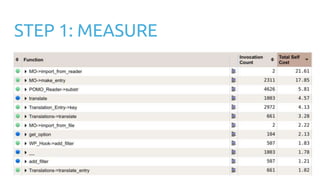
STEP 1: MEASURE
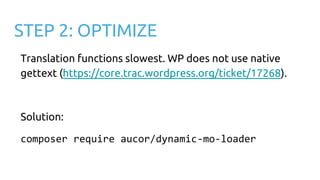
STEP 2: OPTIMIZE
Translation functions slowest. WP does not use native
gettext (https://core.trac.wordpress.org/ticket/17268).
Solution:
composer require aucor/dynamic-mo-loader
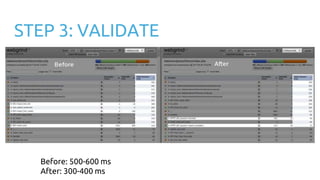
STEP 3: VALIDATE
Before: 500-600 ms
After: 300-400 ms
SEE IT YOURSELF!
wceu2017-demo.seravo.com
wceu2017-demo.seravo.com/webgrind
github.com/ottok/wceu2017-demo
REMEMBER
Nginx access logs easy
Xdebug never in production
xhprof/uprofiler can be production
PCEL APD (2004)
THANK YOU!
SERAVO.COM
facebook.com/Seravocom
Twitter: @Seravo @ottokekalainen

Improving WordPress Performance: Xdebug and PHP profiling

  • 1.
    IMPROVING WORDPRESS PERFORMANCE Xdebug and PHPprofiling WordCamp Europe 2017 Otto Kekäläinen Seravo.com @ottokekalainen
  • 2.
    ● Linux andopen source advocate ● Contributed to WordPress Core, translations, Linux, Docker, Nginx, Redis, MariaDB… ● CEO, sysadmin and developer at Seravo.com – WordPress hosting and upkeep Otto Kekäläinen
  • 3.
    Enterprise grade hosting andupkeep for WordPress
  • 4.
    WORDPRESS SUCCESS FACTORS 1.Easy to use 2. Easy to extend
  • 5.
  • 6.
    A WEB FULLOF WRONG ADVICE Most of the guides and tutorials on security and speed lack evidence.
  • 7.
    I’ve done mythbustingat many WordCamps with WordPress Security 101 seravo.com/wordpress-security-101/
  • 8.
    Now it istime to make sense out of WordPress Speed Performance
  • 9.
    STEP 1: Measure STEP2: Optimize STEP 3: Validate STEP 4: Rinse and repeat
  • 10.
    STEP 1: Measure Findout your baseline to make sure your optimizations later at least do not worsen the performance!
  • 11.
    FULL PAGE LOAD Onlinetools WebPageTest.org GTMetrix.com Pingdom Tools Yellow Lab Tools Pagelocity KeyCDN Performance Test Visualize: HTML load time CSS rendering JavaScript loading image files download …
  • 12.
    HOW FAST ISWORDPRESS? = How fast PHP code generates the HTML = HTTP request time
  • 13.
    CURL ssh example.com curl -s-o /dev/null -w "%{time_total}n" https://example.com/ 0,235 https://curl.haxx.se/docs/manpage.html#-w
  • 14.
    CURL WITH NOCACHE curl -s -o /dev/null -w "%{time_total}n" -H "Pragma: no-cache" https://example.com/ https://developers.google.com/web/fundamentals/performance/opti mizing-content-efficiency/http-caching
  • 15.
    CURL LOOP TODETECT VARIATION export LC_NUMERIC=C for i in {1..20} do curl -so /dev/null -w "%{time_total}n" http://localhost/ done | awk '{ sum += $1; n++; print $1 } END { if (n > 0) print "AVG: " sum / n; }' 0.209 0.107 0.152 AVG: 0.1378
  • 16.
    LOG HTTP REQUESTTIME [29/May/2017:10:02:45 +0300] "POST /wp-admin/admin-ajax.php HTTP/1.1" 200 58 "Mozilla/5.0 (KHTML, like Gecko) Chrome/58.0.3029.110 Safari/537.36" - - 0.028 nginx.conf log_format extensive '$host ' '$remote_addr - $remote_user [$time_local] ' '"$request" $status $body_bytes_sent ' '"$http_referer" "$http_user_agent" ' '$upstream_cache_status - ' '$request_time';
  • 17.
    ANALYZE WITH GOACCESS ➔Average load time ➔ Cumulative load time = sum of all loads
  • 18.
    STEP 2: Optimize Findand solve the bottleneck
  • 19.
    QUICK AND DIRTY:WP-CLI LOOP for p in $(wp plugin list --fields=name --status=active) do echo $p wp plugin deactivate $p for i in {1..5} do curl -so /dev/null -w "%{time_total}n" -H "Pragma: no-cache" http://localhost/ done wp plugin activate $p done
  • 20.
    QUICK AND DIRTY:WP-CLI LOOP ● Baseline ~550 ms ● Deactivating wp-to- twitter or polylang does not have an effect ● When deactivating advanced-custom- fields-pro load times drop to ~65 ms
  • 21.
    A LITTLE MOREDEPTH: DEBUG BAR
  • 22.
    THE PROFESSIONAL WAY:XDEBUG A tool for developers to analyze PHP execution find bottle necks xdebug.org
  • 23.
    XDEBUG INSTALLATION $ sudoapt-get install php-xdebug $ nano /etc/php/fpm/conf.d/20-xdebug.ini ; Enable Xdebug zend_extension=xdebug.so ; Enable php profiling with get param XDEBUG_PROFILE=1 xdebug.profiler_output_dir=/tmp xdebug.profiler_output_name=cachegrind.out.%t.%p xdebug.profiler_enable_trigger=1 $ sudo service restart php-fpm
  • 24.
    PROFILING RUN OFWORDPRESS FRONT PAGE /tmp $ curl -I http://localhost/?XDEBUG_PROFILE=1 -w "%{time_total}n" 0.611 /tmp $ ll -h 11M cachegrind.out.1455198789.5601 /tmp $ head cachegrind.out.1455198789.5601 version: 1 creator: xdebug 2.2.3 cmd: /data/wordpress/htdocs/index.php part: 1 positions: line ...
  • 25.
    WEBGRIND INSTALLATION $ cd/data/wordpress/htdocs $ git clone https://github.com/jokkedk/webgrind $ sudo apt-get install graphviz
  • 26.
    PREINSTALLED IN VVVAND SERAVO VAGRANT laptop$ vagrant ssh vagrant$ xdebug_on # Varying Vagrant Vagrants vagrant$ wp-xdebug-on # Seravo Vagrant
  • 27.
  • 28.
  • 29.
    FILTER FOR USUALSUSPECTS load open curl query
  • 30.
  • 31.
  • 32.
  • 33.
    FREQUENT OR LONGDB QUERIES? Fix Avada theme upgrade check
  • 34.
  • 35.
    EXTERNAL HTTP REQUESTSON EVERY PAGE LOAD?
  • 36.
    DEVELOPERS: PLEASE LEARNTO USE THE WP TRANSIENT API! Most DB queries and external PHP::curl request can be cached easily:
  • 37.
  • 38.
    $ for iin {1..99}; do curl -IL -H "Pragma: no-cache" -w "%{time_total}n" -o /dev/null -s "http://localhost/?XDEBUG_PROFILE=1"; done $ ll -Sh /tmp -rw-r--r-- 111M cachegrind.out.1455200976.5601 -rw-r--r-- 91M cachegrind.out.1455200984.5601 -rw-r--r-- 89M cachegrind.out.1455200972.5604 -rw-r--r-- 89M cachegrind.out.1455200964.5604 -rw-r--r-- 88M cachegrind.out.1455200973.5604 -rw-r--r-- 87M cachegrind.out.1455200963.5601 -rw-r--r-- 87M cachegrind.out.1455200967.5601
  • 39.
  • 40.
    STEP 4: Rinse& repeat
  • 41.
    DEMO: How fastcan we make Twentyseventeen?
  • 42.
  • 43.
    STEP 2: OPTIMIZE Translationfunctions slowest. WP does not use native gettext (https://core.trac.wordpress.org/ticket/17268). Solution: composer require aucor/dynamic-mo-loader
  • 44.
    STEP 3: VALIDATE Before:500-600 ms After: 300-400 ms
  • 45.
  • 46.
    REMEMBER Nginx access logseasy Xdebug never in production xhprof/uprofiler can be production PCEL APD (2004)
  • 47.

Editor's Notes

  • #2 Hello! My name is Otto Kekäläinen and I am one of the founders of Seravo.com a premium WordPress hosting and upkeep service in Finland. I’ll post the slides on my Twitter account after this talk, so please follow me on Twitter to get a link to the slides.
  • #4 At Seravo we maintain hundreds of enterprise grade WordPress sites. Updating those sites over and over again has given a lot of experience about WordPress updates, and today I want to share some of the things I’ve learnt.