Course notes:
Descriptive
statistics
Course notes:
Descriptive
statistics
HOW TO USE AN ONLINE
P-VALUE CALCULATOR
What is a p-value
calculator?
A p-value calculator is a software that
has an input your test statistic, (and
the degrees of freedom, if applicable)
that returns the p-value for the test.
There are various online solutions,
however, the one I would normally
use is by socstatistics @
http://www.socscistatistics.com
How to use the socstatistics online p-value calculator?
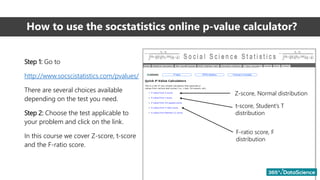
Step 1: Go to
http://www.socscistatistics.com/pvalues/
There are several choices available
depending on the test you need.
Step 2: Choose the test applicable to
your problem and click on the link.
In this course we cover Z-score, t-score
and the F-ratio score.
Z-score, Normal distribution
t-score, Student’s T
distribution
F-ratio score, F
distribution
P-value from Z-score
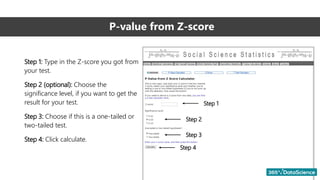
Step 1: Type in the Z-score you got from
your test.
Step 2 (optional): Choose the
significance level, if you want to get the
result for your test.
Step 3: Choose if this is a one-tailed or
two-tailed test.
Step 4: Click calculate.
Step 1
Step 2
Step 3
Step 4
P-value from Z-score
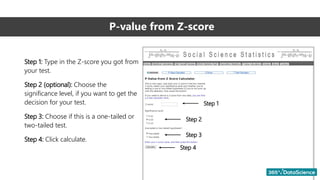
Step 1: Type in the Z-score you got from
your test.
Step 2 (optional): Choose the
significance level, if you want to get the
decision for your test.
Step 3: Choose if this is a one-tailed or
two-tailed test.
Step 4: Click calculate.
Step 1
Step 2
Step 3
Step 4
P-value from Z-score. Example result (Part 1)
After clicking ‘Calculate’, you would
instantly get two results.
Result 1: The p-value of the test.
Result 2: The decision, based on the
information you entered above.
Note: When using this online p-value
calculator, a red color of the text means
that the result is not significant, given
the significance level you have chosen.
Step 1
Step 2
Step 3
Step 4 Result 1
Result 2
P-value from Z-score. Example result (Part 2)
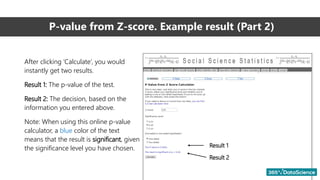
After clicking ‘Calculate’, you would
instantly get two results.
Result 1: The p-value of the test.
Result 2: The decision, based on the
information you entered above.
Note: When using this online p-value
calculator, a blue color of the text
means that the result is significant, given
the significance level you have chosen. Result 1
Result 2
P-value from t-score
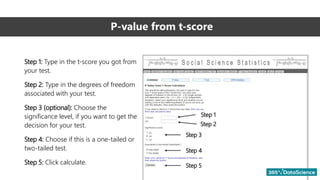
Step 1: Type in the t-score you got from
your test.
Step 2: Type in the degrees of freedom
associated with your test.
Step 3 (optional): Choose the
significance level, if you want to get the
decision for your test.
Step 4: Choose if this is a one-tailed or
two-tailed test.
Step 5: Click calculate.
Step 1
Step 2
Step 3
Step 4
Step 5
P-value from t-score. Example result (Part 1)
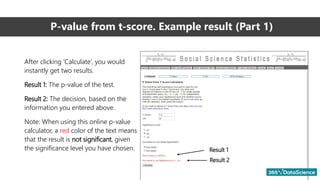
After clicking ‘Calculate’, you would
instantly get two results.
Result 1: The p-value of the test.
Result 2: The decision, based on the
information you entered above.
Note: When using this online p-value
calculator, a red color of the text means
that the result is not significant, given
the significance level you have chosen. Result 1
Result 2
P-value from t-score. Example result (Part 2)
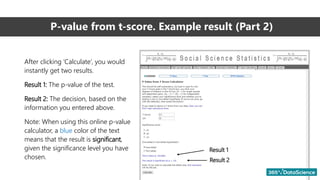
Result 1
Result 2
After clicking ‘Calculate’, you would
instantly get two results.
Result 1: The p-value of the test.
Result 2: The decision, based on the
information you entered above.
Note: When using this online p-value
calculator, a blue color of the text
means that the result is significant,
given the significance level you have
chosen.

p-value.pdf

  • 1.
  • 2.
    What is ap-value calculator? A p-value calculator is a software that has an input your test statistic, (and the degrees of freedom, if applicable) that returns the p-value for the test. There are various online solutions, however, the one I would normally use is by socstatistics @ http://www.socscistatistics.com
  • 3.
    How to usethe socstatistics online p-value calculator? Step 1: Go to http://www.socscistatistics.com/pvalues/ There are several choices available depending on the test you need. Step 2: Choose the test applicable to your problem and click on the link. In this course we cover Z-score, t-score and the F-ratio score. Z-score, Normal distribution t-score, Student’s T distribution F-ratio score, F distribution
  • 4.
    P-value from Z-score Step1: Type in the Z-score you got from your test. Step 2 (optional): Choose the significance level, if you want to get the result for your test. Step 3: Choose if this is a one-tailed or two-tailed test. Step 4: Click calculate. Step 1 Step 2 Step 3 Step 4
  • 5.
    P-value from Z-score Step1: Type in the Z-score you got from your test. Step 2 (optional): Choose the significance level, if you want to get the decision for your test. Step 3: Choose if this is a one-tailed or two-tailed test. Step 4: Click calculate. Step 1 Step 2 Step 3 Step 4
  • 6.
    P-value from Z-score.Example result (Part 1) After clicking ‘Calculate’, you would instantly get two results. Result 1: The p-value of the test. Result 2: The decision, based on the information you entered above. Note: When using this online p-value calculator, a red color of the text means that the result is not significant, given the significance level you have chosen. Step 1 Step 2 Step 3 Step 4 Result 1 Result 2
  • 7.
    P-value from Z-score.Example result (Part 2) After clicking ‘Calculate’, you would instantly get two results. Result 1: The p-value of the test. Result 2: The decision, based on the information you entered above. Note: When using this online p-value calculator, a blue color of the text means that the result is significant, given the significance level you have chosen. Result 1 Result 2
  • 8.
    P-value from t-score Step1: Type in the t-score you got from your test. Step 2: Type in the degrees of freedom associated with your test. Step 3 (optional): Choose the significance level, if you want to get the decision for your test. Step 4: Choose if this is a one-tailed or two-tailed test. Step 5: Click calculate. Step 1 Step 2 Step 3 Step 4 Step 5
  • 9.
    P-value from t-score.Example result (Part 1) After clicking ‘Calculate’, you would instantly get two results. Result 1: The p-value of the test. Result 2: The decision, based on the information you entered above. Note: When using this online p-value calculator, a red color of the text means that the result is not significant, given the significance level you have chosen. Result 1 Result 2
  • 10.
    P-value from t-score.Example result (Part 2) Result 1 Result 2 After clicking ‘Calculate’, you would instantly get two results. Result 1: The p-value of the test. Result 2: The decision, based on the information you entered above. Note: When using this online p-value calculator, a blue color of the text means that the result is significant, given the significance level you have chosen.