Print
Score Report
Thank you for taking this test.
For interpretation of your test score, please contact your Test Administrator.
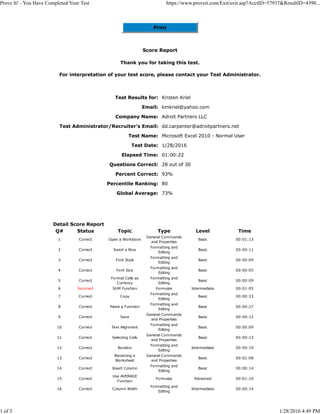
Test Results for: Kristen Kriel
Email: kmkriel@yahoo.com
Company Name: Adroit Partners LLC
Test Administrator/Recruiter's Email: dd.carpenter@adroitpartners.net
Test Name: Microsoft Excel 2010 - Normal User
Test Date: 1/28/2016
Elapsed Time: 01:00:22
Questions Correct: 28 out of 30
Percent Correct: 93%
Percentile Ranking: 80
Global Average: 73%
Detail Score Report
Q# Status Topic Type Level Time
1 Correct Open a Workbook
General Commands
and Properties
Basic 00:01:13
2 Correct Insert a Row
Formatting and
Editing
Basic 00:00:11
3 Correct Font Style
Formatting and
Editing
Basic 00:00:09
4 Correct Font Size
Formatting and
Editing
Basic 00:00:05
5 Correct
Format Cells as
Currency
Formatting and
Editing
Basic 00:00:09
6 Incorrect SUM Function Formulas Intermediate 00:01:05
7 Correct Copy
Formatting and
Editing
Basic 00:00:33
8 Correct Paste a Function
Formatting and
Editing
Basic 00:00:27
9 Correct Save
General Commands
and Properties
Basic 00:00:12
10 Correct Text Alignment
Formatting and
Editing
Basic 00:00:09
11 Correct Selecting Cells
General Commands
and Properties
Basic 00:00:13
12 Correct Borders
Formatting and
Editing
Intermediate 00:00:19
13 Correct
Renaming a
Worksheet
General Commands
and Properties
Basic 00:02:08
14 Correct Insert Column
Formatting and
Editing
Basic 00:00:14
15 Correct
Use AVERAGE
Function
Formulas Advanced 00:01:10
16 Correct Column Width
Formatting and
Editing
Intermediate 00:00:14
Prove It! - You Have Completed Your Test https://www.proveit.com/Exit/exit.asp?AcctID=57937&ResultID=4390...
1 of 3 1/28/2016 4:49 PM
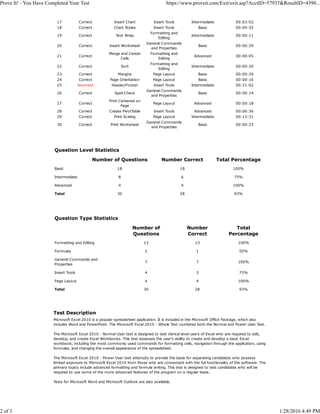
17 Correct Insert Chart Insert Tools Intermediate 00:03:02
18 Correct Chart Styles Insert Tools Basic 00:04:35
19 Correct Text Wrap
Formatting and
Editing
Intermediate 00:00:11
20 Correct Insert Worksheet
General Commands
and Properties
Basic 00:00:29
21 Correct
Merge and Center
Cells
Formatting and
Editing
Advanced 00:00:05
22 Correct Sort
Formatting and
Editing
Intermediate 00:00:30
23 Correct Margins Page Layout Basic 00:00:39
24 Correct Page Orientation Page Layout Basic 00:00:16
25 Incorrect Header/Footer Insert Tools Intermediate 00:21:02
26 Correct Spell Check
General Commands
and Properties
Basic 00:00:14
27 Correct
Print Centered on
Page
Page Layout Advanced 00:00:18
28 Correct Create PivotTable Insert Tools Advanced 00:06:36
29 Correct Print Scaling Page Layout Intermediate 00:13:31
30 Correct Print Worksheet
General Commands
and Properties
Basic 00:00:23
Question Level Statistics
Number of Questions Number Correct Total Percentage
Basic 18 18 100%
Intermediate 8 6 75%
Advanced 4 4 100%
Total 30 28 93%
Question Type Statistics
Number of
Questions
Number
Correct
Total
Percentage
Formatting and Editing 13 13 100%
Formulas 2 1 50%
General Commands and
Properties
7 7 100%
Insert Tools 4 3 75%
Page Layout 4 4 100%
Total 30 28 93%
Test Description
Microsoft Excel 2010 is a popular spreadsheet application. It is included in the Microsoft Office Package, which also
includes Word and PowerPoint. The Microsoft Excel 2010 - Whole Test combines both the Normal and Power User Test.
The Microsoft Excel 2010 - Normal User test is designed to test clerical level users of Excel who are required to edit,
develop, and create Excel Workbooks. This test assesses the user's ability to create and develop a basic Excel
workbook, including the most commonly used commands for formatting cells, navigation through the application, using
formulas, and changing the overall appearance of the spreadsheet.
The Microsoft Excel 2010 - Power User test attempts to provide the basis for separating candidates who possess
limited exposure to Microsoft Excel 2010 from those who are conversant with the full functionality of the software. The
primary topics include advanced formatting and formula writing. This test is designed to test candidates who will be
required to use some of the more advanced features of the program on a regular basis.
Tests for Microsoft Word and Microsoft Outlook are also available.
Prove It! - You Have Completed Your Test https://www.proveit.com/Exit/exit.asp?AcctID=57937&ResultID=4390...
2 of 3 1/28/2016 4:49 PM

Prove It! - MS Excel

  • 1.
    Print Score Report Thank youfor taking this test. For interpretation of your test score, please contact your Test Administrator. Test Results for: Kristen Kriel Email: kmkriel@yahoo.com Company Name: Adroit Partners LLC Test Administrator/Recruiter's Email: dd.carpenter@adroitpartners.net Test Name: Microsoft Excel 2010 - Normal User Test Date: 1/28/2016 Elapsed Time: 01:00:22 Questions Correct: 28 out of 30 Percent Correct: 93% Percentile Ranking: 80 Global Average: 73% Detail Score Report Q# Status Topic Type Level Time 1 Correct Open a Workbook General Commands and Properties Basic 00:01:13 2 Correct Insert a Row Formatting and Editing Basic 00:00:11 3 Correct Font Style Formatting and Editing Basic 00:00:09 4 Correct Font Size Formatting and Editing Basic 00:00:05 5 Correct Format Cells as Currency Formatting and Editing Basic 00:00:09 6 Incorrect SUM Function Formulas Intermediate 00:01:05 7 Correct Copy Formatting and Editing Basic 00:00:33 8 Correct Paste a Function Formatting and Editing Basic 00:00:27 9 Correct Save General Commands and Properties Basic 00:00:12 10 Correct Text Alignment Formatting and Editing Basic 00:00:09 11 Correct Selecting Cells General Commands and Properties Basic 00:00:13 12 Correct Borders Formatting and Editing Intermediate 00:00:19 13 Correct Renaming a Worksheet General Commands and Properties Basic 00:02:08 14 Correct Insert Column Formatting and Editing Basic 00:00:14 15 Correct Use AVERAGE Function Formulas Advanced 00:01:10 16 Correct Column Width Formatting and Editing Intermediate 00:00:14 Prove It! - You Have Completed Your Test https://www.proveit.com/Exit/exit.asp?AcctID=57937&ResultID=4390... 1 of 3 1/28/2016 4:49 PM
  • 2.
    17 Correct InsertChart Insert Tools Intermediate 00:03:02 18 Correct Chart Styles Insert Tools Basic 00:04:35 19 Correct Text Wrap Formatting and Editing Intermediate 00:00:11 20 Correct Insert Worksheet General Commands and Properties Basic 00:00:29 21 Correct Merge and Center Cells Formatting and Editing Advanced 00:00:05 22 Correct Sort Formatting and Editing Intermediate 00:00:30 23 Correct Margins Page Layout Basic 00:00:39 24 Correct Page Orientation Page Layout Basic 00:00:16 25 Incorrect Header/Footer Insert Tools Intermediate 00:21:02 26 Correct Spell Check General Commands and Properties Basic 00:00:14 27 Correct Print Centered on Page Page Layout Advanced 00:00:18 28 Correct Create PivotTable Insert Tools Advanced 00:06:36 29 Correct Print Scaling Page Layout Intermediate 00:13:31 30 Correct Print Worksheet General Commands and Properties Basic 00:00:23 Question Level Statistics Number of Questions Number Correct Total Percentage Basic 18 18 100% Intermediate 8 6 75% Advanced 4 4 100% Total 30 28 93% Question Type Statistics Number of Questions Number Correct Total Percentage Formatting and Editing 13 13 100% Formulas 2 1 50% General Commands and Properties 7 7 100% Insert Tools 4 3 75% Page Layout 4 4 100% Total 30 28 93% Test Description Microsoft Excel 2010 is a popular spreadsheet application. It is included in the Microsoft Office Package, which also includes Word and PowerPoint. The Microsoft Excel 2010 - Whole Test combines both the Normal and Power User Test. The Microsoft Excel 2010 - Normal User test is designed to test clerical level users of Excel who are required to edit, develop, and create Excel Workbooks. This test assesses the user's ability to create and develop a basic Excel workbook, including the most commonly used commands for formatting cells, navigation through the application, using formulas, and changing the overall appearance of the spreadsheet. The Microsoft Excel 2010 - Power User test attempts to provide the basis for separating candidates who possess limited exposure to Microsoft Excel 2010 from those who are conversant with the full functionality of the software. The primary topics include advanced formatting and formula writing. This test is designed to test candidates who will be required to use some of the more advanced features of the program on a regular basis. Tests for Microsoft Word and Microsoft Outlook are also available. Prove It! - You Have Completed Your Test https://www.proveit.com/Exit/exit.asp?AcctID=57937&ResultID=4390... 2 of 3 1/28/2016 4:49 PM