Print
Score Report
Thank you for taking this test.
For interpretation of your test score, please contact your Test Administrator.
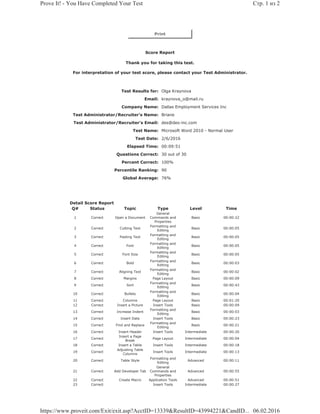
Test Results for: Olga Kraynova
Email: kraynova_o@mail.ru
Company Name: Dallas Employment Services Inc
Test Administrator/Recruiter's Name: Briane
Test Administrator/Recruiter's Email: des@des-inc.com
Test Name: Microsoft Word 2010 - Normal User
Test Date: 2/6/2016
Elapsed Time: 00:09:51
Questions Correct: 30 out of 30
Percent Correct: 100%
Percentile Ranking: 90
Global Average: 76%
Detail Score Report
Q# Status Topic Type Level Time
1 Correct Open a Document
General
Commands and
Properties
Basic 00:00:22
2 Correct Cutting Text
Formatting and
Editing
Basic 00:00:05
3 Correct Pasting Text
Formatting and
Editing
Basic 00:00:05
4 Correct Font
Formatting and
Editing
Basic 00:00:05
5 Correct Font Size
Formatting and
Editing
Basic 00:00:05
6 Correct Bold
Formatting and
Editing
Basic 00:00:03
7 Correct Aligning Text
Formatting and
Editing
Basic 00:00:02
8 Correct Margins Page Layout Basic 00:00:09
9 Correct Sort
Formatting and
Editing
Basic 00:00:43
10 Correct Bullets
Formatting and
Editing
Basic 00:00:04
11 Correct Columns Page Layout Basic 00:01:20
12 Correct Insert a Picture Insert Tools Basic 00:00:09
13 Correct Increase Indent
Formatting and
Editing
Basic 00:00:03
14 Correct Insert Date Insert Tools Basic 00:00:23
15 Correct Find and Replace
Formatting and
Editing
Basic 00:00:21
16 Correct Insert Header Insert Tools Intermediate 00:00:20
17 Correct
Insert a Page
Break
Page Layout Intermediate 00:00:04
18 Correct Insert a Table Insert Tools Intermediate 00:00:18
19 Correct
Adjusting Table
Columns
Insert Tools Intermediate 00:00:13
20 Correct Table Style
Formatting and
Editing
Advanced 00:00:11
21 Correct Add Developer Tab
General
Commands and
Properties
Advanced 00:00:55
22 Correct Create Macro Application Tools Advanced 00:00:51
23 Correct Insert Tools Intermediate 00:00:27
Стр. 1 из 2Prove It! - You Have Completed Your Test
06.02.2016https://www.proveit.com/Exit/exit.asp?AcctID=13339&ResultID=43994221&CandID...
Insert Page
Numbers
24 Correct Undo
General
Commands and
Properties
Basic 00:00:02
25 Correct Spell Check Review Options Basic 00:00:11
26 Correct Print
General
Commands and
Properties
Basic 00:00:08
27 Correct Tracking Changes Review Options Basic 00:00:28
28 Correct Insert a Comment Review Options Advanced 00:00:37
29 Correct Reviewing Pane Review Options Basic 00:00:31
30 Correct Mail Merge Application Tools Advanced 00:00:36
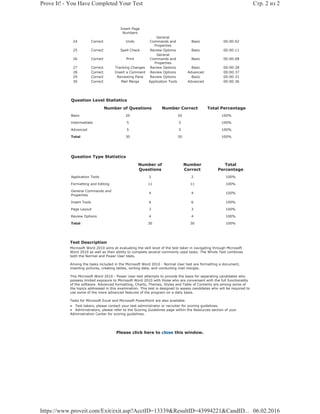
Question Level Statistics
Number of Questions Number Correct Total Percentage
Basic 20 20 100%
Intermediate 5 5 100%
Advanced 5 5 100%
Total 30 30 100%
Question Type Statistics
Number of
Questions
Number
Correct
Total
Percentage
Application Tools 2 2 100%
Formatting and Editing 11 11 100%
General Commands and
Properties
4 4 100%
Insert Tools 6 6 100%
Page Layout 3 3 100%
Review Options 4 4 100%
Total 30 30 100%
Test Description
Microsoft Word 2010 aims at evaluating the skill level of the test taker in navigating through Microsoft
Word 2010 as well as their ability to complete several commonly used tasks. The Whole Test combines
both the Normal and Power User tests.
Among the tasks included in the Microsoft Word 2010 - Normal User test are formatting a document,
inserting pictures, creating tables, sorting data, and conducting mail merges.
This Microsoft Word 2010 - Power User test attempts to provide the basis for separating candidates who
possess limited exposure to Microsoft Word 2010 with those who are conversant with the full functionality
of the software. Advanced formatting, Charts, Themes, Styles and Table of Contents are among some of
the topics addressed in this examination. This test is designed to assess candidates who will be required to
use some of the more advanced features of the program on a daily basis.
Tests for Microsoft Excel and Microsoft PowerPoint are also available.
• Test takers, please contact your test administrator or recruiter for scoring guidelines.
• Administrators, please refer to the Scoring Guidelines page within the Resources section of your
Administration Center for scoring guidelines.
Please click here to close this window.
Стр. 2 из 2Prove It! - You Have Completed Your Test
06.02.2016https://www.proveit.com/Exit/exit.asp?AcctID=13339&ResultID=43994221&CandID...

Proveit - Word

  • 1.
    Print Score Report Thank youfor taking this test. For interpretation of your test score, please contact your Test Administrator. Test Results for: Olga Kraynova Email: kraynova_o@mail.ru Company Name: Dallas Employment Services Inc Test Administrator/Recruiter's Name: Briane Test Administrator/Recruiter's Email: des@des-inc.com Test Name: Microsoft Word 2010 - Normal User Test Date: 2/6/2016 Elapsed Time: 00:09:51 Questions Correct: 30 out of 30 Percent Correct: 100% Percentile Ranking: 90 Global Average: 76% Detail Score Report Q# Status Topic Type Level Time 1 Correct Open a Document General Commands and Properties Basic 00:00:22 2 Correct Cutting Text Formatting and Editing Basic 00:00:05 3 Correct Pasting Text Formatting and Editing Basic 00:00:05 4 Correct Font Formatting and Editing Basic 00:00:05 5 Correct Font Size Formatting and Editing Basic 00:00:05 6 Correct Bold Formatting and Editing Basic 00:00:03 7 Correct Aligning Text Formatting and Editing Basic 00:00:02 8 Correct Margins Page Layout Basic 00:00:09 9 Correct Sort Formatting and Editing Basic 00:00:43 10 Correct Bullets Formatting and Editing Basic 00:00:04 11 Correct Columns Page Layout Basic 00:01:20 12 Correct Insert a Picture Insert Tools Basic 00:00:09 13 Correct Increase Indent Formatting and Editing Basic 00:00:03 14 Correct Insert Date Insert Tools Basic 00:00:23 15 Correct Find and Replace Formatting and Editing Basic 00:00:21 16 Correct Insert Header Insert Tools Intermediate 00:00:20 17 Correct Insert a Page Break Page Layout Intermediate 00:00:04 18 Correct Insert a Table Insert Tools Intermediate 00:00:18 19 Correct Adjusting Table Columns Insert Tools Intermediate 00:00:13 20 Correct Table Style Formatting and Editing Advanced 00:00:11 21 Correct Add Developer Tab General Commands and Properties Advanced 00:00:55 22 Correct Create Macro Application Tools Advanced 00:00:51 23 Correct Insert Tools Intermediate 00:00:27 Стр. 1 из 2Prove It! - You Have Completed Your Test 06.02.2016https://www.proveit.com/Exit/exit.asp?AcctID=13339&ResultID=43994221&CandID...
  • 2.
    Insert Page Numbers 24 CorrectUndo General Commands and Properties Basic 00:00:02 25 Correct Spell Check Review Options Basic 00:00:11 26 Correct Print General Commands and Properties Basic 00:00:08 27 Correct Tracking Changes Review Options Basic 00:00:28 28 Correct Insert a Comment Review Options Advanced 00:00:37 29 Correct Reviewing Pane Review Options Basic 00:00:31 30 Correct Mail Merge Application Tools Advanced 00:00:36 Question Level Statistics Number of Questions Number Correct Total Percentage Basic 20 20 100% Intermediate 5 5 100% Advanced 5 5 100% Total 30 30 100% Question Type Statistics Number of Questions Number Correct Total Percentage Application Tools 2 2 100% Formatting and Editing 11 11 100% General Commands and Properties 4 4 100% Insert Tools 6 6 100% Page Layout 3 3 100% Review Options 4 4 100% Total 30 30 100% Test Description Microsoft Word 2010 aims at evaluating the skill level of the test taker in navigating through Microsoft Word 2010 as well as their ability to complete several commonly used tasks. The Whole Test combines both the Normal and Power User tests. Among the tasks included in the Microsoft Word 2010 - Normal User test are formatting a document, inserting pictures, creating tables, sorting data, and conducting mail merges. This Microsoft Word 2010 - Power User test attempts to provide the basis for separating candidates who possess limited exposure to Microsoft Word 2010 with those who are conversant with the full functionality of the software. Advanced formatting, Charts, Themes, Styles and Table of Contents are among some of the topics addressed in this examination. This test is designed to assess candidates who will be required to use some of the more advanced features of the program on a daily basis. Tests for Microsoft Excel and Microsoft PowerPoint are also available. • Test takers, please contact your test administrator or recruiter for scoring guidelines. • Administrators, please refer to the Scoring Guidelines page within the Resources section of your Administration Center for scoring guidelines. Please click here to close this window. Стр. 2 из 2Prove It! - You Have Completed Your Test 06.02.2016https://www.proveit.com/Exit/exit.asp?AcctID=13339&ResultID=43994221&CandID...