
Prototype Development in Mobile-Learning Design ResearchAlan Foleyafoley@syr.eduHengLuoheluo@syr.edu
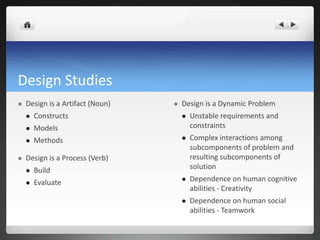
Design StudiesDesign is a Artifact (Noun)ConstructsModelsMethodsDesign is a Process (Verb)BuildEvaluateDesign is a Dynamic ProblemUnstable requirements and constraintsComplex interactions among subcomponents of problem and resulting subcomponents of solutionDependence on human cognitive abilities - CreativityDependence on human social abilities - Teamwork
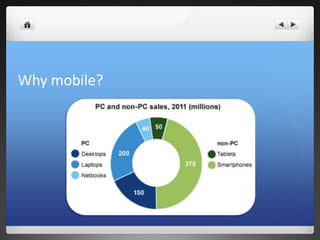
Why mobile?
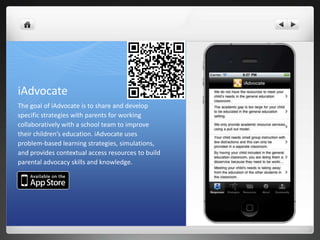
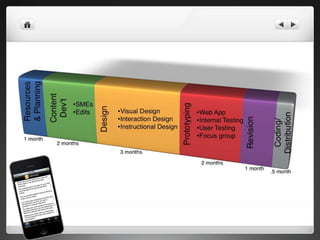
iAdvocateThe goal of iAdvocate is to share and develop specific strategies with parents for working collaboratively with a school team to improve their children’s education. iAdvocate uses problem-based learning strategies, simulations, and provides contextual access resources to build parental advocacy skills and knowledge.
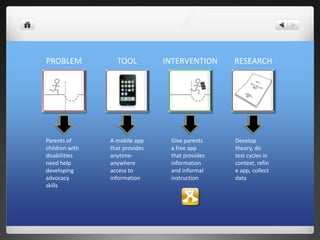
PROBLEMTOOLINTERVENTIONRESEARCHParents of children with disabilities need help developing advocacy skillsA mobile app that provides anytime-anywhere access to informationGive parents a free app that provides information and informal instructionDevelop theory, do test cycles in context, refine app, collect data
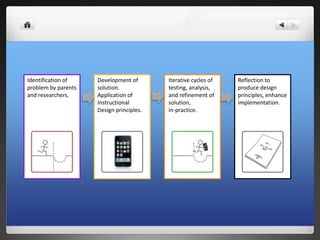
Identification of problem by parents and researchers.Development of solution. Application of Instructional Design principles.Iterative cycles of testing, analysis, and refinement of solution,in-practice.Reflection to produce design principles, enhance implementation.
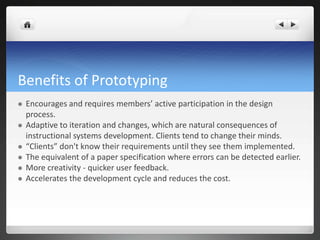
Benefits of PrototypingEncourages and requires members’ active participation in the design process.Adaptive to iteration and changes, which are natural consequences of instructional systems development. Clients tend to change their minds.“Clients” don't know their requirements until they see them implemented.The equivalent of a paper specification where errors can be detected earlier.More creativity - quicker user feedback. Accelerates the development cycle and reduces the cost.
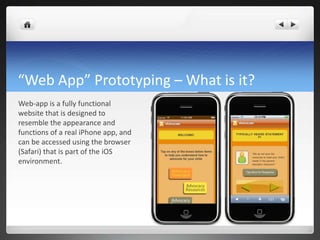
“Web App” Prototyping – What is it? Web-app is a fully functional website that is designed to resemble the appearance and functions of a real iPhone app, and can be accessed using the browser (Safari) that is part of the iOS environment.
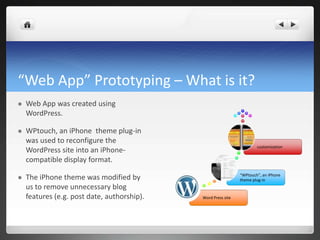
“Web App” Prototyping – What is it? Web App was created using WordPress.WPtouch, an iPhone  theme plug-in was used to reconfigure the WordPress site into an iPhone-compatible display format.The iPhone theme was modified by us to remove unnecessary blog features (e.g. post date, authorship).
“Web App” Prototyping – Why use it? The ability to create a prototype quickly proved to be essential in our case, allowing us to move forward to collect first round of evaluative data from the target users, rather than being stuck early in the development phase.
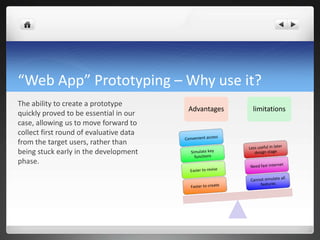
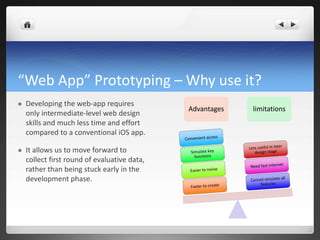
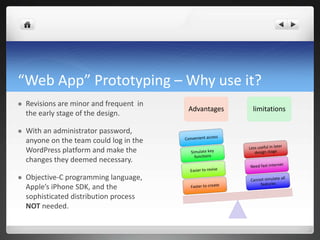
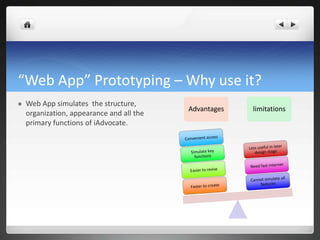
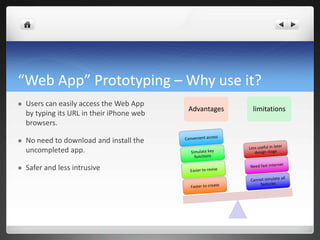
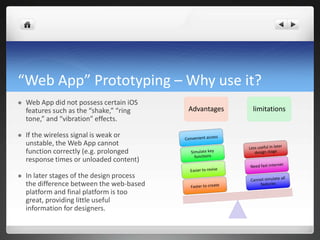
“Web App” Prototyping – Why use it? Developing the web-app requires only intermediate-level web design skills and much less time and effort compared to a conventional iOS app. It allows us to move forward to collect first round of evaluative data, rather than being stuck early in the development phase. AdvantageslimitationsConvenient accessLess useful in later design stageSimulate key functionsNeed fast internetEasier to reviseCannot simulate all featuresFaster to create
“Web App” Prototyping – Why use it? Revisions are minor and frequent  in the early stage of the design. With an administrator password, anyone on the team could log in the WordPress platform and make the changes they deemed necessary.Objective-C programming language, Apple’s iPhone SDK, and the sophisticated distribution process NOT needed.AdvantageslimitationsConvenient accessLess useful in later design stageSimulate key functionsNeed fast internetEasier to reviseCannot simulate all featuresFaster to create
“Web App” Prototyping – Why use it? Web App simulates  the structure, organization, appearance and all the primary functions of iAdvocate. AdvantageslimitationsConvenient accessLess useful in later design stageSimulate key functionsNeed fast internetEasier to reviseCannot simulate all featuresFaster to create
“Web App” Prototyping – Why use it? Users can easily access the Web App by typing its URL in their iPhone web browsers. No need to download and install the uncompleted app. Safer and less intrusiveAdvantageslimitationsConvenient accessLess useful in later design stageSimulate key functionsNeed fast internetEasier to reviseCannot simulate all featuresFaster to create
“Web App” Prototyping – Why use it? Web App did not possess certain iOS features such as the “shake,” “ring tone,” and “vibration” effects. If the wireless signal is weak or unstable, the Web App cannot function correctly (e.g. prolonged response times or unloaded content)In later stages of the design process the difference between the web-based platform and final platform is too great, providing little useful information for designers. AdvantageslimitationsConvenient accessLess useful in later design stageSimulate key functionsNeed fast internetEasier to reviseCannot simulate all featuresFaster to create
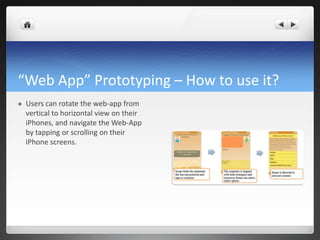
“Web App” Prototyping – How to use it? Users can rotate the web-app from vertical to horizontal view on their iPhones, and navigate the Web-App by tapping or scrolling on their iPhone screens.
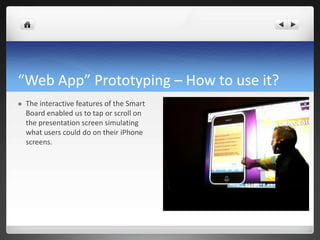
“Web App” Prototyping – How to use it? The interactive features of the Smart Board enabled us to tap or scroll on the presentation screen simulating what users could do on their iPhone screens.
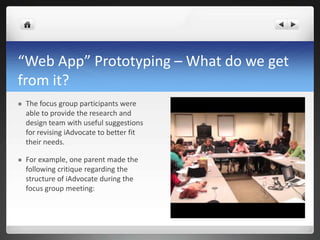
“Web App” Prototyping – What do we get from it? The focus group participants were able to provide the research and design team with useful suggestions for revising iAdvocate to better fit their needs. For example, one parent made the following critique regarding the structure of iAdvocate during the focus group meeting:
“Web App” Prototyping – What do we get from it? “I have a suggestion regarding this 'typically heard statement' part. Unless I am using this wrong, you have to scroll down, I don't know how many statements there are... but it may be helpful if there is one screen that has the menu of all the statements. Because if statement Number Six is what they [the school administers] are saying, I have to scroll to up till Number Five, then the moment is lost...”
Prototype Development in Mobile-Learning Design Research

Prototype Development in Mobile-Learning Design Research

  • 1.
    Prototype Development inMobile-Learning Design ResearchAlan Foleyafoley@syr.eduHengLuoheluo@syr.edu
  • 2.
    Design StudiesDesign isa Artifact (Noun)ConstructsModelsMethodsDesign is a Process (Verb)BuildEvaluateDesign is a Dynamic ProblemUnstable requirements and constraintsComplex interactions among subcomponents of problem and resulting subcomponents of solutionDependence on human cognitive abilities - CreativityDependence on human social abilities - Teamwork
  • 3.
  • 4.
    iAdvocateThe goal ofiAdvocate is to share and develop specific strategies with parents for working collaboratively with a school team to improve their children’s education. iAdvocate uses problem-based learning strategies, simulations, and provides contextual access resources to build parental advocacy skills and knowledge.
  • 6.
    PROBLEMTOOLINTERVENTIONRESEARCHParents of childrenwith disabilities need help developing advocacy skillsA mobile app that provides anytime-anywhere access to informationGive parents a free app that provides information and informal instructionDevelop theory, do test cycles in context, refine app, collect data
  • 7.
    Identification of problemby parents and researchers.Development of solution. Application of Instructional Design principles.Iterative cycles of testing, analysis, and refinement of solution,in-practice.Reflection to produce design principles, enhance implementation.
  • 8.
    Benefits of PrototypingEncouragesand requires members’ active participation in the design process.Adaptive to iteration and changes, which are natural consequences of instructional systems development. Clients tend to change their minds.“Clients” don't know their requirements until they see them implemented.The equivalent of a paper specification where errors can be detected earlier.More creativity - quicker user feedback. Accelerates the development cycle and reduces the cost.
  • 9.
    “Web App” Prototyping– What is it? Web-app is a fully functional website that is designed to resemble the appearance and functions of a real iPhone app, and can be accessed using the browser (Safari) that is part of the iOS environment.
  • 10.
    “Web App” Prototyping– What is it? Web App was created using WordPress.WPtouch, an iPhone theme plug-in was used to reconfigure the WordPress site into an iPhone-compatible display format.The iPhone theme was modified by us to remove unnecessary blog features (e.g. post date, authorship).
  • 11.
    “Web App” Prototyping– Why use it? The ability to create a prototype quickly proved to be essential in our case, allowing us to move forward to collect first round of evaluative data from the target users, rather than being stuck early in the development phase.
  • 12.
    “Web App” Prototyping– Why use it? Developing the web-app requires only intermediate-level web design skills and much less time and effort compared to a conventional iOS app. It allows us to move forward to collect first round of evaluative data, rather than being stuck early in the development phase. AdvantageslimitationsConvenient accessLess useful in later design stageSimulate key functionsNeed fast internetEasier to reviseCannot simulate all featuresFaster to create
  • 13.
    “Web App” Prototyping– Why use it? Revisions are minor and frequent in the early stage of the design. With an administrator password, anyone on the team could log in the WordPress platform and make the changes they deemed necessary.Objective-C programming language, Apple’s iPhone SDK, and the sophisticated distribution process NOT needed.AdvantageslimitationsConvenient accessLess useful in later design stageSimulate key functionsNeed fast internetEasier to reviseCannot simulate all featuresFaster to create
  • 14.
    “Web App” Prototyping– Why use it? Web App simulates the structure, organization, appearance and all the primary functions of iAdvocate. AdvantageslimitationsConvenient accessLess useful in later design stageSimulate key functionsNeed fast internetEasier to reviseCannot simulate all featuresFaster to create
  • 15.
    “Web App” Prototyping– Why use it? Users can easily access the Web App by typing its URL in their iPhone web browsers. No need to download and install the uncompleted app. Safer and less intrusiveAdvantageslimitationsConvenient accessLess useful in later design stageSimulate key functionsNeed fast internetEasier to reviseCannot simulate all featuresFaster to create
  • 16.
    “Web App” Prototyping– Why use it? Web App did not possess certain iOS features such as the “shake,” “ring tone,” and “vibration” effects. If the wireless signal is weak or unstable, the Web App cannot function correctly (e.g. prolonged response times or unloaded content)In later stages of the design process the difference between the web-based platform and final platform is too great, providing little useful information for designers. AdvantageslimitationsConvenient accessLess useful in later design stageSimulate key functionsNeed fast internetEasier to reviseCannot simulate all featuresFaster to create
  • 17.
    “Web App” Prototyping– How to use it? Users can rotate the web-app from vertical to horizontal view on their iPhones, and navigate the Web-App by tapping or scrolling on their iPhone screens.
  • 18.
    “Web App” Prototyping– How to use it? The interactive features of the Smart Board enabled us to tap or scroll on the presentation screen simulating what users could do on their iPhone screens.
  • 19.
    “Web App” Prototyping– What do we get from it? The focus group participants were able to provide the research and design team with useful suggestions for revising iAdvocate to better fit their needs. For example, one parent made the following critique regarding the structure of iAdvocate during the focus group meeting:
  • 20.
    “Web App” Prototyping– What do we get from it? “I have a suggestion regarding this 'typically heard statement' part. Unless I am using this wrong, you have to scroll down, I don't know how many statements there are... but it may be helpful if there is one screen that has the menu of all the statements. Because if statement Number Six is what they [the school administers] are saying, I have to scroll to up till Number Five, then the moment is lost...”

Editor's Notes

  • #5 http://itunes.apple.com/us/app/iadvocate/id427814325?mt=8
  • #11 Demo of App and Web App after this