What is a Protocols???
• Protocols define how messages are sent and
received.
• A set of rules that defines how data is
formatted and processed on a network.
Types of Protocols
• TCP/IP
• HTTP
• FTP
• SMTP
Internet Protocol
• Internet Protocol (IP) is the principal
communications protocol in the Internet Protocol
Suite for relaying datagram across network
boundaries.
Internet Protocol
• In other words, it is a set of rules used to send and
receive messages at the Internet address level.
• IP provides the method of distributing data in
packets, can distribute packets to a destination via
different routes, and can handle congestion in this
manner.
IP provides the method of distributing data in
packets, can distribute packets to a destination via
different routes, and can handle congestion in this
manner.
Transmission Control Protocol
• The Transmission Control Protocol (TCP) is one of the
core protocols of the Internet protocols suite (IP), and is
so common that the entire suite is often called TCP/IP.
• TCP provides for virtual circuits, error detection and
correction, automatic repeat requests, and other reliable
end-to-end communications, using the IP protocol for
transmission
• TCP handles reassembling packets at the destination, as
they can arrive out of order due to the IP routing scheme
to avoid congestion.
• TCP/IP together provide for the most commonly used
functions on the internet, namely e-mail, file transfer, and
the basis of the HTTP protocol for web page documents.
Transmission Control Protocol
• The Transmission Control Protocol (TCP) is one of the
core protocols of the Internet protocols suite (IP), and is
so common that the entire suite is often called TCP/IP.
• TCP provides for virtual circuits, error detection and
correction, automatic repeat requests, and other reliable
end-to-end communications, using the IP protocol for
transmission
• TCP handles reassembling packets at the destination, as
they can arrive out of order due to the IP routing scheme
to avoid congestion.
• TCP/IP together provide for the most commonly used
functions on the internet, namely e-mail, file transfer, and
the basis of the HTTP protocol for web page documents.
TCP Ports:
Hypertext Transfer Protocol
• The Hypertext Transfer Protocol (HTTP) is an
application protocol for distributed, collaborative,
hypermedia information systems. HTTP is the
foundation of data communication for the World
Wide Web.
• Hypertext is structured text that uses logical links
(hyperlinks) between nodes containing text. HTTP is
the protocol to exchange or transfer hypertext.
Working of HTTP
File Transfer Protocol
• File Transfer Protocol (FTP) is a standard
network protocol used to transfer files from one
host to another host over a TCP-based network,
such as the Internet.
• A typical FTP session operates using two
channels: a command (or control) channel and a
data channel.
• Command channel --transmitting commands and
replies to those commands (Port 21)
• Data channel --transferring data. (Port 20)
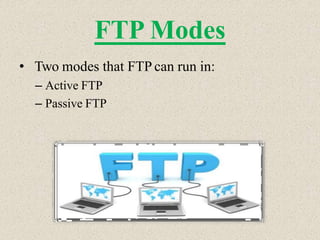
FTP Modes
• Two modes that FTP can run in:
– Active FTP
– Passive FTP
Active FTP
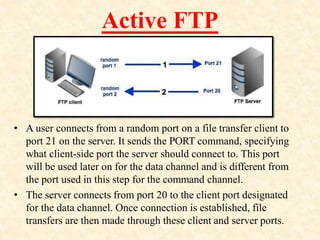
• A user connects from a random port on a file transfer client to
port 21 on the server. It sends the PORT command, specifying
what client-side port the server should connect to. This port
will be used later on for the data channel and is different from
the port used in this step for the command channel.
• The server connects from port 20 to the client port designated
for the data channel. Once connection is established, file
transfers are then made through these client and server ports.
Passive FTP
• The client connects from a random port to port 21 on the
server and issues the PASV command. The server replies,
indicating which (random) port it has opened for data transfer.
• The client connects from another random port to the random
port specified in the server's response. Once connection is
established, data transfers are made through these client and
server ports.
Active Vs. Passive
FTP
Simple Mail Transfer Protocol
• Simple Mail Transfer Protocol (SMTP) is an
Internet standard for electronic mail (e-mail)
transmission across Internet Protocol (IP)
networks.
• SMTP uses TCP port 25.
protocols (1).pptx

protocols (1).pptx

  • 2.
    What is aProtocols??? • Protocols define how messages are sent and received. • A set of rules that defines how data is formatted and processed on a network.
  • 3.
    Types of Protocols •TCP/IP • HTTP • FTP • SMTP
  • 4.
    Internet Protocol • InternetProtocol (IP) is the principal communications protocol in the Internet Protocol Suite for relaying datagram across network boundaries.
  • 5.
    Internet Protocol • Inother words, it is a set of rules used to send and receive messages at the Internet address level. • IP provides the method of distributing data in packets, can distribute packets to a destination via different routes, and can handle congestion in this manner.
  • 6.
    IP provides themethod of distributing data in packets, can distribute packets to a destination via different routes, and can handle congestion in this manner.
  • 7.
    Transmission Control Protocol •The Transmission Control Protocol (TCP) is one of the core protocols of the Internet protocols suite (IP), and is so common that the entire suite is often called TCP/IP. • TCP provides for virtual circuits, error detection and correction, automatic repeat requests, and other reliable end-to-end communications, using the IP protocol for transmission • TCP handles reassembling packets at the destination, as they can arrive out of order due to the IP routing scheme to avoid congestion. • TCP/IP together provide for the most commonly used functions on the internet, namely e-mail, file transfer, and the basis of the HTTP protocol for web page documents.
  • 8.
    Transmission Control Protocol •The Transmission Control Protocol (TCP) is one of the core protocols of the Internet protocols suite (IP), and is so common that the entire suite is often called TCP/IP. • TCP provides for virtual circuits, error detection and correction, automatic repeat requests, and other reliable end-to-end communications, using the IP protocol for transmission • TCP handles reassembling packets at the destination, as they can arrive out of order due to the IP routing scheme to avoid congestion. • TCP/IP together provide for the most commonly used functions on the internet, namely e-mail, file transfer, and the basis of the HTTP protocol for web page documents.
  • 9.
  • 11.
    Hypertext Transfer Protocol •The Hypertext Transfer Protocol (HTTP) is an application protocol for distributed, collaborative, hypermedia information systems. HTTP is the foundation of data communication for the World Wide Web. • Hypertext is structured text that uses logical links (hyperlinks) between nodes containing text. HTTP is the protocol to exchange or transfer hypertext.
  • 12.
  • 13.
    File Transfer Protocol •File Transfer Protocol (FTP) is a standard network protocol used to transfer files from one host to another host over a TCP-based network, such as the Internet. • A typical FTP session operates using two channels: a command (or control) channel and a data channel. • Command channel --transmitting commands and replies to those commands (Port 21) • Data channel --transferring data. (Port 20)
  • 14.
    FTP Modes • Twomodes that FTP can run in: – Active FTP – Passive FTP
  • 15.
    Active FTP • Auser connects from a random port on a file transfer client to port 21 on the server. It sends the PORT command, specifying what client-side port the server should connect to. This port will be used later on for the data channel and is different from the port used in this step for the command channel. • The server connects from port 20 to the client port designated for the data channel. Once connection is established, file transfers are then made through these client and server ports.
  • 16.
    Passive FTP • Theclient connects from a random port to port 21 on the server and issues the PASV command. The server replies, indicating which (random) port it has opened for data transfer. • The client connects from another random port to the random port specified in the server's response. Once connection is established, data transfers are made through these client and server ports.
  • 17.
  • 19.
    Simple Mail TransferProtocol • Simple Mail Transfer Protocol (SMTP) is an Internet standard for electronic mail (e-mail) transmission across Internet Protocol (IP) networks. • SMTP uses TCP port 25.