ARTIFICIAL
INTELLIGENCE
Project
Submitted To:
Mam Sadia Sahar
Submitted By:
Tayyba Ghaffar
Roll number: 2343
BSCS 3rd
MA
03-DEC-2021
Page 1 of 19
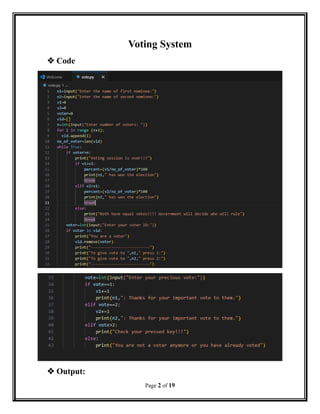
Voting System
 Code
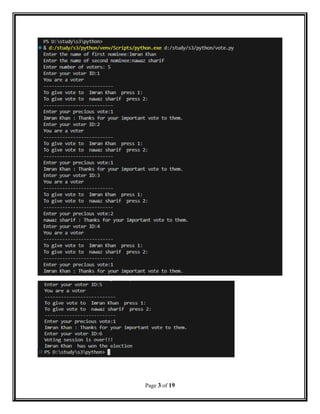
 Output:
Page 2 of 19
Page 3 of 19
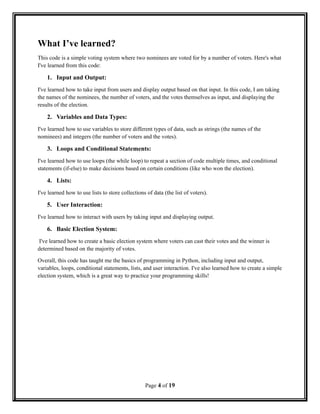
What I’ve learned?
This code is a simple voting system where two nominees are voted for by a number of voters. Here's what
I've learned from this code:
1. Input and Output:
I've learned how to take input from users and display output based on that input. In this code, I am taking
the names of the nominees, the number of voters, and the votes themselves as input, and displaying the
results of the election.
2. Variables and Data Types:
I've learned how to use variables to store different types of data, such as strings (the names of the
nominees) and integers (the number of voters and the votes).
3. Loops and Conditional Statements:
I've learned how to use loops (the while loop) to repeat a section of code multiple times, and conditional
statements (if-else) to make decisions based on certain conditions (like who won the election).
4. Lists:
I've learned how to use lists to store collections of data (the list of voters).
5. User Interaction:
I've learned how to interact with users by taking input and displaying output.
6. Basic Election System:
I've learned how to create a basic election system where voters can cast their votes and the winner is
determined based on the majority of votes.
Overall, this code has taught me the basics of programming in Python, including input and output,
variables, loops, conditional statements, lists, and user interaction. I've also learned how to create a simple
election system, which is a great way to practice your programming skills!
Page 4 of 19
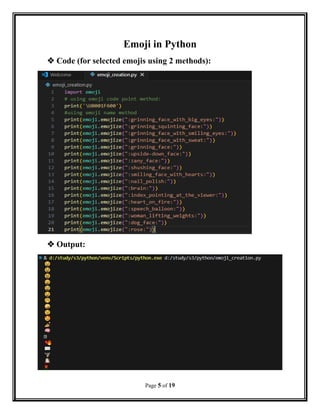
Emoji in Python
 Code (for selected emojis using 2 methods):
 Output:
Page 5 of 19
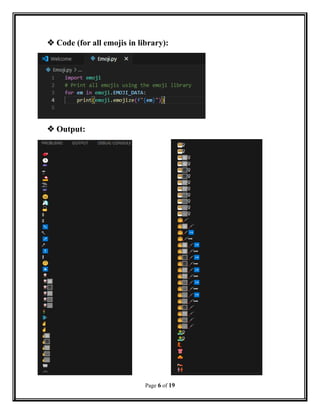
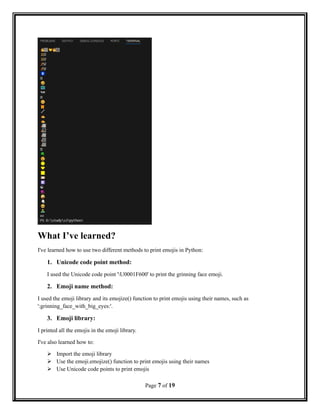
 Code (for all emojis in library):
 Output:
Page 6 of 19
What I’ve learned?
I've learned how to use two different methods to print emojis in Python:
1. Unicode code point method:
I used the Unicode code point 'U0001F600' to print the grinning face emoji.
2. Emoji name method:
I used the emoji library and its emojize() function to print emojis using their names, such as
':grinning_face_with_big_eyes:'.
3. Emoji library:
I printed all the emojis in the emoji library.
I've also learned how to:
 Import the emoji library
 Use the emoji.emojize() function to print emojis using their names
 Use Unicode code points to print emojis
Page 7 of 19
 Print multiple emojis in a single code block
Additionally, I've seen how to use a variety of emojis, including faces, objects, and symbols, and how to
use the emoji library to print them in a fun and easy way!
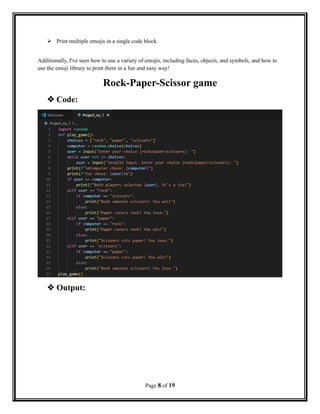
Rock-Paper-Scissor game
 Code:
 Output:
Page 8 of 19
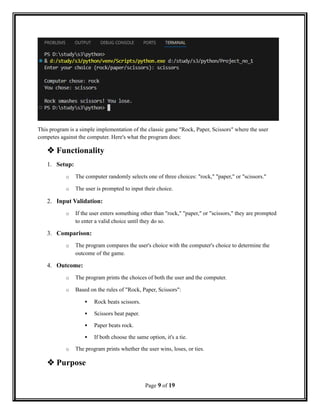
This program is a simple implementation of the classic game "Rock, Paper, Scissors" where the user
competes against the computer. Here's what the program does:
 Functionality
1. Setup:
o The computer randomly selects one of three choices: "rock," "paper," or "scissors."
o The user is prompted to input their choice.
2. Input Validation:
o If the user enters something other than "rock," "paper," or "scissors," they are prompted
to enter a valid choice until they do so.
3. Comparison:
o The program compares the user's choice with the computer's choice to determine the
outcome of the game.
4. Outcome:
o The program prints the choices of both the user and the computer.
o Based on the rules of "Rock, Paper, Scissors":
 Rock beats scissors.
 Scissors beat paper.
 Paper beats rock.
 If both choose the same option, it's a tie.
o The program prints whether the user wins, loses, or ties.
 Purpose
Page 9 of 19
The primary purpose of this program is to entertain the user by allowing them to play a single round of
"Rock, Paper, Scissors" against a computer. It demonstrates basic concepts of programming, such as:
 Random number generation.
 User input handling.
 Conditional logic (if statements) for decision-making.
 String manipulation and comparison.
 How It Works
1. The program uses the random choice function to select the computer's choice randomly.
2. It takes the user's input and ensures it is valid.
3. It compares the user's choice against the computer's choice using a series of conditional
statements to decide the result.
4. Finally, it prints the outcome and informs the user of the result.
 Working of smaller sections of the code:
1. choices = ["rock", "paper", "scissors"]
 Purpose:
o This defines a list of valid choices for the game: "rock," "paper," and "scissors."
 Working:
o The computer will randomly select from this list.
o The user's input is validated against this list to ensure it's valid.
2. computer = random.choice(choices)
 Purpose:
o Randomly selects one choice for the computer.
 Working:
o The random.choice function selects a random element from the choices list.
o This simulates the computer's move in the game.
3. User Input:
user = input("Enter your choice (rock/paper/scissors): ")
while user not in choices:
user = input("Invalid input. Enter your choice (rock/paper/scissors): ")
Page 10 of 19
 Purpose:
o Get the user's choice and validate it.
 Working:
o The program prompts the user to enter their choice.
o It checks if the input is valid (in choices).
o If the input is invalid, it asks again until a valid choice is entered.
4. Displaying Choices:
print(f"nComputer chose: {computer}")
print(f"You chose: {user}n")
 Purpose:
o Inform the user of their choice and the computer’s choice.
 Working:
o The program uses formatted strings (f-strings) to dynamically include the values of
computer and user in the printed message.
5. Tie Condition:
if user == computer:
print(f"Both players selected {user}. It's a tie!")
 Purpose:
o Handle the case where both the user and the computer make the same choice.
 Working:
o If user and computer are equal, the program prints a message indicating a tie.
6. User Wins or Loses Logic:
elif user == "rock":
if computer == "scissors":
print("Rock smashes scissors! You win!")
else:
print("Paper covers rock! You lose.")
 Purpose:
o Determine the outcome when the user selects "rock."
Page 11 of 19
 Working:
o If the computer chooses "scissors," the user wins (rock beats scissors).
o Otherwise, the user loses (paper beats rock).
Code: elif user == "paper":
if computer == "rock":
print("Paper covers rock! You win!")
else:
print("Scissors cuts paper! You lose.")
 Purpose:
o Handle the case where the user chooses "paper."
 Working:
o The program checks if "paper" beats "rock" (user wins) or loses to "scissors."
Code: elif user == "scissors":
if computer == "paper":
print("Scissors cuts paper! You win!")
else:
print("Rock smashes scissors! You lose.")
 Purpose:
o Handle the case where the user chooses "scissors."
 Working:
o The program checks if "scissors" beats "paper" (user wins) or loses to "rock."
7. play_game() Function:
play_game()
 Purpose:
o Start the game by calling the play_game() function.
 Working:
o This function contains all the logic described above.
o It encapsulates the game flow, making it reusable and organized.
Page 12 of 19
Tick-Tack-Toe Game
 Code:
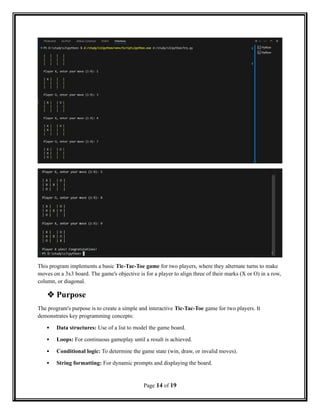
 Output:
Page 13 of 19
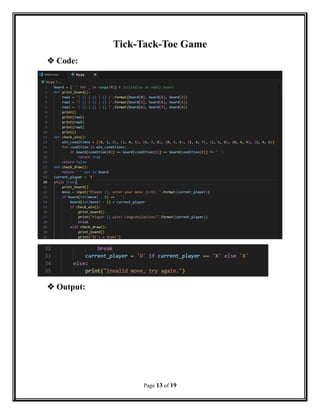
This program implements a basic Tic-Tac-Toe game for two players, where they alternate turns to make
moves on a 3x3 board. The game's objective is for a player to align three of their marks (X or O) in a row,
column, or diagonal.
 Purpose
The program's purpose is to create a simple and interactive Tic-Tac-Toe game for two players. It
demonstrates key programming concepts:
 Data structures: Use of a list to model the game board.
 Loops: For continuous gameplay until a result is achieved.
 Conditional logic: To determine the game state (win, draw, or invalid moves).
 String formatting: For dynamic prompts and displaying the board.
Page 14 of 19
 How It Works Step-by-Step
1. The board is initialized as empty.
2. Players take turns entering moves.
3. The program checks after each move:
o If the player wins, the game announces the winner and ends.
o If the game is a draw, it announces a draw and ends.
4. If neither condition is met, the game alternates to the other player.
5. The game continues until there is a winner or a draw.
 Smaller functional chunks and their working:
1. Board Initialization
board = [' ' for _ in range(9)]
 Purpose:
o Creates a list of 9 spaces (' ') to represent an empty 3x3 Tic-Tac-Toe board.
 Working:
o The list comprehension [ ' ' for _ in range(9)] generates a list with 9 elements, all set to a
space character.
2. print_board Function
def print_board():
row1 = '| {} | {} | {} |'.format(board[0], board[1], board[2])
row2 = '| {} | {} | {} |'.format(board[3], board[4], board[5])
row3 = '| {} | {} | {} |'.format(board[6], board[7], board[8])
print()
print(row1)
print(row2)
print(row3)
print()
 Purpose:
o Displays the current state of the board in a readable format.
Page 15 of 19
 Working:
o Uses format to dynamically insert values from the board list into each row string.
o Prints the rows in the format of a Tic-Tac-Toe grid.
3. check_win Function
def check_win():
win_conditions = [(0, 1, 2), (3, 4, 5), (6, 7, 8), (0, 3, 6), (1, 4, 7), (2, 5, 8), (0, 4, 8), (2, 4, 6)]
for condition in win_conditions:
if board[condition[0]] == board[condition[1]] == board[condition[2]] != ' ':
return True
return False
 Purpose:
o Checks if any player has won the game.
 Working:
o win_conditions defines all possible winning combinations (rows, columns, diagonals).
o For each condition, it checks if the three specified positions in board contain the same
non-space character.
o Returns True if a win is detected, otherwise returns False.
4. check_draw Function
def check_draw():
return ' ' not in board
 Purpose:
o Checks if the board is full and no moves are left.
 Working:
o Uses the condition ' ' not in board to check if there are no empty spaces on the board.
o Returns True if all positions are filled (draw condition), otherwise False.
5. Gameplay Loop
current_player = 'X'
while True:
print_board()
Page 16 of 19
move = input("Player {}, enter your move (1-9): ".format(current_player))
 Purpose:
o Allows the game to run continuously, alternating turns between players.
 Working:
o The current_player variable tracks whose turn it is ('X' or 'O').
o The input function takes the player’s move as a position from 1 to 9.
6. Validating and Making a Move
if board[int(move) - 1] == ' ':
board[int(move) - 1] = current_player
 Purpose:
o Checks if the chosen position is valid and empty.
o Updates the board with the current player's move.
 Working:
o Converts the input move (1-9) into a zero-based index for the board list.
o If the position is empty (' '), it places the current player's mark ('X' or 'O') there.
7. Checking Game Status
if check_win():
print_board()
print("Player {} wins! Congratulations!".format(current_player))
break
elif check_draw():
print_board()
print("It's a draw!")
break
 Purpose:
o After every move, checks if the game is won or drawn.
 Working:
o Calls check_win to determine if the current player has won.
Page 17 of 19
o Calls check_draw to determine if the board is full and no moves are left.
o If either condition is true, it prints the result and exits the loop (break).
8. Switching Turns
current_player = 'O' if current_player == 'X' else 'X'
 Purpose:
o Alternates the turn between players 'X' and 'O'.
 Working:
o Uses a conditional expression to switch the value of current_player.
9. Handling Invalid Moves
else: print("Invalid move, try again.")
 Purpose:
o Informs the player if they attempt to make a move in an already occupied position.
 Working:
o If the chosen position is not empty, the program prints an error message and skips
updating the board.
Page 18 of 19
THE END

PROJECT(voting system, rock paper scissor, emoji creation , tick tack toe in python).docx

  • 1.
    ARTIFICIAL INTELLIGENCE Project Submitted To: Mam SadiaSahar Submitted By: Tayyba Ghaffar Roll number: 2343 BSCS 3rd MA 03-DEC-2021
  • 2.
  • 3.
    Voting System  Code Output: Page 2 of 19
  • 4.
  • 5.
    What I’ve learned? Thiscode is a simple voting system where two nominees are voted for by a number of voters. Here's what I've learned from this code: 1. Input and Output: I've learned how to take input from users and display output based on that input. In this code, I am taking the names of the nominees, the number of voters, and the votes themselves as input, and displaying the results of the election. 2. Variables and Data Types: I've learned how to use variables to store different types of data, such as strings (the names of the nominees) and integers (the number of voters and the votes). 3. Loops and Conditional Statements: I've learned how to use loops (the while loop) to repeat a section of code multiple times, and conditional statements (if-else) to make decisions based on certain conditions (like who won the election). 4. Lists: I've learned how to use lists to store collections of data (the list of voters). 5. User Interaction: I've learned how to interact with users by taking input and displaying output. 6. Basic Election System: I've learned how to create a basic election system where voters can cast their votes and the winner is determined based on the majority of votes. Overall, this code has taught me the basics of programming in Python, including input and output, variables, loops, conditional statements, lists, and user interaction. I've also learned how to create a simple election system, which is a great way to practice your programming skills! Page 4 of 19
  • 6.
    Emoji in Python Code (for selected emojis using 2 methods):  Output: Page 5 of 19
  • 7.
     Code (forall emojis in library):  Output: Page 6 of 19
  • 8.
    What I’ve learned? I'velearned how to use two different methods to print emojis in Python: 1. Unicode code point method: I used the Unicode code point 'U0001F600' to print the grinning face emoji. 2. Emoji name method: I used the emoji library and its emojize() function to print emojis using their names, such as ':grinning_face_with_big_eyes:'. 3. Emoji library: I printed all the emojis in the emoji library. I've also learned how to:  Import the emoji library  Use the emoji.emojize() function to print emojis using their names  Use Unicode code points to print emojis Page 7 of 19
  • 9.
     Print multipleemojis in a single code block Additionally, I've seen how to use a variety of emojis, including faces, objects, and symbols, and how to use the emoji library to print them in a fun and easy way! Rock-Paper-Scissor game  Code:  Output: Page 8 of 19
  • 10.
    This program isa simple implementation of the classic game "Rock, Paper, Scissors" where the user competes against the computer. Here's what the program does:  Functionality 1. Setup: o The computer randomly selects one of three choices: "rock," "paper," or "scissors." o The user is prompted to input their choice. 2. Input Validation: o If the user enters something other than "rock," "paper," or "scissors," they are prompted to enter a valid choice until they do so. 3. Comparison: o The program compares the user's choice with the computer's choice to determine the outcome of the game. 4. Outcome: o The program prints the choices of both the user and the computer. o Based on the rules of "Rock, Paper, Scissors":  Rock beats scissors.  Scissors beat paper.  Paper beats rock.  If both choose the same option, it's a tie. o The program prints whether the user wins, loses, or ties.  Purpose Page 9 of 19
  • 11.
    The primary purposeof this program is to entertain the user by allowing them to play a single round of "Rock, Paper, Scissors" against a computer. It demonstrates basic concepts of programming, such as:  Random number generation.  User input handling.  Conditional logic (if statements) for decision-making.  String manipulation and comparison.  How It Works 1. The program uses the random choice function to select the computer's choice randomly. 2. It takes the user's input and ensures it is valid. 3. It compares the user's choice against the computer's choice using a series of conditional statements to decide the result. 4. Finally, it prints the outcome and informs the user of the result.  Working of smaller sections of the code: 1. choices = ["rock", "paper", "scissors"]  Purpose: o This defines a list of valid choices for the game: "rock," "paper," and "scissors."  Working: o The computer will randomly select from this list. o The user's input is validated against this list to ensure it's valid. 2. computer = random.choice(choices)  Purpose: o Randomly selects one choice for the computer.  Working: o The random.choice function selects a random element from the choices list. o This simulates the computer's move in the game. 3. User Input: user = input("Enter your choice (rock/paper/scissors): ") while user not in choices: user = input("Invalid input. Enter your choice (rock/paper/scissors): ") Page 10 of 19
  • 12.
     Purpose: o Getthe user's choice and validate it.  Working: o The program prompts the user to enter their choice. o It checks if the input is valid (in choices). o If the input is invalid, it asks again until a valid choice is entered. 4. Displaying Choices: print(f"nComputer chose: {computer}") print(f"You chose: {user}n")  Purpose: o Inform the user of their choice and the computer’s choice.  Working: o The program uses formatted strings (f-strings) to dynamically include the values of computer and user in the printed message. 5. Tie Condition: if user == computer: print(f"Both players selected {user}. It's a tie!")  Purpose: o Handle the case where both the user and the computer make the same choice.  Working: o If user and computer are equal, the program prints a message indicating a tie. 6. User Wins or Loses Logic: elif user == "rock": if computer == "scissors": print("Rock smashes scissors! You win!") else: print("Paper covers rock! You lose.")  Purpose: o Determine the outcome when the user selects "rock." Page 11 of 19
  • 13.
     Working: o Ifthe computer chooses "scissors," the user wins (rock beats scissors). o Otherwise, the user loses (paper beats rock). Code: elif user == "paper": if computer == "rock": print("Paper covers rock! You win!") else: print("Scissors cuts paper! You lose.")  Purpose: o Handle the case where the user chooses "paper."  Working: o The program checks if "paper" beats "rock" (user wins) or loses to "scissors." Code: elif user == "scissors": if computer == "paper": print("Scissors cuts paper! You win!") else: print("Rock smashes scissors! You lose.")  Purpose: o Handle the case where the user chooses "scissors."  Working: o The program checks if "scissors" beats "paper" (user wins) or loses to "rock." 7. play_game() Function: play_game()  Purpose: o Start the game by calling the play_game() function.  Working: o This function contains all the logic described above. o It encapsulates the game flow, making it reusable and organized. Page 12 of 19
  • 14.
    Tick-Tack-Toe Game  Code: Output: Page 13 of 19
  • 15.
    This program implementsa basic Tic-Tac-Toe game for two players, where they alternate turns to make moves on a 3x3 board. The game's objective is for a player to align three of their marks (X or O) in a row, column, or diagonal.  Purpose The program's purpose is to create a simple and interactive Tic-Tac-Toe game for two players. It demonstrates key programming concepts:  Data structures: Use of a list to model the game board.  Loops: For continuous gameplay until a result is achieved.  Conditional logic: To determine the game state (win, draw, or invalid moves).  String formatting: For dynamic prompts and displaying the board. Page 14 of 19
  • 16.
     How ItWorks Step-by-Step 1. The board is initialized as empty. 2. Players take turns entering moves. 3. The program checks after each move: o If the player wins, the game announces the winner and ends. o If the game is a draw, it announces a draw and ends. 4. If neither condition is met, the game alternates to the other player. 5. The game continues until there is a winner or a draw.  Smaller functional chunks and their working: 1. Board Initialization board = [' ' for _ in range(9)]  Purpose: o Creates a list of 9 spaces (' ') to represent an empty 3x3 Tic-Tac-Toe board.  Working: o The list comprehension [ ' ' for _ in range(9)] generates a list with 9 elements, all set to a space character. 2. print_board Function def print_board(): row1 = '| {} | {} | {} |'.format(board[0], board[1], board[2]) row2 = '| {} | {} | {} |'.format(board[3], board[4], board[5]) row3 = '| {} | {} | {} |'.format(board[6], board[7], board[8]) print() print(row1) print(row2) print(row3) print()  Purpose: o Displays the current state of the board in a readable format. Page 15 of 19
  • 17.
     Working: o Usesformat to dynamically insert values from the board list into each row string. o Prints the rows in the format of a Tic-Tac-Toe grid. 3. check_win Function def check_win(): win_conditions = [(0, 1, 2), (3, 4, 5), (6, 7, 8), (0, 3, 6), (1, 4, 7), (2, 5, 8), (0, 4, 8), (2, 4, 6)] for condition in win_conditions: if board[condition[0]] == board[condition[1]] == board[condition[2]] != ' ': return True return False  Purpose: o Checks if any player has won the game.  Working: o win_conditions defines all possible winning combinations (rows, columns, diagonals). o For each condition, it checks if the three specified positions in board contain the same non-space character. o Returns True if a win is detected, otherwise returns False. 4. check_draw Function def check_draw(): return ' ' not in board  Purpose: o Checks if the board is full and no moves are left.  Working: o Uses the condition ' ' not in board to check if there are no empty spaces on the board. o Returns True if all positions are filled (draw condition), otherwise False. 5. Gameplay Loop current_player = 'X' while True: print_board() Page 16 of 19
  • 18.
    move = input("Player{}, enter your move (1-9): ".format(current_player))  Purpose: o Allows the game to run continuously, alternating turns between players.  Working: o The current_player variable tracks whose turn it is ('X' or 'O'). o The input function takes the player’s move as a position from 1 to 9. 6. Validating and Making a Move if board[int(move) - 1] == ' ': board[int(move) - 1] = current_player  Purpose: o Checks if the chosen position is valid and empty. o Updates the board with the current player's move.  Working: o Converts the input move (1-9) into a zero-based index for the board list. o If the position is empty (' '), it places the current player's mark ('X' or 'O') there. 7. Checking Game Status if check_win(): print_board() print("Player {} wins! Congratulations!".format(current_player)) break elif check_draw(): print_board() print("It's a draw!") break  Purpose: o After every move, checks if the game is won or drawn.  Working: o Calls check_win to determine if the current player has won. Page 17 of 19
  • 19.
    o Calls check_drawto determine if the board is full and no moves are left. o If either condition is true, it prints the result and exits the loop (break). 8. Switching Turns current_player = 'O' if current_player == 'X' else 'X'  Purpose: o Alternates the turn between players 'X' and 'O'.  Working: o Uses a conditional expression to switch the value of current_player. 9. Handling Invalid Moves else: print("Invalid move, try again.")  Purpose: o Informs the player if they attempt to make a move in an already occupied position.  Working: o If the chosen position is not empty, the program prints an error message and skips updating the board. Page 18 of 19 THE END