Asks, Tasks and Projects
Nancy Pearce
National Specialist, Collaborative Work Management
nanpear@microsoft.com
Project Virtual Conference 2020
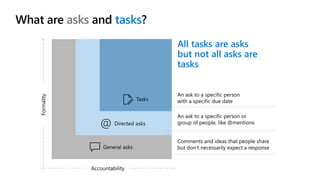
What are asks and tasks?
All tasks are asks
but not all asks are
tasks
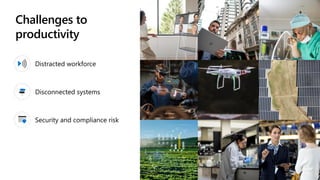
Challenges to
productivity
Distracted workforce
Disconnected systems
Security and compliance risk
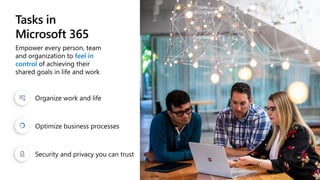
Tasks in
Microsoft 365
Empower every person, team
and organization to feel in
control of achieving their
shared goals in life and work​
Organize work and life
Optimize business processes
Security and privacy you can trust
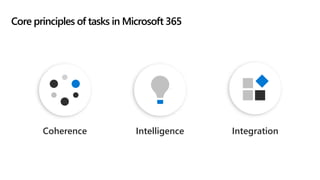
Core principles of tasks in Microsoft 365
IntegrationIntelligenceCoherence
Simple, familiar look and feel across every experience
Maintain user expectations
Enable actions, navigation, and discovery
Coherence
Leverage intelligent services across Microsoft stack
Help users with proactive suggestions
Assist in organizing and prioritizing
Intelligence
Connect any task-related experience to logical endpoints
Create experiences applicable to all types of users
Scale task capabilities from individual use to organizational workflows
Integration
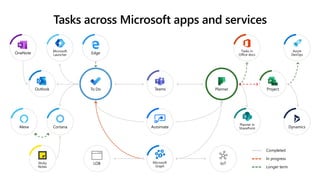
Teams
Dynamics
Planner in
SharePointAutomate
Sticky
Notes
CortanaAlexa
Outlook
Microsoft
Graph
IoTLOB
Azure
DevOps
Tasks in
Office docsEdge
Microsoft
LauncherOneNote
Completed
In progress
Longer term
To Do Planner Project
Tasks across Microsoft apps and services
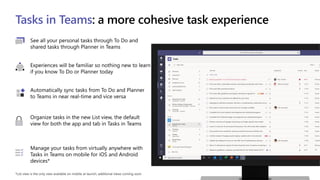
*List view is the only view available on mobile at launch; additional views coming soon
Tasks in Teams: a more cohesive task experience
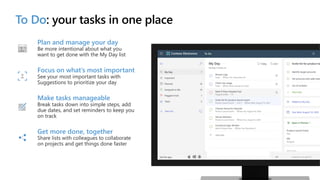
Plan and manage your day
Be more intentional about what you
want to get done with the My Day list
Focus on what’s most important
See your most important tasks with
Suggestions to prioritize your day
Make tasks manageable
Break tasks down into simple steps, add
due dates, and set reminders to keep you
on track
Get more done, together
projects and get things done faster
To Do: your tasks in one place
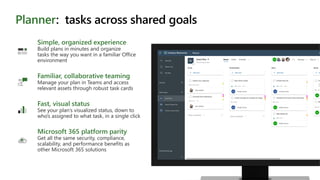
Familiar, collaborative teaming
Manage your plan in Teams and access
relevant assets through robust task cards
Fast, visual status
See your plan’s visualized status, down to
who’s assigned to what task, in a single click
Microsoft 365 platform parity
Get all the same security, compliance,
scalability, and performance benefits as
other Microsoft 365 solutions
Simple, organized experience
Build plans in minutes and organize
tasks the way you want in a familiar Office
environment
Planner: tasks across shared goals
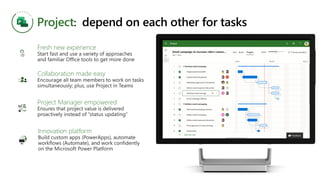
Project: depend on each other for tasks
Fresh new experience
Collaboration made easy
Project Manager empowered
Innovation platform
Teams work the way they want
Enterprises get the results they need
Microsoft’s work management vision
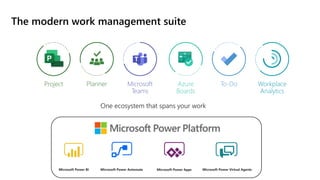
The modern work management suite
Microsoft
Teams
Planner To-DoAzure
Boards
Project Workplace
Analytics
Microsoft Power BI Microsoft Power Automate Microsoft Power Apps Microsoft Power Virtual Agents
One ecosystem that spans your work
© Copyright Microsoft Corporation. All rights reserved.
Thank you

Project Virtual Summit_Asks, Tasks and Projects

  • 1.
    Asks, Tasks andProjects Nancy Pearce National Specialist, Collaborative Work Management nanpear@microsoft.com Project Virtual Conference 2020
  • 2.
    What are asksand tasks? All tasks are asks but not all asks are tasks
  • 3.
  • 4.
    Tasks in Microsoft 365 Empowerevery person, team and organization to feel in control of achieving their shared goals in life and work​ Organize work and life Optimize business processes Security and privacy you can trust
  • 5.
    Core principles oftasks in Microsoft 365 IntegrationIntelligenceCoherence
  • 6.
    Simple, familiar lookand feel across every experience Maintain user expectations Enable actions, navigation, and discovery Coherence
  • 7.
    Leverage intelligent servicesacross Microsoft stack Help users with proactive suggestions Assist in organizing and prioritizing Intelligence
  • 8.
    Connect any task-relatedexperience to logical endpoints Create experiences applicable to all types of users Scale task capabilities from individual use to organizational workflows Integration
  • 9.
    Teams Dynamics Planner in SharePointAutomate Sticky Notes CortanaAlexa Outlook Microsoft Graph IoTLOB Azure DevOps Tasks in OfficedocsEdge Microsoft LauncherOneNote Completed In progress Longer term To Do Planner Project Tasks across Microsoft apps and services
  • 10.
    *List view isthe only view available on mobile at launch; additional views coming soon Tasks in Teams: a more cohesive task experience
  • 11.
    Plan and manageyour day Be more intentional about what you want to get done with the My Day list Focus on what’s most important See your most important tasks with Suggestions to prioritize your day Make tasks manageable Break tasks down into simple steps, add due dates, and set reminders to keep you on track Get more done, together projects and get things done faster To Do: your tasks in one place
  • 12.
    Familiar, collaborative teaming Manageyour plan in Teams and access relevant assets through robust task cards Fast, visual status See your plan’s visualized status, down to who’s assigned to what task, in a single click Microsoft 365 platform parity Get all the same security, compliance, scalability, and performance benefits as other Microsoft 365 solutions Simple, organized experience Build plans in minutes and organize tasks the way you want in a familiar Office environment Planner: tasks across shared goals
  • 13.
    Project: depend oneach other for tasks Fresh new experience Collaboration made easy Project Manager empowered Innovation platform
  • 14.
    Teams work theway they want Enterprises get the results they need Microsoft’s work management vision
  • 15.
    The modern workmanagement suite Microsoft Teams Planner To-DoAzure Boards Project Workplace Analytics Microsoft Power BI Microsoft Power Automate Microsoft Power Apps Microsoft Power Virtual Agents One ecosystem that spans your work
  • 16.
    © Copyright MicrosoftCorporation. All rights reserved. Thank you