The QR-based food ordering system
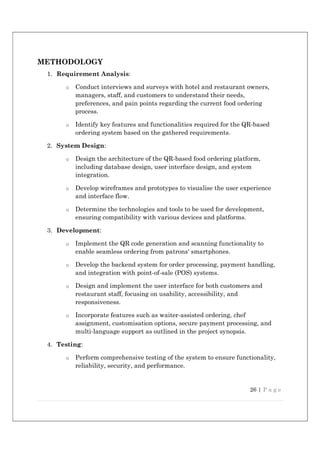
transforms dining by using QR code
technology. Patron’s access digital menus,
place orders, and make secure payments
via smartphones. The system enhances
efficiency and sa sfac on for customers
and establishments, while poten al
limita ons are addressed for successful
implementa on.
SMART
ORDER
STREAM
Minor Project Report
B-TECH CSE, 6th Sem
A MINOR PROJECT REPORT
ON
SMART ORDER STREAM
Submitted by
Vansh Mittal (21CSX31L)
Deepak (21CSX40L)
Ritu Kumari (21CS85CL)
Under the Guidance of
Shivani Gupta
LECTURER
in partial fulfilment for the award of the degree of
BACHELOR OF TECHNOLOGY
IN
COMPUTER SCIENCE AND ENGINEERING
Department of Computer Science & Engineering
LINGAYAS VIDYAPEETH, FARIDABAD
LINGAYA`S VIDYAPEETH
Computer Science
Engineering, Faridabad
CERTIFICATE
This is to cer fy that the project report en tled “SMART ORDER STREAM” submi ed by
group of Mr. Vansh Mi al (21CSX31L), Mr. Deepak (21CSX40L), Miss. Ritu Kumari
(21CS85CL) is submi ed during the academic year 2023-24 of the B-tech in Computer
Science Engineering (CSE), at Lingaya’s Vidyapeeth, Faridabad. The Minor Project was done
under the supervision of Shivani Gupta (Lecturer).
Sign of Project Supervisor Sign of
Shivani Gupta H.O.D
TABLE OF CONTENTS
Declaration i
Acknowledgement ii
Abstract iii
List of Figures/ Images iv
Chapter 1. Introduction 1
1.1 Introduction
1.2 Purpose
1.3 Scope
1.4 Feasibility Study
1.5 Hardware Description
1.6 Software Description
1.6.1 Frontend
1.6.2 Backend
1.6.3 Database
Chapter 2. System Analysis & Design 17
2.1. Study of Current System
2.1.1. Requirement of New System
2.1.2. Performance Characteristics
2.1.3. Functions of System
2.2. Functional and Behavioral modeling
2.2.1. DFD
2.2.2. ER
2.3. Main Modules of System
2.3.1. Admin
2.3.2. Kitchen Module
2.3.3. Waiter Module
2.3.4. Customer Module
2.4. System Design
2.4.1. System Procedural Design
2.4.2. Methodology
2.5. CODING
2.6. System Output
2.7. System Security
Chapter 3. System Testing and Implementation 58
3.1. Testing
3.2. Test Plan
3.3. Test Cases
Chapter 4. Limitation and Future Enhancement 67
Chapter 5. Conclusion and Discussion 69
References/Bibliography
i
Declaration
We hereby declare that this project report entitled “Smart Order Stream” by Mr. Vansh Mi al
(21CSX31L), Mr. Deepak (21CSX40L), Miss. Ritu Kumari (21CS85CL) has being submitted in
partial fulfilment of the requirements for the degree of Bachelor of Technology in Computer
Science & Engineering under the Department of Computer Science and Engineering of
Lingaya`s Vidyapeeth Faridabad, during the academic year 2023, is a bonafide record of our
original work carried out under the guidance of Shivani Gupta, Lecturer, CSE Department.
We further declare that we have not submitted the matter presented in this Project for the award
of any other Degree/Diploma of this University or any other University/Institute.
1. Vansh Mittal, 21CSX31L
2. Deepak, 21CSX40L
3. Ritu Kumari, 21CS85CL
ii
Acknowledgement
I would like to express my sincere gratitude to my supervisor “Shivani Gupta”, “Lecturer”,
Department of Computer Science and Engineering, for giving me the opportunity to work
on this topic. It would never be possible for us to take this project to this level without their
innovative ideas and their relentless support and encouragement.
I express my deepest thanks to CSE faculty for taking part in useful decision & giving necessary
advices and guidance and arranged all facilities to make life easier. I choose this moment to
acknowledge his/her contribution gratefully.
I take immense pleasure in thanking Dr. Ritu Sindhu, Dean & Head of Department of
Computer Science & Engineering. Her tolerances of having discussions, sacrificing her
personal time, are extremely insightful and greatly appreciated.
Vansh Mittal, 21CSX31L
Deepak, 21CSX40L
Ritu Kumari, 21CS85CL
iii
Abstract
The QR-based food ordering system is an innovative solution designed to transform the dining
experience in hotels and restaurants. Leveraging QR code technology, this system enables
patrons to access digital menus directly on their smartphones, providing vivid images, detailed
descriptions, and pricing information for a wide range of dishes and drinks. With just a few
taps, customers can customize their orders and make secure payments, all from the comfort of
their seats, without the need for face-to-face interaction with waitstaff.
The system offers a seamless, contactless ordering process, significantly reducing wait times
and minimizing order errors. It streamlines restaurant operations, enhancing overall efficiency
and customer satisfaction. Patrons enjoy the convenience of browsing at their own pace and
placing orders confidently, while establishments benefit from optimized processes that lead to
higher customer loyalty.
By integrating advanced technology into the dining experience, this project revolutionizes the
way we dine out. It paves the way for a more efficient and enjoyable restaurant experience,
setting new standards for hospitality and food service industries. Welcome to the future of
dining, where QR codes bring convenience, speed, and precision to every meal.
iv
LIST OF FIGURES/ IMAGES
Figure Page No.
Figure 2.3.1 DFD 21
Figure 2.3.2 ER (Entity-Relationship) Diagram 22
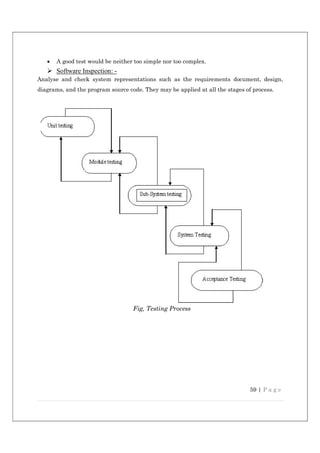
Figure 3.1 Testing Process 59
Images Page No.
Image 2.6.1 Admin Interface 45
Image 2.6.2 Waiter interface 49
Image 2.6.3 Kitchen Interface 50
Image 2.6.4 Customer End 52
1 | P a g e
Introduction:
In an era defined by technological advancement and rapid digital transformation, the
hospitality industry stands at the forefront of innovation, continually seeking new
ways to enhance guest experiences and streamline operations. Among the myriad of
challenges faced by hotels and restaurants, one perennial concern looms large: how
to effectively manage and optimise the food ordering process.
Traditionally, dining establishments have relied on conventional methods of order
placement, often involving physical menus, paper-based order forms, and face-to-face
interaction with waitstaff. While these methods have served their purpose over the
years, they are not without their limitations. Long wait times, order inaccuracies,
and cumbersome payment processes have all contributed to a less-than-ideal dining
experience for both patrons and establishments alike.
Enter the era of QR-based food ordering systems - a technological solution that
promises to change the way we dine out. Developed by our team of dedicated
students, our project seeks to harness the power of QR codes to create a seamless,
efficient, and contactless ordering experience for hotels and restaurants. Imagine a
scenario where patrons can simply scan a QR code placed on their table using their
smartphone, instantly accessing a digital menu complete with vivid images, detailed
descriptions, and pricing information. With just a few taps on their screen, customers
can place their orders, customise their selections, and even make secure payments—
all without ever having to leave their seats or interact directly with waitstaff.
But our QR-based food ordering system goes beyond mere convenience—it's a game-
changer for both patrons and establishments alike. For customers, it offers
unparalleled ease of use, allowing them to browse menus at their own pace, place
orders with confidence, and enjoy a hassle-free dining experience from start to finish.
For hotels and restaurants, it represents a powerful tool for streamlining operations,
reducing wait times, minimising order errors, and ultimately enhancing overall
customer satisfaction and loyalty.
In this rapidly evolving landscape of hospitality technology, our project stands as a
beacon of innovation—a testament to the limitless potential of digital solutions to
transform the way we eat, drink, and enjoy the finer things in life. So, join us on this
2 | P a g e
journey as we embark on a quest to revolutionise the dining experience, one QR code
at a time. Welcome to the future of food ordering. Welcome to the world of QR-based
dining.
PURPOSE
 Enhance Customer Experience: Provide patrons with a seamless, contactless ordering
process that allows them to easily browse menus, customize orders, and make secure payments
directly from their smartphones.
 Streamline Operations: Optimize restaurant and hotel operations by automating the order
placement and payment processes, reducing wait times, and increasing overall efficiency.
 Minimize Order Errors: Eliminate order inaccuracies by enabling customers to place their
orders directly through a digital interface, ensuring precision and clarity in the ordering
process.
 Increase Customer Satisfaction and Loyalty: Offer a modern, hassle-free dining experience
that encourages repeat visits and fosters customer loyalty.
 Empower Customers: Allow patrons to control their dining experience by browsing menus at
their own pace, customizing their selections, and managing their orders independently.
 Improve Resource Management: Enable establishments to better manage their resources,
such as waitstaff and kitchen staff, by optimizing order processing and delivery.
 Boost Revenue: Increase sales through efficient order management and quick turnaround
times, as well as the potential for upselling through dynamic digital menus.
 Adapt to Changing Consumer Preferences: Meet the growing demand for contactless and
digital services in the hospitality industry, driven by the rise of smartphone use and
technological advancements.
 Provide Valuable Data Insights: Collect and analyse data on customer preferences and order
trends, helping establishments make informed decisions to improve their services and
offerings.
 Enhance Safety and Hygiene: Offer a contactless ordering solution that aligns with health
and safety standards, reducing physical interactions and mitigating the risk of contamination.
3 | P a g e
SCOPE
 Integration with Loyalty Programs: Enhance customer retention by
incorporating loyalty and rewards programs directly into the QR-based ordering
system, offering personalized promotions and discounts to regular patrons.
 Advanced Analytics and Insights: Utilize data analytics to gather insights
into customer preferences, order patterns, and peak dining times, enabling
establishments to make data-driven decisions to improve operations and
offerings.
 Customization and Personalization: Further tailor the ordering experience
by leveraging customer data to offer personalized menu recommendations based
on dietary preferences, past orders, and popular choices.
 Multilingual Support: Expand the reach of the system by offering
multilingual support, catering to a diverse range of customers, and improving
the user experience for non-English speakers.
 Integration with Third-Party Delivery Services: Collaborate with delivery
platforms to enable seamless integration of takeout and delivery options,
expanding the scope of the system beyond dine-in services.
 Advanced Security Features: Strengthen data security and privacy measures
to protect customer and payment information, ensuring compliance with
industry standards and regulations.
 Contactless Payments: Enhance the payment experience by incorporating a
wider range of secure, contactless payment methods, including digital wallets
and mobile payments.
 Augmented Reality (AR) Menus: Explore the potential of AR technology to
provide customers with immersive menu experiences, such as virtual food
presentations and interactive visuals.
 Dynamic Pricing and Offers: Implement dynamic pricing strategies to
optimize pricing based on demand and availability, as well as offering real-time
promotions and flash sales.
 Cross-Platform Compatibility: Develop the system to operate across multiple
platforms and devices, including iOS, Android, and desktop, to cater to a wider
audience and improve accessibility.
4 | P a g e
 Enhanced Accessibility Features: Incorporate accessibility options such as
screen readers, voice commands, and large text for visually impaired
customers, ensuring the system is inclusive for all users.
 Smart Recommendations for Upselling: Use AI algorithms to suggest
additional items or complementary dishes based on customer preferences and
order history, potentially increasing average order value.
FEASIBILITY REPORT
The feasibility of the QR-Based Food Ordering System is supported by several factors:
o Technological Advancements: Modern web development technologies allow for the
creation of intuitive and responsive online platforms compatible with various
devices.
o Integration Capabilities: Seamless integration with existing hotel or restaurant
management systems optimizes workflow efficiency and enhances overall system
functionality.
o Training and Support: Comprehensive training and ongoing support provided to
hotel and restaurant staff ensure successful implementation and adoption of the
system.
Revenue Potential: The subscription-based model and potential for increased
customer satisfaction make the system financially viable and attractive for
establishments
Technical Feasibility:
The technical feasibility of the QR-based food ordering system is high due to its
compatibility with existing infrastructure and technologies. The system operates on
standard hardware, such as smartphones and point-of-sale (POS) systems, and can
seamlessly integrate with current software for reservations and inventory
management. Mobile apps can be developed for both iOS and Android platforms,
while a web app ensures wider accessibility for users.
The system generates secure QR codes for easy menu access and employs dynamic
menus and real-time order transmission for efficient kitchen coordination.
Integration with secure payment gateways allows convenient transactions, while
end-to-end encryption and compliance with data protection regulations ensure data
5 | P a g e
security and privacy. The project utilizes scalable databases and load balancing
strategies to maintain reliability during peak usage. A user-friendly interface, with
accessible features like voice commands and screen reader support, enhances the
customer experience. Additionally, integrated live chat and FAQs provide customer
support. Rigorous testing and phased rollouts ensure smooth implementation and
successful deployment. Overall, the system's technical foundation is robust,
supporting its potential to revolutionize the dining experience.
Economic Feasibility:
The economic feasibility of the QR-based food ordering system is promising due to its
potential to generate cost savings and increase revenue for establishments. By
automating the ordering and payment processes, the system reduces labor costs and
allows for more efficient staff deployment. This, in turn, can lead to higher customer
turnover and increased sales.
 Cost Savings: Automating key processes reduces the need for manual order
taking and payment handling, leading to lower labor costs.
 Increased Revenue: Improved efficiency and faster service can boost
customer turnover and sales, while dynamic pricing and upselling
opportunities enhance revenue.
 Customer Retention: The system's streamlined and contactless experience
increases customer satisfaction and loyalty, potentially leading to repeat
business.
 Initial Investment: While there is an upfront cost for software development
and staff training, these are offset by the long-term savings and revenue
growth.
Operational feasibility:
The operational feasibility of the QR-based food ordering system is high due to its
ability to streamline dining processes and improve efficiency. The system reduces
wait times and minimizes order errors by allowing customers to place orders directly
from their smartphones, facilitating real-time order transmission to the kitchen. It
optimizes resource management by empowering customers to handle their ordering
and payment processes independently, freeing up waitstaff for other tasks.
Additionally, the system enhances customer satisfaction and loyalty through a user-
friendly, contactless dining experience. Training staff to manage and maintain the
system can be easily accomplished, and the low need for direct waitstaff interaction
6 | P a g e
reduces operational complexity. Overall, the system's ease of use and automation of
key processes contribute to its strong operational feasibility.
HARDWARE DESCRIPTION:
Minimal Hardware Requirements:
1. Smartphone or Tablet:
 Operating System: iOS or Android.
 Camera: High-resolution camera for scanning QR codes.
 Connectivity: Wi-Fi or mobile data for internet access.
2. Internet Connection:
 Speed: Reliable internet connection with sufficient bandwidth for real-
time data transmission.
 Type: Wi-Fi or wired network connection for stable and consistent
access.

3. Server or Cloud Hosting (Service Provider)
 Processor: Quad-core or higher for handling concurrent requests.
 Memory: 8 GB RAM or more.
 Storage: Ample storage for database and application data.
 Operating System: Windows or Linux-based server OS.
4. Database Server (Service Provider)
 Type: MySQL, PostgreSQL, or another compatible database server.
 Processor: Dual-core or better.
 Memory: 4 GB RAM or more.
 Storage: Sufficient storage for managing customer and order data.
5. Router and Network Equipment:
 Capability: Support for multiple devices and seamless connectivity.
 Security: Capabilities such as firewalls and encryption for secure
network access
7 | P a g e
SOFTWARE DISCRIPTION
Minimal Software Requirements:
FRONTEND:
 Html
 CSS
 JavaScript
 Angular
BACKEND:
 Nodejs
DATABASE:
 MongoDB
FRONTEND
 HTML
The Hypertext Markup Language, or HTML is the standard markup language for
documents designed to be displayed in a web browser. It can be assisted by
technologies such as Cascading Style Sheets (CSS) and scripting languages such as
JavaScript.
Web browsers receive HTML documents from a web server or from local storage and
render the documents into multimedia web pages. HTML describes the structure of
a web page semantically and originally included cues for the appearance of the
document.
8 | P a g e
HTML elements are the building blocks of HTML pages. With HTML constructs,
images and other objects such as interactive forms may be embedded into the
rendered page. HTML provides a means to create structured documents by denoting
structural semantics for text such as headings, paragraphs, lists, links, quotes and
other items. HTML elements are delineated by tags, written using angle brackets.
Tags such as directly introduce content into the
page. Other tags such as <p> surround and provide information about document text
and may include other tags as sub-elements. Browsers do not display the HTML tags,
but use them to interpret the content of the page.
HTML can embed programs written in a scripting language such as JavaScript,
which affects the behaviour and content of web pages. Inclusion of CSS defines the
look and layout of content. The World Wide Web Consortium (W3C), former
maintainer of the HTML and current maintainer of the CSS standards, has
encouraged the use of CSS over explicit presentational HTML since 1997.
 CSS (Cascading Style Sheet)
Cascading Style Sheets, fondly referred to as CSS, is a simply designed language intended
to simplify the process of making web pages presentable. CSS allows you to apply styles to
web pages. More importantly, CSS enables you to do this independent of the HTML that
makes up each web page.
CSS is easy to learn and understood but it provides powerful control over the presentation of
an HTML document.
WHY CSS?
• CSS saves time: You can write CSS once and reuse same sheet in multiple HTML
pages.
• Easy Maintenance: To make a global change simply change the style, and all
elements in all the webpages will be updated automatically.
• Search Engines: CSS is considered as clean coding technique, which means search
engines will not have to struggle to “read” its content.
• Superior styles to HTML: CSS have a much wider array of attributes than HTML,
so you can give a far better look to your HTML page in comparison to HTML
attributes.
• Offline Browsing: CSS can store web applications locally with the help of offline
catch. Using of this we can view offline websites.
9 | P a g e
CSS Syntax
A CSS comprises of style rules that are interpreted by the browser and then applied to the
corresponding elements in your document. A style rule set consists of a selector and
declaration block.
Selector => h1
Declaration => {color:blue;font size:12px;}
• The selector points to the HTML element you want to style.
• The declaration block contains one or more declarations separated by semicolons.
• Each declaration includes a CSS property name and a value, separated by a colon.
• For Example:
-> color is property and blue are value.
-> font size is property and 12px is value.
• A CSS declaration always ends with a semicolon, and declaration blocks are
surrounded by curly braces.
• CSS − Bootstrap comes with the feature of global CSS settings, fundamental HTML
elements styled and enhanced with extensible classes, and an advanced grid system. This
is covered in detail in the section Bootstrap with CSS.
• Components − Bootstrap contains over a dozen reusable components built to provide
iconography, dropdowns, navigation, alerts, pop-overs, and much more. This is covered in
detail in the section Layout Components.
• JavaScript Plugins − Bootstrap contains over a dozen custom jQuery plugins. You can
easily include them all, or one by one. This is covered in details in the section Bootstrap
Plugins.
• Customize − You can customize Bootstrap's components, LESS variables, and jQuery
plugins to get your very own version. It is very easy to setup and start using Bootstrap. This
chapter will explain how to download and setup Bootstrap. We will also discuss the
Bootstrap file structure, and demonstrate its usage with an example.
10 | P a g e
 JAVASCRIPT
is the most common form of the language. The script should be included in or referenced by an
HTML document for the code to be interpreted by the browser. JavaScript is a dynamic computer
programming language. It is lightweight and most used as a part of web pages, whose
implementations allow client-side script to interact with the user and make dynamic pages. It is an
interpreted programming language with object-oriented capabilities.
JavaScript was first known as LiveScript, but Netscape changed its name to JavaScript, possibly
because of the excitement being generated by Java. JavaScript made its first appearance in
Netscape 2.0 in 1995 with the name LiveScript. The general-purpose core of the language has
been embedded in Netscape, Internet Explorer, and other web browsers.
The ECMA-262 Specification defined a standard version of the core JavaScript language.
• JavaScript is a lightweight, interpreted programming language.
• Designed for creating network-centric applications.
• Complementary to and integrated with Java.
• Complementary to and integrated with HTML.
• Open and cross-platform
Client-Side JavaScript
It means that a web page need not be a static HTML, but can include programs that interact with
the user, control the browser, and dynamically create HTML content.
The JavaScript client-side mechanism provides many advantages over traditional CGI server-side
scripts. For example, you might use JavaScript to check if the user has entered a valid e-mail
address in a form field.
The JavaScript code is executed when the user submits the form, and only if all the entries are
valid, they would be submitted to the Web Server.
JavaScript can be used to trap user-initiated events such as button clicks, link navigation, and other
actions that the user initiates explicitly or implicitly.
11 | P a g e
Advantages of JavaScript
The merits of using JavaScript are −
• Less server interaction − You can validate user input before sending the page off to the
server. This saves server traffic, which means less load on your server.
• Immediate feedback to the visitors − They don't have to wait for a page reload to see if
they have forgotten to enter something.
• Increased interactivity − You can create interfaces that react when the user hovers over
them with a mouse or activates them via the keyboard.
• Richer interfaces − You can use JavaScript to include such items as drag-and-drop
components and sliders to give a Rich Interface to your site visitors.
Limitations of JavaScript
We cannot treat JavaScript as a full-fledged programming language. It lacks the following
important features −
 Client-side JavaScript does not allow the reading or writing of files. This has been
kept for security reason.
 JavaScript cannot be used for networking applications because there is no such
support available.
 JavaScript doesn't have any multi-threading or multiprocessor capabilities.
Once again, JavaScript is a lightweight, interpreted programming language that allows you to
build interactivity into otherwise static HTML pages.
JavaScript Development Tools
One of major strengths of JavaScript is that it does not require expensive development tools. You
can start with a simple text editor such as Notepad. Since it is an interpreted language inside the
context of a web browser, you don't even need to buy a compiler.
To make our life simpler, various vendors have come up with very nice JavaScript editing tools.
Some of them are listed here −
12 | P a g e
• Microsoft FrontPage − Microsoft has developed a popular HTML editor called
FrontPage. FrontPage also provides web developers with a number of JavaScript tools to
assist in the creation of interactive websites.
• Macromedia Dreamweaver MX − Macromedia Dreamweaver MX is a very popular
HTML and JavaScript editor in the professional web development crowd. It provides
several handy prebuilt JavaScript components, integrates well with databases, and
conforms to new standards such as XHTML and XML.
• Macromedia HomeSite 5 − HomeSite 5 is a well-liked HTML and JavaScript editor from
Macromedia that can be used to manage personal websites effectively.
Where is JavaScript Today?
The ECMAScript Edition 5 standard will be the first update to be released in over four years.
JavaScript 2.0 conforms to Edition 5 of the ECMAScript standard, and the difference between the
two is extremely minor.
The specification for JavaScript 2.0 can be found on the following site: http://www.ecmascript.org/
Today, Netscape's JavaScript and Microsoft's JScript conform to the ECMAScript standard,
although both the languages still support the features that are not a part of the standard.
 jQuery
jQuery is a fast, small, cross-platform and feature-rich JavaScript library. It is designed to simplify
the client-side scripting of HTML. It makes things like HTML document traversal and
manipulation, animation, event handling, and AJAX very simple with an easy-to-use API that
works on a lot of different type of browsers.
The main purpose of jQuery is to provide an easy way to use JavaScript on your website to make
it more interactive and attractive. It is also used to add animation.
What is jQuery
jQuery is a small, light-weight and fast JavaScript library. It is cross-platform and supports different types
of browsers. It is also referred as? write less do more? because it takes a lot of common tasks that requires
many lines of JavaScript code to accomplish, and binds them into methods that can be called with a single
line of code whenever needed. It is also very useful to simplify a lot of the complicated things from
JavaScript, like AJAX calls and DOM manipulation.
13 | P a g e
o jQuery is a small, fast, and lightweight JavaScript library.
o jQuery is platform-independent.
o jQuery means "write less do more".
o jQuery simplifies AJAX call and DOM manipulation.
jQuery Features
Following are the important features of jQuery.
o HTML manipulation
o CSS manipulation
o Effects and Animations
o Utilities
o HTML event methods
o JSON Parsing
o Extensibility through plug-ins
Why jQuery is required
Sometimes, a question can arise that what is the need of jQuery or what difference it makes on
bringing jQuery instead of AJAX/ JavaScript? If jQuery is the replacement of AJAX and
JavaScript? For all these questions, you can state the following answers.
o It is very fast and extensible.
o It facilitates the users to write UI related function codes in minimum possible
lines.
o It improves the performance of an application.
o Browser's compatible web applications can be developed. o It uses mostly new
features of new browsers.
So, you can say that out of the lot of JavaScript frameworks, jQuery is the most popular and the
most extendable. Many of the biggest companies on the web use jQuery.
14 | P a g e
Some of these companies are:
o Microsoft
o Google
o IBM
o Netflix
What should you know before starting to learn jQuery?
It is always advised to a fresher to learn the basics of web designing before starting to learn jQuery.
He should learn HTML, CSS, and JavaScript first. But, if you belong to a technical background,
it is up to you.
 Angular
Angular is a popular web applica on framework developed by Google, known for its robust
features and powerful tools for building dynamic, single-page applica ons. It offers several key
advantages for web development projects:
1. Two-Way Data Binding:
 Angular features two-way data binding, which automatically synchronizes the data
between the model and the view. This means changes in the user interface
automatically update the data model and vice versa, simplifying the development
process.
2. Component-Based Architecture:
 Angular uses a modular, component-based architecture like React. This structure
allows developers to break down the UI into reusable components, making it easier
to manage and maintain code, and facilitating scalability.
3. Dependency Injection:
 Angular's built-in dependency injection system improves the modularity and
flexibility of applications. By managing dependencies for you, Angular simplifies
testing and boosts performance.
15 | P a g e
4. TypeScript Integration:
 Angular is written in TypeScript, a statically-typed superset of JavaScript. This
integration provides better code readability, error detection, and debugging
capabilities, helping developers write more robust and maintainable code.
5. Rich Ecosystem:
 Angular offers a comprehensive ecosystem with built-in services for common
functionalities such as routing, forms, and HTTP requests. This reduces the need
for third-party libraries and streamlines development.
6. Reactive Programming with RxJS:
 Angular leverages the RxJS library for reactive programming, allowing developers
to handle asynchronous data streams effectively. This results in more efficient and
responsive applications.
7. Cross-Platform Development:
 WithAngular Universal, developers can create server-side rendered applications for
improved performance and SEO optimization. Angular can also be used with
frameworks like Native Script for cross-platform mobile development.
8. Active Community and Support:
 Angular boasts a large, active community with extensive resources, documentation,
and support. This community-driven development ensures continuous
improvements, making it easier to find solutions to common problems.
In summary, Angular's combination of features such as two-way data binding, a robust ecosystem,
and TypeScript integration makes it a strong choice for building modern, scalable web applications.
Its emphasis on modularity and performance optimization helps streamline development while
providing a flexible and efficient framework for developers.
16 | P a g e
BACKEND
 Node.js
Node.js is a powerful open-source run me environment that allows developers to build fast,
scalable web applica ons and backend services using JavaScript. It offers several key advantages
that make it a popular choice for modern web development:
 Non-Blocking, Event-Driven Architecture: Node.js operates on a single-threaded, event-
driven model, enabling it to handle mul ple concurrent connec ons without blocking.
This leads to efficient, responsive applica ons that can support high levels of traffic.
 Fast Execu on with V8 Engine: Powered by the V8 JavaScript engine, Node.js compiles
JavaScript into na ve machine code, resul ng in fast execu on mes and efficient
performance.
 Rich Ecosystem with npm: Node.js boasts a vast ecosystem of libraries and packages
through npm (Node Package Manager), simplifying development by offering easy access
to thousands of modules and tools.
 Real-Time Applica ons: Node.js is ideal for building real- me applica ons such as chat
pla orms, online gaming, and collabora ve tools due to its event-driven nature and
WebSocket support.
 Scalability: Node.js provides strategies for scaling applica ons, such as clustering and
load balancing, making it easy to accommodate growing user traffic and demand.
 Cross-Pla orm Compa bility: Node.js runs on Windows, macOS, and Linux, allowing
developers to write and deploy applica ons across different opera ng systems.
 Asynchronous I/O: Node.js supports asynchronous I/O opera ons, which allows efficient
handling of tasks like file reading and database queries, improving overall performance.
 Full-Stack JavaScript: With Node.js, developers can use JavaScript for both server-side
and client-side scrip ng, streamlining development and fostering be er collabora on
between frontend and backend teams.
Node.js's combina on of performance, scalability, and rich ecosystem makes it an excellent
choice for building modern web applica ons. Its ac ve community ensures con nuous
improvement and abundant resources for support, making it a top choice for developers looking
to create efficient, high-performance solu ons.
17 | P a g e
DATABASE
 MongoDB
o MongoDB is a popular NoSQL database that stores data in a flexible, JSON-like
format called BSON (Binary JSON). It is particularly well-suited for handling
large amounts of unstructured or semi-structured data. o In a machine learning
project, MongoDB could be used to store diverse types of data, such as raw input
data, pre-processed data, or even the results of machine learning model predictions.
Its flexible schema allows for easy adaptation to changing data requirements.
Backend Language:
o The backend of a web application or a machine learning project typically involves
a programming language and a framework that handle server-side logic, data
processing, and communication with databases. Common backend languages
include Python (with frameworks like Flask or Django), Node.js, Java, Ruby, and
others.
If you are referring to the backend programming language in the context of a machine learning
project, Python is frequently chosen due to its extensive ecosystem of machine learning libraries
and frameworks (such as TensorFlow, PyTorch, and scikit-learn), as mentioned in the previous
response.
In summary, MongoDB is a database that can be used as part of the backend infrastructure in a
machine learning project, while the backend language is typically a programming language like
Python, Java, or Node.js. These technologies work together to handle data storage, processing, and
communication in a machine learning application.
18 | P a g e
SYSTEM ANALYSIS
STUDY OF CURRENT SYSTEM
The current food ordering systems in many hotels and restaurants primarily rely on
traditional methods such as paper menus, face-to-face interactions with waitstaff, and cash
or card payments at the table. These conventional approaches come with several limitations
and challenges when compared to the QR-based food ordering system.
 Manual Order Taking: Traditional systems involve manual order taking by
waitstaff, which can lead to order errors, delays, and miscommunication. The QR-
based system, on the other hand, allows customers to place orders directly, reducing
the potential for mistakes.
 Physical Menus: Using physical menus can lead to wear and tear, requiring regular
replacements and updates. In contrast, digital menus accessible through QR codes
can be updated in real time, saving costs and providing customers with the most
current options.
 Long Wait Times: Traditional ordering processes may involve waiting for waitstaff
to take orders, which can be time-consuming, especially during busy periods. The
QR-based system enables customers to order at their convenience, significantly
reducing wait times.
 Payment Handling: Manual payment handling can be cumbersome and may
require multiple interactions with waitstaff. The QR-based system allows for secure,
contactless payments directly through customers' smartphones, streamlining the
payment process.
 Limited Customization: Traditional menus may not offer the same level of
customization as digital menus, which can include options for modifying dishes and
viewing detailed descriptions. The QR-based system provides patrons with greater
control over their orders.
 Staffing Challenges: Traditional systems often require more waitstaff for taking
orders and handling payments, which can be costly and challenging during staff
shortages. The QR-based system minimizes the need for extensive waitstaff
involvement, freeing them for other tasks.
While traditional systems have served the hospitality industry for years, the QR-based food
ordering system presents a more efficient and modern approach to dining out. By embracing
this innovative solution, hotels and restaurants can enhance the customer experience,
streamline operations, and improve overall satisfaction and loyalty.
19 | P a g e
 Requirement of new system
Need for a QR-Based Food Ordering System arises from several factors:
 Changing Consumer Preferences: Consumers increasingly prefer
convenient and contactless experiences, especially in the wake of the
COVID-19 pandemic.
 Operational Efficiency: Traditional ordering methods often lead to
inefficiencies, including long wait times, order inaccuracies, and
cumbersome payment processes. A QR-based system addresses these
challenges by streamlining operations and reducing errors.
 Competitive Advantage: Implementing innovative solutions like QR-based
ordering can give hotels and restaurants a competitive edge by offering
enhanced services and improving the overall dining experience.
 Revenue Generation: Subscription-based models and enhanced customer
satisfaction can lead to additional revenue streams for establishments,
making such systems economically viable.
 Performance Characteristics
 56 kbps or higher Internet connection is required for Client Server
Communication.
 System should be able to give response on time. Loading time of system should
not
be too much.
 Secure access of confidential data (user’s details). SSL can be used.
 Better component design to get better performance at peak time
 Flexible service-based architecture will be highly desirable for future
extension.
 Uninterrupted order chain
20 | P a g e
 Functions of System
o QR Code Integra on: Each table or designated area within the hotel or restaurant will be
equipped with a unique QR code linked to the online ordering pla orm, enabling patrons to
place orders directly from their smartphones.
o Unique QR Code Genera on: The system allows the genera on of unique QR codes for
ordering, dedicated to specific dining tables or allo ed to customers directly.
o Waiter-Assisted Ordering: Waiters can input orders directly into the system through their
service-enabled devices, catering to customers who are not familiar with the system or
prefer tradi onal ordering methods.
o Chef Assignment and Order Priori za on: Chefs can assign orders to themselves, manage
order priori es based on factors such as prepara on me, and provide es mated comple on
mes directly on the customer interface.
o Customiza on Op ons: Patrons can customize their orders according to their preferences,
including special requests or dietary restric ons.
o Secure Payment Processing: The system facilitates secure online payments, ensuring
customer data privacy and transac on security.
o Order Management: Hotel and restaurant staff receive real- me no fica ons of incoming
orders, enabling them to manage and fulfill requests promptly.
o Subscrip on-Based Model: Hotels and restaurants can subscribe to the service, gaining
access to the pla orm and ongoing support for a recurring fee.
o Analy cs and Repor ng: Comprehensive analy cs and repor ng tools are provided to track
sales trends, customer preferences, and performance metrics.
o Customer Support: A dedicated customer support team assists both establishments and
patrons with inquiries or issues they may encounter.
o Integra on with POS Systems: Seamless integra on with exis ng Point-of-Sale (POS) systems
op mizes order processing and inventory management.
o Mul -Language Support: The pla orm supports mul ple languages, enhancing accessibility
for diverse customer demographics.
o Promo ons and Discounts: Hotels and restaurants can implement promo onal offers and
discounts through the pla orm to a ract and retain customers.
21 | P a g e
Functional and Behavioural modelling
 DFD
22 | P a g e
 ER
Fig, ER (En ty-Rela onship) Diagram
23 | P a g e
Main modules of System
 Admin Module (Subscriber):
 Manage Menus: Allows administrators to create, update, and delete menu items,
including descrip ons, images, prices, and availability.
 Manage Users: Provides tools for managing user accounts, including customers, waiters,
and chefs.
 Order Tracking and Management: Enables admins to track and manage incoming orders,
including monitoring order status, assigning orders to chefs, and handling excep ons.
 Repor ng and Analy cs: Offers repor ng and analy cal tools to provide insights into
sales, customer behaviour, and opera onal efficiency.
 System Se ngs: Allows administrators to configure system se ngs, such as payment
gateways, no fica ons, and subscrip on services.
 Kitchen Module:
 View Incoming Orders: Enables chefs to view new orders in real me as they are placed
by customers.
 Assign Orders: Allows chefs to assign orders to themselves or other kitchen staff for
prepara on.
 Update Order Status: Provides tools for chefs to update order status as orders move
through various stages of prepara on and cooking.
 Communicate with Customers: Op onally allows chefs to communicate directly with
customers regarding specific orders or customiza ons.
 Waiter Module:
 Manual Order Entry: Provides waiters with the ability to manually input orders for
customers who prefer tradi onal ordering methods.
 Order Management: Allows waiters to view and manage exis ng orders, including
upda ng order status and assis ng customers with special requests.
24 | P a g e
 Customer Assistance: Enables waiters to assist customers with QR code scanning,
naviga ng the digital menu, or other issues they may encounter during the ordering
process.
 Customer Module:
 QR Code Scanning: Allows customers to scan QR codes at their table to access the digital
menu.
 Browse Menus: Provides customers with access to detailed digital menus, including
images, descrip ons, prices, and customiza on op ons.
 Place Orders: Enables customers to place orders directly from their devices, choosing from
available menu items and customiza ons.
 Make Payments: Offers secure, contactless payment op ons directly from the customer's
smartphone.
 View Order Status: Allows customers to track their order status in real me, receiving
no fica ons on order progress and es mated delivery mes
System Design
System Procedural Design
1. Customer Module:
 Scan QR Code: Customers scan a QR code to access the digital menu.
 Browse Menus: Customers browse the digital menu, viewing images,
descrip ons, and prices of items.
 Place Order: Customers select menu items, customize their orders if necessary,
and submit the order.
 Make Payment: Customers make secure payments through the applica on.
 Receive No fica ons: Customers receive no fica ons about order status and
es mated delivery mes.
2. Order Processing:
 Validate Order: The system validates the order and checks for any poten al
issues.
 Store Order: The order details are stored in the system's database.
25 | P a g e
 No fy Kitchen: The system sends the order to the Kitchen module for
prepara on.
 No fy Waiter: If applicable, the system no fies the waiter for manual
interven on.
3. Kitchen Module:
 Receive Order: Chefs receive incoming orders and assign them to kitchen staff.
 Prepare Order: Chefs and kitchen staff prepare the order according to the
customer's specifica ons.
 Update Order Status: The order status is updated in real- me as it progresses
through prepara on.
4. Waiter Module:
 Assist Customers: Waiters assist customers with the ordering process, such as
scanning QR codes or explaining menu items.
 Manual Order Entry: Waiters can input orders manually for customers who prefer
tradi onal ordering methods.
 Update Order Status: Waiters can update order status and track order progress.
 Deliver Orders: Once the order is ready, waiters deliver it to the customer and
update the system.
5. Admin Module:
 Manage System Se ngs: Admins manage se ngs such as menus, user accounts,
and payment gateways.
 Monitor Orders: Admins monitor orders and opera ons for quality control and
efficiency.
 Generate Reports: Admins use repor ng tools to analyse data and make informed
decisions.
This diagram illustrates the seamless interac on among the various modules and users within
the QR-based food ordering system. By following this procedure, the system op mizes
opera ons and enhances the overall dining experience.
26 | P a g e
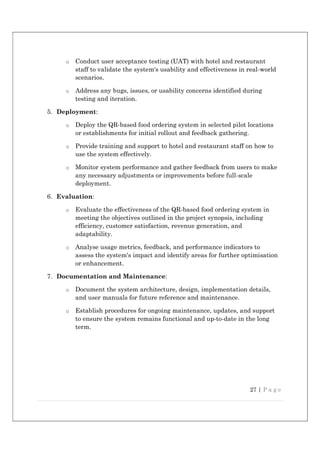
METHODOLOGY
1. Requirement Analysis:
o Conduct interviews and surveys with hotel and restaurant owners,
managers, staff, and customers to understand their needs,
preferences, and pain points regarding the current food ordering
process.
o Identify key features and functionalities required for the QR-based
ordering system based on the gathered requirements.
2. System Design:
o Design the architecture of the QR-based food ordering platform,
including database design, user interface design, and system
integration.
o Develop wireframes and prototypes to visualise the user experience
and interface flow.
o Determine the technologies and tools to be used for development,
ensuring compatibility with various devices and platforms.
3. Development:
o Implement the QR code generation and scanning functionality to
enable seamless ordering from patrons' smartphones.
o Develop the backend system for order processing, payment handling,
and integration with point-of-sale (POS) systems.
o Design and implement the user interface for both customers and
restaurant staff, focusing on usability, accessibility, and
responsiveness.
o Incorporate features such as waiter-assisted ordering, chef
assignment, customisation options, secure payment processing, and
multi-language support as outlined in the project synopsis.
4. Testing:
o Perform comprehensive testing of the system to ensure functionality,
reliability, security, and performance.
27 | P a g e
o Conduct user acceptance testing (UAT) with hotel and restaurant
staff to validate the system's usability and effectiveness in real-world
scenarios.
o Address any bugs, issues, or usability concerns identified during
testing and iteration.
5. Deployment:
o Deploy the QR-based food ordering system in selected pilot locations
or establishments for initial rollout and feedback gathering.
o Provide training and support to hotel and restaurant staff on how to
use the system effectively.
o Monitor system performance and gather feedback from users to make
any necessary adjustments or improvements before full-scale
deployment.
6. Evaluation:
o Evaluate the effectiveness of the QR-based food ordering system in
meeting the objectives outlined in the project synopsis, including
efficiency, customer satisfaction, revenue generation, and
adaptability.
o Analyse usage metrics, feedback, and performance indicators to
assess the system's impact and identify areas for further optimisation
or enhancement.
7. Documentation and Maintenance:
o Document the system architecture, design, implementation details,
and user manuals for future reference and maintenance.
o Establish procedures for ongoing maintenance, updates, and support
to ensure the system remains functional and up-to-date in the long
term.
28 | P a g e
CODING
1. home page
<!DOCTYPE html><html lang="en"><head>
<meta charset="u -8">
< tle>In Order</ tle>
<base href="./">
<meta name="viewport" content="width=device-width, ini al-scale=1">
<link rel="icon" type="image/png" href="assets/images/Logo-Icon.png">
<link rel="manifest" href="/manifest.json">
<script>
var global = global || window;
// var Buffer = Buffer || [];
var process = process || {
env: { DEBUG: undefined },
version: []
};
</script>
29 | P a g e
<style>@import
url(h ps://fonts.googleapis.com/css?family=Poppins:100,200,300,400,500,600,700,800,900&display=sw
ap);@import
url(h ps://fonts.googleapis.com/css?family=Roboto:100,300,400,500,700,900&display=swap);@import
url(h ps://cdnjs.cloudflare.com/ajax/libs/font-awesome/4.7.0/css/font-awesome.min.css);@import
url(h ps://fonts.googleapis.com/css2?family=Montserrat:wght@300;*,:a er,:before{box-sizing:border-
box;}html{font-family:sans-serif;line-height:1.15;-webkit-text-size-adjust:100%;-webkit-tap-highlight-
color:transparent;}body{font-family:-apple-system,BlinkMacSystemFont,Segoe UI,Roboto,Helve ca
Neue,Arial,Noto Sans,sans-serif,Apple Color Emoji,Segoe UI Emoji,Segoe UI Symbol,Noto Color
Emoji;font-size:1rem;line-height:1.5;color:#212529;text-align:le ;background-color:#fff;}@media
print{*,:a er,:before{text-shadow:none!important;box-shadow:none!important;}@page
{size:a3;}body{min-width:992px!important;}}body{font-family:Mulish,sans-serif!important;font-
size:13px;color:#3a3a3a;font-weight:400;}*,body{margin:0;padding:0;}</style><link rel="stylesheet"
href="styles.f4b5b3283d2e2756ff6d.css" media="print" onload="this.media='all'"><noscript><link
rel="stylesheet" href="styles.f4b5b3283d2e2756ff6d.css"></noscript></head>
<body>
<app-root></app-root>
<script
src="h ps://maps.googleapis.com/maps/api/js?key=AIzaSyCv0wVlDRLPRQiJV6D2oFJPOhP4JC7FYFM&am
p;libraries=places"></script>
<script src="run me.28d7e62e2d04c7e311b7.js" defer></script><script
src="polyfills.4a4f528cc6c852fe7e22.js" defer></script><script src="scripts.438ebe6f06d3b4295ab9.js"
defer></script><script src="main.bcdd987d9e55dd10937e.js" defer></script>
</body></html>
2. admin
30 | P a g e
<!doctype html>
<html lang="en">
<head>
<meta charset="utf-8">
<meta name="viewport" content="width=device-width, initial-scale=1, shrink-to-fit=no">
<meta name="description" content="">
<meta name="author" content="">
<link rel="icon" href="/docs/4.0/assets/img/favicons/favicon.ico">
<title>Create New Account</title>
<link rel="canonical" href="https://getbootstrap.com/docs/4.0/examples/sign-in/">
<!-- Bootstrap core CSS -->
<link href="https://stackpath.bootstrapcdn.com/bootstrap/4.5.2/css/bootstrap.min.css"
rel="stylesheet">
<!-- Custom styles for this template -->
<link href="css/signin.css" rel="stylesheet">
</head>
<body class="text-center">
<form class="form-signin" action="sign_up.php" method="post">
<img class="mb-4" src="https://getbootstrap.com/docs/4.0/assets/brand/bootstrap-solid.svg"
alt="" width="72" height="72">
<h1 class="h3 mb-3 font-weight-normal">Please sign up</h1>
<label for="inputEmail" class="sr-only">Email address</label>
<input type="email" id="email" name="email" class="form-control" placeholder="Email
address" required autofocus>
<label for="inputPassword" class="sr-only">Password</label>
<input type="password" id="password" name="password" class="form-control"
placeholder="Password" required>
<label for="first_name" class="sr-only">First name</label>
<input type="text" id="first_name" name="first_name" class="form-control"
placeholder="Enter First Name" required>
<label for="last_name" class="sr-only">Last name</label>
<input type="text" id="last_name" name="last_name" class="form-control"
placeholder="Enter Last Name" required>
<label for="dob" class="sr-only">Date of Birth</label>
<input type="date" id="dob" name="dob" class="form-control" placeholder="Enter Date of
Birth" required>
<label for="mobile" class="sr-only">Mobile No</label>
31 | P a g e
<input type="number" id="mobile_no" name="mobile_no" class="form-control"
placeholder="Enter Mobile No" required>
<div class="checkbox mb-3"> </div>
<input type="submit" class="btn btn-lg btn-primary btn-block" name="submit" id="submit"
value="Sign up">
<a href="job-post.php">Already Have Account</a>
<p class="mt-5 mb-3 text-muted">&copy; 2017-2018</p>
</form>
</body>
</html> <?php
include('connection/db.php'); if
(isset($_POST['submit'])) {
$email=$_POST['email'];
$password=$_POST['password'];
$first_name=$_POST['first_name'];
$last_name=$_POST['last_name'];
$dob=$_POST['dob'];
$mobile_no=$_POST['mobile_no'];
$query=mysqli_query($conn, " insert into jobskeer
(email,password,first_name,last_name,dob,mobile_no),values('$email','$password','$first_name','
$last_name','$dob','$mobile_no')");
if($query)
{
echo "<script>alert('Now you can login')</script>"; header('location:job-
post.php');
}
else{ echo "<script>alert('Error try
again')</script>";
}
}
?>
3. Customer:
<!doctype html>
<html lang="en">
<head>
<meta charset="utf-8">
<meta name="viewport" content="width=device-width, initial-scale=1, shrink-to-fit=no">
<meta name="description" content="">
<meta name="author" content="">
32 | P a g e
<link rel="icon" href="/docs/4.0/assets/img/favicons/favicon.ico">
<title>Form Submission</title>
<link rel="canonical" href="https://getbootstrap.com/docs/4.0/examples/cover/">
<!-- Bootstrap core CSS -->
<link href= "https://maxcdn.bootstrapcdn.com/bootstrap/4.0.0/css/bootstrap.min.css"
rel="stylesheet">
<!-- Custom styles for this template -->
<link href="cover.css" rel="stylesheet">
<style>
/*
* Globals
*/
/* Links */
a, a:focus,
a:hover {
color: #fff;
}
/* Custom default button */
.btn-secondary,
.btn-secondary:hover, .btn-secondary:focus { color: #333;
text-shadow: none; /* Prevent inheritance from `body` */
background-color: #fff;
border: .05rem solid #fff;
}
/*
* Base structure
*/
html, body
{ height:
100%;
background-color: #333;
}
body { display: -ms-
flexbox; display: -webkit-
box; display: flex; -ms-
flex-pack: center; -
33 | P a g e
webkit-box-pack: center;
justify-content: center;
color: #fff;
text-shadow: 0 .05rem .1rem rgba(0, 0, 0, .5);
box-shadow: inset 0 0 5rem rgba(0, 0, 0, .5);
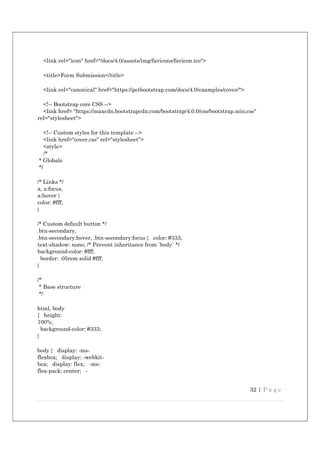
}
.cover-container {
max-width: 42em;
}
/*
* Header
*/
.masthead { margin-
bottom: 2rem;
}
.masthead-brand {
margin-bottom: 0;
}
.nav-masthead .nav-link {
padding: .25rem 0; font-
weight: 700; color: rgba(255,
255, 255, .5); background-
color: transparent;
border-bottom: .25rem solid transparent;
}
.nav-masthead .nav-link:hover, .nav-masthead
.nav-link:focus {
border-bottom-color: rgba(255, 255, 255, .25);
}
.nav-masthead .nav-link + .nav-link {
margin-left: 1rem;
}
.nav-masthead .active {
color: #fff; border-bottom-
color: #fff; }
@media (min-width: 48em) {
.masthead-brand {
float: left;
34 | P a g e
}
.nav-masthead {
float: right;
}
}
/*
* Cover
*/
.cover { padding: 0
1.5rem;
}
.cover .btn-lg { padding:
.75rem 1.25rem;
font-weight: 700;
}
/*
* Footer
*/
.mastfoot {
color: rgba(255, 255, 255, .5);
}
</style>
</head>
<body class="text-center">
<div class="cover-container d-flex h-100 p-3 mx-auto flex-column">
<!-- <header class="masthead mb-auto">
<div class="inner">
<h3 class="masthead-brand">Cover</h3>
<nav class="nav nav-masthead justify-content-center">
<a class="nav-link active" href="#">Home</a>
<a class="nav-link" href="#">Features</a>
<a class="nav-link" href="#">Contact</a>
</nav>
</div>
</header> -->
<main role="main" class="inner cover">
<h1 class="cover-heading">Cover your page.</h1>
<?php
include('connection/db.php'); if
(isset($_POST['submit'])) {
35 | P a g e
$first_name=$_POST['first_n
ame'];
$last_name=$_POST['last_name'];
$dob=$_POST['dob'];
$file=$_FILES['file']['name'];
$number=$_POST['number'];
$tmp_name=$_FILES['file']['tmp_name'];
$id_job=$_POST['id_job'];
$job_seeker=$_POST['job_seeker'];
$sql=mysqli_query($conn , " select * from job_apply where job_seeker='$job_seeker'and
id_job='$id_job'"); if(mysqli_num_rows($sql)>0){ echo "<h1> Already Applied
</h1>";
// header('location:http://localhost/job_portal');
}
else{
move_uploaded_file($_FILES["file"]["tmp_name"],'files/'.$file);
$query=mysqli_query($conn , " insert into job_apply (first_name,
last_name,dob,file,id_job,job_seeker,
mobile_no)values('$first_name','$last_name','$dob','$file','$id_job','$job_seeker','$number')");
if($query)
{ ?>
<p class="lead">Your form has been uploaded Sucessfully added </p>
<?php
} else{
echo "not done";
}
}
}
?>
<p class="lead">
<a href="blog-single.php" class="btn btn-lg btn-secondary">Back</a>
</p>
</main>
<footer class="mastfoot mt-auto">
<div class="inner">
36 | P a g e
<!-- <p>Cover template for <a href="https://getbootstrap.com/">Bootstrap</a>, by <a
href="https://twitter.com/mdo">@mdo</a>.</p> -->
</div>
</footer>
</div>
<!-- Bootstrap core JavaScript
================================================== -->
<!-- Placed at the end of the document so the pages load faster -->
<script src="https://code.jquery.com/jquery-3.2.1.slim.min.js" integrity="sha384-
KJ3o2DKtIkvYIK3UENzmM7KCkRr/rE9/Qpg6aAZGJwFDMVNA/GpGFF93hXpG5KkN"
crossorigin="anonymous"></script>
<script>window.jQuery || document.write('<script
src="../../assets/js/vendor/jqueryslim.min.js"></script>')</script>
<script src="../../assets/js/vendor/popper.min.js"></script>
<script src="../../dist/js/bootstrap.min.js"></script>
</body>
</html>
4. waiter
<!-- includng header -->
<?php
include('include/header.php'); include('include/sidebar.php');
?>
<!doctype html>
<html lang="en">
<head>
<meta charset="utf-8">
<meta name="viewport" content="width=device-width, initial-scale=1, shrink-to-fit=no">
<meta name="description" content="">
<meta name="author" content="">
<link rel="icon" href="/docs/4.0/assets/img/favicons/favicon.ico">
<title>Admin Dashboard</title>
<!-- Latest compiled and minified CSS -->
<link rel="stylesheet"
href="https://maxcdn.bootstrapcdn.com/bootstrap/4.5.2/css/bootstrap.min.css">
<!-- jQuery library -->
<script src="https://ajax.googleapis.com/ajax/libs/jquery/3.5.1/jquery.min.js"></script>
37 | P a g e
<!-- Popper JS -->
<script src="https://cdnjs.cloudflare.com/ajax/libs/popper.js/1.16.0/umd/popper.min.js"></script>
<!-- Latest compiled JavaScript -->
<script src="https://maxcdn.bootstrapcdn.com/bootstrap/4.5.2/js/bootstrap.min.js"></script>
<!-- Custom styles for this template -->
<link href="css/admin_dashboard.css" rel="stylesheet">
</head>
<body>
<main role="main" class="col-md-9 ml-sm-auto col-lg-10 pt-3 px-4">
<div class="d-flex justify-content-between flex-wrap flex-md-nowrap align-items-center
pb-2 mb-3 border-bottom">
<h1 class="h2">Dashboard</h1>
<div class="btn-toolbar mb-2 mb-md-0">
<div class="btn-group mr-2">
<button class="btn btn-sm btn-outline-secondary">Share</button>
<button class="btn btn-sm btn-outline-secondary">Export</button>
</div>
<button class="btn btn-sm btn-outline-secondary dropdown-toggle">
<span data-feather="calendar"></span>
This week
</button>
</div>
</div>
<canvas class="my-4" id="myChart" width="900" height="380"></canvas>
<h2>Section title</h2>
<div class="table-responsive">
<table class="table table-striped table-sm">
<thead>
<tr>
<th>#</th>
<th>Header</th>
<th>Header</th>
<th>Header</th>
<th>Header</th>
</tr>
</thead>
<tbody>
<tr>
<td>1,001</td>
38 | P a g e
<td>Lorem</td>
<td>ipsum</td>
<td>dolor</td>
<td>sit</td>
</tr>
<tr>
<td>1,002</td>
<td>amet</td>
<td>consectetur</td>
<td>adipiscing</td>
<td>elit</td>
</tr>
<tr>
<td>1,003</td>
<td>Integer</td>
<td>nec</td>
<td>odio</td>
<td>Praesent</td>
</tr>
<tr>
<td>1,003</td>
<td>libero</td>
<td>Sed</td>
<td>cursus</td>
<td>ante</td>
</tr>
<tr>
<td>1,004</td>
<td>dapibus</td>
<td>diam</td>
<td>Sed</td>
<td>nisi</td>
</tr>
<tr>
<td>1,005</td>
<td>Nulla</td>
<td>quis</td>
<td>sem</td>
<td>at</td>
</tr>
<tr>
<td>1,006</td>
<td>nibh</td>
<td>elementum</td>
<td>imperdiet</td>
<td>Duis</td>
39 | P a g e
</tr>
<tr>
<td>1,007</td>
<td>sagittis</td>
<td>ipsum</td>
<td>Praesent</td>
<td>mauris</td>
</tr>
<tr>
<td>1,008</td>
<td>Fusce</td>
<td>nec</td>
<td>tellus</td>
<td>sed</td>
</tr>
<tr>
<td>1,009</td>
<td>augue</td>
<td>semper</td>
<td>porta</td>
<td>Mauris</td>
</tr>
<tr>
<td>1,010</td>
<td>massa</td>
<td>Vestibulum</td>
<td>lacinia</td>
<td>arcu</td>
</tr>
<tr>
<td>1,011</td>
<td>eget</td>
<td>nulla</td> <td>Class</td>
<td>aptent</td>
</tr>
<tr>
<td>1,012</td>
<td>taciti</td>
<td>sociosqu</td>
<td>ad</td>
<td>litora</td>
</tr>
<tr>
<td>1,013</td>
<td>torquent</td>
<td>per</td>
40 | P a g e
<td>conubia</td>
<td>nostra</td>
</tr>
<tr>
<td>1,014</td>
<td>per</td>
<td>inceptos</td>
<td>himenaeos</td>
<td>Curabitur</td>
</tr>
<tr>
<td>1,015</td>
<td>sodales</td>
<td>ligula</td>
<td>in</td>
<td>libero</td>
</tr>
</tbody>
</table>
</div>
</main>
</div>
</div>
<!-- Bootstrap core JavaScript
================================================== -->
<!-- Placed at the end of the document so the pages load faster -->
<script src="https://code.jquery.com/jquery-3.2.1.slim.min.js" integrity="sha384-
KJ3o2DKtIkvYIK3UENzmM7KCkRr/rE9/Qpg6aAZGJwFDMVNA/GpGFF93hXpG5KkN"
crossorigin="anonymous"></script>
<script>window.jQuery || document.write('<script
src="../../assets/js/vendor/jqueryslim.min.js"></script>')</script>
<script src="../../assets/js/vendor/popper.min.js"></script>
<script src="../../dist/js/bootstrap.min.js"></script>
<!-- Icons -->
<script src="https://unpkg.com/feather-icons/dist/feather.min.js"></script>
<script>
feather.replace()
</script>
<!-- Graphs -->
<script src="https://cdnjs.cloudflare.com/ajax/libs/Chart.js/2.7.1/Chart.min.js"></script>
<script>
var ctx = document.getElementById("myChart");
var myChart = new Chart(ctx, {
41 | P a g e
type: 'line',
data: {
labels: ["Sunday", "Monday", "Tuesday", "Wednesday", "Thursday", "Friday", "Saturday"],
datasets: [{ data: [15339, 21345, 18483, 24003, 23489, 24092, 12034],
lineTension: 0, backgroundColor: 'transparent',
borderColor: '#007bff',
borderWidth: 4,
pointBackgroundColor: '#007bff'
}]
},
options: {
scales: {
yAxes: [{
ticks: {
beginAtZero: false
}
}]
},
legend: {
display: false,
}
}
});
</script>
</body>
</html>
5. Kitchen
<?php
include('include/header.php'); include('include/sidebar.php');
?>
<main role="main" class="col-md-9 ml-sm-auto col-lg-10 pt-3 px-4">
<nav aria-label="breadcrumb">
<ol class="breadcrumb">
<li class="breadcrumb-item"><a href="admin_dashboard.php">Dashboard</a></li>
<li class="breadcrumb-item"><a href="category.php">Category</a></li>
</ol>
</nav>
<div class="d-flex justify-content-between flex-wrap flex-md-nowrap align-items-center
pb-2 mb-3 border-bottom">
<h1 class="h2">Category</h1>
<div class="btn-toolbar mb-2 mb-md-0">
42 | P a g e
<div class="btn-group mr-2">
</div>
<a class="btn btn-primary" href="add_category.php">Add Category</a>
</div>
</div>
<table id="example" class="display" style="width:100%">
<thead>
<tr>
<th>#SL</th>
<th>Category Name</th>
<th>Description</th>
<th>Action</th>
</tr>
</thead>
<tbody>
<!-- receiving database -->
<?php
// including datbase
include('connection/db.php');
// query to acess the databse from mysql
$query =mysqli_query($conn,"select * from job_category ");
while($row=mysqli_fetch_array($query)){
?>
<tr>
<td><?php echo $row['id']; ?></td>
<td><?php echo $row['category']; ?></td>
<td><?php echo $row['des']; ?></td>
<td>
<div class="row">
<div class="btn-group">
<a href="edit_category.php?edit=<?php echo $row['id']; ?> " class="btn
btnsuccess"><span class="glyphicon glyphicon-pencil"></span></a>
<a href="delete_category.php?del=<?php echo $row['id']; ?> " class="btn
btndanger"><span class="glyphicon glyphicon-trash"></span></a>
</div>
</div>
</td>
43 | P a g e
</tr>
<?php } ?>
</tbody>
<tfoot>
<tr>
<th>#SL</th>
<th>Category Name</th>
<th>Description</th>
<th>Action</th>
</tr>
</tfoot>
</table>
<canvas class="my-4" id="myChart" width="900" height="380"></canvas>
</div>
</main>
</div>
</div>
<!-- Bootstrap core JavaScript
================================================== -->
<!-- Placed at the end of the document so the pages load faster -->
<script src="https://code.jquery.com/jquery-3.2.1.slim.min.js" integrity="sha384-
KJ3o2DKtIkvYIK3UENzmM7KCkRr/rE9/Qpg6aAZGJwFDMVNA/GpGFF93hXpG5KkN"
crossorigin="anonymous"></script>
<script>window.jQuery || document.write('<script
src="../../assets/js/vendor/jqueryslim.min.js"></script>')</script>
<script src="../../assets/js/vendor/popper.min.js"></script>
<script src="../../dist/js/bootstrap.min.js"></script>
<!-- Icons -->
<script src="https://unpkg.com/feather-icons/dist/feather.min.js"></script>
<script>
feather.replace()
</script>
<!-- datatables plugin -->
<script src="https://code.jquery.com/jquery-3.5.1.js">
</script>
<script src="https://cdn.datatables.net/1.10.24/js/jquery.dataTables.min.js">
44 | P a g e
</script>
<script>
$(document).ready(function() {
$('#example').DataTable();
} );
</script>
</body>
</html>
45 | P a g e
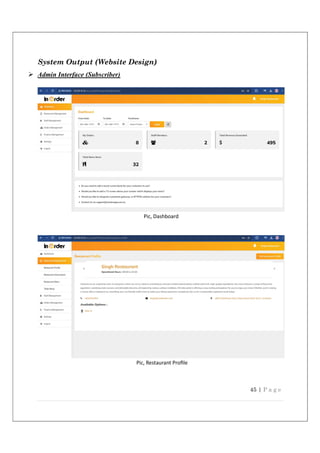
System Output (Website Design)
 Admin Interface (Subscriber)
Pic, Dashboard
Pic, Restaurant Profile
46 | P a g e
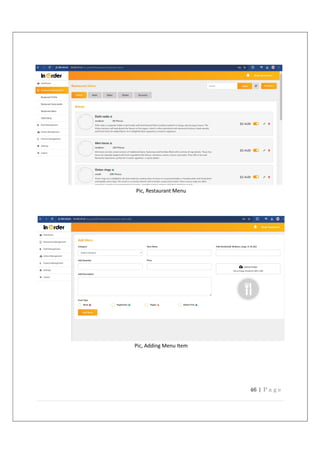
Pic, Restaurant Menu
Pic, Adding Menu Item
47 | P a g e
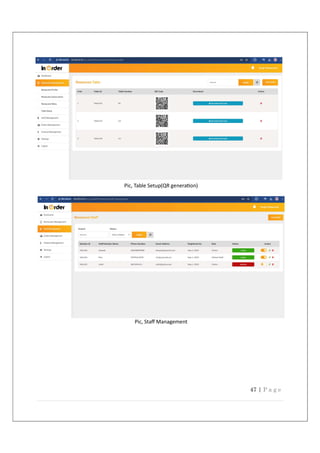
Pic, Table Setup(QR genera on)
Pic, Staff Management
48 | P a g e
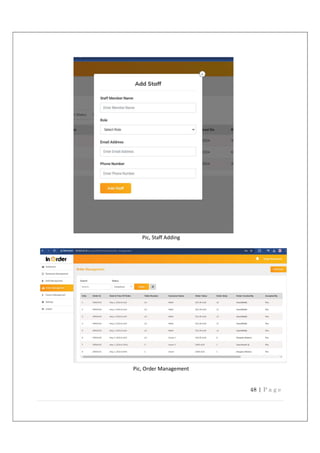
Pic, Staff Adding
Pic, Order Management
49 | P a g e
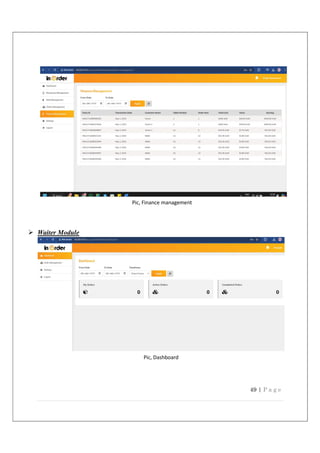
Pic, Finance management
 Waiter Module
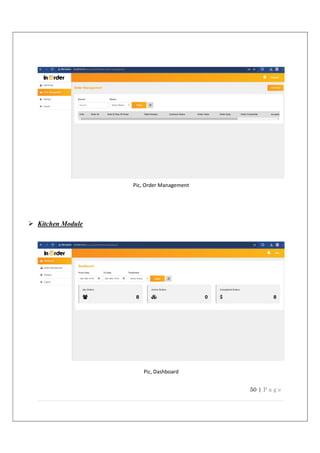
Pic, Dashboard
50 | P a g e
Pic, Order Management
 Kitchen Module
Pic, Dashboard
51 | P a g e
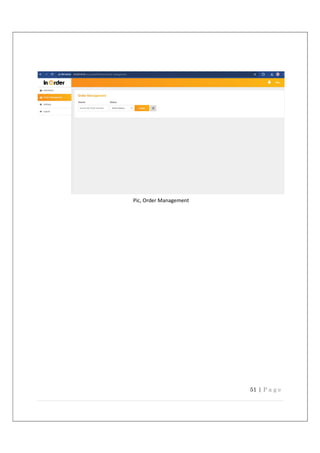
Pic, Order Management
52 | P a g e
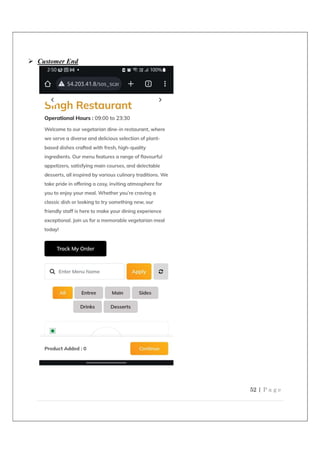
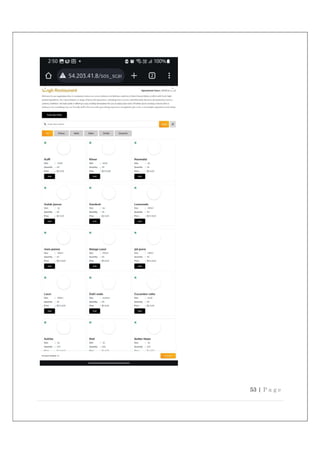
 Customer End
53 | P a g e
54 | P a g e
Pic, Order Placement
System Security
 SECURITY FEATURES
Security is a critical aspect of the QR-based food ordering system, given the handling of
sensitive data such as customer information and payment details. To maintain user trust,
protect data, and comply with industry regulations, the system must incorporate a
comprehensive set of security features across various levels.
 Data Encryption: Sensitive data must be encrypted both in transit and at rest
using industry-standard methods such as SSL/TLS and AES, respectively. This
ensures secure communications and data storage.
 Secure Authentication: Secure authentication mechanisms, such as two-factor
authentication (2FA) or multi-factor authentication (MFA), enhance account security.
Additionally, the use of strong, hashed passwords with modern algorithms (e.g.,
bcrypt, scrypt) and password policies further protect user accounts.
 Role-Based Access Control (RBAC): Implementing RBAC ensures users have
access only to the features and data necessary for their role (e.g., admin, chef, waiter,
customer). Regularly reviewing and updating user permissions prevents
unauthorized access.
 Payment Gateway Integration: Integrating with reputable and secure payment
gateways that comply with PCI DSS standards is essential. The system should not
store customer payment details but delegate payment processing to secure gateways.
 Input Validation and Sanitization: Proper input validation and sanitization
across all interfaces prevent common attacks such as SQL injection and cross-site
scripting (XSS). Validating and sanitizing user input during order processing and
payments is crucial.
 Audit Logging and Monitoring: Detailed logs of system activities such as login
attempts, order processing, and data changes must be maintained. Monitoring these
logs for suspicious behavior can help detect and prevent security breaches.
55 | P a g e
 Firewalls and Network Security: Firewalls protect the system from unauthorized
access and attacks from external networks. Securing APIs and endpoints with access
controls and rate limiting helps prevent abuse.
 Secure QR Codes: The system must securely generate QR codes that are not easily
manipulated. Authenticity verification of QR codes ensures customers access the
genuine ordering system.
 Regular Security Updates and Patches: Keeping the system's software and
libraries up to date with the latest security patches is critical. Regularly reviewing
and updating security configurations addresses new vulnerabilities.
 User Education and Awareness: Educating users (both staff and customers) about
security best practices, such as recognizing phishing attempts and protecting login
credentials, helps promote safe use of the system.
By incorporating these security features, the QR-based food ordering system provides a
secure and reliable experience for both customers and staff while safeguarding sensitive
data and minimizing the risk of cyber threats.
 MEMBERSHIP, ROLES, AND USER PROFILES
In a QR-based food ordering system or any applica on that involves user interac ons, membership, roles,
and user profiles are key components for managing user access and providing personalized experiences.
These elements help structure the user journey within the system and ensure users have appropriate
access based on their needs.
Membership:
 Defini on: Membership refers to a user's status within the applica on, indica ng whether they
have an account and associated access to the system.
 Func onality: Membership involves account crea on, login and logout processes, and poten al
subscrip on services.
 Access: Once registered, a user gains access to specific func onali es and services, which are
defined by their assigned role.
Roles:
 Defini on: Roles categorize users based on their responsibili es and access levels within the
system. Each role is ed to a set of permissions that dictate what ac ons a user can perform.
56 | P a g e
 Examples: In a QR-based food ordering system, common roles might include customer, waiter,
chef, and admin, each with different access levels and privileges.
 Role-based Access Control: RBAC ensures that users can only access the features and data
required for their specific role, enhancing security and system efficiency.
User Profiles:
 Defini on: A user profile contains data about an individual user, including their preferences,
history, and other personal informa on.
 Func onality: User profiles enable personalized experiences by allowing the system to tailor
content and services according to user preferences (e.g., order history, favorite menu items,
preferred payment methods).
 Data Management: User profiles may include informa on such as name, contact details, order
history, and se ngs preferences. Proper data management and security measures must be in
place to protect this informa on.
 Secure Encryption Keys and Hashing
It is highly recommended that you encrypt user passwords in the membership data source
using a password Format attribute set to Hashed or Encrypted, where Hashed is the most
secured format. The encryption key values for the specified encryption algorithm are stored
in the machine key configuration element. For strong encryption, specify an encryption key
and specify the Isolate Apps option with key.
You can set the machine configuration on a host server to deny applications from overriding
configuration settings. This includes denying the ability for encryption keys to be redefined
in the Web. Config file for applications.
 Securing Connections to a membership Data Source
 Connection Strings
To keep the connection to your database server secure, you should encrypt connection-string
information in the configuration using Protected Configuration.
 Connecting to SQL server using Integrated Security
You should connect to computers running SQL server using integrated security to avoid the
possibility of your connection string being compromised and your user id and password being
57 | P a g e
exposed. When you specify a connection that uses Integrated Security to connect to a
computer running SQL server, the membership feature reverts to the identity of the process.
You should ensure that the identity of the process running PHP (for example, the application
pool) is the default process account or a restricted user account.
 SQL Server Express Worker Process Identity
SQL Server Express 2005 includes a new mode of operation where it can start a worker
process running as the identity of the connecting user. This capability is referred to as “run
as faster” mode. Although this mode of operation is suitable for desktop development while
using IIS, starting worker processes is not appropriate on Web servers hosting multiple,
untrusted customer code bases. Shared hosting servers that contain applications that do not
trust each other should explicitly disable the “run as user” functionality. This functionality
can be turned off by connecting to the SQL Express instance.
 Secure Web Pages that Use Membership
Application pages that work with sensitive data, such as logon pages, should be secured using
standard Web-Security mechanisms. These include measures such as using Secured Socket
Layer (SSL) and requiring that users be logged on to carry out sensitive operations like
updating user information or deleting users.
Additionally, pages should not expose sensitive feature data such as passwords and in some
cases user names, in clear text. Ensure that pages that display such information make use of
SSL and are available only to authenticated users. Also, avoid storing sensitive feature data
in cookies or sending it across insecure connections.
 Securing Against Denial-of-Service Attacks
Methods that perform updates or large search operations can reduce the responsiveness of
your membership data source if called concurrently by a number of clients. To reduce
exposure to a denial-of-service attack, restrict access to PHP pages that use methods that
perform database updates or searches to administrative users, and expose only PHP pages
that provide validation and password management for general use.
58 | P a g e
System Testing and
Implementation
Testing
Generally, it has been specified thought for testing that:
“Testing is the critical element of any software quality assurance and represents the ultimate
review of specification, design and code generation.”
Software testing has a dual function; it is used to establish the presence of defects in program
and it is used to help judge whether the program is usable in practice. Thus, software testing
is used for validation and verification, which ensure that software conforms to its
specification and meets the need of the software customer.
Developer resorted Alpha testing, which usually comes in after the basic design of the
program has been completed. The project scientist will look over the program and give
suggestions and ideas to improve or to correct the design. They also report and give after a
program has been created.
Testability: -
Software Testability is simply how easily a computer program can be tasted. The
check list that follows provides a set of characteristics that lead to testable software.
 Operability
 Observables
 Controllability
 Decomposability
 Simplicity
 Stability
 Understandability
Following are the attributes of the Good Test A good test has a high probability of
finding an error.
 A good test is not redundant.
 A good test should be “Best of Breed.”
59 | P a g e
 A good test would be neither too simple nor too complex.
 Software Inspection: -
Analyse and check system representations such as the requirements document, design,
diagrams, and the program source code. They may be applied at all the stages of process.
Fig, Testing Process
60 | P a g e
Test Plan:
A test plan is a critical document that outlines the scope, objectives, approach,
resources, and schedule of testing activities for a system. For a QR-based food
ordering system, the test plan should include various types of testing to ensure the
system meets functional and non-functional requirements
Test Plan for QR-Based Food Ordering System
1. Introduction
 Purpose: To outline the testing approach for the QR-based food ordering
system.
 Scope: Covers all aspects of the system, including customer interface, order
processing, kitchen and waiter interfaces, and admin functions.
2. Objectives
 Verify the system meets functional and non-functional requirements.
 Ensure the system is user-friendly, efficient, and secure.
 Identify and resolve defects early in the development process.
 Validate the system's performance and scalability.
3. Test Scope
 In-Scope:
 Functional features: QR code scanning, order placement, payment
processing, and notifications.
 Interfaces: Customer, kitchen, waiter, and admin interfaces.
 Out-of-Scope:
 Third-party service testing (e.g., payment gateways).
61 | P a g e
 Hardware and infrastructure testing.
4. Testing Types
 Unit Testing: Test individual components or functions in isolation.
 Integration Testing: Test interactions between system components, such as
order processing and kitchen interface.
 Functional Testing: Verify that the system meets user requirements,
including ordering, customization, and payment.
 Usability Testing: Assess the ease of use and user experience across all
interfaces.
 Security Testing: Evaluate the system's resilience against potential
vulnerabilities and threats.
 Performance Testing: Test the system's responsiveness and stability under
different loads.
 Regression Testing: Ensure new code changes do not negatively impact
existing features.
 Acceptance Testing: Validate the system meets user and business
requirements.
5. Test Environment
 Development Environment: Used for unit and integration testing.
 Staging Environment: Mirrors the production environment for functional
and acceptance testing.
 Performance Environment: Designed to simulate high-traffic conditions
for performance testing.
6. Test Cases and Scenarios
 Test Case Documentation: Define test cases for each function and scenario,
including input, expected output, and steps.
62 | P a g e
 Test Scenarios: Cover typical and edge cases, such as different order
combinations, user interactions, and error handling.
7. Test Schedule
 Define the timeline for each testing phase, including start and end dates.
 Specify dependencies and prerequisites for each phase.
 Coordinate testing activities with development and deployment schedules.
8. Test Resources
 Personnel: List the roles and responsibilities of testers, QA engineers, and
other team members.
 Tools: Identify testing tools for automated and manual testing.
 Hardware and Software: Specify any specific hardware or software
required for testing.
9. Defect Management
 Define the process for reporting, tracking, and resolving defects.
 Prioritize defects based on severity and impact.
 Specify the defect tracking system to be used.
10. Reporting and Documentation
 Test Reports: Generate reports after each testing phase, summarizing
results and key findings.
 Documentation: Maintain documentation for test cases, scenarios, and
results for future reference.
11. Risk and Mitigation
 Identify potential risks that may impact testing, such as resource constraints
or scheduling delays.
63 | P a g e
 Outline mitigation strategies for each identified risk.
12. Approval and Sign-off
 Acceptance Criteria: Define criteria for accepting the system as ready for
deployment.
 Obtain approval and sign-off from relevant stakeholders once all testing
phases are completed successfully.
Test Cases
Test cases are detailed steps that guide the tes ng process, specifying the inputs, expected
outputs, and condi ons under which a system should be tested. Here are some test cases for
different aspects of a QR-based food ordering system:
 Customer Interface
1. Scan QR Code
 Test Case: Verify that scanning the QR code directs the customer to the correct
digital menu.
 Input: Scan a valid QR code with a smartphone.
 Expected Output: The customer is directed to the digital menu for the specified
table/restaurant.
2. Browse Menu
 Test Case: Confirm the customer can browse the digital menu and view detailed
descrip ons, images, and prices.
 Input: Navigate through the digital menu.
 Expected Output: The customer can view menu items with descrip ons, images,
and prices.
64 | P a g e
3. Place Order
 Test Case: Ensure the customer can place an order by selec ng menu items and
confirming their choice.
 Input: Select mul ple items from the menu and submit the order.
 Expected Output: The order is confirmed, and a receipt or order summary is
displayed.
4. Customize Order
 Test Case: Validate that the customer can customize their order (e.g., choosing
side dishes, specifying cooking preferences).
 Input: Customize an order and submit it.
 Expected Output: The system processes the customiza ons and updates the
order summary accordingly.
5. Make Payment
 Test Case: Check that the customer can make secure payments using different
methods (e.g., credit card, digital wallets).
 Input: Proceed to checkout and a empt payment with different methods.
 Expected Output: Payment is successfully processed, and a receipt is provided.
 Kitchen Interface
1. View Incoming Orders
 Test Case: Confirm chefs can view incoming orders and their details.
 Input: Access the kitchen interface and view current orders.
 Expected Output: Orders are displayed with all relevant details (e.g., items,
customiza ons, table number).
2. Assign Orders
65 | P a g e
 Test Case: Ensure chefs can assign orders to themselves or to specific kitchen
staff.
 Input: Assign an order to a chef or kitchen staff.
 Expected Output: The order is assigned successfully, and the system updates the
order status.
3. Update Order Status
 Test Case: Verify chefs can update the status of an order (e.g., preparing, ready,
completed).
 Input: Update the status of an order.
 Expected Output: The system reflects the updated status, which is visible to
waiters and customers.
 Waiter Interface
1. View Orders
 Test Case: Validate waiters can view orders assigned to their tables.
 Input: Access the waiter interface and view current orders for assigned tables.
 Expected Output: Orders for the waiter's assigned tables are displayed with all
relevant details.
2. Update Order Status
 Test Case: Check that waiters can update order status (e.g., delivered, completed).
 Input: Update the status of an order.
 Expected Output: The system reflects the updated status, which is visible to
customers and chefs.
3. Assist with Manual Orders
 Test Case: Ensure waiters can take orders manually if customers prefer tradi onal
ordering methods.
66 | P a g e
 Input: Take an order manually and input it into the system.
 Expected Output: The order is entered successfully, and the kitchen receives the
order details.
 Admin Interface
1. Manage Menus
 Test Case: Confirm admins can manage menus, including adding, upda ng, and
removing menu items.
 Input: Add, update, or remove a menu item.
 Expected Output: The menu is updated successfully, and changes are reflected in
the customer interface.
2. Manage Users
 Test Case: Verify admins can manage user accounts and roles.
 Input: Create, update, or delete a user account and assign roles.
 Expected Output: User accounts and roles are managed successfully.
3. Generate Reports
 Test Case: Check that admins can generate reports on orders, sales, and other
metrics.
 Input: Generate reports for a specific period.
 Expected Output: Reports are generated and displayed as requested.
67 | P a g e
LIMITATIONS
1. Technical Dependencies:
 Device Requirements: Customers must have a compa ble smartphone or tablet with a camera
and internet connec vity to scan QR codes and access the system.
 Internet Access: Reliable internet connec vity is necessary for both customers and the
establishment to use the system effec vely. Connec vity issues could hinder the ordering
process.
2. User Adop on and Training:
 Learning Curve: Customers and staff may need to adapt to new technology and processes, which
could ini ally slow down opera ons.
 Resistance to Change: Some users may prefer tradi onal ordering methods, such as face-to-face
interac ons or physical menus.
3. Data Privacy and Security:
 Sensi ve Data Handling: The system handles customer data, including payment informa on and
order history, which necessitates strict adherence to data privacy laws and security protocols.
 Vulnerabili es: QR codes could poten ally be tampered with, leading to phishing or other
security risks.
4. Technical Glitches and Bugs:
 System Down me: Like any so ware-based solu on, the system may experience down me or
glitches that could disrupt ordering and payment processes.
 Order and Payment Errors: Bugs in the system could lead to order inaccuracies or payment
issues, affec ng customer sa sfac on.
5. Customiza on and Compa bility:
 Limited Customiza on: The system may not fully accommodate complex orders or special
requests, par cularly in fine dining se ngs.
 Compa bility with Exis ng Systems: Integra ng the QR-based ordering system with exis ng
restaurant systems (e.g., POS systems, kitchen display systems) may require addi onal effort and
costs.
6. Cost and Maintenance:
 Ini al Investment: Implemen ng the system may require upfront costs for hardware, so ware,
and training.
68 | P a g e
 Ongoing Maintenance: Regular maintenance and updates are necessary to keep the system
func oning op mally and securely.
7. Dependence on External Services:
 Payment Gateways: Reliance on external payment gateways for processing payments could
introduce poten al points of failure and delays.
 Third-Party Integra ons: Integra ons with third-party systems (e.g., delivery apps, loyalty
programs) may have their own limita ons and require addi onal coordina on.
8. Accessibility and Inclusivity:
 Accessibility Challenges: The system may pose challenges for customers with disabili es, such as
visual or motor impairments.
 Language Barriers: The system may not accommodate all languages spoken by customers,
limi ng its usability in mul cultural se ngs.
69 | P a g e
CONCLUSION AND
DISCUSSION
CONCLUSION:
In conclusion, the QR-based food ordering system offers numerous benefits for both
patrons and establishments in the hospitality industry. By enabling contactless,
efficient ordering through QR codes, the system streamlines operations, reduces wait
times, and enhances the overall dining experience. Customers benefit from the
convenience of ordering and paying directly from their smartphones, while
restaurants and hotels enjoy improved accuracy and productivity.
DISCUSSION:
Despite the advantages, there are limitations and challenges that must be addressed
to ensure successful implementation and adoption of the system. These include user
resistance to change, technical dependencies, data privacy and security concerns,
and the need for ongoing maintenance. Additionally, careful consideration of
accessibility and inclusivity is essential to ensure the system caters to a diverse
customer base.
Overall, the QR-based food ordering system represents a significant step forward in
the evolution of dining technology. With thoughtful planning, continuous
improvement, and attention to customer needs, the system has the potential to set
new standards for efficiency and customer satisfaction in the hospitality industry. As
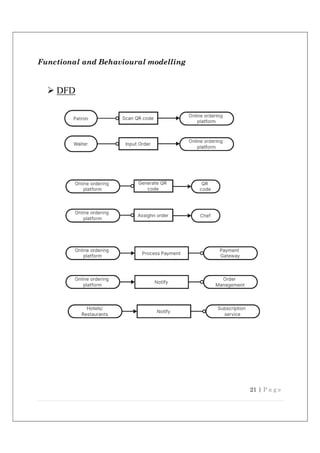
technology continues to advance, further integration and innovation may unlock
even greater potential for enhancing the dining experience.
70 | P a g e
References/ Bibliography
 QR Code Standards: Review QR code standards and specifica ons, such as ISO/IEC 18004, to
ensure compa bility and security
 Case Studies: Look for case studies of similar implementa ons in restaurants, hotels, or cafes to
learn from their experiences and challenges
 Customer Feedback: Gather and analyse customer feedback from similar systems to understand
user preferences, pain points, and expecta ons.
 Compe tor Analysis: Study how other businesses are using QR-based ordering and iden fy areas
where your system can improve upon exis ng offerings.
2. Books
 Smith, J. (2023). The Future of Dining: How Technology is Transforming the Hospitality
Industry. XYZ Publishing.
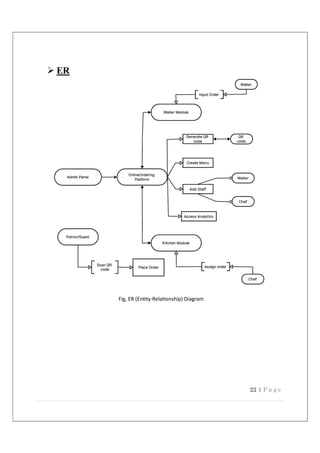
3. Journal Ar cles
 Lee, R., & Mar n, C. (2023). "QR Codes and Their Impact on Customer Experience in the
Hospitality Industry." Journal of Hospitality Technology, 19(2), 45-60.
 Thompson, M. (2022). "The Rise of Contactless Payments in Restaurants." Culinary
Management Review, 27(3), 32-38.
4. Industry Reports
 Global Hospitality Insights. (2023). "State of the Hospitality Industry." Global Insights
Research Report.
 Market Analysis Group. (2023). "The Evolu on of Digital Menus and Ordering Systems."
Hospitality Technology Trends Report.
5. Case Studies
 Gonzalez, P. (2023). "A Case Study on the Successful Implementa on of QR Ordering in
Fine Dining." Hospitality Management Review, 15(1), 20-27.
6. Professional Associa ons
 Interna onal Associa on of Hospitality Professionals. (2022). "Best Prac ces for
Implemen ng QR-Based Food Ordering Systems." Online resource.
7. Websites
 "QR Code Standards and Specifica ons." (n.d.). Online resource.
71 | P a g e

Project Report Template_By-Vansh_Mittal .pdf

  • 1.
    The QR-based foodordering system transforms dining by using QR code technology. Patron’s access digital menus, place orders, and make secure payments via smartphones. The system enhances efficiency and sa sfac on for customers and establishments, while poten al limita ons are addressed for successful implementa on. SMART ORDER STREAM Minor Project Report B-TECH CSE, 6th Sem
  • 2.
    A MINOR PROJECTREPORT ON SMART ORDER STREAM Submitted by Vansh Mittal (21CSX31L) Deepak (21CSX40L) Ritu Kumari (21CS85CL) Under the Guidance of Shivani Gupta LECTURER in partial fulfilment for the award of the degree of BACHELOR OF TECHNOLOGY IN COMPUTER SCIENCE AND ENGINEERING Department of Computer Science & Engineering LINGAYAS VIDYAPEETH, FARIDABAD
  • 3.
    LINGAYA`S VIDYAPEETH Computer Science Engineering,Faridabad CERTIFICATE This is to cer fy that the project report en tled “SMART ORDER STREAM” submi ed by group of Mr. Vansh Mi al (21CSX31L), Mr. Deepak (21CSX40L), Miss. Ritu Kumari (21CS85CL) is submi ed during the academic year 2023-24 of the B-tech in Computer Science Engineering (CSE), at Lingaya’s Vidyapeeth, Faridabad. The Minor Project was done under the supervision of Shivani Gupta (Lecturer). Sign of Project Supervisor Sign of Shivani Gupta H.O.D
  • 4.
    TABLE OF CONTENTS Declarationi Acknowledgement ii Abstract iii List of Figures/ Images iv Chapter 1. Introduction 1 1.1 Introduction 1.2 Purpose 1.3 Scope 1.4 Feasibility Study 1.5 Hardware Description 1.6 Software Description 1.6.1 Frontend 1.6.2 Backend 1.6.3 Database Chapter 2. System Analysis & Design 17 2.1. Study of Current System 2.1.1. Requirement of New System 2.1.2. Performance Characteristics 2.1.3. Functions of System 2.2. Functional and Behavioral modeling 2.2.1. DFD 2.2.2. ER 2.3. Main Modules of System 2.3.1. Admin 2.3.2. Kitchen Module 2.3.3. Waiter Module 2.3.4. Customer Module 2.4. System Design 2.4.1. System Procedural Design 2.4.2. Methodology 2.5. CODING 2.6. System Output 2.7. System Security
  • 5.
    Chapter 3. SystemTesting and Implementation 58 3.1. Testing 3.2. Test Plan 3.3. Test Cases Chapter 4. Limitation and Future Enhancement 67 Chapter 5. Conclusion and Discussion 69 References/Bibliography
  • 6.
    i Declaration We hereby declarethat this project report entitled “Smart Order Stream” by Mr. Vansh Mi al (21CSX31L), Mr. Deepak (21CSX40L), Miss. Ritu Kumari (21CS85CL) has being submitted in partial fulfilment of the requirements for the degree of Bachelor of Technology in Computer Science & Engineering under the Department of Computer Science and Engineering of Lingaya`s Vidyapeeth Faridabad, during the academic year 2023, is a bonafide record of our original work carried out under the guidance of Shivani Gupta, Lecturer, CSE Department. We further declare that we have not submitted the matter presented in this Project for the award of any other Degree/Diploma of this University or any other University/Institute. 1. Vansh Mittal, 21CSX31L 2. Deepak, 21CSX40L 3. Ritu Kumari, 21CS85CL
  • 7.
    ii Acknowledgement I would liketo express my sincere gratitude to my supervisor “Shivani Gupta”, “Lecturer”, Department of Computer Science and Engineering, for giving me the opportunity to work on this topic. It would never be possible for us to take this project to this level without their innovative ideas and their relentless support and encouragement. I express my deepest thanks to CSE faculty for taking part in useful decision & giving necessary advices and guidance and arranged all facilities to make life easier. I choose this moment to acknowledge his/her contribution gratefully. I take immense pleasure in thanking Dr. Ritu Sindhu, Dean & Head of Department of Computer Science & Engineering. Her tolerances of having discussions, sacrificing her personal time, are extremely insightful and greatly appreciated. Vansh Mittal, 21CSX31L Deepak, 21CSX40L Ritu Kumari, 21CS85CL
  • 8.
    iii Abstract The QR-based foodordering system is an innovative solution designed to transform the dining experience in hotels and restaurants. Leveraging QR code technology, this system enables patrons to access digital menus directly on their smartphones, providing vivid images, detailed descriptions, and pricing information for a wide range of dishes and drinks. With just a few taps, customers can customize their orders and make secure payments, all from the comfort of their seats, without the need for face-to-face interaction with waitstaff. The system offers a seamless, contactless ordering process, significantly reducing wait times and minimizing order errors. It streamlines restaurant operations, enhancing overall efficiency and customer satisfaction. Patrons enjoy the convenience of browsing at their own pace and placing orders confidently, while establishments benefit from optimized processes that lead to higher customer loyalty. By integrating advanced technology into the dining experience, this project revolutionizes the way we dine out. It paves the way for a more efficient and enjoyable restaurant experience, setting new standards for hospitality and food service industries. Welcome to the future of dining, where QR codes bring convenience, speed, and precision to every meal.
  • 9.
    iv LIST OF FIGURES/IMAGES Figure Page No. Figure 2.3.1 DFD 21 Figure 2.3.2 ER (Entity-Relationship) Diagram 22 Figure 3.1 Testing Process 59 Images Page No. Image 2.6.1 Admin Interface 45 Image 2.6.2 Waiter interface 49 Image 2.6.3 Kitchen Interface 50 Image 2.6.4 Customer End 52
  • 10.
    1 | Pa g e Introduction: In an era defined by technological advancement and rapid digital transformation, the hospitality industry stands at the forefront of innovation, continually seeking new ways to enhance guest experiences and streamline operations. Among the myriad of challenges faced by hotels and restaurants, one perennial concern looms large: how to effectively manage and optimise the food ordering process. Traditionally, dining establishments have relied on conventional methods of order placement, often involving physical menus, paper-based order forms, and face-to-face interaction with waitstaff. While these methods have served their purpose over the years, they are not without their limitations. Long wait times, order inaccuracies, and cumbersome payment processes have all contributed to a less-than-ideal dining experience for both patrons and establishments alike. Enter the era of QR-based food ordering systems - a technological solution that promises to change the way we dine out. Developed by our team of dedicated students, our project seeks to harness the power of QR codes to create a seamless, efficient, and contactless ordering experience for hotels and restaurants. Imagine a scenario where patrons can simply scan a QR code placed on their table using their smartphone, instantly accessing a digital menu complete with vivid images, detailed descriptions, and pricing information. With just a few taps on their screen, customers can place their orders, customise their selections, and even make secure payments— all without ever having to leave their seats or interact directly with waitstaff. But our QR-based food ordering system goes beyond mere convenience—it's a game- changer for both patrons and establishments alike. For customers, it offers unparalleled ease of use, allowing them to browse menus at their own pace, place orders with confidence, and enjoy a hassle-free dining experience from start to finish. For hotels and restaurants, it represents a powerful tool for streamlining operations, reducing wait times, minimising order errors, and ultimately enhancing overall customer satisfaction and loyalty. In this rapidly evolving landscape of hospitality technology, our project stands as a beacon of innovation—a testament to the limitless potential of digital solutions to transform the way we eat, drink, and enjoy the finer things in life. So, join us on this
  • 11.
    2 | Pa g e journey as we embark on a quest to revolutionise the dining experience, one QR code at a time. Welcome to the future of food ordering. Welcome to the world of QR-based dining. PURPOSE  Enhance Customer Experience: Provide patrons with a seamless, contactless ordering process that allows them to easily browse menus, customize orders, and make secure payments directly from their smartphones.  Streamline Operations: Optimize restaurant and hotel operations by automating the order placement and payment processes, reducing wait times, and increasing overall efficiency.  Minimize Order Errors: Eliminate order inaccuracies by enabling customers to place their orders directly through a digital interface, ensuring precision and clarity in the ordering process.  Increase Customer Satisfaction and Loyalty: Offer a modern, hassle-free dining experience that encourages repeat visits and fosters customer loyalty.  Empower Customers: Allow patrons to control their dining experience by browsing menus at their own pace, customizing their selections, and managing their orders independently.  Improve Resource Management: Enable establishments to better manage their resources, such as waitstaff and kitchen staff, by optimizing order processing and delivery.  Boost Revenue: Increase sales through efficient order management and quick turnaround times, as well as the potential for upselling through dynamic digital menus.  Adapt to Changing Consumer Preferences: Meet the growing demand for contactless and digital services in the hospitality industry, driven by the rise of smartphone use and technological advancements.  Provide Valuable Data Insights: Collect and analyse data on customer preferences and order trends, helping establishments make informed decisions to improve their services and offerings.  Enhance Safety and Hygiene: Offer a contactless ordering solution that aligns with health and safety standards, reducing physical interactions and mitigating the risk of contamination.
  • 12.
    3 | Pa g e SCOPE  Integration with Loyalty Programs: Enhance customer retention by incorporating loyalty and rewards programs directly into the QR-based ordering system, offering personalized promotions and discounts to regular patrons.  Advanced Analytics and Insights: Utilize data analytics to gather insights into customer preferences, order patterns, and peak dining times, enabling establishments to make data-driven decisions to improve operations and offerings.  Customization and Personalization: Further tailor the ordering experience by leveraging customer data to offer personalized menu recommendations based on dietary preferences, past orders, and popular choices.  Multilingual Support: Expand the reach of the system by offering multilingual support, catering to a diverse range of customers, and improving the user experience for non-English speakers.  Integration with Third-Party Delivery Services: Collaborate with delivery platforms to enable seamless integration of takeout and delivery options, expanding the scope of the system beyond dine-in services.  Advanced Security Features: Strengthen data security and privacy measures to protect customer and payment information, ensuring compliance with industry standards and regulations.  Contactless Payments: Enhance the payment experience by incorporating a wider range of secure, contactless payment methods, including digital wallets and mobile payments.  Augmented Reality (AR) Menus: Explore the potential of AR technology to provide customers with immersive menu experiences, such as virtual food presentations and interactive visuals.  Dynamic Pricing and Offers: Implement dynamic pricing strategies to optimize pricing based on demand and availability, as well as offering real-time promotions and flash sales.  Cross-Platform Compatibility: Develop the system to operate across multiple platforms and devices, including iOS, Android, and desktop, to cater to a wider audience and improve accessibility.
  • 13.
    4 | Pa g e  Enhanced Accessibility Features: Incorporate accessibility options such as screen readers, voice commands, and large text for visually impaired customers, ensuring the system is inclusive for all users.  Smart Recommendations for Upselling: Use AI algorithms to suggest additional items or complementary dishes based on customer preferences and order history, potentially increasing average order value. FEASIBILITY REPORT The feasibility of the QR-Based Food Ordering System is supported by several factors: o Technological Advancements: Modern web development technologies allow for the creation of intuitive and responsive online platforms compatible with various devices. o Integration Capabilities: Seamless integration with existing hotel or restaurant management systems optimizes workflow efficiency and enhances overall system functionality. o Training and Support: Comprehensive training and ongoing support provided to hotel and restaurant staff ensure successful implementation and adoption of the system. Revenue Potential: The subscription-based model and potential for increased customer satisfaction make the system financially viable and attractive for establishments Technical Feasibility: The technical feasibility of the QR-based food ordering system is high due to its compatibility with existing infrastructure and technologies. The system operates on standard hardware, such as smartphones and point-of-sale (POS) systems, and can seamlessly integrate with current software for reservations and inventory management. Mobile apps can be developed for both iOS and Android platforms, while a web app ensures wider accessibility for users. The system generates secure QR codes for easy menu access and employs dynamic menus and real-time order transmission for efficient kitchen coordination. Integration with secure payment gateways allows convenient transactions, while end-to-end encryption and compliance with data protection regulations ensure data
  • 14.
    5 | Pa g e security and privacy. The project utilizes scalable databases and load balancing strategies to maintain reliability during peak usage. A user-friendly interface, with accessible features like voice commands and screen reader support, enhances the customer experience. Additionally, integrated live chat and FAQs provide customer support. Rigorous testing and phased rollouts ensure smooth implementation and successful deployment. Overall, the system's technical foundation is robust, supporting its potential to revolutionize the dining experience. Economic Feasibility: The economic feasibility of the QR-based food ordering system is promising due to its potential to generate cost savings and increase revenue for establishments. By automating the ordering and payment processes, the system reduces labor costs and allows for more efficient staff deployment. This, in turn, can lead to higher customer turnover and increased sales.  Cost Savings: Automating key processes reduces the need for manual order taking and payment handling, leading to lower labor costs.  Increased Revenue: Improved efficiency and faster service can boost customer turnover and sales, while dynamic pricing and upselling opportunities enhance revenue.  Customer Retention: The system's streamlined and contactless experience increases customer satisfaction and loyalty, potentially leading to repeat business.  Initial Investment: While there is an upfront cost for software development and staff training, these are offset by the long-term savings and revenue growth. Operational feasibility: The operational feasibility of the QR-based food ordering system is high due to its ability to streamline dining processes and improve efficiency. The system reduces wait times and minimizes order errors by allowing customers to place orders directly from their smartphones, facilitating real-time order transmission to the kitchen. It optimizes resource management by empowering customers to handle their ordering and payment processes independently, freeing up waitstaff for other tasks. Additionally, the system enhances customer satisfaction and loyalty through a user- friendly, contactless dining experience. Training staff to manage and maintain the system can be easily accomplished, and the low need for direct waitstaff interaction
  • 15.
    6 | Pa g e reduces operational complexity. Overall, the system's ease of use and automation of key processes contribute to its strong operational feasibility. HARDWARE DESCRIPTION: Minimal Hardware Requirements: 1. Smartphone or Tablet:  Operating System: iOS or Android.  Camera: High-resolution camera for scanning QR codes.  Connectivity: Wi-Fi or mobile data for internet access. 2. Internet Connection:  Speed: Reliable internet connection with sufficient bandwidth for real- time data transmission.  Type: Wi-Fi or wired network connection for stable and consistent access.  3. Server or Cloud Hosting (Service Provider)  Processor: Quad-core or higher for handling concurrent requests.  Memory: 8 GB RAM or more.  Storage: Ample storage for database and application data.  Operating System: Windows or Linux-based server OS. 4. Database Server (Service Provider)  Type: MySQL, PostgreSQL, or another compatible database server.  Processor: Dual-core or better.  Memory: 4 GB RAM or more.  Storage: Sufficient storage for managing customer and order data. 5. Router and Network Equipment:  Capability: Support for multiple devices and seamless connectivity.  Security: Capabilities such as firewalls and encryption for secure network access
  • 16.
    7 | Pa g e SOFTWARE DISCRIPTION Minimal Software Requirements: FRONTEND:  Html  CSS  JavaScript  Angular BACKEND:  Nodejs DATABASE:  MongoDB FRONTEND  HTML The Hypertext Markup Language, or HTML is the standard markup language for documents designed to be displayed in a web browser. It can be assisted by technologies such as Cascading Style Sheets (CSS) and scripting languages such as JavaScript. Web browsers receive HTML documents from a web server or from local storage and render the documents into multimedia web pages. HTML describes the structure of a web page semantically and originally included cues for the appearance of the document.
  • 17.
    8 | Pa g e HTML elements are the building blocks of HTML pages. With HTML constructs, images and other objects such as interactive forms may be embedded into the rendered page. HTML provides a means to create structured documents by denoting structural semantics for text such as headings, paragraphs, lists, links, quotes and other items. HTML elements are delineated by tags, written using angle brackets. Tags such as directly introduce content into the page. Other tags such as <p> surround and provide information about document text and may include other tags as sub-elements. Browsers do not display the HTML tags, but use them to interpret the content of the page. HTML can embed programs written in a scripting language such as JavaScript, which affects the behaviour and content of web pages. Inclusion of CSS defines the look and layout of content. The World Wide Web Consortium (W3C), former maintainer of the HTML and current maintainer of the CSS standards, has encouraged the use of CSS over explicit presentational HTML since 1997.  CSS (Cascading Style Sheet) Cascading Style Sheets, fondly referred to as CSS, is a simply designed language intended to simplify the process of making web pages presentable. CSS allows you to apply styles to web pages. More importantly, CSS enables you to do this independent of the HTML that makes up each web page. CSS is easy to learn and understood but it provides powerful control over the presentation of an HTML document. WHY CSS? • CSS saves time: You can write CSS once and reuse same sheet in multiple HTML pages. • Easy Maintenance: To make a global change simply change the style, and all elements in all the webpages will be updated automatically. • Search Engines: CSS is considered as clean coding technique, which means search engines will not have to struggle to “read” its content. • Superior styles to HTML: CSS have a much wider array of attributes than HTML, so you can give a far better look to your HTML page in comparison to HTML attributes. • Offline Browsing: CSS can store web applications locally with the help of offline catch. Using of this we can view offline websites.
  • 18.
    9 | Pa g e CSS Syntax A CSS comprises of style rules that are interpreted by the browser and then applied to the corresponding elements in your document. A style rule set consists of a selector and declaration block. Selector => h1 Declaration => {color:blue;font size:12px;} • The selector points to the HTML element you want to style. • The declaration block contains one or more declarations separated by semicolons. • Each declaration includes a CSS property name and a value, separated by a colon. • For Example: -> color is property and blue are value. -> font size is property and 12px is value. • A CSS declaration always ends with a semicolon, and declaration blocks are surrounded by curly braces. • CSS − Bootstrap comes with the feature of global CSS settings, fundamental HTML elements styled and enhanced with extensible classes, and an advanced grid system. This is covered in detail in the section Bootstrap with CSS. • Components − Bootstrap contains over a dozen reusable components built to provide iconography, dropdowns, navigation, alerts, pop-overs, and much more. This is covered in detail in the section Layout Components. • JavaScript Plugins − Bootstrap contains over a dozen custom jQuery plugins. You can easily include them all, or one by one. This is covered in details in the section Bootstrap Plugins. • Customize − You can customize Bootstrap's components, LESS variables, and jQuery plugins to get your very own version. It is very easy to setup and start using Bootstrap. This chapter will explain how to download and setup Bootstrap. We will also discuss the Bootstrap file structure, and demonstrate its usage with an example.
  • 19.
    10 | Pa g e  JAVASCRIPT is the most common form of the language. The script should be included in or referenced by an HTML document for the code to be interpreted by the browser. JavaScript is a dynamic computer programming language. It is lightweight and most used as a part of web pages, whose implementations allow client-side script to interact with the user and make dynamic pages. It is an interpreted programming language with object-oriented capabilities. JavaScript was first known as LiveScript, but Netscape changed its name to JavaScript, possibly because of the excitement being generated by Java. JavaScript made its first appearance in Netscape 2.0 in 1995 with the name LiveScript. The general-purpose core of the language has been embedded in Netscape, Internet Explorer, and other web browsers. The ECMA-262 Specification defined a standard version of the core JavaScript language. • JavaScript is a lightweight, interpreted programming language. • Designed for creating network-centric applications. • Complementary to and integrated with Java. • Complementary to and integrated with HTML. • Open and cross-platform Client-Side JavaScript It means that a web page need not be a static HTML, but can include programs that interact with the user, control the browser, and dynamically create HTML content. The JavaScript client-side mechanism provides many advantages over traditional CGI server-side scripts. For example, you might use JavaScript to check if the user has entered a valid e-mail address in a form field. The JavaScript code is executed when the user submits the form, and only if all the entries are valid, they would be submitted to the Web Server. JavaScript can be used to trap user-initiated events such as button clicks, link navigation, and other actions that the user initiates explicitly or implicitly.
  • 20.
    11 | Pa g e Advantages of JavaScript The merits of using JavaScript are − • Less server interaction − You can validate user input before sending the page off to the server. This saves server traffic, which means less load on your server. • Immediate feedback to the visitors − They don't have to wait for a page reload to see if they have forgotten to enter something. • Increased interactivity − You can create interfaces that react when the user hovers over them with a mouse or activates them via the keyboard. • Richer interfaces − You can use JavaScript to include such items as drag-and-drop components and sliders to give a Rich Interface to your site visitors. Limitations of JavaScript We cannot treat JavaScript as a full-fledged programming language. It lacks the following important features −  Client-side JavaScript does not allow the reading or writing of files. This has been kept for security reason.  JavaScript cannot be used for networking applications because there is no such support available.  JavaScript doesn't have any multi-threading or multiprocessor capabilities. Once again, JavaScript is a lightweight, interpreted programming language that allows you to build interactivity into otherwise static HTML pages. JavaScript Development Tools One of major strengths of JavaScript is that it does not require expensive development tools. You can start with a simple text editor such as Notepad. Since it is an interpreted language inside the context of a web browser, you don't even need to buy a compiler. To make our life simpler, various vendors have come up with very nice JavaScript editing tools. Some of them are listed here −
  • 21.
    12 | Pa g e • Microsoft FrontPage − Microsoft has developed a popular HTML editor called FrontPage. FrontPage also provides web developers with a number of JavaScript tools to assist in the creation of interactive websites. • Macromedia Dreamweaver MX − Macromedia Dreamweaver MX is a very popular HTML and JavaScript editor in the professional web development crowd. It provides several handy prebuilt JavaScript components, integrates well with databases, and conforms to new standards such as XHTML and XML. • Macromedia HomeSite 5 − HomeSite 5 is a well-liked HTML and JavaScript editor from Macromedia that can be used to manage personal websites effectively. Where is JavaScript Today? The ECMAScript Edition 5 standard will be the first update to be released in over four years. JavaScript 2.0 conforms to Edition 5 of the ECMAScript standard, and the difference between the two is extremely minor. The specification for JavaScript 2.0 can be found on the following site: http://www.ecmascript.org/ Today, Netscape's JavaScript and Microsoft's JScript conform to the ECMAScript standard, although both the languages still support the features that are not a part of the standard.  jQuery jQuery is a fast, small, cross-platform and feature-rich JavaScript library. It is designed to simplify the client-side scripting of HTML. It makes things like HTML document traversal and manipulation, animation, event handling, and AJAX very simple with an easy-to-use API that works on a lot of different type of browsers. The main purpose of jQuery is to provide an easy way to use JavaScript on your website to make it more interactive and attractive. It is also used to add animation. What is jQuery jQuery is a small, light-weight and fast JavaScript library. It is cross-platform and supports different types of browsers. It is also referred as? write less do more? because it takes a lot of common tasks that requires many lines of JavaScript code to accomplish, and binds them into methods that can be called with a single line of code whenever needed. It is also very useful to simplify a lot of the complicated things from JavaScript, like AJAX calls and DOM manipulation.
  • 22.
    13 | Pa g e o jQuery is a small, fast, and lightweight JavaScript library. o jQuery is platform-independent. o jQuery means "write less do more". o jQuery simplifies AJAX call and DOM manipulation. jQuery Features Following are the important features of jQuery. o HTML manipulation o CSS manipulation o Effects and Animations o Utilities o HTML event methods o JSON Parsing o Extensibility through plug-ins Why jQuery is required Sometimes, a question can arise that what is the need of jQuery or what difference it makes on bringing jQuery instead of AJAX/ JavaScript? If jQuery is the replacement of AJAX and JavaScript? For all these questions, you can state the following answers. o It is very fast and extensible. o It facilitates the users to write UI related function codes in minimum possible lines. o It improves the performance of an application. o Browser's compatible web applications can be developed. o It uses mostly new features of new browsers. So, you can say that out of the lot of JavaScript frameworks, jQuery is the most popular and the most extendable. Many of the biggest companies on the web use jQuery.
  • 23.
    14 | Pa g e Some of these companies are: o Microsoft o Google o IBM o Netflix What should you know before starting to learn jQuery? It is always advised to a fresher to learn the basics of web designing before starting to learn jQuery. He should learn HTML, CSS, and JavaScript first. But, if you belong to a technical background, it is up to you.  Angular Angular is a popular web applica on framework developed by Google, known for its robust features and powerful tools for building dynamic, single-page applica ons. It offers several key advantages for web development projects: 1. Two-Way Data Binding:  Angular features two-way data binding, which automatically synchronizes the data between the model and the view. This means changes in the user interface automatically update the data model and vice versa, simplifying the development process. 2. Component-Based Architecture:  Angular uses a modular, component-based architecture like React. This structure allows developers to break down the UI into reusable components, making it easier to manage and maintain code, and facilitating scalability. 3. Dependency Injection:  Angular's built-in dependency injection system improves the modularity and flexibility of applications. By managing dependencies for you, Angular simplifies testing and boosts performance.
  • 24.
    15 | Pa g e 4. TypeScript Integration:  Angular is written in TypeScript, a statically-typed superset of JavaScript. This integration provides better code readability, error detection, and debugging capabilities, helping developers write more robust and maintainable code. 5. Rich Ecosystem:  Angular offers a comprehensive ecosystem with built-in services for common functionalities such as routing, forms, and HTTP requests. This reduces the need for third-party libraries and streamlines development. 6. Reactive Programming with RxJS:  Angular leverages the RxJS library for reactive programming, allowing developers to handle asynchronous data streams effectively. This results in more efficient and responsive applications. 7. Cross-Platform Development:  WithAngular Universal, developers can create server-side rendered applications for improved performance and SEO optimization. Angular can also be used with frameworks like Native Script for cross-platform mobile development. 8. Active Community and Support:  Angular boasts a large, active community with extensive resources, documentation, and support. This community-driven development ensures continuous improvements, making it easier to find solutions to common problems. In summary, Angular's combination of features such as two-way data binding, a robust ecosystem, and TypeScript integration makes it a strong choice for building modern, scalable web applications. Its emphasis on modularity and performance optimization helps streamline development while providing a flexible and efficient framework for developers.
  • 25.
    16 | Pa g e BACKEND  Node.js Node.js is a powerful open-source run me environment that allows developers to build fast, scalable web applica ons and backend services using JavaScript. It offers several key advantages that make it a popular choice for modern web development:  Non-Blocking, Event-Driven Architecture: Node.js operates on a single-threaded, event- driven model, enabling it to handle mul ple concurrent connec ons without blocking. This leads to efficient, responsive applica ons that can support high levels of traffic.  Fast Execu on with V8 Engine: Powered by the V8 JavaScript engine, Node.js compiles JavaScript into na ve machine code, resul ng in fast execu on mes and efficient performance.  Rich Ecosystem with npm: Node.js boasts a vast ecosystem of libraries and packages through npm (Node Package Manager), simplifying development by offering easy access to thousands of modules and tools.  Real-Time Applica ons: Node.js is ideal for building real- me applica ons such as chat pla orms, online gaming, and collabora ve tools due to its event-driven nature and WebSocket support.  Scalability: Node.js provides strategies for scaling applica ons, such as clustering and load balancing, making it easy to accommodate growing user traffic and demand.  Cross-Pla orm Compa bility: Node.js runs on Windows, macOS, and Linux, allowing developers to write and deploy applica ons across different opera ng systems.  Asynchronous I/O: Node.js supports asynchronous I/O opera ons, which allows efficient handling of tasks like file reading and database queries, improving overall performance.  Full-Stack JavaScript: With Node.js, developers can use JavaScript for both server-side and client-side scrip ng, streamlining development and fostering be er collabora on between frontend and backend teams. Node.js's combina on of performance, scalability, and rich ecosystem makes it an excellent choice for building modern web applica ons. Its ac ve community ensures con nuous improvement and abundant resources for support, making it a top choice for developers looking to create efficient, high-performance solu ons.
  • 26.
    17 | Pa g e DATABASE  MongoDB o MongoDB is a popular NoSQL database that stores data in a flexible, JSON-like format called BSON (Binary JSON). It is particularly well-suited for handling large amounts of unstructured or semi-structured data. o In a machine learning project, MongoDB could be used to store diverse types of data, such as raw input data, pre-processed data, or even the results of machine learning model predictions. Its flexible schema allows for easy adaptation to changing data requirements. Backend Language: o The backend of a web application or a machine learning project typically involves a programming language and a framework that handle server-side logic, data processing, and communication with databases. Common backend languages include Python (with frameworks like Flask or Django), Node.js, Java, Ruby, and others. If you are referring to the backend programming language in the context of a machine learning project, Python is frequently chosen due to its extensive ecosystem of machine learning libraries and frameworks (such as TensorFlow, PyTorch, and scikit-learn), as mentioned in the previous response. In summary, MongoDB is a database that can be used as part of the backend infrastructure in a machine learning project, while the backend language is typically a programming language like Python, Java, or Node.js. These technologies work together to handle data storage, processing, and communication in a machine learning application.
  • 27.
    18 | Pa g e SYSTEM ANALYSIS STUDY OF CURRENT SYSTEM The current food ordering systems in many hotels and restaurants primarily rely on traditional methods such as paper menus, face-to-face interactions with waitstaff, and cash or card payments at the table. These conventional approaches come with several limitations and challenges when compared to the QR-based food ordering system.  Manual Order Taking: Traditional systems involve manual order taking by waitstaff, which can lead to order errors, delays, and miscommunication. The QR- based system, on the other hand, allows customers to place orders directly, reducing the potential for mistakes.  Physical Menus: Using physical menus can lead to wear and tear, requiring regular replacements and updates. In contrast, digital menus accessible through QR codes can be updated in real time, saving costs and providing customers with the most current options.  Long Wait Times: Traditional ordering processes may involve waiting for waitstaff to take orders, which can be time-consuming, especially during busy periods. The QR-based system enables customers to order at their convenience, significantly reducing wait times.  Payment Handling: Manual payment handling can be cumbersome and may require multiple interactions with waitstaff. The QR-based system allows for secure, contactless payments directly through customers' smartphones, streamlining the payment process.  Limited Customization: Traditional menus may not offer the same level of customization as digital menus, which can include options for modifying dishes and viewing detailed descriptions. The QR-based system provides patrons with greater control over their orders.  Staffing Challenges: Traditional systems often require more waitstaff for taking orders and handling payments, which can be costly and challenging during staff shortages. The QR-based system minimizes the need for extensive waitstaff involvement, freeing them for other tasks. While traditional systems have served the hospitality industry for years, the QR-based food ordering system presents a more efficient and modern approach to dining out. By embracing this innovative solution, hotels and restaurants can enhance the customer experience, streamline operations, and improve overall satisfaction and loyalty.
  • 28.
    19 | Pa g e  Requirement of new system Need for a QR-Based Food Ordering System arises from several factors:  Changing Consumer Preferences: Consumers increasingly prefer convenient and contactless experiences, especially in the wake of the COVID-19 pandemic.  Operational Efficiency: Traditional ordering methods often lead to inefficiencies, including long wait times, order inaccuracies, and cumbersome payment processes. A QR-based system addresses these challenges by streamlining operations and reducing errors.  Competitive Advantage: Implementing innovative solutions like QR-based ordering can give hotels and restaurants a competitive edge by offering enhanced services and improving the overall dining experience.  Revenue Generation: Subscription-based models and enhanced customer satisfaction can lead to additional revenue streams for establishments, making such systems economically viable.  Performance Characteristics  56 kbps or higher Internet connection is required for Client Server Communication.  System should be able to give response on time. Loading time of system should not be too much.  Secure access of confidential data (user’s details). SSL can be used.  Better component design to get better performance at peak time  Flexible service-based architecture will be highly desirable for future extension.  Uninterrupted order chain
  • 29.
    20 | Pa g e  Functions of System o QR Code Integra on: Each table or designated area within the hotel or restaurant will be equipped with a unique QR code linked to the online ordering pla orm, enabling patrons to place orders directly from their smartphones. o Unique QR Code Genera on: The system allows the genera on of unique QR codes for ordering, dedicated to specific dining tables or allo ed to customers directly. o Waiter-Assisted Ordering: Waiters can input orders directly into the system through their service-enabled devices, catering to customers who are not familiar with the system or prefer tradi onal ordering methods. o Chef Assignment and Order Priori za on: Chefs can assign orders to themselves, manage order priori es based on factors such as prepara on me, and provide es mated comple on mes directly on the customer interface. o Customiza on Op ons: Patrons can customize their orders according to their preferences, including special requests or dietary restric ons. o Secure Payment Processing: The system facilitates secure online payments, ensuring customer data privacy and transac on security. o Order Management: Hotel and restaurant staff receive real- me no fica ons of incoming orders, enabling them to manage and fulfill requests promptly. o Subscrip on-Based Model: Hotels and restaurants can subscribe to the service, gaining access to the pla orm and ongoing support for a recurring fee. o Analy cs and Repor ng: Comprehensive analy cs and repor ng tools are provided to track sales trends, customer preferences, and performance metrics. o Customer Support: A dedicated customer support team assists both establishments and patrons with inquiries or issues they may encounter. o Integra on with POS Systems: Seamless integra on with exis ng Point-of-Sale (POS) systems op mizes order processing and inventory management. o Mul -Language Support: The pla orm supports mul ple languages, enhancing accessibility for diverse customer demographics. o Promo ons and Discounts: Hotels and restaurants can implement promo onal offers and discounts through the pla orm to a ract and retain customers.
  • 30.
    21 | Pa g e Functional and Behavioural modelling  DFD
  • 31.
    22 | Pa g e  ER Fig, ER (En ty-Rela onship) Diagram
  • 32.
    23 | Pa g e Main modules of System  Admin Module (Subscriber):  Manage Menus: Allows administrators to create, update, and delete menu items, including descrip ons, images, prices, and availability.  Manage Users: Provides tools for managing user accounts, including customers, waiters, and chefs.  Order Tracking and Management: Enables admins to track and manage incoming orders, including monitoring order status, assigning orders to chefs, and handling excep ons.  Repor ng and Analy cs: Offers repor ng and analy cal tools to provide insights into sales, customer behaviour, and opera onal efficiency.  System Se ngs: Allows administrators to configure system se ngs, such as payment gateways, no fica ons, and subscrip on services.  Kitchen Module:  View Incoming Orders: Enables chefs to view new orders in real me as they are placed by customers.  Assign Orders: Allows chefs to assign orders to themselves or other kitchen staff for prepara on.  Update Order Status: Provides tools for chefs to update order status as orders move through various stages of prepara on and cooking.  Communicate with Customers: Op onally allows chefs to communicate directly with customers regarding specific orders or customiza ons.  Waiter Module:  Manual Order Entry: Provides waiters with the ability to manually input orders for customers who prefer tradi onal ordering methods.  Order Management: Allows waiters to view and manage exis ng orders, including upda ng order status and assis ng customers with special requests.
  • 33.
    24 | Pa g e  Customer Assistance: Enables waiters to assist customers with QR code scanning, naviga ng the digital menu, or other issues they may encounter during the ordering process.  Customer Module:  QR Code Scanning: Allows customers to scan QR codes at their table to access the digital menu.  Browse Menus: Provides customers with access to detailed digital menus, including images, descrip ons, prices, and customiza on op ons.  Place Orders: Enables customers to place orders directly from their devices, choosing from available menu items and customiza ons.  Make Payments: Offers secure, contactless payment op ons directly from the customer's smartphone.  View Order Status: Allows customers to track their order status in real me, receiving no fica ons on order progress and es mated delivery mes System Design System Procedural Design 1. Customer Module:  Scan QR Code: Customers scan a QR code to access the digital menu.  Browse Menus: Customers browse the digital menu, viewing images, descrip ons, and prices of items.  Place Order: Customers select menu items, customize their orders if necessary, and submit the order.  Make Payment: Customers make secure payments through the applica on.  Receive No fica ons: Customers receive no fica ons about order status and es mated delivery mes. 2. Order Processing:  Validate Order: The system validates the order and checks for any poten al issues.  Store Order: The order details are stored in the system's database.
  • 34.
    25 | Pa g e  No fy Kitchen: The system sends the order to the Kitchen module for prepara on.  No fy Waiter: If applicable, the system no fies the waiter for manual interven on. 3. Kitchen Module:  Receive Order: Chefs receive incoming orders and assign them to kitchen staff.  Prepare Order: Chefs and kitchen staff prepare the order according to the customer's specifica ons.  Update Order Status: The order status is updated in real- me as it progresses through prepara on. 4. Waiter Module:  Assist Customers: Waiters assist customers with the ordering process, such as scanning QR codes or explaining menu items.  Manual Order Entry: Waiters can input orders manually for customers who prefer tradi onal ordering methods.  Update Order Status: Waiters can update order status and track order progress.  Deliver Orders: Once the order is ready, waiters deliver it to the customer and update the system. 5. Admin Module:  Manage System Se ngs: Admins manage se ngs such as menus, user accounts, and payment gateways.  Monitor Orders: Admins monitor orders and opera ons for quality control and efficiency.  Generate Reports: Admins use repor ng tools to analyse data and make informed decisions. This diagram illustrates the seamless interac on among the various modules and users within the QR-based food ordering system. By following this procedure, the system op mizes opera ons and enhances the overall dining experience.
  • 35.
    26 | Pa g e METHODOLOGY 1. Requirement Analysis: o Conduct interviews and surveys with hotel and restaurant owners, managers, staff, and customers to understand their needs, preferences, and pain points regarding the current food ordering process. o Identify key features and functionalities required for the QR-based ordering system based on the gathered requirements. 2. System Design: o Design the architecture of the QR-based food ordering platform, including database design, user interface design, and system integration. o Develop wireframes and prototypes to visualise the user experience and interface flow. o Determine the technologies and tools to be used for development, ensuring compatibility with various devices and platforms. 3. Development: o Implement the QR code generation and scanning functionality to enable seamless ordering from patrons' smartphones. o Develop the backend system for order processing, payment handling, and integration with point-of-sale (POS) systems. o Design and implement the user interface for both customers and restaurant staff, focusing on usability, accessibility, and responsiveness. o Incorporate features such as waiter-assisted ordering, chef assignment, customisation options, secure payment processing, and multi-language support as outlined in the project synopsis. 4. Testing: o Perform comprehensive testing of the system to ensure functionality, reliability, security, and performance.
  • 36.
    27 | Pa g e o Conduct user acceptance testing (UAT) with hotel and restaurant staff to validate the system's usability and effectiveness in real-world scenarios. o Address any bugs, issues, or usability concerns identified during testing and iteration. 5. Deployment: o Deploy the QR-based food ordering system in selected pilot locations or establishments for initial rollout and feedback gathering. o Provide training and support to hotel and restaurant staff on how to use the system effectively. o Monitor system performance and gather feedback from users to make any necessary adjustments or improvements before full-scale deployment. 6. Evaluation: o Evaluate the effectiveness of the QR-based food ordering system in meeting the objectives outlined in the project synopsis, including efficiency, customer satisfaction, revenue generation, and adaptability. o Analyse usage metrics, feedback, and performance indicators to assess the system's impact and identify areas for further optimisation or enhancement. 7. Documentation and Maintenance: o Document the system architecture, design, implementation details, and user manuals for future reference and maintenance. o Establish procedures for ongoing maintenance, updates, and support to ensure the system remains functional and up-to-date in the long term.
  • 37.
    28 | Pa g e CODING 1. home page <!DOCTYPE html><html lang="en"><head> <meta charset="u -8"> < tle>In Order</ tle> <base href="./"> <meta name="viewport" content="width=device-width, ini al-scale=1"> <link rel="icon" type="image/png" href="assets/images/Logo-Icon.png"> <link rel="manifest" href="/manifest.json"> <script> var global = global || window; // var Buffer = Buffer || []; var process = process || { env: { DEBUG: undefined }, version: [] }; </script>
  • 38.
    29 | Pa g e <style>@import url(h ps://fonts.googleapis.com/css?family=Poppins:100,200,300,400,500,600,700,800,900&display=sw ap);@import url(h ps://fonts.googleapis.com/css?family=Roboto:100,300,400,500,700,900&display=swap);@import url(h ps://cdnjs.cloudflare.com/ajax/libs/font-awesome/4.7.0/css/font-awesome.min.css);@import url(h ps://fonts.googleapis.com/css2?family=Montserrat:wght@300;*,:a er,:before{box-sizing:border- box;}html{font-family:sans-serif;line-height:1.15;-webkit-text-size-adjust:100%;-webkit-tap-highlight- color:transparent;}body{font-family:-apple-system,BlinkMacSystemFont,Segoe UI,Roboto,Helve ca Neue,Arial,Noto Sans,sans-serif,Apple Color Emoji,Segoe UI Emoji,Segoe UI Symbol,Noto Color Emoji;font-size:1rem;line-height:1.5;color:#212529;text-align:le ;background-color:#fff;}@media print{*,:a er,:before{text-shadow:none!important;box-shadow:none!important;}@page {size:a3;}body{min-width:992px!important;}}body{font-family:Mulish,sans-serif!important;font- size:13px;color:#3a3a3a;font-weight:400;}*,body{margin:0;padding:0;}</style><link rel="stylesheet" href="styles.f4b5b3283d2e2756ff6d.css" media="print" onload="this.media='all'"><noscript><link rel="stylesheet" href="styles.f4b5b3283d2e2756ff6d.css"></noscript></head> <body> <app-root></app-root> <script src="h ps://maps.googleapis.com/maps/api/js?key=AIzaSyCv0wVlDRLPRQiJV6D2oFJPOhP4JC7FYFM&am p;libraries=places"></script> <script src="run me.28d7e62e2d04c7e311b7.js" defer></script><script src="polyfills.4a4f528cc6c852fe7e22.js" defer></script><script src="scripts.438ebe6f06d3b4295ab9.js" defer></script><script src="main.bcdd987d9e55dd10937e.js" defer></script> </body></html> 2. admin
  • 39.
    30 | Pa g e <!doctype html> <html lang="en"> <head> <meta charset="utf-8"> <meta name="viewport" content="width=device-width, initial-scale=1, shrink-to-fit=no"> <meta name="description" content=""> <meta name="author" content=""> <link rel="icon" href="/docs/4.0/assets/img/favicons/favicon.ico"> <title>Create New Account</title> <link rel="canonical" href="https://getbootstrap.com/docs/4.0/examples/sign-in/"> <!-- Bootstrap core CSS --> <link href="https://stackpath.bootstrapcdn.com/bootstrap/4.5.2/css/bootstrap.min.css" rel="stylesheet"> <!-- Custom styles for this template --> <link href="css/signin.css" rel="stylesheet"> </head> <body class="text-center"> <form class="form-signin" action="sign_up.php" method="post"> <img class="mb-4" src="https://getbootstrap.com/docs/4.0/assets/brand/bootstrap-solid.svg" alt="" width="72" height="72"> <h1 class="h3 mb-3 font-weight-normal">Please sign up</h1> <label for="inputEmail" class="sr-only">Email address</label> <input type="email" id="email" name="email" class="form-control" placeholder="Email address" required autofocus> <label for="inputPassword" class="sr-only">Password</label> <input type="password" id="password" name="password" class="form-control" placeholder="Password" required> <label for="first_name" class="sr-only">First name</label> <input type="text" id="first_name" name="first_name" class="form-control" placeholder="Enter First Name" required> <label for="last_name" class="sr-only">Last name</label> <input type="text" id="last_name" name="last_name" class="form-control" placeholder="Enter Last Name" required> <label for="dob" class="sr-only">Date of Birth</label> <input type="date" id="dob" name="dob" class="form-control" placeholder="Enter Date of Birth" required> <label for="mobile" class="sr-only">Mobile No</label>
  • 40.
    31 | Pa g e <input type="number" id="mobile_no" name="mobile_no" class="form-control" placeholder="Enter Mobile No" required> <div class="checkbox mb-3"> </div> <input type="submit" class="btn btn-lg btn-primary btn-block" name="submit" id="submit" value="Sign up"> <a href="job-post.php">Already Have Account</a> <p class="mt-5 mb-3 text-muted">&copy; 2017-2018</p> </form> </body> </html> <?php include('connection/db.php'); if (isset($_POST['submit'])) { $email=$_POST['email']; $password=$_POST['password']; $first_name=$_POST['first_name']; $last_name=$_POST['last_name']; $dob=$_POST['dob']; $mobile_no=$_POST['mobile_no']; $query=mysqli_query($conn, " insert into jobskeer (email,password,first_name,last_name,dob,mobile_no),values('$email','$password','$first_name',' $last_name','$dob','$mobile_no')"); if($query) { echo "<script>alert('Now you can login')</script>"; header('location:job- post.php'); } else{ echo "<script>alert('Error try again')</script>"; } } ?> 3. Customer: <!doctype html> <html lang="en"> <head> <meta charset="utf-8"> <meta name="viewport" content="width=device-width, initial-scale=1, shrink-to-fit=no"> <meta name="description" content=""> <meta name="author" content="">
  • 41.
    32 | Pa g e <link rel="icon" href="/docs/4.0/assets/img/favicons/favicon.ico"> <title>Form Submission</title> <link rel="canonical" href="https://getbootstrap.com/docs/4.0/examples/cover/"> <!-- Bootstrap core CSS --> <link href= "https://maxcdn.bootstrapcdn.com/bootstrap/4.0.0/css/bootstrap.min.css" rel="stylesheet"> <!-- Custom styles for this template --> <link href="cover.css" rel="stylesheet"> <style> /* * Globals */ /* Links */ a, a:focus, a:hover { color: #fff; } /* Custom default button */ .btn-secondary, .btn-secondary:hover, .btn-secondary:focus { color: #333; text-shadow: none; /* Prevent inheritance from `body` */ background-color: #fff; border: .05rem solid #fff; } /* * Base structure */ html, body { height: 100%; background-color: #333; } body { display: -ms- flexbox; display: -webkit- box; display: flex; -ms- flex-pack: center; -
  • 42.
    33 | Pa g e webkit-box-pack: center; justify-content: center; color: #fff; text-shadow: 0 .05rem .1rem rgba(0, 0, 0, .5); box-shadow: inset 0 0 5rem rgba(0, 0, 0, .5); } .cover-container { max-width: 42em; } /* * Header */ .masthead { margin- bottom: 2rem; } .masthead-brand { margin-bottom: 0; } .nav-masthead .nav-link { padding: .25rem 0; font- weight: 700; color: rgba(255, 255, 255, .5); background- color: transparent; border-bottom: .25rem solid transparent; } .nav-masthead .nav-link:hover, .nav-masthead .nav-link:focus { border-bottom-color: rgba(255, 255, 255, .25); } .nav-masthead .nav-link + .nav-link { margin-left: 1rem; } .nav-masthead .active { color: #fff; border-bottom- color: #fff; } @media (min-width: 48em) { .masthead-brand { float: left;
  • 43.
    34 | Pa g e } .nav-masthead { float: right; } } /* * Cover */ .cover { padding: 0 1.5rem; } .cover .btn-lg { padding: .75rem 1.25rem; font-weight: 700; } /* * Footer */ .mastfoot { color: rgba(255, 255, 255, .5); } </style> </head> <body class="text-center"> <div class="cover-container d-flex h-100 p-3 mx-auto flex-column"> <!-- <header class="masthead mb-auto"> <div class="inner"> <h3 class="masthead-brand">Cover</h3> <nav class="nav nav-masthead justify-content-center"> <a class="nav-link active" href="#">Home</a> <a class="nav-link" href="#">Features</a> <a class="nav-link" href="#">Contact</a> </nav> </div> </header> --> <main role="main" class="inner cover"> <h1 class="cover-heading">Cover your page.</h1> <?php include('connection/db.php'); if (isset($_POST['submit'])) {
  • 44.
    35 | Pa g e $first_name=$_POST['first_n ame']; $last_name=$_POST['last_name']; $dob=$_POST['dob']; $file=$_FILES['file']['name']; $number=$_POST['number']; $tmp_name=$_FILES['file']['tmp_name']; $id_job=$_POST['id_job']; $job_seeker=$_POST['job_seeker']; $sql=mysqli_query($conn , " select * from job_apply where job_seeker='$job_seeker'and id_job='$id_job'"); if(mysqli_num_rows($sql)>0){ echo "<h1> Already Applied </h1>"; // header('location:http://localhost/job_portal'); } else{ move_uploaded_file($_FILES["file"]["tmp_name"],'files/'.$file); $query=mysqli_query($conn , " insert into job_apply (first_name, last_name,dob,file,id_job,job_seeker, mobile_no)values('$first_name','$last_name','$dob','$file','$id_job','$job_seeker','$number')"); if($query) { ?> <p class="lead">Your form has been uploaded Sucessfully added </p> <?php } else{ echo "not done"; } } } ?> <p class="lead"> <a href="blog-single.php" class="btn btn-lg btn-secondary">Back</a> </p> </main> <footer class="mastfoot mt-auto"> <div class="inner">
  • 45.
    36 | Pa g e <!-- <p>Cover template for <a href="https://getbootstrap.com/">Bootstrap</a>, by <a href="https://twitter.com/mdo">@mdo</a>.</p> --> </div> </footer> </div> <!-- Bootstrap core JavaScript ================================================== --> <!-- Placed at the end of the document so the pages load faster --> <script src="https://code.jquery.com/jquery-3.2.1.slim.min.js" integrity="sha384- KJ3o2DKtIkvYIK3UENzmM7KCkRr/rE9/Qpg6aAZGJwFDMVNA/GpGFF93hXpG5KkN" crossorigin="anonymous"></script> <script>window.jQuery || document.write('<script src="../../assets/js/vendor/jqueryslim.min.js"></script>')</script> <script src="../../assets/js/vendor/popper.min.js"></script> <script src="../../dist/js/bootstrap.min.js"></script> </body> </html> 4. waiter <!-- includng header --> <?php include('include/header.php'); include('include/sidebar.php'); ?> <!doctype html> <html lang="en"> <head> <meta charset="utf-8"> <meta name="viewport" content="width=device-width, initial-scale=1, shrink-to-fit=no"> <meta name="description" content=""> <meta name="author" content=""> <link rel="icon" href="/docs/4.0/assets/img/favicons/favicon.ico"> <title>Admin Dashboard</title> <!-- Latest compiled and minified CSS --> <link rel="stylesheet" href="https://maxcdn.bootstrapcdn.com/bootstrap/4.5.2/css/bootstrap.min.css"> <!-- jQuery library --> <script src="https://ajax.googleapis.com/ajax/libs/jquery/3.5.1/jquery.min.js"></script>
  • 46.
    37 | Pa g e <!-- Popper JS --> <script src="https://cdnjs.cloudflare.com/ajax/libs/popper.js/1.16.0/umd/popper.min.js"></script> <!-- Latest compiled JavaScript --> <script src="https://maxcdn.bootstrapcdn.com/bootstrap/4.5.2/js/bootstrap.min.js"></script> <!-- Custom styles for this template --> <link href="css/admin_dashboard.css" rel="stylesheet"> </head> <body> <main role="main" class="col-md-9 ml-sm-auto col-lg-10 pt-3 px-4"> <div class="d-flex justify-content-between flex-wrap flex-md-nowrap align-items-center pb-2 mb-3 border-bottom"> <h1 class="h2">Dashboard</h1> <div class="btn-toolbar mb-2 mb-md-0"> <div class="btn-group mr-2"> <button class="btn btn-sm btn-outline-secondary">Share</button> <button class="btn btn-sm btn-outline-secondary">Export</button> </div> <button class="btn btn-sm btn-outline-secondary dropdown-toggle"> <span data-feather="calendar"></span> This week </button> </div> </div> <canvas class="my-4" id="myChart" width="900" height="380"></canvas> <h2>Section title</h2> <div class="table-responsive"> <table class="table table-striped table-sm"> <thead> <tr> <th>#</th> <th>Header</th> <th>Header</th> <th>Header</th> <th>Header</th> </tr> </thead> <tbody> <tr> <td>1,001</td>
  • 47.
    38 | Pa g e <td>Lorem</td> <td>ipsum</td> <td>dolor</td> <td>sit</td> </tr> <tr> <td>1,002</td> <td>amet</td> <td>consectetur</td> <td>adipiscing</td> <td>elit</td> </tr> <tr> <td>1,003</td> <td>Integer</td> <td>nec</td> <td>odio</td> <td>Praesent</td> </tr> <tr> <td>1,003</td> <td>libero</td> <td>Sed</td> <td>cursus</td> <td>ante</td> </tr> <tr> <td>1,004</td> <td>dapibus</td> <td>diam</td> <td>Sed</td> <td>nisi</td> </tr> <tr> <td>1,005</td> <td>Nulla</td> <td>quis</td> <td>sem</td> <td>at</td> </tr> <tr> <td>1,006</td> <td>nibh</td> <td>elementum</td> <td>imperdiet</td> <td>Duis</td>
  • 48.
    39 | Pa g e </tr> <tr> <td>1,007</td> <td>sagittis</td> <td>ipsum</td> <td>Praesent</td> <td>mauris</td> </tr> <tr> <td>1,008</td> <td>Fusce</td> <td>nec</td> <td>tellus</td> <td>sed</td> </tr> <tr> <td>1,009</td> <td>augue</td> <td>semper</td> <td>porta</td> <td>Mauris</td> </tr> <tr> <td>1,010</td> <td>massa</td> <td>Vestibulum</td> <td>lacinia</td> <td>arcu</td> </tr> <tr> <td>1,011</td> <td>eget</td> <td>nulla</td> <td>Class</td> <td>aptent</td> </tr> <tr> <td>1,012</td> <td>taciti</td> <td>sociosqu</td> <td>ad</td> <td>litora</td> </tr> <tr> <td>1,013</td> <td>torquent</td> <td>per</td>
  • 49.
    40 | Pa g e <td>conubia</td> <td>nostra</td> </tr> <tr> <td>1,014</td> <td>per</td> <td>inceptos</td> <td>himenaeos</td> <td>Curabitur</td> </tr> <tr> <td>1,015</td> <td>sodales</td> <td>ligula</td> <td>in</td> <td>libero</td> </tr> </tbody> </table> </div> </main> </div> </div> <!-- Bootstrap core JavaScript ================================================== --> <!-- Placed at the end of the document so the pages load faster --> <script src="https://code.jquery.com/jquery-3.2.1.slim.min.js" integrity="sha384- KJ3o2DKtIkvYIK3UENzmM7KCkRr/rE9/Qpg6aAZGJwFDMVNA/GpGFF93hXpG5KkN" crossorigin="anonymous"></script> <script>window.jQuery || document.write('<script src="../../assets/js/vendor/jqueryslim.min.js"></script>')</script> <script src="../../assets/js/vendor/popper.min.js"></script> <script src="../../dist/js/bootstrap.min.js"></script> <!-- Icons --> <script src="https://unpkg.com/feather-icons/dist/feather.min.js"></script> <script> feather.replace() </script> <!-- Graphs --> <script src="https://cdnjs.cloudflare.com/ajax/libs/Chart.js/2.7.1/Chart.min.js"></script> <script> var ctx = document.getElementById("myChart"); var myChart = new Chart(ctx, {
  • 50.
    41 | Pa g e type: 'line', data: { labels: ["Sunday", "Monday", "Tuesday", "Wednesday", "Thursday", "Friday", "Saturday"], datasets: [{ data: [15339, 21345, 18483, 24003, 23489, 24092, 12034], lineTension: 0, backgroundColor: 'transparent', borderColor: '#007bff', borderWidth: 4, pointBackgroundColor: '#007bff' }] }, options: { scales: { yAxes: [{ ticks: { beginAtZero: false } }] }, legend: { display: false, } } }); </script> </body> </html> 5. Kitchen <?php include('include/header.php'); include('include/sidebar.php'); ?> <main role="main" class="col-md-9 ml-sm-auto col-lg-10 pt-3 px-4"> <nav aria-label="breadcrumb"> <ol class="breadcrumb"> <li class="breadcrumb-item"><a href="admin_dashboard.php">Dashboard</a></li> <li class="breadcrumb-item"><a href="category.php">Category</a></li> </ol> </nav> <div class="d-flex justify-content-between flex-wrap flex-md-nowrap align-items-center pb-2 mb-3 border-bottom"> <h1 class="h2">Category</h1> <div class="btn-toolbar mb-2 mb-md-0">
  • 51.
    42 | Pa g e <div class="btn-group mr-2"> </div> <a class="btn btn-primary" href="add_category.php">Add Category</a> </div> </div> <table id="example" class="display" style="width:100%"> <thead> <tr> <th>#SL</th> <th>Category Name</th> <th>Description</th> <th>Action</th> </tr> </thead> <tbody> <!-- receiving database --> <?php // including datbase include('connection/db.php'); // query to acess the databse from mysql $query =mysqli_query($conn,"select * from job_category "); while($row=mysqli_fetch_array($query)){ ?> <tr> <td><?php echo $row['id']; ?></td> <td><?php echo $row['category']; ?></td> <td><?php echo $row['des']; ?></td> <td> <div class="row"> <div class="btn-group"> <a href="edit_category.php?edit=<?php echo $row['id']; ?> " class="btn btnsuccess"><span class="glyphicon glyphicon-pencil"></span></a> <a href="delete_category.php?del=<?php echo $row['id']; ?> " class="btn btndanger"><span class="glyphicon glyphicon-trash"></span></a> </div> </div> </td>
  • 52.
    43 | Pa g e </tr> <?php } ?> </tbody> <tfoot> <tr> <th>#SL</th> <th>Category Name</th> <th>Description</th> <th>Action</th> </tr> </tfoot> </table> <canvas class="my-4" id="myChart" width="900" height="380"></canvas> </div> </main> </div> </div> <!-- Bootstrap core JavaScript ================================================== --> <!-- Placed at the end of the document so the pages load faster --> <script src="https://code.jquery.com/jquery-3.2.1.slim.min.js" integrity="sha384- KJ3o2DKtIkvYIK3UENzmM7KCkRr/rE9/Qpg6aAZGJwFDMVNA/GpGFF93hXpG5KkN" crossorigin="anonymous"></script> <script>window.jQuery || document.write('<script src="../../assets/js/vendor/jqueryslim.min.js"></script>')</script> <script src="../../assets/js/vendor/popper.min.js"></script> <script src="../../dist/js/bootstrap.min.js"></script> <!-- Icons --> <script src="https://unpkg.com/feather-icons/dist/feather.min.js"></script> <script> feather.replace() </script> <!-- datatables plugin --> <script src="https://code.jquery.com/jquery-3.5.1.js"> </script> <script src="https://cdn.datatables.net/1.10.24/js/jquery.dataTables.min.js">
  • 53.
    44 | Pa g e </script> <script> $(document).ready(function() { $('#example').DataTable(); } ); </script> </body> </html>
  • 54.
    45 | Pa g e System Output (Website Design)  Admin Interface (Subscriber) Pic, Dashboard Pic, Restaurant Profile
  • 55.
    46 | Pa g e Pic, Restaurant Menu Pic, Adding Menu Item
  • 56.
    47 | Pa g e Pic, Table Setup(QR genera on) Pic, Staff Management
  • 57.
    48 | Pa g e Pic, Staff Adding Pic, Order Management
  • 58.
    49 | Pa g e Pic, Finance management  Waiter Module Pic, Dashboard
  • 59.
    50 | Pa g e Pic, Order Management  Kitchen Module Pic, Dashboard
  • 60.
    51 | Pa g e Pic, Order Management
  • 61.
    52 | Pa g e  Customer End
  • 62.
    53 | Pa g e
  • 63.
    54 | Pa g e Pic, Order Placement System Security  SECURITY FEATURES Security is a critical aspect of the QR-based food ordering system, given the handling of sensitive data such as customer information and payment details. To maintain user trust, protect data, and comply with industry regulations, the system must incorporate a comprehensive set of security features across various levels.  Data Encryption: Sensitive data must be encrypted both in transit and at rest using industry-standard methods such as SSL/TLS and AES, respectively. This ensures secure communications and data storage.  Secure Authentication: Secure authentication mechanisms, such as two-factor authentication (2FA) or multi-factor authentication (MFA), enhance account security. Additionally, the use of strong, hashed passwords with modern algorithms (e.g., bcrypt, scrypt) and password policies further protect user accounts.  Role-Based Access Control (RBAC): Implementing RBAC ensures users have access only to the features and data necessary for their role (e.g., admin, chef, waiter, customer). Regularly reviewing and updating user permissions prevents unauthorized access.  Payment Gateway Integration: Integrating with reputable and secure payment gateways that comply with PCI DSS standards is essential. The system should not store customer payment details but delegate payment processing to secure gateways.  Input Validation and Sanitization: Proper input validation and sanitization across all interfaces prevent common attacks such as SQL injection and cross-site scripting (XSS). Validating and sanitizing user input during order processing and payments is crucial.  Audit Logging and Monitoring: Detailed logs of system activities such as login attempts, order processing, and data changes must be maintained. Monitoring these logs for suspicious behavior can help detect and prevent security breaches.
  • 64.
    55 | Pa g e  Firewalls and Network Security: Firewalls protect the system from unauthorized access and attacks from external networks. Securing APIs and endpoints with access controls and rate limiting helps prevent abuse.  Secure QR Codes: The system must securely generate QR codes that are not easily manipulated. Authenticity verification of QR codes ensures customers access the genuine ordering system.  Regular Security Updates and Patches: Keeping the system's software and libraries up to date with the latest security patches is critical. Regularly reviewing and updating security configurations addresses new vulnerabilities.  User Education and Awareness: Educating users (both staff and customers) about security best practices, such as recognizing phishing attempts and protecting login credentials, helps promote safe use of the system. By incorporating these security features, the QR-based food ordering system provides a secure and reliable experience for both customers and staff while safeguarding sensitive data and minimizing the risk of cyber threats.  MEMBERSHIP, ROLES, AND USER PROFILES In a QR-based food ordering system or any applica on that involves user interac ons, membership, roles, and user profiles are key components for managing user access and providing personalized experiences. These elements help structure the user journey within the system and ensure users have appropriate access based on their needs. Membership:  Defini on: Membership refers to a user's status within the applica on, indica ng whether they have an account and associated access to the system.  Func onality: Membership involves account crea on, login and logout processes, and poten al subscrip on services.  Access: Once registered, a user gains access to specific func onali es and services, which are defined by their assigned role. Roles:  Defini on: Roles categorize users based on their responsibili es and access levels within the system. Each role is ed to a set of permissions that dictate what ac ons a user can perform.
  • 65.
    56 | Pa g e  Examples: In a QR-based food ordering system, common roles might include customer, waiter, chef, and admin, each with different access levels and privileges.  Role-based Access Control: RBAC ensures that users can only access the features and data required for their specific role, enhancing security and system efficiency. User Profiles:  Defini on: A user profile contains data about an individual user, including their preferences, history, and other personal informa on.  Func onality: User profiles enable personalized experiences by allowing the system to tailor content and services according to user preferences (e.g., order history, favorite menu items, preferred payment methods).  Data Management: User profiles may include informa on such as name, contact details, order history, and se ngs preferences. Proper data management and security measures must be in place to protect this informa on.  Secure Encryption Keys and Hashing It is highly recommended that you encrypt user passwords in the membership data source using a password Format attribute set to Hashed or Encrypted, where Hashed is the most secured format. The encryption key values for the specified encryption algorithm are stored in the machine key configuration element. For strong encryption, specify an encryption key and specify the Isolate Apps option with key. You can set the machine configuration on a host server to deny applications from overriding configuration settings. This includes denying the ability for encryption keys to be redefined in the Web. Config file for applications.  Securing Connections to a membership Data Source  Connection Strings To keep the connection to your database server secure, you should encrypt connection-string information in the configuration using Protected Configuration.  Connecting to SQL server using Integrated Security You should connect to computers running SQL server using integrated security to avoid the possibility of your connection string being compromised and your user id and password being
  • 66.
    57 | Pa g e exposed. When you specify a connection that uses Integrated Security to connect to a computer running SQL server, the membership feature reverts to the identity of the process. You should ensure that the identity of the process running PHP (for example, the application pool) is the default process account or a restricted user account.  SQL Server Express Worker Process Identity SQL Server Express 2005 includes a new mode of operation where it can start a worker process running as the identity of the connecting user. This capability is referred to as “run as faster” mode. Although this mode of operation is suitable for desktop development while using IIS, starting worker processes is not appropriate on Web servers hosting multiple, untrusted customer code bases. Shared hosting servers that contain applications that do not trust each other should explicitly disable the “run as user” functionality. This functionality can be turned off by connecting to the SQL Express instance.  Secure Web Pages that Use Membership Application pages that work with sensitive data, such as logon pages, should be secured using standard Web-Security mechanisms. These include measures such as using Secured Socket Layer (SSL) and requiring that users be logged on to carry out sensitive operations like updating user information or deleting users. Additionally, pages should not expose sensitive feature data such as passwords and in some cases user names, in clear text. Ensure that pages that display such information make use of SSL and are available only to authenticated users. Also, avoid storing sensitive feature data in cookies or sending it across insecure connections.  Securing Against Denial-of-Service Attacks Methods that perform updates or large search operations can reduce the responsiveness of your membership data source if called concurrently by a number of clients. To reduce exposure to a denial-of-service attack, restrict access to PHP pages that use methods that perform database updates or searches to administrative users, and expose only PHP pages that provide validation and password management for general use.
  • 67.
    58 | Pa g e System Testing and Implementation Testing Generally, it has been specified thought for testing that: “Testing is the critical element of any software quality assurance and represents the ultimate review of specification, design and code generation.” Software testing has a dual function; it is used to establish the presence of defects in program and it is used to help judge whether the program is usable in practice. Thus, software testing is used for validation and verification, which ensure that software conforms to its specification and meets the need of the software customer. Developer resorted Alpha testing, which usually comes in after the basic design of the program has been completed. The project scientist will look over the program and give suggestions and ideas to improve or to correct the design. They also report and give after a program has been created. Testability: - Software Testability is simply how easily a computer program can be tasted. The check list that follows provides a set of characteristics that lead to testable software.  Operability  Observables  Controllability  Decomposability  Simplicity  Stability  Understandability Following are the attributes of the Good Test A good test has a high probability of finding an error.  A good test is not redundant.  A good test should be “Best of Breed.”
  • 68.
    59 | Pa g e  A good test would be neither too simple nor too complex.  Software Inspection: - Analyse and check system representations such as the requirements document, design, diagrams, and the program source code. They may be applied at all the stages of process. Fig, Testing Process
  • 69.
    60 | Pa g e Test Plan: A test plan is a critical document that outlines the scope, objectives, approach, resources, and schedule of testing activities for a system. For a QR-based food ordering system, the test plan should include various types of testing to ensure the system meets functional and non-functional requirements Test Plan for QR-Based Food Ordering System 1. Introduction  Purpose: To outline the testing approach for the QR-based food ordering system.  Scope: Covers all aspects of the system, including customer interface, order processing, kitchen and waiter interfaces, and admin functions. 2. Objectives  Verify the system meets functional and non-functional requirements.  Ensure the system is user-friendly, efficient, and secure.  Identify and resolve defects early in the development process.  Validate the system's performance and scalability. 3. Test Scope  In-Scope:  Functional features: QR code scanning, order placement, payment processing, and notifications.  Interfaces: Customer, kitchen, waiter, and admin interfaces.  Out-of-Scope:  Third-party service testing (e.g., payment gateways).
  • 70.
    61 | Pa g e  Hardware and infrastructure testing. 4. Testing Types  Unit Testing: Test individual components or functions in isolation.  Integration Testing: Test interactions between system components, such as order processing and kitchen interface.  Functional Testing: Verify that the system meets user requirements, including ordering, customization, and payment.  Usability Testing: Assess the ease of use and user experience across all interfaces.  Security Testing: Evaluate the system's resilience against potential vulnerabilities and threats.  Performance Testing: Test the system's responsiveness and stability under different loads.  Regression Testing: Ensure new code changes do not negatively impact existing features.  Acceptance Testing: Validate the system meets user and business requirements. 5. Test Environment  Development Environment: Used for unit and integration testing.  Staging Environment: Mirrors the production environment for functional and acceptance testing.  Performance Environment: Designed to simulate high-traffic conditions for performance testing. 6. Test Cases and Scenarios  Test Case Documentation: Define test cases for each function and scenario, including input, expected output, and steps.
  • 71.
    62 | Pa g e  Test Scenarios: Cover typical and edge cases, such as different order combinations, user interactions, and error handling. 7. Test Schedule  Define the timeline for each testing phase, including start and end dates.  Specify dependencies and prerequisites for each phase.  Coordinate testing activities with development and deployment schedules. 8. Test Resources  Personnel: List the roles and responsibilities of testers, QA engineers, and other team members.  Tools: Identify testing tools for automated and manual testing.  Hardware and Software: Specify any specific hardware or software required for testing. 9. Defect Management  Define the process for reporting, tracking, and resolving defects.  Prioritize defects based on severity and impact.  Specify the defect tracking system to be used. 10. Reporting and Documentation  Test Reports: Generate reports after each testing phase, summarizing results and key findings.  Documentation: Maintain documentation for test cases, scenarios, and results for future reference. 11. Risk and Mitigation  Identify potential risks that may impact testing, such as resource constraints or scheduling delays.
  • 72.
    63 | Pa g e  Outline mitigation strategies for each identified risk. 12. Approval and Sign-off  Acceptance Criteria: Define criteria for accepting the system as ready for deployment.  Obtain approval and sign-off from relevant stakeholders once all testing phases are completed successfully. Test Cases Test cases are detailed steps that guide the tes ng process, specifying the inputs, expected outputs, and condi ons under which a system should be tested. Here are some test cases for different aspects of a QR-based food ordering system:  Customer Interface 1. Scan QR Code  Test Case: Verify that scanning the QR code directs the customer to the correct digital menu.  Input: Scan a valid QR code with a smartphone.  Expected Output: The customer is directed to the digital menu for the specified table/restaurant. 2. Browse Menu  Test Case: Confirm the customer can browse the digital menu and view detailed descrip ons, images, and prices.  Input: Navigate through the digital menu.  Expected Output: The customer can view menu items with descrip ons, images, and prices.
  • 73.
    64 | Pa g e 3. Place Order  Test Case: Ensure the customer can place an order by selec ng menu items and confirming their choice.  Input: Select mul ple items from the menu and submit the order.  Expected Output: The order is confirmed, and a receipt or order summary is displayed. 4. Customize Order  Test Case: Validate that the customer can customize their order (e.g., choosing side dishes, specifying cooking preferences).  Input: Customize an order and submit it.  Expected Output: The system processes the customiza ons and updates the order summary accordingly. 5. Make Payment  Test Case: Check that the customer can make secure payments using different methods (e.g., credit card, digital wallets).  Input: Proceed to checkout and a empt payment with different methods.  Expected Output: Payment is successfully processed, and a receipt is provided.  Kitchen Interface 1. View Incoming Orders  Test Case: Confirm chefs can view incoming orders and their details.  Input: Access the kitchen interface and view current orders.  Expected Output: Orders are displayed with all relevant details (e.g., items, customiza ons, table number). 2. Assign Orders
  • 74.
    65 | Pa g e  Test Case: Ensure chefs can assign orders to themselves or to specific kitchen staff.  Input: Assign an order to a chef or kitchen staff.  Expected Output: The order is assigned successfully, and the system updates the order status. 3. Update Order Status  Test Case: Verify chefs can update the status of an order (e.g., preparing, ready, completed).  Input: Update the status of an order.  Expected Output: The system reflects the updated status, which is visible to waiters and customers.  Waiter Interface 1. View Orders  Test Case: Validate waiters can view orders assigned to their tables.  Input: Access the waiter interface and view current orders for assigned tables.  Expected Output: Orders for the waiter's assigned tables are displayed with all relevant details. 2. Update Order Status  Test Case: Check that waiters can update order status (e.g., delivered, completed).  Input: Update the status of an order.  Expected Output: The system reflects the updated status, which is visible to customers and chefs. 3. Assist with Manual Orders  Test Case: Ensure waiters can take orders manually if customers prefer tradi onal ordering methods.
  • 75.
    66 | Pa g e  Input: Take an order manually and input it into the system.  Expected Output: The order is entered successfully, and the kitchen receives the order details.  Admin Interface 1. Manage Menus  Test Case: Confirm admins can manage menus, including adding, upda ng, and removing menu items.  Input: Add, update, or remove a menu item.  Expected Output: The menu is updated successfully, and changes are reflected in the customer interface. 2. Manage Users  Test Case: Verify admins can manage user accounts and roles.  Input: Create, update, or delete a user account and assign roles.  Expected Output: User accounts and roles are managed successfully. 3. Generate Reports  Test Case: Check that admins can generate reports on orders, sales, and other metrics.  Input: Generate reports for a specific period.  Expected Output: Reports are generated and displayed as requested.
  • 76.
    67 | Pa g e LIMITATIONS 1. Technical Dependencies:  Device Requirements: Customers must have a compa ble smartphone or tablet with a camera and internet connec vity to scan QR codes and access the system.  Internet Access: Reliable internet connec vity is necessary for both customers and the establishment to use the system effec vely. Connec vity issues could hinder the ordering process. 2. User Adop on and Training:  Learning Curve: Customers and staff may need to adapt to new technology and processes, which could ini ally slow down opera ons.  Resistance to Change: Some users may prefer tradi onal ordering methods, such as face-to-face interac ons or physical menus. 3. Data Privacy and Security:  Sensi ve Data Handling: The system handles customer data, including payment informa on and order history, which necessitates strict adherence to data privacy laws and security protocols.  Vulnerabili es: QR codes could poten ally be tampered with, leading to phishing or other security risks. 4. Technical Glitches and Bugs:  System Down me: Like any so ware-based solu on, the system may experience down me or glitches that could disrupt ordering and payment processes.  Order and Payment Errors: Bugs in the system could lead to order inaccuracies or payment issues, affec ng customer sa sfac on. 5. Customiza on and Compa bility:  Limited Customiza on: The system may not fully accommodate complex orders or special requests, par cularly in fine dining se ngs.  Compa bility with Exis ng Systems: Integra ng the QR-based ordering system with exis ng restaurant systems (e.g., POS systems, kitchen display systems) may require addi onal effort and costs. 6. Cost and Maintenance:  Ini al Investment: Implemen ng the system may require upfront costs for hardware, so ware, and training.
  • 77.
    68 | Pa g e  Ongoing Maintenance: Regular maintenance and updates are necessary to keep the system func oning op mally and securely. 7. Dependence on External Services:  Payment Gateways: Reliance on external payment gateways for processing payments could introduce poten al points of failure and delays.  Third-Party Integra ons: Integra ons with third-party systems (e.g., delivery apps, loyalty programs) may have their own limita ons and require addi onal coordina on. 8. Accessibility and Inclusivity:  Accessibility Challenges: The system may pose challenges for customers with disabili es, such as visual or motor impairments.  Language Barriers: The system may not accommodate all languages spoken by customers, limi ng its usability in mul cultural se ngs.
  • 78.
    69 | Pa g e CONCLUSION AND DISCUSSION CONCLUSION: In conclusion, the QR-based food ordering system offers numerous benefits for both patrons and establishments in the hospitality industry. By enabling contactless, efficient ordering through QR codes, the system streamlines operations, reduces wait times, and enhances the overall dining experience. Customers benefit from the convenience of ordering and paying directly from their smartphones, while restaurants and hotels enjoy improved accuracy and productivity. DISCUSSION: Despite the advantages, there are limitations and challenges that must be addressed to ensure successful implementation and adoption of the system. These include user resistance to change, technical dependencies, data privacy and security concerns, and the need for ongoing maintenance. Additionally, careful consideration of accessibility and inclusivity is essential to ensure the system caters to a diverse customer base. Overall, the QR-based food ordering system represents a significant step forward in the evolution of dining technology. With thoughtful planning, continuous improvement, and attention to customer needs, the system has the potential to set new standards for efficiency and customer satisfaction in the hospitality industry. As technology continues to advance, further integration and innovation may unlock even greater potential for enhancing the dining experience.
  • 79.
    70 | Pa g e References/ Bibliography  QR Code Standards: Review QR code standards and specifica ons, such as ISO/IEC 18004, to ensure compa bility and security  Case Studies: Look for case studies of similar implementa ons in restaurants, hotels, or cafes to learn from their experiences and challenges  Customer Feedback: Gather and analyse customer feedback from similar systems to understand user preferences, pain points, and expecta ons.  Compe tor Analysis: Study how other businesses are using QR-based ordering and iden fy areas where your system can improve upon exis ng offerings. 2. Books  Smith, J. (2023). The Future of Dining: How Technology is Transforming the Hospitality Industry. XYZ Publishing. 3. Journal Ar cles  Lee, R., & Mar n, C. (2023). "QR Codes and Their Impact on Customer Experience in the Hospitality Industry." Journal of Hospitality Technology, 19(2), 45-60.  Thompson, M. (2022). "The Rise of Contactless Payments in Restaurants." Culinary Management Review, 27(3), 32-38. 4. Industry Reports  Global Hospitality Insights. (2023). "State of the Hospitality Industry." Global Insights Research Report.  Market Analysis Group. (2023). "The Evolu on of Digital Menus and Ordering Systems." Hospitality Technology Trends Report. 5. Case Studies  Gonzalez, P. (2023). "A Case Study on the Successful Implementa on of QR Ordering in Fine Dining." Hospitality Management Review, 15(1), 20-27. 6. Professional Associa ons  Interna onal Associa on of Hospitality Professionals. (2022). "Best Prac ces for Implemen ng QR-Based Food Ordering Systems." Online resource. 7. Websites  "QR Code Standards and Specifica ons." (n.d.). Online resource.
  • 80.
    71 | Pa g e