Projects Funding Resource Allocation (Headcount) Portfolio Risks
Project Portfolio Dashboard
Project Delivery Roadmap Project Health Card Sch Bud Res Risk CDA
Project Alpha
BRMS Implementation
Project Gamma
Test Activex
SPAX
Q1-2018 Q2-2018 Q3-2018 Q4-2018
Project Portfolio with Roadmap and Health Card Dashboards
Project Alpha
BRMS lmpl
Project Gamma
Test Activex
SPAX
44,000
2,31,000 2,31,000
5,00,000
4,30,000
Activex BRMS SPAX Alpha Gamma
Activex,14
SPAX,12
Alpha,9
BRMS,19
Gamma,46
High,21
Medium,18
Low,11
16
19
11
Open Change Requests Open Risks Open Issues
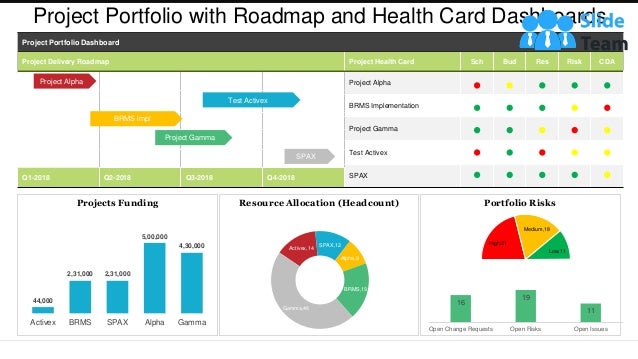
This graph/chart is linked to excel, and changes automatically based on data. Just left click on it and select “Edit Data”.
Instructions To Edit This Slide
This slide has been made in PowerPoint using basic PowerPoint shapes, and all graphics are 100%
editable in PowerPoint.
You can change color, size and orientation of any element to your liking, and add/edit any piece of text
anywhere.
All images are 100% editable in PowerPoint
Change color, size and orientation of any icon to your liking”
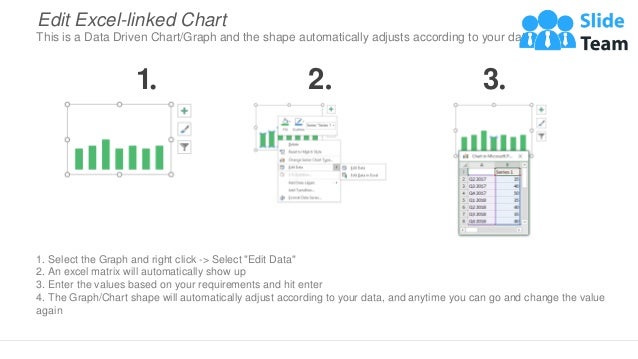
1. Select the Graph and right click -> Select "Edit Data"
2. An excel matrix will automatically show up
3. Enter the values based on your requirements and hit enter
4. The Graph/Chart shape will automatically adjust according to your data, and anytime you can go and change the value
again
Edit Excel-linked Chart
This is a Data Driven Chart/Graph and the shape automatically adjusts according to your data
1 2 3
Edit Color
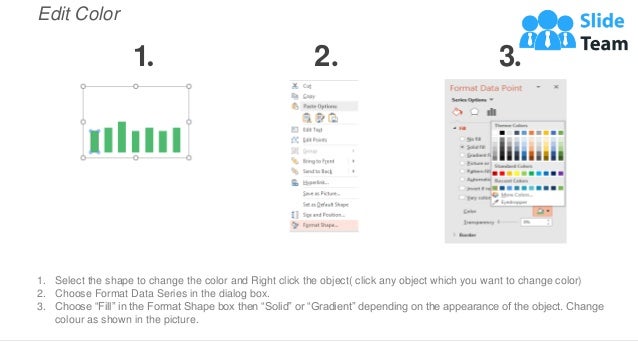
1. Select the shape to change the color and Right click the object( click any object which you want to change color)
2. Choose Format Data Series in the dialog box.
3. Choose “Fill” in the Format Shape box then “Solid” or “Gradient” depending on the appearance of the object. Change
colour as shown in the picture.
1 2 3
Select From Thousands Of Editable Icons On Every Topic
These icons are available at the Icons section on www.slideteam.net

Project Portfolio With Roadmap And Health Card Dashboards

  • 1.
    Projects Funding ResourceAllocation (Headcount) Portfolio Risks Project Portfolio Dashboard Project Delivery Roadmap Project Health Card Sch Bud Res Risk CDA Project Alpha BRMS Implementation Project Gamma Test Activex SPAX Q1-2018 Q2-2018 Q3-2018 Q4-2018 Project Portfolio with Roadmap and Health Card Dashboards Project Alpha BRMS lmpl Project Gamma Test Activex SPAX 44,000 2,31,000 2,31,000 5,00,000 4,30,000 Activex BRMS SPAX Alpha Gamma Activex,14 SPAX,12 Alpha,9 BRMS,19 Gamma,46 High,21 Medium,18 Low,11 16 19 11 Open Change Requests Open Risks Open Issues This graph/chart is linked to excel, and changes automatically based on data. Just left click on it and select “Edit Data”.
  • 2.
    Instructions To EditThis Slide This slide has been made in PowerPoint using basic PowerPoint shapes, and all graphics are 100% editable in PowerPoint. You can change color, size and orientation of any element to your liking, and add/edit any piece of text anywhere.
  • 3.
    All images are100% editable in PowerPoint Change color, size and orientation of any icon to your liking”
  • 4.
    1. Select theGraph and right click -> Select "Edit Data" 2. An excel matrix will automatically show up 3. Enter the values based on your requirements and hit enter 4. The Graph/Chart shape will automatically adjust according to your data, and anytime you can go and change the value again Edit Excel-linked Chart This is a Data Driven Chart/Graph and the shape automatically adjusts according to your data 1 2 3
  • 5.
    Edit Color 1. Selectthe shape to change the color and Right click the object( click any object which you want to change color) 2. Choose Format Data Series in the dialog box. 3. Choose “Fill” in the Format Shape box then “Solid” or “Gradient” depending on the appearance of the object. Change colour as shown in the picture. 1 2 3
  • 6.
    Select From ThousandsOf Editable Icons On Every Topic These icons are available at the Icons section on www.slideteam.net