Date What needs to be done Location Equipment Needed
Production Schedule
November 2nd through to Friday 25th March
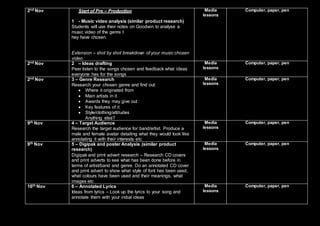
2nd Nov Start of Pre – Production
1 - Music video analysis (similar product research)
Students will use their notes on Goodwin to analyse a
music video of the genre t
hey have chosen.
Extension – shot by shot breakdown of your music chosen
video
Media
lessons
Computer, paper, pen
2nd Nov 2 – Ideas drafting
Peer listen to the songs chosen and feedback what ideas
everyone has for the songs
Media
lessons
Computer, paper, pen
2nd Nov 3 – Genre Research
Research your chosen genre and find out:
 Where it originated from
 Main artists in it
 Awards they may give out
 Key features of it
 Style/clothing/attitudes
Anything else?
Media
lessons
Computer, paper, pen
9th Nov 4 – Target Audience
Research the target audience for band/artist. Produce a
male and female avatar detailing what they would look like
annotating it with their interests etc
Media
lessons
Computer, paper, pen
9th Nov 5 – Digipak and poster Analysis (similar product
research)
Digipak and print advert research – Research CD covers
and print adverts to see what has been done before in
terms of artist/band and genre. Do an annotated CD cover
and print advert to show what style of font has been used,
what colours have been used and their meanings, what
images etc
Media
lessons
Computer, paper, pen
16th Nov 6 – Annotated Lyrics
Ideas from lyrics – Look up the lyrics to your song and
annotate them with your initial ideas
Media
lessons
Computer, paper, pen
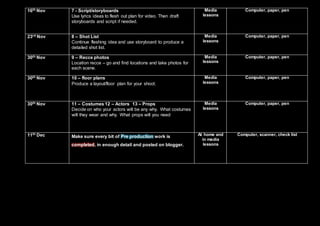
16th Nov 7 - Script/storyboards
Use lyrics ideas to flesh out plan for video. Then draft
storyboards and script if needed.
Media
lessons
Computer, paper, pen
23rd Nov 8 – Shot List
Continue fleshing idea and use storyboard to produce a
detailed shot list.
Media
lessons
Computer, paper, pen
30th Nov 9 – Recce photos
Location recce – go and find locations and take photos for
each scene.
Media
lessons
Computer, paper, pen
30th Nov 10 – floor plans
Produce a layout/floor plan for your shoot.
Media
lessons
Computer, paper, pen
30th Nov 11 – Costumes 12 – Actors 13 – Props
Decide on who your actors will be any why. What costumes
will they wear and why. What props will you need
Media
lessons
Computer, paper, pen
11th Dec Make sure every bit of Pre production work is
completed, in enough detail and posted on blogger.
At home and
in media
lessons
Computer, scanner, check list
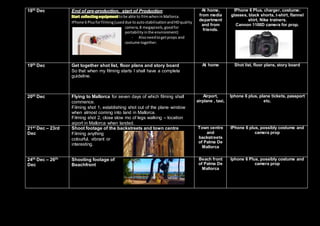
18th Dec End of pre-production, start of Production
Start collectingequipmenttobe able to filmwheninMallorca.
IPhone 6 Plusforfilming (useddue toautostabilisationandHDquality
camera,8 megapixels,goodfor
portabilityinthe environment)
- Alsoneedtogetprops and
costume together.
At home,
from media
department
and from
friends.
IPhone 6 Plus, charger, costume:
glasses, black shorts, t-shirt, flannel
shirt, Nike trainers.
Cannon 1100D camera for prop.
19th Dec Get together shot list, floor plans and story board
So that when my filming starts I shall have a complete
guideline.
At home Shot list, floor plans, story board
20th Dec Flying to Mallorca for seven days of which filming shall
commence.
Filming shot 1, establishing shot out of the plane window
when almost coming into land in Mallorca.
Filming shot 2, close slow mo of legs walking – location
aiport in Mallorca when landed.
Airport,
airplane , taxi,
Iphone 6 plus, plane tickets, passport
etc.
21st Dec – 23rd
Dec
Shoot footage of the backstreets and town centre
Filming anything
colourful, vibrant or
interesting.
Town centre
and
backstreets
of Palma De
Mallorca
IPhone 6 plus, possibly costume and
camera prop
24th Dec – 26th
Dec
Shooting footage of
Beachfront
Beach front
of Palma De
Mallorca
Iphone 6 Plus, possibly costume and
camera prop
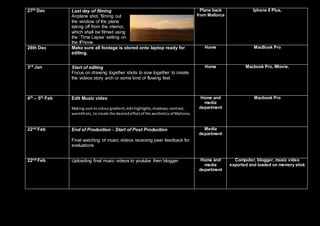
27th Dec Last day of filming
Airplane shot, filming out
the window of the plane
taking off from the interior,
which shall be filmed using
the ‘Time Lapse’ setting on
the IPhone.
Plane back
from Mallorca
Iphone 6 Plus,
28th Dec Make sure all footage is stored onto laptop ready for
editing.
Home MacBook Pro
3rd Jan Start of editing
Focus on drawing together shots to sow together to create
the videos story arch or some kind of flowing feel.
Home Macbook Pro, IMovie.
4th – 5th Feb Edit Music video
Making sure to colourgradient,edithighlights,shadows,contrast,
warmthetc, to create the desiredeffectof the aestheticsof Mallorca.
Home and
media
department
Macbook Pro
22nd Feb End of Production - Start of Post Production
Final watching of music videos receiving peer feedback for
evaluations
Media
department
22nd Feb Uploading final music videos to youtube then blogger Home and
media
department
Computer, blogger, music video
exported and loaded on memory stick
22nd Feb Intro to evaluation questions and design digipak and poster Home and
media
department
29th Feb Design digipak and poster Home and
media
department
Computer, Adobe Photoshop, blogger
14th March Complete evaluation question 2 Home and
media
department
Blogger, other sources of
presentation methods.
21st March Complete evaluation question 3 Home and
media
department
Blogger, other sources of
presentation methods.
21st March Complete evaluation question 4 Home and
media
department
Blogger, other sources of
presentation methods.
21st March Complete evaluation question 4. Upload all evaluation
questions to blogger.
End of whole production
Home and
media
department
Blogger, other sources of
presentation methods.
Production schedule

Production schedule

  • 1.
    Date What needsto be done Location Equipment Needed Production Schedule November 2nd through to Friday 25th March
  • 2.
    2nd Nov Startof Pre – Production 1 - Music video analysis (similar product research) Students will use their notes on Goodwin to analyse a music video of the genre t hey have chosen. Extension – shot by shot breakdown of your music chosen video Media lessons Computer, paper, pen 2nd Nov 2 – Ideas drafting Peer listen to the songs chosen and feedback what ideas everyone has for the songs Media lessons Computer, paper, pen 2nd Nov 3 – Genre Research Research your chosen genre and find out:  Where it originated from  Main artists in it  Awards they may give out  Key features of it  Style/clothing/attitudes Anything else? Media lessons Computer, paper, pen 9th Nov 4 – Target Audience Research the target audience for band/artist. Produce a male and female avatar detailing what they would look like annotating it with their interests etc Media lessons Computer, paper, pen 9th Nov 5 – Digipak and poster Analysis (similar product research) Digipak and print advert research – Research CD covers and print adverts to see what has been done before in terms of artist/band and genre. Do an annotated CD cover and print advert to show what style of font has been used, what colours have been used and their meanings, what images etc Media lessons Computer, paper, pen 16th Nov 6 – Annotated Lyrics Ideas from lyrics – Look up the lyrics to your song and annotate them with your initial ideas Media lessons Computer, paper, pen
  • 3.
    16th Nov 7- Script/storyboards Use lyrics ideas to flesh out plan for video. Then draft storyboards and script if needed. Media lessons Computer, paper, pen 23rd Nov 8 – Shot List Continue fleshing idea and use storyboard to produce a detailed shot list. Media lessons Computer, paper, pen 30th Nov 9 – Recce photos Location recce – go and find locations and take photos for each scene. Media lessons Computer, paper, pen 30th Nov 10 – floor plans Produce a layout/floor plan for your shoot. Media lessons Computer, paper, pen 30th Nov 11 – Costumes 12 – Actors 13 – Props Decide on who your actors will be any why. What costumes will they wear and why. What props will you need Media lessons Computer, paper, pen 11th Dec Make sure every bit of Pre production work is completed, in enough detail and posted on blogger. At home and in media lessons Computer, scanner, check list
  • 4.
    18th Dec Endof pre-production, start of Production Start collectingequipmenttobe able to filmwheninMallorca. IPhone 6 Plusforfilming (useddue toautostabilisationandHDquality camera,8 megapixels,goodfor portabilityinthe environment) - Alsoneedtogetprops and costume together. At home, from media department and from friends. IPhone 6 Plus, charger, costume: glasses, black shorts, t-shirt, flannel shirt, Nike trainers. Cannon 1100D camera for prop. 19th Dec Get together shot list, floor plans and story board So that when my filming starts I shall have a complete guideline. At home Shot list, floor plans, story board 20th Dec Flying to Mallorca for seven days of which filming shall commence. Filming shot 1, establishing shot out of the plane window when almost coming into land in Mallorca. Filming shot 2, close slow mo of legs walking – location aiport in Mallorca when landed. Airport, airplane , taxi, Iphone 6 plus, plane tickets, passport etc. 21st Dec – 23rd Dec Shoot footage of the backstreets and town centre Filming anything colourful, vibrant or interesting. Town centre and backstreets of Palma De Mallorca IPhone 6 plus, possibly costume and camera prop 24th Dec – 26th Dec Shooting footage of Beachfront Beach front of Palma De Mallorca Iphone 6 Plus, possibly costume and camera prop
  • 5.
    27th Dec Lastday of filming Airplane shot, filming out the window of the plane taking off from the interior, which shall be filmed using the ‘Time Lapse’ setting on the IPhone. Plane back from Mallorca Iphone 6 Plus, 28th Dec Make sure all footage is stored onto laptop ready for editing. Home MacBook Pro 3rd Jan Start of editing Focus on drawing together shots to sow together to create the videos story arch or some kind of flowing feel. Home Macbook Pro, IMovie. 4th – 5th Feb Edit Music video Making sure to colourgradient,edithighlights,shadows,contrast, warmthetc, to create the desiredeffectof the aestheticsof Mallorca. Home and media department Macbook Pro 22nd Feb End of Production - Start of Post Production Final watching of music videos receiving peer feedback for evaluations Media department 22nd Feb Uploading final music videos to youtube then blogger Home and media department Computer, blogger, music video exported and loaded on memory stick
  • 6.
    22nd Feb Introto evaluation questions and design digipak and poster Home and media department 29th Feb Design digipak and poster Home and media department Computer, Adobe Photoshop, blogger 14th March Complete evaluation question 2 Home and media department Blogger, other sources of presentation methods. 21st March Complete evaluation question 3 Home and media department Blogger, other sources of presentation methods. 21st March Complete evaluation question 4 Home and media department Blogger, other sources of presentation methods. 21st March Complete evaluation question 4. Upload all evaluation questions to blogger. End of whole production Home and media department Blogger, other sources of presentation methods.