Production Grade Edge Computing
Using Kubernetes
Steve Wong
@cantbewong
Open Source Community Relations Engineer
VMware
Open Source Summit Europe
October 23, 2018
2
Abstract
​Some applications benefit from moving closer to data ingest, or the user. Edge reduces local
processing latency, and supports isolated operation. It also has challenges compared to the
pooled resources, and single point of management of centralized clouds.
You won’t achieve the Google Borg experience at an edge location - nor are you likely to need it.
But with planning it is possible to achieve edge deployments that are secure, with predictable
performance and “highly available enough” considering constraints on money, physical space,
power, etc.
Steve will provide specific recommendations related to architecture, networking, storage,
patching, logging, disaster recovery, and remote manageability - based on using Kubernetes,
and other open source tools and technology.
This is a rapidly changing space, and Steve will also touch on some interesting proposals and
work underway in the space.
Agenda
3
​Production Grade Kubernetes
​What Does It Mean?
​Critical Components in a Kubernetes Cluster
​Architecture of the control plane
​Impacts of Limited Resources at an Edge location
​Making the best of limited budget and facilities
​Kubernetes Configuration
​Defaults may not be appropriate for edge
​Security
​Considerations for edge
​Disaster Recovery & Backup
​Planning checklist
​Futures
4
What does it mean to be “Production Grade”?
When you deploy to edge, you own 100% of this
• The installation is secure
• The deployment is managed with a
repeatable and recorded process
• Performance is predictable and consistent
• Updates and configuration changes can be
safely applied
• Logging and monitoring is in place to
detect and diagnose failures and resource
shortages
• Service is “highly available enough”
considering available resources, including
constraints on money, physical space,
power, etc.
• A recovery process is available,
documented, and tested for use in the
event of failures
Photo attribution: By Tony Webster from Portland, Oregon, United States (212 days without recordable incident) [CC BY 2.0
(https://creativecommons.org/licenses/by/2.0)], via Wikimedia Commons
5
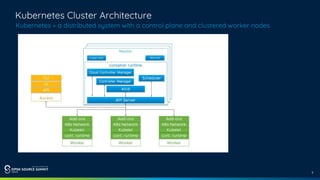
Kubernetes Cluster Architecture
Kubernetes = a distributed system with a control plane and clustered worker nodes 
6
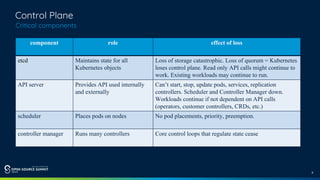
Control Plane
Critical components
component role effect of loss
etcd Maintains state for all
Kubernetes objects
Loss of storage catastrophic. Loss of quorum = Kubernetes
loses control plane. Read only API calls might continue to
work. Existing workloads may continue to run.
API server Provides API used internally
and externally
Can’t start, stop, update pods, services, replication
controllers. Scheduler and Controller Manager down.
Workloads continue if not dependent on API calls
(operators, customer controllers, CRDs, etc.)
scheduler Places pods on nodes No pod placements, priority, preemption.
controller manager Runs many controllers Core control loops that regulate state cease
7
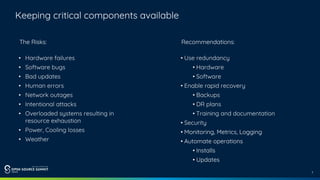
Keeping critical components available
Recommendations:
• Use redundancy
• Hardware
• Software
• Enable rapid recovery
• Backups
• DR plans
• Training and documentation
• Security
• Monitoring, Metrics, Logging
• Automate operations
• Installs
• Updates
The Risks:
• Hardware failures
• Software bugs
• Bad updates
• Human errors
• Network outages
• Intentional attacks
• Overloaded systems resulting in
resource exhaustion
• Power, Cooling losses
• Weather
8
On-premises deployments have finite resources
even in public clouds, budget may limit what you choose to consume
Dreams &
Goals
Resources
a tricky balance
Drawing attribution: By Б.Золзаяа [CC BY-SA 4.0 (https://creativecommons.org/licenses/by-sa/4.0)], from Wikimedia Commons
9
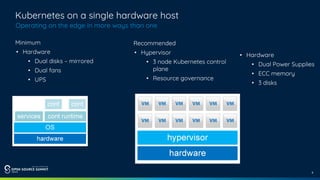
Kubernetes on a single hardware host
Operating on the edge in more ways than one
Minimum
• Hardware
• Dual disks – mirrored
• Dual fans
• UPS
Recommended
• Hypervisor
• 3 node Kubernetes control
plane
• Resource governance
• Hardware
• Dual Power Supplies
• ECC memory
• 3 disks
10
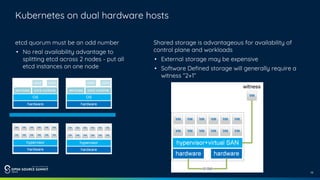
Kubernetes on dual hardware hosts
etcd quorum must be an odd number
• No real availability advantage to
splitting etcd across 2 nodes - put all
etcd instances on one node
Shared storage is advantageous for availability of
control plane and workloads
• External storage may be expensive
• Software Defined storage will generally require a
witness “2+1”
11
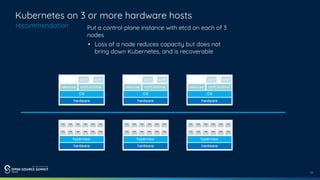
Kubernetes on 3 or more hardware hosts
recommendation Put a control plane instance with etcd on each of 3
nodes
• Loss of a node reduces capacity but does not
bring down Kubernetes, and is recoverable
12
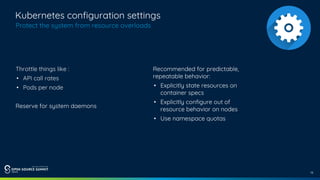
Kubernetes configuration settings
Protect the system from resource overloads
Throttle things like :
• API call rates
• Pods per node
Reserve for system daemons
Recommended for predictable,
repeatable behavior:
• Explicitly state resources on
container specs
• Explicitly configure out of
resource behavior on nodes
• Use namespace quotas
13
Security
Recommendations
• Certificates
• Lock down worker nodes
• Use an image repository with
governance & security features
• Utilize Pod Security Policies
• Use RBAC to drive authorization
decisions and enforcement
• Consider physical security at
edge locations
• Storage encryption
• Protection from attachment
of malicious devices
• Avoid use of plain text credentials
(access key, token, passwords)
• Consider security features when
you choose your network solution
• Logging and monitoring/metrics
can contribute to security
14
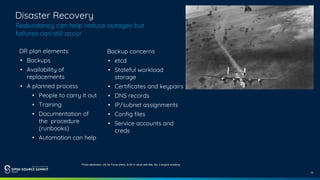
Disaster Recovery
Redundancy can help reduce outages but
failures can still occur
DR plan elements:
• Backups
• Availability of
replacements
• A planned process
• People to carry it out
• Training
• Documentation of
the procedure
(runbooks)
• Automation can help
Backup concerns
• etcd
• Stateful workload
storage
• Certificates and keypairs
• DNS records
• IP/subnet assignments
• Config files
• Service accounts and
creds
Photo attribution: US Air Force photo, B-24 in cloud with flak, No. 2 engine smoking
15
Final Thoughts + Roadmap
Kubernetes can be applied to edge – but doing
so requires some care
Join the Kubernetes Edge IoT working group to get involved
• https://groups.google.com/forum/#!forum/kubernetes-wg-iot-edge
Photo attribution: By Matti Blume [CC BY-SA 4.0 (https://creativecommons.org/licenses/by-sa/4.0)], from Wikimedia Commons
There is opportunity to improve this
• Issues with scale
• Issues with control plane to worker node connectivity
Thank You
Questions
Deck is here:
More detailed coverage can be found in this blog post:
https://kubernetes.io/blog/2018/08/03/out-of-the-clouds-onto-the-ground-how-to-make-kubernetes-pro
duction-grade-anywhere/
Contact me later:
Twitter: @cantbewong
Kubernetes Slack: steve-wong
​References:

Production grade edge computing on Kubernetes OSS EU 2018

  • 1.
    Production Grade EdgeComputing Using Kubernetes Steve Wong @cantbewong Open Source Community Relations Engineer VMware Open Source Summit Europe October 23, 2018
  • 2.
    2 Abstract ​Some applications benefitfrom moving closer to data ingest, or the user. Edge reduces local processing latency, and supports isolated operation. It also has challenges compared to the pooled resources, and single point of management of centralized clouds. You won’t achieve the Google Borg experience at an edge location - nor are you likely to need it. But with planning it is possible to achieve edge deployments that are secure, with predictable performance and “highly available enough” considering constraints on money, physical space, power, etc. Steve will provide specific recommendations related to architecture, networking, storage, patching, logging, disaster recovery, and remote manageability - based on using Kubernetes, and other open source tools and technology. This is a rapidly changing space, and Steve will also touch on some interesting proposals and work underway in the space.
  • 3.
    Agenda 3 ​Production Grade Kubernetes ​WhatDoes It Mean? ​Critical Components in a Kubernetes Cluster ​Architecture of the control plane ​Impacts of Limited Resources at an Edge location ​Making the best of limited budget and facilities ​Kubernetes Configuration ​Defaults may not be appropriate for edge ​Security ​Considerations for edge ​Disaster Recovery & Backup ​Planning checklist ​Futures
  • 4.
    4 What does itmean to be “Production Grade”? When you deploy to edge, you own 100% of this • The installation is secure • The deployment is managed with a repeatable and recorded process • Performance is predictable and consistent • Updates and configuration changes can be safely applied • Logging and monitoring is in place to detect and diagnose failures and resource shortages • Service is “highly available enough” considering available resources, including constraints on money, physical space, power, etc. • A recovery process is available, documented, and tested for use in the event of failures Photo attribution: By Tony Webster from Portland, Oregon, United States (212 days without recordable incident) [CC BY 2.0 (https://creativecommons.org/licenses/by/2.0)], via Wikimedia Commons
  • 5.
    5 Kubernetes Cluster Architecture Kubernetes= a distributed system with a control plane and clustered worker nodes 
  • 6.
    6 Control Plane Critical components componentrole effect of loss etcd Maintains state for all Kubernetes objects Loss of storage catastrophic. Loss of quorum = Kubernetes loses control plane. Read only API calls might continue to work. Existing workloads may continue to run. API server Provides API used internally and externally Can’t start, stop, update pods, services, replication controllers. Scheduler and Controller Manager down. Workloads continue if not dependent on API calls (operators, customer controllers, CRDs, etc.) scheduler Places pods on nodes No pod placements, priority, preemption. controller manager Runs many controllers Core control loops that regulate state cease
  • 7.
    7 Keeping critical componentsavailable Recommendations: • Use redundancy • Hardware • Software • Enable rapid recovery • Backups • DR plans • Training and documentation • Security • Monitoring, Metrics, Logging • Automate operations • Installs • Updates The Risks: • Hardware failures • Software bugs • Bad updates • Human errors • Network outages • Intentional attacks • Overloaded systems resulting in resource exhaustion • Power, Cooling losses • Weather
  • 8.
    8 On-premises deployments havefinite resources even in public clouds, budget may limit what you choose to consume Dreams & Goals Resources a tricky balance Drawing attribution: By Б.Золзаяа [CC BY-SA 4.0 (https://creativecommons.org/licenses/by-sa/4.0)], from Wikimedia Commons
  • 9.
    9 Kubernetes on asingle hardware host Operating on the edge in more ways than one Minimum • Hardware • Dual disks – mirrored • Dual fans • UPS Recommended • Hypervisor • 3 node Kubernetes control plane • Resource governance • Hardware • Dual Power Supplies • ECC memory • 3 disks
  • 10.
    10 Kubernetes on dualhardware hosts etcd quorum must be an odd number • No real availability advantage to splitting etcd across 2 nodes - put all etcd instances on one node Shared storage is advantageous for availability of control plane and workloads • External storage may be expensive • Software Defined storage will generally require a witness “2+1”
  • 11.
    11 Kubernetes on 3or more hardware hosts recommendation Put a control plane instance with etcd on each of 3 nodes • Loss of a node reduces capacity but does not bring down Kubernetes, and is recoverable
  • 12.
    12 Kubernetes configuration settings Protectthe system from resource overloads Throttle things like : • API call rates • Pods per node Reserve for system daemons Recommended for predictable, repeatable behavior: • Explicitly state resources on container specs • Explicitly configure out of resource behavior on nodes • Use namespace quotas
  • 13.
    13 Security Recommendations • Certificates • Lockdown worker nodes • Use an image repository with governance & security features • Utilize Pod Security Policies • Use RBAC to drive authorization decisions and enforcement • Consider physical security at edge locations • Storage encryption • Protection from attachment of malicious devices • Avoid use of plain text credentials (access key, token, passwords) • Consider security features when you choose your network solution • Logging and monitoring/metrics can contribute to security
  • 14.
    14 Disaster Recovery Redundancy canhelp reduce outages but failures can still occur DR plan elements: • Backups • Availability of replacements • A planned process • People to carry it out • Training • Documentation of the procedure (runbooks) • Automation can help Backup concerns • etcd • Stateful workload storage • Certificates and keypairs • DNS records • IP/subnet assignments • Config files • Service accounts and creds Photo attribution: US Air Force photo, B-24 in cloud with flak, No. 2 engine smoking
  • 15.
    15 Final Thoughts +Roadmap Kubernetes can be applied to edge – but doing so requires some care Join the Kubernetes Edge IoT working group to get involved • https://groups.google.com/forum/#!forum/kubernetes-wg-iot-edge Photo attribution: By Matti Blume [CC BY-SA 4.0 (https://creativecommons.org/licenses/by-sa/4.0)], from Wikimedia Commons There is opportunity to improve this • Issues with scale • Issues with control plane to worker node connectivity
  • 16.
  • 17.
    Questions Deck is here: Moredetailed coverage can be found in this blog post: https://kubernetes.io/blog/2018/08/03/out-of-the-clouds-onto-the-ground-how-to-make-kubernetes-pro duction-grade-anywhere/ Contact me later: Twitter: @cantbewong Kubernetes Slack: steve-wong ​References: