Problem Solving
ALGORITHMS AND FLOWCHARTS
Flowchart
 Flowchart is a pictorial representation of an algorithm
 Uses symbols (boxes of different shapes) that have
standardized meanings to denote different types
of instructions
 Actual instructions are written within the boxes
 Boxes are connected by solid lines having arrow marks
to indicate the exact sequence in which the instructions
are to be executed
 Process of drawing a flowchart for an algorithm is called
flowcharting
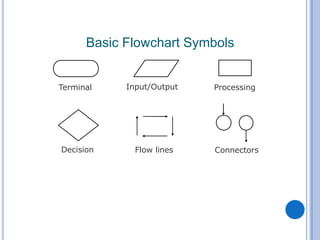
Basic Flowchart Symbols
Terminal Processing
Decision
Input/Output
Flow lines Connectors
FLOWCHART
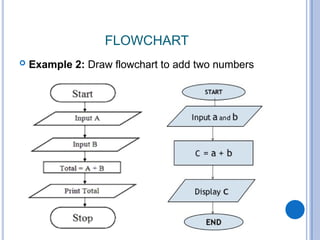
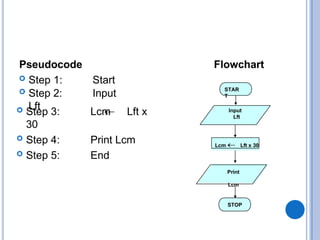
 Example 2: Draw flowchart to add two numbers
Pseudocode
STAR
T
Input
Lft
Lcm Lft x 30
STOP
Flowchart
Print
Lcm
 Step 1: Start
 Step 2: Input
Lft
 Step 3: Lcm Lft x
30
 Step 4: Print Lcm
 Step 5: End
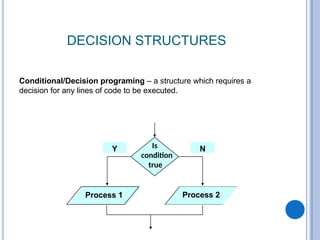
DECISION STRUCTURES
Y N
Is
condition
true
Process 1 Process 2
Conditional/Decision programing – a structure which requires a
decision for any lines of code to be executed.
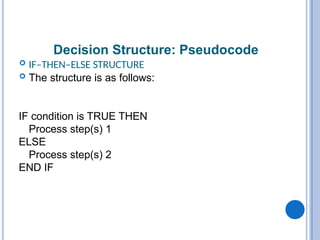
Decision Structure: Pseudocode
 IF–THEN–ELSE STRUCTURE
 The structure is as follows:
IF condition is TRUE THEN
Process step(s) 1
ELSE
Process step(s) 2
END IF
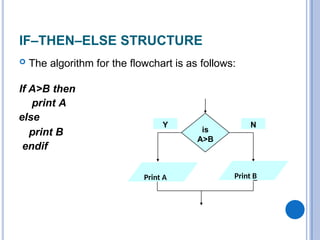
IF–THEN–ELSE STRUCTURE
 The algorithm for the flowchart is as follows:
If A>B then
print A
else
print B
endif
is
A>B
Print
B
Print
A
Y N
Print A Print B
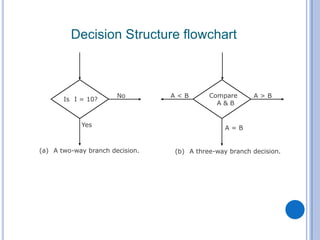
Decision Structure flowchart
Is I = 10?
No
Yes
(a) A two-way branch decision. (b) A three-way branch decision.
A > B
A = B
A < B Compare
A & B
PSEUDOCODE & ALGORITHM
 Example 3: Write an algorithm and draw
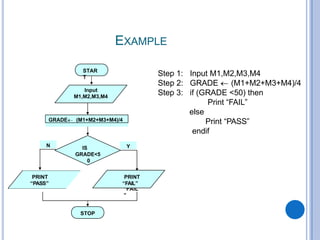
flowchart to determine a student’s final grade
and indicate whether it is passing or failing if its
below 50. The final grade is calculated as the
average of four marks.
PSEUDOCODE & ALGORITHM
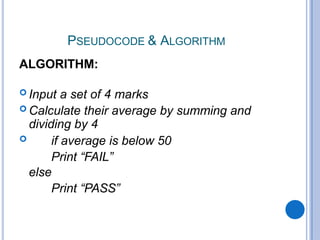
ALGORITHM:
 Input a set of 4 marks
 Calculate their average by summing and
dividing by 4
 if average is below 50
Print “FAIL”
else
Print “PASS”
PSEUDOCODE & ALGORITHM
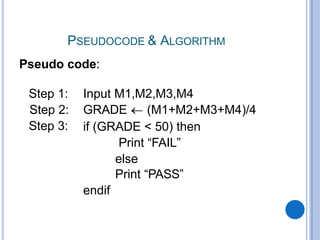
Pseudo code:
Step 1:
Step 2:
Step 3:
Input M1,M2,M3,M4
GRADE (M1+M2+M3+M4)/4
if (GRADE < 50) then
Print “FAIL”
else
Print “PASS”
endif
EXAMPLE
Input M1,M2,M3,M4
Step 1:
Step 2:
Step 3:
GRADE (M1+M2+M3+M4)/4
if (GRADE <50) then
Print “FAIL”
else
Print “PASS”
endif
STAR
T
Input
M1,M2,M3,M4
GRADE (M1+M2+M3+M4)/4
IS
GRADE<5
0
PRINT
“FAIL
”
STOP
Y
N
PRINT
“FAIL”
PRINT
“PASS”
EXAMPLE 5
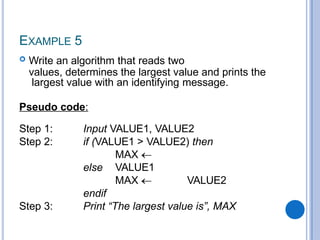
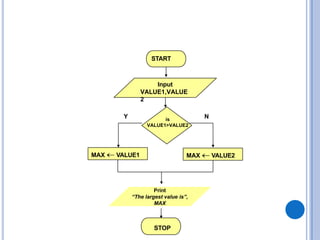
 Write an algorithm that reads two
values, determines the largest value and prints the
largest value with an identifying message.
Pseudo code:
Step 1:
Step 2:
Input VALUE1, VALUE2
if (VALUE1 > VALUE2) then
MAX
VALUE1
else
Step 3:
MAX VALUE2
endif
Print “The largest value is”, MAX
MAX VALUE1
STOP
Y N
START
Input
VALUE1,VALUE
2
MAX VALUE2
is
VALUE1>VALUE2
Print
“The largest value is”,
MAX
NESTED IFS
 One of the alternatives within an IF–THEN–ELSE
statement
 may involve further IF–THEN–ELSE statement
EXAMPLE 6
 Write an algorithm that reads three numbers and
prints the value of the largest number.
Step 1: Input N1, N2,
N3 Step 2: if (N1>N2)
then
if (N1>N3)
then
MAX N1 [N1>N2, N1>N3]
else
MAX N3 [N3>N1>N2]
endif
else
if
(N2
>N3
)
then
MAX N2 [N2>N1, N2>N3]
else
MAX N3 [N3>N2>N1]
endif
endif
Step 3: Print “The largest number is”, MAX
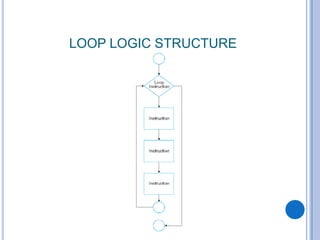
LOOP LOGIC STRUCTURE
Example
 A student appears in an examination, which consists of
total 10 subjects, each subject having maximum
marks of 100.
 The roll number of the student, his/her name, and the
marks obtained by him/her in various subjects are
supplied as input data.
 Draw a flowchart for the algorithm to calculate the
percentage marks obtained by the student in this
examination and then to print it along with his/her roll
number and name.
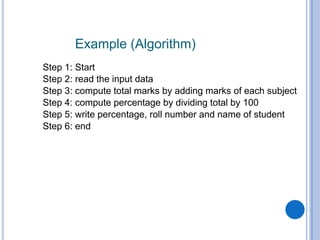
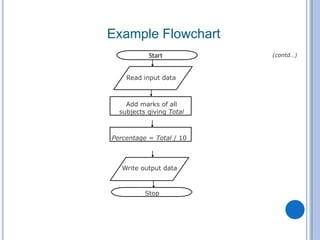
Example (Algorithm)
Step 1: Start
Step 2: read the input data
Step 3: compute total marks by adding marks of each subject
Step 4: compute percentage by dividing total by 100
Step 5: write percentage, roll number and name of student
Step 6: end
Read input data
Add marks of all
subjects giving Total
Percentage = Total / 10
Write output data
Stop
Example Flowchart
(contd…)
Start
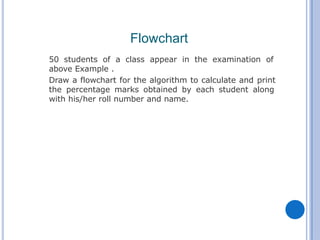
50 students of a class appear in the examination of
above Example .
Draw a flowchart for the algorithm to calculate and print
the percentage marks obtained by each student along
with his/her roll number and name.
Flowchart
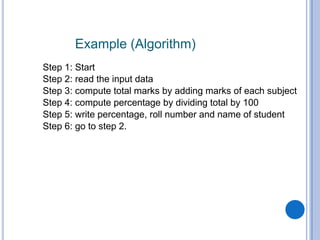
Example (Algorithm)
Step 1: Start
Step 2: read the input data
Step 3: compute total marks by adding marks of each subject
Step 4: compute percentage by dividing total by 100
Step 5: write percentage, roll number and name of student
Step 6: go to step 2.
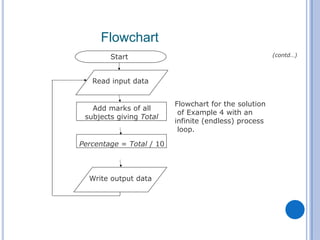
Flowchart for the solution
of Example 4 with an
infinite (endless) process
loop.
Start
Add marks of all
subjects giving Total
Percentage = Total / 10
Write output data
Read input data
Flowchart
(contd…)
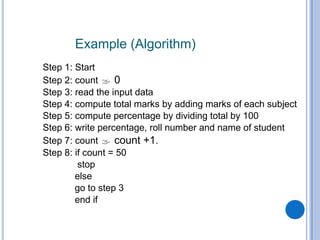
Example (Algorithm)
Step 1: Start
Step 2: count  0
Step 3: read the input data
Step 4: compute total marks by adding marks of each subject
Step 5: compute percentage by dividing total by 100
Step 6: write percentage, roll number and name of student
Step 7: count  count +1.
Step 8: if count = 50
stop
else
go to step 3
end if
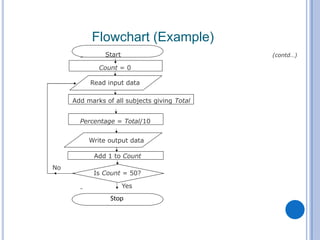
Start
Read input data
Count = 0
Add marks of all subjects giving Total
Percentage = Total/10
Write output data
Add 1 to Count
No
Is Count = 50?
Yes
Flowchart (Example)
(contd…)
Stop
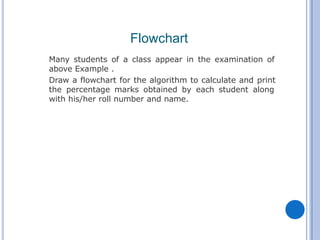
Many students of a class appear in the examination of
above Example .
Draw a flowchart for the algorithm to calculate and print
the percentage marks obtained by each student along
with his/her roll number and name.
Flowchart
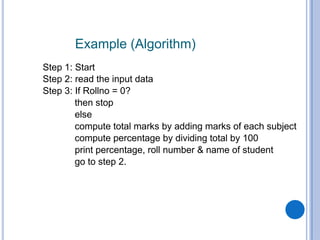
Example (Algorithm)
Step 1: Start
Step 2: read the input data
Step 3: If Rollno = 0?
then stop
else
compute total marks by adding marks of each subject
compute percentage by dividing total by 100
print percentage, roll number & name of student
go to step 2.
Example (Algorithm)
Step 1: Start
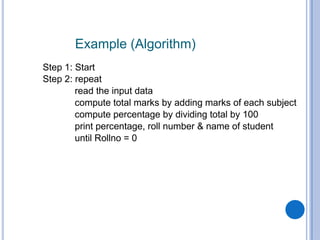
Step 2: repeat
read the input data
compute total marks by adding marks of each subject
compute percentage by dividing total by 100
print percentage, roll number & name of student
until Rollno = 0
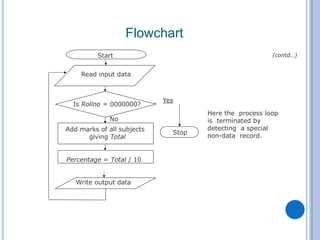
Flowchart
Here the process loop
is terminated by
detecting a special
non-data record.
Stop
Yes
Start
Add marks of all subjects
giving Total
Percentage = Total / 10
No
Is Rollno = 0000000?
Read input data
Write output data
(contd…)
PRACTICE QUESTIONS:
EXAMPLE
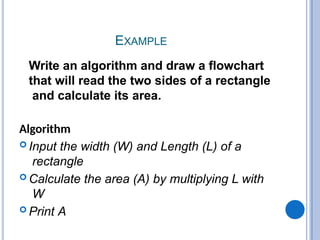
Write an algorithm and draw a flowchart
that will read the two sides of a rectangle
and calculate its area.
EXAMPLE
Write an algorithm and draw a flowchart
that will read the two sides of a rectangle
and calculate its area.
Algorithm
 Input the width (W) and Length (L) of a
rectangle
 Calculate the area (A) by multiplying L with
W
 Print A
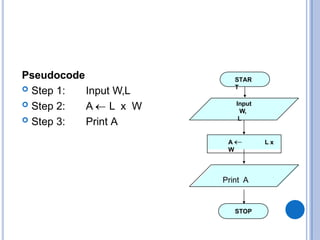
Pseudocode
 Step 1:
 Step 2:
 Step 3:
Input W,L
A L x W
Print A
STAR
T
Input
W,
L
A L x
W
STOP
Print A
EXAMPLE
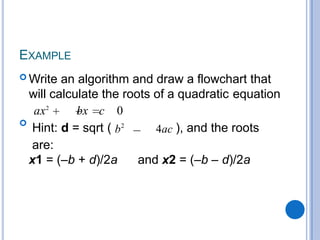
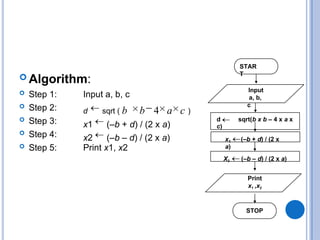
 Write an algorithm and draw a flowchart that
will calculate the roots of a quadratic equation
ax2
bx c 0

Hint: d = sqrt ( b2
4ac ), and the roots
are:
x1 = (–b + d)/2a and x2 = (–b – d)/2a
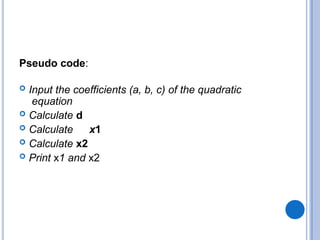
Pseudo code:
 Input the coefficients (a, b, c) of the quadratic
equation
 Calculate d
 Calculate x1
 Calculate x2
 Print x1 and x2
 Algorithm:
Input a, b, c
 Step 1:
 Step 2:
 Step 3:
 Step 4:
 Step 5: Print x1, x2
d sqrt ( b b 4 a c )
x1 (–b + d) / (2 x a)
x2 (–b – d) / (2 x a)
STAR
T
Input
a, b,
c
d sqrt(b x b – 4 x a x
c)
STOP
1
x (–b + d) / (2 x
a)
X2 (–b – d) / (2 x a)
Print
x1 ,x2
EXAMPLE
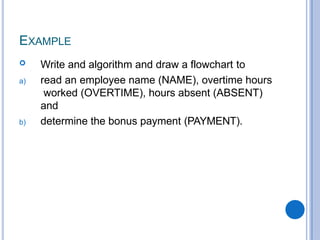
 Write and algorithm and draw a flowchart to
a) read an employee name (NAME), overtime hours
worked (OVERTIME), hours absent (ABSENT)
and
b) determine the bonus payment (PAYMENT).
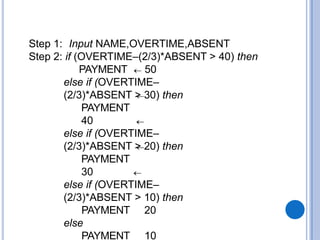
Step 1: Input NAME,OVERTIME,ABSENT
Step 2: if (OVERTIME–(2/3)*ABSENT > 40) then
PAYMENT 50
else if (OVERTIME–
(2/3)*ABSENT > 30) then
PAYMENT
40
else if (OVERTIME–
(2/3)*ABSENT > 20) then
PAYMENT
30
else if (OVERTIME–
(2/3)*ABSENT > 10) then
PAYMENT 20
else
PAYMENT 10
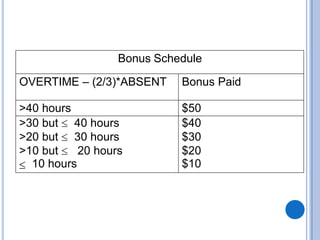
Bonus Schedule
OVERTIME – (2/3)*ABSENT Bonus Paid
>40 hours $50
>30 but 40 hours $40
>20 but 30 hours $30
>10 but 20 hours
10 hours
$20
$10
Problem Solving - Introduction to Flowcharts.pptx

Problem Solving - Introduction to Flowcharts.pptx

  • 1.
  • 2.
    Flowchart  Flowchart isa pictorial representation of an algorithm  Uses symbols (boxes of different shapes) that have standardized meanings to denote different types of instructions  Actual instructions are written within the boxes  Boxes are connected by solid lines having arrow marks to indicate the exact sequence in which the instructions are to be executed  Process of drawing a flowchart for an algorithm is called flowcharting
  • 3.
    Basic Flowchart Symbols TerminalProcessing Decision Input/Output Flow lines Connectors
  • 4.
    FLOWCHART  Example 2:Draw flowchart to add two numbers
  • 5.
    Pseudocode STAR T Input Lft Lcm Lft x30 STOP Flowchart Print Lcm  Step 1: Start  Step 2: Input Lft  Step 3: Lcm Lft x 30  Step 4: Print Lcm  Step 5: End
  • 6.
    DECISION STRUCTURES Y N Is condition true Process1 Process 2 Conditional/Decision programing – a structure which requires a decision for any lines of code to be executed.
  • 7.
    Decision Structure: Pseudocode IF–THEN–ELSE STRUCTURE  The structure is as follows: IF condition is TRUE THEN Process step(s) 1 ELSE Process step(s) 2 END IF
  • 8.
    IF–THEN–ELSE STRUCTURE  Thealgorithm for the flowchart is as follows: If A>B then print A else print B endif is A>B Print B Print A Y N Print A Print B
  • 9.
    Decision Structure flowchart IsI = 10? No Yes (a) A two-way branch decision. (b) A three-way branch decision. A > B A = B A < B Compare A & B
  • 10.
    PSEUDOCODE & ALGORITHM Example 3: Write an algorithm and draw flowchart to determine a student’s final grade and indicate whether it is passing or failing if its below 50. The final grade is calculated as the average of four marks.
  • 11.
    PSEUDOCODE & ALGORITHM ALGORITHM: Input a set of 4 marks  Calculate their average by summing and dividing by 4  if average is below 50 Print “FAIL” else Print “PASS”
  • 12.
    PSEUDOCODE & ALGORITHM Pseudocode: Step 1: Step 2: Step 3: Input M1,M2,M3,M4 GRADE (M1+M2+M3+M4)/4 if (GRADE < 50) then Print “FAIL” else Print “PASS” endif
  • 13.
    EXAMPLE Input M1,M2,M3,M4 Step 1: Step2: Step 3: GRADE (M1+M2+M3+M4)/4 if (GRADE <50) then Print “FAIL” else Print “PASS” endif STAR T Input M1,M2,M3,M4 GRADE (M1+M2+M3+M4)/4 IS GRADE<5 0 PRINT “FAIL ” STOP Y N PRINT “FAIL” PRINT “PASS”
  • 14.
    EXAMPLE 5  Writean algorithm that reads two values, determines the largest value and prints the largest value with an identifying message. Pseudo code: Step 1: Step 2: Input VALUE1, VALUE2 if (VALUE1 > VALUE2) then MAX VALUE1 else Step 3: MAX VALUE2 endif Print “The largest value is”, MAX
  • 15.
    MAX VALUE1 STOP Y N START Input VALUE1,VALUE 2 MAXVALUE2 is VALUE1>VALUE2 Print “The largest value is”, MAX
  • 16.
    NESTED IFS  Oneof the alternatives within an IF–THEN–ELSE statement  may involve further IF–THEN–ELSE statement
  • 17.
    EXAMPLE 6  Writean algorithm that reads three numbers and prints the value of the largest number.
  • 18.
    Step 1: InputN1, N2, N3 Step 2: if (N1>N2) then if (N1>N3) then MAX N1 [N1>N2, N1>N3] else MAX N3 [N3>N1>N2] endif else if (N2 >N3 ) then MAX N2 [N2>N1, N2>N3] else MAX N3 [N3>N2>N1] endif endif Step 3: Print “The largest number is”, MAX
  • 19.
  • 20.
    Example  A studentappears in an examination, which consists of total 10 subjects, each subject having maximum marks of 100.  The roll number of the student, his/her name, and the marks obtained by him/her in various subjects are supplied as input data.  Draw a flowchart for the algorithm to calculate the percentage marks obtained by the student in this examination and then to print it along with his/her roll number and name.
  • 21.
    Example (Algorithm) Step 1:Start Step 2: read the input data Step 3: compute total marks by adding marks of each subject Step 4: compute percentage by dividing total by 100 Step 5: write percentage, roll number and name of student Step 6: end
  • 22.
    Read input data Addmarks of all subjects giving Total Percentage = Total / 10 Write output data Stop Example Flowchart (contd…) Start
  • 23.
    50 students ofa class appear in the examination of above Example . Draw a flowchart for the algorithm to calculate and print the percentage marks obtained by each student along with his/her roll number and name. Flowchart
  • 24.
    Example (Algorithm) Step 1:Start Step 2: read the input data Step 3: compute total marks by adding marks of each subject Step 4: compute percentage by dividing total by 100 Step 5: write percentage, roll number and name of student Step 6: go to step 2.
  • 25.
    Flowchart for thesolution of Example 4 with an infinite (endless) process loop. Start Add marks of all subjects giving Total Percentage = Total / 10 Write output data Read input data Flowchart (contd…)
  • 26.
    Example (Algorithm) Step 1:Start Step 2: count  0 Step 3: read the input data Step 4: compute total marks by adding marks of each subject Step 5: compute percentage by dividing total by 100 Step 6: write percentage, roll number and name of student Step 7: count  count +1. Step 8: if count = 50 stop else go to step 3 end if
  • 27.
    Start Read input data Count= 0 Add marks of all subjects giving Total Percentage = Total/10 Write output data Add 1 to Count No Is Count = 50? Yes Flowchart (Example) (contd…) Stop
  • 28.
    Many students ofa class appear in the examination of above Example . Draw a flowchart for the algorithm to calculate and print the percentage marks obtained by each student along with his/her roll number and name. Flowchart
  • 29.
    Example (Algorithm) Step 1:Start Step 2: read the input data Step 3: If Rollno = 0? then stop else compute total marks by adding marks of each subject compute percentage by dividing total by 100 print percentage, roll number & name of student go to step 2.
  • 30.
    Example (Algorithm) Step 1:Start Step 2: repeat read the input data compute total marks by adding marks of each subject compute percentage by dividing total by 100 print percentage, roll number & name of student until Rollno = 0
  • 31.
    Flowchart Here the processloop is terminated by detecting a special non-data record. Stop Yes Start Add marks of all subjects giving Total Percentage = Total / 10 No Is Rollno = 0000000? Read input data Write output data (contd…)
  • 32.
  • 33.
    EXAMPLE Write an algorithmand draw a flowchart that will read the two sides of a rectangle and calculate its area.
  • 34.
    EXAMPLE Write an algorithmand draw a flowchart that will read the two sides of a rectangle and calculate its area. Algorithm  Input the width (W) and Length (L) of a rectangle  Calculate the area (A) by multiplying L with W  Print A
  • 35.
    Pseudocode  Step 1: Step 2:  Step 3: Input W,L A L x W Print A STAR T Input W, L A L x W STOP Print A
  • 36.
    EXAMPLE  Write analgorithm and draw a flowchart that will calculate the roots of a quadratic equation ax2 bx c 0  Hint: d = sqrt ( b2 4ac ), and the roots are: x1 = (–b + d)/2a and x2 = (–b – d)/2a
  • 37.
    Pseudo code:  Inputthe coefficients (a, b, c) of the quadratic equation  Calculate d  Calculate x1  Calculate x2  Print x1 and x2
  • 38.
     Algorithm: Input a,b, c  Step 1:  Step 2:  Step 3:  Step 4:  Step 5: Print x1, x2 d sqrt ( b b 4 a c ) x1 (–b + d) / (2 x a) x2 (–b – d) / (2 x a) STAR T Input a, b, c d sqrt(b x b – 4 x a x c) STOP 1 x (–b + d) / (2 x a) X2 (–b – d) / (2 x a) Print x1 ,x2
  • 39.
    EXAMPLE  Write andalgorithm and draw a flowchart to a) read an employee name (NAME), overtime hours worked (OVERTIME), hours absent (ABSENT) and b) determine the bonus payment (PAYMENT).
  • 40.
    Step 1: InputNAME,OVERTIME,ABSENT Step 2: if (OVERTIME–(2/3)*ABSENT > 40) then PAYMENT 50 else if (OVERTIME– (2/3)*ABSENT > 30) then PAYMENT 40 else if (OVERTIME– (2/3)*ABSENT > 20) then PAYMENT 30 else if (OVERTIME– (2/3)*ABSENT > 10) then PAYMENT 20 else PAYMENT 10
  • 41.
    Bonus Schedule OVERTIME –(2/3)*ABSENT Bonus Paid >40 hours $50 >30 but 40 hours $40 >20 but 30 hours $30 >10 but 20 hours 10 hours $20 $10