Priority search trees, take 2
Data set for example
• Days of week with priorities: (Mon, 10), (Tues,
5), (Wed, 2), (Thur, 5), (Fri, 6) , (Sat, 1), (Sun,
3), (Work, 8).
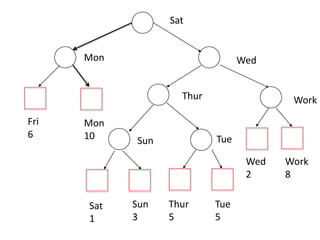
• First, let’s look at one external binary search
tree formed from the keys.
– Internal nodes hold mid-range seperators and
pointers to left and right subtree
– Leaf nodes (external nodes), contain keys and
pointers to associated records.
Sat
Mon Wed
Fri
6
Mon
10
Thur Work
Sun Tue
Sat
1
Sun
3
Thur
5
Tue
5
Wed
2
Work
8
Building the priority search tree from
the external binary search tree
• Notice that our external tree is not a complete
binary tree like the example used previously for
points.
• Now, we relax the constraint that the tree be
external by associating each key with some node
on the path from its corresponding external node
to the root.
• Note we cannot associate all leaves with internal
nodes because there are not enough internal
nodes
Building the priority search tree from
the external binary search tree
• We additionally want the priorities of the
nodes to form a max heap.
• Can achieve this by playing a tournament
starting at the leaves, matches played
between siblings: winner of each match is the
one with higher priority, or the left son if there
is a tie.
Mon, 10
Fri
6
Mon
10
Work, 8
Sun, 3 Thur, 5
Sat
1
Sun
3
Thur
5
Tue
5
Wed
2
Work
8
Mon, 10
Fri
6
Mon
10 Sun, 3 Thur, 5
Sat
1
Sun
3
Thur
5
Tue
5
Wed
2
Work
8
Thur, 5
Work, 8
Fri
6
Mon
10 Sun, 3
Sat
1
Sun
3
Thur
5
Tue
5
Wed
2
Work
8
Thur, 5
Work, 8
Mon, 10
Building the priority search tree from
the external binary search tree
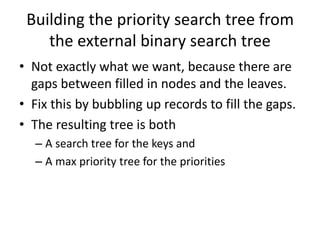
• Not exactly what we want, because there are
gaps between filled in nodes and the leaves.
• Fix this by bubbling up records to fill the gaps.
• The resulting tree is both
– A search tree for the keys and
– A max priority tree for the priorities
Fri
6
Mon
10 Sun, 3
Sat
1
Sun
3
Thur
5
Tue 5
Wed
2
Work
8
Thur, 5
Work, 8
Mon, 10
Fri 6
Wed 2
Tue
5
Using the priority search tree
• Basic query is to find all keys in the range
[lower, upper] whose priority is at least p
– This is just our familiar semi-infinite range query,
where we searched for all points with x
coordinates between x1 and x2 (so the x
coordinates were the keys) and y coordinate
greater than yp.
– Find all keys in the range [holiday, weekend] with
priorities at least 6
Fri
6
Mon
10 Sun, 3
Sat
1
Sun
3
Thur
5
Tue 5
Wed
2
Work
8
Thur, 5
Work, 8
Mon, 10
Fri 6
Wed 2
Tue
5
[holidays, weekend], 6
Sat
Mon Wed
Thur Work
Sun
Tue
Insertion
• We want to insert (K,p). K is the key used in the
BST and p is the priority.
• Whenever we insert a node into an “external”
BST it goes into a new external node, and one
new internal node is created.
• Two phases to insertion – one deals with the BST
side of things, and the other the max heap.
• Start by searching for K, which will take us to an
external node.
Insertion
• Specifically, insert (Semester, 10).
• Search gets down to the external node holding
Saturday.
• Create a new internal node – it will have two
sons: Saturday to the left and Semester to the
right.
– The mid-range separator is Semester
– Promote (Sat, 1) to the new internal node, if it was
not previously promoted
Fri
6
Mon
10 Sun, 3
Sat
1
Sun
3
Thur
5
Tue 5
Wed
2
Work
8
Thur, 5
Work, 8
Mon, 10
Fri 6
Wed 2
Tue
5
Sat
Mon Wed
Thur Work
Sun
Tue
Semester
Semester, 10
Sat 1
General situation – insert K’, p’
K
(K,n)
K’ K,n
K’
K
K’ K,n
K
K’
K
or
K’ > K K’<=K
Second stage of insertion
• Retrace the path from the insertion point to
the root until encountering a node with
priority higher than the insertion point
– We might get to the root and never find such a
point.
K,p
L,m
K’,p’
K,p
K’,p’
m > p’ > p p’ >p
Second stage of insertion
• Now, we replace (K,p) with (K’,p’) and bubble
(K,p) down the tree.
• Make sure to bubble down the correct path to
maintain the BST property!
– In a regular heap it does not matter which branch
you bubble down, but in a priority search tree it
does.
• In our example, (K,p) = (Work, 8)
Fri
6
Mon
10 Sun, 3
Sat
1
Sun
3
Thur
5
Tue 5
Wed
2
Work
8
Thur, 5
Semester,10
Mon, 10
Fri 6
Work,8
Tue
5
Sat
Mon Wed
Thur Work
Sun
Tue
Semester
Semester, 10
Sat 1
Deletion
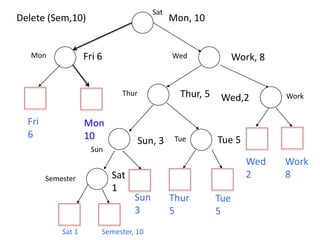
• Two deletion operations:
– DeleteP – delete the record with largest priority –
really just like heaps
– DeleteK – delete record with key K.
• DeleteK has two phases: a search tree phrase
and a priority tree phase.
– Deletion will remove the external node associated
with the key, and so will also reduce by one the
number of internal nodes.
Deletion
• Star by finding the node holding the record
(K’,p’)
– This can be an internal node if (K’, p’) was bubbled
up after insertion
– Or it can be an external node
• Remove (K’, p’) from that node and bubble up
a record to fill the gap.
– If (K’, p’) were in an external node or the root of a
subtree with no records in the subtree, then there
is no need to bubble up.
Deletion
• Now we want to delete the external node
associated with (K’,p’).
– Remove the external node and its parent, and then
connect the sibling of the deleted external node to its
grandparent.
– If the parent was associated with (K,p) we trickle it
down the tree.
K’
K, p
K, p
Fri
6
Mon
10 Sun, 3
Sat
1
Sun
3
Thur
5
Tue 5
Wed
2
Work
8
Thur, 5
Semester,10
Mon, 10
Fri 6
Work,8
Tue
5
Sat
Mon Wed
Thur Work
Sun
Tue
Semester
Semester, 10
Sat 1
Delete (Sem,10)
Fri
6
Mon
10 Sun, 3
Sat
1
Sun
3
Thur
5
Tue 5
Wed
2
Work
8
Thur, 5
Work, 8
Mon, 10
Fri 6
Work,8
Tue
5
Sat
Mon Wed
Thur Work
Sun
Tue
Semester
Semester, 10
Sat 1
Delete (Sem,10)
Fri
6
Mon
10 Sun, 3
Sat
1
Sun
3
Thur
5
Tue 5
Wed
2
Work
8
Thur, 5
Work, 8
Mon, 10
Fri 6
Wed,2
Tue
5
Sat
Mon Wed
Thur Work
Sun
Tue
Semester
Semester, 10
Sat 1
Delete (Sem,10)
Fri
6
Mon
10 Sun, 3
Sun
3
Thur
5
Tue 5
Wed
2
Work
8
Thur, 5
Work, 8
Mon, 10
Fri 6
Wed,2
Tue
5
Sat
Mon Wed
Thur Work
Sun
Tue
Sat 1
Delete (Sem,10)
Rebalancing
• Since the trees are dynamic, if we do not
rebalance through rotations they can become
narrow and deep.
• Treat them like AVL trees, and perform
rotations when balance factors leave their
allowable range.
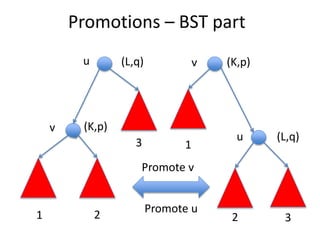
• We’ll look at single rotations, sometimes
called “promotions” in the literature.
Promotions – BST part
Promote v
(K,p)
3
2
1
v
v
3
2
1
(L,q)
u
u (L,q)
(K,p)
Promote u
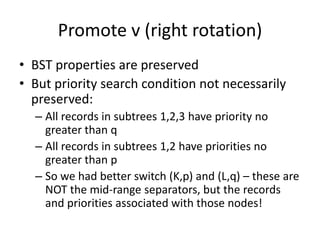
Promote v (right rotation)
• BST properties are preserved
• But priority search condition not necessarily
preserved:
– All records in subtrees 1,2,3 have priority no
greater than q
– All records in subtrees 1,2 have priorities no
greater than p
– So we had better switch (K,p) and (L,q) – these are
NOT the mid-range separators, but the records
and priorities associated with those nodes!
Promote v (Priority part)
3
2
1
(L,q)
u
3
2
1
(L,q)
u
(K,p)
v
v
(K,p)
Promote v (Priority part)
• Because p <- q, nodes u,v, and subtrees 1 and
2 satisfy the priority search tree condition.
• But subtree 3 may not.
– Solved by tricking (K,p) down that subtree, which
will take time proportional to the height of the
priority search tree.
– And we are done!

Priority trees take 2.pptx

  • 1.
  • 2.
    Data set forexample • Days of week with priorities: (Mon, 10), (Tues, 5), (Wed, 2), (Thur, 5), (Fri, 6) , (Sat, 1), (Sun, 3), (Work, 8). • First, let’s look at one external binary search tree formed from the keys. – Internal nodes hold mid-range seperators and pointers to left and right subtree – Leaf nodes (external nodes), contain keys and pointers to associated records.
  • 3.
    Sat Mon Wed Fri 6 Mon 10 Thur Work SunTue Sat 1 Sun 3 Thur 5 Tue 5 Wed 2 Work 8
  • 4.
    Building the prioritysearch tree from the external binary search tree • Notice that our external tree is not a complete binary tree like the example used previously for points. • Now, we relax the constraint that the tree be external by associating each key with some node on the path from its corresponding external node to the root. • Note we cannot associate all leaves with internal nodes because there are not enough internal nodes
  • 5.
    Building the prioritysearch tree from the external binary search tree • We additionally want the priorities of the nodes to form a max heap. • Can achieve this by playing a tournament starting at the leaves, matches played between siblings: winner of each match is the one with higher priority, or the left son if there is a tie.
  • 6.
    Mon, 10 Fri 6 Mon 10 Work, 8 Sun,3 Thur, 5 Sat 1 Sun 3 Thur 5 Tue 5 Wed 2 Work 8
  • 7.
    Mon, 10 Fri 6 Mon 10 Sun,3 Thur, 5 Sat 1 Sun 3 Thur 5 Tue 5 Wed 2 Work 8 Thur, 5 Work, 8
  • 8.
  • 9.
    Building the prioritysearch tree from the external binary search tree • Not exactly what we want, because there are gaps between filled in nodes and the leaves. • Fix this by bubbling up records to fill the gaps. • The resulting tree is both – A search tree for the keys and – A max priority tree for the priorities
  • 10.
    Fri 6 Mon 10 Sun, 3 Sat 1 Sun 3 Thur 5 Tue5 Wed 2 Work 8 Thur, 5 Work, 8 Mon, 10 Fri 6 Wed 2 Tue 5
  • 11.
    Using the prioritysearch tree • Basic query is to find all keys in the range [lower, upper] whose priority is at least p – This is just our familiar semi-infinite range query, where we searched for all points with x coordinates between x1 and x2 (so the x coordinates were the keys) and y coordinate greater than yp. – Find all keys in the range [holiday, weekend] with priorities at least 6
  • 12.
    Fri 6 Mon 10 Sun, 3 Sat 1 Sun 3 Thur 5 Tue5 Wed 2 Work 8 Thur, 5 Work, 8 Mon, 10 Fri 6 Wed 2 Tue 5 [holidays, weekend], 6 Sat Mon Wed Thur Work Sun Tue
  • 13.
    Insertion • We wantto insert (K,p). K is the key used in the BST and p is the priority. • Whenever we insert a node into an “external” BST it goes into a new external node, and one new internal node is created. • Two phases to insertion – one deals with the BST side of things, and the other the max heap. • Start by searching for K, which will take us to an external node.
  • 14.
    Insertion • Specifically, insert(Semester, 10). • Search gets down to the external node holding Saturday. • Create a new internal node – it will have two sons: Saturday to the left and Semester to the right. – The mid-range separator is Semester – Promote (Sat, 1) to the new internal node, if it was not previously promoted
  • 15.
    Fri 6 Mon 10 Sun, 3 Sat 1 Sun 3 Thur 5 Tue5 Wed 2 Work 8 Thur, 5 Work, 8 Mon, 10 Fri 6 Wed 2 Tue 5 Sat Mon Wed Thur Work Sun Tue Semester Semester, 10 Sat 1
  • 16.
    General situation –insert K’, p’ K (K,n) K’ K,n K’ K K’ K,n K K’ K or K’ > K K’<=K
  • 17.
    Second stage ofinsertion • Retrace the path from the insertion point to the root until encountering a node with priority higher than the insertion point – We might get to the root and never find such a point. K,p L,m K’,p’ K,p K’,p’ m > p’ > p p’ >p
  • 18.
    Second stage ofinsertion • Now, we replace (K,p) with (K’,p’) and bubble (K,p) down the tree. • Make sure to bubble down the correct path to maintain the BST property! – In a regular heap it does not matter which branch you bubble down, but in a priority search tree it does. • In our example, (K,p) = (Work, 8)
  • 19.
    Fri 6 Mon 10 Sun, 3 Sat 1 Sun 3 Thur 5 Tue5 Wed 2 Work 8 Thur, 5 Semester,10 Mon, 10 Fri 6 Work,8 Tue 5 Sat Mon Wed Thur Work Sun Tue Semester Semester, 10 Sat 1
  • 20.
    Deletion • Two deletionoperations: – DeleteP – delete the record with largest priority – really just like heaps – DeleteK – delete record with key K. • DeleteK has two phases: a search tree phrase and a priority tree phase. – Deletion will remove the external node associated with the key, and so will also reduce by one the number of internal nodes.
  • 21.
    Deletion • Star byfinding the node holding the record (K’,p’) – This can be an internal node if (K’, p’) was bubbled up after insertion – Or it can be an external node • Remove (K’, p’) from that node and bubble up a record to fill the gap. – If (K’, p’) were in an external node or the root of a subtree with no records in the subtree, then there is no need to bubble up.
  • 22.
    Deletion • Now wewant to delete the external node associated with (K’,p’). – Remove the external node and its parent, and then connect the sibling of the deleted external node to its grandparent. – If the parent was associated with (K,p) we trickle it down the tree. K’ K, p K, p
  • 23.
    Fri 6 Mon 10 Sun, 3 Sat 1 Sun 3 Thur 5 Tue5 Wed 2 Work 8 Thur, 5 Semester,10 Mon, 10 Fri 6 Work,8 Tue 5 Sat Mon Wed Thur Work Sun Tue Semester Semester, 10 Sat 1 Delete (Sem,10)
  • 24.
    Fri 6 Mon 10 Sun, 3 Sat 1 Sun 3 Thur 5 Tue5 Wed 2 Work 8 Thur, 5 Work, 8 Mon, 10 Fri 6 Work,8 Tue 5 Sat Mon Wed Thur Work Sun Tue Semester Semester, 10 Sat 1 Delete (Sem,10)
  • 25.
    Fri 6 Mon 10 Sun, 3 Sat 1 Sun 3 Thur 5 Tue5 Wed 2 Work 8 Thur, 5 Work, 8 Mon, 10 Fri 6 Wed,2 Tue 5 Sat Mon Wed Thur Work Sun Tue Semester Semester, 10 Sat 1 Delete (Sem,10)
  • 26.
    Fri 6 Mon 10 Sun, 3 Sun 3 Thur 5 Tue5 Wed 2 Work 8 Thur, 5 Work, 8 Mon, 10 Fri 6 Wed,2 Tue 5 Sat Mon Wed Thur Work Sun Tue Sat 1 Delete (Sem,10)
  • 27.
    Rebalancing • Since thetrees are dynamic, if we do not rebalance through rotations they can become narrow and deep. • Treat them like AVL trees, and perform rotations when balance factors leave their allowable range. • We’ll look at single rotations, sometimes called “promotions” in the literature.
  • 28.
    Promotions – BSTpart Promote v (K,p) 3 2 1 v v 3 2 1 (L,q) u u (L,q) (K,p) Promote u
  • 29.
    Promote v (rightrotation) • BST properties are preserved • But priority search condition not necessarily preserved: – All records in subtrees 1,2,3 have priority no greater than q – All records in subtrees 1,2 have priorities no greater than p – So we had better switch (K,p) and (L,q) – these are NOT the mid-range separators, but the records and priorities associated with those nodes!
  • 30.
    Promote v (Prioritypart) 3 2 1 (L,q) u 3 2 1 (L,q) u (K,p) v v (K,p)
  • 31.
    Promote v (Prioritypart) • Because p <- q, nodes u,v, and subtrees 1 and 2 satisfy the priority search tree condition. • But subtree 3 may not. – Solved by tricking (K,p) down that subtree, which will take time proportional to the height of the priority search tree. – And we are done!