WEBINAR PHARMACYVIEW
Gordon Thomson,
Head of Clinical Pharmacy Development
NHS Tayside
Andrew Grant,
Healthcare Applications Business Manager
Nugensis
 Introduction – Andrew Grant, Nugensis
 PharmacyView Implementation, Gordon Thomson,
NHS Tayside
 PharmacyView Demo - Andrew Grant, Nugensis
 PharmacyView Reporting Dashboard - Andrew Grant,
Nugensis
 Questions for the Panel
TODAY’S AGENDA
Gordon Thomson,
Head of Clinical Pharmacy Development
NHS Tayside
IMPLEMENTING
PHARMACYVIEW
A tool for clinical teams, team leaders and
the organisation
PHARMACYVIEW
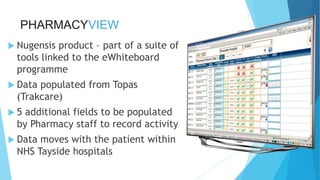
 Nugensis product – part of a suite of
tools linked to the eWhiteboard
programme
 Data populated from Topas
(Trakcare)
 5 additional fields to be populated
by Pharmacy staff to record activity
 Data moves with the patient within
NHS Tayside hospitals
Pharmacy Technician
Identify new admissions
8am Spt/Snr PhTech Access TOPAS, create report for ward
set, print, highlight new admissions since last working day
(8am previous day)
Check eDD for discharges
Spt/Snr Ph Tech access eDD to identify list if discharge
workload in the morning signed off by doctor
Approx 15 Minutes
(Per Patient)
Give TOPAS sheets to Ph Techs
Spt/Snr Ph Tech gives endorsed TOPAS sheets to Ph Tech
covering ward and highlights discharges on eDD.
Pharmacy Technician transits to ward
Check data on TOPAS sheet with Ward
Data
Compare data on whiteboard/WardView and annotate TOPAS
sheets with bay/bed information.
5
Minutes
Approx 20 Minutes
(Per Patient)
Are there
eDD’s on the
system?
Yes No
POD Check New
Patients
Working from TOPAS sheets, TPAR
& PODs assess the suitability of
PODs and communicate problems
/ discrepancies to the ward
pharmacist
5
Minutes
Ward Clinical Pharmacist
20-30
Minutes
Identify and plan workload for ward 3
• Filter patients with first green tick on eDD column.
•Filter patients with no triage category documented.
•Filter patients due for review today.
Filter
PharmacyView
Are there eDD’s
(first green tick)
(Not part of testing
as IT issues with link)
Transit to ward
Yes
No
Sign off eDD
(Not part of testing as IT
issues with link)
Filter
PharmacyView
Are there patients
with no triage
category
Yes
NoClinically Review Patients
Med Rec, TPAR screen, Bloods
Update PharmacyView column.
Filter PharmacyView by
Review Date
Review all patients due
for review today.
Access to Clinical Portal and eDD and
other IT systems accessed via intranet
Confirm if new Patient(s) screened from AMU
•Manual examination of medical notes, update Pharmacy View if required
25Minutes
10
Minutes
10 Minutes
(Per Patient)
20
Minutes
(Per
Ptient)
10Minutes(Per
Patient)
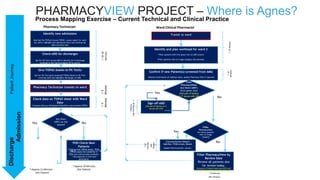
PHARMACYVIEW PROJECT – Where is Agnes?DischargePatientJourney
Admission Process Mapping Exercise – Current Technical and Clinical Practice
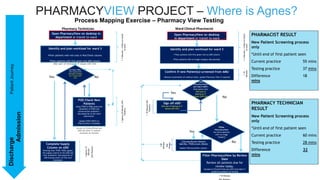
PHARMACYVIEW PROJECT – Where is Agnes?
Process Mapping Exercise – Pharmacy View Testing
Pharmacy Technician Ward Clinical Pharmacist
Identify and plan workload for ward 3
•Filter patients with red cross in Pod Check column.
•Filter patients with first green tick eDD column.
(Not part of testing as IT issues with link)
Open PharmacyView on desktop in
department or transit to ward
Are there eDD’s
(first green tick)
(Not part of testing
as IT issues with
link)Yes No
Complete Supply
Column on eDD
Working from TPAR, PODs update
the supply column on the eDD and
refer problems/ discrepancies on
eDD leaving notes via free text
comments
POD Check New
Patients
Using TPAR & PODs assess the
suitability of PODs and
communicate problems /
discrepancies to the ward
pharmacist.
Update POD CHECK on
PharmcyView at bedside
Access to Clinical Portal and
eDD and other IT systems
accessed via intranet
Identify and plan workload for ward 3
• Filter patients with first green tick on eDD column.
•Filter patients with no triage category documented.
•Filter patients due for review today.
Filter
PharmacyView
Are there eDD’s
(first green tick)
(Not part of
testing as IT
issues with link)
Open PharmacyView on desktop
in department or transit to ward
Yes
No
Sign off eDD
(Not part of testing as IT
issues with link)
Filter
PharmacyView
Are there patients
with no triage
category
Yes
NoClinically Review Patients
Med Rec, TPAR screen, Bloods
Update PharmacyView column.
Filter PharmacyView by Review
Date
Review all patients due for
review today.
Access to Clinical Portal and eDD and other IT
systems accessed via intranet
Confirm if new Patient(s) screened from AMU
•Manual examination of medical notes, update Pharmacy View if required
3Minutes+5Minstotransit
toward
Approx20Minutes(Per
Patient)
2Minutes+5Minstotransit
toward
10
Minutes
10 Minutes
20
Minutes
(Per
Ptient)
Approx15
Minutes
(PerPatient)
10Minutes(Per
Patient)
PHARMACY TECHNICIAN
RESULT
New Patient Screening process
only
*Until end of first patient seen
Current practice 60 mins
Testing practice 28 mins
Difference 32
mins
PHARMACIST RESULT
New Patient Screening process
only
*Until end of first patient seen
Current practice 55 mins
Testing practice 37 mins
Difference 18
mins
DischargePatientJourney
Admission
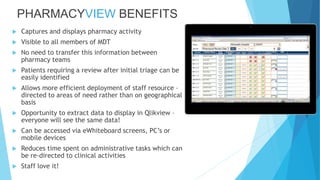
PHARMACYVIEW BENEFITS
 Captures and displays pharmacy activity
 Visible to all members of MDT
 No need to transfer this information between
pharmacy teams
 Patients requiring a review after initial triage can be
easily identified
 Allows more efficient deployment of staff resource –
directed to areas of need rather than on geographical
basis
 Opportunity to extract data to display in Qlikview –
everyone will see the same data!
 Can be accessed via eWhiteboard screens, PC’s or
mobile devices
 Reduces time spent on administrative tasks which can
be re-directed to clinical activities
 Staff love it!
PHARMACYVIEW WHAT HAPPENS NEXT?
 eHealth Team to complete closure report
 Currently in use across medical floor Ninewells (12 wards)
 Implementation plan will describe process to gain access via IT Portal
and awareness sessions for pharmacy staff
 Working with Business Unit to agree specification for measures to be
displayed in Qlikview
 Pharmacy View will come as part of the rollout package for the
eWhiteboard
 Collaboration with users in other Boards to agree national
specification for system and measures
PHARMACYVIEW DEMO
AND REPORTING DASHBOARD
Andrew Grant,
Healthcare Applications Business Manager
Nugensis
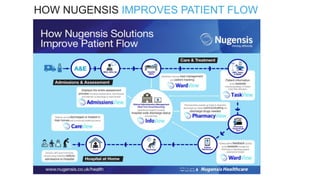
HOW NUGENSIS IMPROVES PATIENT FLOW
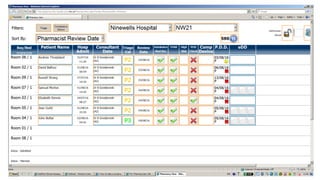
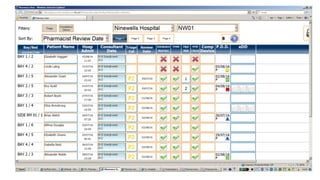
 Provides an immediate and real-time view of every patient’s pharmacy service
requirements.
 Available throughout the Trust to identify and effectively manage the prescription and
supply of drugs
 Supports pharmacists and technicians to record and see, at a glance,
completed/incomplete pharmacy-based requests and alerts
 Enabling a more safety-focused approach to the provision of patient care and
eliminating unnecessary patient visits and assessments.
THE PHARMACYVIEW SOLUTION
QUESTIONS FOR THE PANEL
Please type in your question in the Go to Webinar panel

Prioritising Pharmacy Patient Care Webinar

  • 1.
    WEBINAR PHARMACYVIEW Gordon Thomson, Headof Clinical Pharmacy Development NHS Tayside Andrew Grant, Healthcare Applications Business Manager Nugensis
  • 2.
     Introduction –Andrew Grant, Nugensis  PharmacyView Implementation, Gordon Thomson, NHS Tayside  PharmacyView Demo - Andrew Grant, Nugensis  PharmacyView Reporting Dashboard - Andrew Grant, Nugensis  Questions for the Panel TODAY’S AGENDA
  • 3.
    Gordon Thomson, Head ofClinical Pharmacy Development NHS Tayside IMPLEMENTING PHARMACYVIEW A tool for clinical teams, team leaders and the organisation
  • 4.
    PHARMACYVIEW  Nugensis product– part of a suite of tools linked to the eWhiteboard programme  Data populated from Topas (Trakcare)  5 additional fields to be populated by Pharmacy staff to record activity  Data moves with the patient within NHS Tayside hospitals
  • 5.
    Pharmacy Technician Identify newadmissions 8am Spt/Snr PhTech Access TOPAS, create report for ward set, print, highlight new admissions since last working day (8am previous day) Check eDD for discharges Spt/Snr Ph Tech access eDD to identify list if discharge workload in the morning signed off by doctor Approx 15 Minutes (Per Patient) Give TOPAS sheets to Ph Techs Spt/Snr Ph Tech gives endorsed TOPAS sheets to Ph Tech covering ward and highlights discharges on eDD. Pharmacy Technician transits to ward Check data on TOPAS sheet with Ward Data Compare data on whiteboard/WardView and annotate TOPAS sheets with bay/bed information. 5 Minutes Approx 20 Minutes (Per Patient) Are there eDD’s on the system? Yes No POD Check New Patients Working from TOPAS sheets, TPAR & PODs assess the suitability of PODs and communicate problems / discrepancies to the ward pharmacist 5 Minutes Ward Clinical Pharmacist 20-30 Minutes Identify and plan workload for ward 3 • Filter patients with first green tick on eDD column. •Filter patients with no triage category documented. •Filter patients due for review today. Filter PharmacyView Are there eDD’s (first green tick) (Not part of testing as IT issues with link) Transit to ward Yes No Sign off eDD (Not part of testing as IT issues with link) Filter PharmacyView Are there patients with no triage category Yes NoClinically Review Patients Med Rec, TPAR screen, Bloods Update PharmacyView column. Filter PharmacyView by Review Date Review all patients due for review today. Access to Clinical Portal and eDD and other IT systems accessed via intranet Confirm if new Patient(s) screened from AMU •Manual examination of medical notes, update Pharmacy View if required 25Minutes 10 Minutes 10 Minutes (Per Patient) 20 Minutes (Per Ptient) 10Minutes(Per Patient) PHARMACYVIEW PROJECT – Where is Agnes?DischargePatientJourney Admission Process Mapping Exercise – Current Technical and Clinical Practice
  • 8.
    PHARMACYVIEW PROJECT –Where is Agnes? Process Mapping Exercise – Pharmacy View Testing Pharmacy Technician Ward Clinical Pharmacist Identify and plan workload for ward 3 •Filter patients with red cross in Pod Check column. •Filter patients with first green tick eDD column. (Not part of testing as IT issues with link) Open PharmacyView on desktop in department or transit to ward Are there eDD’s (first green tick) (Not part of testing as IT issues with link)Yes No Complete Supply Column on eDD Working from TPAR, PODs update the supply column on the eDD and refer problems/ discrepancies on eDD leaving notes via free text comments POD Check New Patients Using TPAR & PODs assess the suitability of PODs and communicate problems / discrepancies to the ward pharmacist. Update POD CHECK on PharmcyView at bedside Access to Clinical Portal and eDD and other IT systems accessed via intranet Identify and plan workload for ward 3 • Filter patients with first green tick on eDD column. •Filter patients with no triage category documented. •Filter patients due for review today. Filter PharmacyView Are there eDD’s (first green tick) (Not part of testing as IT issues with link) Open PharmacyView on desktop in department or transit to ward Yes No Sign off eDD (Not part of testing as IT issues with link) Filter PharmacyView Are there patients with no triage category Yes NoClinically Review Patients Med Rec, TPAR screen, Bloods Update PharmacyView column. Filter PharmacyView by Review Date Review all patients due for review today. Access to Clinical Portal and eDD and other IT systems accessed via intranet Confirm if new Patient(s) screened from AMU •Manual examination of medical notes, update Pharmacy View if required 3Minutes+5Minstotransit toward Approx20Minutes(Per Patient) 2Minutes+5Minstotransit toward 10 Minutes 10 Minutes 20 Minutes (Per Ptient) Approx15 Minutes (PerPatient) 10Minutes(Per Patient) PHARMACY TECHNICIAN RESULT New Patient Screening process only *Until end of first patient seen Current practice 60 mins Testing practice 28 mins Difference 32 mins PHARMACIST RESULT New Patient Screening process only *Until end of first patient seen Current practice 55 mins Testing practice 37 mins Difference 18 mins DischargePatientJourney Admission
  • 9.
    PHARMACYVIEW BENEFITS  Capturesand displays pharmacy activity  Visible to all members of MDT  No need to transfer this information between pharmacy teams  Patients requiring a review after initial triage can be easily identified  Allows more efficient deployment of staff resource – directed to areas of need rather than on geographical basis  Opportunity to extract data to display in Qlikview – everyone will see the same data!  Can be accessed via eWhiteboard screens, PC’s or mobile devices  Reduces time spent on administrative tasks which can be re-directed to clinical activities  Staff love it!
  • 10.
    PHARMACYVIEW WHAT HAPPENSNEXT?  eHealth Team to complete closure report  Currently in use across medical floor Ninewells (12 wards)  Implementation plan will describe process to gain access via IT Portal and awareness sessions for pharmacy staff  Working with Business Unit to agree specification for measures to be displayed in Qlikview  Pharmacy View will come as part of the rollout package for the eWhiteboard  Collaboration with users in other Boards to agree national specification for system and measures
  • 11.
    PHARMACYVIEW DEMO AND REPORTINGDASHBOARD Andrew Grant, Healthcare Applications Business Manager Nugensis
  • 12.
  • 13.
     Provides animmediate and real-time view of every patient’s pharmacy service requirements.  Available throughout the Trust to identify and effectively manage the prescription and supply of drugs  Supports pharmacists and technicians to record and see, at a glance, completed/incomplete pharmacy-based requests and alerts  Enabling a more safety-focused approach to the provision of patient care and eliminating unnecessary patient visits and assessments. THE PHARMACYVIEW SOLUTION
  • 14.
    QUESTIONS FOR THEPANEL Please type in your question in the Go to Webinar panel