
DealerTrack AAX
                                                    The industry’s leading inventory solution.

                                                Better Data. Smarter Decisions. Proven Results.


        Inventory

         Price Driver Refresher


© 2012 DealerTrack, Inc. All rights reserved.
February 25, 2013


Presenter:   Tino Rossini
Introduction


■ You are all familiar, and are all using Price Driver in your daily usage of AAX.

■ Over the past few weeks in discussions with various dealers, it has come to our
  attention that there are some possible misconceptions and confusion regarding
  Price Driver.

■ In an effort to make Price Driver easier to understand, use, and the results more
  relevant.

■ A refresher on Price Driver when you are appraising, and to manage your inventory.
How Does Price Driver Work?


■ Price Driver gathers market data supplied by a third party that is matched to the VIN
  of the vehicle that is presented to Price Driver.

■ To arrive at the most relevant data Price Driver uses Chrome to decode the VIN.

■ Price Driver initiates a process to match VINs to arrive at identical market matches
  to your vehicle.
Gathering Data


  There is an immense
amount of market data that
   is available, and in a
constant state of evolution.

Price Driver captures the
most relevant market data
  by matching the VIN.

   To provide you with an
  immediate picture of the
retail market for the specific
           vehicle.
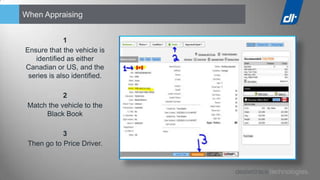
When Appraising


             1
Ensure that the vehicle is
   identified as either
Canadian or US, and the
 series is also identified.

            2
 Match the vehicle to the
      Black Book

            3
 Then go to Price Driver.
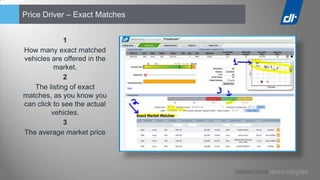
Price Driver – Exact Matches


             1
How many exact matched
vehicles are offered in the
          market.
             2
   The listing of exact
matches, as you know you
can click to see the actual
         vehicles.
             3
The average market price
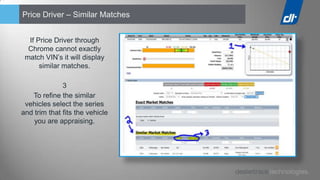
Price Driver – Similar Matches


  If Price Driver through
  Chrome cannot exactly
 match VIN’s it will display
      similar matches.

              3
   To refine the similar
 vehicles select the series
and trim that fits the vehicle
    you are appraising.
Price Driver Advantages / Practices when Appraising


■ Price Driver provides a picture of the current retail market to improve the appraising
  decision process.

■ Price Driver gives an overview of what the customer uncovered of the retail market
  for his vehicle when doing his due diligence.

■ Price Driver results are used by dealers to close deals.

■ Price Driver enables dealers to quickly decide if a vehicle presents a viable retail
  opportunity.
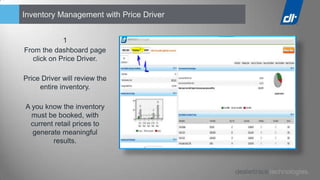
Inventory Management with Price Driver


             1
From the dashboard page
   click on Price Driver.

Price Driver will review the
     entire inventory.

A you know the inventory
  must be booked, with
 current retail prices to
  generate meaningful
        results.
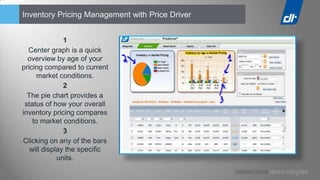
Inventory Pricing Management with Price Driver


               1
  Center graph is a quick
  overview by age of your
pricing compared to current
      market conditions.
               2
  The pie chart provides a
 status of how your overall
inventory pricing compares
    to market conditions.
               3
Clicking on any of the bars
   will display the specific
             units.
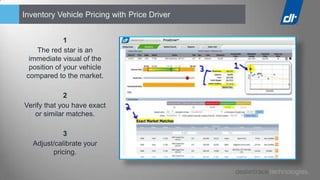
Inventory Vehicle Pricing with Price Driver


              1
    The red star is an
  immediate visual of the
  position of your vehicle
 compared to the market.

             2
Verify that you have exact
   or similar matches.

             3
   Adjust/calibrate your
         pricing.
Take a Moment and Thank You!


  I truly appreciate your
 feedback, regarding this
          refresher.

   Has it been useful?

  Would you like to see
        more?

On which components of
        AAX?

       How often?

Price Driver

  • 1.
    DealerTrack AAX The industry’s leading inventory solution. Better Data. Smarter Decisions. Proven Results. Inventory Price Driver Refresher © 2012 DealerTrack, Inc. All rights reserved.
  • 2.
  • 3.
    Introduction ■ You areall familiar, and are all using Price Driver in your daily usage of AAX. ■ Over the past few weeks in discussions with various dealers, it has come to our attention that there are some possible misconceptions and confusion regarding Price Driver. ■ In an effort to make Price Driver easier to understand, use, and the results more relevant. ■ A refresher on Price Driver when you are appraising, and to manage your inventory.
  • 4.
    How Does PriceDriver Work? ■ Price Driver gathers market data supplied by a third party that is matched to the VIN of the vehicle that is presented to Price Driver. ■ To arrive at the most relevant data Price Driver uses Chrome to decode the VIN. ■ Price Driver initiates a process to match VINs to arrive at identical market matches to your vehicle.
  • 5.
    Gathering Data There is an immense amount of market data that is available, and in a constant state of evolution. Price Driver captures the most relevant market data by matching the VIN. To provide you with an immediate picture of the retail market for the specific vehicle.
  • 6.
    When Appraising 1 Ensure that the vehicle is identified as either Canadian or US, and the series is also identified. 2 Match the vehicle to the Black Book 3 Then go to Price Driver.
  • 7.
    Price Driver –Exact Matches 1 How many exact matched vehicles are offered in the market. 2 The listing of exact matches, as you know you can click to see the actual vehicles. 3 The average market price
  • 8.
    Price Driver –Similar Matches If Price Driver through Chrome cannot exactly match VIN’s it will display similar matches. 3 To refine the similar vehicles select the series and trim that fits the vehicle you are appraising.
  • 9.
    Price Driver Advantages/ Practices when Appraising ■ Price Driver provides a picture of the current retail market to improve the appraising decision process. ■ Price Driver gives an overview of what the customer uncovered of the retail market for his vehicle when doing his due diligence. ■ Price Driver results are used by dealers to close deals. ■ Price Driver enables dealers to quickly decide if a vehicle presents a viable retail opportunity.
  • 10.
    Inventory Management withPrice Driver 1 From the dashboard page click on Price Driver. Price Driver will review the entire inventory. A you know the inventory must be booked, with current retail prices to generate meaningful results.
  • 11.
    Inventory Pricing Managementwith Price Driver 1 Center graph is a quick overview by age of your pricing compared to current market conditions. 2 The pie chart provides a status of how your overall inventory pricing compares to market conditions. 3 Clicking on any of the bars will display the specific units.
  • 12.
    Inventory Vehicle Pricingwith Price Driver 1 The red star is an immediate visual of the position of your vehicle compared to the market. 2 Verify that you have exact or similar matches. 3 Adjust/calibrate your pricing.
  • 13.
    Take a Momentand Thank You! I truly appreciate your feedback, regarding this refresher. Has it been useful? Would you like to see more? On which components of AAX? How often?